PowerShell Basics for
Office Apps & Servers
Greg McMurray
SharePoint Saturday Utah
February 2019
Thank You SPSUtah 2019 Sponsors!
PLATINUM
• Lucidworks
• ZAACT
GOLD
• JourneyTEAM
• Sovereign SP
SILVER
• SkySync
ShareSki & SharePint
Intro – Greg
• Experience in Aerospace, Branding & Marketing,
Energy, Healthcare, Software
• Currently Senior Software Engineer at WECC
• Co-Founder of Aritus Computer Services, L.L.C.
• President of SharePoint / Office 365
and Dynamics 365 User Groups
• Find me online:
- @goyuix
- https://www.linkedin.com/in/goyuix
- https://stackoverflow.com/cv/goyuix
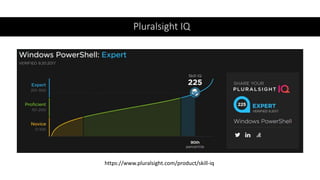
( top 2% of users )
Pluralsight IQ
https://www.pluralsight.com/product/skill-iq
Agenda
•PowerShell History & Basics
•SharePoint Online
•SharePoint PnP Library
•SharePoint On-Premises
•Office Apps Automation
This Photo by Unknown Author is licensed under CC BY-NC-ND
In the beginning
We needed a shell
Not that kind
of shell . . .
Our forebears: CSH
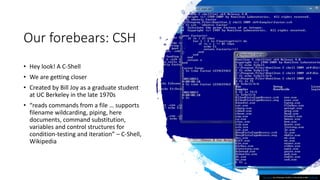
• Hey look! A C-Shell
• We are getting closer
• Created by Bill Joy as a graduate student
at UC Berkeley in the late 1970s
• “reads commands from a file … supports
filename wildcarding, piping, here
documents, command substitution,
variables and control structures for
condition-testing and iteration” – C-Shell,
Wikipedia
This Photo by Unknown Author is licensed under CC BY-SA
PowerShell Origin Story:
Monad & Manifesto
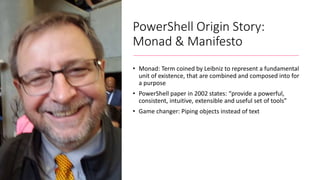
• Monad: Term coined by Leibniz to represent a fundamental
unit of existence, that are combined and composed into for
a purpose
• PowerShell paper in 2002 states: “provide a powerful,
consistent, intuitive, extensible and useful set of tools”
• Game changer: Piping objects instead of text
PowerShell Versions
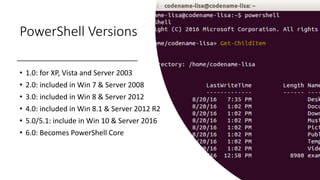
• 1.0: for XP, Vista and Server 2003
• 2.0: included in Win 7 & Server 2008
• 3.0: included in Win 8 & Server 2012
• 4.0: included in Win 8.1 & Server 2012 R2
• 5.0/5.1: include in Win 10 & Server 2016
• 6.0: Becomes PowerShell Core
PowerShell Basics - cmdlets
•Verb-Noun Syntax
• Examples:
• Get-Help
• Get-Command
• Get-Member
• about* pages
PowerShell Basics - Variables
• Variables are labels that hold values
• Start with a dollar sign
• Values have types
• A bunch of special variables exist:
$ENV, $_, $error, etc.
PowerShell Basics - Piping
• The pipe character: |
•Quite literally “pipes” output from
the left side to the right as input
• Reminder: Everything is an object,
might be a string, or something else
PowerShell Basics - Control
•if () { } else {}
• do { } while ()
• foreach ($item in $stuff) {}
• $stuff | ForEach-Object { $_ }
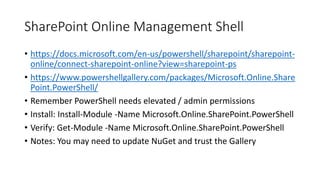
SharePoint Online Management Shell
• https://docs.microsoft.com/en-us/powershell/sharepoint/sharepoint-
online/connect-sharepoint-online?view=sharepoint-ps
• https://www.powershellgallery.com/packages/Microsoft.Online.Share
Point.PowerShell/
• Remember PowerShell needs elevated / admin permissions
• Install: Install-Module -Name Microsoft.Online.SharePoint.PowerShell
• Verify: Get-Module -Name Microsoft.Online.SharePoint.PowerShell
• Notes: You may need to update NuGet and trust the Gallery
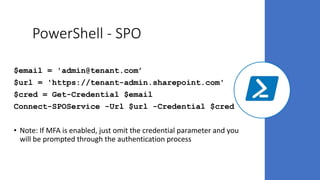
PowerShell - SPO
$email = 'admin@tenant.com’
$url = 'https://tenant-admin.sharepoint.com'
$cred = Get-Credential $email
Connect-SPOService -Url $url -Credential $cred
• Note: If MFA is enabled, just omit the credential parameter and you
will be prompted through the authentication process
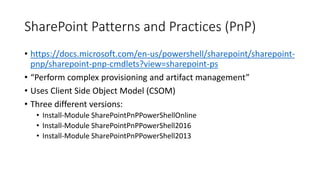
SharePoint Patterns and Practices (PnP)
• https://docs.microsoft.com/en-us/powershell/sharepoint/sharepoint-
pnp/sharepoint-pnp-cmdlets?view=sharepoint-ps
• “Perform complex provisioning and artifact management”
• Uses Client Side Object Model (CSOM)
• Three different versions:
• Install-Module SharePointPnPPowerShellOnline
• Install-Module SharePointPnPPowerShell2016
• Install-Module SharePointPnPPowerShell2013
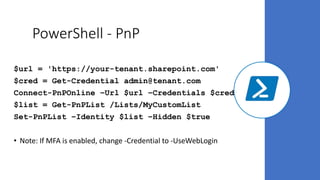
PowerShell - PnP
$url = 'https://your-tenant.sharepoint.com'
$cred = Get-Credential admin@tenant.com
Connect-PnPOnline –Url $url –Credentials $cred
$list = Get-PnPList /Lists/MyCustomList
Set-PnPList –Identity $list –Hidden $true
• Note: If MFA is enabled, change -Credential to -UseWebLogin
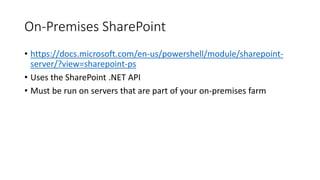
On-Premises SharePoint
• https://docs.microsoft.com/en-us/powershell/module/sharepoint-
server/?view=sharepoint-ps
• Uses the SharePoint .NET API
• Must be run on servers that are part of your on-premises farm
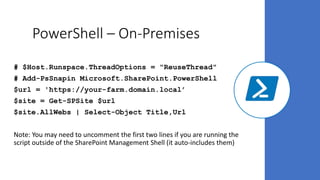
PowerShell – On-Premises
# $Host.Runspace.ThreadOptions = "ReuseThread"
# Add-PsSnapin Microsoft.SharePoint.PowerShell
$url = 'https://your-farm.domain.local’
$site = Get-SPSite $url
$site.AllWebs | Select-Object Title,Url
Note: You may need to uncomment the first two lines if you are running the
script outside of the SharePoint Management Shell (it auto-includes them)
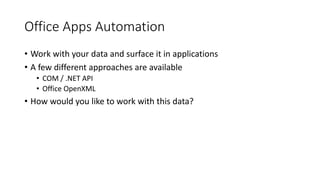
Office Apps Automation
• Work with your data and surface it in applications
• A few different approaches are available
• COM / .NET API
• Office OpenXML
• How would you like to work with this data?
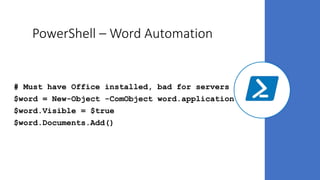
PowerShell – Word Automation
# Must have Office installed, bad for servers
$word = New-Object -ComObject word.application
$word.Visible = $true
$word.Documents.Add()
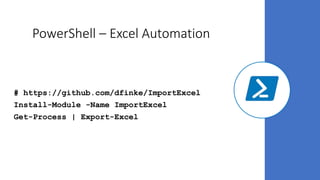
PowerShell – Excel Automation
# https://github.com/dfinke/ImportExcel
Install-Module -Name ImportExcel
Get-Process | Export-Excel
Learning More
• Microsoft and the community have TONS of resources
• Weekly YouTube calls for PnP work
• Channel 9, docs.microsoft.com
• Pluralsight, LinkedIn Learning / Lynda.com, Udemy, others
• Let’s chat: What do you want to build?
• Contact Me: @goyuix or linkedin.com/in/goyuix
• Github: https://github.com/goyuix/presentations/

PowerShell Basics for Office Apps and Servers

  • 1.
    PowerShell Basics for OfficeApps & Servers Greg McMurray SharePoint Saturday Utah February 2019
  • 2.
    Thank You SPSUtah2019 Sponsors! PLATINUM • Lucidworks • ZAACT GOLD • JourneyTEAM • Sovereign SP SILVER • SkySync ShareSki & SharePint
  • 3.
    Intro – Greg •Experience in Aerospace, Branding & Marketing, Energy, Healthcare, Software • Currently Senior Software Engineer at WECC • Co-Founder of Aritus Computer Services, L.L.C. • President of SharePoint / Office 365 and Dynamics 365 User Groups • Find me online: - @goyuix - https://www.linkedin.com/in/goyuix - https://stackoverflow.com/cv/goyuix ( top 2% of users )
  • 4.
  • 5.
    Agenda •PowerShell History &Basics •SharePoint Online •SharePoint PnP Library •SharePoint On-Premises •Office Apps Automation This Photo by Unknown Author is licensed under CC BY-NC-ND
  • 6.
    In the beginning Weneeded a shell
  • 7.
    Not that kind ofshell . . .
  • 8.
    Our forebears: CSH •Hey look! A C-Shell • We are getting closer • Created by Bill Joy as a graduate student at UC Berkeley in the late 1970s • “reads commands from a file … supports filename wildcarding, piping, here documents, command substitution, variables and control structures for condition-testing and iteration” – C-Shell, Wikipedia This Photo by Unknown Author is licensed under CC BY-SA
  • 9.
    PowerShell Origin Story: Monad& Manifesto • Monad: Term coined by Leibniz to represent a fundamental unit of existence, that are combined and composed into for a purpose • PowerShell paper in 2002 states: “provide a powerful, consistent, intuitive, extensible and useful set of tools” • Game changer: Piping objects instead of text
  • 10.
    PowerShell Versions • 1.0:for XP, Vista and Server 2003 • 2.0: included in Win 7 & Server 2008 • 3.0: included in Win 8 & Server 2012 • 4.0: included in Win 8.1 & Server 2012 R2 • 5.0/5.1: include in Win 10 & Server 2016 • 6.0: Becomes PowerShell Core
  • 11.
    PowerShell Basics -cmdlets •Verb-Noun Syntax • Examples: • Get-Help • Get-Command • Get-Member • about* pages
  • 12.
    PowerShell Basics -Variables • Variables are labels that hold values • Start with a dollar sign • Values have types • A bunch of special variables exist: $ENV, $_, $error, etc.
  • 13.
    PowerShell Basics -Piping • The pipe character: | •Quite literally “pipes” output from the left side to the right as input • Reminder: Everything is an object, might be a string, or something else
  • 14.
    PowerShell Basics -Control •if () { } else {} • do { } while () • foreach ($item in $stuff) {} • $stuff | ForEach-Object { $_ }
  • 15.
    SharePoint Online ManagementShell • https://docs.microsoft.com/en-us/powershell/sharepoint/sharepoint- online/connect-sharepoint-online?view=sharepoint-ps • https://www.powershellgallery.com/packages/Microsoft.Online.Share Point.PowerShell/ • Remember PowerShell needs elevated / admin permissions • Install: Install-Module -Name Microsoft.Online.SharePoint.PowerShell • Verify: Get-Module -Name Microsoft.Online.SharePoint.PowerShell • Notes: You may need to update NuGet and trust the Gallery
  • 16.
    PowerShell - SPO $email= 'admin@tenant.com’ $url = 'https://tenant-admin.sharepoint.com' $cred = Get-Credential $email Connect-SPOService -Url $url -Credential $cred • Note: If MFA is enabled, just omit the credential parameter and you will be prompted through the authentication process
  • 17.
    SharePoint Patterns andPractices (PnP) • https://docs.microsoft.com/en-us/powershell/sharepoint/sharepoint- pnp/sharepoint-pnp-cmdlets?view=sharepoint-ps • “Perform complex provisioning and artifact management” • Uses Client Side Object Model (CSOM) • Three different versions: • Install-Module SharePointPnPPowerShellOnline • Install-Module SharePointPnPPowerShell2016 • Install-Module SharePointPnPPowerShell2013
  • 18.
    PowerShell - PnP $url= 'https://your-tenant.sharepoint.com' $cred = Get-Credential admin@tenant.com Connect-PnPOnline –Url $url –Credentials $cred $list = Get-PnPList /Lists/MyCustomList Set-PnPList –Identity $list –Hidden $true • Note: If MFA is enabled, change -Credential to -UseWebLogin
  • 19.
    On-Premises SharePoint • https://docs.microsoft.com/en-us/powershell/module/sharepoint- server/?view=sharepoint-ps •Uses the SharePoint .NET API • Must be run on servers that are part of your on-premises farm
  • 20.
    PowerShell – On-Premises #$Host.Runspace.ThreadOptions = "ReuseThread" # Add-PsSnapin Microsoft.SharePoint.PowerShell $url = 'https://your-farm.domain.local’ $site = Get-SPSite $url $site.AllWebs | Select-Object Title,Url Note: You may need to uncomment the first two lines if you are running the script outside of the SharePoint Management Shell (it auto-includes them)
  • 21.
    Office Apps Automation •Work with your data and surface it in applications • A few different approaches are available • COM / .NET API • Office OpenXML • How would you like to work with this data?
  • 22.
    PowerShell – WordAutomation # Must have Office installed, bad for servers $word = New-Object -ComObject word.application $word.Visible = $true $word.Documents.Add()
  • 23.
    PowerShell – ExcelAutomation # https://github.com/dfinke/ImportExcel Install-Module -Name ImportExcel Get-Process | Export-Excel
  • 24.
    Learning More • Microsoftand the community have TONS of resources • Weekly YouTube calls for PnP work • Channel 9, docs.microsoft.com • Pluralsight, LinkedIn Learning / Lynda.com, Udemy, others • Let’s chat: What do you want to build? • Contact Me: @goyuix or linkedin.com/in/goyuix • Github: https://github.com/goyuix/presentations/