Nik Charlebois
• Software Engineer
• 8 years experience with SharePoint
• MCTS SharePoint 2013 & HTML5
• Full time public servant
• .NET Developer
• Chair of the SPOutaouais User Group
• Blog: NikCharlebois.com
• @NikCharlebois
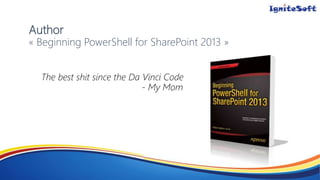
Author
« Beginning PowerShell for SharePoint 2013 »
• Bridge the gap between IT Pros & Developers;
• Understand the internals mechanisms of PowerShell;
• Demonstrate how to use PowerShell on-premises & in the cloud;
• Give an overview of what the future has in store;
• Minimum level of exposure with PowerShell;
• Minimum level of exposure with the SharePoint’s Object Model;
vNext
STSAdm.exe
• Limited tool to manage SharePoint;
• Possibility to create command line scripts using it;
• Often very slow to execute
• Considered to be an IT Pro solution
• Exclusive adminsitrative solution for SharePoint 2003
Console Application (.exe)
• Used the SharePoint Object Model to do administrative tasks;
• Requires a compiled solution (Visual Studio);
• Black box not allowing administrators to read its logic;
• Considered to be a developer solution;
PowerShell
• New in 2009 (SharePoint 2010 not released yet);
• Allows for hybrid solutions between the two previous alternatives;
• Still perceived as a developer’s solution;
• Need to know the SharePoint Object Model;
SharePoint Management Shell
• SharePoint 2010 introduces shortcut methods called cmdlets to
manage SharePoint;
• Ex: Get-SPWeb, Remove-SPSolution, etc.
• Very performant option compared to the previous ones;
• Considered to be a general public solution (IT);
• Language’s appearance in all Microsoft products;
2007
$site = New-Object Microsoft.SharePoint.SPSite("http://intranet")
$web = $site.RootWeb
2010
$web = Get-SPWeb http://localhost
• Introduces about 100 new cmdlets (compared to 2010).
• Most are related to the new search architecture;
• Now the official tool to manage SharePoint;
• Comes preinstalled since Windows Server 2008 R2;
• Used to manage Office 365;
• Integrated in most Microsoft products
• PowerShell is based on the .NET platform;
• Allows you to interact with objects;
• Ex: Get-SPWeb returns an SPWeb object with whom we can interact;
• Allows us to use custom dynamic libraries (custom DLLs);
Demo #1
Reservation System
• PowerShell has access to all .NET libraries;
• Possibility to use libraries handling the graphical interface
elements and others;
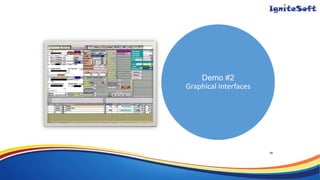
Demo #2
Graphical Interfaces
18
• PowerShell allows us to interact with all SharePoint object types
(just like the Object Model);
• PowerShell offers predefined cmdlets for SharePoint all the way
down to the web level;
• Starting at the lists level, we go back to the 2007 way of doing it;
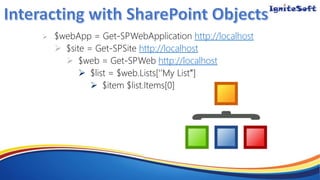
 http://localhost
 http://localhost
 http://localhost


Demo #3
Obtain all lists in a web
• Microsoft made available the « SharePoint Online Management
Shell »
• Connects remotely to an Office 365 SharePoint Online instance;
• Includes it own set of cmdlets;
• Office 365 offers a H-U-G-E 30 PowerShell cmdlets;
• Offers and extremely limited set of possible operations;
• We simply add an ‘o’ in the name of each object in the cmdlets;
• Ex: Get-SPOSite, Set-SPOSite, etc.
Demo #4
Rename a site on Office 365
using PowerShell
• Since SharePoint 2010, there is a Client-Side Object Model
(CSOM);
• This model comes in 3 flavours:
• JavaScript
• .NET
• Silverlight
• Since PowerShell leverages the .NET framework…
• Then 1 + 1 =…
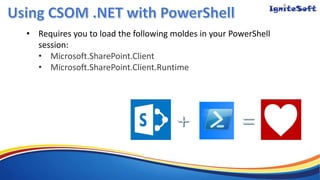
• Requires you to load the following moldes in your PowerShell
session:
• Microsoft.SharePoint.Client
• Microsoft.SharePoint.Client.Runtime
Demo #5
Create a SharePoint public web
On Office 365
using Powershell
27
• Requires coding (Visual Studio);
• Requires you to add references to the following modules:
• System.Management
• System.Management.Automation
• Allows us to define custom verb-noun combinations;
• Each cmdlet is its own class;
Demo #6
Create custom Powershell
cmdlet
29
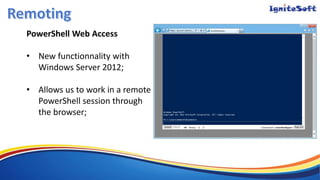
PowerShell Web Access
• New functionnality with
Windows Server 2012;
• Allows us to work in a remote
PowerShell session through
the browser;
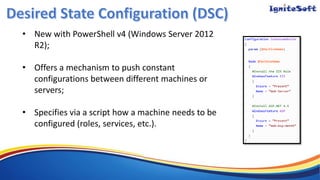
• New with PowerShell v4 (Windows Server 2012
R2);
• Offers a mechanism to push constant
configurations between different machines or
servers;
• Specifies via a script how a machine needs to be
configured (roles, services, etc.).
• Extensions to existing cmdlets:
• Get-SPList, Move-SPList, Clear-SPBlobCache, etc.
• Free & frequently updated
SPPoSh.Codeplex.com
• Youtube Channel with free PowerShell training
videos;
Using PowerShell for SharePoint 2013

Using PowerShell for SharePoint 2013

  • 2.
    Nik Charlebois • SoftwareEngineer • 8 years experience with SharePoint • MCTS SharePoint 2013 & HTML5 • Full time public servant • .NET Developer • Chair of the SPOutaouais User Group • Blog: NikCharlebois.com • @NikCharlebois
  • 3.
    Author « Beginning PowerShellfor SharePoint 2013 »
  • 4.
    • Bridge thegap between IT Pros & Developers; • Understand the internals mechanisms of PowerShell; • Demonstrate how to use PowerShell on-premises & in the cloud; • Give an overview of what the future has in store;
  • 5.
    • Minimum levelof exposure with PowerShell; • Minimum level of exposure with the SharePoint’s Object Model;
  • 6.
  • 8.
    STSAdm.exe • Limited toolto manage SharePoint; • Possibility to create command line scripts using it; • Often very slow to execute • Considered to be an IT Pro solution • Exclusive adminsitrative solution for SharePoint 2003
  • 9.
    Console Application (.exe) •Used the SharePoint Object Model to do administrative tasks; • Requires a compiled solution (Visual Studio); • Black box not allowing administrators to read its logic; • Considered to be a developer solution;
  • 10.
    PowerShell • New in2009 (SharePoint 2010 not released yet); • Allows for hybrid solutions between the two previous alternatives; • Still perceived as a developer’s solution; • Need to know the SharePoint Object Model;
  • 11.
    SharePoint Management Shell •SharePoint 2010 introduces shortcut methods called cmdlets to manage SharePoint; • Ex: Get-SPWeb, Remove-SPSolution, etc. • Very performant option compared to the previous ones; • Considered to be a general public solution (IT); • Language’s appearance in all Microsoft products;
  • 12.
    2007 $site = New-ObjectMicrosoft.SharePoint.SPSite("http://intranet") $web = $site.RootWeb 2010 $web = Get-SPWeb http://localhost
  • 13.
    • Introduces about100 new cmdlets (compared to 2010). • Most are related to the new search architecture; • Now the official tool to manage SharePoint; • Comes preinstalled since Windows Server 2008 R2; • Used to manage Office 365; • Integrated in most Microsoft products
  • 15.
    • PowerShell isbased on the .NET platform; • Allows you to interact with objects; • Ex: Get-SPWeb returns an SPWeb object with whom we can interact; • Allows us to use custom dynamic libraries (custom DLLs);
  • 16.
  • 17.
    • PowerShell hasaccess to all .NET libraries; • Possibility to use libraries handling the graphical interface elements and others;
  • 18.
  • 19.
    • PowerShell allowsus to interact with all SharePoint object types (just like the Object Model); • PowerShell offers predefined cmdlets for SharePoint all the way down to the web level; • Starting at the lists level, we go back to the 2007 way of doing it;
  • 20.
  • 21.
    Demo #3 Obtain alllists in a web
  • 22.
    • Microsoft madeavailable the « SharePoint Online Management Shell » • Connects remotely to an Office 365 SharePoint Online instance; • Includes it own set of cmdlets;
  • 23.
    • Office 365offers a H-U-G-E 30 PowerShell cmdlets; • Offers and extremely limited set of possible operations; • We simply add an ‘o’ in the name of each object in the cmdlets; • Ex: Get-SPOSite, Set-SPOSite, etc.
  • 24.
    Demo #4 Rename asite on Office 365 using PowerShell
  • 25.
    • Since SharePoint2010, there is a Client-Side Object Model (CSOM); • This model comes in 3 flavours: • JavaScript • .NET • Silverlight • Since PowerShell leverages the .NET framework… • Then 1 + 1 =…
  • 26.
    • Requires youto load the following moldes in your PowerShell session: • Microsoft.SharePoint.Client • Microsoft.SharePoint.Client.Runtime
  • 27.
    Demo #5 Create aSharePoint public web On Office 365 using Powershell 27
  • 28.
    • Requires coding(Visual Studio); • Requires you to add references to the following modules: • System.Management • System.Management.Automation • Allows us to define custom verb-noun combinations; • Each cmdlet is its own class;
  • 29.
    Demo #6 Create customPowershell cmdlet 29
  • 31.
    PowerShell Web Access •New functionnality with Windows Server 2012; • Allows us to work in a remote PowerShell session through the browser;
  • 32.
    • New withPowerShell v4 (Windows Server 2012 R2); • Offers a mechanism to push constant configurations between different machines or servers; • Specifies via a script how a machine needs to be configured (roles, services, etc.).
  • 34.
    • Extensions toexisting cmdlets: • Get-SPList, Move-SPList, Clear-SPBlobCache, etc. • Free & frequently updated SPPoSh.Codeplex.com
  • 35.
    • Youtube Channelwith free PowerShell training videos;