One Neos - Many Websites
Sebastian Helzle
Neos Conference 2018
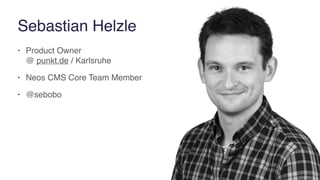
Sebastian Helzle
• Product Owner 

@ punkt.de / Karlsruhe
• Neos CMS Core Team Member
• @sebobo
What will be discussed in this talk
• Why do we want to have many sites in one Neos
• What does Neos offer to make multisite setups easy
• How to create a multisite
• Summary
• Time for questions
Why do I talk about this topic?
Motivation for having multi site setups
The main benefits
• Benefits for development & maintenance
• Optimized editor processes
• Launch new sites and microsites with ease
• Business (money) advantages
Benefits for development & maintenance
• Only one codebase to be taken care of
• Increased security
• One server setup
• One integration pipeline
• Features roll out to all sites at the same time
• And can be limited with feature flags
• Optimize one site and get a benefits in all of them
Optimize editorial process
• Have reusable content between sites
• Have same usability and processes on all sites
• Only one login is needed
• Cross site navigation menus possible
• Reuse assets like images, documents and others
Launch new sites and microsites with ease
• Work on them in parallel to existing pages
• Manage sites and domains in the backend
• Secure the domains until Go-Live with an authentication
• Then:
• Turn of authentication and go live
• If necessary map live domain to server and then go live
Business benefits
• Reduced longterm cost through lower development & maintenance efforts
• But slightly increased initial cost for the first two sites
• More up-to-date content with improved editorial process
• Reduced time to market with new sites
• Consistent corporate identity
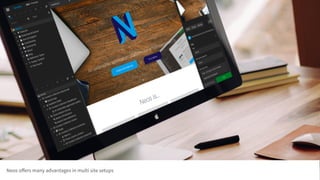
Neos offers many advantages in multi site setups
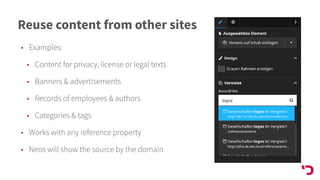
Reuse content from other sites
• Examples:
• Content for privacy, license or legal texts
• Banners & advertisements
• Records of employees & authors
• Categories & tags
• Works with any reference property
• Neos will show the source by the domain
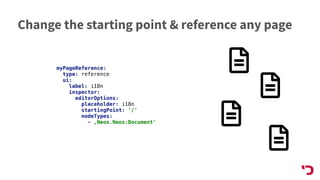
Change the starting point & reference any page
myPageReference:
type: reference
ui:
label: i18n
inspector:
editorOptions:
placeholder: i18n
startingPoint: '/'
nodeTypes:
- ‚Neos.Neos:Document'
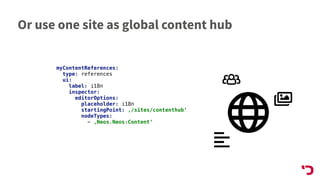
Or use one site as global content hub
myContentReferences:
type: references
ui:
label: i18n
inspector:
editorOptions:
placeholder: i18n
startingPoint: ‚/sites/contenthub‘
nodeTypes:
- ‚Neos.Neos:Content‘
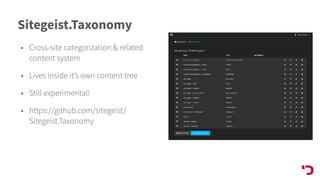
Sitegeist.Taxonomy
• Cross-site categorization & related
content system
• Lives inside it’s own content tree
• Still experimental!
• https://github.com/sitegeist/
Sitegeist.Taxonomy
Hint:
Give every element a fitting title.
You will find it much faster!
Using content dimensions for multisites
• Have a master site
• Use dimensions to customize content on children sites
• Needs mapping of domains to dimensions
• Could get more complex with multiple languages at the same time
• See case study by CORE4 (and ask Bernhard Schmitt @nezaniel)
Handling site specific configurations
• Multiple Settings files in site packages will override each other
• Could be solved with separate Context per site but has drawbacks
• Core caching is not shared
• Needs more configuration on the webserver
• Context must be set correctly for console commands
• Put global configuration into one Settings.yaml
• Have site specific configuration in the site node
• Use a custom nodetype for the homepages
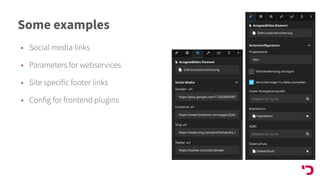
Some examples
• Social media links
• Parameters for webservices
• Site specific footer links
• Config for frontend plugins
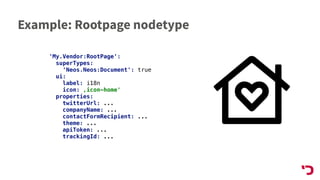
Example: Rootpage nodetype
'My.Vendor:RootPage':
superTypes:
'Neos.Neos:Document': true
ui:
label: i18n
icon: ‚icon-home'
properties:
twitterUrl: ...
companyName: ...
contactFormRecipient: ...
theme: ...
apiToken: ...
trackingId: ...
Theming and customizations
• Use homepage nodes to set themes & customize
• Change logo
• Change typography, colors, iconset, …
• Use 3rd party packages to extend Neos multisite
capabilities
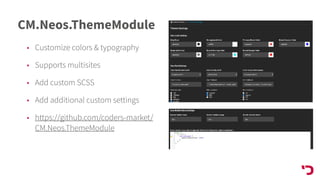
CM.Neos.ThemeModule
• Customize colors & typography
• Supports multisites
• Add custom SCSS
• Add additional custom settings
• https://github.com/coders-market/
CM.Neos.ThemeModule
Separate site handling if necessary
• Use roles which are locked into one site
• Use dynamic policies which match users to sites
• Match asset collections with sites to keep assets
separated
Some notes on performance
• Many small sites behave similar to one bigger site
• Neos can handle a lot of content, no matter where and scales nicely
• Real project with 8 sites containing ~50.000 nodes is no problem
• 100.000s of nodes should work too
• Future Neos developments will make this even more scalable
• Site selection in backend might be harder to use with > 30 sites
• Could be optimized easily in the future
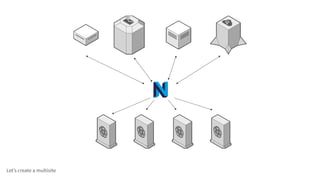
Let’s create a multisite
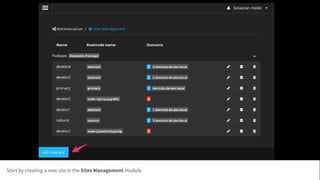
Start by creating a new site in the Sites Management module
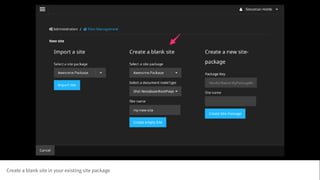
Create a blank site in your existing site package
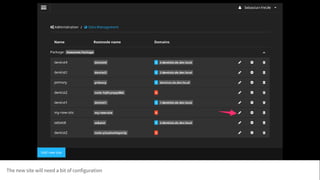
The new site will need a bit of configuration
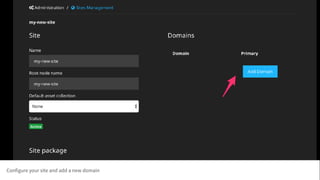
Configure your site and add a new domain
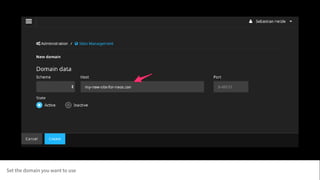
Set the domain you want to use
Map the domain in the web server onto your Neos installation
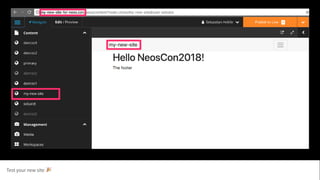
Test your new site 🎉
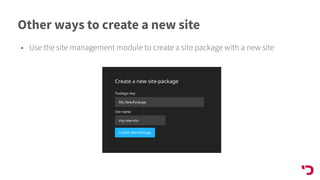
Other ways to create a new site
• Use the site management module to create a site package with a new site
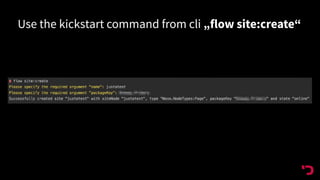
Use the kickstart command from cli „flow site:create“
Notes about creating sites
• Creating a site package is easier with the package „neos/site-
kickstarter“
• You can also build a site package manually if you know what you do
• You will miss out a useful boilerplate
• If you create a new site package you have to import the new site manually
• Don’t forget that additional site packages should depend on the main one
• Don’t forget that Settings.yaml files have one hierarchy
Summary
• Neos is already well prepared to handle many sites
• Many use cases are already solvable
• Some use cases need small adjustments
• Performance will continuously get better with future Neos versions
• Start using the feature and forward use cases and experiences to the core team
• Contribute or sponsor changes that could benefit all projects
Questions?


@sebobo
helzle@punkt.de
Sources
• https://github.com/coders-market/CM.Neos.ThemeModule
• https://github.com/sitegeist/Sitegeist.Taxonomy

One Neos CMS - many websites

  • 1.
    One Neos -Many Websites Sebastian Helzle Neos Conference 2018
  • 2.
    Sebastian Helzle • ProductOwner 
 @ punkt.de / Karlsruhe • Neos CMS Core Team Member • @sebobo
  • 3.
    What will bediscussed in this talk • Why do we want to have many sites in one Neos • What does Neos offer to make multisite setups easy • How to create a multisite • Summary • Time for questions
  • 4.
    Why do Italk about this topic?
  • 5.
    Motivation for havingmulti site setups
  • 6.
    The main benefits •Benefits for development & maintenance • Optimized editor processes • Launch new sites and microsites with ease • Business (money) advantages
  • 7.
    Benefits for development& maintenance • Only one codebase to be taken care of • Increased security • One server setup • One integration pipeline • Features roll out to all sites at the same time • And can be limited with feature flags • Optimize one site and get a benefits in all of them

  • 8.
    Optimize editorial process •Have reusable content between sites • Have same usability and processes on all sites • Only one login is needed • Cross site navigation menus possible • Reuse assets like images, documents and others
  • 9.
    Launch new sitesand microsites with ease • Work on them in parallel to existing pages • Manage sites and domains in the backend • Secure the domains until Go-Live with an authentication • Then: • Turn of authentication and go live • If necessary map live domain to server and then go live
  • 10.
    Business benefits • Reducedlongterm cost through lower development & maintenance efforts • But slightly increased initial cost for the first two sites • More up-to-date content with improved editorial process • Reduced time to market with new sites • Consistent corporate identity
  • 11.
    Neos offers manyadvantages in multi site setups
  • 12.
    Reuse content fromother sites • Examples: • Content for privacy, license or legal texts • Banners & advertisements • Records of employees & authors • Categories & tags • Works with any reference property • Neos will show the source by the domain
  • 13.
    Change the startingpoint & reference any page myPageReference: type: reference ui: label: i18n inspector: editorOptions: placeholder: i18n startingPoint: '/' nodeTypes: - ‚Neos.Neos:Document'
  • 14.
    Or use onesite as global content hub myContentReferences: type: references ui: label: i18n inspector: editorOptions: placeholder: i18n startingPoint: ‚/sites/contenthub‘ nodeTypes: - ‚Neos.Neos:Content‘
  • 15.
    Sitegeist.Taxonomy • Cross-site categorization& related content system • Lives inside it’s own content tree • Still experimental! • https://github.com/sitegeist/ Sitegeist.Taxonomy
  • 16.
    Hint: Give every elementa fitting title. You will find it much faster!
  • 17.
    Using content dimensionsfor multisites • Have a master site • Use dimensions to customize content on children sites • Needs mapping of domains to dimensions • Could get more complex with multiple languages at the same time • See case study by CORE4 (and ask Bernhard Schmitt @nezaniel)
  • 18.
    Handling site specificconfigurations • Multiple Settings files in site packages will override each other • Could be solved with separate Context per site but has drawbacks • Core caching is not shared • Needs more configuration on the webserver • Context must be set correctly for console commands • Put global configuration into one Settings.yaml • Have site specific configuration in the site node • Use a custom nodetype for the homepages
  • 19.
    Some examples • Socialmedia links • Parameters for webservices • Site specific footer links • Config for frontend plugins
  • 20.
    Example: Rootpage nodetype 'My.Vendor:RootPage': superTypes: 'Neos.Neos:Document':true ui: label: i18n icon: ‚icon-home' properties: twitterUrl: ... companyName: ... contactFormRecipient: ... theme: ... apiToken: ... trackingId: ...
  • 21.
    Theming and customizations •Use homepage nodes to set themes & customize • Change logo • Change typography, colors, iconset, … • Use 3rd party packages to extend Neos multisite capabilities
  • 22.
    CM.Neos.ThemeModule • Customize colors& typography • Supports multisites • Add custom SCSS • Add additional custom settings • https://github.com/coders-market/ CM.Neos.ThemeModule
  • 23.
    Separate site handlingif necessary • Use roles which are locked into one site • Use dynamic policies which match users to sites • Match asset collections with sites to keep assets separated
  • 24.
    Some notes onperformance • Many small sites behave similar to one bigger site • Neos can handle a lot of content, no matter where and scales nicely • Real project with 8 sites containing ~50.000 nodes is no problem • 100.000s of nodes should work too • Future Neos developments will make this even more scalable • Site selection in backend might be harder to use with > 30 sites • Could be optimized easily in the future
  • 25.
  • 26.
    Start by creatinga new site in the Sites Management module
  • 27.
    Create a blanksite in your existing site package
  • 28.
    The new sitewill need a bit of configuration
  • 29.
    Configure your siteand add a new domain
  • 30.
    Set the domainyou want to use
  • 31.
    Map the domainin the web server onto your Neos installation
  • 32.
    Test your newsite 🎉
  • 33.
    Other ways tocreate a new site • Use the site management module to create a site package with a new site
  • 34.
    Use the kickstartcommand from cli „flow site:create“
  • 35.
    Notes about creatingsites • Creating a site package is easier with the package „neos/site- kickstarter“ • You can also build a site package manually if you know what you do • You will miss out a useful boilerplate • If you create a new site package you have to import the new site manually • Don’t forget that additional site packages should depend on the main one • Don’t forget that Settings.yaml files have one hierarchy
  • 36.
    Summary • Neos isalready well prepared to handle many sites • Many use cases are already solvable • Some use cases need small adjustments • Performance will continuously get better with future Neos versions • Start using the feature and forward use cases and experiences to the core team • Contribute or sponsor changes that could benefit all projects
  • 37.
  • 38.