Best Practices for WordPress
Who Am I?
• My name is Taylor Lovett
• Director of Web Engineering at 10up
• WordPress plugin creator and core contributor
• Open source community member
@tlovett12
10up is hiring!
@tlovett12
taylor.lovett@10up.com
https://10up.github.io/Engineering-Best-Practices/
C A C H I N G
Redis as a Persistent Object Cache
• WP lets you drop in a custom object cache.
• Redis lets you store things in memory for fast
read/writes
• Redis offers built in failover features that make it
easier to scale than Memcached
https://wordpress.org/plugins/wp-redis/
Page Caching
• Page caching is the act of caching entire
rendered HTML pages.
• Pages can be stored in the object cache
avoiding database queries entirely
https://wordpress.org/plugins/batcache/
Fragment Caching
• All output involving a database read on the front
end should be fragment cached aside from the
main WP query.
• For example, generated HTML from a feature
post carousel should be cached since it uses a
WP_Query
Remote Calls
• Remote blocking calls can be a huge
performance bottleneck
• Cache remote calls as long as possible
• Utilize non-blocking remote requests wherever
possible
Prime Cache Asynchronously
• Don’t make the user wait for a cache to be
primed.
• Re-prime after invalidation
• Cleverly prime cached data asynchronously
(cron, non-blocking AJAX, etc.)
https://github.com/10up/Async-Transients
admin-ajax.php
• Admin-ajax.php is for admin use only. It is not
cached as aggressively as the front end. Page
caching will not work.
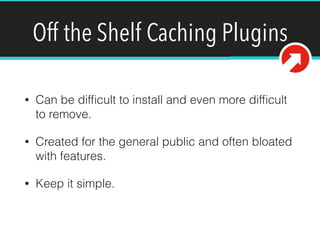
Off the Shelf Caching Plugins
• Can be difficult to install and even more difficult
to remove.
• Created for the general public and often bloated
with features.
• Keep it simple.
D ATA B A S E R E A D S
A N D W R I T E S
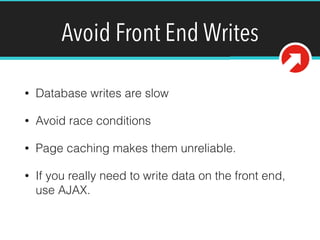
Avoid Front End Writes
• Database writes are slow
• Avoid race conditions
• Page caching makes them unreliable.
• If you really need to write data on the front end,
use AJAX.
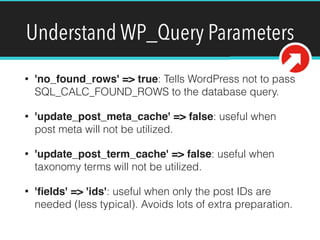
Understand WP_Query Parameters
• 'no_found_rows' => true: Tells WordPress not to pass
SQL_CALC_FOUND_ROWS to the database query.
• 'update_post_meta_cache' => false: useful when
post meta will not be utilized.
• 'update_post_term_cache' => false: useful when
taxonomy terms will not be utilized.
• 'fields' => 'ids': useful when only the post IDs are
needed (less typical). Avoids lots of extra preparation.
Understand WP Query Parameters
• ‘posts_per_page’ => ‘…’: Sets the query limit to
something other than -1
• ‘post__not_in’: Tells MySQL to run a NOT IN
query which is inherently slow. Try to avoid.
Understand WP Query Parameters
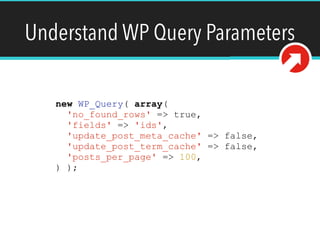
new WP_Query( array(
'no_found_rows' => true,
'fields' => 'ids',
'update_post_meta_cache' => false,
'update_post_term_cache' => false,
'posts_per_page' => 100,
) );
Autoloading Options
• update_option() and add_option() take a 3rd
parameter $autoload.
• If you don’t need an option on every request,
specify false for $autoload.
S E A R C H
Elasticsearch/ElasticPress
• If you receive a lot of search traffic, use
Elasticsearch and ElasticPress.
• Search queries can be very taxing on MySQL
https://github.com/10up/ElasticPress
B R O W S E R
P E R F O R M A N C E
Use a CDN
• CDN’s enable you to serve static assets from
servers closer to your visitors while reducing
load on your web server(s).
• CDN recommendation is very unique to each
project.
Reduce the Number and Size of HTTP
Requests
• Minify JS and CSS files
• Concatenate JS and CSS files
• Optimize images
• HTTP 2?
M A I N TA I N A B I L I T Y
A N D S TA B I L I T Y
Maintainable Code Improves Stability
• Easily maintainable and extendible code bases
are less susceptible to bugs.
• Bugs in maintainable code are solved quicker
• New features are more easily created in
maintainable code.
• Happy engineers are more productive (often
overlooked).
Modern PHP Design Patterns
• WordPress core is backwards compatible with
PHP 5.2.4.
• Your project does not need to be constrained by
incredibly outdated software
• Namespaces, traits, composer, etc.
Don’t Obsess Over MVC PHP
• MVC (model, view, and controller) is a great
pattern in many situations.
• WordPress is inherently not object oriented. We
find that forcing MVC with tools like Twig
ultimately leads to more confusing code that is
harder to maintain.
Modern JS Design Patterns
• CommonJS
• ES6-7
• Write modular code with tools like Webpack and
Browserify
• React
Feature Plugins
• Group distinct pieces of functionality into plugins
as much as possible.
• This separation simplifies deployments and
enables you to reuse functionality on other
projects.
• Opt-in to functionality through usage of hooks
Documentation
• Properly documented code is more quickly fixed and
iterated upon
• Make documentation a part of your code review process
• PHP Documentation Standards: 

https://make.wordpress.org/core/handbook/best-
practices/inline-documentation-standards/php/
• JS Documentation Standards:

https://make.wordpress.org/core/handbook/best-
practices/inline-documentation-standards/javascript/

Wrapping Wrappers
• WordPress has a very rich, easy to use API with
ways to create posts, send HTTP requests,
create metaboxes, etc.
• Creating wrappers around these core APIs more
often than not just results in a layer of confusing
code and another library to memorize.
Write Tests
• PHPUnit for PHP
• Core unit testing framework and WP Mock -
https://github.com/10up/wp_mock
• Mocha for JavaScript
• Tests improve quality and stability through
identification of issues. Decrease regression
S E C U R I T Y
Clean Input
• Validate/sanitize data being inserted into the
database to strip anything harmful.
Clean Input
if ( ! empty( $_POST['option'] ) ) {

update_post_meta( $post_id, 'option_key', true );
} else {
delete_post_meta( $post_id, 'option_key' );
}
update_post_meta( $post_id, 'key_name',
sanitize_text_field( $_POST['description'] ) );
Secure Output
• Escape data that is printed to the screen
• Escape data as late as possible
• Check out the esc_* functions in the codex.
https://codex.wordpress.org/Validating_Sanitizing_and_Escaping_User_Data
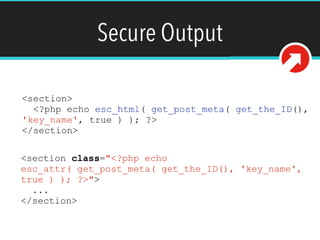
Secure Output
<section>
<?php echo esc_html( get_post_meta( get_the_ID(),
'key_name', true ) ); ?>
</section>
<section class="<?php echo
esc_attr( get_post_meta( get_the_ID(), 'key_name',
true ) ); ?>">
...
</section>
innerHTML and jQuery Selectors
• Don’t insert arbitrary data into innerHTML or
jQuery selectors.
innerHTML and jQuery Selectors
document.getElementsByClassName( 'class-name' )
[0].innerText = textString;
var node = document.createElement( 'div' );
node.innerText = textString;
document.getElementsByClassName( 'class-name' )
[0].appendChild( node );
jQuery( '.class-name-' + parseInt( index ) );
Nonces
• Ensure intent of important actions (database
modifications) by associating them with a nonce
• wp_create_nonce(), wp_verify_nonce(),
wp_nonce_field()
Nonces
<form>
<?php wp_nonce_field( 'prefix-form-action',
'nonce_field' ); ?>
...
</form>
if ( empty( $_POST['nonce_field'] ||
wp_verify_nonce( $_POST['nonce_field'], 'prefix-
form-action' ) {
return false;
}
Limit Login Attempts
• Limit max number of login attempts to prevent
password guessing.
Require Strong Passwords
• Weak passwords are one of the most common
ways attackers exploit websites.
• Require your users create strong passwords.
There are a few great plugins that do this
automatically.
T H I R D PA RT Y C O D E
Review Every Line of Code
Over 40,000 community plugins
• Plugins reviewed before submission
• Plugin revisions not reviewed
• Review guidelines not geared for high
traffic
Review Every Line of Code
Thousands of community themes
• More stringent review guidelines than
plugins
• Review guidelines not geared for high traffic
• Performance not measured
Understand Your Librarys
• jQuery, Underscores, etc. are helpful tools but
should not be used blindly. There is no substitute
for a solid understand of JavaScript.
• Encouraging engineers to understand the
libraries they are using will improve overall code
quality and decrease bugs.
T E A M S
Workflows
• Keeping track of code history with version
control is critical.
• Mandate workflow at the start of project to keep
everyone on the same page.
• Use descriptive commit messages
• Gitflow: http://nvie.com/posts/a-successful-git-
branching-model/
Internal Code Reviews
• Code reviews help ensure performance,
security, maintainability, and scalability
• Engineers improve skills by reviewing and
receiving reviews.
Q U E S T I O N S ?
@ T L O V E T T 1 2
TAY L O R . L O V E T T @ 1 0 U P. C O M
TAY L O R L O V E T T. C O M

Best Practices for WordPress

  • 1.
  • 2.
    Who Am I? •My name is Taylor Lovett • Director of Web Engineering at 10up • WordPress plugin creator and core contributor • Open source community member @tlovett12
  • 3.
  • 4.
  • 5.
    C A CH I N G
  • 6.
    Redis as aPersistent Object Cache • WP lets you drop in a custom object cache. • Redis lets you store things in memory for fast read/writes • Redis offers built in failover features that make it easier to scale than Memcached https://wordpress.org/plugins/wp-redis/
  • 7.
    Page Caching • Pagecaching is the act of caching entire rendered HTML pages. • Pages can be stored in the object cache avoiding database queries entirely https://wordpress.org/plugins/batcache/
  • 8.
    Fragment Caching • Alloutput involving a database read on the front end should be fragment cached aside from the main WP query. • For example, generated HTML from a feature post carousel should be cached since it uses a WP_Query
  • 9.
    Remote Calls • Remoteblocking calls can be a huge performance bottleneck • Cache remote calls as long as possible • Utilize non-blocking remote requests wherever possible
  • 10.
    Prime Cache Asynchronously •Don’t make the user wait for a cache to be primed. • Re-prime after invalidation • Cleverly prime cached data asynchronously (cron, non-blocking AJAX, etc.) https://github.com/10up/Async-Transients
  • 11.
    admin-ajax.php • Admin-ajax.php isfor admin use only. It is not cached as aggressively as the front end. Page caching will not work.
  • 12.
    Off the ShelfCaching Plugins • Can be difficult to install and even more difficult to remove. • Created for the general public and often bloated with features. • Keep it simple.
  • 13.
    D ATA BA S E R E A D S A N D W R I T E S
  • 14.
    Avoid Front EndWrites • Database writes are slow • Avoid race conditions • Page caching makes them unreliable. • If you really need to write data on the front end, use AJAX.
  • 15.
    Understand WP_Query Parameters •'no_found_rows' => true: Tells WordPress not to pass SQL_CALC_FOUND_ROWS to the database query. • 'update_post_meta_cache' => false: useful when post meta will not be utilized. • 'update_post_term_cache' => false: useful when taxonomy terms will not be utilized. • 'fields' => 'ids': useful when only the post IDs are needed (less typical). Avoids lots of extra preparation.
  • 16.
    Understand WP QueryParameters • ‘posts_per_page’ => ‘…’: Sets the query limit to something other than -1 • ‘post__not_in’: Tells MySQL to run a NOT IN query which is inherently slow. Try to avoid.
  • 17.
    Understand WP QueryParameters new WP_Query( array( 'no_found_rows' => true, 'fields' => 'ids', 'update_post_meta_cache' => false, 'update_post_term_cache' => false, 'posts_per_page' => 100, ) );
  • 18.
    Autoloading Options • update_option()and add_option() take a 3rd parameter $autoload. • If you don’t need an option on every request, specify false for $autoload.
  • 19.
    S E AR C H
  • 20.
    Elasticsearch/ElasticPress • If youreceive a lot of search traffic, use Elasticsearch and ElasticPress. • Search queries can be very taxing on MySQL https://github.com/10up/ElasticPress
  • 21.
    B R OW S E R P E R F O R M A N C E
  • 22.
    Use a CDN •CDN’s enable you to serve static assets from servers closer to your visitors while reducing load on your web server(s). • CDN recommendation is very unique to each project.
  • 23.
    Reduce the Numberand Size of HTTP Requests • Minify JS and CSS files • Concatenate JS and CSS files • Optimize images • HTTP 2?
  • 24.
    M A IN TA I N A B I L I T Y A N D S TA B I L I T Y
  • 25.
    Maintainable Code ImprovesStability • Easily maintainable and extendible code bases are less susceptible to bugs. • Bugs in maintainable code are solved quicker • New features are more easily created in maintainable code. • Happy engineers are more productive (often overlooked).
  • 26.
    Modern PHP DesignPatterns • WordPress core is backwards compatible with PHP 5.2.4. • Your project does not need to be constrained by incredibly outdated software • Namespaces, traits, composer, etc.
  • 27.
    Don’t Obsess OverMVC PHP • MVC (model, view, and controller) is a great pattern in many situations. • WordPress is inherently not object oriented. We find that forcing MVC with tools like Twig ultimately leads to more confusing code that is harder to maintain.
  • 28.
    Modern JS DesignPatterns • CommonJS • ES6-7 • Write modular code with tools like Webpack and Browserify • React
  • 29.
    Feature Plugins • Groupdistinct pieces of functionality into plugins as much as possible. • This separation simplifies deployments and enables you to reuse functionality on other projects. • Opt-in to functionality through usage of hooks
  • 30.
    Documentation • Properly documentedcode is more quickly fixed and iterated upon • Make documentation a part of your code review process • PHP Documentation Standards: 
 https://make.wordpress.org/core/handbook/best- practices/inline-documentation-standards/php/ • JS Documentation Standards:
 https://make.wordpress.org/core/handbook/best- practices/inline-documentation-standards/javascript/

  • 31.
    Wrapping Wrappers • WordPresshas a very rich, easy to use API with ways to create posts, send HTTP requests, create metaboxes, etc. • Creating wrappers around these core APIs more often than not just results in a layer of confusing code and another library to memorize.
  • 32.
    Write Tests • PHPUnitfor PHP • Core unit testing framework and WP Mock - https://github.com/10up/wp_mock • Mocha for JavaScript • Tests improve quality and stability through identification of issues. Decrease regression
  • 33.
    S E CU R I T Y
  • 34.
    Clean Input • Validate/sanitizedata being inserted into the database to strip anything harmful.
  • 35.
    Clean Input if (! empty( $_POST['option'] ) ) {
 update_post_meta( $post_id, 'option_key', true ); } else { delete_post_meta( $post_id, 'option_key' ); } update_post_meta( $post_id, 'key_name', sanitize_text_field( $_POST['description'] ) );
  • 36.
    Secure Output • Escapedata that is printed to the screen • Escape data as late as possible • Check out the esc_* functions in the codex. https://codex.wordpress.org/Validating_Sanitizing_and_Escaping_User_Data
  • 37.
    Secure Output <section> <?php echoesc_html( get_post_meta( get_the_ID(), 'key_name', true ) ); ?> </section> <section class="<?php echo esc_attr( get_post_meta( get_the_ID(), 'key_name', true ) ); ?>"> ... </section>
  • 38.
    innerHTML and jQuerySelectors • Don’t insert arbitrary data into innerHTML or jQuery selectors.
  • 39.
    innerHTML and jQuerySelectors document.getElementsByClassName( 'class-name' ) [0].innerText = textString; var node = document.createElement( 'div' ); node.innerText = textString; document.getElementsByClassName( 'class-name' ) [0].appendChild( node ); jQuery( '.class-name-' + parseInt( index ) );
  • 40.
    Nonces • Ensure intentof important actions (database modifications) by associating them with a nonce • wp_create_nonce(), wp_verify_nonce(), wp_nonce_field()
  • 41.
    Nonces <form> <?php wp_nonce_field( 'prefix-form-action', 'nonce_field'); ?> ... </form> if ( empty( $_POST['nonce_field'] || wp_verify_nonce( $_POST['nonce_field'], 'prefix- form-action' ) { return false; }
  • 42.
    Limit Login Attempts •Limit max number of login attempts to prevent password guessing.
  • 43.
    Require Strong Passwords •Weak passwords are one of the most common ways attackers exploit websites. • Require your users create strong passwords. There are a few great plugins that do this automatically.
  • 44.
    T H IR D PA RT Y C O D E
  • 45.
    Review Every Lineof Code Over 40,000 community plugins • Plugins reviewed before submission • Plugin revisions not reviewed • Review guidelines not geared for high traffic
  • 46.
    Review Every Lineof Code Thousands of community themes • More stringent review guidelines than plugins • Review guidelines not geared for high traffic • Performance not measured
  • 47.
    Understand Your Librarys •jQuery, Underscores, etc. are helpful tools but should not be used blindly. There is no substitute for a solid understand of JavaScript. • Encouraging engineers to understand the libraries they are using will improve overall code quality and decrease bugs.
  • 48.
    T E AM S
  • 49.
    Workflows • Keeping trackof code history with version control is critical. • Mandate workflow at the start of project to keep everyone on the same page. • Use descriptive commit messages • Gitflow: http://nvie.com/posts/a-successful-git- branching-model/
  • 50.
    Internal Code Reviews •Code reviews help ensure performance, security, maintainability, and scalability • Engineers improve skills by reviewing and receiving reviews.
  • 51.
    Q U ES T I O N S ? @ T L O V E T T 1 2 TAY L O R . L O V E T T @ 1 0 U P. C O M TAY L O R L O V E T T. C O M