#Kscope
Oracle Application Express
&
Christian Rokitta
www.themes4apex.com
About Me
17 years 17 years 2 years
3 months
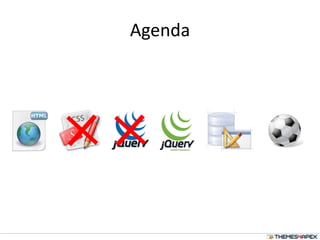
Agenda
Why
• Why mobile web application (vs native App)?
– HTML  APEX
– Costs: platform independent
• Why jQuery Mobile?
– jQuery Framework
– Easy integration with APEX
– Easy to learn
– Easier in 4.2
Running ahead of things?
SQL;
PL/SQL;
APEX Templates
(in 1 min)
<HTML/>
{CSS}
JavaScript(); Action
PAGE
#Substitution#
Render
Definition
Reference
#Position#
<HTML/>
JavaScript();
jQuery Quick Intro
• JavaScript Library
• Simplify JavaScript programing
• Easy to learn
• Principle: select  action
• Build-in: event and effect methods, AJAX
8
jQuery Syntax Examples
Basic syntax is: $(selector).action()
• Dollar Sign is jQuery call
• Selector: "query" HTML elements
• action() that is performed on the element
Examples:
• $("p.test").hide() – hide all paragraphs with class="test“
• $("#test").hide() – hide element with id="test"
• $("p").css("background-color","yellow"); - CSS selector
• $("[href!='#']") – all elements with href attribut not equal “#”
• $("div#intro .head") – all elem. with class=“intro” inside DIV elem.
with id = head
9
• Everything related to webdevelopment
– HTML(5), CSS(3), jQuery, XML, AJAX, JSON, Webse
rvices, ...
• Tutorials
• Examples
• References
• "Try it yourself"
10
“A unified user interface system that works
seamlessly across all popular mobile device
platforms, built on the jQuery and jQuery UI
foundation. Focused on a lightweight codebase
built on progressive enhancement with a
flexible, easily themeable design.”
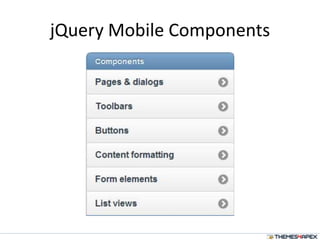
jQuery Mobile Components
13
http://jquerymobile.com
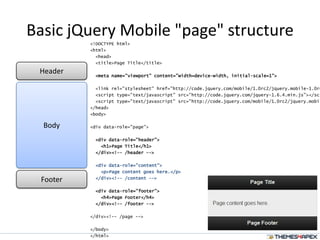
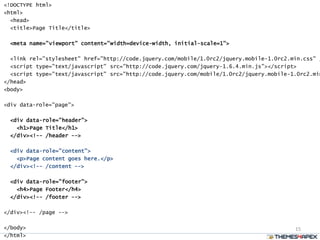
Basic jQuery Mobile "page" structure
<!DOCTYPE html>
<html>
<head>
<title>Page Title</title>
<meta name="viewport" content="width=device-width, initial-scale=1">
<link rel="stylesheet" href="http://code.jquery.com/mobile/1.0rc2/jquery.mobile-1.0rc
<script type="text/javascript" src="http://code.jquery.com/jquery-1.6.4.min.js"></scr
<script type="text/javascript" src="http://code.jquery.com/mobile/1.0rc2/jquery.mobil
</head>
<body>
<div data-role="page">
<div data-role="header">
<h1>Page Title</h1>
</div><!-- /header -->
<div data-role="content">
<p>Page content goes here.</p>
</div><!-- /content -->
<div data-role="footer">
<h4>Page Footer</h4>
</div><!-- /footer -->
</div><!-- /page -->
</body>
</html>
Header
Footer
Body
15
<!DOCTYPE html>
<html>
<head>
<title>Page Title</title>
<meta name="viewport" content="width=device-width, initial-scale=1">
<link rel="stylesheet" href="http://code.jquery.com/mobile/1.0rc2/jquery.mobile-1.0rc2.min.css" /
<script type="text/javascript" src="http://code.jquery.com/jquery-1.6.4.min.js"></script>
<script type="text/javascript" src="http://code.jquery.com/mobile/1.0rc2/jquery.mobile-1.0rc2.min
</head>
<body>
<div data-role="page">
<div data-role="header">
<h1>Page Title</h1>
</div><!-- /header -->
<div data-role="content">
<p>Page content goes here.</p>
</div><!-- /content -->
<div data-role="footer">
<h4>Page Footer</h4>
</div><!-- /footer -->
</div><!-- /page -->
</body>
</html>
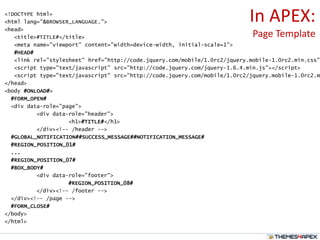
In APEX:
Page Template
<!DOCTYPE html>
<html lang="&BROWSER_LANGUAGE.">
<head>
<title>#TITLE#</title>
<meta name="viewport" content="width=device-width, initial-scale=1">
#HEAD#
<link rel="stylesheet" href="http://code.jquery.com/mobile/1.0rc2/jquery.mobile-1.0rc2.min.css"
<script type="text/javascript" src="http://code.jquery.com/jquery-1.6.4.min.js"></script>
<script type="text/javascript" src="http://code.jquery.com/mobile/1.0rc2/jquery.mobile-1.0rc2.m
</head>
<body #ONLOAD#>
#FORM_OPEN#
<div data-role="page">
<div data-role="header">
<h1>#TITLE#</h1>
</div><!-- /header -->
#GLOBAL_NOTIFICATION##SUCCESS_MESSAGE##NOTIFICATION_MESSAGE#
#REGION_POSITION_01#
...
#REGION_POSITION_07#
#BOX_BODY#
<div data-role="footer">
#REGION_POSITION_08#
</div><!-- /footer -->
</div><!-- /page -->
#FORM_CLOSE#
</body>
</html>
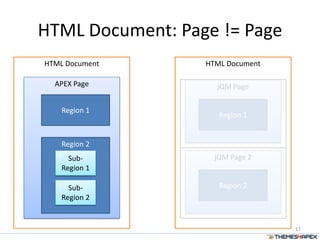
HTML Document
HTML Document: Page != Page
17
APEX Page
Region 1
Region 2
Sub-
Region 1
Sub-
Region 2
HTML Document
jQM Page
Region 1
jQM Page 2
Region 2
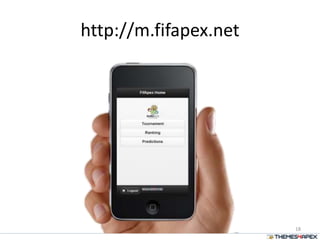
http://m.fifapex.net
18
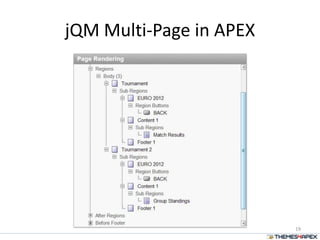
jQM Multi-Page in APEX
19
APEX jQM Templates
20
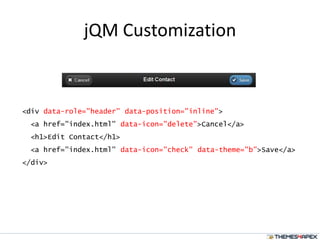
jQM Customization
<div data-role="header" data-position="inline">
<a href="index.html" data-icon="delete">Cancel</a>
<h1>Edit Contact</h1>
<a href="index.html" data-icon="check" data-theme="b">Save</a>
</div>
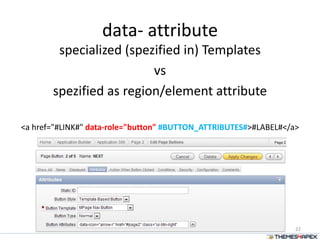
data- attribute
specialized (spezified in) Templates
vs
spezified as region/element attribute
<a href="#LINK#" data-role="button" #BUTTON_ATTRIBUTES#>#LABEL#</a>
22
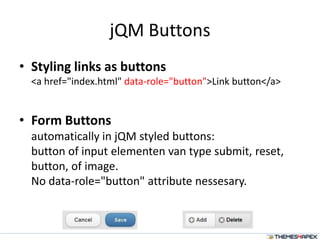
jQM Buttons
• Styling links as buttons
<a href="index.html" data-role="button">Link button</a>
• Form Buttons
automatically in jQM styled buttons:
button of input elementen van type submit, reset,
button, of image.
No data-role="button" attribute nessesary.
Links in jQuery Mobile
• Default link behavior: Ajax
– Automagically (normal link code: href=“...”, Hijax )
– handle page requests in a single-page model
• Linking without Ajax
– data-rel="external", data-ajax="false" of target
attrib.
• “Back” Button (data-rel="back")
– Back in history (ignoring href)
– data-direction="reverse"
24
jQM Lists
Basic List
<ul data-role="listview" data-theme="g">
<li><a href="acura.html">Acura</a></li>
<li><a href="audi.html">Audi</a></li>
<li><a href="bmw.html">BMW</a></li>
</ul>
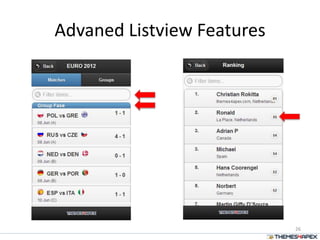
Advaned Listview Features
26
Advanced jQuery Mobile
Listview element possibilities in
Oracle Application Express 4.1
by applying basic SQL
and Analytic Function features
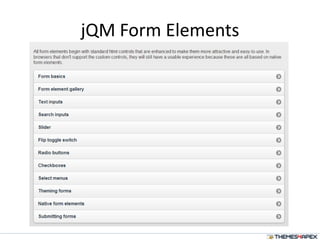
jQM Form Elements
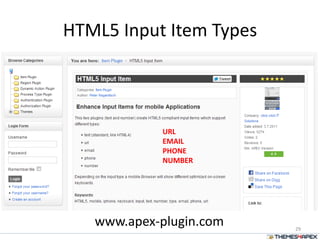
HTML5 Input Item Types
29
www.apex-plugin.com
URL
EMAIL
PHONE
NUMBER
Enable a little bit of Mobile Dev in APEX 4.1
30
jQM Support in 4.2
(may or may not be a feature in ...)
• HTML5 form input support (email, url, date, ...)
as sub-type
• Multiple UI Themes per applicatie
• data- attributes “declaratief”
• jQM List-View Support
32
Questions
33
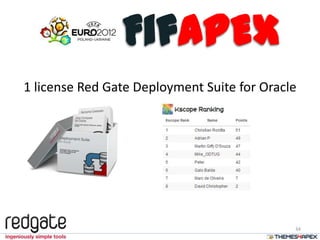
1 license Red Gate Deployment Suite for Oracle
34
FifAPEX
Contact
Blog: http://rokitta.blogspot.com
LinkedIn: http://nl.linkedin.com/in/rokit
Website: http://www.rokit.nl
themes4apex: http://www.themes4apex.nl
FifApex: http://m.fifapex.net
Twitter: @crokitta
Email: christian@rokitta.nl

Apex & jQuery Mobile

  • 1.
  • 3.
    About Me 17 years17 years 2 years 3 months
  • 4.
  • 5.
    Why • Why mobileweb application (vs native App)? – HTML  APEX – Costs: platform independent • Why jQuery Mobile? – jQuery Framework – Easy integration with APEX – Easy to learn – Easier in 4.2
  • 6.
  • 7.
    SQL; PL/SQL; APEX Templates (in 1min) <HTML/> {CSS} JavaScript(); Action PAGE #Substitution# Render Definition Reference #Position# <HTML/> JavaScript();
  • 8.
    jQuery Quick Intro •JavaScript Library • Simplify JavaScript programing • Easy to learn • Principle: select  action • Build-in: event and effect methods, AJAX 8
  • 9.
    jQuery Syntax Examples Basicsyntax is: $(selector).action() • Dollar Sign is jQuery call • Selector: "query" HTML elements • action() that is performed on the element Examples: • $("p.test").hide() – hide all paragraphs with class="test“ • $("#test").hide() – hide element with id="test" • $("p").css("background-color","yellow"); - CSS selector • $("[href!='#']") – all elements with href attribut not equal “#” • $("div#intro .head") – all elem. with class=“intro” inside DIV elem. with id = head 9
  • 10.
    • Everything relatedto webdevelopment – HTML(5), CSS(3), jQuery, XML, AJAX, JSON, Webse rvices, ... • Tutorials • Examples • References • "Try it yourself" 10
  • 11.
    “A unified userinterface system that works seamlessly across all popular mobile device platforms, built on the jQuery and jQuery UI foundation. Focused on a lightweight codebase built on progressive enhancement with a flexible, easily themeable design.”
  • 12.
  • 13.
  • 14.
    Basic jQuery Mobile"page" structure <!DOCTYPE html> <html> <head> <title>Page Title</title> <meta name="viewport" content="width=device-width, initial-scale=1"> <link rel="stylesheet" href="http://code.jquery.com/mobile/1.0rc2/jquery.mobile-1.0rc <script type="text/javascript" src="http://code.jquery.com/jquery-1.6.4.min.js"></scr <script type="text/javascript" src="http://code.jquery.com/mobile/1.0rc2/jquery.mobil </head> <body> <div data-role="page"> <div data-role="header"> <h1>Page Title</h1> </div><!-- /header --> <div data-role="content"> <p>Page content goes here.</p> </div><!-- /content --> <div data-role="footer"> <h4>Page Footer</h4> </div><!-- /footer --> </div><!-- /page --> </body> </html> Header Footer Body
  • 15.
    15 <!DOCTYPE html> <html> <head> <title>Page Title</title> <metaname="viewport" content="width=device-width, initial-scale=1"> <link rel="stylesheet" href="http://code.jquery.com/mobile/1.0rc2/jquery.mobile-1.0rc2.min.css" / <script type="text/javascript" src="http://code.jquery.com/jquery-1.6.4.min.js"></script> <script type="text/javascript" src="http://code.jquery.com/mobile/1.0rc2/jquery.mobile-1.0rc2.min </head> <body> <div data-role="page"> <div data-role="header"> <h1>Page Title</h1> </div><!-- /header --> <div data-role="content"> <p>Page content goes here.</p> </div><!-- /content --> <div data-role="footer"> <h4>Page Footer</h4> </div><!-- /footer --> </div><!-- /page --> </body> </html>
  • 16.
    In APEX: Page Template <!DOCTYPEhtml> <html lang="&BROWSER_LANGUAGE."> <head> <title>#TITLE#</title> <meta name="viewport" content="width=device-width, initial-scale=1"> #HEAD# <link rel="stylesheet" href="http://code.jquery.com/mobile/1.0rc2/jquery.mobile-1.0rc2.min.css" <script type="text/javascript" src="http://code.jquery.com/jquery-1.6.4.min.js"></script> <script type="text/javascript" src="http://code.jquery.com/mobile/1.0rc2/jquery.mobile-1.0rc2.m </head> <body #ONLOAD#> #FORM_OPEN# <div data-role="page"> <div data-role="header"> <h1>#TITLE#</h1> </div><!-- /header --> #GLOBAL_NOTIFICATION##SUCCESS_MESSAGE##NOTIFICATION_MESSAGE# #REGION_POSITION_01# ... #REGION_POSITION_07# #BOX_BODY# <div data-role="footer"> #REGION_POSITION_08# </div><!-- /footer --> </div><!-- /page --> #FORM_CLOSE# </body> </html>
  • 17.
    HTML Document HTML Document:Page != Page 17 APEX Page Region 1 Region 2 Sub- Region 1 Sub- Region 2 HTML Document jQM Page Region 1 jQM Page 2 Region 2
  • 18.
  • 19.
  • 20.
  • 21.
    jQM Customization <div data-role="header"data-position="inline"> <a href="index.html" data-icon="delete">Cancel</a> <h1>Edit Contact</h1> <a href="index.html" data-icon="check" data-theme="b">Save</a> </div>
  • 22.
    data- attribute specialized (spezifiedin) Templates vs spezified as region/element attribute <a href="#LINK#" data-role="button" #BUTTON_ATTRIBUTES#>#LABEL#</a> 22
  • 23.
    jQM Buttons • Stylinglinks as buttons <a href="index.html" data-role="button">Link button</a> • Form Buttons automatically in jQM styled buttons: button of input elementen van type submit, reset, button, of image. No data-role="button" attribute nessesary.
  • 24.
    Links in jQueryMobile • Default link behavior: Ajax – Automagically (normal link code: href=“...”, Hijax ) – handle page requests in a single-page model • Linking without Ajax – data-rel="external", data-ajax="false" of target attrib. • “Back” Button (data-rel="back") – Back in history (ignoring href) – data-direction="reverse" 24
  • 25.
    jQM Lists Basic List <uldata-role="listview" data-theme="g"> <li><a href="acura.html">Acura</a></li> <li><a href="audi.html">Audi</a></li> <li><a href="bmw.html">BMW</a></li> </ul>
  • 26.
  • 27.
    Advanced jQuery Mobile Listviewelement possibilities in Oracle Application Express 4.1 by applying basic SQL and Analytic Function features
  • 28.
  • 29.
    HTML5 Input ItemTypes 29 www.apex-plugin.com URL EMAIL PHONE NUMBER
  • 30.
    Enable a littlebit of Mobile Dev in APEX 4.1 30
  • 31.
    jQM Support in4.2 (may or may not be a feature in ...) • HTML5 form input support (email, url, date, ...) as sub-type • Multiple UI Themes per applicatie • data- attributes “declaratief” • jQM List-View Support 32
  • 32.
  • 33.
    1 license RedGate Deployment Suite for Oracle 34 FifAPEX
  • 34.
    Contact Blog: http://rokitta.blogspot.com LinkedIn: http://nl.linkedin.com/in/rokit Website:http://www.rokit.nl themes4apex: http://www.themes4apex.nl FifApex: http://m.fifapex.net Twitter: @crokitta Email: christian@rokitta.nl

Editor's Notes

  • #2 This is your opening slide.