You’re Doing It Wrong:
A New Developer’s Primer for SharePoint

                  – or –
 Everything that you know is useful,
  but is still, somehow, very, very
                 wrong.


                                          #spdev101
Wake up!
Me:

Technical Lead @ Planet Technologies
Developer
Father
Community Organizer
Virginia Tech Hokie
Penny Arcade Expo Enforcer
UNSC M12 FAV “Warthog” gunner
World Famous Jungle Cruise Skipper (ret.)

                                     #spdev101
Who are you?
SharePoint Development 101
• What do you get?
• What’s the same?
• What tools do I need?
• Key dev concepts you need to know
• 10 things every SharePoint developer should
  know
• How to get your code rejected by your
  SharePoint Architect(s)
• Resources

                                         #spdev101
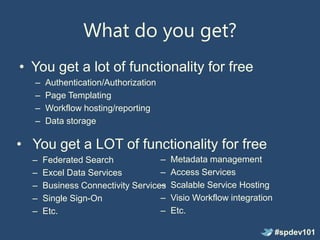
What do you get?
• You get a lot of functionality for free
   –   Authentication/Authorization
   –   Page Templating
   –   Workflow hosting/reporting
   –   Data storage

• You get a LOT of functionality for free
  –    Federated Search             –   Metadata management
  –    Excel Data Services          –   Access Services
  –                                 –
       Business Connectivity Services   Scalable Service Hosting
  –    Single Sign-On               –   Visio Workflow integration
  –    Etc.                         –   Etc.

                                                                     #spdev101
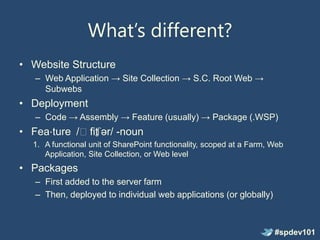
What’s different?
• Website Structure
   – Web Application → Site Collection → S.C. Root Web →
     Subwebs
• Deployment
   – Code → Assembly → Feature (usually) → Package (.WSP)
• Fea⋅ture /ˈfit ər/ -noun
               ʃ
  1. A functional unit of SharePoint functionality, scoped at a Farm, Web
     Application, Site Collection, or Web level
• Packages
   – First added to the server farm
   – Then, deployed to individual web applications (or globally)


                                                                      #spdev101
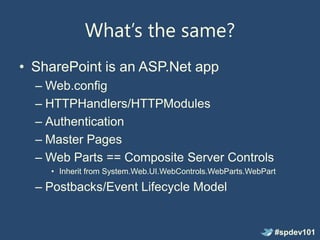
What’s the same?
• SharePoint is an ASP.Net app
  – Web.config
  – HTTPHandlers/HTTPModules
  – Authentication
  – Master Pages
  – Web Parts == Composite Server Controls
    • Inherit from System.Web.UI.WebControls.WebParts.WebPart

  – Postbacks/Event Lifecycle Model


                                                            #spdev101
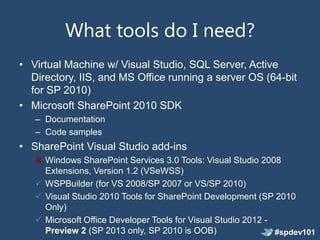
What tools do I need?
• Virtual Machine w/ Visual Studio, SQL Server, Active
  Directory, IIS, and MS Office running a server OS (64-bit
  for SP 2010)
• Microsoft SharePoint 2010 SDK
   – Documentation
   – Code samples
• SharePoint Visual Studio add-ins
     Windows SharePoint Services 3.0 Tools: Visual Studio 2008
     Extensions, Version 1.2 (VSeWSS)
    WSPBuilder (for VS 2008/SP 2007 or VS/SP 2010)
    Visual Studio 2010 Tools for SharePoint Development (SP 2010
     Only)
    Microsoft Office Developer Tools for Visual Studio 2012 -
     Preview 2 (SP 2013 only, SP 2010 is OOB)                  #spdev101
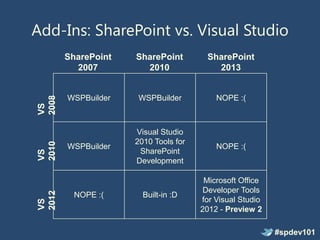
Add-Ins: SharePoint vs. Visual Studio
       SharePoint   SharePoint        SharePoint
         2007         2010              2013


       WSPBuilder   WSPBuilder           NOPE :(
2008
VS


                    Visual Studio
                    2010 Tools for
2010


       WSPBuilder                        NOPE :(
                     SharePoint
VS


                    Development

                                      Microsoft Office
                                      Developer Tools
2012


         NOPE :(      Built-in :D
                                     for Visual Studio
VS


                                     2012 - Preview 2

                                                         #spdev101
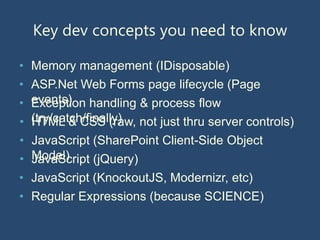
Key dev concepts you need to know

• Memory management (IDisposable)
• ASP.Net Web Forms page lifecycle (Page
• events) handling & process flow
  Exception
• (try/catch/finally) not just thru server controls)
  HTML & CSS (raw,
• JavaScript (SharePoint Client-Side Object
• Model)
  JavaScript (jQuery)
• JavaScript (KnockoutJS, Modernizr, etc)
• Regular Expressions (because SCIENCE)
10 things every developer should know
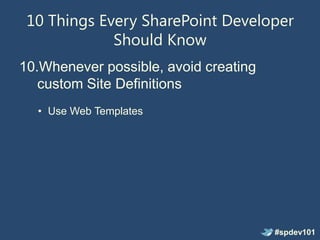
10 Things Every SharePoint Developer
             Should Know
10.Whenever possible, avoid creating
   custom Site Definitions
  • Use Web Templates


                                       #spdev101
10 Things Every SharePoint Developer
             Should Know
9. Solution packages are NOT side-by-side,
   versioned deployments


                                      #spdev101
10 Things Every SharePoint Developer
             Should Know
8. Web.config changes should be made in
   code, not by hand
  • SPWebConfigModification


                                     #spdev101
10 Things Every SharePoint Developer
             Should Know
7. Sandbox limitations are not enforced at
   compile time.


                 You need:
  • Visual Studio 2010 SharePoint Power
                    Tools
    • Office365 Sandbox FxCop Rules

                                        #spdev101
10 Things Every SharePoint Developer
             Should Know
6. Out of the box master & layout pages
   should never be modified


                                          #spdev101
10 Things Every SharePoint Developer
             Should Know
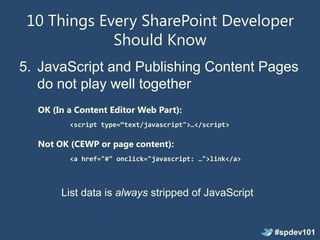
5. JavaScript and Publishing Content Pages
   do not play well together
  OK (In a Content Editor Web Part):
         <script type=“text/javascript">…</script>

  Not OK (CEWP or page content):
         <a href="#" onclick="javascript: …">link</a>


       List data is always stripped of JavaScript


                                                        #spdev101
10 Things Every SharePoint Developer
             Should Know
4. Yes, you can have ASP.Net “yellow
   screen of death” callstacks on errors
   In your web.config file:

   1. Set mode to “off” in the customErrors element
   2. Set debug to “true” in the compilation element
   3. Set CallStack to “true” in the SafeMode element

   In code!
   • SPWebConfigModification


                                                        #spdev101
10 Things Every SharePoint Developer
             Should Know
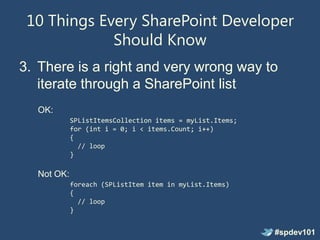
3. There is a right and very wrong way to
   iterate through a SharePoint list
  OK:
            SPListItemsCollection items = myList.Items;
            for (int i = 0; i < items.Count; i++)
            {
              // loop
            }

  Not OK:
            foreach (SPListItem item in myList.Items)
            {
              // loop
            }


                                                          #spdev101
10 Things Every SharePoint Developer
             Should Know
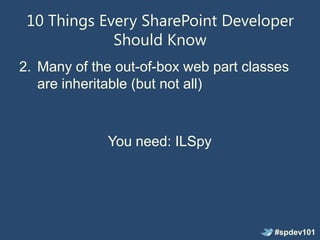
2. Many of the out-of-box web part classes
   are inheritable (but not all)


             You need: ILSpy


                                       #spdev101
10 Things Every SharePoint Developer
             Should Know
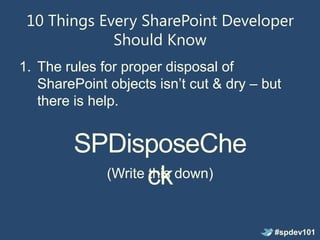
1. The rules for proper disposal of
   SharePoint objects isn’t cut & dry – but
   there is help.


        SPDisposeChe
          (Write ck down)
                 this


                                         #spdev101
How to get your code rejected by your
      SharePoint Architecture Group
• Don’t dispose of your SPSite and SPWeb
  (and related) objects properly
  – The SPDisposeCheck utility is invaluable for
    this
• Use
  SPSecurity.RunWithElevatedPrivileges
  when unnecessary or just plain badly
• Log errors to whatever’s handy at the time
• Make changes to the web.config file
  without consideration for others       #spdev101
Resources
• SPDisposeCheck Utility
  – http://code.msdn.microsoft.com/SPDisposeCheck
• StackOverflow/SharePointOverflow
  – http://stackoverflow.com
  – http://sharepointoverflow.com
• Twitter (#SPHelp)
• Your local SharePoint User Group


                                                #spdev101
Demo!
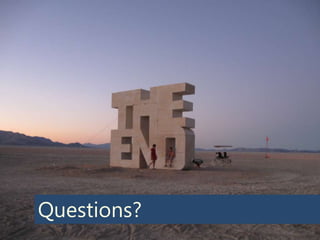
Questions?
One more thing…
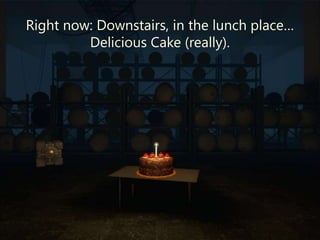
Right now: Downstairs, in the lunch place…
         Delicious Cake (really).
Thanks for coming!
• Don’t forget your evaluations

• You can find me at:
   • Blog: http://greghurlman.com
   • Twitter: @ghurlman
   • Email: greg@greghurlman.com
   • Princeton Area SharePoint User Group
   • SharePoint Saturday New York & New
     Jersey
   • Manticore Theatre @ PAX East

                                            #spdev101
Photo Credits
•   http://www.flickr.com/photos/matthewebel/4542976737/
•   http://www.flickr.com/photos/photojonny/2268845904/
•   http://www.flickr.com/photos/damaradeaella/2822846819/
•   http://www.flickr.com/photos/yourdon/3890013824/
•   http://www.flickr.com/photos/tommarker/474596167/


                                                             #spdev101

SharePoint Development 101

  • 1.
    You’re Doing ItWrong: A New Developer’s Primer for SharePoint – or – Everything that you know is useful, but is still, somehow, very, very wrong. #spdev101
  • 2.
  • 4.
    Me: Technical Lead @Planet Technologies Developer Father Community Organizer Virginia Tech Hokie Penny Arcade Expo Enforcer UNSC M12 FAV “Warthog” gunner World Famous Jungle Cruise Skipper (ret.) #spdev101
  • 5.
  • 6.
    SharePoint Development 101 •What do you get? • What’s the same? • What tools do I need? • Key dev concepts you need to know • 10 things every SharePoint developer should know • How to get your code rejected by your SharePoint Architect(s) • Resources #spdev101
  • 7.
    What do youget? • You get a lot of functionality for free – Authentication/Authorization – Page Templating – Workflow hosting/reporting – Data storage • You get a LOT of functionality for free – Federated Search – Metadata management – Excel Data Services – Access Services – – Business Connectivity Services Scalable Service Hosting – Single Sign-On – Visio Workflow integration – Etc. – Etc. #spdev101
  • 8.
    What’s different? • WebsiteStructure – Web Application → Site Collection → S.C. Root Web → Subwebs • Deployment – Code → Assembly → Feature (usually) → Package (.WSP) • Fea⋅ture /ˈfit ər/ -noun ʃ 1. A functional unit of SharePoint functionality, scoped at a Farm, Web Application, Site Collection, or Web level • Packages – First added to the server farm – Then, deployed to individual web applications (or globally) #spdev101
  • 9.
    What’s the same? •SharePoint is an ASP.Net app – Web.config – HTTPHandlers/HTTPModules – Authentication – Master Pages – Web Parts == Composite Server Controls • Inherit from System.Web.UI.WebControls.WebParts.WebPart – Postbacks/Event Lifecycle Model #spdev101
  • 10.
    What tools doI need? • Virtual Machine w/ Visual Studio, SQL Server, Active Directory, IIS, and MS Office running a server OS (64-bit for SP 2010) • Microsoft SharePoint 2010 SDK – Documentation – Code samples • SharePoint Visual Studio add-ins Windows SharePoint Services 3.0 Tools: Visual Studio 2008 Extensions, Version 1.2 (VSeWSS)  WSPBuilder (for VS 2008/SP 2007 or VS/SP 2010)  Visual Studio 2010 Tools for SharePoint Development (SP 2010 Only)  Microsoft Office Developer Tools for Visual Studio 2012 - Preview 2 (SP 2013 only, SP 2010 is OOB) #spdev101
  • 11.
    Add-Ins: SharePoint vs.Visual Studio SharePoint SharePoint SharePoint 2007 2010 2013 WSPBuilder WSPBuilder NOPE :( 2008 VS Visual Studio 2010 Tools for 2010 WSPBuilder NOPE :( SharePoint VS Development Microsoft Office Developer Tools 2012 NOPE :( Built-in :D for Visual Studio VS 2012 - Preview 2 #spdev101
  • 12.
    Key dev conceptsyou need to know • Memory management (IDisposable) • ASP.Net Web Forms page lifecycle (Page • events) handling & process flow Exception • (try/catch/finally) not just thru server controls) HTML & CSS (raw, • JavaScript (SharePoint Client-Side Object • Model) JavaScript (jQuery) • JavaScript (KnockoutJS, Modernizr, etc) • Regular Expressions (because SCIENCE)
  • 13.
    10 things everydeveloper should know
  • 14.
    10 Things EverySharePoint Developer Should Know 10.Whenever possible, avoid creating custom Site Definitions • Use Web Templates #spdev101
  • 15.
    10 Things EverySharePoint Developer Should Know 9. Solution packages are NOT side-by-side, versioned deployments #spdev101
  • 16.
    10 Things EverySharePoint Developer Should Know 8. Web.config changes should be made in code, not by hand • SPWebConfigModification #spdev101
  • 17.
    10 Things EverySharePoint Developer Should Know 7. Sandbox limitations are not enforced at compile time. You need: • Visual Studio 2010 SharePoint Power Tools • Office365 Sandbox FxCop Rules #spdev101
  • 18.
    10 Things EverySharePoint Developer Should Know 6. Out of the box master & layout pages should never be modified #spdev101
  • 19.
    10 Things EverySharePoint Developer Should Know 5. JavaScript and Publishing Content Pages do not play well together OK (In a Content Editor Web Part): <script type=“text/javascript">…</script> Not OK (CEWP or page content): <a href="#" onclick="javascript: …">link</a> List data is always stripped of JavaScript #spdev101
  • 20.
    10 Things EverySharePoint Developer Should Know 4. Yes, you can have ASP.Net “yellow screen of death” callstacks on errors In your web.config file: 1. Set mode to “off” in the customErrors element 2. Set debug to “true” in the compilation element 3. Set CallStack to “true” in the SafeMode element In code! • SPWebConfigModification #spdev101
  • 21.
    10 Things EverySharePoint Developer Should Know 3. There is a right and very wrong way to iterate through a SharePoint list OK: SPListItemsCollection items = myList.Items; for (int i = 0; i < items.Count; i++) { // loop } Not OK: foreach (SPListItem item in myList.Items) { // loop } #spdev101
  • 22.
    10 Things EverySharePoint Developer Should Know 2. Many of the out-of-box web part classes are inheritable (but not all) You need: ILSpy #spdev101
  • 23.
    10 Things EverySharePoint Developer Should Know 1. The rules for proper disposal of SharePoint objects isn’t cut & dry – but there is help. SPDisposeChe (Write ck down) this #spdev101
  • 24.
    How to getyour code rejected by your SharePoint Architecture Group • Don’t dispose of your SPSite and SPWeb (and related) objects properly – The SPDisposeCheck utility is invaluable for this • Use SPSecurity.RunWithElevatedPrivileges when unnecessary or just plain badly • Log errors to whatever’s handy at the time • Make changes to the web.config file without consideration for others #spdev101
  • 25.
    Resources • SPDisposeCheck Utility – http://code.msdn.microsoft.com/SPDisposeCheck • StackOverflow/SharePointOverflow – http://stackoverflow.com – http://sharepointoverflow.com • Twitter (#SPHelp) • Your local SharePoint User Group #spdev101
  • 26.
  • 27.
  • 28.
  • 29.
    Right now: Downstairs,in the lunch place… Delicious Cake (really).
  • 30.
    Thanks for coming! •Don’t forget your evaluations • You can find me at: • Blog: http://greghurlman.com • Twitter: @ghurlman • Email: greg@greghurlman.com • Princeton Area SharePoint User Group • SharePoint Saturday New York & New Jersey • Manticore Theatre @ PAX East #spdev101
  • 31.
    Photo Credits • http://www.flickr.com/photos/matthewebel/4542976737/ • http://www.flickr.com/photos/photojonny/2268845904/ • http://www.flickr.com/photos/damaradeaella/2822846819/ • http://www.flickr.com/photos/yourdon/3890013824/ • http://www.flickr.com/photos/tommarker/474596167/ #spdev101