Spring Surf & Web Scripts!
Dave Draper – UI Engineer - @_DaveDraper!
History lesson...
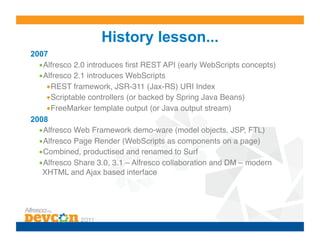
2007
  • Alfresco 2.0 introduces first REST API (early WebScripts concepts)!
  • Alfresco 2.1 introduces WebScripts!
     • REST framework, JSR-311 (Jax-RS) URI Index!
     • Scriptable controllers (or backed by Spring Java Beans)!
     • FreeMarker template output (or Java output stream)!
2008
  • Alfresco Web Framework demo-ware (model objects, JSP, FTL)!
  • Alfresco Page Render (WebScripts as components on a page)!
  • Combined, productised and renamed to Surf!
  • Alfresco Share 3.0, 3.1 – Alfresco collaboration and DM – modern
   XHTML and Ajax based interface!
History lesson (cont)...
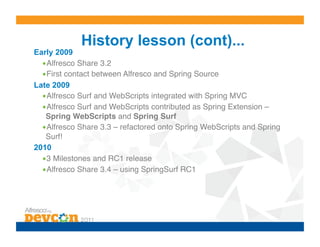
Early 2009
  • Alfresco Share 3.2!
  • First contact between Alfresco and Spring Source!
Late 2009
  • Alfresco Surf and WebScripts integrated with Spring MVC!
  • Alfresco Surf and WebScripts contributed as Spring Extension –
   Spring WebScripts and Spring Surf!
  • Alfresco Share 3.3 – refactored onto Spring WebScripts and Spring
   Surf!!
2010
  • 3 Milestones and RC1 release!
  • Alfresco Share 3.4 – using SpringSurf RC1!
History lesson (cont)...
2011
 • Alfresco Team!
 • New extensibility capabilities added!
 • Version 1.0.0 releases!
 • Alfresco Share 4.0!
What Are WebScripts?
• Services bound to a URIs which respond to
 HTTP methods such as GET, POST, PUT and
 DELETE!
• Support multiple formats (HTML, JSON & XML)!
• A framework for creating a REST API!
• Made up of descriptor, controller, properties,
 configuration and presentation files!
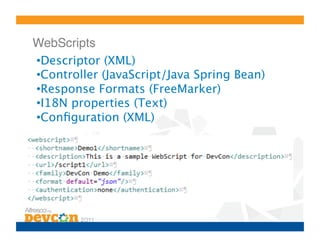
WebScripts!
• Descriptor (XML)
• Controller (JavaScript/Java Spring Bean)
• Response Formats (FreeMarker)
• I18N properties (Text)
• Configuration (XML)
Response Formats!
•  Available formats
 • HTML!
 • Text!
 • XML!
 • ATOM!
 • RSS!
 • JSON!
•  Set default in Descriptor (if more than one available)
•  Request by:
 • Extension (e.g. /script1.html, /script1.json, etc)!
 • Format request parameter (e.g. /script1?format=xml)!
Why Use Web Scripts?
•    Rapid development (no server restarts)
•    Separation of concerns (MVC)
•    Localization
•    Extensibility
•    FreeMarker and JavaScript
But What Is Spring Surf ?
•  An extension to Spring MVC
•  A set of controllers, resolvers and views
•  A way of breaking an HTML page into re-
   usable composite parts
•  An interface to the Alfresco Repository
•  The framework that underpins Alfresco
   Share
Example Spring Surf Objects
•    Pages
•    Template Instances
•    Regions
•    Chrome
•    Components
•    Sub-Components
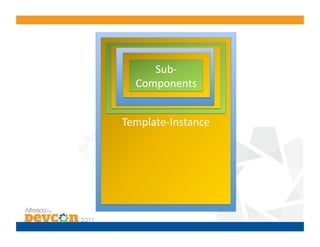
Sub-­‐
  Component	
  
   Component	
  
     Region	
  
 Region-­‐Chrome	
  
  Components	
  
    Chrome	


Template-­‐Instance	
  
      Page	
  
Mistakes were made…
•    Chrome
•    Scopes
•    No Component nesting
•    1-1 Region/Component binding
•    Spring Roo
•    Tools
•    Difficult to match output to source
…but there is lots of good stuff !
•     Themes
•     Model Object stores (file system, classpath, remote,
      etc)
•     Presets / object creation
•     URI templates
•     Remote connections
•     Authentication
•     Extensibility
•     Endlessly configurable
What can you do with it?
• Rapid web-tier view composition – Spring MVC
 View Resolver!
• FreeMarker, JSP, Groovy, PHP pages!
• WebScript, FTL, JSP, Groovy, PHP components!
• Simple JavaScript, Groovy controllers!
• Remote API – REST request/response
 processing!
• WebScripts – standalone REST API tier!
• Portlets!
What you SHOULD do with it?!

 • Customize Alfresco Share!
 • Use WebScripts and FreeMarker!
 • Use JavaScript controllers!
 • Use Endpoints to contact an Alfresco Repository
  in standalone applications!
SOME USEFUL INFORMATION!
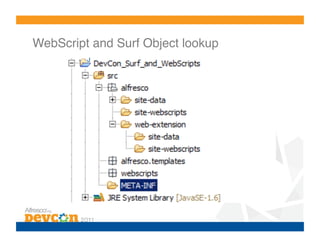
WebScript and Surf Object lookup!
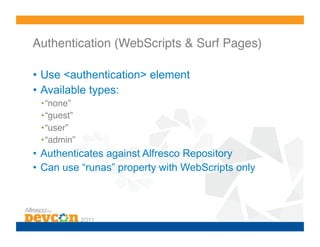
Authentication (WebScripts & Surf Pages)!

•  Use <authentication> element
•  Available types:
 • “none”!
 • “guest”!
 • “user”!
 • “admin”!
•  Authenticates against Alfresco Repository
•  Can use “runas” property with WebScripts only
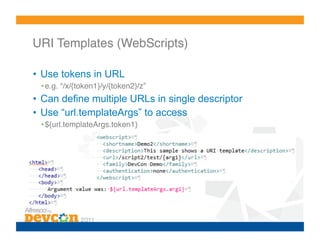
URI Templates (WebScripts)!

•  Use tokens in URL
 • e.g. “/x/{token1}/y/{token2}/z”!
•  Can define multiple URLs in single descriptor
•  Use “url.templateArgs” to access
 • ${url.templateArgs.token1}!
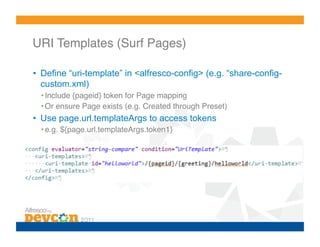
URI Templates (Surf Pages)!

•  Define “uri-template” in <alfresco-config> (e.g. “share-config-
   custom.xml)
  • Include {pageid} token for Page mapping!
  • Or ensure Page exists (e.g. Created through Preset)!
•  Use page.url.templateArgs to access tokens
  • e.g. ${page.url.templateArgs.token1}!
Surf Configuration!

•  Configuration object
   • Site home page!
   • Site theme!
•  Surf.xml
   • Object type implementations (e.g. AdvancedComponent)!
   • User factories!
   • Site configuration!
   • Chrome!
   • Page type (e.g. Login)!
   • Module Deployment!
•  Spring Application Context
   • Services (configuration loading, user factories, persistence, remote access, etc)!
   • Controllers (login controllers, etc)!
   • Interceptors!
Custom Home Page!

•  From:
   http://blogs.alfresco.com/wp/ddraper/2011/11/01/advanced-
   share-customization-part-1/
•  Optionally override <site-configuration> in “surf.xml”
  • Default is “slingshot.site.configuration”!
•  Set <root-page> property in Configuration object
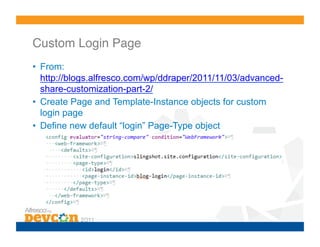
Custom Login Page!
•  From:
   http://blogs.alfresco.com/wp/ddraper/2011/11/03/advanced-
   share-customization-part-2/
•  Create Page and Template-Instance objects for custom
   login page
•  Define new default “login” Page-Type object
Regions and Components
•         Regions define location into which Components can
          be bound
•         Binding done through region-id, source-id and
          scope
     o      Forced 1-1 bindings
     o      Flawed concept for Component switching
•         Sub-Components introduced as a workaround
•         Components SHOULD use ComponentType or
          Processor but are “optimized” to use WebScript
          URL
Remote API
• Connectors & Authenticators!
• XML configure access to “endpoints” – obtained
 by id!
• Access HTTP methods through JavaScript
 controller or Ajax via proxy controller!
• Endpoints hide the URL stem from scripts –
 authentication encapsulated by connectors and
 authenticators!
• Connect to multiple REST sources; alfresco,
 wiki, search!
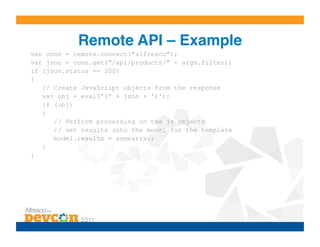
Remote API – Example!
var conn = remote.connect("alfresco");
var json = conn.get("/api/products/" + args.filter);
if (json.status == 200)
{
   // Create JavaScript objects from the response
   var obj = eval('(' + json + ')');
   if (obj)
   {
      // Perform processing on the js objects
      // set results into the model for the template
      model.results = somearray;
   }
}
Model Object Stores
• Persisters – read model object definitions from
 classpath, WEB-INF, JARs!
• Alfresco legacy locations and Spring “friendly”
 locations!
  o Migration of Alfresco Surf 3.2 apps!
  o New locations require less files, folders!
• Read and write to remote location and local file
 system!
• Example - Alfresco Share stores pages and
 components for dynamic dashboards in the
 repository!
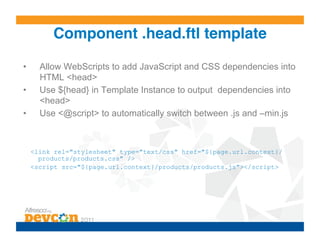
Component .head.ftl template!

•      Allow WebScripts to add JavaScript and CSS dependencies into
       HTML <head>
•      Use ${head} in Template Instance to output dependencies into
       <head>
•      Use <@script> to automatically switch between .js and –min.js


     <link rel="stylesheet" type="text/css" href="${page.url.context}/
       products/products.css" />
     <script src="${page.url.context}/products/products.js"></script>
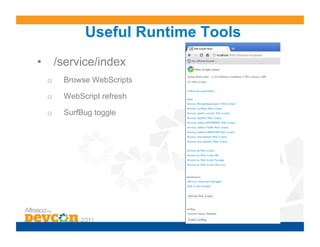
Useful Runtime Tools
•  /service/index
 o    Browse WebScripts

 o    WebScript refresh

 o    SurfBug toggle
Roadmap!

•  Forking from Spring back into Alfresco
•  Continued development (more extensibility
   features, performance improvements)
•  Continued use in Alfresco projects
•  More blogging, forums and documentation
How do I use it?!

 • You CAN SVN checkout, maven build:
  https://src.springframework.org/svn/se-surf/trunk!
 • You SHOULD use Alfresco Community JARs
  when available!
Learn More!

•  Blog posts:
 • http://blogs.alfresco.com/wp/ewinlof/!
 • http://blogs.alfresco.com/wp/kevinr/!
 • http://blogs.alfresco.com/wp/ddraper/!
 • http://mindthegab.com/!
•  Alfresco Forum: “Surf Development”
Questions?!
PLAT-7 Spring Web Scripts and Spring Surf

PLAT-7 Spring Web Scripts and Spring Surf

  • 1.
    Spring Surf &Web Scripts! Dave Draper – UI Engineer - @_DaveDraper!
  • 2.
    History lesson... 2007 • Alfresco 2.0 introduces first REST API (early WebScripts concepts)! • Alfresco 2.1 introduces WebScripts! • REST framework, JSR-311 (Jax-RS) URI Index! • Scriptable controllers (or backed by Spring Java Beans)! • FreeMarker template output (or Java output stream)! 2008 • Alfresco Web Framework demo-ware (model objects, JSP, FTL)! • Alfresco Page Render (WebScripts as components on a page)! • Combined, productised and renamed to Surf! • Alfresco Share 3.0, 3.1 – Alfresco collaboration and DM – modern XHTML and Ajax based interface!
  • 3.
    History lesson (cont)... Early2009 • Alfresco Share 3.2! • First contact between Alfresco and Spring Source! Late 2009 • Alfresco Surf and WebScripts integrated with Spring MVC! • Alfresco Surf and WebScripts contributed as Spring Extension – Spring WebScripts and Spring Surf! • Alfresco Share 3.3 – refactored onto Spring WebScripts and Spring Surf!! 2010 • 3 Milestones and RC1 release! • Alfresco Share 3.4 – using SpringSurf RC1!
  • 4.
    History lesson (cont)... 2011 • Alfresco Team! • New extensibility capabilities added! • Version 1.0.0 releases! • Alfresco Share 4.0!
  • 5.
    What Are WebScripts? • Servicesbound to a URIs which respond to HTTP methods such as GET, POST, PUT and DELETE! • Support multiple formats (HTML, JSON & XML)! • A framework for creating a REST API! • Made up of descriptor, controller, properties, configuration and presentation files!
  • 6.
    WebScripts! • Descriptor (XML) • Controller (JavaScript/JavaSpring Bean) • Response Formats (FreeMarker) • I18N properties (Text) • Configuration (XML)
  • 7.
    Response Formats! •  Availableformats • HTML! • Text! • XML! • ATOM! • RSS! • JSON! •  Set default in Descriptor (if more than one available) •  Request by: • Extension (e.g. /script1.html, /script1.json, etc)! • Format request parameter (e.g. /script1?format=xml)!
  • 8.
    Why Use WebScripts? •  Rapid development (no server restarts) •  Separation of concerns (MVC) •  Localization •  Extensibility •  FreeMarker and JavaScript
  • 9.
    But What IsSpring Surf ? •  An extension to Spring MVC •  A set of controllers, resolvers and views •  A way of breaking an HTML page into re- usable composite parts •  An interface to the Alfresco Repository •  The framework that underpins Alfresco Share
  • 10.
    Example Spring SurfObjects •  Pages •  Template Instances •  Regions •  Chrome •  Components •  Sub-Components
  • 11.
    Sub-­‐ Component   Component   Region   Region-­‐Chrome   Components   Chrome   Template-­‐Instance   Page  
  • 12.
    Mistakes were made… •  Chrome •  Scopes •  No Component nesting •  1-1 Region/Component binding •  Spring Roo •  Tools •  Difficult to match output to source
  • 13.
    …but there islots of good stuff ! •  Themes •  Model Object stores (file system, classpath, remote, etc) •  Presets / object creation •  URI templates •  Remote connections •  Authentication •  Extensibility •  Endlessly configurable
  • 14.
    What can youdo with it? • Rapid web-tier view composition – Spring MVC View Resolver! • FreeMarker, JSP, Groovy, PHP pages! • WebScript, FTL, JSP, Groovy, PHP components! • Simple JavaScript, Groovy controllers! • Remote API – REST request/response processing! • WebScripts – standalone REST API tier! • Portlets!
  • 15.
    What you SHOULDdo with it?! • Customize Alfresco Share! • Use WebScripts and FreeMarker! • Use JavaScript controllers! • Use Endpoints to contact an Alfresco Repository in standalone applications!
  • 16.
  • 17.
    WebScript and SurfObject lookup!
  • 18.
    Authentication (WebScripts &Surf Pages)! •  Use <authentication> element •  Available types: • “none”! • “guest”! • “user”! • “admin”! •  Authenticates against Alfresco Repository •  Can use “runas” property with WebScripts only
  • 19.
    URI Templates (WebScripts)! • Use tokens in URL • e.g. “/x/{token1}/y/{token2}/z”! •  Can define multiple URLs in single descriptor •  Use “url.templateArgs” to access • ${url.templateArgs.token1}!
  • 20.
    URI Templates (SurfPages)! •  Define “uri-template” in <alfresco-config> (e.g. “share-config- custom.xml) • Include {pageid} token for Page mapping! • Or ensure Page exists (e.g. Created through Preset)! •  Use page.url.templateArgs to access tokens • e.g. ${page.url.templateArgs.token1}!
  • 21.
    Surf Configuration! •  Configurationobject • Site home page! • Site theme! •  Surf.xml • Object type implementations (e.g. AdvancedComponent)! • User factories! • Site configuration! • Chrome! • Page type (e.g. Login)! • Module Deployment! •  Spring Application Context • Services (configuration loading, user factories, persistence, remote access, etc)! • Controllers (login controllers, etc)! • Interceptors!
  • 22.
    Custom Home Page! • From: http://blogs.alfresco.com/wp/ddraper/2011/11/01/advanced- share-customization-part-1/ •  Optionally override <site-configuration> in “surf.xml” • Default is “slingshot.site.configuration”! •  Set <root-page> property in Configuration object
  • 23.
    Custom Login Page! • From: http://blogs.alfresco.com/wp/ddraper/2011/11/03/advanced- share-customization-part-2/ •  Create Page and Template-Instance objects for custom login page •  Define new default “login” Page-Type object
  • 24.
    Regions and Components •  Regions define location into which Components can be bound •  Binding done through region-id, source-id and scope o  Forced 1-1 bindings o  Flawed concept for Component switching •  Sub-Components introduced as a workaround •  Components SHOULD use ComponentType or Processor but are “optimized” to use WebScript URL
  • 25.
    Remote API • Connectors &Authenticators! • XML configure access to “endpoints” – obtained by id! • Access HTTP methods through JavaScript controller or Ajax via proxy controller! • Endpoints hide the URL stem from scripts – authentication encapsulated by connectors and authenticators! • Connect to multiple REST sources; alfresco, wiki, search!
  • 26.
    Remote API –Example! var conn = remote.connect("alfresco"); var json = conn.get("/api/products/" + args.filter); if (json.status == 200) { // Create JavaScript objects from the response var obj = eval('(' + json + ')'); if (obj) { // Perform processing on the js objects // set results into the model for the template model.results = somearray; } }
  • 27.
    Model Object Stores • Persisters– read model object definitions from classpath, WEB-INF, JARs! • Alfresco legacy locations and Spring “friendly” locations! o Migration of Alfresco Surf 3.2 apps! o New locations require less files, folders! • Read and write to remote location and local file system! • Example - Alfresco Share stores pages and components for dynamic dashboards in the repository!
  • 28.
    Component .head.ftl template! •  Allow WebScripts to add JavaScript and CSS dependencies into HTML <head> •  Use ${head} in Template Instance to output dependencies into <head> •  Use <@script> to automatically switch between .js and –min.js <link rel="stylesheet" type="text/css" href="${page.url.context}/ products/products.css" /> <script src="${page.url.context}/products/products.js"></script>
  • 29.
    Useful Runtime Tools • /service/index o  Browse WebScripts o  WebScript refresh o  SurfBug toggle
  • 30.
    Roadmap! •  Forking fromSpring back into Alfresco •  Continued development (more extensibility features, performance improvements) •  Continued use in Alfresco projects •  More blogging, forums and documentation
  • 31.
    How do Iuse it?! • You CAN SVN checkout, maven build: https://src.springframework.org/svn/se-surf/trunk! • You SHOULD use Alfresco Community JARs when available!
  • 32.
    Learn More! •  Blogposts: • http://blogs.alfresco.com/wp/ewinlof/! • http://blogs.alfresco.com/wp/kevinr/! • http://blogs.alfresco.com/wp/ddraper/! • http://mindthegab.com/! •  Alfresco Forum: “Surf Development”
  • 33.