Power BI
Streaming Datasets
Greg McMurray
Utah Power BI Users Group, February 2017
Greg McMurray
 Currently Business Solutions Developer at WECC
 Manager at Aritus Computer Services for 18 years
 Aerospace, Branding & Marketing, Energy, Healthcare, Software
 Active in many local user groups
 Find me online
 @goyuix
 https://www.linkedin.com/in/goyuix
 https://stackoverflow.com/cv/goyuix - top 3% of users
Western Electricity Coordinating Council (WECC)
 Non-profit to ensure the reliability of the western interconnection
 Approved Regional Entity by Federal Energy Regulatory Commission
 Create, monitor & enforce reliability standards
 Publish various models and independent perspective
 Covers 14 western states, 2 Canadian provinces and Baja Mexico
Real-time Streaming Datasets
 Preview announced in August 2016
https://powerbi.microsoft.com/en-us/blog/real-time-in-no-time-with-power-bi/
 Released to general availability in January 2017
https://powerbi.microsoft.com/en-us/blog/announcing-general-availability-of-power-bi-
real-time-streaming-datasets/
 Datasets available through REST API or via PubNub
 Example: Azure Stream Analytics pushes to REST API
 Optionally store historic values
 Important Note: Dashboards auto-refresh. Reports require manual refresh.
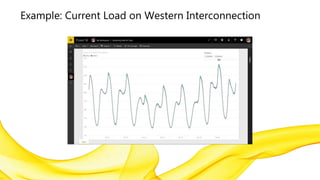
Example: Current Load on Western Interconnection
Creating a Streaming Dataset
 Login to powerbi.com portal
 Under your workspace create a new Streaming Dataset
 This is different than a regular dataset, and isn’t an option there
 We will create a sample for holding random numbers with the following schema
 Value : Number
 Min : Number
 Max : Number
 Stamp : DateTime
 Enable Historical Analysis
REST API: Adding Data via PowerShell
 Each Streaming Dataset has a unique Push URL
 Looks like https://api.powerbi.com/beta/guid/datasets/guid/rows
 Has an encoded access key parameter as well
 Base64 encoded, 64 bytes long
 Doesn’t appear to be a string representation of anything special – just bytes
 POST to this URL with a JSON string
 Needs to be an array of objects that represent each row
 Example: [ { “Value”:50 } ]
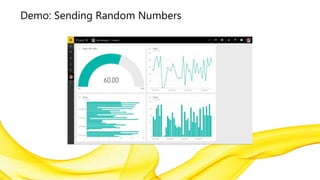
Demo: Sending Random Numbers
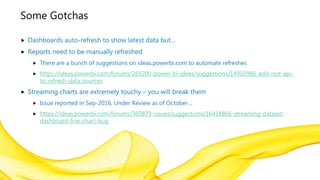
Some Gotchas
 Dashboards auto-refresh to show latest data but…
 Reports need to be manually refreshed
 There are a bunch of suggestions on ideas.powerbi.com to automate refreshes
 https://ideas.powerbi.com/forums/265200-power-bi-ideas/suggestions/14950986-add-rest-api-
to-refresh-data-sources
 Streaming charts are extremely touchy – you will break them
 Issue reported in Sep-2016, Under Review as of October…
 https://ideas.powerbi.com/forums/360879-issues/suggestions/16418866-streaming-dataset-
dashboard-line-chart-bug
Discussion: What are good examples?
 Some common examples:
 Bulk Electric System (of course!)
 Temperature
 Traffic Counters
 What do these all have in common?
 Similar values
 Steady values / changes
 They also can trigger actions: Change in generation, HVAC, traffic signals

Power BI Streaming Datasets

  • 1.
    Power BI Streaming Datasets GregMcMurray Utah Power BI Users Group, February 2017
  • 2.
    Greg McMurray  CurrentlyBusiness Solutions Developer at WECC  Manager at Aritus Computer Services for 18 years  Aerospace, Branding & Marketing, Energy, Healthcare, Software  Active in many local user groups  Find me online  @goyuix  https://www.linkedin.com/in/goyuix  https://stackoverflow.com/cv/goyuix - top 3% of users
  • 3.
    Western Electricity CoordinatingCouncil (WECC)  Non-profit to ensure the reliability of the western interconnection  Approved Regional Entity by Federal Energy Regulatory Commission  Create, monitor & enforce reliability standards  Publish various models and independent perspective  Covers 14 western states, 2 Canadian provinces and Baja Mexico
  • 4.
    Real-time Streaming Datasets Preview announced in August 2016 https://powerbi.microsoft.com/en-us/blog/real-time-in-no-time-with-power-bi/  Released to general availability in January 2017 https://powerbi.microsoft.com/en-us/blog/announcing-general-availability-of-power-bi- real-time-streaming-datasets/  Datasets available through REST API or via PubNub  Example: Azure Stream Analytics pushes to REST API  Optionally store historic values  Important Note: Dashboards auto-refresh. Reports require manual refresh.
  • 5.
    Example: Current Loadon Western Interconnection
  • 6.
    Creating a StreamingDataset  Login to powerbi.com portal  Under your workspace create a new Streaming Dataset  This is different than a regular dataset, and isn’t an option there  We will create a sample for holding random numbers with the following schema  Value : Number  Min : Number  Max : Number  Stamp : DateTime  Enable Historical Analysis
  • 7.
    REST API: AddingData via PowerShell  Each Streaming Dataset has a unique Push URL  Looks like https://api.powerbi.com/beta/guid/datasets/guid/rows  Has an encoded access key parameter as well  Base64 encoded, 64 bytes long  Doesn’t appear to be a string representation of anything special – just bytes  POST to this URL with a JSON string  Needs to be an array of objects that represent each row  Example: [ { “Value”:50 } ]
  • 8.
  • 9.
    Some Gotchas  Dashboardsauto-refresh to show latest data but…  Reports need to be manually refreshed  There are a bunch of suggestions on ideas.powerbi.com to automate refreshes  https://ideas.powerbi.com/forums/265200-power-bi-ideas/suggestions/14950986-add-rest-api- to-refresh-data-sources  Streaming charts are extremely touchy – you will break them  Issue reported in Sep-2016, Under Review as of October…  https://ideas.powerbi.com/forums/360879-issues/suggestions/16418866-streaming-dataset- dashboard-line-chart-bug
  • 10.
    Discussion: What aregood examples?  Some common examples:  Bulk Electric System (of course!)  Temperature  Traffic Counters  What do these all have in common?  Similar values  Steady values / changes  They also can trigger actions: Change in generation, HVAC, traffic signals