Introduction to
SQL Server Graph DB
Salt Lake City SQL Server User Group
Greg McMurray – November 2018
GREG MCMURRAY
• Experience in Aerospace, Branding & Marketing,
Energy, Healthcare, Software
• Currently Senior Software Engineer at WECC
• Co-Founder of Aritus Computer Services, L.L.C.
• President of SharePoint / Office 365
and Dynamics 365 User Groups
• Find me online:
- @goyuix
- https://www.linkedin.com/in/goyuix
- https://stackoverflow.com/cv/goyuix
( top 2% of users )
WECC
• OUR MISSION:
“To effectively and efficiently reduce risks to the reliability and security of
the Western Interconnection’s Bulk Power System”
• Approved Regional Entity by Federal Energy Regulatory Commission
• Creation, Monitoring, and Enforcement of Reliability Standards
• Develop datasets, reports, and tools in addition to reliability and
performance assessments, to provide independent perspective
• We cover 14 states, 2 provinces, and part of Baja Mexico
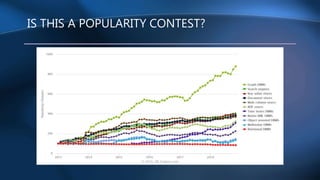
IS THIS A POPULARITY CONTEST?
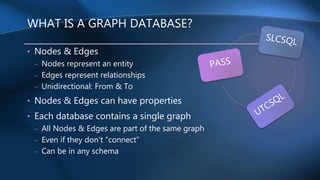
WHAT IS A GRAPH DATABASE?
• Nodes & Edges
– Nodes represent an entity
– Edges represent relationships
– Unidirectional: From & To
• Nodes & Edges can have properties
• Each database contains a single graph
– All Nodes & Edges are part of the same graph
– Even if they don’t “connect”
– Can be in any schema
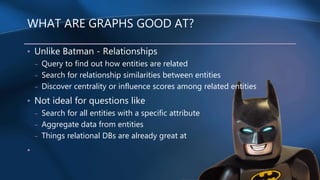
WHAT ARE GRAPHS GOOD AT?
• Unlike Batman - Relationships
– Query to find out how entities are related
– Search for relationship similarities between entities
– Discover centrality or influence scores among related entities
• Not ideal for questions like
– Search for all entities with a specific attribute
– Aggregate data from entities
– Things relational DBs are already great at
•
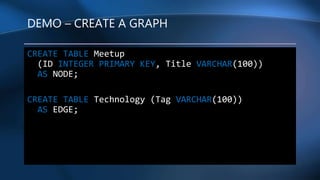
DEMO – CREATE A GRAPH
CREATE TABLE Meetup
(ID INTEGER PRIMARY KEY, Title VARCHAR(100))
AS NODE;
CREATE TABLE Technology (Tag VARCHAR(100))
AS EDGE;
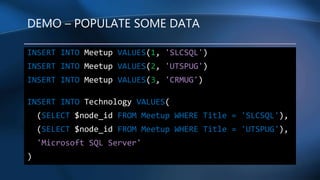
DEMO – POPULATE SOME DATA
INSERT INTO Meetup VALUES(1, 'SLCSQL')
INSERT INTO Meetup VALUES(2, 'UTSPUG')
INSERT INTO Meetup VALUES(3, 'CRMUG')
INSERT INTO Technology VALUES(
(SELECT $node_id FROM Meetup WHERE Title = 'SLCSQL'),
(SELECT $node_id FROM Meetup WHERE Title = 'UTSPUG'),
'Microsoft SQL Server'
)
ASCII ART
:MMMMH:
:XMMMM$M$RX
MMM$$MXM!$MX
XMMMMR$MMM!MMX
MMMRMM$$MMX!!MX XMM
<MMMMMMMRMMM!!MM> XMM!
XMMMMMMMMM!!!!!MXXHHMMMMMMXXMMM!!!~~!M?M~
XMMMM?~ !M8!!!!MMMMMMMMMM??~~~~~ <X! ~
'MMMM> MMX!:HMMM!~ ~ '! `!!HX.
'MMMMM :MMM!~~ ~ '~: ~ ~~ <~ ~ !MX:
~MMMMM:~!MMM~~ <~ ':!XXXHMMMMMHH!: ~MMMx ..:...
!MMMM! ~~~~ ~<XHMMMMMMM!?MMMMMMMMMM~ ~MMMMHMMMMMMMMMMH.
MMMM! ~ ~ XMMM~ `?MMMMMX ?MM?!!!XX!?MMMMM
XMM~~ ~~ <MM? !MMMM!: 'M!!!!!!!:!M!MMM!
XMM!~ `~ XMM `MMMM 'MX<XXHXHMMMMMMMM
'MMMX~ ~ XM~ ?MM!<~!X~?M~~~~~MMMM$M~
MMMMM! ~MMX~~~!~~! XMMMMM
:MM~!MM!~ MMM: <~ ~~~ MMMMM!
XM!: ~~ 'MM!:` ~XH! .MMMMM
MM~ .~ XX ~ ~!MMMMMMMMMMX
! 'MM~ ~~X !!~ '~~XMMMMMMMMM~
~!'MM!`~!X !~ ~:MM?~```
!: !MM!!!!! ~ `:XMX
!x ~MM`H!~ ' :HMMMM!
::MX ~ X! 'MM '~!??MMM>
!M!MM??~`?~ !~ M M .. ~~~!~:MX
~?!X. ! XXMM X`M !~!!~MM!
.XHMM !MMf < XM !~!!:MM
.!?~ ` ~~ MMM! :!!~!!MX
~MM 'HXMHMMMM
X:::. < !!!: ' !MMMMMM!:XH!
```~M> < .XMMMM@HXH<`. ~!~`~M??~`
XM~ ~.~ XM$R!~~!?MMMMHX. ~ :HMM.
<~ '< X! XM?~!~:~~~:~ !MMMX ~ :XMM~
!MXXXX !~ !MR:~~XMMMMMMX<~!MMM !X
`M X !M!~XMM8MMMMMMMX:!MMX ~?Hx:.
! ! XMM!8MM$M8$MM$MMM!MMX .XMMMMX
` :!!!: ! 'MMMMM$MMMMRMMMMMMMM~ :< !M
` !~ ! ~MMMMMMM$MMMMMMMMMf !!'! `%:
! .: !: ?MMMMMMMMMMMMMM~ M! ~ : ~:
<~!!H!~ : `?MMRMMMMMMM! !` 'M.
.!! ~` ~<. ~~?MMM"~ :' !! !.
` `! ~: >` : ~: `
< ~~~ :!!. ! `~
!! !X `!!X
!M MH `~
!MX. ~
!MMX: :!!
!MMMMMMMMM~
`~!""~
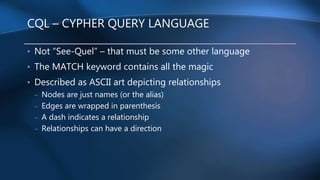
CQL – CYPHER QUERY LANGUAGE
• Not “See-Quel” – that must be some other language
• The MATCH keyword contains all the magic
• Described as ASCII art depicting relationships
– Nodes are just names (or the alias)
– Edges are wrapped in parenthesis
– A dash indicates a relationship
– Relationships can have a direction
CQL – GRAMMAR
MATCH (<graph_search_pattern>)
<graph_search_pattern> ::=
{<node_alias> {
{ <-( <edge_alias> )- }
| { -( <edge_alias> )-> }
<node_alias> } }
[ { AND } { ( <graph_search_pattern> ) } ]
[ ,...n ]
<node_alias> ::= node_table_name | node_alias
<edge_alias> ::= edge_table_name | edge_alias
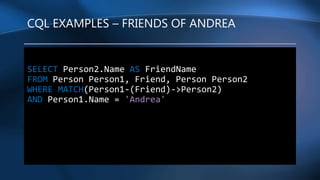
CQL EXAMPLES – FRIENDS OF ANDREA
SELECT Person2.Name AS FriendName
FROM Person Person1, Friend, Person Person2
WHERE MATCH(Person1-(Friend)->Person2)
AND Person1.Name = 'Andrea'
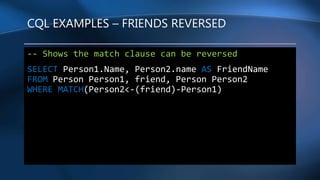
CQL EXAMPLES – FRIENDS REVERSED
-- Shows the match clause can be reversed
SELECT Person1.Name, Person2.name AS FriendName
FROM Person Person1, friend, Person Person2
WHERE MATCH(Person2<-(friend)-Person1)
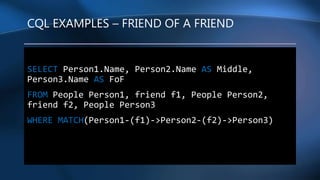
CQL EXAMPLES – FRIEND OF A FRIEND
SELECT Person1.Name, Person2.Name AS Middle,
Person3.Name AS FoF
FROM People Person1, friend f1, People Person2,
friend f2, People Person3
WHERE MATCH(Person1-(f1)->Person2-(f2)->Person3)
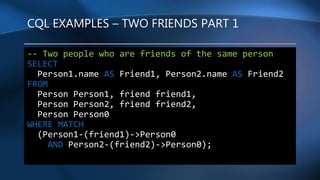
CQL EXAMPLES – TWO FRIENDS PART 1
-- Two people who are friends of the same person
SELECT
Person1.name AS Friend1, Person2.name AS Friend2
FROM
Person Person1, friend friend1,
Person Person2, friend friend2,
Person Person0
WHERE MATCH
(Person1-(friend1)->Person0
AND Person2-(friend2)->Person0);
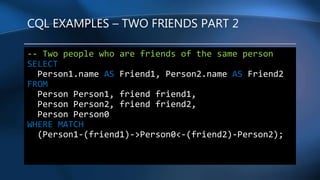
CQL EXAMPLES – TWO FRIENDS PART 2
-- Two people who are friends of the same person
SELECT
Person1.name AS Friend1, Person2.name AS Friend2
FROM
Person Person1, friend friend1,
Person Person2, friend friend2,
Person Person0
WHERE MATCH
(Person1-(friend1)->Person0<-(friend2)-Person2);
HIERARCHAL QUERIES
• Ah, our dear friend the CTE to the rescue right?
• Wait – aren’t these really a graph structure?
• Let’s look at a simple example
INTERESTING QUESTIONS
• Find restaurants that my friends like
– Near where I am currently
• How many coastal cities are rainy?
– How many rainy cities claim to have good fish and chips?
– Are all rainy cities with good fish and chips in Europe?
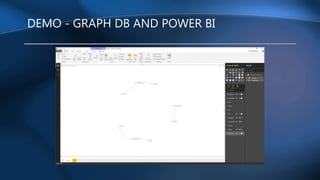
DEMO - GRAPH DB AND POWER BI
GRAPH DB LIMITATIONS
• Unidirectional graphs only
• No updating $from_id and $to_id edge columns
– Can update custom columns on edges
– Need to create new edge and delete old one
• No to Temp tables, Table types, table variables
– Cannot be node or edge tables
• No cross-database queries
– Remember? One graph per database
BLEEDING EDGE - WHAT IS NEW IN SQL 2019
• Edge Constraints – CONNECTION and TO keywords
Example:
CONSTRAINT MyName CONNECTION
(Customer TO Product)
• MATCH support in MERGE statements
• Use derived table or view aliases in graph match queries
WANT TO LEARN MORE?
• Works in Azure SQL and SQL 2017
– Requires correct engine and database level 140
• https://docs.microsoft.com/en-us/sql/relational-
databases/graphs/sql-graph-overview
• Lots of other articles and demos
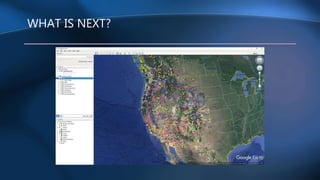
WHAT IS NEXT?
QUESTIONS AND ANSWERS
• First the call to action:
– How can you start using this today?
– Any blockers that would stop you?
– Share with others what you learned today
• I’d love to hear your success stories
– Please connect with me on social media
• What questions do you still have?

Introduction to SQL Server Graph DB

  • 1.
    Introduction to SQL ServerGraph DB Salt Lake City SQL Server User Group Greg McMurray – November 2018
  • 2.
    GREG MCMURRAY • Experiencein Aerospace, Branding & Marketing, Energy, Healthcare, Software • Currently Senior Software Engineer at WECC • Co-Founder of Aritus Computer Services, L.L.C. • President of SharePoint / Office 365 and Dynamics 365 User Groups • Find me online: - @goyuix - https://www.linkedin.com/in/goyuix - https://stackoverflow.com/cv/goyuix ( top 2% of users )
  • 3.
    WECC • OUR MISSION: “Toeffectively and efficiently reduce risks to the reliability and security of the Western Interconnection’s Bulk Power System” • Approved Regional Entity by Federal Energy Regulatory Commission • Creation, Monitoring, and Enforcement of Reliability Standards • Develop datasets, reports, and tools in addition to reliability and performance assessments, to provide independent perspective • We cover 14 states, 2 provinces, and part of Baja Mexico
  • 4.
    IS THIS APOPULARITY CONTEST?
  • 5.
    WHAT IS AGRAPH DATABASE? • Nodes & Edges – Nodes represent an entity – Edges represent relationships – Unidirectional: From & To • Nodes & Edges can have properties • Each database contains a single graph – All Nodes & Edges are part of the same graph – Even if they don’t “connect” – Can be in any schema
  • 6.
    WHAT ARE GRAPHSGOOD AT? • Unlike Batman - Relationships – Query to find out how entities are related – Search for relationship similarities between entities – Discover centrality or influence scores among related entities • Not ideal for questions like – Search for all entities with a specific attribute – Aggregate data from entities – Things relational DBs are already great at •
  • 7.
    DEMO – CREATEA GRAPH CREATE TABLE Meetup (ID INTEGER PRIMARY KEY, Title VARCHAR(100)) AS NODE; CREATE TABLE Technology (Tag VARCHAR(100)) AS EDGE;
  • 8.
    DEMO – POPULATESOME DATA INSERT INTO Meetup VALUES(1, 'SLCSQL') INSERT INTO Meetup VALUES(2, 'UTSPUG') INSERT INTO Meetup VALUES(3, 'CRMUG') INSERT INTO Technology VALUES( (SELECT $node_id FROM Meetup WHERE Title = 'SLCSQL'), (SELECT $node_id FROM Meetup WHERE Title = 'UTSPUG'), 'Microsoft SQL Server' )
  • 9.
    ASCII ART :MMMMH: :XMMMM$M$RX MMM$$MXM!$MX XMMMMR$MMM!MMX MMMRMM$$MMX!!MX XMM <MMMMMMMRMMM!!MM>XMM! XMMMMMMMMM!!!!!MXXHHMMMMMMXXMMM!!!~~!M?M~ XMMMM?~ !M8!!!!MMMMMMMMMM??~~~~~ <X! ~ 'MMMM> MMX!:HMMM!~ ~ '! `!!HX. 'MMMMM :MMM!~~ ~ '~: ~ ~~ <~ ~ !MX: ~MMMMM:~!MMM~~ <~ ':!XXXHMMMMMHH!: ~MMMx ..:... !MMMM! ~~~~ ~<XHMMMMMMM!?MMMMMMMMMM~ ~MMMMHMMMMMMMMMMH. MMMM! ~ ~ XMMM~ `?MMMMMX ?MM?!!!XX!?MMMMM XMM~~ ~~ <MM? !MMMM!: 'M!!!!!!!:!M!MMM! XMM!~ `~ XMM `MMMM 'MX<XXHXHMMMMMMMM 'MMMX~ ~ XM~ ?MM!<~!X~?M~~~~~MMMM$M~ MMMMM! ~MMX~~~!~~! XMMMMM :MM~!MM!~ MMM: <~ ~~~ MMMMM! XM!: ~~ 'MM!:` ~XH! .MMMMM MM~ .~ XX ~ ~!MMMMMMMMMMX ! 'MM~ ~~X !!~ '~~XMMMMMMMMM~ ~!'MM!`~!X !~ ~:MM?~``` !: !MM!!!!! ~ `:XMX !x ~MM`H!~ ' :HMMMM! ::MX ~ X! 'MM '~!??MMM> !M!MM??~`?~ !~ M M .. ~~~!~:MX ~?!X. ! XXMM X`M !~!!~MM! .XHMM !MMf < XM !~!!:MM .!?~ ` ~~ MMM! :!!~!!MX ~MM 'HXMHMMMM X:::. < !!!: ' !MMMMMM!:XH! ```~M> < .XMMMM@HXH<`. ~!~`~M??~` XM~ ~.~ XM$R!~~!?MMMMHX. ~ :HMM. <~ '< X! XM?~!~:~~~:~ !MMMX ~ :XMM~ !MXXXX !~ !MR:~~XMMMMMMX<~!MMM !X `M X !M!~XMM8MMMMMMMX:!MMX ~?Hx:. ! ! XMM!8MM$M8$MM$MMM!MMX .XMMMMX ` :!!!: ! 'MMMMM$MMMMRMMMMMMMM~ :< !M ` !~ ! ~MMMMMMM$MMMMMMMMMf !!'! `%: ! .: !: ?MMMMMMMMMMMMMM~ M! ~ : ~: <~!!H!~ : `?MMRMMMMMMM! !` 'M. .!! ~` ~<. ~~?MMM"~ :' !! !. ` `! ~: >` : ~: ` < ~~~ :!!. ! `~ !! !X `!!X !M MH `~ !MX. ~ !MMX: :!! !MMMMMMMMM~ `~!""~
  • 10.
    CQL – CYPHERQUERY LANGUAGE • Not “See-Quel” – that must be some other language • The MATCH keyword contains all the magic • Described as ASCII art depicting relationships – Nodes are just names (or the alias) – Edges are wrapped in parenthesis – A dash indicates a relationship – Relationships can have a direction
  • 11.
    CQL – GRAMMAR MATCH(<graph_search_pattern>) <graph_search_pattern> ::= {<node_alias> { { <-( <edge_alias> )- } | { -( <edge_alias> )-> } <node_alias> } } [ { AND } { ( <graph_search_pattern> ) } ] [ ,...n ] <node_alias> ::= node_table_name | node_alias <edge_alias> ::= edge_table_name | edge_alias
  • 12.
    CQL EXAMPLES –FRIENDS OF ANDREA SELECT Person2.Name AS FriendName FROM Person Person1, Friend, Person Person2 WHERE MATCH(Person1-(Friend)->Person2) AND Person1.Name = 'Andrea'
  • 13.
    CQL EXAMPLES –FRIENDS REVERSED -- Shows the match clause can be reversed SELECT Person1.Name, Person2.name AS FriendName FROM Person Person1, friend, Person Person2 WHERE MATCH(Person2<-(friend)-Person1)
  • 14.
    CQL EXAMPLES –FRIEND OF A FRIEND SELECT Person1.Name, Person2.Name AS Middle, Person3.Name AS FoF FROM People Person1, friend f1, People Person2, friend f2, People Person3 WHERE MATCH(Person1-(f1)->Person2-(f2)->Person3)
  • 15.
    CQL EXAMPLES –TWO FRIENDS PART 1 -- Two people who are friends of the same person SELECT Person1.name AS Friend1, Person2.name AS Friend2 FROM Person Person1, friend friend1, Person Person2, friend friend2, Person Person0 WHERE MATCH (Person1-(friend1)->Person0 AND Person2-(friend2)->Person0);
  • 16.
    CQL EXAMPLES –TWO FRIENDS PART 2 -- Two people who are friends of the same person SELECT Person1.name AS Friend1, Person2.name AS Friend2 FROM Person Person1, friend friend1, Person Person2, friend friend2, Person Person0 WHERE MATCH (Person1-(friend1)->Person0<-(friend2)-Person2);
  • 17.
    HIERARCHAL QUERIES • Ah,our dear friend the CTE to the rescue right? • Wait – aren’t these really a graph structure? • Let’s look at a simple example
  • 18.
    INTERESTING QUESTIONS • Findrestaurants that my friends like – Near where I am currently • How many coastal cities are rainy? – How many rainy cities claim to have good fish and chips? – Are all rainy cities with good fish and chips in Europe?
  • 19.
    DEMO - GRAPHDB AND POWER BI
  • 20.
    GRAPH DB LIMITATIONS •Unidirectional graphs only • No updating $from_id and $to_id edge columns – Can update custom columns on edges – Need to create new edge and delete old one • No to Temp tables, Table types, table variables – Cannot be node or edge tables • No cross-database queries – Remember? One graph per database
  • 21.
    BLEEDING EDGE -WHAT IS NEW IN SQL 2019 • Edge Constraints – CONNECTION and TO keywords Example: CONSTRAINT MyName CONNECTION (Customer TO Product) • MATCH support in MERGE statements • Use derived table or view aliases in graph match queries
  • 22.
    WANT TO LEARNMORE? • Works in Azure SQL and SQL 2017 – Requires correct engine and database level 140 • https://docs.microsoft.com/en-us/sql/relational- databases/graphs/sql-graph-overview • Lots of other articles and demos
  • 23.
  • 24.
    QUESTIONS AND ANSWERS •First the call to action: – How can you start using this today? – Any blockers that would stop you? – Share with others what you learned today • I’d love to hear your success stories – Please connect with me on social media • What questions do you still have?