
Power BI Premium for Fun & Profit
Ike Ellis, MVP
Crafting Bytes – Partner
Solliance – General Manager – Data & AI Practice
@ike_ellis
Ike Ellis
• /ikeellis
• @ike_ellis
• www.ikeellis.com
• Founder of San Diego Power BI
and PowerApps User Group
• MVP since 2011
• Author of Developing Azure
Solutions, Power BI MVP Book
• Speaker at PASS Summit, SQLBits,
DevIntersections, TechEd, Craft, MS
Azure & AI Conference
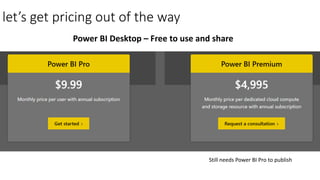
let’s get pricing out of the way
Power BI Desktop – Free to use and share
Still needs Power BI Pro to publish
power bi embedded pricing
All things being equal, when is power bi premium
worth it? Well, at the lowest tier
• 500 users who view reports in the portal. $10 per user per month
• 1,000 users who view: $5 per user per month
Examples
1) If an organization consists of 200 total users – 50 are engaging in self-service BI, while the remaining 150 are limited
to viewing BI content – Power BI Pro is the most economical deployment option for all users within the organization.
2) However, if the organization consists of 700 total users – 100 are engaging in self-service BI, while the remaining 600
occasionally view BI content – the most economical deployment option would be to license Power BI Pro for the 100
users engaging in self-service BI and to license Power BI Premium for the 600 seeking occasional access to view BI
content.
Dedicated capacity
• The Power BI Service (portal) is a
shared resource
• Makes performance inconsistent
• Cheaper
• Power BI Premium means having your
own Power BI server, with dedicated
compute (CPU) and memory
• Surprises me that people who spend
$250,000 in SQL Server licensing
complain about Power BI Premium
costs
Early use of new features
Microsoft has stated that features will be released in Power BI Premium
BEFORE Power BI Professional
This could be considered a huge competitive advantage
Power BI Report Server
• Power BI reports and SSRS reports
completely within an organization’s
firewall
• The same number of virtual cores
provisioned in the cloud can also be
deployed on-premises with Power BI
Report Server – without the need to split
the capacity
• providing the freedom to move to the
cloud at your pace.
Embedding
Power BI Premium allows for embedding Power BI into a custom application
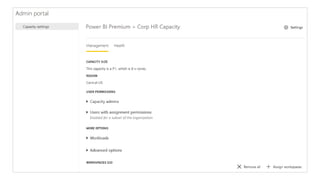
Admin settings
Admin demo
Multi geo region for data residency
You can choose which country and region your Power BI tenant resides in
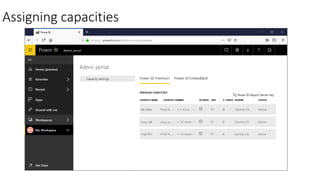
Assigning capacities
Monitoring
Large Datasets
• 10GB Datasets
• Refreshed up to 12GB
Incremental refresh advantages
• Refreshes are faster
• Refreshes are more reliable - It's no longer necessary to maintain long-
running connections to volatile source systems.
• Resource consumption is reduced - Less data to refresh reduces overall
consumption of memory and other resources.
Incremental Refresh
Options
Incremental Refresh Demo
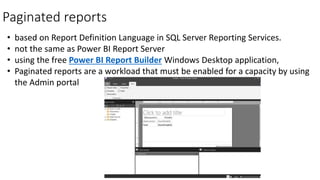
Paginated reports
• based on Report Definition Language in SQL Server Reporting Services.
• not the same as Power BI Report Server
• using the free Power BI Report Builder Windows Desktop application,
• Paginated reports are a workload that must be enabled for a capacity by using
the Admin portal
Paginated Report Demo
Power BI Embedded
• Pausable
• Billable hourly
• Cheaper
• No Power BI Service (Portal) for viewers
• Deploy to SharePoint or a custom portal written by
developers
• Similar to Premium
Power BI Embedded Demo
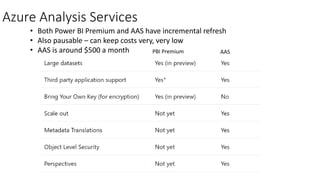
Azure Analysis Services
• Both Power BI Premium and AAS have incremental refresh
• Also pausable – can keep costs very, very low
• AAS is around $500 a month PBI Premium AAS
Azure Analysis Services Demo
Future Features
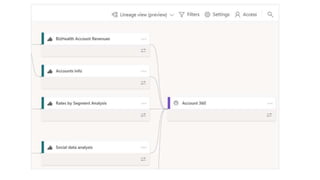
• Data Lineage
• Data Protection
• Datasets larger than 10GB in Premium
• Historical Capacity Metrics
• Power BI Home Customization
• XMLA Read/Write Endpoint (Read is GA, Write in
Preview)
• SSMS Connectivity
• Excel
• Profiler
Demo: Excel connectivity
• Ike Ellis
• Twitter: @ike_ellis
• YouTube: https://www.youtube.com/user/IkeEllisData
• Solliance – General Manager – Data & AI Practice
• Partner – Crafting Bytes
• Microsoft MVP
• www.solliance.net
• www.craftingbytes.com
• www.ikeellis.com
Contact Me!

Power bi premium

  • 1.
    Power BI Premiumfor Fun & Profit Ike Ellis, MVP Crafting Bytes – Partner Solliance – General Manager – Data & AI Practice @ike_ellis
  • 2.
    Ike Ellis • /ikeellis •@ike_ellis • www.ikeellis.com • Founder of San Diego Power BI and PowerApps User Group • MVP since 2011 • Author of Developing Azure Solutions, Power BI MVP Book • Speaker at PASS Summit, SQLBits, DevIntersections, TechEd, Craft, MS Azure & AI Conference
  • 3.
    let’s get pricingout of the way Power BI Desktop – Free to use and share Still needs Power BI Pro to publish
  • 4.
  • 5.
    All things beingequal, when is power bi premium worth it? Well, at the lowest tier • 500 users who view reports in the portal. $10 per user per month • 1,000 users who view: $5 per user per month
  • 6.
    Examples 1) If anorganization consists of 200 total users – 50 are engaging in self-service BI, while the remaining 150 are limited to viewing BI content – Power BI Pro is the most economical deployment option for all users within the organization. 2) However, if the organization consists of 700 total users – 100 are engaging in self-service BI, while the remaining 600 occasionally view BI content – the most economical deployment option would be to license Power BI Pro for the 100 users engaging in self-service BI and to license Power BI Premium for the 600 seeking occasional access to view BI content.
  • 7.
    Dedicated capacity • ThePower BI Service (portal) is a shared resource • Makes performance inconsistent • Cheaper • Power BI Premium means having your own Power BI server, with dedicated compute (CPU) and memory • Surprises me that people who spend $250,000 in SQL Server licensing complain about Power BI Premium costs
  • 8.
    Early use ofnew features Microsoft has stated that features will be released in Power BI Premium BEFORE Power BI Professional This could be considered a huge competitive advantage
  • 9.
    Power BI ReportServer • Power BI reports and SSRS reports completely within an organization’s firewall • The same number of virtual cores provisioned in the cloud can also be deployed on-premises with Power BI Report Server – without the need to split the capacity • providing the freedom to move to the cloud at your pace.
  • 10.
    Embedding Power BI Premiumallows for embedding Power BI into a custom application
  • 11.
  • 12.
  • 13.
    Multi geo regionfor data residency You can choose which country and region your Power BI tenant resides in
  • 14.
  • 16.
  • 17.
    Large Datasets • 10GBDatasets • Refreshed up to 12GB
  • 18.
    Incremental refresh advantages •Refreshes are faster • Refreshes are more reliable - It's no longer necessary to maintain long- running connections to volatile source systems. • Resource consumption is reduced - Less data to refresh reduces overall consumption of memory and other resources.
  • 19.
  • 20.
  • 21.
  • 22.
    Paginated reports • basedon Report Definition Language in SQL Server Reporting Services. • not the same as Power BI Report Server • using the free Power BI Report Builder Windows Desktop application, • Paginated reports are a workload that must be enabled for a capacity by using the Admin portal
  • 23.
  • 24.
    Power BI Embedded •Pausable • Billable hourly • Cheaper • No Power BI Service (Portal) for viewers • Deploy to SharePoint or a custom portal written by developers • Similar to Premium
  • 25.
  • 26.
    Azure Analysis Services •Both Power BI Premium and AAS have incremental refresh • Also pausable – can keep costs very, very low • AAS is around $500 a month PBI Premium AAS
  • 28.
  • 29.
    Future Features • DataLineage • Data Protection • Datasets larger than 10GB in Premium • Historical Capacity Metrics • Power BI Home Customization • XMLA Read/Write Endpoint (Read is GA, Write in Preview) • SSMS Connectivity • Excel • Profiler
  • 31.
  • 32.
    • Ike Ellis •Twitter: @ike_ellis • YouTube: https://www.youtube.com/user/IkeEllisData • Solliance – General Manager – Data & AI Practice • Partner – Crafting Bytes • Microsoft MVP • www.solliance.net • www.craftingbytes.com • www.ikeellis.com Contact Me!