

Ike Ellis, MVP, Partner – Crafting Bytes
Introdution to DAX
Do you know DAX?
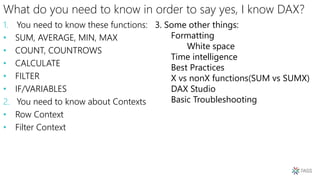
What do you need to know in order to say yes, I know DAX?
1. You need to know these functions:
• SUM, AVERAGE, MIN, MAX
• COUNT, COUNTROWS
• CALCULATE
• FILTER
• IF/VARIABLES
2. You need to know about Contexts
• Row Context
• Filter Context
3. Some other things:
Formatting
White space
Time intelligence
Best Practices
X vs nonX functions(SUM vs SUMX)
DAX Studio
Basic Troubleshooting
So how will you learn it?
Go in order:
• This slide deck
• This Power BI Project
Practice, practice, practice
And how will you use it?
Works in Excel
Works in Power BI
Works in SQL Server Analysis Services (SSAS) Tabular
This presentation
• Simplifies the complexity
• Might not tell you the whole truth for the sake of simplicity
• Is not seeking to be comprehensive, but instead, seeks to
allow you to answer the question, yes, I know DAX in that job
interview
Your first DAX expression
Check Power BI Desktop tab “Your First DAX Expression”
It’s a calculated column called Order Line Total
Meant to add a column to every record in a table.
Order Line Total = 'Sales OrderDetails'[qty] * 'Sales OrderDetails'[unitprice]
Your Second DAX Expression
Check Power BI Desktop tab “Your Second DAX Expression”
This is a measure
Meant to perform an aggregation that we can slice & dice
Total Sales = SUM('Sales OrderDetails'[Order Line Total])
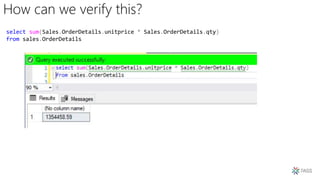
How can we verify this?
select sum(Sales.OrderDetails.unitprice * Sales.OrderDetails.qty)
from sales.OrderDetails
DAX Expression Breakdown
Name the
measure.
You’ll use
that in the
visualizatio
n
Built in DAX formula
Table name
Column nameEquals sign
separates
expression name
from expression
formula
Total Sales = SUM('Sales OrderDetails'[Ordera Line Total])
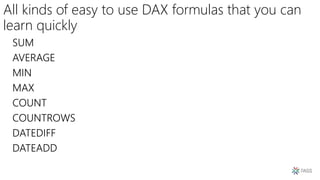
All kinds of easy to use DAX formulas that you can
learn quickly
SUM
AVERAGE
MIN
MAX
COUNT
COUNTROWS
DATEDIFF
DATEADD
Look at tab “Easy DAX built-in formulas”
Look under the Orders table for the calculated column “Days to
Ship”
Look under Orders table for measure “Average Days to Ship
Days To Ship = DATEDIFF('Sales Orders'[orderdate], 'Sales Orders'[shippeddate],DAY)
Play again: AVERAGE and DATEDIFF
Average Days to Ship = AVERAGE('Sales Orders'[Days To Ship])
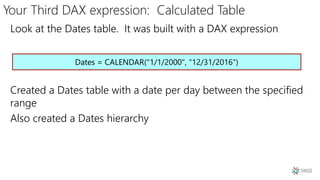
Your Third DAX expression: Calculated Table
Look at the Dates table. It was built with a DAX expression
Created a Dates table with a date per day between the specified
range
Also created a Dates hierarchy
Dates = CALENDAR("1/1/2000", "12/31/2016")
Now on to Contexts!
Two different contexts:
• Row Context
• Filter Context
Row Context
We already know how this works! We’ve been using it for all of
our calculated columns. Let’s revisit our first DAX Expression
Notice we expect a value per row in a table
This runs at import and gets stored
Might increase file size
Order Line Total = 'Sales OrderDetails'[qty] * 'Sales OrderDetails'[unitprice]
Filter Context
Easy to show with measures
Look at Filter Context 1, 2, 3 in the Power BI Desktop file
(PBIX).
Filter Context 1
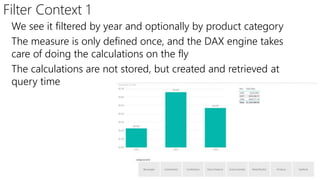
We see it filtered by year and optionally by product category
The measure is only defined once, and the DAX engine takes
care of doing the calculations on the fly
The calculations are not stored, but created and retrieved at
query time
Filter Context 2
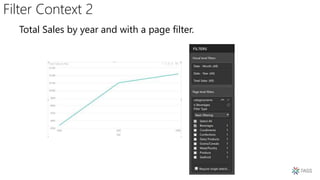
Total Sales by year and with a page filter.
Filter Context 3
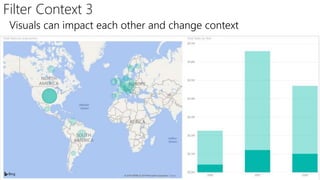
Visuals can impact each other and change context
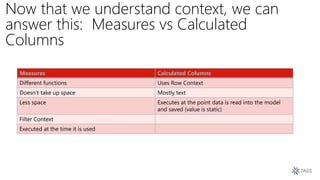
Now that we understand context, we can
answer this: Measures vs Calculated
Columns
Measures Calculated Columns
Different functions Uses Row Context
Doesn’t take up space Mostly text
Less space Executes at the point data is read into the model
and saved (value is static)
Filter Context
Executed at the time it is used
CALCULATE: Breaking out of the filter context
Beverages Total Sales = CALCULATE
(
SUM('Sales OrderDetails'[Order Line Total])
, 'Production Categories'[categoryname] = "Beverages"
)
AGGREGATION
FILTER
Look at the tab CALCULATE
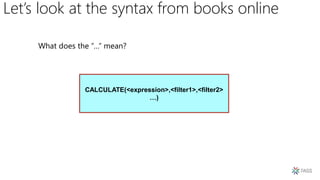
Let’s look at the syntax from books online
CALCULATE(<expression>,<filter1>,<filter2>
…)
CALCULATE: Over Multiple Tables
Total Sales - Beverages in USA = CALCULATE(
sum('Sales OrderDetails'[Order Line Total])
, 'Production Categories'[categoryname]= "Beverages"
, 'Sales Customers'[country] = "USA"
)
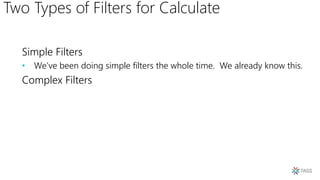
Two Types of Filters for Calculate
Simple Filters
• We’ve been doing simple filters the whole time. We already know this.
Complex Filters
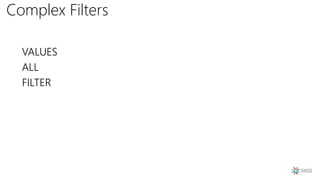
Complex Filters
VALUES
ALL
FILTER
VALUES
Returns a virtual table
• A table that’s created in memory, but has a relationship with existing tables
Returns a single column table that respects the current filter
context
Country Count = COUNTROWS(
VALUES('Sales Orders'[shipcountry]))
Country Count wo VALUES = COUNTROWS('Sales Orders’)
ALL
Removes all current filters from the filter context
Could be renamed “remove filter”
Country Count Total = COUNTROWS(All('Sales
Orders'[shipcountry]))
FILTER
Very powerful when combined with DAX
Allows you to filter your calculation anyway you want
Allows you to dream up very complicated code
Easier to read if you use multiple line DAX Statements
FILTER
Total Sales For Customers with Minimum Order Count v2 =
VAR MinimumOrderCount = 10
VAR CustomersWithMinimumOrders = FILTER('Sales Customers', [Number of Orders] >
MinimumOrderCount)
VAR CustomersWithMinimumOrdersResult = CALCULATE
(
sum('Sales OrderDetails'[Order Line Total])
, CustomersWithMinimumOrders
)
RETURN CustomersWithMinimumOrdersResult
FILTER – Use simple formulas too
Number of Orders = COUNT('Sales Orders'[orderid])
Number of US Orders = CALCULATE
(
COUNT
(
'Sales OrderDetails'[orderid]
)
, FILTER
(
'Sales Customers'
, 'Sales Customers'[country] = "USA"
)
)
FILTER – Create Table
Minimum Order Customers =
VAR MinimumOrderCount = 10
var CustomersWithMinimumOrders = FILTER('Sales Customers', [Number of Orders] > MinimumOrderCount)
RETURN CustomersWithMinimumOrders
VARIABLES & RETURN
Total Sales For Customers with Minimum Order Count =
VAR MinimumOrderCount = 5
VAR CustomersWithMinimumOrders = CALCULATE
(
sum('Sales OrderDetails'[Order Line Total])
, FILTER('Sales Customers', [Number of Orders] >
MinimumOrderCount)
)
RETURN CustomersWithMinimumOrders
Variables
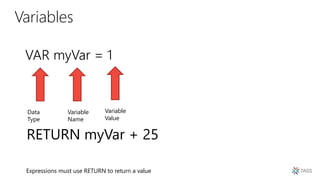
VAR myVar = 1
Data
Type
Variable
Name
Variable
Value
RETURN myVar + 25
Expressions must use RETURN to return a value
Debugging using variables
• RETURN does not need to return the last variable
• In a multi-step formula, you can return an earlier value to
troubleshoot it
• Simplifies the reading of code, rather than endlessly nesting
values over and over again.
Time Intelligence: TOTALYTD
YTD Total Sales = TOTALYTD
(
SUM('Sales OrderDetails'[Order Line Total])
, Dates[Date].[Date]
)
Time Intelligence: PREVIOUSMONTH
Total Sales Previous Month = CALCULATE
(
sum('Sales OrderDetails'[Order Line Total])
, PREVIOUSMONTH(Dates[Date])
)
X vs nonX functions(SUM vs SUMX)
• SUM is an aggregator function. It works like a measure,
calculating based on the current filter context.
• SUMX is an iterator function. It works row by row.
SUMX has awareness of rows in a table, hence can
reference the intersection of each row with any columns
in the table.
SUM vs SUMX Example
Total Sales SUMX = SUMX(
'Sales OrderDetails'
, 'Sales OrderDetails'[qty] * 'Sales OrderDetails'[unitprice
)
Total Sales = SUM('Sales OrderDetails'[Order Line Total])
Best Practice: Organize your code
Keep measures together
Organize them by type
• Simple aggregation
• Time variance
• Ratios and differences
• Business-specific calculations
Best Practice: Naming Columns & Measures
• Feel free to use spaces
• Avoid acronyms
• Make names terse, but descriptive
• Makes Q & A easier to use
• In formulas, reference table names for calculated columns and
do not reference table names for measures, so you’ll know the
difference
Best Practice: Formatting
• DAX Expressions can have lots of parentheses and square brackets
• Please use white space to control this
• Here’s an example of a properly formatted calculated column
• DaxFormatter.com
Days To Ship = DATEDIFF
(
'Sales Orders'[orderdate]
, 'Sales Orders'[shippeddate]
, DAY
)
Basic Troubleshooting
A lot of things can go wrong, but the problem is usually one of
two things:
1. A relationship is misconfigured or the data is wrong in the model.
2. Wrong data type
Data types
• Numeric
• String
• Bool
• DateTime
• If a function is expecting a numeric, but gets a string, it won’t
work. Clean up the model and watch it start working.
• Uses less space and memory with your model
• Improves performance
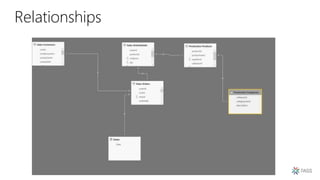
Relationships
Manipulating the relationships
Total Sales By Ship Year = CALCULATE
(
SUM('Sales OrderDetails'[Order Line Total])
, USERELATIONSHIP('Sales Orders'[shippeddate],
Dates[Date])
)
Only one active relationship at a time
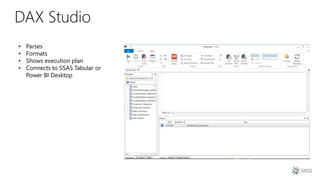
DAX Studio
• Parses
• Formats
• Shows execution plan
• Connects to SSAS Tabular or
Power BI Desktop
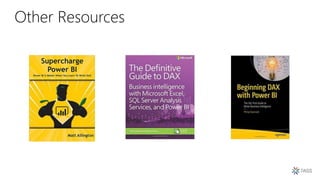
Other Resources
Contact Me!
• http://www.craftingbytes.com
• http://blog.ikeellis.com
• http://www.ikeellis.com
• YouTube
• http://www.youtube.com/user/IkeEllisData
• San Diego Tech Immersion Group
• http://www.sdtig.com
• Twitter: @ike_ellis
• 619.922.9801
• ike@craftingbytes.com
Free online webinar
events
Free 1-day local
training events
Local user groups
around the world
Online special
interest user groups
Business analytics
training
Get involved
Explore
everything
PASS has
to offer
Free Online Resources
Newsletters
PASS.org
Download the GuideBook App
and search: PASS Summit 2018
Follow the QR code link displayed on session
signage throughout the conference venue and
in the program guide
Session
evaluations
Your feedback is
important and valuable.
Go to passSummit.com
3 Ways to Access:
Submit by 5pm Friday, November 16th to win prizes.

Pass 2018 introduction to dax

  • 1.
    Ike Ellis, MVP,Partner – Crafting Bytes Introdution to DAX
  • 2.
  • 3.
    What do youneed to know in order to say yes, I know DAX? 1. You need to know these functions: • SUM, AVERAGE, MIN, MAX • COUNT, COUNTROWS • CALCULATE • FILTER • IF/VARIABLES 2. You need to know about Contexts • Row Context • Filter Context 3. Some other things: Formatting White space Time intelligence Best Practices X vs nonX functions(SUM vs SUMX) DAX Studio Basic Troubleshooting
  • 4.
    So how willyou learn it? Go in order: • This slide deck • This Power BI Project Practice, practice, practice
  • 5.
    And how willyou use it? Works in Excel Works in Power BI Works in SQL Server Analysis Services (SSAS) Tabular
  • 6.
    This presentation • Simplifiesthe complexity • Might not tell you the whole truth for the sake of simplicity • Is not seeking to be comprehensive, but instead, seeks to allow you to answer the question, yes, I know DAX in that job interview
  • 7.
    Your first DAXexpression Check Power BI Desktop tab “Your First DAX Expression” It’s a calculated column called Order Line Total Meant to add a column to every record in a table. Order Line Total = 'Sales OrderDetails'[qty] * 'Sales OrderDetails'[unitprice]
  • 8.
    Your Second DAXExpression Check Power BI Desktop tab “Your Second DAX Expression” This is a measure Meant to perform an aggregation that we can slice & dice Total Sales = SUM('Sales OrderDetails'[Order Line Total])
  • 9.
    How can weverify this? select sum(Sales.OrderDetails.unitprice * Sales.OrderDetails.qty) from sales.OrderDetails
  • 10.
    DAX Expression Breakdown Namethe measure. You’ll use that in the visualizatio n Built in DAX formula Table name Column nameEquals sign separates expression name from expression formula Total Sales = SUM('Sales OrderDetails'[Ordera Line Total])
  • 11.
    All kinds ofeasy to use DAX formulas that you can learn quickly SUM AVERAGE MIN MAX COUNT COUNTROWS DATEDIFF DATEADD
  • 12.
    Look at tab“Easy DAX built-in formulas” Look under the Orders table for the calculated column “Days to Ship” Look under Orders table for measure “Average Days to Ship Days To Ship = DATEDIFF('Sales Orders'[orderdate], 'Sales Orders'[shippeddate],DAY) Play again: AVERAGE and DATEDIFF Average Days to Ship = AVERAGE('Sales Orders'[Days To Ship])
  • 13.
    Your Third DAXexpression: Calculated Table Look at the Dates table. It was built with a DAX expression Created a Dates table with a date per day between the specified range Also created a Dates hierarchy Dates = CALENDAR("1/1/2000", "12/31/2016")
  • 14.
    Now on toContexts! Two different contexts: • Row Context • Filter Context
  • 15.
    Row Context We alreadyknow how this works! We’ve been using it for all of our calculated columns. Let’s revisit our first DAX Expression Notice we expect a value per row in a table This runs at import and gets stored Might increase file size Order Line Total = 'Sales OrderDetails'[qty] * 'Sales OrderDetails'[unitprice]
  • 16.
    Filter Context Easy toshow with measures Look at Filter Context 1, 2, 3 in the Power BI Desktop file (PBIX).
  • 17.
    Filter Context 1 Wesee it filtered by year and optionally by product category The measure is only defined once, and the DAX engine takes care of doing the calculations on the fly The calculations are not stored, but created and retrieved at query time
  • 18.
    Filter Context 2 TotalSales by year and with a page filter.
  • 19.
    Filter Context 3 Visualscan impact each other and change context
  • 20.
    Now that weunderstand context, we can answer this: Measures vs Calculated Columns Measures Calculated Columns Different functions Uses Row Context Doesn’t take up space Mostly text Less space Executes at the point data is read into the model and saved (value is static) Filter Context Executed at the time it is used
  • 21.
    CALCULATE: Breaking outof the filter context Beverages Total Sales = CALCULATE ( SUM('Sales OrderDetails'[Order Line Total]) , 'Production Categories'[categoryname] = "Beverages" ) AGGREGATION FILTER Look at the tab CALCULATE
  • 22.
    Let’s look atthe syntax from books online CALCULATE(<expression>,<filter1>,<filter2> …)
  • 23.
    CALCULATE: Over MultipleTables Total Sales - Beverages in USA = CALCULATE( sum('Sales OrderDetails'[Order Line Total]) , 'Production Categories'[categoryname]= "Beverages" , 'Sales Customers'[country] = "USA" )
  • 24.
    Two Types ofFilters for Calculate Simple Filters • We’ve been doing simple filters the whole time. We already know this. Complex Filters
  • 25.
  • 26.
    VALUES Returns a virtualtable • A table that’s created in memory, but has a relationship with existing tables Returns a single column table that respects the current filter context Country Count = COUNTROWS( VALUES('Sales Orders'[shipcountry])) Country Count wo VALUES = COUNTROWS('Sales Orders’)
  • 27.
    ALL Removes all currentfilters from the filter context Could be renamed “remove filter” Country Count Total = COUNTROWS(All('Sales Orders'[shipcountry]))
  • 28.
    FILTER Very powerful whencombined with DAX Allows you to filter your calculation anyway you want Allows you to dream up very complicated code Easier to read if you use multiple line DAX Statements
  • 29.
    FILTER Total Sales ForCustomers with Minimum Order Count v2 = VAR MinimumOrderCount = 10 VAR CustomersWithMinimumOrders = FILTER('Sales Customers', [Number of Orders] > MinimumOrderCount) VAR CustomersWithMinimumOrdersResult = CALCULATE ( sum('Sales OrderDetails'[Order Line Total]) , CustomersWithMinimumOrders ) RETURN CustomersWithMinimumOrdersResult
  • 30.
    FILTER – Usesimple formulas too Number of Orders = COUNT('Sales Orders'[orderid]) Number of US Orders = CALCULATE ( COUNT ( 'Sales OrderDetails'[orderid] ) , FILTER ( 'Sales Customers' , 'Sales Customers'[country] = "USA" ) )
  • 31.
    FILTER – CreateTable Minimum Order Customers = VAR MinimumOrderCount = 10 var CustomersWithMinimumOrders = FILTER('Sales Customers', [Number of Orders] > MinimumOrderCount) RETURN CustomersWithMinimumOrders
  • 32.
    VARIABLES & RETURN TotalSales For Customers with Minimum Order Count = VAR MinimumOrderCount = 5 VAR CustomersWithMinimumOrders = CALCULATE ( sum('Sales OrderDetails'[Order Line Total]) , FILTER('Sales Customers', [Number of Orders] > MinimumOrderCount) ) RETURN CustomersWithMinimumOrders
  • 33.
    Variables VAR myVar =1 Data Type Variable Name Variable Value RETURN myVar + 25 Expressions must use RETURN to return a value
  • 34.
    Debugging using variables •RETURN does not need to return the last variable • In a multi-step formula, you can return an earlier value to troubleshoot it • Simplifies the reading of code, rather than endlessly nesting values over and over again.
  • 35.
    Time Intelligence: TOTALYTD YTDTotal Sales = TOTALYTD ( SUM('Sales OrderDetails'[Order Line Total]) , Dates[Date].[Date] )
  • 36.
    Time Intelligence: PREVIOUSMONTH TotalSales Previous Month = CALCULATE ( sum('Sales OrderDetails'[Order Line Total]) , PREVIOUSMONTH(Dates[Date]) )
  • 37.
    X vs nonXfunctions(SUM vs SUMX) • SUM is an aggregator function. It works like a measure, calculating based on the current filter context. • SUMX is an iterator function. It works row by row. SUMX has awareness of rows in a table, hence can reference the intersection of each row with any columns in the table.
  • 38.
    SUM vs SUMXExample Total Sales SUMX = SUMX( 'Sales OrderDetails' , 'Sales OrderDetails'[qty] * 'Sales OrderDetails'[unitprice ) Total Sales = SUM('Sales OrderDetails'[Order Line Total])
  • 39.
    Best Practice: Organizeyour code Keep measures together Organize them by type • Simple aggregation • Time variance • Ratios and differences • Business-specific calculations
  • 40.
    Best Practice: NamingColumns & Measures • Feel free to use spaces • Avoid acronyms • Make names terse, but descriptive • Makes Q & A easier to use • In formulas, reference table names for calculated columns and do not reference table names for measures, so you’ll know the difference
  • 41.
    Best Practice: Formatting •DAX Expressions can have lots of parentheses and square brackets • Please use white space to control this • Here’s an example of a properly formatted calculated column • DaxFormatter.com Days To Ship = DATEDIFF ( 'Sales Orders'[orderdate] , 'Sales Orders'[shippeddate] , DAY )
  • 42.
    Basic Troubleshooting A lotof things can go wrong, but the problem is usually one of two things: 1. A relationship is misconfigured or the data is wrong in the model. 2. Wrong data type
  • 43.
    Data types • Numeric •String • Bool • DateTime • If a function is expecting a numeric, but gets a string, it won’t work. Clean up the model and watch it start working. • Uses less space and memory with your model • Improves performance
  • 44.
  • 45.
    Manipulating the relationships TotalSales By Ship Year = CALCULATE ( SUM('Sales OrderDetails'[Order Line Total]) , USERELATIONSHIP('Sales Orders'[shippeddate], Dates[Date]) ) Only one active relationship at a time
  • 46.
    DAX Studio • Parses •Formats • Shows execution plan • Connects to SSAS Tabular or Power BI Desktop
  • 47.
  • 48.
    Contact Me! • http://www.craftingbytes.com •http://blog.ikeellis.com • http://www.ikeellis.com • YouTube • http://www.youtube.com/user/IkeEllisData • San Diego Tech Immersion Group • http://www.sdtig.com • Twitter: @ike_ellis • 619.922.9801 • ike@craftingbytes.com
  • 49.
    Free online webinar events Free1-day local training events Local user groups around the world Online special interest user groups Business analytics training Get involved Explore everything PASS has to offer Free Online Resources Newsletters PASS.org
  • 50.
    Download the GuideBookApp and search: PASS Summit 2018 Follow the QR code link displayed on session signage throughout the conference venue and in the program guide Session evaluations Your feedback is important and valuable. Go to passSummit.com 3 Ways to Access: Submit by 5pm Friday, November 16th to win prizes.