SQLAlchemy Primer
(extra content)
for Kobe Python Meetup #13
2017/09/15 Kobe Japan
Yasushi Masuda PhD
( @whosaysni )
Tech team, Core IT grp. IT Dept.
MonotaRO Co., LTD.
Pythonista since 2001 (2.0~)
• elaphe (barcode library)
• oikami.py (老神.py)
• PyCon JP founder
Japanese Translation works
Agenda
Myths
Core concepts in SQLAlchemy


Engine basics (+hands-on)
ORM primer (+hans-on)
References
Online Document:

http://docs.sqlalchemy.org/
en/rel_1_1/


(Old) Japanese translation:

http://omake.accense.com/
static/doc-ja/sqlalchemy/
Preparation
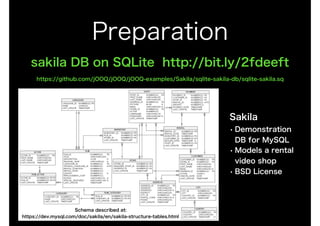
sakila DB on SQLite http://bit.ly/2fdeeft
https://github.com/jOOQ/jOOQ/jOOQ-examples/Sakila/sqlite-sakila-db/sqlite-sakila.sq
Sakila
• Demonstration
DB for MySQL
• Models a rental
video shop
• BSD License
Schema described at:
https://dev.mysql.com/doc/sakila/en/sakila-structure-tables.html
Myths
[WRONG!] It's just an ORM library

Not limited to. SQLAlchemy is a DB manipulation framework.
[WRONG!] SA is built on ORM

NO. Connection management and SQL expression framework are its core.

ORM is built on them.


[WRONG!] SA cannot handle raw SQL

Table definition is not required. Even textual SQL is available.
[WRONG!] SA automatically escapes value for you

SQLAlchemy relies value escaping on DB-API, while it escapes schema, table, column
names. SQLAlchemy generates parameterized query that helps DB-API level escaping.
[WRONG!] Only Python adept can handle SA

SQLAlchemy is EASY. You may need SQL and RDBMS experience. Let's see!
[AGREE] Documentation is somewhat difficult to understand

Agreed.
Core concepts
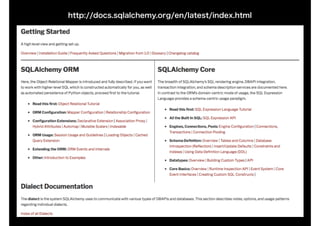
http://docs.sqlalchemy.org/en/latest/index.html
SQLAlchemy Core
Engine (connection)
Schema definition

SQL Expression
SQLAlchemy ORM
Mapper
Declarative Mapper
Session
Dialect
DB Backend-specific functionalities
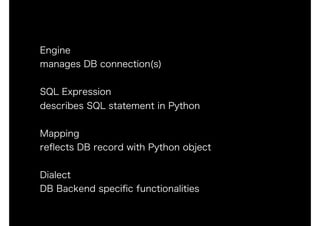
Engine
manages DB connection(s)
SQL Expression

describes SQL statement in Python
Mapping

reflects DB record with Python object
Dialect
DB Backend specific functionalities
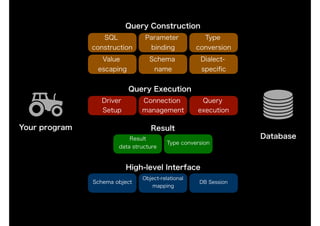
Database
Your program
SQL
construction
Query
execution
Type

conversion
Parameter
binding
Driver
Setup
Connection
management
Result
data structure
Value
escaping
Schema
name
Type conversion
Dialect-
specific
Query Construction
Query Execution
Result
Schema object
Object-relational
mapping
High-level Interface
DB Session
Engine
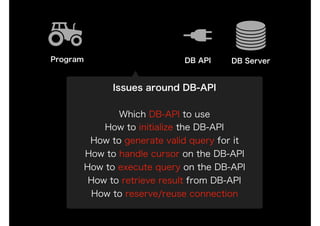
DB API DB ServerProgram
Issues around DB-API
Which DB-API to use
How to initialize the DB-API
How to generate valid query for it
How to handle cursor on the DB-API
How to execute query on the DB-API
How to retrieve result from DB-API
How to reserve/reuse connection
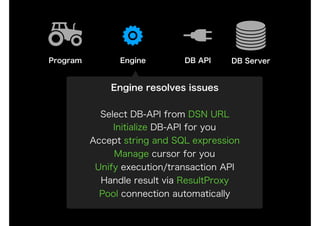
DB API DB ServerProgram
Engine resolves issues
Select DB-API from DSN URL
Initialize DB-API for you
Accept string and SQL expression
Manage cursor for you
Unify execution/transaction API
Handle result via ResultProxy
Pool connection automatically
Engine
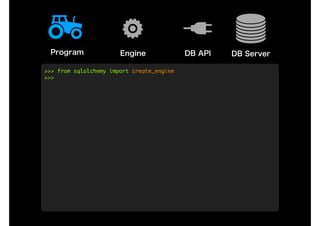
Engine DB API DB ServerProgram
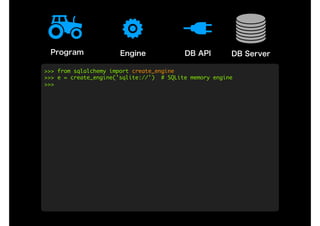
>>>	from	sqlalchemy	import	create_engine

>>>
Engine DB API DB ServerProgram
>>>	from	sqlalchemy	import	create_engine

>>>	e	=	create_engine('sqlite://')		#	SQLite	memory	engine

>>>
Engine DB API DB ServerProgram
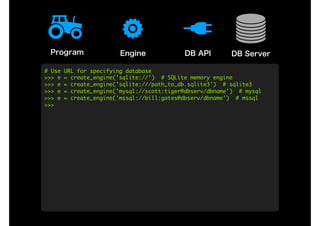
#	Use	URL	for	specifying	database

>>>	e	=	create_engine('sqlite://')		#	SQLite	memory	engine

>>>	e	=	create_engine('sqlite:///path_to_db.sqlite3')		#	sqlite3

>>>	e	=	create_engine('mysql://scott:tiger@dbserv/dbname')		#	mysql

>>>	e	=	create_engine('mssql://bill:gates@dbserv/dbname')		#	mssql

>>>
Engine DB API DB ServerProgram
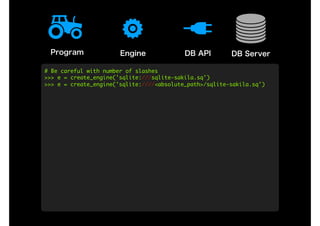
#	Be	careful	with	number	of	slashes

>>>	e	=	create_engine('sqlite:///sqlite-sakila.sq')

>>>	e	=	create_engine('sqlite:////<absolute_path>/sqlite-sakila.sq')
Engine DB API DB ServerProgram
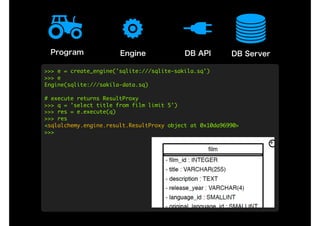
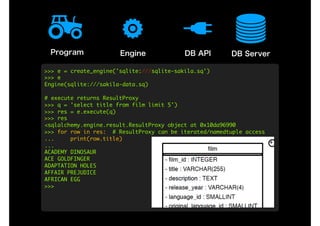
>>>	e	=	create_engine('sqlite:///sqlite-sakila.sq')

>>>	e

Engine(sqlite:///sakila-data.sq)

#	execute	returns	ResultProxy

>>>	q	=	'select	title	from	film	limit	5')

>>>	res	=	e.execute(q)

>>>	res

<sqlalchemy.engine.result.ResultProxy	object	at	0x10da96990>

>>>
Engine DB API DB ServerProgram
>>>	e	=	create_engine('sqlite:///sqlite-sakila.sq')

>>>	e

Engine(sqlite:///sakila-data.sq)

#	execute	returns	ResultProxy

>>>	q	=	'select	title	from	film	limit	5')

>>>	res	=	e.execute(q)

>>>	res

<sqlalchemy.engine.result.ResultProxy	object	at	0x10da96990

>>>	for	row	in	res:		#	ResultProxy	can	be	iterated/namedtuple	access

...					print(row.title)

...	

ACADEMY	DINOSAUR

ACE	GOLDFINGER

ADAPTATION	HOLES

AFFAIR	PREJUDICE

AFRICAN	EGG

>>>
Engine DB API DB ServerProgram
>>>	q	=	'select	film_id,	title	from	film	limit	10'

>>>	rows	=	list(e.execute(q))

>>>	rows[2][1]	#	each	row	is	accessible	like	as	tuple

'ADAPTATION	HOLES'

>>>	rows[4]['title']	#	row	can	be	accessible	like	as	dictionary

'AFRICAN	EGG'

>>>	res	=	e.execute(q)

>>>	for	fid,	title	in	res:	#	can	be	expanded	as	normal	tuple

...					print((fid,	title))

...	

(1,	'ACADEMY	DINOSAUR')

(2,	'ACE	GOLDFINGER')

(3,	'ADAPTATION	HOLES')

(4,	'AFFAIR	PREJUDICE')

(5,	'AFRICAN	EGG')

>>>	rows	=	list(e.execute(q))

>>>
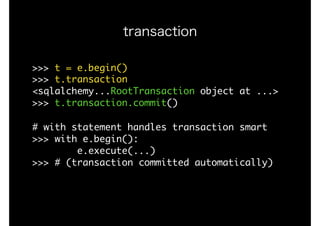
transaction
>>>	t	=	e.begin()

>>>	t.transaction

<sqlalchemy...RootTransaction	object	at	...>

>>>	t.transaction.commit()

#	with	statement	handles	transaction	smart

>>>	with	e.begin():

								e.execute(...)

>>>	#	(transaction	committed	automatically)

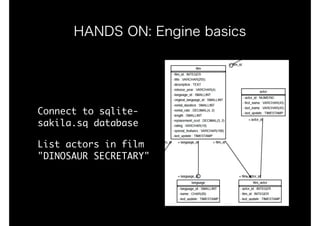
HANDS ON: Engine basics
Connect	to	sqlite-
sakila.sq	database

List	actors	in	film	
"DINOSAUR	SECRETARY"
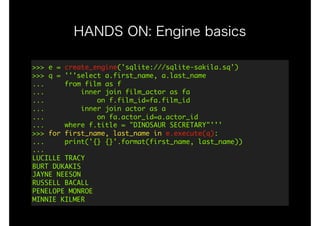
HANDS ON: Engine basics
>>>	e	=	create_engine('sqlite:///sqlite-sakila.sq')

>>>	q	=	'''select	a.first_name,	a.last_name

...					from	film	as	f	

...									inner	join	film_actor	as	fa	

...													on	f.film_id=fa.film_id	

...									inner	join	actor	as	a

...													on	fa.actor_id=a.actor_id	

...					where	f.title	=	"DINOSAUR	SECRETARY"'''

>>>	for	first_name,	last_name	in	e.execute(q):

...					print('{}	{}'.format(first_name,	last_name))

...

LUCILLE	TRACY

BURT	DUKAKIS

JAYNE	NEESON

RUSSELL	BACALL

PENELOPE	MONROE

MINNIE	KILMER
SQL expression
Remember: SQL is a language
SELECT	[	ALL	|	DISTINCT	[	ON	(	expression	[,	...]	)	]	]

				[	*	|	expression	[	[	AS	]	output_name	]	[,	...]	]

				[	FROM	from_item	[,	...]	]

				[	WHERE	condition	]

				[	GROUP	BY	grouping_element	[,	...]	]

				[	ORDER	BY	expression

								[	ASC	|	DESC	|	USING	operator	]

								[	NULLS	{	FIRST	|	LAST	}	]	[,	...]	]

				[	LIMIT	{	count	|	ALL	}	]
Remember: SQL is a language
SELECT	[	ALL	|	DISTINCT	[	ON	(	expression	[,	...]	)	]	]

				[	*	|	expression	[	[	AS	]	output_name	]	[,	...]	]

				[	FROM	from_item	[,	...]	]

				[	WHERE	condition	]

				[	GROUP	BY	grouping_element	[,	...]	]

				[	ORDER	BY	expression

								[	ASC	|	DESC	|	USING	operator	]

								[	NULLS	{	FIRST	|	LAST	}	]	[,	...]	]

				[	LIMIT	{	count	|	ALL	}	]
STATEMENT
Remember: SQL is a language
SELECT	[	ALL	|	DISTINCT	[	ON	(	expression	[,	...]	)	]	]

				[	*	|	expression	[	[	AS	]	output_name	]	[,	...]	]

				[	FROM	from_item	[,	...]	]

				[	WHERE	condition	]

				[	GROUP	BY	grouping_element	[,	...]	]

				[	ORDER	BY	expression

								[	ASC	|	DESC	|	USING	operator	]

								[	NULLS	{	FIRST	|	LAST	}	]	[,	...]	]

				[	LIMIT	{	count	|	ALL	}	]
CLAUSE
CLAUSE
CLAUSE
CLAUSE
CLAUSE
CLAUSE
Remember: SQL is a language
SELECT	[	ALL	|	DISTINCT	[	ON	(	expression	[,	...]	)	]	]

				[	*	|	expression	[	[	AS	]	output_name	]	[,	...]	]

				[	FROM	from_item	[,	...]	]

				[	WHERE	condition	]

				[	GROUP	BY	grouping_element	[,	...]	]

				[	ORDER	BY	expression

								[	ASC	|	DESC	|	USING	operator	]

								[	NULLS	{	FIRST	|	LAST	}	]	[,	...]	]

				[	LIMIT	{	count	|	ALL	}	]
parameter
parameter
expression
expression
expression
expression
expression
expression
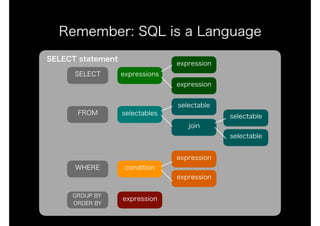
Remember: SQL is a Language
SELECT
FROM selectables
selectable
join
WHERE
selectable
selectable
GROUP BY
ORDER BY
expression
expression
condition
expression
expressions
expression
expression
SELECT statement
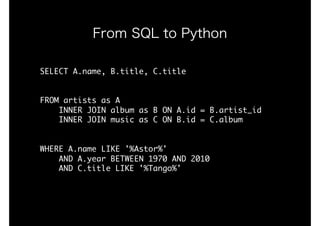
SELECT	A.name,	B.title,	C.title

FROM	artists	as	A

				INNER	JOIN	album	as	B	ON	A.id	=	B.artist_id

				INNER	JOIN	music	as	C	ON	B.id	=	C.album

WHERE	A.name	LIKE	'%Astor%'

				AND	A.year	BETWEEN	1970	AND	2010

				AND	C.title	LIKE	'%Tango%'
From SQL to Python
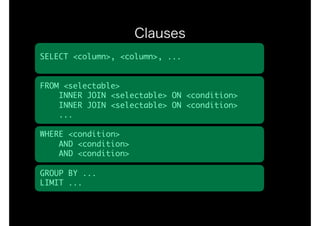
SELECT	<column>,	<column>,	...

FROM	<selectable>

				INNER	JOIN	<selectable>	ON	<condition>

				INNER	JOIN	<selectable>	ON	<condition>

				...

WHERE	<condition>

				AND	<condition>

				AND	<condition>

GROUP	BY	...

LIMIT	...
Clauses
SELECT	<[<column>,	<column>,	<column>]>

FROM	<join	(<selectable>,	<selectable>,	...)>

WHERE	<and	(<condition>,	<condition>,	...)>
Statement and subjects
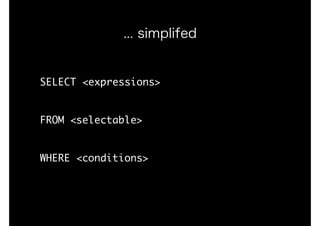
SELECT	<expressions>

FROM	<selectable>

WHERE	<conditions>
... simplifed
<select	statement>
..., finally
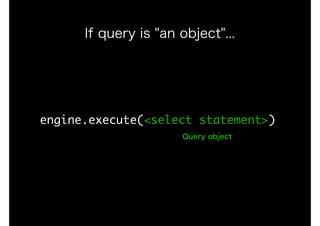
engine.execute(<select	statement>)
If query is "an object"...
Query object
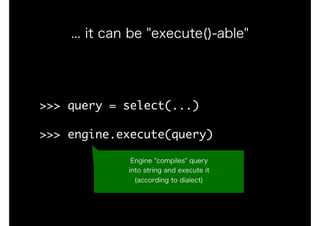
>>>	query	=	select(...)

>>>	engine.execute(query)
... it can be "execute()-able"
Engine "compiles" query
into string and execute it
(according to dialect)
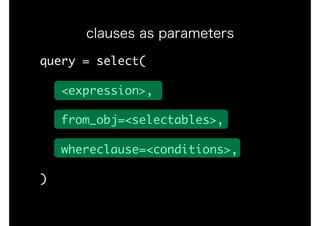
query	=	select(

			<expression>,

			from_obj=<selectables>,

			whereclause=<conditions>,

)
clauses as parameters
columns	=	[col1,	col2,	...]

fromobj	=	join(tbl1,	tbl2,	...)

where	=	and_(expr1,	expr2,	...)

query_expr	=	select(

			columns,	from_obj=fromobj,

			whereclause=where)
query with SQL expression
>>>	from	sqlalchemy.sql	import	select,	text

>>>	q	=	select([text('*')])

building sql statement with
basic sql expression
>>>	from	sqlalchemy.sql	import	select,	text

>>>	q	=	select([text('*')])

>>>	q

<sqlalchemy.....Select	at	...;	Select	object>

>>>	str(q)

'SELECT	*'

>>>	q	=	select([text('*')],

...					from_obj=text('foo'),	

...					whereclause=text('id=3'))

>>>	str(q)

'SELECT	*	nFROM	foo	nWHERE	id=3'
building sql statement with
basic sql expression
>>>	from	sqlalchemy.sql	import	select,	text

>>>	q	=	select([text('*')])

>>>	q

<sqlalchemy.....Select	at	...;	Select	object>

>>>	str(q)

'SELECT	*'

>>>	q	=	select([text('*')],

...					from_obj=text('foo'),	

...					whereclause=text('id=3'))

>>>	str(q)

'SELECT	*	nFROM	foo	nWHERE	id=3'
building sql statement with
basic sql expression
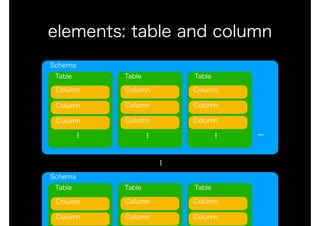
elements: table and column
Schema
Table Table Table
...
Column
Column
Column
...
Column
Column
Column
...
Column
Column
Column
...
Schema
Table Table Table
Column
Column
Column
Column
Column
Column
...
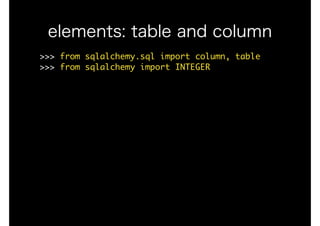
elements: table and column
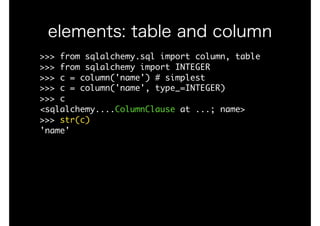
>>>	from	sqlalchemy.sql	import	column,	table

>>>	from	sqlalchemy	import	INTEGER
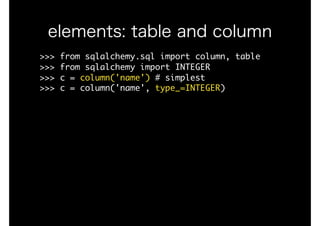
elements: table and column
>>>	from	sqlalchemy.sql	import	column,	table

>>>	from	sqlalchemy	import	INTEGER

>>>	c	=	column('name')	#	simplest

>>>	c	=	column('name',	type_=INTEGER)
elements: table and column
>>>	from	sqlalchemy.sql	import	column,	table

>>>	from	sqlalchemy	import	INTEGER

>>>	c	=	column('name')	#	simplest

>>>	c	=	column('name',	type_=INTEGER)

>>>	c

<sqlalchemy....ColumnClause	at	...;	name>

>>>	str(c)

'name'
elements: table and column
>>>	from	sqlalchemy.sql	import	column,	table

>>>	from	sqlalchemy	import	INTEGER

>>>	c	=	column('name')	#	simplest

>>>	c	=	column('name',	type_=INTEGER)

>>>	c

<sqlalchemy....ColumnClause	at	...;	name>

>>>	str(c)

'name'

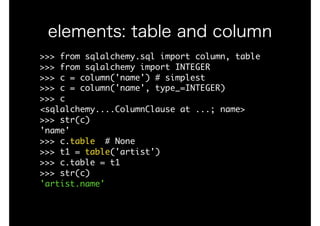
>>>	c.table		#	None

>>>	t1	=	table('artist')

>>>	c.table	=	t1

>>>	str(c)

'artist.name'
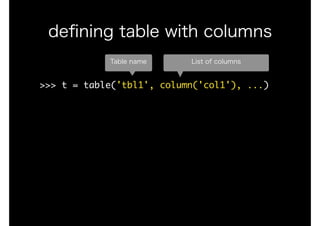
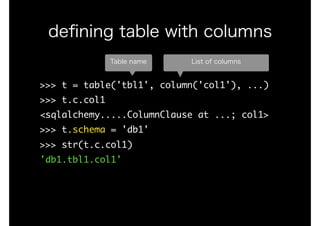
>>>	t	=	table('tbl1',	column('col1'),	...)

defining table with columns
Table name List of columns
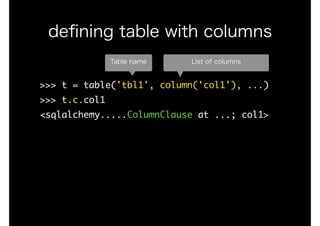
>>>	t	=	table('tbl1',	column('col1'),	...)

>>>	t.c.col1

<sqlalchemy.....ColumnClause	at	...;	col1>

defining table with columns
Table name List of columns
>>>	t	=	table('tbl1',	column('col1'),	...)

>>>	t.c.col1

<sqlalchemy.....ColumnClause	at	...;	col1>

>>>	t.schema	=	'db1'

>>>	str(t.c.col1)

'db1.tbl1.col1'

defining table with columns
Table name List of columns
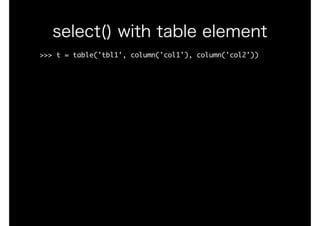
>>>	t	=	table('tbl1',	column('col1'),	column('col2'))

select() with table element
>>>	t	=	table('tbl1',	column('col1'),	column('col2'))

>>>	print(select([t]))

SELECT	tbl1.col1,	tbl1.col2

FROM	tbl1

select() with table element
>>>	t	=	table('tbl1',	column('col1'),	column('col2'))

>>>	print(select([t]))

SELECT	tbl1.col1,	tbl1.col2

FROM	tbl1

#	column	labeling

>>>	print(select([t.c.col1.label('col_alias1')])

SELECT	tbl1.col1	as	"col_alias1"

FROM	tbl1

select() with table element
>>>	t	=	table('tbl1',	column('col1'),	column('col2'))

>>>	print(select([t]))

SELECT	tbl1.col1,	tbl1.col2

FROM	tbl1

#	column	labeling

>>>	print(select([t.c.col1.label('col_alias1')])

SELECT	tbl1.col1	as	"col_alias1"

FROM	tbl1

#	table	alias

>>>	t_A,	t_B	=	alias(t,	'A'),	alias(t,	'B')

>>>	print(select([t_A.c.col1,	t_B.c.col2]))

SELECT	"A".col1,	"B".col2

FROM	tbl1	AS	"A",	tbl1	AS	"B"
select() with table element
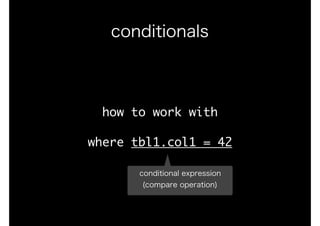
how	to	work	with

where	tbl1.col1	=	42
conditionals
how	to	work	with

where	tbl1.col1	=	42
conditionals
conditional expression
(compare operation)
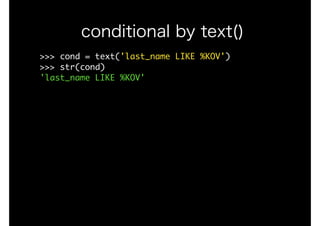
>>>	cond	=	text('last_name	LIKE	%KOV')

>>>	str(cond)

'last_name	LIKE	%KOV'

conditional by text()
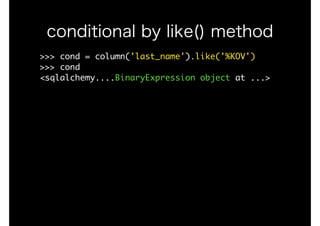
>>>	cond	=	column('last_name').like('%KOV')

>>>	cond

<sqlalchemy....BinaryExpression	object	at	...>

conditional by like() method
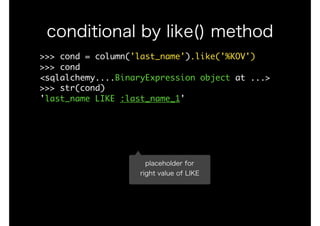
>>>	cond	=	column('last_name').like('%KOV')

>>>	cond

<sqlalchemy....BinaryExpression	object	at	...>

>>>	str(cond)

'last_name	LIKE	:last_name_1'

conditional by like() method
placeholder for
right value of LIKE
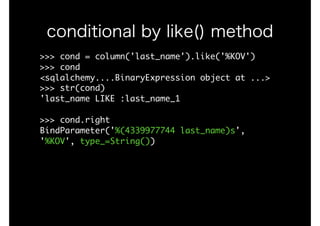
>>>	cond	=	column('last_name').like('%KOV')

>>>	cond

<sqlalchemy....BinaryExpression	object	at	...>

>>>	str(cond)

'last_name	LIKE	:last_name_1

>>>	cond.right

BindParameter('%(4339977744	last_name)s',	
'%KOV',	type_=String())

conditional by like() method
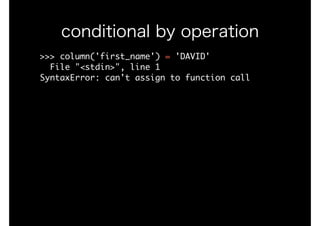
>>>	column('first_name')	=	'DAVID'

		File	"<stdin>",	line	1

SyntaxError:	can't	assign	to	function	call

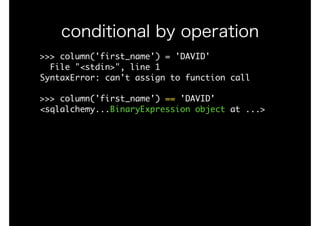
conditional by operation
>>>	column('first_name')	=	'DAVID'

		File	"<stdin>",	line	1

SyntaxError:	can't	assign	to	function	call

>>>	column('first_name')	==	'DAVID'

<sqlalchemy...BinaryExpression	object	at	...>

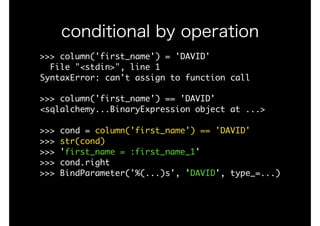
conditional by operation
>>>	column('first_name')	=	'DAVID'

		File	"<stdin>",	line	1

SyntaxError:	can't	assign	to	function	call

>>>	column('first_name')	==	'DAVID'

<sqlalchemy...BinaryExpression	object	at	...>

>>>	cond	=	column('first_name')	==	'DAVID'

>>>	str(cond)

>>>	'first_name	=	:first_name_1'

>>>	cond.right

>>>	BindParameter('%(...)s',	'DAVID',	type_=...)

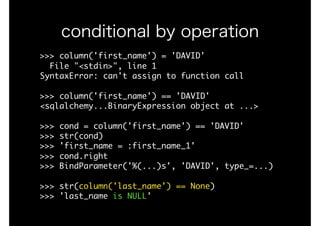
conditional by operation
>>>	column('first_name')	=	'DAVID'

		File	"<stdin>",	line	1

SyntaxError:	can't	assign	to	function	call

>>>	column('first_name')	==	'DAVID'

<sqlalchemy...BinaryExpression	object	at	...>

>>>	cond	=	column('first_name')	==	'DAVID'

>>>	str(cond)

>>>	'first_name	=	:first_name_1'

>>>	cond.right

>>>	BindParameter('%(...)s',	'DAVID',	type_=...)

>>>	str(column('last_name')	==	None)

>>>	'last_name	is	NULL'
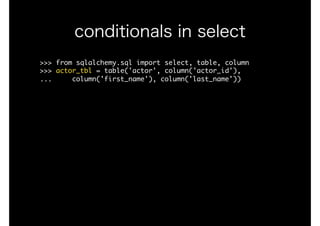
conditional by operation
>>>	from	sqlalchemy.sql	import	select,	table,	column

>>>	actor_tbl	=	table('actor',	column('actor_id'),

...					column('first_name'),	column('last_name'))

conditionals in select
>>>	from	sqlalchemy.sql	import	select,	table,	column

>>>	actor_tbl	=	table('actor',	column('actor_id'),

...					column('first_name'),	column('last_name'))

>>>	query	=	select([actor_tbl],

...					whereclause=(actor_tbl.c.last_name=='TRACY'))

conditionals in select
>>>	from	sqlalchemy.sql	import	select,	table,	column

>>>	actor_tbl	=	table('actor',	column('actor_id'),

...					column('first_name'),	column('last_name'))

>>>	query	=	select([actor_tbl],

...					whereclause=(actor_tbl.c.last_name=='TRACY'))

>>>	query

<sqlalchemy.....Select	at	...;	Select	object>

>>>	print(query)

SELECT	actor.first_name,	actor.last_name	

FROM	actor	

WHERE	actor.last_name	=	:last_name_1

>>>	query.compile().params

{'last_name_1':	'TRACY'}

conditionals in select
>>>	from	sqlalchemy.sql	import	select,	table,	column

>>>	actor_tbl	=	table('actor',	column('actor_id'),

...					column('first_name'),	column('last_name'))

>>>	query	=	select([actor_tbl],

...					whereclause=(actor_tbl.c.last_name=='TRACY'))

>>>	query

<sqlalchemy.....Select	at	...;	Select	object>

>>>	print(query)

SELECT	actor.actor_id,	actor.first_name,	actor.last_name	

FROM	actor	

WHERE	actor.last_name	=	:last_name_1

>>>	query.compile().params

{'last_name_1':	'TRACY'}

>>>	list(e.execute(query))

[(20,	'LUCILLE',	'TRACY'),	(117,	'RENEE',	'TRACY')]

conditionals in select
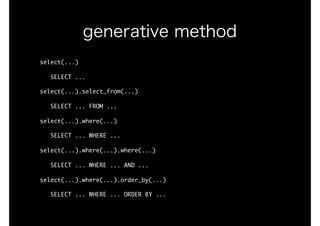
select(...)

			SELECT	...

select(...).select_from(...)

			SELECT	...	FROM	...

select(...).where(...)

			SELECT	...	WHERE	...

select(...).where(...).where(...)

			SELECT	...	WHERE	...	AND	...

select(...).where(...).order_by(...)

			SELECT	...	WHERE	...	ORDER	BY	...
generative method
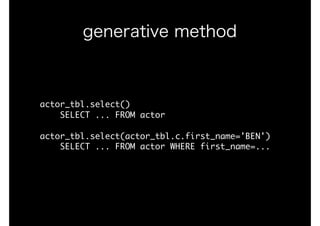
actor_tbl.select()

				SELECT	...	FROM	actor

actor_tbl.select(actor_tbl.c.first_name='BEN')

				SELECT	...	FROM	actor	WHERE	first_name=...

generative method
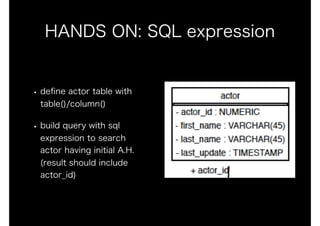
HANDS ON: SQL expression
• define actor table with
table()/column()
• build query with sql
expression to search

actor having initial A.H. 

(result should include
actor_id)
Schema definition
how	to	CREATE	table
schema definition
how	to	CREATE	table

how	to	define	column	detail

how	to	define	constraints
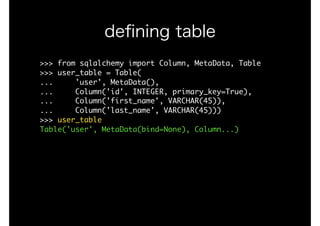
schema definition
>>>	from	sqlalchemy	import	Column,	MetaData,	Table

>>>	user_table	=	Table(

...					'user',	MetaData(),

...					Column('id',	INTEGER,	primary_key=True),

...					Column('first_name',	VARCHAR(45)),

...					Column('last_name',	VARCHAR(45)))

>>>
defining table
>>>	from	sqlalchemy	import	Column,	MetaData,	Table

>>>	user_table	=	Table(

...					'user',	MetaData(),

...					Column('id',	INTEGER,	primary_key=True),

...					Column('first_name',	VARCHAR(45)),

...					Column('last_name',	VARCHAR(45)))

>>>	user_table

Table('user',	MetaData(bind=None),	Column...)

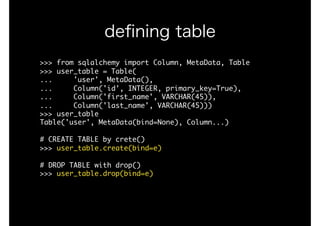
defining table
>>>	from	sqlalchemy	import	Column,	MetaData,	Table

>>>	user_table	=	Table(

...					'user',	MetaData(),

...					Column('id',	INTEGER,	primary_key=True),

...					Column('first_name',	VARCHAR(45)),

...					Column('last_name',	VARCHAR(45)))

>>>	user_table

Table('user',	MetaData(bind=None),	Column...)

#	CREATE	TABLE	by	crete()

>>>	user_table.create(bind=e)

#	DROP	TABLE	with	drop()

>>>	user_table.drop(bind=e)

defining table
Table/Column vs table/column
Visitable (base type)
ClauseElement
Selectable
FromClause
[ table() ]
ColumnElement
ColumnClause
[ column() ]
Column Table
SchemaItem
Table/Column vs table/column
Visitable (base type)
ClauseElement
Selectable
FromClause
[ table() ]
ColumnElement
ColumnClause
[ column() ]
Column Table
SchemaItem
Supprorts
same operation
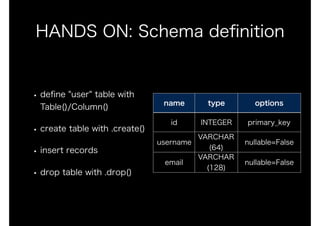
HANDS ON: Schema definition
• define "user" table with
Table()/Column()
• create table with .create()
• insert records
• drop table with .drop()
name type options
id INTEGER primary_key
username
VARCHAR
(64)
nullable=False
email
VARCHAR

(128)
nullable=False
ORM basics
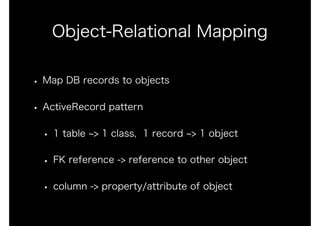
Object-Relational Mapping
• Map DB records to objects
• ActiveRecord pattern
• 1 table ~> 1 class, 1 record ~> 1 object
• FK reference -> reference to other object
• column -> property/attribute of object
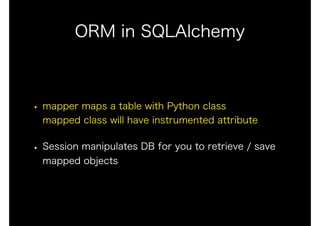
ORM in SQLAlchemy
• mapper maps a table with Python class

mapped class will have instrumented attribute
• Session manipulates DB for you to retrieve / save
mapped objects
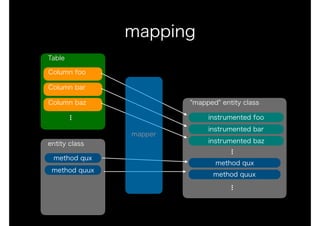
mapping
Table
Column foo
Column bar
Column baz
...
entity class
"mapped" entity class
instrumented foo
instrumented bar
instrumented baz
...
method qux
method quux
method qux
method quux
...
mapper
classic mapping
[new] declarative mapping
mapping patterns
>>>	from	sqlalchemy.orm	import	mapper

>>>	actor_tbl	=	Table(...)

>>>	class	Actor(object):	pass

>>>	mapper(Actor,	actor_tbl)

>>>	dir(Actor)

['__class__',	...	'_sa_class_manager',	
'actor_id',	'first_name',	'last_name']

>>>	Actor.actor_id

<...InstrumentedAttribute	object	at	...>

classic mapping
>>>	from	sqlalchemy.ext.declarative	import	
declarative_base

>>>	from	sqlalchmy	import	DateTime,	Integer,	String

>>>	Base	=	declarative_base()

>>>

>>>	class	Actor(Base):

...					__tablename__	=	'actor'

...					actor_id	=	Column(Integer,	primary_key=True)

...					first_name	=	Column(String)

...					last_name	=	Column(String)

...					last_update	=	Column(DateTime)

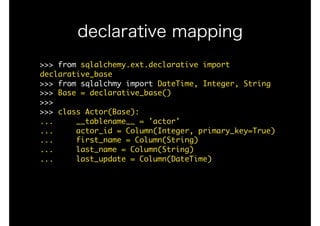
declarative mapping
>>>	from	sqlalchemy.ext.declarative	import	declarative_base

>>>	from	sqlalchmy	import	DateTime,	Integer,	String

>>>	Base	=	declarative_base()

>>>

>>>	class	Actor(Base):

...					__tablename__	=	'actor'

...					actor_id	=	Column(Integer,	primary_key=True)

...					first_name	=	Column(String)

...					last_name	=	Column(String)

...					last_update	=	Column(DateTime)

>>>	dir(Actor)

['__class__',	'_decl_class_registry',	'_sa_class_manager',	
'actor_id',	'first_name',	'last_name',	'last_update',	
'metadata']

declarative mapping
ORM in SQLAlchemy
• mapper maps a table with Python class

mapped class will have instrumented attribute
• Session manipulates DB for you to retrieve / save
mapped objects
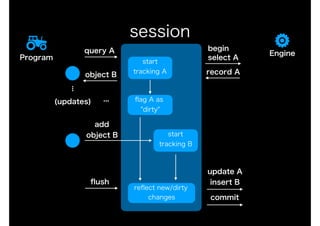
session
Engine
Program
query A
select A
record Aobject B
start

tracking A...
(updates) flag A as
"dirty"
reflect new/dirty
changes
flush
start

tracking B
...
add
object B
update A
insert B
commit
begin
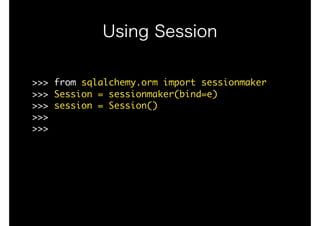
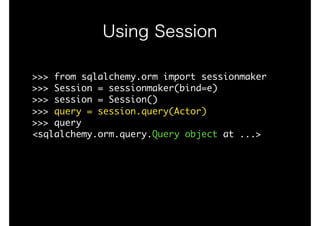
Using Session
>>>	from	sqlalchemy.orm	import	sessionmaker

>>>	Session	=	sessionmaker(bind=e)

>>>	session	=	Session()

>>>

>>>
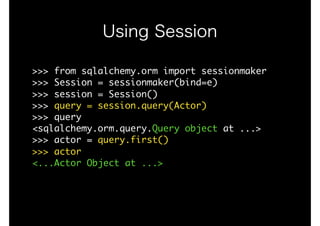
Using Session
>>>	from	sqlalchemy.orm	import	sessionmaker

>>>	Session	=	sessionmaker(bind=e)

>>>	session	=	Session()

>>>	query	=	session.query(Actor)

>>>	query

<sqlalchemy.orm.query.Query	object	at	...>
Using Session
>>>	from	sqlalchemy.orm	import	sessionmaker

>>>	Session	=	sessionmaker(bind=e)

>>>	session	=	Session()

>>>	query	=	session.query(Actor)

>>>	query

<sqlalchemy.orm.query.Query	object	at	...>

>>>	actor	=	query.first()

>>>	actor

<...Actor	Object	at	...>
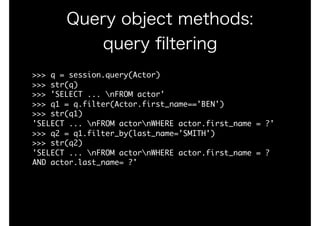
Query object methods:
query filtering
>>>	q	=	session.query(Actor)

>>>	str(q)

>>>	'SELECT	...	nFROM	actor'

>>>	q1	=	q.filter(Actor.first_name=='BEN')

>>>	str(q1)

'SELECT	...	nFROM	actornWHERE	actor.first_name	=	?'

>>>	q2	=	q1.filter_by(last_name='SMITH')

>>>	str(q2)

'SELECT	...	nFROM	actornWHERE	actor.first_name	=	?	
AND	actor.last_name=	?'
Query object methods:
fetching record(s)
>>>	q	=	session.query(Actor)

>>>	q.first()

<...Actor	object	at	...>

>>>	q.all()		#	WARNING:	SELECTs	all	records

<...Actor	object	at	...>,	<...Actor	object	at	...>,	...

>>>	q[:3]

<...Actor	object	at	...>,	<...Actor	object	at	...>,	...

>>>	q.count()

200
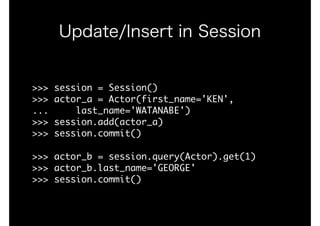
Update/Insert in Session
>>>	session	=	Session()

>>>	actor_a	=	Actor(first_name='KEN',

...					last_name='WATANABE')

>>>	session.add(actor_a)

>>>	session.commit()

>>>	actor_b	=	session.query(Actor).get(1)

>>>	actor_b.last_name='GEORGE'

>>>	session.commit()
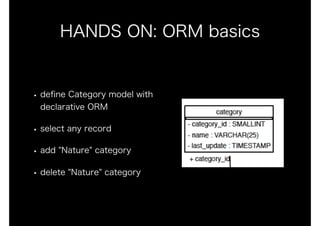
HANDS ON: ORM basics
• define Category model with
declarative ORM
• select any record
• add "Nature" category
• delete "Nature" category

SQLAlchemy Primer