Polymer 1.0
Jason
What is Polymer?
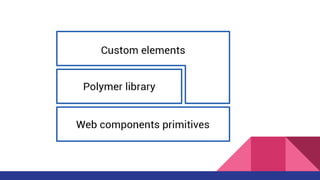
●The Polymer library is designed to make it easier and faster for developers to
create great, reusable components for the modern web.
●With custom elements, you can extend the vocabulary of HTML with your own
elements. Elements that provide sophisticated UI.
Web Component
●HTML Template
●Custom Element
●Shadow DOM
●HTML Import
Installing with Bower
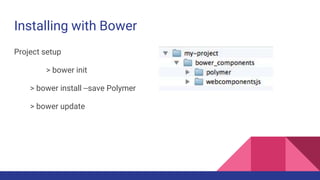
Project setup
> bower init
> bower install --save Polymer
> bower update
Quick tour of Polymer
● Register an element
● Add local DOM
● Compose with local DOM
● Use data binding
● Declare a property
● Bind to a property
Register an element
● To register a new element, call the Polymer function, which registers a new
element with the browser. Registering an element associates a tag name with a
prototype, so you can add properties and methods to your custom element.
The custom element’s name must contain a dash (-).
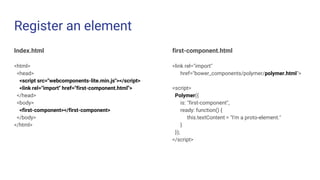
Register an element
Index.html
<html>
<head>
<script src="webcomponents-lite.min.js"></script>
<link rel="import" href="first-component.html">
</head>
<body>
<first-component></first-component>
</body>
</html>
first-component.html
<link rel="import"
href="bower_components/polymer/polymer.html">
<script>
Polymer({
is: "first-component",
ready: function() {
this.textContent = "I'm a proto-element."
}
});
</script>
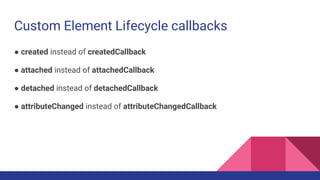
Custom Element Lifecycle callbacks
● created instead of createdCallback
● attached instead of attachedCallback
● detached instead of detachedCallback
● attributeChanged instead of attributeChangedCallback
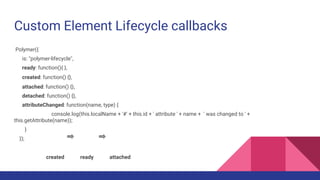
Custom Element Lifecycle callbacks
Polymer({
is: "polymer-lifecycle",
ready: function(){ },
created: function() {},
attached: function() {},
detached: function() {},
attributeChanged: function(name, type) {
console.log(this.localName + '#' + this.id + ' attribute ' + name + ' was changed to ' +
this.getAttribute(name));
}
});
created ready attached
Add local DOM
● Many elements include some internal DOM nodes to implement the element’s
UI and behavior. Polymer calls this local DOM, and it provides an easy way to
specify it.
● Local DOM is encapsulated inside the element.
Add local DOM
Index.html
<html>
<head>
<script src="webcomponents-lite.min.js"></script>
<link rel="import" href="dom-element.html">
</head>
<body>
<dom-element></dom-element>
</body>
</html>
dom-element.html
<link rel="import"
href="bower_components/polymer/polymer.html">
<dom-module id="dom-element">
<template>
<p>I'm a DOM element. </p>
</template>
<script>
Polymer({
is: "dom-element"
});
</script>
</dom-module>
Compose with local DOM
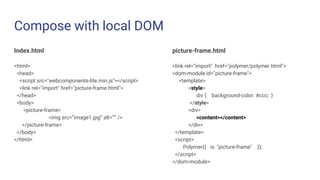
● Local DOM lets you control composition. The element’s children can be
distributed so they render as if they were inserted into the local DOM tree.
Compose with local DOM
Index.html
<html>
<head>
<script src="webcomponents-lite.min.js"></script>
<link rel="import" href="picture-frame.html">
</head>
<body>
<picture-frame>
<img src=”image1.jpg” alt=”” />
</picture-frame>
</body>
</html>
picture-frame.html
<link rel="import" href="polymer/polymer.html">
<dom-module id="picture-frame">
<template>
<style>
div { background-color: #ccc; }
</style>
<div>
<content></content>
</div>
</template>
<script>
Polymer({ is: "picture-frame" });
</script>
</dom-module>
Use data binding
● Data binding is a great way to quickly propagate changes in your element and
reduce boilerplate code. You can bind properties in your component using the
“double-mustache” syntax ({{}}). The {{}} is replaced by the value of the
property referenced between the brackets.
Use data binding
Index.html
<html>
<head>
<script src="webcomponents-lite.min.js"></script>
<link rel="import" href="name-tag.html">
</head>
<body>
<name-tag></name-tag>
</body>
</html>
name-tag.html
<link rel="import" href="polymer.html">
<dom-module id="name-tag">
<template>
This is <b>{{owner}}</b>'s name-tag element.
</template>
<script>
Polymer({
is: "name-tag",
ready: function() {
this.owner = "Daniel";
} });
</script>
</dom-module>
Declare a property
● Properties are an important part of an element’s public API. Polymer declared
properties support a number of common patterns for properties — setting
default values, configuring properties from markup, observing property
changes, and more..
Declare a property
Index.html
<html>
<head>
<script src="webcomponents-lite.min.js"></script>
<link rel="import" href="configurable-name-tag.html">
</head>
<body>
<configurable-name-tag
owner="Scott"></configurable-name-tag>
</body>
</html>
configurable-name-tag.html
<dom-module id="configurable-name-tag">
<template>
This is <b>{{owner}}</b>'s configurable-name-tag .
</template>
<script>
Polymer({
is: "configurable-name-tag",
properties: {
owner: {
type: String,
value: "Daniel"
}
}
});
</script>
</dom-module>
Bind to a property
● In addition to text content, you can bind to an element’s properties (using
property-name="{{binding}}"). Polymer properties can optionally support
two-way binding.
●This example uses two-way binding: binding the value of a custom input
element (iron-input) to the element’s owner property, so it’s updated as the user
types
Bind to a property
Index.html
<html>
<head>
<script src="webcomponents-lite.min.js"></script>
<link rel="import" href="editable-name-tag.html">
</head>
<body>
<editable-name-tag></editable-name-tag>
</body>
</html>
editable-name-tag.html
<link rel="import" href="polymer.html">
<link rel="import" href="iron-input/iron-input.html">
<dom-module id="editable-name-tag">
<template>
This is a <strong>{{owner}}</strong>'s editable-name-tag.
<input is="iron-input" bind-value="{{owner}}"/>
</template>
<script>
Polymer({
is: "editable-name-tag",
properties: {
owner: {
type: String,
value: "Daniel"
} } });
</script>
</dom-module>
Reference
Polymer 1.0 - https://www.polymer-project.org/1.0/docs/
Shadow - https://developer.mozilla.org/en-US/docs/Web/HTML/Element/Shadow
Html Import - http://www.html5rocks.com/en/tutorials/webcomponents/imports/
Custom Elements - http://www.html5rocks.com/en/tutorials/webcomponents/customelements/

Polymer

  • 1.
  • 2.
    What is Polymer? ●ThePolymer library is designed to make it easier and faster for developers to create great, reusable components for the modern web. ●With custom elements, you can extend the vocabulary of HTML with your own elements. Elements that provide sophisticated UI.
  • 4.
    Web Component ●HTML Template ●CustomElement ●Shadow DOM ●HTML Import
  • 5.
    Installing with Bower Projectsetup > bower init > bower install --save Polymer > bower update
  • 6.
    Quick tour ofPolymer ● Register an element ● Add local DOM ● Compose with local DOM ● Use data binding ● Declare a property ● Bind to a property
  • 7.
    Register an element ●To register a new element, call the Polymer function, which registers a new element with the browser. Registering an element associates a tag name with a prototype, so you can add properties and methods to your custom element. The custom element’s name must contain a dash (-).
  • 8.
    Register an element Index.html <html> <head> <scriptsrc="webcomponents-lite.min.js"></script> <link rel="import" href="first-component.html"> </head> <body> <first-component></first-component> </body> </html> first-component.html <link rel="import" href="bower_components/polymer/polymer.html"> <script> Polymer({ is: "first-component", ready: function() { this.textContent = "I'm a proto-element." } }); </script>
  • 9.
    Custom Element Lifecyclecallbacks ● created instead of createdCallback ● attached instead of attachedCallback ● detached instead of detachedCallback ● attributeChanged instead of attributeChangedCallback
  • 10.
    Custom Element Lifecyclecallbacks Polymer({ is: "polymer-lifecycle", ready: function(){ }, created: function() {}, attached: function() {}, detached: function() {}, attributeChanged: function(name, type) { console.log(this.localName + '#' + this.id + ' attribute ' + name + ' was changed to ' + this.getAttribute(name)); } }); created ready attached
  • 11.
    Add local DOM ●Many elements include some internal DOM nodes to implement the element’s UI and behavior. Polymer calls this local DOM, and it provides an easy way to specify it. ● Local DOM is encapsulated inside the element.
  • 12.
    Add local DOM Index.html <html> <head> <scriptsrc="webcomponents-lite.min.js"></script> <link rel="import" href="dom-element.html"> </head> <body> <dom-element></dom-element> </body> </html> dom-element.html <link rel="import" href="bower_components/polymer/polymer.html"> <dom-module id="dom-element"> <template> <p>I'm a DOM element. </p> </template> <script> Polymer({ is: "dom-element" }); </script> </dom-module>
  • 13.
    Compose with localDOM ● Local DOM lets you control composition. The element’s children can be distributed so they render as if they were inserted into the local DOM tree.
  • 14.
    Compose with localDOM Index.html <html> <head> <script src="webcomponents-lite.min.js"></script> <link rel="import" href="picture-frame.html"> </head> <body> <picture-frame> <img src=”image1.jpg” alt=”” /> </picture-frame> </body> </html> picture-frame.html <link rel="import" href="polymer/polymer.html"> <dom-module id="picture-frame"> <template> <style> div { background-color: #ccc; } </style> <div> <content></content> </div> </template> <script> Polymer({ is: "picture-frame" }); </script> </dom-module>
  • 15.
    Use data binding ●Data binding is a great way to quickly propagate changes in your element and reduce boilerplate code. You can bind properties in your component using the “double-mustache” syntax ({{}}). The {{}} is replaced by the value of the property referenced between the brackets.
  • 16.
    Use data binding Index.html <html> <head> <scriptsrc="webcomponents-lite.min.js"></script> <link rel="import" href="name-tag.html"> </head> <body> <name-tag></name-tag> </body> </html> name-tag.html <link rel="import" href="polymer.html"> <dom-module id="name-tag"> <template> This is <b>{{owner}}</b>'s name-tag element. </template> <script> Polymer({ is: "name-tag", ready: function() { this.owner = "Daniel"; } }); </script> </dom-module>
  • 17.
    Declare a property ●Properties are an important part of an element’s public API. Polymer declared properties support a number of common patterns for properties — setting default values, configuring properties from markup, observing property changes, and more..
  • 18.
    Declare a property Index.html <html> <head> <scriptsrc="webcomponents-lite.min.js"></script> <link rel="import" href="configurable-name-tag.html"> </head> <body> <configurable-name-tag owner="Scott"></configurable-name-tag> </body> </html> configurable-name-tag.html <dom-module id="configurable-name-tag"> <template> This is <b>{{owner}}</b>'s configurable-name-tag . </template> <script> Polymer({ is: "configurable-name-tag", properties: { owner: { type: String, value: "Daniel" } } }); </script> </dom-module>
  • 19.
    Bind to aproperty ● In addition to text content, you can bind to an element’s properties (using property-name="{{binding}}"). Polymer properties can optionally support two-way binding. ●This example uses two-way binding: binding the value of a custom input element (iron-input) to the element’s owner property, so it’s updated as the user types
  • 20.
    Bind to aproperty Index.html <html> <head> <script src="webcomponents-lite.min.js"></script> <link rel="import" href="editable-name-tag.html"> </head> <body> <editable-name-tag></editable-name-tag> </body> </html> editable-name-tag.html <link rel="import" href="polymer.html"> <link rel="import" href="iron-input/iron-input.html"> <dom-module id="editable-name-tag"> <template> This is a <strong>{{owner}}</strong>'s editable-name-tag. <input is="iron-input" bind-value="{{owner}}"/> </template> <script> Polymer({ is: "editable-name-tag", properties: { owner: { type: String, value: "Daniel" } } }); </script> </dom-module>
  • 21.
    Reference Polymer 1.0 -https://www.polymer-project.org/1.0/docs/ Shadow - https://developer.mozilla.org/en-US/docs/Web/HTML/Element/Shadow Html Import - http://www.html5rocks.com/en/tutorials/webcomponents/imports/ Custom Elements - http://www.html5rocks.com/en/tutorials/webcomponents/customelements/

Editor's Notes

  • #4 http://bbs.logdown.com/posts/210337-introduce-web-component-of-beginners-mind
  • #5 http://bbs.logdown.com/posts/210337-introduce-web-component-of-beginners-mind https://blog.othree.net/log/2013/11/27/web-component/ https://developer.mozilla.org/en-US/docs/Web/HTML/Element/Shadow
  • #7 https://www.polymer-project.org/1.0/docs/start/quick-tour.html
  • #10 https://www.polymer-project.org/1.0/docs/devguide/registering-elements.html