Google Polymer
Introduction
Buzzwords
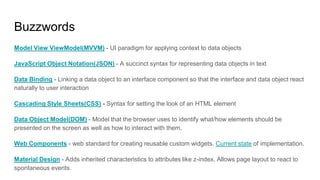
Model View ViewModel(MVVM) - UI paradigm for applying context to data objects
JavaScript Object Notation(JSON) - A succinct syntax for representing data objects in text
Data Binding - Linking a data object to an interface component so that the interface and data object react
naturally to user interaction
Cascading Style Sheets(CSS) - Syntax for setting the look of an HTML element
Data Object Model(DOM) - Model that the browser uses to identify what/how elements should be
presented on the screen as well as how to interact with them.
Web Components - web standard for creating reusable custom widgets. Current state of implementation.
Material Design - Adds inherited characteristics to attributes like z-index. Allows page layout to react to
spontaneous events.
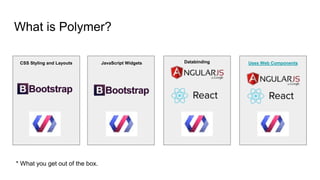
What is Polymer?
CSS Styling and Layouts JavaScript Widgets Databinding Uses Web Components
* What you get out of the box.
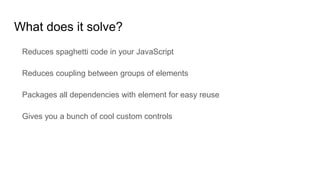
What does it solve?
Reduces spaghetti code in your JavaScript
Reduces coupling between groups of elements
Packages all dependencies with element for easy reuse
Gives you a bunch of cool custom controls
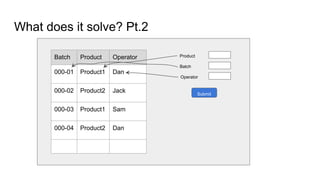
What does it solve? Pt.2
Product
Batch
Operator
Submit
Batch Product Operator
000-01 Product1 Dan
000-02 Product2 Jack
000-03 Product1 Sam
000-04 Product2 Dan
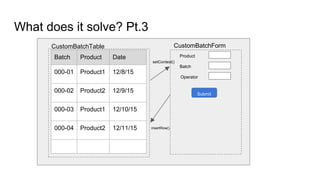
What does it solve? Pt.3
Product
Batch
Operator
Submit
Batch Product Date
000-01 Product1 12/8/15
000-02 Product2 12/9/15
000-03 Product1 12/10/15
000-04 Product2 12/11/15
CustomBatchForm
setContext()
insertRow()
CustomBatchTable
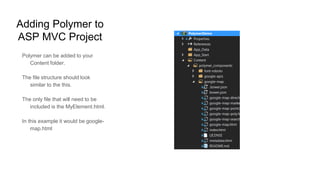
Adding Polymer to
ASP MVC Project
Polymer can be added to your
Content folder.
The file structure should look
similar to the this.
The only file that will need to be
included is the MyElement.html.
In this example it would be google-
map.html
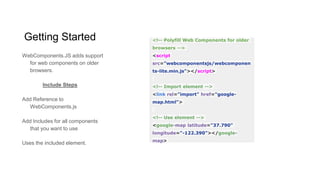
Getting Started
WebComponents.JS adds support
for web components on older
browsers.
Include Steps
Add Reference to
WebComponents.js
Add Includes for all components
that you want to use
Uses the included element.
<!-- Polyfill Web Components for older
browsers -->
<script
src="webcomponentsjs/webcomponen
ts-lite.min.js"></script>
<!-- Import element -->
<link rel="import" href="google-
map.html">
<!-- Use element -->
<google-map latitude="37.790"
longitude="-122.390"></google-
map>
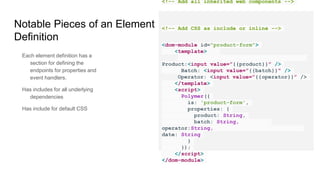
Notable Pieces of an Element
Definition
Each element definition has a
section for defining the
endpoints for properties and
event handlers.
Has includes for all underlying
dependencies
Has include for default CSS
<!-- Add all inherited web components -->
<!-- Add CSS as include or inline -->
<dom-module id="product-form">
<template>
Product:<input value=”{{product}}” />
Batch: <input value=”{{batch}}” />
Operator: <input value=”{{operator}}” />
</template>
<script>
Polymer({
is: 'product-form',
properties: {
product: String,
batch: String,
operator:String,
date: String
}
});
</script>
</dom-module>
Why Should I Use It
Common integration pattern for all elements
Support for one-way and two-way data binding
Implements Web Components
Extensible HTML elements
Setting Data Binding
Double mustache notation represents
two-way binding “{{myObject}}”
Double square brackets represents
one-way binding “[[myObject]]”
Data binding usually uses the “items”
attribute.
Use the “as” attribute to set the name
for a single item in the items list.
<template is="dom-bind">
<iron-ajax url="data.json" last-response="{{data}}" auto></iron-ajax>
<iron-list items="[[data]]" as="person">
<template>
<div>
Name: <span>[[person.name]]</span>
</div>
</template>
</iron-list>
</template>
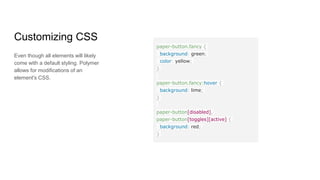
Customizing CSS
Even though all elements will likely
come with a default styling. Polymer
allows for modifications of an
element's CSS.
paper-button.fancy {
background: green;
color: yellow;
}
paper-button.fancy:hover {
background: lime;
}
paper-button[disabled],
paper-button[toggles][active] {
background: red;
}
Demo Project
Feel free to look through the demo project
Also feel free to use the live demo
Here is the Polymer element catalog
Vulcanize - Tool for optimizing Web Component includes

Google Polymer Introduction

  • 1.
  • 2.
    Buzzwords Model View ViewModel(MVVM)- UI paradigm for applying context to data objects JavaScript Object Notation(JSON) - A succinct syntax for representing data objects in text Data Binding - Linking a data object to an interface component so that the interface and data object react naturally to user interaction Cascading Style Sheets(CSS) - Syntax for setting the look of an HTML element Data Object Model(DOM) - Model that the browser uses to identify what/how elements should be presented on the screen as well as how to interact with them. Web Components - web standard for creating reusable custom widgets. Current state of implementation. Material Design - Adds inherited characteristics to attributes like z-index. Allows page layout to react to spontaneous events.
  • 3.
    What is Polymer? CSSStyling and Layouts JavaScript Widgets Databinding Uses Web Components * What you get out of the box.
  • 4.
    What does itsolve? Reduces spaghetti code in your JavaScript Reduces coupling between groups of elements Packages all dependencies with element for easy reuse Gives you a bunch of cool custom controls
  • 5.
    What does itsolve? Pt.2 Product Batch Operator Submit Batch Product Operator 000-01 Product1 Dan 000-02 Product2 Jack 000-03 Product1 Sam 000-04 Product2 Dan
  • 6.
    What does itsolve? Pt.3 Product Batch Operator Submit Batch Product Date 000-01 Product1 12/8/15 000-02 Product2 12/9/15 000-03 Product1 12/10/15 000-04 Product2 12/11/15 CustomBatchForm setContext() insertRow() CustomBatchTable
  • 7.
    Adding Polymer to ASPMVC Project Polymer can be added to your Content folder. The file structure should look similar to the this. The only file that will need to be included is the MyElement.html. In this example it would be google- map.html
  • 8.
    Getting Started WebComponents.JS addssupport for web components on older browsers. Include Steps Add Reference to WebComponents.js Add Includes for all components that you want to use Uses the included element. <!-- Polyfill Web Components for older browsers --> <script src="webcomponentsjs/webcomponen ts-lite.min.js"></script> <!-- Import element --> <link rel="import" href="google- map.html"> <!-- Use element --> <google-map latitude="37.790" longitude="-122.390"></google- map>
  • 9.
    Notable Pieces ofan Element Definition Each element definition has a section for defining the endpoints for properties and event handlers. Has includes for all underlying dependencies Has include for default CSS <!-- Add all inherited web components --> <!-- Add CSS as include or inline --> <dom-module id="product-form"> <template> Product:<input value=”{{product}}” /> Batch: <input value=”{{batch}}” /> Operator: <input value=”{{operator}}” /> </template> <script> Polymer({ is: 'product-form', properties: { product: String, batch: String, operator:String, date: String } }); </script> </dom-module>
  • 10.
    Why Should IUse It Common integration pattern for all elements Support for one-way and two-way data binding Implements Web Components Extensible HTML elements
  • 11.
    Setting Data Binding Doublemustache notation represents two-way binding “{{myObject}}” Double square brackets represents one-way binding “[[myObject]]” Data binding usually uses the “items” attribute. Use the “as” attribute to set the name for a single item in the items list. <template is="dom-bind"> <iron-ajax url="data.json" last-response="{{data}}" auto></iron-ajax> <iron-list items="[[data]]" as="person"> <template> <div> Name: <span>[[person.name]]</span> </div> </template> </iron-list> </template>
  • 12.
    Customizing CSS Even thoughall elements will likely come with a default styling. Polymer allows for modifications of an element's CSS. paper-button.fancy { background: green; color: yellow; } paper-button.fancy:hover { background: lime; } paper-button[disabled], paper-button[toggles][active] { background: red; }
  • 13.
    Demo Project Feel freeto look through the demo project Also feel free to use the live demo Here is the Polymer element catalog Vulcanize - Tool for optimizing Web Component includes

Editor's Notes

  • #4 Only focusing on Web Components for this speech. I may misrepresent Angular and other technologies due to lack of experience with them The approach that polymer takes is to package all of the CSS and JavaScript for an element into one file. Polymer syntax looks a lot more like WPF than Angular does. Blog describing the current state of Web Components implementation. Mozilla also has a framework called X-Tag.
  • #6 In many cases an input value may map directly to a specific cell. This will cause issues if the implementation of the table changes.
  • #7 Each dotted box represents a custom element Use the black box approach to element groupings Create well defined points of entry. Also can make use of the observer pattern.
  • #8 Note that these are .HTML files and not CSS or JavaScript
  • #10 A public function would be represented as property like setContext: function(contextObj) { }