


Web Components
with Polymer
Jeff Tapper
Digital Primates
@jefftapper / @digitalprimates
Who am I?
• Senior Consultant at Digital Primates
– Building next generation client applications
• Developing Internet applications for 20 years
• Author of 12 books on Internet technologies
Who are you?
What are Web Components?
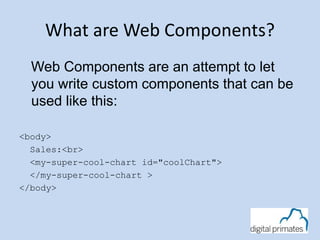
Web Components are an attempt to let
you write custom components that can be
used like this:
<body>
Sales:<br>
<my-super-cool-chart id="coolChart">
</my-super-cool-chart >
</body>
How do they work
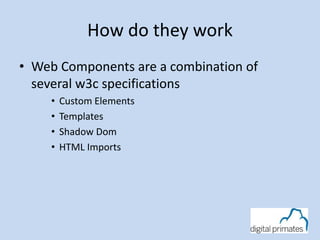
• Web Components are a combination of
several w3c specifications
• Custom Elements
• Templates
• Shadow Dom
• HTML Imports
Creating Custom Elements
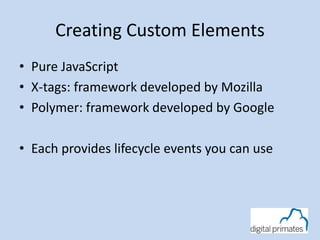
• Pure JavaScript
• X-tags: framework developed by Mozilla
• Polymer: framework developed by Google
• Each provides lifecycle events you can use
Creating in JavaScript
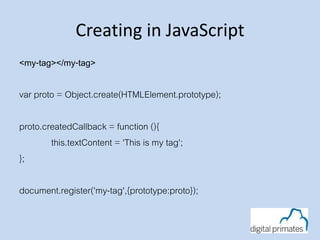
<my-tag></my-tag>
var proto = Object.create(HTMLElement.prototype);
proto.createdCallback = function (){
this.textContent = 'This is my tag';
};
document.register('my-tag',{prototype:proto});
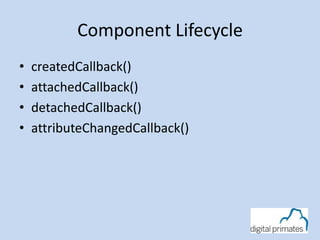
Component Lifecycle
• createdCallback()
• attachedCallback()
• detachedCallback()
• attributeChangedCallback()
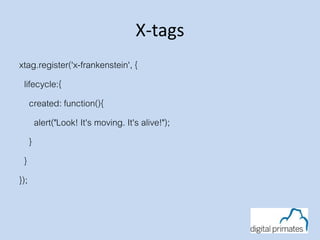
X-tags
xtag.register('x-frankenstein', {
lifecycle:{
created: function(){
alert("Look! It's moving. It's alive!");
}
}
});
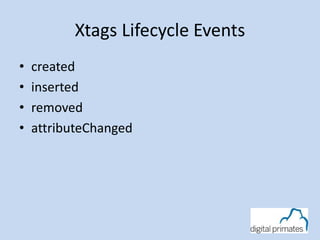
Xtags Lifecycle Events
• created
• inserted
• removed
• attributeChanged
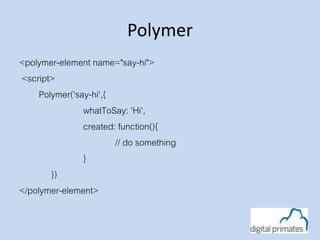
Polymer
<polymer-element name="say-hi">
<script>
Polymer('say-hi',{
whatToSay: 'Hi',
created: function(){
// do something
}
})
</polymer-element>
Polymer Lifecycle Events
• created
• attached
• detached
• attributeChanged
What is Polymer?
A library built on top of Web Components.
Allows us to use Web Components today in modern browsers
which don’t yet support Web Components
3 main pieces
• A set of polyfills
• Web application framework
• Set of UI components
What are we covering?
Web Components, specifically:
What in the world are web components?
What problem are they trying to solve?
How do they work?
Can I actually use these things?
What does it mean to my app/development process?
Life on the Edge
Web Components are beyond leading edge.
As of this moment, they do not work in their entirety in all
browsers
A good portion of the functionality is available in Chrome
So, is it real?
Yes!!!
Web Component support is actually here today. Even
though they are not fully supported in all browsers,
Polymer and Polyfills allow use in most modern
browsers today
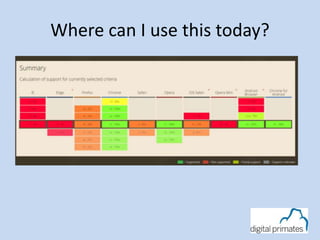
Where can I use this today?
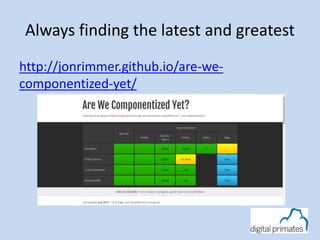
Always finding the latest and greatest
http://jonrimmer.github.io/are-we-
componentized-yet/
Why are they important?
A few minor reasons you may like the idea, first:
Encapsulation
• Manageable Reuse
• Hiding complexity and implementation
• Dealing with duplicated IDs
• Dealing with CSS scoping / propagation
Ease of Distribution
Appropriate technology choices
• Markup in markup, not in code
How do they work?
Web Components are a series of Working draft
specifications:
• HTML Templates
– http://www.w3.org/TR/html-templates/
• Shadow DOM
– http://www.w3.org/TR/shadow-dom/
• Custom Elements
– http://www.w3.org/TR/custom-elements/
• HTML Imports
– http://www.w3.org/TR/html-imports/
Example Application
• Twitter-button
created by Zeno Rocha
source code available at
https://github.com/social-elements/twitter-button
http://localhost/poly/twitter-button-master
• Language Application
created by Michael Labriola
http://localhost/poly/
Templates
The concept of templates is prolific and nearly self-
explanatory. Their use takes a bit more effort:
Inactive DOM Fragment
Easily Clone-able
Easily Change-able
Templates
You define them with the template element
<template id="productTemplate">
<div>
<img src="">
<div class="name"></div>
<div class="description"></div>
</div>
</template>
This is parsed but it’s not active. It’s not rendered.
Shadow DOM
Shadow DOM is at the heart of the whole component
concepts
It’s encapsulation
Its used by the browsers today to implement their own
controls
Ultimately its about hiding implementation details and
exposing an interface
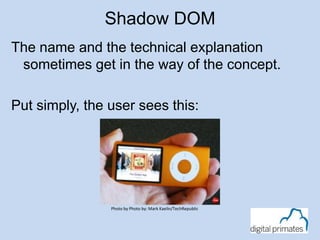
Shadow DOM
The name and the technical explanation
sometimes get in the way of the concept.
Put simply, the user sees this:
Photo by Photo by: Mark Kaelin/TechRepublic
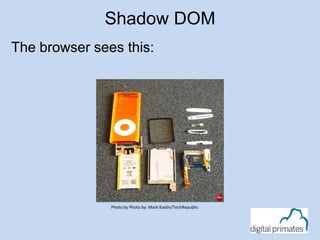
Shadow DOM
The browser sees this:
Photo by Photo by: Mark Kaelin/TechRepublic
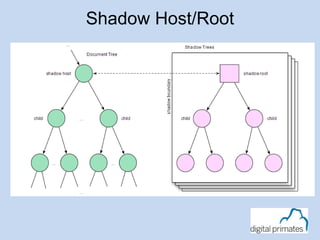
Shadow Host/Root
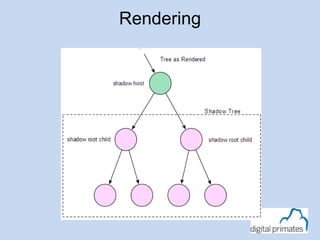
Rendering
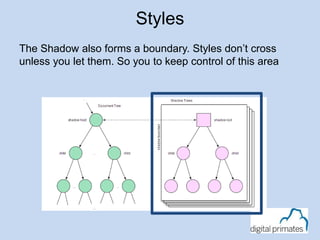
The Shadow also forms a boundary. Styles don’t cross
unless you let them. So you to keep control of this area
Styles
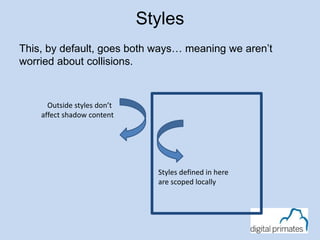
This, by default, goes both ways… meaning we aren’t
worried about collisions.
Styles
Outside styles don’t
affect shadow content
Styles defined in here
are scoped locally
HTML Imports
• HTML imports are about importing and sharing HTML
content.
• Why? Well, reuse, it facilitates the reuse of templates
and provides us a fundamental need if we are going to
share an encapsulated chunk we might call a
component.
• <link rel="import" href="goodies.html">
HTML Imports
• Last word on this…
• Imports aren’t supported pretty much anywhere yet,
however, there are polyfills.
• Imports are blocking. So, your page will act as though it
needs this content before it can render.
Custom Elements
• Elements are the key to putting this together.
• Custom Elements are DOM elements that can be
defined by a developer.
• They are allowed to manage state and provide a
scriptable interface.
• In other words, they are the shell of what will become
our component
Custom Elements
• Defining a custom element like this:
<polymer-element extends="button" name="fancy-button">
</polymer-element>
• Allows you to use that custom element in your
own markup:
<div>
<fancy-button></fancy-button>
</div>
Custom Elements
• You can use the concepts we previously discussed,
templates, Shadow DOM, etc. from within a custom
element.
• Further, custom elements give you a set of Lifecycle
callbacks so you can know things like when you are
inserted into the DOM, removed and ready.
• This means you can define the visual aspects of a
custom element in mark up and the code in script.
Resources
• http://www.w3.org/wiki/WebComponents/
• http://www.polymer-project.org/
• @polymer – officical twitter of the polymer
project
• @digitalprimates
• @jefftapper

Web Components

  • 1.
    Web Components with Polymer JeffTapper Digital Primates @jefftapper / @digitalprimates
  • 2.
    Who am I? •Senior Consultant at Digital Primates – Building next generation client applications • Developing Internet applications for 20 years • Author of 12 books on Internet technologies
  • 3.
  • 4.
    What are WebComponents? Web Components are an attempt to let you write custom components that can be used like this: <body> Sales:<br> <my-super-cool-chart id="coolChart"> </my-super-cool-chart > </body>
  • 5.
    How do theywork • Web Components are a combination of several w3c specifications • Custom Elements • Templates • Shadow Dom • HTML Imports
  • 6.
    Creating Custom Elements •Pure JavaScript • X-tags: framework developed by Mozilla • Polymer: framework developed by Google • Each provides lifecycle events you can use
  • 7.
    Creating in JavaScript <my-tag></my-tag> varproto = Object.create(HTMLElement.prototype); proto.createdCallback = function (){ this.textContent = 'This is my tag'; }; document.register('my-tag',{prototype:proto});
  • 8.
    Component Lifecycle • createdCallback() •attachedCallback() • detachedCallback() • attributeChangedCallback()
  • 9.
  • 10.
    Xtags Lifecycle Events •created • inserted • removed • attributeChanged
  • 11.
  • 12.
    Polymer Lifecycle Events •created • attached • detached • attributeChanged
  • 13.
    What is Polymer? Alibrary built on top of Web Components. Allows us to use Web Components today in modern browsers which don’t yet support Web Components 3 main pieces • A set of polyfills • Web application framework • Set of UI components
  • 14.
    What are wecovering? Web Components, specifically: What in the world are web components? What problem are they trying to solve? How do they work? Can I actually use these things? What does it mean to my app/development process?
  • 15.
    Life on theEdge Web Components are beyond leading edge. As of this moment, they do not work in their entirety in all browsers A good portion of the functionality is available in Chrome
  • 16.
    So, is itreal? Yes!!! Web Component support is actually here today. Even though they are not fully supported in all browsers, Polymer and Polyfills allow use in most modern browsers today
  • 17.
    Where can Iuse this today?
  • 18.
    Always finding thelatest and greatest http://jonrimmer.github.io/are-we- componentized-yet/
  • 19.
    Why are theyimportant? A few minor reasons you may like the idea, first: Encapsulation • Manageable Reuse • Hiding complexity and implementation • Dealing with duplicated IDs • Dealing with CSS scoping / propagation Ease of Distribution Appropriate technology choices • Markup in markup, not in code
  • 20.
    How do theywork? Web Components are a series of Working draft specifications: • HTML Templates – http://www.w3.org/TR/html-templates/ • Shadow DOM – http://www.w3.org/TR/shadow-dom/ • Custom Elements – http://www.w3.org/TR/custom-elements/ • HTML Imports – http://www.w3.org/TR/html-imports/
  • 21.
    Example Application • Twitter-button createdby Zeno Rocha source code available at https://github.com/social-elements/twitter-button http://localhost/poly/twitter-button-master • Language Application created by Michael Labriola http://localhost/poly/
  • 22.
    Templates The concept oftemplates is prolific and nearly self- explanatory. Their use takes a bit more effort: Inactive DOM Fragment Easily Clone-able Easily Change-able
  • 23.
    Templates You define themwith the template element <template id="productTemplate"> <div> <img src=""> <div class="name"></div> <div class="description"></div> </div> </template> This is parsed but it’s not active. It’s not rendered.
  • 24.
    Shadow DOM Shadow DOMis at the heart of the whole component concepts It’s encapsulation Its used by the browsers today to implement their own controls Ultimately its about hiding implementation details and exposing an interface
  • 25.
    Shadow DOM The nameand the technical explanation sometimes get in the way of the concept. Put simply, the user sees this: Photo by Photo by: Mark Kaelin/TechRepublic
  • 26.
    Shadow DOM The browsersees this: Photo by Photo by: Mark Kaelin/TechRepublic
  • 27.
  • 28.
  • 29.
    The Shadow alsoforms a boundary. Styles don’t cross unless you let them. So you to keep control of this area Styles
  • 30.
    This, by default,goes both ways… meaning we aren’t worried about collisions. Styles Outside styles don’t affect shadow content Styles defined in here are scoped locally
  • 31.
    HTML Imports • HTMLimports are about importing and sharing HTML content. • Why? Well, reuse, it facilitates the reuse of templates and provides us a fundamental need if we are going to share an encapsulated chunk we might call a component. • <link rel="import" href="goodies.html">
  • 32.
    HTML Imports • Lastword on this… • Imports aren’t supported pretty much anywhere yet, however, there are polyfills. • Imports are blocking. So, your page will act as though it needs this content before it can render.
  • 33.
    Custom Elements • Elementsare the key to putting this together. • Custom Elements are DOM elements that can be defined by a developer. • They are allowed to manage state and provide a scriptable interface. • In other words, they are the shell of what will become our component
  • 34.
    Custom Elements • Defininga custom element like this: <polymer-element extends="button" name="fancy-button"> </polymer-element> • Allows you to use that custom element in your own markup: <div> <fancy-button></fancy-button> </div>
  • 35.
    Custom Elements • Youcan use the concepts we previously discussed, templates, Shadow DOM, etc. from within a custom element. • Further, custom elements give you a set of Lifecycle callbacks so you can know things like when you are inserted into the DOM, removed and ready. • This means you can define the visual aspects of a custom element in mark up and the code in script.
  • 36.
    Resources • http://www.w3.org/wiki/WebComponents/ • http://www.polymer-project.org/ •@polymer – officical twitter of the polymer project • @digitalprimates • @jefftapper