Introduction to Web Components
HTML Templates, Custom Elements & Shadow DOM
Fu Cheng
@alexcheng1982
2
Agenda
Software Components
HTML Templates
Custom Elements
Shadow DOM
HTML Imports
Polymer Project
3
Web Components is
Component Model of the Web
4
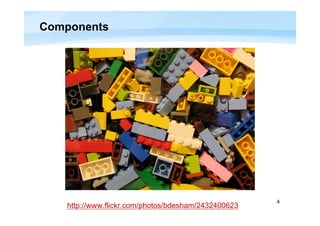
Components
http://www.flickr.com/photos/bdesham/2432400623
5
Software Component
An individual software component is a software package,
a web service, a web resource, or a module that
encapsulates a set of related functions (or data).
Components are modular and cohesive.
Components communicate with each other via interfaces.
A component model is a definition of standards for
component implementation, documentation and
deployment.
– EJB, COM, COBRA
http://en.wikipedia.org/wiki/Software_component
6
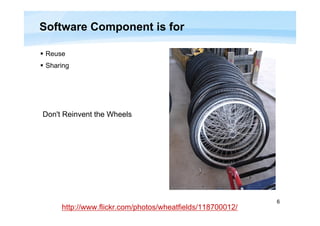
Software Component is for
 Reuse
 Sharing
http://www.flickr.com/photos/wheatfields/118700012/
Don't Reinvent the Wheels
7
Components for the Web
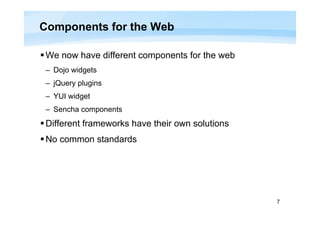
We now have different components for the web
– Dojo widgets
– jQuery plugins
– YUI widget
– Sencha components
Different frameworks have their own solutions
No common standards
8
What's the Problem?
Bad encapsulation
http://www.flickr.com/photos/27898848@N06/3174611184
9
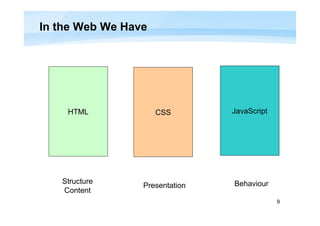
In the Web We Have
HTML CSS JavaScript
Structure
Content
Presentation Behaviour
10
After You Add a Component
You may introduce
– Additional DOM nodes
• Statically inlined
• Dynamically created using JavaScript
– CSS rules
– JavaScript objects
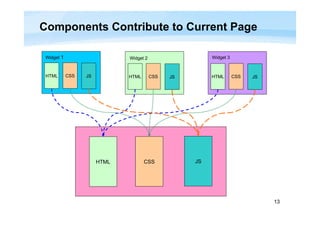
These may conflict with your own application
– Duplicated DOM element IDs
– Component's styles mingles with existing styles
– Conflicted global JavaScript object names
11
Add a Twitter Badge to Your Page (1)
Go to https://twitter.com/about/resources/buttons
Select type
You get code like this
12
Add a Twitter Badge to Your Page (2)
You get DOM like this
iframe is the primary tool we have for encapsulation
13
Components Contribute to Current Page
HTML CSS JS
HTML CSS JS HTML CSS JS HTML CSS JS
Widget 1 Widget 2 Widget 3
14
Web Components
Component model standard for the Web
W3C working draft
(http://www.w3.org/standards/techs/components)
A very new standard
15
Web Components
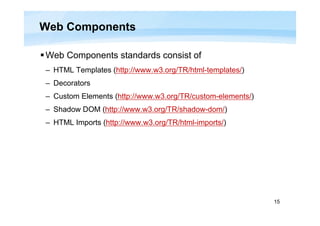
Web Components standards consist of
– HTML Templates (http://www.w3.org/TR/html-templates/)
– Decorators
– Custom Elements (http://www.w3.org/TR/custom-elements/)
– Shadow DOM (http://www.w3.org/TR/shadow-dom/)
– HTML Imports (http://www.w3.org/TR/html-imports/)
16
HTML Templates
Templates = basic structure + place holders
Dynamic web applications use templates to generate
HTML fragments
Current template techniques
– Inline invisible markup
• Set CSS style 'display:none'
– Embed HTML markup in string
• In JavaScript files
17
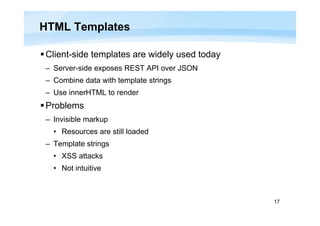
HTML Templates
Client-side templates are widely used today
– Server-side exposes REST API over JSON
– Combine data with template strings
– Use innerHTML to render
Problems
– Invisible markup
• Resources are still loaded
– Template strings
• XSS attacks
• Not intuitive
18
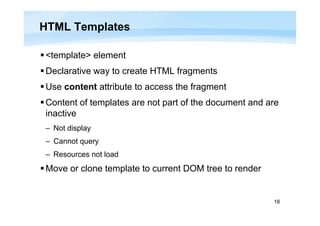
HTML Templates
<template> element
Declarative way to create HTML fragments
Use content attribute to access the fragment
Content of templates are not part of the document and are
inactive
– Not display
– Cannot query
– Resources not load
Move or clone template to current DOM tree to render
19
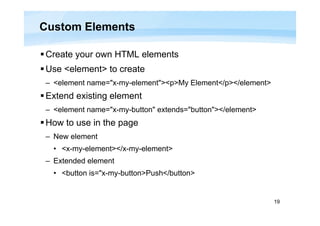
Custom Elements
Create your own HTML elements
Use <element> to create
– <element name="x-my-element"><p>My Element</p></element>
Extend existing element
– <element name="x-my-button" extends="button"></element>
How to use in the page
– New element
• <x-my-element></x-my-element>
– Extended element
• <button is="x-my-button>Push</button>
20
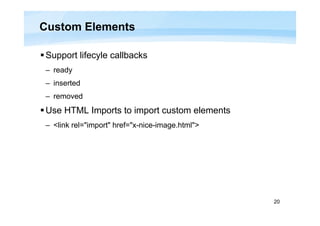
Custom Elements
Support lifecyle callbacks
– ready
– inserted
– removed
Use HTML Imports to import custom elements
– <link rel="import" href="x-nice-image.html">
21
Shadow DOM
Shadow DOM is the key of encapsulation within the DOM
tree
 Establish functional boundaries in a document tree
22
Typical Web Application
23
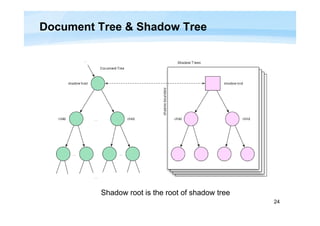
Shadow Tree
Shadow DOM allows elements in the document tree to
host other DOM trees
A set of rules establish encapsulation boundaries
between document tree and shadow trees
24
Document Tree & Shadow Tree
Shadow root is the root of shadow tree
25
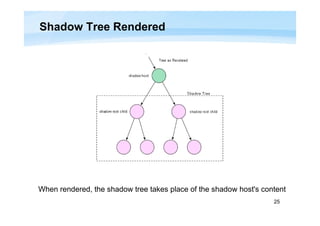
Shadow Tree Rendered
When rendered, the shadow tree takes place of the shadow host's content
26
Insertion Point
Insertion point is where shadow host's children are transposed when rendering
27
Insertion Point Rendered
When rendered, shadow host's children are distributed to different
insertion points
28
Encapsulation
All nodes in the shadow tree are NOT accessible in
shadow host's document
Node ids are NOT addressable in shadow host's
document
Style sheets are NOT accessible using shadow host's
document's CSSOM
29
Encapsulation
Styles
– CSS rules declared in an enclosing tree not apply in a shadow tree,
except when the apply-author-styles flag is set for this tree
– CSS selectors cannot cross the shadow boundary
– Use reset-style-inheritance flag to set inheritable CSS properties
to the initial value
Use @host to add styles to shadow host
30
Encapsulation
Events dispatched in the shadow tree may
– Cross the shadow boundary or
– Be terminated at the shadow boundary
Events crossing the shadow boundary are retargetted
– Event's information is adjusted to hide shadow tree
31
Simple Sample
32
Simple Sample
 Use JavaScript to create a shadow
host
 Use <content> to specify insertion
point
 Shadow host's chidren and shadow
tree are composited together when
rendered
 CSS selectors only match wholly
inside or outside of the shadow tree
Style 'color: #f00' not applied to shadow tree
33
HTML Imports
HTML Imports are a way to include and reuse HTML
documents in other HTML documents.
<link rel="import" href="x-person-badge.html">
34
Polymer Project
Polymer is a new type of library for the web, built on top of
Web Components, and designed to leverage the evolving
web platform on modern browsers.
– Created by Google
– http://www.polymer-project.org/
– Announced in Google I/O 2013
Embrace latest standards
Provide polyfills for old browsers
Going to replace Web UI in Dart
35
Polymer Architecture
36
Examples
Web Components examples in my GitHub repository:
https://github.com/alexcheng1982/learn-web-components

Introduction to Web Components

  • 1.
    Introduction to WebComponents HTML Templates, Custom Elements & Shadow DOM Fu Cheng @alexcheng1982
  • 2.
    2 Agenda Software Components HTML Templates CustomElements Shadow DOM HTML Imports Polymer Project
  • 3.
  • 4.
  • 5.
    5 Software Component An individualsoftware component is a software package, a web service, a web resource, or a module that encapsulates a set of related functions (or data). Components are modular and cohesive. Components communicate with each other via interfaces. A component model is a definition of standards for component implementation, documentation and deployment. – EJB, COM, COBRA http://en.wikipedia.org/wiki/Software_component
  • 6.
    6 Software Component isfor  Reuse  Sharing http://www.flickr.com/photos/wheatfields/118700012/ Don't Reinvent the Wheels
  • 7.
    7 Components for theWeb We now have different components for the web – Dojo widgets – jQuery plugins – YUI widget – Sencha components Different frameworks have their own solutions No common standards
  • 8.
    8 What's the Problem? Badencapsulation http://www.flickr.com/photos/27898848@N06/3174611184
  • 9.
    9 In the WebWe Have HTML CSS JavaScript Structure Content Presentation Behaviour
  • 10.
    10 After You Adda Component You may introduce – Additional DOM nodes • Statically inlined • Dynamically created using JavaScript – CSS rules – JavaScript objects These may conflict with your own application – Duplicated DOM element IDs – Component's styles mingles with existing styles – Conflicted global JavaScript object names
  • 11.
    11 Add a TwitterBadge to Your Page (1) Go to https://twitter.com/about/resources/buttons Select type You get code like this
  • 12.
    12 Add a TwitterBadge to Your Page (2) You get DOM like this iframe is the primary tool we have for encapsulation
  • 13.
    13 Components Contribute toCurrent Page HTML CSS JS HTML CSS JS HTML CSS JS HTML CSS JS Widget 1 Widget 2 Widget 3
  • 14.
    14 Web Components Component modelstandard for the Web W3C working draft (http://www.w3.org/standards/techs/components) A very new standard
  • 15.
    15 Web Components Web Componentsstandards consist of – HTML Templates (http://www.w3.org/TR/html-templates/) – Decorators – Custom Elements (http://www.w3.org/TR/custom-elements/) – Shadow DOM (http://www.w3.org/TR/shadow-dom/) – HTML Imports (http://www.w3.org/TR/html-imports/)
  • 16.
    16 HTML Templates Templates =basic structure + place holders Dynamic web applications use templates to generate HTML fragments Current template techniques – Inline invisible markup • Set CSS style 'display:none' – Embed HTML markup in string • In JavaScript files
  • 17.
    17 HTML Templates Client-side templatesare widely used today – Server-side exposes REST API over JSON – Combine data with template strings – Use innerHTML to render Problems – Invisible markup • Resources are still loaded – Template strings • XSS attacks • Not intuitive
  • 18.
    18 HTML Templates <template> element Declarativeway to create HTML fragments Use content attribute to access the fragment Content of templates are not part of the document and are inactive – Not display – Cannot query – Resources not load Move or clone template to current DOM tree to render
  • 19.
    19 Custom Elements Create yourown HTML elements Use <element> to create – <element name="x-my-element"><p>My Element</p></element> Extend existing element – <element name="x-my-button" extends="button"></element> How to use in the page – New element • <x-my-element></x-my-element> – Extended element • <button is="x-my-button>Push</button>
  • 20.
    20 Custom Elements Support lifecylecallbacks – ready – inserted – removed Use HTML Imports to import custom elements – <link rel="import" href="x-nice-image.html">
  • 21.
    21 Shadow DOM Shadow DOMis the key of encapsulation within the DOM tree  Establish functional boundaries in a document tree
  • 22.
  • 23.
    23 Shadow Tree Shadow DOMallows elements in the document tree to host other DOM trees A set of rules establish encapsulation boundaries between document tree and shadow trees
  • 24.
    24 Document Tree &Shadow Tree Shadow root is the root of shadow tree
  • 25.
    25 Shadow Tree Rendered Whenrendered, the shadow tree takes place of the shadow host's content
  • 26.
    26 Insertion Point Insertion pointis where shadow host's children are transposed when rendering
  • 27.
    27 Insertion Point Rendered Whenrendered, shadow host's children are distributed to different insertion points
  • 28.
    28 Encapsulation All nodes inthe shadow tree are NOT accessible in shadow host's document Node ids are NOT addressable in shadow host's document Style sheets are NOT accessible using shadow host's document's CSSOM
  • 29.
    29 Encapsulation Styles – CSS rulesdeclared in an enclosing tree not apply in a shadow tree, except when the apply-author-styles flag is set for this tree – CSS selectors cannot cross the shadow boundary – Use reset-style-inheritance flag to set inheritable CSS properties to the initial value Use @host to add styles to shadow host
  • 30.
    30 Encapsulation Events dispatched inthe shadow tree may – Cross the shadow boundary or – Be terminated at the shadow boundary Events crossing the shadow boundary are retargetted – Event's information is adjusted to hide shadow tree
  • 31.
  • 32.
    32 Simple Sample  UseJavaScript to create a shadow host  Use <content> to specify insertion point  Shadow host's chidren and shadow tree are composited together when rendered  CSS selectors only match wholly inside or outside of the shadow tree Style 'color: #f00' not applied to shadow tree
  • 33.
    33 HTML Imports HTML Importsare a way to include and reuse HTML documents in other HTML documents. <link rel="import" href="x-person-badge.html">
  • 34.
    34 Polymer Project Polymer isa new type of library for the web, built on top of Web Components, and designed to leverage the evolving web platform on modern browsers. – Created by Google – http://www.polymer-project.org/ – Announced in Google I/O 2013 Embrace latest standards Provide polyfills for old browsers Going to replace Web UI in Dart
  • 35.
  • 36.
    36 Examples Web Components examplesin my GitHub repository: https://github.com/alexcheng1982/learn-web-components