mAppMechanic PolymerJS
PolymerJS
1
Session 3 - Custom Elements
PolymerJSmAppMechanic
Agenda
2
• What is Custom Polymer Element ?
• Registration of Custom Element
• Extending Native HTML Elements
• Declared Properties Basics
• Lifecycle Events
• Local DOM for Custom Elements
• Styling of Custom Elements
PolymerJSmAppMechanic
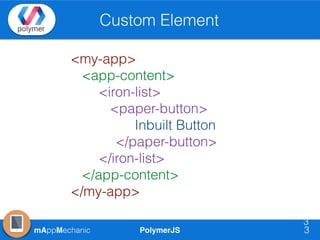
Custom Element
3
3
<my-app>
<app-content>
<iron-list>
<paper-button>
Inbuilt Button
</paper-button>
</iron-list>
</app-content>
</my-app>
PolymerJSmAppMechanic
(contd) Custom Element
4
4
★ Instantiated using a constructor or document.createElement.
★ Configured using attributes or properties.
★ Populated with internal DOM inside each instance.
★ Responsive to property and attribute changes (for example, by
populating data into the DOM, or firing an event).
★ Styled with internal defaults or externally.
★ Responsive to methods that manipulate its internal state.
Polymer provides a set of features to create your own Custom Elements
similar to creating like a Web Component using customElements v1 API. It
provides some added benefits over native web components. Important points
regarding it are:
PolymerJSmAppMechanic
Registration of Custom Element
5
5
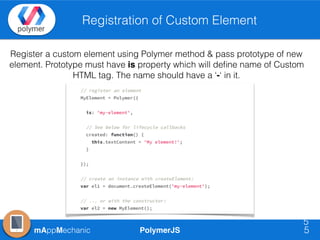
Register a custom element using Polymer method & pass prototype of new
element. Prototype must have is property which will define name of Custom
HTML tag. The name should have a ‘-‘ in it.
PolymerJSmAppMechanic 6
PolymerJSmAppMechanic
Declare Properties
7
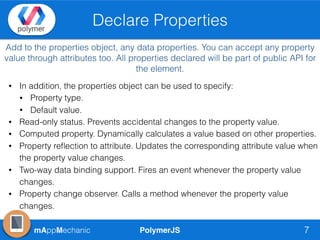
Add to the properties object, any data properties. You can accept any property
value through attributes too. All properties declared will be part of public API for
the element.
• In addition, the properties object can be used to specify:
• Property type.
• Default value.
• Read-only status. Prevents accidental changes to the property value.
• Computed property. Dynamically calculates a value based on other properties.
• Property reflection to attribute. Updates the corresponding attribute value when
the property value changes.
• Two-way data binding support. Fires an event whenever the property value
changes.
• Property change observer. Calls a method whenever the property value
changes.
PolymerJSmAppMechanic
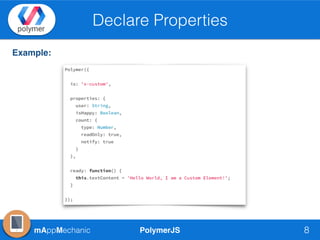
Declare Properties
8
Example:
PolymerJSmAppMechanic
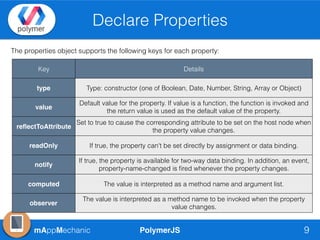
Declare Properties
9
The properties object supports the following keys for each property:
Key Details
type Type: constructor (one of Boolean, Date, Number, String, Array or Object)
value
Default value for the property. If value is a function, the function is invoked and
the return value is used as the default value of the property.
reflectToAttribute
Set to true to cause the corresponding attribute to be set on the host node when
the property value changes.
readOnly If true, the property can't be set directly by assignment or data binding.
notify
If true, the property is available for two-way data binding. In addition, an event,
property-name-changed is fired whenever the property changes.
computed The value is interpreted as a method name and argument list.
observer
The value is interpreted as a method name to be invoked when the property
value changes.
PolymerJSmAppMechanic 10
PolymerJSmAppMechanic
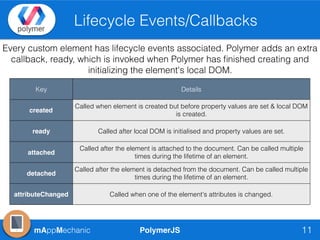
Lifecycle Events/Callbacks
11
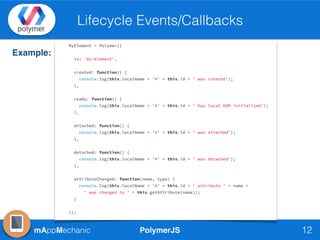
Every custom element has lifecycle events associated. Polymer adds an extra
callback, ready, which is invoked when Polymer has finished creating and
initializing the element's local DOM.
Key Details
created
Called when element is created but before property values are set & local DOM
is created.
ready Called after local DOM is initialised and property values are set.
attached
Called after the element is attached to the document. Can be called multiple
times during the lifetime of an element.
detached
Called after the element is detached from the document. Can be called multiple
times during the lifetime of an element.
attributeChanged Called when one of the element's attributes is changed.
PolymerJSmAppMechanic
Lifecycle Events/Callbacks
12
Example:
PolymerJSmAppMechanic 13
PolymerJSmAppMechanic
Local DOM
14
The local DOM created and managed by any Custom Element is called
Local DOM. It is different from the Light DOM (children of web
components).
• Polymer uses native Shadow DOM for this wherever the Browsers
support it.
• Polymer uses a custom implementation called Shady DOM wherever the
Browser do not support shadow DOM. Shady DOM has a different API.
Polymer interface covers most of the common DOM methods and
properties, and is compatible with both shady DOM and native shadow
DOM.
PolymerJSmAppMechanic
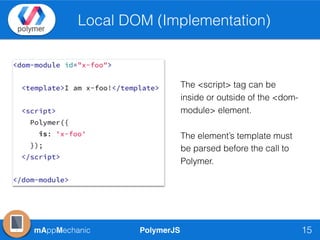
Local DOM (Implementation)
15
The <script> tag can be
inside or outside of the <dom-
module> element.
The element’s template must
be parsed before the call to
Polymer.
PolymerJSmAppMechanic
(contd)Important Features
16
➡ Automatic Node Finding

Any node specified in the element's template with an id is stored
on the this.$ hash by id.
➡ this.$$(selector)

$$ returns the first node in the local DOM that matches selector.
➡ DOM distribution

The <content> element provides an insertion point at which an
element's light DOM is combined with its local DOM.
➡ DOM API

Polymer.dom API methods like insertBefore, appendChild,
removeChild.

Properties - innerHTML, textContent, firstChild, lastChild
PolymerJSmAppMechanic 17
PolymerJSmAppMechanic
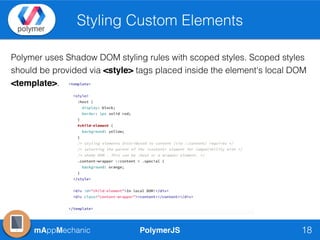
Styling Custom Elements
18
Polymer uses Shadow DOM styling rules with scoped styles. Scoped styles
should be provided via <style> tags placed inside the element's local DOM
<template>.
PolymerJSmAppMechanic
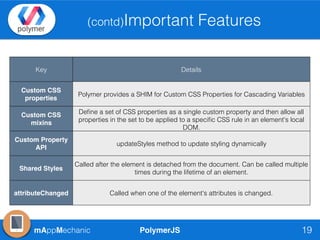
(contd)Important Features
19
Key Details
Custom CSS
properties
Polymer provides a SHIM for Custom CSS Properties for Cascading Variables
Custom CSS
mixins
Define a set of CSS properties as a single custom property and then allow all
properties in the set to be applied to a specific CSS rule in an element's local
DOM.
Custom Property
API
updateStyles method to update styling dynamically
Shared Styles
Called after the element is detached from the document. Can be called multiple
times during the lifetime of an element.
attributeChanged Called when one of the element's attributes is changed.
PolymerJSmAppMechanic 20
mAppMechanic PolymerJS 21
Thanks
mAppMechanic
twitter.com/mAppMechanic
linkedin.com/in/rahatkh
yehtechnologies@gmail.com

MAppMechanic CodeLabs - PolymerJS Custom Elements

  • 1.
  • 2.
    PolymerJSmAppMechanic Agenda 2 • What isCustom Polymer Element ? • Registration of Custom Element • Extending Native HTML Elements • Declared Properties Basics • Lifecycle Events • Local DOM for Custom Elements • Styling of Custom Elements
  • 3.
  • 4.
    PolymerJSmAppMechanic (contd) Custom Element 4 4 ★Instantiated using a constructor or document.createElement. ★ Configured using attributes or properties. ★ Populated with internal DOM inside each instance. ★ Responsive to property and attribute changes (for example, by populating data into the DOM, or firing an event). ★ Styled with internal defaults or externally. ★ Responsive to methods that manipulate its internal state. Polymer provides a set of features to create your own Custom Elements similar to creating like a Web Component using customElements v1 API. It provides some added benefits over native web components. Important points regarding it are:
  • 5.
    PolymerJSmAppMechanic Registration of CustomElement 5 5 Register a custom element using Polymer method & pass prototype of new element. Prototype must have is property which will define name of Custom HTML tag. The name should have a ‘-‘ in it.
  • 6.
  • 7.
    PolymerJSmAppMechanic Declare Properties 7 Add tothe properties object, any data properties. You can accept any property value through attributes too. All properties declared will be part of public API for the element. • In addition, the properties object can be used to specify: • Property type. • Default value. • Read-only status. Prevents accidental changes to the property value. • Computed property. Dynamically calculates a value based on other properties. • Property reflection to attribute. Updates the corresponding attribute value when the property value changes. • Two-way data binding support. Fires an event whenever the property value changes. • Property change observer. Calls a method whenever the property value changes.
  • 8.
  • 9.
    PolymerJSmAppMechanic Declare Properties 9 The propertiesobject supports the following keys for each property: Key Details type Type: constructor (one of Boolean, Date, Number, String, Array or Object) value Default value for the property. If value is a function, the function is invoked and the return value is used as the default value of the property. reflectToAttribute Set to true to cause the corresponding attribute to be set on the host node when the property value changes. readOnly If true, the property can't be set directly by assignment or data binding. notify If true, the property is available for two-way data binding. In addition, an event, property-name-changed is fired whenever the property changes. computed The value is interpreted as a method name and argument list. observer The value is interpreted as a method name to be invoked when the property value changes.
  • 10.
  • 11.
    PolymerJSmAppMechanic Lifecycle Events/Callbacks 11 Every customelement has lifecycle events associated. Polymer adds an extra callback, ready, which is invoked when Polymer has finished creating and initializing the element's local DOM. Key Details created Called when element is created but before property values are set & local DOM is created. ready Called after local DOM is initialised and property values are set. attached Called after the element is attached to the document. Can be called multiple times during the lifetime of an element. detached Called after the element is detached from the document. Can be called multiple times during the lifetime of an element. attributeChanged Called when one of the element's attributes is changed.
  • 12.
  • 13.
  • 14.
    PolymerJSmAppMechanic Local DOM 14 The localDOM created and managed by any Custom Element is called Local DOM. It is different from the Light DOM (children of web components). • Polymer uses native Shadow DOM for this wherever the Browsers support it. • Polymer uses a custom implementation called Shady DOM wherever the Browser do not support shadow DOM. Shady DOM has a different API. Polymer interface covers most of the common DOM methods and properties, and is compatible with both shady DOM and native shadow DOM.
  • 15.
    PolymerJSmAppMechanic Local DOM (Implementation) 15 The<script> tag can be inside or outside of the <dom- module> element. The element’s template must be parsed before the call to Polymer.
  • 16.
    PolymerJSmAppMechanic (contd)Important Features 16 ➡ AutomaticNode Finding
 Any node specified in the element's template with an id is stored on the this.$ hash by id. ➡ this.$$(selector)
 $$ returns the first node in the local DOM that matches selector. ➡ DOM distribution
 The <content> element provides an insertion point at which an element's light DOM is combined with its local DOM. ➡ DOM API
 Polymer.dom API methods like insertBefore, appendChild, removeChild.
 Properties - innerHTML, textContent, firstChild, lastChild
  • 17.
  • 18.
    PolymerJSmAppMechanic Styling Custom Elements 18 Polymeruses Shadow DOM styling rules with scoped styles. Scoped styles should be provided via <style> tags placed inside the element's local DOM <template>.
  • 19.
    PolymerJSmAppMechanic (contd)Important Features 19 Key Details CustomCSS properties Polymer provides a SHIM for Custom CSS Properties for Cascading Variables Custom CSS mixins Define a set of CSS properties as a single custom property and then allow all properties in the set to be applied to a specific CSS rule in an element's local DOM. Custom Property API updateStyles method to update styling dynamically Shared Styles Called after the element is detached from the document. Can be called multiple times during the lifetime of an element. attributeChanged Called when one of the element's attributes is changed.
  • 20.
  • 21.