Less JS!
for backend developers
About me
Olga Semeniuk,
Java developer
https://plus.google.com/+OlgaKorichkovskaya
Agenda
● Web components
● Polymer
● JSF: PrimeFaces
Goals:
● Reducing amount of code
● Readability
● Composability (being able to create whole
sites and apps by putting different elements
together)
Web Components
set standards from Google
WebComponents.org
Goals:
● Build widgets
● …which can be reused reliably
● …and which won’t break pages if the next
version of the component changes
internal implementation details
Web Components: aims
● Simplification
● Reusability
● Robustness
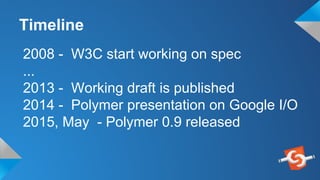
2008 - W3C start working on spec
...
2013 - Working draft is published
2014 - Polymer presentation on Google I/O
2015, May - Polymer 0.9 released
Timeline
Bower
● A package manager for the web
● Search for dependencies and install
them as packages
● Created by Twitter
● Open Source
www.bower.io
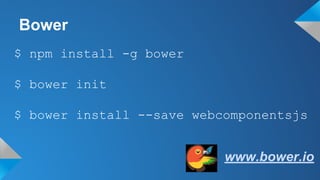
Bower
$ npm install -g bower
www.bower.io
$ bower init
$ bower install --save webcomponentsjs
Web Components
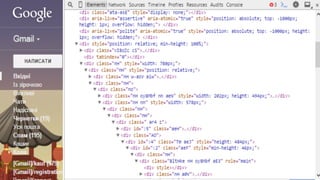
Shadow DOM
HTML Imports
HTML Templates
Custom Elements
Shadow DOM
Method of combining multiple DOM trees
into one hierarchy and
how these trees interact with each other
within a document
Shadow DOM: benefits
● Encapsulate content by creating
document fragments.
● Separate content from presentation
thereby eliminating naming conflicts and
improving code expression
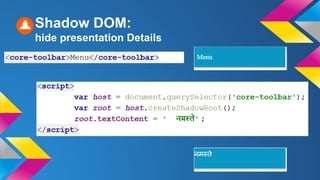
Shadow DOM:
hide presentation Details
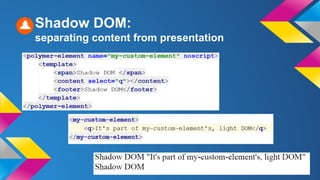
Shadow DOM:
separating content from presentation
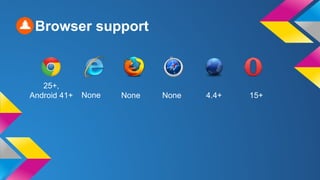
25+,
Android 41+ None None None 4.4+ 15+
Browser support
Polyfills
webcomponents.js is a set of polyfills built on
top of the Web Components specifications,
enable Web Components in browsers that lack
native support
It makes it possible for developers to use
these standards today
HTML Imports
Imports let include and reuse HTML docs in
other HTML docs.
for html <link rel="import" href="..">
We have <script src>, <link rel="stylesheet">,
<img>, <video>, <audio>...
HTML Imports
The URL is called an import location. To load content from
another domain, the import location needs to be CORS-enabled
HTML Imports: benefits
● Decomposition
● Combining several resources (JS,
CSS, ..) in one
● Reuse
Browser support
36+,
Android 41+
None None None 40+ 23+
Custom Elements
“Everything is an element” philosophy:
web app becomes a collection of well-
defined, reusable components.
Custom Elements
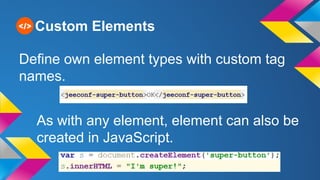
Define own element types with custom tag
names.
As with any element, element can also be
created in JavaScript.
Custom Elements
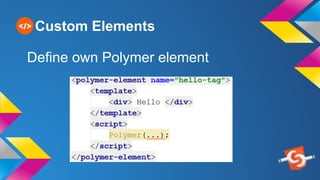
Define own Polymer element
Custom Elements
Types of elements:
● UI elements, which render UI to the
screen.
● Non-UI elements, which provide
other utilities.
Custom Elements: benefits
● Reduce the amount of code
● Express the function of the code
● Encapsulation, inheritance
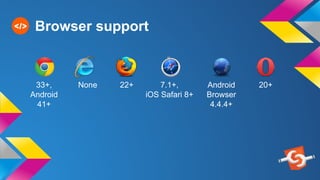
Browser support
33+,
Android
41+
None 22+ 7.1+,
iOS Safari 8+
Android
Browser
4.4.4+
20+
Web Components
● Increase productivity
● Declarative
● Composability
● Implement APIs per element type
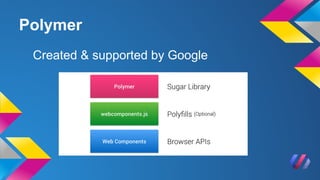
Polymer
Library built with some extra sugar, provides
a declarative syntax for defining custom
elements, special features including
● two-way data binding,
● declarative event handling,
● declarative inheritance
● property observation
Created & supported by Google
Polymer
Polymer elements
Core-elements are a set of visual and non-visual
utility elements for working with layout, user input,
selection, and scaffolding apps.
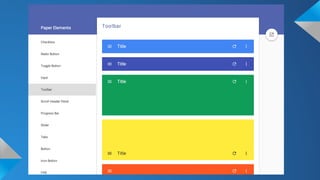
Polymer's paper collection implements
material design, highly visual, highly interactive
elements that include things like controls,
layouts, hero transitions, and scrolling effects.
Material design
● Material is the metaphor
● Bold, graphic, intentional
● Motion provides meaning
“Visual language that synthesizes the classic
principles of good design with the innovation and
possibility of technology and science.” © Google
Principles:
http://google.com/design/spec/material-design
● Browser integrated: declarative event
handlers, mutation observers, query selector
● Interoperability - every framework is
compatible with DOM
Polymer : pros
● Write script in a scripting language, write
styles in a styling language, write markup in a
markup language.
● DevTools support
● Browser support
● Not production ready, so far
● Client side technology - many similar
things to JS - frameworks, such
experience is very helpful
Polymer : cons
JSF: PrimeFaces
primefaces.org
PrimeFaces
● Component library for JavaServer Faces
(JSF) based applications
● Standard part of the Java EE stack, so
you can’t do anything wrong
● The most popular JSF framework
Who uses PrimeFaces?
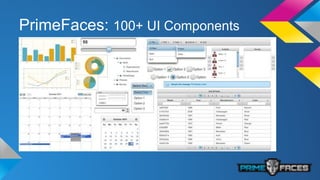
PrimeFaces: 100+ UI Components
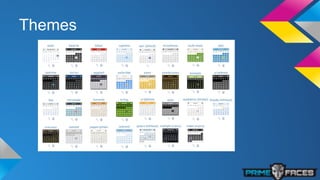
Themes
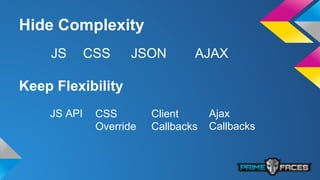
Hide Complexity
JS CSS JSON AJAX
Keep Flexibility
JS API CSS
Override
Client
Callbacks
Ajax
Callbacks
Templates
JSF 2 Templating with Facelets
ui:insert
ui:define
ui:include
ui:composition
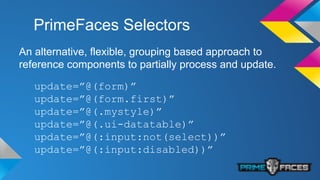
PrimeFaces Selectors
An alternative, flexible, grouping based approach to
reference components to partially process and update.
update=”@(form)”
update=”@(form.first)”
update=”@(.mystyle)”
update=”@(.ui-datatable)”
update=”@(:input:not(select))”
update=”@(:input:disabled))”
Custom Elements
PrimeFaces contains API to build custom
components.
But custom components is often difficult to
maintain.
Pros
● Mature and cross browser compatible
● Very large and helpful community
● Easy to understand even for novice team
members
and cons
● Tightly coupled: Layout, Design, Logic,
Communication with the server
● Need some time to make components
look right together
● Easy to make mistakes related to a
misunderstanding of the request-
response lifecycle
and cons
● Not suitable for heavily consumer oriented
website
● Final HTML page is generated from
pseudo-html (xhtml)
● and resulting HTML is often atrocious
● Generation take time
● JSF concept is outdated
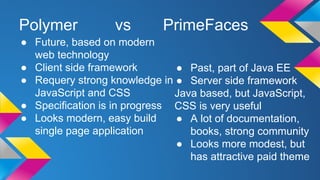
Polymer vs PrimeFaces
● Future, based on modern
web technology
● Client side framework
● Requery strong knowledge in
JavaScript and CSS
● Specification is in progress
● Looks modern, easy build
single page application
● Past, part of Java EE
● Server side framework
Java based, but JavaScript,
CSS is very useful
● A lot of documentation,
books, strong community
● Looks more modest, but
has attractive paid theme
Polymer and PrimeFaces
● Powerful frameworks to simplify writing code for
the UI
● Contains set of ready components with styles
● Allow to create own components
● Keep page templating
● Have own search in DOM
● Encapsulate complexity
● Responsive Design
● Extendable
Polymer demo
1. Project skeleton (Spring-Boot, index.html)
2. Add Polymer, core-, paper-elements
3. Create component
4. - add data
5. - style
6. Style for welcome page
7. Add paper-input, paper-button and core-ajax
8. Backend service
PrimeFaces demo
1. Generate project skeleton from archetype (https:
//github.com/bprager/spring-boot-primefaces)
2. Welcome page layout
3. Add polymer components
4. Add interaction with Spring Been
Links
● Web Components WebComponents.org
● Polymer polymer-project.org
● Material-design http://www.google.
com/design/spec/material-design/
● PrimeFaces primefaces.org
● SpringBoot/PrimeFaces Maven-Archetype https://github.
com/bprager/spring-boot-primefaces
● Slides
<questions></questions>
Thanks!

JEE Conf 2015: Less JS!

  • 1.
  • 2.
    About me Olga Semeniuk, Javadeveloper https://plus.google.com/+OlgaKorichkovskaya
  • 3.
    Agenda ● Web components ●Polymer ● JSF: PrimeFaces
  • 5.
    Goals: ● Reducing amountof code ● Readability ● Composability (being able to create whole sites and apps by putting different elements together)
  • 6.
    Web Components set standardsfrom Google WebComponents.org
  • 7.
    Goals: ● Build widgets ●…which can be reused reliably ● …and which won’t break pages if the next version of the component changes internal implementation details
  • 8.
    Web Components: aims ●Simplification ● Reusability ● Robustness
  • 9.
    2008 - W3Cstart working on spec ... 2013 - Working draft is published 2014 - Polymer presentation on Google I/O 2015, May - Polymer 0.9 released Timeline
  • 10.
    Bower ● A packagemanager for the web ● Search for dependencies and install them as packages ● Created by Twitter ● Open Source www.bower.io
  • 11.
    Bower $ npm install-g bower www.bower.io $ bower init $ bower install --save webcomponentsjs
  • 12.
    Web Components Shadow DOM HTMLImports HTML Templates Custom Elements
  • 13.
    Shadow DOM Method ofcombining multiple DOM trees into one hierarchy and how these trees interact with each other within a document
  • 14.
    Shadow DOM: benefits ●Encapsulate content by creating document fragments. ● Separate content from presentation thereby eliminating naming conflicts and improving code expression
  • 15.
  • 16.
  • 17.
    25+, Android 41+ NoneNone None 4.4+ 15+ Browser support
  • 18.
    Polyfills webcomponents.js is aset of polyfills built on top of the Web Components specifications, enable Web Components in browsers that lack native support It makes it possible for developers to use these standards today
  • 19.
    HTML Imports Imports letinclude and reuse HTML docs in other HTML docs. for html <link rel="import" href=".."> We have <script src>, <link rel="stylesheet">, <img>, <video>, <audio>...
  • 20.
    HTML Imports The URLis called an import location. To load content from another domain, the import location needs to be CORS-enabled
  • 21.
    HTML Imports: benefits ●Decomposition ● Combining several resources (JS, CSS, ..) in one ● Reuse
  • 22.
  • 23.
    Custom Elements “Everything isan element” philosophy: web app becomes a collection of well- defined, reusable components.
  • 24.
    Custom Elements Define ownelement types with custom tag names. As with any element, element can also be created in JavaScript.
  • 25.
  • 26.
    Custom Elements Types ofelements: ● UI elements, which render UI to the screen. ● Non-UI elements, which provide other utilities.
  • 27.
    Custom Elements: benefits ●Reduce the amount of code ● Express the function of the code ● Encapsulation, inheritance
  • 28.
    Browser support 33+, Android 41+ None 22+7.1+, iOS Safari 8+ Android Browser 4.4.4+ 20+
  • 29.
    Web Components ● Increaseproductivity ● Declarative ● Composability ● Implement APIs per element type
  • 30.
    Polymer Library built withsome extra sugar, provides a declarative syntax for defining custom elements, special features including ● two-way data binding, ● declarative event handling, ● declarative inheritance ● property observation
  • 31.
    Created & supportedby Google Polymer
  • 32.
    Polymer elements Core-elements area set of visual and non-visual utility elements for working with layout, user input, selection, and scaffolding apps. Polymer's paper collection implements material design, highly visual, highly interactive elements that include things like controls, layouts, hero transitions, and scrolling effects.
  • 35.
    Material design ● Materialis the metaphor ● Bold, graphic, intentional ● Motion provides meaning “Visual language that synthesizes the classic principles of good design with the innovation and possibility of technology and science.” © Google Principles: http://google.com/design/spec/material-design
  • 36.
    ● Browser integrated:declarative event handlers, mutation observers, query selector ● Interoperability - every framework is compatible with DOM Polymer : pros ● Write script in a scripting language, write styles in a styling language, write markup in a markup language. ● DevTools support
  • 37.
    ● Browser support ●Not production ready, so far ● Client side technology - many similar things to JS - frameworks, such experience is very helpful Polymer : cons
  • 38.
  • 39.
    PrimeFaces ● Component libraryfor JavaServer Faces (JSF) based applications ● Standard part of the Java EE stack, so you can’t do anything wrong ● The most popular JSF framework
  • 40.
  • 41.
  • 42.
  • 43.
    Hide Complexity JS CSSJSON AJAX Keep Flexibility JS API CSS Override Client Callbacks Ajax Callbacks
  • 44.
    Templates JSF 2 Templatingwith Facelets ui:insert ui:define ui:include ui:composition
  • 45.
    PrimeFaces Selectors An alternative,flexible, grouping based approach to reference components to partially process and update. update=”@(form)” update=”@(form.first)” update=”@(.mystyle)” update=”@(.ui-datatable)” update=”@(:input:not(select))” update=”@(:input:disabled))”
  • 46.
    Custom Elements PrimeFaces containsAPI to build custom components. But custom components is often difficult to maintain.
  • 47.
    Pros ● Mature andcross browser compatible ● Very large and helpful community ● Easy to understand even for novice team members
  • 48.
    and cons ● Tightlycoupled: Layout, Design, Logic, Communication with the server ● Need some time to make components look right together ● Easy to make mistakes related to a misunderstanding of the request- response lifecycle
  • 49.
    and cons ● Notsuitable for heavily consumer oriented website ● Final HTML page is generated from pseudo-html (xhtml) ● and resulting HTML is often atrocious ● Generation take time ● JSF concept is outdated
  • 50.
    Polymer vs PrimeFaces ●Future, based on modern web technology ● Client side framework ● Requery strong knowledge in JavaScript and CSS ● Specification is in progress ● Looks modern, easy build single page application ● Past, part of Java EE ● Server side framework Java based, but JavaScript, CSS is very useful ● A lot of documentation, books, strong community ● Looks more modest, but has attractive paid theme
  • 51.
    Polymer and PrimeFaces ●Powerful frameworks to simplify writing code for the UI ● Contains set of ready components with styles ● Allow to create own components ● Keep page templating ● Have own search in DOM ● Encapsulate complexity ● Responsive Design ● Extendable
  • 52.
    Polymer demo 1. Projectskeleton (Spring-Boot, index.html) 2. Add Polymer, core-, paper-elements 3. Create component 4. - add data 5. - style 6. Style for welcome page 7. Add paper-input, paper-button and core-ajax 8. Backend service
  • 53.
    PrimeFaces demo 1. Generateproject skeleton from archetype (https: //github.com/bprager/spring-boot-primefaces) 2. Welcome page layout 3. Add polymer components 4. Add interaction with Spring Been
  • 54.
    Links ● Web ComponentsWebComponents.org ● Polymer polymer-project.org ● Material-design http://www.google. com/design/spec/material-design/ ● PrimeFaces primefaces.org ● SpringBoot/PrimeFaces Maven-Archetype https://github. com/bprager/spring-boot-primefaces ● Slides
  • 55.
  • 56.