Custom Elements with
Polymer Web Components
John Riviello
@JohnRiv
Distinguished Engineer, Comcast Interactive Media
Elements: The Web Conference at Penn State – June 14, 2016
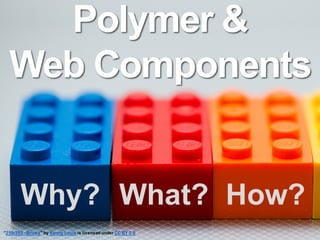
Polymer &
Web Components
”250/365 - Bricks" by Kenny Louie is licensed under CC BY 2.0
Why? What? How?
Communicating & shipping
web design & functionality
updates across a large
organization is HARD WORK
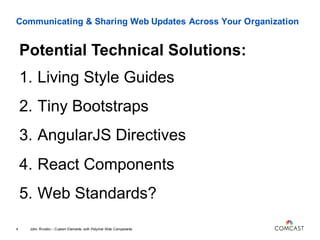
Communicating & Sharing Web Updates Across Your Organization
1. Living Style Guides
2. Tiny Bootstraps
3. AngularJS Directives
4. React Components
5. Web Standards?
John Riviello – Custom Elements with Polymer Web Components4
Potential Technical Solutions:
YES!
Web Standards!
Web Components!
What are
Web Components?
What are Web Components?
4 Specs
John Riviello – Custom Elements with Polymer Web Components7
What are Web Components?
Custom Elements
John Riviello – Custom Elements with Polymer Web Components8
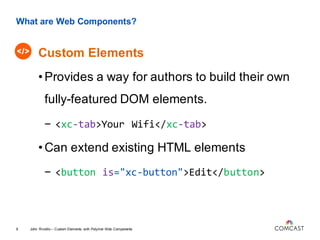
What are Web Components?
Custom Elements
John Riviello – Custom Elements with Polymer Web Components9
•Provides a way for authors to build their own
fully-featured DOM elements.
- <xc-tab>Your Wifi</xc-tab>
•Can extend existing HTML elements
- <button is="xc-button">Edit</button>
What are Web Components?
HTML Imports
John Riviello – Custom Elements with Polymer Web Components10
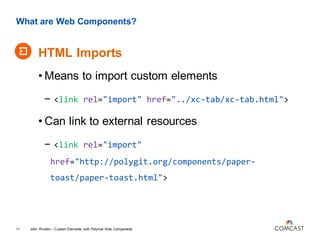
What are Web Components?
HTML Imports
John Riviello – Custom Elements with Polymer Web Components11
• Means to import custom elements
- <link rel="import" href="../xc-tab/xc-tab.html">
• Can link to external resources
- <link rel="import"
href="http://polygit.org/components/paper-
toast/paper-toast.html">
What are Web Components?
Templates
John Riviello – Custom Elements with Polymer Web Components12
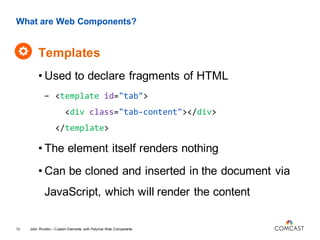
What are Web Components?
Templates
John Riviello – Custom Elements with Polymer Web Components13
• Used to declare fragments of HTML
- <template id="tab">
<div class="tab-content"></div>
</template>
• The element itself renders nothing
• Can be cloned and inserted in the document via
JavaScript, which will render the content
What are Web Components?
Shadow DOM
John Riviello – Custom Elements with Polymer Web Components14
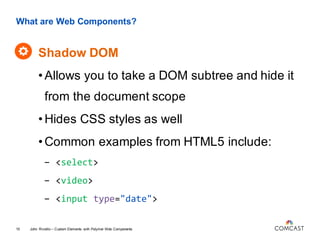
What are Web Components?
Shadow DOM
John Riviello – Custom Elements with Polymer Web Components15
•Allows you to take a DOM subtree and hide it
from the document scope
•Hides CSS styles as well
•Common examples from HTML5 include:
- <select>
- <video>
- <input type="date">
Can we even use
these things?
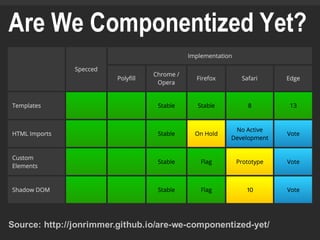
Source: http://jonrimmer.github.io/are-we-componentized-yet/
Are We Componentized Yet?
There’s hope.
What’s better than
hope?
POLYFILLS!
*as long as there is still hope*
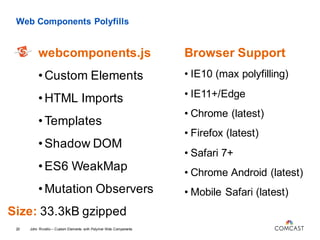
Web Components Polyfills
webcomponents.js
John Riviello – Custom Elements with Polymer Web Components20
•Custom Elements
•HTML Imports
•Templates
•Shadow DOM
•ES6 WeakMap
•Mutation Observers
Browser Support
• IE10 (max polyfilling)
• IE11+/Edge
• Chrome (latest)
• Firefox (latest)
• Safari 7+
• Chrome Android (latest)
• Mobile Safari (latest)
Size: 33.3kB gzipped
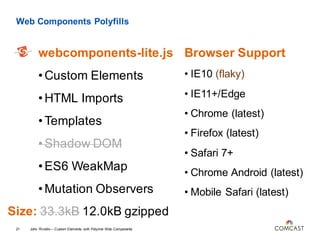
Web Components Polyfills
webcomponents-lite.js
John Riviello – Custom Elements with Polymer Web Components21
•Custom Elements
•HTML Imports
•Templates
•Shadow DOM
•ES6 WeakMap
•Mutation Observers
Browser Support
• IE10 (flaky)
• IE11+/Edge
• Chrome (latest)
• Firefox (latest)
• Safari 7+
• Chrome Android (latest)
• Mobile Safari (latest)
Size: 33.3kB 12.0kB gzipped
Lightweight
Web Component
Libraries
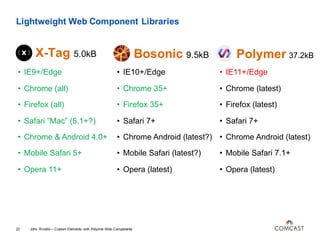
Lightweight Web Component Libraries
X-Tag 5.0kB
John Riviello – Custom Elements with Polymer Web Components23
• IE9+/Edge
• Chrome (all)
• Firefox (all)
• Safari ”Mac” (5.1+?)
• Chrome & Android 4.0+
• Mobile Safari 5+
• Opera 11+
• IE10+/Edge
• Chrome 35+
• Firefox 35+
• Safari 7+
• Chrome Android (latest?)
• Mobile Safari (latest?)
• Opera (latest)
• IE11+/Edge
• Chrome (latest)
• Firefox (latest)
• Safari 7+
• Chrome Android (latest)
• Mobile Safari 7.1+
• Opera (latest)
Bosonic 9.5kB Polymer 37.2kB
Google Polymer
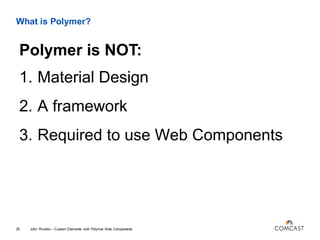
What is Polymer?
1. Material Design
2. A framework
3. Required to use Web Components
John Riviello – Custom Elements with Polymer Web Components25
Polymer is NOT:
What is Polymer?
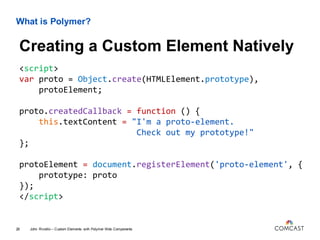
<script>
var proto = Object.create(HTMLElement.prototype),
protoElement;
proto.createdCallback = function () {
this.textContent = "I'm a proto-element.
Check out my prototype!"
};
protoElement = document.registerElement('proto-element', {
prototype: proto
});
</script>
John Riviello – Custom Elements with Polymer Web Components26
Creating a Custom Element Natively
What is Polymer?
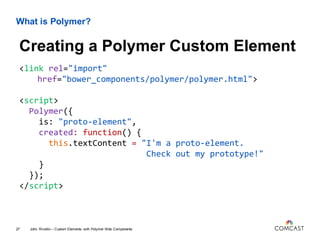
<link rel="import"
href="bower_components/polymer/polymer.html">
<script>
Polymer({
is: "proto-element",
created: function() {
this.textContent = "I'm a proto-element.
Check out my prototype!"
}
});
</script>
John Riviello – Custom Elements with Polymer Web Components27
Creating a Polymer Custom Element
What is Polymer?
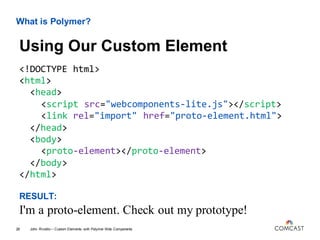
<!DOCTYPE html>
<html>
<head>
<script src="webcomponents-lite.js"></script>
<link rel="import" href="proto-element.html">
</head>
<body>
<proto-element></proto-element>
</body>
</html>
RESULT:
I'm a proto-element. Check out my prototype!
John Riviello – Custom Elements with Polymer Web Components28
Using Our Custom Element
What is Polymer?
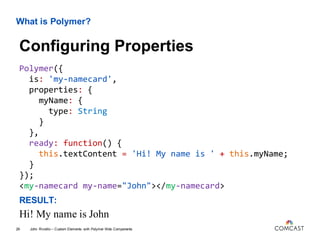
Polymer({
is: 'my-namecard',
properties: {
myName: {
type: String
}
},
ready: function() {
this.textContent = 'Hi! My name is ' + this.myName;
}
});
<my-namecard my-name="John"></my-namecard>
RESULT:
Hi! My name is John
John Riviello – Custom Elements with Polymer Web Components29
Configuring Properties
What is Polymer?
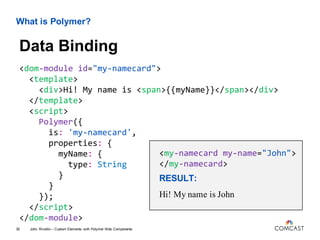
<dom-module id="my-namecard">
<template>
<div>Hi! My name is <span>{{myName}}</span></div>
</template>
<script>
Polymer({
is: 'my-namecard',
properties: {
myName: {
type: String
}
}
});
</script>
</dom-module>
John Riviello – Custom Elements with Polymer Web Components30
Data Binding
<my-namecard my-name="John">
</my-namecard>
RESULT:
Hi! My name is John
What is Polymer?
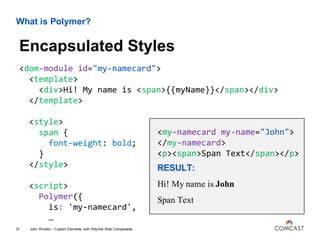
<dom-module id="my-namecard">
<template>
<div>Hi! My name is <span>{{myName}}</span></div>
</template>
<style>
span {
font-weight: bold;
}
</style>
<script>
Polymer({
is: 'my-namecard',
…
John Riviello – Custom Elements with Polymer Web Components31
Encapsulated Styles
<my-namecard my-name="John">
</my-namecard>
<p><span>Span Text</span></p>
RESULT:
Hi! My name is John
Span Text
What is Polymer?
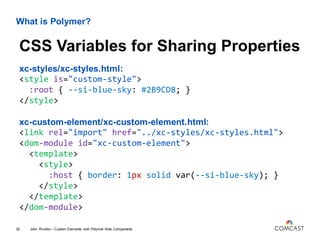
xc-styles/xc-styles.html:
<style is="custom-style">
:root { --si-blue-sky: #2B9CD8; }
</style>
xc-custom-element/xc-custom-element.html:
<link rel="import" href="../xc-styles/xc-styles.html">
<dom-module id="xc-custom-element">
<template>
<style>
:host { border: 1px solid var(--si-blue-sky); }
</style>
</template>
</dom-module>
John Riviello – Custom Elements with Polymer Web Components32
CSS Variables for Sharing Properties
What is Polymer?
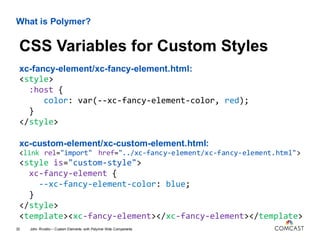
xc-fancy-element/xc-fancy-element.html:
<style>
:host {
color: var(--xc-fancy-element-color, red);
}
</style>
xc-custom-element/xc-custom-element.html:
<link rel="import" href="../xc-fancy-element/xc-fancy-element.html">
<style is="custom-style">
xc-fancy-element {
--xc-fancy-element-color: blue;
}
</style>
<template><xc-fancy-element></xc-fancy-element></template>
John Riviello – Custom Elements with Polymer Web Components33
CSS Variables for Custom Styles
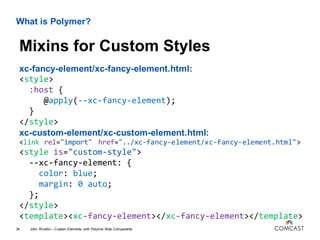
What is Polymer?
xc-fancy-element/xc-fancy-element.html:
<style>
:host {
@apply(--xc-fancy-element);
}
</style>
xc-custom-element/xc-custom-element.html:
<link rel="import" href="../xc-fancy-element/xc-fancy-element.html">
<style is="custom-style">
--xc-fancy-element: {
color: blue;
margin: 0 auto;
};
</style>
<template><xc-fancy-element></xc-fancy-element></template>
John Riviello – Custom Elements with Polymer Web Components34
Mixins for Custom Styles
What is Polymer?
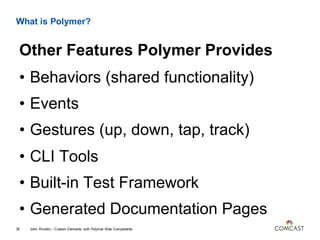
• Behaviors (shared functionality)
• Events
• Gestures (up, down, tap, track)
• CLI Tools
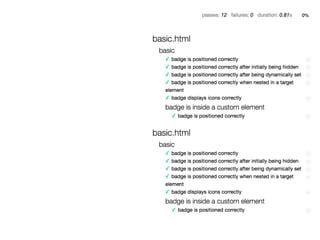
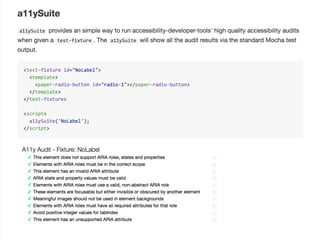
• Built-in Test Framework
• Generated Documentation Pages
John Riviello – Custom Elements with Polymer Web Components35
Other Features Polymer Provides
Building with
Polymer
Building with Polymer
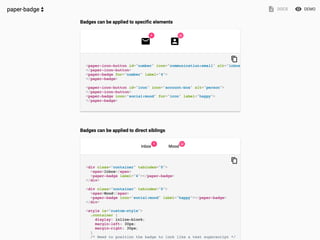
• Use someone else’s element(s)
• Build your own element(s)
• Build an entire app with Polymer
John Riviello – Custom Elements with Polymer Web Components37
How to Get Started
Using Open Source
Polymer Elements
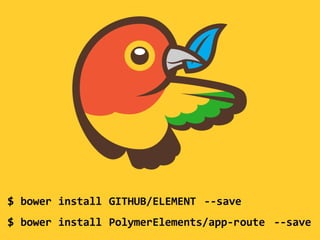
$ bower install GITHUB/ELEMENT --save
$ bower install PolymerElements/app-route --save
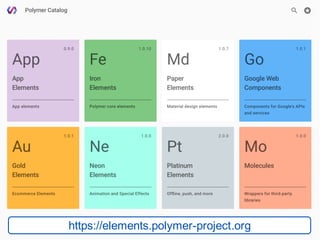
https://elements.polymer-project.org
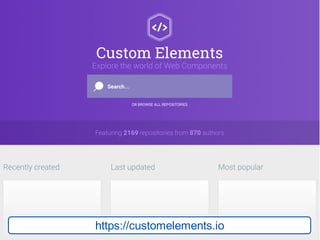
https://customelements.io
Building Your Own
Polymer Element
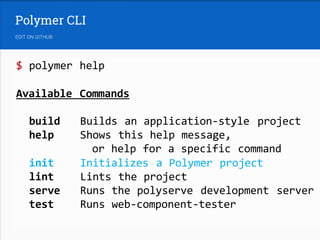
$ polymer help
Available Commands
build Builds an application-style project
help Shows this help message,
or help for a specific command
init Initializes a Polymer project
lint Lints the project
serve Runs the polyserve development server
test Runs web-component-tester
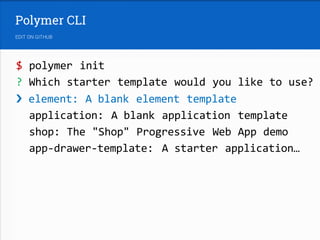
$ polymer init
? Which starter template would you like to use?
› element: A blank element template
application: A blank application template
shop: The "Shop" Progressive Web App demo
app-drawer-template: A starter application…
Building with Polymer
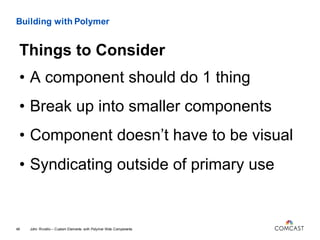
• A component should do 1 thing
• Break up into smaller components
• Component doesn’t have to be visual
• Syndicating outside of primary use
John Riviello – Custom Elements with Polymer Web Components49
Things to Consider
Building a
Polymer App
Building with Polymer
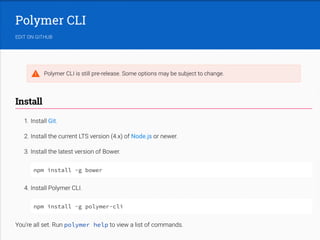
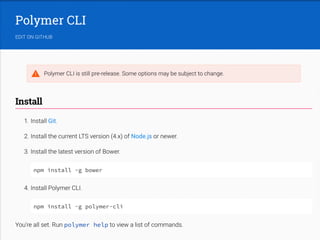
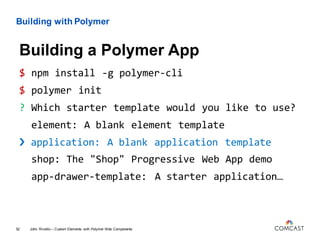
$ npm install -g polymer-cli
$ polymer init
? Which starter template would you like to use?
element: A blank element template
› application: A blank application template
shop: The "Shop" Progressive Web App demo
app-drawer-template: A starter application…
John Riviello – Custom Elements with Polymer Web Components52
Building a Polymer App
Building with Polymer
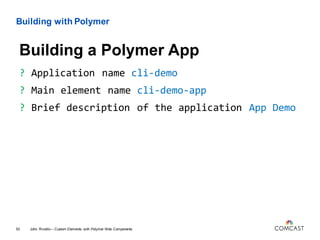
? Application name cli-demo
? Main element name cli-demo-app
? Brief description of the application App Demo
John Riviello – Custom Elements with Polymer Web Components53
Building a Polymer App
Building with Polymer
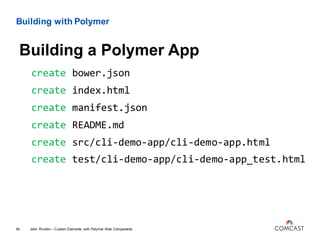
create bower.json
create index.html
create manifest.json
create README.md
create src/cli-demo-app/cli-demo-app.html
create test/cli-demo-app/cli-demo-app_test.html
John Riviello – Custom Elements with Polymer Web Components54
Building a Polymer App
Building with Polymer
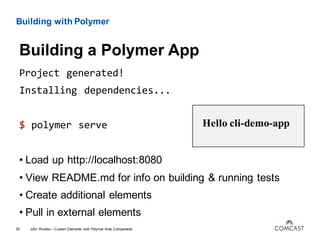
Project generated!
Installing dependencies...
$ polymer serve
• Load up http://localhost:8080
John Riviello – Custom Elements with Polymer Web Components55
Building a Polymer App
Hello cli-demo-app
• View README.md for info on building & running tests
• Create additional elements
• Pull in external elements
Deploying with
Polymer
Deploying with Polymer
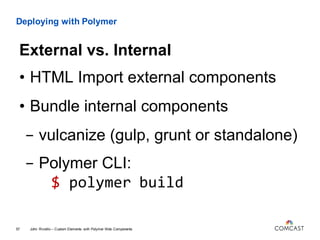
• HTML Import external components
• Bundle internal components
- vulcanize (gulp, grunt or standalone)
- Polymer CLI:
$ polymer build
John Riviello – Custom Elements with Polymer Web Components57
External vs. Internal
Custom Elements with Polymer Web Components
John Riviello – Custom Elements with Polymer Web Components58
Learning More
• polymer-project.org
• webcomponents.org
• Polycasts with Rob Dodson on YouTube
• 2016 Google I/O Polymer videos on YouTube
• Polymer Summit videos on YouTube
• Polymer Slack: polymer-slack.herokuapp.com
For Further Info & Feedback:
Twitter: @JohnRiv

Custom Elements with Polymer Web Components #econfpsu16

  • 1.
    Custom Elements with PolymerWeb Components John Riviello @JohnRiv Distinguished Engineer, Comcast Interactive Media Elements: The Web Conference at Penn State – June 14, 2016
  • 2.
    Polymer & Web Components ”250/365- Bricks" by Kenny Louie is licensed under CC BY 2.0 Why? What? How?
  • 3.
    Communicating & shipping webdesign & functionality updates across a large organization is HARD WORK
  • 4.
    Communicating & SharingWeb Updates Across Your Organization 1. Living Style Guides 2. Tiny Bootstraps 3. AngularJS Directives 4. React Components 5. Web Standards? John Riviello – Custom Elements with Polymer Web Components4 Potential Technical Solutions:
  • 5.
  • 6.
  • 7.
    What are WebComponents? 4 Specs John Riviello – Custom Elements with Polymer Web Components7
  • 8.
    What are WebComponents? Custom Elements John Riviello – Custom Elements with Polymer Web Components8
  • 9.
    What are WebComponents? Custom Elements John Riviello – Custom Elements with Polymer Web Components9 •Provides a way for authors to build their own fully-featured DOM elements. - <xc-tab>Your Wifi</xc-tab> •Can extend existing HTML elements - <button is="xc-button">Edit</button>
  • 10.
    What are WebComponents? HTML Imports John Riviello – Custom Elements with Polymer Web Components10
  • 11.
    What are WebComponents? HTML Imports John Riviello – Custom Elements with Polymer Web Components11 • Means to import custom elements - <link rel="import" href="../xc-tab/xc-tab.html"> • Can link to external resources - <link rel="import" href="http://polygit.org/components/paper- toast/paper-toast.html">
  • 12.
    What are WebComponents? Templates John Riviello – Custom Elements with Polymer Web Components12
  • 13.
    What are WebComponents? Templates John Riviello – Custom Elements with Polymer Web Components13 • Used to declare fragments of HTML - <template id="tab"> <div class="tab-content"></div> </template> • The element itself renders nothing • Can be cloned and inserted in the document via JavaScript, which will render the content
  • 14.
    What are WebComponents? Shadow DOM John Riviello – Custom Elements with Polymer Web Components14
  • 15.
    What are WebComponents? Shadow DOM John Riviello – Custom Elements with Polymer Web Components15 •Allows you to take a DOM subtree and hide it from the document scope •Hides CSS styles as well •Common examples from HTML5 include: - <select> - <video> - <input type="date">
  • 16.
    Can we evenuse these things?
  • 17.
  • 18.
  • 19.
    POLYFILLS! *as long asthere is still hope*
  • 20.
    Web Components Polyfills webcomponents.js JohnRiviello – Custom Elements with Polymer Web Components20 •Custom Elements •HTML Imports •Templates •Shadow DOM •ES6 WeakMap •Mutation Observers Browser Support • IE10 (max polyfilling) • IE11+/Edge • Chrome (latest) • Firefox (latest) • Safari 7+ • Chrome Android (latest) • Mobile Safari (latest) Size: 33.3kB gzipped
  • 21.
    Web Components Polyfills webcomponents-lite.js JohnRiviello – Custom Elements with Polymer Web Components21 •Custom Elements •HTML Imports •Templates •Shadow DOM •ES6 WeakMap •Mutation Observers Browser Support • IE10 (flaky) • IE11+/Edge • Chrome (latest) • Firefox (latest) • Safari 7+ • Chrome Android (latest) • Mobile Safari (latest) Size: 33.3kB 12.0kB gzipped
  • 22.
  • 23.
    Lightweight Web ComponentLibraries X-Tag 5.0kB John Riviello – Custom Elements with Polymer Web Components23 • IE9+/Edge • Chrome (all) • Firefox (all) • Safari ”Mac” (5.1+?) • Chrome & Android 4.0+ • Mobile Safari 5+ • Opera 11+ • IE10+/Edge • Chrome 35+ • Firefox 35+ • Safari 7+ • Chrome Android (latest?) • Mobile Safari (latest?) • Opera (latest) • IE11+/Edge • Chrome (latest) • Firefox (latest) • Safari 7+ • Chrome Android (latest) • Mobile Safari 7.1+ • Opera (latest) Bosonic 9.5kB Polymer 37.2kB
  • 24.
  • 25.
    What is Polymer? 1.Material Design 2. A framework 3. Required to use Web Components John Riviello – Custom Elements with Polymer Web Components25 Polymer is NOT:
  • 26.
    What is Polymer? <script> varproto = Object.create(HTMLElement.prototype), protoElement; proto.createdCallback = function () { this.textContent = "I'm a proto-element. Check out my prototype!" }; protoElement = document.registerElement('proto-element', { prototype: proto }); </script> John Riviello – Custom Elements with Polymer Web Components26 Creating a Custom Element Natively
  • 27.
    What is Polymer? <linkrel="import" href="bower_components/polymer/polymer.html"> <script> Polymer({ is: "proto-element", created: function() { this.textContent = "I'm a proto-element. Check out my prototype!" } }); </script> John Riviello – Custom Elements with Polymer Web Components27 Creating a Polymer Custom Element
  • 28.
    What is Polymer? <!DOCTYPEhtml> <html> <head> <script src="webcomponents-lite.js"></script> <link rel="import" href="proto-element.html"> </head> <body> <proto-element></proto-element> </body> </html> RESULT: I'm a proto-element. Check out my prototype! John Riviello – Custom Elements with Polymer Web Components28 Using Our Custom Element
  • 29.
    What is Polymer? Polymer({ is:'my-namecard', properties: { myName: { type: String } }, ready: function() { this.textContent = 'Hi! My name is ' + this.myName; } }); <my-namecard my-name="John"></my-namecard> RESULT: Hi! My name is John John Riviello – Custom Elements with Polymer Web Components29 Configuring Properties
  • 30.
    What is Polymer? <dom-moduleid="my-namecard"> <template> <div>Hi! My name is <span>{{myName}}</span></div> </template> <script> Polymer({ is: 'my-namecard', properties: { myName: { type: String } } }); </script> </dom-module> John Riviello – Custom Elements with Polymer Web Components30 Data Binding <my-namecard my-name="John"> </my-namecard> RESULT: Hi! My name is John
  • 31.
    What is Polymer? <dom-moduleid="my-namecard"> <template> <div>Hi! My name is <span>{{myName}}</span></div> </template> <style> span { font-weight: bold; } </style> <script> Polymer({ is: 'my-namecard', … John Riviello – Custom Elements with Polymer Web Components31 Encapsulated Styles <my-namecard my-name="John"> </my-namecard> <p><span>Span Text</span></p> RESULT: Hi! My name is John Span Text
  • 32.
    What is Polymer? xc-styles/xc-styles.html: <styleis="custom-style"> :root { --si-blue-sky: #2B9CD8; } </style> xc-custom-element/xc-custom-element.html: <link rel="import" href="../xc-styles/xc-styles.html"> <dom-module id="xc-custom-element"> <template> <style> :host { border: 1px solid var(--si-blue-sky); } </style> </template> </dom-module> John Riviello – Custom Elements with Polymer Web Components32 CSS Variables for Sharing Properties
  • 33.
    What is Polymer? xc-fancy-element/xc-fancy-element.html: <style> :host{ color: var(--xc-fancy-element-color, red); } </style> xc-custom-element/xc-custom-element.html: <link rel="import" href="../xc-fancy-element/xc-fancy-element.html"> <style is="custom-style"> xc-fancy-element { --xc-fancy-element-color: blue; } </style> <template><xc-fancy-element></xc-fancy-element></template> John Riviello – Custom Elements with Polymer Web Components33 CSS Variables for Custom Styles
  • 34.
    What is Polymer? xc-fancy-element/xc-fancy-element.html: <style> :host{ @apply(--xc-fancy-element); } </style> xc-custom-element/xc-custom-element.html: <link rel="import" href="../xc-fancy-element/xc-fancy-element.html"> <style is="custom-style"> --xc-fancy-element: { color: blue; margin: 0 auto; }; </style> <template><xc-fancy-element></xc-fancy-element></template> John Riviello – Custom Elements with Polymer Web Components34 Mixins for Custom Styles
  • 35.
    What is Polymer? •Behaviors (shared functionality) • Events • Gestures (up, down, tap, track) • CLI Tools • Built-in Test Framework • Generated Documentation Pages John Riviello – Custom Elements with Polymer Web Components35 Other Features Polymer Provides
  • 36.
  • 37.
    Building with Polymer •Use someone else’s element(s) • Build your own element(s) • Build an entire app with Polymer John Riviello – Custom Elements with Polymer Web Components37 How to Get Started
  • 38.
  • 39.
    $ bower installGITHUB/ELEMENT --save $ bower install PolymerElements/app-route --save
  • 40.
  • 41.
  • 42.
  • 44.
    $ polymer help AvailableCommands build Builds an application-style project help Shows this help message, or help for a specific command init Initializes a Polymer project lint Lints the project serve Runs the polyserve development server test Runs web-component-tester
  • 45.
    $ polymer init ?Which starter template would you like to use? › element: A blank element template application: A blank application template shop: The "Shop" Progressive Web App demo app-drawer-template: A starter application…
  • 49.
    Building with Polymer •A component should do 1 thing • Break up into smaller components • Component doesn’t have to be visual • Syndicating outside of primary use John Riviello – Custom Elements with Polymer Web Components49 Things to Consider
  • 50.
  • 52.
    Building with Polymer $npm install -g polymer-cli $ polymer init ? Which starter template would you like to use? element: A blank element template › application: A blank application template shop: The "Shop" Progressive Web App demo app-drawer-template: A starter application… John Riviello – Custom Elements with Polymer Web Components52 Building a Polymer App
  • 53.
    Building with Polymer ?Application name cli-demo ? Main element name cli-demo-app ? Brief description of the application App Demo John Riviello – Custom Elements with Polymer Web Components53 Building a Polymer App
  • 54.
    Building with Polymer createbower.json create index.html create manifest.json create README.md create src/cli-demo-app/cli-demo-app.html create test/cli-demo-app/cli-demo-app_test.html John Riviello – Custom Elements with Polymer Web Components54 Building a Polymer App
  • 55.
    Building with Polymer Projectgenerated! Installing dependencies... $ polymer serve • Load up http://localhost:8080 John Riviello – Custom Elements with Polymer Web Components55 Building a Polymer App Hello cli-demo-app • View README.md for info on building & running tests • Create additional elements • Pull in external elements
  • 56.
  • 57.
    Deploying with Polymer •HTML Import external components • Bundle internal components - vulcanize (gulp, grunt or standalone) - Polymer CLI: $ polymer build John Riviello – Custom Elements with Polymer Web Components57 External vs. Internal
  • 58.
    Custom Elements withPolymer Web Components John Riviello – Custom Elements with Polymer Web Components58 Learning More • polymer-project.org • webcomponents.org • Polycasts with Rob Dodson on YouTube • 2016 Google I/O Polymer videos on YouTube • Polymer Summit videos on YouTube • Polymer Slack: polymer-slack.herokuapp.com For Further Info & Feedback: Twitter: @JohnRiv