20160715 Ian
Vim 的初體驗
神的編輯器 VS
編輯器之神
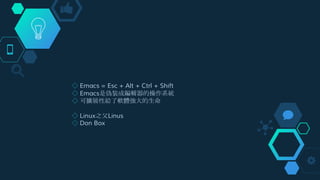
◇ Emacs = Esc + Alt + Ctrl + Shift
◇ Emacs是偽裝成編輯器的操作系統
◇ 可擴展性給了軟體強大的生命
◇ Linux之父Linus
◇ Don Box
為什麼要用 vim
● 所有的 Unix Like 系統都會內建 vi 文書編輯器
● 很多個別軟體的編輯介面都會主動呼叫 vi
● vim 具有程式編輯的能力,可以主動的以字體顏色辨別語法的正
確性,方便程式設計
1
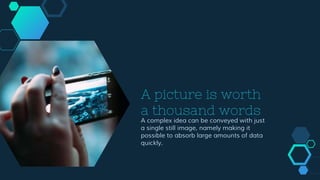
A picture is worth
a thousand words
A complex idea can be conveyed with just
a single still image, namely making it
possible to absorb large amounts of data
quickly.
A picture is worth
a thousand words
A complex idea can be conveyed with just
a single still image, namely making it
possible to absorb large amounts of data
quickly.
A picture is worth
a thousand words
A complex idea can be conveyed with just
a single still image, namely making it
possible to absorb large amounts of data
quickly.
基本使用介紹2
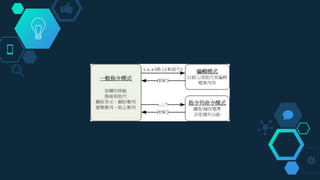
一般指令模式
◇ h 左移一個字
j 下移一個字
k 上移一個字
l 右移一個字
w 移至下一個單詞的開頭
e 移至下一個單詞的末尾
b 移至上一個單詞的開頭
gg 移至第一行
ngg 移至第n行
G 移至最後一行
0 移至行首
$ 移至行尾
m 鼠標移動至頁面中間
zz 將當前行滾動至頁面中間
其他常用
◇ yy 複製一行
p 黏貼
x 刪除鼠標所在字
d 刪除,必須與其他鍵組合使用
dd 刪除一行
u 撤銷上次的操作
v 選擇
n命令 將命令執行n次,如5dd會刪除5行
. 重複剛剛的命令
編輯模式
◇ i 在當前位置插入
I 在當前行首插入
a 在當前位置的後面一個字的位置插入
A 在當前行尾插入
o 在下一行插入
O 在上一行插入
指令列命令模式
◇ :w 將編輯的資料寫入硬碟檔案中
:q 離開 vi
:wq 儲存後離開,若為 :wq! 則為強制儲存後離開 (常用)
:! command 暫時離開 vi 到指令列模式下執行 command 的顯示結果
組合命令
◇ 一般都組合命令都是 量詞 + 命令 + 鼠標移動命令,下面是幾個例子:
dw 刪除鼠標所在的位置到單詞的結束(d:刪除,w到下個單詞的開頭)
db 刪除鼠標所在的位置到單詞的開頭
d0 刪除鼠標所在的位置到行首,類似的d$,刪除鼠標所在的位置到行尾
10gg v 21gg d 鼠標移到第十行,選擇第十行到第二十行的內容,刪除
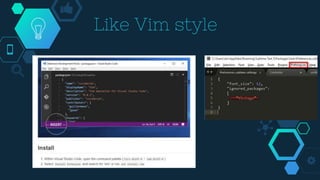
Like Vim style
Demo Time
成為神的參考
◇ http://www.openvim.com/tutorial.html
◇ http://www.vim.org/
◇ http://linux.vbird.org/linux_basic/0310vi.php
◇ http://enginechang.logdown.com/posts/296611-learn-something-from-
learning-vim
Thanks!
Instructions for useOpen this document in Google Slides (if you are at slidescarnival.com use the button below this
presentation)
You have to be signed in to your Google account
EDIT IN GOOGLE SLIDES
Go to the File menu and select Make a copy.
You will get a copy of this document on your
Google Drive and will be able to edit, add or
delete slides.
EDIT IN POWERPOINT®
Go to the File menu and select Download as
Microsoft PowerPoint. You will get a .pptx file
that you can edit in PowerPoint.
Remember to download and install the fonts
used in this presentation (you’ll find the links to
the font files needed in the Presentation design
slide)
More info on how to use this template at www.slidescarnival.com/help-use-presentation-template
This template is free to use under Creative Commons Attribution license. If you use the graphic assets
(photos, icons and typographies) provided with this presentation you must keep the Credits slide.
Transition headline
Let’s start with the first set of slides
1
“
Quotations are commonly printed as a
means of inspiration and to invoke
philosophical thoughts from the reader.
BIG concept
Bring the attention of your
audience over a key concept
using icons or illustrations
White
Is the color of milk and fresh
snow, the color produced by
the combination of all the
colors of the visible
spectrum.
You can also split
your content
Black
Is the color of coal, ebony,
and of outer space. It is the
darkest color, the result of
the absence of or complete
absorption of light.
In two or three
columns
Yellow
Is the color of gold,
butter and ripe lemons.
In the spectrum of
visible light, yellow is
found between green
and orange.
Blue
Is the colour of the
clear sky and the deep
sea. It is located
between violet and
green on the optical
spectrum.
Red
Is the color of blood,
and because of this it
has historically been
associated with
sacrifice, danger and
courage.
A picture is worth
a thousand words
A complex idea can be conveyed with just
a single still image, namely making it
possible to absorb large amounts of data
quickly.
Want big
impact?
Use big
image.
Gray
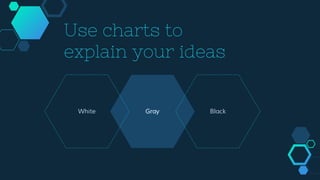
Use charts to
explain your ideas
White Black
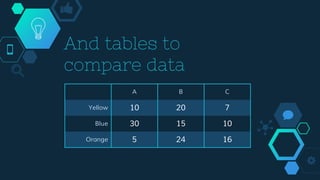
And tables to
compare data
A B C
Yellow 10 20 7
Blue 30 15 10
Orange 5 24 16
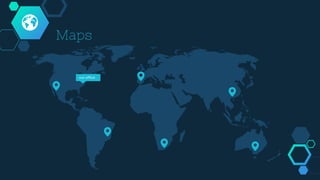
Maps
our office
89,526,124Whoa! That’s a big number, aren’t you proud?
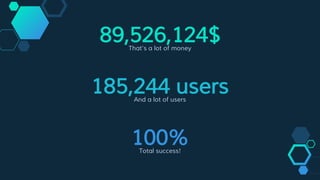
89,526,124$That’s a lot of money
100%Total success!
185,244 usersAnd a lot of users
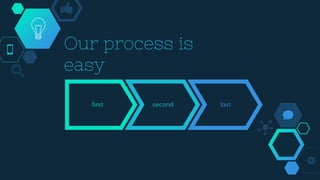
Our process is
easy
first second last
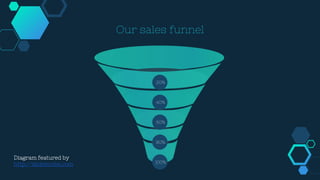
Our sales funnel
20%
40%
60%
100%
80%
Diagram featured by
http://slidemodel.com
Let’s review some
concepts
Yellow
Is the color of gold, butter and
ripe lemons. In the spectrum of
visible light, yellow is found
between green and orange.
Blue
Is the colour of the clear sky and
the deep sea. It is located
between violet and green on the
optical spectrum.
Red
Is the color of blood, and
because of this it has historically
been associated with sacrifice,
danger and courage.
Yellow
Is the color of gold, butter and
ripe lemons. In the spectrum of
visible light, yellow is found
between green and orange.
Blue
Is the colour of the clear sky and
the deep sea. It is located
between violet and green on the
optical spectrum.
Red
Is the color of blood, and
because of this it has historically
been associated with sacrifice,
danger and courage.
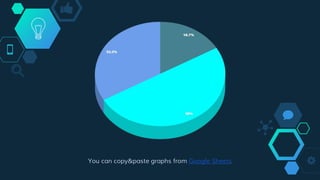
You can copy&paste graphs from Google Sheets
Android project
Show and explain your web, app or
software projects using these
gadget templates.
Place your screenshot here
Place your screenshot
here
iPhone project
Show and explain your web, app or
software projects using these
gadget templates.
Place your screenshot here
Tablet project
Show and explain your web, app or
software projects using these
gadget templates.
Place your screenshot here
Desktop project
Show and explain your
web, app or software
projects using these
gadget templates.
Credits
Special thanks to all the people who made and released
these awesome resources for free:
◇ Presentation template by SlidesCarnival
◇ Photographs by Unsplash
Presentation design
This presentation uses the following typographies and colors:
◇ Titles: Nixie One
◇ Body copy: Muli
You can download the fonts on this page:
http://www.google.com/fonts#UsePlace:use/Collection:Nixie+One|Muli:300,400,300italic,400italic
Click on the “arrow button” that appears on the top right
Aquamarina #00e1c6 / Turquoise #19bbd5 / Skyblue #2c9dde /
Light gray #c6daec / Dark blue #0e293c
You don’t need to keep this slide in your presentation. It’s only here to serve you as a design
guide if you need to create new slides or download the fonts to edit the presentation in
PowerPoint®
SlidesCarnival icons are editable shapes.
This means that you can:
● Resize them without losing quality.
● Change fill color and opacity.
● Change line color, width and style.
Isn’t that nice? :)
Examples:

vim

  • 1.
  • 2.
  • 3.
    ◇ Emacs =Esc + Alt + Ctrl + Shift ◇ Emacs是偽裝成編輯器的操作系統 ◇ 可擴展性給了軟體強大的生命 ◇ Linux之父Linus ◇ Don Box
  • 4.
    為什麼要用 vim ● 所有的Unix Like 系統都會內建 vi 文書編輯器 ● 很多個別軟體的編輯介面都會主動呼叫 vi ● vim 具有程式編輯的能力,可以主動的以字體顏色辨別語法的正 確性,方便程式設計 1
  • 5.
    A picture isworth a thousand words A complex idea can be conveyed with just a single still image, namely making it possible to absorb large amounts of data quickly.
  • 6.
    A picture isworth a thousand words A complex idea can be conveyed with just a single still image, namely making it possible to absorb large amounts of data quickly.
  • 7.
    A picture isworth a thousand words A complex idea can be conveyed with just a single still image, namely making it possible to absorb large amounts of data quickly.
  • 8.
  • 10.
    一般指令模式 ◇ h 左移一個字 j下移一個字 k 上移一個字 l 右移一個字 w 移至下一個單詞的開頭 e 移至下一個單詞的末尾 b 移至上一個單詞的開頭 gg 移至第一行 ngg 移至第n行 G 移至最後一行 0 移至行首 $ 移至行尾 m 鼠標移動至頁面中間 zz 將當前行滾動至頁面中間
  • 11.
    其他常用 ◇ yy 複製一行 p黏貼 x 刪除鼠標所在字 d 刪除,必須與其他鍵組合使用 dd 刪除一行 u 撤銷上次的操作 v 選擇 n命令 將命令執行n次,如5dd會刪除5行 . 重複剛剛的命令
  • 12.
    編輯模式 ◇ i 在當前位置插入 I在當前行首插入 a 在當前位置的後面一個字的位置插入 A 在當前行尾插入 o 在下一行插入 O 在上一行插入
  • 13.
    指令列命令模式 ◇ :w 將編輯的資料寫入硬碟檔案中 :q離開 vi :wq 儲存後離開,若為 :wq! 則為強制儲存後離開 (常用) :! command 暫時離開 vi 到指令列模式下執行 command 的顯示結果
  • 14.
    組合命令 ◇ 一般都組合命令都是 量詞+ 命令 + 鼠標移動命令,下面是幾個例子: dw 刪除鼠標所在的位置到單詞的結束(d:刪除,w到下個單詞的開頭) db 刪除鼠標所在的位置到單詞的開頭 d0 刪除鼠標所在的位置到行首,類似的d$,刪除鼠標所在的位置到行尾 10gg v 21gg d 鼠標移到第十行,選擇第十行到第二十行的內容,刪除
  • 15.
  • 16.
  • 17.
    成為神的參考 ◇ http://www.openvim.com/tutorial.html ◇ http://www.vim.org/ ◇http://linux.vbird.org/linux_basic/0310vi.php ◇ http://enginechang.logdown.com/posts/296611-learn-something-from- learning-vim
  • 18.
  • 19.
    Instructions for useOpenthis document in Google Slides (if you are at slidescarnival.com use the button below this presentation) You have to be signed in to your Google account EDIT IN GOOGLE SLIDES Go to the File menu and select Make a copy. You will get a copy of this document on your Google Drive and will be able to edit, add or delete slides. EDIT IN POWERPOINT® Go to the File menu and select Download as Microsoft PowerPoint. You will get a .pptx file that you can edit in PowerPoint. Remember to download and install the fonts used in this presentation (you’ll find the links to the font files needed in the Presentation design slide) More info on how to use this template at www.slidescarnival.com/help-use-presentation-template This template is free to use under Creative Commons Attribution license. If you use the graphic assets (photos, icons and typographies) provided with this presentation you must keep the Credits slide.
  • 20.
    Transition headline Let’s startwith the first set of slides 1
  • 21.
    “ Quotations are commonlyprinted as a means of inspiration and to invoke philosophical thoughts from the reader.
  • 22.
    BIG concept Bring theattention of your audience over a key concept using icons or illustrations
  • 23.
    White Is the colorof milk and fresh snow, the color produced by the combination of all the colors of the visible spectrum. You can also split your content Black Is the color of coal, ebony, and of outer space. It is the darkest color, the result of the absence of or complete absorption of light.
  • 24.
    In two orthree columns Yellow Is the color of gold, butter and ripe lemons. In the spectrum of visible light, yellow is found between green and orange. Blue Is the colour of the clear sky and the deep sea. It is located between violet and green on the optical spectrum. Red Is the color of blood, and because of this it has historically been associated with sacrifice, danger and courage.
  • 25.
    A picture isworth a thousand words A complex idea can be conveyed with just a single still image, namely making it possible to absorb large amounts of data quickly.
  • 26.
  • 27.
    Gray Use charts to explainyour ideas White Black
  • 28.
    And tables to comparedata A B C Yellow 10 20 7 Blue 30 15 10 Orange 5 24 16
  • 29.
  • 30.
    89,526,124Whoa! That’s abig number, aren’t you proud?
  • 31.
    89,526,124$That’s a lotof money 100%Total success! 185,244 usersAnd a lot of users
  • 32.
  • 33.
    Our sales funnel 20% 40% 60% 100% 80% Diagramfeatured by http://slidemodel.com
  • 34.
    Let’s review some concepts Yellow Isthe color of gold, butter and ripe lemons. In the spectrum of visible light, yellow is found between green and orange. Blue Is the colour of the clear sky and the deep sea. It is located between violet and green on the optical spectrum. Red Is the color of blood, and because of this it has historically been associated with sacrifice, danger and courage. Yellow Is the color of gold, butter and ripe lemons. In the spectrum of visible light, yellow is found between green and orange. Blue Is the colour of the clear sky and the deep sea. It is located between violet and green on the optical spectrum. Red Is the color of blood, and because of this it has historically been associated with sacrifice, danger and courage.
  • 35.
    You can copy&pastegraphs from Google Sheets
  • 36.
    Android project Show andexplain your web, app or software projects using these gadget templates. Place your screenshot here
  • 37.
    Place your screenshot here iPhoneproject Show and explain your web, app or software projects using these gadget templates.
  • 38.
    Place your screenshothere Tablet project Show and explain your web, app or software projects using these gadget templates.
  • 39.
    Place your screenshothere Desktop project Show and explain your web, app or software projects using these gadget templates.
  • 40.
    Credits Special thanks toall the people who made and released these awesome resources for free: ◇ Presentation template by SlidesCarnival ◇ Photographs by Unsplash
  • 41.
    Presentation design This presentationuses the following typographies and colors: ◇ Titles: Nixie One ◇ Body copy: Muli You can download the fonts on this page: http://www.google.com/fonts#UsePlace:use/Collection:Nixie+One|Muli:300,400,300italic,400italic Click on the “arrow button” that appears on the top right Aquamarina #00e1c6 / Turquoise #19bbd5 / Skyblue #2c9dde / Light gray #c6daec / Dark blue #0e293c You don’t need to keep this slide in your presentation. It’s only here to serve you as a design guide if you need to create new slides or download the fonts to edit the presentation in PowerPoint®
  • 42.
    SlidesCarnival icons areeditable shapes. This means that you can: ● Resize them without losing quality. ● Change fill color and opacity. ● Change line color, width and style. Isn’t that nice? :) Examples: