Pinterest
www.webtrainings.in
www.webtrainings.in
What is Pinterest?
Pinterest is an American image sharing and social media service designed to enable
saving and discovery of information on the internet using images and, on a smaller scale,
animated GIFs and videos in the form of Pinboards.
Founded: December 2009
Date launched: January 2010
Employees: 1,600
- wikipedia
www.webtrainings.in
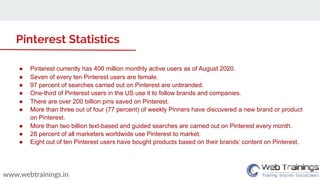
Pinterest Statistics
â—Ź Pinterest currently has 400 million monthly active users as of August 2020.
â—Ź Seven of every ten Pinterest users are female.
â—Ź 97 percent of searches carried out on Pinterest are unbranded.
â—Ź One-third of Pinterest users in the US use it to follow brands and companies.
â—Ź There are over 200 billion pins saved on Pinterest.
â—Ź More than three out of four (77 percent) of weekly Pinners have discovered a new brand or product
on Pinterest.
â—Ź More than two billion text-based and guided searches are carried out on Pinterest every month.
â—Ź 28 percent of all marketers worldwide use Pinterest to market.
● Eight out of ten Pinterest users have bought products based on their brands’ content on Pinterest.
www.webtrainings.in
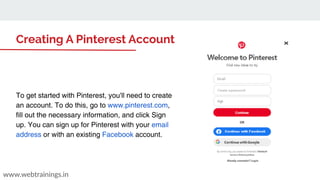
Creating A Pinterest Account
To get started with Pinterest, you'll need to create
an account. To do this, go to www.pinterest.com,
fill out the necessary information, and click Sign
up. You can sign up for Pinterest with your email
address or with an existing Facebook account.
Types of Accounts
www.webtrainings.in
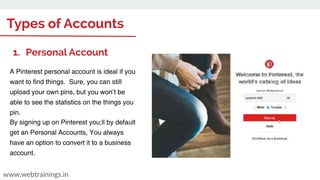
1. Personal Account
A Pinterest personal account is ideal if you
want to find things. Sure, you can still
upload your own pins, but you won’t be
able to see the statistics on the things you
pin.
By signing up on Pinterest you;ll by default
get an Personal Accounts, You always
have an option to convert it to a business
account.
Types of Accounts
www.webtrainings.in
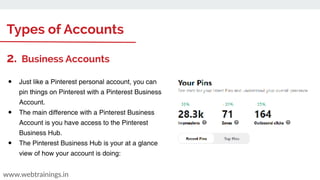
2. Business Accounts
â—Ź Just like a Pinterest personal account, you can
pin things on Pinterest with a Pinterest Business
Account.
â—Ź The main difference with a Pinterest Business
Account is you have access to the Pinterest
Business Hub.
â—Ź The Pinterest Business Hub is your at a glance
view of how your account is doing:
Customizing the Profile
www.webtrainings.in
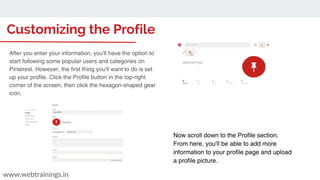
Now scroll down to the Profile section.
From here, you'll be able to add more
information to your profile page and upload
a profile picture.
webtrainings
After you enter your information, you'll have the option to
start following some popular users and categories on
Pinterest. However, the first thing you'll want to do is set
up your profile. Click the Profile button in the top-right
corner of the screen, then click the hexagon-shaped gear
icon.
Pinterest Strategies
â—Ź Brand Awareness
â—Ź Creating Relevant Boards & Pins
â—Ź Optimising for SEO Ranking
â—Ź Sharing Infographic
â—Ź Sharing Blogs with Pins
â—Ź Pinterest Ads
www.webtrainings.in
Boards in Pinterest
www.webtrainings.in
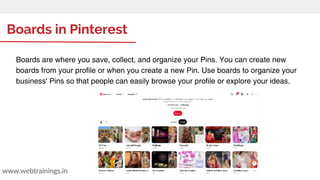
Boards are where you save, collect, and organize your Pins. You can create new
boards from your profile or when you create a new Pin. Use boards to organize your
business' Pins so that people can easily browse your profile or explore your ideas.
How to Manage Boards
www.webtrainings.in
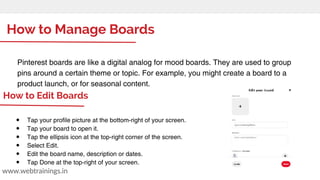
Pinterest boards are like a digital analog for mood boards. They are used to group
pins around a certain theme or topic. For example, you might create a board to a
product launch, or for seasonal content.
â—Ź Tap your profile picture at the bottom-right of your screen.
â—Ź Tap your board to open it.
â—Ź Tap the ellipsis icon at the top-right corner of the screen.
â—Ź Select Edit.
â—Ź Edit the board name, description or dates.
â—Ź Tap Done at the top-right of your screen.
How to Edit Boards
Pins and Links
www.webtrainings.in
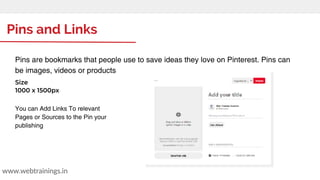
Pins are bookmarks that people use to save ideas they love on Pinterest. Pins can
be images, videos or products
Size
1000 x 1500px
You can Add Links To relevant
Pages or Sources to the Pin your
publishing
Generating Engagement
www.webtrainings.in
With more than 70 million Daily active users generating approximately 90 percent of total
social media shares online, Pinterest provides a unique environment for engaging your
target audience and showcasing your brand. Harness the power of Pinterest for your
social media strategy with these this simple steps.
1. Always be audience-centric
2. Maximize your profile
3. Make your pins easier to find
4. Share Engaging Content
5. Use Infographic
How to Use Infographics
www.webtrainings.in
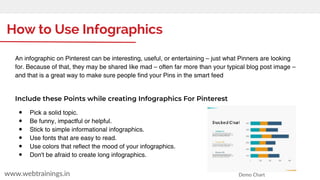
An infographic on Pinterest can be interesting, useful, or entertaining – just what Pinners are looking
for. Because of that, they may be shared like mad – often far more than your typical blog post image –
and that is a great way to make sure people find your Pins in the smart feed
Include these Points while creating Infographics For Pinterest
â—Ź Pick a solid topic.
â—Ź Be funny, impactful or helpful.
â—Ź Stick to simple informational infographics.
â—Ź Use fonts that are easy to read.
â—Ź Use colors that reflect the mood of your infographics.
â—Ź Don't be afraid to create long infographics.
Demo Chart
Integrating Pinterest in Site
www.webtrainings.in
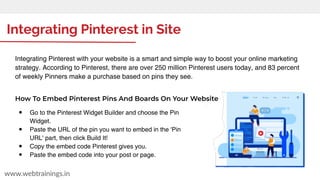
Integrating Pinterest with your website is a smart and simple way to boost your online marketing
strategy. According to Pinterest, there are over 250 million Pinterest users today, and 83 percent
of weekly Pinners make a purchase based on pins they see.
How To Embed Pinterest Pins And Boards On Your Website
â—Ź Go to the Pinterest Widget Builder and choose the Pin
Widget.
â—Ź Paste the URL of the pin you want to embed in the 'Pin
URL' part, then click Build It!
â—Ź Copy the embed code Pinterest gives you.
â—Ź Paste the embed code into your post or page.
Engagement Metrics for Pins
www.webtrainings.in
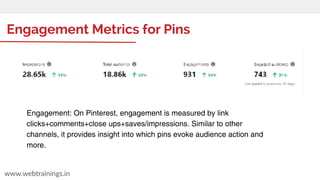
Engagement: On Pinterest, engagement is measured by link
clicks+comments+close ups+saves/impressions. Similar to other
channels, it provides insight into which pins evoke audience action and
more.
Pinterest Analytics
www.webtrainings.in
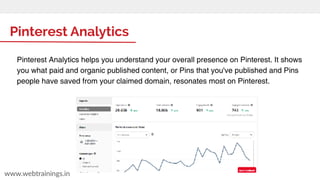
Pinterest Analytics helps you understand your overall presence on Pinterest. It shows
you what paid and organic published content, or Pins that you've published and Pins
people have saved from your claimed domain, resonates most on Pinterest.
Advertising options in Pinterest
www.webtrainings.in
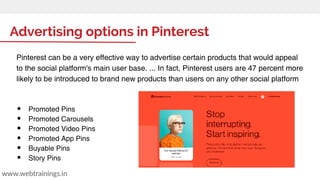
Pinterest can be a very effective way to advertise certain products that would appeal
to the social platform's main user base. ... In fact, Pinterest users are 47 percent more
likely to be introduced to brand new products than users on any other social platform
â—Ź Promoted Pins
â—Ź Promoted Carousels
â—Ź Promoted Video Pins
â—Ź Promoted App Pins
â—Ź Buyable Pins
â—Ź Story Pins
www.webtrainings.in
Thank you

Pinterest Marketing Strategies 2021

  • 1.
  • 2.
    www.webtrainings.in What is Pinterest? Pinterestis an American image sharing and social media service designed to enable saving and discovery of information on the internet using images and, on a smaller scale, animated GIFs and videos in the form of Pinboards. Founded: December 2009 Date launched: January 2010 Employees: 1,600 - wikipedia
  • 3.
    www.webtrainings.in Pinterest Statistics ● Pinterestcurrently has 400 million monthly active users as of August 2020. ● Seven of every ten Pinterest users are female. ● 97 percent of searches carried out on Pinterest are unbranded. ● One-third of Pinterest users in the US use it to follow brands and companies. ● There are over 200 billion pins saved on Pinterest. ● More than three out of four (77 percent) of weekly Pinners have discovered a new brand or product on Pinterest. ● More than two billion text-based and guided searches are carried out on Pinterest every month. ● 28 percent of all marketers worldwide use Pinterest to market. ● Eight out of ten Pinterest users have bought products based on their brands’ content on Pinterest.
  • 4.
    www.webtrainings.in Creating A PinterestAccount To get started with Pinterest, you'll need to create an account. To do this, go to www.pinterest.com, fill out the necessary information, and click Sign up. You can sign up for Pinterest with your email address or with an existing Facebook account.
  • 5.
    Types of Accounts www.webtrainings.in 1.Personal Account A Pinterest personal account is ideal if you want to find things. Sure, you can still upload your own pins, but you won’t be able to see the statistics on the things you pin. By signing up on Pinterest you;ll by default get an Personal Accounts, You always have an option to convert it to a business account.
  • 6.
    Types of Accounts www.webtrainings.in 2.Business Accounts â—Ź Just like a Pinterest personal account, you can pin things on Pinterest with a Pinterest Business Account. â—Ź The main difference with a Pinterest Business Account is you have access to the Pinterest Business Hub. â—Ź The Pinterest Business Hub is your at a glance view of how your account is doing:
  • 7.
    Customizing the Profile www.webtrainings.in Nowscroll down to the Profile section. From here, you'll be able to add more information to your profile page and upload a profile picture. webtrainings After you enter your information, you'll have the option to start following some popular users and categories on Pinterest. However, the first thing you'll want to do is set up your profile. Click the Profile button in the top-right corner of the screen, then click the hexagon-shaped gear icon.
  • 8.
    Pinterest Strategies â—Ź BrandAwareness â—Ź Creating Relevant Boards & Pins â—Ź Optimising for SEO Ranking â—Ź Sharing Infographic â—Ź Sharing Blogs with Pins â—Ź Pinterest Ads www.webtrainings.in
  • 9.
    Boards in Pinterest www.webtrainings.in Boardsare where you save, collect, and organize your Pins. You can create new boards from your profile or when you create a new Pin. Use boards to organize your business' Pins so that people can easily browse your profile or explore your ideas.
  • 10.
    How to ManageBoards www.webtrainings.in Pinterest boards are like a digital analog for mood boards. They are used to group pins around a certain theme or topic. For example, you might create a board to a product launch, or for seasonal content. â—Ź Tap your profile picture at the bottom-right of your screen. â—Ź Tap your board to open it. â—Ź Tap the ellipsis icon at the top-right corner of the screen. â—Ź Select Edit. â—Ź Edit the board name, description or dates. â—Ź Tap Done at the top-right of your screen. How to Edit Boards
  • 11.
    Pins and Links www.webtrainings.in Pinsare bookmarks that people use to save ideas they love on Pinterest. Pins can be images, videos or products Size 1000 x 1500px You can Add Links To relevant Pages or Sources to the Pin your publishing
  • 12.
    Generating Engagement www.webtrainings.in With morethan 70 million Daily active users generating approximately 90 percent of total social media shares online, Pinterest provides a unique environment for engaging your target audience and showcasing your brand. Harness the power of Pinterest for your social media strategy with these this simple steps. 1. Always be audience-centric 2. Maximize your profile 3. Make your pins easier to find 4. Share Engaging Content 5. Use Infographic
  • 13.
    How to UseInfographics www.webtrainings.in An infographic on Pinterest can be interesting, useful, or entertaining – just what Pinners are looking for. Because of that, they may be shared like mad – often far more than your typical blog post image – and that is a great way to make sure people find your Pins in the smart feed Include these Points while creating Infographics For Pinterest ● Pick a solid topic. ● Be funny, impactful or helpful. ● Stick to simple informational infographics. ● Use fonts that are easy to read. ● Use colors that reflect the mood of your infographics. ● Don't be afraid to create long infographics. Demo Chart
  • 14.
    Integrating Pinterest inSite www.webtrainings.in Integrating Pinterest with your website is a smart and simple way to boost your online marketing strategy. According to Pinterest, there are over 250 million Pinterest users today, and 83 percent of weekly Pinners make a purchase based on pins they see. How To Embed Pinterest Pins And Boards On Your Website â—Ź Go to the Pinterest Widget Builder and choose the Pin Widget. â—Ź Paste the URL of the pin you want to embed in the 'Pin URL' part, then click Build It! â—Ź Copy the embed code Pinterest gives you. â—Ź Paste the embed code into your post or page.
  • 15.
    Engagement Metrics forPins www.webtrainings.in Engagement: On Pinterest, engagement is measured by link clicks+comments+close ups+saves/impressions. Similar to other channels, it provides insight into which pins evoke audience action and more.
  • 16.
    Pinterest Analytics www.webtrainings.in Pinterest Analyticshelps you understand your overall presence on Pinterest. It shows you what paid and organic published content, or Pins that you've published and Pins people have saved from your claimed domain, resonates most on Pinterest.
  • 17.
    Advertising options inPinterest www.webtrainings.in Pinterest can be a very effective way to advertise certain products that would appeal to the social platform's main user base. ... In fact, Pinterest users are 47 percent more likely to be introduced to brand new products than users on any other social platform â—Ź Promoted Pins â—Ź Promoted Carousels â—Ź Promoted Video Pins â—Ź Promoted App Pins â—Ź Buyable Pins â—Ź Story Pins
  • 18.