PictureBox Control
Prof. Neeraj Bhargava
Kapil Chauhan
Department of Computer Science
School of Engineering & Systems Sciences
MDS University, Ajmer
PictureBox Control
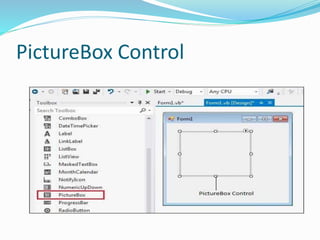
 The PictureBox control is used for displaying images
on the form.
 The Image property of the control allows you to set an
image both at design time or at run time.
PictureBox Control
Properties of the PictureBox Control
The following are some of the commonly used properties of
the PictureBox control −
 AllowDrop
Specifies whether the picture box accepts data that a user
drags on it.
 ErrorImage
Gets or specifies an image to be displayed when an error
occurs during the image-loading process or if the image load
is cancelled.
 Image
Gets or sets the image that is displayed in the control.
Cont..
 ImageLocation
Gets or sets the path or the URL for the image displayed
in the control.
 InitialImage
Gets or sets the image displayed in the control when the
main image is loaded.
Cont..
 SizeMode
Determines the size of the image to be displayed in the control.
This property takes its value from the PictureBoxSizeMode
enumeration, which has values −
Normal − the upper left corner of the image is placed at upper
left part of the picture box
StrechImage − allows stretching of the image
AutoSize − allows resizing the picture box to the size of the
image
CenterImage − allows centering the image in the picture box
Zoom − allows increasing or decreasing the image size to
maintain the size ratio.
Methods of the PictureBox Control
 CancelAsync
Cancels an asynchronous image load.
 Load
Displays an image in the picture box
 LoadAsync
Loads image asynchronously.
 ToString
Returns the string that represents the current picture
box.
Events of the PictureBox Control
 CausesValidationChanged
Overrides the Control.CausesValidationChanged
property.
 Click
Occurs when the control is clicked.
 Enter
Overrides the Control.Enter property.
 FontChanged
Occurs when the value of the Font property changes.
Cont..
 FontChanged
Occurs when the value of the Font property changes.
 KeyDown
Occurs when a key is pressed when the control has focus.
 KeyPress
Occurs when a key is pressed when the control has focus.
 KeyUp
Occurs when a key is released when the control has focus.
 Leave
Occurs when input focus leaves the PictureBox.
Assignment
 Explain picture box control in vb.net with example and
describe methods, events and properties.

Picture box control

  • 1.
    PictureBox Control Prof. NeerajBhargava Kapil Chauhan Department of Computer Science School of Engineering & Systems Sciences MDS University, Ajmer
  • 2.
    PictureBox Control  ThePictureBox control is used for displaying images on the form.  The Image property of the control allows you to set an image both at design time or at run time.
  • 3.
  • 4.
    Properties of thePictureBox Control The following are some of the commonly used properties of the PictureBox control −  AllowDrop Specifies whether the picture box accepts data that a user drags on it.  ErrorImage Gets or specifies an image to be displayed when an error occurs during the image-loading process or if the image load is cancelled.  Image Gets or sets the image that is displayed in the control.
  • 5.
    Cont..  ImageLocation Gets orsets the path or the URL for the image displayed in the control.  InitialImage Gets or sets the image displayed in the control when the main image is loaded.
  • 6.
    Cont..  SizeMode Determines thesize of the image to be displayed in the control. This property takes its value from the PictureBoxSizeMode enumeration, which has values − Normal − the upper left corner of the image is placed at upper left part of the picture box StrechImage − allows stretching of the image AutoSize − allows resizing the picture box to the size of the image CenterImage − allows centering the image in the picture box Zoom − allows increasing or decreasing the image size to maintain the size ratio.
  • 7.
    Methods of thePictureBox Control  CancelAsync Cancels an asynchronous image load.  Load Displays an image in the picture box  LoadAsync Loads image asynchronously.  ToString Returns the string that represents the current picture box.
  • 8.
    Events of thePictureBox Control  CausesValidationChanged Overrides the Control.CausesValidationChanged property.  Click Occurs when the control is clicked.  Enter Overrides the Control.Enter property.  FontChanged Occurs when the value of the Font property changes.
  • 9.
    Cont..  FontChanged Occurs whenthe value of the Font property changes.  KeyDown Occurs when a key is pressed when the control has focus.  KeyPress Occurs when a key is pressed when the control has focus.  KeyUp Occurs when a key is released when the control has focus.  Leave Occurs when input focus leaves the PictureBox.
  • 10.
    Assignment  Explain picturebox control in vb.net with example and describe methods, events and properties.