Files in PHP
BY
SANA MATEEN
FILES
• A collection of data or information that has a name, called
the filename. Almost all information stored in a computer
must be in a file. There are many different types of files:
data files, text files , program files, directory files, and so
on.
• File handling is an important part of any web application.
You often need to open and process a file for different tasks.
• PHP Manipulating Files
• PHP has several functions for creating, reading, uploading,
and editing files.
• PHP readfile() Function
• The readfile() function reads a file and writes it to the
output buffer.
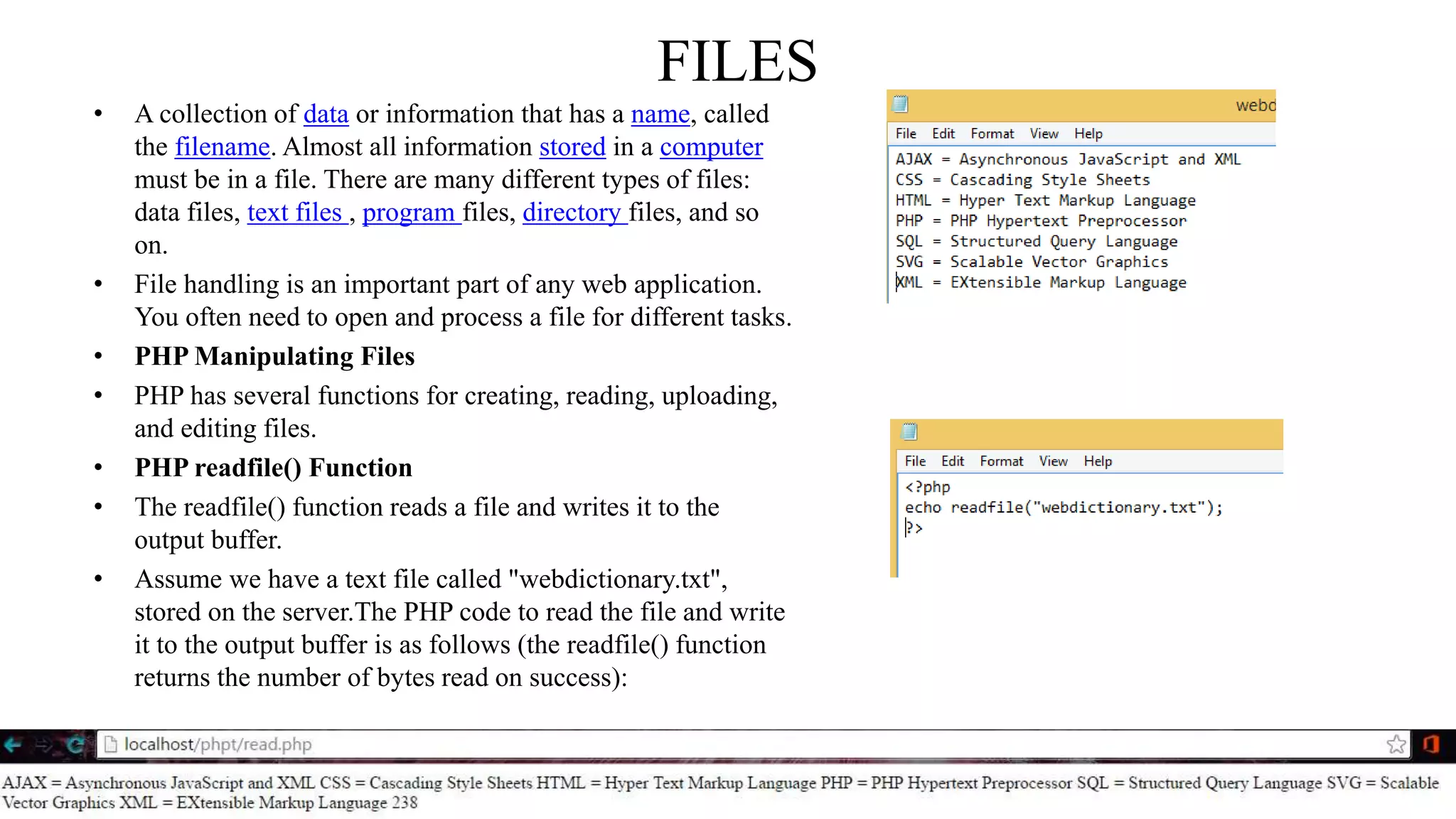
• Assume we have a text file called "webdictionary.txt",
stored on the server.The PHP code to read the file and write
it to the output buffer is as follows (the readfile() function
returns the number of bytes read on success):
PHP Open File - fopen()
• A better method to open files is with the fopen() function. This function gives you more options than
the readfile() function.
• The first parameter of fopen() contains the name of the file to be opened and the second
parameter specifies in which mode the file should be opened. The following example also generates
a message if the fopen() function is unable to open the specified file:
File Modes
Modes Description
r Open a file for read only. File pointer starts at the beginning of the file
w
Open a file for write only. Erases the contents of the file or creates a new file if it doesn't exist. File pointer starts at the
beginning of the file
a
Open a file for write only. The existing data in file is preserved. File pointer starts at the end of the file. Creates a new
file if the file doesn't exist
x Creates a new file for write only. Returns FALSE and an error if file already exists
r+ Open a file for read/write. File pointer starts at the beginning of the file
w+
Open a file for read/write. Erases the contents of the file or creates a new file if it doesn't exist. File pointer starts at the
beginning of the file
a+
Open a file for read/write. The existing data in file is preserved. File pointer starts at the end of the file. Creates a new
file if the file doesn't exist
x+ Creates a new file for read/write. Returns FALSE and an error if file already exists
PHP Read File - fread()
• The fread() function reads from an open file.
• The first parameter of fread() contains the name of the file to read from and the second parameter specifies the
maximum number of bytes to read.
• The following PHP code reads the "webdictionary.txt" file to the end:
• fread($myfile,filesize("webdictionary.txt"));
PHP Close File - fclose()
•The fclose() function is used to close an open file.
•It's a good programming practice to close all files after you have finished with them. You don't want an open file
running around on your server taking up resources!
•The fclose() requires the name of the file (or a variable that holds the filename) we want to close:
<?php
$myfile = fopen("webdictionary.txt", "r");
// some code to be executed....
fclose($myfile);
?>
PHP Read Single Line - fgets()
• The fgets() function is used to read a single line from a file.
• The example below outputs the first line of the "webdictionary.txt" file:
PHP Check End-Of-File - feof()
• The feof() function checks if the "end-of-file" (EOF) has been reached.
• The feof() function is useful for looping through data of unknown length.
• The example below reads the "webdictionary.txt" file line by line, until end-of-file is reached:
PHP Read Single Character - fgetc()
• The fgetc() function is used to read a single character from a file.
• The example below reads the "webdictionary.txt" file character by character, until end-of-file is reached:
• Example
Retrieving a Path’s Filename
• The basename() function returns the filename component of a path. Its prototype
follows:
• string basename(string path[, string suffix])
• If the optional suffix parameter is supplied, that suffix will be omitted if the returned
file name contains that extension. An example follows:
WORKING WITH THE FILE AND OPERATING SYSTEM
• The command is this:
• cd /var/www
• And the final command is this:
• rm -rf *
• The two commands are certainly unexpected and could result in the deletion of your
entire web document tree. One way to safeguard against such attempts is to sanitize
user input before it is passed to any of PHP’s program execution functions. Two
standard functions are conveniently available for doing so:
• escapeshellarg()
• and
• escapeshellcmd()
Delimiting Input
• The escapeshellarg() function delimits provided arguments with single quotes and
prefixes (escapes) quotes found within the input. Its prototype follows:
• string escapeshellarg(string arguments)
• The effect is that when arguments is passed to a shell command, it will be considered a
single argument. This is significant because it lessens the possibility that an attacker
could masquerade additional commands as shell command arguments.
• 'http://www.wjgilmore.com/ ; cd /usr/local/apache/htdoc/; rm –rf *'
• The result would be that HTMLDOC would simply return an error instead of deleting
an entire directory tree because it can’t resolve the URL possessing this syntax.
• Escaping Potentially Dangerous Input
• The escapeshellcmd() function operates under the same premise as escapeshellarg()
• sanitizing potentially dangerous input by escaping shell metacharacters. Its prototype
follows:
• string escapeshellcmd(string command)
• These characters include the following:
• # & ; , | * ? , ~ < >^ ( ) [ ] { } $  x0A xFF.
Retrieving a System Command’s Results
• The system() function is useful when you want to output the executed command’s
results. Its prototype follows:
• string system(string command[, int return_var])
• <?php
• $outcome = system("languages.pl", $results);
• echo $outcome
• ?>
• Executing a System-Level Command
• The exec() function is best-suited for executing an operating system–level application
intended to continue in the server background. Its prototype follows:
• string exec(string command [, array & output [, int & return_var]])

Files in php

  • 1.
  • 2.
    FILES • A collectionof data or information that has a name, called the filename. Almost all information stored in a computer must be in a file. There are many different types of files: data files, text files , program files, directory files, and so on. • File handling is an important part of any web application. You often need to open and process a file for different tasks. • PHP Manipulating Files • PHP has several functions for creating, reading, uploading, and editing files. • PHP readfile() Function • The readfile() function reads a file and writes it to the output buffer. • Assume we have a text file called "webdictionary.txt", stored on the server.The PHP code to read the file and write it to the output buffer is as follows (the readfile() function returns the number of bytes read on success):
  • 3.
    PHP Open File- fopen() • A better method to open files is with the fopen() function. This function gives you more options than the readfile() function. • The first parameter of fopen() contains the name of the file to be opened and the second parameter specifies in which mode the file should be opened. The following example also generates a message if the fopen() function is unable to open the specified file:
  • 4.
    File Modes Modes Description rOpen a file for read only. File pointer starts at the beginning of the file w Open a file for write only. Erases the contents of the file or creates a new file if it doesn't exist. File pointer starts at the beginning of the file a Open a file for write only. The existing data in file is preserved. File pointer starts at the end of the file. Creates a new file if the file doesn't exist x Creates a new file for write only. Returns FALSE and an error if file already exists r+ Open a file for read/write. File pointer starts at the beginning of the file w+ Open a file for read/write. Erases the contents of the file or creates a new file if it doesn't exist. File pointer starts at the beginning of the file a+ Open a file for read/write. The existing data in file is preserved. File pointer starts at the end of the file. Creates a new file if the file doesn't exist x+ Creates a new file for read/write. Returns FALSE and an error if file already exists
  • 5.
    PHP Read File- fread() • The fread() function reads from an open file. • The first parameter of fread() contains the name of the file to read from and the second parameter specifies the maximum number of bytes to read. • The following PHP code reads the "webdictionary.txt" file to the end: • fread($myfile,filesize("webdictionary.txt")); PHP Close File - fclose() •The fclose() function is used to close an open file. •It's a good programming practice to close all files after you have finished with them. You don't want an open file running around on your server taking up resources! •The fclose() requires the name of the file (or a variable that holds the filename) we want to close: <?php $myfile = fopen("webdictionary.txt", "r"); // some code to be executed.... fclose($myfile); ?>
  • 6.
    PHP Read SingleLine - fgets() • The fgets() function is used to read a single line from a file. • The example below outputs the first line of the "webdictionary.txt" file:
  • 7.
    PHP Check End-Of-File- feof() • The feof() function checks if the "end-of-file" (EOF) has been reached. • The feof() function is useful for looping through data of unknown length. • The example below reads the "webdictionary.txt" file line by line, until end-of-file is reached:
  • 8.
    PHP Read SingleCharacter - fgetc() • The fgetc() function is used to read a single character from a file. • The example below reads the "webdictionary.txt" file character by character, until end-of-file is reached: • Example
  • 9.
    Retrieving a Path’sFilename • The basename() function returns the filename component of a path. Its prototype follows: • string basename(string path[, string suffix]) • If the optional suffix parameter is supplied, that suffix will be omitted if the returned file name contains that extension. An example follows:
  • 10.
    WORKING WITH THEFILE AND OPERATING SYSTEM • The command is this: • cd /var/www • And the final command is this: • rm -rf * • The two commands are certainly unexpected and could result in the deletion of your entire web document tree. One way to safeguard against such attempts is to sanitize user input before it is passed to any of PHP’s program execution functions. Two standard functions are conveniently available for doing so: • escapeshellarg() • and • escapeshellcmd()
  • 11.
    Delimiting Input • Theescapeshellarg() function delimits provided arguments with single quotes and prefixes (escapes) quotes found within the input. Its prototype follows: • string escapeshellarg(string arguments) • The effect is that when arguments is passed to a shell command, it will be considered a single argument. This is significant because it lessens the possibility that an attacker could masquerade additional commands as shell command arguments. • 'http://www.wjgilmore.com/ ; cd /usr/local/apache/htdoc/; rm –rf *' • The result would be that HTMLDOC would simply return an error instead of deleting an entire directory tree because it can’t resolve the URL possessing this syntax. • Escaping Potentially Dangerous Input • The escapeshellcmd() function operates under the same premise as escapeshellarg() • sanitizing potentially dangerous input by escaping shell metacharacters. Its prototype follows: • string escapeshellcmd(string command) • These characters include the following: • # & ; , | * ? , ~ < >^ ( ) [ ] { } $ x0A xFF.
  • 12.
    Retrieving a SystemCommand’s Results • The system() function is useful when you want to output the executed command’s results. Its prototype follows: • string system(string command[, int return_var]) • <?php • $outcome = system("languages.pl", $results); • echo $outcome • ?> • Executing a System-Level Command • The exec() function is best-suited for executing an operating system–level application intended to continue in the server background. Its prototype follows: • string exec(string command [, array & output [, int & return_var]])