SAFETY AND
SECURITY
SAFETY AND SECURITY
In the context of computers, safety and security are
different but related concepts that both involve
protecting data and systems:
•Safety - Focuses on preventing unintentional
damage to data and systems from physical hazards
like accidents or natural disasters.
•Security - Focuses on preventing intentional
damage to data and systems from external factors
like theft or cyber-attacks.
SAFETY AND SECURITY
Here are some examples of computer security measures:
• Firewalls: A technical security measure
• Encryption: A technical security measure
• Passwords: A technical security measure
• Anti-virus and anti-malware software: A technical security measure
• Virtual private networks (VPNs): Encrypt data between two points
• HTTPS: Used instead of unencrypted HTTP
Computer security is important because it protects an organization's
assets, which include hardware, software, personnel, and facilities.
SAFETY AND SECURITY
• Firewalls - a device or program that monitors and controls the flow of
network traffic between networks or hosts with different security
levels
• Encryption - a method of data security that scrambles data into a secret code,
or ciphertext, that can only be unlocked with a unique digital key.
• Malware - malicious software that can damage, disrupt, or steal data from a
device without the user's knowledge.
• VPN - protects its users by encrypting their data and masking their IP
addresses. This hides their browsing activity, identity, and location,
allowing for greater privacy and autonomy.
SAFETY AND SECURITY
A cyber gang, much like a gang in real life, is a group of
people who work together to commit crimes. Just like in
real life gangs, these gangs can be made up of many
loosely organized members (like the group Anonymous) or
they can be a small team of specialists.
GIGO
Another common error made by humans is capturing
incorrect information. This is more commonly called GIGO.
Garbage in, garbage out, or GIGO, refers to the
idea that in any system, the quality of output is
determined by the quality of the input.
GIGO
According to GIGO, if you capture inaccurate, unreliable or
nonsense information on your computer then you can expect
any program that uses this information to provide you with
inaccurate, unreliable or nonsense information. For example, If
you enter someone’s email address or phone number
incorrectly then you will not be able to contact that person.
GIGO
According to GIGO, if you capture inaccurate, unreliable or
nonsense information on your computer then you can expect
any program that uses this information to provide you with
inaccurate, unreliable or nonsense information. For example, If
you enter someone’s email address or phone number
incorrectly then you will not be able to contact that person.
THREATS
PHYSICAL ACCESS
•One way in which data can be lost is through theft.
This can be the theft of a smartphone, notebook or
computer, or simply the theft of an external hard
drive or flash disk.
•Do not leave your storage devices unattended in
public spaces such as in school computers.
•Make regular backups of your data.
Never store critical information only on a portable
storage device.
HARDWARE FAILURE
• While most hardware can simply be replaced, losing a storage device
means you also lose all the data stored on the device, which could
represent the loss of many years of work.
Data loss like this occurs for two reasons:
• mechanical damages of hard drive: There are many moving parts
inside hard drives that can break down easily.
• power failures: Sudden changes in voltage may damage hard drives and
other parts which are very sensitive to changes in voltage and strong
magnetic fields
• spilling coffee, and other water damages: Liquids cause short circuit of
important electronic components and they are really hard to
recover/repair afterwards.
NETWORK VULNERABILITY
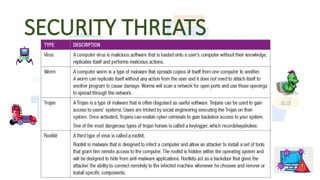
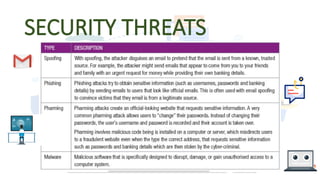
•The final threat you will learn about are
network-based threats. Since you already know
about viruses, spoofing and phishing, this
section will look at these types of network
threats. The table below describes each of these
threats in greater detail.
SECURITY THREATS
SECURITY THREATS

SAFETY AND SECURITY.pptx SAFETY AND SECURITY.pptx

  • 1.
  • 2.
    SAFETY AND SECURITY Inthe context of computers, safety and security are different but related concepts that both involve protecting data and systems: •Safety - Focuses on preventing unintentional damage to data and systems from physical hazards like accidents or natural disasters. •Security - Focuses on preventing intentional damage to data and systems from external factors like theft or cyber-attacks.
  • 3.
    SAFETY AND SECURITY Hereare some examples of computer security measures: • Firewalls: A technical security measure • Encryption: A technical security measure • Passwords: A technical security measure • Anti-virus and anti-malware software: A technical security measure • Virtual private networks (VPNs): Encrypt data between two points • HTTPS: Used instead of unencrypted HTTP Computer security is important because it protects an organization's assets, which include hardware, software, personnel, and facilities.
  • 4.
    SAFETY AND SECURITY •Firewalls - a device or program that monitors and controls the flow of network traffic between networks or hosts with different security levels • Encryption - a method of data security that scrambles data into a secret code, or ciphertext, that can only be unlocked with a unique digital key. • Malware - malicious software that can damage, disrupt, or steal data from a device without the user's knowledge. • VPN - protects its users by encrypting their data and masking their IP addresses. This hides their browsing activity, identity, and location, allowing for greater privacy and autonomy.
  • 5.
    SAFETY AND SECURITY Acyber gang, much like a gang in real life, is a group of people who work together to commit crimes. Just like in real life gangs, these gangs can be made up of many loosely organized members (like the group Anonymous) or they can be a small team of specialists.
  • 6.
    GIGO Another common errormade by humans is capturing incorrect information. This is more commonly called GIGO. Garbage in, garbage out, or GIGO, refers to the idea that in any system, the quality of output is determined by the quality of the input.
  • 7.
    GIGO According to GIGO,if you capture inaccurate, unreliable or nonsense information on your computer then you can expect any program that uses this information to provide you with inaccurate, unreliable or nonsense information. For example, If you enter someone’s email address or phone number incorrectly then you will not be able to contact that person.
  • 8.
    GIGO According to GIGO,if you capture inaccurate, unreliable or nonsense information on your computer then you can expect any program that uses this information to provide you with inaccurate, unreliable or nonsense information. For example, If you enter someone’s email address or phone number incorrectly then you will not be able to contact that person.
  • 9.
  • 10.
    PHYSICAL ACCESS •One wayin which data can be lost is through theft. This can be the theft of a smartphone, notebook or computer, or simply the theft of an external hard drive or flash disk. •Do not leave your storage devices unattended in public spaces such as in school computers. •Make regular backups of your data. Never store critical information only on a portable storage device.
  • 11.
    HARDWARE FAILURE • Whilemost hardware can simply be replaced, losing a storage device means you also lose all the data stored on the device, which could represent the loss of many years of work. Data loss like this occurs for two reasons: • mechanical damages of hard drive: There are many moving parts inside hard drives that can break down easily. • power failures: Sudden changes in voltage may damage hard drives and other parts which are very sensitive to changes in voltage and strong magnetic fields • spilling coffee, and other water damages: Liquids cause short circuit of important electronic components and they are really hard to recover/repair afterwards.
  • 12.
    NETWORK VULNERABILITY •The finalthreat you will learn about are network-based threats. Since you already know about viruses, spoofing and phishing, this section will look at these types of network threats. The table below describes each of these threats in greater detail.
  • 13.
  • 14.

Editor's Notes

  • #3 Firewalls - a device or program that monitors and controls the flow of network traffic between networks or hosts with different security levels Encryption - a method of data security that scrambles data into a secret code, or ciphertext, that can only be unlocked with a unique digital key. Malware - malicious software that can damage, disrupt, or steal data from a device without the user's knowledge. VPN - protects its users by encrypting their data and masking their IP addresses. This hides their browsing activity, identity, and location, allowing for greater privacy and autonomy.
  • #6 GIGO- GARBAGE IN, GARBAGE OUT