INFORMATION SECURITY
By: Dio Pratama
Definition
'Information is an asset which, like other
important business assets, has value to
an organization and consequently needs
to be suitably protected’
BS ISO 27002:2005
Information Security
Information security, sometimes shortened to InfoSec, is the
practice of defending information from unauthorized access,
use, disclosure, disruption, modification, perusal, inspection,
recording or destruction. It is a general term that can be used
regardless of the form the data may take (e.g. electronic,
physical)
What to Protect
Data
Resource
Data
ResourceData
▪ Prevention : Prevent unauthorized access
▪ Detection : Detect who has accessed the data without permission
▪ Recovery : Recover data that has been lost
Goals of Security
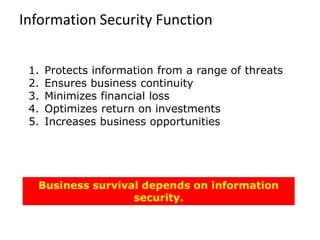
Information Security Function
1. Protects information from a range of threats
2. Ensures business continuity
3. Minimizes financial loss
4. Optimizes return on investments
5. Increases business opportunities
Business survival depends on information
security.
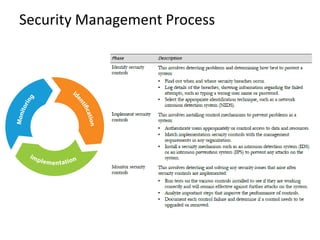
Security Management Process
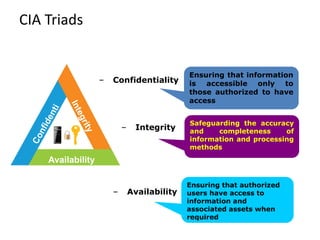
CIA Triads
Availability
– Confidentiality
Ensuring that information
is accessible only to
those authorized to have
access
– Integrity
Safeguarding the accuracy
and completeness of
information and processing
methods
– Availability
Ensuring that authorized
users have access to
information and
associated assets when
required
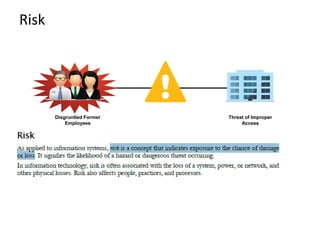
Risk
Threat of Improper
Access
Disgruntled Former
Employees
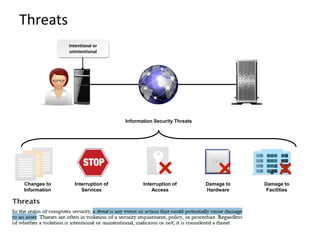
Threats
Intentional or
unintentional
Changes to
Information
Interruption of
Services
Damage to
Hardware
Damage to
Facilities
Information Security Threats
Interruption of
Access
Vulnerability
Unsecured Router Information SystemAttacker
Risk & Threat
High User
Knowledge of IT
Systems
Theft,
Sabotage,
Misuse
Virus Attacks
Systems &
Network
Failure
Lack Of
Documentation
Lapse in
Physical
Security
Natural
Calamities &
Fire
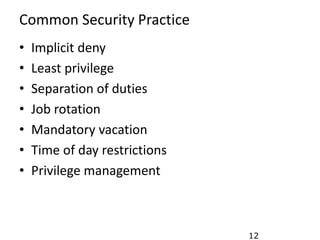
Common Security Practice
12
• Implicit deny
• Least privilege
• Separation of duties
• Job rotation
• Mandatory vacation
• Time of day restrictions
• Privilege management
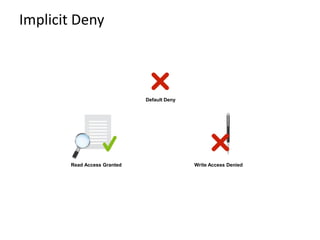
Implicit Deny
Write Access Denied
Default Deny
Read Access Granted
Least Privileges
User 1 User 4
User 3User 2
Data Entry Clerks Financial Coordinators
Perform their jobs with
fewer privileges
Perform their jobs with
more privileges
Separation of Duties
Backup Audit Restore
Job Rotation
Backup
Audit
RestoreFirewall
Access Control
Mandatory Vacation
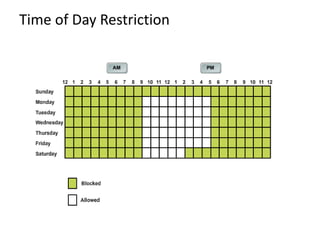
Time of Day Restriction
Priviledge Management
Administrator
Authorization
Authentication
Access Control
Accounting/Auditing
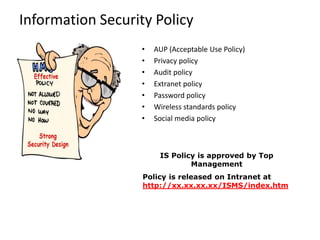
Information Security Policy
IS Policy is approved by Top
Management
Policy is released on Intranet at
http://xx.xx.xx.xx/ISMS/index.htm
• AUP (Acceptable Use Policy)
• Privacy policy
• Audit policy
• Extranet policy
• Password policy
• Wireless standards policy
• Social media policy
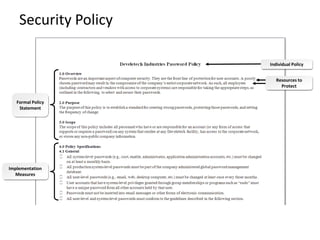
Security Policy
Implementation
Measures
Formal Policy
Statement
Resources to
Protect
Individual Policy
Access Control (Physical) Policy
• Follow Security Procedures
• Wear Identity Cards and Badges
• Ask unauthorized visitor his credentials
• Attend visitors in Reception and Conference Room only
• Bring visitors in operations area without prior
permission
• Bring hazardous and combustible material in secure
area
• Practice “Piggybacking”
• Bring and use pen drives, zip drives, ipods, other storage
devices unless and otherwise authorized to do so
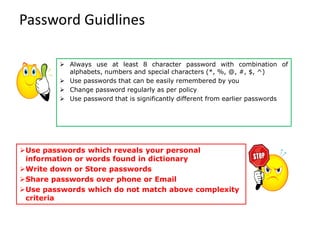
Password Guidlines
➢ Always use at least 8 character password with combination of
alphabets, numbers and special characters (*, %, @, #, $, ^)
➢ Use passwords that can be easily remembered by you
➢ Change password regularly as per policy
➢ Use password that is significantly different from earlier passwords
➢Use passwords which reveals your personal
information or words found in dictionary
➢Write down or Store passwords
➢Share passwords over phone or Email
➢Use passwords which do not match above complexity
criteria
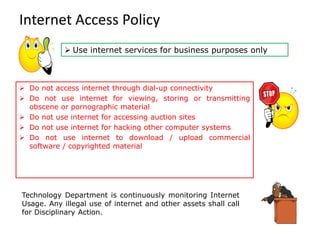
Internet Access Policy
Technology Department is continuously monitoring Internet
Usage. Any illegal use of internet and other assets shall call
for Disciplinary Action.
➢ Do not access internet through dial-up connectivity
➢ Do not use internet for viewing, storing or transmitting
obscene or pornographic material
➢ Do not use internet for accessing auction sites
➢ Do not use internet for hacking other computer systems
➢ Do not use internet to download / upload commercial
software / copyrighted material
➢ Use internet services for business purposes only
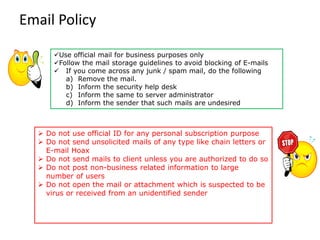
Email Policy
➢ Do not use official ID for any personal subscription purpose
➢ Do not send unsolicited mails of any type like chain letters or
E-mail Hoax
➢ Do not send mails to client unless you are authorized to do so
➢ Do not post non-business related information to large
number of users
➢ Do not open the mail or attachment which is suspected to be
virus or received from an unidentified sender
✓Use official mail for business purposes only
✓Follow the mail storage guidelines to avoid blocking of E-mails
✓ If you come across any junk / spam mail, do the following
a) Remove the mail.
b) Inform the security help desk
c) Inform the same to server administrator
d) Inform the sender that such mails are undesired
Security Incident Report Flow
Report Security Incidents (IT and Non-IT) to
Helpdesk through
• E-mail to info.sec@organisation.com
• Telephone : xxxx-xxxx-xxxx
• Anonymous Reporting through Drop boxes
e.g.:
IT Incidents: Mail Spamming, Virus attack, Hacking, etc.
Non-IT Incidents: Unsupervised visitor movement, Information
leakage, Bringing unauthorized Media
•Do not discuss security incidents with any one outside organisation
•Do not attempt to interfere with, obstruct or prevent anyone from reporting
incidents
User Responsibility Suggestion
✓ Ensure your Desktops are having latest antivirus updates
✓ Ensure your system is locked when you are away
✓ Always store laptops/ media in a lockable place
✓ Be alert while working on laptops during travel
✓ Ensure sensitive business information is under lock and key
when unattended
✓ Ensure back-up of sensitive and critical information assets
✓ Understand Compliance Issues such as
Cyber Law
IPR, Copyrights, NDA
Contractual Obligations with customer
✓ Verify credentials, if the message is received from unknown
sender
✓ Always switch off your computer before leaving for the day
✓ Keep your self updated on information security aspects
Human Wall Is Always Better Than A Firewall
. . . LET US BUILD A HUMAN WALL ALONG WITH FIREWALL
Source: xxx
Sekian
~Semoga Bermanfaat~

Information Security

  • 1.
  • 2.
    Definition 'Information is anasset which, like other important business assets, has value to an organization and consequently needs to be suitably protected’ BS ISO 27002:2005
  • 3.
    Information Security Information security,sometimes shortened to InfoSec, is the practice of defending information from unauthorized access, use, disclosure, disruption, modification, perusal, inspection, recording or destruction. It is a general term that can be used regardless of the form the data may take (e.g. electronic, physical)
  • 4.
    What to Protect Data Resource Data ResourceData ▪Prevention : Prevent unauthorized access ▪ Detection : Detect who has accessed the data without permission ▪ Recovery : Recover data that has been lost Goals of Security
  • 5.
    Information Security Function 1.Protects information from a range of threats 2. Ensures business continuity 3. Minimizes financial loss 4. Optimizes return on investments 5. Increases business opportunities Business survival depends on information security.
  • 6.
  • 7.
    CIA Triads Availability – Confidentiality Ensuringthat information is accessible only to those authorized to have access – Integrity Safeguarding the accuracy and completeness of information and processing methods – Availability Ensuring that authorized users have access to information and associated assets when required
  • 8.
  • 9.
    Threats Intentional or unintentional Changes to Information Interruptionof Services Damage to Hardware Damage to Facilities Information Security Threats Interruption of Access
  • 10.
  • 11.
    Risk & Threat HighUser Knowledge of IT Systems Theft, Sabotage, Misuse Virus Attacks Systems & Network Failure Lack Of Documentation Lapse in Physical Security Natural Calamities & Fire
  • 12.
    Common Security Practice 12 •Implicit deny • Least privilege • Separation of duties • Job rotation • Mandatory vacation • Time of day restrictions • Privilege management
  • 13.
    Implicit Deny Write AccessDenied Default Deny Read Access Granted
  • 14.
    Least Privileges User 1User 4 User 3User 2 Data Entry Clerks Financial Coordinators Perform their jobs with fewer privileges Perform their jobs with more privileges
  • 15.
  • 16.
  • 17.
  • 18.
    Time of DayRestriction
  • 19.
  • 20.
    Information Security Policy ISPolicy is approved by Top Management Policy is released on Intranet at http://xx.xx.xx.xx/ISMS/index.htm • AUP (Acceptable Use Policy) • Privacy policy • Audit policy • Extranet policy • Password policy • Wireless standards policy • Social media policy
  • 21.
  • 22.
    Access Control (Physical)Policy • Follow Security Procedures • Wear Identity Cards and Badges • Ask unauthorized visitor his credentials • Attend visitors in Reception and Conference Room only • Bring visitors in operations area without prior permission • Bring hazardous and combustible material in secure area • Practice “Piggybacking” • Bring and use pen drives, zip drives, ipods, other storage devices unless and otherwise authorized to do so
  • 23.
    Password Guidlines ➢ Alwaysuse at least 8 character password with combination of alphabets, numbers and special characters (*, %, @, #, $, ^) ➢ Use passwords that can be easily remembered by you ➢ Change password regularly as per policy ➢ Use password that is significantly different from earlier passwords ➢Use passwords which reveals your personal information or words found in dictionary ➢Write down or Store passwords ➢Share passwords over phone or Email ➢Use passwords which do not match above complexity criteria
  • 24.
    Internet Access Policy TechnologyDepartment is continuously monitoring Internet Usage. Any illegal use of internet and other assets shall call for Disciplinary Action. ➢ Do not access internet through dial-up connectivity ➢ Do not use internet for viewing, storing or transmitting obscene or pornographic material ➢ Do not use internet for accessing auction sites ➢ Do not use internet for hacking other computer systems ➢ Do not use internet to download / upload commercial software / copyrighted material ➢ Use internet services for business purposes only
  • 25.
    Email Policy ➢ Donot use official ID for any personal subscription purpose ➢ Do not send unsolicited mails of any type like chain letters or E-mail Hoax ➢ Do not send mails to client unless you are authorized to do so ➢ Do not post non-business related information to large number of users ➢ Do not open the mail or attachment which is suspected to be virus or received from an unidentified sender ✓Use official mail for business purposes only ✓Follow the mail storage guidelines to avoid blocking of E-mails ✓ If you come across any junk / spam mail, do the following a) Remove the mail. b) Inform the security help desk c) Inform the same to server administrator d) Inform the sender that such mails are undesired
  • 26.
    Security Incident ReportFlow Report Security Incidents (IT and Non-IT) to Helpdesk through • E-mail to info.sec@organisation.com • Telephone : xxxx-xxxx-xxxx • Anonymous Reporting through Drop boxes e.g.: IT Incidents: Mail Spamming, Virus attack, Hacking, etc. Non-IT Incidents: Unsupervised visitor movement, Information leakage, Bringing unauthorized Media •Do not discuss security incidents with any one outside organisation •Do not attempt to interfere with, obstruct or prevent anyone from reporting incidents
  • 27.
    User Responsibility Suggestion ✓Ensure your Desktops are having latest antivirus updates ✓ Ensure your system is locked when you are away ✓ Always store laptops/ media in a lockable place ✓ Be alert while working on laptops during travel ✓ Ensure sensitive business information is under lock and key when unattended ✓ Ensure back-up of sensitive and critical information assets ✓ Understand Compliance Issues such as Cyber Law IPR, Copyrights, NDA Contractual Obligations with customer ✓ Verify credentials, if the message is received from unknown sender ✓ Always switch off your computer before leaving for the day ✓ Keep your self updated on information security aspects
  • 28.
    Human Wall IsAlways Better Than A Firewall . . . LET US BUILD A HUMAN WALL ALONG WITH FIREWALL
  • 29.