Spark Driven Big Data
Analytics
Inosh Goonewardena
Associate Technical Lead - WSO2, Inc.
Agenda
● What is Big Data?
● Big Data Analytics
● Introduction to Apache Spark
● Apache Spark Components & Architecture
● Writing Spark Analytic Applications
What is Big Data?
● Big data is a term for data sets that are so large and complex in nature
● Constitute structured, semi-structured and unstructured data
● Big Data cannot easily be managed by traditional RDBMS or statistics
tools
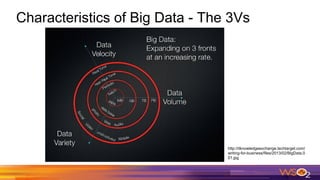
Characteristics of Big Data - The 3Vs
http://itknowledgeexchange.techtarget.com/
writing-for-business/files/2013/02/BigData.0
01.jpg
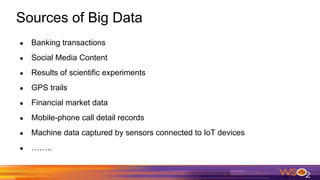
Sources of Big Data
● Banking transactions
● Social Media Content
● Results of scientific experiments
● GPS trails
● Financial market data
● Mobile-phone call detail records
● Machine data captured by sensors connected to IoT devices
● ……..
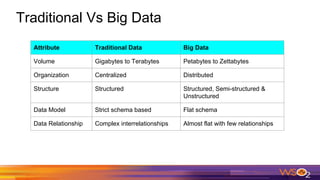
Traditional Vs Big Data
Attribute Traditional Data Big Data
Volume Gigabytes to Terabytes Petabytes to Zettabytes
Organization Centralized Distributed
Structure Structured Structured, Semi-structured &
Unstructured
Data Model Strict schema based Flat schema
Data Relationship Complex interrelationships Almost flat with few relationships
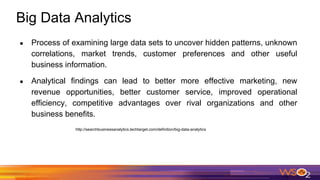
Big Data Analytics
● Process of examining large data sets to uncover hidden patterns, unknown
correlations, market trends, customer preferences and other useful
business information.
● Analytical findings can lead to better more effective marketing, new
revenue opportunities, better customer service, improved operational
efficiency, competitive advantages over rival organizations and other
business benefits.
http://searchbusinessanalytics.techtarget.com/definition/big-data-analytics
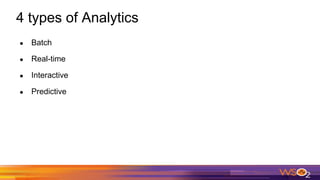
4 types of Analytics
● Batch
● Real-time
● Interactive
● Predictive
Challenges of Big Data Analytics
● Traditional RDBMS fail to handle Big Data
● Big Data cannot fit in the memory of a single computer
● Processing of Big Data in a single computer will take a lot of time
● Scaling with traditional RDBMS is expensive
Traditional Large-Scale Computation
● Traditionally, computation has been processor-bound
○ Relatively small amounts of data
○ Significant amount of complex processing performed on that data
● For decades, the primary push was to increase the computing power of a
single machine
○ Faster processor, more RAM
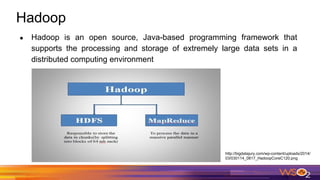
Hadoop
● Hadoop is an open source, Java-based programming framework that
supports the processing and storage of extremely large data sets in a
distributed computing environment
http://bigdatajury.com/wp-content/uploads/2014/
03/030114_0817_HadoopCoreC120.png
The Hadoop Distributed File System - HDFS
● Responsible for storing data on the cluster
● Data files are split into blocks and distributed across multiple nodes in the
cluster
● Each block is replicated multiple times
○ Default is to replicate each block three times
○ Replicas are stored on different nodes
○ This ensures both reliability and availability
MapReduce
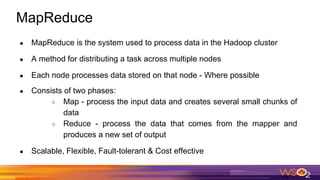
● MapReduce is the system used to process data in the Hadoop cluster
● A method for distributing a task across multiple nodes
● Each node processes data stored on that node - Where possible
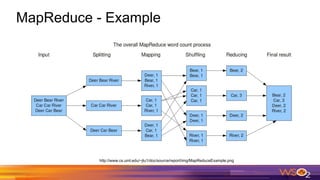
● Consists of two phases:
○ Map - process the input data and creates several small chunks of
data
○ Reduce - process the data that comes from the mapper and
produces a new set of output
● Scalable, Flexible, Fault-tolerant & Cost effective
MapReduce - Example
http://www.cs.uml.edu/~jlu1/doc/source/report/img/MapReduceExample.png
Limitations of MapReduce
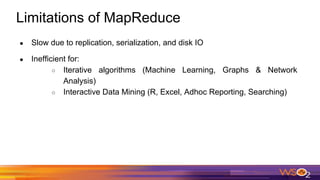
● Slow due to replication, serialization, and disk IO
● Inefficient for:
○ Iterative algorithms (Machine Learning, Graphs & Network
Analysis)
○ Interactive Data Mining (R, Excel, Adhoc Reporting, Searching)
Apache Spark
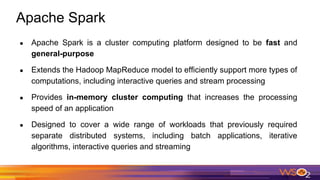
● Apache Spark is a cluster computing platform designed to be fast and
general-purpose
● Extends the Hadoop MapReduce model to efficiently support more types of
computations, including interactive queries and stream processing
● Provides in-memory cluster computing that increases the processing
speed of an application
● Designed to cover a wide range of workloads that previously required
separate distributed systems, including batch applications, iterative
algorithms, interactive queries and streaming
Features of Spark
● Speed − Spark helps to run an application in Hadoop cluster, up to 100
times faster in memory, and 10 times faster when running on disk.
● Supports multiple languages − Spark provides built-in APIs in Java,
Scala, or Python.
● Advanced Analytics − Spark not only supports ‘Map’ and ‘reduce’. It also
supports SQL queries, Streaming data, Machine learning (ML), and Graph
algorithms.
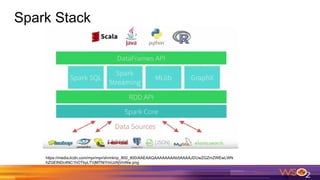
Spark Stack
https://media.licdn.com/mpr/mpr/shrinknp_800_800/AAEAAQAAAAAAAAb5AAAAJDUwZGZmZWEwLWN
hZGEtNDc4NC1hOTkyLTVjMTNiYmUzNjVmNw.png
Components of Spark
● Apache Spark Core − Underlying general execution engine for spark
platform that all other functionality is built upon. Provides In-Memory
computing and referencing datasets in external storage systems.
● Spark SQL − Component on top of Spark Core that introduces a new data
abstraction called SchemaRDD, which provides support for structured and
semi-structured data.
● Spark Streaming − Leverages Spark Core's fast scheduling capability to
perform streaming analytics. Ingests data in mini-batches and performs
RDD transformations on those mini-batches of data.
Components of Spark
● MLlib − Distributed machine learning framework above Spark. Provides
multiple types of machine learning algorithms, including binary
classification, regression, clustering and collaborative filtering, as well as
supporting functionality such as model evaluation and data import.
● GraphX − Distributed graph-processing framework on top of Spark.
Provides an API for expressing graph computation that can model the
user-defined graphs by using Pregel abstraction API.
Why a New Programming Model?
● MapReduce simplified big data analysis.
● But users quickly wanted more:
○ More complex, multi-pass analytics (e.g. ML, graph)
○ More interactive ad-hoc queries
○ More real-time stream processing
● All 3 need faster data sharing in parallel apps
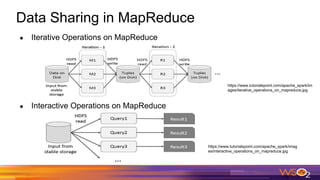
Data Sharing in MapReduce
● Iterative Operations on MapReduce
● Interactive Operations on MapReduce
https://www.tutorialspoint.com/apache_spark/im
ages/iterative_operations_on_mapreduce.jpg
https://www.tutorialspoint.com/apache_spark/imag
es/interactive_operations_on_mapreduce.jpg
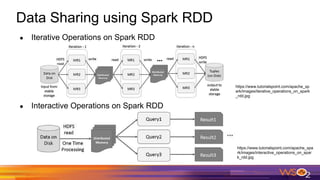
Data Sharing using Spark RDD
● Iterative Operations on Spark RDD
● Interactive Operations on Spark RDD
https://www.tutorialspoint.com/apache_sp
ark/images/iterative_operations_on_spark
_rdd.jpg
https://www.tutorialspoint.com/apache_spa
rk/images/interactive_operations_on_spar
k_rdd.jpg
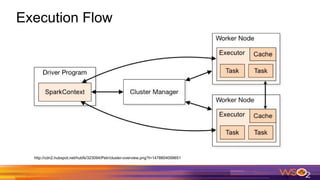
Execution Flow
http://cdn2.hubspot.net/hubfs/323094/Petr/cluster-overview.png?t=1478804099651
Execution Flow (contd.)
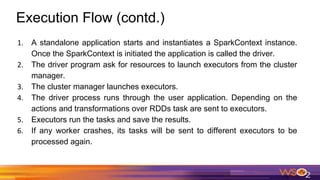
1. A standalone application starts and instantiates a SparkContext instance.
Once the SparkContext is initiated the application is called the driver.
2. The driver program ask for resources to launch executors from the cluster
manager.
3. The cluster manager launches executors.
4. The driver process runs through the user application. Depending on the
actions and transformations over RDDs task are sent to executors.
5. Executors run the tasks and save the results.
6. If any worker crashes, its tasks will be sent to different executors to be
processed again.
Terminology
● Application
○ User program built on Spark. Consists of a driver program and
executors on the cluster.
● Application Jar
○ A jar containing the user's Spark application and its dependencies
except Hadoop & Spark Jars
● Driver Program
○ The process where the main method of the program runs
○ Runs the user user code that creates a SparkContext, creates
RDDs, and performs actions and transformation
Terminology (contd.)
● SparkContext
○ Represents the connection to a Spark cluster
○ Driver programs access Spark through a SparkContext object
○ Can be used to create RDDs, accumulators and broadcast
variables on that cluster
● Cluster Manager
○ An external service to manage resources on the cluster
(standalone manager, YARN, Apache Mesos)
Terminology (contd.)
● Deploy Mode
○ cluster - driver inside the cluster
○ client - driver outside the cluster
● Worker node
○ Any node that can run application code in the cluster
● Executor
○ A process launched for an application on a worker node, that runs
tasks and keeps data in memory or disk storage across them.
Each application has its own executors.
Terminology (contd.)
● Task
○ A unit of work that will be sent to one executor
● Job
○ A parallel computation consisting of multiple tasks that gets
spawned in response to a Spark action (e.g. save, collect).
● Stage
○ Smaller set of tasks that each job is divided.
○ Sequential and depend on each other
Spark Pillars
Two main abstractions of Spark.
● RDD - Resilient Distributed Dataset
● DAG - Direct Acyclic Graph
RDD (Resilient Distributed Dataset)
● Fundamental data structure of Spark
● Immutable distributed collection of objects
● The data is partitioned across machines in the cluster that can be operated
in parallel
● Fault-tolerant
● Support two types of operations
○ Transformation
○ Action
RDD - Transformations
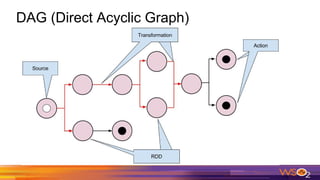
● Returns a pointer to new RDD
● lazily evaluated
● Step in a program telling Spark how to get data and what to do with it.
● Some of the most popular Spark transformations:
○ map
○ filter
○ flatMap
○ groupByKey
○ reduceByKey
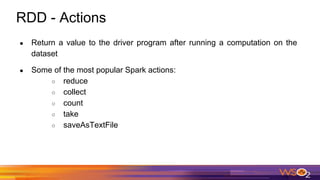
RDD - Actions
● Return a value to the driver program after running a computation on the
dataset
● Some of the most popular Spark actions:
○ reduce
○ collect
○ count
○ take
○ saveAsTextFile
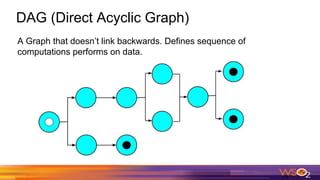
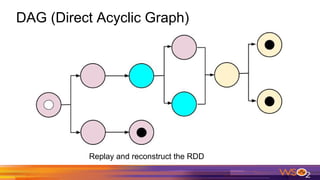
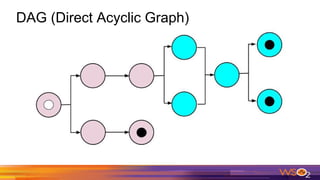
DAG (Direct Acyclic Graph)
A Graph that doesn’t link backwards. Defines sequence of
computations performs on data.
DAG (Direct Acyclic Graph)
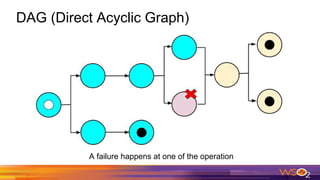
A failure happens at one of the operation
DAG (Direct Acyclic Graph)
Replay and reconstruct the RDD
DAG (Direct Acyclic Graph)
Writing Analytics Applications
1. SparkConf conf = new SparkConf().setMaster("local").setAppName("Word Count App");
2. JavaSparkContext sc = new JavaSparkContext(conf);
3.
4. JavaRDD<String> lines = spark.read().textFile(args[0]).javaRDD();
5.
6. JavaRDD<String> words = lines.flatMap(new FlatMapFunction<String, String>() {
7. @Override
8. public Iterator<String> call(String s) {
9. return Arrays.asList(s.split(" ")).iterator();
10. }
11. });
12.
13. JavaPairRDD<String, Integer> ones = words.mapToPair(new PairFunction<String, String, Integer>() {
14. @Override
15. public Tuple2<String, Integer> call(String s) {
16. return new Tuple2<>(s, 1);
17. }
18. });
19.
20. JavaPairRDD<String, Integer> counts = ones.reduceByKey(new Function2<Integer, Integer, Integer>() {
21. @Override
22. public Integer call(Integer i1, Integer i2) {
23. return i1 + i2;
24. }
25. });
26.
27. List<Tuple2<String, Integer>> output = counts.collect();
28 for (Tuple2<?,?> tuple : output) {
29 System.out.println(tuple._1() + ": " + tuple._2());
30. }
Writing Analytics Applications (contd.)
SparkConf conf = new SparkConf().setMaster("local").setAppName("Word Count App");
JavaSparkContext sc = new JavaSparkContext(conf);
JavaRDD<String> lines = spark.read().textFile(args[0]).javaRDD();
JavaRDD<String> words = lines.flatMap(new FlatMapFunction<String, String>() {
@Override
public Iterator<String> call(String s) {
return Arrays.asList(s.split(" ")).iterator();
}
});
JavaPairRDD<String, Integer> ones = words.mapToPair(new PairFunction<String, String, Integer>() {
@Override
public Tuple2<String, Integer> call(String s) {
return new Tuple2<>(s, 1);
}
});
JavaPairRDD<String, Integer> counts = ones.reduceByKey(new Function2<Integer, Integer, Integer>() {
@Override
public Integer call(Integer i1, Integer i2) {
return i1 + i2;
}
});
List<Tuple2<String, Integer>> output = counts.collect();
for (Tuple2<?,?> tuple : output) {
System.out.println(tuple._1() + ": " + tuple._2());
}
Green colored codes are not executing on the driver. Those are executing on another node.
Writing Analytics Applications (contd.)
SparkConf conf = new SparkConf().setMaster("local").setAppName("Word Count App");
JavaSparkContext sc = new JavaSparkContext(conf);
JavaRDD<String> lines = spark.read().textFile(args[0]).javaRDD();
JavaRDD<String> words =lines.flatMap(new FlatMapFunction<String, String>() {
@Override
public Iterator<String> call(String s) {
return Arrays.asList(s.split(" ")).iterator();
}
});
JavaPairRDD<String, Integer> ones =words.mapToPair(new PairFunction<String, String, Integer>() {
@Override
public Tuple2<String, Integer> call(String s) {
return new Tuple2<>(s, 1);
}
});
JavaPairRDD<String, Integer> counts =ones.reduceByKey(new Function2<Integer, Integer, Integer>() {
@Override
public Integer call(Integer i1, Integer i2) {
return i1 + i2;
}
});
List<Tuple2<String, Integer>> output =counts.collect();
for (Tuple2<?,?> tuple : output) {
System.out.println(tuple._1() + ": " + tuple._2());
}
Blue colored codes are transformations. Red colored code is an action. Green colored code is stuffs
that happens locally (not Spark related things)
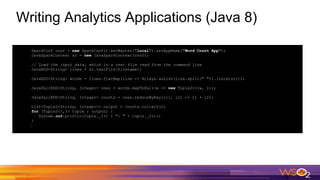
Writing Analytics Applications (Java 8)
SparkConf conf = new SparkConf().setMaster("local").setAppName("Word Count App");
JavaSparkContext sc = new JavaSparkContext(conf);
// Load the input data, which is a text file read from the command line
JavaRDD<String> lines = sc.textFile(filename);
JavaRDD<String> words = lines.flatMap(line -> Arrays.asList(line.split(" ")).iterator());
JavaPairRDD<String, Integer> ones = words.mapToPair(w -> new Tuple2<>(w, 1));
JavaPairRDD<String, Integer> counts = ones.reduceByKey((i1, i2) -> i1 + i2);
List<Tuple2<String, Integer>> output = counts.collect();
for (Tuple2<?,?> tuple : output) {
System.out.println(tuple._1() + ": " + tuple._2());
}
Demo
Questions?

Spark Driven Big Data Analytics

  • 1.
    Spark Driven BigData Analytics Inosh Goonewardena Associate Technical Lead - WSO2, Inc.
  • 2.
    Agenda ● What isBig Data? ● Big Data Analytics ● Introduction to Apache Spark ● Apache Spark Components & Architecture ● Writing Spark Analytic Applications
  • 3.
    What is BigData? ● Big data is a term for data sets that are so large and complex in nature ● Constitute structured, semi-structured and unstructured data ● Big Data cannot easily be managed by traditional RDBMS or statistics tools
  • 4.
    Characteristics of BigData - The 3Vs http://itknowledgeexchange.techtarget.com/ writing-for-business/files/2013/02/BigData.0 01.jpg
  • 5.
    Sources of BigData ● Banking transactions ● Social Media Content ● Results of scientific experiments ● GPS trails ● Financial market data ● Mobile-phone call detail records ● Machine data captured by sensors connected to IoT devices ● ……..
  • 6.
    Traditional Vs BigData Attribute Traditional Data Big Data Volume Gigabytes to Terabytes Petabytes to Zettabytes Organization Centralized Distributed Structure Structured Structured, Semi-structured & Unstructured Data Model Strict schema based Flat schema Data Relationship Complex interrelationships Almost flat with few relationships
  • 7.
    Big Data Analytics ●Process of examining large data sets to uncover hidden patterns, unknown correlations, market trends, customer preferences and other useful business information. ● Analytical findings can lead to better more effective marketing, new revenue opportunities, better customer service, improved operational efficiency, competitive advantages over rival organizations and other business benefits. http://searchbusinessanalytics.techtarget.com/definition/big-data-analytics
  • 8.
    4 types ofAnalytics ● Batch ● Real-time ● Interactive ● Predictive
  • 9.
    Challenges of BigData Analytics ● Traditional RDBMS fail to handle Big Data ● Big Data cannot fit in the memory of a single computer ● Processing of Big Data in a single computer will take a lot of time ● Scaling with traditional RDBMS is expensive
  • 10.
    Traditional Large-Scale Computation ●Traditionally, computation has been processor-bound ○ Relatively small amounts of data ○ Significant amount of complex processing performed on that data ● For decades, the primary push was to increase the computing power of a single machine ○ Faster processor, more RAM
  • 11.
    Hadoop ● Hadoop isan open source, Java-based programming framework that supports the processing and storage of extremely large data sets in a distributed computing environment http://bigdatajury.com/wp-content/uploads/2014/ 03/030114_0817_HadoopCoreC120.png
  • 12.
    The Hadoop DistributedFile System - HDFS ● Responsible for storing data on the cluster ● Data files are split into blocks and distributed across multiple nodes in the cluster ● Each block is replicated multiple times ○ Default is to replicate each block three times ○ Replicas are stored on different nodes ○ This ensures both reliability and availability
  • 13.
    MapReduce ● MapReduce isthe system used to process data in the Hadoop cluster ● A method for distributing a task across multiple nodes ● Each node processes data stored on that node - Where possible ● Consists of two phases: ○ Map - process the input data and creates several small chunks of data ○ Reduce - process the data that comes from the mapper and produces a new set of output ● Scalable, Flexible, Fault-tolerant & Cost effective
  • 14.
  • 15.
    Limitations of MapReduce ●Slow due to replication, serialization, and disk IO ● Inefficient for: ○ Iterative algorithms (Machine Learning, Graphs & Network Analysis) ○ Interactive Data Mining (R, Excel, Adhoc Reporting, Searching)
  • 16.
    Apache Spark ● ApacheSpark is a cluster computing platform designed to be fast and general-purpose ● Extends the Hadoop MapReduce model to efficiently support more types of computations, including interactive queries and stream processing ● Provides in-memory cluster computing that increases the processing speed of an application ● Designed to cover a wide range of workloads that previously required separate distributed systems, including batch applications, iterative algorithms, interactive queries and streaming
  • 17.
    Features of Spark ●Speed − Spark helps to run an application in Hadoop cluster, up to 100 times faster in memory, and 10 times faster when running on disk. ● Supports multiple languages − Spark provides built-in APIs in Java, Scala, or Python. ● Advanced Analytics − Spark not only supports ‘Map’ and ‘reduce’. It also supports SQL queries, Streaming data, Machine learning (ML), and Graph algorithms.
  • 18.
  • 19.
    Components of Spark ●Apache Spark Core − Underlying general execution engine for spark platform that all other functionality is built upon. Provides In-Memory computing and referencing datasets in external storage systems. ● Spark SQL − Component on top of Spark Core that introduces a new data abstraction called SchemaRDD, which provides support for structured and semi-structured data. ● Spark Streaming − Leverages Spark Core's fast scheduling capability to perform streaming analytics. Ingests data in mini-batches and performs RDD transformations on those mini-batches of data.
  • 20.
    Components of Spark ●MLlib − Distributed machine learning framework above Spark. Provides multiple types of machine learning algorithms, including binary classification, regression, clustering and collaborative filtering, as well as supporting functionality such as model evaluation and data import. ● GraphX − Distributed graph-processing framework on top of Spark. Provides an API for expressing graph computation that can model the user-defined graphs by using Pregel abstraction API.
  • 21.
    Why a NewProgramming Model? ● MapReduce simplified big data analysis. ● But users quickly wanted more: ○ More complex, multi-pass analytics (e.g. ML, graph) ○ More interactive ad-hoc queries ○ More real-time stream processing ● All 3 need faster data sharing in parallel apps
  • 22.
    Data Sharing inMapReduce ● Iterative Operations on MapReduce ● Interactive Operations on MapReduce https://www.tutorialspoint.com/apache_spark/im ages/iterative_operations_on_mapreduce.jpg https://www.tutorialspoint.com/apache_spark/imag es/interactive_operations_on_mapreduce.jpg
  • 23.
    Data Sharing usingSpark RDD ● Iterative Operations on Spark RDD ● Interactive Operations on Spark RDD https://www.tutorialspoint.com/apache_sp ark/images/iterative_operations_on_spark _rdd.jpg https://www.tutorialspoint.com/apache_spa rk/images/interactive_operations_on_spar k_rdd.jpg
  • 24.
  • 25.
    Execution Flow (contd.) 1.A standalone application starts and instantiates a SparkContext instance. Once the SparkContext is initiated the application is called the driver. 2. The driver program ask for resources to launch executors from the cluster manager. 3. The cluster manager launches executors. 4. The driver process runs through the user application. Depending on the actions and transformations over RDDs task are sent to executors. 5. Executors run the tasks and save the results. 6. If any worker crashes, its tasks will be sent to different executors to be processed again.
  • 26.
    Terminology ● Application ○ Userprogram built on Spark. Consists of a driver program and executors on the cluster. ● Application Jar ○ A jar containing the user's Spark application and its dependencies except Hadoop & Spark Jars ● Driver Program ○ The process where the main method of the program runs ○ Runs the user user code that creates a SparkContext, creates RDDs, and performs actions and transformation
  • 27.
    Terminology (contd.) ● SparkContext ○Represents the connection to a Spark cluster ○ Driver programs access Spark through a SparkContext object ○ Can be used to create RDDs, accumulators and broadcast variables on that cluster ● Cluster Manager ○ An external service to manage resources on the cluster (standalone manager, YARN, Apache Mesos)
  • 28.
    Terminology (contd.) ● DeployMode ○ cluster - driver inside the cluster ○ client - driver outside the cluster ● Worker node ○ Any node that can run application code in the cluster ● Executor ○ A process launched for an application on a worker node, that runs tasks and keeps data in memory or disk storage across them. Each application has its own executors.
  • 29.
    Terminology (contd.) ● Task ○A unit of work that will be sent to one executor ● Job ○ A parallel computation consisting of multiple tasks that gets spawned in response to a Spark action (e.g. save, collect). ● Stage ○ Smaller set of tasks that each job is divided. ○ Sequential and depend on each other
  • 30.
    Spark Pillars Two mainabstractions of Spark. ● RDD - Resilient Distributed Dataset ● DAG - Direct Acyclic Graph
  • 31.
    RDD (Resilient DistributedDataset) ● Fundamental data structure of Spark ● Immutable distributed collection of objects ● The data is partitioned across machines in the cluster that can be operated in parallel ● Fault-tolerant ● Support two types of operations ○ Transformation ○ Action
  • 32.
    RDD - Transformations ●Returns a pointer to new RDD ● lazily evaluated ● Step in a program telling Spark how to get data and what to do with it. ● Some of the most popular Spark transformations: ○ map ○ filter ○ flatMap ○ groupByKey ○ reduceByKey
  • 33.
    RDD - Actions ●Return a value to the driver program after running a computation on the dataset ● Some of the most popular Spark actions: ○ reduce ○ collect ○ count ○ take ○ saveAsTextFile
  • 34.
    DAG (Direct AcyclicGraph) A Graph that doesn’t link backwards. Defines sequence of computations performs on data.
  • 35.
  • 36.
    DAG (Direct AcyclicGraph) A failure happens at one of the operation
  • 37.
    DAG (Direct AcyclicGraph) Replay and reconstruct the RDD
  • 38.
  • 39.
    Writing Analytics Applications 1.SparkConf conf = new SparkConf().setMaster("local").setAppName("Word Count App"); 2. JavaSparkContext sc = new JavaSparkContext(conf); 3. 4. JavaRDD<String> lines = spark.read().textFile(args[0]).javaRDD(); 5. 6. JavaRDD<String> words = lines.flatMap(new FlatMapFunction<String, String>() { 7. @Override 8. public Iterator<String> call(String s) { 9. return Arrays.asList(s.split(" ")).iterator(); 10. } 11. }); 12. 13. JavaPairRDD<String, Integer> ones = words.mapToPair(new PairFunction<String, String, Integer>() { 14. @Override 15. public Tuple2<String, Integer> call(String s) { 16. return new Tuple2<>(s, 1); 17. } 18. }); 19. 20. JavaPairRDD<String, Integer> counts = ones.reduceByKey(new Function2<Integer, Integer, Integer>() { 21. @Override 22. public Integer call(Integer i1, Integer i2) { 23. return i1 + i2; 24. } 25. }); 26. 27. List<Tuple2<String, Integer>> output = counts.collect(); 28 for (Tuple2<?,?> tuple : output) { 29 System.out.println(tuple._1() + ": " + tuple._2()); 30. }
  • 40.
    Writing Analytics Applications(contd.) SparkConf conf = new SparkConf().setMaster("local").setAppName("Word Count App"); JavaSparkContext sc = new JavaSparkContext(conf); JavaRDD<String> lines = spark.read().textFile(args[0]).javaRDD(); JavaRDD<String> words = lines.flatMap(new FlatMapFunction<String, String>() { @Override public Iterator<String> call(String s) { return Arrays.asList(s.split(" ")).iterator(); } }); JavaPairRDD<String, Integer> ones = words.mapToPair(new PairFunction<String, String, Integer>() { @Override public Tuple2<String, Integer> call(String s) { return new Tuple2<>(s, 1); } }); JavaPairRDD<String, Integer> counts = ones.reduceByKey(new Function2<Integer, Integer, Integer>() { @Override public Integer call(Integer i1, Integer i2) { return i1 + i2; } }); List<Tuple2<String, Integer>> output = counts.collect(); for (Tuple2<?,?> tuple : output) { System.out.println(tuple._1() + ": " + tuple._2()); } Green colored codes are not executing on the driver. Those are executing on another node.
  • 41.
    Writing Analytics Applications(contd.) SparkConf conf = new SparkConf().setMaster("local").setAppName("Word Count App"); JavaSparkContext sc = new JavaSparkContext(conf); JavaRDD<String> lines = spark.read().textFile(args[0]).javaRDD(); JavaRDD<String> words =lines.flatMap(new FlatMapFunction<String, String>() { @Override public Iterator<String> call(String s) { return Arrays.asList(s.split(" ")).iterator(); } }); JavaPairRDD<String, Integer> ones =words.mapToPair(new PairFunction<String, String, Integer>() { @Override public Tuple2<String, Integer> call(String s) { return new Tuple2<>(s, 1); } }); JavaPairRDD<String, Integer> counts =ones.reduceByKey(new Function2<Integer, Integer, Integer>() { @Override public Integer call(Integer i1, Integer i2) { return i1 + i2; } }); List<Tuple2<String, Integer>> output =counts.collect(); for (Tuple2<?,?> tuple : output) { System.out.println(tuple._1() + ": " + tuple._2()); } Blue colored codes are transformations. Red colored code is an action. Green colored code is stuffs that happens locally (not Spark related things)
  • 42.
    Writing Analytics Applications(Java 8) SparkConf conf = new SparkConf().setMaster("local").setAppName("Word Count App"); JavaSparkContext sc = new JavaSparkContext(conf); // Load the input data, which is a text file read from the command line JavaRDD<String> lines = sc.textFile(filename); JavaRDD<String> words = lines.flatMap(line -> Arrays.asList(line.split(" ")).iterator()); JavaPairRDD<String, Integer> ones = words.mapToPair(w -> new Tuple2<>(w, 1)); JavaPairRDD<String, Integer> counts = ones.reduceByKey((i1, i2) -> i1 + i2); List<Tuple2<String, Integer>> output = counts.collect(); for (Tuple2<?,?> tuple : output) { System.out.println(tuple._1() + ": " + tuple._2()); }
  • 43.
  • 44.