PhyloFinder: An intelligentPhyloFinder: An intelligent
search engine forsearch engine for
phylogenetic tree databasesphylogenetic tree databases
Presented byPresented by
AFNAN SAID ZUITERAFNAN SAID ZUITER
TreeBASETreeBASE
 TreeBASE is the largest relational database of publishedTreeBASE is the largest relational database of published
phylogenetic information.phylogenetic information.
 It stores more than 4,400 trees that contain over 75,000 taxa,It stores more than 4,400 trees that contain over 75,000 taxa,
the data matrices used to infer the trees, and additional meta-the data matrices used to infer the trees, and additional meta-
data, such as bibliographic information and details of thedata, such as bibliographic information and details of the
phylogenetic analyses.phylogenetic analyses.
 Though TreeBASE is a valuable repository for phylogeneticThough TreeBASE is a valuable repository for phylogenetic
data, it is often difficult to identify and access relevantdata, it is often difficult to identify and access relevant
phylogenetic data from within TreeBASE.phylogenetic data from within TreeBASE.
so we need search engine for phylogenetic trees.so we need search engine for phylogenetic trees.
TBMapTBMap
 A database that maps names of taxa found in TreeBASE toA database that maps names of taxa found in TreeBASE to
other taxonomic databases and clusters equivalent taxonomicother taxonomic databases and clusters equivalent taxonomic
names.names.
 However, TBMap is not incorporated in TreeBASE or in anyHowever, TBMap is not incorporated in TreeBASE or in any
other phylogenetic search engines.other phylogenetic search engines.
ChallengesChallenges
 Must be tools that can quickly identify phylogenetic treesMust be tools that can quickly identify phylogenetic trees
containing a specified taxon or set of taxacontaining a specified taxon or set of taxa
 Taxonomic names used in stored phylogenetic trees often are basedTaxonomic names used in stored phylogenetic trees often are based
on various inconsistent taxonomies.on various inconsistent taxonomies.
 Taxonomic classifications and names frequently change, and theseTaxonomic classifications and names frequently change, and these
changes may not be reflected in database trees.changes may not be reflected in database trees.
 Repositories such as TreeBASE contain many species that areRepositories such as TreeBASE contain many species that are
represented by multiple equivalent names.represented by multiple equivalent names.
 Taxonomic queries are further complicated by misspellings orTaxonomic queries are further complicated by misspellings or
unique subspecies designations in stored trees.unique subspecies designations in stored trees.
Effective phylogenetic search engineEffective phylogenetic search engine
 The leaves in stored phylogenetic trees may represent differentThe leaves in stored phylogenetic trees may represent different
taxonomic levels, such as families, genera, species, or subspecies.taxonomic levels, such as families, genera, species, or subspecies.
 Identifying trees containing not only the specific taxon name usedIdentifying trees containing not only the specific taxon name used
in the query, but also trees containing descendants or ancestors ofin the query, but also trees containing descendants or ancestors of
the query taxon.the query taxon.
 Identifying trees containing direct ancestors (the internal nodes onIdentifying trees containing direct ancestors (the internal nodes on
the path from the root of a taxonomy tree to the query taxon) of thethe path from the root of a taxonomy tree to the query taxon) of the
query taxon.query taxon.
 Allowing the user to find all the taxa matching a partial nameAllowing the user to find all the taxa matching a partial name
taxon query.taxon query.
Effective phylogenetic search engineEffective phylogenetic search engine
 Have the ability to make phylogenetic queries, in which the userHave the ability to make phylogenetic queries, in which the user
can assess a specified tree by comparing it to the trees in thecan assess a specified tree by comparing it to the trees in the
database.database.
 Must be able to identify all trees that contain or agree with a queryMust be able to identify all trees that contain or agree with a query
tree, or the trees in the database in which the query tree istree, or the trees in the database in which the query tree is
embedded.embedded.
 since there is often much disagreement among trees, it is verysince there is often much disagreement among trees, it is very
useful to be able to identify all the trees that are similar, but notuseful to be able to identify all the trees that are similar, but not
necessarily identical, to a query tree.necessarily identical, to a query tree.
 Some tree mining (searching) features are implemented withSome tree mining (searching) features are implemented with
TreeBASE.TreeBASE.
PhyloFinderPhyloFinder
 A search engine for phylogenetic databases that enhances the ability to search aA search engine for phylogenetic databases that enhances the ability to search a
tree database (TreeBase).tree database (TreeBase).
 Uses TBMap to address the problem of taxonomic inconsistency, (recognizingUses TBMap to address the problem of taxonomic inconsistency, (recognizing
synonymous taxon names).synonymous taxon names).
 Offers alternate spelling suggestions for taxonomic queries that do not find aOffers alternate spelling suggestions for taxonomic queries that do not find a
match in the tree database.match in the tree database.
 Using the hierarchical structure of the NCBI taxonomy to search for treesUsing the hierarchical structure of the NCBI taxonomy to search for trees
containing descendants or ancestors of a query taxon.containing descendants or ancestors of a query taxon.
 Has a tree visualization tool that displays the query results, highlightingHas a tree visualization tool that displays the query results, highlighting
relevant taxa and branches, and provides hyperlinks to the NCBI taxonomy andrelevant taxa and branches, and provides hyperlinks to the NCBI taxonomy and
TBMap websites.TBMap websites.
 The implementation of PhyloFinder uses simple but powerful informationThe implementation of PhyloFinder uses simple but powerful information
retrieval techniques.retrieval techniques.
(using of an inverted index that maps taxa to trees, which allows the system to(using of an inverted index that maps taxa to trees, which allows the system to
filter out many trees that are irrelevant to a given query, and a representation offilter out many trees that are irrelevant to a given query, and a representation of
trees that allows fast least common ancestor queries directly on the database).trees that allows fast least common ancestor queries directly on the database).
ImplementationImplementation
 Taxonomic Queries andTaxonomic Queries and
Phylogenetic queriesPhylogenetic queries
 PhyloFinder's web-based interface allows the user to makePhyloFinder's web-based interface allows the user to make
taxonomictaxonomic andand phylogeneticphylogenetic queries.queries.
 Taxonomic queries involve a single taxon or set of taxa.Taxonomic queries involve a single taxon or set of taxa.
 Phylogenetic queries take as input a phylogenetic tree andPhylogenetic queries take as input a phylogenetic tree and
attempt to locate trees in the database that match it in someattempt to locate trees in the database that match it in some
specified way.specified way.
1.1. Taxonomic QueriesTaxonomic Queries
1)1) Contains:Contains:
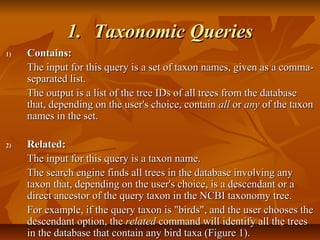
The input for this query is a set of taxon names, given as a comma-The input for this query is a set of taxon names, given as a comma-
separated list.separated list.
The output is a list of the tree IDs of all trees from the databaseThe output is a list of the tree IDs of all trees from the database
that, depending on the user's choice, containthat, depending on the user's choice, contain allall oror anyany of the taxonof the taxon
names in the set.names in the set.
2)2) Related:Related:
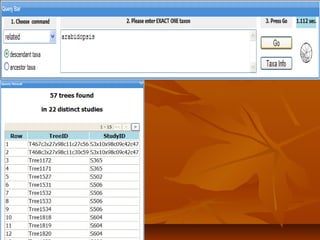
The input for this query is a taxon name.The input for this query is a taxon name.
The search engine finds all trees in the database involving anyThe search engine finds all trees in the database involving any
taxon that, depending on the user's choice, is a descendant or ataxon that, depending on the user's choice, is a descendant or a
direct ancestor of the query taxon in the NCBI taxonomy tree.direct ancestor of the query taxon in the NCBI taxonomy tree.
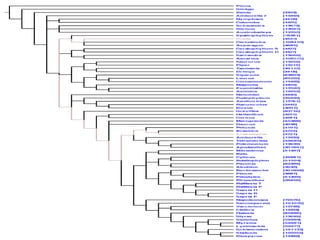
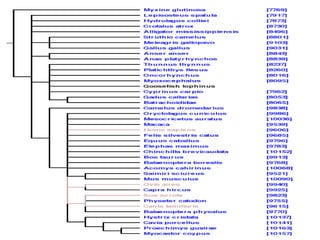
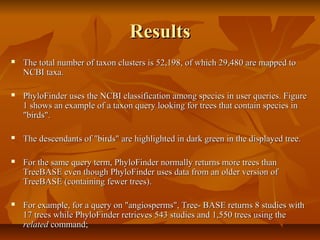
For example, if the query taxon is "birds", and the user chooses theFor example, if the query taxon is "birds", and the user chooses the
descendant option, thedescendant option, the relatedrelated command will identify all the treescommand will identify all the trees
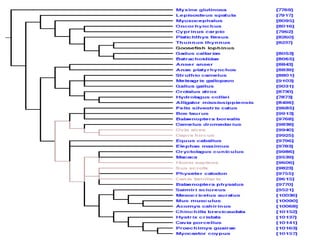
in the database that contain any bird taxa (Figure 1).in the database that contain any bird taxa (Figure 1).
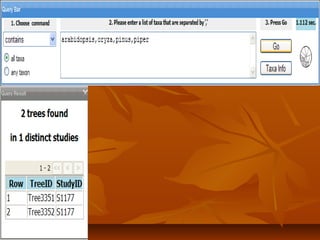
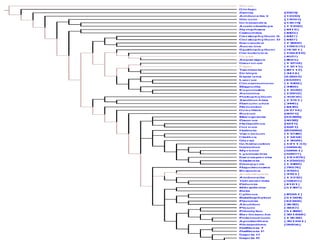
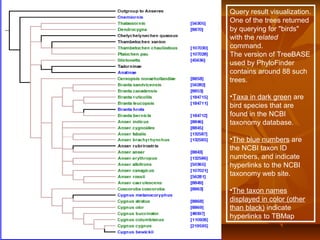
Query result visualization.
One of the trees returned
by querying for "birds"
with the related
command.
The version of TreeBASE
used by PhyloFinder
contains around 88 such
trees.
•Taxa in dark green are
bird species that are
found in the NCBI
taxonomy database.
•The blue numbers are
the NCBI taxon ID
numbers, and indicate
hyperlinks to the NCBI
taxonomy web site.
•The taxon names
displayed in color (other
than black) indicate
hyperlinks to TBMap
1.1. Taxonomic QueriesTaxonomic Queries
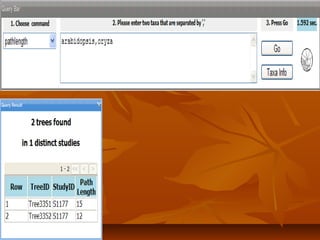
3)3) Pathlength:Pathlength:
The input for this query is a pair of taxon names.The input for this query is a pair of taxon names.
The output is a list of the tree IDs of all trees containing the two species,The output is a list of the tree IDs of all trees containing the two species,
along with the distance (path length) between the two taxa in each tree.along with the distance (path length) between the two taxa in each tree.
Note: in our implementation of PhyloFinder using TreeBASE trees, theNote: in our implementation of PhyloFinder using TreeBASE trees, the
output is a list of the TreeBASE tree IDs, the corresponding study IDs,output is a list of the TreeBASE tree IDs, the corresponding study IDs,
and the distance (path length) between the two taxa in each tree.and the distance (path length) between the two taxa in each tree.
2.2. Phylogenetic QueriesPhylogenetic Queries
 PhyloFinder supports two different types of phylogenetic queries:PhyloFinder supports two different types of phylogenetic queries:
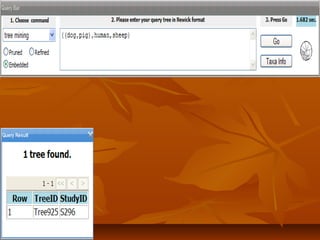
1.1. tree mining (searching)tree mining (searching)
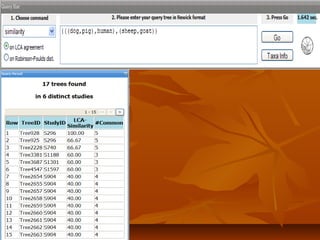
2.2. tree similaritytree similarity search.search.
 To describe these commands, we need some definitions.To describe these commands, we need some definitions.
3.3. DefinitionsDefinitions
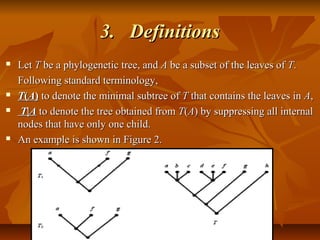
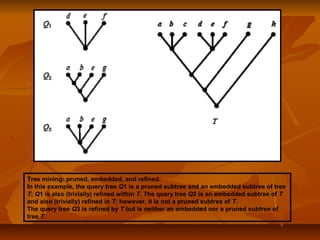
 LetLet TT be a phylogenetic tree, andbe a phylogenetic tree, and AA be a subset of the leaves ofbe a subset of the leaves of TT..
Following standard terminology,Following standard terminology,
 TT((AA)) to denote the minimal subtree ofto denote the minimal subtree of TT that contains the leaves inthat contains the leaves in AA,,
 TT||AA to denote the tree obtained fromto denote the tree obtained from TT((AA) by suppressing all internal) by suppressing all internal
nodes that have only one child.nodes that have only one child.
 An example is shown in Figure 2.An example is shown in Figure 2.
3.3. DefinitionsDefinitions
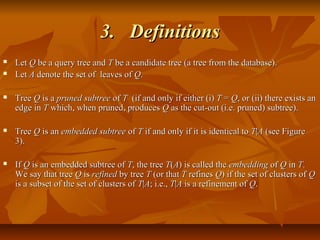
 LetLet QQ be a query tree andbe a query tree and TT be a candidate tree (a tree from the database).be a candidate tree (a tree from the database).
 LetLet AA denote the set of leaves ofdenote the set of leaves of QQ..
 TreeTree QQ is ais a pruned subtreepruned subtree ofof TT (if and only if either (i)(if and only if either (i) TT == QQ, or (ii) there exists an, or (ii) there exists an
edge inedge in TT which, when pruned, produceswhich, when pruned, produces QQ as the cut-out (i.e. pruned) subtree).as the cut-out (i.e. pruned) subtree).
 TreeTree QQ is anis an embedded subtreeembedded subtree ofof TT if and only if it is identical toif and only if it is identical to TT||AA (see Figure(see Figure
3).3).
 IfIf QQ is an embedded subtree ofis an embedded subtree of TT, the tree, the tree TT((AA) is called the) is called the embeddingembedding ofof QQ inin TT..
We say that treeWe say that tree QQ isis refinedrefined by treeby tree TT (or that(or that TT refinesrefines QQ) if the set of clusters of) if the set of clusters of QQ
is a subset of the set of clusters ofis a subset of the set of clusters of TT||AA; i.e.,; i.e., TT||AA is a refinement ofis a refinement of QQ..
Tree mining: pruned, embedded, and refined.
In this example, the query tree Q1 is a pruned subtree and an embedded subtree of tree
T; Q1 is also (trivially) refined within T. The query tree Q2 is an embedded subtree of T
and also (trivially) refined in T; however, it is not a pruned subtree of T.
The query tree Q3 is refined by T but is neither an embedded nor a pruned subtree of
tree T.
3.3. DefinitionsDefinitions
 AA similarity measuresimilarity measure is a function that, given ais a function that, given a query treequery tree and aand a
candidate treecandidate tree returns a percentage score between 0 and 100%.returns a percentage score between 0 and 100%.
 similarity scoresimilarity score is the percentage score (0-100%) and it reflects howis the percentage score (0-100%) and it reflects how
similar the query tree is to the candidate tree.similar the query tree is to the candidate tree.
 PhyloFinder uses two similarity measures, one based on thePhyloFinder uses two similarity measures, one based on the
Robinson-Foulds (RF) distance and the other based on leastRobinson-Foulds (RF) distance and the other based on least
common ancestors (LCAs).common ancestors (LCAs).
 If the LCA based score is 100%, the query tree is refined by theIf the LCA based score is 100%, the query tree is refined by the
candidate tree, while if the RF similarity score is 100%, the querycandidate tree, while if the RF similarity score is 100%, the query
tree can be embedded in the candidate tree.tree can be embedded in the candidate tree.
Newick tree format is a way to represent graph theoretical trees with edge lengths
using parentheses and commas
Newick tree format
4.4. CommandsCommands
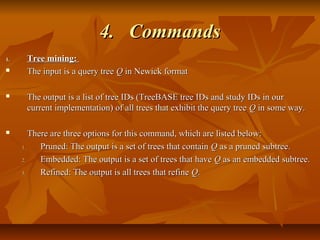
1.1. Tree mining:Tree mining:
 The input is a query treeThe input is a query tree QQ in Newick formatin Newick format
 The output is a list of tree IDs (TreeBASE tree IDs and study IDs in ourThe output is a list of tree IDs (TreeBASE tree IDs and study IDs in our
current implementation) of all trees that exhibit the query treecurrent implementation) of all trees that exhibit the query tree QQ in some way.in some way.
 There are three options for this command, which are listed below:There are three options for this command, which are listed below:
1.1. Pruned: The output is a set of trees that containPruned: The output is a set of trees that contain QQ as a pruned subtree.as a pruned subtree.
2.2. Embedded: The output is a set of trees that haveEmbedded: The output is a set of trees that have QQ as an embedded subtree.as an embedded subtree.
3.3. Refined: The output is all trees that refineRefined: The output is all trees that refine QQ..
4.4. CommandsCommands
2.2. SimilaritySimilarity::
 The input is a tree in Newick format.The input is a tree in Newick format.
 The output is a list of the IDs of all trees thatThe output is a list of the IDs of all trees that share at least three taxa withshare at least three taxa with
the query treethe query tree, ranked according to their similarity scores., ranked according to their similarity scores.
 Two options are provided, depending on whether the similarity score isTwo options are provided, depending on whether the similarity score is
computed with the RF based or the LCA-based measure.computed with the RF based or the LCA-based measure.
 (We require at least three shared taxa, because fewer than three taxa(We require at least three shared taxa, because fewer than three taxa
provide no topological information for rooted trees.)provide no topological information for rooted trees.)
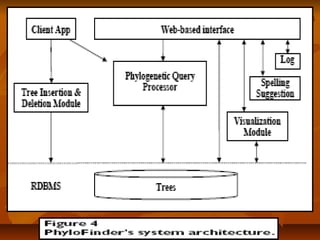
System ArchitectureSystem Architecture
 PhyloFinder stores the phylogenetic trees, which in our test implementationPhyloFinder stores the phylogenetic trees, which in our test implementation
are from TreeBASE, and the NCBI taxonomy tree in MySQL (an openare from TreeBASE, and the NCBI taxonomy tree in MySQL (an open
source relational database management system (RDBMS)) using a slightsource relational database management system (RDBMS)) using a slight
modification ofmodification of nested-set representationnested-set representation..
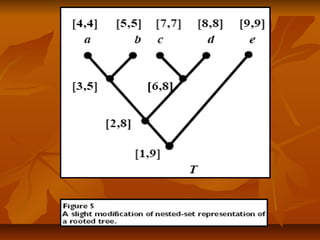
 Under this scheme, each nodeUnder this scheme, each node xx of a given tree is represented by an intervalof a given tree is represented by an interval
[[NxNx,, RxRx], where], where Nx (Nx ( NodeID ofNodeID of x)x), is an integer defined by a preorder walk, is an integer defined by a preorder walk
of the tree, andof the tree, and RxRx is the largest NodeID of a descendant ofis the largest NodeID of a descendant of xx (Figure 5).(Figure 5).
 NodeNode yy is an ancestor of nodeis an ancestor of node xx if and only if the interval [if and only if the interval [NyNy,, RyRy] contains] contains
the interval [the interval [Nx, RxNx, Rx], and the LCA of a set of nodes], and the LCA of a set of nodes xx1,...,1,...,xkxk is the commonis the common
ancestorancestoryy with largest NodeID. With this representation, LCA queries canwith largest NodeID. With this representation, LCA queries can
be implemented as SQL queries directly on the relational database.be implemented as SQL queries directly on the relational database.
 Taxon clusters are generated using TBMap and the NCBI taxonomyTaxon clusters are generated using TBMap and the NCBI taxonomy
database.database.
System ArchitectureSystem Architecture
 In order to automatically translate between synonymous names for theIn order to automatically translate between synonymous names for the
same species, the RDBMS stores a collection ofsame species, the RDBMS stores a collection of taxon clusterstaxon clusters, where, where
each cluster contains a set of synonymous taxa.each cluster contains a set of synonymous taxa.
 In text retrieval and web mining, such indices are used as mappings fromIn text retrieval and web mining, such indices are used as mappings from
words to sets of documents that contain them.words to sets of documents that contain them.
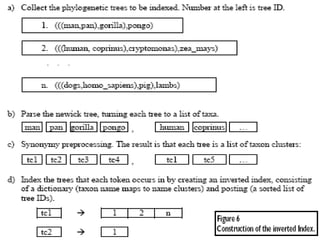
 PhyloFinder's inverted index treats taxon clusters as words andPhyloFinder's inverted index treats taxon clusters as words and
phylogenetic trees as documents to achieve fast querying (Figure 6).phylogenetic trees as documents to achieve fast querying (Figure 6).
 TheThe phylogenetic query processorphylogenetic query processor is the kernel of the search engine.is the kernel of the search engine.
 It provides functions to parse user commands, to perform taxonomic andIt provides functions to parse user commands, to perform taxonomic and
phylogenetic queries, and to coordinate other modules.phylogenetic queries, and to coordinate other modules.
System ArchitectureSystem Architecture
 The query processor uses the NCBI tree as a classification guide for species inThe query processor uses the NCBI tree as a classification guide for species in
queries such as thequeries such as the relatedrelated command.command.
 TheThe spelling suggestion modulespelling suggestion module checks spellings in the query and provideschecks spellings in the query and provides
suggestions based on taxon names in Tree- BASE or in the NCBI taxonomysuggestions based on taxon names in Tree- BASE or in the NCBI taxonomy
database.database.
 This is implemented using the GNU Aspell c library, with some modifications inThis is implemented using the GNU Aspell c library, with some modifications in
order to handle special alphabet characters (e.g., '-', '&', '.') and compound wordsorder to handle special alphabet characters (e.g., '-', '&', '.') and compound words
in taxon names.in taxon names.
 TheThe visualization modulevisualization module creates HTML files with image map, which showcreates HTML files with image map, which show
phylogenetic trees in a dendrogram format, highlight the embedded query tree orphylogenetic trees in a dendrogram format, highlight the embedded query tree or
species, and provide link-outs for species in NCBI taxonomy database.species, and provide link-outs for species in NCBI taxonomy database.
System ArchitectureSystem Architecture
 TheThe client applicationclient application is an administration tool that provides an interface tois an administration tool that provides an interface to
handle tree insertions and deletions (via thehandle tree insertions and deletions (via the insertion and deletion moduleinsertion and deletion module).).
 It also provides commands for updating the inverted index and performing low-It also provides commands for updating the inverted index and performing low-
level queries (SQL commands or specified query commands with unformattedlevel queries (SQL commands or specified query commands with unformatted
results) for testing and debugging.results) for testing and debugging.
 TheThe web-based interfaceweb-based interface is an interactive web application that uses the AJAXis an interactive web application that uses the AJAX
technique. It is written using the Google Web Toolkit (GWT) [27] and the GWTtechnique. It is written using the Google Web Toolkit (GWT) [27] and the GWT
Window Manager (GWM).Window Manager (GWM).
 The system maintains aThe system maintains a loglog, where it records user queries and timestamps., where it records user queries and timestamps.
 The statistics can be used to analyze user needs and help optimize the searchThe statistics can be used to analyze user needs and help optimize the search
engine performance.engine performance.
Taxonomic name consistencyTaxonomic name consistency
 The search engine relies on taxon clusters provided by TBMap to identifyThe search engine relies on taxon clusters provided by TBMap to identify
synonymous taxonomic names. Whenever PhyloFinder encounters ansynonymous taxonomic names. Whenever PhyloFinder encounters an
inconsistency, it ignores the classification provided by TBMap, and relies insteadinconsistency, it ignores the classification provided by TBMap, and relies instead
on the NCBI taxonomy.on the NCBI taxonomy.
 Another complication is that TBMap uses four external taxonomic databases –Another complication is that TBMap uses four external taxonomic databases –
ITIS, IPNI, uBIO and NCBI – among which there are conflicts. (see Figure 7). InITIS, IPNI, uBIO and NCBI – among which there are conflicts. (see Figure 7). In
such cases, PhyloFinder again uses the NCBI classification.such cases, PhyloFinder again uses the NCBI classification.
Figure 7
Synonym conflict in IPNI and
NCBI. Name cluster containing
"Antennaria solitaria" and
"Antennaria monocephala"
produced
by TBMap [8]. Anternnaria
solitaria and Antennaria
monocephala are synonyms in
IPNI, but are treated as distinct
taxa by NCBI.
In such cases, PhyloFinder uses
the NCBI classification.
Query processingQuery processing
 When a user submits a query from a web browser, the web CGI program parsesWhen a user submits a query from a web browser, the web CGI program parses
the user query into query command (e.g.,the user query into query command (e.g., containscontains) and query contents (e.g., the) and query contents (e.g., the
taxa in the list).taxa in the list).
 The results for some queries (such as obtaining the NCBI taxon ID for a givenThe results for some queries (such as obtaining the NCBI taxon ID for a given
taxon name) can be retrieved directly from the database. Other queries (such as thetaxon name) can be retrieved directly from the database. Other queries (such as the
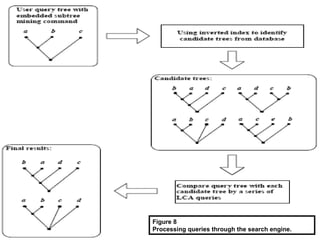
tree miningtree mining command) go through the query processor, which first identifiescommand) go through the query processor, which first identifies
candidate trees using the inverted index and then performs further computations tocandidate trees using the inverted index and then performs further computations to
get the final results (see Figure 8).get the final results (see Figure 8).
 Identifying the candidate trees using the inverted index allows us to filter a largeIdentifying the candidate trees using the inverted index allows us to filter a large
fraction of the database trees from further consideration, significantly acceleratingfraction of the database trees from further consideration, significantly accelerating
the query processing.the query processing.
 Phylogenetic queries (other than RF-based similarity search) are implemented byPhylogenetic queries (other than RF-based similarity search) are implemented by
using LCA queries to compare ancestor-descendant relationships in the query treeusing LCA queries to compare ancestor-descendant relationships in the query tree
and in the database tree.and in the database tree.
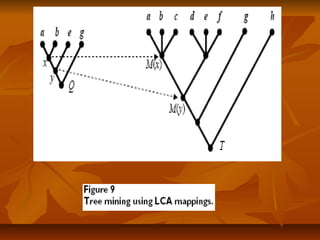
 Figure 9Figure 9 shows a simple example where the goal is to determine if query treeshows a simple example where the goal is to determine if query tree QQ
can be embedded in database treecan be embedded in database tree TT..
Query processingQuery processing
 The two internal nodesThe two internal nodes xx andand yy inin QQ map to nodesmap to nodes MM((xx) and) and MM((yy) in) in TT in the sensein the sense
that the LCAs of the descendants ofthat the LCAs of the descendants of xx andand yy areare MM((xx) and) and MM((yy), respectively.), respectively.
 QQ can be embedded incan be embedded in TT sincesince MM((xx) and) and MM((yy) have the same ancestor-descendant) have the same ancestor-descendant
relationship inrelationship in TT asas xx andand yy have inhave in QQ..
 The use of nested-set representation for trees in the RDBMS allows LCA queriesThe use of nested-set representation for trees in the RDBMS allows LCA queries
to be directly computed by the RDBMS.to be directly computed by the RDBMS.
 Hierarchical queries (e.g.,Hierarchical queries (e.g., relatedrelated), which require a classification (or ontology)), which require a classification (or ontology)
guide, are addressed by Boolean operations on the inverted index. For example,guide, are addressed by Boolean operations on the inverted index. For example,
when a user query asks for trees that contain "birds" using thewhen a user query asks for trees that contain "birds" using the related/descendantrelated/descendant
command, the search engine first looks for all bird species in the storedcommand, the search engine first looks for all bird species in the stored
phylogenetic trees using the NCBI taxonomy tree to identify all bird species in thephylogenetic trees using the NCBI taxonomy tree to identify all bird species in the
trees.trees.
 It then retrieves the tree ID lists corresponding to each bird species and returnsIt then retrieves the tree ID lists corresponding to each bird species and returns
their union (equivalent to Boolean "OR")their union (equivalent to Boolean "OR")
Figure 8
Processing queries through the search engine.
Initial setupInitial setup
 The first step in the setup is to assemble all the phylogenetic treesThe first step in the setup is to assemble all the phylogenetic trees
in Newick format together in a file.in Newick format together in a file.
 A program then reads this file and converts the trees into the nestedA program then reads this file and converts the trees into the nested
set representation used by PhyloFinder. The output of this programset representation used by PhyloFinder. The output of this program
consists of several MySQL tables.consists of several MySQL tables.
 A second program then reads in these tables, and uses data fromA second program then reads in these tables, and uses data from
additional sources, like TBMap and NCBI, to create someadditional sources, like TBMap and NCBI, to create some
additional MySQL tables which help to improve query processing.additional MySQL tables which help to improve query processing.
 All these MySQL tables must then be loaded into the MySQLAll these MySQL tables must then be loaded into the MySQL
database.database.
 Once this is done, the main program can be run.Once this is done, the main program can be run.
Initial setupInitial setup
 The main program first reads some tables from the MySQL database inThe main program first reads some tables from the MySQL database in
order to create the inverted index, and then waits for commands from theorder to create the inverted index, and then waits for commands from the
client application.client application.
 Once the server is set up, the system is ready for use.Once the server is set up, the system is ready for use.
 In practice, we have found that setting up the system for TreeBASE data isIn practice, we have found that setting up the system for TreeBASE data is
more complicated. This is because Tree- BASE data does not alwaysmore complicated. This is because Tree- BASE data does not always
conform to the Newick standard, and some of the trees contain errors.conform to the Newick standard, and some of the trees contain errors.
 In addition, several of the trees contain special international characters.In addition, several of the trees contain special international characters.
 Dealing with this effectively requires some manual work and it makes itDealing with this effectively requires some manual work and it makes it
difficult to automatically update the local copy of TreeBASEdifficult to automatically update the local copy of TreeBASE
ResultsResults
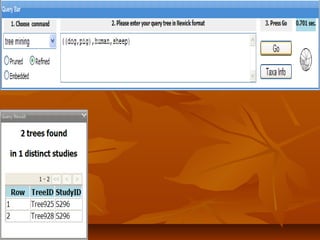
 At the top center of the main window is a query panel that contains widgets forAt the top center of the main window is a query panel that contains widgets for
choosing commands and entering queries.choosing commands and entering queries.
 At the right is a navigation bar that includes help links and links to information onAt the right is a navigation bar that includes help links and links to information on
the PhyloFinder framework. A result panel is displayed when the search enginethe PhyloFinder framework. A result panel is displayed when the search engine
finds results matching a query.finds results matching a query.
 Trees are displayed graphically when the user clicks the records in the resultTrees are displayed graphically when the user clicks the records in the result
panel.panel.
 Phylogenetic query results are visualized by highlighting the setPhylogenetic query results are visualized by highlighting the set CC of taxa that theof taxa that the
result tree and the query tree have in common, as well as edges in the result treeresult tree and the query tree have in common, as well as edges in the result tree
that connectthat connect CC..
 If a taxon in the result tree is in TBMap, its name is hyperlinked to TBMap, and ifIf a taxon in the result tree is in TBMap, its name is hyperlinked to TBMap, and if
the taxon is in the NCBI taxonomy database, an NCBI taxon ID number with athe taxon is in the NCBI taxonomy database, an NCBI taxon ID number with a
hyperlink to the NCBI taxonomy browser is appended to the taxon name.hyperlink to the NCBI taxonomy browser is appended to the taxon name.
ResultsResults
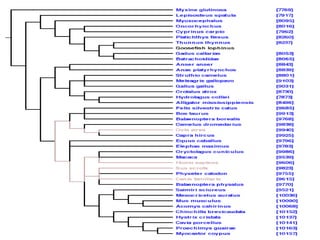
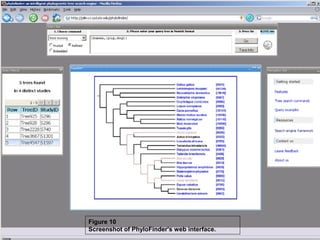
 Figures 1 and 10, illustrate various features of PhyloFinder.Figures 1 and 10, illustrate various features of PhyloFinder.
 Note the use of color by the visualization module.Note the use of color by the visualization module.
 Embedded query trees and taxon names are highlighted using various colors.Embedded query trees and taxon names are highlighted using various colors.
 Brown indicates an exact match (Brown indicates an exact match (i.ei.e. same taxon name or NCBI taxon ID).. same taxon name or NCBI taxon ID).
 For theFor the relatedrelated command, ancestors of the query taxon are highlighted incommand, ancestors of the query taxon are highlighted in
orange, and descendants are highlighted in green.orange, and descendants are highlighted in green.
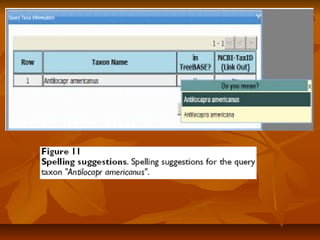
 The system provides spelling suggestions – all from Tree-BASE and NCBI –The system provides spelling suggestions – all from Tree-BASE and NCBI –
for misspelled taxon names.for misspelled taxon names.
 For example, Figure 11 shows the spelling suggestions offered by PhyloFinderFor example, Figure 11 shows the spelling suggestions offered by PhyloFinder
for the query taxon "for the query taxon "Antilocapr americanusAntilocapr americanus", which is neither in any of the", which is neither in any of the
TreeBASE trees nor in the NCBI database.TreeBASE trees nor in the NCBI database.
ResultsResults
 When a user chooses a name from the suggestion list, PhyloFinderWhen a user chooses a name from the suggestion list, PhyloFinder
automatically updates the user query and the NCBI taxonomy out-link.automatically updates the user query and the NCBI taxonomy out-link.
 PhyloFinder effectively uses the NCBI taxonomy and the TBMap database toPhyloFinder effectively uses the NCBI taxonomy and the TBMap database to
translate between different names for the same species (see Figure 10).translate between different names for the same species (see Figure 10).
 For example, if one que-ries for trees that are similar to "(human,(pig, dog))",For example, if one que-ries for trees that are similar to "(human,(pig, dog))",
PhyloFinder will look for trees that contain scientific names for human, pig,PhyloFinder will look for trees that contain scientific names for human, pig,
and dog. TBMap allows us to find many synonyms that would be missed byand dog. TBMap allows us to find many synonyms that would be missed by
using only the NCBI names.using only the NCBI names.
 There are 64,529 leaf taxa in the TreeBASE trees used by PhyloFinder. ByThere are 64,529 leaf taxa in the TreeBASE trees used by PhyloFinder. By
itself, NCBI allows us to map 30,007 of these taxa to 29,669 distinct NCBIitself, NCBI allows us to map 30,007 of these taxa to 29,669 distinct NCBI
TaxonIDs, leaving 34,522 isolated taxa, each of which is in its own cluster, forTaxonIDs, leaving 34,522 isolated taxa, each of which is in its own cluster, for
a total of 64,191 clusters. In contrast, using TBMap we are able to map 36,864a total of 64,191 clusters. In contrast, using TBMap we are able to map 36,864
leaf taxa in TreeBASE to NCBI taxa.leaf taxa in TreeBASE to NCBI taxa.
Figure 10
Screenshot of PhyloFinder's web interface.
ResultsResults
 The total number of taxon clusters is 52,198, of which 29,480 are mapped toThe total number of taxon clusters is 52,198, of which 29,480 are mapped to
NCBI taxa.NCBI taxa.
 PhyloFinder uses the NCBI classification among species in user queries. FigurePhyloFinder uses the NCBI classification among species in user queries. Figure
1 shows an example of a taxon query looking for trees that contain species in1 shows an example of a taxon query looking for trees that contain species in
"birds"."birds".
 The descendants of "birds" are highlighted in dark green in the displayed tree.The descendants of "birds" are highlighted in dark green in the displayed tree.
 For the same query term, PhyloFinder normally returns more trees thanFor the same query term, PhyloFinder normally returns more trees than
TreeBASE even though PhyloFinder uses data from an older version ofTreeBASE even though PhyloFinder uses data from an older version of
TreeBASE (containing fewer trees).TreeBASE (containing fewer trees).
 For example, for a query on "angiosperms", Tree- BASE returns 8 studies withFor example, for a query on "angiosperms", Tree- BASE returns 8 studies with
17 trees while PhyloFinder retrieves 543 studies and 1,550 trees using the17 trees while PhyloFinder retrieves 543 studies and 1,550 trees using the
relatedrelated command;command;
ResultsResults
 When querying on "Fungi", PhyloFinder returns 487 studies with 1,054 trees,When querying on "Fungi", PhyloFinder returns 487 studies with 1,054 trees,
as compared to the 6 studies with 15 trees that are retrieved using TreeBASEas compared to the 6 studies with 15 trees that are retrieved using TreeBASE
searching tools.searching tools.
 This remarkable improvement over TreeBASE is achieved due to aThis remarkable improvement over TreeBASE is achieved due to a
combination of the classification guide provided by the NCBI taxonomy tree,combination of the classification guide provided by the NCBI taxonomy tree,
and taxon cluster information from TBMap.and taxon cluster information from TBMap.
 The time required to process a query depends on network speed, server load,The time required to process a query depends on network speed, server load,
client computer performance, among other factors.client computer performance, among other factors.
 In most of our test queries, the results were received within a matter ofIn most of our test queries, the results were received within a matter of
seconds.seconds.
 In particular, elapsed times and CPU times for a taxonomic query onIn particular, elapsed times and CPU times for a taxonomic query on
"angiosperms" using the"angiosperms" using the relatedrelated command were 0.266s and 0.076scommand were 0.266s and 0.076s
respectively; and for "Fungi" the corresponding times were 0.172s and 0.06srespectively; and for "Fungi" the corresponding times were 0.172s and 0.06s
respectively.respectively.
DiscussionDiscussion
 PhyloFinder enhances the utility of TreeBASE by making it easier to assess andPhyloFinder enhances the utility of TreeBASE by making it easier to assess and
obtain the phylogenetic data contained within it.obtain the phylogenetic data contained within it.
 PhyloFinder adds several new taxonomic querying capabilities to TreeBASE,PhyloFinder adds several new taxonomic querying capabilities to TreeBASE,
including spelling suggestions, searches for synonymous taxonomic names, andincluding spelling suggestions, searches for synonymous taxonomic names, and
the ability to identify trees with ancestors or descendants of the query taxon andthe ability to identify trees with ancestors or descendants of the query taxon and
to identify path lengths between taxa in the database trees.to identify path lengths between taxa in the database trees.
 PhyloFinder also expands the power of phylogenetic queries, offering morePhyloFinder also expands the power of phylogenetic queries, offering more
precise options for identifying different types of subtrees and more metrics forprecise options for identifying different types of subtrees and more metrics for
identifying similar trees than TreeBASE.identifying similar trees than TreeBASE.
 Additionally, PhyloFinder provides a tree visualization tool that highlights queryAdditionally, PhyloFinder provides a tree visualization tool that highlights query
taxa in an informative manner and gives useful outlinks to GenBank and TBMap.taxa in an informative manner and gives useful outlinks to GenBank and TBMap.
 Furthermore, PhyloFinder provides nearly immediate results for most queries.Furthermore, PhyloFinder provides nearly immediate results for most queries.
 Still, PhyloFinder is a search engine, not a database, and is not meant to be aStill, PhyloFinder is a search engine, not a database, and is not meant to be a
substitute for tree repositories such as TreeBASE.substitute for tree repositories such as TreeBASE.
DiscussionDiscussion
 PhyloFinder is not limited to TreeBASE and can be incorporated into anyPhyloFinder is not limited to TreeBASE and can be incorporated into any
phylogenetic tree database. For example, we have incorporatedphylogenetic tree database. For example, we have incorporated
PhyloFinder into the PhyLoTA browser for gene trees (Sanderson M, BossPhyloFinder into the PhyLoTA browser for gene trees (Sanderson M, Boss
D, Chen D, Cranston KA, Wehe A: The PhyLoTA browser: processingD, Chen D, Cranston KA, Wehe A: The PhyLoTA browser: processing
GenBank for molecular phylogenetics research, submitted)GenBank for molecular phylogenetics research, submitted)
 Future development of PhyloFinder will include a desktop version inFuture development of PhyloFinder will include a desktop version in
which users can input their own sets of phylogenetic trees.which users can input their own sets of phylogenetic trees.
 A number of other extensions to the search engine are also underA number of other extensions to the search engine are also under
development.development.
 These include handling unrooted trees, providing an interface for retrievingThese include handling unrooted trees, providing an interface for retrieving
trees in Newick format and more options for drawing trees, displayingtrees in Newick format and more options for drawing trees, displaying
details of the phylogenetic study in the query results, and ranking treesdetails of the phylogenetic study in the query results, and ranking trees
returned by thereturned by the embedded subtree miningembedded subtree mining command (e.g., the rank of a treecommand (e.g., the rank of a tree
TT could be the number of edge contractions ofcould be the number of edge contractions of TT that are required to get thethat are required to get the
query tree).query tree).
DiscussionDiscussion
 The search engine can also be linked to tools for building supertrees, which willThe search engine can also be linked to tools for building supertrees, which will
allow users to assemble large phylogenies by combining phylogenetic trees withallow users to assemble large phylogenies by combining phylogenetic trees with
incomplete taxon overlap.incomplete taxon overlap.
 The usefulness of any phylogenetic search engine is limited by the amount ofThe usefulness of any phylogenetic search engine is limited by the amount of
phylogenetic information it can search. Although TreeBASE is the largestphylogenetic information it can search. Although TreeBASE is the largest
relational database of published phylogenetic trees, few journals require thatrelational database of published phylogenetic trees, few journals require that
trees be submitted to TreeBASE, and thus it contains only a small percentage oftrees be submitted to TreeBASE, and thus it contains only a small percentage of
published phylogenetic trees.published phylogenetic trees.
 We hope that the development of more effective methods to access and utilizeWe hope that the development of more effective methods to access and utilize
phylogenetic data will further motivate efforts to collect and store phylogeneticphylogenetic data will further motivate efforts to collect and store phylogenetic
information.information.
ConclusionConclusion
 While there has been great progress in understanding organismalWhile there has been great progress in understanding organismal
relationships across the tree of life, this phylogenetic data is often notrelationships across the tree of life, this phylogenetic data is often not
easily accessible to scientists.easily accessible to scientists.
 PhyloFinder enhances the utility of phylogenetic databases, by enablingPhyloFinder enhances the utility of phylogenetic databases, by enabling
scientists to identify and assess available phylogenetic data.scientists to identify and assess available phylogenetic data.
 The taxonomic search tools in PhyloFinder allow researchers to identify allThe taxonomic search tools in PhyloFinder allow researchers to identify all
trees containing taxa of interest without knowing the names of all taxa intrees containing taxa of interest without knowing the names of all taxa in
the available trees, possible synonymous taxon names, or even the correctthe available trees, possible synonymous taxon names, or even the correct
spelling of a taxon name.spelling of a taxon name.
 The phylogenetic search tools allow one to evaluate phylogeneticThe phylogenetic search tools allow one to evaluate phylogenetic
hypotheses by comparing it to existing phylogenies and dentifying treeshypotheses by comparing it to existing phylogenies and dentifying trees
that agree with or are similar to the query tree.that agree with or are similar to the query tree.
 We have tested the utility of PhyloFinder using trees from TreeBASE, theWe have tested the utility of PhyloFinder using trees from TreeBASE, the
largest relational database of published phylogenetic information, but thelargest relational database of published phylogenetic information, but the
search engine can be used with any other tree database.search engine can be used with any other tree database.
 http://pilin.cs.iastate.edu/phylofinder/.http://pilin.cs.iastate.edu/phylofinder/.
 http://pilin.cs.iastate.edu/phylofinder/phylofinder-schema.pdfhttp://pilin.cs.iastate.edu/phylofinder/phylofinder-schema.pdf

Phylo finder: an intelligent search engine for phylogenetic tree databases

  • 1.
    PhyloFinder: An intelligentPhyloFinder:An intelligent search engine forsearch engine for phylogenetic tree databasesphylogenetic tree databases Presented byPresented by AFNAN SAID ZUITERAFNAN SAID ZUITER
  • 2.
    TreeBASETreeBASE  TreeBASE isthe largest relational database of publishedTreeBASE is the largest relational database of published phylogenetic information.phylogenetic information.  It stores more than 4,400 trees that contain over 75,000 taxa,It stores more than 4,400 trees that contain over 75,000 taxa, the data matrices used to infer the trees, and additional meta-the data matrices used to infer the trees, and additional meta- data, such as bibliographic information and details of thedata, such as bibliographic information and details of the phylogenetic analyses.phylogenetic analyses.  Though TreeBASE is a valuable repository for phylogeneticThough TreeBASE is a valuable repository for phylogenetic data, it is often difficult to identify and access relevantdata, it is often difficult to identify and access relevant phylogenetic data from within TreeBASE.phylogenetic data from within TreeBASE. so we need search engine for phylogenetic trees.so we need search engine for phylogenetic trees.
  • 3.
    TBMapTBMap  A databasethat maps names of taxa found in TreeBASE toA database that maps names of taxa found in TreeBASE to other taxonomic databases and clusters equivalent taxonomicother taxonomic databases and clusters equivalent taxonomic names.names.  However, TBMap is not incorporated in TreeBASE or in anyHowever, TBMap is not incorporated in TreeBASE or in any other phylogenetic search engines.other phylogenetic search engines.
  • 4.
    ChallengesChallenges  Must betools that can quickly identify phylogenetic treesMust be tools that can quickly identify phylogenetic trees containing a specified taxon or set of taxacontaining a specified taxon or set of taxa  Taxonomic names used in stored phylogenetic trees often are basedTaxonomic names used in stored phylogenetic trees often are based on various inconsistent taxonomies.on various inconsistent taxonomies.  Taxonomic classifications and names frequently change, and theseTaxonomic classifications and names frequently change, and these changes may not be reflected in database trees.changes may not be reflected in database trees.  Repositories such as TreeBASE contain many species that areRepositories such as TreeBASE contain many species that are represented by multiple equivalent names.represented by multiple equivalent names.  Taxonomic queries are further complicated by misspellings orTaxonomic queries are further complicated by misspellings or unique subspecies designations in stored trees.unique subspecies designations in stored trees.
  • 5.
    Effective phylogenetic searchengineEffective phylogenetic search engine  The leaves in stored phylogenetic trees may represent differentThe leaves in stored phylogenetic trees may represent different taxonomic levels, such as families, genera, species, or subspecies.taxonomic levels, such as families, genera, species, or subspecies.  Identifying trees containing not only the specific taxon name usedIdentifying trees containing not only the specific taxon name used in the query, but also trees containing descendants or ancestors ofin the query, but also trees containing descendants or ancestors of the query taxon.the query taxon.  Identifying trees containing direct ancestors (the internal nodes onIdentifying trees containing direct ancestors (the internal nodes on the path from the root of a taxonomy tree to the query taxon) of thethe path from the root of a taxonomy tree to the query taxon) of the query taxon.query taxon.  Allowing the user to find all the taxa matching a partial nameAllowing the user to find all the taxa matching a partial name taxon query.taxon query.
  • 6.
    Effective phylogenetic searchengineEffective phylogenetic search engine  Have the ability to make phylogenetic queries, in which the userHave the ability to make phylogenetic queries, in which the user can assess a specified tree by comparing it to the trees in thecan assess a specified tree by comparing it to the trees in the database.database.  Must be able to identify all trees that contain or agree with a queryMust be able to identify all trees that contain or agree with a query tree, or the trees in the database in which the query tree istree, or the trees in the database in which the query tree is embedded.embedded.  since there is often much disagreement among trees, it is verysince there is often much disagreement among trees, it is very useful to be able to identify all the trees that are similar, but notuseful to be able to identify all the trees that are similar, but not necessarily identical, to a query tree.necessarily identical, to a query tree.  Some tree mining (searching) features are implemented withSome tree mining (searching) features are implemented with TreeBASE.TreeBASE.
  • 7.
    PhyloFinderPhyloFinder  A searchengine for phylogenetic databases that enhances the ability to search aA search engine for phylogenetic databases that enhances the ability to search a tree database (TreeBase).tree database (TreeBase).  Uses TBMap to address the problem of taxonomic inconsistency, (recognizingUses TBMap to address the problem of taxonomic inconsistency, (recognizing synonymous taxon names).synonymous taxon names).  Offers alternate spelling suggestions for taxonomic queries that do not find aOffers alternate spelling suggestions for taxonomic queries that do not find a match in the tree database.match in the tree database.  Using the hierarchical structure of the NCBI taxonomy to search for treesUsing the hierarchical structure of the NCBI taxonomy to search for trees containing descendants or ancestors of a query taxon.containing descendants or ancestors of a query taxon.  Has a tree visualization tool that displays the query results, highlightingHas a tree visualization tool that displays the query results, highlighting relevant taxa and branches, and provides hyperlinks to the NCBI taxonomy andrelevant taxa and branches, and provides hyperlinks to the NCBI taxonomy and TBMap websites.TBMap websites.  The implementation of PhyloFinder uses simple but powerful informationThe implementation of PhyloFinder uses simple but powerful information retrieval techniques.retrieval techniques. (using of an inverted index that maps taxa to trees, which allows the system to(using of an inverted index that maps taxa to trees, which allows the system to filter out many trees that are irrelevant to a given query, and a representation offilter out many trees that are irrelevant to a given query, and a representation of trees that allows fast least common ancestor queries directly on the database).trees that allows fast least common ancestor queries directly on the database).
  • 8.
  • 9.
     Taxonomic QueriesandTaxonomic Queries and Phylogenetic queriesPhylogenetic queries  PhyloFinder's web-based interface allows the user to makePhyloFinder's web-based interface allows the user to make taxonomictaxonomic andand phylogeneticphylogenetic queries.queries.  Taxonomic queries involve a single taxon or set of taxa.Taxonomic queries involve a single taxon or set of taxa.  Phylogenetic queries take as input a phylogenetic tree andPhylogenetic queries take as input a phylogenetic tree and attempt to locate trees in the database that match it in someattempt to locate trees in the database that match it in some specified way.specified way.
  • 10.
    1.1. Taxonomic QueriesTaxonomicQueries 1)1) Contains:Contains: The input for this query is a set of taxon names, given as a comma-The input for this query is a set of taxon names, given as a comma- separated list.separated list. The output is a list of the tree IDs of all trees from the databaseThe output is a list of the tree IDs of all trees from the database that, depending on the user's choice, containthat, depending on the user's choice, contain allall oror anyany of the taxonof the taxon names in the set.names in the set. 2)2) Related:Related: The input for this query is a taxon name.The input for this query is a taxon name. The search engine finds all trees in the database involving anyThe search engine finds all trees in the database involving any taxon that, depending on the user's choice, is a descendant or ataxon that, depending on the user's choice, is a descendant or a direct ancestor of the query taxon in the NCBI taxonomy tree.direct ancestor of the query taxon in the NCBI taxonomy tree. For example, if the query taxon is "birds", and the user chooses theFor example, if the query taxon is "birds", and the user chooses the descendant option, thedescendant option, the relatedrelated command will identify all the treescommand will identify all the trees in the database that contain any bird taxa (Figure 1).in the database that contain any bird taxa (Figure 1).
  • 15.
    Query result visualization. Oneof the trees returned by querying for "birds" with the related command. The version of TreeBASE used by PhyloFinder contains around 88 such trees. •Taxa in dark green are bird species that are found in the NCBI taxonomy database. •The blue numbers are the NCBI taxon ID numbers, and indicate hyperlinks to the NCBI taxonomy web site. •The taxon names displayed in color (other than black) indicate hyperlinks to TBMap
  • 16.
    1.1. Taxonomic QueriesTaxonomicQueries 3)3) Pathlength:Pathlength: The input for this query is a pair of taxon names.The input for this query is a pair of taxon names. The output is a list of the tree IDs of all trees containing the two species,The output is a list of the tree IDs of all trees containing the two species, along with the distance (path length) between the two taxa in each tree.along with the distance (path length) between the two taxa in each tree. Note: in our implementation of PhyloFinder using TreeBASE trees, theNote: in our implementation of PhyloFinder using TreeBASE trees, the output is a list of the TreeBASE tree IDs, the corresponding study IDs,output is a list of the TreeBASE tree IDs, the corresponding study IDs, and the distance (path length) between the two taxa in each tree.and the distance (path length) between the two taxa in each tree.
  • 19.
    2.2. Phylogenetic QueriesPhylogeneticQueries  PhyloFinder supports two different types of phylogenetic queries:PhyloFinder supports two different types of phylogenetic queries: 1.1. tree mining (searching)tree mining (searching) 2.2. tree similaritytree similarity search.search.  To describe these commands, we need some definitions.To describe these commands, we need some definitions.
  • 20.
    3.3. DefinitionsDefinitions  LetLetTT be a phylogenetic tree, andbe a phylogenetic tree, and AA be a subset of the leaves ofbe a subset of the leaves of TT.. Following standard terminology,Following standard terminology,  TT((AA)) to denote the minimal subtree ofto denote the minimal subtree of TT that contains the leaves inthat contains the leaves in AA,,  TT||AA to denote the tree obtained fromto denote the tree obtained from TT((AA) by suppressing all internal) by suppressing all internal nodes that have only one child.nodes that have only one child.  An example is shown in Figure 2.An example is shown in Figure 2.
  • 21.
    3.3. DefinitionsDefinitions  LetLetQQ be a query tree andbe a query tree and TT be a candidate tree (a tree from the database).be a candidate tree (a tree from the database).  LetLet AA denote the set of leaves ofdenote the set of leaves of QQ..  TreeTree QQ is ais a pruned subtreepruned subtree ofof TT (if and only if either (i)(if and only if either (i) TT == QQ, or (ii) there exists an, or (ii) there exists an edge inedge in TT which, when pruned, produceswhich, when pruned, produces QQ as the cut-out (i.e. pruned) subtree).as the cut-out (i.e. pruned) subtree).  TreeTree QQ is anis an embedded subtreeembedded subtree ofof TT if and only if it is identical toif and only if it is identical to TT||AA (see Figure(see Figure 3).3).  IfIf QQ is an embedded subtree ofis an embedded subtree of TT, the tree, the tree TT((AA) is called the) is called the embeddingembedding ofof QQ inin TT.. We say that treeWe say that tree QQ isis refinedrefined by treeby tree TT (or that(or that TT refinesrefines QQ) if the set of clusters of) if the set of clusters of QQ is a subset of the set of clusters ofis a subset of the set of clusters of TT||AA; i.e.,; i.e., TT||AA is a refinement ofis a refinement of QQ..
  • 22.
    Tree mining: pruned,embedded, and refined. In this example, the query tree Q1 is a pruned subtree and an embedded subtree of tree T; Q1 is also (trivially) refined within T. The query tree Q2 is an embedded subtree of T and also (trivially) refined in T; however, it is not a pruned subtree of T. The query tree Q3 is refined by T but is neither an embedded nor a pruned subtree of tree T.
  • 23.
    3.3. DefinitionsDefinitions  AAsimilarity measuresimilarity measure is a function that, given ais a function that, given a query treequery tree and aand a candidate treecandidate tree returns a percentage score between 0 and 100%.returns a percentage score between 0 and 100%.  similarity scoresimilarity score is the percentage score (0-100%) and it reflects howis the percentage score (0-100%) and it reflects how similar the query tree is to the candidate tree.similar the query tree is to the candidate tree.  PhyloFinder uses two similarity measures, one based on thePhyloFinder uses two similarity measures, one based on the Robinson-Foulds (RF) distance and the other based on leastRobinson-Foulds (RF) distance and the other based on least common ancestors (LCAs).common ancestors (LCAs).  If the LCA based score is 100%, the query tree is refined by theIf the LCA based score is 100%, the query tree is refined by the candidate tree, while if the RF similarity score is 100%, the querycandidate tree, while if the RF similarity score is 100%, the query tree can be embedded in the candidate tree.tree can be embedded in the candidate tree.
  • 24.
    Newick tree formatis a way to represent graph theoretical trees with edge lengths using parentheses and commas Newick tree format
  • 25.
    4.4. CommandsCommands 1.1. Treemining:Tree mining:  The input is a query treeThe input is a query tree QQ in Newick formatin Newick format  The output is a list of tree IDs (TreeBASE tree IDs and study IDs in ourThe output is a list of tree IDs (TreeBASE tree IDs and study IDs in our current implementation) of all trees that exhibit the query treecurrent implementation) of all trees that exhibit the query tree QQ in some way.in some way.  There are three options for this command, which are listed below:There are three options for this command, which are listed below: 1.1. Pruned: The output is a set of trees that containPruned: The output is a set of trees that contain QQ as a pruned subtree.as a pruned subtree. 2.2. Embedded: The output is a set of trees that haveEmbedded: The output is a set of trees that have QQ as an embedded subtree.as an embedded subtree. 3.3. Refined: The output is all trees that refineRefined: The output is all trees that refine QQ..
  • 30.
    4.4. CommandsCommands 2.2. SimilaritySimilarity:: The input is a tree in Newick format.The input is a tree in Newick format.  The output is a list of the IDs of all trees thatThe output is a list of the IDs of all trees that share at least three taxa withshare at least three taxa with the query treethe query tree, ranked according to their similarity scores., ranked according to their similarity scores.  Two options are provided, depending on whether the similarity score isTwo options are provided, depending on whether the similarity score is computed with the RF based or the LCA-based measure.computed with the RF based or the LCA-based measure.  (We require at least three shared taxa, because fewer than three taxa(We require at least three shared taxa, because fewer than three taxa provide no topological information for rooted trees.)provide no topological information for rooted trees.)
  • 33.
    System ArchitectureSystem Architecture PhyloFinder stores the phylogenetic trees, which in our test implementationPhyloFinder stores the phylogenetic trees, which in our test implementation are from TreeBASE, and the NCBI taxonomy tree in MySQL (an openare from TreeBASE, and the NCBI taxonomy tree in MySQL (an open source relational database management system (RDBMS)) using a slightsource relational database management system (RDBMS)) using a slight modification ofmodification of nested-set representationnested-set representation..  Under this scheme, each nodeUnder this scheme, each node xx of a given tree is represented by an intervalof a given tree is represented by an interval [[NxNx,, RxRx], where], where Nx (Nx ( NodeID ofNodeID of x)x), is an integer defined by a preorder walk, is an integer defined by a preorder walk of the tree, andof the tree, and RxRx is the largest NodeID of a descendant ofis the largest NodeID of a descendant of xx (Figure 5).(Figure 5).  NodeNode yy is an ancestor of nodeis an ancestor of node xx if and only if the interval [if and only if the interval [NyNy,, RyRy] contains] contains the interval [the interval [Nx, RxNx, Rx], and the LCA of a set of nodes], and the LCA of a set of nodes xx1,...,1,...,xkxk is the commonis the common ancestorancestoryy with largest NodeID. With this representation, LCA queries canwith largest NodeID. With this representation, LCA queries can be implemented as SQL queries directly on the relational database.be implemented as SQL queries directly on the relational database.  Taxon clusters are generated using TBMap and the NCBI taxonomyTaxon clusters are generated using TBMap and the NCBI taxonomy database.database.
  • 36.
    System ArchitectureSystem Architecture In order to automatically translate between synonymous names for theIn order to automatically translate between synonymous names for the same species, the RDBMS stores a collection ofsame species, the RDBMS stores a collection of taxon clusterstaxon clusters, where, where each cluster contains a set of synonymous taxa.each cluster contains a set of synonymous taxa.  In text retrieval and web mining, such indices are used as mappings fromIn text retrieval and web mining, such indices are used as mappings from words to sets of documents that contain them.words to sets of documents that contain them.  PhyloFinder's inverted index treats taxon clusters as words andPhyloFinder's inverted index treats taxon clusters as words and phylogenetic trees as documents to achieve fast querying (Figure 6).phylogenetic trees as documents to achieve fast querying (Figure 6).  TheThe phylogenetic query processorphylogenetic query processor is the kernel of the search engine.is the kernel of the search engine.  It provides functions to parse user commands, to perform taxonomic andIt provides functions to parse user commands, to perform taxonomic and phylogenetic queries, and to coordinate other modules.phylogenetic queries, and to coordinate other modules.
  • 38.
    System ArchitectureSystem Architecture The query processor uses the NCBI tree as a classification guide for species inThe query processor uses the NCBI tree as a classification guide for species in queries such as thequeries such as the relatedrelated command.command.  TheThe spelling suggestion modulespelling suggestion module checks spellings in the query and provideschecks spellings in the query and provides suggestions based on taxon names in Tree- BASE or in the NCBI taxonomysuggestions based on taxon names in Tree- BASE or in the NCBI taxonomy database.database.  This is implemented using the GNU Aspell c library, with some modifications inThis is implemented using the GNU Aspell c library, with some modifications in order to handle special alphabet characters (e.g., '-', '&', '.') and compound wordsorder to handle special alphabet characters (e.g., '-', '&', '.') and compound words in taxon names.in taxon names.  TheThe visualization modulevisualization module creates HTML files with image map, which showcreates HTML files with image map, which show phylogenetic trees in a dendrogram format, highlight the embedded query tree orphylogenetic trees in a dendrogram format, highlight the embedded query tree or species, and provide link-outs for species in NCBI taxonomy database.species, and provide link-outs for species in NCBI taxonomy database.
  • 39.
    System ArchitectureSystem Architecture TheThe client applicationclient application is an administration tool that provides an interface tois an administration tool that provides an interface to handle tree insertions and deletions (via thehandle tree insertions and deletions (via the insertion and deletion moduleinsertion and deletion module).).  It also provides commands for updating the inverted index and performing low-It also provides commands for updating the inverted index and performing low- level queries (SQL commands or specified query commands with unformattedlevel queries (SQL commands or specified query commands with unformatted results) for testing and debugging.results) for testing and debugging.  TheThe web-based interfaceweb-based interface is an interactive web application that uses the AJAXis an interactive web application that uses the AJAX technique. It is written using the Google Web Toolkit (GWT) [27] and the GWTtechnique. It is written using the Google Web Toolkit (GWT) [27] and the GWT Window Manager (GWM).Window Manager (GWM).  The system maintains aThe system maintains a loglog, where it records user queries and timestamps., where it records user queries and timestamps.  The statistics can be used to analyze user needs and help optimize the searchThe statistics can be used to analyze user needs and help optimize the search engine performance.engine performance.
  • 40.
    Taxonomic name consistencyTaxonomicname consistency  The search engine relies on taxon clusters provided by TBMap to identifyThe search engine relies on taxon clusters provided by TBMap to identify synonymous taxonomic names. Whenever PhyloFinder encounters ansynonymous taxonomic names. Whenever PhyloFinder encounters an inconsistency, it ignores the classification provided by TBMap, and relies insteadinconsistency, it ignores the classification provided by TBMap, and relies instead on the NCBI taxonomy.on the NCBI taxonomy.  Another complication is that TBMap uses four external taxonomic databases –Another complication is that TBMap uses four external taxonomic databases – ITIS, IPNI, uBIO and NCBI – among which there are conflicts. (see Figure 7). InITIS, IPNI, uBIO and NCBI – among which there are conflicts. (see Figure 7). In such cases, PhyloFinder again uses the NCBI classification.such cases, PhyloFinder again uses the NCBI classification.
  • 41.
    Figure 7 Synonym conflictin IPNI and NCBI. Name cluster containing "Antennaria solitaria" and "Antennaria monocephala" produced by TBMap [8]. Anternnaria solitaria and Antennaria monocephala are synonyms in IPNI, but are treated as distinct taxa by NCBI. In such cases, PhyloFinder uses the NCBI classification.
  • 42.
    Query processingQuery processing When a user submits a query from a web browser, the web CGI program parsesWhen a user submits a query from a web browser, the web CGI program parses the user query into query command (e.g.,the user query into query command (e.g., containscontains) and query contents (e.g., the) and query contents (e.g., the taxa in the list).taxa in the list).  The results for some queries (such as obtaining the NCBI taxon ID for a givenThe results for some queries (such as obtaining the NCBI taxon ID for a given taxon name) can be retrieved directly from the database. Other queries (such as thetaxon name) can be retrieved directly from the database. Other queries (such as the tree miningtree mining command) go through the query processor, which first identifiescommand) go through the query processor, which first identifies candidate trees using the inverted index and then performs further computations tocandidate trees using the inverted index and then performs further computations to get the final results (see Figure 8).get the final results (see Figure 8).  Identifying the candidate trees using the inverted index allows us to filter a largeIdentifying the candidate trees using the inverted index allows us to filter a large fraction of the database trees from further consideration, significantly acceleratingfraction of the database trees from further consideration, significantly accelerating the query processing.the query processing.  Phylogenetic queries (other than RF-based similarity search) are implemented byPhylogenetic queries (other than RF-based similarity search) are implemented by using LCA queries to compare ancestor-descendant relationships in the query treeusing LCA queries to compare ancestor-descendant relationships in the query tree and in the database tree.and in the database tree.  Figure 9Figure 9 shows a simple example where the goal is to determine if query treeshows a simple example where the goal is to determine if query tree QQ can be embedded in database treecan be embedded in database tree TT..
  • 43.
    Query processingQuery processing The two internal nodesThe two internal nodes xx andand yy inin QQ map to nodesmap to nodes MM((xx) and) and MM((yy) in) in TT in the sensein the sense that the LCAs of the descendants ofthat the LCAs of the descendants of xx andand yy areare MM((xx) and) and MM((yy), respectively.), respectively.  QQ can be embedded incan be embedded in TT sincesince MM((xx) and) and MM((yy) have the same ancestor-descendant) have the same ancestor-descendant relationship inrelationship in TT asas xx andand yy have inhave in QQ..  The use of nested-set representation for trees in the RDBMS allows LCA queriesThe use of nested-set representation for trees in the RDBMS allows LCA queries to be directly computed by the RDBMS.to be directly computed by the RDBMS.  Hierarchical queries (e.g.,Hierarchical queries (e.g., relatedrelated), which require a classification (or ontology)), which require a classification (or ontology) guide, are addressed by Boolean operations on the inverted index. For example,guide, are addressed by Boolean operations on the inverted index. For example, when a user query asks for trees that contain "birds" using thewhen a user query asks for trees that contain "birds" using the related/descendantrelated/descendant command, the search engine first looks for all bird species in the storedcommand, the search engine first looks for all bird species in the stored phylogenetic trees using the NCBI taxonomy tree to identify all bird species in thephylogenetic trees using the NCBI taxonomy tree to identify all bird species in the trees.trees.  It then retrieves the tree ID lists corresponding to each bird species and returnsIt then retrieves the tree ID lists corresponding to each bird species and returns their union (equivalent to Boolean "OR")their union (equivalent to Boolean "OR")
  • 44.
    Figure 8 Processing queriesthrough the search engine.
  • 45.
    Initial setupInitial setup The first step in the setup is to assemble all the phylogenetic treesThe first step in the setup is to assemble all the phylogenetic trees in Newick format together in a file.in Newick format together in a file.  A program then reads this file and converts the trees into the nestedA program then reads this file and converts the trees into the nested set representation used by PhyloFinder. The output of this programset representation used by PhyloFinder. The output of this program consists of several MySQL tables.consists of several MySQL tables.  A second program then reads in these tables, and uses data fromA second program then reads in these tables, and uses data from additional sources, like TBMap and NCBI, to create someadditional sources, like TBMap and NCBI, to create some additional MySQL tables which help to improve query processing.additional MySQL tables which help to improve query processing.  All these MySQL tables must then be loaded into the MySQLAll these MySQL tables must then be loaded into the MySQL database.database.  Once this is done, the main program can be run.Once this is done, the main program can be run.
  • 46.
    Initial setupInitial setup The main program first reads some tables from the MySQL database inThe main program first reads some tables from the MySQL database in order to create the inverted index, and then waits for commands from theorder to create the inverted index, and then waits for commands from the client application.client application.  Once the server is set up, the system is ready for use.Once the server is set up, the system is ready for use.  In practice, we have found that setting up the system for TreeBASE data isIn practice, we have found that setting up the system for TreeBASE data is more complicated. This is because Tree- BASE data does not alwaysmore complicated. This is because Tree- BASE data does not always conform to the Newick standard, and some of the trees contain errors.conform to the Newick standard, and some of the trees contain errors.  In addition, several of the trees contain special international characters.In addition, several of the trees contain special international characters.  Dealing with this effectively requires some manual work and it makes itDealing with this effectively requires some manual work and it makes it difficult to automatically update the local copy of TreeBASEdifficult to automatically update the local copy of TreeBASE
  • 47.
    ResultsResults  At thetop center of the main window is a query panel that contains widgets forAt the top center of the main window is a query panel that contains widgets for choosing commands and entering queries.choosing commands and entering queries.  At the right is a navigation bar that includes help links and links to information onAt the right is a navigation bar that includes help links and links to information on the PhyloFinder framework. A result panel is displayed when the search enginethe PhyloFinder framework. A result panel is displayed when the search engine finds results matching a query.finds results matching a query.  Trees are displayed graphically when the user clicks the records in the resultTrees are displayed graphically when the user clicks the records in the result panel.panel.  Phylogenetic query results are visualized by highlighting the setPhylogenetic query results are visualized by highlighting the set CC of taxa that theof taxa that the result tree and the query tree have in common, as well as edges in the result treeresult tree and the query tree have in common, as well as edges in the result tree that connectthat connect CC..  If a taxon in the result tree is in TBMap, its name is hyperlinked to TBMap, and ifIf a taxon in the result tree is in TBMap, its name is hyperlinked to TBMap, and if the taxon is in the NCBI taxonomy database, an NCBI taxon ID number with athe taxon is in the NCBI taxonomy database, an NCBI taxon ID number with a hyperlink to the NCBI taxonomy browser is appended to the taxon name.hyperlink to the NCBI taxonomy browser is appended to the taxon name.
  • 48.
    ResultsResults  Figures 1and 10, illustrate various features of PhyloFinder.Figures 1 and 10, illustrate various features of PhyloFinder.  Note the use of color by the visualization module.Note the use of color by the visualization module.  Embedded query trees and taxon names are highlighted using various colors.Embedded query trees and taxon names are highlighted using various colors.  Brown indicates an exact match (Brown indicates an exact match (i.ei.e. same taxon name or NCBI taxon ID).. same taxon name or NCBI taxon ID).  For theFor the relatedrelated command, ancestors of the query taxon are highlighted incommand, ancestors of the query taxon are highlighted in orange, and descendants are highlighted in green.orange, and descendants are highlighted in green.  The system provides spelling suggestions – all from Tree-BASE and NCBI –The system provides spelling suggestions – all from Tree-BASE and NCBI – for misspelled taxon names.for misspelled taxon names.  For example, Figure 11 shows the spelling suggestions offered by PhyloFinderFor example, Figure 11 shows the spelling suggestions offered by PhyloFinder for the query taxon "for the query taxon "Antilocapr americanusAntilocapr americanus", which is neither in any of the", which is neither in any of the TreeBASE trees nor in the NCBI database.TreeBASE trees nor in the NCBI database.
  • 49.
    ResultsResults  When auser chooses a name from the suggestion list, PhyloFinderWhen a user chooses a name from the suggestion list, PhyloFinder automatically updates the user query and the NCBI taxonomy out-link.automatically updates the user query and the NCBI taxonomy out-link.  PhyloFinder effectively uses the NCBI taxonomy and the TBMap database toPhyloFinder effectively uses the NCBI taxonomy and the TBMap database to translate between different names for the same species (see Figure 10).translate between different names for the same species (see Figure 10).  For example, if one que-ries for trees that are similar to "(human,(pig, dog))",For example, if one que-ries for trees that are similar to "(human,(pig, dog))", PhyloFinder will look for trees that contain scientific names for human, pig,PhyloFinder will look for trees that contain scientific names for human, pig, and dog. TBMap allows us to find many synonyms that would be missed byand dog. TBMap allows us to find many synonyms that would be missed by using only the NCBI names.using only the NCBI names.  There are 64,529 leaf taxa in the TreeBASE trees used by PhyloFinder. ByThere are 64,529 leaf taxa in the TreeBASE trees used by PhyloFinder. By itself, NCBI allows us to map 30,007 of these taxa to 29,669 distinct NCBIitself, NCBI allows us to map 30,007 of these taxa to 29,669 distinct NCBI TaxonIDs, leaving 34,522 isolated taxa, each of which is in its own cluster, forTaxonIDs, leaving 34,522 isolated taxa, each of which is in its own cluster, for a total of 64,191 clusters. In contrast, using TBMap we are able to map 36,864a total of 64,191 clusters. In contrast, using TBMap we are able to map 36,864 leaf taxa in TreeBASE to NCBI taxa.leaf taxa in TreeBASE to NCBI taxa.
  • 50.
    Figure 10 Screenshot ofPhyloFinder's web interface.
  • 51.
    ResultsResults  The totalnumber of taxon clusters is 52,198, of which 29,480 are mapped toThe total number of taxon clusters is 52,198, of which 29,480 are mapped to NCBI taxa.NCBI taxa.  PhyloFinder uses the NCBI classification among species in user queries. FigurePhyloFinder uses the NCBI classification among species in user queries. Figure 1 shows an example of a taxon query looking for trees that contain species in1 shows an example of a taxon query looking for trees that contain species in "birds"."birds".  The descendants of "birds" are highlighted in dark green in the displayed tree.The descendants of "birds" are highlighted in dark green in the displayed tree.  For the same query term, PhyloFinder normally returns more trees thanFor the same query term, PhyloFinder normally returns more trees than TreeBASE even though PhyloFinder uses data from an older version ofTreeBASE even though PhyloFinder uses data from an older version of TreeBASE (containing fewer trees).TreeBASE (containing fewer trees).  For example, for a query on "angiosperms", Tree- BASE returns 8 studies withFor example, for a query on "angiosperms", Tree- BASE returns 8 studies with 17 trees while PhyloFinder retrieves 543 studies and 1,550 trees using the17 trees while PhyloFinder retrieves 543 studies and 1,550 trees using the relatedrelated command;command;
  • 54.
    ResultsResults  When queryingon "Fungi", PhyloFinder returns 487 studies with 1,054 trees,When querying on "Fungi", PhyloFinder returns 487 studies with 1,054 trees, as compared to the 6 studies with 15 trees that are retrieved using TreeBASEas compared to the 6 studies with 15 trees that are retrieved using TreeBASE searching tools.searching tools.  This remarkable improvement over TreeBASE is achieved due to aThis remarkable improvement over TreeBASE is achieved due to a combination of the classification guide provided by the NCBI taxonomy tree,combination of the classification guide provided by the NCBI taxonomy tree, and taxon cluster information from TBMap.and taxon cluster information from TBMap.  The time required to process a query depends on network speed, server load,The time required to process a query depends on network speed, server load, client computer performance, among other factors.client computer performance, among other factors.  In most of our test queries, the results were received within a matter ofIn most of our test queries, the results were received within a matter of seconds.seconds.  In particular, elapsed times and CPU times for a taxonomic query onIn particular, elapsed times and CPU times for a taxonomic query on "angiosperms" using the"angiosperms" using the relatedrelated command were 0.266s and 0.076scommand were 0.266s and 0.076s respectively; and for "Fungi" the corresponding times were 0.172s and 0.06srespectively; and for "Fungi" the corresponding times were 0.172s and 0.06s respectively.respectively.
  • 55.
    DiscussionDiscussion  PhyloFinder enhancesthe utility of TreeBASE by making it easier to assess andPhyloFinder enhances the utility of TreeBASE by making it easier to assess and obtain the phylogenetic data contained within it.obtain the phylogenetic data contained within it.  PhyloFinder adds several new taxonomic querying capabilities to TreeBASE,PhyloFinder adds several new taxonomic querying capabilities to TreeBASE, including spelling suggestions, searches for synonymous taxonomic names, andincluding spelling suggestions, searches for synonymous taxonomic names, and the ability to identify trees with ancestors or descendants of the query taxon andthe ability to identify trees with ancestors or descendants of the query taxon and to identify path lengths between taxa in the database trees.to identify path lengths between taxa in the database trees.  PhyloFinder also expands the power of phylogenetic queries, offering morePhyloFinder also expands the power of phylogenetic queries, offering more precise options for identifying different types of subtrees and more metrics forprecise options for identifying different types of subtrees and more metrics for identifying similar trees than TreeBASE.identifying similar trees than TreeBASE.  Additionally, PhyloFinder provides a tree visualization tool that highlights queryAdditionally, PhyloFinder provides a tree visualization tool that highlights query taxa in an informative manner and gives useful outlinks to GenBank and TBMap.taxa in an informative manner and gives useful outlinks to GenBank and TBMap.  Furthermore, PhyloFinder provides nearly immediate results for most queries.Furthermore, PhyloFinder provides nearly immediate results for most queries.  Still, PhyloFinder is a search engine, not a database, and is not meant to be aStill, PhyloFinder is a search engine, not a database, and is not meant to be a substitute for tree repositories such as TreeBASE.substitute for tree repositories such as TreeBASE.
  • 56.
    DiscussionDiscussion  PhyloFinder isnot limited to TreeBASE and can be incorporated into anyPhyloFinder is not limited to TreeBASE and can be incorporated into any phylogenetic tree database. For example, we have incorporatedphylogenetic tree database. For example, we have incorporated PhyloFinder into the PhyLoTA browser for gene trees (Sanderson M, BossPhyloFinder into the PhyLoTA browser for gene trees (Sanderson M, Boss D, Chen D, Cranston KA, Wehe A: The PhyLoTA browser: processingD, Chen D, Cranston KA, Wehe A: The PhyLoTA browser: processing GenBank for molecular phylogenetics research, submitted)GenBank for molecular phylogenetics research, submitted)  Future development of PhyloFinder will include a desktop version inFuture development of PhyloFinder will include a desktop version in which users can input their own sets of phylogenetic trees.which users can input their own sets of phylogenetic trees.  A number of other extensions to the search engine are also underA number of other extensions to the search engine are also under development.development.  These include handling unrooted trees, providing an interface for retrievingThese include handling unrooted trees, providing an interface for retrieving trees in Newick format and more options for drawing trees, displayingtrees in Newick format and more options for drawing trees, displaying details of the phylogenetic study in the query results, and ranking treesdetails of the phylogenetic study in the query results, and ranking trees returned by thereturned by the embedded subtree miningembedded subtree mining command (e.g., the rank of a treecommand (e.g., the rank of a tree TT could be the number of edge contractions ofcould be the number of edge contractions of TT that are required to get thethat are required to get the query tree).query tree).
  • 57.
    DiscussionDiscussion  The searchengine can also be linked to tools for building supertrees, which willThe search engine can also be linked to tools for building supertrees, which will allow users to assemble large phylogenies by combining phylogenetic trees withallow users to assemble large phylogenies by combining phylogenetic trees with incomplete taxon overlap.incomplete taxon overlap.  The usefulness of any phylogenetic search engine is limited by the amount ofThe usefulness of any phylogenetic search engine is limited by the amount of phylogenetic information it can search. Although TreeBASE is the largestphylogenetic information it can search. Although TreeBASE is the largest relational database of published phylogenetic trees, few journals require thatrelational database of published phylogenetic trees, few journals require that trees be submitted to TreeBASE, and thus it contains only a small percentage oftrees be submitted to TreeBASE, and thus it contains only a small percentage of published phylogenetic trees.published phylogenetic trees.  We hope that the development of more effective methods to access and utilizeWe hope that the development of more effective methods to access and utilize phylogenetic data will further motivate efforts to collect and store phylogeneticphylogenetic data will further motivate efforts to collect and store phylogenetic information.information.
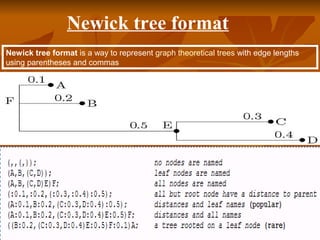
  • 58.
    ConclusionConclusion  While therehas been great progress in understanding organismalWhile there has been great progress in understanding organismal relationships across the tree of life, this phylogenetic data is often notrelationships across the tree of life, this phylogenetic data is often not easily accessible to scientists.easily accessible to scientists.  PhyloFinder enhances the utility of phylogenetic databases, by enablingPhyloFinder enhances the utility of phylogenetic databases, by enabling scientists to identify and assess available phylogenetic data.scientists to identify and assess available phylogenetic data.  The taxonomic search tools in PhyloFinder allow researchers to identify allThe taxonomic search tools in PhyloFinder allow researchers to identify all trees containing taxa of interest without knowing the names of all taxa intrees containing taxa of interest without knowing the names of all taxa in the available trees, possible synonymous taxon names, or even the correctthe available trees, possible synonymous taxon names, or even the correct spelling of a taxon name.spelling of a taxon name.  The phylogenetic search tools allow one to evaluate phylogeneticThe phylogenetic search tools allow one to evaluate phylogenetic hypotheses by comparing it to existing phylogenies and dentifying treeshypotheses by comparing it to existing phylogenies and dentifying trees that agree with or are similar to the query tree.that agree with or are similar to the query tree.  We have tested the utility of PhyloFinder using trees from TreeBASE, theWe have tested the utility of PhyloFinder using trees from TreeBASE, the largest relational database of published phylogenetic information, but thelargest relational database of published phylogenetic information, but the search engine can be used with any other tree database.search engine can be used with any other tree database.
  • 59.