Technology   and language    learning Emma Arthur   [email_address]
Key questions in using technology What can the technology contribute to learning? Is the use of technology more effective than other methods?  Don't use computers for their own sake;  think about  why  you're using them first.
In using technology consider: the contribution to learning –adaptability to suit the specific needs of  all  learners. language skills required. computer skills required- teacher and learner. learner – age, style of learning, mother tongue. organisation of teaching – integrated ? organisation of the classroom  /computers   -  computers  in class or computer lab. financial – software and hardware.
Why use technology? When used  appropriately , it can: develop further all four skills. enable students to become more effective and confident learners. raise the standards of student’s achievements.
individualise learning – appropriate level and speed. develop independent learning. provide the opportunity for real communication / real language use / cultural experiences. Specific programs provide support for children with dyslexia and other learning difficulties.
provide variety. provide motiviation. a multisensory learning experience. provide opportunites for cross-curricular activities. help prepare students for the future.
What technology is available? Generic Software applications e.g. Microsoft Office, Powerpoint, Publisher CALL specific software  Software designed for English teaching (not ELT) Internet and collaborative technologies wikis, podcasting, Slideshare, Skype, blogs. Video / films: authentic and for ELT  Others:  digital camera, video camera, digital recorder,
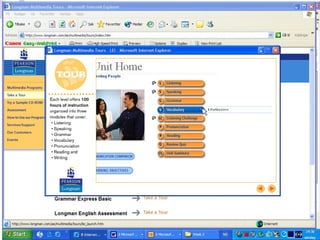
ELT Dedicated software (CALL) Advantages Does not require high level of computer literacy. Is designed for ELT learners and can have very sophisticated functions. Disadvantages CALL software  is usually  'content-specific' in that the teacher cannot change the linguistic content, or the format of the activities which seek to teach that content.  Tends to be expensive. Find reviews or try demos before you buy.
ELT Dedicated software (CALL) Advantages Does not require high level of computer literacy. Is designed for ELT learners and can have very sophisticated functions. Disadvantages CALL software  is usually  'content-specific' in that the teacher cannot change the linguistic content, or the format of the activities which seek to teach that content.  Tends to be expensive
ELT software / dictionaries www.clarityenglish.com www.wida.co.uk www.longman.co.uk www.oxford.co. uk www.oup.com/elt/teachersclub/dictionaries/?cc=no  (dictionaries) Online bilingual dictionaries can be useful if students know how to use them effectively.
Using the Internet Grammar games and exercises News clips, video clips, sound files, etc. Research potential: carry out webquests Webcams International projects and school links Collaborative technology: blogging, email, Podcasting, YouTube, Flicker, etc.  http ://stevemc.blogmatrix.com/:entry:stevemc-2006-11-08-0000/
Evaluation of work using technology Computer assessed / corrected. Teacher correction using the technology. Self assessement / teacher assessment through electronic portfolios.
Assistive Technology for students with reading and writing difficulties Supportive writing technology provides pupils with a means of compensating for some of the limitations and difficulties they have during the writing process.  It includes, word processors, wordbank software, word predictors, motivational programs, talking word processors, speech output facilities and speech recognition.

Using technology in LL

  • 1.
    Technology and language learning Emma Arthur [email_address]
  • 2.
    Key questions inusing technology What can the technology contribute to learning? Is the use of technology more effective than other methods? Don't use computers for their own sake; think about why you're using them first.
  • 3.
    In using technologyconsider: the contribution to learning –adaptability to suit the specific needs of all learners. language skills required. computer skills required- teacher and learner. learner – age, style of learning, mother tongue. organisation of teaching – integrated ? organisation of the classroom /computers - computers in class or computer lab. financial – software and hardware.
  • 4.
    Why use technology?When used appropriately , it can: develop further all four skills. enable students to become more effective and confident learners. raise the standards of student’s achievements.
  • 5.
    individualise learning –appropriate level and speed. develop independent learning. provide the opportunity for real communication / real language use / cultural experiences. Specific programs provide support for children with dyslexia and other learning difficulties.
  • 6.
    provide variety. providemotiviation. a multisensory learning experience. provide opportunites for cross-curricular activities. help prepare students for the future.
  • 7.
    What technology isavailable? Generic Software applications e.g. Microsoft Office, Powerpoint, Publisher CALL specific software Software designed for English teaching (not ELT) Internet and collaborative technologies wikis, podcasting, Slideshare, Skype, blogs. Video / films: authentic and for ELT Others: digital camera, video camera, digital recorder,
  • 8.
    ELT Dedicated software(CALL) Advantages Does not require high level of computer literacy. Is designed for ELT learners and can have very sophisticated functions. Disadvantages CALL software is usually 'content-specific' in that the teacher cannot change the linguistic content, or the format of the activities which seek to teach that content. Tends to be expensive. Find reviews or try demos before you buy.
  • 9.
    ELT Dedicated software(CALL) Advantages Does not require high level of computer literacy. Is designed for ELT learners and can have very sophisticated functions. Disadvantages CALL software is usually 'content-specific' in that the teacher cannot change the linguistic content, or the format of the activities which seek to teach that content. Tends to be expensive
  • 10.
    ELT software /dictionaries www.clarityenglish.com www.wida.co.uk www.longman.co.uk www.oxford.co. uk www.oup.com/elt/teachersclub/dictionaries/?cc=no (dictionaries) Online bilingual dictionaries can be useful if students know how to use them effectively.
  • 11.
    Using the InternetGrammar games and exercises News clips, video clips, sound files, etc. Research potential: carry out webquests Webcams International projects and school links Collaborative technology: blogging, email, Podcasting, YouTube, Flicker, etc. http ://stevemc.blogmatrix.com/:entry:stevemc-2006-11-08-0000/
  • 12.
    Evaluation of workusing technology Computer assessed / corrected. Teacher correction using the technology. Self assessement / teacher assessment through electronic portfolios.
  • 13.
    Assistive Technology forstudents with reading and writing difficulties Supportive writing technology provides pupils with a means of compensating for some of the limitations and difficulties they have during the writing process. It includes, word processors, wordbank software, word predictors, motivational programs, talking word processors, speech output facilities and speech recognition.

Editor's Notes

  • #2 Aim of presentation to show good practice and the range of possibilities with young learners 6-14 Many of the ideas are a combination of software produced for native speakers and ELT resources for young learners. I have chosen to use the term ICT (information and communications technology) rather than computers as this reflects the changing approach to using new technologies in teh classroom. ICT implies a more dynamic interaction between the learner and the world of information which goes beyond what is found on the computer screen.