PCI Bus Architecture
By
S.Senthilmurugan
Asst.Professor/ICE
SRM University. Chennai.
Introduction
• Introduction
• History of the Bus
• Performance
• Plug and Play
• How it works
• Other types of the PCI Bus
• Future of the PCI Bus
• Conclusion
2
Introduction
• A computer bus is used to transfer data from one location or
device on the motherboard to the central processing unit
where all calculations take place.
• Two different parts of a Bus
– Address bus‐transfers information about where the data
should go
– Data bus‐transfers the actual data
3
History
• PCI(Peripheral Component Interconnect) bus is based on ISA (Industry
Standard Architecture) Bus and VL (VESA Local) Bus.
• Introduced by Intel in 1992
• Revised twice into version 2.1 which is the 64‐bit standard that it is today.
• Great feature of PCI Bus was that it was invented as an industry standard
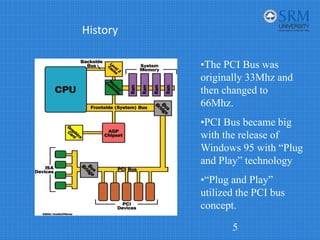
• PCI provides direct access to system memory for the devices that are
connected to the bus which is then connected through a bridge that
connects to the front side bus.
• This configuration allowed for higher performance without slowing down
the processor
4
History
5
The image cannot be displayed. Your computer may not have enough memory to open the image, or the image may have been corrupted. Restart your computer, and then open the file again. If the red x still appears, you may have to delete the image and then insert it again.
•The PCI Bus was
originally 33Mhz and
then changed to
66Mhz.
•PCI Bus became big
with the release of
Windows 95 with “Plug
and Play” technology
•“Plug and Play”
utilized the PCI bus
concept.
PCI System Bus Performance
• What makes the PCI bus one of the fastest I/O bus
used today?
• Three features make this possible:
– Burst Mode: allows multiple sets of data to be sent
(Kozierok, 2001a)
– Full Bus Mastering: the ability of devices on the PCI bus to
perform transfers directly (Kozierok, 2001c)
– High Bandwidth Options: allows for increased speed of the
PCI (Kozierok, 2001a)
6
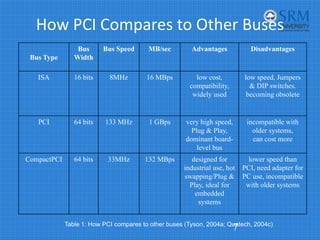
How PCI Compares to Other Buses
7
Table 1: How PCI compares to other buses (Tyson, 2004a; Quatech, 2004c)
Bus Type
Bus
Width
Bus Speed MB/sec Advantages Disadvantages
ISA 16 bits 8MHz 16 MBps low cost,
compatibility,
widely used
low speed, Jumpers
& DIP switches.
becoming obsolete
PCI 64 bits 133 MHz 1 GBps very high speed,
Plug & Play,
dominant board-
level bus
incompatible with
older systems,
can cost more
CompactPCI 64 bits 33MHz 132 MBps designed for
industrial use, hot
swapping/Plug &
Play, ideal for
embedded
systems
lower speed than
PCI, need adapter for
PC use, incompatible
with older systems
Plug and Play
• Requirements for full
implementation:
– Plug and Play BIOS
– Extended System
Configuration Data
(ESCD)
– Plug and Play
operating system
• Tasks it automates:
– Interrupt Requests
(IRQ)
– Direct Memory Access
(DMA)
– Memory Addresses
– Input/Output (I/O)
Configuration
(Tyson, 2004b)
8
How PCI Works: Installing A
New Device
• Once a new device has
been inserted into a PCI
slot on the motherboard
1. Operating System Basic
Input/Output System
(BIOS) initiates Plug and
Play (PnP) BIOS.
2. PnP BIOS scans the PCI
bus for any new
hardware connected to
the bus. If new hardware
is found, it will ask for
identification.
3. The device will respond
with its identification and
send its device ID to the
BIOS through the bus.
4. PnP checks the Extended
System Configuration Data
(ESCD) to make sure the
configuration data already
exists for the card. (If the
card is new, then there will
be no data for it.)
9
New Device Cont…
5. PnP will assign an Interrupt
Request Line, Direct
Memory Access, memory
address and Input/Output
settings to the card, then
stores the information in the
ESCD.
6. When the Windows software
loads, it will check the PCI
bus and the ESCD to see if
there is new hardware.
Windows will alert the user
that new hardware has been
found if there is new
hardware installed and will
also identify the hardware.
7. Windows will determine the
device and attempt to install
its driver. The operating
system may ask the user to
insert a disk containing the
driver or direct it to where the
driver is located. In the
event that Windows is
unable to determine what the
device is, it will provide a
dialog window so the user
can identify the hardware
and load its driver.
10
How a Device Works
• Example: PCI-based
sound card
1. The sound card will convert
the analog signal to a digital
signal.
2. The digital audio data carried
across the PCI bus to the bus
controller, which determines
which device on the PCI
device has the priority to send
data to the central processing
unit (CPU) and whether the
data will go directly to the
CPU or to the system
memory.
3. If the sound card is in
recording mode, the bus
controller will assign a high
priority to the data coming
from the sound card. It will
send the sound cards data
over the bus bridge to the
system bus.
4. The system bus will save the
data in system memory.
When the recording is
complete, then it will be up to
the user to save the data from
the sound card on either the
hard drive, or will remain in
memory for additional
processing.
11
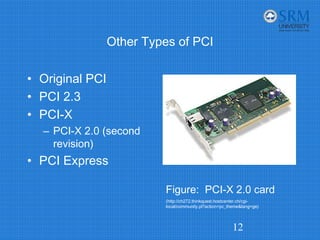
Other Types of PCI
• Original PCI
• PCI 2.3
• PCI-X
– PCI-X 2.0 (second
revision)
• PCI Express
12
Figure: PCI-X 2.0 card
(http://ch272.thinkquest.hostcenter.ch/cgi-
local/community.pl?action=pc_theme&lang=ge)
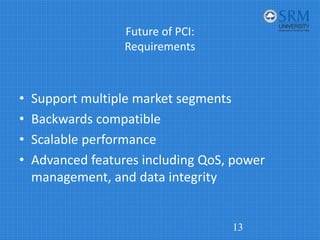
Future of PCI:
Requirements
• Support multiple market segments
• Backwards compatible
• Scalable performance
• Advanced features including QoS, power
management, and data integrity
13
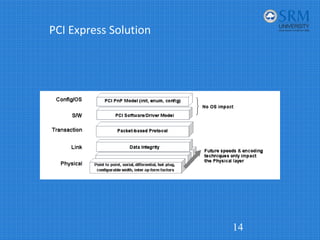
PCI Express Solution
14
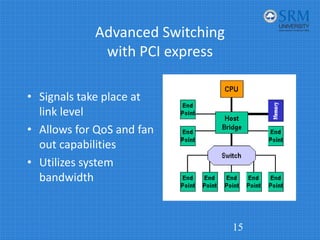
Advanced Switching
with PCI express
• Signals take place at
link level
• Allows for QoS and fan
out capabilities
• Utilizes system
bandwidth
15
Conclusion
• Due to the need for growing data transfer
rates among IO devices, the original PCI
Architecture has become outdated
• A new model of PCI, called PCI Express will
replace the dated architecture giving it life for
another decade
16
End of Presentation
Any Questions?

PCI.pdf

  • 1.
  • 2.
    Introduction • Introduction • Historyof the Bus • Performance • Plug and Play • How it works • Other types of the PCI Bus • Future of the PCI Bus • Conclusion 2
  • 3.
    Introduction • A computerbus is used to transfer data from one location or device on the motherboard to the central processing unit where all calculations take place. • Two different parts of a Bus – Address bus‐transfers information about where the data should go – Data bus‐transfers the actual data 3
  • 4.
    History • PCI(Peripheral ComponentInterconnect) bus is based on ISA (Industry Standard Architecture) Bus and VL (VESA Local) Bus. • Introduced by Intel in 1992 • Revised twice into version 2.1 which is the 64‐bit standard that it is today. • Great feature of PCI Bus was that it was invented as an industry standard • PCI provides direct access to system memory for the devices that are connected to the bus which is then connected through a bridge that connects to the front side bus. • This configuration allowed for higher performance without slowing down the processor 4
  • 5.
    History 5 The image cannotbe displayed. Your computer may not have enough memory to open the image, or the image may have been corrupted. Restart your computer, and then open the file again. If the red x still appears, you may have to delete the image and then insert it again. •The PCI Bus was originally 33Mhz and then changed to 66Mhz. •PCI Bus became big with the release of Windows 95 with “Plug and Play” technology •“Plug and Play” utilized the PCI bus concept.
  • 6.
    PCI System BusPerformance • What makes the PCI bus one of the fastest I/O bus used today? • Three features make this possible: – Burst Mode: allows multiple sets of data to be sent (Kozierok, 2001a) – Full Bus Mastering: the ability of devices on the PCI bus to perform transfers directly (Kozierok, 2001c) – High Bandwidth Options: allows for increased speed of the PCI (Kozierok, 2001a) 6
  • 7.
    How PCI Comparesto Other Buses 7 Table 1: How PCI compares to other buses (Tyson, 2004a; Quatech, 2004c) Bus Type Bus Width Bus Speed MB/sec Advantages Disadvantages ISA 16 bits 8MHz 16 MBps low cost, compatibility, widely used low speed, Jumpers & DIP switches. becoming obsolete PCI 64 bits 133 MHz 1 GBps very high speed, Plug & Play, dominant board- level bus incompatible with older systems, can cost more CompactPCI 64 bits 33MHz 132 MBps designed for industrial use, hot swapping/Plug & Play, ideal for embedded systems lower speed than PCI, need adapter for PC use, incompatible with older systems
  • 8.
    Plug and Play •Requirements for full implementation: – Plug and Play BIOS – Extended System Configuration Data (ESCD) – Plug and Play operating system • Tasks it automates: – Interrupt Requests (IRQ) – Direct Memory Access (DMA) – Memory Addresses – Input/Output (I/O) Configuration (Tyson, 2004b) 8
  • 9.
    How PCI Works:Installing A New Device • Once a new device has been inserted into a PCI slot on the motherboard 1. Operating System Basic Input/Output System (BIOS) initiates Plug and Play (PnP) BIOS. 2. PnP BIOS scans the PCI bus for any new hardware connected to the bus. If new hardware is found, it will ask for identification. 3. The device will respond with its identification and send its device ID to the BIOS through the bus. 4. PnP checks the Extended System Configuration Data (ESCD) to make sure the configuration data already exists for the card. (If the card is new, then there will be no data for it.) 9
  • 10.
    New Device Cont… 5.PnP will assign an Interrupt Request Line, Direct Memory Access, memory address and Input/Output settings to the card, then stores the information in the ESCD. 6. When the Windows software loads, it will check the PCI bus and the ESCD to see if there is new hardware. Windows will alert the user that new hardware has been found if there is new hardware installed and will also identify the hardware. 7. Windows will determine the device and attempt to install its driver. The operating system may ask the user to insert a disk containing the driver or direct it to where the driver is located. In the event that Windows is unable to determine what the device is, it will provide a dialog window so the user can identify the hardware and load its driver. 10
  • 11.
    How a DeviceWorks • Example: PCI-based sound card 1. The sound card will convert the analog signal to a digital signal. 2. The digital audio data carried across the PCI bus to the bus controller, which determines which device on the PCI device has the priority to send data to the central processing unit (CPU) and whether the data will go directly to the CPU or to the system memory. 3. If the sound card is in recording mode, the bus controller will assign a high priority to the data coming from the sound card. It will send the sound cards data over the bus bridge to the system bus. 4. The system bus will save the data in system memory. When the recording is complete, then it will be up to the user to save the data from the sound card on either the hard drive, or will remain in memory for additional processing. 11
  • 12.
    Other Types ofPCI • Original PCI • PCI 2.3 • PCI-X – PCI-X 2.0 (second revision) • PCI Express 12 Figure: PCI-X 2.0 card (http://ch272.thinkquest.hostcenter.ch/cgi- local/community.pl?action=pc_theme&lang=ge)
  • 13.
    Future of PCI: Requirements •Support multiple market segments • Backwards compatible • Scalable performance • Advanced features including QoS, power management, and data integrity 13
  • 14.
  • 15.
    Advanced Switching with PCIexpress • Signals take place at link level • Allows for QoS and fan out capabilities • Utilizes system bandwidth 15
  • 16.
    Conclusion • Due tothe need for growing data transfer rates among IO devices, the original PCI Architecture has become outdated • A new model of PCI, called PCI Express will replace the dated architecture giving it life for another decade 16
  • 17.