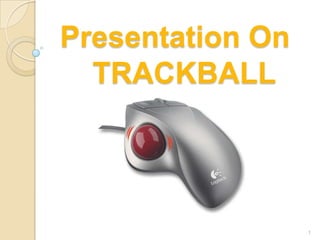
Presentation On
  TRACKBALL


                  1
Presented by…..


                           Mayank Tiwari
                          Ranjan Phukan
                   Satish Chandra Rabha
                     6TH SEMESTER
        DEPARTMENT OF INFORMATION
                      TECHNOLOGY
Contents
 Introduction
 History
 Working Principle
 Advantage
 Disadvantage
 Applications


                      3
Introduction
•A trackball is a pointing input device
consisting of a ball held by a socket
containing sensors to detect a rotation of
the ball about two axes—like an upside-
down mouse with an exposed protruding
ball.

•The user rolls the ball with the thumb,
fingers, or the palm of the hand to move a
cursor.

                                             4
History Of Trackball
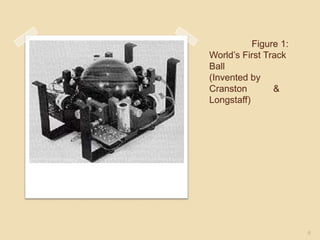
• The trackball was invented by Tom Cranston and
Fred Longstaff in 1952, eleven years before the
mouse was invented.
•Before the advent of the touchpad, small
trackballs were common on portable computers,
where there may be no desk space on which to
run a mouse. Some small thumbballs clip onto the
side of the keyboard and have integral buttons
with the same function as mouse buttons.


                                                   5
Figure 1:
World’s First Track
Ball
(Invented by
Cranston        &
Longstaff)


                       6
Working Principle
   A trackball consists of a stationary
    hand rest, which is usually larger than
    a mouse, that contains a round track
    ball set in a socket, which allows it to
    rotate freely. We can rotate the ball
    with our thumb, and sensors detect
    movement along two perpendicular
    axes, which, in turn, move the pointer
    on the screen.

                                               7
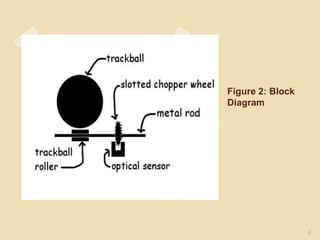
Figure 2: Block
Diagram


                  8
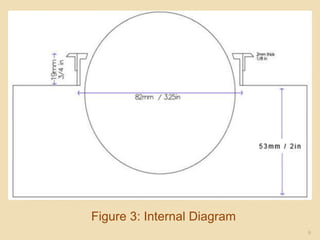
Figure 3: Internal Diagram
                             9
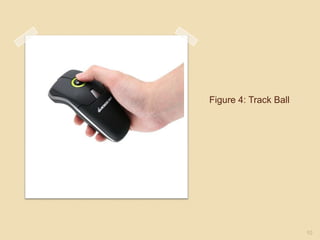
Figure 4: Track Ball


                       10
Advantages Of Trackball

•If
  space is of minimal quantity, the traditional
mouse needs to roam and needs its own mouse
pad to travel, a track mouse needs neither.

•The buttons are also placed well so your fingers
are not stressed in reaching for them.


                                                    11
Advantages of Trackball
(contd..)
   At times when a user is browsing
    menus or websites rather than
    typing, it is also possible to hold a
    trackball in the hand like a television
    remote control, operating the ball
    with the right thumb and pressing the
    buttons with the left thumb, thus
    giving the fingers a rest.


                                              12
Advantages of Trackball
    (contd..)
   Elderly people sometimes have difficulty
    holding a mouse still while double-
    clicking; the trackball allows them to let
    go of the cursor while using the button.

   Trackball mice come in all sizes as per
    user’s needs.


                                             13
Disadvantages of Trackball
   Trackballs are by their nature
    asymmetric.Thumb-operated
    trackballs   are     not    generally
    available       in       left-handed
    configurations,    due    to    small
    demand.


                                            14
Disadvantages of
Trackball(contd..)

   Trackballs tend not to skip and flow
    more smoothly than mice or touch
    pads, but mice are often easier to
    manipulate quickly and accurately.

   Some users incur unacceptable
    fatigue of the thumb.


                                           15
Special Applications

•Large    tracker balls are sometimes seen on
computerized special-purpose workstations,
such as the radar consoles in an air-traffic
control room or sonar equipment on a ship or
submarine.
•Military    mobile anti-aircraft radars and
submarine sonar tend to continue using
trackballs, since they can be made more durable
and more fit for fast emergency use.


                                                  16
Special Applications
(contd..)
•Computer     gamers have been able to
successfully use trackballs in most modern
computer games with any slight loss of speed
compensated for with an increase in precision.
•Trackballs have also been regarded as
excellent complements to analog joysticks.
This provides for two-hand aiming and a high
accuracy and consistency replacement for the
traditional mouse and keyboard.


                                             17
Special Applications (contd..)
•Trackballs   are provided as the pointing
device in some public internet access
terminals. Unlike a mouse, a trackball can
easily be built into a console, and cannot
be ripped away or easily vandalized. This
simplicity also makes them ideal for use in
industrial computers.


                                              18
Special Applications
(contd..)
•Because   trackballs for personal computers are
stationary, they may require less space for
operation than a mouse, and may simplify use in
confined or cluttered areas such as a small desk
or a rack-mounted terminal. They are generally
preferred in laboratory setting for the same
reason.
•Some mobile phones, such as the T-Mobile
Sidekick 3 and the BlackBerry Pearl feature
trackballs. These miniature trackballs are made
very small to fit within the thickness of a mobile
device, and are controlled by the tip of a finger or
thumb.
                                                       19
Thank You


            20

Track ball

  • 1.
    Presentation On TRACKBALL 1
  • 2.
    Presented by….. Mayank Tiwari Ranjan Phukan Satish Chandra Rabha 6TH SEMESTER DEPARTMENT OF INFORMATION TECHNOLOGY
  • 3.
    Contents  Introduction  History Working Principle  Advantage  Disadvantage  Applications 3
  • 4.
    Introduction •A trackball isa pointing input device consisting of a ball held by a socket containing sensors to detect a rotation of the ball about two axes—like an upside- down mouse with an exposed protruding ball. •The user rolls the ball with the thumb, fingers, or the palm of the hand to move a cursor. 4
  • 5.
    History Of Trackball •The trackball was invented by Tom Cranston and Fred Longstaff in 1952, eleven years before the mouse was invented. •Before the advent of the touchpad, small trackballs were common on portable computers, where there may be no desk space on which to run a mouse. Some small thumbballs clip onto the side of the keyboard and have integral buttons with the same function as mouse buttons. 5
  • 6.
    Figure 1: World’s FirstTrack Ball (Invented by Cranston & Longstaff) 6
  • 7.
    Working Principle  A trackball consists of a stationary hand rest, which is usually larger than a mouse, that contains a round track ball set in a socket, which allows it to rotate freely. We can rotate the ball with our thumb, and sensors detect movement along two perpendicular axes, which, in turn, move the pointer on the screen. 7
  • 8.
  • 9.
  • 10.
  • 11.
    Advantages Of Trackball •If space is of minimal quantity, the traditional mouse needs to roam and needs its own mouse pad to travel, a track mouse needs neither. •The buttons are also placed well so your fingers are not stressed in reaching for them. 11
  • 12.
    Advantages of Trackball (contd..)  At times when a user is browsing menus or websites rather than typing, it is also possible to hold a trackball in the hand like a television remote control, operating the ball with the right thumb and pressing the buttons with the left thumb, thus giving the fingers a rest. 12
  • 13.
    Advantages of Trackball (contd..)  Elderly people sometimes have difficulty holding a mouse still while double- clicking; the trackball allows them to let go of the cursor while using the button.  Trackball mice come in all sizes as per user’s needs. 13
  • 14.
    Disadvantages of Trackball  Trackballs are by their nature asymmetric.Thumb-operated trackballs are not generally available in left-handed configurations, due to small demand. 14
  • 15.
    Disadvantages of Trackball(contd..)  Trackballs tend not to skip and flow more smoothly than mice or touch pads, but mice are often easier to manipulate quickly and accurately.  Some users incur unacceptable fatigue of the thumb. 15
  • 16.
    Special Applications •Large tracker balls are sometimes seen on computerized special-purpose workstations, such as the radar consoles in an air-traffic control room or sonar equipment on a ship or submarine. •Military mobile anti-aircraft radars and submarine sonar tend to continue using trackballs, since they can be made more durable and more fit for fast emergency use. 16
  • 17.
    Special Applications (contd..) •Computer gamers have been able to successfully use trackballs in most modern computer games with any slight loss of speed compensated for with an increase in precision. •Trackballs have also been regarded as excellent complements to analog joysticks. This provides for two-hand aiming and a high accuracy and consistency replacement for the traditional mouse and keyboard. 17
  • 18.
    Special Applications (contd..) •Trackballs are provided as the pointing device in some public internet access terminals. Unlike a mouse, a trackball can easily be built into a console, and cannot be ripped away or easily vandalized. This simplicity also makes them ideal for use in industrial computers. 18
  • 19.
    Special Applications (contd..) •Because trackballs for personal computers are stationary, they may require less space for operation than a mouse, and may simplify use in confined or cluttered areas such as a small desk or a rack-mounted terminal. They are generally preferred in laboratory setting for the same reason. •Some mobile phones, such as the T-Mobile Sidekick 3 and the BlackBerry Pearl feature trackballs. These miniature trackballs are made very small to fit within the thickness of a mobile device, and are controlled by the tip of a finger or thumb. 19
  • 20.