
OSI MODEL
Abhishek Sonker
What is OSI Model?
1. The OSI (Open Systems Interconnection) Model
2. It is a framework used in computer networking to understand how data is
transmitted and received between computers and devices.
3. It breaks down the communication process into seven layers.
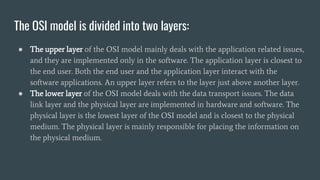
The OSI model is divided into two layers:
● The upper layer of the OSI model mainly deals with the application related issues,
and they are implemented only in the software. The application layer is closest to
the end user. Both the end user and the application layer interact with the
software applications. An upper layer refers to the layer just above another layer.
● The lower layer of the OSI model deals with the data transport issues. The data
link layer and the physical layer are implemented in hardware and software. The
physical layer is the lowest layer of the OSI model and is closest to the physical
medium. The physical layer is mainly responsible for placing the information on
the physical medium.
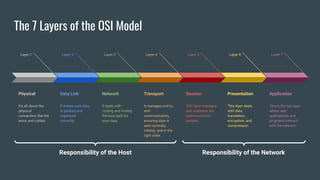
The 7 Layers of the OSI Model
Physical
it's all about the
physical
connection, like the
wires and cables.
Layer 1
Data Link
It makes sure data
is packed and
organized
correctly.
Layer 2
Network
It deals with
routing and finding
the best path for
your data.
Layer 3
Transport
It manages end-to-
end
communication,
ensuring data is
sent correctly,
reliably, and in the
right order.
Layer 4
Session
This layer manages
and maintains the
communication
session.
Layer 5
Presentation
This layer deals
with data
translation,
encryption, and
compression.
Layer 6
Application
This is the top layer
where user
applications and
programs interact
with the network.
Layer 7
Responsibility of the Host Responsibility of the Network
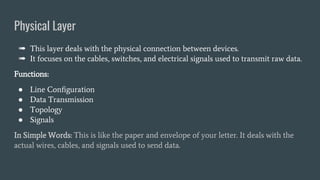
Physical Layer
➠ This layer deals with the physical connection between devices.
➠ It focuses on the cables, switches, and electrical signals used to transmit raw data.
Functions:
● Line Configuration
● Data Transmission
● Topology
● Signals
In Simple Words: This is like the paper and envelope of your letter. It deals with the
actual wires, cables, and signals used to send data.
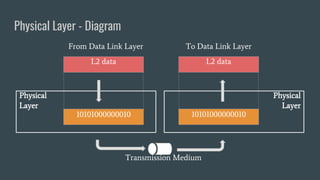
Physical Layer - Diagram
L2 data
10101000000010
L2 data
10101000000010
Physical
Layer
Physical
Layer
From Data Link Layer To Data Link Layer
Transmission Medium
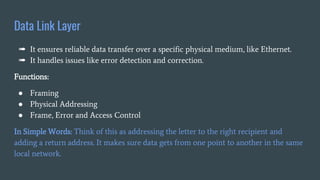
Data Link Layer
➠ It ensures reliable data transfer over a specific physical medium, like Ethernet.
➠ It handles issues like error detection and correction.
Functions:
● Framing
● Physical Addressing
● Frame, Error and Access Control
In Simple Words: Think of this as addressing the letter to the right recipient and
adding a return address. It makes sure data gets from one point to another in the same
local network.
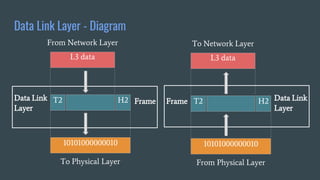
Data Link Layer - Diagram
L3 data
T2
Data Link
Layer
From Network Layer
10101000000010
H2 Frame
To Physical Layer
L3 data
T2
To Network Layer
10101000000010
H2
Frame
From Physical Layer
Data Link
Layer
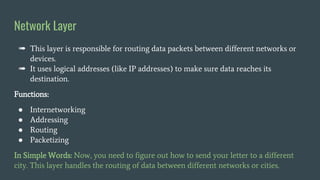
Network Layer
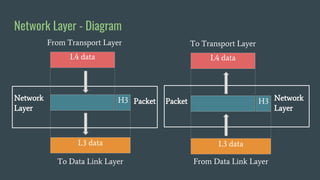
➠ This layer is responsible for routing data packets between different networks or
devices.
➠ It uses logical addresses (like IP addresses) to make sure data reaches its
destination.
Functions:
● Internetworking
● Addressing
● Routing
● Packetizing
In Simple Words: Now, you need to figure out how to send your letter to a different
city. This layer handles the routing of data between different networks or cities.
Network Layer - Diagram
L4 data
Network
Layer
From Transport Layer
L3 data
H3 Packet
To Data Link Layer
L4 data
To Transport Layer
L3 data
H3
Packet
From Data Link Layer
Network
Layer
Transport Layer
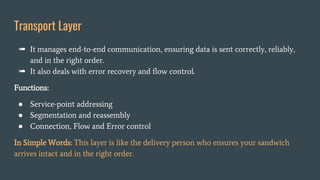
➠ It manages end-to-end communication, ensuring data is sent correctly, reliably,
and in the right order.
➠ It also deals with error recovery and flow control.
Functions:
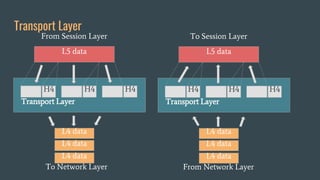
● Service-point addressing
● Segmentation and reassembly
● Connection, Flow and Error control
In Simple Words: This layer is like the delivery person who ensures your sandwich
arrives intact and in the right order.
Transport Layer
L5 data
From Session Layer
To Network Layer
H4
H4 H4
Transport Layer
L4 data
L4 data
L4 data
L5 data
To Session Layer
From Network Layer
H4
H4 H4
Transport Layer
L4 data
L4 data
L4 data
Session Layer
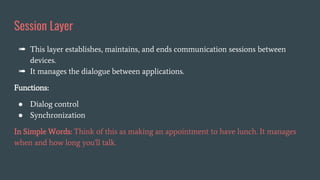
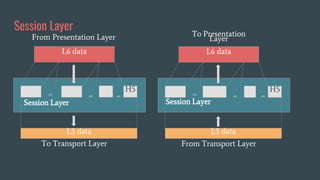
➠ This layer establishes, maintains, and ends communication sessions between
devices.
➠ It manages the dialogue between applications.
Functions:
● Dialog control
● Synchronization
In Simple Words: Think of this as making an appointment to have lunch. It manages
when and how long you'll talk.
Session Layer
L6 data
From Presentation Layer
To Transport Layer
H5
Session Layer
L5 data
L6 data
To Presentation
Layer
From Transport Layer
H5
Session Layer
syn
syn
syn
L5 data
syn
syn
syn
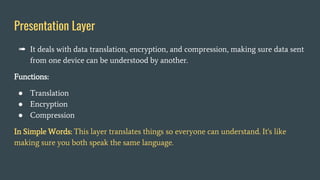
Presentation Layer
➠ It deals with data translation, encryption, and compression, making sure data sent
from one device can be understood by another.
Functions:
● Translation
● Encryption
● Compression
In Simple Words: This layer translates things so everyone can understand. It's like
making sure you both speak the same language.
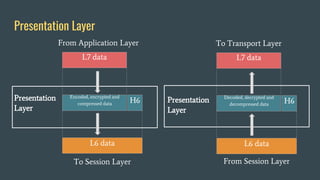
Presentation Layer
L7 data
Presentation
Layer
From Application Layer
L6 data
H6
To Session Layer
L7 data
To Transport Layer
L6 data
H6
From Session Layer
Encoded, encrypted and
compressed data
Decoded, decrypted and
decompressed data
Presentation
Layer
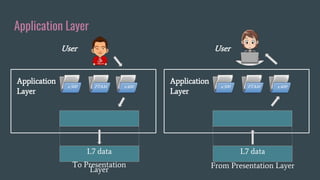
Application Layer
➠ This is the top layer where user applications and programs interact with the
network.
➠ It provides various services for applications like email, web browsing, and file
transfer.
Functions:
● File transfer, access, and management (FTAM)
● Mail services
● Directly services
In Simple Words: Finally, this is the actual sandwich filling, the content or service you
want to use, like watching a video or browsing the web.
Application Layer
Application
Layer
L7 data
To Presentation
Layer
x.500 FTAM x.400
User
Application
Layer
L7 data
From Presentation Layer
x.500 FTAM x.400
User

OSI MODEL

  • 1.
  • 2.
    What is OSIModel? 1. The OSI (Open Systems Interconnection) Model 2. It is a framework used in computer networking to understand how data is transmitted and received between computers and devices. 3. It breaks down the communication process into seven layers.
  • 3.
    The OSI modelis divided into two layers: ● The upper layer of the OSI model mainly deals with the application related issues, and they are implemented only in the software. The application layer is closest to the end user. Both the end user and the application layer interact with the software applications. An upper layer refers to the layer just above another layer. ● The lower layer of the OSI model deals with the data transport issues. The data link layer and the physical layer are implemented in hardware and software. The physical layer is the lowest layer of the OSI model and is closest to the physical medium. The physical layer is mainly responsible for placing the information on the physical medium.
  • 4.
    The 7 Layersof the OSI Model Physical it's all about the physical connection, like the wires and cables. Layer 1 Data Link It makes sure data is packed and organized correctly. Layer 2 Network It deals with routing and finding the best path for your data. Layer 3 Transport It manages end-to- end communication, ensuring data is sent correctly, reliably, and in the right order. Layer 4 Session This layer manages and maintains the communication session. Layer 5 Presentation This layer deals with data translation, encryption, and compression. Layer 6 Application This is the top layer where user applications and programs interact with the network. Layer 7 Responsibility of the Host Responsibility of the Network
  • 5.
    Physical Layer ➠ Thislayer deals with the physical connection between devices. ➠ It focuses on the cables, switches, and electrical signals used to transmit raw data. Functions: ● Line Configuration ● Data Transmission ● Topology ● Signals In Simple Words: This is like the paper and envelope of your letter. It deals with the actual wires, cables, and signals used to send data.
  • 6.
    Physical Layer -Diagram L2 data 10101000000010 L2 data 10101000000010 Physical Layer Physical Layer From Data Link Layer To Data Link Layer Transmission Medium
  • 7.
    Data Link Layer ➠It ensures reliable data transfer over a specific physical medium, like Ethernet. ➠ It handles issues like error detection and correction. Functions: ● Framing ● Physical Addressing ● Frame, Error and Access Control In Simple Words: Think of this as addressing the letter to the right recipient and adding a return address. It makes sure data gets from one point to another in the same local network.
  • 8.
    Data Link Layer- Diagram L3 data T2 Data Link Layer From Network Layer 10101000000010 H2 Frame To Physical Layer L3 data T2 To Network Layer 10101000000010 H2 Frame From Physical Layer Data Link Layer
  • 9.
    Network Layer ➠ Thislayer is responsible for routing data packets between different networks or devices. ➠ It uses logical addresses (like IP addresses) to make sure data reaches its destination. Functions: ● Internetworking ● Addressing ● Routing ● Packetizing In Simple Words: Now, you need to figure out how to send your letter to a different city. This layer handles the routing of data between different networks or cities.
  • 10.
    Network Layer -Diagram L4 data Network Layer From Transport Layer L3 data H3 Packet To Data Link Layer L4 data To Transport Layer L3 data H3 Packet From Data Link Layer Network Layer
  • 11.
    Transport Layer ➠ Itmanages end-to-end communication, ensuring data is sent correctly, reliably, and in the right order. ➠ It also deals with error recovery and flow control. Functions: ● Service-point addressing ● Segmentation and reassembly ● Connection, Flow and Error control In Simple Words: This layer is like the delivery person who ensures your sandwich arrives intact and in the right order.
  • 12.
    Transport Layer L5 data FromSession Layer To Network Layer H4 H4 H4 Transport Layer L4 data L4 data L4 data L5 data To Session Layer From Network Layer H4 H4 H4 Transport Layer L4 data L4 data L4 data
  • 13.
    Session Layer ➠ Thislayer establishes, maintains, and ends communication sessions between devices. ➠ It manages the dialogue between applications. Functions: ● Dialog control ● Synchronization In Simple Words: Think of this as making an appointment to have lunch. It manages when and how long you'll talk.
  • 14.
    Session Layer L6 data FromPresentation Layer To Transport Layer H5 Session Layer L5 data L6 data To Presentation Layer From Transport Layer H5 Session Layer syn syn syn L5 data syn syn syn
  • 15.
    Presentation Layer ➠ Itdeals with data translation, encryption, and compression, making sure data sent from one device can be understood by another. Functions: ● Translation ● Encryption ● Compression In Simple Words: This layer translates things so everyone can understand. It's like making sure you both speak the same language.
  • 16.
    Presentation Layer L7 data Presentation Layer FromApplication Layer L6 data H6 To Session Layer L7 data To Transport Layer L6 data H6 From Session Layer Encoded, encrypted and compressed data Decoded, decrypted and decompressed data Presentation Layer
  • 17.
    Application Layer ➠ Thisis the top layer where user applications and programs interact with the network. ➠ It provides various services for applications like email, web browsing, and file transfer. Functions: ● File transfer, access, and management (FTAM) ● Mail services ● Directly services In Simple Words: Finally, this is the actual sandwich filling, the content or service you want to use, like watching a video or browsing the web.
  • 18.
    Application Layer Application Layer L7 data ToPresentation Layer x.500 FTAM x.400 User Application Layer L7 data From Presentation Layer x.500 FTAM x.400 User