COMPUTER AWARENESS
Abhishek Sonker
Overview
Computer awareness refers to a person's knowledge and understanding of computers, their components,
software, and their impact on various aspects of life and work. It involves being familiar with how computers
work, their history, and their practical applications. Computer awareness encompasses a range of topics,
including:
● Hardware: Physical components of a computer, such as the CPU, RAM, storage devices, motherboard,
and peripherals like keyboards and monitors.
● Software: Knowledge of computer programs and operating systems, including how to use them and
install/uninstall software.
● Basic Operations: Familiarity with basic computer operations like file management, using a web browser,
and navigating the user interface.
● Computer Security: Awareness of cybersecurity best practices, including protecting against viruses,
malware, and online threats.
● Digital Literacy: The ability to use digital tools and software for communication, productivity, and research
purposes.
● Programming: Understanding the fundamentals of programming languages and how to write, run, and
debug simple programs.
● Internet and Networking: Knowledge of how the internet works, including concepts like IP addresses,
DNS, and common networking protocols.
● Computer History: Awareness of the historical developments that have shaped the field of computing.
● Ethical and Social Implications: Understanding the ethical and societal issues related to computers,
including privacy concerns and the impact of technology on society.
● Emerging Technologies: Keeping up to date with the latest advancements in computer technology, such
as artificial intelligence, virtual reality, and blockchain.
Computer awareness is important in today's digital age, as computers are integral to many aspects of daily life,
work, and business. It empowers individuals to make informed decisions about technology, stay safe online, and
leverage the power of computers for various tasks and opportunities.
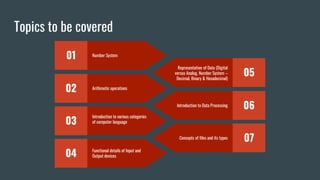
Topics to be covered
01 Number System
02 Arithmetic operations
03
Introduction to various categories
of computer language
04 Functional details of Input and
Output devices
05
Representation of Data (Digital
versus Analog, Number System –
Decimal, Binary & Hexadecimal)
06
Introduction to Data Processing
07
Concepts of files and its types
Number System
What is Number System?
➔ The technique to represent and work with numbers is called number system.
➔ Decimal number system is the most common number system
➔ It includes:
Base 2
Binary Number System
Having just two digits – 0 and 1
Octal Number System
Has eight digits – 0, 1, 2, 3, 4, 5, 6
and 7
Base 8
Decimal Number System
Having 10 digits from 0 to 9
Base 10
Hexadecimal Number System
Has 16 symbols – 0 to 9 and A to
F
Base 16
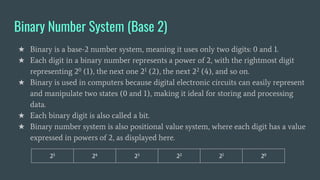
Binary Number System (Base 2)
★ Binary is a base-2 number system, meaning it uses only two digits: 0 and 1.
★ Each digit in a binary number represents a power of 2, with the rightmost digit
representing 20 (1), the next one 21 (2), the next 22 (4), and so on.
★ Binary is used in computers because digital electronic circuits can easily represent
and manipulate two states (0 and 1), making it ideal for storing and processing
data.
★ Each binary digit is also called a bit.
★ Binary number system is also positional value system, where each digit has a value
expressed in powers of 2, as displayed here.
25 24 23 22 21 20
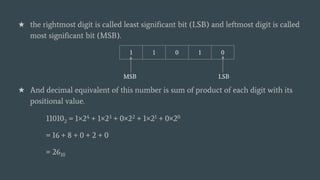
★ the rightmost digit is called least significant bit (LSB) and leftmost digit is called
most significant bit (MSB).
★ And decimal equivalent of this number is sum of product of each digit with its
positional value.
110102 = 1×24 + 1×23 + 0×22 + 1×21 + 0×20
= 16 + 8 + 0 + 2 + 0
= 2610
1 1 0 1 0
MSB LSB
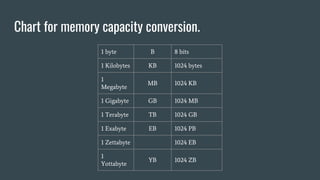
Chart for memory capacity conversion.
1 byte B 8 bits
1 Kilobytes KB 1024 bytes
1
Megabyte
MB 1024 KB
1 Gigabyte GB 1024 MB
1 Terabyte TB 1024 GB
1 Exabyte EB 1024 PB
1 Zettabyte 1024 EB
1
Yottabyte
YB 1024 ZB
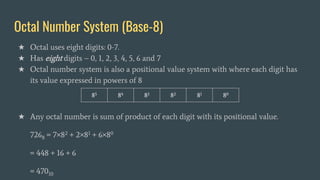
Octal Number System (Base-8)
★ Octal uses eight digits: 0-7.
★ Has eight digits – 0, 1, 2, 3, 4, 5, 6 and 7
★ Octal number system is also a positional value system with where each digit has
its value expressed in powers of 8
★ Any octal number is sum of product of each digit with its positional value.
7268 = 7×82 + 2×81 + 6×80
= 448 + 16 + 6
= 47010
85 84 83 82 81 80
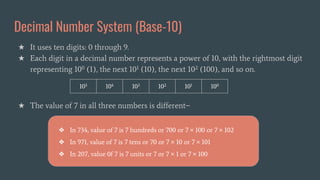
Decimal Number System (Base-10)
★ It uses ten digits: 0 through 9.
★ Each digit in a decimal number represents a power of 10, with the rightmost digit
representing 100 (1), the next 101 (10), the next 102 (100), and so on.
★ The value of 7 in all three numbers is different−
105 104 103 102 101 100
❖ In 734, value of 7 is 7 hundreds or 700 or 7 × 100 or 7 × 10²
❖ In 971, value of 7 is 7 tens or 70 or 7 × 10 or 7 × 101
❖ In 207, value 0f 7 is 7 units or 7 or 7 × 1 or 7 × 100
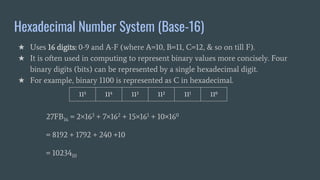
Hexadecimal Number System (Base-16)
★ Uses 16 digits: 0-9 and A-F (where A=10, B=11, C=12, & so on till F).
★ It is often used in computing to represent binary values more concisely. Four
binary digits (bits) can be represented by a single hexadecimal digit.
★ For example, binary 1100 is represented as C in hexadecimal.
27FB16 = 2×163 + 7×162 + 15×161 + 10×160
= 8192 + 1792 + 240 +10
= 1023410
115 114 113 112 111 110
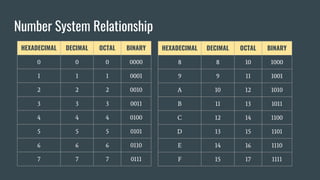
Number System Relationship
HEXADECIMAL DECIMAL OCTAL BINARY
0 0 0 0000
1 1 1 0001
2 2 2 0010
3 3 3 0011
4 4 4 0100
5 5 5 0101
6 6 6 0110
7 7 7 0111
HEXADECIMAL DECIMAL OCTAL BINARY
8 8 10 1000
9 9 11 1001
A 10 12 1010
B 11 13 1011
C 12 14 1100
D 13 15 1101
E 14 16 1110
F 15 17 1111
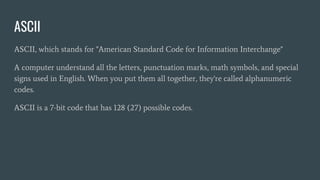
ASCII
ASCII, which stands for "American Standard Code for Information Interchange"
A computer understand all the letters, punctuation marks, math symbols, and special
signs used in English. When you put them all together, they're called alphanumeric
codes.
ASCII is a 7-bit code that has 128 (27) possible codes.
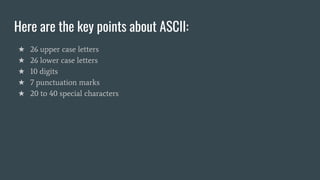
Here are the key points about ASCII:
★ 26 upper case letters
★ 26 lower case letters
★ 10 digits
★ 7 punctuation marks
★ 20 to 40 special characters
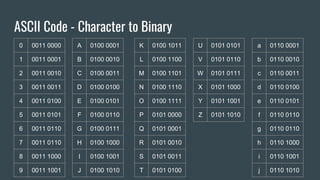
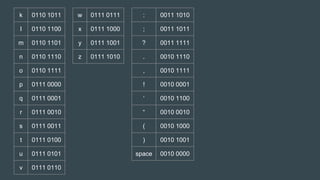
ASCII Code - Character to Binary
0 0011 0000
1 0011 0001
2 0011 0010
3 0011 0011
4 0011 0100
5 0011 0101
6 0011 0110
7 0011 0110
8 0011 1000
9 0011 1001
A 0100 0001
B 0100 0010
C 0100 0011
D 0100 0100
E 0100 0101
F 0100 0110
G 0100 0111
H 0100 1000
I 0100 1001
J 0100 1010
K 0100 1011
L 0100 1100
M 0100 1101
N 0100 1110
O 0100 1111
P 0101 0000
Q 0101 0001
R 0101 0010
S 0101 0011
T 0101 0100
U 0101 0101
V 0101 0110
W 0101 0111
X 0101 1000
Y 0101 1001
Z 0101 1010
a 0110 0001
b 0110 0010
c 0110 0011
d 0110 0100
e 0110 0101
f 0110 0110
g 0110 0110
h 0110 1000
i 0110 1001
j 0110 1010
k 0110 1011
l 0110 1100
m 0110 1101
n 0110 1110
o 0110 1111
p 0111 0000
q 0111 0001
r 0111 0010
s 0111 0011
t 0111 0100
u 0111 0101
v 0111 0110
w 0111 0111
x 0111 1000
y 0111 1001
z 0111 1010
: 0011 1010
; 0011 1011
? 0011 1111
. 0010 1110
, 0010 1111
! 0010 0001
‘ 0010 1100
“ 0010 0010
( 0010 1000
) 0010 1001
space 0010 0000
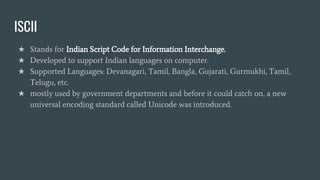
ISCII
★ Stands for Indian Script Code for Information Interchange.
★ Developed to support Indian languages on computer.
★ Supported Languages: Devanagari, Tamil, Bangla, Gujarati, Gurmukhi, Tamil,
Telugu, etc.
★ mostly used by government departments and before it could catch on, a new
universal encoding standard called Unicode was introduced.
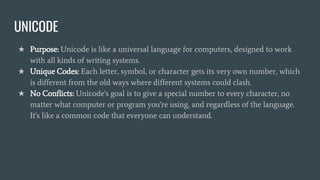
UNICODE
★ Purpose: Unicode is like a universal language for computers, designed to work
with all kinds of writing systems.
★ Unique Codes: Each letter, symbol, or character gets its very own number, which
is different from the old ways where different systems could clash.
★ No Conflicts: Unicode's goal is to give a special number to every character, no
matter what computer or program you're using, and regardless of the language.
It's like a common code that everyone can understand.

COMPUTER AWARENESS.pptx

  • 1.
  • 2.
    Overview Computer awareness refersto a person's knowledge and understanding of computers, their components, software, and their impact on various aspects of life and work. It involves being familiar with how computers work, their history, and their practical applications. Computer awareness encompasses a range of topics, including: ● Hardware: Physical components of a computer, such as the CPU, RAM, storage devices, motherboard, and peripherals like keyboards and monitors. ● Software: Knowledge of computer programs and operating systems, including how to use them and install/uninstall software. ● Basic Operations: Familiarity with basic computer operations like file management, using a web browser, and navigating the user interface. ● Computer Security: Awareness of cybersecurity best practices, including protecting against viruses, malware, and online threats.
  • 3.
    ● Digital Literacy:The ability to use digital tools and software for communication, productivity, and research purposes. ● Programming: Understanding the fundamentals of programming languages and how to write, run, and debug simple programs. ● Internet and Networking: Knowledge of how the internet works, including concepts like IP addresses, DNS, and common networking protocols. ● Computer History: Awareness of the historical developments that have shaped the field of computing. ● Ethical and Social Implications: Understanding the ethical and societal issues related to computers, including privacy concerns and the impact of technology on society. ● Emerging Technologies: Keeping up to date with the latest advancements in computer technology, such as artificial intelligence, virtual reality, and blockchain. Computer awareness is important in today's digital age, as computers are integral to many aspects of daily life, work, and business. It empowers individuals to make informed decisions about technology, stay safe online, and leverage the power of computers for various tasks and opportunities.
  • 4.
    Topics to becovered 01 Number System 02 Arithmetic operations 03 Introduction to various categories of computer language 04 Functional details of Input and Output devices 05 Representation of Data (Digital versus Analog, Number System – Decimal, Binary & Hexadecimal) 06 Introduction to Data Processing 07 Concepts of files and its types
  • 5.
  • 6.
    What is NumberSystem? ➔ The technique to represent and work with numbers is called number system. ➔ Decimal number system is the most common number system ➔ It includes: Base 2 Binary Number System Having just two digits – 0 and 1 Octal Number System Has eight digits – 0, 1, 2, 3, 4, 5, 6 and 7 Base 8 Decimal Number System Having 10 digits from 0 to 9 Base 10 Hexadecimal Number System Has 16 symbols – 0 to 9 and A to F Base 16
  • 7.
    Binary Number System(Base 2) ★ Binary is a base-2 number system, meaning it uses only two digits: 0 and 1. ★ Each digit in a binary number represents a power of 2, with the rightmost digit representing 20 (1), the next one 21 (2), the next 22 (4), and so on. ★ Binary is used in computers because digital electronic circuits can easily represent and manipulate two states (0 and 1), making it ideal for storing and processing data. ★ Each binary digit is also called a bit. ★ Binary number system is also positional value system, where each digit has a value expressed in powers of 2, as displayed here. 25 24 23 22 21 20
  • 8.
    ★ the rightmostdigit is called least significant bit (LSB) and leftmost digit is called most significant bit (MSB). ★ And decimal equivalent of this number is sum of product of each digit with its positional value. 110102 = 1×24 + 1×23 + 0×22 + 1×21 + 0×20 = 16 + 8 + 0 + 2 + 0 = 2610 1 1 0 1 0 MSB LSB
  • 9.
    Chart for memorycapacity conversion. 1 byte B 8 bits 1 Kilobytes KB 1024 bytes 1 Megabyte MB 1024 KB 1 Gigabyte GB 1024 MB 1 Terabyte TB 1024 GB 1 Exabyte EB 1024 PB 1 Zettabyte 1024 EB 1 Yottabyte YB 1024 ZB
  • 10.
    Octal Number System(Base-8) ★ Octal uses eight digits: 0-7. ★ Has eight digits – 0, 1, 2, 3, 4, 5, 6 and 7 ★ Octal number system is also a positional value system with where each digit has its value expressed in powers of 8 ★ Any octal number is sum of product of each digit with its positional value. 7268 = 7×82 + 2×81 + 6×80 = 448 + 16 + 6 = 47010 85 84 83 82 81 80
  • 11.
    Decimal Number System(Base-10) ★ It uses ten digits: 0 through 9. ★ Each digit in a decimal number represents a power of 10, with the rightmost digit representing 100 (1), the next 101 (10), the next 102 (100), and so on. ★ The value of 7 in all three numbers is different− 105 104 103 102 101 100 ❖ In 734, value of 7 is 7 hundreds or 700 or 7 × 100 or 7 × 10² ❖ In 971, value of 7 is 7 tens or 70 or 7 × 10 or 7 × 101 ❖ In 207, value 0f 7 is 7 units or 7 or 7 × 1 or 7 × 100
  • 12.
    Hexadecimal Number System(Base-16) ★ Uses 16 digits: 0-9 and A-F (where A=10, B=11, C=12, & so on till F). ★ It is often used in computing to represent binary values more concisely. Four binary digits (bits) can be represented by a single hexadecimal digit. ★ For example, binary 1100 is represented as C in hexadecimal. 27FB16 = 2×163 + 7×162 + 15×161 + 10×160 = 8192 + 1792 + 240 +10 = 1023410 115 114 113 112 111 110
  • 13.
    Number System Relationship HEXADECIMALDECIMAL OCTAL BINARY 0 0 0 0000 1 1 1 0001 2 2 2 0010 3 3 3 0011 4 4 4 0100 5 5 5 0101 6 6 6 0110 7 7 7 0111 HEXADECIMAL DECIMAL OCTAL BINARY 8 8 10 1000 9 9 11 1001 A 10 12 1010 B 11 13 1011 C 12 14 1100 D 13 15 1101 E 14 16 1110 F 15 17 1111
  • 14.
    ASCII ASCII, which standsfor "American Standard Code for Information Interchange" A computer understand all the letters, punctuation marks, math symbols, and special signs used in English. When you put them all together, they're called alphanumeric codes. ASCII is a 7-bit code that has 128 (27) possible codes.
  • 15.
    Here are thekey points about ASCII: ★ 26 upper case letters ★ 26 lower case letters ★ 10 digits ★ 7 punctuation marks ★ 20 to 40 special characters
  • 16.
    ASCII Code -Character to Binary 0 0011 0000 1 0011 0001 2 0011 0010 3 0011 0011 4 0011 0100 5 0011 0101 6 0011 0110 7 0011 0110 8 0011 1000 9 0011 1001 A 0100 0001 B 0100 0010 C 0100 0011 D 0100 0100 E 0100 0101 F 0100 0110 G 0100 0111 H 0100 1000 I 0100 1001 J 0100 1010 K 0100 1011 L 0100 1100 M 0100 1101 N 0100 1110 O 0100 1111 P 0101 0000 Q 0101 0001 R 0101 0010 S 0101 0011 T 0101 0100 U 0101 0101 V 0101 0110 W 0101 0111 X 0101 1000 Y 0101 1001 Z 0101 1010 a 0110 0001 b 0110 0010 c 0110 0011 d 0110 0100 e 0110 0101 f 0110 0110 g 0110 0110 h 0110 1000 i 0110 1001 j 0110 1010
  • 17.
    k 0110 1011 l0110 1100 m 0110 1101 n 0110 1110 o 0110 1111 p 0111 0000 q 0111 0001 r 0111 0010 s 0111 0011 t 0111 0100 u 0111 0101 v 0111 0110 w 0111 0111 x 0111 1000 y 0111 1001 z 0111 1010 : 0011 1010 ; 0011 1011 ? 0011 1111 . 0010 1110 , 0010 1111 ! 0010 0001 ‘ 0010 1100 “ 0010 0010 ( 0010 1000 ) 0010 1001 space 0010 0000
  • 18.
    ISCII ★ Stands forIndian Script Code for Information Interchange. ★ Developed to support Indian languages on computer. ★ Supported Languages: Devanagari, Tamil, Bangla, Gujarati, Gurmukhi, Tamil, Telugu, etc. ★ mostly used by government departments and before it could catch on, a new universal encoding standard called Unicode was introduced.
  • 19.
    UNICODE ★ Purpose: Unicodeis like a universal language for computers, designed to work with all kinds of writing systems. ★ Unique Codes: Each letter, symbol, or character gets its very own number, which is different from the old ways where different systems could clash. ★ No Conflicts: Unicode's goal is to give a special number to every character, no matter what computer or program you're using, and regardless of the language. It's like a common code that everyone can understand.