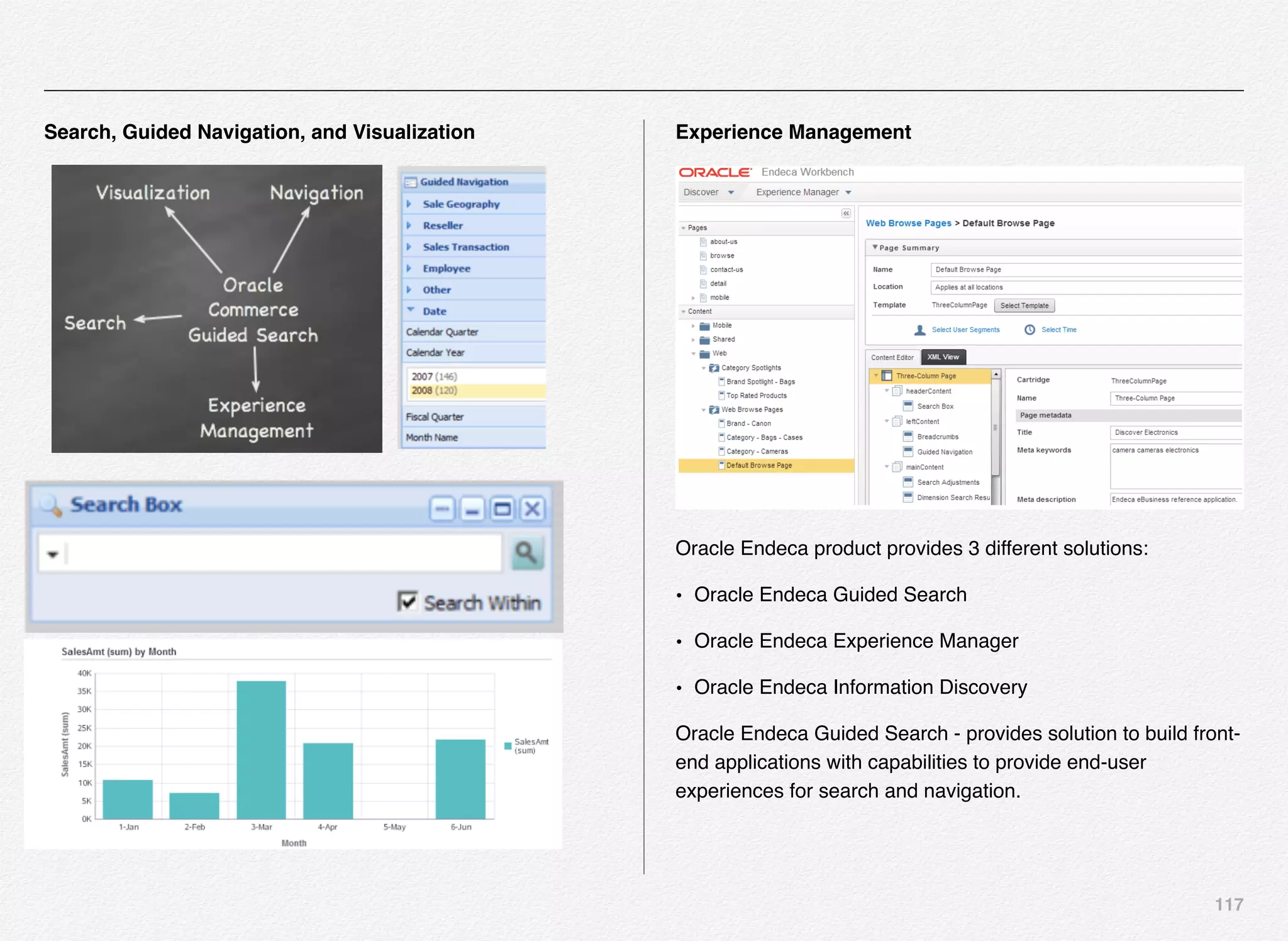
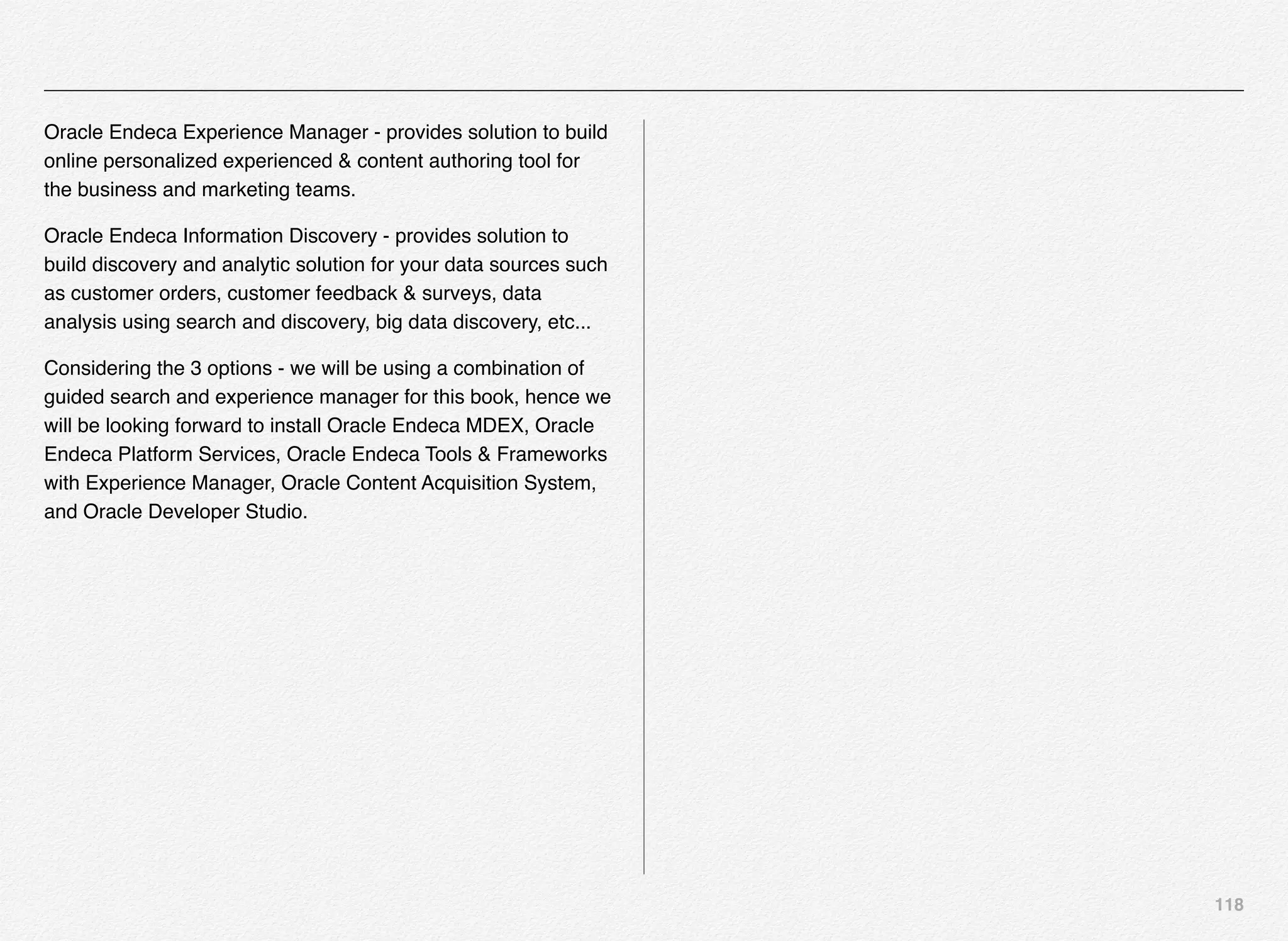
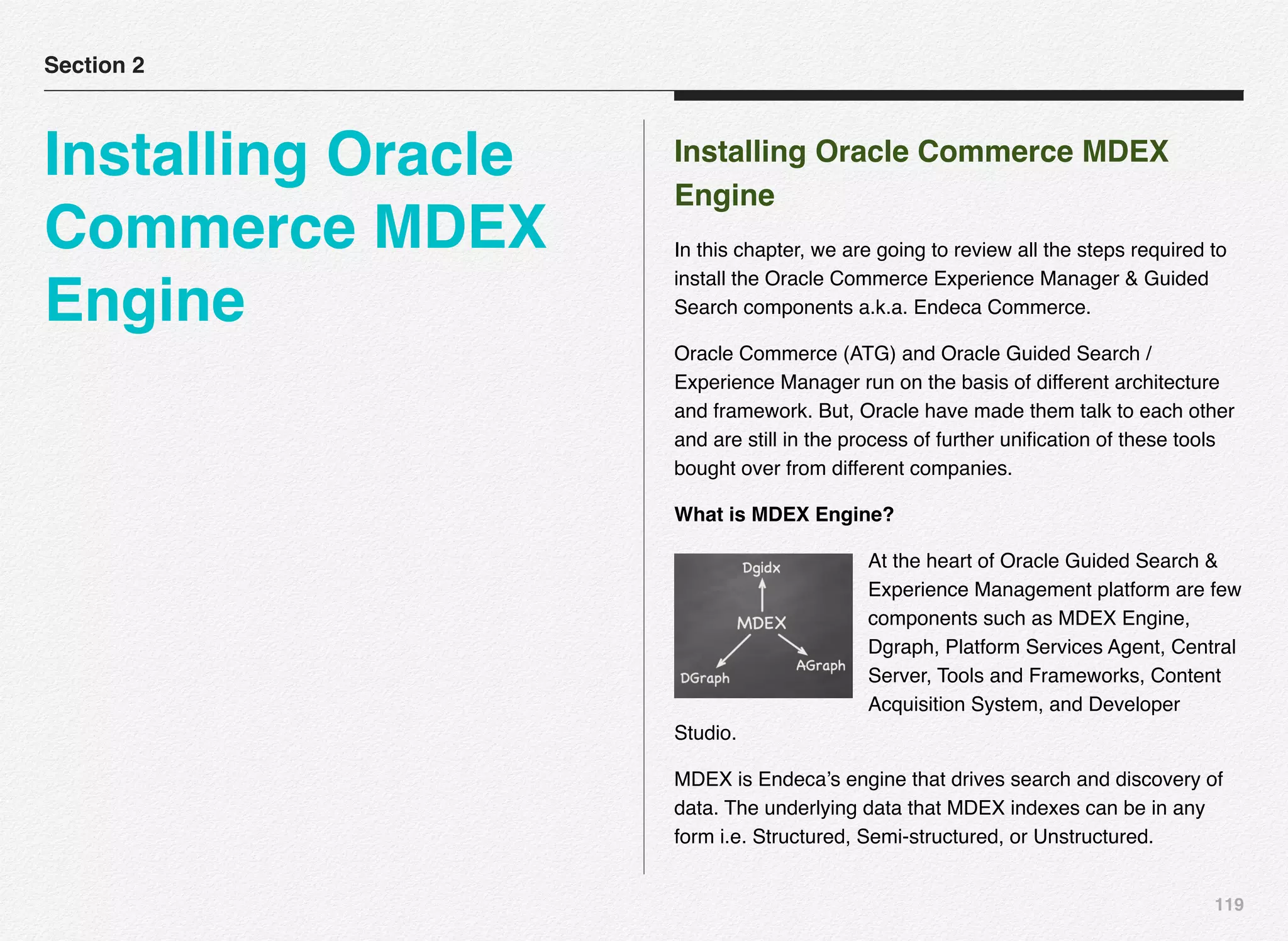
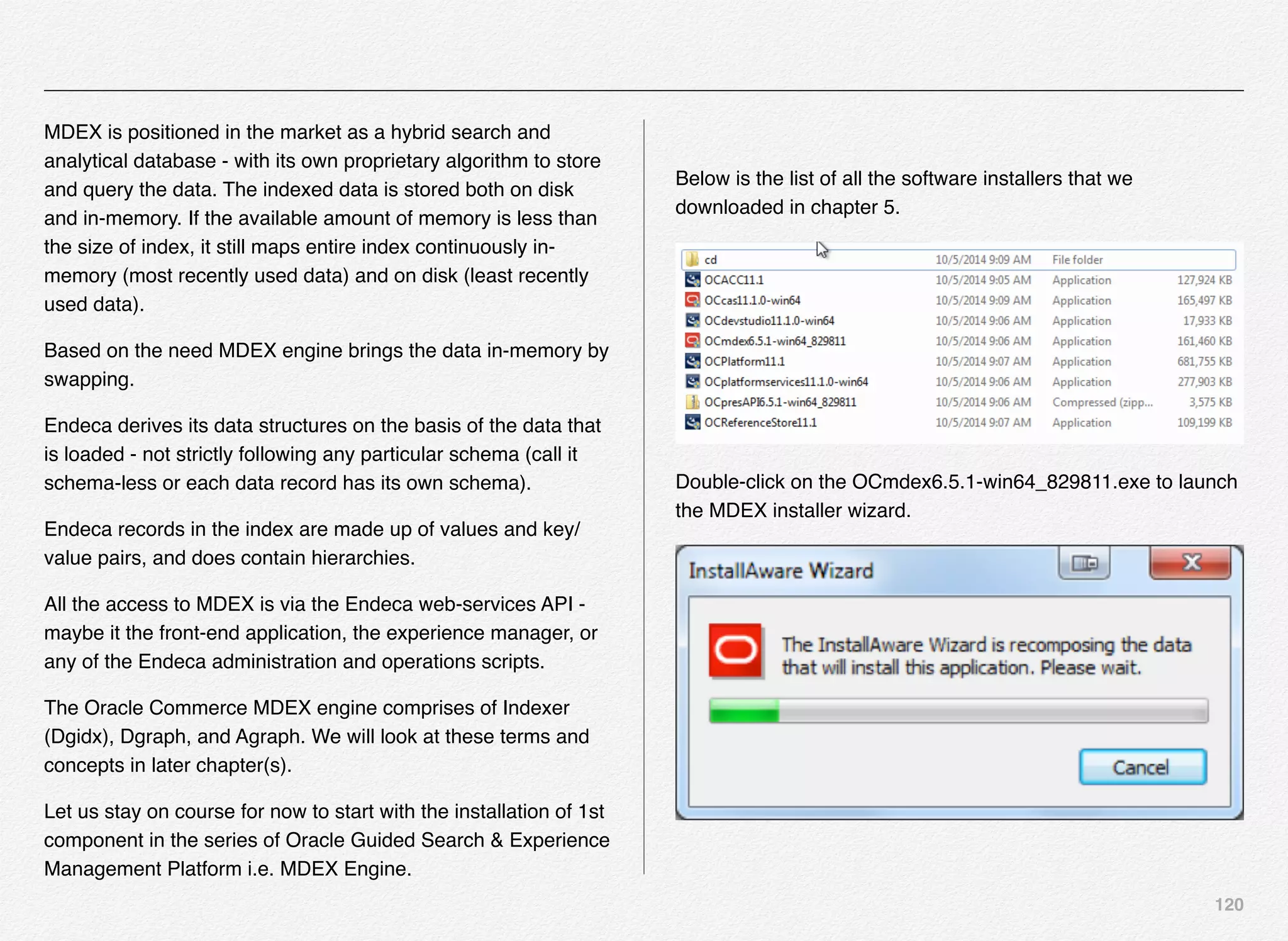
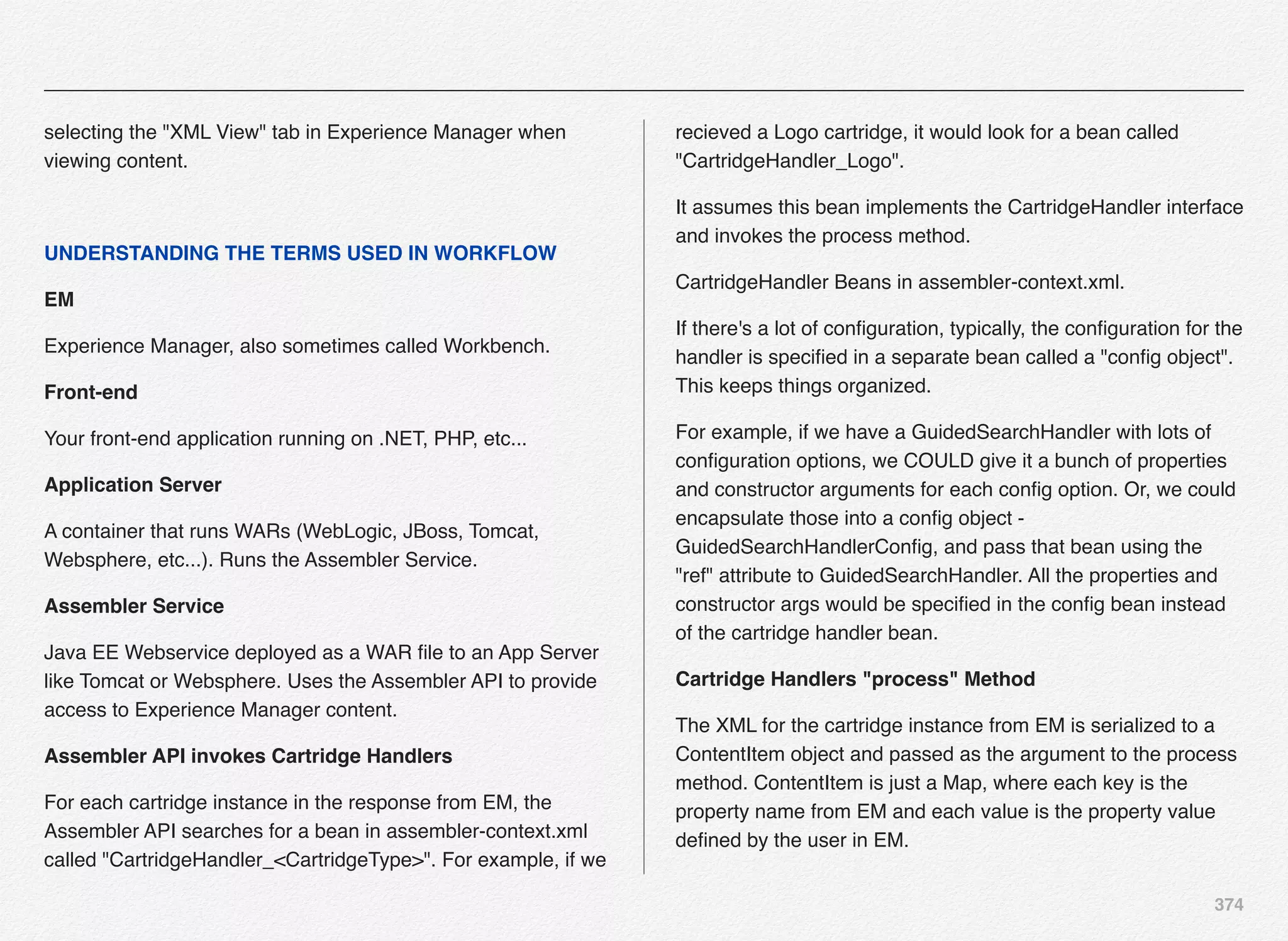
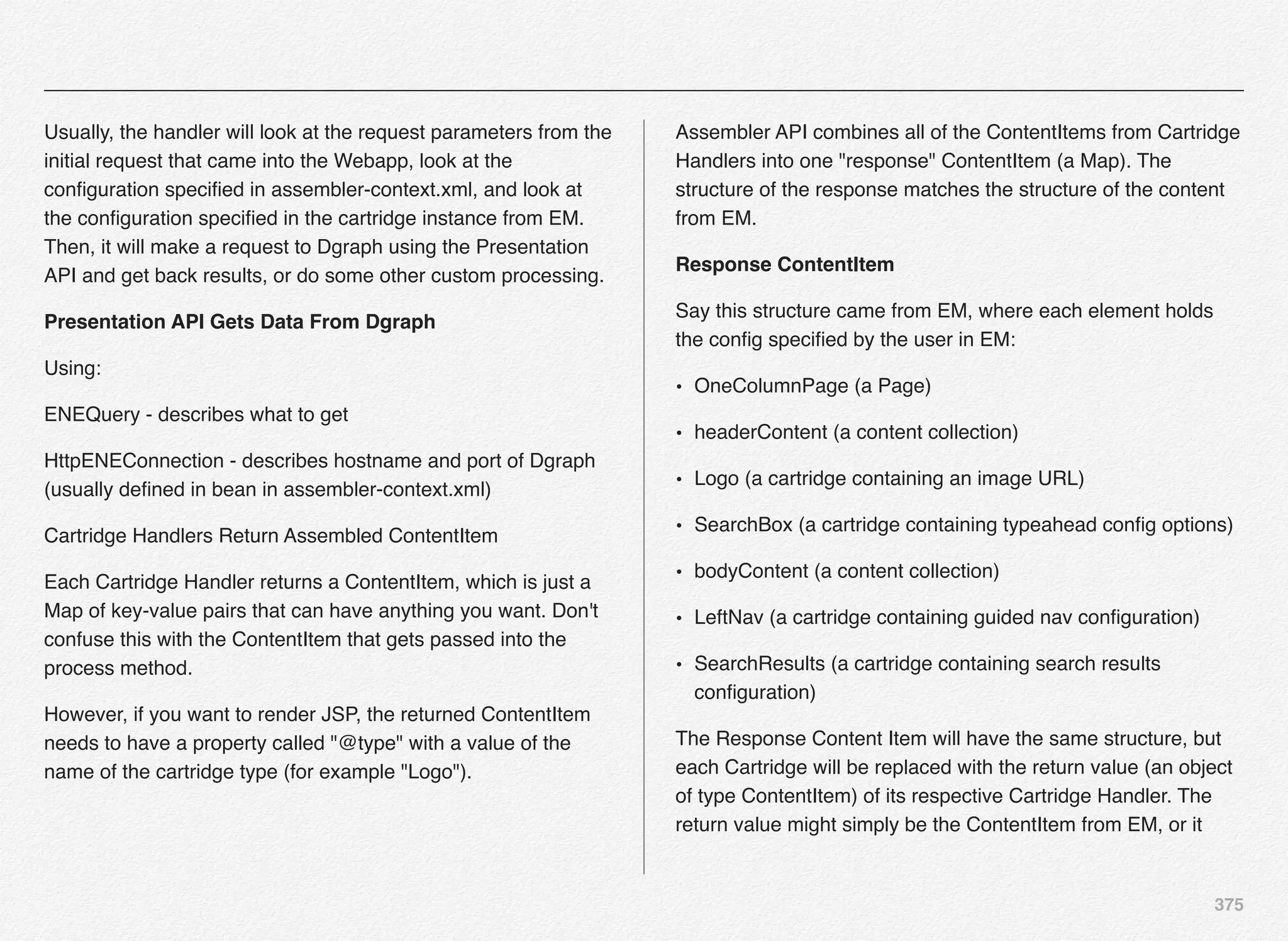
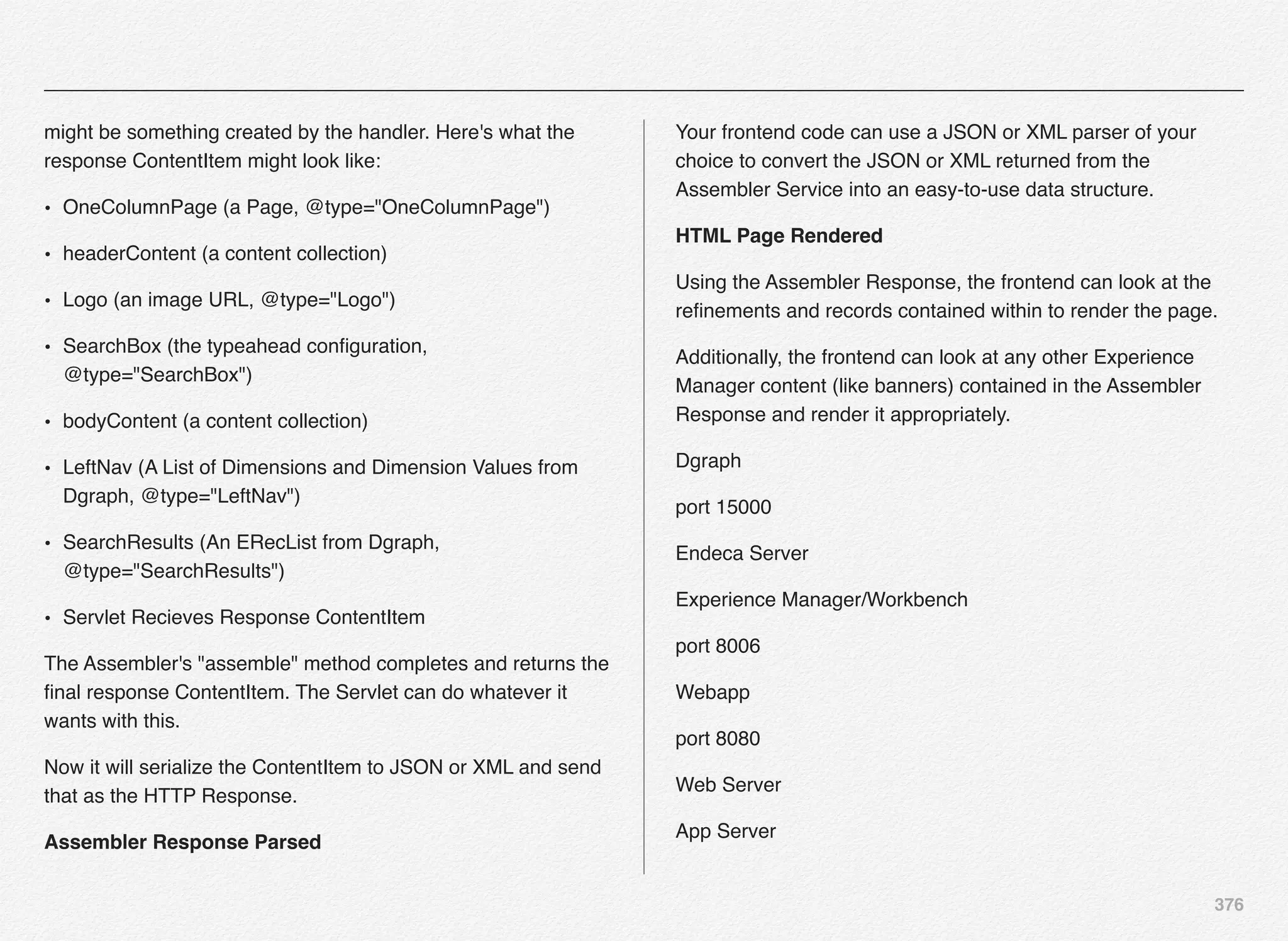
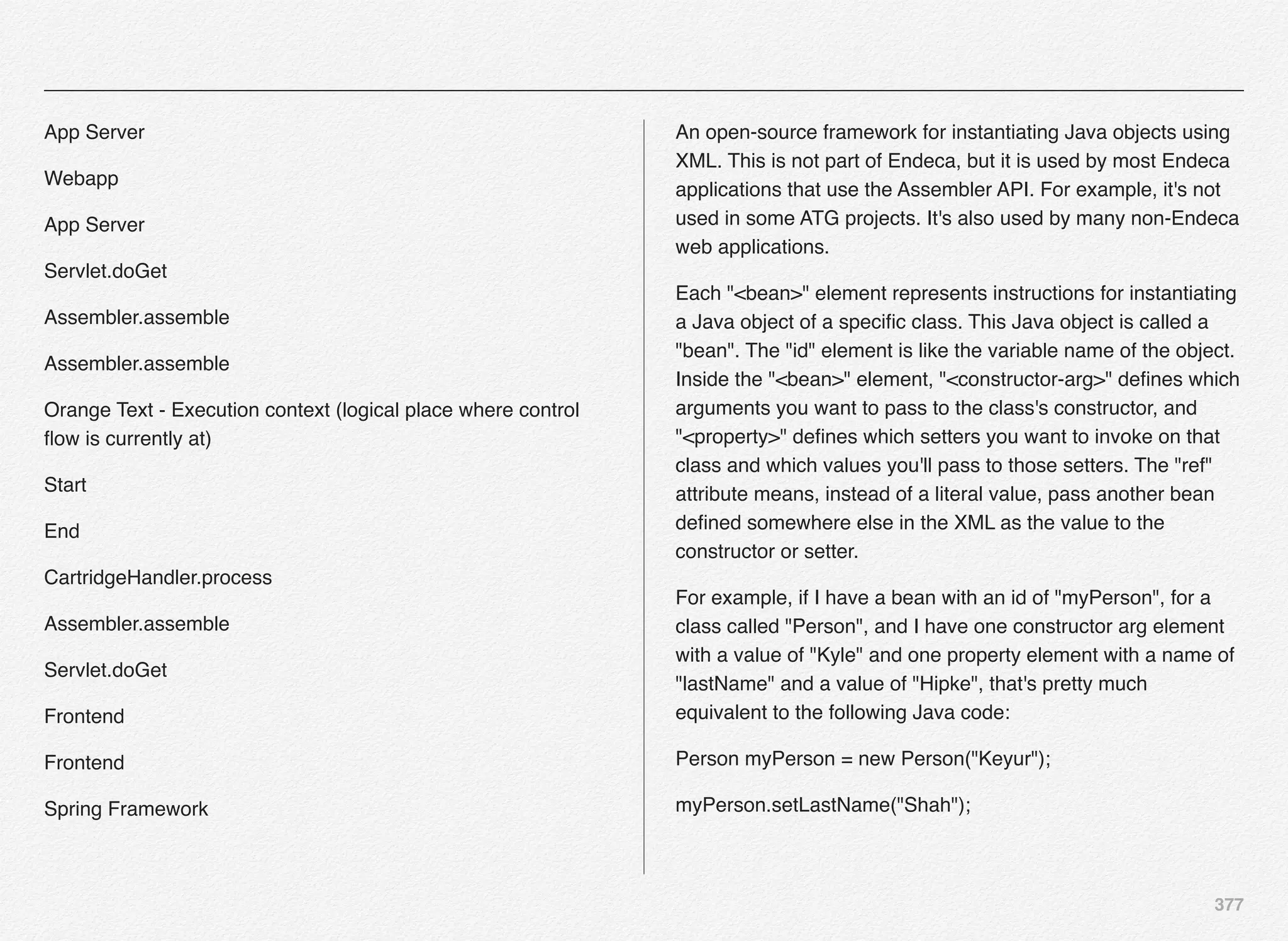
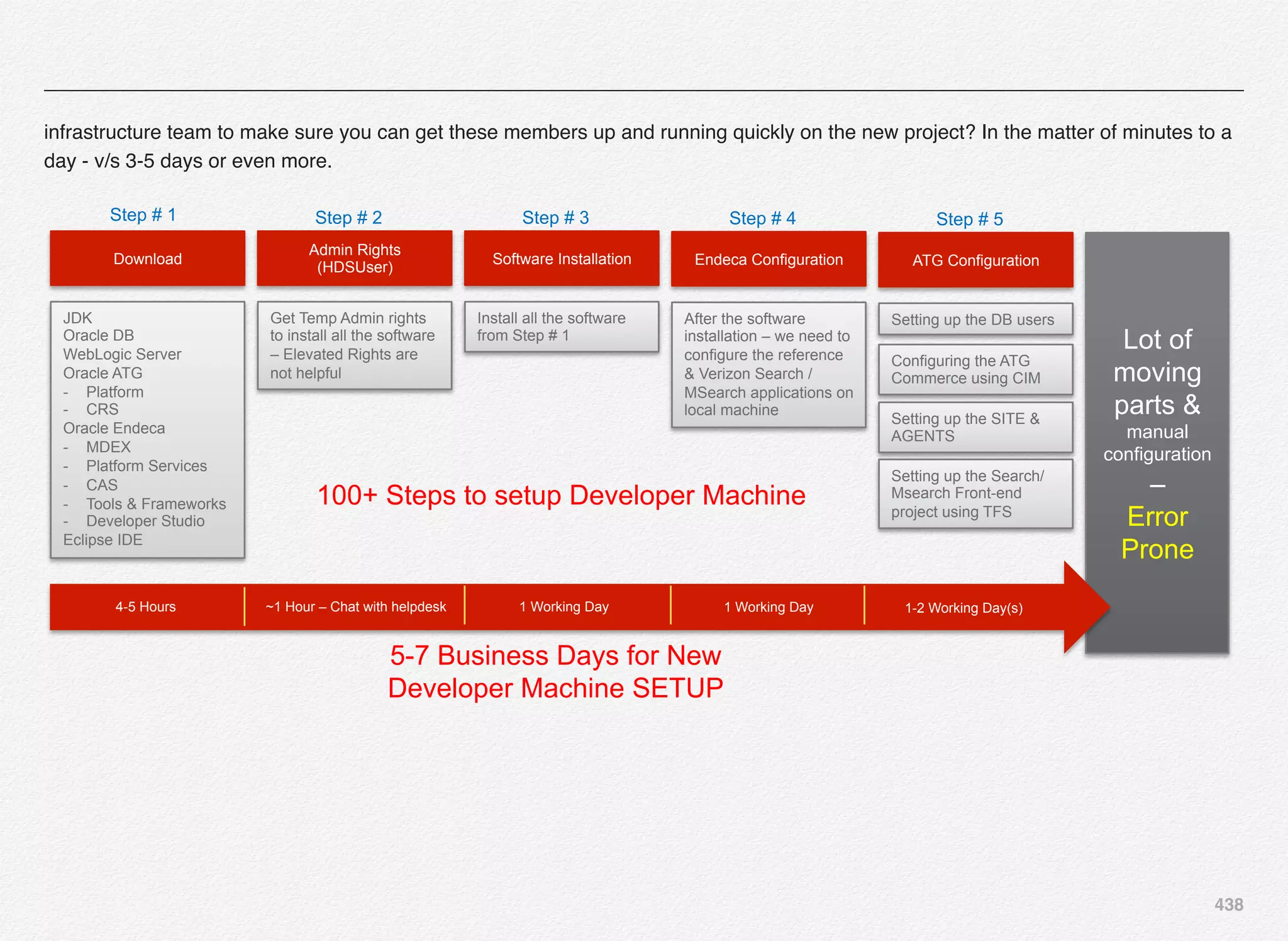
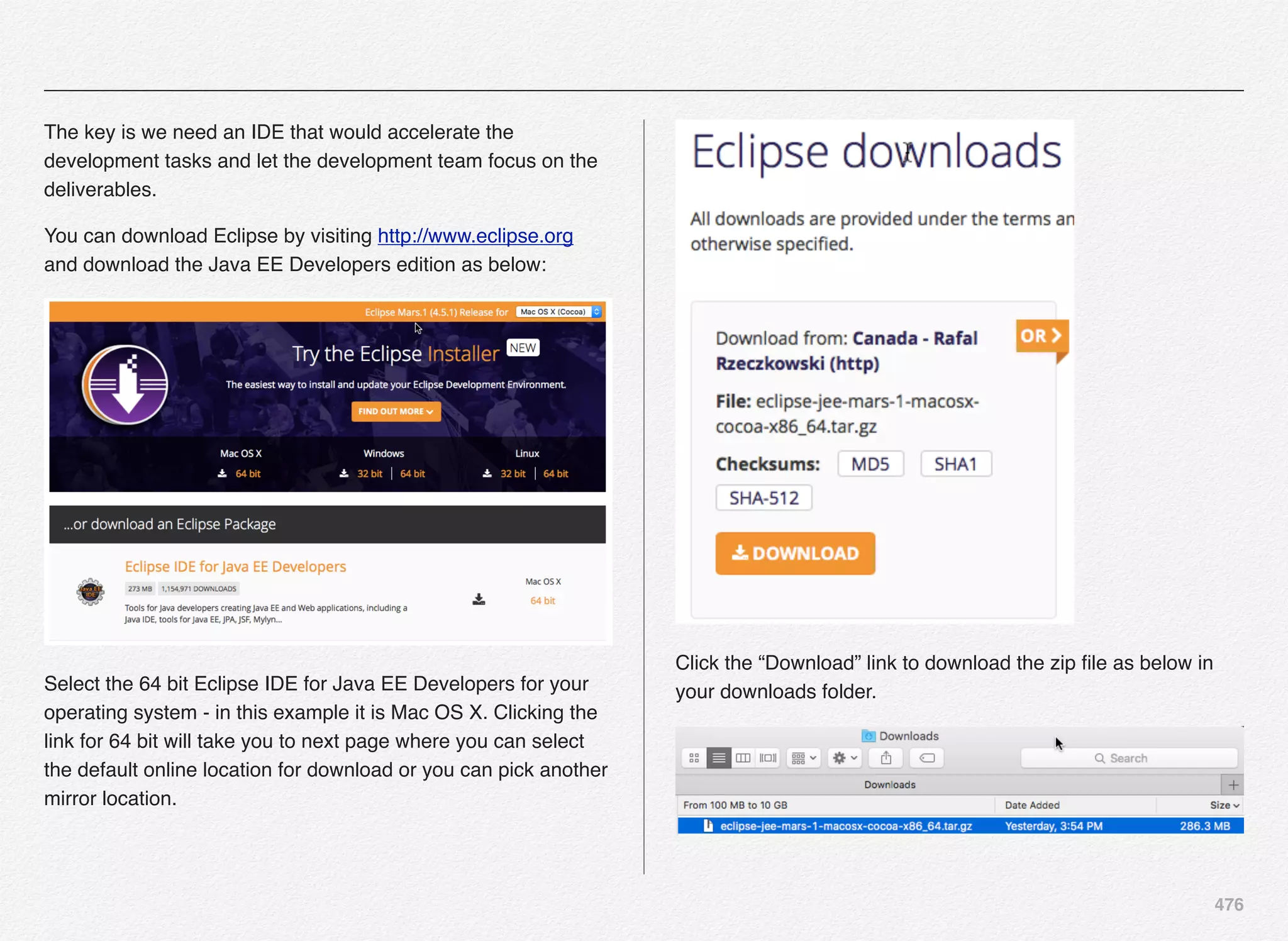
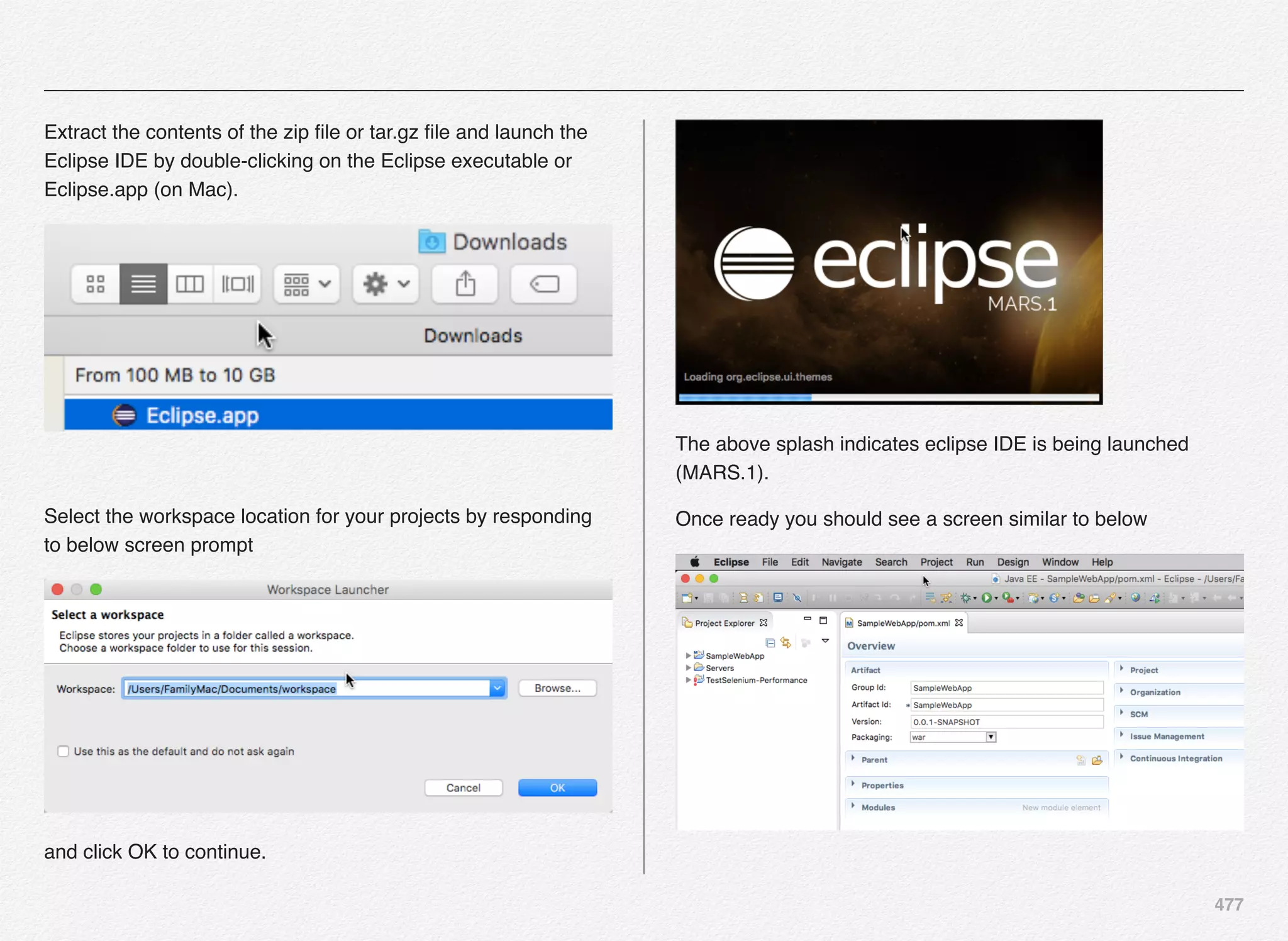
Keyur Shah
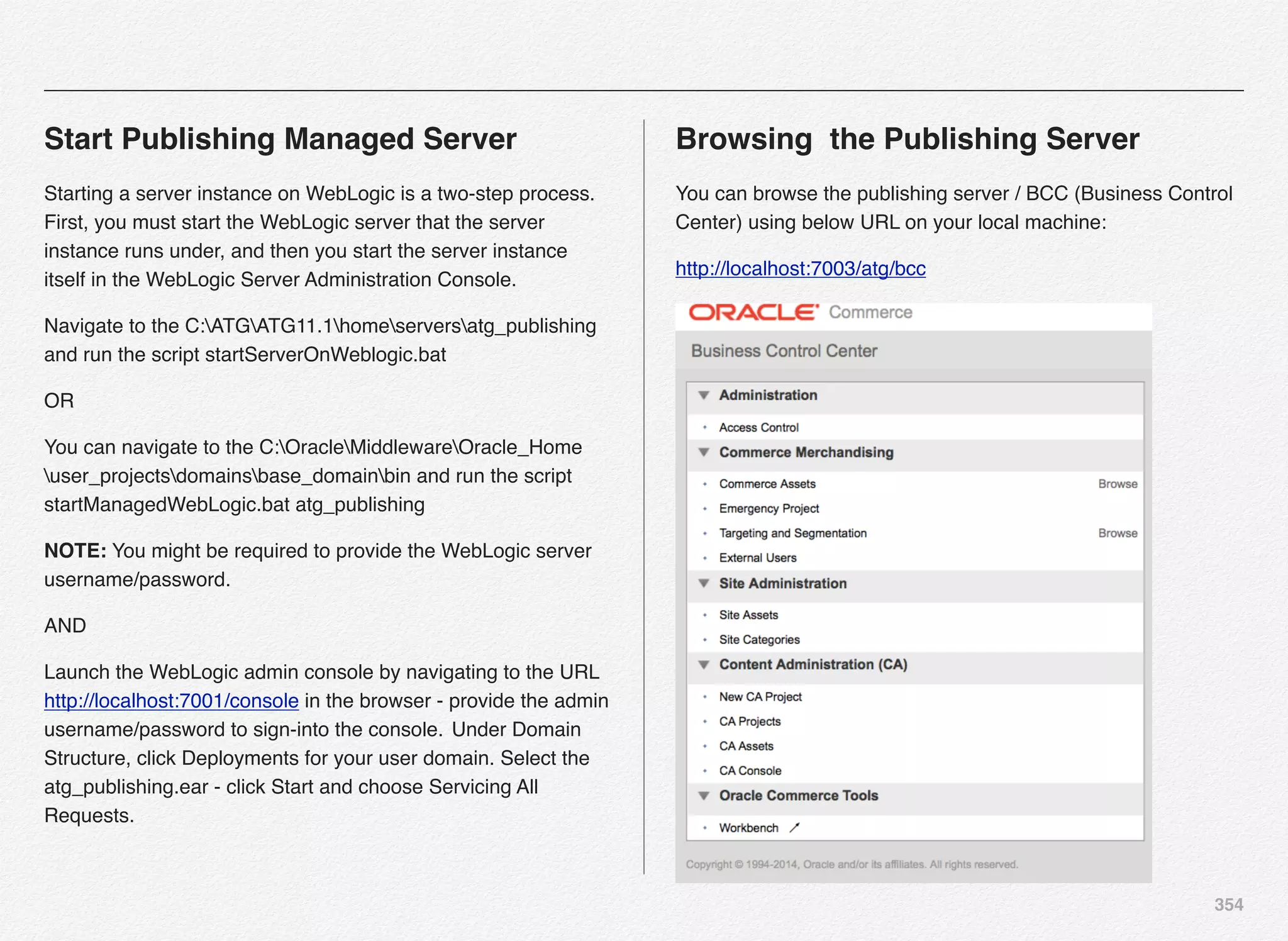
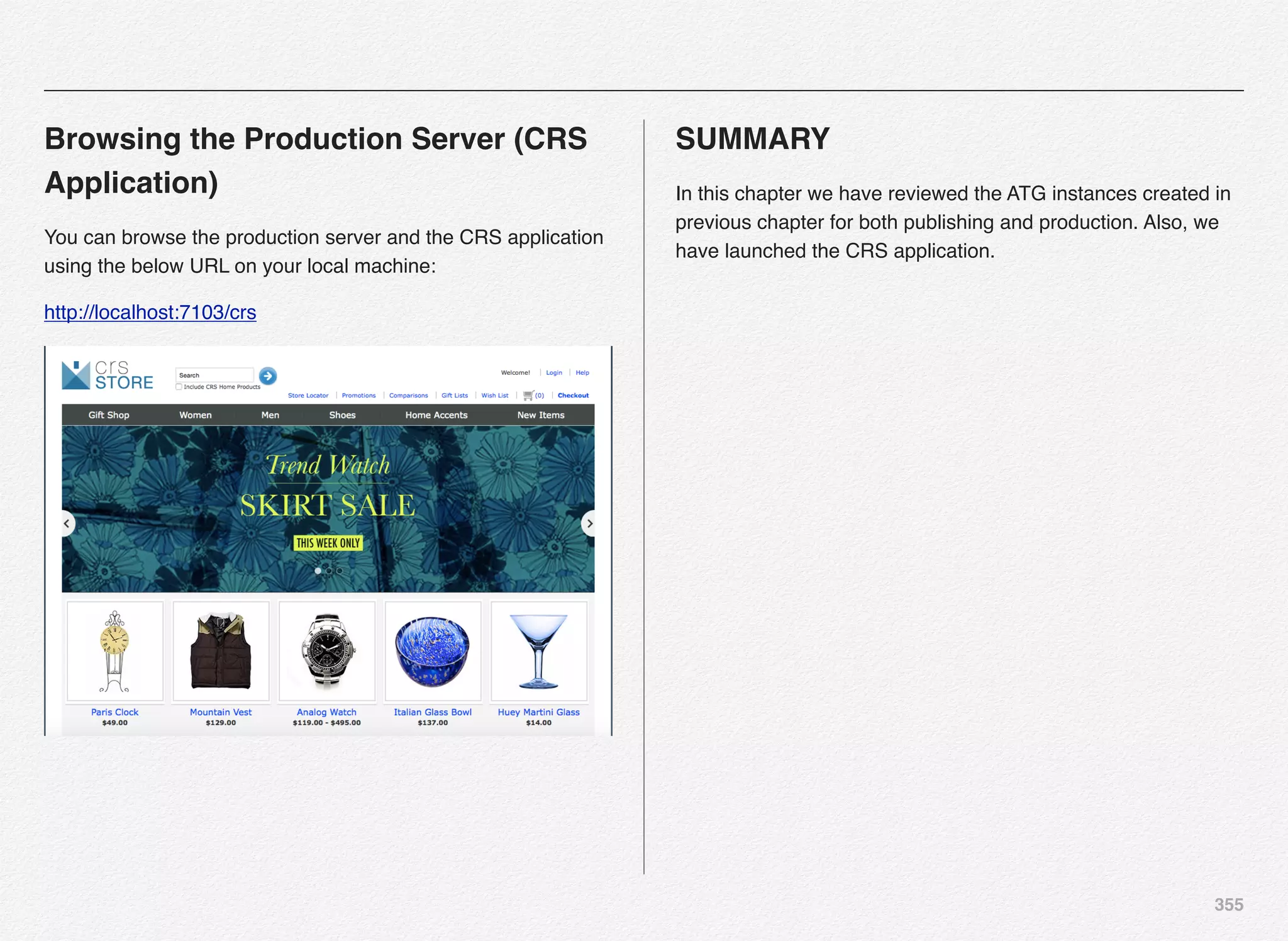
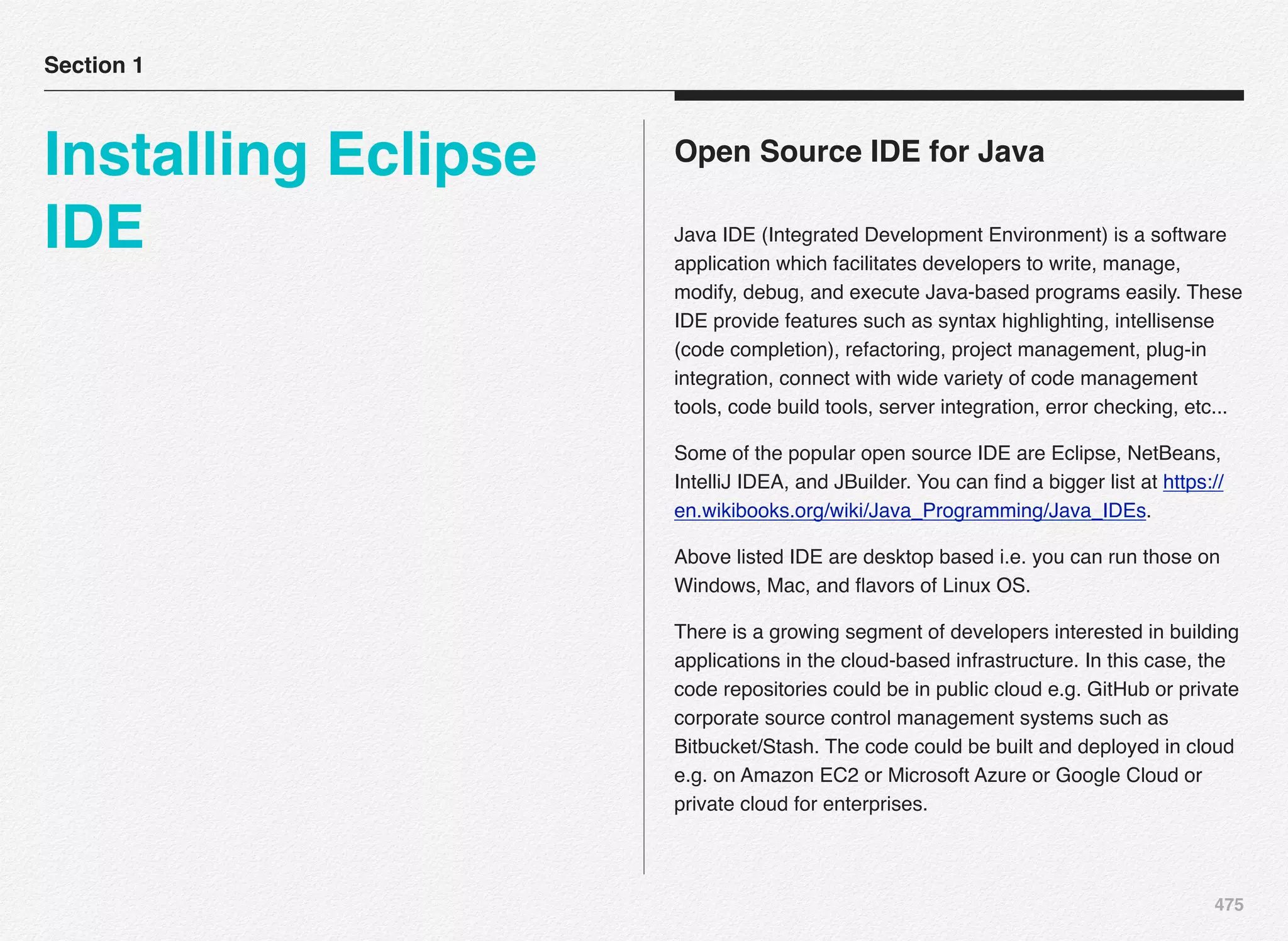
First Edition
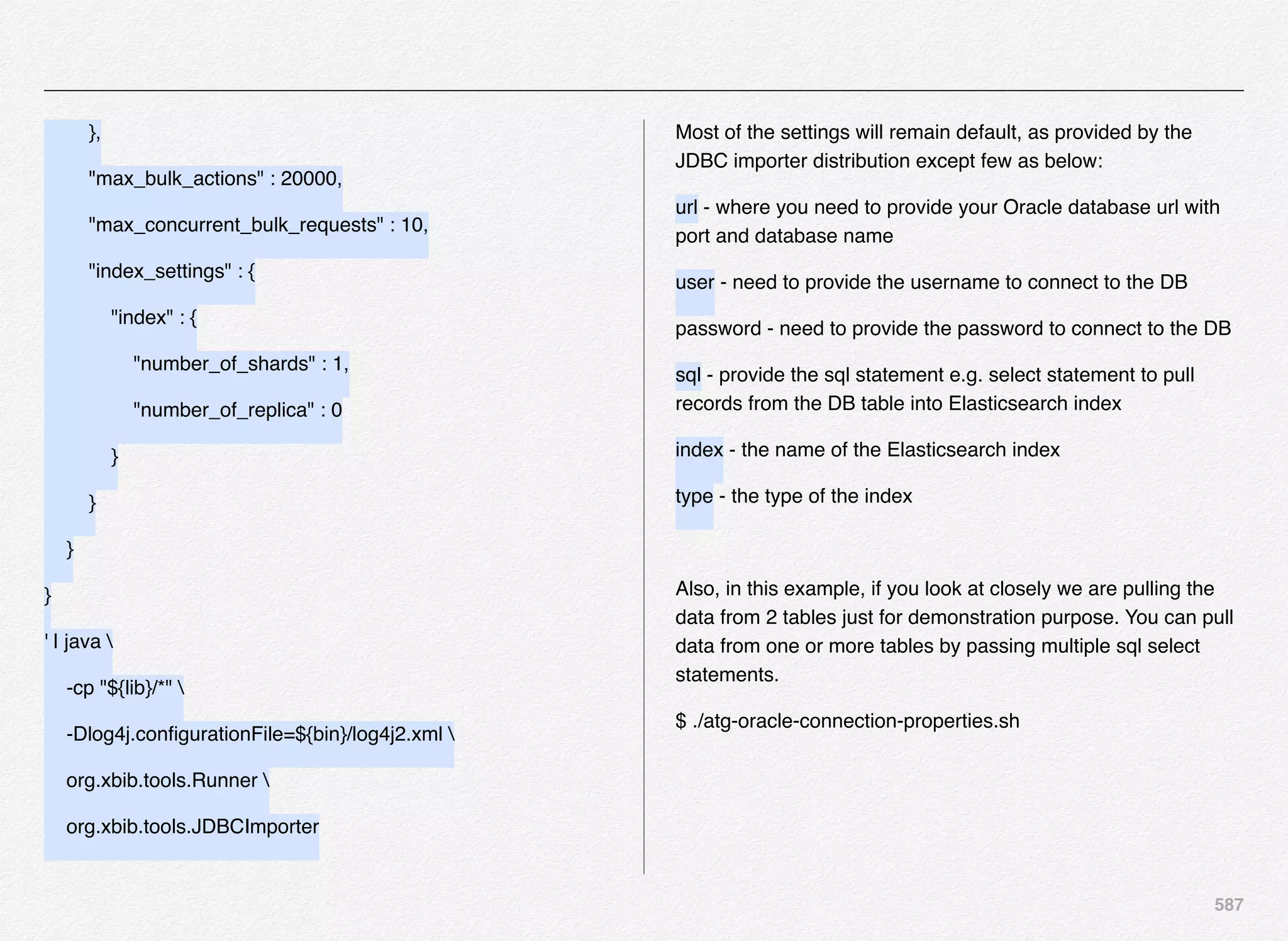
Oracle Commerce
Using ATG & Endeca
Do It Yourself Series
Objectives
The objective of this book is to help fellow developers learn the Oracle Commerce platform
from the ground-up using step-by-step approach and clear explanation about Oracle
Commerce.
Also, this book aims at helping you learn new and exciting world of Open Source Softwares
including how you can make it even further easier for your team members to get on board
with Oracle Commerce in no time using the DevOps performance culture implementation.
Later chapters of this book will help you learn how you can use some of the most innovative
frameworks and tools in the industry such as Splunk, Logstash, Elasticsearch, and Kibana to
create your own dashboards for your Oracle Commerce applications.
The book is not by any means intending to replace the Oracle Commerce documentation.
Documentation provides you wealth of information and resources - but what this book brings
is the step-by-step guidance for beginners to learn the product quickly and effectively. I would
quote my own learning experience and curve for this statement and you might agree with it
based on your individual experiences.
1
High-fidelity guide
written with a simple
objective “To boost
development team
productivity for both
new and existing
projects driven by the
Oracle ATG & Endeca
Commerce Platform”
Introduction
3
Section 1
eCommerce -
Platform
Components
I. Recipe for success
II. Commerce components
4
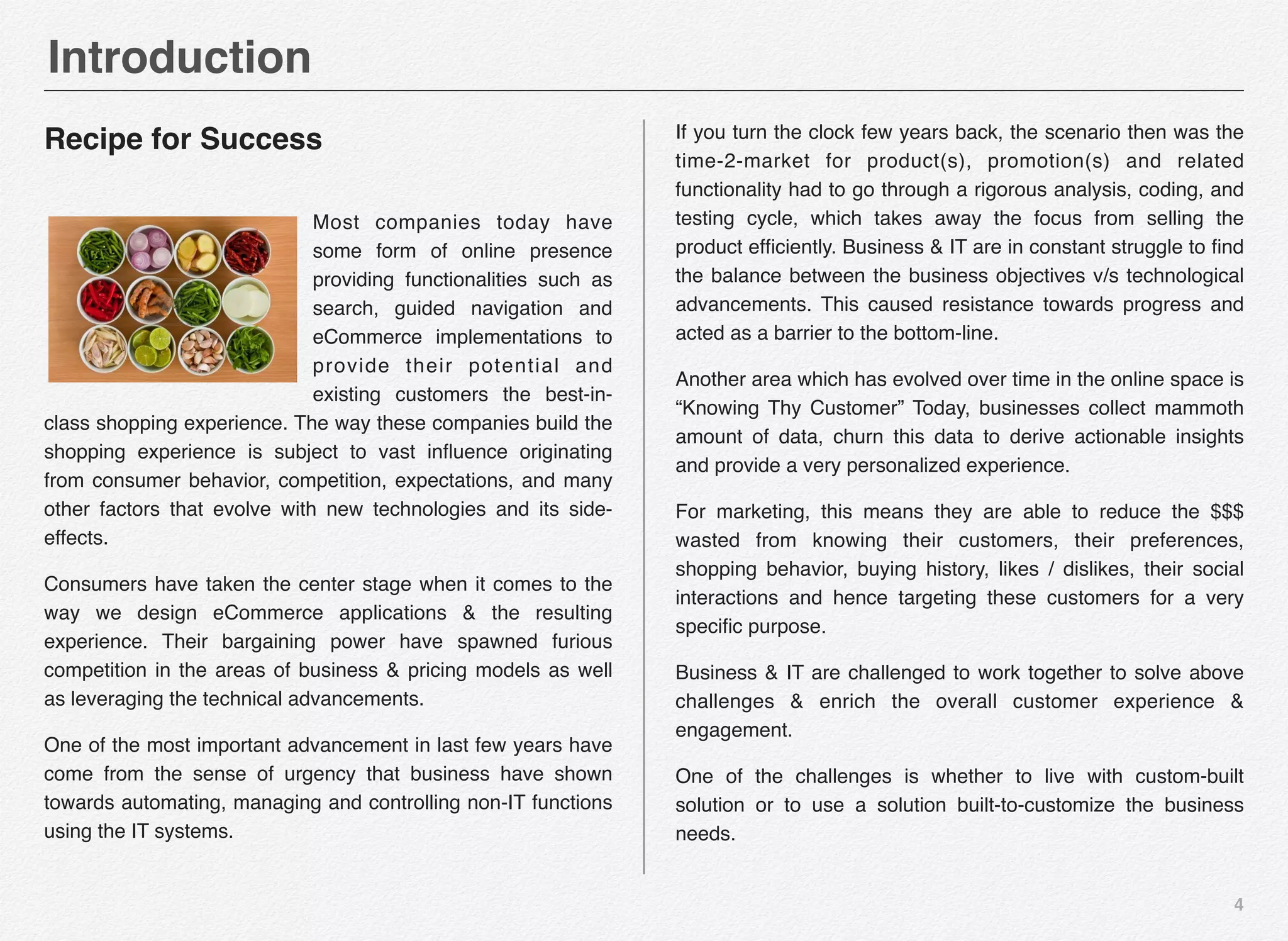
Recipe for Success
Most companies today have
some form of online presence
providing functionalities such as
search, guided navigation and
eCommerce implementations to
provide their potential and
existing customers the best-in-
class shopping experience. The way these companies build the
shopping experience is subject to vast influence originating
from consumer behavior, competition, expectations, and many
other factors that evolve with new technologies and its side-
effects.
Consumers have taken the center stage when it comes to the
way we design eCommerce applications & the resulting
experience. Their bargaining power have spawned furious
competition in the areas of business & pricing models as well
as leveraging the technical advancements.
One of the most important advancement in last few years have
come from the sense of urgency that business have shown
towards automating, managing and controlling non-IT functions
using the IT systems.
If you turn the clock few years back, the scenario then was the
time-2-market for product(s), promotion(s) and related
functionality had to go through a rigorous analysis, coding, and
testing cycle, which takes away the focus from selling the
product efficiently. Business & IT are in constant struggle to find
the balance between the business objectives v/s technological
advancements. This caused resistance towards progress and
acted as a barrier to the bottom-line.
Another area which has evolved over time in the online space is
“Knowing Thy Customer” Today, businesses collect mammoth
amount of data, churn this data to derive actionable insights
and provide a very personalized experience.
For marketing, this means they are able to reduce the $$$
wasted from knowing their customers, their preferences,
shopping behavior, buying history, likes / dislikes, their social
interactions and hence targeting these customers for a very
specific purpose.
Business & IT are challenged to work together to solve above
challenges & enrich the overall customer experience &
engagement.
One of the challenges is whether to live with custom-built
solution or to use a solution built-to-customize the business
needs.
Introduction
5
Section 2
Commerce
Components
Commerce
Components
6
Commerce Components
Let us take a look at various components (one or more) that
any ecommerce platform would comprise of, regardless of the
fact whether they are custom-built or a built-to-customize
solutions such as ATG or Hybris.
• Transactional Components
• Integration with Downstream Systems
• CMS Integration
• CRM Integration
• Responsive Design
• Personalization
• A/B & Multivariate Testing
• Performance Engineering
• Payment Gateway
• Business Intelligence
• Business Management Tools
• Multi-site Application
• Multi-channel / Cross-channel Capabilities
• Recommendation Engine
• Inventory Management
• Pricing Engine
• Tax Calculation
• Product Catalog Management
• User Profiles
• Fulfillment Services
• On-Boarding Capabilities
• SEO Capabilities
• Search
• Promotions & Discount Management
• Cross-device & Cross-browser Compatibility
• Social Integration
7
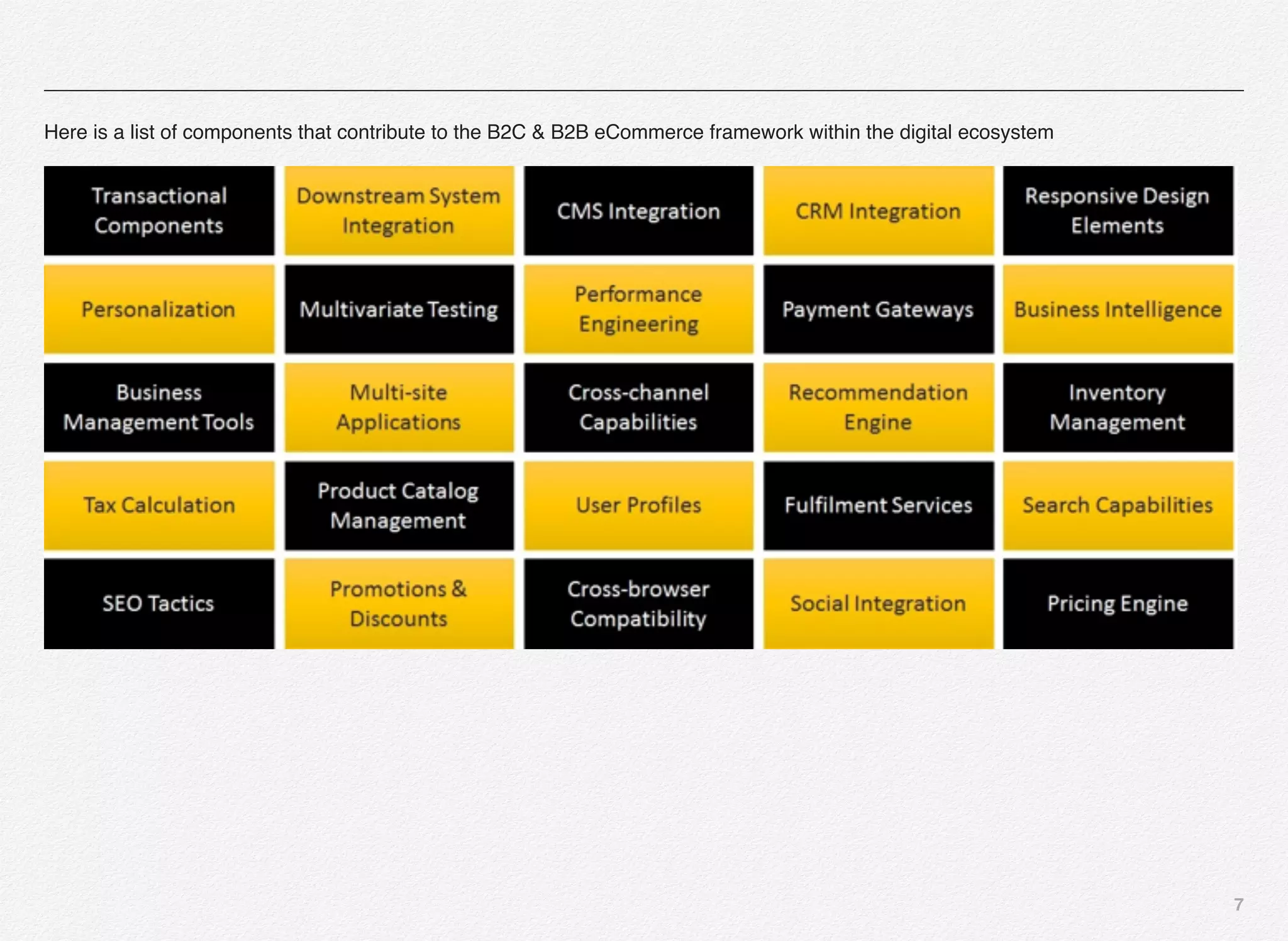
Here is a list of components that contribute to the B2C & B2B eCommerce framework within the digital ecosystem
8
Transactional Components
Transactional components are responsible for managing the
commerce transactions performed by the customers using the
online or offline web / store application.
Downstream System Integration
One of the primary functions of any enterprise business layer is
to provide integration with numerous back-end gateways and
services for all critical business functions such as performing
credit check, validating the credit cards, retrieving customer
billing profile, pulling customer buying history, and so on. These
functions varies by sectors and industries.
CMS Integration
In today’s business scenario content is the king and widely
distributed across different sources. Primarily, the content is
stored inside the repositories such as CMS (enterprise content
management systems) or WCM (web content management
systems). The ecommerce platform need to provide out-of-the-
box CMS functionality or means to integrate with any of the
existing CMS systems.
Responsive Design Elements
In the past few years there have been tremendous progress in
the mobile & tablet technologies forcing the companies to re-
think their strategies towards delivering and rendering content
on plethora of new devices popping up in the market. These
devices covers desktops, laptops, netbooks, touch-enabled
laptops, smart phones, tablets, and phablets.
Also, these devices vary in size, features, and resolutions
making it even more difficult for the development teams to
render content to match device specifications.
Responsive or adaptive design standards is an answer to
address these challenges.
One of the key components of the ecommerce platforms is to
manage rendering of content on numerous devices without
significant development overheads.
Personalization
One of the key components that provides rich, engaging, and
compelling customer experience is personalization. Welcoming
back the returning visitor is not the only level of personalization
that customers expect these days. The websites are now doing
deep into the philosophy of “know thy customer” to deliver the
most compelling online and offline experience to the customers.
Personalization can be offered on the web, to the mobile sites,
mobile APPS, within the contact center applications, in emails
or snail mails and on advertising mediums.
9
Organizations use tons of data elements defining customers,
their behaviors, and preferences to drive the personalized
experience. Based-on these attributes customers are
segmented into various buckets and targeted for different
campaigns accordingly. Customers would potentially be moved
across these buckets due to the volatile nature of business,
behaviors, and preferences.
Social media is not an exception when it comes to driving
personalization. Rather, it is one of the big factors in driving
personalized experience.
A/B Testing
A/B testing is the most basic type of testing used by marketing
to test the advertising campaigns against 2 variants. E.g. test
and measure the current offer v/s the new offer in 2 distinct
segments of the user or region. It is also known as controlled
experiment or split testing.
Multivariate Testing
Multivariate testing (MVT) is a component of optimization
framework that is leveraged for evaluating the performance of
one or more website components in a live environment. MVT
aims as experimenting with new methods or ideas with a small
segment of customers in the live production environment.
Some of the benefits of MVT are accelerated learning curve
and breakthrough thinking.
Performance Engineering
Website performance is one of the very important aspects of
running a customer facing enterprise commerce applications. If
the website is running slow or you have non-performing
components of a website then it will have an impact on the
overall customer experience and hence can drive away the
customers to competition.
Your ecommerce solution need to be able to scale in-terms-of
software and hardware to handle the traffic or load during peak
times of your business and around the year. Website
availability, reliability, scalability, and performance are very
important to running smooth business in the online space.
Performance tuning & engineering should be an integral part of
the product & customer experience lifecycle management.
10
Payment Gateway
Payment gateway links your website to your processing
network and merchant account. Essentially a payment gateway
facilitates the coordination of communicating a payment
transaction between you, the merchant, and banks.
The entire process comprises of these pieces:
1. Front-end systems accepting the credit / debit cards
2. Payment gateway
3. Fraud detection & control
4. Merchant account
5. Banks
6. Syncing data
7. Receiving the money
8. Printing receipts
9. Reports
Business Intelligence
The business intelligence is a very important component of an
online eCommerce application. It helps you log and track the
behavior of online visitors, online transactions, campaign
metrics, click-through details, and generate tons of metrics that
will provide the business with valuable insights on what the
customers are doing, what products are they interested in,
which campaigns are performing well or under performing etc...
Oracle provides a BI module known as ATG Customer
Intelligence that you can use to implemented integrated logging
and tracking for multi-channels including online, contact center,
email, and chats.
Business Management Tools
Business needs to have convenience to manage day-2-day
functions efficiently and they need one or more tools for the
exact reason.
If you have deployed custom solution then you would probably
have IT department that works with business that develops and
maintains these tools e.g. content authoring, asset
management, content management, rules engine, email
management, segmentation, etc...
If you are using built-to-custom platforms such as ATG then you
get quite a few tools out-of-the-box that the business team can
11
you with no or few customizations. BCC, ACC, and Outreach
are the tools that the business team will use in the world of
ATG.
Multisite Applications
Businesses small, medium or large sometimes have the need
to create a site for a specific purpose a.k.a. Micro-site and
sometimes have the need to create multiple sites to cater the
needs of different segments of customers or offer different
categories of products.
The theme while creating these multiple sites is to keep the
customers focused as well as enable business to cross-sell
products across sites using single shopping-cart experience.
Cross-channel Capabilities
Most organizations use multiple channels to enable sales,
customer service, and support for their customers e.g. Online
Web, Mobile Web, TV, Contact Center, Mobile Apps, Chat, and
IVR.
Key question that puzzles everyone is how do you integrate
these touch-points and experiences to eliminate disconnected
experiences, boost engagement, reduce customer complains,
and have an impact on the bottom-line.
Cross-channel capabilities help organizations overcome these
challenges.
Recommendation System/Engine
In the modern age of web applications, there is an extensive
class of systems involve predicting user responses to options.
Such systems are known as recommendation systems or
engine.
Recommender systems have changed the way people find
products, information, and even other people using some of the
most sophisticated piece of algorithms and across plethora of
touch-points. Recommendation systems study patterns of
behavior to know what someone will prefer from a collection of
things one have never experienced. The technology behind
recommendation systems has evolved over the past 20 years
into a rich collection of tools that enable the marketer, business
users, practitioners or researchers to develop effective
recommendation systems.
Recommendation systems are integral part of personalization
framework for a true enriched customer experience. These
systems addresses areas such as:
1. Non-personalized / Static recommendations
2. Recommend products / services based on ratings &
predictions
12
3. Knowledge-based recommendations
4. Collaborative filtering
5. Decisioning engine based predictions & recommendations
6. Rule-based recommendations
7. Performance-based recommendations
8. Integrated with machine learning techniques
9. Critic and dialog-based approaches
10.Providing weight-based alternatives
11.Good-better-best options
12.Track recommendation effectiveness & metrics
Below are few use-cases of recommendations based on user
and item:
User-based recommendations
1. If User A likes Items 1,2,3,4, and 5,
2. And User B likes Items 1,2,3, and 4
3. Then User B is quite likely to also like Item 5
Item-based recommendations
1. If Users who purchased item 1 are also disproportionately
likely to purchase item 2
2. And User A purchased item 1
3. Then User A will probably be interested in item 2
Oracle provides a SaaS known as “Recommendations on
demand” that drives recommendations based on your purchase
history and predictive technology.
Inventory Management
Inventory management is one of the key functions of all online
retail website. The Inventory management system or framework
facilitates querying and maintaining inventory of items being
sold on your site(s). Typically, it provides following functions:
1. Add items to the inventory
2. Remove items from the inventory
3. Notify the store if the customer intends to buy an item that is
currently not in stock or want to pre-order
4. Make specific count of items available for order, pre-order, or
backorder
5. Determine if, and when a particular item will be in stock
13
Tax Calculation
Since the beginning of online ecommerce era, there have been
several laws governing the way online retailers and other
commerce transaction tax the online customers for the products
and services they buy over the internet. Regardless of the law,
you as a customer would have paid some form of tax for an
online transaction. Classic example would be your transaction
on the online books giant Amazon.com.
The challenge with tax is the accuracy of calculation since the
tax varies for customers across cities, counties, or states also
known as TAX ZONES.
TaxCloud is one of the sales tax service provider for online
retailers (http://www.taxcloud.net - The Federal Tax Authority
LLC).
They provide free-easy way to integrate & configure the tax
service into your shopping cart or order management system. It
instantly calculates the sales tax for any U.S. address and is
pre-integrated with over 40 ecommerce platforms.
The system monitors changes to the tax rates and tax holidays
and updates the data accordingly.
If you are setting up a site that uses third-party software to
h a n d l e t a x c a l c u l a t i o n , AT G p r o v i d e s a c l a s s
atg.commerce.pricing.TaxProcessorTaxCalculator that helps
you determine how much tax to charge for an order.
Product Catalog Management
Product catalog management refers to the process involved in
supporting, management, and maintaining the product and
product information in a structured and consistent way in form
of electronic catalogs or within the commerce databases.
Activities related to product catalog management involves
extracting, transforming, loading, categorizing, normalizing,
joining, indexing, and keeping it in commerce platform friendly
formats.
Product catalog information is typically used on the online sites
providing shopping experience, mail order catalogs, ERP
systems, price comparison services, search engines, and
content management systems.
User Profiles
User profile is a collection of attributes that defines the user,
visitor, or customer that uses your online or offline application.
These are the users who come in contact, with your application
in one form or another, during their interaction with company
products and services.
14
User profile attributes contain information that identifies the
user (some personal information e.g. first name, last name,
email), some online behavior data (such as last visited page,
offer viewed, referral site, campaign details, click stream data,
etc...), and some other data that the commerce application and
marketing would deem useful from personalization,
segmentation, and targeting perspective.
You should not confuse the user profile with customer billing
profiles. User profiles could easily be viewed as a container that
contains the billing profile data as one aspect of the overall
interaction profile.
With software platforms such as ATG, user profiles can easily
help the marketing understand how the customers are behaving
across multiple touch-points provided across-channels and
target these customers more efficiently and effectively.
Fulfillment Services
An eCommerce system provides tools to manage pre-checkout
order-processing tasks such as product display, configuration,
adding items to the shopping cart, customer contact
information, shipping information, billing information, validating
customer credit card, and ensuring the items are shipped with
customers preferred shipping method.
Once the customer submits an order, the fulfillment framework
kicks-in and takes over the processing of the order. The
fulfillment framework comprises of standard services which
coordinate and execute the order fulfillment process.
Following are some of the tasks performed by the methods and
processes inside the fulfillment framework:
1. Identifying orders ready to be shipped
2. Notifying the fulfillment system once the order has been
shipped
3. Notifying the fulfillment system if the customer cancels an
order prior-to shipping
4. Notifying the fulfillment system if there is a change in
shipping method
5. Ability to print an order
6. Ability to export an order via XML for easy integration with
other systems
7. Ability to process scheduled orders
8. Executing orders based on approvals
9. Invoicing
10.Requisitions
15
11.Trigger order confirmation email / SMS
12.Trigger order shipping email / SMS
Search Capabilities
Search is one of the primary components for a successful
eCommerce website experience. Search functionality usually
cuts down the chase for impatient users to locate the content or
products they are interested in with a simple choice of
keywords that they key-into the search-box.
ATG provides out-of-the-box search module that customers and
business partners can use to find relevant information and
merchandise easily. Some of the capabilities provided by
search module comprises of:
1. Fuzzy queries that automatically corrects misspelled words
2. Words might have various homonyms
3. Natural language processing allows users to generate
search results based on questions - e.g. which is the top
selling hard disk drive?
4. Sophisticated search queries can be used to generate
results based on rankings of documents & contextual
relevance
5. Configure contextual hyperlinking
6. Faceted search capabilities
Search engine can be integrated into commerce database, chat
transcripts, support documents, customer relationship
management platform, and user generated content (UGC) e.g.
comments and feedback.
SEO (Search Engine Optimization) Tactics
How do you improve the chances of the content on your site to
be findable and presented to the user within the top search
results in the SERP (Search Engine Results Page)? SEO
tactics is the most practical answer to achieving this objective.
It is often achieved by implementing small changes to parts of
your website, providing a sizable impact to the overall findability
and its content within the search engine results.
Search Engine Optimization is a term used to describe variety
of tricks & techniques for making web pages & contents more
accessible and findable to web spiders / crawlers and hence
improve the chances of better ranking of pages and contents
inside the search results.
ATG commerce provides out-of-the-box capabilities to manage
SEO tactics. Some of the tools provided by ATG commerce
platform to implement SEO tactics are URL recoding, Canonical
URLs, Sitemaps, and SEO Tagging.
16
Promotions, Discounts & Coupons
In the modern economy, there would be hardly any business
that would not be offering some form of means to attract
customers. These means could be in form of promotions or
discounts or coupons.
Promotions can be in form of discount on certain item or on
entire order or it could be in form of free shipping or expedited
shipping.
Some the examples of promotions are as below:
• Buy one get other 50% off
• Buy one get one free
• Buy one get other with equal or lower value free
• Get % off on a particular item
• Get % off on entire order
• Free-shipping flat to all customers for this week
• Shipping cost only 1c for specific duration
• Use FREESHIP coupon code to receive free-shipping
• Use LOCALRADIO coupon code to get 1 free movie ticket
You can use the ecommerce platform with out-of-the-box
capabilities to create, manage, track, and optimize the
promotional offers and campaigns.
You can create different scenarios in which different offers are
available the customers in form of discounts or coupons.
You can associate these offers with their profile attributes,
segmentation, buying history, and other personalization
aspects.
Social Integration
Social media is a very powerful medium to get the word out
about your products & services, any new promotions, and can
be made to go viral.
Social media is the new word-of-mouth for establishing the
brand awareness and performing business with potential
customers, and a very important component of any customer
facing application or site on the web or mobile. Most online
applications today provide some sort of integration with popular
social media sites such as Facebook, Twitter, Pinterest,
LinkedIn, etc...
17
B O N U S - M u l t i / O m n i - C h a n n e l
Personalization Questionnaire
In this section we are going to look @ series of questions
broadly categorized into strategy, implementation, and
operations - that can help you understand your organization's
position regarding personalized customer experience.
STRATEGY / VISION / ORGANIZATION
• Is personalization something that is considered important
within your organization?
• Does it have Organizational Leadership commitment?
• Within your organization, how does personalization affect the
‘customer experience’? Are they related or exclusive of one
another?
• Is personalization viewed as a ‘feature to be implemented in
phase X of a given project / program’ or is it considered to be
‘a core philosophy that should be engrained deep within
many aspects of customer engagement’?
• Does your organization have a personalization strategy?
• Does your organization have a personalization roadmap?
Section 3
Multi-Omni-
Channel
Personalization
Questionnaire
18
• Who or which group/dept in the organization is responsible
for the personalization strategy?
• Does the personalization strategy only consider the web or is
it equally important across channels (e.g. call center, voice
portal, self-service - web/mobile/tablets/kiosks/gaming
consoles)?
• If so, what other channels are involved and in what capacity?
For example, is the call center involved? Is there a bi-
directional contribution of data or is it one-way?
• Is the data being captured in centralized sources e.g. data
warehouses and fed back into the decision making systems
• What personalization initiatives have been or are currently
implemented?
• Do you have personalization efforts in play within some of the
teams/groups (silo)?
• If yes, how are these silo's sharing the data?
• Do you have real-time touchpoint communication?
• Personalization initiatives can be defined as well-defined
personalization functionality that has been implemented on
the site or email campaigns or mailers or call center (i.e. a
personalized email campaign or a personalized web
campaign).
• What types of personalization initiatives are you considering
for future implementations and how have you determined that
they are relevant and will have an impact?
• What kind of presence does your organization have in social
media?
• Is Social Media a part of your personalization strategy?
• Have you seen success with any of your initiatives? You
might want to outline the type of success - how to you
measure it
• Please describe your best customer (the customer that you
aspire to attract, the customer that you aspire to retain).
• Do you have a loyalty or rewards program? If so, how does
this affect your personalization strategy?
• Do you have gamification playing role in your loyalty
program?
• What tools have you evaluated or considered for modeling
and gamification?
• Do you have programs with the objective of "Mobile First"
and/or "Cloud First"?
• Are those programs tied to personalization programs?
19
IMPLEMENTATION
• Have you engaged any outside agency for your
personalization initiatives?
• Are you focusing on B2C or B2B or both (based on
applicability)
• Is the personalization initiative completely controlled @
home?
• Are you using any Commerce personalization functionality?
• What segments (if any) are defined and how did you
determine that they are relevant to your site / business?
• What data within your organization is not currently integrated
with your Commerce solution but may prove useful with
respect to personalization? Examples could include service
history, offline channel purchase history, mobile engagement
etc.
• Do you believe geographic data about visitors to be
important? How have you utilized geographic data to
personalize the user experience across all touch points with
the brand?
• Do you track user behavior while on the site? Please
describe.
• Do you identify from where the user originated and does it
matter? For example, we track that the user came from
Google and they searched for the term "XYZ" to get to our
site - and then navigated nn pages before actually completing
the order.
• Do you have strategy to contact customers who don't
complete orders on your site?
• Please describe how content is managed on your site. Do
you plan to use any off-the-shelf commerce solutions?
• Please describe how the content is structured (intended to be
open-ended). Hint: is there anything interesting or unique
about your content / catalog? Is it volume based? or is it low
volume but complex in nature?
• Are you using any modeling features / tools to further
enhance the personalized behavior and experience for your
customers?
20
OPERATIONS
• Who in the organization is responsible for the operational
aspects of personalization?
• What tools are used to manage personalization on the site?
• Do you have tools that can help you monitor customer
touchpoints and interactions?
• Do you currently use AB Testing to test the effectiveness of
content, initiatives, etc? If so, what AB Testing tools are you
using for this?
• What tools / solutions do you use to measure the
effectiveness of personalization initiatives?
• What are the KPIs that you track?
Oracle Commerce Assessment Tool
Oracle Commerce assessment tool is useful for you to find out
the factors that make or break commerce experience, helps you
identify strategies to drive more traffic, convert more customers,
and boost revenues & order values.
Click this link and begin assessment to find out what’s in it for
your organization - https://oracle-dashboard.com/ecommerce/?
campaign=OcomCX&referenceid=ComAllSolutions&user=susp
ect.
SUMMARY
This chapter was focused on giving you insights into the type of
answers you would be looking forward to while shopping for or
planning an personalized online experience.
As you have seen selecting an enterprise grade commerce
platform maybe it branded, open source, or custom (home
grown) is a complex process. You can either build it on site
using the technology of choice over period of time or you can
shop around, acquire the product, resources, and implement/
customize it to your needs and pay for license fees.
Its build v/s buy decision and the growing demand & complexity
in targeting the customers based on marketing and business
needs.
2
In this chapter we will
introduce you to the
Oracle Commerce
products, services, and
components.
Overview
22
Section 1
Oracle Commerce -
Product Overview
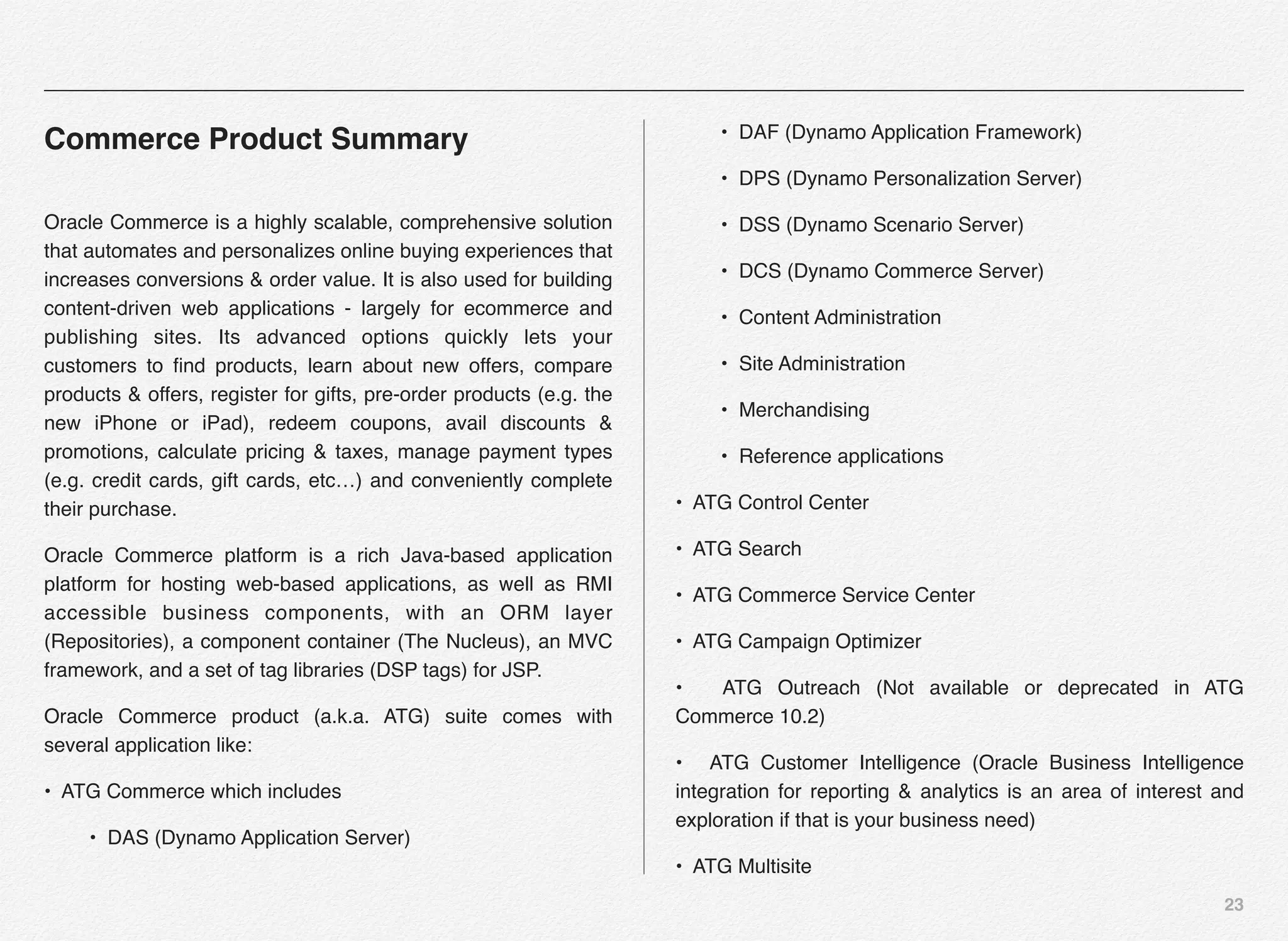
I. Commerce Product Summary
II. Functional Descriptions
III. Commerce for Business Users
IV. Commerce for Developers
23
Commerce Product Summary
Oracle Commerce is a highly scalable, comprehensive solution
that automates and personalizes online buying experiences that
increases conversions & order value. It is also used for building
content-driven web applications - largely for ecommerce and
publishing sites. Its advanced options quickly lets your
customers to find products, learn about new offers, compare
products & offers, register for gifts, pre-order products (e.g. the
new iPhone or iPad), redeem coupons, avail discounts &
promotions, calculate pricing & taxes, manage payment types
(e.g. credit cards, gift cards, etc…) and conveniently complete
their purchase.
Oracle Commerce platform is a rich Java-based application
platform for hosting web-based applications, as well as RMI
accessible business components, with an ORM layer
(Repositories), a component container (The Nucleus), an MVC
framework, and a set of tag libraries (DSP tags) for JSP.
Oracle Commerce product (a.k.a. ATG) suite comes with
several application like:
• ATG Commerce which includes
• DAS (Dynamo Application Server)
• DAF (Dynamo Application Framework)
• DPS (Dynamo Personalization Server)
• DSS (Dynamo Scenario Server)
• DCS (Dynamo Commerce Server)
• Content Administration
• Site Administration
• Merchandising
• Reference applications
• ATG Control Center
• ATG Search
• ATG Commerce Service Center
• ATG Campaign Optimizer
• ATG Outreach (Not available or deprecated in ATG
Commerce 10.2)
• ATG Customer Intelligence (Oracle Business Intelligence
integration for reporting & analytics is an area of interest and
exploration if that is your business need)
• ATG Multisite
24
Functional Descriptions
Let us look at these terms a little closer:
Dynamo Application Server
The ATG Dynamo Application Server (DAS) is a high-
performance application engine that is built on Java standards
and highly scalable application server that provides the system
and application developer with all the benefits of Java including
the easy re-use and portability benefits of JavaBean and
Enterprise JavaBean components.
Dynamo Application Framework
The ATG Dynamo Application Framework (DAF) is the base of
component development environment, which is made up of the
JavaBeans & JSPs. This helps developers assemble
applications comprised of component beans by associating
them using the configuration files in the ATG Nucleus. Nucleus
is ATG’s open object framework (OOF). DAF doesn’t have any
business user tasks that require you to directly interact with the
framework itself.
Dynamo Personalization Server
The ATG Dynamo Personalization Server (DPS) delivers a
highly personalized customer experience to the end-users with
the help of ATG user profile & personalization business rules,
e.g. which banners to show to which group of customers or
which product bundles to show to new v/s existing customers or
what content to show to users of specific income age or which
products to show to men v/s women. Also, you can fuse lot of
complex rules as one segment and target the visitors/
customers accordingly. These are some of the examples of
personalized content. DPS also supports targeted email
delivery to specific group of customers under different life-stage
or ordering life cycle.
Dynamo Scenario Server
The ATG Dynamo Scenario Server (DSS) takes personalization
to next level. It extends the content targeting capabilities of the
DPS (personalization module) giving business the flexibility to
create business processes a.k.a. scenarios that are time-
sensitive, event-driven campaigns designed to manage
interactions between the site visitors and the content over a
period of time. Some scenarios can be short-lived, whereas
others can be long-lived. Also, the scenarios are re-usable
under different situations and repeatable for the customers who
are simply passing thru the same stage of lifecycle with the
company as some others have in past.
Dynamo Commerce Server
The ATG Dynamo Commerce Server (DCS) provides the
foundation code for creating an online store or commerce site.
25
Commerce site includes features that allow you to manage
product catalogs, pricing, taxation, inventory, promotions,
discounts, coupons, and fulfillment of the same including
returns and exchanges.
Content Administration
The ATG Content Administration (CA) provides set of tools for
business users to publish and maintain content for ATG-based
web applications. It helps business users to manage contents/
assets through different stages of lifecycle that includes
creation, amendment, versioning, approval, and deployment.
The content/assets are promoted from development to testing
to staging to production environments. Version of the content is
very important to be able to promote or rollback the content
from production environment. Content administration is integral
to the ATG platform and is installed along with the platform
itself. Business users can access the content administration
module using the BCC (Business Control Center) UI.
Site Administration
ATG Site Administration is a utility that is installed with the ATG
platform and is used by the business users to register and
configure one or more web sites. Site administration can be
launched from the BCC UI.
Merchandising
The ATG Commerce Merchandising provides full control to the
business users over merchandising process. The business
users can efficiently and creatively manage all aspects of cross-
channel and multisite commerce. Merchandising is an element
of utmost importance for company with any online presence
regardless of its industry (retail, consumer & luxury goods,
financial services, digital media & high tech, communications,
and airlines).
ATG Control Center
The ATG Control Center is a point & click Java UI that gives
you access & control to all the features of the ATG Commerce
platform. ACC is a precursor to BCC. Though BCC is a
recommended UI to perform most of the business tasks, users
can also use ACC to perform the same. There are tasks such
as workflows, scenarios, and slots, which can be performed
exclusively in ACC and are not available in BCC.
ATG Search
The ATG Search capability when integrated with the commerce
site allows the users to search any document (such as a PDF
or HTML file) or repository item such as a commerce product
from the catalog or any structured piece of data from a
26
transactional database, such as order transaction DB in SQL
Server or Oracle.
ATG Commerce Service Center
The ATG Commerce Service Center (CSC) module brings the
same personalized ecommerce experience to the contact
center as to online. CSC is a web-based application available to
the agents in the contact center to address customer needs for
ordering transactions, customer care, and sales support. The
customer could be using the phone, email, chat, or the website
for initiating or completing their transactions. In a cross-channel
scenario the customer could have initiated their order on the
web, dropped the site on a certain page and called into the
contact center via the phone or initiated the chat with the agent.
In either case, the agent in the contact center should be able to
pull the incomplete online transaction and assist the customer
to complete the order. This type of cross-channel
communication reduces the AHT (Average Handling Time) and
boost agent productivity and sales. This is a result of the
features such as shared cart across the channels or multi-sites.
ATG Campaign Optimizer
Assume a scenario in which you are launching a new product
bundle, a new product or new marketing landing pages. The
marketing team wants to test these out on a certain segment of
customers or launch the landing pages in certain zip codes.
The purpose is to have both old and new pages available in live
environment so as you can compare & measure the
effectiveness of new v/s the old or one product bundle v/s the
other. You can perform A/B or MVT (Multivariate) testing using
the ATG Optimizer. The most fundamental benefit of using the
optimizer modules comes from its ability for business to make
well-informed decisions and hence increases the revenue.
ATG Outreach
The ATG Outreach is a companion product for marketing
professionals. It helps marketing team to create, deploy and
manage outbound marketing campaign programs. ATG
Outreach, built on the ATG Scenario Engine, allows business
users to create powerful, multi-step campaigns using the ATG
Business Control Center (BCC). As a marketer you need to
learn to use the BCC to build, deploy, execute and monitor
customer service and marketing campaigns. You can build
multi-stage campaigns that span across and integrate Web,
email, and contact center channels.
ATG Customer Intelligence
The ATG Customer Intelligence (ACI) module provides access
to tools business can use to analyze data, drill-down to the
details, come up with actionable insights, and make informed
decisions for improving the KPIs (Key Performance Indicators).
The business data analysis tools provide access to all data
27
related to internal and external customer interactions. The
business users can also perform ad-hoc queries, create
individual or team dashboards and scorecards. You can also
automate the delivery of reports on time-basis. ATG provides
out-of-the-box integration of ACI with ATG Commerce, ATG
Outreach, ATG Search, ATG Self Service, and ATG Knowledge.
ATG Multisite
Lot of online commerce sites manages multiple sites or stores
based on the business or customer segment needs. For e.g.
you may have a site for all customers v/s specific micro-site for
Spanish or Chinese language customers. Though the user
interaction will be in a specific language, the underlying product
catalog will still remain the same. Sometime organizations
dealing with huge type of inventory may decide to have
separate sites for electronic products v/s the appliances and
still may want the customer to be able to shop across multiple
sites and complete the commerce transaction in single cart and
checkout process. These are ideal candidates for ATG multisite
architecture. Business users are able to manage multiple sites
using the Site Administration functionality available in the BCC
(Business Control Center) UI as shown in the screenshot.
ATG Products
ATG products is an umbrella term that covers all the modules in
the entire ATG software suite (including the platform) - e.g. ATG
Web Commerce Platform, ATG Control Center, ATG Commerce
Reference Store, etc...
ATG Installation
ATG installation is a collective term that includes all the tools,
files, classes, etc.. used by the development team for
developing and assembling the J2EE module in the ATG
Nucleus-based application.
28
ATG Server
ATG server is a configuration layer driven by the component
JavaBeans and the configuration property files that is available
to be added to other configuration layers by the application
assembler when assembling an EAR
Dynamo Server Admin
Dynamo server admin is a set of web pages that you can use to
configure and/or monitor the ATG installation. It provides you
with a number of useful features, such as, modify the the
configuration of ATG server instance, browser the Nucleus
component hierarchy, change admin password, view user
profiles etc...
Once you have installed and configured ATG web commerce,
you can navigate to the Dynamo server admin by browsing to
the following url: http://localhost:8080/dyn/admin.
Note: The hostname and port are subject to your own
installation and configuration.
Component
Component is a Java object instance of a specific configuration
for a JavaBean. This JavaBean is typically registered with
Nucleus.
Oracle Commerce for Business Users
The ATG platform provides all necessary tools and capabilities
to create a compelling and personalized online buying
experience. Business users have the flexibility to create,
manage, and maintain multiple sites based on the customers
niche & needs, all referring to the same product catalog and
create a unique experience for targeted set of customers. They
have the ability to quickly launch campaigns to quickly respond
to the competition. ATG provides out-of-the-box tool called BCC
(Business Control Center) that allows the business users to
manage and maintain web storefront, including a complete and
customizable review and approval workflow. This helps
streamline the online experience & decision making.
Oracle Commerce for Developers
The Dynamo Application Framework (DAF) runs on top of your
application server and supplies essential facilities for
application development and deployment (Nucleus,
Repositories, tag libraries, security, etc.). It gives you an RMI
container, distributed caching, distributed locking and
distributed singletons, distributed events and messaging, a task
29
scheduler, a rules engine and a mechanism for defining
business workflows with custom actions and outcomes, a
graphical editor for business workflows, support for versioned
data, support for roles and rights, logging and auditing - all out
of the box, and all using very coherent and consistent APIs.
At application level, you have the components and the APIs for
dealing with user profiling, identity management and
personalization, content authoring, versioning and publishing,
content search, product catalogs for tangible and intangible
goods, product search and guided navigation, pricing, tax
calculation, promotions, shopping carts, gift lists and wish lists,
payment types, shipping methods, order tracking, customer
relationship management etc.
ATG application is a piece of software, installed independent of
the ATG platform, which can be included as a module or set of
modules in a Nucleus-based application.
30
Section 2
Oracle Commerce
Core Concepts
I. What’s in the Box?
II.Oracle Commerce Core
Concepts
31
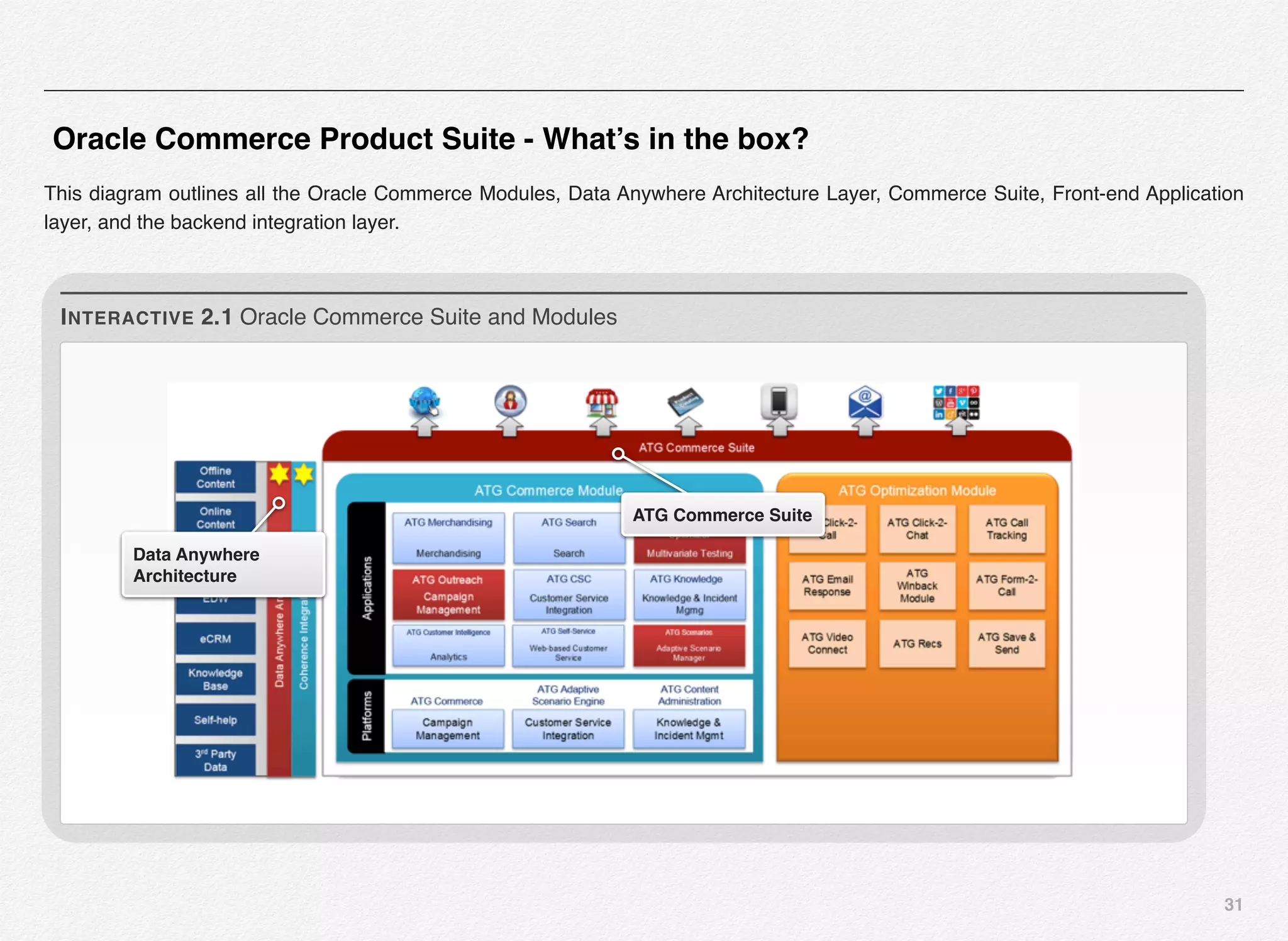
Oracle Commerce Product Suite - What’s in the box?
This diagram outlines all the Oracle Commerce Modules, Data Anywhere Architecture Layer, Commerce Suite, Front-end Application
layer, and the backend integration layer.
Data Anywhere
Architecture
ATG Commerce Suite
INTERACTIVE 2.1 Oracle Commerce Suite and Modules
32
Note: Some of these components might be deprecated or could
have taken form of SaaS model by disintegrating from the
Oracle Commerce stack by Oracle to better justify their
presence in overall Oracle products ecosystem.
Oracle Commerce Core Concepts
In this section we will cover some of the core terms & concepts
that you will frequently you while working with Oracle
Commerce platform, amongst the development & business
teams, and which you much absolutely familiarize with.
Nucleus
The Nucleus is a lightweight container for managing the life
cycle and dependency binding of Java component objects. It is
the core of the Oracle Commerce framework and all other
services and frameworks are hosted within it.
It’s essentially an object container that manages the lifecycle of
POJOs (Plain Old Java Objects) using reflection and
dependency injection. It's responsible for instantiating objects
and setting their properties based on a very flexible but well
defined configuration layering hierarchy using simple properties
text files. In Oracle Commerce world, these objects are called
components (basically named JavaBeans and Servlets) that
can be linked together via these configuration files by a
developer to create an Commerce application. Nucleus also
maintains a name hierarchy and is responsible for resolving
these names to components, which can be request, session or
globally scoped.
Nucleus-based applications are assembled into EAR files that
include both the application and Oracle Commerce platform
resources, and which are then deployed to your application
server.
ATG products are built on top of industry standards that include:
• Java
• JavaBeans
• Servlets
• Java Server Pages (JSPs)
• Wireless Application Protocols (WAP/WML)
Nucleus components are standard JavaBeans, each with an
accompanying .properties file, storing configuration values.
Nucleus sets the configured values on each new instance of a
component.
33
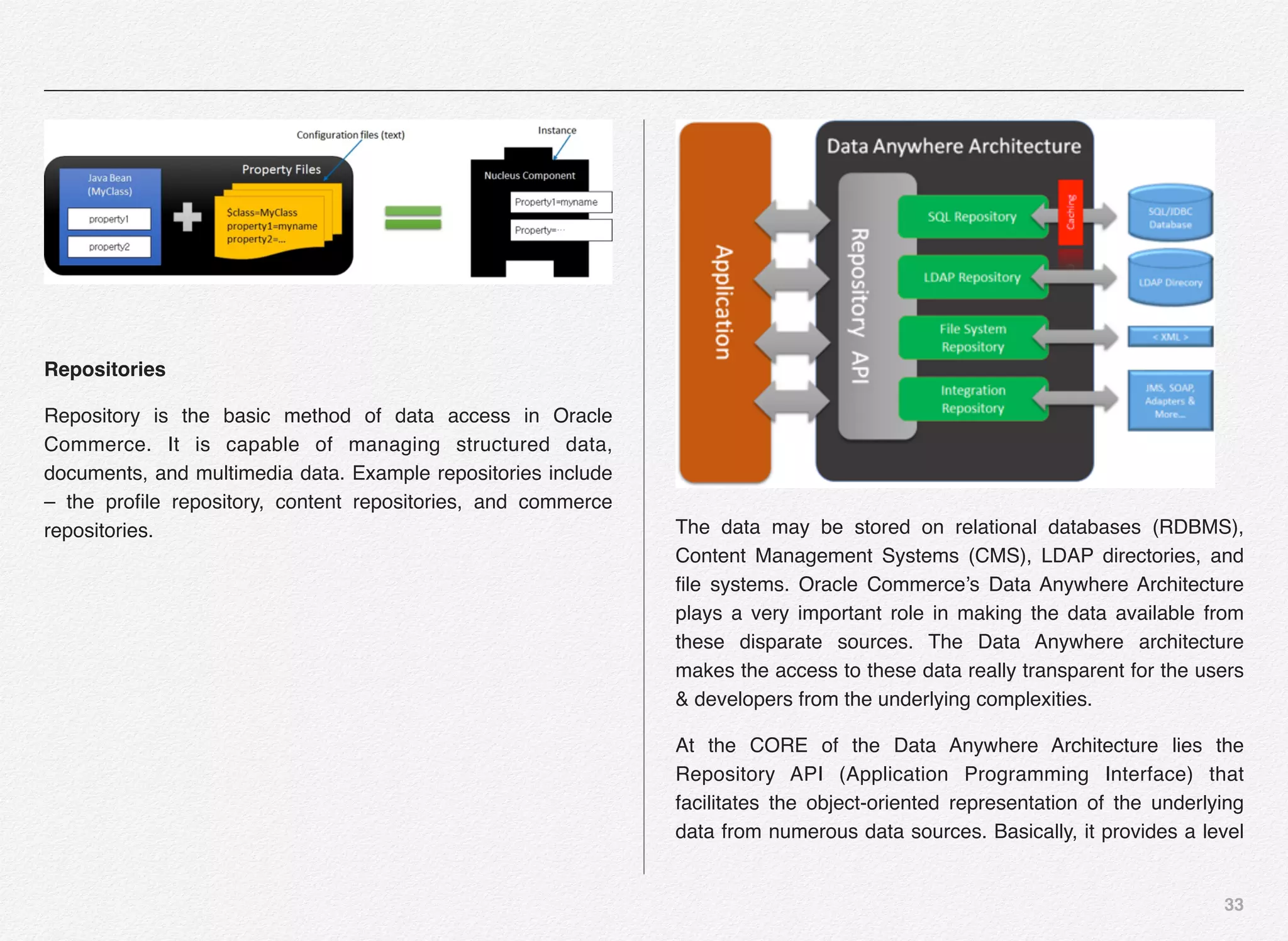
Repositories
Repository is the basic method of data access in Oracle
Commerce. It is capable of managing structured data,
documents, and multimedia data. Example repositories include
– the profile repository, content repositories, and commerce
repositories. The data may be stored on relational databases (RDBMS),
Content Management Systems (CMS), LDAP directories, and
file systems. Oracle Commerce’s Data Anywhere Architecture
plays a very important role in making the data available from
these disparate sources. The Data Anywhere architecture
makes the access to these data really transparent for the users
& developers from the underlying complexities.
At the CORE of the Data Anywhere Architecture lies the
Repository API (Application Programming Interface) that
facilitates the object-oriented representation of the underlying
data from numerous data sources. Basically, it provides a level
34
of abstraction and shields the developers from underlying
complexities as mentioned above.
Connectors
Oracle Commerce provides connectors that create hooks into
these disparate data sources. E.g. SQL connector is available
to connect to RDBMS, LDAP connecter helps you to connect to
the LDAP directories, FS Connector helps in connecting to the
File System, and CMS connector helps connecting with various
Content Management Systems.
The role of a connector is to translate the request into whatever
calls are needed to access that particular data source.
Connectors for RDBMS and LDAP directories are made
available out-of-the-box. The open and published interface
design of the connectors makes it possible to develop
additional custom connectors if necessary.
Developers use the repository API to connect, query, create,
delete, and modify repository items.
Profiles
To understand the ATG user profiles, let us start with the basic
understand about the need for user profiles. With the level of
details that the companies collect about their online users and
the objective of reducing digital marketing waste is what is
driving the need for online profiling. The activity of observing,
gathering, and storing the actions performed by your users and
any additional information that can separate one user from
another is known as online profiling.
The intent is very clear, once you visit the site and come to the
site again you should not be treated as an anonymous visitor
anymore (unless of course, you have deleted all your cookies).
Companies should be able to identify the visitor based on past
visit(s) and personalize the experience with the site or the given
channel accordingly. So, this makes the case for the ATG user
profiles. User profile is the collection of information about the
person visiting your website or a specific marketing channel or
touch-point.
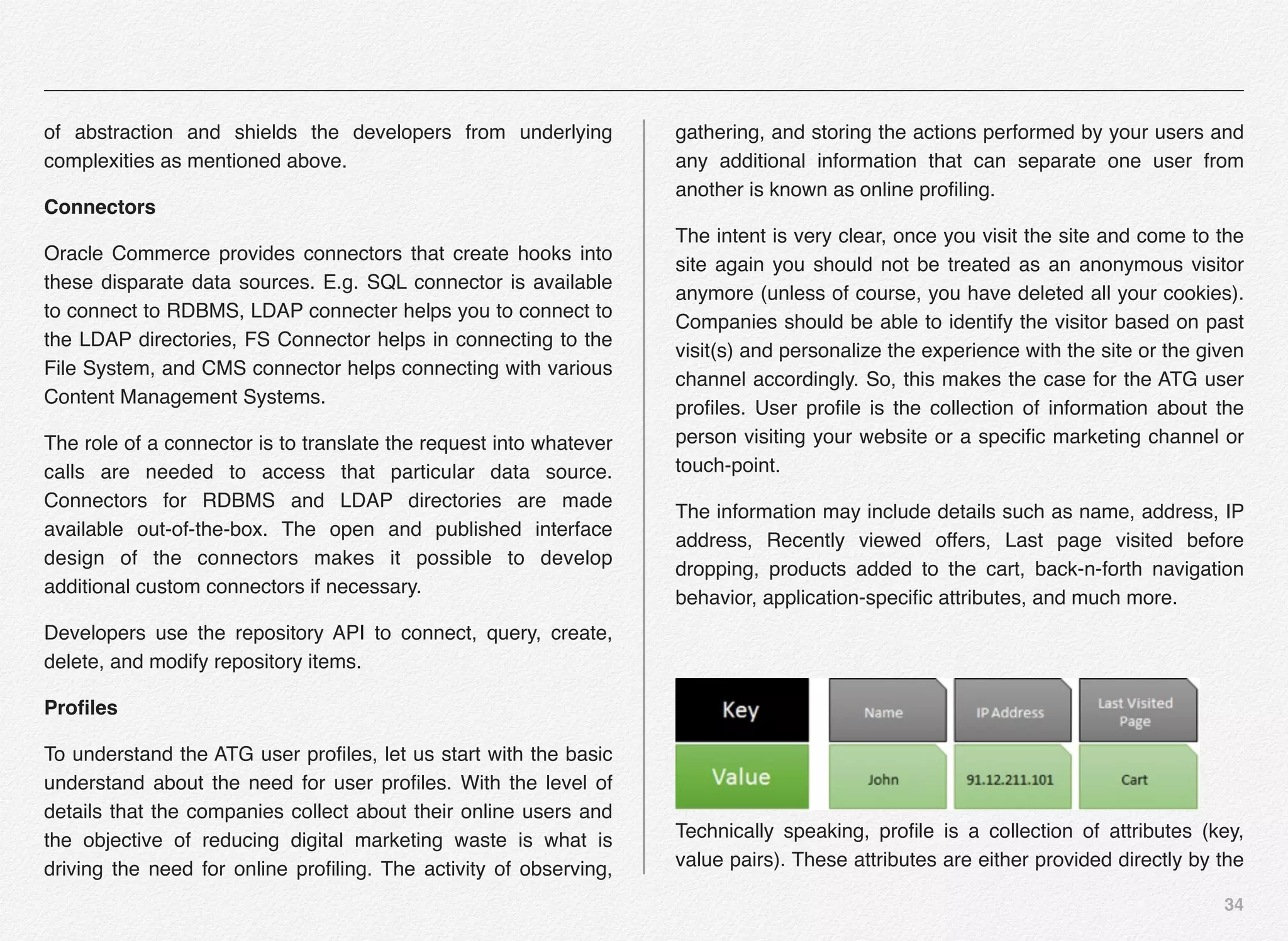
The information may include details such as name, address, IP
address, Recently viewed offers, Last page visited before
dropping, products added to the cart, back-n-forth navigation
behavior, application-specific attributes, and much more.
Technically speaking, profile is a collection of attributes (key,
value pairs). These attributes are either provided directly by the
35
user or collected based on browsing behavior or could be
shared information across multi-channels or multi-sites.
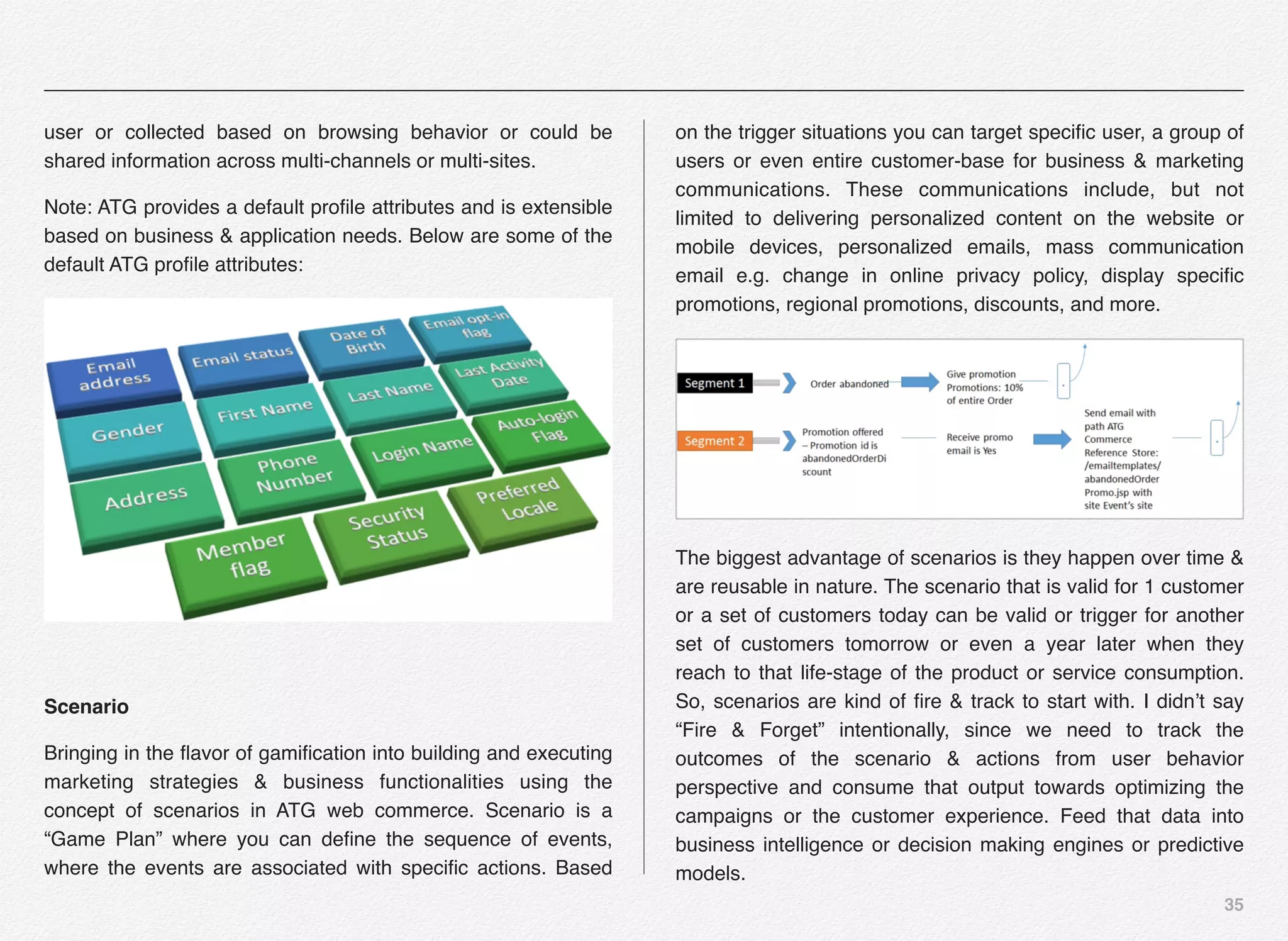
Note: ATG provides a default profile attributes and is extensible
based on business & application needs. Below are some of the
default ATG profile attributes:
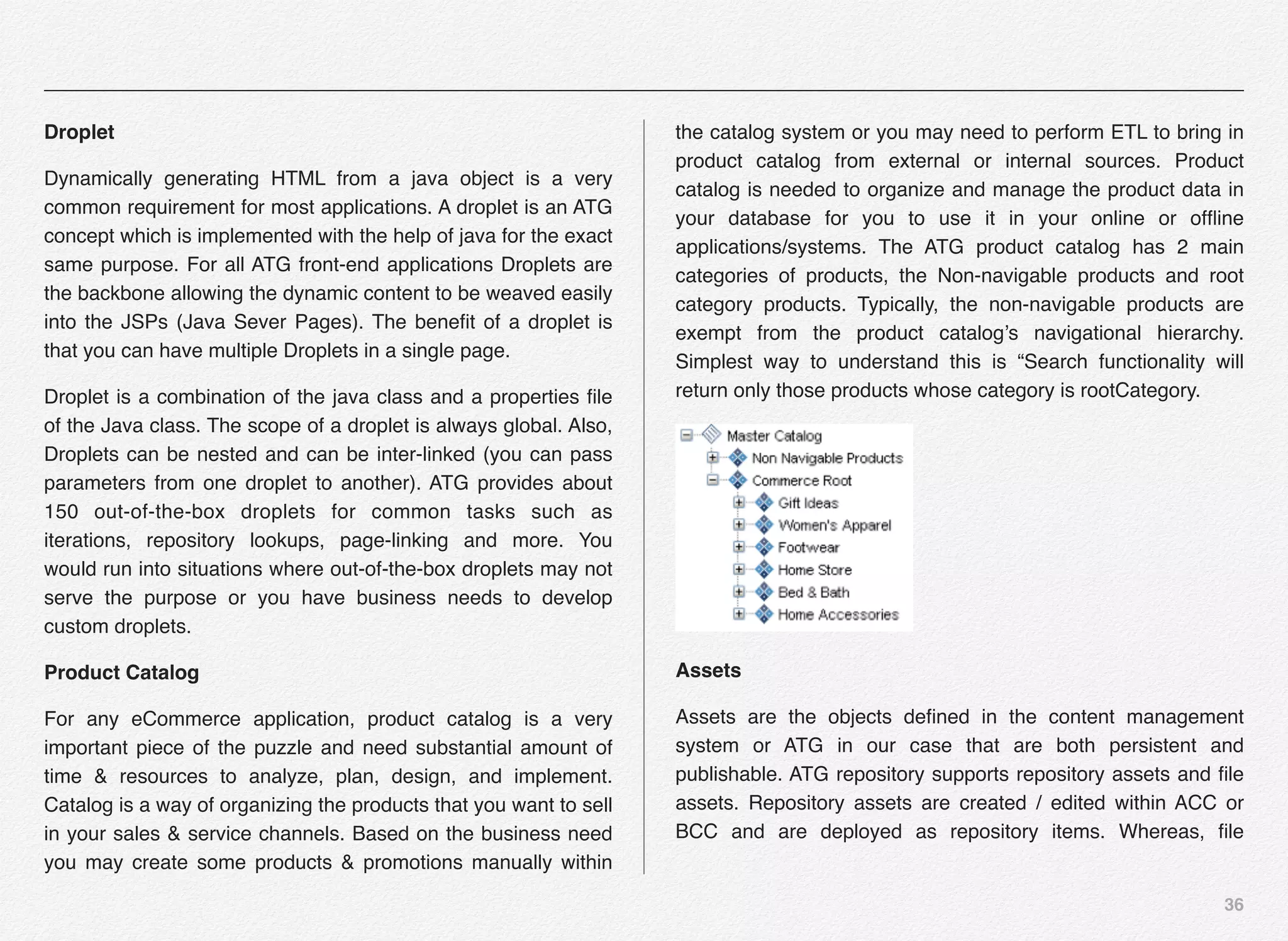
Scenario
Bringing in the flavor of gamification into building and executing
marketing strategies & business functionalities using the
concept of scenarios in ATG web commerce. Scenario is a
“Game Plan” where you can define the sequence of events,
where the events are associated with specific actions. Based
on the trigger situations you can target specific user, a group of
users or even entire customer-base for business & marketing
communications. These communications include, but not
limited to delivering personalized content on the website or
mobile devices, personalized emails, mass communication
email e.g. change in online privacy policy, display specific
promotions, regional promotions, discounts, and more.
The biggest advantage of scenarios is they happen over time &
are reusable in nature. The scenario that is valid for 1 customer
or a set of customers today can be valid or trigger for another
set of customers tomorrow or even a year later when they
reach to that life-stage of the product or service consumption.
So, scenarios are kind of fire & track to start with. I didn’t say
“Fire & Forget” intentionally, since we need to track the
outcomes of the scenario & actions from user behavior
perspective and consume that output towards optimizing the
campaigns or the customer experience. Feed that data into
business intelligence or decision making engines or predictive
models.
36
Droplet
Dynamically generating HTML from a java object is a very
common requirement for most applications. A droplet is an ATG
concept which is implemented with the help of java for the exact
same purpose. For all ATG front-end applications Droplets are
the backbone allowing the dynamic content to be weaved easily
into the JSPs (Java Sever Pages). The benefit of a droplet is
that you can have multiple Droplets in a single page.
Droplet is a combination of the java class and a properties file
of the Java class. The scope of a droplet is always global. Also,
Droplets can be nested and can be inter-linked (you can pass
parameters from one droplet to another). ATG provides about
150 out-of-the-box droplets for common tasks such as
iterations, repository lookups, page-linking and more. You
would run into situations where out-of-the-box droplets may not
serve the purpose or you have business needs to develop
custom droplets.
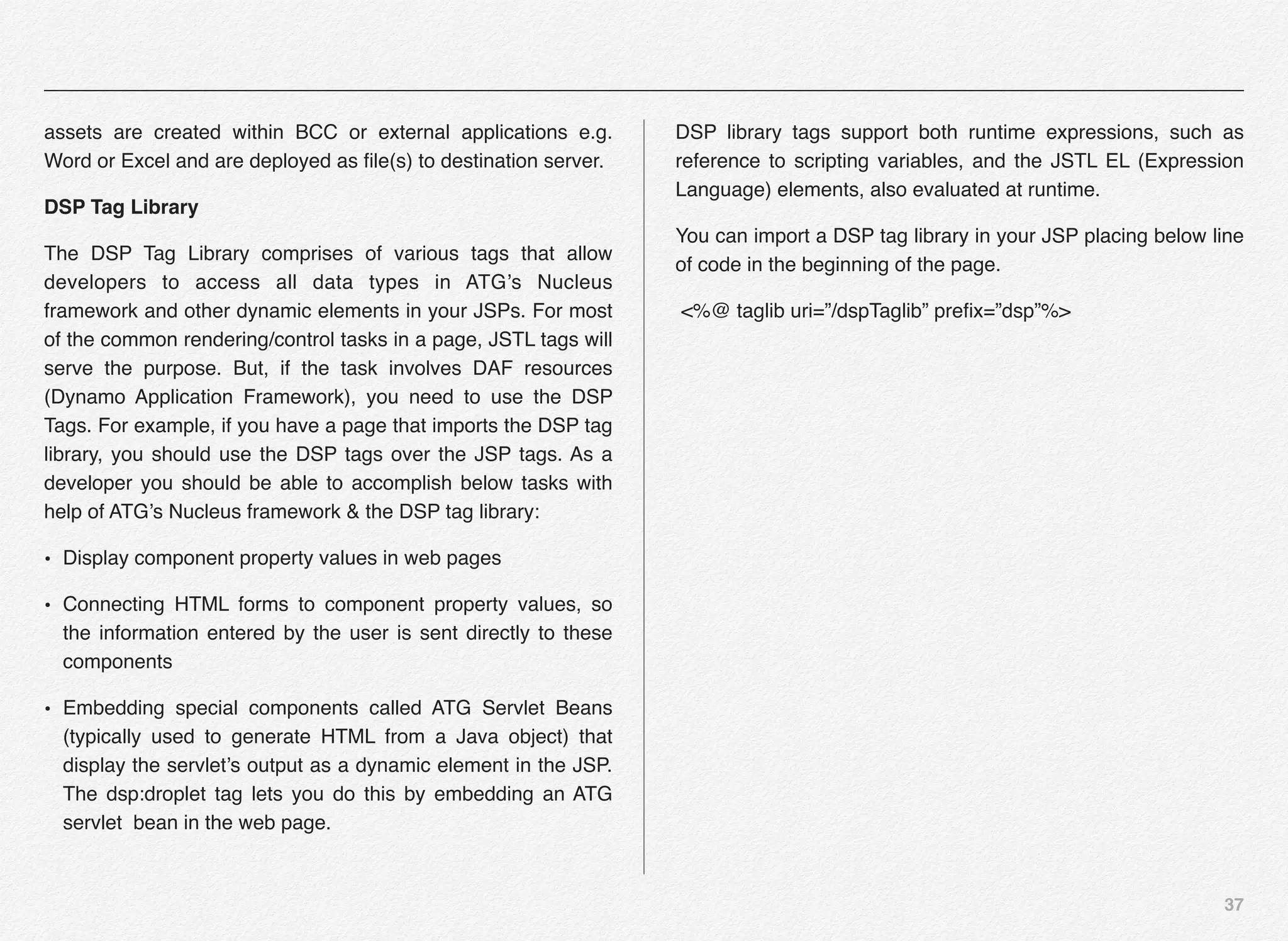
Product Catalog
For any eCommerce application, product catalog is a very
important piece of the puzzle and need substantial amount of
time & resources to analyze, plan, design, and implement.
Catalog is a way of organizing the products that you want to sell
in your sales & service channels. Based on the business need
you may create some products & promotions manually within
the catalog system or you may need to perform ETL to bring in
product catalog from external or internal sources. Product
catalog is needed to organize and manage the product data in
your database for you to use it in your online or offline
applications/systems. The ATG product catalog has 2 main
categories of products, the Non-navigable products and root
category products. Typically, the non-navigable products are
exempt from the product catalog’s navigational hierarchy.
Simplest way to understand this is “Search functionality will
return only those products whose category is rootCategory.
Assets
Assets are the objects defined in the content management
system or ATG in our case that are both persistent and
publishable. ATG repository supports repository assets and file
assets. Repository assets are created / edited within ACC or
BCC and are deployed as repository items. Whereas, file
37
assets are created within BCC or external applications e.g.
Word or Excel and are deployed as file(s) to destination server.
DSP Tag Library
The DSP Tag Library comprises of various tags that allow
developers to access all data types in ATG’s Nucleus
framework and other dynamic elements in your JSPs. For most
of the common rendering/control tasks in a page, JSTL tags will
serve the purpose. But, if the task involves DAF resources
(Dynamo Application Framework), you need to use the DSP
Tags. For example, if you have a page that imports the DSP tag
library, you should use the DSP tags over the JSP tags. As a
developer you should be able to accomplish below tasks with
help of ATG’s Nucleus framework & the DSP tag library:
• Display component property values in web pages
• Connecting HTML forms to component property values, so
the information entered by the user is sent directly to these
components
• Embedding special components called ATG Servlet Beans
(typically used to generate HTML from a Java object) that
display the servlet’s output as a dynamic element in the JSP.
The dsp:droplet tag lets you do this by embedding an ATG
servlet bean in the web page.
DSP library tags support both runtime expressions, such as
reference to scripting variables, and the JSTL EL (Expression
Language) elements, also evaluated at runtime.
You can import a DSP tag library in your JSP placing below line
of code in the beginning of the page.
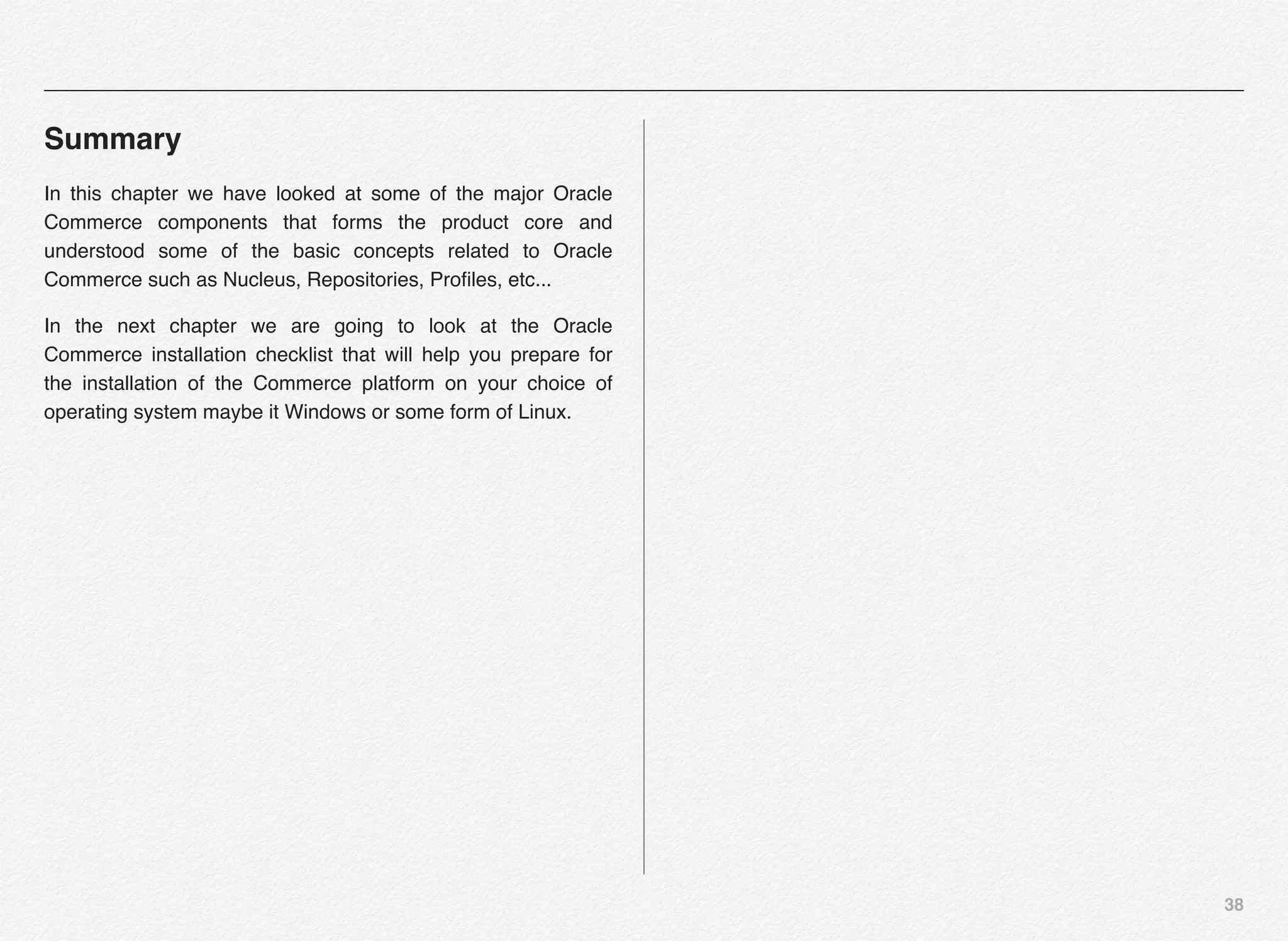
<%@ taglib uri=”/dspTaglib” prefix=”dsp”%>
38
Summary
In this chapter we have looked at some of the major Oracle
Commerce components that forms the product core and
understood some of the basic concepts related to Oracle
Commerce such as Nucleus, Repositories, Profiles, etc...
In the next chapter we are going to look at the Oracle
Commerce installation checklist that will help you prepare for
the installation of the Commerce platform on your choice of
operating system maybe it Windows or some form of Linux.
3
Thorough planning and
preparation is the key to
setting up the ATG Web
Commerce development
environment with least
amount of challenges
Oracle Commerce V11
Installation Checklist
40
Section 1
Oracle Commerce
(ATG & Endeca)
Installation
Checklist
I. Elaborative Checklist
II. Downloading Prerequisite Softwares
41
Elaborate Checklist
Oracle Commerce installation and configuration experience can
vary from rough-2-Smooth based on your exposure to the
product. We would call it a great adventure to start with and will
begin our journey by putting together a checklist of the
resources we need to perform the ATG & Endeca Commerce
installation and configuration on a developer machine. Let us
take a look at each aspect in details covering hardware
requirements, software requirements, and download details.
Hardware Requirements
Oracle Commerce 11.1 needs 64-bit hardware and at least
4-8GB of RAM for you to install and run it on the development
machine. If you can manage a system with 8+ GB RAM even
better.
Oracle Commerce v11.1 is the latest development in the
Commerce & Search landscape from Oracle.
OS Requirements
Oracle Commerce - both ATG & Endeca Commerce 11.1 need
64-bit version of Windows or Linux, OS to install and configure.
Oracle Commerce Software Checklist
Below is an elaborate list of softwares you will need for
successful installation & configuration of the Oracle Commerce:
1. Oracle JDK 1.7
2. WebLogic Server 12.1.2
3. Oracle Commerce Platform 11.1.0
4. Oracle Commerce Reference Store 11.1.0
5. Oracle Commerce ATG Control Center (OCC)
6. Oracle Commerce Customer Service Center (Optional)
7. Oracle Commerce MDEX Engine 6.5.1
8. Oracle Commerce Guided Search Platform Services 11.1.0
9. Oracle Commerce Content Acquisition System 11.1.0
10. Oracle Commerce Experience Manager Tools and
Frameworks 11.1.0
11. Oracle Commerce Developer Studio 11.1.0
42
12. Oracle Commerce and RightNow Reference Integration
11.1.0 (Optional)
13. Oracle Commerce and Social Relationship Management
11.1.0 (Optional)
14. Oracle Commerce Document Conversion Kit 11.1.0
(Optional)
15. Oracle Database Express Edition 11g Release 2
16. JDBC Driver for Your Database Software - Comes with
Oracle Database Express Edition
17. Eclipse IDE
18. SQL Client (e.g. Oracle SQL Developer Client )
Downloading Pre-requisites for Oracle Commerce
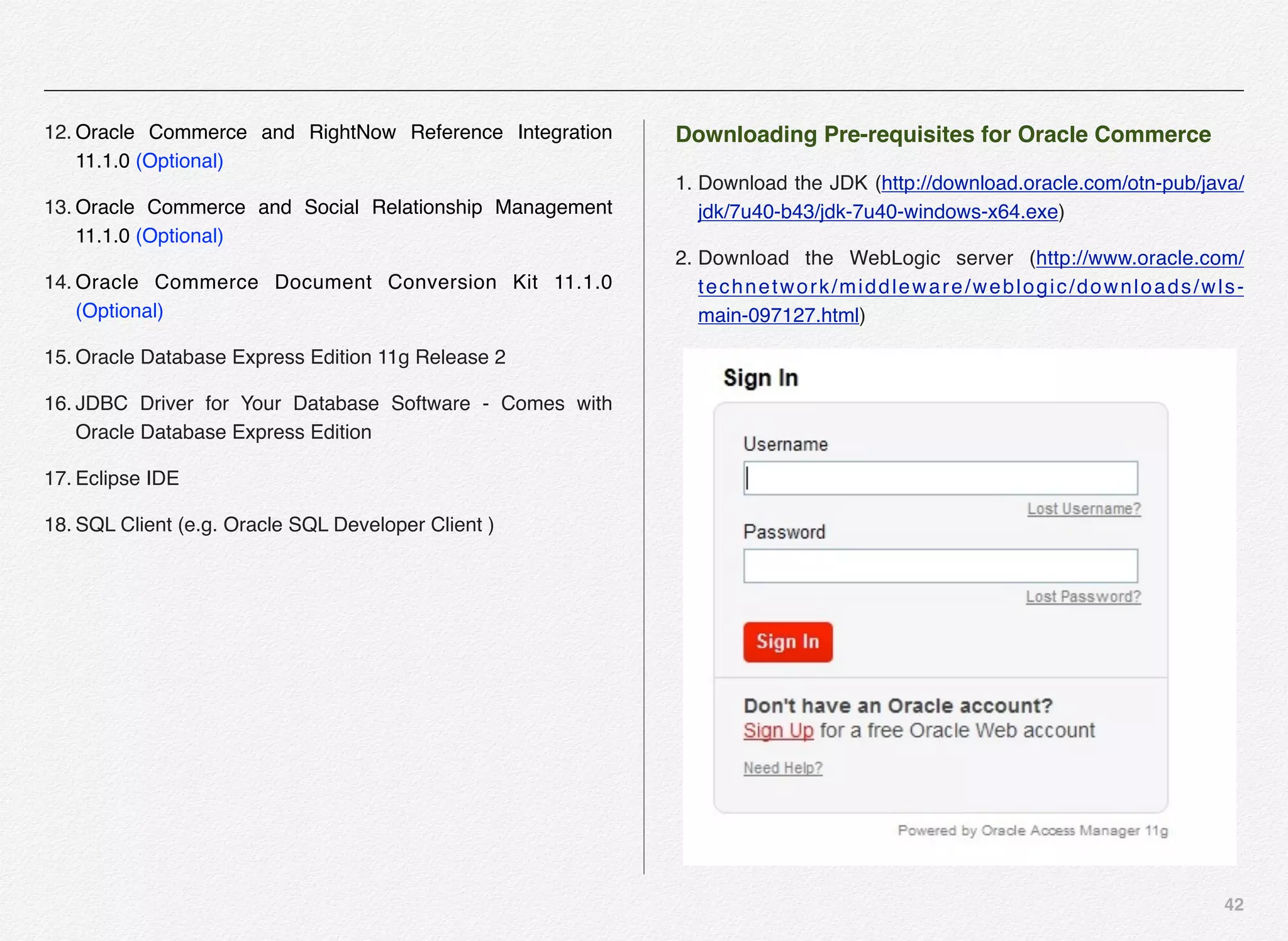
1. Download the JDK (http://download.oracle.com/otn-pub/java/
jdk/7u40-b43/jdk-7u40-windows-x64.exe)
2. Download the WebLogic server (http://www.oracle.com/
technetwork/middleware/weblogic/downloads/wls-
main-097127.html)
43
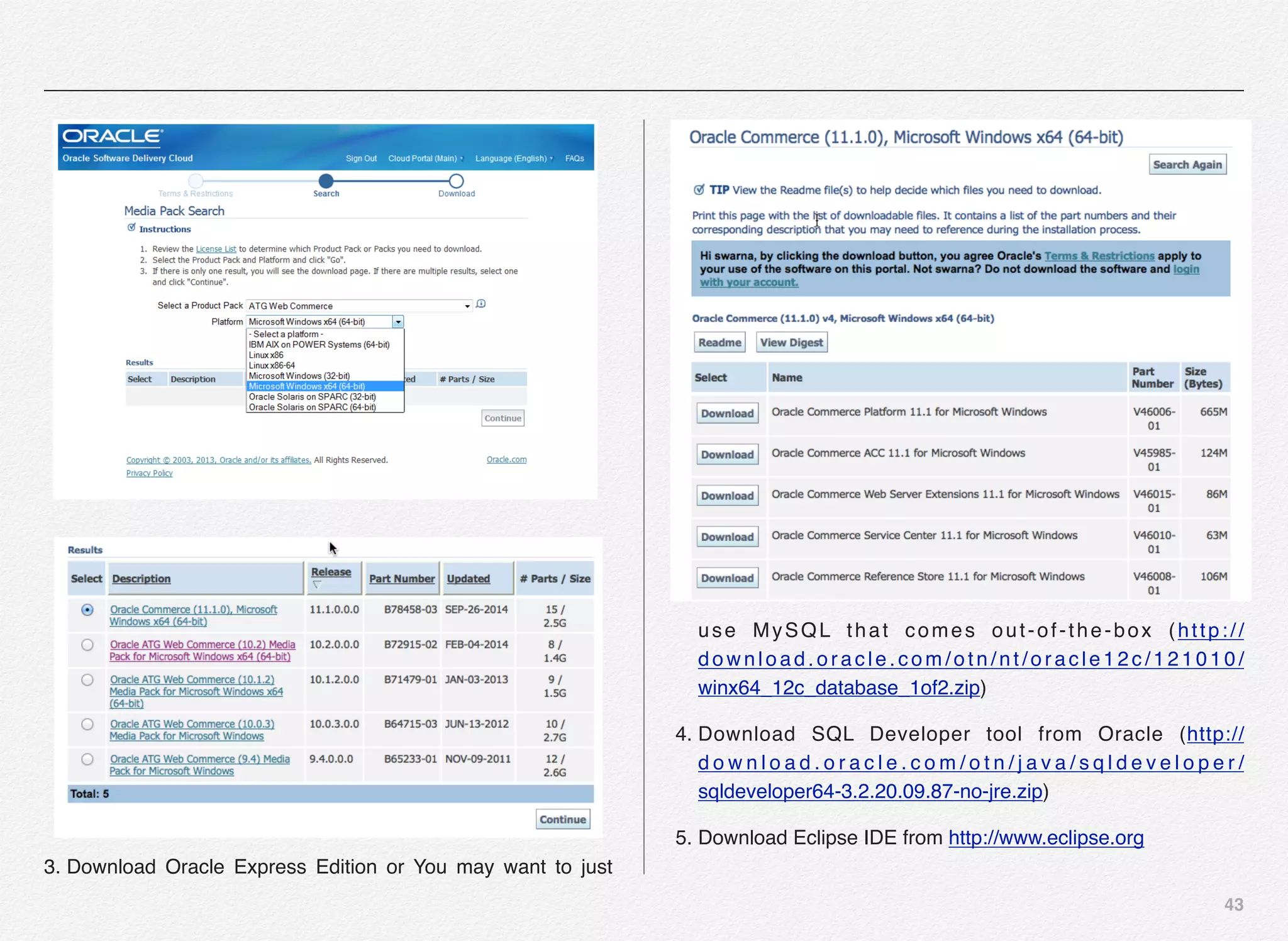
3. Download Oracle Express Edition or You may want to just
use MySQL that comes out-of-the-box (http://
download.oracle.com/otn/nt/oracle12c/121010/
winx64_12c_database_1of2.zip)
4. Download SQL Developer tool from Oracle (http://
d o w n l o a d . o r a c l e . c o m / o t n / j a v a / s q l d e v e l o p e r /
sqldeveloper64-3.2.20.09.87-no-jre.zip)
5. Download Eclipse IDE from http://www.eclipse.org
44
6. ATG Plug-in for Eclipse - Is now a part of your Oracle
Commerce Installation
7. Download the ATG Web Commerce Documentation at http://
www.oracle.com/technetwork/indexes/documentation/
atgwebcommerce-393465.html
Useful Tools from Open Source World
• ATG Log Colorizer
• ATG DUST (Dynamo Unit & System Test)
• ATG ANT
• ATG Repository Modeler
• ATG Repository Definition Editor
• ATG Repository Testing
• ATG Dynamo Servlet Testing
• ATG DUST Case (just like Junit’s Testcase)
• FormHandler Testing
• Eclipse IDE
• ATG Plug-in for Eclipse
• XML Editor (e.g. Notepad++ or XMLSPY)
45
Downloading the Oracle Commerce Modules
1. Sign-in to https://edelivery.oracle.com/
2. Read and Accept license agreement
3. Select product as ATG Web commerce
4. Select your platform as 64 bit
5. Select Oracle ATG Web Commerce (11.1.0)
There are 3 categories of modules:
1. Commerce
• Oracle Commerce Platform
• Oracle Commerce ACC
• Oracle Commerce Reference
• Oracle Commerce Service Center (Optional)
• Oracle Web Server Extensions (Optional)
2. Search / Experience Manager
• Oracle Commerce MDEX Engine
• Oracle Commerce Guided Search Platform
Section 2
Downloading the
Oracle Commerce
Modules
46
• Oracle Experience Manager Tools and Frameworks
• Oracle Commerce Content Acquisition System
• Oracle Commerce Developer Studio
3. Reference Integrations
• Oracle Commerce and RightNow integration
• Oracle Commerce and Social Media Relationship
• Oracle Commerce Reference Store
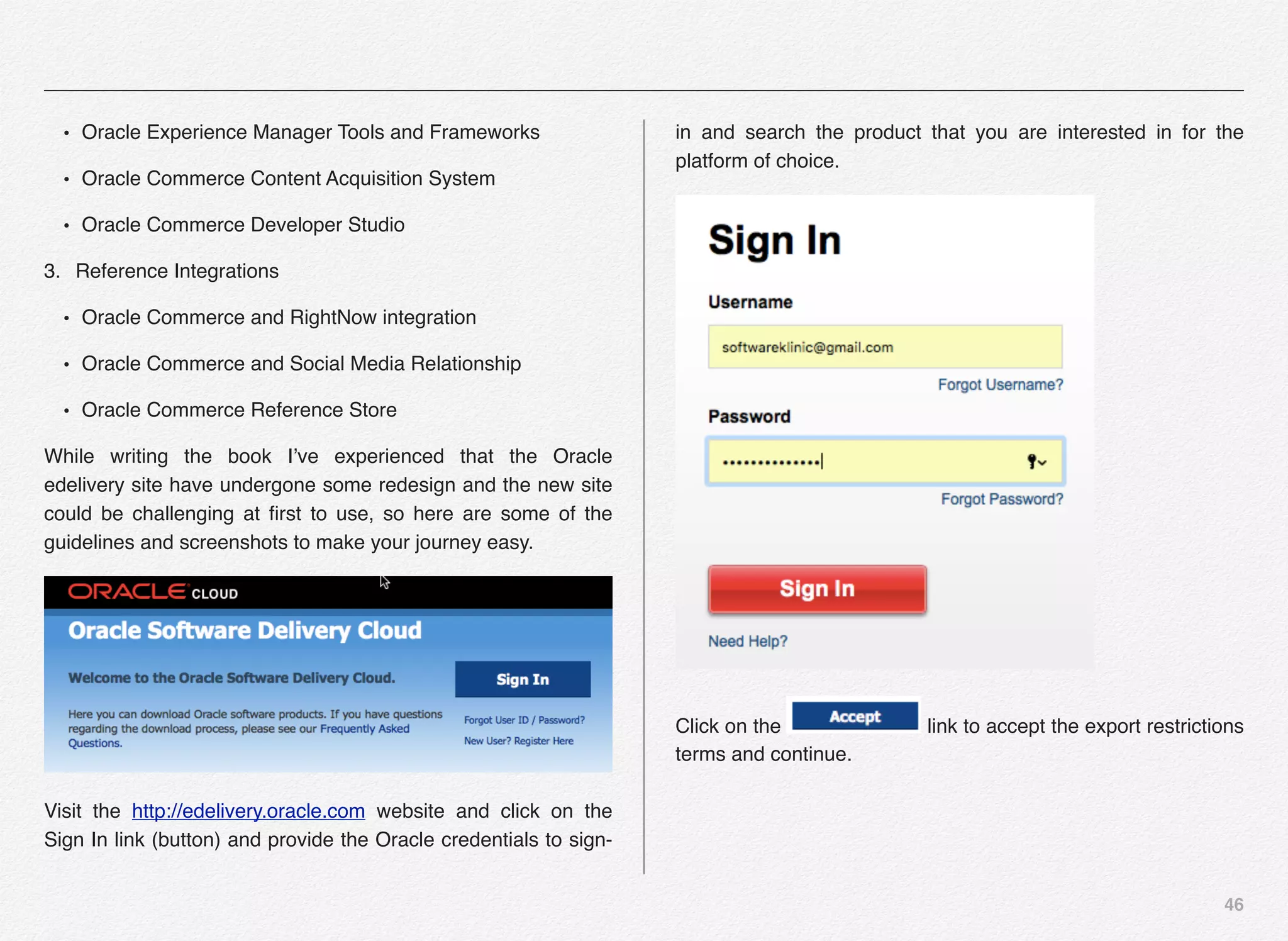
While writing the book I’ve experienced that the Oracle
edelivery site have undergone some redesign and the new site
could be challenging at first to use, so here are some of the
guidelines and screenshots to make your journey easy.
Visit the http://edelivery.oracle.com website and click on the
Sign In link (button) and provide the Oracle credentials to sign-
in and search the product that you are interested in for the
platform of choice.
Click on the link to accept the export restrictions
terms and continue.
47
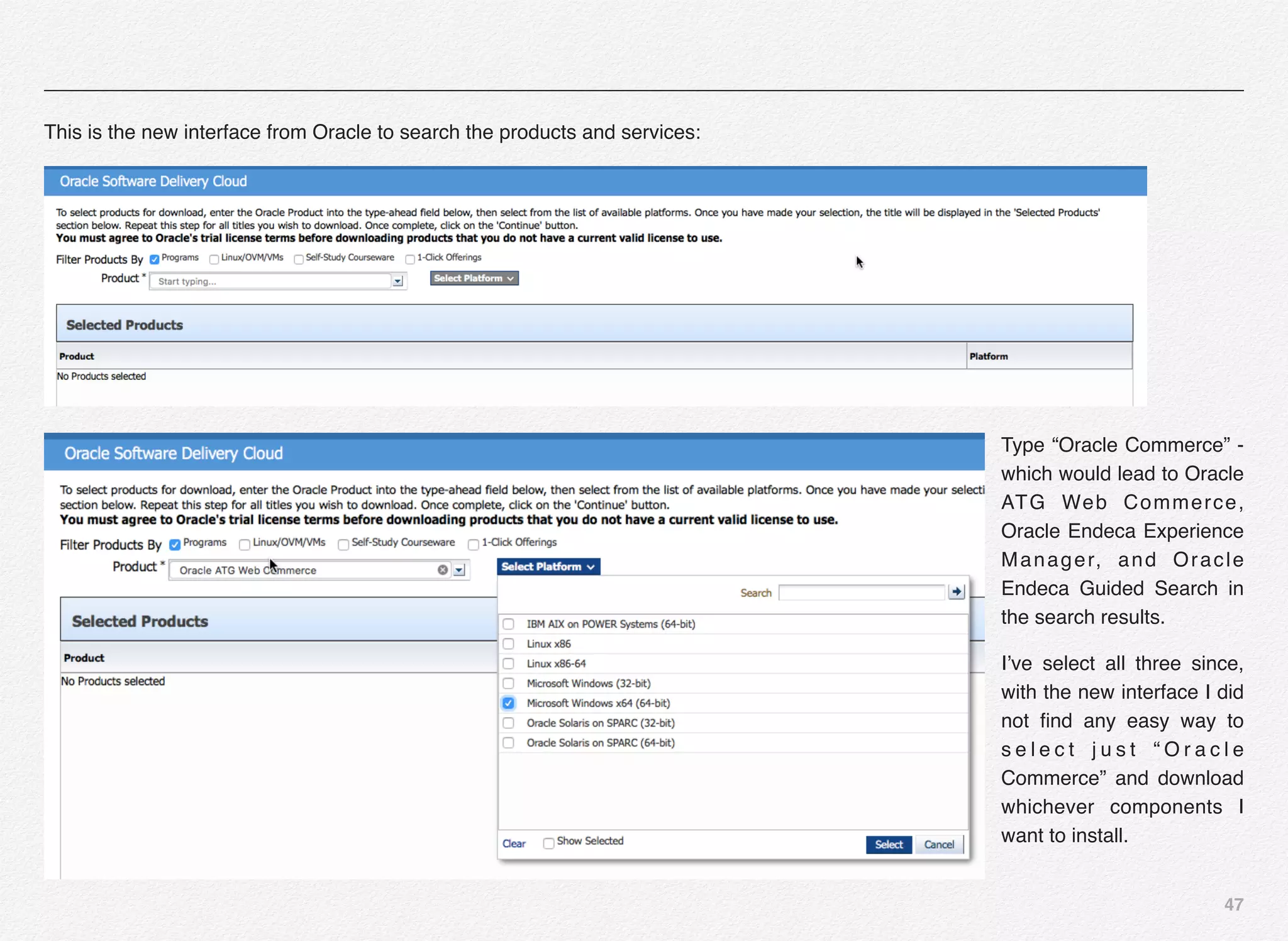
This is the new interface from Oracle to search the products and services:
Type “Oracle Commerce” -
which would lead to Oracle
ATG Web Commerce,
Oracle Endeca Experience
Manager, and Oracle
Endeca Guided Search in
the search results.
I’ve select all three since,
with the new interface I did
not find any easy way to
s e l e c t j u s t “ O r a c l e
Commerce” and download
whichever components I
want to install.
48
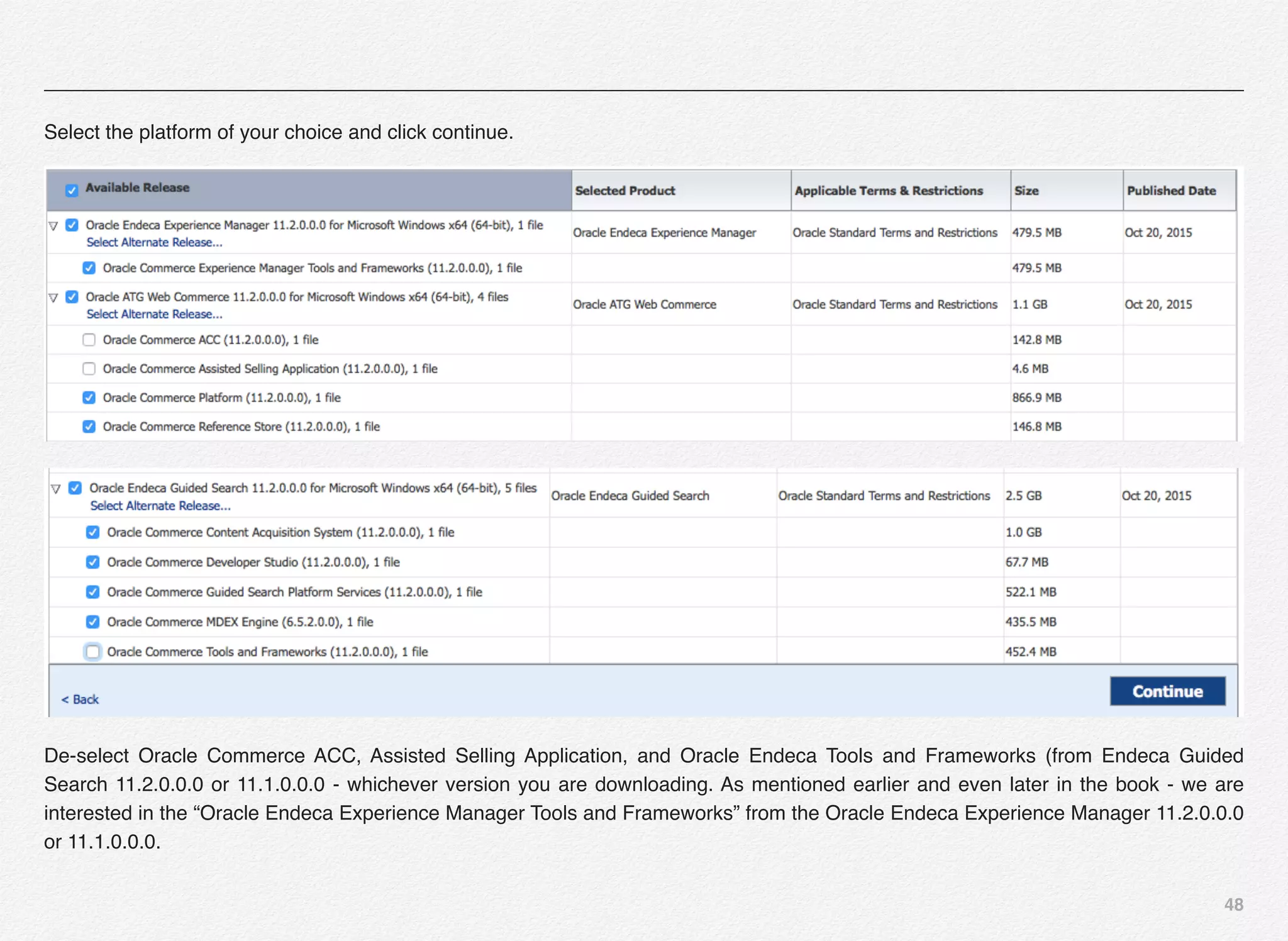
Select the platform of your choice and click continue.
De-select Oracle Commerce ACC, Assisted Selling Application, and Oracle Endeca Tools and Frameworks (from Endeca Guided
Search 11.2.0.0.0 or 11.1.0.0.0 - whichever version you are downloading. As mentioned earlier and even later in the book - we are
interested in the “Oracle Endeca Experience Manager Tools and Frameworks” from the Oracle Endeca Experience Manager 11.2.0.0.0
or 11.1.0.0.0.
49
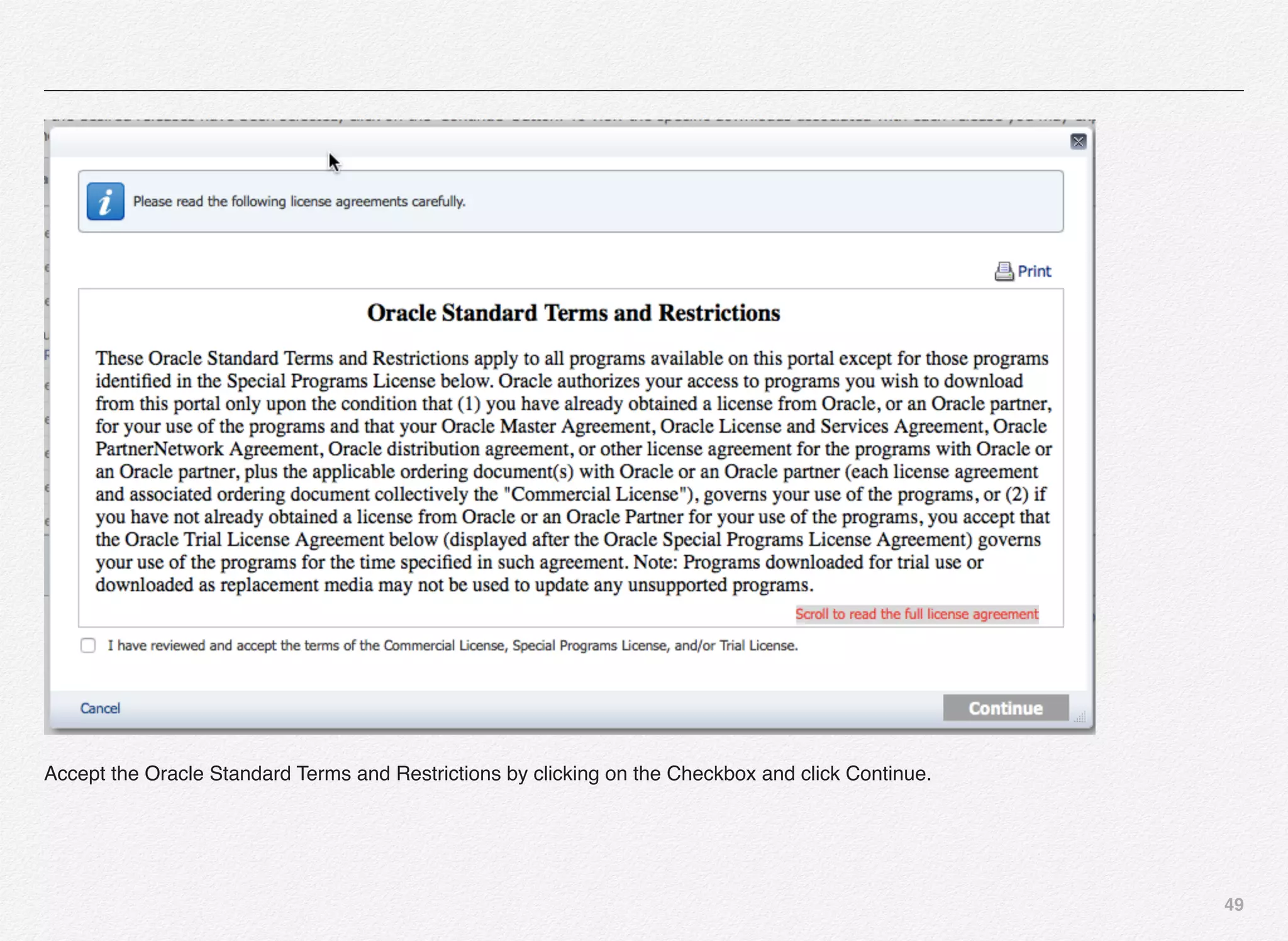
Accept the Oracle Standard Terms and Restrictions by clicking on the Checkbox and click Continue.
50
51
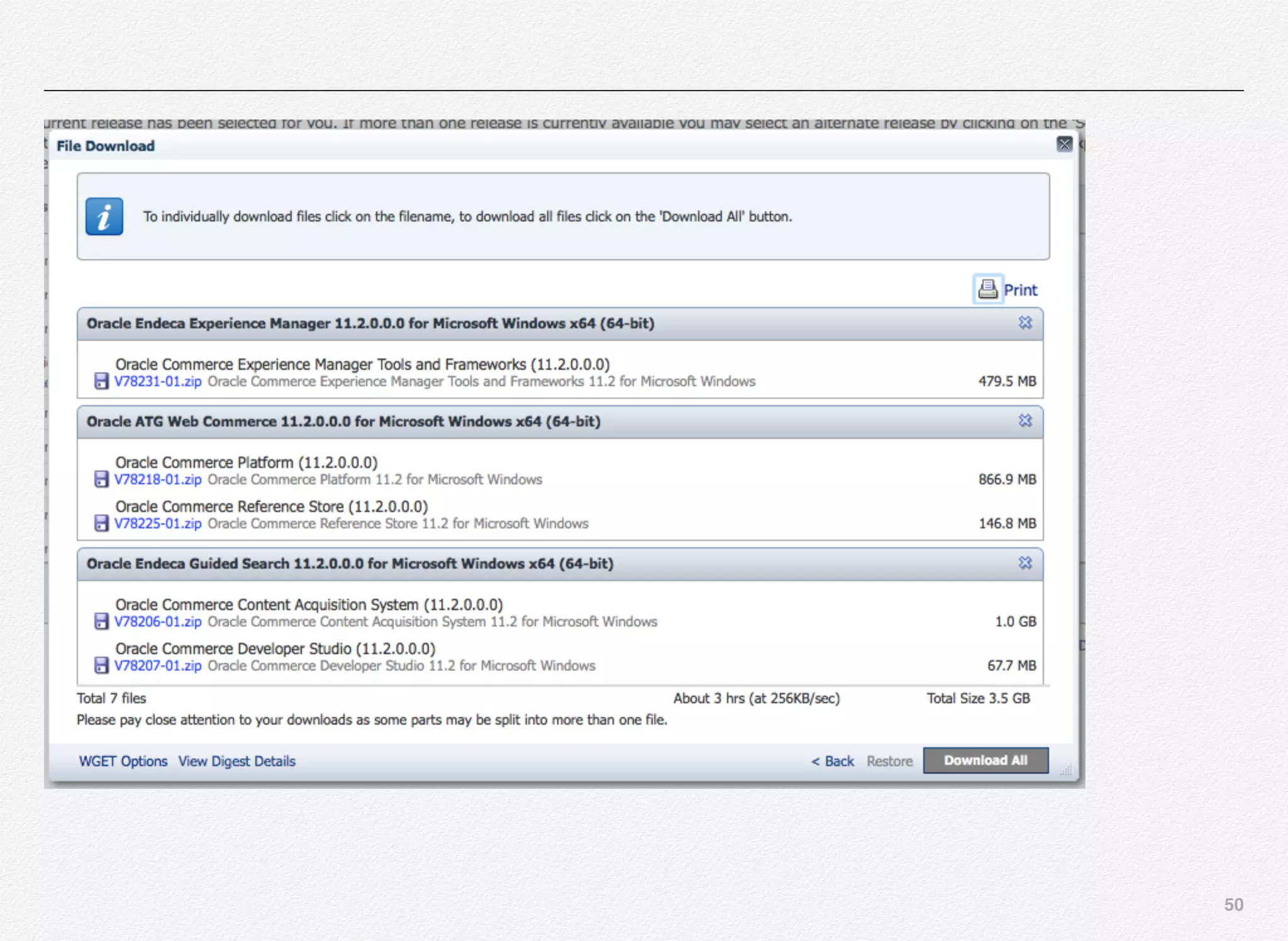
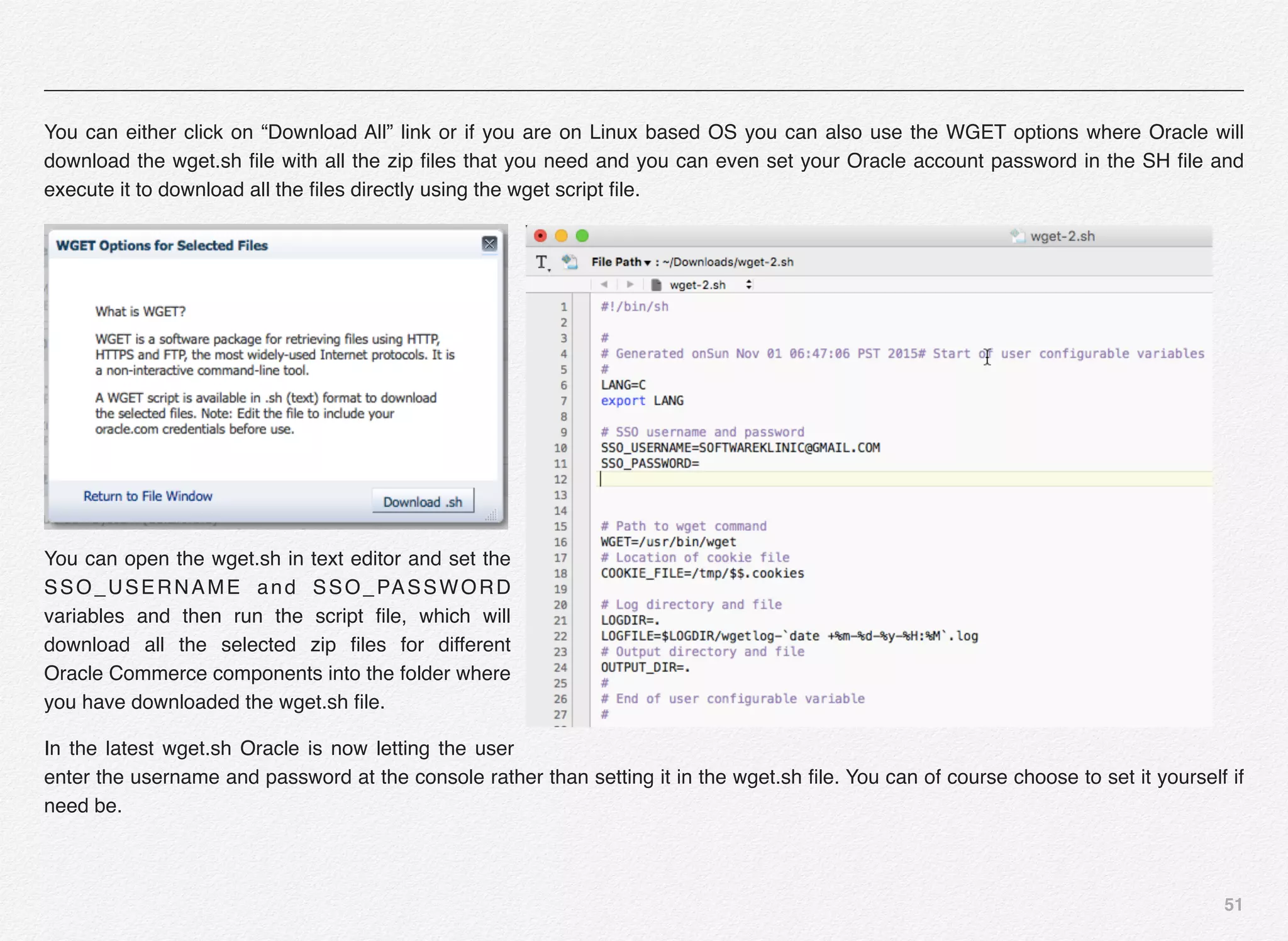
You can either click on “Download All” link or if you are on Linux based OS you can also use the WGET options where Oracle will
download the wget.sh file with all the zip files that you need and you can even set your Oracle account password in the SH file and
execute it to download all the files directly using the wget script file.
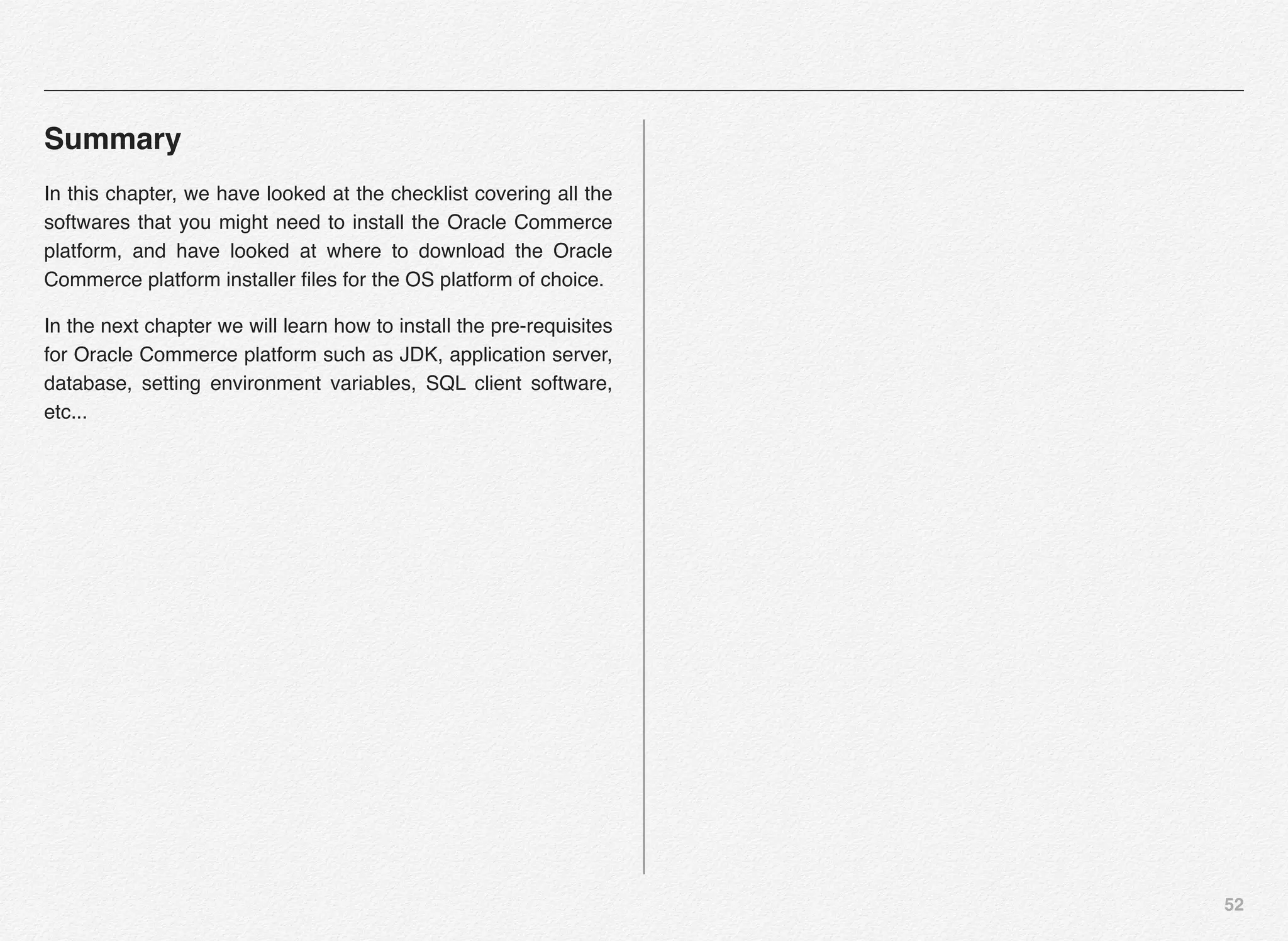
You can open the wget.sh in text editor and set the
SSO_USERNAME and SSO_PASSWORD
variables and then run the script file, which will
download all the selected zip files for different
Oracle Commerce components into the folder where
you have downloaded the wget.sh file.
In the latest wget.sh Oracle is now letting the user
enter the username and password at the console rather than setting it in the wget.sh file. You can of course choose to set it yourself if
need be.
52
Summary
In this chapter, we have looked at the checklist covering all the
softwares that you might need to install the Oracle Commerce
platform, and have looked at where to download the Oracle
Commerce platform installer files for the OS platform of choice.
In the next chapter we will learn how to install the pre-requisites
for Oracle Commerce platform such as JDK, application server,
database, setting environment variables, SQL client software,
etc...
4
This chapter outlines and
explains the steps involved
in installing all the pre-
requisites for Oracle
Commerce e.g.:
- JDK 1.7
- WebLogic 12.1.x
- Oracle XE DB
- SQL Developer
Installing Pre-
requisites
54
Section 1
Installing Pre-
requisites - JDK 1.7
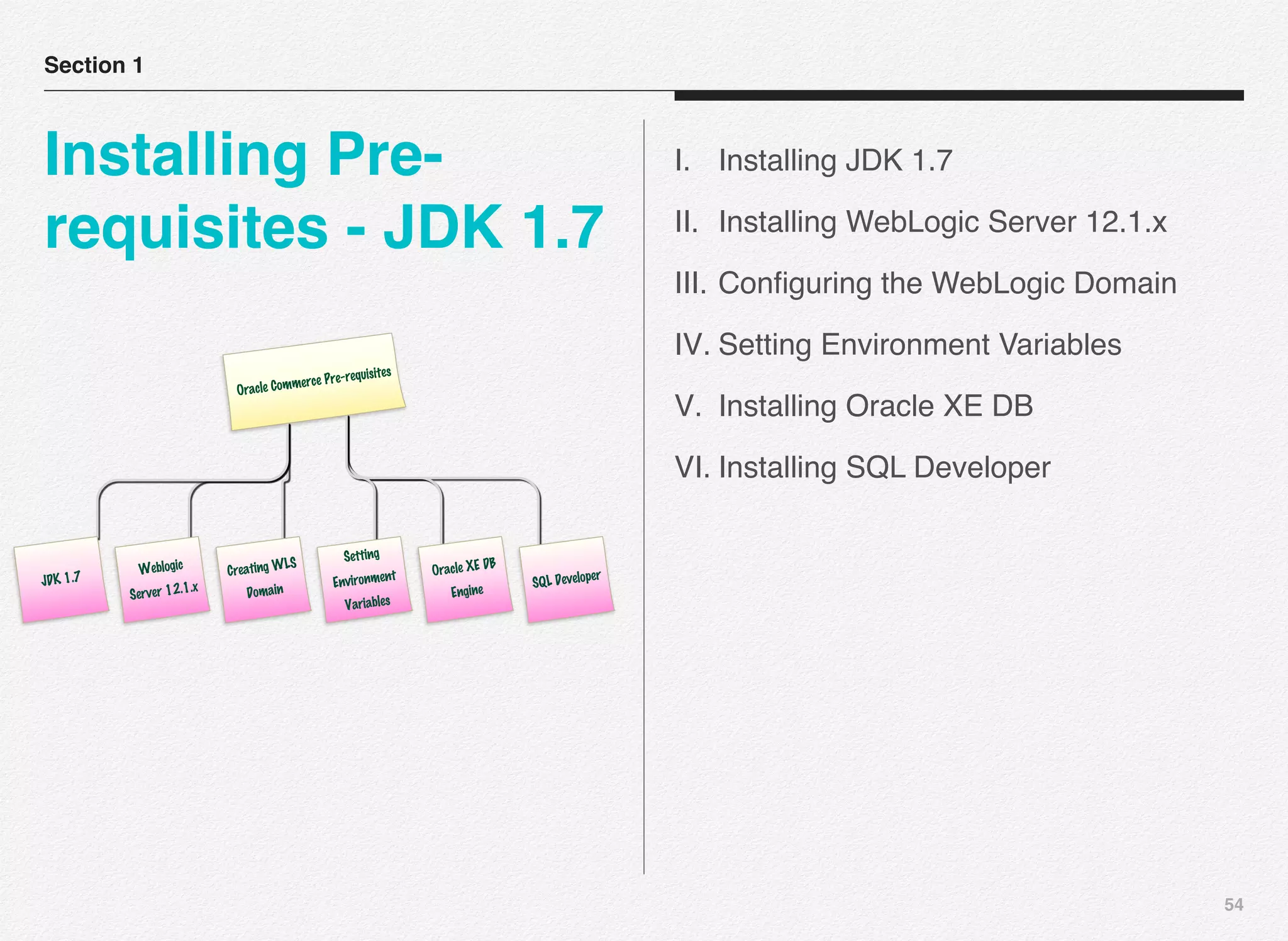
I. Installing JDK 1.7
II. Installing WebLogic Server 12.1.x
III. Configuring the WebLogic Domain
IV. Setting Environment Variables
V. Installing Oracle XE DB
VI. Installing SQL Developer
Oracle Commerce Pre-requisites
JDK 1.7
Weblogic
Server 12.1.x
Creating WLS
Domain
Setting
Environment
Variables
Oracle XE DB
Engine SQL Developer
55
Install Commerce Commerce Platform
In this section, you are going to learn how to install the
Commerce aspect of the Oracle Commerce Platform.
JDK 1.7
Installing the Oracle Commerce Platform starts with making
sure you have the RIGHT JDK Version installed on your choice
of operating system. We will install JDK 1.7 for the latest Oracle
Commerce 11.1 release.
What do you need to do?
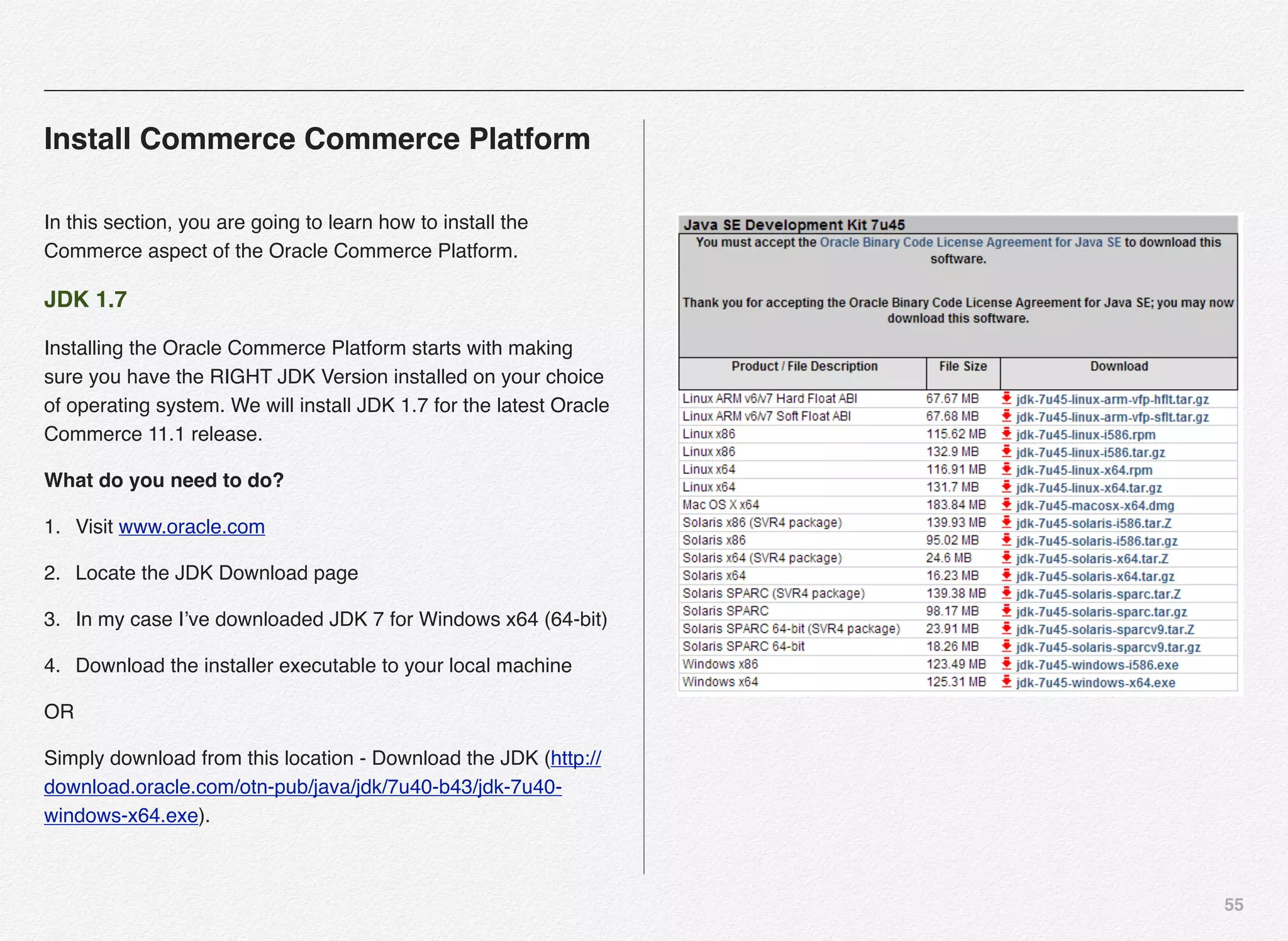
1. Visit www.oracle.com
2. Locate the JDK Download page
3. In my case I’ve downloaded JDK 7 for Windows x64 (64-bit)
4. Download the installer executable to your local machine
OR
Simply download from this location - Download the JDK (http://
download.oracle.com/otn-pub/java/jdk/7u40-b43/jdk-7u40-
windows-x64.exe).
56
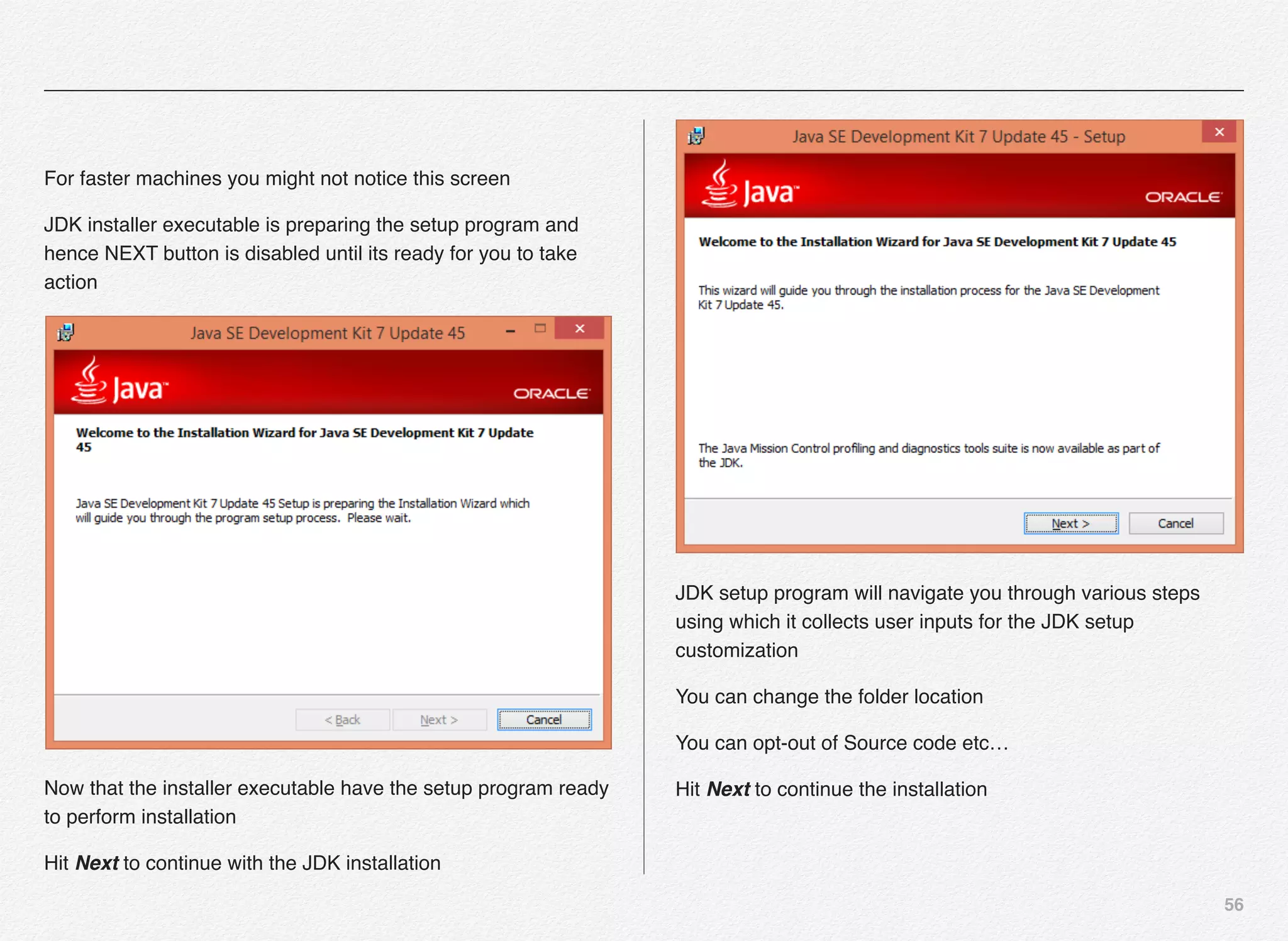
For faster machines you might not notice this screen
JDK installer executable is preparing the setup program and
hence NEXT button is disabled until its ready for you to take
action
Now that the installer executable have the setup program ready
to perform installation
Hit Next to continue with the JDK installation
JDK setup program will navigate you through various steps
using which it collects user inputs for the JDK setup
customization
You can change the folder location
You can opt-out of Source code etc…
Hit Next to continue the installation
57
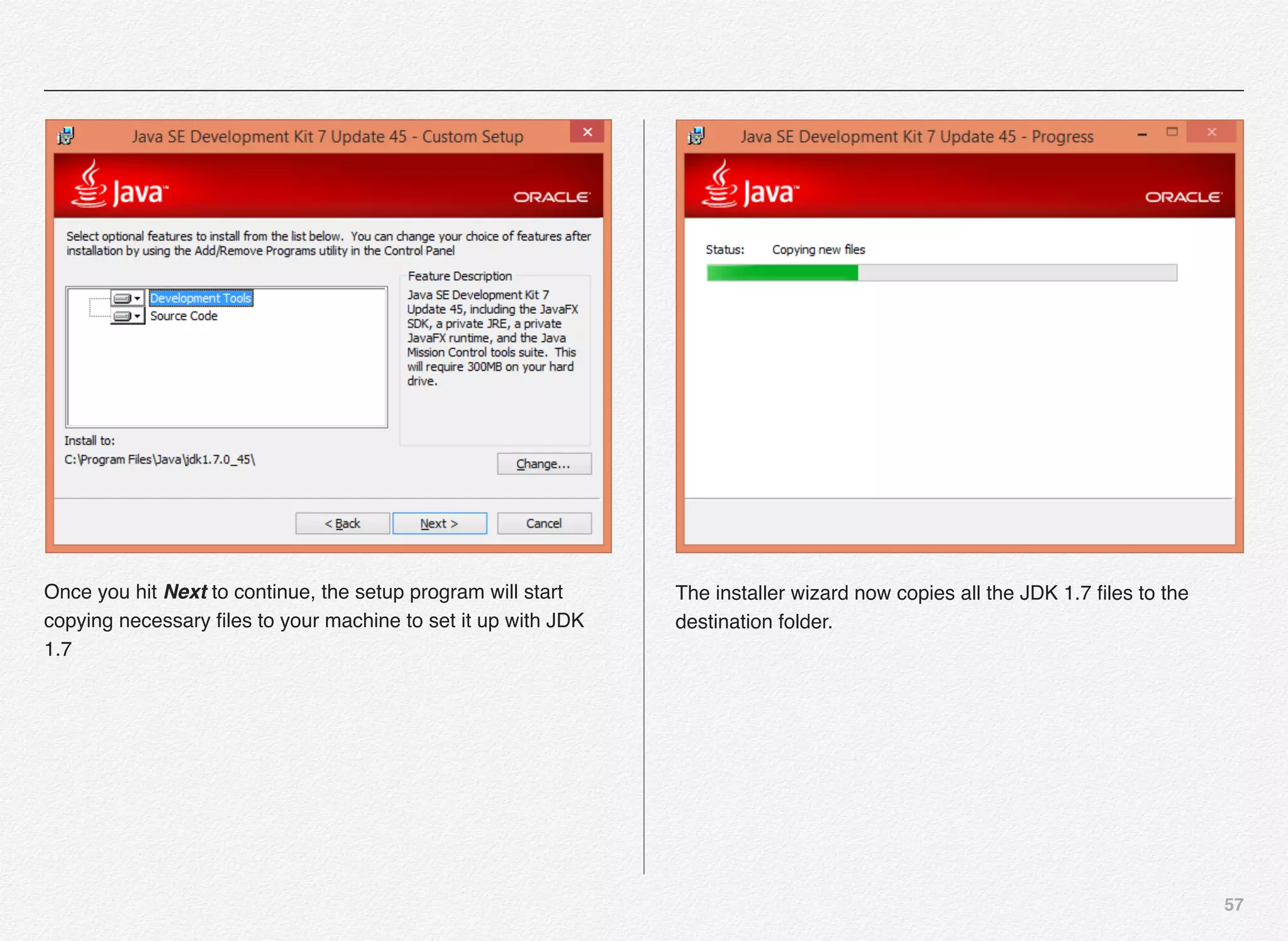
Once you hit Next to continue, the setup program will start
copying necessary files to your machine to set it up with JDK
1.7
The installer wizard now copies all the JDK 1.7 files to the
destination folder.
58
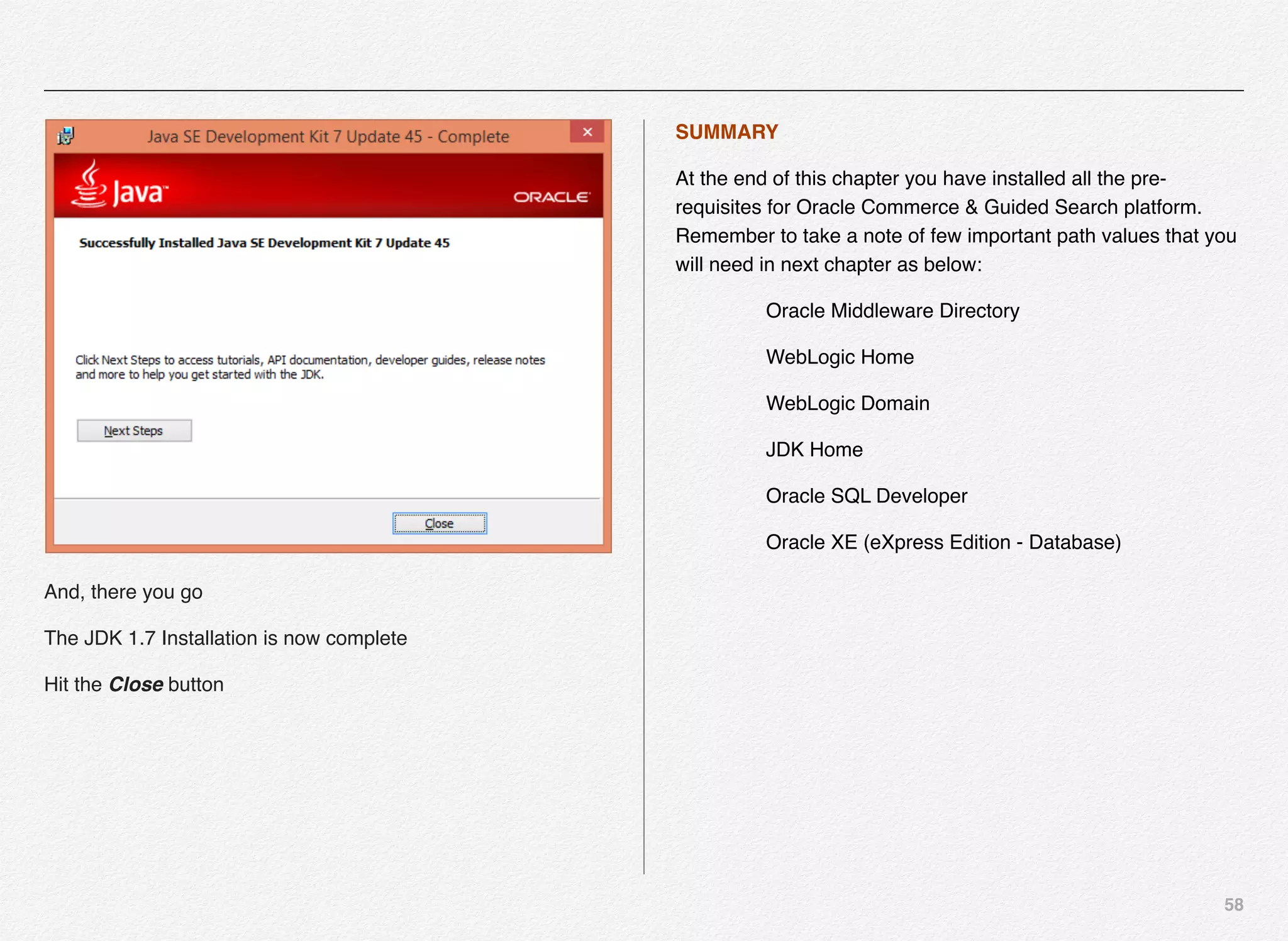
And, there you go
The JDK 1.7 Installation is now complete
Hit the Close button
SUMMARY
At the end of this chapter you have installed all the pre-
requisites for Oracle Commerce & Guided Search platform.
Remember to take a note of few important path values that you
will need in next chapter as below:
Oracle Middleware Directory
WebLogic Home
WebLogic Domain
JDK Home
Oracle SQL Developer
Oracle XE (eXpress Edition - Database)
59
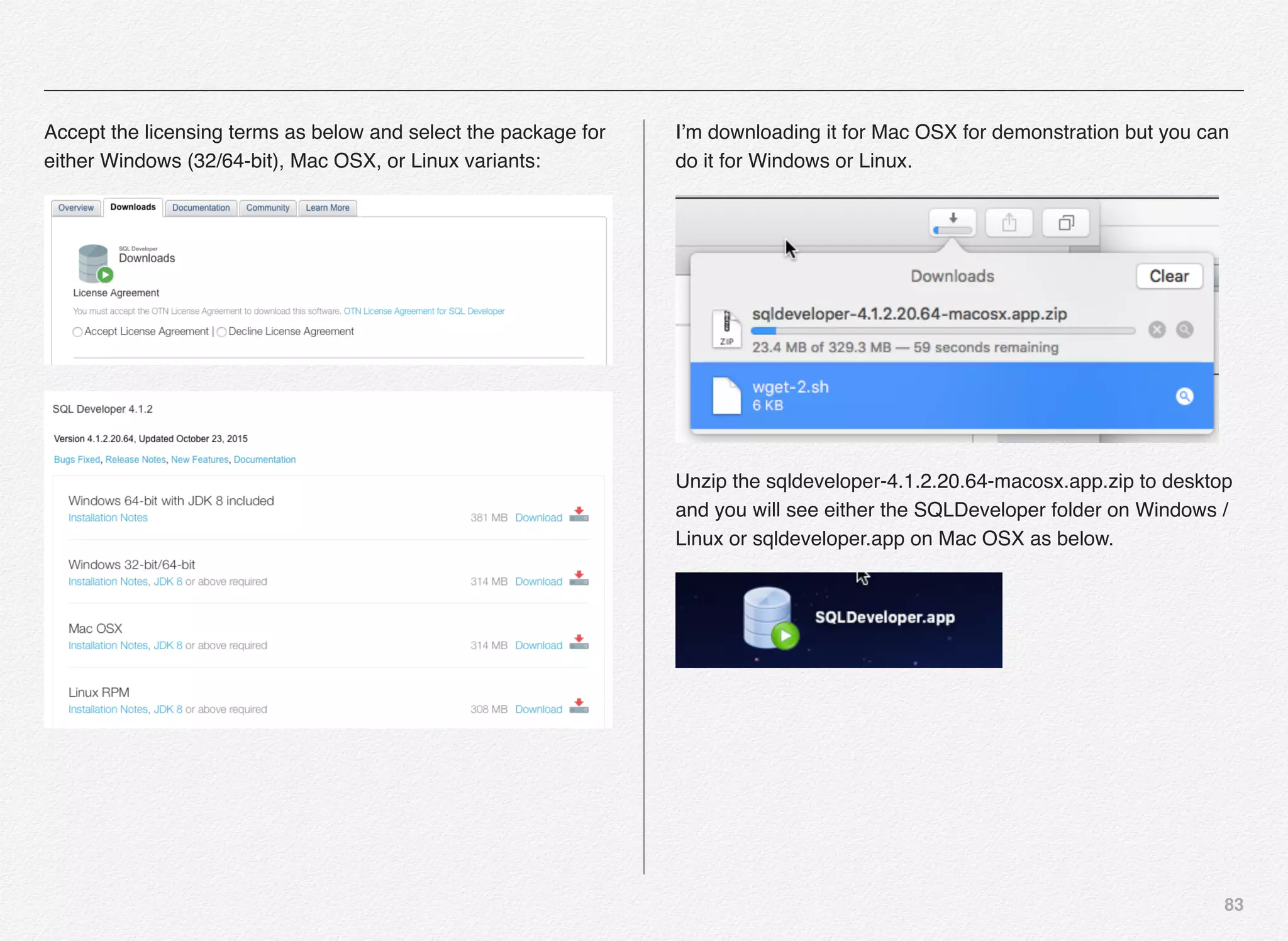
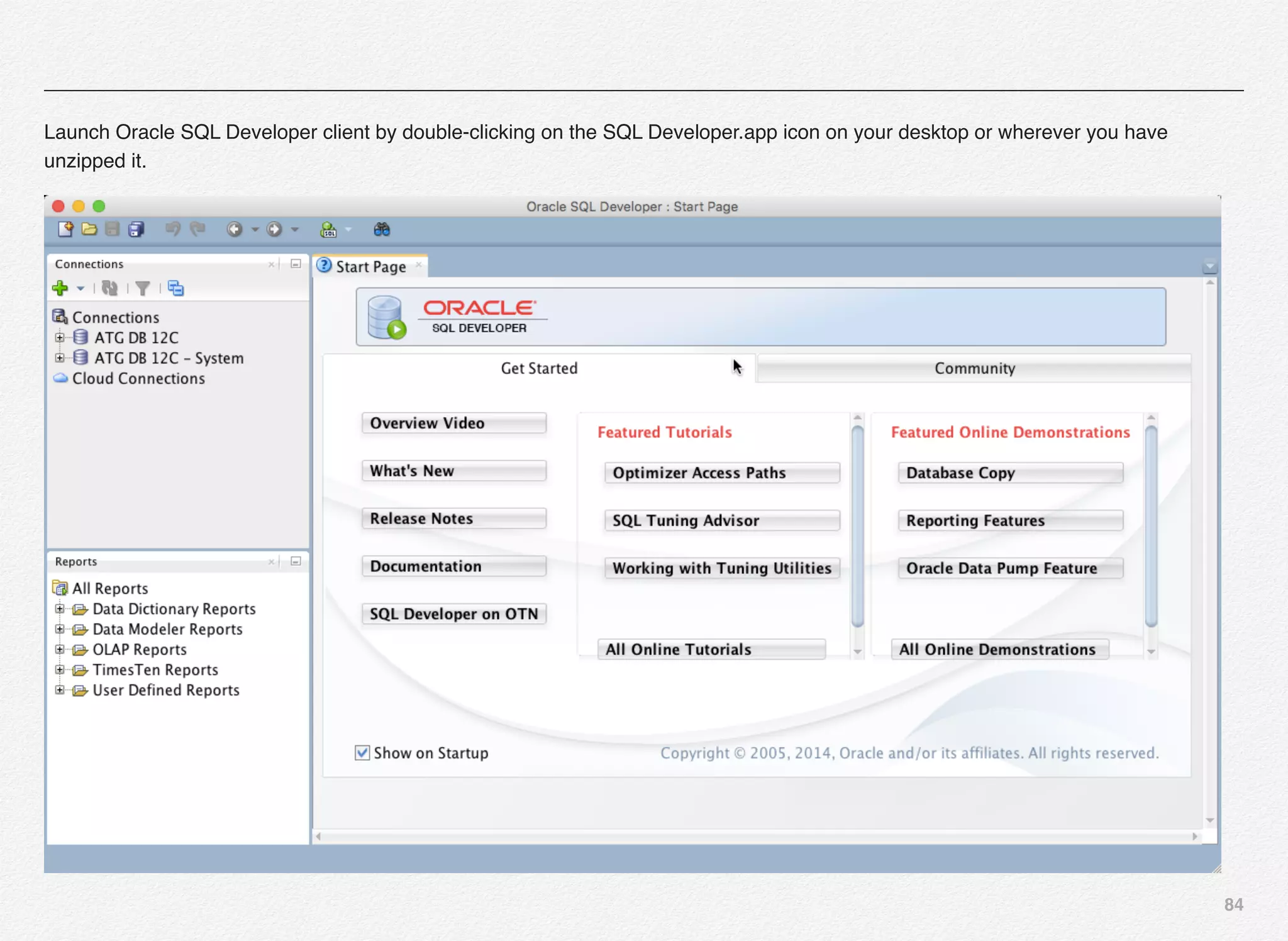
Installing SQL Developer
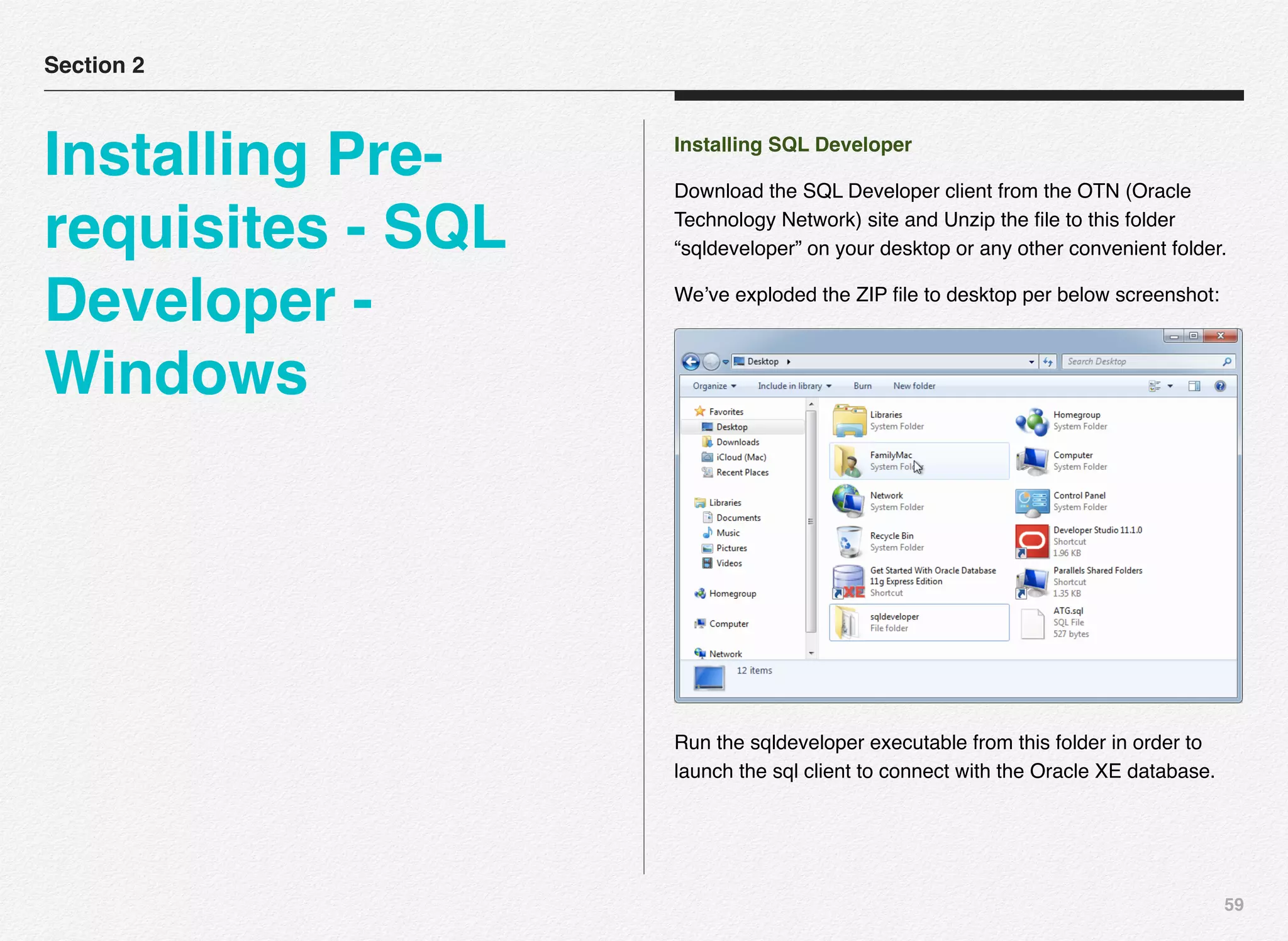
Download the SQL Developer client from the OTN (Oracle
Technology Network) site and Unzip the file to this folder
“sqldeveloper” on your desktop or any other convenient folder.
We’ve exploded the ZIP file to desktop per below screenshot:
Run the sqldeveloper executable from this folder in order to
launch the sql client to connect with the Oracle XE database.
Section 2
Installing Pre-
requisites - SQL
Developer -
Windows
60
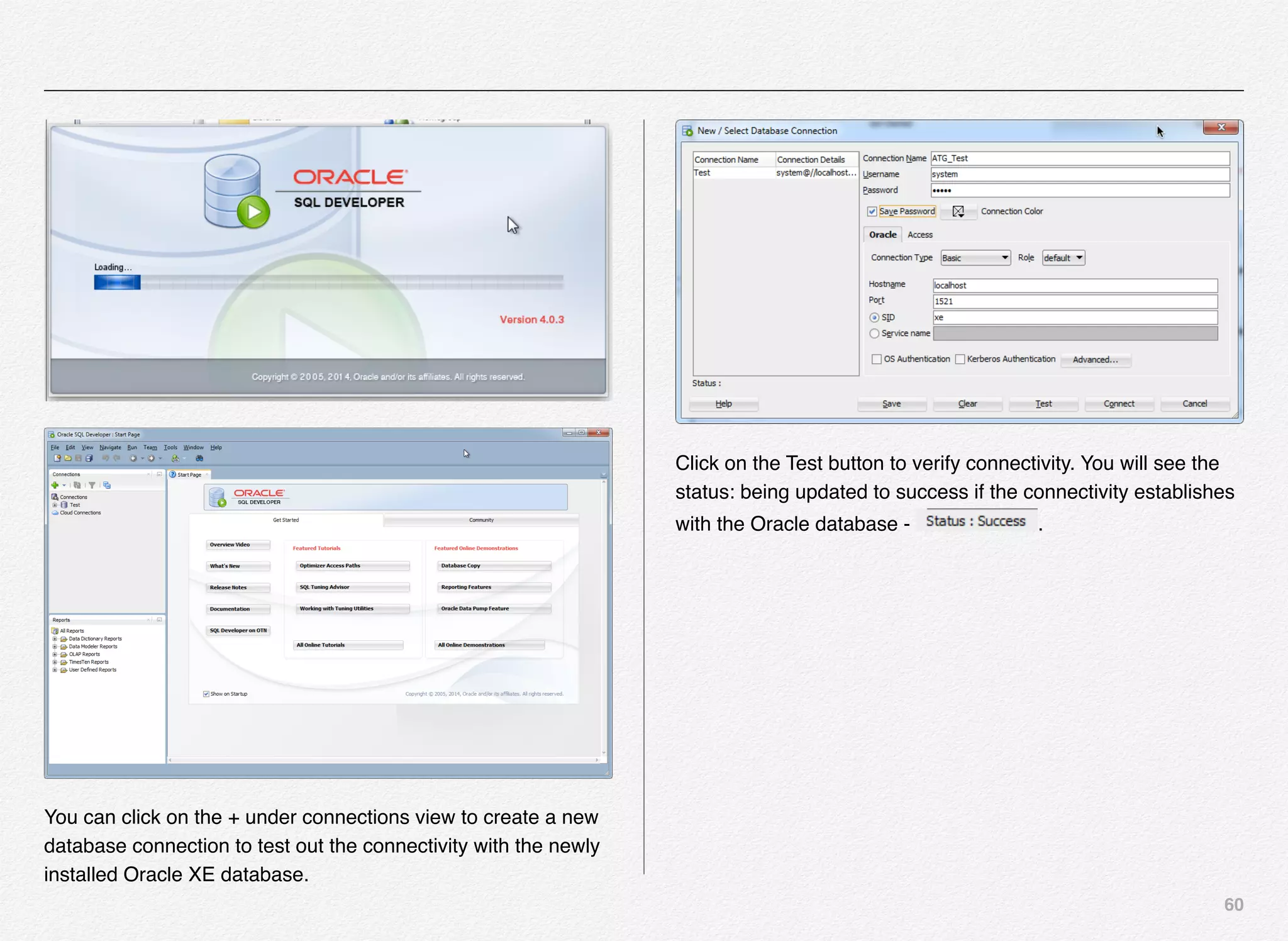
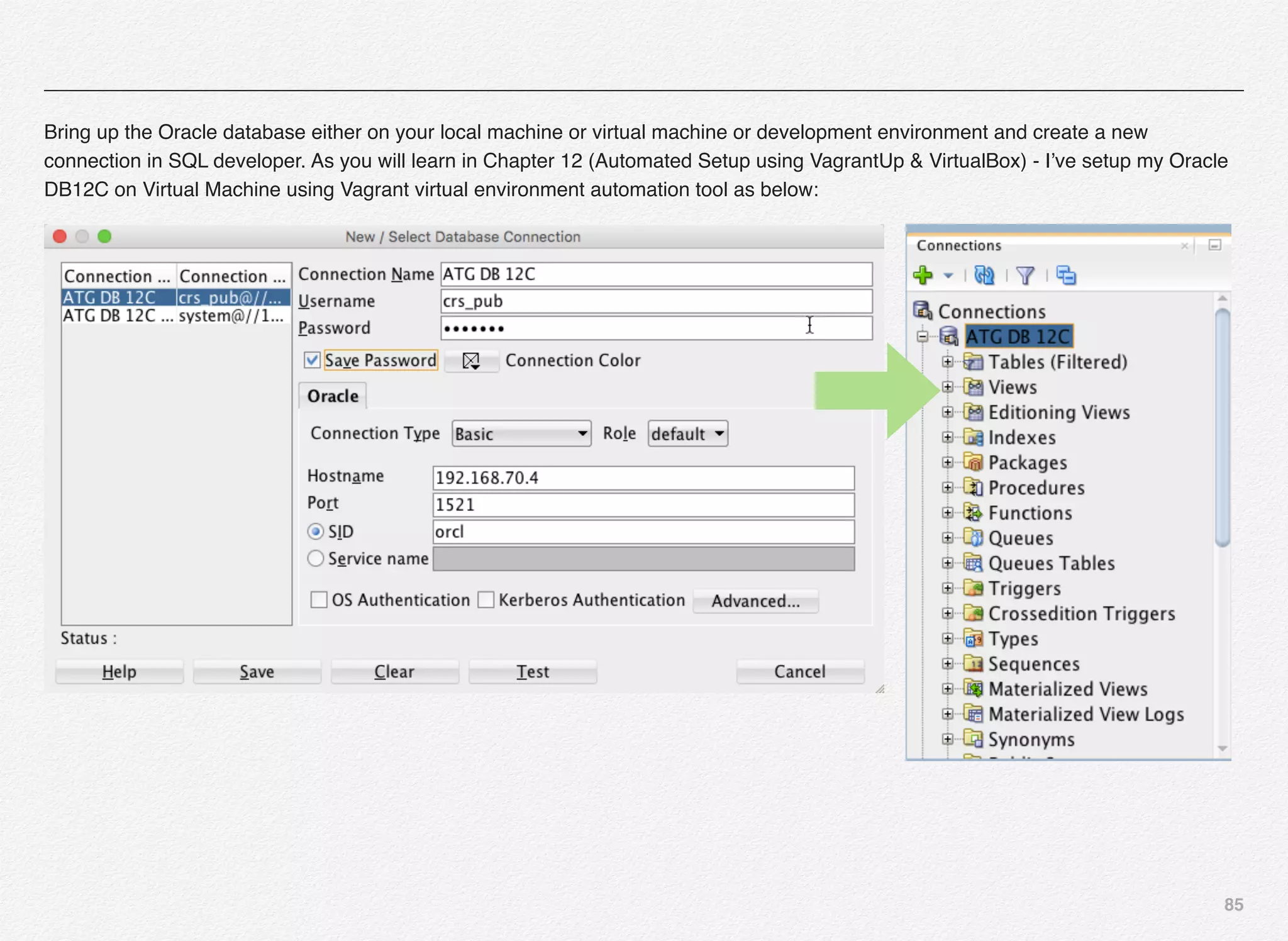
You can click on the + under connections view to create a new
database connection to test out the connectivity with the newly
installed Oracle XE database.
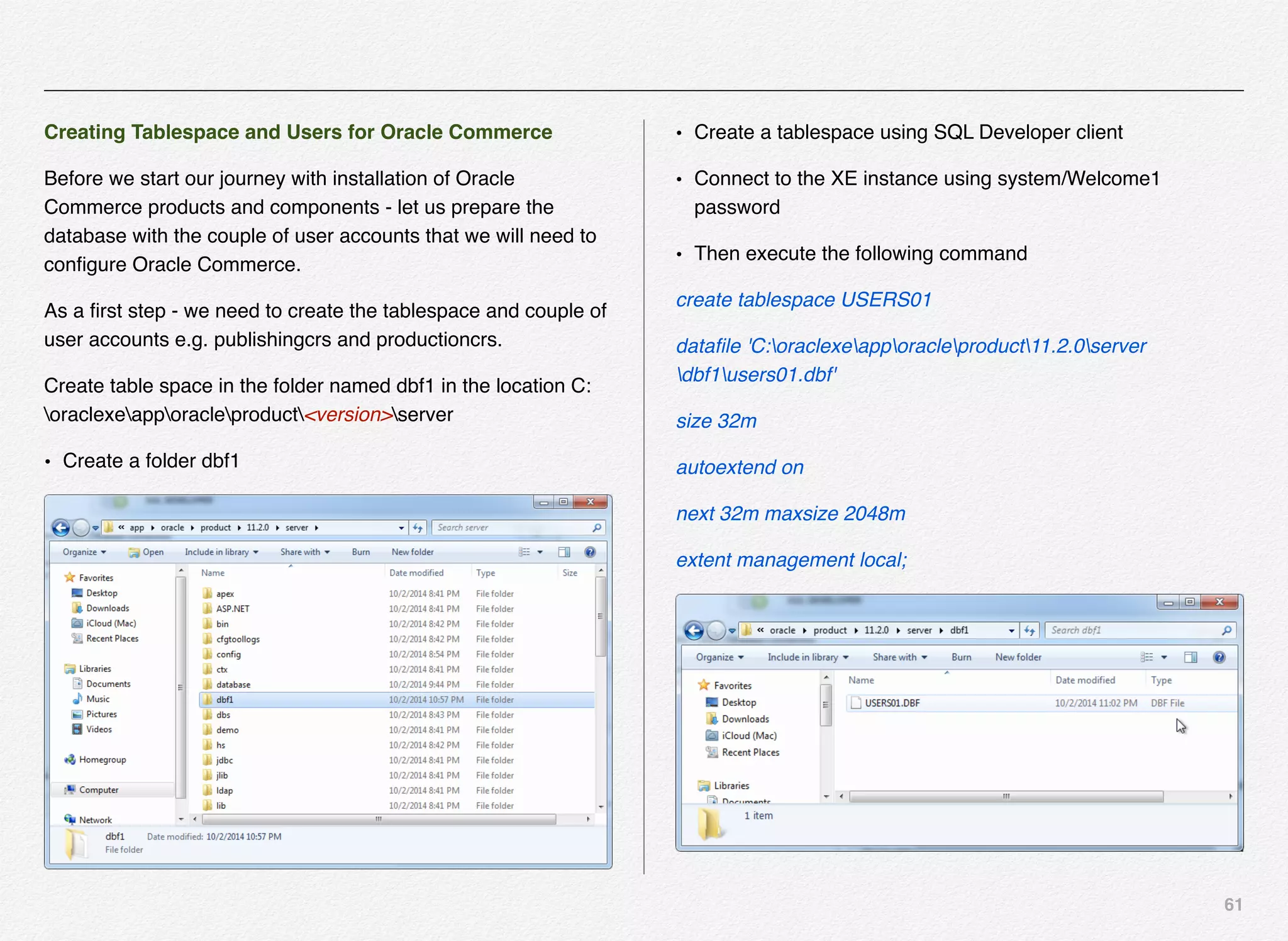
Click on the Test button to verify connectivity. You will see the
status: being updated to success if the connectivity establishes
with the Oracle database - .
61
Creating Tablespace and Users for Oracle Commerce
Before we start our journey with installation of Oracle
Commerce products and components - let us prepare the
database with the couple of user accounts that we will need to
configure Oracle Commerce.
As a first step - we need to create the tablespace and couple of
user accounts e.g. publishingcrs and productioncrs.
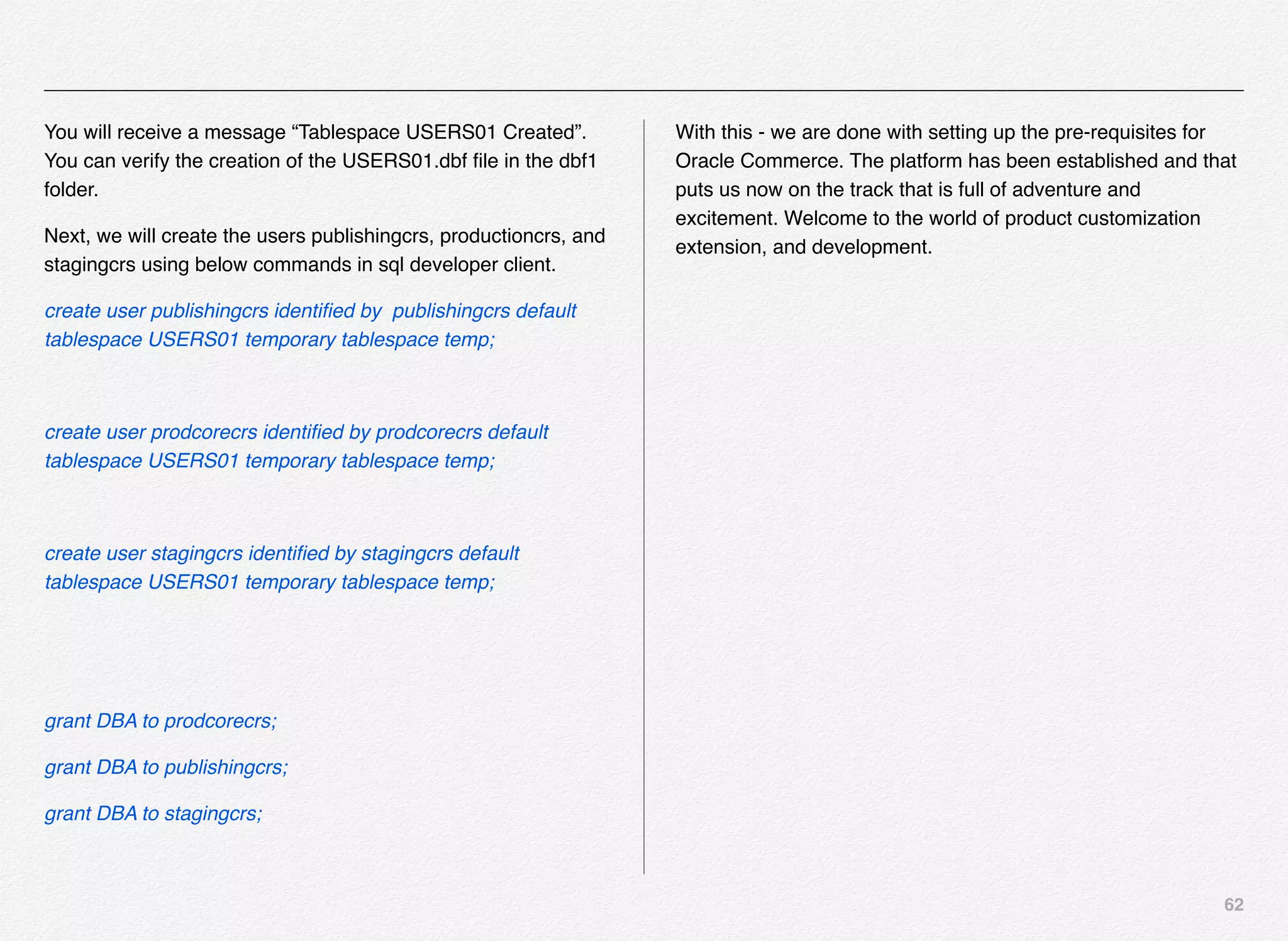
Create table space in the folder named dbf1 in the location C:
oraclexeapporacleproduct<version>server
• Create a folder dbf1
• Create a tablespace using SQL Developer client
• Connect to the XE instance using system/Welcome1
password
• Then execute the following command
create tablespace USERS01
datafile 'C:oraclexeapporacleproduct11.2.0server
dbf1users01.dbf'
size 32m
autoextend on
next 32m maxsize 2048m
extent management local;
62
You will receive a message “Tablespace USERS01 Created”.
You can verify the creation of the USERS01.dbf file in the dbf1
folder.
Next, we will create the users publishingcrs, productioncrs, and
stagingcrs using below commands in sql developer client.
create user publishingcrs identified by publishingcrs default
tablespace USERS01 temporary tablespace temp;
create user prodcorecrs identified by prodcorecrs default
tablespace USERS01 temporary tablespace temp;
create user stagingcrs identified by stagingcrs default
tablespace USERS01 temporary tablespace temp;
grant DBA to prodcorecrs;
grant DBA to publishingcrs;
grant DBA to stagingcrs;
With this - we are done with setting up the pre-requisites for
Oracle Commerce. The platform has been established and that
puts us now on the track that is full of adventure and
excitement. Welcome to the world of product customization
extension, and development.
63
Installing the WebLogic Server
Once you have the JDK installed, you can move on to next step
and that is to install the Oracle WebLogic Server.
This section assumes that you have downloaded the WebLogic
Installer for Windows from previous chapter or you can visit this
link - (http://www.oracle.com/technetwork/middleware/weblogic/
downloads/wls-main-097127.html).
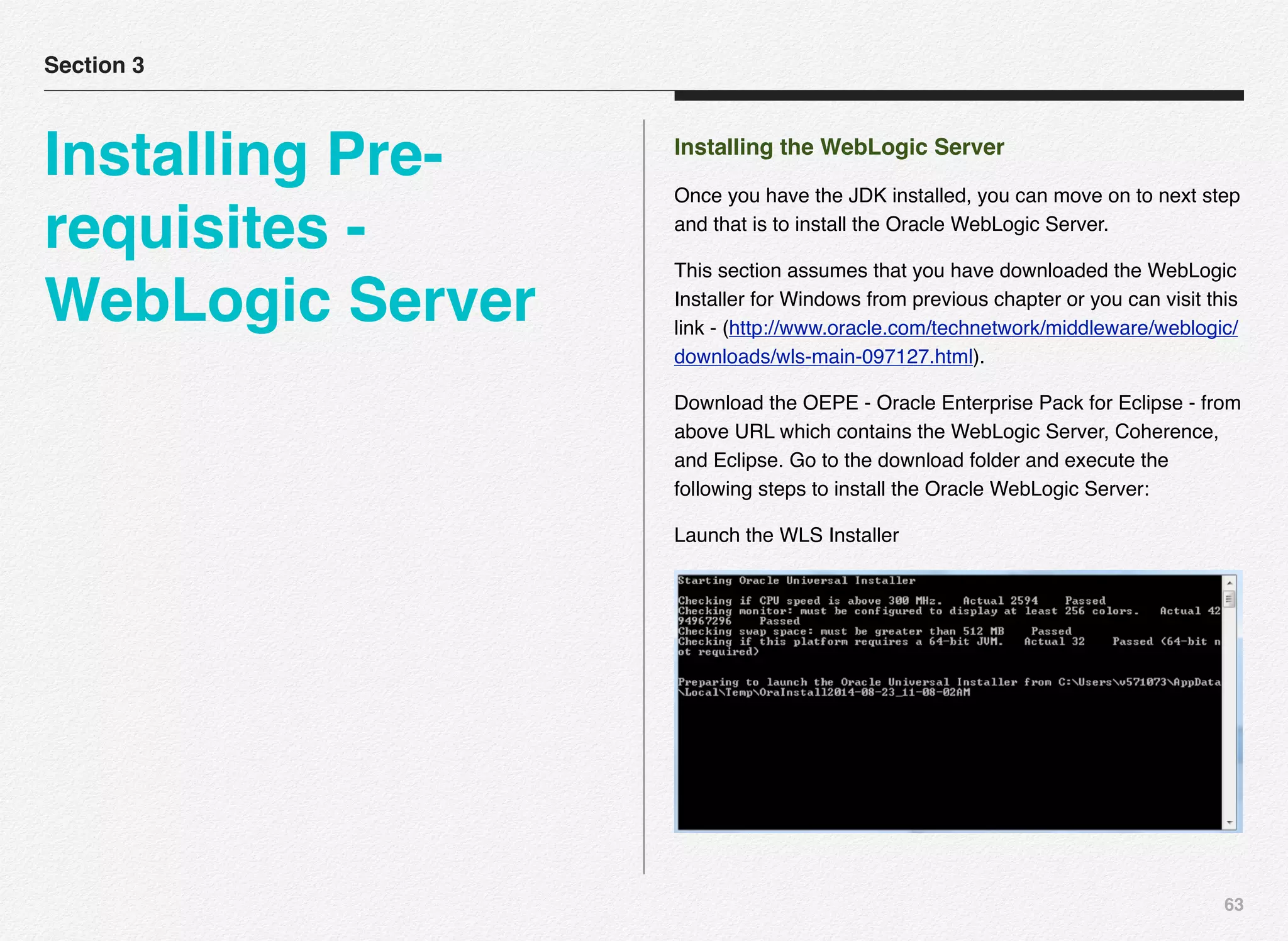
Download the OEPE - Oracle Enterprise Pack for Eclipse - from
above URL which contains the WebLogic Server, Coherence,
and Eclipse. Go to the download folder and execute the
following steps to install the Oracle WebLogic Server:
Launch the WLS Installer
Section 3
Installing Pre-
requisites -
WebLogic Server
64
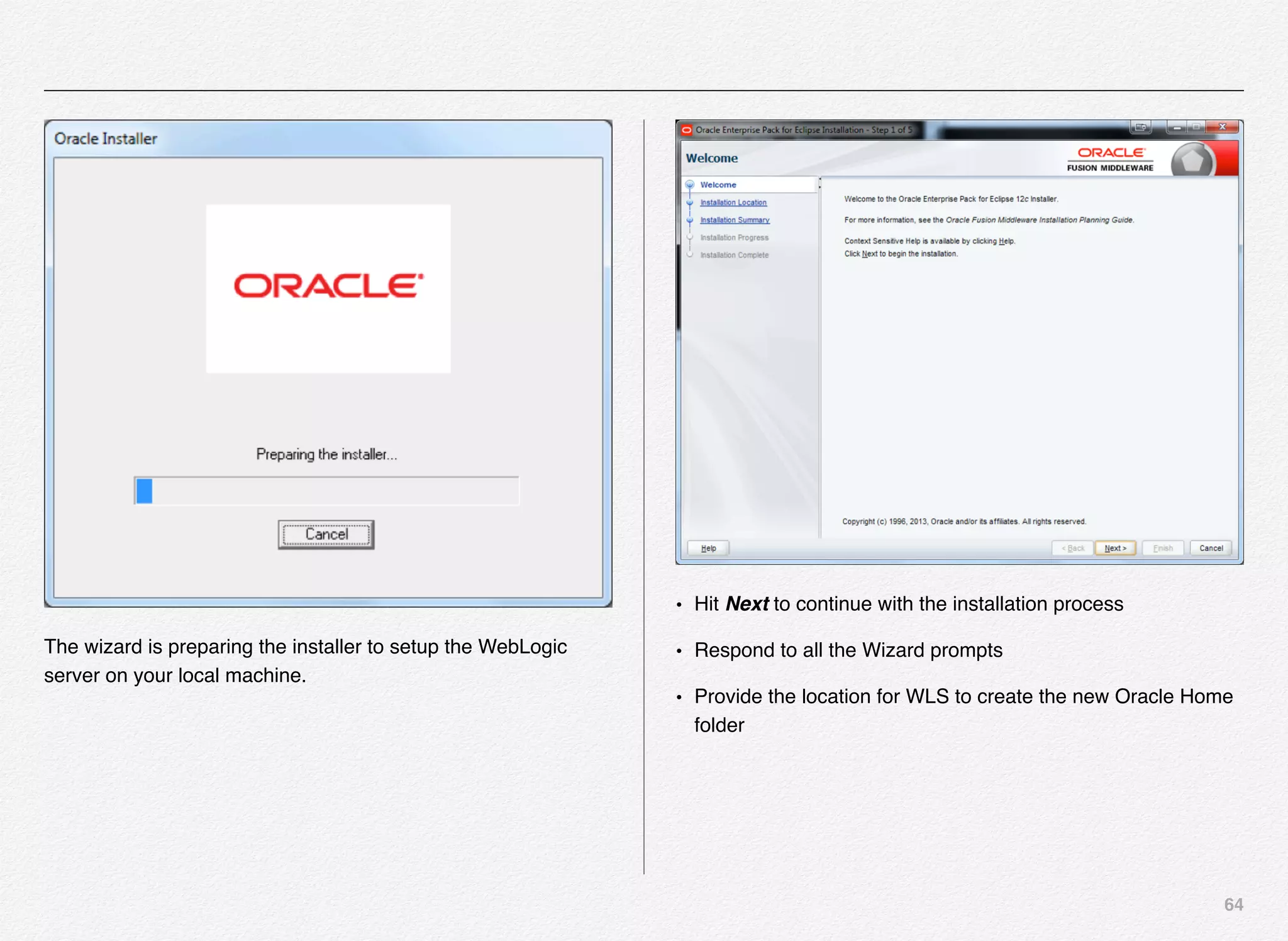
The wizard is preparing the installer to setup the WebLogic
server on your local machine.
• Hit Next to continue with the installation process
• Respond to all the Wizard prompts
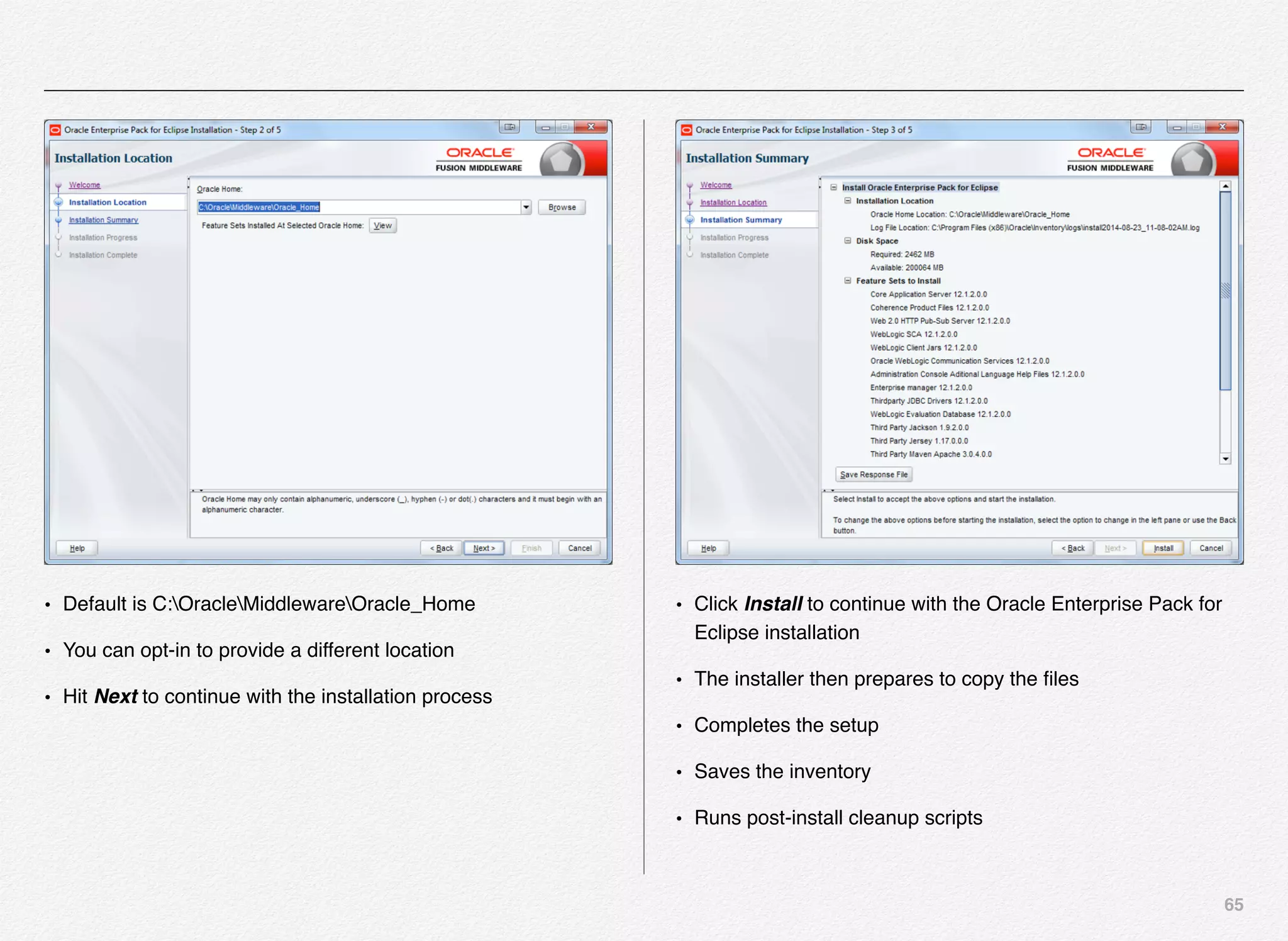
• Provide the location for WLS to create the new Oracle Home
folder
65
• Default is C:OracleMiddlewareOracle_Home
• You can opt-in to provide a different location
• Hit Next to continue with the installation process
• Click InstalI to continue with the Oracle Enterprise Pack for
Eclipse installation
• The installer then prepares to copy the files
• Completes the setup
• Saves the inventory
• Runs post-install cleanup scripts
66
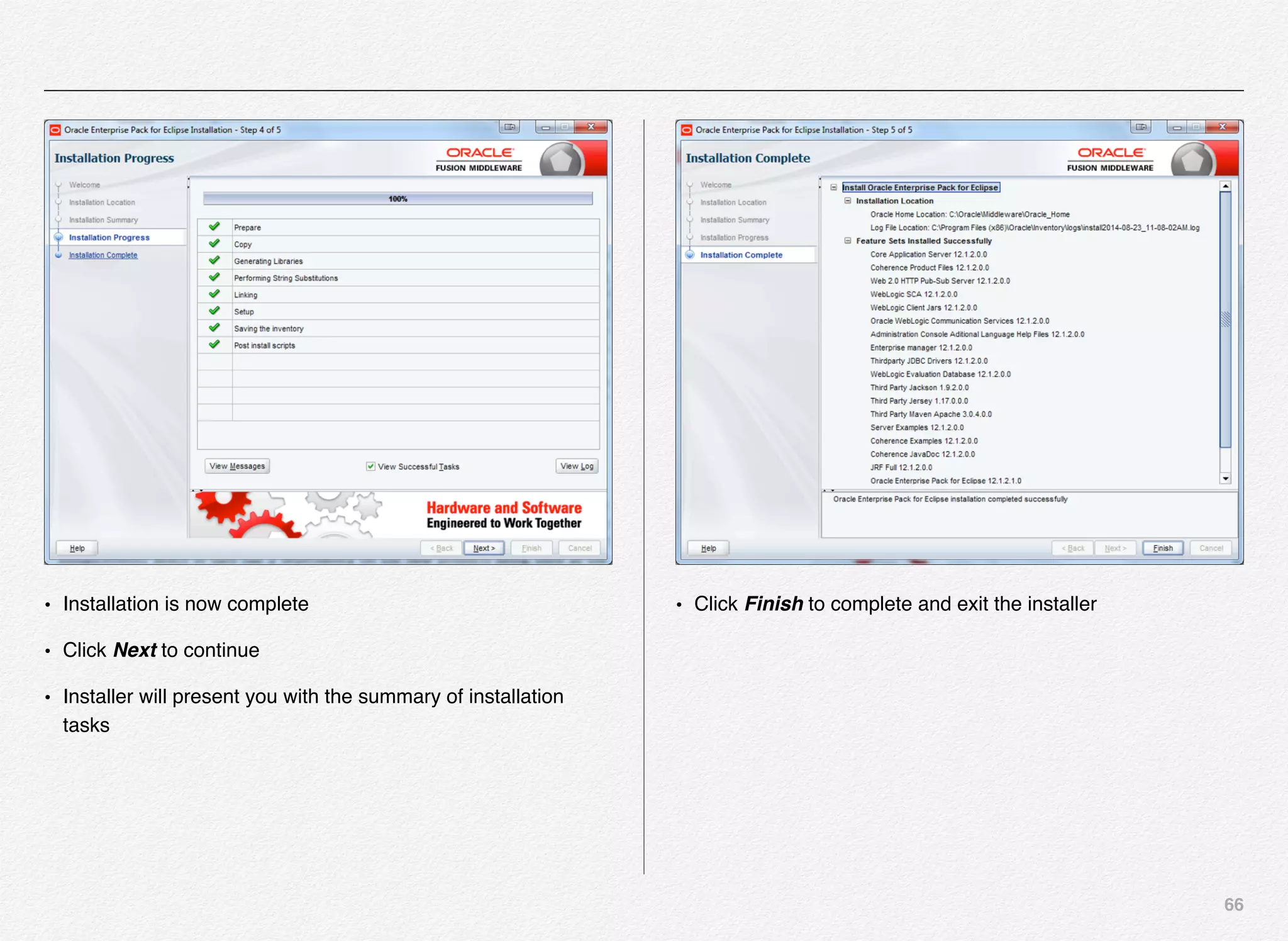
• Installation is now complete
• Click Next to continue
• Installer will present you with the summary of installation
tasks
• Click Finish to complete and exit the installer
67
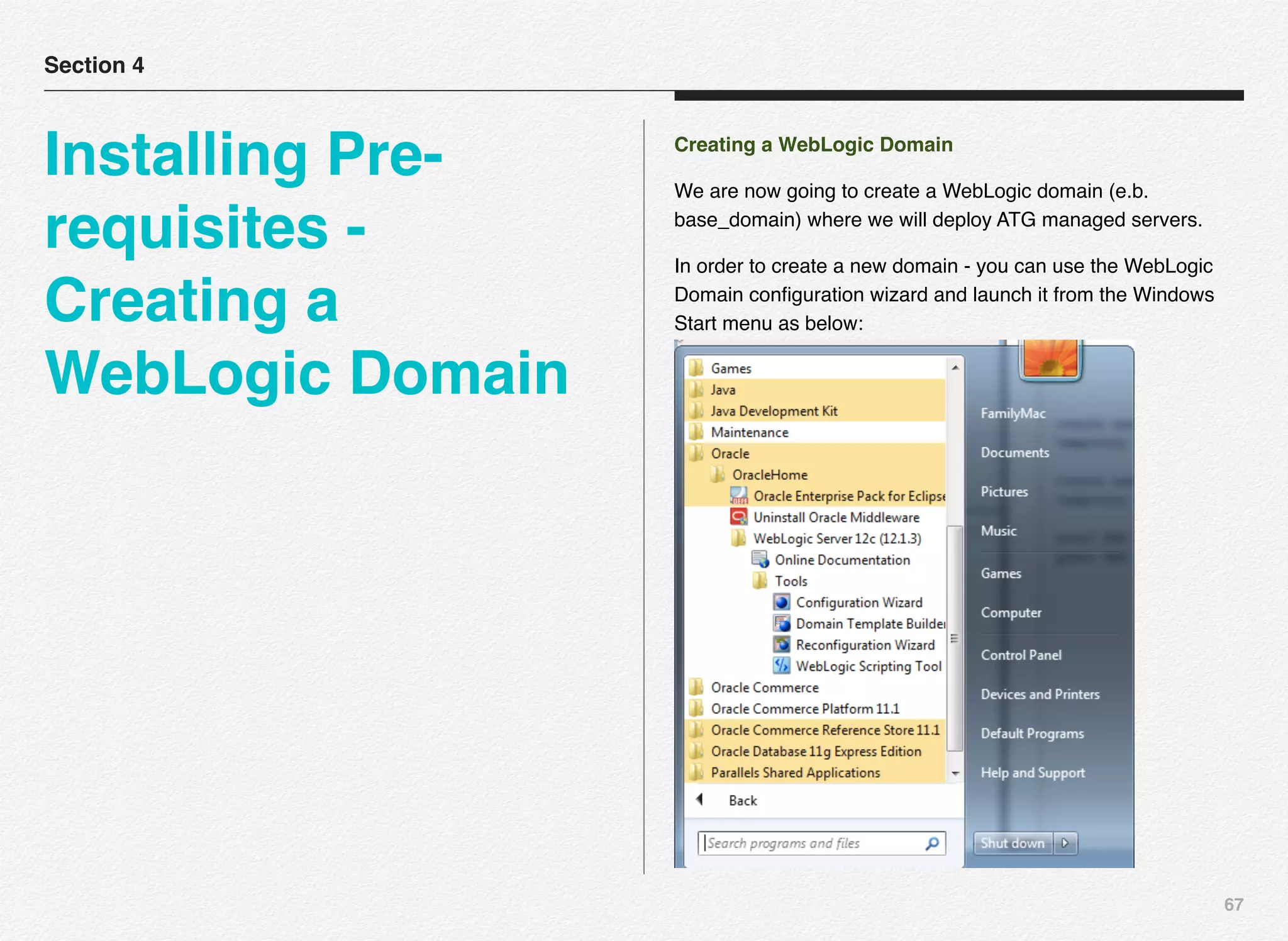
Creating a WebLogic Domain
We are now going to create a WebLogic domain (e.b.
base_domain) where we will deploy ATG managed servers.
In order to create a new domain - you can use the WebLogic
Domain configuration wizard and launch it from the Windows
Start menu as below:
Section 4
Installing Pre-
requisites -
Creating a
WebLogic Domain
68
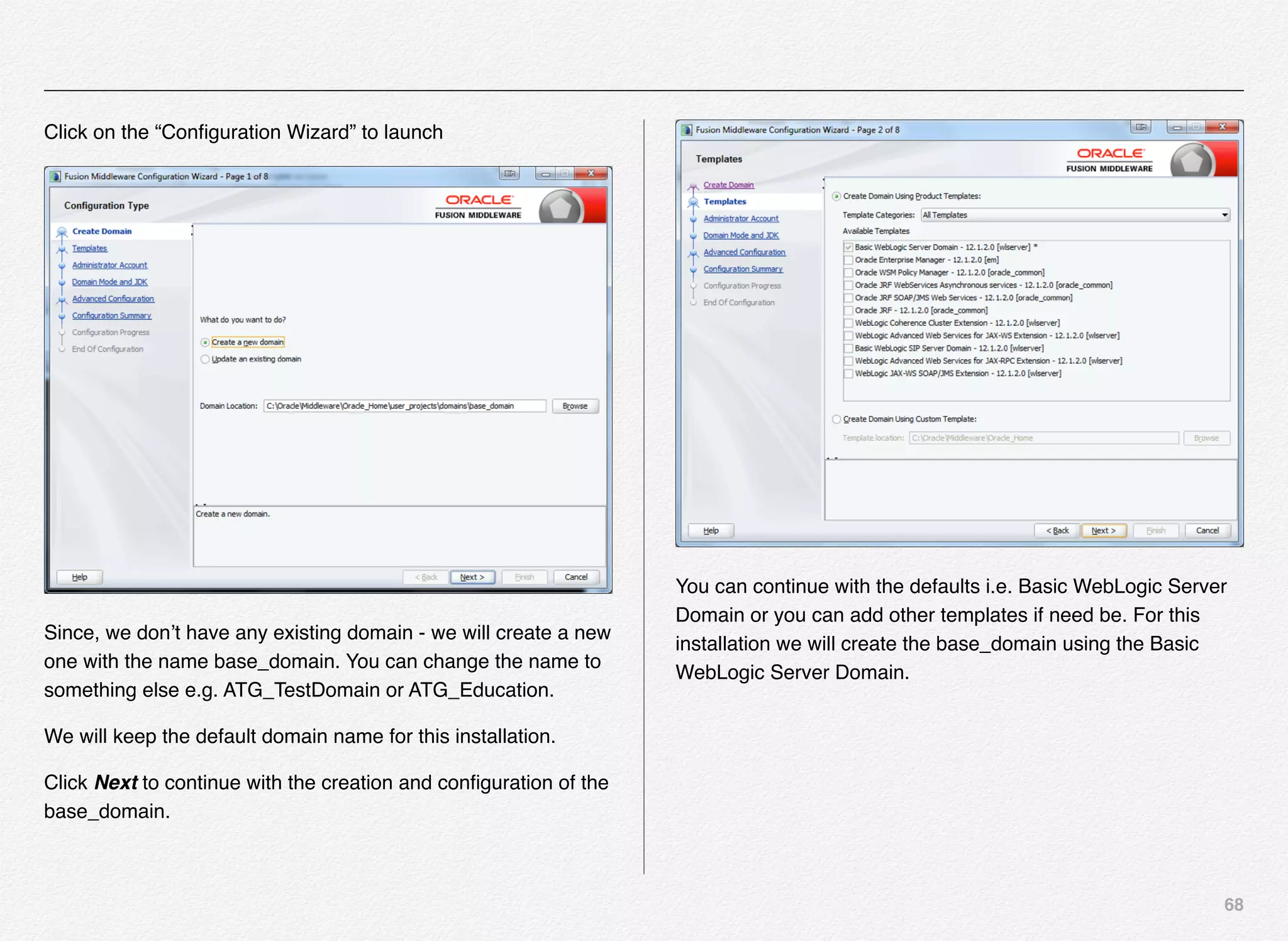
Click on the “Configuration Wizard” to launch
Since, we don’t have any existing domain - we will create a new
one with the name base_domain. You can change the name to
something else e.g. ATG_TestDomain or ATG_Education.
We will keep the default domain name for this installation.
Click Next to continue with the creation and configuration of the
base_domain.
You can continue with the defaults i.e. Basic WebLogic Server
Domain or you can add other templates if need be. For this
installation we will create the base_domain using the Basic
WebLogic Server Domain.
69
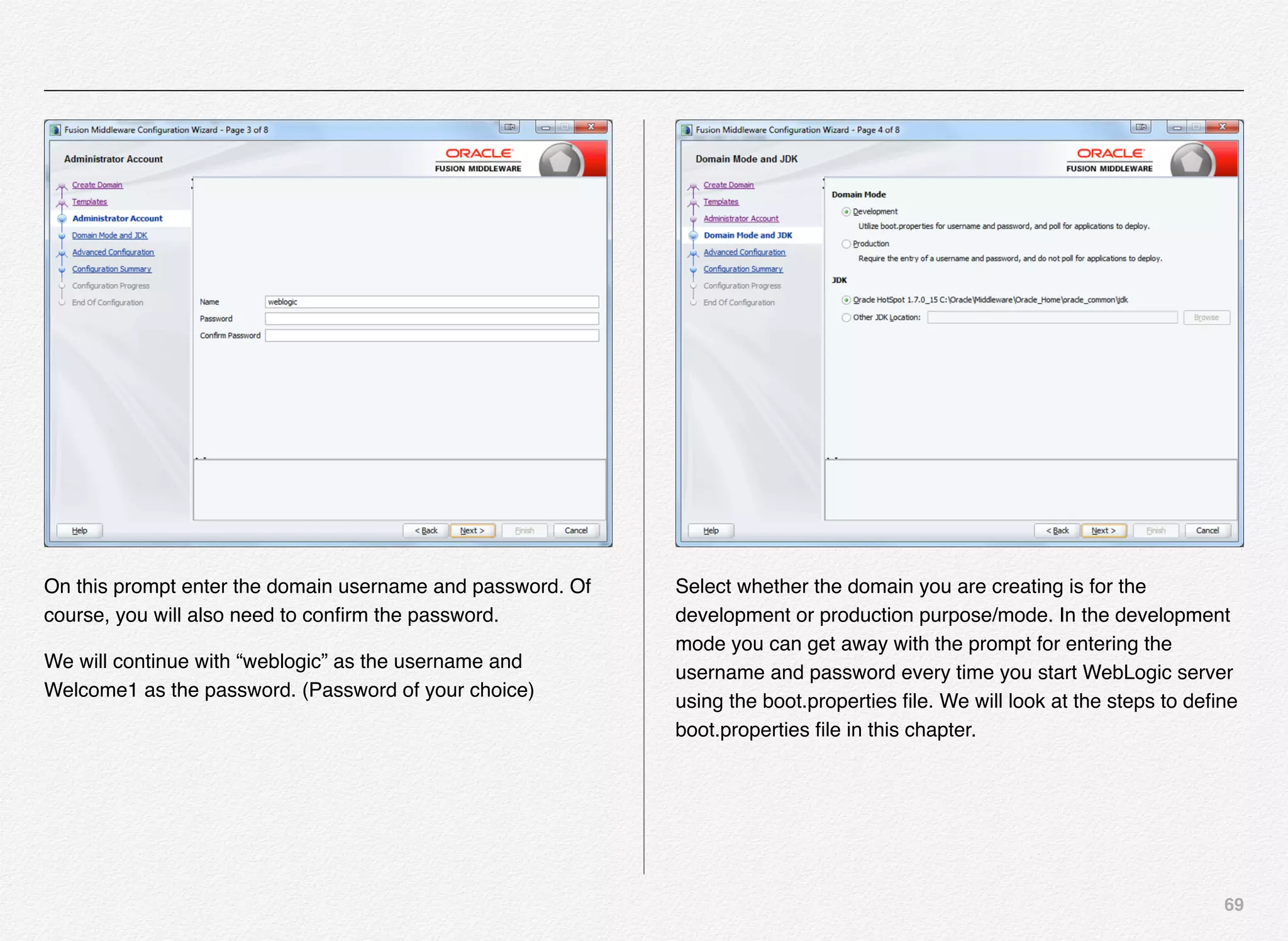
On this prompt enter the domain username and password. Of
course, you will also need to confirm the password.
We will continue with “weblogic” as the username and
Welcome1 as the password. (Password of your choice)
Select whether the domain you are creating is for the
development or production purpose/mode. In the development
mode you can get away with the prompt for entering the
username and password every time you start WebLogic server
using the boot.properties file. We will look at the steps to define
boot.properties file in this chapter.
70
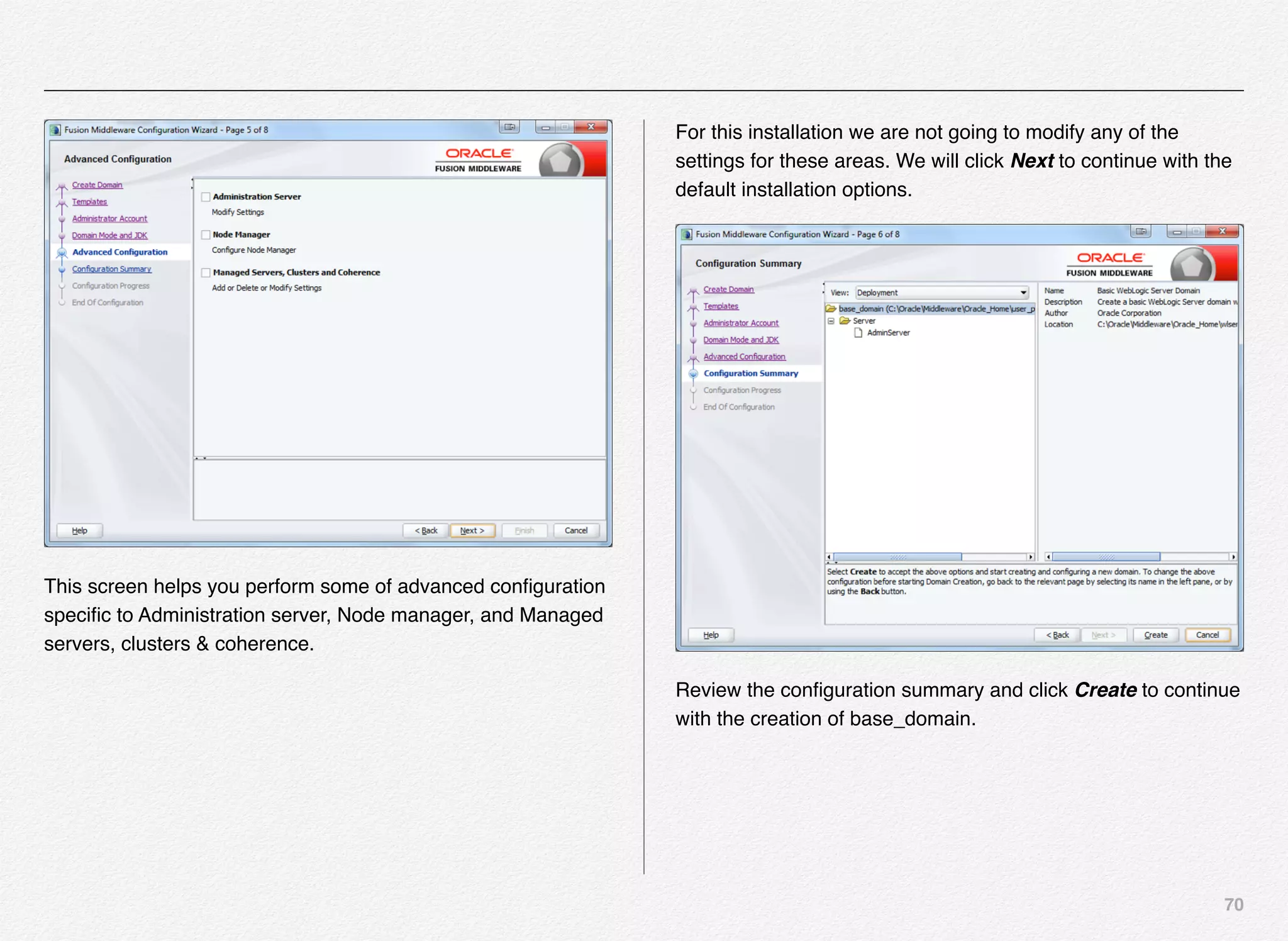
This screen helps you perform some of advanced configuration
specific to Administration server, Node manager, and Managed
servers, clusters & coherence.
For this installation we are not going to modify any of the
settings for these areas. We will click Next to continue with the
default installation options.
Review the configuration summary and click Create to continue
with the creation of base_domain.
71
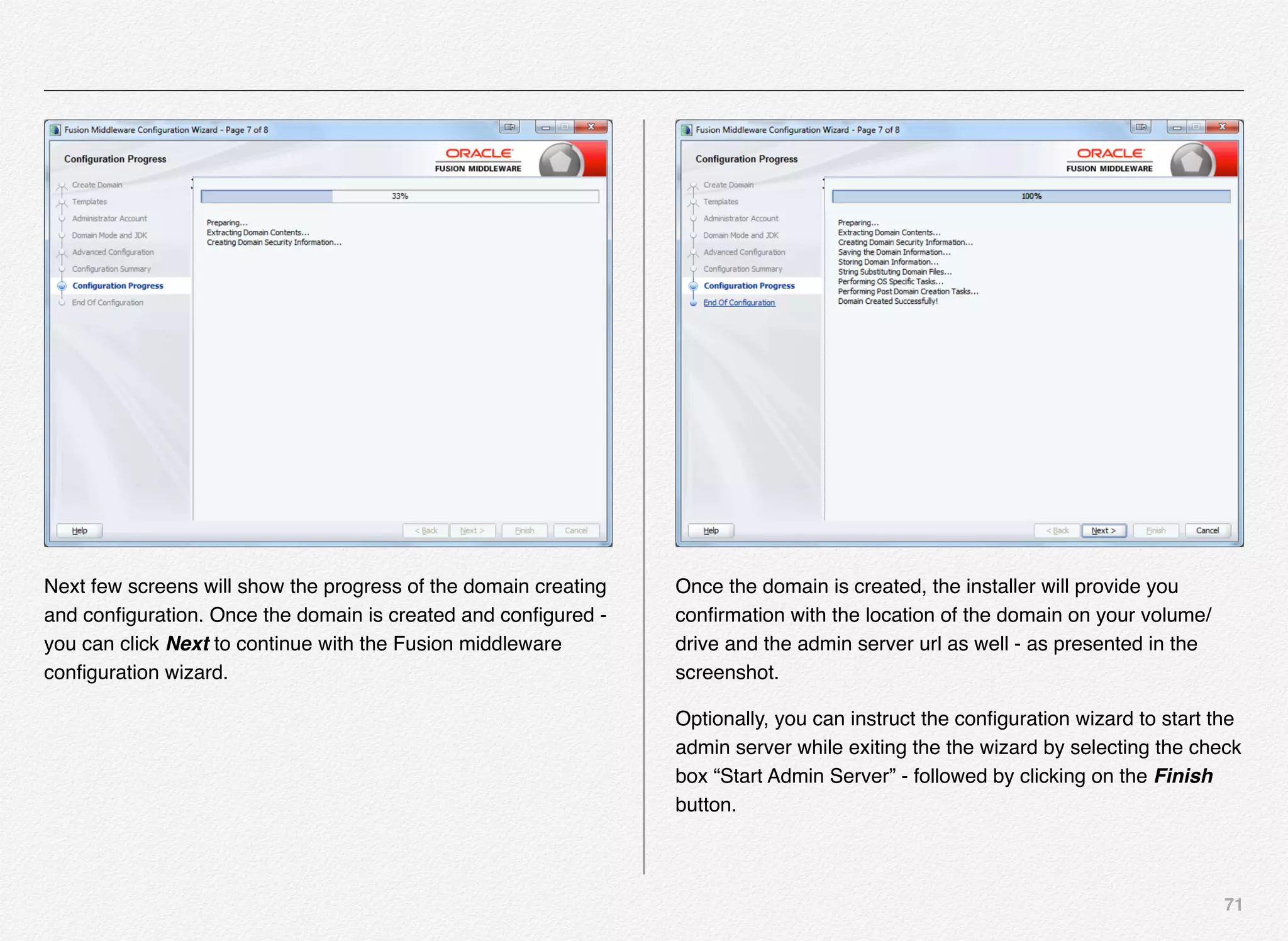
Next few screens will show the progress of the domain creating
and configuration. Once the domain is created and configured -
you can click Next to continue with the Fusion middleware
configuration wizard.
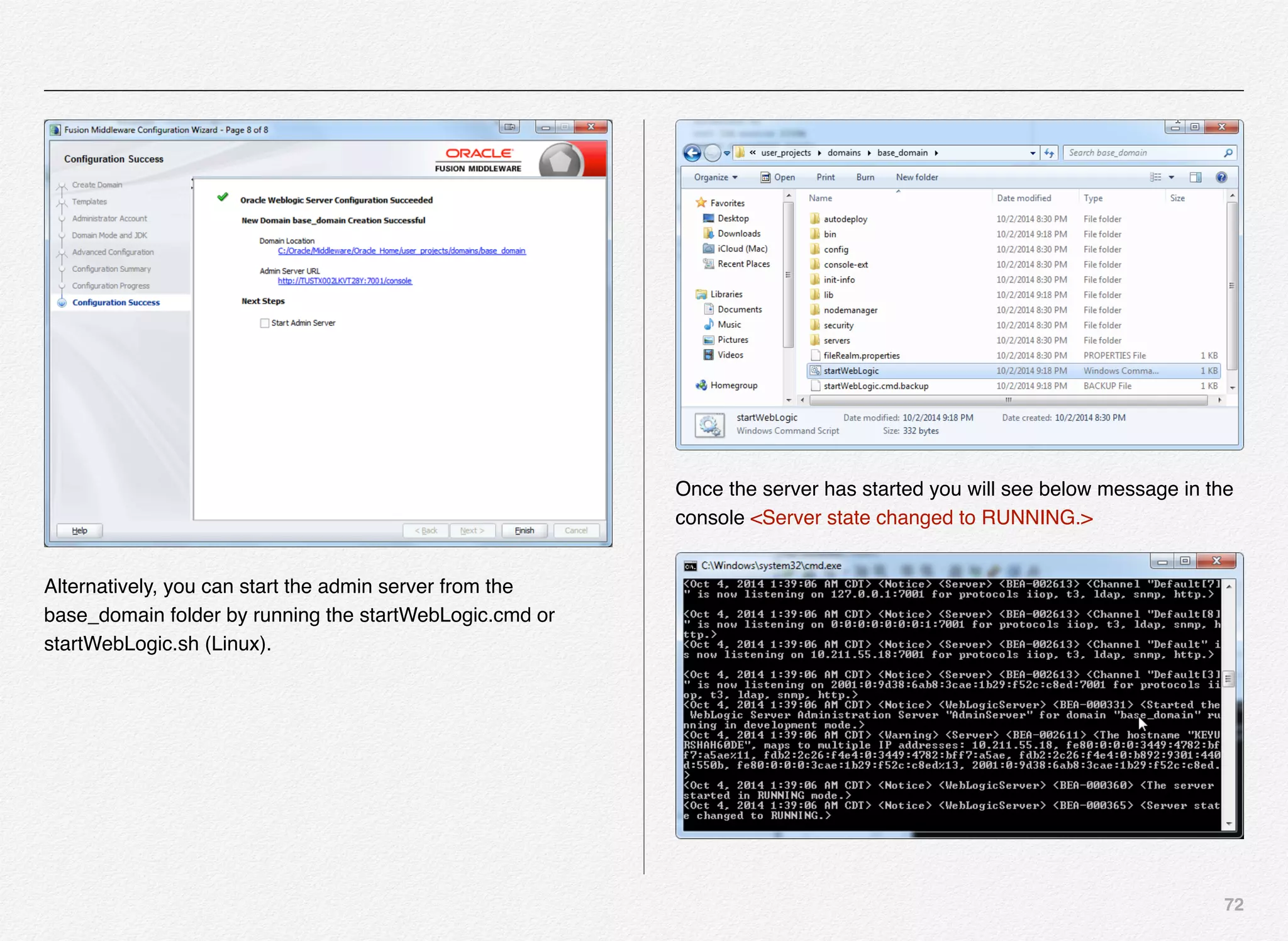
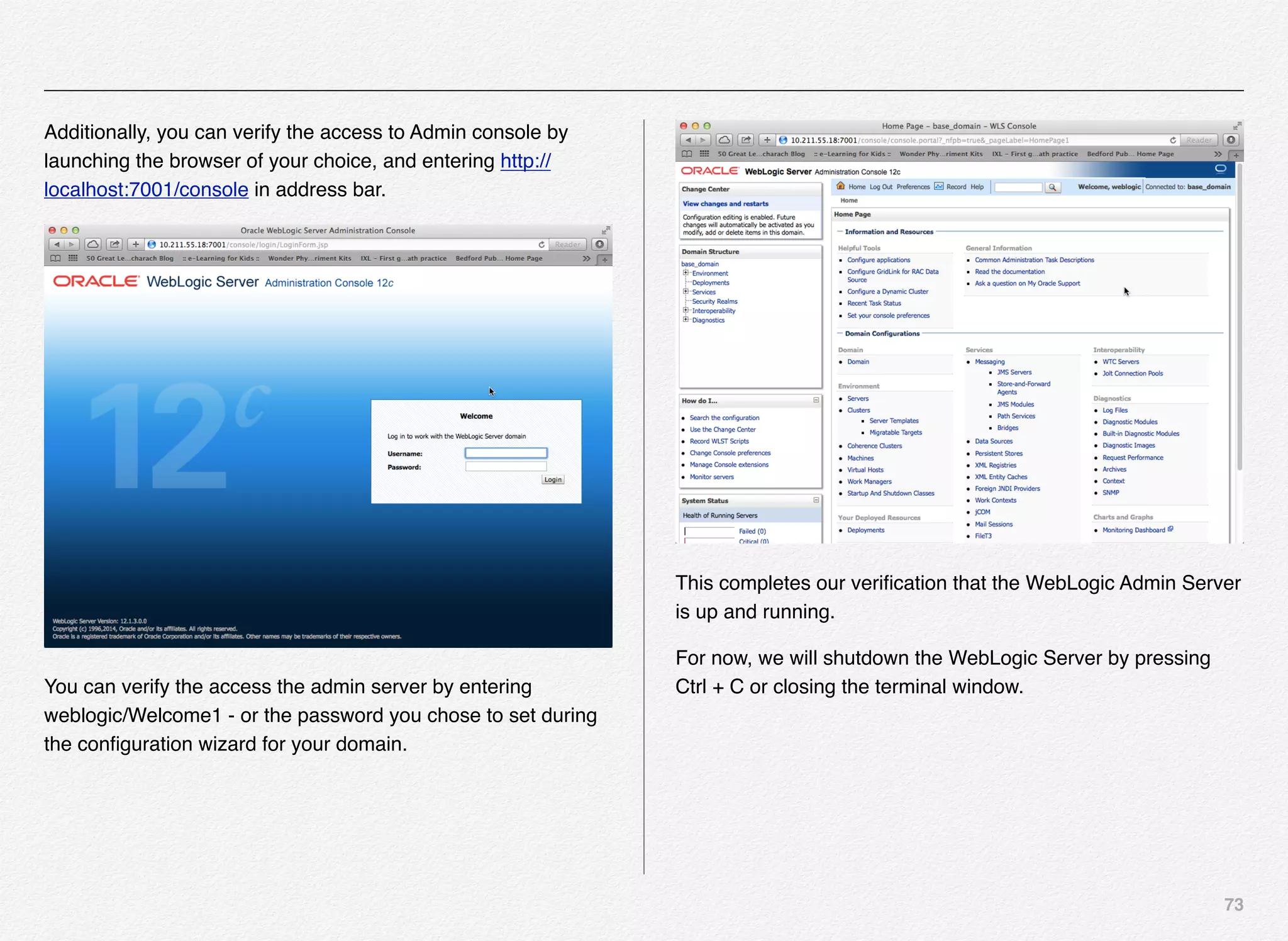
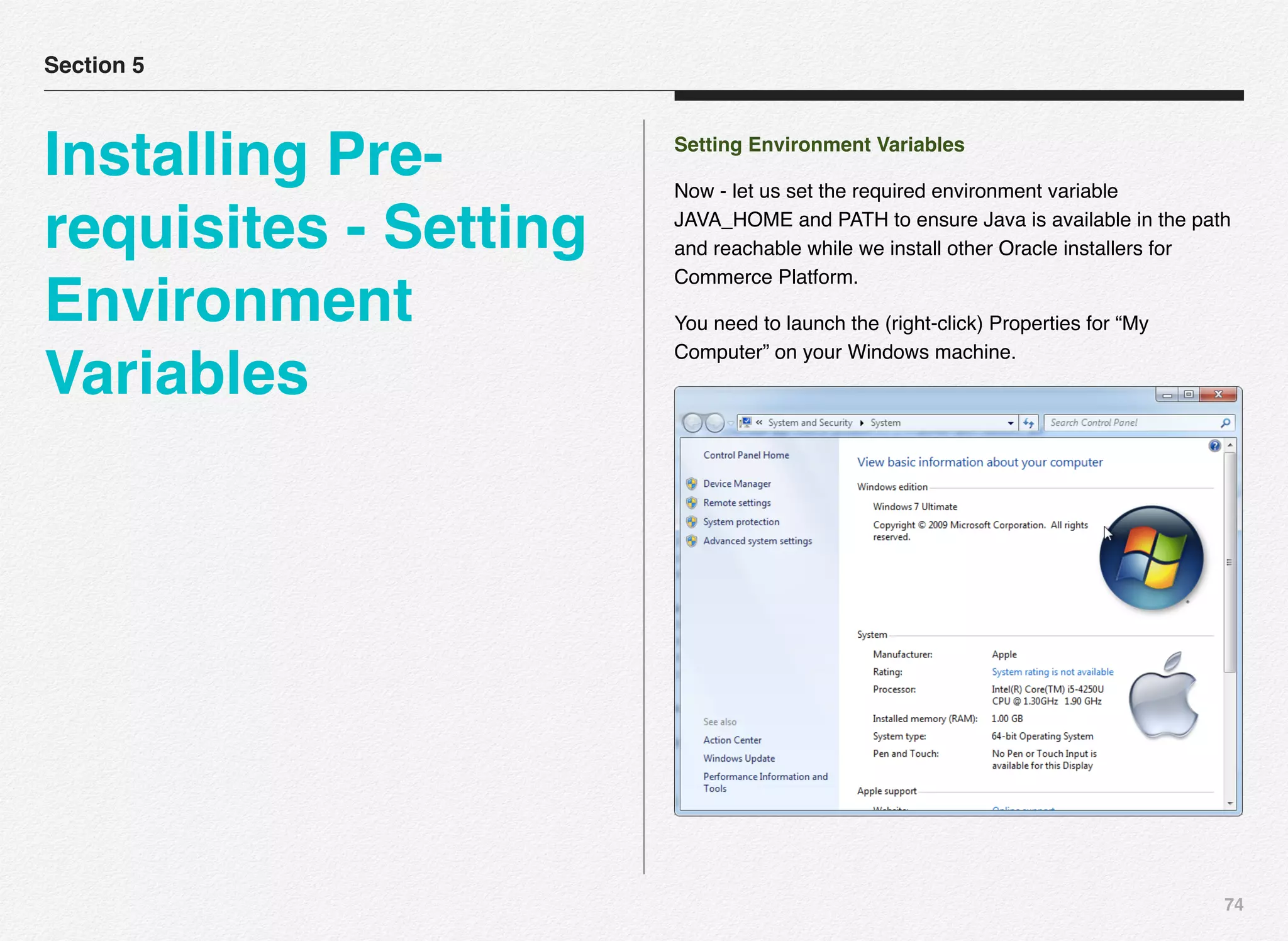
Once the domain is created, the installer will provide you
confirmation with the location of the domain on your volume/
drive and the admin server url as well - as presented in the
screenshot.
Optionally, you can instruct the configuration wizard to start the
admin server while exiting the the wizard by selecting the check
box “Start Admin Server” - followed by clicking on the Finish
button.
72
Alternatively, you can start the admin server from the
base_domain folder by running the startWebLogic.cmd or
startWebLogic.sh (Linux).
Once the server has started you will see below message in the
console <Server state changed to RUNNING.>
73
Additionally, you can verify the access to Admin console by
launching the browser of your choice, and entering http://
localhost:7001/console in address bar.
You can verify the access the admin server by entering
weblogic/Welcome1 - or the password you chose to set during
the configuration wizard for your domain.
This completes our verification that the WebLogic Admin Server
is up and running.
For now, we will shutdown the WebLogic Server by pressing
Ctrl + C or closing the terminal window.
74
Setting Environment Variables
Now - let us set the required environment variable
JAVA_HOME and PATH to ensure Java is available in the path
and reachable while we install other Oracle installers for
Commerce Platform.
You need to launch the (right-click) Properties for “My
Computer” on your Windows machine.
Section 5
Installing Pre-
requisites - Setting
Environment
Variables
75
You can then click on “advanced system setting” in the left
navigation menu - which will launch the System Properties
dialog box.
Next - click on the “Environment Variables” button.
It will launch another dialog box with the list of both User
variables and System variables.
Click on the New... button to create a new System variable -
called JAVA_HOME and assign it a value of the path to the JDK
1.7 version e.g. C:Program FilesJavajdk1.7.0_67
76
Next step is to set the PATH variable to add the path to JDK 1.7
as per below screenshot: (double-click on the PATH pre-
existing system variable)
Append the JDK 1.7 path to the PATH system variable. Click
OK to confirm the changes to the PATH system variable.
Click OK to exit the Environment Variables dialog box. And,
click OK again to exit the System Properties dialog box.
77
Installing Oracle eXpress Database Edition 11g R2
In order to install Oracle Commerce (ATG) - you can either
choose to live with the built-in MySQL database or you can
install Oracle eXpress Database Edition 11g R2 for your
installation. We are going to use use the Oracle Express
Database Edition 11g R2 for this installation.
If you recollect we have already downloaded the Oracle
eXpress database edition in Chapter 3.
Launch the Oracle XE DB installer from the download location.
Section 6
Installing Pre-
requisites - Oracle
eXpress Database
Edition 11g R2
78
Accept the license agreement and click Next to continue with
the installation wizard.
79
Select the destination folder where you want to install the
Oracle Database 11g Express Edition. Click Next to continue
with the installation wizard.
Specify and confirm the password you want to setup for the
SYS and SYSTEM database accounts. I would keep it as
admin. (or something easy to remember or keep it the same
Welcome1 across all of your installations)
80
Review all the installation settings and click the Install button to
continue with the installation wizard. You might want to take a
note of the “Oracle Database Listener” port - 1521- you will
need the port and the database instance name (e.g. XE) during
the ATG Commerce instance configuration in later chapter.
Click Install to continue with the installation wizard.
Installer wizard would now copy necessary files to the
destination folder (e.g. c:oraclexe).
81
Once the installation wizard finishes copying the files you can
click on the Finish button to exit. You can verify whether the
Oracle Database service is running from Administrative Tools in
your windows Control Panel as per this screenshot.
Launch Services using below steps:
Start > Control Panel > System and Security > Administrative
Tools > Services
With this - we are done with the installation of Oracle Database
Express Edition 11g R2.
82
Oracle SQL Developer Client
Once you have the database engine setup you will need a
client application to be able to connect to the database and in
case if you need to be able to run some SQL commands to
view the table structures or records, alter the schema, add
tables, alter permissions, etc...
With Oracle Commerce test run in this book, I do not see you
making any changes to the Oracle Commerce schema, but in
the real-world application you would be potentially extending
the existing Oracle Commerce schema e.g. adding new
attributes to the user profile.
You can visit the URL - http://www.oracle.com/technetwork/
developer-tools/sql-developer/downloads/index.html to
download the Oracle SQL developer client universal launcher
ZIP file.
Section 7
Installing SQL
Developer Client -
Mac
83
Accept the licensing terms as below and select the package for
either Windows (32/64-bit), Mac OSX, or Linux variants:
I’m downloading it for Mac OSX for demonstration but you can
do it for Windows or Linux.
Unzip the sqldeveloper-4.1.2.20.64-macosx.app.zip to desktop
and you will see either the SQLDeveloper folder on Windows /
Linux or sqldeveloper.app on Mac OSX as below.
84
Launch Oracle SQL Developer client by double-clicking on the SQL Developer.app icon on your desktop or wherever you have
unzipped it.
85
Bring up the Oracle database either on your local machine or virtual machine or development environment and create a new
connection in SQL developer. As you will learn in Chapter 12 (Automated Setup using VagrantUp & VirtualBox) - I’ve setup my Oracle
DB12C on Virtual Machine using Vagrant virtual environment automation tool as below:
86
Summary
This concludes the setup and configuration of Oracle SQL
Developer client tool for Mac and the chapter as well.
We have installed all the prerequisites for Oracle Commerce in
this chapter and will dive into Installing Oracle Commerce v11
in next chapter.
5
This chapter outlines and
explains the steps involved
in installing Oracle
Commerce including:
- Oracle Commerce
Platform
- Oracle Commerce
Reference Store
- Oracle Commerce ACC
Installing Oracle
Commerce v11
88
Section 1
Installing Oracle
Commerce
Platform
Oracle
Commerce
Oracle Commerce
Service Center 11.1
Oracle ATG Control
Center 11.1
Oracle Commerce
Reference Store
11.1
Oracle Commerce
Platform 11.1
89
Install Commerce Commerce Platform
What is Oracle Commerce Platform?
Oracle Commerce (a.k.a. ATG Web Commerce Platform) is the
leading enterprise eCommerce solution that provides you with
the eCommerce platform and framework that you can
customize and extend per your requirements. It brings few
inherent benefits - speed in commerce solution development for
the developer community and also the improved time-2-market
for marketing and business.
In this section, you are going to learn how to install the Oracle
Commerce Platform.
Before we get started with the process of installing Oracle
Commerce Platform and its components, let us make sure you
have downloaded and unzipped all the downloads to respective
folders to be able to run the same in sequential manner.
Below screenshots provides you the list of components needed
from http://edelivery.oracle.com:
Oracle Commerce Components (a.k.a. ATG Commerce)
Oracle Guided Search & Experience Manager
Components (a.k.a. Endeca)
90
Below are the list of ZIP files you will have after downloading
above components:
Below is the exploded list of all the components:
ATG Commerce Components
• OCPlatform11.1
• OCReferenceStore11.1
• OCACC11.1
Endeca Components
• OCmdex6.5.1-win64
• OCplatformservices11.1.0-win64
• cd (folder)
• OCcas11.1.0-win64
• OCdevstudio11.1.0-win64
Since, we now have all the necessary components unzipped -
let us launch the 1st installer i.e. OCPlatform11.1 from the
downloads folder.
Double-clicking the OCPlatform11.1 executable will launch the
Oracle Commerce Platform (a.k.a. ATG Platform) installer.
91
The setup program will walk you through several steps to install
the OCP (Oracle Commerce Platform).
• Select the language of choice and click OK to continue.
• Installer will now show you the introduction screen indicating
you can click Next to continue with the installation or click on
the Cancel Button to exit the installer.
• Click Next to continue with the installation wizard.
92
• In this step you will be required to “ACCEPT” the terms of the
license agreements, in order to continue with the installation
• Select “I Accept”, which will enable the Next button
• Click Next to continue with the installation
• In this step you need to select the folder/drive where you
want the installer to extract and copy the Oracle Commerce
platform files
• E.g. C:ATGATG11.1
• It is not mandatory to install Oracle Commerce in the default
folder - you can change it to your development requirements
• Click Next to continue with the installation
93
• Select the products you wish to install as a part of this
installation
• Our choice is NOT “Select All” - We have not selected some
of the B2B reference sites and even MySQL
• Remember, we are using Oracle eXpress Edition
• It covers (ATG Platform, Portal, Content Administration,
Motorprise, Quincy Funds, MySQL & Demo Accounts)
• Click Next to Continue
• In this step we will select the application server for our Oracle
Commerce Installation
• Since we have already installed WLS, we’ll select “Oracle
WebLogic” as an application server of choice
• Click Next to continue with the installation
94
• In this step you need to provide following inputs
• Oracle Middleware Directory
• WebLogic Home
• WebLogic Domain
• JDK Home
• Click Next to continue with the installation
• In this step you can review your responses to previous
prompts
• Verify & Change (if need be) - Click Previous button to make
any changes to your responses
• Click Install to perform the Oracle Commerce setup using the
inputs listed in this section
95
Installer now extracts and installs various components of the
Oracle Commerce Platform to the destination folder.
Once the installer is done copying all the necessary files to the
destination folder, 100% - will give you the indication about
completion.
Click DONE to exit the installer - with this we are done installing
the Oracle Commerce Platform.
96
Install Commerce Commerce ACC
(ATG Control Center)
ATG Control Center is one of the UI that business users can
use to perform most of the business functions such as:
• Manage User profiles, roles, and organizations
• Manage profile groups
• Manage content items
• Manage content targeters
• Manage content groups
• Manage SCENARIOS and SLOTS (ACC ONLY)
• Manage Workflows (ACC ONLY)
Most of the above functions are now available and managed
typically from the BCC (Business Control Center), which is a
Web-based UI - except the last 2 bulleted items, which are
manageable from ACC ONLY.
Section 2
Installing Oracle
Commerce ACC
(ATG Control
Center)
97
We have already downloaded all the necessary components
needed for installing the Oracle Commerce & Guided Search
platform as shown below:
In this section, we are going to install Oracle Commerce ACC
(ATG Control Center) by double-clicking on the OCACC11.1
executable from the downloads folder.
Once the installer is ready it will present you with the language
options to select and continue.
• Select the language of choice and click “OK” to continue with
the installation.
98
• The installer is now ready
• Click Next to continue with the installation
• Accept the license agreement terms
• Click Next continue with the installation
99
• Select the folder for the installer to extract the ACC files
• Typically it would be under the ATG folder - peer to the
ATG11.1 folder
• Click Next to continue with the installation
• Select the location where you want to place shortcut for ACC
inside your Windows program menu
• Click Next to continue with the installation
100
• Ready to rock-n-roll with the installation
• Review your responses to the installer prompts
• Click Install to continue with the installation process
• On the way to its destination
• You should receive the DONE message shortly
• Installation is now complete
Note: You can install & run ACC from either the SERVER or
CLIENT - it is just a Java executable and can point to any of
your existing Oracle Commerce (ATG) servers.
101
Installing Commerce Commerce
Reference Store
We have already downloaded all the necessary components
needed for installing the Oracle Commerce & Guided Search
platform as shown below:
In this section, we are going to install Oracle Commerce
Reference Store by double-clicking on the
OCReferenceStore11.1 executable from the downloads folder.
Section 3
Installing Oracle
Commerce
Reference Store
102
• You will land on this screen, once you launch the installer
executable, and it prepares the setup program to continue
• You can pick the language of choice (“English” in this case)
and continue
• Click OK to continue with the installation
• The setup program will walk you through several steps as
outlined on the LEFT in above screenshot
• Installer will start with “Introduction to the InstallAnywhere
program” & the actions you need to perform to continue
• Click Next to continue with the installation
103
• In this step you will be required to “ACCEPT” the terms of the
license agreements, in order to continue with the installation
• Select “I Accept”, which will enable the Next button
• Click Next to continue with the installation
• In this step you need to select the folder/drive where you
want the installer to extract the Oracle Commerce platform
files for the Commerce Reference Store
• E.g. C:ATGATG11.1
• Click Next to continue with the installation
104
• This step is the same as all other windows installation
program prompts
• You need to decide where you want to place the shortcut
icons/menu
• We will use the default selection
• Click Next to continue
• In this step you can review your responses to previous
prompts
• Verify & Change (if need be) - you can click on the Previous
button to make any desired changes
• Click Install to perform the Oracle Commerce Reference
Store setup using the inputs listed in this section
105
• Once the installer is done copying all the necessary files to
the destination folder, 100% - will give you the indication
about completion.
• Click DONE to exit the installer
106
Oracle Commerce Web Server
Extensions
If you are planning to planning to deploy web content such as
binary files (images, pdfs, docs, etc...) or static text content files
to staging and production environments (web servers), you
need to install the optional component Web Publishing Agent
of the Oracle Commerce Suite i.e. Oracle Commerce Web
Server Extensions.
You can download this piece of installer/software from the same
edelivery location as the rest of Oracle Commerce installers for
your OS architecture.
In production environment - remember, you will need to install
the Web Publishing Agent on each web server.
You will use the Oracle Commerce Web Server Extensions 11.1
installer to install the Web Publishing Agent on each web
server.
Section 4
Installing Oracle
Commerce Web
Server Extensions
107
Download the installer for OC Web Server Extensions 11.1 @
previous download location as per below screenshot:
Launch the installer by double-clicking on the
OCWebServerExtensions11.1.exe - installer executable.
Launching the installer will present the wizard with an option to
pick the language for the installer - default selection is English.
Click the Go button to continue with the installation wizard.
108
You can take a quick look @ all the steps required to setup the
Web Publishing Agent on the web server on staging or
production environment.
Click the Next button to proceed with the next screen and
follow the prompts to carry out next step.
You are required to accept the terms of the License Agreement
to continue to the next screen.
Click on the Next button to continue.
109
Select the default folder location or provide an alternate location
and click Next to continue.
You have an option of either installing the ATG Publishing Web
Agent on all the production servers or manage content across
multiple HTTP and Oracle Commerce servers, pushing content
from the Oracle Commerce Platform document root to the
HTTP servers document roots. This can be achieved using the
Oracle Commerce Web Server Extensions distributor service.
110
Provide the distributor service port - keep if default if you want
to and click Next to continue.
Specify the cache directory ( document root directory ) to be
used by the Distributor Service.The directory can be the Web
Server's document root directory or any subdirectory within it.
111
Specify an ATG Publishing Web Agent (RMI) Port. In this step you will specify the local directory that the
Publishing Web Agent can use as the document root directory.
112
Remember - in real-life you might be installing the ATG
Publishing Web Agent on a Linux based system in non-prod
and production environments. So, the installation steps could
be somewhat different, but the configuration requirement are
still going to be the same as explained here.
The installer wizard is now read to install the ATG Publishing
Web Agent.
113
114
Summary
In this chapter we have looked as installing some of the most
common Oracle Commerce components for a developer
machine e.g. Oracle Commerce Platform, Oracle Commerce
Reference Store, Oracle ACC, and Oracle Commerce Web
Extension.
In the next chapter, we will continue our journey to install the
Oracle Endeca Commerce components such as MDEX,
Platform Services, Tools & Frameworks, CAS, and Developer
Studio.
6
This chapter outlines and
explains the steps involved
in installing Oracle
Commerce including:
- Endeca MDEX Engine
- Guided Search Platform
Services
- Tools and Frameworks
- Content Acquisition
System
- Developer Studio
Installing Oracle
Commerce - Cont’d
116
What is Oracle Commerce Guided
Search?
Oracle Commerce Guided Search (in previous life - Endeca
Guided Search) enables its users to explore data interactively
in real time - could be in the form of search, navigation &
visualization.
It facilitates this through an interface that is very easy to
understand and use - without worrying about the scale and
complexity of the underlying data.
In this age of Internet, users need to search, navigate, and
analyze all of their data - in finer details as possible. Also, users
need to sometimes be able to aggregate the data and present
accordingly. The application of search, navigate, and
visualization is to guide the users achieve their goal while they
are interacting with your application which can be device and
form-factor agnostic.
Section 1
Understanding
Oracle Commerce
Guided Search
oracle Commerce Cont'd
Guided Search Platform
Oracle MDEX
Engine
Oracle Guided Search
Platform Services Oracle Experience
Manager Tools &
Frameworks
Oracle Content
Acquisition System
Oracle Developer
Studio
117
Search, Guided Navigation, and Visualization Experience Management
Oracle Endeca product provides 3 different solutions:
• Oracle Endeca Guided Search
• Oracle Endeca Experience Manager
• Oracle Endeca Information Discovery
Oracle Endeca Guided Search - provides solution to build front-
end applications with capabilities to provide end-user
experiences for search and navigation.
118
Oracle Endeca Experience Manager - provides solution to build
online personalized experienced & content authoring tool for
the business and marketing teams.
Oracle Endeca Information Discovery - provides solution to
build discovery and analytic solution for your data sources such
as customer orders, customer feedback & surveys, data
analysis using search and discovery, big data discovery, etc...
Considering the 3 options - we will be using a combination of
guided search and experience manager for this book, hence we
will be looking forward to install Oracle Endeca MDEX, Oracle
Endeca Platform Services, Oracle Endeca Tools & Frameworks
with Experience Manager, Oracle Content Acquisition System,
and Oracle Developer Studio.
119
Installing Oracle Commerce MDEX
Engine
In this chapter, we are going to review all the steps required to
install the Oracle Commerce Experience Manager & Guided
Search components a.k.a. Endeca Commerce.
Oracle Commerce (ATG) and Oracle Guided Search /
Experience Manager run on the basis of different architecture
and framework. But, Oracle have made them talk to each other
and are still in the process of further unification of these tools
bought over from different companies.
What is MDEX Engine?
At the heart of Oracle Guided Search &
Experience Management platform are few
components such as MDEX Engine,
Dgraph, Platform Services Agent, Central
Server, Tools and Frameworks, Content
Acquisition System, and Developer
Studio.
MDEX is Endeca’s engine that drives search and discovery of
data. The underlying data that MDEX indexes can be in any
form i.e. Structured, Semi-structured, or Unstructured.
Section 2
Installing Oracle
Commerce MDEX
Engine
120
MDEX is positioned in the market as a hybrid search and
analytical database - with its own proprietary algorithm to store
and query the data. The indexed data is stored both on disk
and in-memory. If the available amount of memory is less than
the size of index, it still maps entire index continuously in-
memory (most recently used data) and on disk (least recently
used data).
Based on the need MDEX engine brings the data in-memory by
swapping.
Endeca derives its data structures on the basis of the data that
is loaded - not strictly following any particular schema (call it
schema-less or each data record has its own schema).
Endeca records in the index are made up of values and key/
value pairs, and does contain hierarchies.
All the access to MDEX is via the Endeca web-services API -
maybe it the front-end application, the experience manager, or
any of the Endeca administration and operations scripts.
The Oracle Commerce MDEX engine comprises of Indexer
(Dgidx), Dgraph, and Agraph. We will look at these terms and
concepts in later chapter(s).
Let us stay on course for now to start with the installation of 1st
component in the series of Oracle Guided Search & Experience
Management Platform i.e. MDEX Engine.
Below is the list of all the software installers that we
downloaded in chapter 5.
Double-click on the OCmdex6.5.1-win64_829811.exe to launch
the MDEX installer wizard.
121
The installer will extract and launch the Oracle Commerce
MDEX Engine 6.5.1 x64 Edition installation wizard.
• Click Next to continue with the installation wizard.
• Review the Copyright & Legal information related to this
software
• Click Next to continue with the installation
122
• Select the location where you would like to create new
shortcuts.
• Click Next to continue with the installation
• Select the folder on your local drive where you want to store
the install files
• We will continue with the default C:EndecaMDEX6.5.1
• Click Next to continue with the installation
123
• Now that you have responded to all the prompts
• Click Next to start copying file to the destination folder
• Setup is now validating installation files
• Wait for the installer to finish copying the files
124
• Setup is now coping the necessary files to C:EndecaMDEX
6.5.1 folder as specified during the installation prompt.
• With this you have successfully installed the Oracle
Commerce Endeca MDEX Engine.
• Click Finish to exit the installation wizard
• Verify the MDEX folder is available at C:EndecaMDEX -
after the installation is complete
Also, we are going to Unzip OCpresAPI6.5.1-win65-829811.zip
which will contain a folder with the name “PresentationAPI”
under the “Endeca” folder.
125
Once extracted you will notice a new folder “Endeca” created -
copy the sub-folder “PresentationAPI” to C:Endeca.
Verify the content of C:Endeca - should contain 2 sub-folders
MDEX and PresentationAPI.
This concludes the installation of MDEX and PresentationAPI.
126
Installing Oracle Commerce Guided
Search Platform Services
Oracle commerce guided search platform services comprises of
several components that play a very important role in couple of
important areas e.g. ETL - Extract, Transform, and Load using
the Data Foundry & Forge processes - and - the Endeca
Application Controller (EAC). Additionally, it also comprises of
other components such as logging, reporting, presentation API,
reference implementations, and the key emgr_update utility.
Oracle Guided Search
Platform Services
Components
EAC (Endeca
Application
Controller)
Data
Foundry
Logging and
Reporting
System
Reference
Implementati
ons
emgr_update
utility
Presentation
& Logging
APIs
Section 3
Installing Oracle
Commerce Guided
Search Platform
Sercies
127
Pre-requisites for Installing Platform Services
Since we are installing the Oracle Commerce on Microsoft
Windows platform, you need to make sure the user account
that you are currently signed-into has necessary permissions /
rights to install or remove windows services.
Platform services component will ask for the following details
during the installation process:
• Username
• Password
• Verify Password
• Domain
Below is the list of all the software installers we downloaded in
chapter 5.
Launch the Oracle Commerce Guided Search Platform
Services installer executable OCplatformservices11.1.0-
win64.exe from the downloads folder (left).
• Once you launch the Endeca Platform Services 11.1.0
installer executable, it loads the setup wizard
• Once the setup wizard is ready
• Click Next to continue the Platform Services 11.1.0
installation
128
• Review the Copyright information related to this software
• Click Next to continue with the installation
• Do you want this installation to be just for your own use or
everyone who uses this computer?
• Pick the response that is applicable to your scenario
• Click Next to continue with the installation
129
• Select the folder on your local drive where you want to store
the install files
• We will continue with the default C:EndecaPlatformServices
• Click Next to continue with the installation
• Carefully review these options
• Since you are installing this on a stand-alone system - you
will install both Central Server and an Agent
• If you were installing this on a Linux based production
environment then you will have a single server running the
Central Server and the other servers in cluster serving client
search requests with only an Agent. Basically, you need only
one Central Server across the application.
• Click Next to continue with the installation
130
• Oracle Commerce Guided Search Platform Services would
need local system user with admin permissions who has
access to create windows services
• You need to provide your windows user id / password for the
account that has the necessary permissions
• Installer will use this information to validate the user name /
password / permissions before continuing with the next step
• Click Next to validate the user name / password &
permissions
• The Default ports for EAC service & shutdown are 8888 and
8090 respectively
• You need to provide the MDEX Engine root directory with the
version number as highlighted in the screenshot
• Enter the PATH and click Next to continue with the
installation
131
• With all the user input provided @ the prompts, Endeca
Platform Services installer is now ready
• Click Install to continue with the installation
• Installer is copying files to C:EndecaPlatformServices folder
132
• Installation is now complete
• You need to restart the system in order for the changes to
take effect
• Once you restart, you can check the contents of the C:
Endeca folder it should have 3 sub-folders
• MDEX
• PlatformServices
• PresentationAPI
Also, you can go to Windows Services and verify the availability
of new service called “Endeca HTTP Service”.
Start > Control Panel > System and Security > Administrative
Tools > Services
133
ALTERNATIVE APPROACH TO START PLATFORM
SERVICES
In case, you have issues with the service (maybe its not
running or not installed) - you can start the Endeca HTTP
Service from this location (per screenshot)
C:EndecaPlatformServices11.1.0ToolsServerBin
You can 1st run the setenv.bat followed by startup.bat - which
will in turn launch a command window and run the Endeca
HTTP Service. You can shutdown the HTTP Service by
pressing CTRL + C in the command window.
134
Installing Oracle Commerce
Experience Manager Tools and
Frameworks
Oracle Endeca Tools and Frameworks is a collection of tools
that facilitate business owners to build dynamic presentation of
content across multi-channels. Tools and Frameworks comes in
2 flavors:
1. Tools and Frameworks with Experience Manager
2. Tools and Frameworks with Guided Search
Section 4
Installing Oracle
Commerce
Experience
Manager Tools and
Frameworks
135
If you are looking forward to using features such as
merchandising, content spotlighting, and brining personalization
into play beyond just guided search and navigation - you would
need the Tools and Frameworks with Experience Manager
package.
The package that we downloaded in chapter 5 was with
Experience Manager. This is the package we need to use the
combined power of both ATG and Endeca Commerce.
Remember, we have already Unzipped the Tools and
Frameworks with Experience Manager installer into the “cd”
folder.
Change the directory to cd/Disk1/install and run the setup.exe
(application) to launch the Tools and Frameworks installation
wizard.
ORACLE RECOMMENDATION
Oracle recommends to set the ENDECA_TOOLS_ROOT and
ENDECA_TOOLS_CONF environment variables prior to
installing Tools and Frameworks.
We have not experienced the need for above step - but just
wanted to point it out since its recommended in Oracle
documentation for Tools and Framework installation.
136
You can set the environment variables by going to the
Computer > Properties > Advanced system settings >
Environment Variables.
We have launched the setup.exe (application) to initialize the
Oracle Universal Installer that will install the Oracle Commerce
Tools and Frameworks with Experience Manager. The installer
will guide you through the installation and configuration of Tools
and Frameworks.
This is the 1st time you are installing Tools and Frameworks
and hence, no need to worry about Deinstall Products. Also,
there are no installed products currently. So, we will safely
assume to click Next to continue with the installation.
NOTE: Prior to Oracle Commerce 11.1 and 11.0 - there was no
need to install Tools and Frameworks - you could simply UNZIP
the ToolsAndFrameworks folder and copy it to the C:Endeca
and then install the windows service to bring it up and running.
137
• Accept the license terms and export restrictions and continue
to next step
• In this step, you need to select the installation type
• Minimal
• Complete
• The complete installation also includes the reference
applications - e.g. Discovery data, Discover Electronics,
Discover Electronics Authoring, Discovery Services, etc...
• Cliclk Next to continue with the installation
138
• Select a name for this installation and provide a full path
where you want the Tools And Frameworks to be installed
• We will select to install it under C:Endeca
ToolsAndFrameworks
• In this step - you need to provide the password for admin
workbench user
• We would recommend to keep it admin / admin for now
139
• Review all the information you have provided in previous
steps
• Click Install to continue with the installation of Tools and
Frameworks
• Installer will now copy necessary files to the destination
folder, save Oracle inventory and configure the application
• If something goes wrong during the installation - you can
refer to the installation log at the specified location
140
• Installation is successful and you are provided additional
instructions to execute the run.bat - If you do not want to
install the Endeca Tools Service (explained in next topic) -
then you can start the Tools and Frameworks using Run.bat.
• Once started - you can stop the Tools and Frameworks using
Stop.bat.
• You can now close the installer by clicking on the Exit button
Registering “Endeca Tools Service” on
Windows
Unlike Platform Services, Oracle installer doesn’t automatically
register the service for Endeca Tools and Framework. You are
required to run the batch file from command prompt - for which
launch the command prompt in administrator mode.
Change the current working directory to C:Endeca
ToolsAndFrameworks11.1.0ToolsServerBin
141
You will notice several batch files - especially install_service.bat
- execute this batch file as shown in the next screenshot.
By installing it as a service, you can control the nature of its
startup - e.g. automatically or manually or disable it.
Once the service is registered you will see the message “The
service ‘EndecaToolsService’ has been installed”.
142
Verify the Endeca Tools Service
You can verify the service and its status in the Services under
Administrative Tools in control panel.
Start > Control Panel > System and Security > Administrative
tools > Services
Notice that the status of the service is currently “Started”
Verify Tools and Framework Installation
Once you have verified the Endeca Tools Service in Windows
services and its status is running - you can verify the Tools and
Frameworks installation by launching the browser and pointing
it to http://localhost:8006/.
If you see the below page - that confirms the successful
installation of the Endeca Tools Service & the framework.
Remember, we had assigned admin / admin for the Oracle
Commerce Workbench username and password.
143
Log into the Workbench using admin / admin - Click on the “Log
In” button.
You would land on the workbench administrative tools home
page.
We have not yet deployed and configured any application
hence you are able to just view the menu options pertaining to
Administrative Tools.
Once you deploy and configure applications you will start
seeing the new application(s) in the drop-down adjacent to the
Home menu.
Note: CAS Installation (next step) will fail if you miss to register
the EndecaToolsService windows service or manually start the
Tools And Frameworks using the Run.bat from command-line.
144
Installing Oracle Commerce Content
Acquisition System
What is Content Acquisition System (CAS)?
It is imperative that we understand the purpose of Content
Acquisition System and its role in the overall Oracle Commerce
Guided Search product.
While you build your Guided Search application you will have
the need to connect to disparate data sources such as a CMS
(Content Management System), Database, File System, or
Custom repositories to index the data from.
Oracle Commerce Content Acquisition System is a collection of
component that facilitates you to add, remove, crawl, and
configure these disparate data sources.
Oracle Commerce CAS crawls these data sources, reads the
structured, semi-structured, or unstructured data, converts
documents and files to proprietary data structures (XML or
Record Store Instances) and store them on disk for future use
in the Forge pipeline.
Section 5
Installing Oracle
Content
Acquisition System
(CAS)
145
Content Acquisition System comprises of below components:
• CAS Service (servlet container)
• CAS Server
• CAS Workbench Console
• CAS Server API
• Web Crawler
• Component Instance Manager
• Record Store Instances
• Connectors / Adapters to data sources
• Document Converter
• DVal ID Manager
146
Let us get started with the installation of Oracle Commerce
Content Acquisition System - we will introduce other concepts
related to Oracle Commerce Guided Search in later chapter(s).
Double-click on the OCcas11.1.0-win64.exe executable file in
order to launch the CAS installation wizard.
• This is the introductory screen of the Setup Wizard
• Click Next to continue with the installation
147
• Review the Copyright information related to this software
• Click Next to continue with the installation
• The Content Acquisition System includes Endeca Web
Crawler, the CAS Server, CAS Console as a Workbench
Extension, and CAS Deployment Template Integration
• You may optionally install CAS Samples as well
• The job of these components is to crawl the structured, semi-
structured and unstructured data
• Click Next to continue with the installation
148
• Select the folder on your local drive where you want to store
the CAS install files
• We will select the default C:EndecaCAS location
• Click Next to continue with the installation
• In order to create/register the Endeca CAS Service, enter the
username / password with the domain name with proper
authorization to create a service
• Click Next to continue with the installation
• Installer will validate the username and password for the
ability to register/create windows service
149
• Please enter the host and port of your CAS Server installation
• Default port for CAS Server port is 8500
• Default port for CAS Server Shutdown port is 8506
• Click Next to continue with the installation
• This step is just a pause (Take a breath)
• Decision point to move forward with the installation or go
back and change any of your selections
• Click Next to continue with the installation
150
• Installer is copying files to C:EndecaCAS folder This screen indicates that you have successfully complete the
installation of Oracle Commerce Content Acquisition System
11.1.0.
Click Finish to exit the installation wizard.
151
Verify the Endeca CAS Service
You can verify the service and its status in the Services under
Administrative Tools in control panel.
Start > Control Panel > System and Security > Administrative
tools > Services
Notice that the status of the Endeca CAS Service is
currently “Started”. Also, take a note of all the Endeca
Services (HTTP, Tools, and CAS) - are started and running.
NOTE: CAS services should start automatically - unlike Endeca
Tools Service (which didnt start automatically) - you need to
start it - since you simply installed it from command-line.
152
Installing Oracle Commerce Developer
Studio
Oracle Commerce Developer Studio 11.1.0 is a Microsoft
Windows only application that helps developers define all
aspects of your record store instance configuration. It is more of
a MINI ETL (Extract, Transform, Load) & Workflow tool.
Below are some of the high-level tasks that you can perform
using the Developer Studio:
• Define pipeline components
• Load the data from numerous data sources (JDBC, XML,
TXT, CSV etc...)
• Join the data from numerous sources
• Map the incoming data to Endeca properties
• Export the data
• Create dimensions and dimension values including
dimension hierarchies
• Define precedence rules
• Define search configurations
Section 6
Installing Oracle
Commerce
Developer Studio
153
Developer Studio provides a graphical-interface (GUI) to
perform all the ETL type of tasks. Developer Studio uses the
concept of project files saved on disk as .ESP.
Each individual component configuration in the Developer
Studio application is stored on disk within respective XML file.
You will notice about 30+ XML files created - each with specific
configuration information. We will create these later in the
chapter.
154
Let us get started with the installation of Oracle Commerce
Developer Studio.
Double-click the OCdevstudio11.1.0-win64.exe executable to
launch the Oracle Commerce Developer Studio installation
wizard.
• Installer is now ready
• Click Next to continue
155
• Review the Copyright information
• Click Next to continue
• Select the destination folder where you want the installer to
copy Developer Studio files
• We will continue with the default location C:Endeca
DeveloperStudio
• Click Next to continue
156
• Installation wizard is now ready to install the software and
copy necessary files
• Click Install to continue
• Installation wizard now copies the files to the destination
folder
157
Installer is now done setting up the Developer Studio on your
computer
Click Finish to exit the wizard
Verify the Developer Studio Application
You can run the Developer Studio application from Start > All
Programs > Endeca > Developer Studio > Developer Studio
11.1.0
158
On launching Oracle Commerce Developer Studio - it shows a
UI. You can now either open an existing Developer Studio
project or create a New Project.
With this we now have all the necessary components installed
for configuring the Oracle Commerce Reference Store.
159
Deploying Discover Electronics
In this section we will look at the steps involved in deploying the
out-of-the-box Endeca reference application - Discover
Electronics.
This section assumes that you have already installed the
Oracle Endeca Commerce 11.1.0 or 11.2.0 software modules
based on the previous chapters/sections.
We will now learn to deploy the “Discover electronics” Endeca
reference application using the “production-ready” scripts in the
form of “Deployment Template”.
Also, once the application is deployed we will need to execute
some more scripts to bring the application live.
And, will take a quick look @ discover electronics in Experience
Manager, Authoring, and Production view.
We are going to use the Endeca deployment template to deploy
a new application and then later execute some more scripts
pertaining to the new application to initialize it, read the data
source, index the content, push the index to the target servers
and bring the application to life.
Section 7
Deploying Discover
Electronics -
Endeca Application
160
You might be wondering what is a deployment template. The
deploymentTemplate is actually a program that can accept as
input – a template for creating an Endeca application, and in
turn creates the Endeca application for you. It is a batch
program – deploy.bat(/sh).
Endeca provides a few templates with the installation (as part of
Tools and Frameworks) for basic Endeca applications.
“Discover Electronics” is an Endeca commerce based sample
ecommerce store – like application bundled with Endeca.
Below are some of the templates located in the C:Endeca
ToolsandFrameworks11.2.0reference folder.
We are going to use the discover-data template for creating
our Endeca application. The template for Discover Electronics
application is defined as XML file in discover-data folder and
the actual application for authoring preview and live site are
defined in discover-electronics-authoring and discover-
electronics folders respectively.
For the deployment of Discover Electronics we will use the --
app parameter with a sample deploy.xml as a template using
which we will deploy the reference application.
Navigate to the C:EndecaToolsandFrameworks
deployment_templatebin folder to execute the deploy.bat or
deploy.sh (Unix).
The deploy script is located in the bin directory (as per the path
below) creates, configures, and distributes the EAC application
files into the deployment directory structure.
1.! Start a command prompt (on Windows) or a shell (on
UNIX)

2.! Navigate to <installationpath>ToolsAndFrameworks
<version>deployment_templatebin or the equivalent path on
UNIX

3.! From the bin directory, run the deploy script. For example,
on Windows: C:EndecaToolsAndFrameworks
11.2.0deployment_templatebin>deploy --app C:Endeca
ToolsAndFrameworks11.2.0referencediscover-data
161
deploy.xml

4.! If the path to the Platform Services installation is correct,
press Enter
(The template identifies the location and version of your
Platform Services installation based on the ENDECA_ROOT
environment variable. If the information presented by the
installer does not match the version or location of the software
you plan to use for the deployment, stop the installation, reset
your ENDECA_ROOT environment variable, and start again.
Note that the installer may not be able to parse the Platform
Services version from the ENDECA_ROOT path if it is installed
in a non-standard directory structure. It is not necessary for the
installer to parse the version number, so if you are certain that
the ENDECA_ROOT path points to the correct location,
proceed with the installation. )
5.! Specify a short name for the application. The name should
consist of lower- or uppercase letters, or digits between zero
and nine – e.g. Discover

6.! Specify the full path into which your application should be
deployed
This directory must already exist (e.g. C:Endecaapps). The
deploy script creates a folder inside of the deployment directory
162
with the name of your application (e.g. Discover) and the
application directory structure
(I’ve just created a folder “apps” under C:Endeca)
For example, if your application name is Discover, and you
specify the deployment directory as C:Endecaapps, the deploy
script installs the template for your application into C:Endeca
appsTestCrawler
7.! Specify the port number of the EAC Central Server
By default, the Central Server host is the machine on which you
are running deploy script and that all EAC Agents are running
on the same port – e.g. 8888
8.! Specify the port number of Oracle Endeca Workbench, or
press Enter to accept the default of 8006 and continue

9.! Specify the port number of the Live Dgraph, or press Enter
to accept the default of 15000 and continue 

10.! Specify the port number of the Authoring Dgraph, or press
Enter to accept the default of 15002 and continue


11.! Specify the port number of the Log Server, or press Enter
to accept the default of 15010 and continue. 


163


Note: If the application directory already exists, the deploy
script time stamps and archives the existing directory to avoid
accidental loss of data


12. Specify the path for the Oracle Wallet jps-config.xml (for
credentials configuration), state repository folder for archives,
and path for the authoring application configuration to be
exported to during deployment
13. Discover application is now successfully deployed at the
target folder
NOTE
If you want to deploy the Discover Electronics Endeca
reference application on another port (e.g. 17000, 17002, and
17010) - you absolutely can - but you need to make the port
changes in the Assembler.properties file (under WEB-INF folder
) located in the reference folder for both discover-electronics
and discover-electronics-authoring applications.
Properties you need to change are as follows for both
applications:
164
discover-electronics
mdex.port=17000
logserver.port=17010
discover-electronics-authoring
mdex.port=17002
logserver.port=17010
You need to restart both Platform Services & Tools Service after
making the change to the port # for it to take effect.
Initializing the Discover Application
Once the application is deployed to C:Endecaapps folder, you
can check out the structure of the folder by navigating to C:
EndecaappsDiscover (Discover is our application name)
1.! Navigate to the control directory of the newly deployed
application. This is located under your application directory. For
example: C:Endecaapps<app dir>control – e.g. C:Endeca
appsTestCrawlercontrol.

165
The control folder contains all the initialization, baseline
updates, and other application management scripts that will
help you control the application.
2.! From the control directory, run the initialize_services script.
a.! On Windows:
<app dir>controlinitialize_services.bat
e.g. C:EndecaAppsDiscovercontrolinitialize_services.bat
b.! On UNIX:
<app dir>/control/initialize_services.sh
e.g. ./usr/home/Endeca/Apps/Discover/
control.initialize_services.sh
The initialize_services script initializes each server in the
deployment environment with the directories and configuration
required to host your application. The script removes any
existing provisioning associated with this application in the EAC
and then adds the hosts and components in your application
configuration file to the EAC.
Once deployed, an EAC application includes all of the scripts
and configuration files required to create an index and start an
MDEX Engine.
166
Initialize_services Response
C:EndecaappsDiscovercontrol>initialize_services.bat
Setting EAC provisioning and performing initial setup...
[11.30.15 18:36:09] INFO: Checking definition from
AppConfig.xml against existin
g EAC provisioning.
[11.30.15 18:36:09] INFO: Setting definition for application
'Discover'.
[11.30.15 18:36:11] INFO: Setting definition for host
'AuthoringMDEXHost'.
[11.30.15 18:36:12] INFO: Setting definition for host
'LiveMDEXHostA'.
[11.30.15 18:36:12] INFO: Setting definition for host
'ReportGenerationHost'.
[11.30.15 18:36:12] INFO: Setting definition for host
'WorkbenchHost'.
[11.30.15 18:36:12] INFO: Setting definition for host 'ITLHost'.
[11.30.15 18:36:12] INFO: Setting definition for component
'AuthoringDgraph'.
[11.30.15 18:36:13] INFO: [AuthoringMDEXHost] Starting shell
utility 'mkpath_-data-dgidx-output'.
[11.30.15 18:36:14] INFO: [AuthoringMDEXHost] Starting shell
utility 'mkpath_-data-partials-forge-output'.
[11.30.15 18:36:16] INFO: [AuthoringMDEXHost] Starting shell
utility 'mkpath_-data-partials-cumulative-partials'.
[11.30.15 18:36:17] INFO: [AuthoringMDEXHost] Starting shell
utility 'mkpath_-data-workbench-dgraph-config'.
[11.30.15 18:36:18] INFO: [AuthoringMDEXHost] Starting shell
utility 'mkpath_-data-dgraphs-local-dgraph-input'.
[11.30.15 18:36:19] INFO: [AuthoringMDEXHost] Starting shell
utility 'mkpath_-data-dgraphs-local-cumulative-partials'.
[11.30.15 18:36:20] INFO: [AuthoringMDEXHost] Starting shell
utility 'mkpath_-data-dgraphs-local-dgraph-config'.
[11.30.15 18:36:22] INFO: Setting definition for component
'DgraphA1'.
[11.30.15 18:36:22] INFO: Setting definition for script
'PromoteAuthoringToLive'.
167
[11.30.15 18:36:22] INFO: Setting definition for custom
component 'IFCR'.
[11.30.15 18:36:22] INFO: Updating provisioning for host
'ITLHost'.
[11.30.15 18:36:22] INFO: Updating definition for host 'ITLHost'.
[11.30.15 18:36:22] INFO: [ITLHost] Starting shell utility
'mkpath_-'.
[11.30.15 18:36:24] INFO: Setting definition for component
'LogServer'.
[11.30.15 18:36:24] INFO: [ReportGenerationHost] Starting
shell utility 'mkpath_-reports-input'.
[11.30.15 18:36:25] INFO: Setting definition for script
'DaySoFarReports'.
[11.30.15 18:36:25] INFO: Setting definition for script
'DailyReports'.
[11.30.15 18:36:25] INFO: Setting definition for script
'WeeklyReports'.
[11.30.15 18:36:25] INFO: Setting definition for script
'DaySoFarHtmlReports'.
[11.30.15 18:36:25] INFO: Setting definition for script
'DailyHtmlReports'.
[11.30.15 18:36:25] INFO: Setting definition for script
'WeeklyHtmlReports'.
[11.30.15 18:36:26] INFO: Setting definition for component
'WeeklyReportGenerator'.
[11.30.15 18:36:26] INFO: Setting definition for component
'DailyReportGenerator'.
[11.30.15 18:36:26] INFO: Setting definition for component
'DaySoFarReportGenerator'.
[11.30.15 18:36:26] INFO: Setting definition for component
'WeeklyHtmlReportGenerator'.
[11.30.15 18:36:26] INFO: Setting definition for component
'DailyHtmlReportGenerator'.
[11.30.15 18:36:27] INFO: Setting definition for component
'DaySoFarHtmlReportGenerator'.
[11.30.15 18:36:27] INFO: Setting definition for script
'BaselineUpdate'.
[11.30.15 18:36:27] INFO: Setting definition for script
'PartialUpdate'.
168
[11.30.15 18:36:27] INFO: Setting definition for component
'Forge'.
[11.30.15 18:36:27] INFO: [ITLHost] Starting shell utility
'mkpath_-data-incoming'.
[11.30.15 18:36:28] INFO: [ITLHost] Starting shell utility
'mkpath_-data-workbench-temp'.
[11.30.15 18:36:30] INFO: Setting definition for component
'PartialForge'.
[11.30.15 18:36:30] INFO: [ITLHost] Starting shell utility
'mkpath_-data-partials-incoming'.
[11.30.15 18:36:31] INFO: Setting definition for component
'Dgidx'.
[11.30.15 18:36:31] INFO: Definition updated.
[11.30.15 18:36:31] INFO: Provisioning site from prototype...
[11.30.15 18:36:34] INFO: Finished provisioning site from
prototype.
Finished updating EAC.
Importing content...
[11.30.15 18:36:40] INFO: Checking definition from
AppConfig.xml against existing EAC provisioning.
[11.30.15 18:36:41] INFO: Definition has not changed.
[11.30.15 18:36:42] INFO: Packaging contents for upload...
[11.30.15 18:36:43] INFO: Finished packaging contents.
[11.30.15 18:36:43] INFO: Uploading contents to: http://
DESKTOP-11BE6VH:8006/ifcr/sites/Discover
[11.30.15 18:36:56] INFO: Finished uploading contents.
[11.30.15 18:36:59] INFO: Checking definition from
AppConfig.xml against existing EAC provisioning.
[11.30.15 18:37:01] INFO: Definition has not changed.
[11.30.15 18:37:01] INFO: Packaging contents for upload...
[11.30.15 18:37:02] INFO: Finished packaging contents.
[11.30.15 18:37:02] INFO: Uploading contents to: http://
DESKTOP-11BE6VH:8006/ifcr/sites/Discover
[11.30.15 18:37:04] INFO: Finished uploading contents.
Finished importing content
C:EndecaappsDiscovercontrol>
169
Running Baseline Update
Once the baseline data ready flag is set either by running the
load_baseline_test_data or with help of
set_baseline_data_ready_flag script, you can fire the
baseline_update script to read the data from the data source,
apply all the dimensions & properties, index the content, and
make the index available in all the graphs i.e. authoring and live
dgraphs.
Baseline	Update
Forge Dgidx Endeca
Index
Dgraph
Endeca
Index
Data	
Source
Baseline update script is a multipart process as outlined below:
1. Obtain lock
2. Validate data readiness
3. If workbench integration is enabled, download and merge
workbench configuration
4. Clean processing directories
5. Copy data to processing directory
6. Release lock
7. Copy config to processing directory
8. Archive Forge logs
9. Forge
10.Archive Dgidx logs
11.Dgidx
12.Distribute index to each servers ITL and MDEX
13.Update MDEX engines
14.If Workbench integration is enabled, upload post-Forge
dimensions to Oracle Endeca Workbench
15.Archive index and Forge state. The newly created index and
the state files in Forge's state directory are archived on the
indexing server.
170
16.Cycle LogServer. The LogServer is stopped and restarted.
During the downtime, the LogServer's error and output logs
are archived.
17.Release lock
Let us now fire both the scripts to load the data into incoming
folder followed by executing the baseline update script.
C:EndecaappsTestCrawler
control>load_baseline_test_data.bat
C:EndecaappsTestCrawlerconfigscript....test_data
baselinepolite-crawl.xml
1 file(s) copied.
Setting flag 'baseline_data_ready' in the EAC.
C:EndecaappsTestCrawlercontrol>baseline_update.bat
[11.30.15 18:44:01] INFO: Checking definition from
AppConfig.xml against existing EAC provisioning.
[11.30.15 18:44:02] INFO: Definition has not changed.
[11.30.15 18:44:02] INFO: Starting baseline update script.
[11.30.15 18:44:02] INFO: Acquired lock 'update_lock'.
[11.30.15 18:44:02] INFO: [ITLHost] Starting shell utility 'move_-
_to_processing'.
[11.30.15 18:44:04] INFO: [ITLHost] Starting copy utility
'fetch_config_to_input_for_forge_Forge'.
[11.30.15 18:44:05] INFO: [ITLHost] Starting backup utility
'backup_log_dir_for_component_Forge'.
[11.30.15 18:44:06] INFO: [ITLHost] Starting component
'Forge'.
[11.30.15 18:44:09] INFO: [ITLHost] Starting backup utility
'backup_log_dir_for_component_Dgidx'.
[11.30.15 18:44:11] INFO: [ITLHost] Starting component 'Dgidx'.
[11.30.15 18:44:29] INFO: [AuthoringMDEXHost] Starting copy
utility
'copy_index_to_host_AuthoringMDEXHost_AuthoringDgraph'.
[11.30.15 18:44:30] INFO: Applying index to dgraphs in restart
group 'A'.
[11.30.15 18:44:30] INFO: [AuthoringMDEXHost] Starting shell
utility 'mkpath_dgraph-input-new'.
171
[11.30.15 18:44:31] INFO: [AuthoringMDEXHost] Starting copy
utility
'copy_index_to_temp_new_dgraph_input_dir_for_AuthoringDgr
aph'.
[11.30.15 18:44:33] INFO: [AuthoringMDEXHost] Starting shell
utility 'move_dgraph-input_to_dgraph-input-old'.
[11.30.15 18:44:34] INFO: [AuthoringMDEXHost] Starting shell
utility 'move_dgraph-input-new_to_dgraph-input'.
[11.30.15 18:44:35] INFO: [AuthoringMDEXHost] Starting
backup utility
'backup_log_dir_for_component_AuthoringDgraph'.
[11.30.15 18:44:36] INFO: [AuthoringMDEXHost] Starting
component 'AuthoringDgraph'.
[11.30.15 18:44:42] INFO: Publishing Workbench 'authoring'
configuration to MDEX 'AuthoringDgraph'
[11.30.15 18:44:42] INFO: Pushing authoring content to dgraph:
AuthoringDgraph
[11.30.15 18:44:44] INFO: Finished pushing content to dgraph.
[11.30.15 18:44:44] INFO: [AuthoringMDEXHost] Starting shell
utility 'rmdir_dgraph-input-old'.
[11.30.15 18:44:46] INFO: [LiveMDEXHostA] Starting shell
utility 'cleanDir_local-dgraph-input'.
[11.30.15 18:44:47] INFO: [LiveMDEXHostA] Starting copy
utility 'copy_index_to_host_LiveMDEXHostA_DgraphA1'.
[11.30.15 18:44:48] INFO: Applying index to dgraphs in restart
group '1'.
[11.30.15 18:44:48] INFO: [LiveMDEXHostA] Starting shell
utility 'mkpath_dgraph-input-new'.
[11.30.15 18:44:49] INFO: [LiveMDEXHostA] Starting copy
utility
'copy_index_to_temp_new_dgraph_input_dir_for_DgraphA1'.
[11.30.15 18:44:50] INFO: [LiveMDEXHostA] Starting shell
utility 'move_dgraph-input_to_dgraph-input-old'.
[11.30.15 18:44:52] INFO: [LiveMDEXHostA] Starting shell
utility 'move_dgraph-input-new_to_dgraph-input'.
[11.30.15 18:44:53] INFO: [LiveMDEXHostA] Starting backup
utility 'backup_log_dir_for_component_DgraphA1'.
[11.30.15 18:44:54] INFO: [LiveMDEXHostA] Starting
component 'DgraphA1'.
[11.30.15 18:45:00] INFO: Publishing Workbench 'live'
configuration to MDEX 'DgraphA1'
172
[11.30.15 18:45:00] INFO: 'LiveDgraphCluster': no available
config to apply at this time, config is created by exporting a
config snapshot.
[11.30.15 18:45:00] INFO: [LiveMDEXHostA] Starting shell
utility 'rmdir_dgraph-input-old'.
[11.30.15 18:45:01] INFO: [ITLHost] Starting copy utility
'fetch_post_forge_dimensions_to_config_postforgedims_dir_C-
Endeca-apps-Discover-config-script-config-pipeline-
postforgedims'.
[11.30.15 18:45:01] INFO: [ITLHost] Starting backup utility
'backup_state_dir_for_component_Forge'.
[11.30.15 18:45:03] INFO: [ITLHost] Starting backup utility
'backup_index_Dgidx'
.
[11.30.15 18:45:04] INFO: [ReportGenerationHost] Starting
backup utility 'backup_log_dir_for_component_LogServer'.
[11.30.15 18:45:05] INFO: [ReportGenerationHost] Starting
component 'LogServer'.
[11.30.15 18:45:06] INFO: Released lock 'update_lock'.
[11.30.15 18:45:06] INFO: Baseline update script finished.
C:EndecaappsDiscovercontrol>
Promoting the Content to Live Site
With this the Endeca Discover Application is now registered in
EAC (Endeca Application Controller) and the authoring
application is up and running. Also, we need to push the index
to live application and not just the authoring application.
For that all the content in the authoring index must be promoted
to the live index - index being used by the live site using the
promote_content script.
C:EndecaappsDiscovercontrol>promote_content.bat
[11.30.15 18:51:21] INFO: Checking definition from
AppConfig.xml against existing EAC provisioning.
[11.30.15 18:51:22] INFO: Definition has not changed.
[11.30.15 18:51:22] INFO: Exporting MDEX tool contents to file
Discover.mdex.2015-11-30_18-51-22.zip
[11.30.15 18:51:23] INFO: Exporting resource 'http://
DESKTOP-11BE6VH:8006/ifcr/sites/Discover' to 'C:Endeca
ToolsAndFrameworks11.2.0serverworkspacestaterepository
DiscoverDiscover2015-11-30_18-51-23.zip'
173
[11.30.15 18:51:26] INFO: Finished exporting resource.
[11.30.15 18:51:26] INFO: Job #: update-
dgraph-1448938286589 Sending update to server - file: C:
UserssoftwAppDataLocalTempsoap-
mdex589856330515823330.xml
[11.30.15 18:51:26] INFO: The request to the Dgraph at
DESKTOP-11BE6VH:17000 was successfully sent. The return
code was : 200
[11.30.15 18:51:26] INFO: Begin updating Assemblers.
[11.30.15 18:51:26] INFO: Calling Assemblers to update
contents.
[11.30.15 18:51:27] INFO: Updated Assembler at URL: http://
DESKTOP-11BE6VH:8006/discover/admin
[11.30.15 18:51:27] INFO: Updated Assembler at URL: http://
DESKTOP-11BE6VH:8006/assembler/admin
[11.30.15 18:51:27] INFO: Finished updating Assemblers.
Updating reference file.
C:EndecaappsDiscovercontrol>
Oracle Endeca Workbench for Discover
Electronics
Oracle Endeca Workbench is the authoring tool that enables
business uses to deliver personalized search & shopping
experiences across multiple channels i.e. Web, call centers,
and Mobile. Also, the Endeca platform can be used to integrate
the experiences in any other non-traditional channels using
RESTful APIs. Also, Endeca supports modules for SEO (Search
Engine Optimization), Social connectors, and Mobile
experience support for iOS, android, and mobile web.
174
Endeca guided search interface provides you to design search
experiences using navigation queries and keyword search
queries.
Endeca experience manager provides you the necessary set of
tools to create pages, plug-in the cartridges/templates, integrate
segments from internal/external systems (e.g. Oracle ATG Web
Commerce), and personalize the experiences based on
customer’s profile, online behavior and interactions.
With the latest update from Oracle 11.2 - now you can even
create, track, and manage projects and related changes for the
site(s) and content(s) the authors work on.
When you launch experience manager after sign-in you will
notice with 11.2 that the current project is marked as “Untitled
work” as below:
I’m going to click the drop down and rename the project to
Exploring and click on the button.
175
Once authors makes necessary changes to the site/content,
they can preview the content right within experience manager
using the preview button as per below screenshot
Preview inside Experience Manager
Once the business users are ready with the changes they can
preview the changes, promote the changes to the live site in QA
environment, verify the changes there, and then promote the
content/pages to the next environment e.g. staging, and finally
to production. All of these can be achieved using the same
experience manager interface.
All the business users need to do is goto the EAC Admin
Console from the top menu and then click on the Scripts tab as
per below screenshot:
176
Clicking on the scripts tab will bring up a list of out-of-the-box
scripts that the deployment template provided and configured
for you - which can be customized on need basis or you can
write your own scripts to do certain tasks and add those scripts
as actions in Experience manager.
One particular script of interest here is
PromoteAuthoringToLive. Let us understand what does this
script do. All, the changes that the authors carry out are saved
and indexed in the Authoring graph (MDEX) on the ITL server.
Once the authors are ready with the changes to be moved to
the live site (customer facing) they need to promote the
authoring content to live site by clicking on the “Start” link under
the Scripts tab in EAC Admin Console.
Endeca runs the promote_content.bat or sh script, which in-turn
exports all the authoring content changes as a ZIP file - splits
the ZIP file into 2
177
1. Content changes that needs to goto the application server
e.g. Weblogic or WebSphere
2. Changes such as redirects/thesaurus that needs to goto the
MDEX engine in the LiveDgraph
Below diagram explains clearly on how we can promote content
from one environment to another using the export the ZIP files,
rsync utility in Linux, and running promote_content in
production data centers to activate the new index/content
changes.
Prod 1 – ITL Box
Data Center 1
Prod 2 – ITL Box
Data Center 2
Stage 1 – ITL Box
Prod 1 – ITL Box
FLDProd 1 – ITL Box
FLDProd 1 – WLS
Servers
Prod 1 – ITL Box
FLDProd 1 – ITL Box
FLDProd 2 – WLS
Servers
/apps/opt/weblogic/endeca/ToolsandFrameworks/11.2.0/s
erver/workspace/state/repository/Search
/apps/opt/weblogic/endeca/apps/Search/data/dgraphcl
uster/LiveDgraphCluster/config_snapshots
/apps/opt/weblogic/endeca/Too
lsandFrameworks/11.2.0/server/w
orkspace/state/repository/Search
/apps/opt/weblogic/endeca/Too
lsandFrameworks/11.2.0/server/w
orkspace/state/repository/Search
In the above example it is assumed that the authors will use the
authoring tool in the stage environment, will have the ability to
preview the content, and even test the same on live site in
staging environment. So, the staging site has below
components
ITL Server
• MDEX
• Tools & Frameworks
• Platform services - central server
• CAS
MDEX Server (Interacting with Assembler)
• MDEX
• Platform services - Agent
iPlanet & WebLogic Server
• WebLogic managed server for Search application
• iPlanet serving the HTTP traffic from browsers and redirects
requests to WebLogic managed server for dynamic content
• Endeca search application EAR deployed on managed server
178
• Assembler configured to talk to the MDEX Server
Production site has below components
ITL Server (is used to do some data churning, indexing,
and distributing the indexes)
• MDEX
• Tools & Frameworks
• Platform services - central server
• CAS
MDEX Server (interacting with Assembler)
• MDEX
• Platform services - Agent
iPlanet & WebLogic Server
• WebLogic managed server for Search application
• iPlanet serving the HTTP traffic from browsers and redirects
requests to WebLogic managed server for dynamic content
• Endeca search application EAR deployed on managed server
• Assembler configured to talk to the MDEX Server
We created multiple scripts to perform some of the tasks
instead of using out-of-the-box promote_content script.
We created functions and scripts as below:
1. export_content - task was to just export the workbench
content and search config into 2 separate zip files
2. Once the content is exported - use another script
promoteContentToStagingLive - task was to push the
exported ZIP files and ingest the same on the WebLogic
server running the assembler application and to the MDEX
server serving the assembler application
3. Once the authors verified the content in staging - they would
want to promote the content to production live environment
using promoteContentToProductionLive - task was to
push the exported ZIP files and ingest the same on the
production WebLogic server running the assembler
application and to the production MDEX server serving the
assembler application
Below is the sequence of script execution events for promoting
content from staging authoring tool to staging and production
live sites:
179
1. Author completes the task in Endeca Experience Manager
on ITL server in staging environment
2. Previews the content on staging environment
3. Then goes to the EAC Admin Console on staging Endeca
Workbench and runs the script “export_content.bat/sh”
4. This script will create 2 zip files in 2 separate locations
a. Workbench content ZIP file - /apps/opt/weblogic/endeca/
ToolsandFrameworks/11.2.0/server/workspace/state/
repository/Discover


The file “current_application_config.txt” contains the name
of the most recent ZIP file - so as when you run promote
content - it will not get confused over which zip file content
should be pushed to the Assembler on the WebLogic
server
b. Search config ZIP file - /apps/opt/weblogic/endeca/apps/
Discover/data/dgraphcluster/LiveDgraphCluster/
config_snapshots


The file “current_search_config.txt” contains the name of
the most recent ZIP file - so as when you run promote
content script - it will pick the right zip file with all json files
to be indexed on the MDEX server
5. Then, the author can promote the content to Staging live
website using the promoteContentToStagingLive script
6. Once, verified the author can promote the content to
Production live website using the
promoteContentToProductionLive script
180
Create Export_content script
In order to create the export_content script that just exports the
workbench content & config to 2 separate zip files and not do
any other action, we need to add a new function in the
WorkbenchConfig.xml file under C:EndecaAppsDiscover
configscript folder, by making a copy of the existing bean
shell script provided by out-of-the-box deployment script for
promoteAuthoringToLive.
We will change the script id to “export_content” and comment
out the ORANGE marked functions and leave the PURPLE
marked functions uncommented.
UNCOMMENTED functions for export_content
• IFCR.exportConfigSnapshot(LiveDgraphCluster);
• IFCR.exportApplication();
COMMENTED functions for export_content - since we dont
need to apply these exports to the Assembler and the MDEX
server right now. We will use another script to publish these
changes to the Assembler and the MDEX server
• LiveDgraphCluster.applyConfigSnapshot();
• AssemblerUpdate.updateAssemblers();
<!--
##################################################
######################
# Promotes a snapshot of the current dgraph configuration
(e.g. rules, thesaurus, phrases)
# from the IFCR to the LiveDgraphCluster.
-->
<script id="PromoteAuthoringToLive">
<log-dir>./logs/provisioned_scripts</log-dir>
<provisioned-script-command>./control/
promote_content.bat</provisioned-script-command>
<bean-shell-script>
<![CDATA[
// Exports a snapshot of the current dgraph config for
the Live
// dgraph cluster. Writes the config into a single zip file.
// The zip is written to the local config directory for the
live
181
// dgraph cluster. A key file is stored along with the zip.
// This key file keeps the latest version of the zip file.
IFCR.exportConfigSnapshot(LiveDgraphCluster);
// IFCR exportApplication
// Used to export a particular node to disk. This on disk
format will represent
// all nodes as JSON files. Can be used to update the
Assembler.
// Note that these updates are "Application Specific".
You can only export nodes
// that represent content and configuration relevant to
this Application.
IFCR.exportApplication();
// Applies the latest config of each dgraph in the Live
Dgraph cluster
// using the zip file written in a previous step.
// The LiveDgraphCluster is the name of a defined
dgraph-cluster
// in the application config. If the name of the cluster is
// different or there are multiple clusters, You will need to
add
// a line for each cluster defined.
LiveDgraphCluster.applyConfigSnapshot();
// AssemblerUpdate updateAssemblers
// Updates all the assemblers configured for your
deployment template application.
// The AssemblerUpdate component can take a list of
Assembler Clusters which it
// should work against, and will build URLs and POST
requests accordingly for each
// in order to update them with the contents of the given
directory.
AssemblerUpdate.updateAssemblers();
182
// To promote using a direct connection, as in prior
versions (3.X) of Tools
// and Frameworks, comment out the prior lines and
uncomment the following line.
// IFCR.promoteFromAuthoringToLive();
]]>
</bean-shell-script>
</script>
export_content script
As you will notice we have copied the previous script and
named the script id as “export_content” and commented out the
functions to applyConfigSnapshot and updateAssembler so as
this script just exports the IFCR content into the zip files and not
really worry about updating the assembler and the MDEX
engine.
<!--
##################################################
######################
# Promotes a snapshot of the current dgraph configuration
(e.g. rules, thesaurus, phrases)
# from the IFCR to the LiveDgraphCluster.
-->
<script id="export_content">
<log-dir>./logs/provisioned_scripts</log-dir>
<provisioned-script-command>./control/
promote_content.bat</provisioned-script-command>
<bean-shell-script>
<![CDATA[
// Exports a snapshot of the current dgraph config for
the Live
// dgraph cluster. Writes the config into a single zip file.
// The zip is written to the local config directory for the
live
// dgraph cluster. A key file is stored along with the zip.
// This key file keeps the latest version of the zip file.
IFCR.exportConfigSnapshot(LiveDgraphCluster);
183
// IFCR exportApplication
// Used to export a particular node to disk. This on disk
format will represent
// all nodes as JSON files. Can be used to update the
Assembler.
// Note that these updates are "Application Specific".
You can only export nodes
// that represent content and configuration relevant to
this Application.
IFCR.exportApplication();
// Applies the latest config of each dgraph in the Live
Dgraph cluster
// using the zip file written in a previous step.
// The LiveDgraphCluster is the name of a defined
dgraph-cluster
// in the application config. If the name of the cluster is
// different or there are multiple clusters, You will need to
add
// a line for each cluster defined.
// LiveDgraphCluster.applyConfigSnapshot();
// AssemblerUpdate updateAssemblers
// Updates all the assemblers configured for your
deployment template application.
// The AssemblerUpdate component can take a list of
Assembler Clusters which it
// should work against, and will build URLs and POST
requests accordingly for each
// in order to update them with the contents of the given
directory.
// AssemblerUpdate.updateAssemblers();
// To promote using a direct connection, as in prior
versions (3.X) of Tools
184
// and Frameworks, comment out the prior lines and
uncomment the following line.
// IFCR.promoteFromAuthoringToLive();
]]>
</bean-shell-script>
</script>
Promote to Production ITL using
RSYNC and running Promote_content
in Production environment
Once the IFCR content is exported to the ZIP files in destination
folders, next step is to have a RSYNC script that synchronizes
any new files from both destination folders in staging
environment to the production ITL box and then from there
synchronize the experience manager config zip file to the
WebLogic server where the Assembler application is running.
For simplicity sake, we will create the exact same folder
structure on WebLogic server(s) i.e. /apps/opt/weblogic/endeca/
ToolsandFrameworks/11.2.0/server/workspace/state/repository/
Discover
This folder location must be also added in the
assembler.properties file for your front-end Java project so as
the Assembler knows the where to read the ZIP files from when
the promote_content is triggered in production on the ITL box.
So, mechanically here is what will happen:
1. export_content in staging - creates the zip files
2. rsync - synchronizes both the ZIP files from staging
environment to production ITL server
3. another rsync - synchronizes the Workbench content ZIP file
from /apps/opt/weblogic/endeca/ToolsandFrameworks/
11.2.0/server/workspace/state/repository/Discover location
on ITL server to the same folder location on WebLogic
Server running the web application
4. run promote_content script in production which will update all
the MDEX Servers and also all the application servers
running the Assembler application
In the production environment you need to configure the
promoteAuthoringToLive script in the WorkbenchConfig.xml file
to comment out the export functions and leave the
applyConfigSnapshot & updateAssembler functions
uncommented as per this script:
185
export_content script
As you will notice we have copied the previous script and
named the script id as “export_content” and commented out the
functions to applyConfigSnapshot and updateAssembler so as
this script just exports the IFCR content into the zip files and not
really worry about updating the assembler and the MDEX
engine.
<!--
##################################################
######################
# Promotes a snapshot of the current dgraph configuration
(e.g. rules, thesaurus, phrases)
# from the IFCR to the LiveDgraphCluster.
-->
<script id="export_content">
<log-dir>./logs/provisioned_scripts</log-dir>
<provisioned-script-command>./control/
promote_content.bat</provisioned-script-command>
<bean-shell-script>
<![CDATA[
// Exports a snapshot of the current dgraph config for
the Live
// dgraph cluster. Writes the config into a single zip file.
// The zip is written to the local config directory for the
live
// dgraph cluster. A key file is stored along with the zip.
// This key file keeps the latest version of the zip file.
// IFCR.exportConfigSnapshot(LiveDgraphCluster);
// IFCR exportApplication
// Used to export a particular node to disk. This on disk
format will represent
// all nodes as JSON files. Can be used to update the
Assembler.
// Note that these updates are "Application Specific".
You can only export nodes
// that represent content and configuration relevant to
this Application.
186
// IFCR.exportApplication();
// Applies the latest config of each dgraph in the Live Dgraph cluster
// using the zip file written in a previous step.
// The LiveDgraphCluster is the name of a defined dgraph-cluster
// in the application config. If the name of the cluster is
// different or there are multiple clusters, You will need to add
// a line for each cluster defined.
LiveDgraphCluster.applyConfigSnapshot();
// AssemblerUpdate updateAssemblers
// Updates all the assemblers configured for your deployment template application.
// The AssemblerUpdate component can take a list of Assembler Clusters which it
// should work against, and will build URLs and POST requests accordingly for each
// in order to update them with the contents of the given directory.
// AssemblerUpdate.updateAssemblers();
187
// To promote using a direct connection, as in prior versions (3.X) of Tools
// and Frameworks, comment out the prior lines and uncomment the following line.
// IFCR.promoteFromAuthoringToLive();
]]>
</bean-shell-script>
</script>
188
Srv001
Srv002
CAS Crawl
ITL / WB
Srv001
Author View
Authoring
Site &
Preview
17002
File-based content promotion
ZIP
Export content
View Content Changes
Staging Production
Workbench
Config ZIP for
Assemblers
on Web
Servers
Search
Config ZIP for
MDEX /
Dgraph
Servers
Authors
Record store
Record
store
Promote
content
189
Understanding Cartridge
In this section we will explore Cartridges and Endeca
Assembler Application by examining how they work together in
a "Hello World" example cartridge.
Let’s first understand what is a cartridge, cartridge template,
cartridge handler and the structure of a cartridge before
developing our own custom Cartridge. Further we will also take
a close look at Endeca assembler application to understand
what it does under the hood.
About Cartridges and Cartridge Templates
Endeca cartridge is a content item with a specific role in your
application; for example, a cartridge can map to a GUI
component in the front-end application. The Assembler includes
a number of cartridges that map to typical GUI components –
for example, a Breadcrumbs cartridge, a Search Box cartridge,
and a Results List cartridge.
You can create other cartridges that map to other GUI
components expected by your business users.
Section 8
Developing Custom
Cartridge in
Endeca
190
Every cartridge is defined by a template. A cartridge template defines:
  ·    The structure and initial configuration for a content item.
  ·    A set of configurable properties and the associated editors with which the business user can configure them.
Experience Manager instantiates each content item from its cartridge template. This includes any configuration made by the business
user, and results in a content item with instance configuration that is passed to the Assembler.
Consider the below diagram for your understanding:
Template Workbench
Content
Item
Editor
Panel
Property Editor
String Boolean …
String
Editor
Boolean
Editor
…
191
Experience manager is composed of templates and cartridges
Templates are prebuilt page layouts that determine where the
content and data is placed. Below are some of the template
layouts that would help you strike the chord based on your
desktop web or mobile web experience.
Cartridge on the other side are prebuilt, modular components
responsible for pulling the content and data from the Endeca
MDEX engine and probably external systems (if that is the
demand of your business). Not all data can or will reside in
MDEX engine and at times you need integration with external
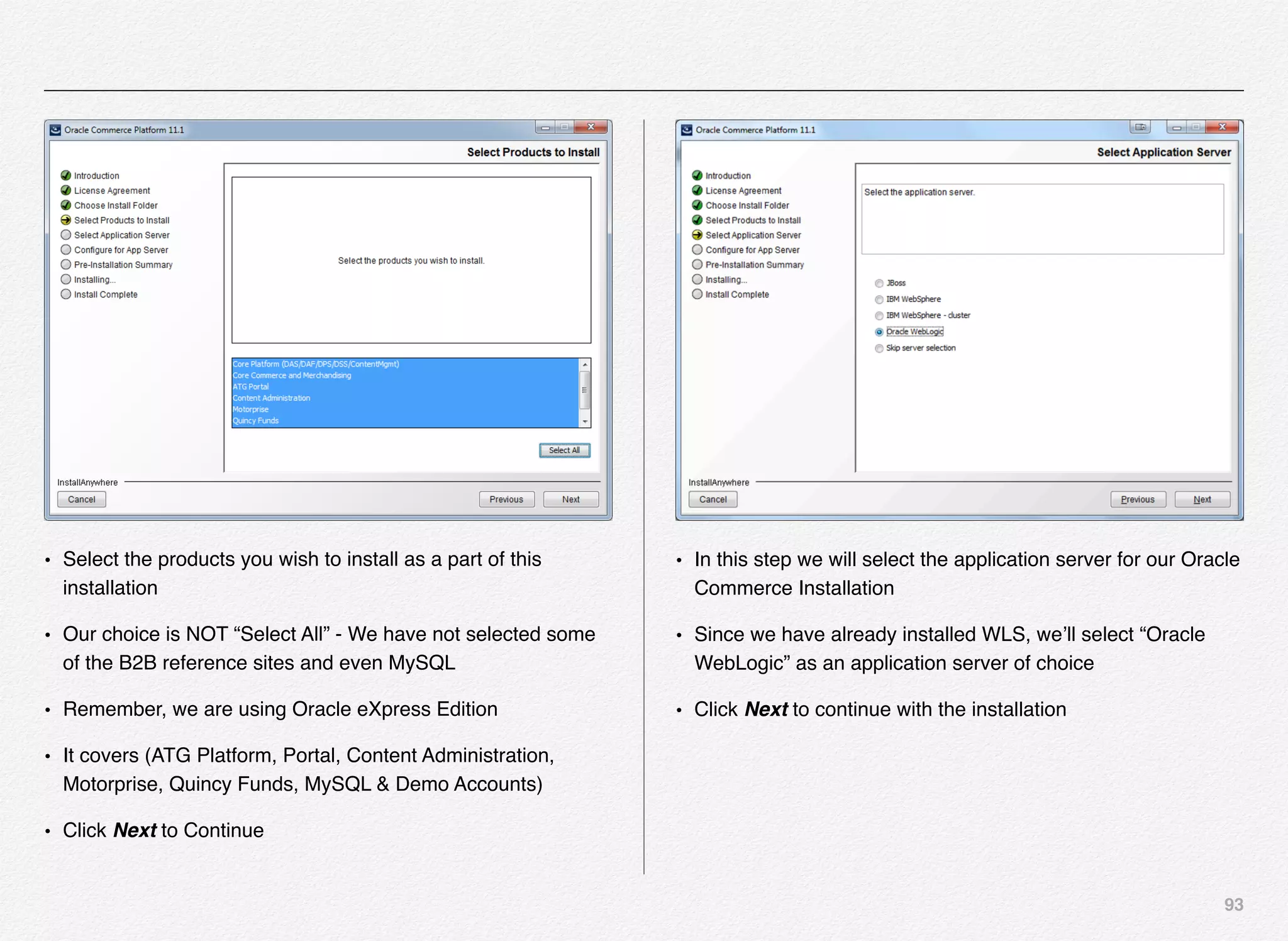
or internal systems to get the data into a particular cartridge.
Video Ratings Reviews
Search
Results
Hero
Banners
Trending /
Analytics
Endeca provides 20+ cartridges out-of-the-box as below:
These cartridges are located under the <app-dir>/config/import/
templates folder. Below is the location on my Linux instance
/usr/local/endeca/Apps/CRS/config/import/templates
or on a Windows machine below is the location:
C:EndecaappsDiscoverconfigimporttemplates
About Cartridge Handlers
A cartridge handler takes a content item as input, processes it,
and returns a content item as output.
The input content item typically includes instance configuration,
which consists of any properties specified by a business user
using the Experience Manager or Rule Manager tool in Endeca
192
Workbench. The content item is typically initialized by layering
configuration from other sources: your application may include
default values, or URL parameter that represent end user
selections in the front-end application.
A cartridge handler can optionally perform further processing,
such as asking the search engine for data. When processing is
finished, the handler returns a completed content item to the
application.
Note: Not all cartridges require cartridge handlers. In the case
of a content item with no associated cartridge handler, the
Assembler returns the unmodified content item.
About Cartridge structure
The template contains two main sections: the <ContentItem>
element and the <EditorPanel> element.
Content
Item
Editor
Panel
The content item is at the core in Assembler applications that
can represent both the configuration model for a cartridge and
the response model that the Assembler returns to the client
application. A content item is a map of properties, or key-value
pairs. The <ContentItem> element in the template defines the
prototypical content item and its properties, similar to a class or
type definition.
Template Workbench
Content
Item
Editor
Panel
Property Editor
String Boolean …
String
Editor
Boolean
Editor
…
Property can be of the type String, Boolean, etc...
Editor can of the type String Editor, Boolean Editor, etc...
193
Creating Your Own Custom Cartridge
The high-level workflow for creating a basic cartridge is as
follows:
1. Create a cartridge template (usually an XML file) in the
templates folder and upload it to Endeca Workbench using
set_templates control script
2. Use Experience Manager to create and configure and
instance of the cartridge - this is typically a business user
responsibility - but developers will use this step to test out
the functionality of the cartridge once its developed and
before releasing it to business user
3. Add a renderer to the front-end application
FOR DEVELOPERS
As you will notice and experience, step 2 is necessary during
development to have a cartridge instance with which to test.
However, once the cartridge development is complete and
released by deploying it to Endeca Experience Manager, the
business user is typically responsible for creating and
maintaining cartridge instances in Experience Manager.
Here we will define a new cartridge and use Workbench to
configure it to appear on a page.
Follow these steps to create and configure a basic "Hello
World" cartridge.
Step # 1
Navigate to the templates directory of your application
(Discovery in our case), and create a subdirectory named
"HelloWorld." This directory name will also be the template ID
for your template.
For example:
C:EndecaappsDiscoverconfigimporttemplatesHelloWorld
OR
/usr/local/endeca/Apps/Discover/config/import/templates/
HelloWorld
Step # 2
Create an empty cartridge template XML file with the name
“template.xml” in the folder HelloWorld (per above) and paste
below template XML into the template.xml file.
<ContentTemplate xmlns="http://endeca.com/schema/content-
template/2008"
xmlns:editors="editors" type="SecondaryContent">
194
! <Description>A sample cartridge that can display a simple
message.</Description>
! <ThumbnailUrl>/ifcr/tools/xmgr/img/template_thumbnails/
sidebar_content.jpg</ThumbnailUrl>
! <ContentItem>
! ! <Name>Hello cartridge</Name>
! ! <Property name="message">
! ! ! <String/>
! ! </Property>
! ! <Property name="messageColor">
! ! ! <String/>
! ! </Property>
! </ContentItem>
! <EditorPanel>
! ! <BasicContentItemEditor>
! ! ! <editors:StringEditor propertyName="message"
label="Message"/>
! ! ! <editors:StringEditor
propertyName="messageColor" label="Color"/>
! ! </BasicContentItemEditor>
! </EditorPanel>
</ContentTemplate>
Step # 3
In this step we will upload the template to Endeca Experience
Manager using the set_templates control script.
Open the terminal window or command prompt, navigate to
application control folder as below:
cd /usr/local/endeca/Apps/Discover/control
or
cd C:Endecaappsdiscovercontrol
and run the set_templates control script which will looks for all
the templates in the /usr/local/endeca/Apps/Discover/config/
import/templates folder and upload all the templates to Endeca
experience manager (rather it will replace all the old templates
with the new ones from the templates folder).
195
As you would notice in the above screenshot, Endeca set_templates.sh script just uploaded all the templates to the IFCR Discover site
at the location http://localdomain:8006/ifcr/sites/Discover/templates.
Step # 4
Now, we need to log into the Endeca Workbench and verify that the new template is available for business users to use and make
necessary enhancements per business need.
Let us launch the Endeca Workbench using http://localhost:8006 and click the application that you want to test for the new cartridge.
Remember, we created the cartridge in the Discover application, hence that would be our target application in Workbench. Select the
application and click on the “Experience Manager” link on the page.
196
Expand the tree in the left navigation under the
“Content” > “Web” > “General” > “Pages” and click
on the Default Browse Page as shown in the
screenshot on the right.
In the Edit pane on the right side click on the rightContent and
click the button
197
Click the “Add” button will launch a popup for you to select the
cartridge you want to associate to the new secondary content.
Select “HelloWorld” cartridge and click the OK button. The
selected cartridge will be added to the DefaultBrowsePage.
198
New rightContent is added with the cartridge name “Hello Cartridge” as defined in the template.xml file, with 2 properties “Message”
and “Color”
199
Remember, all the changes being made are currently only in the authoring environment and have not yet been promoted to the live
environment.
Add the custom “Message” and “Color” values followed by clicking on the “SAVE CHANGES” BUTTON (right top)
Let us now visit the http://
localhost:8006/discover-
authoring link. Search for
any product and it will get
you to the search results
page with 3 column layout
and rightContent.
As you will notice, the Hello
cartridge shows an error,
since we have no front-end
renderer specified. We
need to write some code
that will display the content
in the front-end cartridge.
Right Content
Top Related
Products
Hello
The error displays because we have not yet created a renderer for the Hello cartridge.
http://localhost:8006/discover-authoring
200
Additionally, at the footer of the page you will notice you can
view the response from assembler in either JSON or XML
format.
Click on the “json” link to view the json response returned by
the assembler api - since we didn’t add any code in front-end to
render the json response.
Rendering the Cartridge Content
The Endeca assembler application has no way to render the
content to the front-end - its responsibility is to return the data
structure as either JSON or XML. Rendering the JSON content
to the front-end is the front-end web application responsibility.
Hence, we need to write some basic rendering code to
demonstrate how we can connect-the-dots and put things
together.
Create a new JSP file (HelloWorld.jsp) in the C:Endeca
ToolsAndFrameworks11.1.0referencediscover-electronics-
authoringWEB-INFviewsdesktopHelloWorld folder (You need
to create the HelloWorld folder)
or in the
/usr/local/endeca/ToolsAndFrameworks/11.1.0/reference/
discover-electronics-authoring/WEB-INF/views/desktop/
HelloWorld (You need to create the HelloWorld folder)
NOTE:
Please remember that the name of the folder and jsp file must
resemble the folder name under which you created the
template.xml e.g. if the Template folder name (ID) is
HelloWorld, then the folder name in front-end application must
be HelloWorld and the JSP name must be HelloWorld.jsp.
201
Add below snipped of code in the HelloWorld.jsp
<%@page language="java" pageEncoding="UTF-8"
contentType="text/html;charset=UTF-8"%>
<%@include file="/WEB-INF/views/include.jsp"%>
<div style="border-style: dotted; border-width: 1px;
border-color: #999999; padding: 10px 10px">
<div style="font-size: 150%;
color: ${component.messageColor}">${component.message}
</div>
</div>
Just refresh the Discover
authoring home page http://
localhost:8006/discover-
authoring , and you should be
able to see the Hello World!
Message as defined in the
experience manager.
Full view of the Discover Electronics Authoring page, with
message “Hello from Mars”
Customizing the Cartridge
We have learnt how to add a custom cartridge, add it to the
experience manager, use the Endeca experience manager to
instantiate the cartridge in the template, wrote simple rendering
code, and finally were able to see it executing successfully.
Let us now take this to next level, by customizing the cartridge
to be able to pick and choose the color options from the drop-
down list.
Next page will demonstrate what are we going to accomplish by
customizing the cartridge.
202
´ Previous
´ Now
203
Open the template.xml file that we created earlier in this section
using your favorite text/xml editor from the folder /usr/local/
endeca/Apps/Discover/config/import/templates/HelloWorld/
template.xml.
The new XML piece we are going to add is marked below:
<ContentTemplate xmlns="http://endeca.com/schema/content-
template/2008"
xmlns:editors="editors" type="SecondaryContent">
! <Description>A sample cartridge that can display a simple
message.</Description>
! <ThumbnailUrl>/ifcr/tools/xmgr/img/template_thumbnails/
sidebar_content.jpg</ThumbnailUrl>
! <ContentItem>
! ! <Name>Hello cartridge</Name>
! ! <Property name="message">
! ! ! <String/>
! ! </Property>
! ! <Property name="messageColor">
! ! ! <String/>
! ! </Property>
! </ContentItem>
! <EditorPanel>
! ! <BasicContentItemEditor>
! ! ! <editors:StringEditor propertyName="message"
label="Message" bottomLabel="Enter a message to display.
HTML is allowed"/>
! ! ! <editors:ChoiceEditor
propertyName="messageColor" label="Color">
! ! ! ! <choice label="Red" value="#FF0000"/>
! ! ! ! <choice label="Green" value="#00FF00"/>
! ! ! ! <choice label="Blue" value="#0000FF"/>
! ! ! </editors:ChoiceEditor>!
! ! </BasicContentItemEditor>
! </EditorPanel>
</ContentTemplate>
We have added the bottomLabel for the Message and added
the choice for author to pick from using the drop-down list.
204
Also we have changed the editor type from StringEditor to
ChoiceEditor. Since, we are now required to provide drop-down
list to the author to pick the value from and not type it manually
in a text box we need to make this change.
Now, let us switch the folder back to /usr/local/endeca/Apps/
Discover/control and re-execute the script set_templates.sh or
set_templates.bat to reflect the changes in the Endeca
experience manager.
If there are no XML construct errors, you should find above
response from set_templates control script. We can now logout
and log back into the Endeca Workbench to see the changes.
And, here is the effect of the change when you log back into
Endeca Workbench - when you click on the Hello Cartridge in
the rightContent in the Edit pane - you will see the string editor
for Color have disappeared and now we have a drop-down list
of choices for the author to pick from.
Select the Green value for the Color, save the changes, and
refresh the browser window to see the changes reflect in the
discover-electronics-authoring application.
205
206
Custom Icon for Cartridge
We created a new cartridge by copying the structure from
another cartridge and manipulated it to add the elements such
as message and color. But, the thumbnail URI was retained
from the copy as below:
<ThumbnailUrl>/ifcr/tools/xmgr/img/template_thumbnails/
sidebar_content.jpg</ThumbnailUrl>
Now, let us create our own JPG or PNG file and add it to the
images folder in the discover-electronics-authoring.
´ Create a custom JPG image in your favorite image tool
e.g. You can use Windows paint application
´ Images are typically of 81x81 dimension in Experience
Manager (below are examples of default images)
´ You can copy/save the custom thumbnail image on
your web or image server
´ For this example, We are saving the image to
/usr/local/endeca/ToolsAndFrameworks/11.1.0/referen
ce/discover-electronics-authoring/images/
207
Once the image has been copied to the specified location, we
need to add that to the template.xml file for the HelloWorld
template as below:
<ThumbnailUrl>http://192.168.70.5:8006/discover-authoring/
images/rightContent.png</ThumbnailUrl>
Save the file template.xml and then run the set_templates.bat/
sh from the Application control folder e.g. /usr/local/endeca/
Apps/Discover/control/set_templates.sh or C:EndecaApps
Discovercontrolset_templates.bat.
After setting the templates, now you can log back into the
Endeca Workbench and traverse to the Default Browse Page
and click change on the Hello Cartridge edit pane.
208
Summary
In this chapter we have experienced the installation and
configuration of Oracle Endeca Commerce application
components such as MDEX, Platform Services, Tools and
Frameworks, CAS, and Developer Studio. The process is
somewhat simple on Linux or complex based your familiarity
with Linux OS since the only interactive component is Tools &
Frameworks, rest all are silent installation. I believe its simple
but could be challenging if this is your 1st time on Linux.
Also, we have learnt how to use the deployment template to
deploy new Endeca applications and then configure the same
using some of the control scripts.
Towards the end of the chapter we understood how we can
configure the Endeca content promotion across environments
using out-of-the-box Endeca control scripts with RSYNC utility
in Linux.
Creating a custom cartridge, deploying it in workbench, writing
renderer code, and customizing the cartridge is all we have
understood in the last section of this chapter.
In the next chapter we will learn various Oracle Commerce
concept that will come in handy in later chapters in the book
and with your hands-on experience with Oracle Commerce.
7
In this chapter we will
cover the basic concepts
and terms that we need to
grasp about Oracle
Commerce Configuration &
Deployment in a systematic
manner.
Oracle Commerce
Concepts
210
Understanding Oracle Commerce
Architecture & Concepts
You were already introduced to some of the core Oracle
Commerce concepts in Section 2 of Chapter 2. In this chapter
we will dive further to get an understanding of some more
Oracle Commerce concepts.
Oracle Commerce is a highly customizable platform for creating
and delivering end-2-end personalized customer experiences.
Oracle Commerce platform is based on Java, J2EE, and JSP
technologies and using highly customizable Java framework.
If you are experienced with spring / struts framework, this would
sound like known & sailed waters.
Oracle Commerce is built on top of a highly scalable and
reliable J2EE application server such as Oracle WebLogic
Server and JBoss.
All of these frameworks are designed to cater to more than just
a static page of the conventional website. Most websites today
provide dynamic responses and to great extent customize the
responses to make it more relevant to the customer themselves
- call it personalized.
Section 1
Oracle Commerce
Concepts & Terms
211
With the growing complexity of the nature of the web and
mobile sites / applications, the content residing in multiple
sources, the product catalog being served by multiple data
sources, and the business logic to tie all these together could
be again hosted in disparate business engines.
The point here is we can certainly write custom code and thats
what most enterprises and businesses - large or small - have
been doing for years. Until when they realize the size and
complexity of code is simply unmanageable and quite error-
prone. Even worse is the amount of time it takes to correct
issues in the code and testing the same out. The whole
philosophy of lifecycle is affected by these challenges in terns
of turnaround time and time to market.
One way to solve this puzzle is to make effective use of the
MVC (Model-View-Controller) pattern and architecture - where
the Model represents the business layer or backend data
sources or databases, the View represents the front-end
presentation layer of the underlying data and the Controller
represents the navigational code.
Most of these frameworks are targeted to developing enterprise
applications quickly and easily using the Rapid Application
Development models. The resulting applications are easy to
test and provide reusability of code.
These frameworks also brings in amazing use of POJO (Plain
Old Java Objects), ORM (Object Relational Model/Mapping)
frameworks, logging frameworks, Aspect Oriented
Programming, Dependency Injection, and configurable
components.
Most web applications follow a simple paradigm at the top.
They have a front-end application that the end-user uses, load
balancer, and underlying web / application server (a.k.a. Page
Servers) that serve users request by connecting to plethora of
back-end services & databases and retrieving the information
needed to be rendered on the front-end.
Deployment Topology
Typically, the “deployment topology” for your site comprises of
the entire set of machines, servers, databases, and network
configuration that makes up your ATG commerce deployment. A
diagram is often helpful in describing the entire topology
visually.
Server Types
Oracle ATG provides and support many types of servers that
provide different functions, for example, a page server delivers
site pages to customers and a server lock manager handles
data access. Some of the typical server types are
merchandising server, content administration server, page
212
server, server lock manager, process editor servers, global
scenario servers, fulfillment servers, and preview servers.
ATG Server Instances
You can run one or multiple instances for any of the above
listed server types in ATG. The decision for # of instances is
based on the server type and the amount of traffic it will need to
handle. If it is a customer-facing server e.g. page server - then
you need at least 2 instances of page server to provide fault
tolerance.
ATG Page Servers / Front-end Servers
Let us get a quick grasp about the idea of Page Servers in the
world of Oracle Commerce (ATG Commerce Web Servers).
A page server is an Oracle Commerce (ATG) server that
responds to end-user requests for a specific page on a website
e.g. you goto www.oracle.com - that request will goto a page
server.
User requests originating from browsers (IE, Firefox, or
Chrome) are typically routed through a dedicated hardware
load balancer and a web server (such as iPlanet Web Server,
Nginx, or Apache) to the Oracle Commerce (ATG) page server,
which produces a personalized page by using data about the
customer and the environment as well as other information.
The system is made intelligent enough to figure out the
whereabouts of the customer, the nature of their visit, other
relevant information from the CRM or Order Fulfillment /
Provisioning systems - and generate a experience that is
relevant to the customer’s intent and interaction. The key here
is to let the customer know that the company is open for
business at their convenience in term of time, device, and
functionality.
I would certainly not like to use an online system just for certain
money spending tasks and then make a call to talk to someone
for tasks where I really need help with product support and
service.
All these factors need to be accounted for while designing an
online system of commerce,
service, and support.
213
Here is the most basic form of Oracle Commerce Architecture:
Customer) Load)Balancer) Oracle)Commerce)Page)Server)
Oracle Commerce - ATG & Endeca Commerce suite is a
platform that provides highly customizable and functional web
and mobile sites/apps based on Java & JSP technologies that
run on a highly scalable J2EE application servers such as
Oracle WebLogic or IBM WebSphere.
In-order-to further understand the role of Oracle Commerce
ATG page server, let us first grasp terms such as versioned and
non-versioned data.
Versioned Data
Oracle ATG provides User Interfaces such as BCC (Business
Control Center), ACC (ATG Control Center), and EXM (Endeca
Experience Manager) to create highly personalized web and
mobile content
While deploying the application and preparing the schema -
Oracle commerce creates versioned versions of tables have
additional columns to store data for versioned assets.
Especially, the Merchandising module & functionality requires
the versioned tables.
With Versioned tables, authors can manage and track different
changes that went live through the course of application
evolution and construction and be able to rollback the content
or asset to a specific version in case of any issues.
Below are some out-of-the-box production ready scripts
provided by the Oracle ATG Commerce framework to help you
create versioned repositories/schema.
To create versioned Commerce tables and versioned catalog
tables on a production-ready or evaluation database, run the
following scripts:
<ATG10dir>/DCS/Versioned/sql/install/database-vendor/
dcs_versioned_ddl.sql
<ATG10dir>/DAF/Search/Index/sql/db_components/database-
vendor/search_ddl.sql
<ATG10dir>/DAF/Search/Versioned/sql/db_components/
database-vendor/versioned_search_site_ddl.sql
<ATG10dir>/DAF/Search/Routing/sql/db_components/
database-vendor/routing_ddl.sql
Non-Versioned Data
214
Once the content or an asset has been through different stages
of the publishing and approval workflow and is ready to be
moved to the live site (production) - the author publishes the
changes and promotes the content to the live site.
The live site runs out of a non-versioned database schema,
meaning - it does not have additional columns in the schema to
store the version information for the content/assets.
You need versioned data only in the authoring environment and
a single version of truth in the live customer facing site.
Hope this helps clarify the terms versioned and non-versioned
data that we will use to further understand the ATG page server.
Below diagram is created to support above explanations about
the terms versioned and non-versioned data/schema.
Oracle ATG Administration Server
We use multiple names for the ATG Administration Server such
as Asset Management Server or Content Administration Server
or the BCC Server or at time as a publishing server. Essentially,
these represents one thing in common and that is the
administration related activities are carried out by this type of
server(s).
Usually, we have one administration server per environment for
the site. Again, there are no hard and fast rules if your work flow
is such that the content administration need to happen only in
one environment and then the workflow will push the content to
higher environments then you might have just 1 administration
server.
BCC (Business Control Center) is at the center of this server
and provides all the business and administration functions that
the business users can use to carry out tasks such as:
• Create and manage users and groups
• Create and modify site assets (e.g. images, block of text,
triggers, slots, targeters, scenarios, etc...)
• Create promotions, price lists, and other related contents
• Create new projects and approve tasks in the workflow
• Preview assets before deploying
• Run reports
• Import products
• Supports versioning of assets and content
215
Oracle	ATG	Content	
Administration
Oracle	ATG	Merchandising	Server
Oracle	ATG	BCC	
(Business	Control	Center)
ATG	Asset	Management	Server
Versioned	Schema	of	
the	Oracle	Commerce	
Database
Staged	Site/Application
Non-Versioned	Schema
Staging	Server
Live	Site	– Customer	Facing	
Application
Non-Versioned	Schema
Production	 Server
216
Oracle	ATG	BCC	
(Business	Control	Center)
ATG	Administration	Server	and	BCCInternal	User
Versioned	Schema	of	
the	Oracle	Commerce	
Database
Non-Versioned	Schema
Live	Site	– Customer	Facing	
Application
Oracle	ATG	Page	Server
In this case, the business user also known as “internal user” interacts with the Oracle Commerce framework using the Oracle ATG
Content Administration server and BCC to create / load the content and assets. Also, they define different business rules that drives
the segmentation and personalization needs for targeting content to specific segment of users. The content and assets are stored in
the versioned database providing the users means to rollback a specific version of content. Once the content is production ready and
tested in staging environment, it is promoted or pushed to the customer-facing live environment which is based on non-versioned
schema.
217
In the previous diagram we have outlined only one ATG Page server, but in the real production environment you will have multiple
Page servers and you can learn about it more either in the Oracle Commerce documentation on the topic “Setting up a Production
Cluster” or later in this book.
Oracle	ATG	BCC	
(Business	Control	Center)
ATG	Administration	Server	and	BCCInternal	User
Versioned	Schema	of	
the	Oracle	Commerce	
Database
Non-Versioned	
Schema	for	Product	
Catalog	&	Content
Live	Site	– Customer	Facing	
Application
Oracle	ATG	Page	Server
Transactional	
Database
Developer
J2ee	
App
Source	Code	Repository Assemble	&	Deploy		Application
EAR
218
Developers create an ATG Application Module, which contains,
a J2EE application. Typically, you need to place the application
module into the ATG main directory, and assemble the
application into an Enterprise Archive (EAR) file if packed or a
folder. The EAR is then deployed to the application server
instances. The deployment process varies depending on the
application server that you use. In our case, all the
environments have been configured to use Oracle WebLogic
Server 12.x, in which application deployment is managed by the
WebLogic Admin Server for the domain.
Setting up the Oracle Commerce components to run everything
on a single host is a much simpler experience compared to
setting up the application in a typical multi-environment case
where the organizations have development machines,
development servers, testing/QA servers, Staging servers, and
Production servers.
You need a detailed launch plan, deployment topology, server
role assignment, cluster setup plan, setting up and creating
load balancer rules, server instance details, database setup,
setting up the CDN, step-by-step task plan, architecture
diagrams, ensure all the firewall rules have been implemented,
and the servers (web, application, database, etc...) are able to
talk to each other in multi-environment setup.
ATG Server Lock Manager(s)
According to Oracle Commerce documentation - “The server
lock manager synchronizes locking among various ATG
servers, so only one at a time can modify the same item”
At least one ATG server must be configured to start the /atg/
dynamo/service/ServerLockManager component on application
startup and each server in the cluster is a SLM client. Each
cluster has one primary SLM and optionally 1 backup SLM.
One important aspect to remember about the SLM is that it
doesn’t run any application on it and hence is not CPU
intensive
We will look at the example cluster that comprises of different
types of ATG servers in the topic covering “Clusters in ATG”
Clusters in ATG
The term cluster in ATG means somewhat different than the
way it is understood and used in the traditional world of
infrastructure - where cluster is a collection of physical or virtual
servers with all running either WebLogic server or some other
type of server on it.
Cluster is a collection of different types of server instances that
function collectively to perform major site responsibility such as
Content Administration or Customer-facing eCommerce
Application.
219
Customer-facing cluster includes the web server such as Java
Web Server and primary transaction servers such as WebLogic
server that hosts the customer-facing web applications. This
cluster could also have additional servers such as lock server
manager and process editor servers. Below are the common
components that form the customer-facing cluster:
• Application server (e.g. WebLogic)
• ATG platform
• Publishing agent
• Customer-facing application(s)
• Customer-facing application data
Another familiar cluster is known as Asset Management Cluster
that is primarily responsible for controlling and managing all the
ATG-based sites. For example - business clients, marketing,
merchandisers, and partners would use the ATG BCC
(Business Control Center) to create, manage, and publish
content, promotions, personalization rules, segments, web
assets, and inter-linked sites. Also, the ATG sites & content is
linked with Endeca Experience Manager for further creation of
engaging and personalized experiences for the online and
mobile customers.
Below are the common components that form the asset
management cluster:
• ATG platform
• BCC (Business Control Center)
• Content Administration
• Merchandising
• Preview application / module
• Asset management metadata
• Versioned application data
ATG repositories is yet another important component of the
framework that helps improve the performance of ATG
applications by caching data. We come across a scenario very
frequently in the web applications where the data on one server
might have changed and that needs to be synchronized with
other servers without the possibility of other servers overwriting
each other.
One of the most common approaches is to use locking
mechanism. A server that wants to modify some data requests
a lock on it, and while it is locked, no other server may access
it; when the server releases the lock, the other servers reload
the fresh data. This sort of cache management is used mostly
220
for data that changes often but is unlikely to be changed
simultaneously on multiple servers (such as user profiles).
ATG	Instance
ATG	Instance
A
B
C
A
B
D
SLM	
for	AB
SLM	
for	CD
Server	Lock	
Managers
Client	Lock	
Managers
Client	Lock	
Managers
ATG lock management controls read and write access to data
shared by multiple servers. This type of server handles locks on
data to prevent data collisions. Server Lock Managers (SLM)
may be dedicated server instances, or another type of server
can be configured to also be an SLM.
SLMs are not CPU-intensive, so they can share a CPU with
other servers.
What happens if no primary or backup SLM is available? The
site continues to function, but locked caching is no longer
available, which has a negative impact on performance for data
that uses that type of caching.
Example of ATG Cluster - from Oracle Documentation
Steps 1-15
Suppose you want to set up a site consisting of:
• An Administration Server
• Three servers that serve pages
• One server that runs the ATG lock manager
• One server that runs the process editor server
221
Here’s an example of how you might do this:
1. Start up WebLogic Server using the startWebLogic script.
This starts up the WebLogic Administration Server (e.g.
wlsAdmin, default port 7001).
2. In the WebLogic Console, create servers named
pageServer1, pageServer2, and pageServer3. Assign each
server port number 7700. Assign a unique IP address to
each server (i.e., an IP address used by no other server in
the domain).
3. Create a cluster named pageCluster. Put pageServer1,
pageServer2, and pageServer3 into this cluster.
4. Create servers named procedit and lockmgr. Assign each
server the port number 7800. Assign each server a unique
IP address.
5. Create a cluster named serviceCluster. Put procedit and
lockmgr into this cluster.
6. Assign the two clusters different multicast addresses.
7. Using either the Dynamo Administration UI or the
makeDynamoServer script, create ATG servers named
pageServer1, pageServer2, pageServer3, procedit, and
lockmgr. (You do not need to give the ATG servers the same
names as the WebLogic servers, but it is a good idea do
so.)
8. Configure the ATG lockmgr server to run the ATG
ServerLockManager. (See Enabling the Repository Cache
Lock Managers for more information.)
9. Configure the ATG Scenario Manager to run the process
editor server on the ATG procedit server. (See the ATG
Personalization Programming Guide for more information.)
10. Set up ATG session backup, as discussed in Enabling
Session Backup.
11. Assemble your application, deploy it on each server in both
clusters, and configure each instance to use the ATG server
corresponding to the WebLogic server the instance is
running on. (This process is discussed in Assembling for a
WebLogic Cluster.)
12. Un-deploy any applications that are deployed on the
Administration Server.
13. Configure your HTTP server to serve pages from each
server in pageCluster (but not any of the other servers).
14. Shut down the Administration Server and then restart it. This
will ensure that all of the changes you made will take effect.
222
15. Start up the managed servers you created, using the
startManagedWebLogic script. The syntax of this script is:

startManagedWebLogic WebLogicServeradminURL

where WebLogicServer is the name of the WebLogic server,
and adminURL is the URL of the WebLogic Administration
Server. Let’s assume that the hostname for the
Administration Server is myMachine. To start up the
WebLogic pageServer1, the command would be:

startManagedWebLogic pageServer1 http://myMachine/
7001
ATG Process Editor Servers
Oracle ATG Commerce provides a powerful tool to the business
users knowns as Scenario Management, which helps them to
outline and plan the customer interactions that varies
depending on customer actions and behavior while interacting
with the web or mobile applications. Most important factor here
is that the business users can carry out these functions without
the help or engagement of IT department.
The scenario manager is a typical function available for
business users in the BCC (Business Control Center).
ATG provides another type of scenarios known as workflows,
which are designed to manage the lifecycle of an asset in the
BCC. The server serving/managing scenarios is known as SES
- Scenario Editor Server and the server managing workflows is
known as WES - Workflow Editor Server.
Both scenarios and workflows can be created in the ACC (ATG
Control Center) tool, whereas, the business users manage the
lifecycle of those scenarios and workflows in the BCC.
Process	Editor	Server
Scenario	Editor	Server Workflow	Editor	Server
ATG Preview Server
Business users create assets using the BCC tool on the content
administration and asset management server. Usually, business
user need to preview these assets before approving and
moving it to next environment. A preview application is set up
as a Web application module on each preview-enabled server
defined during the CIM. You use a “versioned instance” of an
application that runs on the production server, and deploy this
223
module on a server where the ATG Business Control Center is
running. One of the key aspect that we need to understand
here is that the preview application doesn’t need to be 100%
functional since it is not a customer facing commerce
application. It only needs those pages / components functional
that are required to preview the assets before deploying them
at the target location.
Though preview-enabled server is optional, most sites do
implement this functionality as it empowers business users to
validate the assets and trigger conditions.
Preview server can be implemented as an internal to ATG
administration server or external (stand alone) dedicated
preview server or both.
ATG Fulfillment Server
ATG framework also provides necessary components and
functions to handle customer orders after they have been
submitted from the front-end. Also, ATG provides you an option
to integrate the framework with external order management
system. Some of the large enterprises or other small
businesses might already have an existing order fulfillment
services using either homegrown solutions or thru integration
with 3rd party fulfillment serves.
Once the orders are submitted and fulfilled by external order
management system the response is sent back to the ATG
framework and repositories are updated for accurate
information about state of the customer order to reflect it back
into the database and communicate the same back to the
customer using email or SMS etc...
Database
Database is one of the key components of the Oracle
Commerce ATG framework which needs multiple databases
running on the same or different servers. You may use
enterprise grade databases such as Oracle or Microsoft SQL
Server for the multi-environment setup. For development
purpose you may also use MySQL that Oracle provides out-of-
the-box.
We can focus primarily on 3 types of database schema for
ATG-based applications:
• Customer-facing or Production Schema
• Staging Schema
• Asset Management Schema
224
ATG	Clusters
Customer	Facing
Production	Core
Switching	A
Catalogs	&	
Assets
Switching	B
Catalog	&
Assets
Staging
Core	&	catalog
Asset	
Management
Publishing
This	schema	
contains	tables	for	
customer	profiles,	
orders,	scenario	
metadata,	security,	
JMS	messages,	
etc…
This schema contains commerce
catalog and other assets. Assets are
deployed to the offline database, and
then the databases are switched. The
schema of Switching A and B databases
are identical.
The	staging	schema	
is	typically	not	
switched	and	
contains	both	core	
and	catalog+asset
related	tables.
The	asset	
management	cluster	
uses	the	publishing	
schema	containing	
versioned	assets,	CA	
metadata,	internal	
user	profiles
225
Each of the above database schemas have its own unique set
of tables (except switching A and B - which are identical) and
hence you can create these schemas using one of the 2
methods:
• Using the CIM (Configuration Installation & Management)
utility
• Using the out-of-the-box SQL scripts
About Switching Datasources
You might be guessing what is a switching datasource. Is this
something unique to ATG?
I guess you are right, a switching datasource is unique to ATG.
I’m sure other frameworks might have similar mechanism or
adept this concept. Business constantly works on the changes
related to the content and assets using the authoring tool (BCC)
and all those changes are in the publishing database.
Business uses the BCC tool to roll over those thousands of
changes from the publishing database to the live site and that
can really be a very rocky transition. Many things can go wrong
from data feed import to indexes to space issues etc...
To address these type of issues, ATG implemented a switching
datasource setup.  Typically, there will be two production
customer-facing database setups, one active and the other
inactive.
Clients go into the Business Control Center and add all the
changes they want to roll out. These changes are made on the
publishing database.
Using the BCC workflows then these changes are deployed
onto the inactive production customer-facing setup in a ‘switch
mode’ deployment. Then, in one transaction, the active
datasource and inactive are switched. The inactive datasource
with all the client’s changes is now the active datasource the
site will run on.
The business continues to make the changes to publishing
database and once ready with the changes to make those to
live site are again published to the inactive datasource, which
then again switched to become active. And the story goes on.
226
Publishing	
Database
Production	
Core
Transactional
SwitchingDS_B
Catalog
Active
SwitchingDS_A
Catalog
Active
SwitchingDS_A
Catalog
Inactive
SwitchingDS_B
Catalog
Inactive
Production	
Core
Transactional
Step	1	à Publish	Assets	to	Inactive	Datasource
Step	2	à The	datasources are	switched.	The	
inactive		datasource becomes	active	and	the	
active	datasource becomes	inactive
New	
Assets
Customer-facing	
Application
Catalog
Orders
Shipping
Users
SWITCH	DS
After	the	switch
New	Assets
Typically, this type of setup is more appealing for websites that experience heavy traffic. The sites that experience low traffic volume
can actually have a simpler setup with “online deployment mode” where the changes make it to live environment directly and
businesses typically have low number of assets and not high number of content changes to make it a worth to have switching setup.
Publishing	
Database
Production	
Core
Transactional
Catalog	DB
Online	
Deployment
New	
Assets
Customer-facing	
Application
Catalog
Orders
Shipping
Users
227
Oracle Commerce Project Lifecycle
The Oracle Commerce project lifecycle comprises a series of
steps - some sequential and other intertwined & iterative - just
like most of the projects we carry out in custom applications.
The difference here is the engagement of business/marketing
with the tools Oracle Commerce offer for better control over
content management, segmentation, and experience
management in numerous phases of the project lifecycle.
We will review a stack of phases you will typically be involved in
the Oracle Commerce project lifecycle as below:
• Ideation & Research
• Studying Competitors
• Business Case Development
• Project Kick-off
• Requirements
• Planning
• System Architecture
• Application Design
Section 2
Oracle Commerce
Project Lifecycle
228
• Implementation
• Testing
• Training
• Launch
• Ongoing Maintenance
Ideation, research, and analysis is a necessary step for lot of
companies or online shops - especially, if they are exploring
solutions that can provide benefits such as better ROI, time-2-
market, business control over the content management etc...
One of the deciding factors could be branded v/s Open Source.
Once you are past that decision - you can study and review
various leaders in the ecommerce/digital commerce space such
as Oracle, IBM, and SAP (Hybris) for consideration based on
your business needs and the feature set you are looking for as
a part of the package - studying the competitor products
factsheet, reviews from Gartner or Forrester are helpful as well,
and you can also check out what others are using in your own
industry or outside.
Once you have the understanding of competitive products,
their pricing models, and the ROI model - you can then work on
developing a business case with help of your business, IT, and
vendor leadership teams to outline the capital investment,
implementation costs, returns, hard benefits, user productivity
benefits, cost savings, etc... over a period of next few years
(e.g. 5 years).
Here is a link to a Mind Map PDF that will guide you through the
process for creating or developing a business case.
Assuming you have made your business case appealing to the
leadership team, its approved and above the line from funding
perspective for the subsequent business year - next step is for
the program/project management team to kick-off the project
and initiate its true life-cycle.
The project kick-off meeting is setup with all stake-holders
including business, marketing, IT, Architects, consulting
members, vendors, and any others who are considered as the
key players who will contribute to the success of the project.
In the kick-off meeting - business shares the high-level
objectives and the mission statement for the project with the
stakeholders and contributors to ensure everyone is on the
same page and has same understanding from the overall
deliverable perspective.
All the inputs, processes, outputs, facts and assumptions
recorded along with the business requirements in business
matrix which later is transformed into a business requirement
229
document covering various teams impacted directly or
indirectly.
Business & IT system architecture is equally important for the
success of the project - making sure all the right systems,
applications, databases, front-end systems, backend systems,
methods, and procedures are captured and documented that
interact with each other.
Application design & Implementation is where the technical
teams and the architects work closely with design,
development, middleware, firewall/network security, operating
system, configuration, management, deployment, and testing
teams very closely.
This is to ensure all the pieces are glued correctly for creating,
developing, and providing the environment expected by the
business users and testing team for validating the products and
services to be delivered to the end-user (customer).
Testing team develops test cases based on the business
requirements to validate expected deliverables. Additionally, it is
important to perform system and application level load,
performance, and soak testing to ensure the system (hardware
and software configuration) is ready to perform at the peak
hours under the expected load.
Training the business users to use the new tools to perform
day-2-day operations for managing content, assets, rules, etc..
is an important step in the success of any out-of-the-box
ecommerce platform such as Oracle Commerce.
And, last but not least step is ongoing maintenance and support
for the new platform.
Launching the live site that runs on the Oracle Commerce
Platform is like throwing a party for mega-event. With so many
moving parts its important to keep an inventory of all the parts
and ensure each part is configured and verified to be fully
functional.
NOTE
Oracle Commerce Architect & Administrator plays a very
important role in the overall delivery. They need to be engaged
right from the project kick-off to the launch and any post-
production issues.
Below is a template of activities involved in an Oracle
Commerce-based project life-cycle:
• Project Start! ! !
• RGS - Requirement Gathering Session (Business, IT,
Consulting Companies)
• Developer local system setup & on-boarding resources!
230
• DIT - Development Platform Setup!
• Topology & Reference Architecture
• SIT + UAT Platform Setup!
• Product Catalog Design Discussion!
• Extending the Product Catalog!
• Product Catalog Integration!
• Profile Customization!
• Back-end API Integration!
• Front-end Integration!
• Core Development Activities (Experience Management)!
• Core Development Activities (Ordering)! !
• Build Task Automation!
• Integration with Source Control (TFS / Git / Clearcase /
Subversion)!
• External Systems Integration !
• Integration/Functional Testing!
• Sample Page creation!
• Sample Page/Flow Creation - Ordering!
• Demonstrate Product Display!
• Demonstrate Cart Adds!
• Demonstrate Cart Display
• Demonstrate Payment Methods
• SIT / ITO Testing
• Load Testing
• Performance Tuning!
• Logging & Reporting
• Stage & Production Platform Setup!
• Configuring Authoring / Preview / Display / Workflow across
different environment
• A/B / MV Testing
• Document environment setup & deployment processes
• GO LIVE
• Post-production deployment monitoring
• Post-production performance tuning
231
8
In this chapter we will look
at the complete process to
configure and install the
Oracle Commerce
Reference Store using the
CIM utility.
Configuration &
Installation (CIM)
233
Installing the WTEE Utility
Before we step our foot on the gas pedal for installing and
configuring the Oracle Commerce Reference Store, let us take
a look at the Wtee utility that will come handy if you want to log
the response text generated by the CIM utility to a text file for
later reference with your responses to each prompt.
For Unix/Linux users its not a big deal since they can use the
out-of-the-box tee utility to perform similar task.
Since, you may not find a tee equivalent on Microsoft Windows
systems, you can goto the Google and search for “Wtee
download” - which in-turn will lead you to https://
code.google.com/p/wintee/downloads/detail?
name=wtee.exe&can=2&q=.
Section 1
Installing the WTEE
Utility
234
You can click on wtee.exe link on the destination page @
code.google.com - which will download the wtee.exe to the
downloads folder.
For convenience reasons, I would copy the wtee.exe from
downloads folder to C:ATGATG11.1homebin.
You may wonder on why would we want to do that - the reason
is the Oracle Commerce CIM.bat file is also located under
above folder.
Since, You will be executing the CIM.bat from the homebin
folder - we have copied/moved the wtee.exe there as well.
Above screenshot is just a confirmation that the wtee.exe is
indeed available in the C:ATGATG11.1homebin folder.
We will now verify that the wtee.exe does the task that it is
intended to (redirect the output of any executable from console/
stdout - to the text file).
Assuming you have already launched the command window
run the following command:
C:ATGATG11.1homebin> dir | wtee dir_output.txt
Here, we are sending the output of dir command to stdout as
well as to wtee utility which will store the input received into the
dir_output.txt
Additionally, you can verify the content of the dir_output.txt file.
C:ATGATG11.1homebin> Type dir_output.txt <enter>
This will display the content of the text file as a proof of content
redirected and stored in the destination file.
Let us now move to next steps, i.e. understand CIM utility and
the steps involved.
235
About CIM - Configuration and
Installation Manager
Oracle Commerce is an enterprise application which comes
with its own level of complexity just like any other enterprise
application. Most enterprise applications cannot be used out-of-
the-box - they need to be configured and customized as
minimum based on our need and optionally extended/
developed for any additional needs.
The CIM utility is a handy tool that Oracle provides that reduces
the overall complexity of configuring the Oracle Commerce
Applications.
For understanding how CIM functions it is required to
understand the previous chapter covering the Oracle
Commerce Concepts - familiarize yourself with the important
terms and concepts.
At high-level these are some of the key tasks that the CIM utility
performs for you based on the responses you provide to the
CIM prompts:
• Oracle Commerce Product Selection
• Datasource Configuration
Section 2
About Oracle
Commerce
Installation &
Configuration
Management (CIM)
- Pre-requisites
236
• Database schema creation and importing the data
• Oracle Commerce server instance creation and
configuration
• Assembling the application
• Deploying the application
It is important that you familiarize yourself with some
of the key terminologies such as Oracle Commerce
(ATG) Nucleus, Components, Configuration,
Deployment, and Assembly of the applications.
The figure on this page helps you understand the key
objectives of CIM utility:
• CIM ensures that the order of steps required to
configure and install the Oracle Commerce
application are followed strictly (validates)
• CIM helps you with automation of most of the
complex steps into simple prompts and responses
• CIM also assigns intelligent defaults where applicable and possible
• Ensure steps are complete for each task listed previously
• You will be able to record the responses and repeat the CIM unattended on other developer machines
237
• Last but not the least, it helps you avoid opportunity for errors
- that doesn’t completely eliminate the possibility of errors -
but helps reduce all common mistakes that results into
complex back ‘n’ forth during installation,
CIM Prerequisites
You need to aware of few details about different inputs CIM will
need in order to configure the Oracle Commerce Platform &
Commerce Reference Store.
Below pre-requisites will come in handy:
Document and know the path to your application server home
directory. For example: C:OracleMiddlewareOracleHome
wlserver
Document and know the path to the domain directory for your
application (in our case its base_domain). For example: C:
OracleMiddlewareuser_projectsdomainsbase_domain
You will also need to know the username and password for the
administration account for your application server. In case of
WebLogic, we have created a username “Weblogic” and
password as “Welcome1”
We are also assuming that you have used the SQL client or
developer tool and created necessary database tablespace
followed by the required username & password, listening port,
database name, and server hostname for each database that
your application requires. In our case we have Oracle XE
database running on the local machine (localhost), with port
1521, and have created required accounts (username/
password) with appropriate privileges.
The accounts that we created are:
• publishingcrs
• prodcorecrs
• switching_a (optional)
• switching_b (optional)
During CIM installation if you do not select to install switching
data sources (i.e. Online only mode) - then you don’t need to
create switching_a and switching_b accounts.
You also need to know the path to the JDBC (Java DataBase
Connectivity driver for your database software
You will be required to set several passwords including Oracle
Commerce server administrator, merchandising user, and
content administrator. You will enter this password during
database imports. If you are not using Content Administration,
you will not configure this user account.
238
Configuration & Installation
Management (CIM) - Product Selection
Let us launch the CIM utility and get started with the
configuration of Oracle Commerce Platform and Reference
Store.
Change the working directory to C:ATGATG11.1HomeBin - to
launch the CIM utility along with the wtee utility to record all the
responses you provide @ CIM prompts.
C:> CD ATGATG11.1HomeBin
C:ATGATG11.1HomeBin>
Launch the CIM utility using the below command:
C:ATGATG11.1HomeBin> CIM | WTEE CIM_Responses.txt
Section 3
Configuration and
Installation
Management (CIM)
CIM Installer -
Initial Tasks
Setup
Administrator
Password
Product
Selection
Select
Application
Server
NOTE:
You can STOP and START the CIM utility @ your convenience -
responses to your previous prompts have been saved by CIM.
239
Once you launch the CIM you will se
some initial messages e.g. Nucleus
running and Starting the Oracle
Platform Security Services (OPSS) -
and will present you with the CIM Main
Menu.
You are now required to set the Oracle
Commerce Platform Administrator
Password. We will set it to Welcome1
for this installation.
The option [R] is already selected for
you to set the administrator password.
Make sure to follow the rules for setting
the password for the Administrator
account.
We decided to use Welcome1 - and will
use the same password for all of our
admin & merchandising accounts for
this setup.
240
Next step is to select the products that you would like to
configure for Oracle Commerce on your development machine.
Just to jog your memory we selected few products during the
installation of Oracle Commerce Platform (OCP) as per this
screenshot:
We had selected:
1. Oracle Commerce Core Platform
2. Core Commerce and Merchandising
3. ATG Portal
4. Content Administration
5. Motoprise B2B application
6. Quincy Funds - Demo application for personalization,
targeted content, and Scenario features
241
CIM then tries to verify the product folders
and presents you with the screen full of
options to choose from. Each option has
one or more products selected to be
configured as a part of the CIM guided
process.
For example, Option [9] includes:
1. Oracle Commerce Platform
2. Oracle Commerce Platform-guided
Search Integration
3. Content Administration
4. Site Administration
5. Core Commerce
6. Merchandising
7. Data warehouse components
8. Preview
Select Option [9] followed by the option [D] to continue with the configuration.
242
Once you select the option [D] to
continue, the CIM utility
automatically selects some of the
add-ons to be installed/configured
based on the choice of product
selection in previous step.
You will notice that the add-ons
Commerce Search & Merchandising
UI have been automatically included.
You have few more add-ons
available to pick from the AddOns
menu.
We will select options [2] [4] [5] [6].
Select [D] to continue
243
We will select optional Addons such as Staging Server, SSO,
Preview Server, and Abandoned Order Services.
Select [D] to continue
Staging Server - Most companies in the real world have
several environments for code deployment and validations, e.g
DIT (development), SIT (system test), Staging (pre-production),
and Live/Production. The staging environment in a way mimics
the production environment. In Oracle Commerce world - the
stating server is going to mimic the production EAR - while
pointing to its own non-versioned data source / repository.
SSO - Single Sign-on Server to establish links between the
sign-in process for BCC and Experience Manager.
Preview Server - If you want to provide preview capabilities to
the authors / business owners / content creators - you will have
to configure and setup preview server.
Abandoned Order Services - Visitors and customers tend to
abandon order or shopping cart during the process of learn/
explore/order - where they adds items to the order/cart but
never check out. Instead, the customer simply exits the Web
site, thus “abandoning” the incomplete order.
Oracle Commerce’s Abandoned Order Services is a module
designed specifically to address this use case and provides you
with a collection of services and tools that enable you to detect,
respond to, and report on the abandoned orders or shopping
carts.
This module helps business owners / marketers use their
marketing dollars more effectively by providing them
opportunity to carryout effective campaigns and help these
visitors/customers close the orders by completing them with
special offers/discounts.
244
Since we selected Option [4] in previous menu we need to
select our mechanism for SSO authentication. Oracle
Commerce supports 2 types of SSO authentication
mechanisms:
1) Commerce Only SSO Authentication - which is basically
single sign-on just between Oracle Commerce ATG & Oracle
Commerce Guided Search / Experience Manager (Endeca).
2) OAM (Oracle Access Manager) authentication - Oracle
Access Management (OAM) is a component of the Oracle
Identity and Access Management (OIM) software suite, is an
enterprise-level security application that allows you to
configure a number of security functions, including Single
Sign On (SSO). If your organization is using the OAM for
various applications (internal) - you can use the SSO
function of the OAM to authenticate the users
Select [1] to select the “Commerce Only SSO Authentication”
option.
Also, select if you are planning to use internal LDAP Server
based SSO Authentication. If you don’t have LDAP Server
Authentication or don’t want to setup at this time - Select [D] to
mark this option done and continue.
245
Oracle
AddonsStaging
Server
Lock Server
SSO
Commerce
Only SSO
Oracle
Workbench
Oracle
Commerce
BCC
OAM
WebCenter
SitesOracle
Workbench
Oracle
Commerce
SSO
Preview
Server
Reporting
Abandoned
Order
Services
In this book & for our purpose we just want the business users
to be able to sign-in to Endeca Workbench and Oracle
Commerce BCC (Business Control Center).
If you are using WebCenter Sites, Oracle Commerce ATG, and
Oracle Endeca Commerce - then it will be a good idea to use
OAM for the single sign-on for all 3 products.
With Oracle Commerce Only SSO you can use either the built-
in user management and security functionality or use the LDAP
Server Authentication if your organization has alternative SSO
authentication - to integrate with existing internal SSO directory.
What is Quincy Funds Demo?
Oracle Commerce Platform comes with several demo/reference
applications such as Oracle Commerce Reference Store
(CRS), Quincy Funds Demo Application, Motoprise Application,
Discover Electronics etc...
Quincy Funds Demo is a great out-of-the-box application that is
designed to demonstrate the power of Oracle Commerce
246
Platform web site capabilities - specifically in the area of
personalization and scenarios.
Following are some of the areas that are @ the center of focus
in this application:
• Real-time Profiling Features
• User Segmentation
• Content Targeting
• Scenarios
We will select the Quincy Funds Demo application to be
installed/configured as a part of this process and come back
later in the book to review above features.
Select [1] and [D] to continue
Next step is a decision point for you to pick between Switching
and Non-Switching Data Source.
You might wonder about the terminology and its role in the way
we configure our deployment.
Let me give some background here - most of the enterprise
application would face the challenge on what to do when there
is a new release going live especially in the area of application
and database.
How do we keep the site running for 24x7 and still go ahead
with deploying the changes without impacting the customer
experience. When to flip the switch?
Most of the cases what we’ve observed is we keep some DB or
APP server in cluster - deploy the new code/db on others and
then once these APP/DB servers are ready we move them in
and out of cluster. This is all done in a traditional way.
With tools that business uses today - they could be engaged in
rolling out thousands of changes at a time from the content
management systems to the live sites (customer facing). And,
247
believe me it can be as rocky as landing on the asteroid - since there are so many moving parts and anything can go wrong with any
dependent part. This can force you to rollback the whole roll-out of changes back to previous state and that could also not be error
free. Hope you get a bigger picture of what happens in enterprises large or small.
What can be done about it? Oracle
Commerce Platform provides us with the
ability of a unique feature called switching
datasources. It means when we architect,
design, and implement the platform the
choice is made to use 2 customer-facing
setups - call those Switch_A & Switch_B
for convenience sake.
Of the 2 data sources one datasource is
ACTIVE and the other is INACTIVE. The
process kind of works as below:
1. Business users make changes to the
publishing database (content
administration / asset management)
2. Then the changes made by business users are deployed to the INACTIVE data source (in a switch-mode deployment)
3. Once all the changes have made its way to INACTIVE data source, with a single transaction the INACTIVE and ACTIVE data
sources are switched or flipped.
Note: Production core is your transactional database, whereas Switch A/B are going to be in a way static content holders that gets
updated and switched only on the basis of business needs.
248
The below diagram represents a typical setup of Oracle Commerce Platform with 3 sections:
1. Publishing Application - has 3-4 datasources pointing to local publishing schema, staging schema, production switching schema,
and production core schema.
2. Staging Application - has 1 datasource pointing to its local staging schema
3. Production Application - has 3 schemas - 2 switching (active & inactive) and 1 core schemas
NOTE: CIM will help you configure all the 3 server instances (Publishing, Staging, and Production).
249
Next decision to make is about the index type that you want to use - Index by SKU (Stock Keeping Unit) or Index by Product. Most
retailers have products and pricing returned / controlled via faceted-search and for that to be effective you need to index by SKU rather
than product.
What is SKU (Stock Keeping Unit)? - SKU (stock keeping unit a.k.a. "Sku" or “SKU”) is an identification, usually alphanumeric, of a
particular product or its variation based on different attributes (color or capacity) that allows it to be tracked for inventory purposes.
250
Typically, SKU (also pronounced as SKYEW) is associated with any item that is purchasable in the store (retail, catalog, or e-tail). It is
clearly explained in the Oracle documentation using below example:
251
Select the Commerce Index Type (SKU or Product) and further select Experience Manager Preview options for staging server. In this
case we will select Option [1] - Index by SKU.
252
253
We are going to configure few AddOns from the above list e.g. Storefront Demo App, Fulfillment, Oracle Recommendations on
Demand Integration, RightNow Integration, and Mobile Reference Store. Primarily we will be looking as the Storefront demo
application (CRS) and Mobile Reference Store.
254
Select Inspect Application [2] and [D] to return to the previous menu options.
255
You have the option to either create a Storefront populated with
all the data about product catalog, users, orders, promotions,
etc... or just deploy the schema with empty data structures. This
is useful if you intend to load your own product catalogs, user
accounts, orders, promotions etc... If you want to use out-of-
the-box data then go with option [1].
Select option [1] Full data set and continue.
If you opt-in for Oracle Recommendations for Oracle
Commerce then you would need an Oracle Recommendations
on-demand account. We will select option [1] Use
Recommendations demonstration account and continue.
Select the only option [1] REST Web Services for Native
Applications and continue. Oracle Commerce provides out-of-
the-box example of the Commerce Reference Store for Mobile
Web and iOS and its integration with the Oracle Commerce
Platform using the RESTFul API for which you need to create
the key/password etc..
Selection of Mobile Reference Store Web Services
automatically includes below modules based on mobile
recommendations:
1. Publishing Management Group
2. Publishing Staging Server
3. Choose Non-Switching Publishing Datasource
256
CIM - Product Selection Complete
With the selection of Publishing preview option - we are now
done with the products and its option/add-on selection. Below is
a summary of products, addons, server modules, and validation
response.
Current Product Selection:
  Content Administration
  Oracle Commerce Reference Store
  Oracle Commerce Site Administration
  Oracle Commerce Platform-Guided Search Integration
Selected AddOns:
  Commerce Search
  Merchandising UI
  Staging Server
  Single Sign On (SSO)
  Abandoned Order Services
  Preview Server
  Commerce Only SSO Authentication
  Quincy Funds Demo
  Non-Switching Datasource
  Add commerce data to SiteAdmin
  Index by SKU
257
  Configure Experience Manager Preview to run on the Staging
Server
  Configure Experience Manager Preview to run on the
Production Server. Use this option in development or evaluation
environments only. Do not use it for an actual production
system.
  Storefront Demo Application
  Fulfillment
  Oracle Recommendations On Demand Integration
  RightNow KnowledgeBase
  Mobile Reference Store
  Inspect Application
  Full
  Fulfillment using Oracle Commerce Platform
  RightNow (Non-International)
  Use Recommendations demonstration account
  REST Web Services for Native Applications
  Mobile Recommendations
  Publishing Management
  Publishing Staging Server
  Publishing Non-Switching Datasource
  Configure Preview to run on the CA Server
Server Instance Types:
Production Server
Store.EStore DCS.AbandonedOrderServices DafEar.Admin
DPS DSS ContentMgmt
DCS.PublishingAgent DCS.AbandonedOrderServices
ContentMgmt.Endeca.Index
DCS.Endeca.Index Store.Endeca.Index
DAF.Endeca.Assembler DSSJ2EEDemo
DCS.Endeca.Index.SKUIndexing Store.Storefront
Store.Recommendations
Store.Mobile Store.Fluoroscope Store.Fulfillment
Store.KnowledgeBase
Store.Mobile.REST Store.Mobile.Recommendations
PublishingAgent Store.EStore
258
Publishing Server
DCS-UI.Versioned BIZUI PubPortlet DafEar.Admin
ContentMgmt.Versioned
DCS-UI.SiteAdmin.Versioned SiteAdmin.Versioned
DCS.Versioned DCS-UI
Store.EStore.Versioned Store.Storefront
ContentMgmt.Endeca.Index.Versioned
DCS.Endeca.Index.Versioned Store.Endeca.Index.Versioned
DCS.Endeca.Index.SKUIndexing Store.Mobile
Store.Mobile.Versioned
Store.KnowledgeBase Store.Mobile.REST.Versioned
Staging Server
Store.EStore DafEar.Admin ContentMgmt
DCS.PublishingAgent
DCS.AbandonedOrderServices ContentMgmt.Endeca.Index
DCS.Endeca.Index
Store.Endeca.Index DAF.Endeca.Assembler
DCS.Endeca.Index.SKUIndexing
Store.Storefront Store.Recommendations Store.Mobile
Store.Fluoroscope
Store.Fulfillment Store.KnowledgeBase Store.Mobile.REST
Store.Mobile.Recommendations Store.EStore
 
Commerce Only SSO Server
DafEar.Admin SSO DafEar
-------VALIDATING INSTALLATION----------------------------------
enter [h]Help, [m]Main Menu, [q]Quit to exit
CIM is validating your Product Selection against your current
installation.
  >> All required modules exist - passed
=======CIM MAIN MENU===========================
enter [h]Help, [q]Quit to exit
259
CIM - Application Server Selection &
Configuration
We have completed the necessary steps to set the
administrator password and product selection in previous
section of this chapter. Also, you can notice on below
screenshot a message “pending database import” - which
means we are yet to configure our database, create necessary
schema, and import the data into the database schema. These
actions will happen in upcoming sections/chapters.
In this section we are going to take a look at the steps involved
in selecting the application server for our Oracle Commerce
Platform setup with Reference Store.
select option [A] to select and configure the Application Server
where you will be deploying the Oracle commerce Authoring
and Display applications. The default option here is [1] Jboss
Application Server. We will select option [2] to perform the
Section 4
CIM - Application
Server Selection &
Configuration
260
installation and configuration using the Oracle WebLogic Server
- primarily using the Developer Mode in this book.
Select option [2]
Next you need to provide WebLogic server path to the CIM
script which will be further validated along with the version of
WebLogic.
Also, you need to provide the path to the domain folder that you
want to use. For this setup we will go with the default
base_domain folder under the Oracle WebLogic Home.
Note: Make sure you have started the WebLogic admin server
before moving forward since the next step will try to validate the
username/password and connectivity to the WebLogic admin
server
261
Locate the startWebLogic.cmd executable in the C:Oracle
MiddlewareOracle_Homeuser_projectsdomains
base_domain folder and launch the WebLogic Admin Server.
WebLogic server will be in RUNNING mode in a short while.
262
Once the WebLogic Admin Server is up and running you can
select the option [P] to perform validation of the connectivity to
WebLogic Admin Server using the username and password
provided.
CIM is not able to connect to the WebLogic server at the admin
port 7001.
With this we have completed the selection and configuration of
application server for our Oracle ATG Commerce application.
263
CIM - Database Configuration
In this section, we will use the CIM utility to configure the
database of your choice (Oracle Express Edition, SQL Server,
MySql etc...) and create schemas for publishing, staging,
production, switching A, and switching B - based on your
configuration options in previous section.
If you opted for switching datasources then you will need
switching A and switching B datasources (we named them
Switch A and Switch B respectively) in last section.
Note: You will need at least 2 database schemas - publishing
and production core. For your local setup you really don’t need
switching database schema and staging is optional as well.
Section 5
CIM - Database
Configuration
Database
Configuration
Publishing
Production
Staging
SwitchingA
SwitchingB
Database
Hostna
me
Port
Driver
Location
DB
Name
DB
URL
JNDI
Name
Username
Password
Username Password
Username
Password
Username
Password
Username
Password
264
What should be known before you
begin?
This section will help you gather some information before
proceeding with the database configuration using CIM as
below:
1. Publishing database username and password
2. Production core database username and password
3. Staging database username and password
4. Switch A database username and password
5. Switch B database username and password
6. JDBC driver location
7. Database Hostname
8. Database port
9. Database Name (instance)
10.Database URL - CIM will create it for you
11.JNDI Name - CIM will provide default name
We have completed the initial tasks:
• Product selection
• Application Server Selection & Configuration
Next we are going to address 4 additional tasks based on the
product selection & application server configuration:
• Database Configuration
• Configuring OPSS Security
• Server Instance Configuration
• Application Assembly & Deployment
265
Publishing Data Source Configuration
Based on the product and the respective add-ons selection we
made in previous sections - CIM performs necessary checks on
exactly what type of data sources we need to configure.
For this installation - we are going to need 3 users created for
publishing, production core, and staging respectively. If you
recollect we have already created 3 users (publishingcrs,
productioncrs, and stagingcrs) in pre-requisite chapter.
Let us now configure the datasources required to be mapped to
the server instances later using CIM prompts. We will start with
publishing datasource configuration:
You need to provide connection details as discussed earlier in
this section. Select [C] for connection details and continue:
266
Select the database type of your choice and continue. We have
already installed Oracle Express Edition (XE instance) in the
pre-requisites chapter.
For the CRS (Commerce Reference Store) datasource
configuration - we will use Oracle Thin as our database type.
Select [1] to continue:
You are now required to provide additional information to the
CIM prompts such as:
• User name
• Password
• Re-enter password
• Host name
• Port number
• Database Name
• Database URL (automatically constructed by CIM)
• Driver Path
Driver path is in C:oracleexeappsoracleproduct11.2.0server
jdbclib folder. The file name you need is ojdbc.jar.
Also, you will notice the CIM utility constructs the JNDI name
for you as ATGPublishingDS - we will use the default - if you
want to change you can.
267
This is an important step:
Make sure the database instance is up and running - you can
verify in the services using control panel.
Optionally, verify that you are able to connect to it using sql
developer client utility.
Otherwise you can test the connection details using the CIM
utility using the [T] - Test Connection prompt.
We will use the CIM utility to test the connection to our data
source. Select [T] to continue with the database connectivity
test.
As you can notice, the connection to the database publishingcrs
was successful @ jdbc:oracle:thin:@localhost:1521:xe.
Next, we need to create the schema for publishing datasource
(publishingcrs).
CIM have been designed to select the next step in some cases
e.g. once you test the connection, it auto-selects [S] to provide
you guidance on what should be the next natural step.
268
Select [S] to continue with the creation of schema for publishing
server & data source.
You might wonder why did you get Create Schema option again
with an option to Skip this step. Remember, CIM utility is not the
only way to install and configure Oracle Commerce Products
and its add-ons. You can do this even manually.
In some cases you would like your database administration
team (DBA) or system administrator to perform certain
activities.
Assume, you want your DBA team to manage & create
schemas for you & on various servers (Development, Testing,
Staging, QA, Training, and Production) - then how would the
DBA team create the needed schema for a given server
instance.
Oracle Commerce comes well-equipped with several DDL
scripts and supporting XML files to load the data from directly
into the database with using CIM - so the CIM utility provides
you an option to skip this step - if you so wish your DBA team to
perform this task for you.
For more information about using the SQL/DDL scripts for
creating database schemas you can refer to the users guide -
“ATG Installation and Configuration Guide” - chapter -
“Configure Databases and Database Access - Section - Create
Database Tables using SQL Scripts.
In the book we will continue our journey with the CIM utility to
create database schemas & import the sample data for
commerce reference stores using the same.
269
As you can see in below screenshot - PUBLISHINGCRS
publishing schema is now created and tables are visible in the
SQL Developer Client:
Whereas, the PRODCORECRS schema is not yet created and
hence no tables are available/visible.
Similar flexibility is available as Create Schema - for Import
Data. You can either you CIM utility to import data into the
schema or you can use the SQL scripts that comes out of the
box to import data.
================================================
Define the password for the Merchandising User (login:
merchandising). Password must be at least 8 characters in
length. Password must contain one of the following characters:
1234567890. Password must contain both upper-case and
lower-case letters. >
================================================
270
Note: the Merchandising user is not a database username - it is
a user that will be used to access the Oracle Commerce BCC
(Business Control Center) tool.
So, the username merchandising and password you are going
to set it used for accessing the GUI BCC tool.
Set the password - we’re setting it as Welcome1 / verified as
Welcome1.
Also, you will be required to set the password for Admin user for
BCC tool.
Set the password - we’re setting it as Welcome1 / verified as
Welcome1.
================================================
 Define the password for the Publishing Admin User (login:
admin). Password must be at least 8 characters in length.
Password must contain one of the following characters:
1234567890. Password must contain both upper-case and
lower-case letters. > ********
Re-enter the password > ********
================================================
Verifying the merchandising & admin password will trigger the
data import process and it will run few SQL scripts with
corresponding XML files to import the data into the publishing
schema as below - COLORED lines are responses from the
CIM utility while importing data.
===============================================
Combining template tasks...Success
Importing ( 1 of 17 ) /CIM/tmp/import/management-import1.xml:
/DAS/install/data/dynAdminRepo.xml to /atg/dynamo/security/
AdminSqlRepository
/DPS/InternalUsers/install/data/das-security.xml to /atg/
userprofiling/
InternalProfileRepository
/DPS/InternalUsers/install/data/dcs-security.xml to /atg/
userprofiling/
InternalProfileRepository
271
/DPS/InternalUsers/install/data/security.xml to /atg/userprofiling/
InternalProfileRepository
/DPS/InternalUsers/install/data/searchadmin-security.xml to /
atg/userprofiling/
InternalProfileRepository
/DPS/InternalUsers/install/data/contentmgmt-security.xml to /
atg/userprofiling/
InternalProfileRepository
...Success
Importing ( 2 of 17 ) /Publishing/base/install/epub-role-data.xml
to /atg/userpr
ofiling/InternalProfileRepository...Success
Importing ( 3 of 17 ) /Publishing/base/install/epub-file-
repository-data.xml to
/atg/epub/file/PublishingFileRepository...Success
Loading ( 4 of 17 ) DSS/atg/registry/data/scenarios/DSS/*.sdl &
DSS/atg/
registry/data/scenarios/recorders/*.sdl...Success
Importing ( 5 of 17 ) /CIM/tmp/import/management-import2.xml:
/DCS/install/data/initial-segment-lists.xml to /atg/userprofiling/
PersonalizationRepository
/DCS/Versioned/install/data/internal-users-security.xml to /atg/
userprofiling/
InternalProfileRepository
/WebUI/install/data/profile.xml to /atg/userprofiling/
InternalProfileRepository
/WebUI/install/data/external_profile.xml to /atg/userprofiling/
ProfileAdapterRepository
/CommerceReferenceStore/Store/KnowledgeBase/install/data/
viewmapping.xml to /
atg/web/viewmapping/ViewMappingRepository
272
/CommerceReferenceStore/Store/Storefront/data/catalog-
versioned.xml to /atg/
commerce/catalog/ProductCatalog
…Success
Importing ( 6 of 17 ) /CommerceReferenceStore/Store/
Storefront/data/
pricelists.xml to /atg/commerce/pricing/priceLists/
PriceLists...Success
Importing ( 7 of 17 ) /CommerceReferenceStore/Store/
Storefront/data/
inventory.xml to /atg/commerce/inventory/
InventoryRepository…Success
Importing ( 8 of 17 ) /CommerceReferenceStore/Store/
Storefront/data/
inventory2.xml to /atg/commerce/inventory/
InventoryRepository...Success
Importing ( 9 of 17 ) /CIM/tmp/import/management-import3.xml:
/CommerceReferenceStore/Store/Storefront/data/wishlists.xml
to /atg/commerce/
gifts/Giftlists
/CommerceReferenceStore/Store/Storefront/data/users.xml to /
atg/userprofiling/
ProfileAdapterRepository
/CommerceReferenceStore/Store/Storefront/data/giftlists-
updates.xml to /atg/
commerce/gifts/Giftlists
...Success
Loading ( 10 of 17 ) Store.Storefront.NoPublishing/atg/registry/
Slots/
*.properties...Success
273
Loading ( 11 of 17 ) Store.Storefront.NoPublishing/atg/registry/
RepositoryTargeters/ProductCatalog/*.properties...Success
Loading ( 12 of 17 ) Store.Storefront.NoPublishing/atg/registry/
RepositoryGroups/*.properties...Success
Loading ( 13 of 17 ) Store.Storefront.NoPublishing/atg/registry/
RepositoryGroups/UserProfiles/*.properties...Success
Loading ( 14 of 17 ) Store.Storefront.NoPublishing/atg/registry/
data/scenarios/
store/abandonedorders/*.sdl & Store.Storefront.NoPublishing/
atg/registry/data/
scenarios/store/global/*.sdl & Store.Storefront.NoPublishing/
atg/registry/data/
scenarios/store/homepage/*.sdl &
Store.Storefront.NoPublishing/atg/registry/
data/scenarios/store/category/*.sdl &
Store.Storefront.NoPublishing/atg/
registry/data/scenarios/store/orders/*.sdl &
Store.Storefront.NoPublishing/atg/
registry/data/scenarios/store/returns/*.sdl &
Store.Storefront.NoPublishing/
atg/registry/data/scenarios/DCS/*.sdl...Success
Importing ( 15 of 17 ) /CIM/tmp/import/management-
import4.xml:
/CommerceReferenceStore/Store/Storefront/data/sites.xml to /
atg/multisite/
SiteRepository
/CommerceReferenceStore/Store/Storefront/data/stores.xml to /
atg/commerce/
locations/LocationRepository
/CommerceReferenceStore/Store/Storefront/data/promos.xml
to /atg/commerce/
catalog/ProductCatalog
274
/CommerceReferenceStore/Store/Storefront/data/claimable.xml
to /atg/commerce/
claimable/ClaimableRepository
/CommerceReferenceStore/Store/Storefront/data/
storecontent.xml to /atg/store/
stores/StoreContentRepository
/CommerceReferenceStore/Store/Storefront/data/content-
management.xml to /atg/
content/ContentManagementRepository
/CommerceReferenceStore/Store/Storefront/data/seotags.xml
to /atg/seo/
SEORepository
/CommerceReferenceStore/Store/Mobile/data/catalog-
versioned.xml to /atg/
commerce/catalog/ProductCatalog
/CommerceReferenceStore/Store/Mobile/data/sites.xml to /atg/
multisite/
SiteRepository
/CommerceReferenceStore/Store/Mobile/data/stores.xml to /
atg/commerce/
locations/LocationRepository
/CommerceReferenceStore/Store/Mobile/data/promos-
versioned.xml to /atg/
commerce/catalog/ProductCatalog
/CommerceReferenceStore/Store/Mobile/data/claimable.xml
to /atg/commerce/
claimable/ClaimableRepository
/CommerceReferenceStore/Store/Mobile/data/
promotionalContent-versioned.xml to /
atg/commerce/catalog/ProductCatalog
...Success
Loading ( 16 of 17 ) Store.Mobile/atg/registry/
RepositoryTargeters/
ProductCatalog/*.properties...Success
275
Importing ( 17 of 17 ) /CIM/tmp/import/management-
import5.xml:
/CommerceReferenceStore/Store/Mobile/data/storecontent.xml
to /atg/store/
stores/StoreContentRepository
/BIZUI/install/data/portal.xml to /atg/portal/framework/
PortalRepository
/BIZUI/install/data/profile.xml to /atg/userprofiling/
InternalProfileRepository
/BIZUI/install/data/viewmapping.xml to /atg/web/viewmapping/
ViewMappingRepository
/BCC/install/data/viewmapping.xml to /atg/web/viewmapping/
ViewMappingRepository
/DPS-UI/AccessControl/install/data/viewmapping.xml to /atg/
web/viewmapping/
ViewMappingRepository
/DPS-UI/install/data/viewmapping.xml to /atg/web/viewmapping/
ViewMappingRepository
/DPS-UI/install/data/viewmapping_preview.xml to /atg/web/
viewmapping/
ViewMappingRepository
/AssetUI/install/data/viewmapping.xml to /atg/web/
viewmapping/
ViewMappingRepository
/AssetUI/install/data/assetManagerViews.xml to /atg/web/
viewmapping/
ViewMappingRepository
/SiteAdmin/Versioned/install/data/siteadmin-role-data.xml to /
atg/
userprofiling/InternalProfileRepository
/SiteAdmin/Versioned/install/data/viewmapping.xml to /atg/web/
viewmapping/
ViewMappingRepository
/SiteAdmin/Versioned/install/data/viewmapping_preview.xml to /
atg/web/
viewmapping/ViewMappingRepository
276
/SiteAdmin/Versioned/install/data/templates.xml to /atg/
multisite/
SiteRepository
/DPS-UI/Versioned/install/data/viewmapping.xml to /atg/web/
viewmapping/
ViewMappingRepository
/DPS-UI/Versioned/install/data/examples.xml to /atg/web/
viewmapping/
ViewMappingRepository
/ContentMgmt-UI/install/data/viewmapping.xml to /atg/web/
viewmapping/
ViewMappingRepository
/DCS-UI/install/data/viewmapping.xml to /atg/web/
viewmapping/
ViewMappingRepository
/DCS-UI/install/data/viewmapping_preview.xml to /atg/web/
viewmapping/
ViewMappingRepository
/CommerceReferenceStore/Store/EStore/Versioned/install/data/
sites-templates.xml to /atg/multisite/SiteRepository
/CommerceReferenceStore/Store/KnowledgeBase/install/data/
basic-urls.xml to /
atg/multisite/SiteRepository
/CommerceReferenceStore/Store/EStore/Versioned/install/data/
viewmapping.xml to
/atg/web/viewmapping/ViewMappingRepository
/CommerceReferenceStore/Store/EStore/Versioned/install/data/
site-template-viewmapping.xml to /atg/web/viewmapping/
ViewMappingRepository
/CommerceReferenceStore/Store/EStore/Versioned/install/data/
internal-users-security.xml to /atg/userprofiling/
InternalProfileRepository
/CommerceReferenceStore/Store/Mobile/Versioned/install/data/
sites-templates.xml to /atg/multisite/SiteRepository
/DCS-UI/Versioned/install/data/users.xml to /atg/userprofiling/
InternalProfileRepository
277
/DCS-UI/Versioned/install/data/viewmapping.xml to /atg/web/
viewmapping/
ViewMappingRepository
/DCS-UI/SiteAdmin/Versioned/install/data/viewmapping.xml to /
atg/web/
viewmapping/ViewMappingRepository
...Success
Update administrator password (1 of 1). The administrator
password was
successfully updated in the database.
All imports completed successfully.
================================================
With this we have completed the schema creation and data
import for publishing datasource.
Select [O] to configure another datasource (e.g. Production or
Staging).
278
Production Data Source Configuration
Let us now configure the datasources required to be mapped to
the server instances later using CIM prompts. We will start with
production core datasource configuration:
You need to provide connection details as discussed earlier in
this section. Select [C] for connection details and continue:
CIM remembers your choices to the prompts made earlier -
these comes handy, especially if you are re-configuring your
data sources - if something goes wrong - and you want to start
over again.
Since, we don’t have any existing production connection details
- we will select [2] and continue.
Select the database type of your choice and continue. We have
already installed Oracle Express Edition (XE instance) in the
pre-requisites chapter.
279
For the CRS (Commerce Reference Store) datasource
configuration - we will use Oracle Thin as our database type.
Select [1] to continue:
You are now required to provide additional information to the
CIM prompts such as:
• User name
• Password
• Re-enter password
• Host name
• Port number
• Database Name
• Database URL (automatically constructed by CIM)
• Driver Path
As you will notice, we’ve made a mistake in providing the JDBC
driver file/path - CIM quickly checked if the file existed at the
given location - which it didn’t find in this case.
CIM will continue to next step once you provide correct location
for the JDBC jar file.
Driver path is in C:oracleexeappsoracleproduct11.2.0server
jdbclib folder. The file name you need is ojdbc.jar.
Also, you will notice the CIM utility constructs the JNDI name
for you as ATGProductionDS - we will use the default - if you
want to change you can.
This is an important step:
280
Make sure the database instance is up and running - you can
verify in the services using control panel.
Optionally, verify that you are able to connect to it using sql
developer client utility.
Otherwise you can test the connection details using the CIM
utility using the [T] - Test Connection prompt.
We will use the CIM utility to test the connection to our data
source. Select [T] to continue with the database connectivity
test.
As you can notice, the connection to the database
productioncrs was successful @ jdbc:oracle:thin:@localhost:
1521:xe.
Next, we need to create the schema for production datasource
(productioncrs).
CIM have been designed to select the next step in some cases
e.g. once you test the connection, it auto-selects [S] to provide
you guidance on what should be the next natural step.
Select [S] to continue with the creation of schema for
production server & data source.
281
You might wonder why did you get Create Schema option again
with an option to Skip this step. Remember, CIM utility is not the
only way to install and configure Oracle Commerce Products
and its add-ons. You can do this even manually.
In some cases you would like your database administration
team (DBA) or system administrator to perform certain
activities.
Assume, you want your DBA team to manage & create
schemas for you & on various servers (Development, Testing,
Staging, QA, Training, and Production) - then how would the
DBA team create the needed schema for a given server
instance.
Oracle Commerce comes well-equipped with several SQL/DDL
scripts and supporting XML files to load the data from directly
into the database with using CIM - so the CIM utility provides
you an option to skip this step - if you so wish your DBA team to
perform this task for you.
For more information about using the SQL/DDL scripts for
creating database schemas you can refer to the users guide -
“ATG Installation and Configuration Guide” - chapter -
“Configure Databases and Database Access - Section - Create
Database Tables using SQL Scripts.
In the book we will continue our journey with the CIM utility to
create database schemas & import the sample data for
commerce reference stores using the same.
As you can see in below screenshot - PRODCORECRS
production core schema is now created and tables are visible in
the SQL Developer Client:
282
Next step is to Import Initial Data for the production core data
source.
Similar flexibility is available as Create Schema - for Import
Data. You can either you CIM utility to import data into the
schema or you can use the SQL scripts that comes out of the
box to import data.
COLORED lines are responses from the CIM utility while
importing data.
================================================
Importing ( 1 of 4 ) /CIM/tmp/import/nonswitchingCore-
import1.xml:
/DAS/install/data/dynAdminRepo.xml to /atg/dynamo/security/
AdminSqlRepository
/DSSJ2EEDemo/install/data/profileAdapterRepository.xml to /
atg/userprofiling/
ProfileAdapterRepository
/WebUI/install/data/external_profile.xml to /atg/userprofiling/
ProfileAdapterRepository
/DCS/install/data/returnData.xml to /atg/commerce/custsvc/
CsrRepository
/CommerceReferenceStore/Store/Storefront/data/catalog.xml to
/atg/commerce/
catalog/ProductCatalog
/CommerceReferenceStore/Store/Storefront/data/pricelists.xml
to /atg/commerce/
283
pricing/priceLists/PriceLists
/CommerceReferenceStore/Store/Storefront/data/sites.xml to /
atg/multisite/
SiteRepository
/CommerceReferenceStore/Store/Storefront/data/stores.xml to /
atg/commerce/
locations/LocationRepository
/CommerceReferenceStore/Store/Storefront/data/promos.xml
to /atg/commerce/
catalog/ProductCatalog
/CommerceReferenceStore/Store/Storefront/data/seotags.xml
to /atg/seo/
SEORepository
...Success
Importing ( 2 of 4 ) /CommerceReferenceStore/Store/Storefront/
data/inventory.xml
to /atg/commerce/inventory/InventoryRepository...Success
Importing ( 3 of 4 ) /CommerceReferenceStore/Store/Storefront/
data/
inventory2.xml to /atg/commerce/inventory/
InventoryRepository...Success
Importing ( 4 of 4 ) /CIM/tmp/import/nonswitchingCore-
import2.xml:
/CommerceReferenceStore/Store/Storefront/data/wishlists.xml
to /atg/commerce/
gifts/Giftlists
/CommerceReferenceStore/Store/Storefront/data/users.xml to /
atg/userprofiling/
ProfileAdapterRepository
/CommerceReferenceStore/Store/Storefront/data/giftlists-
updates.xml to /atg/
commerce/gifts/Giftlists
/CommerceReferenceStore/Store/Storefront/data/orders.xml
to /atg/commerce/
284
order/OrderRepository
/CommerceReferenceStore/Store/Storefront/data/returns.xml to
/atg/commerce/
custsvc/CsrRepository
/CommerceReferenceStore/Store/Storefront/data/
storecontent.xml to /atg/store/
stores/StoreContentRepository
/CommerceReferenceStore/Store/Storefront/data/content-
management.xml to /atg/
content/ContentManagementRepository
/CommerceReferenceStore/Store/Storefront/data/claimable.xml
to /atg/commerce/
claimable/ClaimableRepository
/CommerceReferenceStore/Store/KnowledgeBase/install/data/
basic-urls.xml to /
atg/multisite/SiteRepository
/CommerceReferenceStore/Store/Mobile/data/catalog.xml to /
atg/commerce/catalog/
ProductCatalog
/CommerceReferenceStore/Store/Mobile/data/sites.xml to /atg/
multisite/
SiteRepository
/CommerceReferenceStore/Store/Mobile/data/stores.xml to /
atg/commerce/
locations/LocationRepository
/CommerceReferenceStore/Store/Mobile/data/promos.xml to /
atg/commerce/catalog/
ProductCatalog
/CommerceReferenceStore/Store/Mobile/data/claimable.xml
to /atg/commerce/
claimable/ClaimableRepository
/CommerceReferenceStore/Store/Mobile/data/
promotionalContent.xml to /atg/
commerce/catalog/ProductCatalog
/CommerceReferenceStore/Store/Mobile/data/storecontent.xml
to /atg/store/
stores/StoreContentRepository
...Success
285
Update administrator password (1 of 1). The administrator
password was
successfully updated in the database.
All imports completed successfully.
================================================
With this we have completed the schema creation and data
import for production datasource.
Select [O] to configure our last datasource (e.g. Staging).
Staging Data Source Configuration
Let us now configure the staging datasource required to be
mapped to the staging server instances later using CIM
prompts.
Select [S] for staging data source configuration and continue.
You need to provide connection details as discussed earlier in
this section. Select [C] for connection details and continue:
286
You may re-use one of the above data source configuration
values if you intend to - since most of the settings will remain
the same except username and password.
In this case we will continue by selection option [3] - None/Use
Existing option to provide fresh set of values for staging
datasource.
Select the database type of your choice and continue. We have
already installed Oracle Express Edition (XE instance) in the
pre-requisites chapter.
For the CRS (Commerce Reference Store) datasource
configuration - we will use Oracle Thin as our database type.
Select [1] to continue:
You are now required to provide additional information to the
CIM prompts such as:
• User name
• Password
287
• Re-enter password
• Host name
• Port number
• Database Name
• Database URL (automatically constructed by CIM)
• Driver Path
CIM will continue to next step once you provide correct location
for the JDBC jar file.
Driver path is in C:oracleexeappsoracleproduct11.2.0server
jdbclib folder. The file name you need is ojdbc.jar.
Also, you will notice the CIM utility constructs the JNDI name
for you as ATGStagingDS - we will use the default - if you want
to change you can.
This is an important step:
Make sure the database instance is up and running - you can
verify in the services using control panel.
Optionally, verify that you are able to connect to it using sql
developer client utility.
Otherwise you can test the connection details using the CIM
utility using the [T] - Test Connection prompt.
We will use the CIM utility to test the connection to our data
source. Select [T] to continue with the database connectivity
test.
288
As you can notice, the connection to the database stagingcrs
was successful @ jdbc:oracle:thin:@localhost:1521:xe.
Next, we need to create the schema for staging datasource
(stagingcrs).
CIM have been designed to select the next step in some cases
e.g. once you test the connection, it auto-selects [S] to provide
you guidance on what should be the next natural step.
Select [S] to continue with the creation of schema for staging
server & data source.
You might wonder why did you get Create Schema option again
with an option to Skip this step. Remember, CIM utility is not the
only way to install and configure Oracle Commerce Products
and its add-ons. You can do this even manually.
In some cases you would like your database administration
team (DBA) or system administrator to perform certain
activities.
Assume, you want your DBA team to manage & create
schemas for you & on various servers (Development, Testing,
Staging, QA, Training, and Production) - then how would the
DBA team create the needed schema for a given server
instance.
289
Oracle Commerce comes well-equipped with several DDL
scripts and supporting XML files to load the data from directly
into the database with using CIM - so the CIM utility provides
you an option to skip this step - if you so wish your DBA team to
perform this task for you.
For more information about using the SQL/DDL scripts for
creating database schemas you can refer to the users guide -
“ATG Installation and Configuration Guide” - chapter -
“Configure Databases and Database Access - Section - Create
Database Tables using SQL Scripts.
In the book we will continue our journey with the CIM utility to
create database schemas & import the sample data for
commerce reference stores using the same.
As you can see in below screenshot - STAGINGCRS staging
schema is now created and tables are visible in the SQL
Developer Client:
Next step is to Import Initial Data for the production core data
source.
290
Similar flexibility is available as Create Schema - for Import
Data. You can either you CIM utility to import data into the
schema or you can use the SQL scripts that comes out of the
box to import data.
COLORED lines are responses from the CIM utility while
importing data.
================================================
-------DATA IMPORT STAGING-------------------------------------------
enter [h]Help, [m]Main Menu, [q]Quit to exit
Combining template tasks...Success
Importing ( 1 of 4 ) /CIM/tmp/import/stagingnonswitchingCore-
import1.xml:
/DAS/install/data/dynAdminRepo.xml to /atg/dynamo/security/
AdminSqlRepository
/WebUI/install/data/external_profile.xml to /atg/userprofiling/
ProfileAdapterRepository
/DCS/install/data/returnData.xml to /atg/commerce/custsvc/
CsrRepository
/CommerceReferenceStore/Store/Storefront/data/catalog.xml to
/atg/commerce/
catalog/ProductCatalog
/CommerceReferenceStore/Store/Storefront/data/pricelists.xml
to /atg/commerce/
pricing/priceLists/PriceLists
/CommerceReferenceStore/Store/Storefront/data/sites.xml to /
atg/multisite/
SiteRepository
/CommerceReferenceStore/Store/Storefront/data/stores.xml to /
atg/commerce/
locations/LocationRepository
291
/CommerceReferenceStore/Store/Storefront/data/promos.xml
to /atg/commerce/
catalog/ProductCatalog
/CommerceReferenceStore/Store/Storefront/data/seotags.xml
to /atg/seo/
SEORepository
...Success
Importing ( 2 of 4 ) /CommerceReferenceStore/Store/Storefront/
data/inventory.xml
to /atg/commerce/inventory/InventoryRepository...Success
Importing ( 3 of 4 ) /CommerceReferenceStore/Store/Storefront/
data/
inventory2.xml to /atg/commerce/inventory/
InventoryRepository...Success
Importing ( 4 of 4 ) /CIM/tmp/import/stagingnonswitchingCore-
import2.xml:
/CommerceReferenceStore/Store/Storefront/data/wishlists.xml
to /atg/commerce/
gifts/Giftlists
/CommerceReferenceStore/Store/Storefront/data/users.xml to /
atg/userprofiling/
ProfileAdapterRepository
/CommerceReferenceStore/Store/Storefront/data/giftlists-
updates.xml to /atg/
commerce/gifts/Giftlists
/CommerceReferenceStore/Store/Storefront/data/orders.xml
to /atg/commerce/
order/OrderRepository
/CommerceReferenceStore/Store/Storefront/data/returns.xml to
/atg/commerce/
custsvc/CsrRepository
/CommerceReferenceStore/Store/Storefront/data/
storecontent.xml to /atg/store/
stores/StoreContentRepository
292
/CommerceReferenceStore/Store/Storefront/data/content-
management.xml to /atg/
content/ContentManagementRepository
/CommerceReferenceStore/Store/Storefront/data/claimable.xml
to /atg/commerce/
claimable/ClaimableRepository
/CommerceReferenceStore/Store/KnowledgeBase/install/data/
basic-urls.xml to /
atg/multisite/SiteRepository
/CommerceReferenceStore/Store/Mobile/data/catalog.xml to /
atg/commerce/catalog/
ProductCatalog
/CommerceReferenceStore/Store/Mobile/data/sites.xml to /atg/
multisite/
SiteRepository
/CommerceReferenceStore/Store/Mobile/data/stores.xml to /
atg/commerce/
locations/LocationRepository
/CommerceReferenceStore/Store/Mobile/data/promos.xml to /
atg/commerce/catalog/
ProductCatalog
/CommerceReferenceStore/Store/Mobile/data/claimable.xml
to /atg/commerce/
claimable/ClaimableRepository
/CommerceReferenceStore/Store/Mobile/data/
promotionalContent.xml to /atg/
commerce/catalog/ProductCatalog
/CommerceReferenceStore/Store/Mobile/data/storecontent.xml
to /atg/store/
stores/StoreContentRepository
...Success
Update administrator password (1 of 1). The administrator
password was
successfully updated in the database.
All imports completed successfully.
================================================
293
With this we now have successfully configured all the 3 data
sources:
1. Publishing
2. Production Core
3. Staging
Select [O] to continue
We don’t have any other data source to be configured at this
time - hence we will select [D] to return to previous CIM menu.
You will notice this brings us back to CIM main menu.
With this we have completed the database selection and
configuration. Also, we have created schema for our target
Oracle ATG Commerce application and imported the data into
the tables. In next section, we will configure the Oracle security
for the Commerce application.
294
Configuring OPSS Security
What is OPSS? - OPSS stands for Oracle Platform Security
Services. The OPSS security store is the repository of system
and application-specific policies, credentials, keys, and audit
metadata. That is a lot of words in single sentence. Hold on to
those for a moment.
Oracle Commerce applications incorporate & implements
Oracle Platform Security Services (OPSS), which allows you to
configure your applications to collect and store credential data
in a secure manner. OPSS provides a security framework that
contains services and APIs (Application Programming Interface)
for performing authentication and authorization functions.
Oracle Commerce applications primarily uses and implements
the CSF - Credential Store Framework - a sub-component of
OPSS.
CSF provides a set of APIs that basically enable external
applications to store any credentials required by your
application securely. E.g. Storing the credentials required by
BCC (Business Control Center) or Experience Manager. By
storing credentials in central location - you can help your
business users have to sign-in using a single interface rather
Section 6
CIM - Configure
OPSS Security
295
than signing into BCC and Experience Manager separately. All
of us agree multiple accounts and sign-in methods are painful.
We will now get on to step [2] of the installation and
configuration of Commerce Reference Store (CRS) - i.e.
Configure OPSS Security.
Select [1] to enter the location where the OPSS files will be
deployed - also, you will notice additional instructions/
information specific to Windows and (*)nix based systems -
especially if you have multiple servers that need to access the
same security credentials.
Since, we are installing on Windows bases system - we will
continue with default path for shared location of the OPSS
security files.
296
CIM was successfully able to store the shared path for OPSS
security files.
You will notice, that CIM automatically selected [3] instead of [2]
- since [2] - Enter the security credentials for REST Services is
kind of optional if you are just installing Oracle Commerce BCC
components (ATG) and not going to work with Oracle
Commerce Experience Manager (Endeca).
Since we are going to install and use both Oracle Commerce
BCC and Experience Manager components - we will opt for [2]
and setup credentials to be used for REST API communication
between Oracle Commerce BCC and Experience Manager - to
share User Segments.
In this case we are understanding that the business users will
create / review the user segments in Oracle Commerce BCC
tool and then the user segments will be pushed to Oracle
Commerce Experience Manager tool - where the business
users will be able to use those segments to design segment
specific experiences.
Oracle'
Commerce'BCC'
Oracle'Commerce'
Experience'Manager'
Business'User'
Creates'
Segments'
Share'Segments'
REST'API'
Business'User'
Use'
Segments'
OPSS'
Select [2] to continue setting up the credentials for REST API.
297
COLORED note below is from CIM response - explanation to
what the REST service helps with and why it is important
secure the segment sharing mechanism.
================================================
Workbench accesses user segment data via REST services.
These REST services are protected by a shared security
credential which is used during machine-to-machine
communication. The credential you specify here must also must
be added to the Workbench configuration using the
manage_credentials script. Administrators should use a
complex, long, machine-generated credential.
================================================
As you have noticed - there are 2 parts to setting up the
credentials:
1. Oracle Commerce (ATG) side - Completed with CIM
2. Oracle Commerce Workbench Access using
Manage_Credentials script (Endeca)
Next step is to deploy the OPSS configuration files to the
destination folder.
Select [3] to continue with deployment of configuration files
CIM utility copies required OPSS files to the deploy directory -
C:ATGATG11.1CIMdeploy folder in this case.
298
Select [D] to validate the destination folder exists and copy the
credentials to shared directory.
You can notice the copy of credentials to shared directory was
successful to C:ATGATG11.1homesecurity.
We are back to the security deployment menu - all the 3 options
have bee marked DONE.
Select [D] to return to previous main (CIM Main Menu).
With this we have completed the OPSS security configuration,
setting up the REST API credentials, and deploying of shared
credentials to the shared directory.
Let us now move on to next step - Server Instance
Configuration.
299
CIM - Server Instance Configuration
As discussed in previous section - we have completed the
database configuration [Done] and the OPSS security [Done].
Next step is to configure server instances. If you recollect we
have already configured our data sources for 3 servers:
• publishing - publishingcrs
• production - prodcorecrs
• staging - stagingcrs
We need to now configure the server instances
Section 7
CIM - Server
Instance
Configuration
Server Instance
Configuration
Publishing
Server Instance
Production
Server Instance
Oracle Only
SSO Server
Staging Server
Instance
300
You would notice that we have 4 server instances to configure -
one extra compared to the data sources we configured.
We need a server instance created and running to manage
SSO (Single Sign-On) in addition to publishing, production, and
staging server instances.
Configure SSO Server Instance
Oracle provides out-of-the-box implementation of OPSS -
Oracle Product Security framework and APIs - part of which is
configuring the SSO server instance using the CIM.
Once you launch the server instance type selection menu - you
will see several options to configure the server instance type. In
this case, we selected the server instance type to be SSO.
You have 3 options for the SSO server instance type
configuration - 2 options are mandatory and 1 optional.
You will notice the 1st 2 options (Server general configuration
and Instance management) are required for all the server
instance types that we are going to configure (SSO, Publishing,
Staging, and Production).
Select [C] to configure the Commerce Only SSO server general
details for this instance. General configuration details are
301
applied from the template of the server instance that is provided
by Oracle. In some cases you need to customize these settings
and not in others.
For Commerce Only SSO Server Instance, we were not
required to make any changes or respond to any prompts
during the general configuration.
Marked as [DONE]. Let us now select [I] for instance
management - where you can add, edit or remove instances.
Select [A] to add a new server instance for Commerce Only
SSO server - Oracle will provide default values to some/most of
these prompts (feel free to override).
It is possible you might be running multiple instances of Oracle
Commerce (ATG) managed servers running on the same
physical machine. This idea forces us to bind the WebLogic
server (application server) to dedicated port numbers.
CIM provides 4 out-of-the-box configuration set of values - but
that doesn’t limit us from creating even 10 or 15 or even 100
instances. We can create as many server instances of different
types based on our deployment topology and business
requirement and use CIM to manually assign those port
numbers to each application.
At this stage, you can either pick and use the default port
binding that CIM provides or you can provide customer port
binding (including out-of-the-box bindings).
302
We are going to use the port bindings 03 with the set of values
for each of below:
• HTTP Port - Your WebLogic server port to receive HTTP
requests
• HTTPS Port - Secure version of HTTP port to receive
requests
• RMI Port - The RMI port allows various components of ATG
Service to communicate
• DRP Port - The DRP port number identifies each server as a
unique ATG server instance. The DRP port number must be
unique on a given host. The port itself is not used for
communication
• Lock Server Port - [Not Applicable] in case of SSO server
• File Deployment Port - Port used by ATG to deploy file assets
from the asset management server to the target server
• File Synchronization Deploy Server Port - Useful in case if
you have multiple asset management servers running on
different hosts and if you are not using any solutions such as
SAN or NFS or RSync - ATG provides you with a mechanism
known as FileSynchronizationDeplotServer component that
helps in synchronizing file assets spread across different
asset management servers running on different hosts.
Above are the port bindings we have selected for the Oracle
Commerce Only SSO Server Instance.
303
COLORED lines are response from CIM once you provide all
the PORT numbers for each type.
================================================
>> Properties File successfully created at C:ATG
ATG11.1home..home
serversatg_sso_serverlocalconfigatgdynamo
Configuration.properties
>> Properties File successfully created at C:ATG
ATG11.1home..home
serversatg_sso_serverlocalconfigatgdynamoservicejdbc
JTDataSource_production.properties
>> Properties File successfully created at C:ATG
ATG11.1home..home
serversatg_sso_serverlocalconfigatgdynamoservicejdbc
JTDataSource.properties
>> Properties File successfully created at C:ATG
ATG11.1home..home
serversatg_sso_serverlocalconfigatgdynamoserver
OPSSInitializer.properties
>> Properties File successfully created at C:ATG
ATG11.1home..home
serversatg_sso_serverlocalconfigatgdynamoservicejdbc
DirectJTDataSource_production.properties
>> Properties File successfully created at C:ATG
ATG11.1home..home
serversatg_sso_serverlocalconfigatgdynamoservicejdbc
DirectJTDataSource.properties
>> Properties File successfully created at C:ATG
ATG11.1home..home
serversatg_sso_serverlocalconfigatgdynamoservice
ClusterName.properties
================================================
304
This concludes the Oracle Commerce Only SSO server
instance configuration.
Select [D] to return to the Server Instance Type Configuration
menu
Select [O] to return back to Server Instance Type Selection
menu, which indicates 1 instance is configured.
[C] Commerce Only SSO Server - 1 instance configured -
DONE
305
Configure Publishing Server Instance
Oracle Commerce Publishing server instance contains below
modules
DCS-UI.Versioned BIZUI PubPortlet DafEar.Admin
ContentMgmt.Versioned
DCS-UI.SiteAdmin.Versioned SiteAdmin.Versioned
DCS.Versioned DCS-UI
Store.EStore.Versioned Store.Storefront
ContentMgmt.Endeca.Index.Versioned
DCS.Endeca.Index.Versioned Store.Endeca.Index.Versioned
DCS.Endeca.Index.SKUIndexing Store.Mobile
Store.Mobile.Versioned
Store.KnowledgeBase Store.Mobile.REST.Versioned
Primarily, it contains necessary modules that provides you with
business UI for content administration, asset management,
merchandising, workflow, and versioning.
Select [P] to configure general settings for publishing server
instance.
306
307
================================================
>> Properties File successfully created at C:ATG
ATG11.1home..homeserversatg_publishinglocalconfigatg
dynamoConfiguration.properties
>> Properties File successfully created at C:ATG
ATG11.1home..homeserversatg_publishinglocalconfigatg
dynamoInitial.properties
Enter Lock Server Port [[9010]] >
>> Properties File successfully created at C:ATG
ATG11.1home..homeserversatg_publishinglocalconfigatg
dynamoservice
ServerLockManager.properties
>> Properties File successfully created at C:ATG
ATG11.1home..homeserversatg_publishinglocalconfigatg
dynamoservice
ClientLockManager.properties
>> Properties File successfully created at C:ATG
ATG11.1home..homeserversatg_publishinglocalconfigatg
dynamoservicejdbcJTDataSource_production.properties
>> Properties File successfully created at C:ATG
ATG11.1home..homeserversatg_publishinglocalconfigatg
dynamoservicejdbcDirectJTDataSource_staging.properties
>> Properties File successfully created at C:ATG
ATG11.1home..homeserversatg_publishinglocalconfigatg
dynamoservicepreviewLocalhost.properties
>> Properties File successfully created at C:ATG
ATG11.1home..homeserversatg_publishinglocalconfigatg
remotecontrolcenterserviceControlCenterService.properties
>> Properties File successfully created at C:ATG
ATG11.1home..homeserversatg_publishinglocalconfigatg
userprofilingProfileRequest.properties
>> Properties File successfully created at C:ATG
ATG11.1home..homeserversatg_publishinglocalconfigatg
dynamoservicejdbc
DirectJTDataSource_production.properties
>> Properties File successfully created at C:ATG
ATG11.1home..homeserversatg_publishinglocalconfigatg
contentsearchMediaContentOutputConfig.properties
308
>> Properties File successfully created at C:ATG
ATG11.1home..homeserversatg_publishinglocalconfigatg
dynamoservletdafpipelineProfileRequestServlet.properties
>> Properties File successfully created at C:ATG
ATG11.1home..homeserversatg_publishinglocalconfigatg
commerceendecaindex
CategoryToDimensionOutputConfig_staging.properties
>> Properties File successfully created at C:ATG
ATG11.1home..homeserversatg_publishinglocalconfigatg
dynamoserverSQLRepositoryEventServer.properties
>> Properties File successfully created at C:ATG
ATG11.1home..homeserversatg_publishinglocalconfigatg
endecaassembler
AssemblerApplicationConfiguration.properties
>> Properties File successfully created at C:ATG
ATG11.1home..homeserversatg_publishinglocalconfigatg
dynamoservicejdbcDirectJTDataSource.properties
>> Properties File successfully created at C:ATG
ATG11.1home..homeserversatg_publishinglocalconfigatg
searchconfigLanguageDimensionService.properties
>> Properties File successfully created at C:ATG
ATG11.1home..homeserversatg_publishinglocalconfigatg
dynamoservletdafpipelineAccessControlServlet.properties
>> Properties File successfully created at C:ATG
ATG11.1home..homeserversatg_publishinglocalconfigatg
dynamoservletdafpipelineDynamoHandler.properties
>> Properties File successfully created at C:ATG
ATG11.1home..homeserversatg_publishinglocalconfigatg
contentsearchArticleOutputConfig_staging.properties
>> Properties File successfully created at C:ATG
ATG11.1home..homeserversatg_publishinglocalconfigatg
commercesearch
StoreLocationOutputConfig_staging.properties
>> Properties File successfully created at C:ATG
ATG11.1home..homeserversatg_publishinglocalconfigatg
dynamoserviceClientLockManager_production.properties
>> Properties File successfully created at C:ATG
ATG11.1home..homeserversatg_publishinglocalconfigatg
storestoresStoreContentRepository_production.properties
309
>> Properties File successfully created at C:ATG
ATG11.1home..homeserversatg_publishinglocalconfigatg
commercesearchProductCatalogOutputConfig.properties
>> Properties File successfully created at C:ATG
ATG11.1home..homeserversatg_publishinglocalconfigatg
endecaApplicationConfiguration.properties
>> Properties File successfully created at C:ATG
ATG11.1home..homeserversatg_publishinglocalconfigatg
dynamoserverOPSSInitializer.properties
>> Properties File successfully created at C:ATG
ATG11.1home..homeserversatg_publishinglocalconfigatg
commercecatalogProductCatalog_production.properties
>> Properties File successfully created at C:ATG
ATG11.1home..homeserversatg_publishinglocalconfigatg
contentsearchMediaContentOutputConfig_staging.properties
>> Properties File successfully created at C:ATG
ATG11.1home..homeserversatg_publishinglocalconfigatg
endecaindexIndexingApplicationConfiguration.properties
>> Properties File successfully created at C:ATG
ATG11.1home..homeserversatg_publishinglocalconfigatg
userprofilingInternalProfileFormHandler.properties
>> Properties File successfully created at C:ATG
ATG11.1home..homeserversatg_publishinglocalconfigatg
endecaassemblercartridgemanager
DefaultFileStoreFactory.properties
>> Properties File successfully created at C:ATG
ATG11.1home..homeserversatg_publishinglocalconfigatg
userprofilingssoLightweightSSOTools.properties
>> Properties File successfully created at C:ATG
ATG11.1home..homeserversatg_publishinglocalconfig
moduleList.properties
>> Properties File successfully created at C:ATG
ATG11.1home..homeserversatg_publishinglocalconfigatg
dynamoservicejdbcJTDataSource.properties
>> Properties File successfully created at C:ATG
ATG11.1home..homeserversatg_publishinglocalconfigatg
contentsearchArticleOutputConfig.properties
>> Properties File successfully created at C:ATG
ATG11.1home..homeserversatg_publishinglocalconfigatg
commercesearchStoreLocationOutputConfig.properties
>> Properties File successfully created at C:ATG
ATG11.1home..homeserversatg_publishinglocalconfigatg
commercesearch
ProductCatalogOutputConfig_staging.properties
310
>> Properties File successfully created at C:ATG
ATG11.1home..homeserversatg_publishinglocalconfigatg
commercepricingpriceListsPriceLists_production.properties
>> Properties File successfully created at C:ATG
ATG11.1home..homeserversatg_publishinglocalconfigatg
commerceendecaindex
CategoryToDimensionOutputConfig.properties
>> Properties File successfully created at C:ATG
ATG11.1home..homeserversatg_publishinglocalconfigatg
dynamoservicejdbcJTDataSource_staging.properties
>> Properties File successfully created at C:ATG
ATG11.1home..homeserversatg_publishinglocalconfigatg
dynamoserviceClusterName.properties
>> Properties File successfully created at C:ATG
ATG11.1home..homeserversatg_publishinglocalconfigatg
webassetmanageruserprofiling
NonTransientAccessController.properties
================================================
Deploying CRS EAC Application
311
312
================================================
Intitializing Endeca Application. View log file at C:/ATG/
ATG11.1/home/../
CIM/ log/cim.log
|. . . . . . . . . . . . . . . . . . . . . |
>> Application initialization successful.
>> Properties File successfully created at C:ATG
ATG11.1home..homeserversatg_publishinglocalconfigatg
dynamoservicejdbcJTDataSource_production.properties
>> Properties File successfully created at C:ATG
ATG11.1home..homeserversatg_publishinglocalconfigatg
dynamoservicejdbcDirectJTDataSource_staging.properties
>> Properties File successfully created at C:ATG
ATG11.1home..homeserversatg_publishinglocalconfigatg
dynamoservicepreviewLocalhost.properties
>> Properties File successfully created at C:ATG
ATG11.1home..homeserversatg_publishinglocalconfigatg
remotecontrolcenterserviceControlCenterService.properties
>> Properties File successfully created at C:ATG
ATG11.1home..homeserversatg_publishinglocalconfigatg
userprofilingProfileRequest.properties
>> Properties File successfully created at C:ATG
ATG11.1home..homeserversatg_publishinglocalconfigatg
dynamoservicejdbc
DirectJTDataSource_production.properties
>> Properties File successfully created at C:ATG
ATG11.1home..homeserversatg_publishinglocalconfigatg
contentsearchMediaContentOutputConfig.properties
>> Properties File successfully created at C:ATG
ATG11.1home..homeserversatg_publishinglocalconfigatg
dynamoservletdafpipelineProfileRequestServlet.properties
313
>> Properties File successfully created at C:ATG
ATG11.1home..homeserversatg_publishinglocalconfigatg
commerceendecaindex
CategoryToDimensionOutputConfig_staging.properties
>> Properties File successfully created at C:ATG
ATG11.1home..homeserversatg_publishinglocalconfigatg
dynamoserverSQLRepositoryEventServer.properties
>> Properties File successfully created at C:ATG
ATG11.1home..homeserversatg_publishinglocalconfigatg
endecaassembler
AssemblerApplicationConfiguration.properties
>> Properties File successfully created at C:ATG
ATG11.1home..homeserversatg_publishinglocalconfigatg
dynamoservicejdbcDirectJTDataSource.properties
>> Properties File successfully created at C:ATG
ATG11.1home..homeserversatg_publishinglocalconfigatg
searchconfigLanguageDimensionService.properties
>> Properties File successfully created at C:ATG
ATG11.1home..homeserversatg_publishinglocalconfigatg
dynamoservletdafpipelineAccessControlServlet.properties
>> Properties File successfully created at C:ATG
ATG11.1home..homeserversatg_publishinglocalconfigatg
dynamoservletdafpipelineDynamoHandler.properties
>> Properties File successfully created at C:ATG
ATG11.1home..homeserversatg_publishinglocalconfigatg
contentsearchArticleOutputConfig_staging.properties
>> Properties File successfully created at C:ATG
ATG11.1home..homeserversatg_publishinglocalconfigatg
commercesearch
StoreLocationOutputConfig_staging.properties
>> Properties File successfully created at C:ATG
ATG11.1home..homeserversatg_publishinglocalconfigatg
dynamoserviceClientLockManager_production.properties
>> Properties File successfully created at C:ATG
ATG11.1home..homeserversatg_publishinglocalconfigatg
storestoresStoreContentRepository_production.properties
>> Properties File successfully created at C:ATG
ATG11.1home..homeserversatg_publishinglocalconfigatg
commercesearchProductCatalogOutputConfig.properties
>> Properties File successfully created at C:ATG
ATG11.1home..homeserversatg_publishinglocalconfigatg
endecaApplicationConfiguration.properties
314
>> Properties File successfully created at C:ATG
ATG11.1home..homeserversatg_publishinglocalconfigatg
dynamoserverOPSSInitializer.properties
>> Properties File successfully created at C:ATG
ATG11.1home..homeserversatg_publishinglocalconfigatg
commercecatalogProductCatalog_production.properties
>> Properties File successfully created at C:ATG
ATG11.1home..homeserversatg_publishinglocalconfigatg
contentsearchMediaContentOutputConfig_staging.properties
>> Properties File successfully created at C:ATG
ATG11.1home..homeserversatg_publishinglocalconfigatg
endecaindexIndexingApplicationConfiguration.properties
>> Properties File successfully created at C:ATG
ATG11.1home..homeserversatg_publishinglocalconfigatg
userprofilingInternalProfileFormHandler.properties
>> Properties File successfully created at C:ATG
ATG11.1home..homeserversatg_publishinglocalconfigatg
endecaassemblercartridgemanager
DefaultFileStoreFactory.properties
>> Properties File successfully created at C:ATG
ATG11.1home..homeserversatg_publishinglocalconfigatg
userprofilingssoLightweightSSOTools.properties
>> Properties File successfully created at C:ATG
ATG11.1home..homeserversatg_publishinglocalconfig
moduleList.properties
>> Properties File successfully created at C:ATG
ATG11.1home..homeserversatg_publishinglocalconfigatg
dynamoservicejdbcJTDataSource.properties
>> Properties File successfully created at C:ATG
ATG11.1home..homeserversatg_publishinglocalconfigatg
contentsearchArticleOutputConfig.properties
>> Properties File successfully created at C:ATG
ATG11.1home..homeserversatg_publishinglocalconfigatg
commercesearchStoreLocationOutputConfig.properties
>> Properties File successfully created at C:ATG
ATG11.1home..homeserversatg_publishinglocalconfigatg
commercesearch
ProductCatalogOutputConfig_staging.properties
>> Properties File successfully created at C:ATG
ATG11.1home..homeserversatg_publishinglocalconfigatg
commercepricingpriceListsPriceLists_production.properties
>> Properties File successfully created at C:ATG
ATG11.1home..homeserversatg_publishinglocalconfigatg
commerceendecaindex
CategoryToDimensionOutputConfig.properties
315
>> Properties File successfully created at C:ATG
ATG11.1home..homeserversatg_publishinglocalconfigatg
dynamoservicejdbcJTDataSource_staging.properties
>> Properties File successfully created at C:ATG
ATG11.1home..homeserversatg_publishinglocalconfigatg
dynamoserviceClusterName.properties
>> Properties File successfully created at C:ATG
ATG11.1home..homeserversatg_publishinglocalconfigatg
webassetmanageruserprofiling
NonTransientAccessController.properties
================================================
Configure Production Server Instance
316
317
================================================
>> Properties File successfully created at C:ATG
ATG11.1home..homeserversatg_productionlocalconfigatg
dynamoConfiguration.properties
>> Properties File successfully created at C:ATG
ATG11.1home..homeserversatg_productionlocalconfigatg
dynamoInitial.properties
Enter Lock Server Port [[9012]] >
>> Properties File successfully created at C:ATG
ATG11.1home..homeserversatg_productionlocalconfigatg
dynamoserviceServerLockManager.properties
>> Properties File successfully created at C:ATG
ATG11.1home..homeserversatg_productionlocalconfigatg
dynamoserviceClientLockManager.properties
>> Properties File successfully created at C:ATG
ATG11.1home..homeserversatg_productionlocalconfigatg
dynamoserviceClientLockManager_production.properties
>> Properties File successfully created at C:ATG
ATG11.1home..homeserversatg_productionlocalconfigatg
trackingUsageTrackingService.properties
318
>> Properties File successfully created at C:ATG
ATG11.1home..homeserversatg_productionlocalconfigatg
dynamoservletadminpipelineAdminHandler.properties
>> Properties File successfully created at C:ATG
ATG11.1home..homeserversatg_productionlocalconfigatg
endecaApplicationConfiguration.properties
>> Properties File successfully created at C:ATG
ATG11.1home..homeserversatg_productionlocalconfigatg
dynamoserverOPSSInitializer.properties
>> Properties File successfully created at C:ATG
ATG11.1home..homeserversatg_productionlocalconfigatg
dynamoservicejdbc
DirectJTDataSource_production.properties
>> Properties File successfully created at C:ATG
ATG11.1home..homeserversatg_productionlocalconfigatg
commercecatalogProductCatalog.properties
>> Properties File successfully created at C:ATG
ATG11.1home..homeserversatg_productionlocalconfigatg
commercecatalogcustom
AncestorGeneratorService.properties
>> Properties File successfully created at C:ATG
ATG11.1home..homeserversatg_productionlocalconfigatg
endecaindexIndexingApplicationConfiguration.properties
>> Properties File successfully created at C:ATG
ATG11.1home..homeserversatg_productionlocalconfigatg
endecaassemblercartridgemanager
DefaultFileStoreFactory.properties
>> Properties File successfully created at C:ATG
ATG11.1home..homeserversatg_productionlocalconfigatg
dynamoservicejdbcDirectJTDataSource.properties
>> Properties File successfully created at C:ATG
ATG11.1home..homeserversatg_productionlocalconfig
moduleList.properties
>> Properties File successfully created at C:ATG
ATG11.1home..homeserversatg_productionlocalconfigatg
dynamoservicejdbcJTDataSource.properties
>> Properties File successfully created at C:ATG
ATG11.1home..homeserversatg_productionlocalconfigatg
commercepricingpriceListsPriceLists.properties
>> Properties File successfully created at C:ATG
ATG11.1home..homeserversatg_productionlocalconfigatg
endecaassembler
AssemblerApplicationConfiguration.properties
319
>> Properties File successfully created at C:ATG
ATG11.1home..homeserversatg_productionlocalconfigatg
dynamoserviceGSAInvalidatorService.properties
>> Properties File successfully created at C:ATG
ATG11.1home..homeserversatg_productionlocalconfigatg
epubDeploymentAgent.properties
>> Properties File successfully created at C:ATG
ATG11.1home..homeserversatg_productionlocalconfigatg
Initial.properties
>> Properties File successfully created at C:ATG
ATG11.1home..homeserversatg_productionlocalconfigatg
dynamoservicejdbcDirectJTDataSource.properties
>> Properties File successfully created at C:ATG
ATG11.1home..homeserversatg_productionlocalconfigatg
storestoresStoreContentRepository.properties
>> Properties File successfully created at C:ATG
ATG11.1home..homeserversatg_productionlocalconfigatg
searchconfigLanguageDimensionService.properties
>> Properties File successfully created at C:ATG
ATG11.1home..homeserversatg_productionlocalconfigatg
dynamoservletdafpipelineDynamoHandler.properties
>> Properties File successfully created at C:ATG
ATG11.1home..homeserversatg_productionlocalconfigatg
dynamoserviceClusterName.properties
================================================
320
321
Configure Staging Server Instance
322
323
================================================
>> Properties File successfully created at C:ATG
ATG11.1home..home
serversatg_staginglocalconfigatgdynamo
Configuration.properties
>> Properties File successfully created at C:ATG
ATG11.1home..home
serversatg_staginglocalconfigatgcommerceendecaindex
StoreLocationDimensionExporter.properties
>> Properties File successfully created at C:ATG
ATG11.1home..home
serversatg_staginglocalconfigatgdynamoservicejdbc
DirectJTDataSource_production.properties
>> Properties File successfully created at C:ATG
ATG11.1home..home
serversatg_staginglocalconfigatgcommercecatalog
ProductCatalog.properties
>> Properties File successfully created at C:ATG
ATG11.1home..home
324
serversatg_staginglocalconfigatgcommerceendecaindex
CategoryTreeService.properties
>> Properties File successfully created at C:ATG
ATG11.1home..home
serversatg_staginglocalconfigatgcommerceendecaindex
ProductCatalogSimpleIndexingAdmin.properties
>> Properties File successfully created at C:ATG
ATG11.1home..home
serversatg_staginglocalconfigatgcontentendecaindex
MediaContentDimensionExporter.properties
>> Properties File successfully created at C:ATG
ATG11.1home..home
serversatg_staginglocalconfigatgdynamoservice
GSAInvalidatorService.properties
>> Properties File successfully created at C:ATG
ATG11.1home..home
serversatg_staginglocalconfigatgendecaassembler
AssemblerApplicationConfiguration.properties
>> Properties File successfully created at C:ATG
ATG11.1home..home
serversatg_staginglocalconfigatgdynamoservice
IdGenerator_production.properties
>> Properties File successfully created at C:ATG
ATG11.1home..home
serversatg_staginglocalconfigatgdynamoservicejdbc
DirectJTDataSource.properties
>> Properties File successfully created at C:ATG
ATG11.1home..home
serversatg_staginglocalconfigatgsearchconfig
325
LanguageDimensionService.properties
>> Properties File successfully created at C:ATG
ATG11.1home..home
serversatg_staginglocalconfigatgcontentendecaindex
ContentMgmtSimpleIndexingAdmin.properties
>> Properties File successfully created at C:ATG
ATG11.1home..home
serversatg_staginglocalconfigatgdynamoserver
SQLRepositoryEventServer_production.properties
>> Properties File successfully created at C:ATG
ATG11.1home..home
serversatg_staginglocalconfigatgdynamoservice
ClientLockManager_production.properties
>> Properties File successfully created at C:ATG
ATG11.1home..home
serversatg_staginglocalconfigatgdynamoservicejdbc
SQLRepository_production.properties
>> Properties File successfully created at C:ATG
ATG11.1home..home
serversatg_staginglocalconfigatgendeca
ApplicationConfiguration.properties
>> Properties File successfully created at C:ATG
ATG11.1home..home
serversatg_staginglocalconfigatgcommerceendecaindex
RepositoryTypeDimensionExporter.properties
>> Properties File successfully created at C:ATG
ATG11.1home..home
serversatg_staginglocalconfigatgdynamoserver
OPSSInitializer.properties
326
>> Properties File successfully created at C:ATG
ATG11.1home..home
serversatg_staginglocalconfigatgcommerceendecaindex
StoreLocationSchemaExporter.properties
>> Properties File successfully created at C:ATG
ATG11.1home..home
serversatg_staginglocalconfigatgcontentendecaindex
ArticleDimensionExporter.properties
>> Properties File successfully created at C:ATG
ATG11.1home..home
serversatg_staginglocalconfigatgcommerceendecaindex
SchemaExporter.properties
>> Properties File successfully created at C:ATG
ATG11.1home..home
serversatg_staginglocalconfigatgendecaindex
IndexingApplicationConfiguration.properties
>> Properties File successfully created at C:ATG
ATG11.1home..home
serversatg_staginglocalconfigatgendecaassemblercartridge
manager
DefaultFileStoreFactory.properties
>> Properties File successfully created at C:ATG
ATG11.1home..home
serversatg_staginglocalconfigatgcontentsearch
MediaContentProvider.properties
>> Properties File successfully created at C:ATG
ATG11.1home..home
serversatg_staginglocalconfigatgdynamoservicejdbc
JTDataSource.properties
327
>> Properties File successfully created at C:ATG
ATG11.1home..home
serversatg_staginglocalconfigatgcommercepricingpriceLists

PriceLists.properties
>> Properties File successfully created at C:ATG
ATG11.1home..home
serversatg_staginglocalconfigatgcontentendecaindex
MediaContentSchemaExporter.properties
>> Properties File successfully created at C:ATG
ATG11.1home..home
serversatg_staginglocalconfigatgcontentendecaindex
ArticleSchemaExporter.properties
>> Properties File successfully created at C:ATG
ATG11.1home..home
serversatg_staginglocalconfigatgepub
DeploymentAgent.properties
>> Properties File successfully created at C:ATG
ATG11.1home..home
serversatg_staginglocalconfigatgstorestores
StoreContentRepository.properties
>> Properties File successfully created at C:ATG
ATG11.1home..home
serversatg_staginglocalconfigatgcontentsearch
ArticlePropertyProvider.properties
================================================
328
329
Application Assembly & Deployment
We have completed the configuration of server instances in
previous section.
In this section, we will use CIM to build the EARs for respective
server instances, deploying the EARs to respective managed
servers on the WebLogic server, registering the data sources,
add database driver to application server class path, and
perform some post deployment cleanup activities.
Select option [4] - Application Assembly & Deployment from the
CIM main menu.
Note: We have created 4 server instances in the previous
option [3] - Server Instance Configuration as below:
1. atg_production
Section 8
CIM - Application
Assembly &
Deployment
330
2. atg_publishing
3. atg_sso_server
4. atg_staging
Deploy Production Server Instance
We can start with deployment of atg_production - Production
server instance with a Server Lock Manager (SLM).
Select [A] to continue with deployment of atg_production
You are now required to provide the EAR name for Production
server instance with a Server Lock Manager. We have entered
atg_production.ear as the EAR name for the production
instance.
You will notice some runassembler arguments:
- server atg_production
- layer EndecaPreview
331
Select option [D] to deploy the atg_production.ear to weblogic
server
If you notice the Online Deployment failed for the
atg_production.ear. What could have caused it to fail? By
checking the details in the log file - it was noticed that the
WebLogic admin server was not running at the time of
deployment and hence the failure.
Start the WebLogic admin server and select the option [D] to go
back to deployment menu and try to re-deploy the managed
server EAR for atg_production.
332
And, from the screenshot above we have the managed server
instance for atg_production created on WebLogic online - the
ear was created and deployed successfully to WebLogic server.
Also, you will notice the location of the atg_production managed
server batch file location C:/ATG/ATG11.1/home/servers/
atg_production/startServerOnWeblogic.sh / bat - basically it
writes both files .sh (*nix) and .bat (Windows).
You can then visit the WebLogic admin console using the
console URL http://localhost:7001/console and navigate to the
deployment link in the left navigation menu.
Next step is to register the ATG production DS (data source)
on the WebLogic server online. Select option [R] to register the
data source.
Below is the response from CIM about registering the data
source by the name ATGProductionDS for the atg_production
managed server instance.
333
Once the data source is registered for the managed server
instance, you can verify the JDBC data source in the WebLogic
admin server console by visiting the URL http://localhost:7001/
console - expand Services from the left navigation and click on
Data Sources link to view the available data sources on the
admin server.
You will observe a new JDBC data source registered and
available with the name ATGProductionDS and its target is
atg_production managed server instance.
Click on Connection Pool tab to check the configuration of
ATGProductionDS data source.
Once CIM is through registering the data source with the
WebLogic server - next step is to add the database driver to
application server classpath (you provided the driver and path
during CIM configuration).
334
During the Oracle Commerce configuration using CIM we
provided the database driver details - JAR file + the physical
path e.g. C:/oraclexe/app/oracle/product/11.2.0/server/jdbc/lib/
ojdbc6.jar.
Selecting CIM option [A] will append the above path to the
Weblogic classpath - results into updating the classpath in C:/
oracle/Middleware/Oracle_Home/user_projects/domains/
base_domain/bin/setDomainEnv.cmd file.
The database driver path have been successfully appended to
the Weblogic classpath. In the next step we will perform the
post deployment tasks on the WebLogic server.
As a part of post deployment activities, we are going to make
changes to the WebLogic JVM (Java Virtual Machine)
optimization and copy the protocol.jar.
335
Selecting [U] update startup script will add necessary
parameters to the managed server startup script C:/ATG/
ATG11.1/home/servers/atg_production/
startServerOnWeblogic.sh / bat
In the next step we will copy the protocol.jar file to production
instance with a server lock manager (SLM).
Protocol.jar file is copied to the domain lib directory for example
- C:OracleMiddlewareOracle_Homeuser_projectsdomains
base_domainlib directory,
This is the domain library directory and is usually located at
$DOMAIN_DIR/lib. Since, you might have your domain name
different than the default (base_domain - in this book) - you can
check the location of your domain based on the DOMAIN_DIR
variable - check for the file protocol.jar under the lib directory.
The jars located in this directory will be picked up and added
dynamically to the end of the server classpath at server startup.
The jars will be ordered lexically in the classpath. The domain
library directory is one mechanism that can be used for adding
application libraries to the server classpath.
336
It is possible to override the $DOMAIN_DIR/lib directory using
the -Dweblogic.ext.dirs system property during startup. This
property specifies a list of directories to pick up jars from and
dynamically append to the end of the server classpath using
java.io.File.pathSeparator as the delimiter between path
entries.
With the above steps marked as “Done” - we have now
completed the configuration and deployment of the
atg_production server instance - the managed server is now
created and registered with the WebLogic domain and the
Select [O] to configure another server instance e.,g. publishing
or staging.
Deploy Publishing Server Instance
We can start with deployment of atg_publishing - Publishing
server instance with a Server Lock Manager (SLM).
Select [P] to continue with deployment of atg_publishing
You are now required to provide the EAR name for Publishing
server instance with a Server Lock Manager. We have entered
atg_publishing.ear as the EAR name for the publishing
instance.
You will notice some runassembler arguments:
- server atg_publishing
- layer Staging preview
Basically, we are configuring this managed server as publishing
server and it automatically includes Staging and ATG preview
layers.
337
We need to include Staging layer since we want to configure
Staging site and agent using the BCC (Business Control
Center) tool.
Below is the list of modules automatically included for the
publishing server.
Top Level Module List:
DCS-UI.Versioned BIZUI PubPortlet DafEar.Admin
ContentMgmt.Versioned
DCS-UI.SiteAdmin.Versioned SiteAdmin.Versioned
DCS.Versioned DCS-UI
Store.EStore.Versioned Store.Storefront
ContentMgmt.Endeca.Index.Versioned
DCS.Endeca.Index.Versioned Store.Endeca.Index.Versioned
DCS.Endeca.Index.SKUIndexing Store.Mobile
Store.Mobile.Versioned
Store.KnowledgeBase Store.Mobile.REST.Versioned
Next step is to register the data source with the WebLogic
Server - selecting the option [R] will do the job. CIM will register
the data source you have defined in previous steps with the
WebLogic server.
338
Next, we ned to add the database driver to the application
server classpath so as the application server can find and
interact with the database server using the database
connection details specified in earlier steps.
339
Top Level Module List:
DCS-UI.Versioned BIZUI PubPortlet DafEar.Admin
ContentMgmt.Versioned
DCS-UI.SiteAdmin.Versioned SiteAdmin.Versioned
DCS.Versioned DCS-UI
Store.EStore.Versioned Store.Storefront
ContentMgmt.Endeca.Index.Versioned
DCS.Endeca.Index.Versioned Store.Endeca.Index.Versioned
DCS.Endeca.Index.SKUIndexing Store.Mobile
Store.Mobile.Versioned
Store.KnowledgeBase Store.Mobile.REST.Versioned
Select the option [A] to add the database driver to the
application server classpath.
340
Select [U] to update the classpath in the setDomainEnv.cmd file
in the domain/bin folder.
Select the option [P] to perform the post deployment actions on
the application server - including the Weblogic JVM
optimization, copying the protocol.jar file, and some cleanup as
well.
Select both the options [W] and [C] to let CIM instruct to
perform the actions to let WebLogic JVM optimization and copy
the protocol.jar.
Selecting option [C] will copy the protocol.jar to the publishing
with a Server Lock Manager atg_publishing.ear to the Weblogic
managed server.
341
Above screenshot shows you the location of the protocol.jar
where CIM will send the copy.
This completes the deployment of publishing managed server
to the WebLogic online.
Let us now configure another server instance by selecting the
option [O]
The steps and the description is going to remain the same for
all the other servers except the server name. Hence, we will
just have the screenshots for your reference. By now you must
have got an understanding of what does CIM do for deployment
and how - hence we will not need to repeat all the description in
remaining 2 sections.
342
Deploy SSO Server Instance
We can start with deployment of atg_sso_server - SSO server
instance - Commerce Only SSO Server.
Select [C] to continue with deployment of atg_sso_server
You are now required to provide the EAR name for SSO server
instance. We have entered sso.ear as the EAR name for the
SSO server instance.
You will notice some runassembler arguments:
- server atg_sso_server
Basically, we are configuring this managed server as SSO
server for Commerce Only SSO Server.
We are now presented with the familiar deployment menu
options as experienced in the Production and Publishing server
instance deployment.
343
344
Deploy Staging Server Instance
We can start with deployment of atg_staging - staging server
instance - for ATG staging environment.
Select [C] to continue with deployment of atg_staging server
345
346
347
Summary
In this chapter we have looked at installing the WTEE utility
which will help you capture all the responses generated by the
CIM utility, understanding the CIM utility & its role, running the
CIM utility to perform product selection, data source
configuration, security configuration, server instance
configuration, and finally deploying the application to WebLogic
server online.
In the next chapter, we will verify the server instances, their
locations, and launch the publishing / production server.
9
In this chapter we will
verify the server instances
created in previous
chapter. Especially, we will
look at 2 instances:
1. Publishing
2. Production
Verifying Server
Instances
349
Locating Publishing & Production
Instance
In the previous chapter, we created 4 server instances and
registered the same with WebLogic Server Online using the
CIM utility.
The server instances we created were as follow:
1. Publishing
2. Production
3. SSO
4. Staging
Now, what we need to find out is the location of server
instances created on the disk and how do you start different
managed servers for each of above list.
CIM utility creates the server instances in the folder
<ATGHOME>/home/servers folder. In this book, the ATGHOME
is located in C:ATGATG11.1.
Hence, the server instance folders would be available under C:
ATGATG11.1homeservers folder - as per next screenshot.
Section 1
Starting Oracle
Commerce
Publishing and
Production
Instance
350
Navigating to one of these folders you will realize it has a script
to launch the respective managed server such as:
1. atg_publishing
2. atg_production
3. atg_sso_server
4. atg_staging
Specifically, the server instance folder (e.g. atg_publishing)
contains 2 important file/folder:
1. startServerOnWeblogic.bat or sh
2. localconfig
startServerOnWeblogic script is configured to start specific
managed server on WebLogic and the localconfig folder
contains all the managed server specific configuration /
property files per next folder structure of local config.
Local config folder is located in 2 places - <ATGHOME>/home/
servers/<ATGServer> and <ATGHOME>/home/localconfig.
351
These are the folders contains server instance specific property files
and configuration.
Below are the high-level folders under localconfig:
• Commerce
• Dynamo
• Endeca
• Remote
• Search
• Store
• UserProfiling
• Web
• Content
Each parent and child folders contains property files per
below screenshot (localconfig/dynamo):
localconfig
Commerce
Catalog
Endeca
Pricing
Search
Content
Search
Dynamo
Server
Servlet
Service
Endeca
Assembler
Index
Remote
Control
Center
Search
Config
Store
Stores
UserProfiling
sso
Web
Asset
Manager
352
Typically, properties file is a name/value pair with each name
carrying a specific message for the server in term of
configuration and instantiation of the server instance. Below is a
example of /localconfig/atg/dynamo/Configuration.properties
file:
Since, we have now looked at the configuration folder structure,
let us switch our focus back to the startServerOnWeblogic
script and look @ what does the script do and launch the
publishing managed server.
Below is the set of instructions inside the script that launches
the publishing managed server on WebLogic:
==============================================
setlocal
title atg_publishing
call "C:/Oracle/Middleware/Oracle_Home/user_projects/
domains/base_domain//bin/startManagedWebLogic.cmd"
atg_publishing t3://localhost:7001/ %*
endlocal
==============================================
The EAR is already registered with WebLogic Server Online -
but it is always good to know the location of the EAR files (if
packed) / folders (if not packed).
353
EAR files/folders are located in the <ATGHOME>/home/
cimEars folder as per the screenshot. Below are the modules/
ears contained in the atg_publishing.ear folder:
354
Start Publishing Managed Server
Starting a server instance on WebLogic is a two-step process.
First, you must start the WebLogic server that the server
instance runs under, and then you start the server instance
itself in the WebLogic Server Administration Console.
Navigate to the C:ATGATG11.1homeserversatg_publishing
and run the script startServerOnWeblogic.bat
OR
You can navigate to the C:OracleMiddlewareOracle_Home
user_projectsdomainsbase_domainbin and run the script
startManagedWebLogic.bat atg_publishing
NOTE: You might be required to provide the WebLogic server
username/password.
AND
Launch the WebLogic admin console by navigating to the URL
http://localhost:7001/console in the browser - provide the admin
username/password to sign-into the console. !Under Domain
Structure, click Deployments for your user domain. Select the
atg_publishing.ear - click Start and choose Servicing All
Requests.
Browsing the Publishing Server
You can browse the publishing server / BCC (Business Control
Center) using below URL on your local machine:
http://localhost:7003/atg/bcc
355
Browsing the Production Server (CRS
Application)
You can browse the production server and the CRS application
using the below URL on your local machine:
http://localhost:7103/crs
SUMMARY
In this chapter we have reviewed the ATG instances created in
previous chapter for both publishing and production. Also, we
have launched the CRS application.
10
In this chapter we will
discover the Oracle
Commerce Endeca
concepts and reference
application known as
Discover Electronics.
Endeca Commerce
- Basics
357
Basics of Oracle Endeca
Oracle Endeca based on its powerful MDEX engine is a hybrid
search-analytical database with its proprietary algorithms and
data structures designed for very efficient exploration of data/
information from numerous data sources - regardless of its data
structure.
Oracle Endeca product suite show cases some of the most
innovative use cases developed based on the powerful
underlying Endeca MDEX engine and framework. The use
cases includes:
1. Guided Search & Navigation
2. Commerce Experience Management
3. Information Discovery
Oracle Endeca Guided Search is a powerful platform based on
the Endeca MDEX Engine. It helps you build Guided Search
and Navigation applications for both customer facing online and
contact center applications:
1. Provides capabilities to leverage live updates from web
analytics data/logs, user reviews, user generated content,
social content, online and offline product catalogs, and local
Section 1
Understanding
Oracle Endeca
358
store inventory. Basically, you can crawl and index variety of
data sources on timely intervals or continuous fashion.
2. Endeca empowers you to combine structured content (e.g.
RDBMS) with unstructured content such as CMS Content,
PDFs, and Media (audio and video)
3. A faceted approach helps you manage choices across every
level of the catalog / content
Oracle Endeca Experience Manager, Oracle Commerce
Business Intelligence and Oracle Endeca Workbench are the
business solutions that are built on top of its powerful MDEX
engine.
Experience Manager UI
Experience manager is the UI (User Interface) business users
use to create landing pages to deliver personalized and
relevant content with a number of promotional strategies such
as (even better with tighter integration with Oracle Commerce
a.k.a. ATG):
1. Product/record promotions
2. Content promotions - Rule(s) driven
3. Grouping the records
4. Banners - Rule(s) driven
5. Profiling & Segmentation
Oracle Endeca Commerce Components
Oracle Endeca Commerce also enables companies to provide
personalized and targeted experience to customers regardless
of the communication touch-points such as:
1. In-store
2. Mobile
3. Social
4. Tablets
5. Gaming consoles
6. Online
Oracle Endeca Commerce comprises of following key products,
components and terms:
• MDEX Engine – Is the engine that indexes and serves client
requests
• Presentation/Assembler API
359
• Platform Services – provides all necessary tools and services
for deploying, managing, and controlling Endeca applications
• Tools and Frameworks – provides business tools and
reference applications
• Deployment Templates - provides you a pre-built production
quality scripts to create new Endeca applications by simply
answering to some prompts. This is a handy collection of
tools for administrators to create new applications on the fly
• CAS (Content Acquisition System) - provides a set of tools
and APIs to integrate Endeca MDEX engine with underlying
variety of data sources to index the content from
• Social & Mobile adapters
• Sitemap generator
• Website Crawler
• Assembler
• Experience Manager
• Page Builder
• Guided Search / Navigation
• Business Intelligence
• Developer Studio
• Forge
• DGraph / AGraph
Oracle Endeca Guided Search Features
Guided Search / Navigation offers managing below items:
1. Breadcrumbs – Helps users understand where they are on
your site
2. Guided navigation – Categorical view of your products and
service
3. Iteratively refine or expand results
4. Enhance navigation with dynamic refinement ranking
5. Enhance navigation with refinement hierarchy
6. Enhance navigation with precedence rules
7. Enhance navigation with Range refinements
8. Displaying relevant results
9. Standard text search
10. Dimension search results
360
11. Supporting type-ahead functionality
12. Relevance ranking
13. Auto-correct spelling
14. Did-you-mean functionality
15. Stemming and Thesaurus
16. Compound Dimension Search
17. Redirects
18. Snippets & Highlights
Key Tasks for Business Users in
Experience Manager
Following are some of the key tasks involved while working with
the Endeca Experience Manager tool:
1. Content creation
2. Template Creation
3. Configuration
4. Using pre-built components
5. Integrating existing cartridges
6. Merchandising / Searchandising
7. Targeting & Segmentation
8. Intelligence and optimization
9. Dynamic delivery of content based on rules & segments
361
Endeca Platform Components
362
Endeca Installation and Deployment Flow
Oracle Endeca
MDEX
Presentation
API
Platform
Services +
RESTART PC
Tools And
Frameworks +
Verify
Installation
Initialize_Service
Verify Admin
Console Launch
CAS
Developer
Studio
Deployment
Template
Deploy
Discover
Electronics
Initialize_servic
es
Load Baseline
Test Data
Baseline
Update
Promote
Content
363
Oracle Endeca - primarily comprises of 4 components:
• MDEX
• Platform Services
• Tools and Frameworks with Experience Manager
• CAS
You can start with the installation of MDEX followed by the
remaining 3 components.
Once all the Endeca primary components are installed you can
deploy the Discovery application that comes out-of-the-box to
get a feel of various functionalities supported by Endeca
Commerce.
Endeca has several components that interact at different levels
to help you generate the personalized and targeted user
experience for your customers.
Endeca Accelerator Application – e.g. Discover Electronics or CRS
Endeca Application Assembler
Mobile Experience Social Experience
Experience
Manager
MDEX
Intelligence /
Analytic
Content Acquisition System (CAS)
Data sources e.g. DB, JSON, XML, Social, Web, Feedback
At the underlying layer are numerous data sources such as a
web site with few hundred to thousand(s) of pages, product
catalog database tables, customer feedback, social media
posts/feedback/tweets, online surveys, etc...
Data sources e.g. DB, JSON, XML, Social, Web, Feedback
The data sources could be structured (e.g. database tables),
semi-structured (e.g. XML / JSON), and unstructured (e.g.
surveys, comments, feedback text).
364
Endeca provides a component known as CAS - Content Acquisition System - that you can use to connect to the underlying data
sources and read/crawl the data to be indexed by the Endeca MDEX engine and make the indexed data available to the authoring tool
(Experience Manager) and front-end application (via the Assembler).
Content Acquisition System (CAS)
The Endeca CAS Server is a Jetty based servlet container that manages record stores, dimensions, and crawling operations. The CAS
Server API (Application Programming Interface) is an interface for interacting with the CAS Server. By default, the CAS Service runs
on port 8500. Similarly, the Endeca EAC Central Server runs on Tomcat, and coordinates the command, control, and monitoring of
EAC applications.
Crawl
Website
Configuration
Content
Database & File System
Indexing
MDEX Dgraph / Index
Console
WSDL
CMS
Connector
File System
JDBC
Merge
Record Store
Record Store
MDEX
Compatibl
e Output
Dimension
Mapping
Manipulators
Document
Conversion
Content Acquisition System
Custom
365
Next component to understand in the sequence of interactions
is the MDEX Engine.
MDEX is designed to support Endeca’s “search and discovery”
uses cases, where the user can search and filter arbitrarily, and
get fast aggregated views returned back to them. As such,
Endeca position MDEX as a hybrid search and analytical
database designed for analysis of
diverse, and fast-changing, data.
Again, the search and discovery is
a great use of the hybrid database
with fast retrieval of indexed
contents. The front-end application
such as Endeca Studio or your own search application can
query the content from the MDEX engine using the Endeca
Web Service API. Remember, there are no JDBC or OJDBC
calls to MDEX engine - since MDEX is not a traditional
database. It is rather a proprietary data store and retrieval
engine with its own data structures and algorithms. Following
are some of the characteristics of MDEX:
• MDEX has a light-weight design considering metadata and
schema
• MDEX records are made up of key/value pairs
• Key/value pairs can contain hierarchy - schema-less data
structure
• Storage and retrieval is a combination of in-memory cache
and disk-based column-storage data structure
• No up-front modeling or design of data storage
• All the access requests to data in the MDEX is via web
service calls
• More the memory less disk IO operations - better the
performance
Endeca Experience Manager was introduced with Oracle
Commerce (Endeca) 10.x right after
the acquisition of Endeca
Technologies in 2011. Experience
manager is a tool that authors
can use to configure the entire
front-end experience for search
and navigation.
Experience manager allows great level of flexibility for the
business to easily configure their search experience, marketing
landing pages, and eCommerce pages in both layout and
functionality, based on the concept of page and cartridge
templates.
IT is involved in creating the template structures. Once the
structures are created, deployed, and activated - business
users could then pick and choose which cartridges to use, and
MDEX
Experience
Manager
366
where to place them on the page. In addition, they could create
separate page and cartridge configurations to trigger for any
search or navigation state - e.g. provide personalized
experience based on targeting and segmentation.
Endeca experience manager empowers authors with out-of-the-
box functionalities such as:
• Create & control web page layouts
• Add/remove components from web pages
• Prioritize the order of search results
• Schedule the times for display of specific content e.g. show
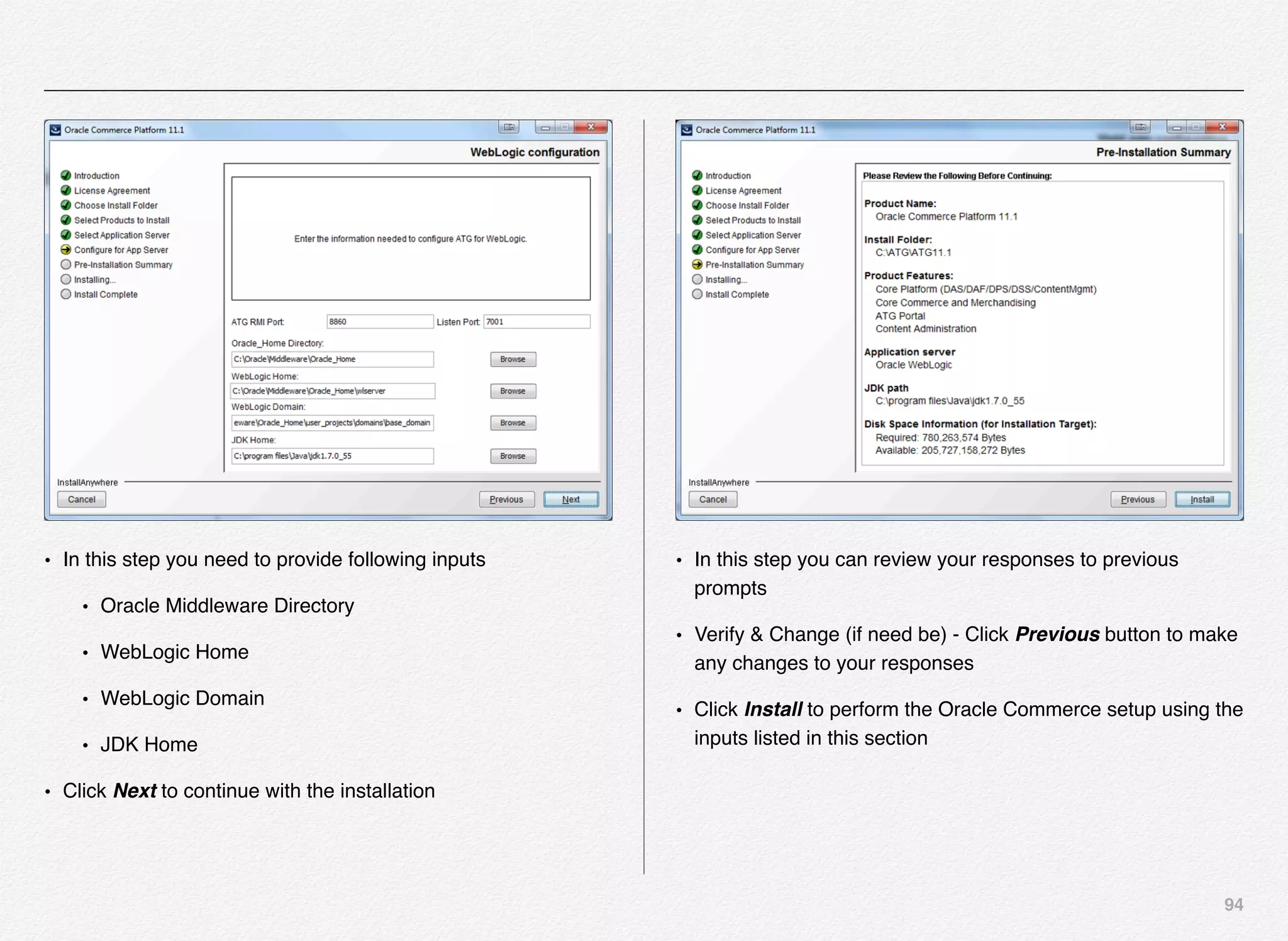
certain banners during certain holiday
• Boost and bury specific search results
• Create custom landing pages for specific search queries
• Fine-tune search relevancy
• Define keyword redirects and synonyms
• Segmentation and targeting customers - even more powerful
when integrated with ATG segmentation
Experience manager gives complete control to the authors to
deliver and manage web/mobile experiences with little or no
help from IT - once the system is operational.
Mobile experiences - i.e. Web, iOS, and Android - are playing
very important role in conducting business with customers with
the growing sales of all types of mobile form factors including
smartphones and tablets. Oracle Endeca for Mobile platform
provides a unified platform that enables business users deliver
consistent experience
on mobile devices
which is at par with
web experience.
Multi-channel and cross-channel experiences are playing
pivotal role in the way companies are putting customers first
and innovating ways of doing business with customers. Oracle
Endeca empowers businesses to leverage the existing backend
technology to provide consistent experiences to the customers
on various form factors.
What does this mean for customers? - The mobile customers
can search and browse your entire product catalog, watch
helpful videos, view support documents, read FAQs, create
wish lists, download PDFs, read and write user reviews, and
proceed through checkout—all from their mobile devices.
Mobile Experience
367
Oracle Endeca - Reference Applications
Oracle Endeca provides Out-of-the-box applications, such as -
Discover Electronics & Commerce Reference Store (CRS) that
enable fast deployment and customization. Each reference
application for mobile Web-enabled smartphones and tablet
devices has robust features and device-specific templates,
cartridges, and editors for a platform-optimized experience.
Out-of- the-box features include:
• Hooks for integrating with commerce platforms and other
technologies
• Store locator with location-based services
• Wish lists, favorites, and order history
• Social integrations with Facebook and Twitter
Commerce
Reference
Store
CRS – Web Store
CRS-M
Mobile Web
Application
Store.mobile
CRS-IUA
iOS Universal
Application
Store.Mobile.REST
Mobile Commerce Reference Store (CRS-M) is a mobile web
application, viewed in the browser of a mobile device. CRS-IUA
is a native iPhone and iPad application that interacts with the
web application's backend to send and receive data. A
Universal app runs on both the iPhone/iPod Touch and the
iPad. From a developer’s perspective, it is an iPhone and iPad
app built as a single binary.
Endeca Accelerator Application – e.g. Discover Electronics or CRS
368
The Endeca Assembler application
enables a WEB application to query the
MDEX Engine and retrieve the
appropriate dynamic
content based on user’s
navigation state or other
triggers.
The Assembler
application
provides a
RESTful web
service API that returns results either in
JSON or XML. The Assembler
application returns deeply nested JSON
or XML response to be interpreted by
the front-end application. The application
returns results an entire page at a time
in the JSON or
XML - hence
some might
feel this
approach a
little unusual
when compared to the traditional
approach where we request results on
resource-by-resource basis.
Example of JSON
http://localhost:8006/discover/?format=json
Explicitly
retrieve JSON
from Assembler
Open the JSON
in Notepad++
Download the
JSON Viewer
for Notepad++
369
The Assembler API is powered by Java, but the query interface is language-agnostic web service.
Finding a way to navigate this structure both by traditional/hand and in-code is equally important. JSON or XML viewer would be
extremely handy. Install one in your browser(s) so that you can view the returned results within the browser (Firefox has out-of-the-box
support for JSON). You can also install tools such as Notepad++ with JSON viewer extension to save and view/navigate the JSON file.
JSON Viewer in Notepad++
• You can download the JSON Viewer for Notepad++ from Sourceforge
• http://sourceforge.net/projects/nppjsonviewer/?source=dlp
• Unzip the download
• This plugin is meant to display a JSON string in a Treeview. It also marks the error position in case of parsing errors.
• Thats it!!!
============ Instruction ============
• Paste the file "NPPJSONViewer.dll" to Notepad++ plugin folder
• open a document containing a JSON string
• Select JSON fragment and navigate to plugins/JSON Viewer/show JSON Viewer or press "Ctrl+Alt+Shift+J"
370
About EAC (Endeca Application Controller)
EAC is the central system for managing one or more Endeca applications and all of the components installed on each Endeca host. It
consist of the EAC Central Server (which coordinates the command, control, and monitoring of all Agents in an Endeca
implementation), the EAC Agent (which controls the work of an Endeca implementation on a single host machine) and the EAC
command-line utility, eaccmd.
371
MDEX Production Cluster @ HTTP Service (8888)
HTTP Service (8888)
EAC CS
+
DB Store
EAC Agent
WSDL (Public) WSDL (Internal)
ITL Host
Production
EAC Agent
WSDL (Internal)
EAC Agent
WSDL (Internal)
EAC Agent
WSDL (Internal)
MDEX 1 MDEX 3 MDEX 3
EAC agent installed on each host machine where one or more
Endeca components have been installed which receive
commands from the EAC Central Server and executes the
command for the components provisioned on that host
machine.
The Assembler Application Web Service Workflow
We have reviewed various components and their functions as
well as composition in the Oracle Endeca Commerce
framework. Let us know understand what happens when the
application user performs a search on keywords on your
website. There is a chain of events that gets executed to
assemble the request with the parameters based on customers
request - whether it is for searching keywords or navigating to a
particular category of products.
Let us take a look at what happens exactly behind the scenes
to process users request/action.
STEP 1
The end-user (could be just a visitor or your existing customer)
using the modern browser visits your website seeking for
information e.g. interested in a particular product or support
article and types search keywords in the search box and
triggers the search request. This is basically - a HTTP Request
that originates from the web browser and arrives at the web
(e.g. Java Web Server) or the application (WebLogic /
WebSphere / JBoss) server.
The front-end application needs the content from Experience
Manager, so it makes a request to the App Server running the
Assembler Service. The content or configuration could either
reside on the server where Assembler service is running or it
could reside in MDEX engine on a separate server.
For example:
http://myserver:8080/assembler/json/guidedsearch?Ntt=camera
372
Request Path - /assembler/json/guidedsearch
Request Parameters - ?Ntt=camera
Parameter "Ntt" has a value of "camera"
STEP 2
App Server Sends Request to Assembler Service
App Server decides: Which of my Web Apps should get this
request?
Most app servers look at first part of request path.
Request path of "/assembler/json/guidedsearch" would go to
the webapp deployed with a WAR file called "assembler.war"
STEP 3
Assembler Service Receives Request
Assembler Service decides: What do I do with this?
Next action determined by web.xml - it runs an HttpServlet
Class.
web.xml
In web.xml:
<servlet>
- defines a servlet (a Java class)
<servlet-class>
- Class extending HttpServlet
<servlet-name>
- Name you want to refer to servlet with
<servlet-mapping>
- defines which request path a servlet should handle.
<url-pattern>
- pattern of request paths to match
<servlet-name>
- Name of servlet to run when request paths match that url-
pattern
STEP 4
Servlet Receives Request
Spring Beans Initialized from assembler-context.xml, loaded
into a WebApplicationContext object (see "Spring Framework").
373
Each <bean> just represents instructions for creating and
initializing a Java object of a specific class. The "id" attribute is
like the "variable name" of that object.
<constructor-arg>
- Argument to pass into object's constructor
<property>
- Invoke a setter after construction and pass a specific value
"ref" attribute
- Use another bean as the value instead of a literal
STEP 5
Content Queried from EM
Assembler bean retrieved from WebApplicationContext. The
"assemble" method is invoked and passed one of two
possibilities:
What happens is up to whatever the developer wrote in the
HttpServlet's "doGet" method?
This describes the out-of-the-box implementation used by the
Assembler Service.
STEP 6
ContentInclude
Constructed with a String representing a path to a page in the
"Pages" section of EM. In the out of the box Servlet, it gets this
string by removing "/assembler/json" from the request URL.
A String like "/guidedsearch" would return a Page in the
"Pages" section called "guidedsearch".
STEP 7
ContentSlotConfig
Constructed with a String representing a path to a folder in the
"content" section of EM. Path always starts with "/content".
A String like "/content/general/banners" would return one or
more of whatever is in the "banners" folder, nested underneath
the "general" folder. This might return some pages or some
cartridge instances. You specify how many things to return from
the folder.
STEP 8
Assembler API Receives EM Content
Content is just structured XML containing the property values
specified by the user in EM. You can see what it looks like by
374
selecting the "XML View" tab in Experience Manager when
viewing content.
UNDERSTANDING THE TERMS USED IN WORKFLOW
EM
Experience Manager, also sometimes called Workbench.
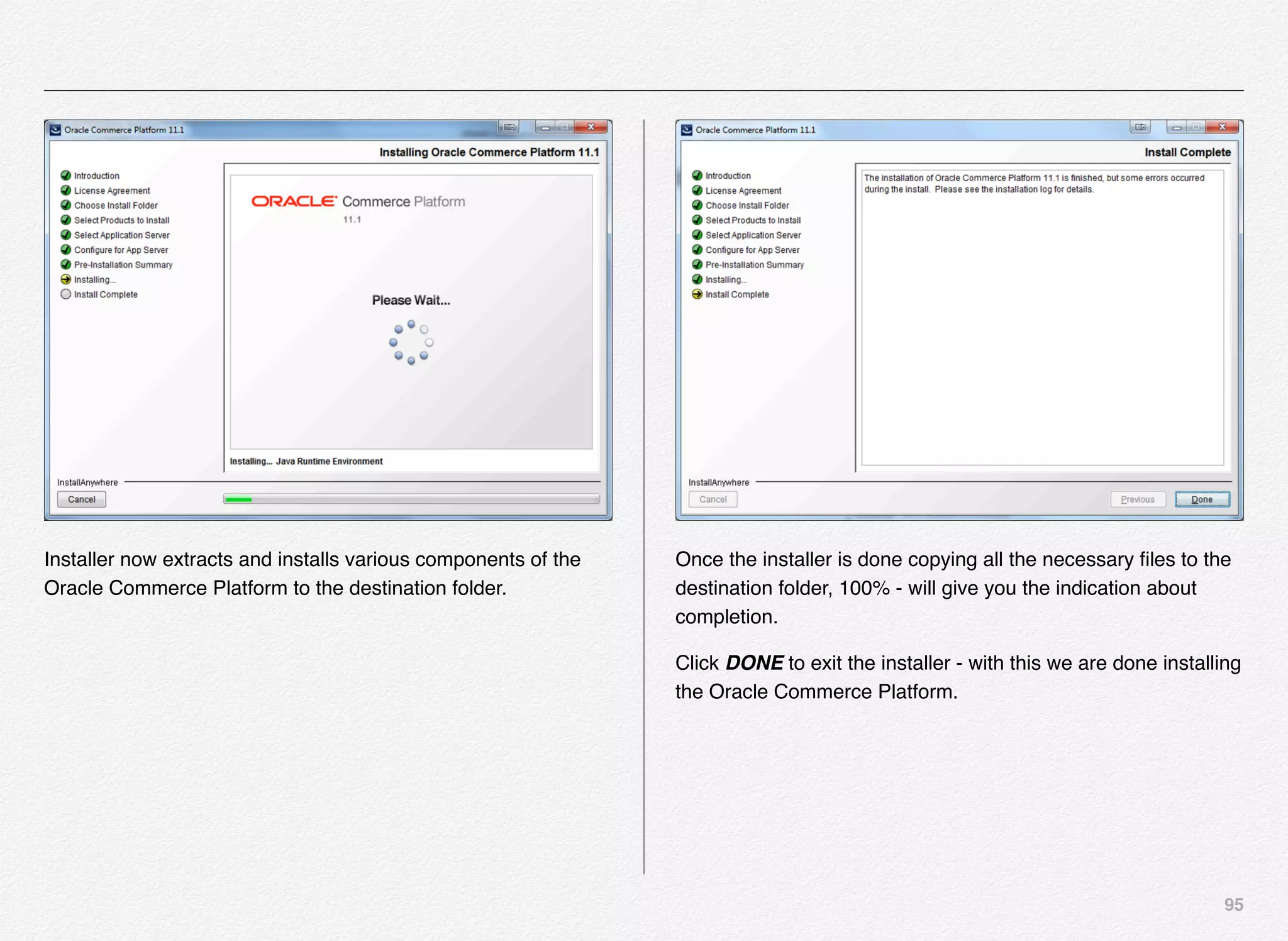
Front-end
Your front-end application running on .NET, PHP, etc...
Application Server
A container that runs WARs (WebLogic, JBoss, Tomcat,
Websphere, etc...). Runs the Assembler Service.
Assembler Service
Java EE Webservice deployed as a WAR file to an App Server
like Tomcat or Websphere. Uses the Assembler API to provide
access to Experience Manager content.
Assembler API invokes Cartridge Handlers
For each cartridge instance in the response from EM, the
Assembler API searches for a bean in assembler-context.xml
called "CartridgeHandler_<CartridgeType>". For example, if we
recieved a Logo cartridge, it would look for a bean called
"CartridgeHandler_Logo".
It assumes this bean implements the CartridgeHandler interface
and invokes the process method.
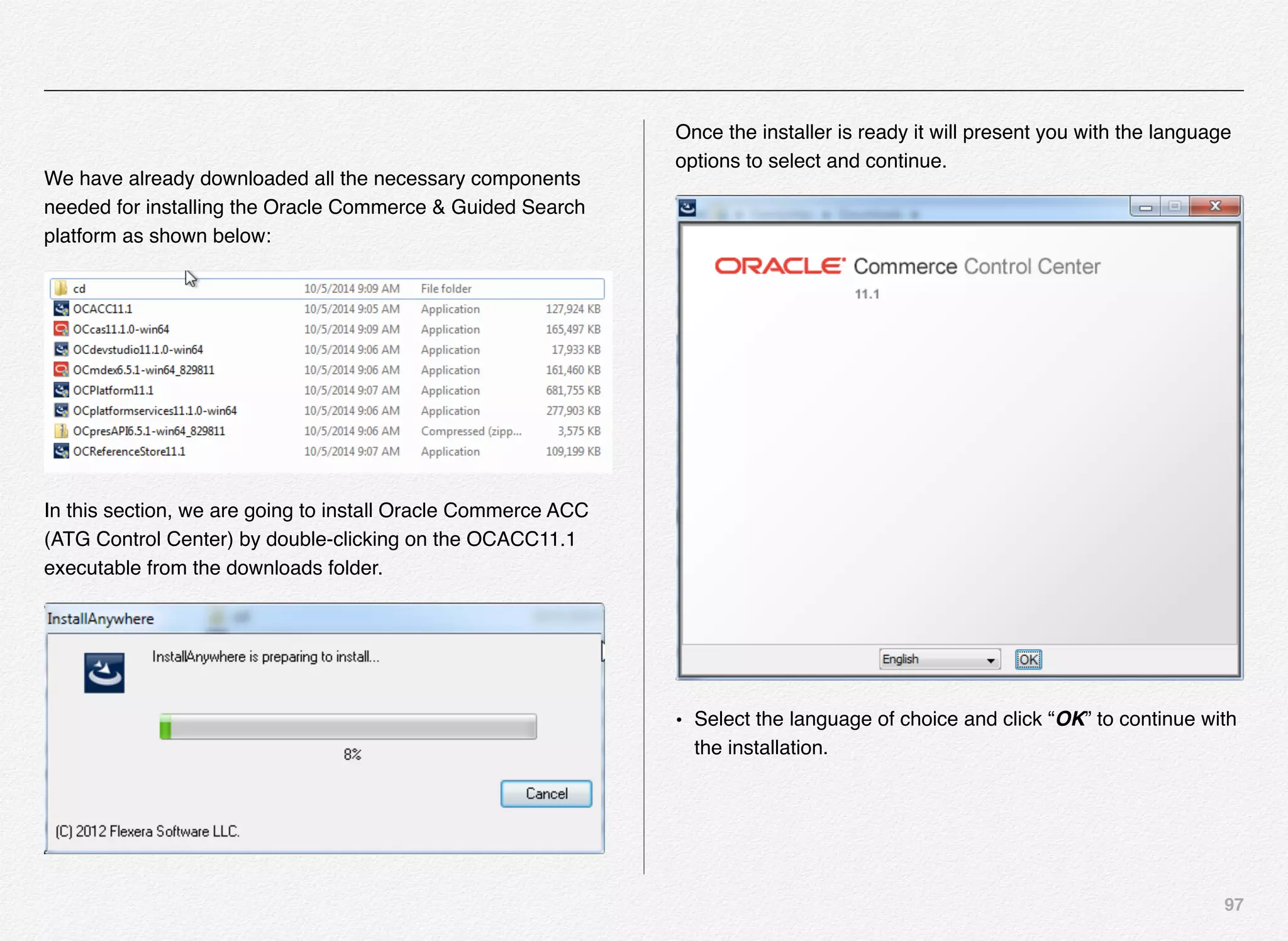
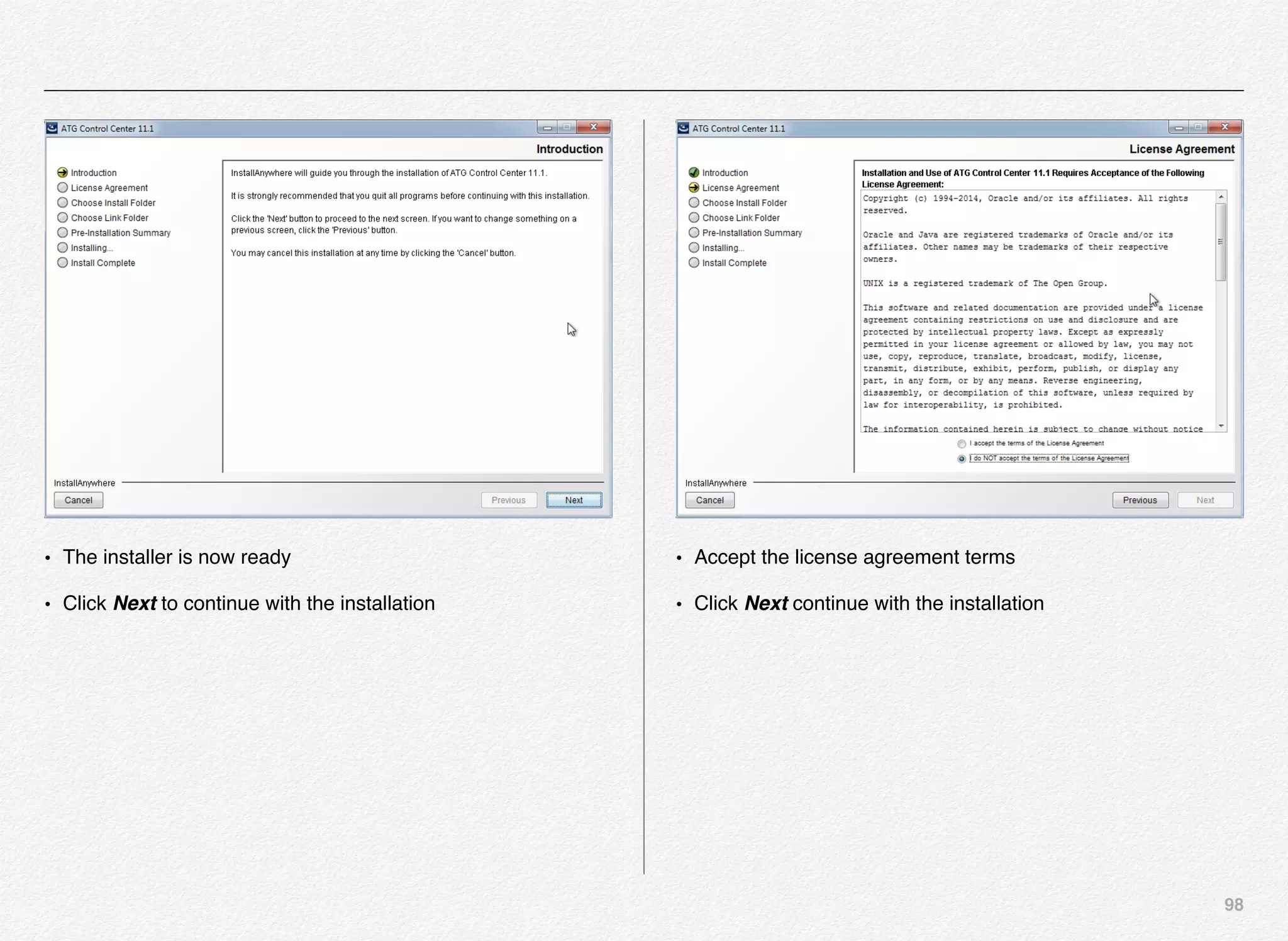
CartridgeHandler Beans in assembler-context.xml.
If there's a lot of configuration, typically, the configuration for the
handler is specified in a separate bean called a "config object".
This keeps things organized.
For example, if we have a GuidedSearchHandler with lots of
configuration options, we COULD give it a bunch of properties
and constructor arguments for each config option. Or, we could
encapsulate those into a config object -
GuidedSearchHandlerConfig, and pass that bean using the
"ref" attribute to GuidedSearchHandler. All the properties and
constructor args would be specified in the config bean instead
of the cartridge handler bean.
Cartridge Handlers "process" Method
The XML for the cartridge instance from EM is serialized to a
ContentItem object and passed as the argument to the process
method. ContentItem is just a Map, where each key is the
property name from EM and each value is the property value
defined by the user in EM.
375
Usually, the handler will look at the request parameters from the
initial request that came into the Webapp, look at the
configuration specified in assembler-context.xml, and look at
the configuration specified in the cartridge instance from EM.
Then, it will make a request to Dgraph using the Presentation
API and get back results, or do some other custom processing.
Presentation API Gets Data From Dgraph
Using:
ENEQuery - describes what to get
HttpENEConnection - describes hostname and port of Dgraph
(usually defined in bean in assembler-context.xml)
Cartridge Handlers Return Assembled ContentItem
Each Cartridge Handler returns a ContentItem, which is just a
Map of key-value pairs that can have anything you want. Don't
confuse this with the ContentItem that gets passed into the
process method.
However, if you want to render JSP, the returned ContentItem
needs to have a property called "@type" with a value of the
name of the cartridge type (for example "Logo").
Assembler API combines all of the ContentItems from Cartridge
Handlers into one "response" ContentItem (a Map). The
structure of the response matches the structure of the content
from EM.
Response ContentItem
Say this structure came from EM, where each element holds
the config specified by the user in EM:
• OneColumnPage (a Page)
• headerContent (a content collection)
• Logo (a cartridge containing an image URL)
• SearchBox (a cartridge containing typeahead config options)
• bodyContent (a content collection)
• LeftNav (a cartridge containing guided nav configuration)
• SearchResults (a cartridge containing search results
configuration)
The Response Content Item will have the same structure, but
each Cartridge will be replaced with the return value (an object
of type ContentItem) of its respective Cartridge Handler. The
return value might simply be the ContentItem from EM, or it
376
might be something created by the handler. Here's what the
response ContentItem might look like:
• OneColumnPage (a Page, @type="OneColumnPage")
• headerContent (a content collection)
• Logo (an image URL, @type="Logo")
• SearchBox (the typeahead configuration,
@type="SearchBox")
• bodyContent (a content collection)
• LeftNav (A List of Dimensions and Dimension Values from
Dgraph, @type="LeftNav")
• SearchResults (An ERecList from Dgraph,
@type="SearchResults")
• Servlet Recieves Response ContentItem
The Assembler's "assemble" method completes and returns the
final response ContentItem. The Servlet can do whatever it
wants with this.
Now it will serialize the ContentItem to JSON or XML and send
that as the HTTP Response.
Assembler Response Parsed
Your frontend code can use a JSON or XML parser of your
choice to convert the JSON or XML returned from the
Assembler Service into an easy-to-use data structure.
HTML Page Rendered
Using the Assembler Response, the frontend can look at the
refinements and records contained within to render the page.
Additionally, the frontend can look at any other Experience
Manager content (like banners) contained in the Assembler
Response and render it appropriately.
Dgraph
port 15000
Endeca Server
Experience Manager/Workbench
port 8006
Webapp
port 8080
Web Server
App Server
377
App Server
Webapp
App Server
Servlet.doGet
Assembler.assemble
Assembler.assemble
Orange Text - Execution context (logical place where control
flow is currently at)
Start
End
CartridgeHandler.process
Assembler.assemble
Servlet.doGet
Frontend
Frontend
Spring Framework
An open-source framework for instantiating Java objects using
XML. This is not part of Endeca, but it is used by most Endeca
applications that use the Assembler API. For example, it's not
used in some ATG projects. It's also used by many non-Endeca
web applications.
Each "<bean>" element represents instructions for instantiating
a Java object of a specific class. This Java object is called a
"bean". The "id" element is like the variable name of the object.
Inside the "<bean>" element, "<constructor-arg>" defines which
arguments you want to pass to the class's constructor, and
"<property>" defines which setters you want to invoke on that
class and which values you'll pass to those setters. The "ref"
attribute means, instead of a literal value, pass another bean
defined somewhere else in the XML as the value to the
constructor or setter.
For example, if I have a bean with an id of "myPerson", for a
class called "Person", and I have one constructor arg element
with a value of "Kyle" and one property element with a name of
"lastName" and a value of "Hipke", that's pretty much
equivalent to the following Java code:
Person myPerson = new Person("Keyur");
myPerson.setLastName("Shah");
11
In this chapter we will
review and study the
enterprise architecture
requirements for setting up
Oracle Endeca Commerce
in Test, Stage, and
Production environments -
with single or multiple
instances of Endeca
Experience Manager.
Endeca Enterprise
Architecture
379
Endeca Enterprise Architecture
Oracle Endeca based on its powerful MDEX engine is a hybrid
search-analytical database with its proprietary algorithms and
data structures designed for very efficient exploration of data/
information from numerous data sources - regardless of its data
structure.
You need to work out a detailed plan based on the business
requirement covering the architecture, solution, and
implementation of the entire endeca delivery and assembly
pipeline workflow.
Below is an elaborate list of components/activities/tasks you
need to consider for designing the solution architecture of
Endeca application:
• Platform hardware - we have used Intel based VMs for our
Oracle Commerce installation
• Operating System - Oracle Linux, Solaris, RHEL, Microsoft
Windows (2008 R2 and 2012) - Red Hat Enterprise Linux is
what we have used
• JDK - 1.7.0_40+
Section 1
Endeca Enterprise
Architecture
Requirements
380
• Virtualization - Amazon, Exalogic, Oracle VM, VMWare -
More coverage in chapter 12 on creating Oracle Commerce
Virtual Environment
• Environment for developer machines - How are you going
to setup your developer machines - those could be running
on Windows or you might want to use Linux based -
production like - virtual machine on your local to simulate the
live environment
• Environment for Development environment servers
• Environment for Integration testing servers
• Environment for Staging servers
• Environment for Production servers - most of the
hardware and software needs would be identical across your
environments for Oracle Commerce - except # of CPU,
Memory, Storage, and # of servers in cluster
• Database requirement - As such Oracle Commerce is
database vendor agnostic, so you can use Oracle Commerce
or Microsoft SQL Server
• CPU and Memory requirements for each server in
different environments - most companies like to mimic
production configuration in staging environment
• Identifying the server role in each environment - i.e. data
processing server, tools server, MDEX server, application
server, logging and reporting server
• Physical network diagram and workflow connecting
servers in each environment - you can use tools such as
Visio or any flowcharting software to accomplish this. I’ve
also used Powerpoint in many cases to quickly create
architecture diagrams
• Endeca component installation requirement for each
server role - you will have to decide whether to install full set
of all 4 components (i.e. MDEX, CAS, Platform Services, and
Tools and Frameworks with Experience Manager) or just
MDEX and Platform Services
• Location for Endeca workbench / experience manager -
whether you want single environment running Workbench or
your business authors are going to re-create content in 2
different environments such as test and stage/prod
• Total # of experience manager environments - previous
point addresses this requirement - again based on business
requirements
• Website crawler configuration (if involved) - you can use
out-of-the-box web crawler component of Oracle Endeca
CAS (Content Acquisition System) to crawl the websites and
381
create record store that can be ingested into the pipeline,
index, and make it available to the application via MDEX
servers.
• Product catalog CAS configuration (if involved) - you can
configure endeca pipeline to ingest records from product
catalog database to make products searchable and navigable
• # of ITL servers and the # of authoring graphs - you need to
have a detailed physical diagram
• # of MDEX servers and the # of dgraphs
• Configuration of ITL server XMLs
• # of application servers & pertaining details
• Logging/reporting server details
• Firewall request for port access to be created
• From which servers
• To which servers
• What are the port numbers
• Uni-directional or bi-directional access - from all the
tests we performed in lab to test the directions of the port, it
was clear that better to leave these ports opened bi-
directional. Oracle documentation does not mention
specifically the directions of the ports
• Make sure your application is listening on specified ports
- ensure that the application is deployed on the servers ready
to listen any incoming requests for the firewall team to be
able to validate your port requests, risk evaluation, and
execution
Purpose Port
Endeca Tools Service Port 8006
Endeca Tools Service SSL Port 8446
Endeca Tools Service Shutdown Port 8084
CAS Service Port 8500
CAS Service Shutdown Port 8506
Endeca HTTP Service Port 8888
Endeca HTTP Service SSL Port 8443
Endeca HTTP Service Shutdown Port 8090
Endeca Control System JCD Port 8088
Application Dgraph User Query Port e.g. Search
Application
18000
Application Agraph User Query Port e.g. Search
Application
18002
Application Logging Server Port e.g. Search Application 18010
382
• Inventory of all the ports, their functions, and directions
(uni or bi-directional access of port) - prepare a
spreadsheet or use any online tool that your operations team
might have provided to document all the port requirements
• Creating the endeca pipeline using developer studio - if
you are developing a Guided Search application for your
customers (internal or external) - you can use the developer
studio tool that comes out of the box to configure the pipeline.
Developer studio is available only on Windows platform.
• Understand what can a pipeline do for you - below are
some of the steps involved in creating the Endeca
application:
• Prepare the Source Data - could be a record store created
by crawling the web pages or a product catalog database
• Classify/Categorize the Data (Understand the Taxonomy)
• Oracle Endeca EAC Application Creation - You will need
your own version of Endeca application deployment script
or you can use out-of-the-box deploy script to create
Endeca EAC application
• Oracle Endeca Pipeline Creation - you will be using the
developer studio on windows to create Endeca pipeline to
connect datasources, create taxonomy - properties/
dimensions, dimension groups, precedence rules, search
interfaces, user profiles, keyword redirects, dynamic
business rules
• Oracle Endeca EAC Application Initialization - Once the
application is deployed (which is copying the application
folder structure and default configuration for a single
machine setup) - you need to initialize the application which
is as good as registering the application with the EAC -
Endeca Application Controller
• Indexing Data into MDEX - Once you have the pipeline
ready with all the configurations, you can run the baseline
updates process - which will index the data and push the
index to MDEX servers
• Testing Pipeline and Indexed Data Using jsp Reference
Application - Endeca provides you a web application
known as Endeca JSPREF that can be used to validate
your index content, dimensions, properties, etc...
• Development tools such as:
• Eclipse IDE - most of Java development community uses
Eclipse IDE for development of Java/J2EE applications -
also there are other tools available in the industry such as
NetBeans, IntelliJ, and BEA WebLogic Workshop
• DCEVM / JRebel - JRebel and DCEVM are the plugins for
Eclipse that you can use to speed up the development
383
process by helping developers test the code without having
to restart the Managed application servers
• WebLogic / Tomcat server - you will need to use an
application server maybe it Weblogic or Tomcat or Jboss
for deploying and testing ATG/Endeca based applications
just like any other J2EE applications.
• XML viewer/editor - you will need to install / use tools
such as XML SPY for viewing and editing XML files
• Enhanced Notepad - you can use tools such as Notepad+
+ or Text Wrangler or Text Mate to manipulate text files,
JSON, and XMLs
• Java SDK
• Maven / ant
• Git / TFS - your choice of source control system such as
Git or Microsoft TFS. If you are working in an enterprise
and using Git - you might be using enterprise Git server
such as Atlassian Stash
• Database engine (MySql, Oracle XE, Microsoft SQL)
• Security clearance requirements - Advances in web
technologies coupled with a changing business environment,
mean that web applications are becoming more prevalent in
corporate, public and Government services today. Although
web applications can provide convenience and efficiency,
there are also a number of new security threats, which could
potentially pose significant risks to an organisation‟s
information technology infrastructure if not handled properly.
You need to get in touch with your security team within the
enterprise to get the guidelines and requirements for security
clearance of new servers and applications.
• Security clearance documents - as a part of security
clearance for the new application & hardware you will need to
create documents such as physical network diagram,
application architecture diagram, application flows, access
control, etc...
• Port scan for access and vulnerabilities - security team
will initiate vulnerability scans for your application. Per
Wikipedia - A port scanner is a software application designed
to probe a server or host for open ports. This is often used by
administrators to verify security policies of their networks and
by attackers to identify running services on a host with the
view to compromise it. Per TechTarget - A port scan is a
series of messages sent by someone attempting to break into
a computer to learn which computer network services, each
associated with a "well-known" port number, the computer
provides.
• App scan for access and vulnerabilities - Per OWASP -
Web Application Vulnerability Scanners are the automated
384
tools that scan web applications to look for known security
vulnerabilities such as cross-site scripting, SQL injection,
command execution, directory traversal and insecure server
configuration. A large number of both commercial and open
source tools are available and and all these tools have their
own strengths and weaknesses.
• Document the deployment topology for your ATG
commerce application - The Deployment server requires
information about the production and staging targets where
assets are to be deployed. Sometimes your workflow may
involve more sites such as Testing, Staging, and Production
where the assets are to be deployed. In order to provide this
information you Define the Deployment Topology—that is,
deployment targets and their individual servers where agents
are installed. 


Before you do so, however, knowledge of the topology is
required for several earlier steps in the deployment
configuration process. For this reason, you should plan the
deployment topology as the first step towards deployment
setup. You can prepare a spreadsheet where you define
which server plays what roles, the ports assigned to each
server in different environment, repository mappings, etc...
• Rsync scripts for synchronizing images from upload
source to Endeca media folder - You might install web
publishing agent on each and every server in production to
be able to push the resources such as images, js, css, jsp
etc... or you can configure to publish the resources to only
one server with web publishing agent and then synchronize
the folder(s) to other production servers. On Linux bases
servers you can use a utility known as “rsync” that can be
scheduled to synchronize the content of the folders every few
minutes as a “cron” job. This is out-of-the-box Linux utility for
synchronizing folders/files. There are other utilities that you
can find on Github you can use to do real-time
synchronization of folders/files without having to setup cron
job to synchronize at pre-determined time interval
• Scripts to promote content from one environment to
another - depending on your business requirements -
assume you have authoring setup in one environment and
you want to promote Endeca content to various environments
such as testing, staging, and production. You can use the file-
based deployment functionality introduced in Endeca 11.0
using which you can export the the experience manager
content to zip files and these zip files can be pushed to both
the MDEX and application server running the assembler.
Once these zip files are pushed and promote content script is
run in the target environment the promoted content becomes
live in the target environment.
385
• Scripts to auto-trigger crawling, indexing, and baseline
update on scheduled bases for website crawl - there are
several other areas in Endeca where you will need to write
scripts or configure Cron job to trigger these scripts at
scheduled time intervals. For example, you might want to
trigger the web site crawler every evening @ 7 or 8 (non-
peak hours) - to crawl the entire site or product catalog and
refresh the index with latest content. This can be achieved
using the cron job.
• Adding the scripts to EAC admin console in workbench
for authors to execute the same - the custom scripts created
to export and promote contents can be added to the Endeca
workbench from the EAC admin console
• Creating and deploying page templates / cartridges - as a
part of business requirements and development you will be
required to create page and cartridge templates and
potentially add custom code to handle any special
implementation details. You need to then execute Endeca
scripts for your application to set the templates to make those
available to content authors via the Endeca Experience
Manager
• Customizing out-of-the-box Endeca deployment scripts -
Usually out-of-the-box Endeca deployment and controls
scripts are sufficient enough and production ready. But, in
case of any special functional or business needs you can
customize the existing or create new bean shell-scripts to
address the same.
• Customizing out-of-the-box control folder scripts and
application configuration XMLs based on the physical
architecture - Once you deploy the Endeca application using
the default deployment script, the application will be
configured for a single machine - assuming that the same
server (localhost) is going to play the role of data processing
server, MDEX engine, Workbench, application server, web
server, and any additional roles. Based on your physical
architecture of the given environment you will be required to
configure the XML files in the config/script folder to provide
additional inputs about the machine IP/Hostname and ports
that each server will play the role of
• Need for the load-balancer URL for application servers -
in the real world, when you configure your application for
Staging or production environment - you are looking at a
configuration of application that spans across multiple servers
for scaling, load balancing, and disaster recovery reasons.
For example, if you have 5 application servers responsible for
assembling the pages at run-time facing the customers you
need to assign a load-balancer to direct the traffic evenly to
these application servers, making sure that no single server
is over burdened
386
• Need for the load-balancer URL for MDEX server cluster -
in the real world, when you configure your Endeca application
for Staging or production environment - you are looking at a
configuration of application that spans across multiple servers
for scaling, load balancing, and disaster recovery reasons.
For example, if you have 5 servers holding the application
index responsible for receiving front-end application server
requests and responding the queries with appropriate
responses at run-time facing the customers - you need to
assign a load-balancer to direct the traffic evenly to these
MDEX servers, making sure that no single server is over
burdened
• Customize the front-end web application properties to
point to the correct load-balancer URL and port - your
web application responsible for assembling the pages at run-
time would have to be configured (e.g. assembler.properties)
to point to the correct values for workbench host/port and
MDEX hostport
Understanding Endeca Production Architecture
In the next diagram I’ve put together the way a typical Endeca
search application architecture would look like. Though, this
architecture doesn’t show the hooks into the web crawling CAS
server or product catalog integration. It typically shows you how
the production Endeca application physical servers will be laid
out for your understanding and convenience.
The right side of the diagram explains the basic connectivity
and flow from the instance when the user request is received
and then it is passed through the application load balancer to
the application server. The request is then assembled by the
Endeca assembler on the Application server to be passed on to
the MDEX server via the MDEX server load balancer.
Assuming this is a production environment you tend to have
more than one servers in each layer (Application & MDEX) to
take care of the traffic distribution and load balancing.
In the sample diagram we have:
- 1 ITL Server
- 1 Logging & Reporting Server
- 3 Application Servers
- 5 MDEX Servers
387
MDEX 1 MDEX 2 MDEX 3 MDEX 4 MDEX 5
App Server Cluster / LB
MDEX/Dgraph Servers
Cluster / LB
iPlanet (80)
Weblogic (6101)
App Server Cluster
Endeca
DGRAPH
Processes
Addressing
client search
requests
MDEX Server
Cluster
(8888/17000)
ITL 1
RPT 1
8888
Log
Server
Logs (17010)
ITL Server
8888
8000-8999 15000-17000
Search
front-end
Java
Application
APP
SERVER 1
APP
SERVER 2
APP
SERVER 3
Endeca Workbench ports
8006, 8007
388
Endeca Production Architecture Components
• Users / Customers
• Application Server Load Balancer
• Web Server (e.g. iPlanet / Java Web Server)
• Cluster of Application Servers (e.g. WebLogic)
• MDEX Server Load Balancer
• MDEX Restart Groups
• Cluster of MDEX Servers
• ITL Server
• Logging and Reporting Server
Users / Customers - are the direct consumers of your web or
mobile application - whether they are seeking some information
on support documents, searching for product information,
looking for contact numbers for your customer care center,
navigating product categories, or wanting to find some product
promotions and order products. Typically, these consumers
would be using the browser of their choice or using a mobile
application triggering the request that eventually reaches to the
MDEX servers and the MDEX responds in either the JSON or
XML format.
Web Server (e.g. iPlanet / Java Web Server) - Web servers
receive the browser requests originating from the web site
users via the HTTP protocol.
Application & MDEX Server Load Balancer - Load balancers
are the preferred solution for providing scalability, redundancy,
and fail-over for application requests originating from the web
browsers or mobile applications.
An Endeca-based application relies upon the availability of the
MDEX Engine to service user requests. If that MDEX Engine
should be unavailable, then the Endeca portion of the
application will be unable to respond to queries. The MDEX
Engine might be unavailable or appear to be unavailable for
any number of reasons, including hardware failure, an in-
process update of the MDEX Engine's indices, or, in extreme
cases, very high load on a given MDEX Engine. In addition, for
high traffic sites, it may be necessary to have more than one
MDEX Engine to serve traffic. For these reasons, it is generally
desirable to implement multiple MDEX Engines for a given
deployment, to ensure the highest levels of availability and
performance.
The MDEX Engine functions very similarly to a web server in
terms of network traffic: It simply accepts HTTP requests on a
specified port, and returns results to the caller. This behavior
allows for standard web load balancing techniques to be
applied. In particular, all of these techniques will introduce a
389
Virtual IP address, which will accept requests from the application server, and route the requests to the MDEX Engine it determines
best suited to handling the request.
REFERENCE ARCHITECTURE - SINGLE APPLICATION SERVER
Endeca MDEX
Engine 1
Endeca MDEX
Engine 2
HTTPLoadBalancer
HTTP
Request To
Specific
IP and Port Application
Server
Endeca API
HTTP
Request
Virtual IP
(Load
Balancer)
Browser
HTTP
Requests
To Virtual
IP
REFERENCE ARCHITECTURE - MULTIPLE APPLICATION SERVER
Endeca MDEX
Engine 1
Endeca MDEX
Engine 2
HTTPLoadBalancer
HTTP
Request To
Specific
IP and Port
Application
Server
HTTP
Request
Virtual IP
(Load
Balancer)
Application
Server
Application
Server
Application
Server
MDEX
HTTPLoadBalancer
APP
Browser
HTTP
Requests
To Virtual
IP
390
It is important to realize that the load balancing scheme described in the previous diagram is no different than the solution most web
sites implement for balancing external traffic to application servers. The configuration process should therefore be familiar in terms of
port access / firewalls etc...
In many cases, if enough ports are available, the same physical hardware can even be used, provided any firewalls do not restrict this
loop-back. Also, as mentioned earlier you need to be aware if the port access need is uni-directional or bi-directional since that will
impact your firewall rules request to the firewall / network team - and be ready with documented justification.
Endeca MDEX
Engine 1
Endeca MDEX
Engine 2
HTTPLoadBalancerHTTP
Request To
Specific
IP and Port
Application
Server
HTTP
Request
Virtual IP
(Load
Balancer)
Application
Server
Application
Server
Application
Server
MDEX
HTTPLoadBalancer
APP
Browser
HTTP
Requests
To Virtual
IPEndeca MDEX
Engine 3
Endeca MDEX
Engine 4
RestartGroupARestartGroupB
When the baseline update process runs on the ITL, it creates the index and then distributes the index to the MDEX servers in cluster.
But, before it does that you are required to assign one or more MDEX servers to a restart group. ITL server will have to bring down the
DGRAPH process running on the MDEX server in order to push the new index. In production, typically you do not want to hinder the
customer experience by bringing down all the DGRAPH at once. So, assigning the DGRAPH/MDEX servers to a restart group helps
the baseline update bring down only those servers in a particular restart group. Assume, in above example we have MDEX Engine 1
391
and 2 in restart group A - and - MDEX Engine 3 and 4 in restart
group B.
When baseline update runs, it brings down the graphs in restart
group A, pushes the new index to these servers, brings the
graphs back up, and then brings down the graphs in the restart
group B, pushes the new index to these servers, and then
brings the graphs back up on the servers in restart group B.
Per Oracle Documentation
The restartGroup property indicates the Dgraph's membership
in a restart group. When applying a new index or configuration
updates to a cluster of Dgraphs (or when updating a cluster of
Dgraphs with a provisioning change such as a new or modified
process argument), the Dgraph cluster object applies changes
simultaneously to all Dgraphs in a restart group.
Similarly, the updateGroup property indicates the Dgraph's
membership in an update group. When applying partial
updates, the Dgraph cluster object applies changes
simultaneously to all Dgraphs in an update group.
Dgraph configuration snippet from LiveDgraphCluster.xml
<dgraph id="Dgraph1" host-id="MDEXHost1" port="15000">
<properties>
<property name="restartGroup" value="A" />
<property name="updateGroup" value="a" />
</properties>
<log-dir>./logs/dgraphs/Dgraph1</log-dir>
<input-dir>./data/dgraphs/Dgraph1/dgraph_input</input-dir>
<update-dir>./data/dgraphs/Dgraph1/dgraph_input/updates</
update-dir>
</dgraph>
<dgraph id="Dgraph2" host-id="MDEXHost2" port="15000">
<properties>
<property name="restartGroup" value="A" />
<property name="updateGroup" value="a" />
</properties>
<log-dir>./logs/dgraphs/Dgraph2</log-dir>
392
<input-dir>./data/dgraphs/Dgraph2/dgraph_input</input-dir>
<update-dir>./data/dgraphs/Dgraph2/dgraph_input/updates</
update-dir>
</dgraph>
<dgraph id="Dgraph3" host-id="MDEXHost3" port="15000">
<properties>
<property name="restartGroup" value="B" />
<property name="updateGroup" value="b" />
</properties>
<log-dir>./logs/dgraphs/Dgraph3</log-dir>
<input-dir>./data/dgraphs/Dgraph3/dgraph_input</input-dir>
<update-dir>./data/dgraphs/Dgraph3/dgraph_input/updates</
update-dir>
</dgraph>
<dgraph id="Dgraph4" host-id="MDEXHost4" port="15000">
<properties>
<property name="restartGroup" value="B" />
<property name="updateGroup" value="b" />
</properties>
<log-dir>./logs/dgraphs/Dgraph4</log-dir>
<input-dir>./data/dgraphs/Dgraph4/dgraph_input</input-dir>
<update-dir>./data/dgraphs/Dgraph4/dgraph_input/updates</
update-dir>
</dgraph>
393
High-level Architecture for Promote Content
At a very high level since Oracle Commerce 11.0 we have a
new way to promote content from authoring environment to live
environment e.g. staging authoring to production live.
As depicted in the the picture on left, the Endeca Workbench
has 2 types of content:
1.Workbench content that needs to goto Application server
running the Assembler application in production
2.Search config content that needs to goto the MDEX server in
production
This is done by file-based method v/s the direct method... in the
file-based method the changes made by authors in Endeca
experience manager are separated into 2 set of zip files as
described above. Then, these zip files need to be copied or
rsync’d to the production environment and run the promote
content script in production environment for it to make the
changes alive.
export_content.sh is not an out-of-the-box script - you make it by copying the promote_content.sh and making necessary adjustments
to the name of the bean shell function name which you will create in WorkbenchConfig.xml in the <app-dir>/config/script folder of your
application.
Application
Assembler
MDEX
Dgraph
Application Servers
MDEX Servers
• Contents
• Pages
• Templates
• Phrases
• Rules
• Thesaurus
• Keyword Redirects
Export_content.sh
Staging Production
394
PROMOTE_CONTENT.SH
[vagrant@localhost control]$ cat promote_content.sh
#!/bin/sh
WORKING_DIR=`dirname ${0} 2>/dev/null`
. "${WORKING_DIR}/../config/script/set_environment.sh"
# "PromoteAuthoringToLive" can be used to promote the
application.
# "PromoteAuthoringToLive" exports configuration for dgraphs
and for assemblers as files. These files are then applied to the
live dgraph cluster(s) and assemblers.
"${WORKING_DIR}/runcommand.sh"
PromoteAuthoringToLive run 2>&1
WORKBENCHCONFIG.XML
WorkbenchConfig.xml file is available in /usr/local/endeca/
Apps/Discover/config/script folder or C:EndecaAppsDiscover
configscripts folder.
This file contains the bean shell script function known as
PromoteAuthoringToLive. This function makes 4 calls
1. to Export Workbench content as ZIP file with help of
IFCR.exportApplication();

Used to export a particular node to disk. This on disk format
will represent all nodes as JSON files. Can be used to
update the Assembler. Note that these updates are
"Application Specific". You can only export nodes that
represent content and configuration relevant to this
Application.
2. to Export Search config in Workbench as ZIP file with help of
IFCR.exportConfigSnapshot(LiveDgraphCluster);

Exports a snapshot of the current dgraph config for the Live
dgraph cluster. Writes the config into a single zip file. The zip
is written to the local config directory for the live dgraph
cluster. A key file is stored along with the zip. This key file
keeps the latest version of the zip file.
3. to apply the ZIP file export to the live dgraph cluster (MDEX
Servers) with help of
395
LiveDgraphCluster.applyConfigSnapshot();

Applies the latest config of each dgraph in the Live Dgraph
cluster using the zip file written in a previous step. The
LiveDgraphCluster is the name of a defined dgraph-cluster in
the application config. If the name of the cluster is different or
there are multiple clusters, You will need to add a line for
each cluster defined.
4. to apply the ZIP file export to the assembler application
running on WebLogic or WebSphere or JBoss server with
help of AssemblerUpdate.updateAssemblers();

Updates all the assemblers configured for your deployment
template application. The AssemblerUpdate component can
take a list of Assembler Clusters which it should work
against, and will build URLs and POST requests accordingly
for each in order to update them with the contents of the
given directory.
Minimalist code for PromoteAuthoringToLive is as below:
<script id="PromoteAuthoringToLive">
<log-dir>./logs/provisioned_scripts</log-dir>
<provisioned-script-command>./control/
promote_content.sh</provisioned-script-command>
<bean-shell-script>
<![CDATA[
IFCR.exportConfigSnapshot(LiveDgraphCluster);
IFCR.exportApplication();
LiveDgraphCluster.applyConfigSnapshot();
AssemblerUpdate.updateAssemblers();
]]>
</bean-shell-script>
</script>
396
COPYING PromoteAuthoringToLive to
ExportContent
In WorkbenchConfig.xml you can copy and paste the script id
“PromoteAuthoringToLive” and rename the script id to
“Export_Content” and then have only 2 functions out of the 4 to
do the job i.e. is to export the content and config to ZIP files.
Minimalist code for ExportContent is as below:
<script id="ExportContent">
<log-dir>./logs/provisioned_scripts</log-dir>
<provisioned-script-command>./control/
promote_content.sh</provisioned-script-command>
<bean-shell-script>
<![CDATA[
IFCR.exportConfigSnapshot(LiveDgraphCluster);
IFCR.exportApplication();
// LiveDgraphCluster.applyConfigSnapshot();
// AssemblerUpdate.updateAssemblers();
]]>
</bean-shell-script>
</script>
As you will notice we have commented 2 functions to update
the live dgraph cluster and assembers. We will use this function
in a separate script called export_content.sh which will refer to
ExportContent script id as below:
WORKING_DIR=`dirname ${0} 2>/dev/null`
. "${WORKING_DIR}/../config/script/set_environment.sh"
# "PromoteAuthoringToLive" can be used to promote the
application.
# "PromoteAuthoringToLive" exports configuration for dgraphs
and for assemblers as files. These files are then applied to the
live dgraph cluster(s) and assemblers.
"${WORKING_DIR}/runcommand.sh" ExportContent run 2>&1
397
PROMOTE_CONTENT IN PRODUCTION
Similarly, once these ZIP files are RSYNC’d in production ITL
server we can run a customized version of promote_content.sh
with the 2 export functions commented and just the apply
snapshot and update assembler.
Minimalist code for PromoteAuthoringToLive in production
environment is as below:
<script id="PromoteAuthoringToLive">
<log-dir>./logs/provisioned_scripts</log-dir>
<provisioned-script-command>./control/
promote_content.sh</provisioned-script-command>
<bean-shell-script>
<![CDATA[
// IFCR.exportConfigSnapshot(LiveDgraphCluster);
// IFCR.exportApplication();
LiveDgraphCluster.applyConfigSnapshot();
AssemblerUpdate.updateAssemblers();
]]>
</bean-shell-script>
</script>
12
In this chapter we will learn
how to crawl a website
using Endeca Web Crawler
and feed that data to the
Developer Studio and the
Endeca Application using
the Endeca pipeline.
Oracle Endeca -
Web Crawler
399
Endeca Web Crawler
This chapter is designed to help you understand below areas:
1. How to configure and execute web crawling for a given site/
urls?
2. How to setup & deploy a sample Endeca application using
the deploy script?
3. Build pipeline using Developer Studio - Next section
4. Running the Baseline Updates & Indexing - Next section
5. Testing the results using the Endeca jsp_ref – reference
application - Next section
Section 1
Crawling Websites
& Initializing the
TestCrawl
Application
400
Web Crawler - Introduction
Web Crawlers are computer programs that browse the World
Wide Web in a methodical, automated manner. Other terms for
Web crawlers are ants, automatic indexers, bots, worms, Web
spider, Web robot or Web scooter.
This process is called Web crawling. Many sites, in particular
search engines, use spiders as a means of providing up-to-date
data. Web crawlers are mainly used to create a copy of all the
visited pages for later processing by a search engine that will
index the downloaded pages to provide fast searches. Also,
crawlers can be used to gather specific types of information
from Web pages, such as harvesting e-mail addresses (usually
for spam).
A Web crawler is a type of bot or software agent. In general, it
starts with a list of URLs to visit, called the seeds. As the
crawler visits these URLs, it identifies all the hyperlinks in the
page and adds them to the list of URLs to visit, called the crawl
frontier. URLs from the frontier are recursively visited according
to a set of policies.
Running the Endeca Crawl
You can check the configuration and operation of the Endeca
Web Crawler by running a sample web crawl script file (web-
crawler.bat or web-crawler.sh) that is located in the C:Endeca
CAS3.1.2bin folder.
You can try the following steps to execute a sample crawl:
1.! Open a command prompt
2.! Navigate to the C:EndecaCAS11.2.0Bin folder
3.! Run the web-crawler.bat or web-crawler.sh script with the
following flags.
4.! –d defines the depth of CRAWL
a.! 0 for the –d flag is to crawl only the root of the site
b.! 1 for the –d flag is to crawl the root and all the links under
the root
5.! C:EndecaCAS11.2.0bin> web-crawler -c ....workspace
confweb-crawlerpolite-crawl -d 1 -s http://www.oracle.com
6.! If the crawl begins successfully, you will see the INFO
progress messages as per below screenshot / sample crawl run
messages
401
INFO! 2015-11-29 01:02:42,726!0!
com.endeca.itl.web.Main![main]! Adding seed: http://
www.oracle.com
INFO! 2015-11-29 01:02:42,726!0!
com.endeca.itl.web.Main![main]! Seed URLs: [http://
www.oracle.com]
INFO! 2015-11-29 01:02:43,617!891!
com.endeca.itl.web.db.CrawlDbFactory! [main]! Initialized
crawldb: com.endeca.itl.web.db.BufferedDerbyCrawlDb
INFO! 2015-11-29 01:02:43,617!891!
com.endeca.itl.web.Crawler! [main]! Using executor
settings: numThreads = 100, maxThreadsPerHost=1
INFO! 2015-11-29 01:02:44,539!1813!
com.endeca.itl.web.Crawler! [main]! Fetching seed URLs.
INFO! 2015-11-29 01:02:45,977!3251!
com.endeca.itl.web.Crawler! [main]! Seeds complete.
INFO! 2015-11-29 01:03:43,923!61197!
com.endeca.itl.web.Crawler! [Timer-2]! Progress: Perf: Level 0
(interval) 60.0s. 0.9 Pages/s. 44.5 kB/s. 57 fetched. 2.6 mB. 56
records. 1 redirected. 0 retried. 0 gone. 2892 filtered.
INFO! 2015-11-29 01:03:43,923!61197!
com.endeca.itl.web.Crawler! [Timer-2]! Progress: Perf: All
(cumulative) 60.0s. 0.9 Pages/s. 44.5 kB/s. 57 fetched. 2.6 mB.
56 records. 1 redirected. 0 retried. 0 gone. 2892 filtered.
INFO! 2015-11-29 01:03:43,923!61197!
com.endeca.itl.web.Crawler! [Timer-2]! Progress: Queue: .
active requests: 1 on 1 host(s) (www.oracle.com). pending
requests: 42 on 1 host(s) (www.oracle.com). 1 host(s) visited
INFO! 2015-11-29 01:04:28,426!105700!
com.endeca.itl.web.Crawler! [pool-1-thread-70]! Finished
level: host: www.oracle.com, depth: 1, max depth reached
INFO! 2015-11-29 01:04:28,426!105700!
com.endeca.itl.web.Crawler! [main]! Starting crawler shut
down
INFO! 2015-11-29 01:04:28,442!105716!
com.endeca.itl.web.Crawler! [main]! Waiting for running
threads to complete
INFO! 2015-11-29 01:04:28,520!105794!
com.endeca.itl.web.Crawler! [main]! Progress: Level:
Cumulative crawl summary (level)
INFO! 2015-11-29 01:04:28,520!105794!
com.endeca.itl.web.Crawler! [main]! host-summary:
www.oracle.com to depth 2
host!depth! completed! total!blocks
402
www.oracle.com! 0! 1! 1! 1
www.oracle.com! 1! 100! 100! 1
www.oracle.com! 2! 0! 2457!5
www.oracle.com! all! 101! 2558!7
INFO! 2015-11-29 01:04:28,520!105794!
com.endeca.itl.web.Crawler! [main]! host-summary: total
crawled: 101 completed. 2558 total.
INFO! 2015-11-29 01:04:28,520!105794!
com.endeca.itl.web.Crawler! [main]! Shutting down
CrawlDb
INFO! 2015-11-29 01:04:28,629!105903!
com.endeca.itl.web.Crawler! [main]! Progress: Host:
Cumulative crawl summary (host)
INFO! 2015-11-29 01:04:28,629!105903!
com.endeca.itl.web.Crawler! [main]! Host: www.oracle.com:
100 fetched. 4.4 mB. 97 records. 1 redirected. 0 retried. 0 gone.
4701 filtered.
INFO! 2015-11-29 01:04:28,629!105903!
com.endeca.itl.web.Crawler! [main]! Progress: Perf: All
(cumulative) 104.7s. 1.0 Pages/s. 43.1 kB/s. 100 fetched. 4.4
mB. 97 records. 1 redirected. 0 retried. 0 gone. 4701 filtered.
INFO! 2015-11-29 01:04:28,629!105903!
com.endeca.itl.web.Crawler! [main]! Crawl complete.
403
Crawl Output
By default the CRAWL OUTPUT is created in the folder C:EndecaCAS11.2.0binpolite-crawl-workspaceoutputpolite-crawl.xml
NOTE: The CAS Server stores the records in either a Record Store instance or in a file on disk. By default record storage is written to
a Record Store instance. The Web Crawler stores records, by default, in a file on disk but can be configured to store records in a
Record Store instance. (Using a Record Store instance is the recommended approach.)
The archive folder contains date/time stamped versions of polite-crawl.xml(S).
404
Below is the sample output (format) in the polite-crawl.xml
<?xml version='1.0' encoding='UTF-8'?>
<RECORDS>
<RECORD>
<PROP NAME="Endeca.Web.HTMLMetaTag.language">
<PVAL>en</PVAL>
</PROP>
<PROP
NAME="Endeca.Document.CharEncodingForConversion">
<PVAL>UTF-8</PVAL>
</PROP>
<PROP NAME="Endeca.Document.OutlinkCount">
<PVAL>155</PVAL>
</PROP>
<PROP NAME="Endeca.Web.HTMLMetaTag.title">
<PVAL>Oracle | Hardware and Software, Engineered to
Work Together</PVAL>
</PROP>
<PROP NAME="Endeca.Web.Host">
<PVAL>www.oracle.com</PVAL>
</PROP>
<PROP NAME="Endeca.SourceType">
<PVAL>WEB</PVAL>
</PROP>
<PROP NAME="Endeca.Id">
<PVAL>http://www.oracle.com/index.html</PVAL>
</PROP>
<PROP NAME="Endeca.File.Size">
<PVAL>36358</PVAL>
</PROP>
By default, the Web-crawler creates the OUTPUT in the XML
file. The crawl output can alternatively be stored in RECORD
STORE using the sample script available in the folder C:
EndecaCAS11.2.0samplewebcrawler-to-recordstorerun-
sample.bat
405
Before you can run the run-sample.bat you need to make changes to 3 configuration LST/TXT/XML/BAT files as listed below:
conf/endeca.lst
In the file endeca.lst you can list all the URLs that you want to crawl.

conf/crawl-urlfilter.txt
In this file you can define what to do with URLs found on the page: you can specify to follow a URL and crawl it or skip certain URLs
and not follow them. Example screenshot is available below for reference. You can modify this file based on your needs.
conf/site.xml
Here we can specify the record store to write to (among
other things). So at the tag <property> with the name tag
output.recordStore.instanceName. We can specify the
record store name. If not existing it will be created
automatically when running the crawl. My record store will
be called rs-myfirstrs:
Modify the run-sample.bat to include the resord store
instance name you just configured so as the batch file will
create and point to the correct record store instance.
406
The run-sample.bat file performs following tasks:
1. Create a record store component (validates if the component already exist)
2. Point to the right record store component for storing the crawl output
Run the web-crawler.bat using the site configuration
RUN-SAMPLE.BAT - Content
407
About Proxy Settings
If you are within the corporate networks it is quite possible that
your 1st attempt to execute web crawl might actually fail or not
work. That is because, you have or might not have configured
the PROXY SETTINGS for your CRAWL configuration. You can
achieve this by modifying the default.xml file located in the
CONF folder of your webcrawl-to-recordstore folder.
<!-- Proxy properties -->
<property>
<name>http.proxy.hostname</name>
<value></value>
<description>The proxy hostname. If empty, no proxy is
used.</description>
</property>
<property>
<name>http.proxy.port</name>
<value>80</value>
<description>The proxy port.</description>
</property>
Crawl Summary
Below is the crawl host-summary defining the depth.
Completed, total, and # of blocks.
408
Deploying a TestCrawler application for
testing the Endeca pipeline and
baseline updates
The deploy script is located in the bin directory (as per the path
below) creates, configures, and distributes the EAC application
files into the deployment directory structure.
1.! Start a command prompt (on Windows) or a shell (on
UNIX)

2.! Navigate to <installationpath>ToolsAndFrameworks
<version>deployment_templatebin or the equivalent path on
UNIX

3.! From the bin directory, run the deploy script. For example,
on Windows: C:EndecaToolsAndFrameworks
11.2.0deployment_templatebin>deploy 

4.! If the path to the Platform Services installation is correct,
press Enter
(The template identifies the location and version of your
Platform Services installation based on the ENDECA_ROOT
environment variable. If the information presented by the
installer does not match the version or location of the software
you plan to use for the deployment, stop the installation, reset
your ENDECA_ROOT environment variable, and start again.
Note that the installer may not be able to parse the Platform
Services version from the ENDECA_ROOT path if it is installed
in a non-standard directory structure. It is not necessary for the
installer to parse the version number, so if you are certain that
the ENDECA_ROOT path points to the correct location,
proceed with the installation. )
409
5.! Specify a short name for the application. The name should
consist of lower- or uppercase letters, or digits between zero
and nine – e.g. TestCrawler

6.! Specify the full path into which your application should be
deployed
This directory must already exist (e.g. C:Endecaapps). The
deploy script creates a folder inside of the deployment directory
with the name of your application (e.g. TestCrawler) and the
application directory structure
(I’ve just created a folder “apps” under C:Endeca)
For example, if your application name is TestCrawler, and you
specify the deployment directory as C:Endecaapps, the deploy
script installs the template for your application into C:Endeca
appsTestCrawler
7.! Specify the port number of the EAC Central Server
By default, the Central Server host is the machine on which you
are running deploy script and that all EAC Agents are running
on the same port – e.g. 8888
8.! Specify the port number of Oracle Endeca Workbench, or
press Enter to accept the default of 8006 and continue

410
9.! Specify the port number of the Live Dgraph, or press Enter
to accept the default of 15000 and continue 

Note: You can use another port # since if you have discover
electronics Endeca application deployed and graphs running,
this would conflict with it.
10.! Specify the port number of the Authoring Dgraph, or press
Enter to accept the default of 15002 and continue


Note: You can use another port # since if you have discover
electronics Endeca application deployed and graphs running,
this would conflict with it.
11.! Specify the port number of the Log Server, or press Enter
to accept the default of 15010 and continue. 


Note: You can use another port # since if you have discover
electronics Endeca application deployed and graphs running,
this would conflict with it.


Note: If the application directory already exists, the deploy
script time stamps and archives the existing directory to avoid
accidental loss of data


12. Specify the path for the Oracle Wallet jps-config.xml (for
credentials configuration), state repository folder for archives,
and path for the authoring application configuration to be
exported to during deployment
13. TestCrawler application is now successfully deployed at the
target folder
411
Change the Workbench Password
before Initialize
Before we look at how to initialize the newly deployed
application and run post-initialize tasks, we need to log-in to the
Endeca workbench web UI and change the default password
from admin/admin to a strong password. This is a new
requirement with 11.2 - where workbench and all other
application related tasks will force you to change the default
password. Below is a screenshot of the error when you try to
initialize the application without changing the default password:
NOTE: Error is pointing “The current password for user ‘admin’
is a one time password! You must logon to workbench and
change your password”
Let us logon to the Endeca workbench using http://localhost:
8006 as per below screenshot:
Log-in to Oracle Endeca Commerce Workbench using
username (admin) and password (admin) - which will trigger
below dialog enforcing the password change.
412
Clicking the “OK” button will request you to provide old and new
password as below:
And, also better to hover the mouse pointer over the “?” icon to
know the password complexity rules to be able to change it
painlessly.
The new password is “Password1” respecting the rules for
password complexity.
And, now you have successfully logged into the workbench
application.
Let us now try to initialize the application again - remember we
might have to either delete the old application and recreate or
force the script to re-initialize the application from the ground-
413
up. And, to our expectation we need to initialize the application
using --force option - since it already performed some of the
initialization tasks and failed in between.
So, we just triggered the initialize_services script using --force
option, but again the script failed with a new error message as
below:
Looks like, this time its complaining about the unauthorized
(401): Unauthorized access to workbench. Please check your
credentials in WorkbenchConfig.xml/OCS. OCS is Oracle
Commerce Security section in the xml. Let us locate the file and
review the security settings.
WorkbenchConfig.xml file is located in the C:Endecaapps
TestCrawlerconfigscript folder. After reviewing the content of
this file there is nothing that points to setting a password in this
file. So, what is the way out?
Let us locate the utility known as “manage_credentials.bat
or .sh” under the folder C:EndecaToolsandFrameworks
11.2.0credentialstorebin and execute the utility using below
command
> manage_credentials.bat add --user admin
• provide the credential’s key name: ifcr - the key name is
mentioned clearly in the WorkbenchConfig.xml file that we
just reviewed
414
• provide the new password for user admin
• re-enter the password to confirm for user admin
The utility messages that the credential of type [password]
already exists for this key. Do you want to replace it [yes/no]?
Respond “y” to the prompt which will replace the password for
the ifcr key in the credential store.
Initializing the TestCrawler Application
Once the application is deployed to C:Endecaapps folder, you
can check out the structure of the folder by navigating to C:
EndecaappsTestCrawler (TestCrawler is our application
name)
1.! Navigate to the control directory of the newly deployed
application. This is located under your application directory. For
example: C:Endecaapps<app dir>control – e.g. C:Endeca
appsTestCrawlercontrol.

The control folder contains all the initialization, baseline
updates, and other application management scripts that will
help you control the application.
415
2.! From the control directory, run the initialize_services script.
a.! On Windows:
<app dir>controlinitialize_services.bat
e.g. C:EndecaAppsTestCrawlercontrolinitialize_services.bat
b.! On UNIX:
<app dir>/control/initialize_services.sh
e.g. ./usr/home/Endeca/Apps/TestCrawler/
control.initialize_services.sh
The initialize_services script initializes each server in the
deployment environment with the directories and configuration
required to host your application. The script removes any
existing provisioning associated with this application in the EAC
and then adds the hosts and components in your application
configuration file to the EAC.
Once deployed, an EAC application includes all of the scripts
and configuration files required to create an index and start an
MDEX Engine.
416
Initialize_services Response
C:EndecaappsTestCrawlercontrol>initialize_services.bat --
force
Removing existing application provisioning...
[11.29.15 12:41:53] INFO: Removing application. Any active
components will be fo
rced to stop.
[11.29.15 12:41:54] INFO: Removing definition for custom
component 'IFCR'.
[11.29.15 12:41:54] INFO: Updating provisioning for host
'ITLHost'.
[11.29.15 12:41:54] INFO: Updating definition for host 'ITLHost'.
[11.29.15 12:41:58] INFO: Removing definition for application
'TestCrawler'.
[11.29.15 12:42:00] INFO: Application 'TestCrawler' removed.
Setting EAC provisioning and performing initial setup...
[11.29.15 12:42:04] INFO: Checking definition from
AppConfig.xml against existin
g EAC provisioning.
[11.29.15 12:42:04] INFO: Setting definition for application
'TestCrawler'.
[11.29.15 12:42:05] INFO: Setting definition for host
'AuthoringMDEXHost'.
[11.29.15 12:42:05] INFO: Setting definition for host
'LiveMDEXHostA'.
[11.29.15 12:42:05] INFO: Setting definition for host
'ReportGenerationHost'.
[11.29.15 12:42:05] INFO: Setting definition for host
'WorkbenchHost'.
[11.29.15 12:42:05] INFO: Setting definition for host 'ITLHost'.
[11.29.15 12:42:05] INFO: Setting definition for component
'AuthoringDgraph'.
[11.29.15 12:42:07] INFO: Setting definition for component
'DgraphA1'.
[11.29.15 12:42:07] INFO: Setting definition for script
'PromoteAuthoringToLive'
.
[11.29.15 12:42:07] INFO: Setting definition for custom
component 'IFCR'.
417
[11.29.15 12:42:07] INFO: Updating provisioning for host
'ITLHost'.
[11.29.15 12:42:07] INFO: Updating definition for host 'ITLHost'.
[11.29.15 12:42:07] INFO: [ITLHost] Starting shell utility
'mkpath_-'.
[11.29.15 12:42:09] INFO: Setting definition for component
'LogServer'.
[11.29.15 12:42:09] INFO: Setting definition for script
'DaySoFarReports'.
[11.29.15 12:42:09] INFO: Setting definition for script
'DailyReports'.
[11.29.15 12:42:09] INFO: Setting definition for script
'WeeklyReports'.
[11.29.15 12:42:09] INFO: Setting definition for script
'DaySoFarHtmlReports'.
[11.29.15 12:42:09] INFO: Setting definition for script
'DailyHtmlReports'.
[11.29.15 12:42:09] INFO: Setting definition for script
'WeeklyHtmlReports'.
[11.29.15 12:42:09] INFO: Setting definition for component
'WeeklyReportGenerato
r'.
[11.29.15 12:42:09] INFO: Setting definition for component
'DailyReportGenerator
'.
[11.29.15 12:42:10] INFO: Setting definition for component
'DaySoFarReportGenera
tor'.
[11.29.15 12:42:10] INFO: Setting definition for component
'WeeklyHtmlReportGene
rator'.
[11.29.15 12:42:10] INFO: Setting definition for component
'DailyHtmlReportGener
ator'.
[11.29.15 12:42:10] INFO: Setting definition for component
'DaySoFarHtmlReportGe
nerator'.
418
[11.29.15 12:42:10] INFO: Setting definition for script
'BaselineUpdate'.
[11.29.15 12:42:10] INFO: Setting definition for script
'PartialUpdate'.
[11.29.15 12:42:10] INFO: Setting definition for component
'Forge'.
[11.29.15 12:42:11] INFO: Setting definition for component
'PartialForge'.
[11.29.15 12:42:11] INFO: Setting definition for component
'Dgidx'.
[11.29.15 12:42:11] INFO: Definition updated.
[11.29.15 12:42:11] INFO: Provisioning site from prototype...
[11.29.15 12:42:13] INFO: Finished provisioning site from
prototype.
Finished updating EAC.
Importing content using public format...
[11.29.15 12:42:16] INFO: Checking definition from
AppConfig.xml against existin
g EAC provisioning.
[11.29.15 12:42:18] INFO: Definition has not changed.
[11.29.15 12:42:19] INFO: Packaging contents for upload...
[11.29.15 12:42:20] INFO: Finished packaging contents.
[11.29.15 12:42:20] INFO: Uploading contents to: http://
DESKTOP-11BE6VH:8006/ifc
r/sites/TestCrawler/pages
[11.29.15 12:42:21] INFO: Finished uploading contents.
Importing content using legacy format...
[11.29.15 12:42:24] INFO: Checking definition from
AppConfig.xml against existin
g EAC provisioning.
[11.29.15 12:42:25] INFO: Definition has not changed.
[11.29.15 12:42:26] INFO: Packaging contents for upload...
[11.29.15 12:42:26] INFO: Finished packaging contents.
[11.29.15 12:42:26] INFO: Uploading contents to: http://
DESKTOP-11BE6VH:8006/ifc
r/sites/TestCrawler
[11.29.15 12:42:27] INFO: Finished uploading contents.
419
Finished importing content in legacy format
C:EndecaappsTestCrawlercontrol>
Delete an existing Endeca Application
It is quite possible that you might want to delete an existing
Endeca application and re-initialize the application. You can
achieve this by navigating to the <app-dir>/control folder e.g. C:
EndecaappsTestCrawlercontrol and execute below command
to delete the current application.
C:EndecaappsTestCrawlercontrol> runcommand.bat --
remove-app
Once the above command is executed successfully you can
navigate to the C:Endecaapps folder and delete the
TestCrawler folder to completely remove all the files created by
the deploy.bat.
Know Your Application Folders
config/lib Sub-directories to store custom scripts or code for your
Deployment Template project
config/pipeline Development studio pipeline file an XML config files
config/
report_templates
Files required to generate application reports
config/script AppConfig.xml file and related deployment template scripts
responsible for defining the baseline update workflow and
communication of different Endeca components with the
EAC CS
control Scripts responsible for running different operations defined
in AppConfig.xml
data/incoming Premodified incoming data files ready for acquisition by the
Endeca pipeline
data/processing Temporary data and configuration files created and stored
data/forge_output The data and configuration files that are output from the
forge process to the Dgidx process
data/dgidx_output Index files that are output from the Dgidx process
data/dgraphs The copy of index files used by an instance of the MDEX
Engine
data/state Autogenerated dimension files
420
Preparing the Crawl Output for Pipeline
In this section we will look at how to prepare the output XML
generated by the web-crawler utility in previous section as an
input to the Endeca TestCrawler application pipeline and later
ingest the data from the XML or recordstore into the Endeca
MDEX by running the baseline_updates utility.
Next step is to copy the polite-crawl.xml from the C:Endeca
CAS11.2.0binpolite-crawl-workspaceoutput folder to the C:
EndecaAPPSTestCrawlertest_databaseline folder.
Now that we have the data file i.e. polite-crawl.xml copied to the
test_data/baseline folder, next step is to create a forge pipeline
that will read the data from the crawl xml and probably modify
the pipeline project with some additional data structuring and
cleansing using the developer studio tool. I would recommend
to delete data.txt file.
Section 2
TestCrawl
Application
Pipeline
421
Creating a Forge Pipeline
You can create different types of forge pipelines based on your
needs. In this example we are going to create a baseline
update pipeline, which is applicable to full crawl and not the
incremental crawl.
Below is the high-level overview of the baseline update pipeline
that you will create in the developer studio:
1.! Create a record store to read ENDECA records produced
using CAS
2.! Identify the language of documents
3.! Map record properties to Endeca properties and
dimensions
You can either create a new pipeline or modify the existing
pipeline. The default pipeline is already available once you
deploy the application in the C:EndecaAppsTestCrawler
configpipeline* folder and the default project + relevant files
already exist, e.g. TestCrawler.esp.
Also, you will find about 30+ XML files in the same folder.
Directory of C:EndecaAppsTestCrawlerconfigpipeline
contains below list of files:
1.! crawl_profile_1.xml
2.! crawl_profile_1_config.xml
3.! crawl_profile_1_url_list.xml
4.! dimensions.xml
5.! externaldimensions.xml
6.! pipeline.epx
7.! pipeline.lyt
8.! TestCrawler.analytics_config.xml
9.! TestCrawler.crawler_defaults.properties
10.! TestCrawler.crawler_global_config.xml
11.! TestCrawler.crawl_profiles.xml
12.! TestCrawler.derived_props.xml
13.! TestCrawler.dimension_groups.xml
14.! TestCrawler.dimension_refs.xml
15.! TestCrawler.dimsearch_config.xml
16.! TestCrawler.dimsearch_index.xml
17.! TestCrawler.dval_ranks.xml
422
18.! TestCrawler.dval_refs.xml
19.! TestCrawler.esp
20.! TestCrawler.key_props.xml
21.! TestCrawler.languages.xml
22.! TestCrawler.merchstyles.xml
23.! TestCrawler.merchzones.xml
24.! TestCrawler.merch_rules.xml
25.! TestCrawler.merch_rule_group_default.xml
26.! TestCrawler.merch_rule_group_default_redirects.xml
27.! TestCrawler.phrases.xml
28.! TestCrawler.precedence_rules.xml
29.! TestCrawler.profiles.xml
30.! TestCrawler.prop_refs.xml
31.! TestCrawler.record_filter.xml
32.! TestCrawler.record_sort_config.xml
33.! TestCrawler.record_spec.xml
34.! TestCrawler.recsearch_config.xml
35.! TestCrawler.recsearch_indexes.xml
36.! TestCrawler.refinement_config.xml
37.! TestCrawler.relrank_strategies.xml
38.! TestCrawler.render_config.xml
39.! TestCrawler.rollups.xml
40.! TestCrawler.search_chars.xml
41.! TestCrawler.stemming.xml
42.! TestCrawler.stop_words.xml
43.! TestCrawler.thesaurus.xml
423
Launch Developer Studio
You will be able to locate Endeca Developer Studio under C:
EndecaDeveloperStudio11.2.0 folder with an executable
EStudio.exe.
Note: Developer studio is available only for Windows platform.
In order to create a new project in Developer Studio, Click on
File > New Project > Provide the project name and destination
folder
Or, you can open an existing project that was created by the
deployment script in previous step. You can edit the existing
(basic) pipeline for our purpose.
424
In order to open the default/basic pipeline of the TestCrawler
project, double-click the “Pipeline Diagram” Link in the project
explorer pane.
After you double-click the “Pipeline Diagram” link as per above
screenshot, you will get a view of the Endeca pipeline that is
auto-generated by the deployment script located under the C:
EndecaAppsTestCrawlerscriptpipeline with the name
TestCrawler.esp
425
Language_Identifier is not mandatory but if you have the data in
other language supported by Oracle Endeca than English, you
would want to use the Language_Identifier component in the
pipeline.
LoadData is the Record Adapter component of the Endeca
pipeline - Record adapters read and write record data. A record
adapter describes where the data is located (or will be saved
to), the format, and various aspects of processing.
The Endeca Forge process can read source data from a variety
of file formats and source systems. Each data source needs a
corresponding input record adapter describing the particulars of
that source. Based on this information, Forge parses the data
and turns it into Endeca records. Input record adapters
automatically decompress source data that is compressed in
the gzip format.
We will change the default name of the record adapter from
“LoadData” to “LoadCrawlData” and provide the URL which is a
file name in the default location i.e. under C:Endecaapps
TestCrawlertest_databaseline folder.
The name of our data file is polite-crawl.xml.
All the configuration changes are visible in the next screenshot
for the LoadCrawlData record adapter.
426
427
Save the Developer Studio project and next step is to run the
load_baseline_test_data script followed by the baseline_update
script in the <app-dir>/control folder.
Load BaseLine Test Data
During Endeca application development, use the
load_baseline_test_data script to simulate the data extraction
process (or data readiness signal, in the case of an application
that uses a non-extract data source).
This script delivers the data extract in [appdir]/test_data/
baseline and runs the set_baseline_data_ready_flag script,
which sets a flag in the EAC indicating that data has been
extracted and is ready for baseline update processing.
Typically in production environment if the data extract is
happening as a part of web crawler output or using some other
process and if you just want to baseline index the data then you
can customize your baseline_update script to add the line to set
the baseline data ready flag and avoid calling the
load_baseline_test_data scripot.
In production, this step should be replaced with a data
extraction process that delivers extracts into the incoming
directory and sets the "baseline_data_ready" flag in the EAC.
This flag can be set by making a Web service call to the EAC or
by running the provided set_baseline_data_ready_flag script.
Once the Polite-crawl.xml has been copied to the baseline
folder, you can run the script the
LOAD_BASELINE_TEST_DATA.BAT to move this file to the C:
EndecaAppTestCrawlerdataincoming folder.
C:EndecaAppsTestCrawler
control>load_baseline_test_data.bat
C:EndecaAppsTestCrawlerconfigscript....test_data
baselinepolite-crawl.xml
1 file(s) copied.
Setting flag 'baseline_data_ready' in the EAC (Endeca
Application Controller).
428
The load_baseline_test_data script copied the crawl results xml
file to the <app-dir>dataincoming folder as per above
screenshot.
Once you have verified that the file have been moved from the
test_data/baseline folder to the incoming folder, next step is to
run the baseline_update script.
Running Baseline Update
Once the baseline data ready flag is set either by running the
load_baseline_test_data or with help of
set_baseline_data_ready_flag script, you can fire the
baseline_update script to read the data from the data source,
apply all the dimensions & properties, index the content, and
make the index available in all the graphs i.e. authoring and live
dgraphs.
Baseline	Update
Forge Dgidx Endeca
Index
Dgraph
Endeca
Index
Data	
Source
Baseline update script is a multipart process as outlined below:
1. Obtain lock
2. Validate data readiness
3. If workbench integration is enabled, download and merge
workbench configuration
4. Clean processing directories
5. Copy data to processing directory
6. Release lock
7. Copy config to processing directory
8. Archive Forge logs
9. Forge
10.Archive Dgidx logs
11.Dgidx
12.Distribute index to each servers ITL and MDEX
13.Update MDEX engines
14.If Workbench integration is enabled, upload post-Forge
dimensions to Oracle Endeca Workbench
429
15.Archive index and Forge state. The newly created index and
the state files in Forge's state directory are archived on the
indexing server.
16.Cycle LogServer. The LogServer is stopped and restarted.
During the downtime, the LogServer's error and output logs
are archived.
17.Release lock
Let us now fire both the scripts to load the data into incoming
folder followed by executing the baseline update script.
C:EndecaappsTestCrawler
control>load_baseline_test_data.bat
C:EndecaappsTestCrawlerconfigscript....test_data
baselinepolite-crawl.xml
1 file(s) copied.
Setting flag 'baseline_data_ready' in the EAC.
C:EndecaappsTestCrawlercontrol>baseline_update.bat
[11.29.15 15:34:23] INFO: Checking definition from
AppConfig.xml against existing EAC provisioning.
[11.29.15 15:34:24] INFO: Definition has not changed.
[11.29.15 15:34:24] INFO: Starting baseline update script.
[11.29.15 15:34:24] INFO: Acquired lock 'update_lock'.
[11.29.15 15:34:24] INFO: [ITLHost] Starting shell utility
'cleanDir_processing'.
[11.29.15 15:34:26] INFO: [ITLHost] Starting shell utility 'move_-
_to_processing'.
[11.29.15 15:34:27] INFO: [ITLHost] Starting copy utility
'fetch_config_to_input_for_forge_Forge'.
[11.29.15 15:34:28] INFO: [ITLHost] Starting backup utility
'backup_log_dir_for_component_Forge'.
[11.29.15 15:34:29] INFO: [ITLHost] Starting component
'Forge'.
[11.29.15 15:34:31] INFO: [ITLHost] Starting backup utility
'backup_log_dir_for_component_Dgidx'.
[11.29.15 15:34:32] INFO: [ITLHost] Starting component
'Dgidx'.
[11.29.15 15:34:46] INFO: [AuthoringMDEXHost] Starting copy
utility
'copy_index_to_host_AuthoringMDEXHost_AuthoringDgraph'.
[11.29.15 15:34:47] INFO: Applying index to dgraphs in restart
group 'A'.
430
[11.29.15 15:34:47] INFO: [AuthoringMDEXHost] Starting shell
utility 'mkpath_dgraph-input-new'.
[11.29.15 15:34:48] INFO: [AuthoringMDEXHost] Starting copy
utility
'copy_index_to_temp_new_dgraph_input_dir_for_AuthoringDgr
aph'.
[11.29.15 15:34:50] INFO: [AuthoringMDEXHost] Starting shell
utility 'move_dgraph-input_to_dgraph-input-old'.
[11.29.15 15:34:51] INFO: [AuthoringMDEXHost] Starting shell
utility 'move_dgraph-input-new_to_dgraph-input'.
[11.29.15 15:34:52] INFO: [AuthoringMDEXHost] Starting
backup utility
'backup_log_dir_for_component_AuthoringDgraph'.
[11.29.15 15:34:53] INFO: [AuthoringMDEXHost] Starting
component 'AuthoringDgraph'.
[11.29.15 15:35:02] INFO: Publishing Workbench 'authoring'
configuration to MDEX 'AuthoringDgraph'
[11.29.15 15:35:02] INFO: Pushing authoring content to dgraph:
AuthoringDgraph
[11.29.15 15:35:05] INFO: Finished pushing content to dgraph.
[11.29.15 15:35:06] INFO: [AuthoringMDEXHost] Starting shell
utility 'rmdir_dgraph-input-old'.
[11.29.15 15:35:07] INFO: [LiveMDEXHostA] Starting shell
utility 'cleanDir_local-dgraph-input'.
[11.29.15 15:35:09] INFO: [LiveMDEXHostA] Starting copy
utility 'copy_index_to_host_LiveMDEXHostA_DgraphA1'.
[11.29.15 15:35:10] INFO: Applying index to dgraphs in restart
group '1'.
[11.29.15 15:35:10] INFO: [LiveMDEXHostA] Starting shell
utility 'mkpath_dgraph-input-new'.
[11.29.15 15:35:11] INFO: [LiveMDEXHostA] Starting copy
utility
'copy_index_to_temp_new_dgraph_input_dir_for_DgraphA1'.
[11.29.15 15:35:12] INFO: [LiveMDEXHostA] Starting shell
utility 'move_dgraph-input_to_dgraph-input-old'.
[11.29.15 15:35:13] INFO: [LiveMDEXHostA] Starting shell
utility 'move_dgraph-input-new_to_dgraph-input'.
[11.29.15 15:35:14] INFO: [LiveMDEXHostA] Starting backup
utility 'backup_log_dir_for_component_DgraphA1'.
[11.29.15 15:35:16] INFO: [LiveMDEXHostA] Starting
component 'DgraphA1'.
431
[11.29.15 15:35:23] INFO: Publishing Workbench 'live'
configuration to MDEX 'DgraphA1'
[11.29.15 15:35:23] INFO: 'LiveDgraphCluster': no available
config to apply at this time, config is created by exporting a
config snapshot.
[11.29.15 15:35:23] INFO: [LiveMDEXHostA] Starting shell
utility 'rmdir_dgraph-input-old'.
[11.29.15 15:35:25] INFO: [ITLHost] Starting copy utility
'fetch_post_forge_dimensions_to_config_postforgedims_dir_C-
Endeca-apps-TestCrawler-config-script-config-pipeline-
postforgedims'.
[11.29.15 15:35:25] INFO: [ITLHost] Starting backup utility
'backup_state_dir_for_component_Forge'.
[11.29.15 15:35:26] INFO: [ITLHost] Starting backup utility
'backup_index_Dgidx'.
[11.29.15 15:35:27] INFO: [ReportGenerationHost] Starting
backup utility 'backup_log_dir_for_component_LogServer'.
[11.29.15 15:35:28] INFO: [ReportGenerationHost] Starting
component 'LogServer'.
[11.29.15 15:35:29] INFO: Released lock 'update_lock'.
[11.29.15 15:35:29] INFO: Baseline update script finished.
C:EndecaappsTestCrawlercontrol>
432
Testing the Pipeline
You can test the pipeline and indexed data using the built-in
application provided by Oracle Endeca known as
endeca_jspref.
After you have successfully run a baseline update - data
indexed, index distributed, and started the Endeca
components, you can use the JSP reference implementation to
navigate and search your data. This is a very useful tool during
the development phase.
The JSP reference application is installed as part of Oracle
Endeca Workbench installation and runs in the Endeca Tools
Service.
To verify an Endeca setup with the internal Endeca JSP
reference application:
1. Open the browser (IE, Firefox, Chrome, Safari)
2. Navigate to http://localhost:8006/endeca_jspref - it could be
server name or IP or FQDN in your case instead of localhost
3. The above URL brings you to a page with a link called
ENDECA-JSP Reference Implementation as shown below:
Section 3
Testing the Pipeline
and Indexed Data
433


4. Click on the link “ORACLE ENDECA-JSP Reference
Implementation” - will launch the page where you need to
provide additional details about the host and port of the
Endeca application that you deployed, created, and initialized
in previous sections
5. You can test both the graphs i.e. either Authoring graph or
Live Dgraph at the ports 15002 or 15000 respectively - in
below screenshot we will use localhost and 15002 (Authoring
graph)

As you will experience on your own machine, we are looking at
about 97 records that Endeca indexed based on the crawl
results that we collected by crawling the http://www.oracle.com
home page.
With this we have successfully tested the Endeca pipeline and
Indexed data and are ready to move on to the next adventure.
13
In this chapter we will look
at the necessity of
automate setup of Oracle
Commerce using DevOps
tools such as VagrantUp,
VirtualBox, and Puppet.
Automated Setup
using VagrantUp
435
What is DevOps?
Automation is the key for time-2-implement & executing new
requirements for the middleware or the network team. For
years, system administrators have been using various means to
automate the processes using shell scripts and scheduling the
scripts for execution at determines frequency & time using cron
process.
Development teams are no exception to the automation
requirement. Think about 20 new developers joining your
project on the SOW - Statement of Work, and you need to have
them up and running quickly so as to be able to focus on
development activities and deliver the project on time.
What would the developers need? Development platform
e.g. .Net or Java, development IDE e.g. Visual Studio .Net or
Eclipse, XML viewer, JSON tools, some browser-plugins,
additional tools to view the performance of their code, code
analysis tools etc... 
The point here is that right from the project inception to
completion we need tools that can make lives easier of our co-
workers - whether they are developers, operations team, or
somewhere in between. Hence, a community of developers
initiated a thought process to bring that change that everyone
was seeking for - a philosophy to bring the development and
Section 1
DevOps -
Performance
Culture
436
operations teams closer, help the teams to collaborate better,
stop the blame game and focus on the task at hand, and
reduce the waste of time and resources.
DevOps is not just about bringing automation to next level -
rather it is a philosophy that will help teams collaborate better to
produce continuous software and constantly enrich customer
experience, eliminating all the delay caused otherwise by the
manual or error prone steps in between.
Historically, product managers, business analysts and software
engineers would work together to organize a product release
plan, with user stories sequenced and stitched into iterations
that could be re-prioritized at each iteration boundary. While
every iteration is supposed to end with a “production ready”
version of the system, it has not been common to actually
release to production regularly.
More often, the output of an iteration makes it only as far as a
“test” or “staging” environment, because actually pushing to
production requires many more steps: bundling the code,
packaging the product, provisioning the environment,
performance & load testing, and coordinating with the
operations staff. 
Launching a software into production environment has plethora
of additional steps compared to the test or staging environment.
Also, the sheer # of hardware (cpu, memory, disk space,
network cards, etc...) multiplies the challenges and tasks in
terms of installing the operating system, web servers,
application servers, software applications, configuration,
backup software, monitoring software, etc...
We need to embrace the tools, methods, and culture in order to
be true DevOps minded company. Another way to understand
DevOps is - through the acronym CAMS- Culture, Automation,
Measurements and Sharing."
You can refer to this article Just Enough Developed
Infrastructure (Source of the above image).
437
Challenges
Most of us working on Oracle Commerce (ATG/Endeca) have
done the installation & configuration of the platform dozens of
times already on our local machines & on server environments.
And, I'm sure we hardly would have any exceptions who didn't
experience the steep learning curve. Such is the process with
learning enterprise grade products that needs tons of
customization before the product is ready to use.
What are the typical challenges we have faced with this
mammoth platform and so is the experience with most
enterprise grade platform with lot customization possibilities &
generic in nature? We will stay focused on Oracle Commerce:
1. Size of the downloads - depending in what you are installing
the base platform could amount to about 3GB of installers
2. Install the operating system of choice (if not already wanting
to use Windows)
3. # of dependencies (Web server, Application server, JDK,
IDE tools, plug-ins, source code management integration,
database setup, database integration, etc...)
4. Oracle's own # of installers based on what you are trying to
do with Commerce, Search and experience management
5. 100s of steps involved in installation of all the products
6. 100s of steps involved in configuration of the Oracle
commerce software & application(s)
Lot of these steps are error-prone and can lead to re-installation
or re-configuration of some or all parts based on how bad it
becomes in the process.
Assuming you have floated new RFQ/RFP for an upcoming
project & have picked the vendor to deliver the project OR you
have 4-5 new team members joining the team from another
project who just finished delivering another project (non-Oracle
Commerce & have background of the Oracle Commerce
platform).
You want these new members to start working on your project...
Do you know how much is the lead time you need to bring
these new resources on board and have the right kind of
development environment setup?
Let us say it will take anywhere from 3-5 days (if you are lucky)
to have all the access to the software, permissions, downloads,
install, configure, and get going.
You really do not want these resources to be spending their 1st
week on a mammoth of error-prone processes/methods of
setting up the development machines.
What can you do about it? How can you cut down the time to
start for these new members? How do you work with
438
infrastructure team to make sure you can get these members up and running quickly on the new project? In the matter of minutes to a
day - v/s 3-5 days or even more.
Lot of
moving
parts &
manual
configuration
–
Error
Prone
Download
JDK
Oracle DB
WebLogic Server
Oracle ATG
-  Platform
-  CRS
Oracle Endeca
-  MDEX
-  Platform Services
-  CAS
-  Tools & Frameworks
-  Developer Studio
Eclipse IDE
Step # 1
Admin Rights
(HDSUser)
Get Temp Admin rights
to install all the software
– Elevated Rights are
not helpful
Step # 2
Software Installation
Install all the software
from Step # 1
Step # 3
4-5 Hours ~1 Hour – Chat with helpdesk 1 Working Day
Endeca Configuration
After the software
installation – we need to
configure the reference
& Verizon Search /
MSearch applications on
local machine
Step # 4
1 Working Day
Setting up the Search/
Msearch Front-end
project using TFS
ATG Configuration
Setting up the DB users
Step # 5
1-2 Working Day(s)
Configuring the ATG
Commerce using CIM
Setting up the SITE &
AGENTS
5-7 Business Days for New
Developer Machine SETUP
100+ Steps to setup Developer Machine
439
Solutions
One solution to handle this situation is to create a Virtual Machine with all the software, tools, and configuration that you can think of
that the developers would need. And, then copy the VM to developers machine and code against the Virtual Machine. Would cut down
the get go time for the development team to a great extent. But, you are still looking forward to about a week of time to plan, setup &
configure the virtual machine, and test it for stability & reliability.
But, this solution has a potential bottleneck. Once you have a new version out  or an upgrade... you are required to redo the whole
exercise again and create a NEW Virtual Machine and make sure it will work for all developers. That's the downside of this solution
otherwise, it should help cut the chase.
Assume you created a Virtual Machine for Version 10.2 of Oracle Commerce and 4 or 6 months later Oracle launches a new version
11.0 with significant business and functional changes. If you want to try out the new version on your Windows PC which already has
OC 10.2 running would be practically impossible. You have to discard the old version and install the new version.
In case you are using the VM, you will have to invest time and resources to setup the VM for Oracle Commerce 11.0 all over again
even thought there might be no significant changes in the installation and configuration procedure.
What would you do in that case? This is something that we faced during our experience and experimentation of various versions of
Oracle Commerce.
Hence, we started looking around for potential solutions that would take the VM to next level where the VM itself can be created on the
fly by just supplying it the necessary scripts, configurations, and software installers.
Hence, the beginning of journey to the world of automation of development and operations a.k.a. DevOps.
440
Manual
Development
Machine Setup Virtualization
Agile Development
DevOps
Solves the problem partially Potential to solve bigger problems
•  Re-creating a virtual machine is still
manual & error-prone
•  Need multiple-virtual for different
hardware configuration & environment
•  Change in software version will need to
–recreate VM which will take about a
week – since need all steps to be
redone
•  Automate VM creation &
equipping with right Software
•  Getting up and running in minutes
or hours v/s days
•  Automation to next level
Bring Agility to Deployment & Operations
In next section, we will look at what does it take to automate the virtualization of the development machines and hence, virtualization of
environments such as development, testing, staging, and production.
441
DevOps Tool Chain & Categorization
DevOps offers plethora open source and paid tools for
automation of numerous areas in development and operations.
These tools help you automate the entire software development
and deployment pipeline - providing you the opportunity to
implement continuous development, continuous integration,
continuous build, continuous deployment, continuous delivery
of software, and enhancing the customer experience on
continuous basis.
Below is a category outline of DevOps tools:
• Enterprise Architecture
• Logging, tracing, metrics measurement, and discovery
• Containers
• Capacity Management
• Continuous Integration
• Monitoring
• Configuration Management
• Test and Build systems
Section 2
DevOps Tool Chain
& Virtualization of
Oracle Commerce
442
• Collaboration / Project Management
• Source Control
• Test & Performance
• Deployment
• Infrastructure Automation
• Code quality & Security
For the automation of development virtual machine and
environment running Oracle Commerce we will take review
specific tools and technologies in this section. The tools
required for the job are:
• VirtualBox
• Vagrant Up
• Puppet / Chef
• Shell scripts
VirtualBox - helps you create, manage, and use virtual
machines on your local machine
Vagrant Up - wraps the functionality of VirtualBox and embeds
the ability to use orchestration scripts / tools to manage the
installation and configuration of softwares/applications on the
VM
Puppet / Chef - are infrastructure orchestration and automation
tools that use RDSL - Ruby Domain Specific Language to write
the configuration for any given environment in simple text files
that can be shared with your colleagues in both development
and operations to be able to replicate the VM instance for any
environment - maybe it in test, stage, or production.
Shell scripts - for starters who have probably no knowledge of
how to write Puppet / Chef scripts or configuration files - but
already have knowledge of writing Unix/Linux shell scripts - can
use that knowledge to perform the automated installation of
software. For example, you can write a bootstrap.sh file to
update the Linux OS libraries post installation and install
apache web server or nginx web server.
443
What is Vagrant Up?
Vagrant Up is a tool for building complete development
environments. With an ease-to-use workflows and focus on
automation it addresses following:
•  Lowers development environment setup time
•  Increases development/production parity
•  Makes “works on my machine” excuse a relic of past
Current Process VB / Vagrant / Git / Stash Impact
•  Someone joins your project…
•  They pick up their laptop…
•  Then spend the next 5-7 days following
instructions on setting up their environment,
tools, etc…
•  Someone joins your project…
•  They pick up their laptop…
•  Install VirtualBox and VagrantUp ~30 minutes
•  Then spend next 1-2 hour(s) to clone the
environment using the vagrant script
5-7
days
1
day
444
We live in the world where the business needs and the
supporting stack of technologies are constantly undergoing
change. As outlined in previous section, we maybe simply
upgrading the software version or possibly adding a new
software to the stack of softwares that we are currently using.
Projects keep growing and become complex over a period of
time. We constantly add new variables or exclude outdated
variables from the software stack to support dynamics of
business and customer experience.
Vagrant Up is a software solution that allows you to create
virtual machine for your business need on the fly and helps you
to start developing against different versions or technologies no
time.
All the OS, web server, application server, software installation
and configuration details are documented in form of
configuration file known as Vagrantfile and orchestration scripts
such as native shell scripts or puppet/chef scripts.
Vagrantup is a lightweight software solution that integrates with
existing virtualization, container, and orchestration
technologies, rather then re-inventing the wheel.
You can use existing virtualization technologies such as Virtual
Box, VMWare, HyperV, AWS, etc... and use the shell or puppet
scripts to automate the installation and confiugration of
software.
Getting Started with Vagrant Up
In order to setup your 1st Oracle Commerce virtual machine
using Vagrant Up you need to download and install Virtualbox
as your virtualization solution for your choice of OS from the
http://www.virtualbox.org/.
Virtualbox is a open source tool sponsored by Oracle
corporation, which lets you create, manage, and use virtual
machines on your own computer.
Vagrant wraps all the Virtualbox functionality into simple
intuitive command-line user interface that helps you quickly
create, manage, use, and destroy virtual machines on your
local computer.
One of the key concepts in Vagrant is provisioning. Provisioning
is a mean Vagrant uses to automatically install necessary
software and configure the same on the Virtual Machine. This is
typically done using one of the 3 provisioning services:
• SSH
• Puppet
• Chef
445
We will look at the steps involved in getting started with Vagrant Up based virtualization of Oracle Commerce.
Download &
Install VirtualBox
Download &
Install Vagrant
Up
Create Base Box &
Run Orchestration
Scripts
On demand VM
creation
Light-weight Headless VM
Development
Engagement on
Same Day
GIT CLONE
Package the
Vagrant Box
Shared folder with
INSTALLERS
1. Download & install VirtualBox
2. Download & Install Vagrant Up
3. Create Base Box & write puppet/check configuration scripts
446
4. Check-in the scripts into source control repository
5. Replicate the VM creation using Vagrant Up & Puppet
configuration/scripts
Installing VirtualBox
The 1st step is to download and install VirtualBox from the
VirtualBox download page at https://www.virtualbox.org/wiki/
Downloads. You need to select the download type based on the
operating system you are trying to install VirtualBox on.
The wizard/steps will more or less remain the same across
different operating systems. I’ve downloaded the VirtualBox
installer for Mac, hence the screenshots in the book are based
on the installation on Mac OS X.
You can double-click on the dmg file on Mac to launch the
installer.
Double-click on the VirtualBox.pkg icon to launch and complete
the VirtualBox installation. On Windows, this will be a
straightforward wizard - just like any other windows installer.
447
Regardless of Windows or Mac, VirtualBox installer will perform
a check to figure out if the BIOS option for virtualization is
enabled or not. If not, you will be required to enable hyper-
threading option in the BIOS.
Click continue to let VirtualBox perform the check and move to
the next step where you can specify the location you want the
installer to save the VirtualBox application on disk.
Click the install button to complete the installation.
448
With this the VirtualBox installation is complete and you are
equipped to create, manage, and use Virtual Machines on your
local computer.
But, our journey doesn’t conclude here - we now need to install
the Vagrant Up tool to be able to manage Virtual Machines
using provisioning tools such as Puppet, Chef, or Shell Scripts.
449
Installing Vagrant Up
Once you have installed VirtualBox, next step is to download
and install Vagrant Up for your choice of operation from https://
www.vagrantup.com/downloads.html as below:
For demonstration purpose, we will install Vagrant Up as well
on Mac - but again similar wizard oriented installer for
Windows.
Once the installation is complete, you can verify if Vagrant is
installed and available by launching the terminal (Linux) or
Command-prompt (Windows) window and execute the
command “vagrant”.
450
Downloading Oracle Commerce -
Vagrant Project from Github
Graham Mather have created 3 projects on GitHub as follows:
• Vagrant-Endeca - https://github.com/kpath/Vagrant-Endeca
• Vagrant-CRS - https://github.com/kpath/Vagrant-CRS
• Vagrant-CRS-AWS - https://github.com/kpath/Vagrant-CRS-
AWS
The Vagrant-Endeca project is for anyone who wants to just
create an Endeca 11.1 Virtual Machine.
The Vagrant-CRS project is for anyone who want to try out full
capabilities of Oracle Commerce which includes the out-of-the-
box CRS (Commerce Reference Store) application with full
integration of ATG and Endeca.
The Vagrant-CRS-AWS project is for anyone who want a quick
and easy way to stand up an ATG CRS 11.1 server on Amazon
AWS. This is good for demos and just for playing around with a
running instance.
Setting Up Vagrant Folder for CRS
We have already setup the prerequisite for the Vagrant-CRS
project to setup the Oracle Commerce (ATG & Endeca) using
Oracle Database 11G or 12C. Let us know setup the Vagrant-
CRS folder on our local machine and ready it for creating 2
virtual machines 1 for Oracle Commerce and Database each
respectively.
You have couple of options to get the latest Vagrant-CRS
project from GitHub:
1. If you already have Git client installed on your local computer
- you can simply clone the Git repository - either to desktop
or your choice of location
2. If you do not have Git client installed and still want to
continue without cloning the Git repository - you can do it by
downloading the ZIP version of this project from the GitHub
location
OPTION 1 - Cloning Vagrant-CRS repository from GitHub
This option is assuming you have installed the Git client from
http://git-scm.com/download for your choice of operating
system.
451
Once you have installed Git, you can goto the terminal window
in Mac/Linux or command-prompt in Windows and execute
below command:
Type the git command at the terminal prompt and you can
confirm if Git is already installed - you can expect the response
as shown in above screenshot.
Next step is to visit this link - https://github.com/kpath/Vagrant-
CRS and use one of the 3 options as per this screenshot:
We will goto the Downloads folder and clone the Git repository
as below:
$ cd Downloads
$ git clone https://github.com/kpath/Vagrant-CRS.git
Will clone the repository into a new folder called “Vagrant-CRS”
452
Once the project is cloned on your local - you change the
current working directory to Vagrant-CRS - and inspect the
folder contents as below:
Before you continue with bringing up the virtual machine for
ATG-CRS and DB11G or DB12C as defined in the
README.MD section below - you need to download all the
installers and move/copy the same to “software” folder.
You can open the README.MD file in your favorite text editor
such as Notepad or Notepad++ or Textpad on Windows OR
Sublime Text or TextWrangler in Mac or maybe vi in Linux. The
README.MD file will guide you through all the steps required
to bring up the virtual machines.
README.MD
# ATG CRS Quickstart Guide
### About
This document describes a quick and easy way to install and
play with ATG CRS. By following this guide, you'll be able to
focus on learning about ATG CRS, without debugging common
gotchas.
If you get lost, you can consult the [ATG CRS Installation and
Configuration Guide](http://docs.oracle.com/cd/E52191_01/
CRS.11-1/ATGCRSInstall/html) for help.
### Conventions
Throughout this document, the top-level directory that you
checked out from git will be referred to as `{ATG-CRS}`
### Product versions used in this guide:
• Oracle Linux Server release 6.5 (Operating System) - [All
Licenses](https://oss.oracle.com/linux/legal/pkg-list.html)
453
• Oracle Database (choose either 11g or 12c)
• Oracle Database 11.2.0.4.0 Enterprise Edition - [license]
(http://docs.oracle.com/cd/E11882_01/license.112/e47877/
toc.htm)
• Oracle Database 12.1.0.2.0 Enterprise Edition - [license]
(http://docs.oracle.com/database/121/DBLIC/toc.htm)
• Oracle ATG Web Commerce 11.1 - [license](http://
docs.oracle.com/cd/E52191_02/Platform.11-1/
ATGLicenseGuide/html/index.html)
• JDK 1.7 - [Oracle BCL license](http://www.oracle.com/
technetwork/java/javase/terms/license/index.html)
• ojdbc7.jar - driver [OTN license](http://www.oracle.com/
technetwork/licenses/distribution-license-152002.html)
• Jboss EAP 6.1 - [LGPL license](http://en.wikipedia.org/wiki/
GNU_Lesser_General_Public_License)
### Other software dependencies
• Vagrant - [MIT license](https://github.com/mitchellh/vagrant/
blob/master/LICENSE)
• VirtualBox - [License FAQ](https://www.virtualbox.org/wiki/
Licensing_FAQ) - [GPL](http://www.gnu.org/licenses/old-
licenses/gpl-2.0.html)
• vagrant-vbguest plugin - [MIT license](https://github.com/
dotless-de/vagrant-vbguest/blob/master/LICENSE)
• Oracle SQL Developer - [license](http://www.oracle.com/
technetwork/licenses/sqldev-license-152021.html)
### Technical Requirements
This product stack is quite heavy. It's a DB, three endeca
services and two ATG servers. You're going to need:
• 16 gigs RAM
### Download Required Database Software
The CRS demo works with either Oracle 11g or Oracle 12c.
Pick one and follow the download and provisioning instructions
for the one you picked.
454
### Oracle 11g (11.2.0.4.0) Enterprise Edition
The first step is to download the required installers. In order to
download Oracle database software you need an Oracle
Support account.
• Go to [Oracle Support](http://support.oracle.com)
• Click the "patches and updates" tab
• On the left of the page look for "patching quick links". If it's
not expanded, expand it.
• Within that tab, under "Oracle Server and Tools", click "Latest
Patchsets"
• This should bring up a popup window. Mouse over Product-
>Oracle Database->Linux x86-64 and click on 11.2.0.4.0
• At the bottom of that page, click the link "13390677" within
the table, which is the patch number
• Only download parts 1 and 2.
Even though it says it's a patchset, it's actually a full product
installer.
**IMPORTANT:** Put the zip files parts 1 and 2, in the `{ATG-
CRS}/software`directory at the top level of this project (it's the
directory that has a `readme.txt`file telling you how to use the
directory).
### Oracle 12c (12.1.0.2.0) Enterprise Edition
• Go to [Oracle Database Software Downloads](http://
www.oracle.com/technetwork/database/enterprise-edition/
downloads/index-092322.html)
• Accept the license agreement
• Under the section "(12.1.0.2.0) - Enterprise Edition" download
parts 1 and 2 for Linux x86-64
**IMPORTANT:** Put the zip files parts 1 and 2, in the `{ATG-
CRS}/software`directory at the top level of this project (it's the
directory that has a `readme.txt`file telling you how to use the
directory).
455
### Oracle SQL Developer
You will also need a way to connect to the database. I
recommend [Oracle SQL Developer](http://www.oracle.com/
technetwork/developer-tools/sql-developer/downloads/
index.html).
### Download required ATG server software
### ATG 11.1
• Go to [Oracle Edelivery](http://edelivery.oracle.com)
• Accept the restrictions
• On the search page Select the following options:
• Product Pack -> ATG Web Commerce
• Platform -> Linux x86-64
• Click Go
• Click the top search result "Oracle Commerce (11.1.0), Linux"
• Download the following parts:
• Oracle Commerce Platform 11.1 for UNIX
• Oracle Commerce Reference Store 11.1 for UNIX
• Oracle Commerce MDEX Engine 6.5.1 for Linux
• Oracle Commerce Content Acquisition System 11.1 for
Linux
• Oracle Commerce Experience Manager Tools and
Frameworks 11.1 for Linux
• Oracle Commerce Guided Search Platform Services 11.1
for Linux
**NOTE** The Experience Manager Tools and Frameworks
zipfile (V46389-01.zip) expands to a `cd` directory containing
an installer. It's not strictly required to unzip this file. If you
don't unzip V46389-01.zip the provisioner will do it for you.
### JDK 1.7
• Go to the [Oracle JDK 7 Downloads Page](http://
www.oracle.com/technetwork/java/javase/downloads/jdk7-
downloads-1880260.html)
• Download "jdk-7u72-linux-x64.rpm"
### JBoss EAP 6.1
456
• Go to the [JBoss product downloads page](http://
www.jboss.org/products/eap/download/)
• Click "View older downloads"
• Click on the zip downloader for 6.1.0.GA
### OJDBC Driver
• Go to the [Oracle 12c driver downloads page](http://
www.oracle.com/technetwork/database/features/jdbc/jdbc-
drivers-12c-download-1958347.html)
• Download ojdbc7.jar
All oracle drivers are backwards compatible with the officially
supported database versions at the time of the driver's release.
You can use ojdbc7 to connect to either 12c or 11g databases.
**IMPORTANT:** Move everything you downloaded to the
`{ATG-CRS}/software`directory at the top level of this project.
### Software Check
Before going any further, make sure your software directory
looks like one of the following:
If you seclected Oracle 11g:
software/
── OCPlatform11.1.bin
── OCReferenceStore11.1.bin
── OCcas11.1.0-Linux64.sh
── OCmdex6.5.1-Linux64_829811.sh
── OCplatformservices11.1.0-Linux64.bin
── V46389-01.zip
── jboss-eap-6.1.0.zip
── jdk-7u72-linux-x64.rpm
── ojdbc7.jar
── p13390677_112040_Linux-x86-64_1of7.zip
── p13390677_112040_Linux-x86-64_2of7.zip
457
└── readme.txt
if you selected Oracle 12c:
software/
── OCPlatform11.1.bin
── OCReferenceStore11.1.bin
── OCcas11.1.0-Linux64.sh
── OCmdex6.5.1-Linux64_829811.sh
── OCplatformservices11.1.0-Linux64.bin
── V46389-01.zip
── jboss-eap-6.1.0.zip
── jdk-7u72-linux-x64.rpm
── linuxamd64_12102_database_1of2.zip
── linuxamd64_12102_database_2of2.zip
── ojdbc7.jar
└── readme.txt
### Install Required Virtual Machine Software
Install the latest versions of [VirtualBox](https://
www.virtualbox.org/wiki/Downloads) and [Vagrant](http://
www.vagrantup.com/downloads.html). Also get the [vagrant-
vbguest plugin](https://github.com/dotless-de/vagrant-vbguest).
You install it by typing from the command line:
`vagrant plugin install vagrant-vbguest`
### Create the database vm
This project comes with two databases vm definitions. Pick
either Oracle 11g or 12c. They both run on the same private IP
address, so ATG will connect to either one the same way.
For 11g, type
`vagrant up db11g`
For 12c type
`vagrant up db12c`
458
This will set in motion an amazing series of events, *and can
take a long time*, depending on your RAM, processor speed,
and internet connection speed. The scripts will:
• download an empty centos machine
• switch it to Oracle Linux (an officially supported platform for
Oracle 11g and ATG 11.1)
• install all prerequisites for the oracle database
• install and configure the oracle db software
• create an empty db name `orcl`
• import the CRS tables and data
To get a shell on the db vm, type
`vagrant ssh db11g | db12c`
Either db11g or db12c.
You'll be logged in as the user "vagrant". This user has sudo
privileges (meaning you can run `somecommand`as root by
typing `sudo somecommand`). To su to root (get a root shell),
type `su -`. The root password is "vagrant". If you want to su to
the oracle user, the easiest thing to do is to su to root and then
type `su - oracle`. The "oracle" user is the user that's running
oracle and owns all the oracle directories. The project directory
will be mounted at `/vagrant`. You can copy files back and forth
between your host machine and the VM using that directory.
Key Information:
• The db vm has the private IP 192.168.70.4. This is defined at
the top of the Vagrantfile. If you want you can change the IP
address by modifying the Vagrantfile.
• The system username password combo is system/oracle
• The ATG schema names are
crs_core,crs_pub,crs_cata,crs_catb. Passwords are the
same as schema name.
• The SID (database name) is orcl
• It's running on the default port 1521
• You can control the oracle server with a service: "sudo
service dbora stop|start"
### Create the "atg" vm
`vagrant up atg`
When it's done you'll have a vm created that is all ready to
install and run ATG CRS. It will have installed jdk7 at /usr/java/
459
jdk1.7.0_72 and jboss at /home/vagrant/jboss/. You'll also have
the required environment variables set in the .bash_profile of
the "vagrant" user.
To get a shell on the atg vm, type
`vagrant ssh atg`
Key Information:
• The atg vm has the private IP 192.168.70.5. This is defined
at the top of the Vagrantfile. If you want you can change the
IP address by modifying the Vagrantfile.
• java is installed in `/usr/java/jdk1.7.0_72`
• jboss is installed at `/home/vagrant/jboss`
• Your project directory is mounted at `/vagrant`. You'll find the
installers you downloaded at `/vagrant/software`from within
the atg vm
• All the endeca software is installed under `/usr/local/
endeca`and your CRS endeca project is installed under `/usr/
local/endeca/Apps`
### Run the ATGPublishing and ATGProduction servers
For your convenience, this project contains scripts that start the
ATG servers with the correct options. Use `vagrant ssh atg`to
get a shell on the atg vm, and then run:
`/vagrant/scripts/atg/startPublishing.sh`
and then in a different shell
`/vagrant/scripts/atg/startProduction.sh`
Both servers start in the foreground. To stop them either press
control-c or close the window.
460
Dynamo Admin UI
Key Information:
• The ATGProduction server's primary HTTP port is 8080.
You access its dynamo admin at: http://192.168.70.5:8080/
dyn/admin. You need to change the password while
accessing the dynamo admin UI. Enter the username, current
password, new password, and confirm new password


• The ATGPublishing server's primary HTTP port is 8180.
You access its dynamo admin at: http://192.168.70.5:8180/
dyn/admin. It's started with the JBoss option `-
Djboss.socket.binding.port-offset=100`so every port is 100
more than the corresponding ATGProduction port.

You need to change the password while accessing the
461
dynamo admin UI. Enter the username, current password,
new password, and confirm new password.

• The ATG admin username and password is: admin/
Admin123. This applies to both ATGPublishing and
ATGProduction. Use this to log into Dynamo Admin and the
BCC. Remember from preview steps - you will be required to
change the default password from Admin123 to something
else.
• The various endeca components are installed as the
following services. From within the atg vm, you can use the
scripts `/vagrant/scripts/atg/start_endeca_services.sh`and `/
vagrant/scripts/atg/stop_endeca_services.sh`to start|stop all
the endeca services at once:
• endecaplatform
• endecaworkbench
• endecacas
• You can launch BCC using http://192.168.70.5:8180/atg/bcc/
462
### Run initial full deployment
At this point, you can pick up the ATG CRS documentation from
the [Configuring and Running a Full Deployment]
(http://docs.oracle.com/cd/E52191_01/CRS.11-1/
ATGCRSInstall/html/
s0214configuringandrunningafulldeploy01.html) section.
Your publishing server has all the CRS data, but nothing has
been deployed to production. You need to:
• Deploy the crs data
• Check the Endeca baseline index status
• Promote the CRS content from the command line
You have already started the publishing server successfully
potentially without any errors - When you see the message
“Server started in RUNNING mode” continue with the next step
- which is to launch BCC using http://192.168.70.5:8180/atg/
bcc/
463
Configuring and Running a Full Deployment and Deploy
the CRS data
Do this from within the BCC by following the [docs](http://
docs.oracle.com/cd/E52191_01/CRS.11-1/ATGCRSInstall/html/
s0214configuringthedeploymenttopology01.html)
• Log onto the Business Control Center - http://
192.168.70.5:8180/atg/bcc/
• Expand Content Administration (CA), and then click CA
Console
• Click Configuration, and then click Add Site [if the site doesn’t
already exist]
• Enter the following details:
• Site Name: Production
• Site Initialization Options: Do a full deployment
• Site Type: Workflow target
• Add the following repository mappings. To add a repository
mapping, select a Source Repository and Destination
Repository, then click Add
" Source Repository
• /atg/commerce/catalog/SecureProductCatalog
• /atg/commerce/claimable/SecureClaimableRepository
• /atg/commerce/locations/SecureLocationRepository
• /atg/commerce/pricing/priceLists/SecurePriceLists
• /atg/content/SecureContentManagementRepository
• /atg/multisite/SecureSiteRepository
• /atg/seo/SecureSEORepository
• /atg/store/stores/SecureStoreContentRepository
• /atg/userprofiling/PersonalizationRepository
" Destination Repository
• /atg/commerce/catalog/ProductCatalog_production
• /atg/commerce/claimable/
ClaimableRepository_production
• /atg/commerce/locations/
LocationRepository_production
• /atg/commerce/pricing/priceLists/
PriceLists_production
464
• /atg/content/
ContentManagementRepository_production
• /atg/multisite/SiteRepository_production
• /atg/seo/SEORepository_production
• /atg/store/stores/StoreContentRepository_production
• /atg/userprofiling/
PersonalizationRepository_production
• Click Save Changes to save your changes and enable the
Agents tab.
• Click the Agents tab, and then click Add Agent to Site.
• Enter the following details:
• Agent Name: ProdAgent
• Transport URL: rmi://
<ATGProduction_host>:<ATGProduction_rmi_port>/atg/
epub/AgentTransport
• Click the button with the double-right arrow to include both
the /atg/epub/file/WWWFileSystem and /atg/epub/file/
ConfigFileSystem file systems in the configuration.
• Click Save Changes.
• Click the Back to deployment administration configuration
link.
• Click Make changes live.
• Accept the default, Do a full deployment (data NOT
imported), then click Make changes live.
• To view your deployment’s progress, under Deployment
Administration, click Overview, then click Production to see
the percent complete.
• After the deployment has finished, proceed to the next
section, Checking the Baseline Index Status, to verify that the
baseline index initiated after the deployment completes
successfully.
### Check the baseline index status
Do this from within the Dynamo Admin by following the [docs]
(http://docs.oracle.com/cd/E52191_01/CRS.11-1/
ATGCRSInstall/html/
s0215checkingthebaselineindexstatus01.html)
After a full deployment, a baseline index is automatically
initiated. Follow the steps below to ensure that the baseline
index has completed and you can move on to promoting
content.
465
To check the baseline index status:
1. In a browser, return to the Dynamo Server Admin on the
ATGProduction server. See Browsing the Production Server
for details.
2. Click the Component Browser link, and then use the
subsequent links to navigate to the /atg/commerce/endeca/
index/ProductCatalogSimpleIndexingAdmin component.
3. Ensure that the Auto Refresh option is selected so that the
status information is refreshed.
4. When the Status for all phases is COMPLETE (Succeeded),
proceed to the next section, Promoting the Commerce
Reference Store Content.
5.
### Promote the Commerce Reference Store Content
(endeca)
Do this from the command line from within the atg vm:
`vagrant ssh atg`
`/usr/local/endeca/Apps/CRS/control/promote_content.sh`
### Access the storefront
The CRS application is live at:
http://192.168.70.5:8080/crs
466
Summary
We have learnt how to install Oracle Commerce - CRS
application on a Linux-based virtual machines using Vagrant
and VirtualBox tools.
The key is for anyone who wants to try out this setup they need
to follow simple steps:
1. Install VirtualBox
2. Install Vagrant
3. Git Clone the Vagrant-CRS from GitHub
4. Vagrant Up db11g or db12c
5. Vagrant Up atg
Recommendation is to use db12c virtual machine over
db11g.
467
Creating Shared Folders
When we configured the Vagrantfile for this project under the
VagrantCRS folder - we configured how to access the host OS
folder (e.g. /VagrantCRS) as a /vagrant folder on the guest OS.
But, sometimes you might want to do the reverse as well - e.g.
access one or more folders from the Guest OS on your host
OS.
For example, I would like to use the /home/vagrant/ATG folder
accessible to my host operating system (e.g. on my Mac OS X)
so as I can configure the Eclipse ATG plug-in. Without the plug-
in jar file accessible you wont be able to install and enable the
ATG plug-in in Eclipse IDE.
The ATG plug-in for Eclipse is available under the /home/
vagrant/ATG/ATG11.1/Eclipse folder with the name
“ATGUpdateSite.jar”.
Section 3
Accessing Guest
ATG folder on Host
Operating System
468
The VagrantCRS ATG virtual machine that we created using Vagrant doesn’t have any support for Samba (file/folder sharing service)
out-of-the-box. Hence, we need to install the Samba package using the Root privileges and configure the same so as we can share
one or more folders with the host operating system e.g. Windows or Mac OS X.
You can install Sambe on your flavor of Linux using the yum install command as below:
       $ su - (to login as root)
! $ yum -y install samba (Install samba on Linux OS)
Once samba file sharing utility is installed on Linux OS, next we need to add an existing user - Use the following command to add a
new Samba user (the new Samba user must be an existing Linux user or the command will fail):
       smbpasswd -a <username>
! e.g. smbpasswd -a vagrant (remember vagrant is the user we used to log-into the ATG virtual machine).
469
Next step is the create the samba group - perform the following steps to create a smbusers group, change ownership of the /smbdemo
directory, and add a user to the smbusers group:
! $ groupadd smbusers

        $ chown :smbusers /home/vagrant/ATG

        $ usermod -G smbusers vagrant
Samba configuration is done in the file /etc/samba/smb.conf. There are two parts to /etc/samba/smb.conf:
Global Settings: This is where you configure the server. You’ll find things like authentication method, listening ports, interfaces,
workgroup names, server names, log file settings, and similar parameters.
Share Definitions: This is where you configure each of the shares for the users. By default, there’s a printer share already configured
In the Global Settings section, at line 74, change the workgroup name to your workgroup name. I’m going to use the default or change
it to Vagrant.
470
Now, confirm that the authentication type is set to user by going to the authentication section, still in Global Settings, and line 101.
Make sure there is no hash mark at the beginning of the line to enable user security.
This change allows users on your Red Hat/CentOS server to log in to shares on the Samba server.
Next, add a section for /smbdemo, which you created earlier. You can just add it to the very bottom of /etc/samba/smb.conf with the
following lines:
In this case you can provide the actual folder
that you want to share with the Host operating
system - e.g. path = /home/vagrant/ATG
471
After making the changes to the smb.conf - save and exit back to the terminal. Now you can restart both smb and nmb services using
the following commands:
$ service smb restart
$ service nmb restart
After restarting both the services, you can go back to the host operating system and add a network share and map it to a drive letter
( in Windows) or add as a smb share in Mac OS X as below:
472
Post-connect, you will see the share in your host operating system finder or explorer window as below:
473
Alternatively, you can create a folder on your local computer e.g. Windows/Mac, map that folder to the Virtual Machine and install ATG
in the mapped folder. What you achieve with this method is the entire ATG software gets installed on host computer OS i.e. Windows
or Mac and still visible in the guest OS running the ATG application on the WebLogic or JBoss server.
Also, it becomes easy for the Eclipse IDE to locate the ATG home and install and setup the ATG plug-in for Eclipse IDE using this
mechanism.
14
In this chapter we will look
at installing Eclipse IDE
and look at Oracle ATG
Plug-in for Eclipse
Developers.
Also we will look at the
ATG Colorizer utility which
is a great tool while you are
watching the console
running the ATG
application server.
Configure Eclipse
& ATG Plug-in
475
Open Source IDE for Java
Java IDE (Integrated Development Environment) is a software
application which facilitates developers to write, manage,
modify, debug, and execute Java-based programs easily. These
IDE provide features such as syntax highlighting, intellisense
(code completion), refactoring, project management, plug-in
integration, connect with wide variety of code management
tools, code build tools, server integration, error checking, etc...
Some of the popular open source IDE are Eclipse, NetBeans,
IntelliJ IDEA, and JBuilder. You can find a bigger list at https://
en.wikibooks.org/wiki/Java_Programming/Java_IDEs.
Above listed IDE are desktop based i.e. you can run those on
Windows, Mac, and flavors of Linux OS.
There is a growing segment of developers interested in building
applications in the cloud-based infrastructure. In this case, the
code repositories could be in public cloud e.g. GitHub or private
corporate source control management systems such as
Bitbucket/Stash. The code could be built and deployed in cloud
e.g. on Amazon EC2 or Microsoft Azure or Google Cloud or
private cloud for enterprises.
Section 1
Installing Eclipse
IDE
476
The key is we need an IDE that would accelerate the
development tasks and let the development team focus on the
deliverables.
You can download Eclipse by visiting http://www.eclipse.org
and download the Java EE Developers edition as below:
Select the 64 bit Eclipse IDE for Java EE Developers for your
operating system - in this example it is Mac OS X. Clicking the
link for 64 bit will take you to next page where you can select
the default online location for download or you can pick another
mirror location.
Click the “Download” link to download the zip file as below in
your downloads folder.
477
Extract the contents of the zip file or tar.gz file and launch the
Eclipse IDE by double-clicking on the Eclipse executable or
Eclipse.app (on Mac).
Select the workspace location for your projects by responding
to below screen prompt
and click OK to continue.
The above splash indicates eclipse IDE is being launched
(MARS.1).
Once ready you should see a screen similar to below
478
Oracle ATG Plug-in for Eclipse
Eclipse IDE is an application which provides the functionality of
typical loader called plug-in loader. On its own, Eclipse is a
simple program but it is made extremely useful and powerful by
plugging in variety of integrations and functionalities with help of
plug-in modules.
Eclipse (plug-in loader) is surrounded by hundreds and
thousands of plug-ins. Plug-in is yet another java program
which extends the functionality of Eclipse in some way. Each
eclipse plug-in can either consume service provided by other
plug-in or can extend its functionality to be consumed by other
plug-ins. These plug-in are dynamically loaded by eclipse at run
time on demand basis. One of such plug-ins is provided by
Oracle to aid developers in building Oracle ATG framework
based applications.
Oracle Commerce (ATG) offers a set of development tools for
the open source Eclipse Platform (http://www.eclipse.org).
Open the Eclipse IDE and use the Eclipse Update Manager to
install the ATG Eclipse plug-in:
Section 2
Installing ATG
Plugin for Eclipse
479
1. Open the Eclipse Workbench and select Help > Install New
Software

2. In the Available Software dialog box, click the “Add...” button

3. Then give a name to the plugin ATG Plugin

4. Then browse Archive and go to /ATG/ATG11.1/Eclipse or /
ATG/ATG11.2/Eclipse folder.
480
5. Then you can find jar file named “ATGUpdateSite.jar”

6. Select that jar file, which will bring you back to the Add
Repository dialog box. Click OK to continue

7. Now we have pointed the ATG Plugin Jar file and now going
install it in Eclipse. Select “Oracle ATG Web Commerce
Development Tools (for Eclipse 3.7.0 platform) checkbox
(both) as per below screenshot
481
8. Then click Next to start the installation process


9. Review the items to be installed and click Next to continue
482
10. Review the licensing terms, accept the terms, and click
Finish to continue with the plug-in installation

11. If you receive a warning about unsigned content click “OK”
and continue

12. Eclipse will continue installing the ATG plug-in as per below
screenshot

13. You need to restart Eclipse to activate the plug-in

To learn more about using the ATG Eclipse plugins, see the
ATG documentation under Help > Help Contents in Eclipse
after you have installed them.
483
Clicking on Help Contents menu option will launch a localhost help for Eclipse which will provide you help on Oracle ATG Web
Commerce Development Tools 3.7
484
When you expand the Oracle ATG Web Commerce
Development Tools 3.7 in the help window you will notice the
documentation provides you guidelines on how to perform
certain most common tasks related to Oracle ATG Web
Commerce application as below:
Using the ATG Project Wizards
The ATG Project wizards enable you to quickly create ATG
modules and skeleton J2EE applications.
• The New ATG Module wizard extends the standard Eclipse
Java Project wizard. It creates a new Java project and sets
up the required directory structure and configuration files for
an ATG application module, J2EE application and web
application.
• The Existing ATG Module wizard creates a new Java project
for a module that already exists in your ATG installation.
• The ATG J2EE Application wizard creates a basic J2EE
application and web application within an existing ATG
module project.
• The ATG Web Application wizard creates a basic web
application within an existing J2EE application.
• The ATG Standalone Web Application wizard creates a basic
web application that is not part of a J2EE application.
485
Working with ATG Nucleus Components
The Oracle ATG Web Commerce Development Tools plug-in
provides several tools for component development, including a
component browser, a component editor, and a wizard for
creating new components. All of these tools are focused on
helping developers manage the components based on the ATG
framework and Nucleus.
The ATG Component Browser view appears automatically in
the Workbench's Java and Resource perspectives (see note
below). It shows you the hierarchy of components within a
selected ATG module project.
You can create a new Nucleus component or a new Repository
using the Oracle ATG Web Commerce Development Tools plug-
in.
Typical input provided by the developer for a new component
are module, scope, class name, and component name.
486
Optionally, developer can edit the component in the component
editor after the component creation.
You can create a new Oracle ATG repository using the
repository editor (essentially component editor) and provide
input such as module, scope (defaulted to global), class name
of the repository, and the component name.
Also, you can use component editor to either create a new
component or open an existing component from the component
browser view.
Component editor is primarily used to edit component’s scope,
modify property values, and description.
487
Assembling an ATG Application
The assembly process for ATG applications can be surely complicated to setup and slow to start with.  Oracle Commerce ATG
installation comes with an executable, runAssembler, that helps developer in assembling ATG modules/applications.
The runAssembler executable has a plethora of options, which could make it complex in the beginning for a new developer and it is
critical to know when to use each option or even how to use the combination of these options.
Additionally, since ATG applications consist of many individual modules, it’s important to know how to properly order the modules.
ATG’s idea of configuration layering starts with the correct module ordering in the final assembled application.
Mastering the assembly of ATG applications is beneficial for every project, team, and team member.
The runAssembler utility can be found in $DYNAMO_HOME/bin.  For windows, it’s a batch file, while *nix will be an executable. 
runAssembler could be located ATG/ATG11.1/home/bin
On the next page, you can find the location and the name of the utility (runAssembler for Linux platforms & runAssembler.bat for
Windows platform) on my Virtual Machine setup.
488
489
The basic usage is:
Below are some of the most relevant and useful arguments that
you would potentially use on regular-basis:
-usage
Prints out usage instructions, including syntax and options
The following installed Oracle Commerce components are
being used to launch:
ATGPlatform version 11.1 installed at /home/vagrant/ATG/
ATG11.1
Usage: runAssembler [option*] output-file-name [-layer config-
layer-list] -m dynamo-module-list
For extended information on options, use the -usage flag.
The runAssembler command assembles Dynamo Application
Modules into a single ear file.
J2EE modules contained within a Dynamo Application Module
are declared by adding one or more of the
following attributes to a given module's META-INF/
MANIFEST.MF:
ATG-EAR-Module: path/to_your/earfile
ATG-Web-Module: path/to_your/warfile
ATG-EJB-Module: path/to_your/ejb.jar
Replace path/to_your/XXXX with the relative path to a j2ee
module.
See the Installation and Configuration guides specific to your
appserver on http://www.atg.com/
-liveconfig
This flag instructs the application to use a special layer of
configuration only appropriate for production environments.
This needs to be the first argument after runAssembler.
490
-overwrite
Use this to completely overwrite the previous ear file. By
default, only the newest files are overwritten and the
unchanged are unchanged.
-pack
By default, ATG ears are assembled into ‘exploded’ directory.
This option packs the ear down into an ear file.
-server [server]
If you’re building out an ear for a specific server, i.e publishing
or storefront etc, you can include the ATG server name to
include a server-specific configuration layer. These are the
servers that will be in $DYNAMO_HOME/servers.
-standalone
This must be after the -layer flag and before -m flag.  This puts
everything required into the ear file and does not refer back to
the ATG installation at runtime (much preferred in a production
environment). Without this, configuration isn’t included in the
ear, but instead referenced from the ATG installation.
-m <module-1 module-2..>
A list of modules to include in the application. This is very
important and will be discussed further down.
The Oracle ATG Web Commerce Development Tools plug-in
also provides you with a wizard that can be used to take the
application modules specified in the ATG project and assemble
these modules into an EAR file, which you can then deploy to
the enterprise class application servers such as WebLogic or
IBM WebSphere - of course even JBoss.
If you have already used the runAssembler command-line utility
provided by Oracle ATG Web Commerce - this wizard is the
GUI version of the same utility.
-liveconfig
configure the production level caching
491
Some of the otherwise command-line means to execute the
runAssembler utility would be as follows:
Control the size of your ear and ease in deployment with the -
pack flag
Note: In below examples DYNAMO_HOME represents ATG/
ATG11.1/home folder
Include server configuration into your application using the -
server flag
Build application on one server and then distribute it to other
servers as standalone application. Of course, these type of
EAR will be significant larger
You may assemble a “BIG” ear by bundling all modules within a
single EAR file but you can decide how to stop and start or
launch modules on need basis at runtime.
If you want to start specific modules only even if it had more
modules included in the build - use below option
492
Module ordering is very important to build the ATG application
What-if you want to specify your own ATG config add-on
directory - To change the localconfig directory of the application,
modify the ‘dataDir’ setting for the ear:
Out-of-the-box, Oracle ATG adds the $DYNAMO_HOME/
localconfig folder e.g. /home/vagrant/ATG/ATG11.1/home/
localconfig folder to the end of the config path.
This option would help you start the server with the /foo/bar/
ATG_Config directory enabled as the localconfig layer.
What’s Next? - After Installing ATG
Plug-in
Once you have the ATG plug-in installed, next step is to check it
out using the ATG perspective. Just like if you are a Java
developer or a Java EE developer - you can use those
perspectives so as Eclipse would be switching the UI
components to best let the developer take advantage of the UI
based on the type of application they are developing.
To enable ATG perspective in the Eclipse IDE you need to
select and show the ATG perspective as per below
screenshots:
493
Select the ATG perspective from the Open Perspective > Other dialog box and click OK to continue.
494
Now it will open all components related to ATG development
ATG Component Browser 
Located left upper corner along with package explorer
495
This represents ATG default components and components
which are created by the developer.
ATG DSP Tag Libraries ( /ATG/ATG11.1/DAS/taglib/)
These libraries are coming with default ATG framework.
As a best practice, you should try to use default ATG framework
for their developments.
We have to use these tag libraries in our JSP pages.
ATG Servlet Beans
These are pure Java Servlets enabled with ATG features.
You can extend and customized these default ATG servlet
beans.
If the environment variables e.g. DYNAMO_ROOT and
DYNAMO_HOME are set correctly the eclipse ATG plug-in will
traverse thru the folders and identify ATG libraries and plug-in
details. If not, you might have to set the ATG root manually
using this dialog box
496
497
ATG Plug-in 101
In this section we will look at how to use the ATG plug-in in
Eclipse to create a new ATG module and a sample project
using the ATG JSP tag library.
Creating new Oracle ATG web commerce project in Eclipse
could be really challenging for beginners (was also for me).
Hope this section will help you ride in high spirits in terms of
getting started and cruising after this initial experience of
constructing a ATG project in Eclipse.
ATG’s plug-in for the open source Eclipse Platform (http://
www.eclipse.org) enables you to quickly create ATG modules
and skeleton J2EE applications using an Eclipse-based IDE.
The plug-in adds four ATG wizards to your Eclipse Workbench:
• The ATG Module Project wizard creates a new Java project
and sets up the required directory structure and configuration
files for an ATG application module, J2EE application and
web application.
• The ATG J2EE Application wizard creates a basic J2EE
application and web application within an existing ATG
module project.
Section 3
Using the Oracle
ATG Web
Commerce Plug-in
498
• The ATG Web Application wizard creates a basic web
application within an existing J2EE application.
• The ATG Standalone Web Application wizard creates a basic
web application that is not part of a J2EE application.
Before you go ahead and try out these steps, below are some
of the pre-requisites:
! •! JDK 7/8
! •! ATG11.1 / 11.2
! •! JBoss6+
! •! Oracle 11G (even Express Edition will do)
! •! Eclipse With Installed ATG Plugin - for this
demonstration i’m using Eclipse Indigo Version 3.7.0
After getting all the required software installed open the Eclipse
and go with the screenshots listed below.
Click File -> New -> New ATG Module
499
Make sure your project location is ATG root directory where
ATG is installed e.g. C:ATGATG11.1 or ATG11.2 - and click
Next to continue
500
501
Click Finish.
You have successfully created a new ATG module. You can
check your new module in ATG root folder.
As we have seen there are three base modules DAS, DPS,
DSS that are necessary for ATG application so we database
configuration to get these modules running.
502
Need for Colors
Color coding is a great way to specify the difference between
different actions.  With color we can immediately recognize
patterns, signals, warnings, etc.  By using a utility that color
codes your logs and server outputs to highlight errors in red,
warnings in yellow or orange, and the good parts in green, you
can be much more efficient about how you monitor and search
for situations that needs your attention on the console.
ATG Colorizer Utility
This utility color-codes log files or console output from JBoss,
WebLogic, WebSphere, and DAS application servers. Output
originating from ATG is also recognized and colored
appropriately. This utility greatly aids in reading and interpreting
log files.
You can download the ATG Colorizer for your choice of
operating system at http://atglogcolorizer.sourceforge.net/.
Quick Start - Windows
Download the application, strip the "v1_2" from the file name,
then run it any one of the following ways:
• /application/start/script.ext | C:pathtoATGLogColorizer.exe
Section 4
ATG Colorizer
Utility
503
• C:pathtoATGLogColorizer.exe C:pathtofile.log
Quick Start - Unix Variants
Download the application, strip the "v1_2" from the file name,
make it executable, then run it any one of the following ways:
• tail -f /path/to/file.log | /path/to/./ATGLogColorizer
• /path/to/./ATGLogColorizer /path/to/file.log
• bin/appServerStartupScript.sh | /path/to/./ATGLogColorizer
Are you a Mac user? Download an OSX release, courtesy of
Glen Borkowski
Are you a Solaris user? Download a Solaris release, courtesy
of Mark Donnelly
Below are sample screenshots from the web for JBoss and
WebLogic:
504
ATG Developer Tools
In this chapter you have already been introduced to some of the
developer tools such as the Eclipse IDE, ATG Plug-in for
Eclipse, and ATG Colorizer.
We will now look at some more tools that you will find handy
while working with ATG & Endeca projects.
Oracle ACC (ATG Control Center)
The Oracle ATG Control Center (ACC) is a GUI tool that helps
developers configure and personalize website content.
Developers can browse and edit component configurations and
live values of the running application. IT & business users can
build scenarios using ACC and, also view / edit repository data.
One of the easiest way to launch the ACC tool is using the
dynamo administration UI e.g. http://<server/ip>:<port>/dyn/
admin.
In my case the server is running on 192.168.70.5 so the URL
would be http://192.168.70.5:8180/dyn/admin. Enter the admin
username and password to log into the dynamo admin UI as in
the screenshot.
Section 5
Other ATG
Developer Tools
505
Now, you can click on the ATG Control Center Administration
link.
The ACC may be run in one of three modes: 

Same VM: The ACC application runs in the same Java Virtual
Machine (JVM) as your ATG application.
Different VM on the same computer: The ACC will run from
the same installation as your ATG application but in a separate
process.


Different computer: You can run the ACC as a stand-alone
application that connects over a network to an ATG server
instance running on a different machine. You would remember
we installed ACC on a local machine using the Oracle ACC
installer in the earlier part of this book (Chapter 5, Section 2).
Note: If you have installed Oracle ATG Commerce on Linux
based system, launching ACC in server/separate VM will
require that the OS supports or has the necessary components
to launch the X11 UI or you will receive below error in the
dynamo administration console.
The ATG Control Center could not be started. Dynamo
received the following error message from the JVM:
java.awt.HeadlessException: No X11 DISPLAY variable was
set, but this program performed an operation which
requires it.
You can also install the Oracle ATG Control Center on Mac OS
X using below guideline.
Download V78201-01.zip from Oracle edelivery site and unzip it
in your downloads folder on Mac. It is already marked
executable hence simply execute the .bin file e.g. ./
506
OCACC11.2.bin or OCACC11.1.bin which will run the installer
in terminal window
Installation is now complete and is Oracle ACC is available
under /Users/<username>/ATG/ACC11.2 or 11.1 based on the
version you have downloaded and installed.
Navigate to the /Users/FamilyMac/ATG/ACC11.2/bin folder you
will find an executable script or a batch file (windows) that you
can execute.
For Mac, I would execute ./startClient - but that resulted into an
error.
Since my download was for Linux x86-64 bit operating system, i
have still managed to install the bin on Mac but it is assuming
this is Sun Solaris OS and trying to locate the JVM in a
particular Sun Solaris specific folder which it could not locate.
507
So, we have to do a little hack here - open the startClient file in
your favorite text editor and hard code JAVA_VM variable
where your Java is on Mac.
So, 1st task is to locate Java on Mac using $ which java
command.
And, in the text editor go to the bottom of the startClient script
file and add this line of code
JAVA_VM=”/usr/bin/java” right after the if..fi block of code where
its setting the JAVA_VM to override whatever OS specific VM
path the script is trying to set.
Once done, save the file and exit the editor, and launch the
startClient utility again and here it launches...
508
Oracle ATG Server Administration
One of the useful tools that developers (in the development
state) and the administrators can use to manage ATG instance
is the dynamo server administration.
ATG dynamo admin utility is available for each instance of the
ATG server - maybe it publishing server or staging or live
production site.
ATG dynamo admin provides web-based UI (User Interface)
that you can use to manage several aspects of the ATG
instance and also, manipulate the behavior of the running
instance. Though, those setting changes are alive until the
instance is restarted and not made permanent to the properties
file.
To access Oracle ATG Dynamo Server Admin you need to
follow these steps:
1. In a browser of your choice, navigate to:

http://<hostname>:<port>/dyn/admin

For example, on WebLogic:

http://localhost:7003/dyn/admin
OR 

http://localhost:8180/dyn/admin - based on at which port you
have your publishing / production server running
2. You will be presented with the authentication dialog box -
enter admin for both the username and password and click
OK
3. While launching ACC, WebLogic also requires an additional
login for the WebLogic server. Enter your WebLogic
username and password, and then click OK
4. You see the Password Management page. For security
reasons, you must change the password to ATG Dynamo
Server Admin the first time you access it
5. In the Username and Current Password fields, enter admin
6. In the New Password field, enter a new password, for
example, admin123
7. Re-enter the new password in the Confirm Password field,
then click Submit button
8. In the authentication dialog box, enter admin for the user
name and admin123 for the password, and then click OK.

You are notified that the password has been successfully
updated
9. To access the ATG Dynamo Administration interface, click
the admin link at the top of the Password Management page
509
10.! For subsequent access to the ATG Dynamo Administration
interface, you need only follow steps 1 through 3 above,
using admin123 as the password
Clicking on the “admin” link in the above “Password
Management” screen will present the ATG Administration page.
510
ATG DUST & Test Driven Development
(TDD)
The software development world have is moving away from the
waterfall model to agile and so are the release cycles of the
software deployment to production. The release cycles are
moving from months and weeks to continuous deployment
model.
To achieve this you certainly have to automate your testing of
the software as well as a part of the process - since even
thought you might achieve automating the entire pipeline from
process perspective if testing is still manual - it could pose
some challenges in automation.
Test-driven-development (TDD) is an evolutionary approach
that refers to a style programming in which the focus is on 3
interwoven pieces:
• Coding
• Testing
• Design (refactoring)
TDD can be described using below set of rules:
• Start with single unit test describing an aspect of the
program / code
• Execute the test, which should fail because the program
lacks that feature
• Write just enough code, the simplest possible, to make the
test pass
• Next, refactor the code until it conforms to the simplicity
criteria
• Repeat, accumulating unit tests over time
Let us look at it further and break it down into easy to
understand steps:
1. Assuming you have the project requirements from the
business or clients - before you start writing code for the
requirements, you need to first focus and write an automated
test for your code. Well, you might think - how can I do that?
2. While writing the automated tests, you must consider all
possible conditions covering inputs, errors, and outputs. This
way, your mind is not clouded by any code that's already
been written
3. The noble purpose here is that the first time you run your
automated test, the test should fail—indicating that the code
511
is not yet ready - remember you have not yet written any code - just the automated tests. Assume you wrote about 10 tests.
4. Next step for you is to begin coding. Since there's already an automated test, as long as the code fails it, it means that the code is
still not ready. The code need to be fixed until it passes all assertions
5. Once the code passes the test, you can then begin cleaning it up, using refactoring. As long as the code still passes the test, it
means that it still works.
6. And, just like what we used to do in basic --- redo from start when you introduce new requirements
(Re)Write	a	
test
Write	code
Refactor	/	
Clean-up	code
Check	if	
the	test	
fails
Run	all	
tests
Test	succeeds
Repeat
All	tests	succeed
Test	fails
Test(s)	fails
512
The teams might have tons of reasons for not implementing
TDD in their existing or new projects - but the benefits of
implementing TDD out-weights the reasons for not.
When you develop using TDD, it gives certain subtle benefits
with testing quickly and efficiently.
I’m sure most of the developers who use TDD regularly for their
projects are very well versed and know how to use it or you can
get few lessons / tutorials and get yourself acquainted with the
subject.
What we want to focus in this book is give you a quick start on
how to get it going for your ATG application. Since, ATG
Nucleus framework is unique in its own right its better to use
something that is readily available - developed by the open
source community and not to reinvent.
There are couple of open source projects that you can look at
and get started with:
1. ATG DUST available on SourceForge
2. Extension to the ATG DUST - A framework to simplify TDD
with Oracle Web Commerce (ATG) on GitHub
What is ATG DUST?
ATG DUST is a framework for building JUnit tests for
applications built on the ATG Dynamo platform. This framework
allows one to quickly write test code that depends up Nucleus
or ATG Repositories. By using this framework one can
drastically cut down on development time. It takes only a few
seconds to start up a test with a repository, but it may take
multiple minutes to start up an application server. To get started
with DUST, take a look at http://atgdust.sourceforge.net/first-
test.html. This page will walk you through the process of
running a basic test which starts Nucleus. After that, read the
other getting started guides to describe how to create
standalone Junit tests which can startup repositories and use
the DynamoHttpServletResponse classes.
Above description about ATG DUST is credited to the ATG
DUST site on sourceforge.net.
To get started with ATG DUST visit this page on ATG DUST site
and follow the steps outlined.
You should be able to test Nucleus, Out-of-the-box ATG
components, ATG Repositories, Dynamo Servlets, and
FormHandler testing using the ATG DUST framework.
513
Simplify TDD with Oracle Web
Commerce (ATG)
The team as http://www.roanis.com (Roanis Computing, UK)
have published an open source framework enhancements that
further simplify Test Driven Development using the ATG DUST
framework for the Oracle Web Commerce (ATG) developers.
You can find the open source project at https://github.com/
Roanis/atg-tdd.
The aim of this open source project is to provide an annotation
driven framework, which takes care of lot of typical setup
needed to setup TDD for ATG project(s).
This project enhances and is built on top of the great work
already done by JUnit and ATG DUST open source projects -
the aim is to make writing unit tests easy.
For using this project to implement TDD in your Oracle Web
Commerce project the prerequisite is ATG DUST 1.2.2 and
definitely the knowledge of ATG DUST would come in very
handy as well.
Based on the outline on GitHub below steps should be
sufficient to get you started with the enhanced TDD with Oracle
Web Commerce:
1. Download the release and extract the tdd-x.x.jar.
2. Copy the TDD folder into your ATG install under
$DYNAMO_HOME/../ i.e. at the same level as the other
modules (e.g. DAS, DCS, etc).
3. Make the file Core/libs/core-x.x.jar available to your project/
build.
4. See the Core build file for which transitive dependencies are
needed and add those to your project/build.
5. Start writing tests!
Supported ATG Versions
Below are the TDD versions and its support for the respective
ATG versions:
TDD Version" ATG Version
1.0! ! ! 10.2
1.1, 1.2! ! 11.0, 11.1
1.3, 1.4! ! 10.2, 11.0, 11.1
514
Summary
In this chapter we looked at some of the tools that can come
handy while developing ATG-based web applications such as
the ATG plug-in for Eclipse, ATG Colorizer, ACC utility, ATG
DUST, and the enhanced TDD for ATG using ATG DUST.
In the next chapter we will cover the integration between Oracle
Endeca MDEX & ITL server logs into Splunk tool for monitoring
and reporting.
15
In this chapter we will look
at how to integrate Oracle
Endeca Guided Search
application logs into
Splunk discover and
analysis tool.
Oracle Endeca -
Splunk Integration
516
Reporting & Monitoring Using Splunk
Splunk is one of the disruptive software products that is aimed
at automating the log search and analysis in real-time.
It speeds tactical troubleshooting by gathering real-time log
data from your distributed applications and infrastructure in one
place to enable powerful searches, dynamic dashboards and
alerts, and reporting for real-time analysis—all at an attractive
price that will fit your budget.
Best way to understand the value of Splunk is by looking at
what kind of logs/data we are dealing with, realizing the
complexity of these logs in terms of analysis and identifying
valuable information / insights from the same.
Before Splunk and all other similar tools in the market - it was
really difficult to present the information from logs in the form
that can make sense to IT, operations, and executives.
What does Splunk bring to the table?
Immediate results & actionable insights - you can download and
install Splunk free edition (even limited edition for enterprise) in
minutes and get it up and running no time.
Delivers high-performance indexing and search technology -
the engine indexes the logs/content in a fast and efficient
Section 1
Reporting &
Monitoring Tools
517
manner. Also, provides a search interface & APIs to dip into the
indexes and pull the right information based on search
keywords.
Analytical index database - Splunk index is stored in a form of
data structure that is not only fast to retrieve but also supports
the analytical model to be able to pull numerical time series
data on the fly for analytical reasons.
Plenty of Splunk applications available for ease of analysis -
Splunk platform is extensible and there are 1000s of
applications available that you can pick and choose from to cut
the chase to operationalizing the data/log analysis.
One such application available is for Oracle Endeca Guided
Search at https://splunkbase.splunk.com/app/1525/
Reporting & Monitoring Using Splunk
The Splunk App for Oracle Endeca Guided Search allows you
to consume logs from your implementation of Oracle Endeca
Guided Search for both systems operations and site analytics
use cases.
The application provides extractions, transforms, configuration,
lookups, saved searches, and dashboards for several different
log types including...
- Dgraph Request Logs
- Endeca logserver output
- Forge logs
- Dgidx logs
- Baseline update logs
NOTE: At the time of writing this book,
Splunk works on Yosomite Mac OS -
but not on El Capitan
518
Installing Splunk Enterprise Free
(500MB Limit)
You can visit this URL http://www.splunk.com/en_us/download/
splunk-enterprise.html to download and install Splunk
enterprise free edition for your choice of OS (Windows, Linux,
Solaris, or Mac OS).
In this book, We’ll install Splunk enterprise on Mac OS.
Click on the DMG file which will redirect you to create a
Splunk.com account as below:
519
If you are a returning Splunk use - you can login using existing
username/password to download the software.
Locate your Splunk installer on Mac > Downloads folder as
below and double-click the DMG file to launch the Splunk
installer.
520
Double-click the Install Splunk icon, which in-turn will launch the
Splunk installer as below:
Click Continue
Accept the license agreement and click Continue to navigate
the remaining steps and perform the installation.
521
Select the installation location and click Install to continue:
Enter the Mac user password and click Install Software button.
Hurray - Splunk installation is now complete and we are ready
to take the leap to installing the Oracle Endeca Guided Search
Splunk application.
522
Search for Splunk from spotlight (Mac) or Start > All Programs
(Windows)
Launch Splunk daemon using below:
Mac - /Applications/Splunk/bin/splunk start
Windows - Start > All Programs > Splunk > Splunk
Linux - ./opt/splunk/bin/splunk start
One Splunk server starts you can access it using the browser
windows by pointing it to http://localhost:8000 or whatever is the
523
IP address of the machine where its running with 8000 port e.g. http://10.211.55.31:8000 in my case. Since, I have latest Mac OS -
which is not yet supported by Splunk - i installed it on Ubuntu. Below is the 1st run screen of Splunk:
Enter the username & password - which you need to change
during your 1st login.
524
Splunk is now ready and we can install the Oracle Endeca Guided Search application on it. In order to do that - we need to download
the application from Splunk market place @ https://splunkbase.splunk.com/app/1525/.
Click the Download button and accept the license agreements followed by clicking Agree to download.
525
Below file will be available in Downloads folder once you click
on Agree on download.
Now, go back to the localhost splunk
browser interface located @ http://
localhost:8000 and click on the blue gear
icon in the Splunk interface.
Splunk will let you browse more apps in the market place or you
can selectively install a particular app from the tgz file that you
ust downloaded from the market place.
Click on Install app from file to install the Oracle Endeca Guided
Search Splunk application from the file.
Select the file from your downloads folder and click the Upload
button to continue.
Once you click upload, Splunk will upload the tgz file to the
Splunk server location, install the application and make it
available listed in the interface:
526
You should see a message - App "Oracle Endeca Guided
Search" was installed successfully.
Let us know look at and configure the newly installed Splunk
application for Oracle Endeca Guided Search by clicking on the
App menu as per below screenshot:
Clicking the Oracle Endeca Guided Search menu option would
launch the application and present its out-of-the-box dashboard
- but as you would expect it would be an empty dashboard. We
are yet to configure various data sources / log file locations for
dgraph, forge, log server out, dgidx, and baseline update.
Before we get started with configuration of the application data/
log sources - let us take a moment to understand the physical
architecture on how Splunk is installed, where are the log files
located, and how these logs will be forwarded to the Splunk log
receiver.
527
Also, we should understand how Splunk architecture works -
since that will help you design the architecture for your
application.
MDEX	Server	1
Endeca Dgraph Request	Log
DgraphA1.reqlog
MDEX	Server	2
Endeca Dgraph Request	Log
DgraphB1.reqlog
MDEX	Server	3
Endeca Dgraph Request	Log
DgraphC1.reqlog
MDEX	Server	4
Endeca Dgraph Request	Log
DgraphD1.reqlog
Splunk Forwarder Splunk Forwarder Splunk Forwarder Splunk Forwarder
Indexer
Receives	and	Indexes	all	the	
logs	from	forwarders
Splunk Receiver
Web	Access
User	Interface	for	Search	&	
Analysis
Splunk Interface
You can have Splunk running on single server pointing to the
logs on a single server in the most simplistic scenario. But,
thats not a scenario in real world. Most of the companies
running small, medium, or enterprise level applications have
more than 1 servers in the farm serving the traffic to their
websites or the backend systems serving those front-end web
applications.
So, for this discussion we are going to assume we have 4
Endeca MDEX servers serving the front-end application server
for search application - once we have reviewed how to
configure Oracle Endeca Guided Search Splunk application on
a single server. The application that we are going to use is the
one provided out-of-the-box by Oracle i.e. Discover Electronics.
Since, all of us are familiar with the application and have
installed it at some point of our learning curve - it would be easy
to use it as a candidate for our Splunk configuration & testing.
To start with we have already installed the Splunk platform &
the Oracle Endeca Guided Search Splunk application on our
local computer and we have Endeca Guided Search - Discover
Electronics running on the same computer as well. So, ideally
we would not need receiver/forwarder configured in this
scenario.
Now that we have launched Oracle Endeca Guided Search
application - as you can see all the charts are empty - since we
have not yet configured an of the input sources.
Let us 1st discuss where to find all the log files for any Endeca
application of interest to plug-in to Splunk. You need to locate
the apps folder on your local file system maybe it Windows,
Mac, or Linux.
In case of Windows I would typically have configured it under C:
Apps or C:UsersXXXXXXXapps.
In case of Mac I’ve it under /Users/XXXXXXX/apps.
528
In case of Linux I’ve it under /home/XXXXXXX/apps. Here, XXXXXX is the username.
529
The folder structure you would expect under the apps/Discover
is a below:
The folder that we are interested in is “logs”, which contains
folders such as:
Configure your Endeca Search Application Logs
Configure inputs for each of the Endeca logs types that you
have available from the following list. Please make sure to point
input to the "endeca" index and use the sourcetype listed.
Click on the top menu Settings > Data Inputs to configure the
files & folders
You can either
configure local files
& folders or
configure the files &
folders using
forwarders. We will
configure the local
files & folders - since
we have Endeca &
Splunk running on
the same server and
are not worrying
about multiple
dgraph / MDEX
servers.
530
Click on Files & directories under “Local Inputs” to configure
different log folders for this application.
Click on the New button to kick-start the process to add data
inputs. The wizard will navigate you through the below process:
• Select Source
• Set Source Type
• Input Settings
• Review
• Done
Select the folder for Dgraph request log files using Browse
dialog box
Dgraph folder location - /home/parallels/apps/Discover/logs/
dgraphs
531
Click Next to specify the source type
Source type
The source type is one of the default fields that Splunk assigns
to all incoming data. It tells Splunk what kind of data you've got,
so that Splunk can format the data intelligently during indexing.
And it's a way to categorize your data, so that you can search it
easily. Click New and provide the source type name as
“dgraph_request”
App context
Application contexts are folders within a Splunk instance that
contain configurations for a specific use case or domain of data.
App contexts improve manageability of input and source type
definitions. Splunk loads all app contexts based on precedence
rules.
Host
When Splunk indexes data, each event receives a "host" value.
The host value should be the name of the machine from which
the event originates. The type of input you choose determines
the available configuration options. ubuntu is my host name -
could be localhost or an IP address or a fully-qualified domain
name.
532
Index
Splunk stores incoming data as events in the selected index. Consider using a "sandbox" index as a destination if you have problems
determining a source type for your data. A sandbox index lets you troubleshoot your configuration without impacting production
indexes. You can always change this setting later.
We will create a new index called “endeca”.
Enter the index name as “endeca” and click the Save button.
533
With this we are done setting the source type, host, and the
index name. Click “Review” to re-visit all the changes and click
the “Submit” button.
Once the request is submitted, you should see the status of
your submission and can opt to start searching - Splunk would
have already started to read the log files and index the content
right after you submit the request.
There you go...
You are now ready to discover the information from logs that
you are seeking for e.g. what are the search terms, errors,
warnings, whether or not the baseline updates ran, the click-
stream analysis of products, etc..
534
You are looking @ all request logs in the dgraphs folder e.g. AuthoringGraph & LiveGraph (e.g. DGraphA1).
535
Similarly, configure all the 5 data inputs e.g. Dgraph quest, Endeca Logserver Output, Forge, Dgidx, and Provisioned Scripts. For the
1st time you need to select “Create new index” e.g. endeca, but for the rest of the 4 requests you need to select from the drop-down
and pick endeca as existing index - since it was already created during 1st step.
Dgraph Request
• Standard monitor location (update as appropriate)=[HTML_REMOVED]/logs/dgraphs/.../*.reqlog
• index = endeca
• sourcetype = dgraph_request
Endeca Logserver Output
• Standard monitor location (update as appropriate)=[HTML_REMOVED]/logs/logserver_output
• index = endeca
• sourcetype = logserver_output
Forge
• Standard monitor location (update as appropriate)=[HTML_REMOVED]/logs/forges/.../Forge.log
• index = endeca
• sourcetype = forge
Dgidx
• Standard monitor location (update as appropriate)=[HTML_REMOVED]/logs/dgidxs/.../Dgidx.log
536
• index = endeca
• sourcetype = dgidx
Baseline Update
• Standard monitor location (update as appropriate)=[HTML_REMOVED]/logs/provisioned_scripts/BaselineUpdate*.log
• index = endeca
• sourcetype = baseline_update
Verify data is flowing by executing a search query over all time of ... index=endeca and start using the application.
At the end of creating all 5 data inputs, you would see below inputs created in Files & Directories:
So, now your Splunk instance is monitoring the activities happening on the local files & directories under above configured folders and
as you can see its showing # of files it has identified and read from each folder and its sub-folders (recursively).
537
High-Level Splunk Architecture & Application Dashboard Screenshots
Download &
Install Splunk
Download &
Install Endeca
guided Search
Splunk Application
Configure Endeca
Guided Search
Splunk Application
Create an Index
by the name
“endeca”
11 Forwarders
1 Receiver
Dgraph request log
Forge request log
Logserver Output
Dgidx log Output
Baseline Update log
Configure Data Files and
Directories
HTTP
READY TO DISCOVER DATA
538
539
540
16
In this chapter we will use
another stack of tools &
technologies to integrate
Endeca guided search
application logs for
discovering and analyzing
logs.
The tool set we are going
use is known as ELK -
ElasticSearch, Logstash,
and Kibana.
Dgraph Log
Analysis - ELK
542
What is ELK Stack?
ELK is a tool-chain stack of open source technologies that lets
you integrate logs from your existing production systems,
integrate the same for discovery, analysis, and visualization.
ELK - ElasticSearch
Elasticsearch is a document store in which data with no
predefined structure can be stored. Elasticsearch is based on
Apache Lucene - its origins and core strength are in full text
search of any of the data held within it, and it is this that
differentiates it from pure document stores such as MongoDB,
Cassandra, Couchbase, etc... In Elasticsearch, data is stored
and retrieved through messages sent over the HTTP protocol
using the RESTful API. Also, Elasticsearch provides seamless
integration with Logstash. Below are some of the features /
functionalities of Elasticsearch:
• Sharded, replicated, searchable, json document store
• Used by many big name services out there - Github,
Soundcloud, Foursquare, Xing, many others
• Full text search, geo spatial search, advanced search
ranking, suggestions, … much more. It’s awesome
• Restfully JSON over HTTP
Section 1
Introduction to ELK
Stack
543
• Two Types of Shards
• Primary
• Replica
• Replicas of Primary Shards
• Protect the data
• Make Searches Faster
ELK - Logstash
Logstash is a powerful framework and an open source tool to
read the log inputs from numerous sources, filter the logs, apply
codecs, and redirect the output to systems such as
Elasticsearch for further indexing and processing.
• Plumbing for your logs
• Many different inputs for your logs
• Filtering/parsing for your logs
• Many outputs for your logs: for example redis, elasticsearch,
file
ELK - Kibana
Kibana is a web application that adds value to the already
powerful functionality provided by Logstash and Elasitcsearch
in form of Search interface and Visualization elements. Kibana
enables you to build flexible and interactive time-based
dashboards, sourcing data from Elasticsearch. I’ve also used
another visualization and dashboard tool known as Grafana,
which is forked from Kibana and is used to interact with some of
the time-series data collection tools such as Graphite (carbon,
graphite web, whisper) or Influx DB.
In the next couple of pages you will see that both the UI looks
very similar but Grafana has been enhanced to deal with JSON
object structure with much ease.
• Highly configurable dashboard to slice and dice your logstash
logs in elasticsearch
• Real-time dashboards, easily configurable
• Creation of tables, graphs and sophisticated visualizations
• Search the log events
• Support Lucene Query Syntax
544
Kibana UI
545
Grafana UI
What is the role of Broker (e.g. Redis)?
• Broker acts as Temp Buffer between Logstash Agents and the Central server
• Enhance Performance by providing caching buffer for log events
• Adds Resiliency
• Incase the Indexing fails, the events are held in a queue instead of getting lost
546
Logstash
Agents Redis
Logstash
Central Server ElasticSearch
Shipper
Shipper
Shipper
Kibana
Broker Indexer Search &
Storage
547
Where to start?
You can get started by visiting the elastic search web URL -
http://www.elastic.co and downloading Elasticsearch, Logstash,
and Kibana from below locations:
https://www.elastic.co/downloads/elasticsearch
https://www.elastic.co/downloads/logstash
https://www.elastic.co/downloads/kibana
I’m installing this on a Ubuntu 14.04 OS and hence below steps
are applicable to Ubuntu for now - but the steps are either same
or similar on most Linux flavors either you get a zip or .gz or
deb or rpm and install it.
STEP # 1 - Install Java
sudo add-apt-repository -y ppa:webupd8team/java
sudo apt-get update
echo debconf shared/accepted-oracle-license-v1-1 select true |
sudo debconf-set-selections
echo debconf shared/accepted-oracle-license-v1-1 seen true |
sudo debconf-set-selections
sudo apt-get -y install oracle-java8-installer
java -version
STEP # 2 - Install Elasticsearch
cd /var/cache/apt/archives
sudo wget https://download.elastic.co/elasticsearch/
elasticsearch/elasticsearch-1.7.1.deb
sudo dpkg -i elasticsearch-1.7.1.deb
sudo update-rc.d elasticsearch defaults 95 10
548
sudo /etc/init.d/elasticsearch restart
Configure Elasticsearch
cd /etc/elasticsearch
sudo nano /etc/elasticsearch/elasticsearch.yml
Add below lines to the elasticsearch.yml file:
http.cors.enabled: true
http.cors.allow-origin: "*"
STEP # 3 - Test Elasticsearch service & access
ps aux | grep elasticsearch
curl -X GET 'http://localhost:9200'
curl 'http://localhost:9200/_search?pretty'
Expected output
$ curl -X GET 'http://localhost:9200'
{
"status" : 200,
"name" : "Richard Rider",
"cluster_name" : "elasticsearch",
"version" : {
"number" : "1.7.3",
"build_hash" :
"05d4530971ef0ea46d0f4fa6ee64dbc8df659682",
"build_timestamp" : "2015-10-15T09:14:17Z",
"build_snapshot" : false,
"lucene_version" : "4.10.4"
},
"tagline" : "You Know, for Search"
}
Optionally, you can install the Kopf plugin for elasticsearch -
The kopf plugin provides an admin GUI for Elasticsearch. It
helps in debugging and managing clusters and shards. It’s
really easy to install:
sudo /usr/share/elasticsearch/bin/plugin -install lmenezes/
elasticsearch-kopf
549
View in browser at: http://localhost:9200/_plugin/kopf/#!/cluster. You should see something like this:
STEP # 4 - Install Logstash
cd /var/cache/apt/archives
sudo wget http://download.elastic.co/logstash/logstash/packages/debian/logstash_1.5.3-1_all.deb
sudo dpkg -i logstash_1.5.3-1_all.deb
sudo update-rc.d logstash defaults 95 10
sudo /etc/init.d/logstash restart
By default Logstash filters will only work on a single thread, and thus also one CPU core. To increase the number of cores available to
LogStash, edit the file /etc/default/logstash and set the -w parameter to the number of cores: LS_OPTS="-w 8".
lscpu
550
sudo nano /etc/default/logstash
You can increase the Java heap size here as well. Make sure to
uncomment the line you are updating.
LS_OPTS="-w 8"
LS_HEAP_SIZE="1024m"
Don’t forget to restart logstash afterwards.
sudo /etc/init.d/logstash restart
ps aux | grep logstash
STEP # 5 - Install Kibana
cd /opt
sudo wget https://download.elasticsearch.org/kibana/kibana/
kibana-4.1.2-linux-x64.tar.gz
sudo tar xvfz kibana-4.1.2-linux-x64.tar.gz
sudo ln -s kibana-4.1.2-linux-x64 kibana
If you intend to configure Kibana - you can edit the kibana.yml
located @ /opt/kibana/config folder.
STEP # 6 - Start Kibana
Let us now start Kibana manually by executing the following
command:
sudo ./kibana/bin/kibana
You can also start Kibana automatically when the server comes
up by following this procedure:
cd /etc/init.d
sudo wget https://raw.githubusercontent.com/akabdog/scripts/
master/kibana4_init
sudo chmod 755 kibana4_init
sudo update-rc.d kibana4_init defaults 95 10
sudo /etc/init.d/kibana4_init restart
Once Kibana starts, you can verify it by launching the following
URL in browser: http://localhost:5601.
551
With this we now have Elasticsearch, Logstash, and Kibana (ELK) stack up and running. Next step is to configure Logstash to get the
input by reading the DGraph request log files for your Endeca application, indexing the records in those log files in Elasticsearch, and
discovering/visualizing the same in Kibana.
We are now going to create a sample Logstash configuration file with the capability to read CSV (Comma Separated Values) file with
some sample data. This will help you understand exactly what happens under the hood in ELK stack and how the information gets
presented in Kibana with help of Elasticsearch.
552
Create a folder where you want to place Logstash config files
e.g. logstash-configs and create a file e.g. logstash-csv.conf
under the configs folder.
Below is the sample content for the logstash-csv.conf file:
input {
! file {
! ! path => "/home/parallels/Desktop/logstash-configs/
test.csv"
! ! type => "csv"
! ! start_position => "beginning"
! }
}
filter {
! csv {
! ! columns => ["name","age","gender"]
! ! separator => ","
! }
}
output {
! elasticsearch {
! ! action => "index"
! ! host => "localhost"
! ! index => "logstash-%{+YYYY.MM.dd}"
! ! workers => 1
! }
# stdout {
# codec => rubydebug
# }
}
INPUT BLOCK
In this config file, we have used the input {} code-block to make
Logstash aware about the source of the log/data file(s).
Logstash provides a number of different ways to get the data
into Logstash ranging from CSV, network logs, system logs,
553
IRC, Files on the Filesystem, Redis, RabbitMQ, and many
more. Today we want to watch a CSV file using the file{} block
inside the input{}.
Inside the file{} block, we have the ability to specify options
dictating the path, the type of source, and from where to start
reading the file. Here we will specify three options: path, type,
and start_position in this sample test.
input {
! file {
! ! path => "/home/parallels/Desktop/logstash-configs/
test.csv"
! ! type => "csv"
! ! start_position => "beginning"
! }
}
The path setting is the first required option and must be an
absolute path, or the full path to the file. In this case we are
using the absolute file name with the extension CSV, since the
intent is to read and index the CSV file content e.g. /home/
parallels/Desktop/logstash-configs/test.csv.
We could have configured the file{} block to read all the CSV
files using *.csv instead of test.csv. Using the wildcard
character will instruct Logstash to monitor the folder for all the
files with the csv extension and ingest the content of all the csv
files for indexing.
The second option we specify is type and is a custom option. It
is optional but important to specify the type - since type is
passed along to each event the happens to this input from here
on in. For our test configuration, this may mean how it is parsed
and it may mean what the document type is when sent to
ElasticSearch. E.g. we are specifying the type as “csv” or you
could make it as “personal” - to signify its personal information
contained in the data source.
Lastly, we specify the start_position option - which is important
to let Logstash know to read from the beginning of the source
file. By default, Logstash uses end as the start_position which
typically means it is expecting a live stream and reads at the
end of the stream to start streaming the data to Elasticsearch.
FITER BLOCK
We have now configured the input{} block and told Logstash
where to look for the data file. Next, we need to tell Logstash
how to deal with this data and should it use it as is or pick ‘n’
choose only the data of interest and leave the rest at the
554
source. Below is the list of filter plugins available out-of-the-box
for you to use for variety of data sources:
! •! aggregate
! •! alter
! •! anonymize
! •! collate
! •! csv
! •! cidr
! •! clone
! •! cipher
! •! checksum
! •! date
! •! dns
! •! drop
! •! elasticsearch
! •! extractnumbers
! •! environment
! •! elapsed
! •! fingerprint
! •! geoip
! •! grok
! •! i18n
! •! json
! •! json_encode
! •! kv
! •! mutate
! •! metrics
! •! multiline
! •! metaevent
! •! prune
! •! punct
! •! ruby
! •! range
! •! syslog_pri
555
! •! sleep
! •! split
! •! throttle
! •! translate
! •! uuid
! •! urldecode
! •! useragent
! •! xml
! •! zeromq
We might have 10-20 attributes in the csv file (e.g. Name, Age,
Gender, Address, City, Zipcode, Occupation, etc...) - but we
might be just interested in 3-4 attributes to be used by Logstash
for indexing. Hence, we will use the filter{} block to customize
that. This helps in not burdening Logstash central server and
Elasticsearch with unnecessary data and keeps these servers
light weight.
So, while planning the storage for central server and
Elasticsearch you need to be careful and calculate based on
how much data will be pushed to Central server and
Elasticsearch v/s how much is available at the point of data
origin.
filter {
! csv {
! ! columns => ["name","age","gender"]
! ! separator => ","
! }
}
The first option, columns, allows us to specify the names of the
columns in our csv file e.g. name, age, gender. By default,
logstash will simply name them using a default name / number
format where the first column would be named column1 and the
7th column would be named column7 - if not specified.
Optionally, you can specify the names of columns you want
Logstash to extract and send to Elasticsearch for indexing e.g.
by specifying columns => [“name”, “age”, “gender”]
The second option, separator, is used to specify and tell
Logstash which character is used to separate columns. The
default separator character is "," as we set it specifically in the
556
conf file, but for all the love for documentation I find it is useful
to include this setting in the configuration file so that it is no-
brainer to anybody reading the file how our files are formatted.
No assumptions whatsoever.
OUTPUT BLOCK
We have already read the data from source as specified in the
input{} block and parsed & filtered as specified in the filter{}
block. Last and final block of our test configuration file is the
output{} block.
Last block that we will look as is the output{} block. Where do
we send the extracted, parsed, and processed logs for further
application.
output {
! elasticsearch {
! ! action => "index"
! ! host => "localhost"
! ! index => "logstash-%{+YYYY.MM.dd}"
! ! workers => 1
! }
# stdout {
# codec => rubydebug
# }
}
Logstash can output data to many different places such as
ElasticSearch as we will use here, but also email, a file, Google
Big Query, JIRA, IRC, and much more. Below is a full list of all
the plugins at the point of writing this book:
! •! boundary
! •! circonus
! •! csv
! •! cloudwatch
! •! datadog
! •! datadog_metrics
! •! email
! •! elasticsearch
! •! exec
! •! file
! •! google_bigquery
557
! •! google_cloud_storage
! •! ganglia
! •! gelf
! •! graphtastic
! •! graphite
! •! hipchat
! •! http
! •! irc
! •! influxdb
! •! juggernaut
! •! jira
! •! kafka
! •! lumberjack
! •! librato
! •! loggly
! •! mongodb
! •! metriccatcher
! •! nagios
! •! null
! •! nagios_nsca
! •! opentsdb
! •! pagerduty
! •! pipe
! •! riemann
! •! redmine
! •! rackspace
! •! rabbitmq
! •! redis
! •! riak
! •! s3
! •! sqs
! •! stomp
! •! statsd
! •! solr_http
558
! •! sns
! •! syslog
! •! stdout
! •! tcp
! •! udp
! •! webhdfs
! •! websocket
! •! xmpp
! •! zabbix
! •! zeromq
In this book, we are going to redirect the output to Elasticsearch
by specifying four options: action, host, index, and workers. We
also have the stdout output option included, but commented
out, for debugging purposes.
Within the elasticsearch output option, we begin by setting the
action we would like ElasticSearch to perform which can be
either "index" or "delete". "index" is the default value for this
option.
Secondly, we set the host option which tells logstash the
hostname or IP address to use for ElasticSearch unicast
discovery. According to Logstash, many times this is not a
required field and should be used when normal node / cluster
discovery does not function properly. But, we continue to
specify the IP or hostname for our Elasticsearch server,
anyways.
Third, we set the index option which allows us to specify what
ElasticSearch index we would like to write our data to. The
value provided in this configuration file is the default value,
which uses logstash- followed by the current four digit year, two
digit month, and two digit day. We will go with the default option
here.
Fourth, we set the number of workers that you would like for
this output - that is the default. Logstash does clarify that this
setting may not be useful for all types of outputs. Also, I’m still
doing a soul search on what this option is.
EXECUTION TIME
Now, let us take a quick look at how to start Logstash using the
configuration file that we just created and understood.
You need to know/document the bin folder location for
Logstash. In my case it is located under /opt/logstash/bin,
559
hence my command to start Logstash with the custom
configuration file would be as follows:
$ /opt/logstash/bin/logstash -f /home/parallels/logstash-configs/
logstash-csv.conf
EXPECTED CONSOLE OUTPUT
Above is the console response printed during Logstash startup
for your reference. If there are any errors you will see those on
the console as well - you might want to redirect the console
response to a log file for future references - and start the
process in background or as a service.
VERIFYING IN KIBANA
I’m assuming here that Elasticsearch is already up and running.
Let us launch Kibana web UI and verify if the indexed contents
are available for search, discovery, and visualization in Kibana.
Also, I’m assuming that Kibana web UI is already running we
just need to launch it in your favorite browser.
http://localhost:5601 - if you recollect if Kibana UI runs at the
5601 port.
560
Below is a sample screen visual of the Kibana UI at launch-time:
561
This signifies that its time to create an index pattern for Kibana
to look for and interact with the Index created by Elasticsearch.
Remember, we specified the format of the index in the output{}
section for Elasticsearch as “index => "logstash-%
{+YYYY.MM.dd}".
Click on “refresh fields” and then select @timestamp from the
Time-field name drop-down box as below:
Select @timestamp and click on the button, which
will create the index pattern that Kibana will use to lookup the
content in Elasticsearch and will navigate you to below page
with list of all the attributes of the index.
You can select to mark this pattern as the default
index pattern for Kibana to use.
Scroll-through the entire list of field names to ensure the fields
you specified in the logstash filter section to be indexed are
present e.g. name, age, and gender as below:
562
We are currently on the settings tab - since we were in the process of creating the index pattern for Kibana. Let us now move our focus
on the Discover tab where we can check if the indexed data is available and searchable.
Test data in the test.csv file for reference
"Phil",54,"Male"
"Dawn",63,"Female"
"John", 34,"Male"
"Keyur",99,"Male"
"Steve",35,"Male"
"Laura",32,"Female"
“Kristine”,20,”Female”
Click on the Discover tab and the UI should show you the Kibana search interface as below:
563
On the left, you will notice list of all the attributes. On the top you see an empty search box with an * - meaning search will return all
items in the index. and the big section showing you the data timeline and result e.g. Time and _source. You can add other elements
from the left navigation.
564
565
You can try searching any keyword that comes to mind associated to the data in the csv file. E.g. I tried to search “Phil” and below is
the response from Kibana search interface:
Notice - 1 hit, Yellow keyword highlight in the search result.
566
SAMPLE VISUALIZATION
Now is the time to create a sample visualization from our indexed content. Let us click on the Visualize tab
and below is the experience - Kibana will present you with a wizard to create the Visualization.
567
Pick the visualization format you are interested in (e.g. Pie
Chart) and specify the metric data source for the given series
(x, y) and format the visualization. We will clicl on the “Pie
chart” for visualization and pick either existing search
configuration or use new search results for visualization. We
will go with “From a new search”.
You will be presented with the Visualization configuration
screen as below:
Here you need to configure the bucket type as either Split slices
or Split chart. We will go with Split slices based on the Term -
Gender from the index data - click on the Split slices link and
continue to configure by providing the Aggregation means input
from the Aggregation dropdown.
Following are pre-defined values for the Aggregation dropdown:
• Data Histogram
• Histogram
• Range
• Data Range
• IPv4 Range
• Terms
• Significant Terms
• Filters
You can download some sample data from the web or use this
link http://www.briandunning.com/sample-data/
We will use this free data for
some more analysis and
visualization as below. Let
us download and place the
us-500.csv file to the
ELKStack configs folder.
568
Below are the list of fields in the csv file:
"first_name","last_name","company_name","address","city","co
unty","state","zip","phone1","phone2","email","web"
We will import all the 500 records using logstash CSV filter and
change the logstash-csv.conf file as per below instructions:
input {
! file {
! ! path => "/Volumes/EXTERNAL/ELKStack/configs/
us-500.csv"
! ! type => "csv"
! ! start_position => "beginning"
! }
}
filter {
! csv {
! ! columns =>
["first_name","last_name","company_name","address","city","co
unty","state","zip","phone1","phone2","email","web"]
! ! separator => ","
! }
}
output {
! elasticsearch {
! ! action => "index"
! ! hosts => "localhost"
! ! index => "logstash-%{+YYYY.MM.dd}"
! ! workers => 1
! }
# stdout {
# codec => rubydebug
# }
}
569
570
Re-run logstash, elasticsearch, and kibana and you will notice that now logstash will load all 500+ records from the csv file into elastic
search and if you run the following command, you will see the index created with 500+ documents in the index.
http://localhost:9200/_cat/indices?v
Note, you can also run this command using the curl command on the command-line as below:
$ curl 'localhost:9200/_cat/indices?v'
Index name - logstash-2015.10.31
docs.count - 505
store.size - 852.1kb
571
Let us now create the index pattern in Kibana using the timestamp field as below:
572
As a result of which you will see all the fields being indexed by
Elasticsearch as below: Mark this index as default using this button and goto
Discover tab for your journey to search, then create sample
visualization, and dashboard respectively.
Click on the tab to create a new chart.
Select the visualization of choice e.g.
573
Select the X-
Axis to add the
data series
aggregation
type of interest:
I’ve selected “Terms” and now we need to select the Field on
which we want to aggregate and the field I’ve chosen is “State”
followed by clicking the Play button.
Also, i’ve changed the Size to 10 instead of 5, so it will provide
the list of 10 states in descending order of the metric: count by
terms on State field as in this chart:
574
575
Click on the Save icon in
the toolbar to save the
Visualization with a specific
title/name (spaces are allowed), followed by clicking the Save
button e.g.
Next, you can click on the Dashboard tab to get toolbar
associated to the Dashboard
Click on the + icon to add saved Visualizations to the
Dashboard e.g. Population Spread by State visualization as
below:
You now have 1 visualization added to the Dashboard, likewise,
you can create multiple visualizations, save those, and add to
the Dashboard and your Dashboard can eventually look like
below and even better:
Now, back to how to create a dashboard for the Endeca Search
application.
Remember, we created a Oracle CRS virtual environment using
Virtualbox, Vagrant, and DSL scripts Chapter 12 “Automated
Setup Using Vagrant”. We are going to leverage the same
setup to pull the DGraph request log and parse, discover,
visualize in ELK stack in this chapter.
576
If you look @ the Apps/CRS folder, you will notice the logs
folder which contains all the different types of log files for CRS
(Commerce Reference Store) application. Below is the directory
structure of the logs folder for your CRS application:
We are interested in the DgraphA1 request logs which are
available at logs/dgraphs/DgraphA1 folder as in the next
screenshot:
The file that we are interested in is DgraphA1.reqlog. We can
either copy this file to separate folder on your computer or you
can make ELK stack (logstash) point to this file in the external
folder and which will work fine as well if you have proper
firewalls and access to the file location no matter which server it
is on (especially in production).
For simplicity sake, i will copy the file to my local computer and
point the logstash config to point to this file.
577
The logstash config file for reading the Endeca dgraph request
log is different than from reading the CSV file, since Endeca
logs are written in different format by the MDEX engine.
Below is the entire endeca.conf content - this is based on my
experience with Endeca logs and requirement to take only the
data elements that we really need. I’m leaving out probably
some of the other data elements from the request log file.
input {
! file {
! ! type => "endeca"
! ! path => ["/Volumes/EXTERNAL/VagrantCRS/
DgraphA1.reqlog"]
! ! start_position => "beginning"
! }
}
filter {
! if [type] == "endeca" {
! ! urldecode {all_fields => true }
! ! if ([message] =~ /(graph)/) {
! ! ! drop{}
! ! }
! ! mutate {
! ! ! gsub => [ "message","[+=]"," " ]
! ! }
! ! grok {
578
! ! ! match => [ "message", "%{NUMBER:timpstamp}
%{IP:clientip} - %{NUMBER:httpid} %{NUMBER:bytes} %
{NUMBER:time_taken} %{NUMBER:duration} %
{NUMBER:response} %{NUMBER:results} %
{NUMBER:Q_status} %{NUMBER:Q_status2} %{DATA:URI} %
{DATA:Terms}&" ]
! ! }
! }
}
output {
elasticsearch {
action => "index"
hosts => "127.0.0.1"
index => "endeca-search"
workers => 1
}
stdout {}
}
In endeca.conf we are using the grok filter to retrieve/match
fields from the dgraph request log file. Also, we are eliminating
some of the dgraph log entries especially which are not search
related. We are only extracting log entries which are related to
the search and navigation.
Let us now start the Logstash, Elasticsearch, and Kibana
services and watch it index the content of the dgraph request
log file.
If you look @ the list of indexes in Elasticsearch you would
notice a new index has been added by the name endeca-
search with 54 documents.
579
Now, let us goto the Kibana UI and create a new index pattern for endeca-search index using the settings tab and click Create button
to create a new Index pattern for endeca-search:
580
You would now notice a new index pattern is created called
endeca* and it contains all the fields that we have otherwise
mapped in the endeca.conf file.
Mark it as a default index and
click on the Discover tab on
the top to try out some
search queries using the
Kibana UI.
You can also goto
visualization and create a
Vertical Bar Chart using the
search Terms.
The endecal.conf file
provided in this book is for
reference purpose and can
be enhanced / extended
based on your experience
with Endeca dgraph request
logs and logstash grok
insights.
I would consider learning
grok filter from this link to
start with - https://
www.elastic.co/guide/en/
logstash/current/plugins-
filters-grok.html.
The point is as a part of your
581
DevOps performance culture you need to think about various
frameworks, platforms, tools, and technologies that you can try
out as a open source software or branded solution.
In this book so far we have covered Vagrant Up - environment
setup automation, puppet/chef - Domain Specific Language for
automation of environments, VirtualBox - virtual machine
environment, ELK Stack - log analysis and visualization
softwares.
Also, you can consider looking at other open source softwares
such as Docker, Graphite, Grafana, Sitespeed.io, Bucky server/
client, Piwik analytics for web and mobile, etc...
Indexing Database Content into
Elasticsearch
So far in this chapter, we have looked at how to index the CSV
file and also the Endeca Dgraph request log(s). Let us continue
our adventure and now look at how to index the database
table(s) into Elasticsearch.
Prior to Elasticsearch 1.5 we used the River JDBC driver in
Elasticsearch to index the database content. But, with the
release of 1.5 and above we now have something known as
JDBC Importer which can be found at https://github.com/
jprante/elasticsearch-jdbc.
Below is the compatibility matrix between various versions of
JDBC Importer and Elasticsearch.
582
You can download the JDBC Importer from the online distribution at http://xbib.org/repository/org/xbib/elasticsearch/importer/
elasticsearch-jdbc.
The latest vesion is 2.0.0.1 so you can either use 2.0.0.0 or 2.0.0.1 with Elasticsearch 2.0 that was released on Oct 28, 2015.
583
Download the elasticsearch-jdbc-2.0.0.1-dist.zip and extract it to the folder under your ELK stack folder.
The folder structure would look as below:
584
Navigate under elasticsearch-jdbc-2.0.0.1/lib folder and you will notice out-of-the-box JDBC drivers provided for various data sources
as below:
585
You need to perform following steps in order to establish
connectivity to the database of your choice and index the table
content into Elasticsearch:
• Download the JDBC importer distribution as outlined on
previous page
• Unpack / Unzip the zip file to the ELK stack folder (you can
actually unzip anywhere - just remember the location)
• Goto the unpacked directory (for convenience we will call it
$JDBC_IMPORTER_HOME)
• Goto the lib directory under the $JDBC_IMPORTER_HOME
• If you do not find the JDBC driver jar in the lib directory,
download it from the vendor’s site and put the driver jar into
the lib folder - this is pretty much what we used to do with
River JDBC for Elasticsearch
• Modify the script in the bin directory to your needs.
Remember, JDBC Importer provides you scripts for out-of-
the-box drivers - mostly open source databases e.g. mysql,
etc...
• Run the script with a command that start
org.xbib.tools.JDBCImporter with the lib directory on the
classpath
These are the scripts
that come out-of-the-
box providing you
examples of how to do
things with JDBC,
database, and
Elasticsearch.
As you can see you
have examples for
mysql primarily,
oracle, and postgres
sql. Also, it logs all the
details using log4j.
We are going to configure the Oracle datasource for
demonstration in this chapter, so let us make a copy of oracle-
connection-properties.sh as atg-oracle-connection-
properties.sh.
586
Below are the content of the script file
#!/bin/sh
# This example is a template to connect to Oracle
# The JDBC URL and SQL must be replaced by working ones.
DIR="$( cd "$( dirname "${BASH_SOURCE[0]}" )" && pwd )"
bin=${DIR}/../bin
lib=${DIR}/../lib
echo '
{
"type" : "jdbc",
"jdbc" : {
"url" : "jdbc:oracle:thin:@//192.168.70.4:1521/orcl",
"connection_properties" : {
"oracle.jdbc.TcpNoDelay" : false,
"useFetchSizeWithLongColumn" : false,
"oracle.net.CONNECT_TIMEOUT" : 10000,
"oracle.jdbc.ReadTimeout" : 50000
},
"user" : "crs_pub",
"password" : "crs_pub",
"sql" : [
!{"statement" : "select a.*, sysdate from crs_prd_features
a"},
!{"statement" : "select a.*, sysdate from crs_feature a"}
! ! ! ],
"index" : "myoracle1",
"type" : "myoracle",
"elasticsearch" : {
"cluster" : "elasticsearch",
"host" : "localhost",
"port" : 9300
587
},
"max_bulk_actions" : 20000,
"max_concurrent_bulk_requests" : 10,
"index_settings" : {
"index" : {
"number_of_shards" : 1,
"number_of_replica" : 0
}
}
}
}
' | java 
-cp "${lib}/*" 
-Dlog4j.configurationFile=${bin}/log4j2.xml 
org.xbib.tools.Runner 
org.xbib.tools.JDBCImporter
Most of the settings will remain default, as provided by the
JDBC importer distribution except few as below:
url - where you need to provide your Oracle database url with
port and database name
user - need to provide the username to connect to the DB
password - need to provide the password to connect to the DB
sql - provide the sql statement e.g. select statement to pull
records from the DB table into Elasticsearch index
index - the name of the Elasticsearch index
type - the type of the index
Also, in this example, if you look at closely we are pulling the
data from 2 tables just for demonstration purpose. You can pull
data from one or more tables by passing multiple sql select
statements.
$ ./atg-oracle-connection-properties.sh
588
After you run the script from the terminal or command window and the script runs successfully, you can check the list of indexes in
Elasticsearch using below command in the browser:
http://localhost:9200/_cat/indices?v
As you can observe in above screenshot, we now have a new index “myoracle1” with a certain document count - based on how many
records you have in the database table.
589
Below is the visualization based on the crs_prd_features table:
590
Summary
In this chapter we have looked at in details how to setup ELK environment to create a search interface and visualization for your
Endeca Dgraph Logs.
You have learnt how to setup Logstash, Elasticsearch, and Kibana. Also, we have looked at how to import CSV data and create
visualizations in Kibana.
ELK is completely open source and free, with abundant of online articles, forums, and videos for you to learn quickly.
17
In this chapter we will look
at what’s new in Oracle
Commerce (ATG & Endeca)
v11.2
There are some new and
exciting features made
available in Endeca and
some of the bug fixes done
as a part of this release.
Oracle Commerce
v11.2 - What’s New
592
Continuous Education
One thing that I believe is critical in not just technology sector
but rather about in each field in which you pursue the career is
“CONTINUOUS EDUCATION”. With so much advancement in
technology and the role it plays in our lives and work - it is
important to keep in touch with what is going on and keep
ourselves updated to certain extent based.
Oracle just released the 2nd update after v11 for Oracle
Commerce i.e. 11.2. At first look I didn’t realize significant
changes, but later found out some interesting changes and
advancements especially in Endeca Experience Manager while
discussing with a colleague and we thought of giving it a spin
on a virtual box and the changes are pretty important from
authoring perspective.
Let us look at high-level and then some in details about “What’s
New” in 11.x.
The new features and capabilities are in alignment with three
main themes:
• Customer Engagement - delivering relevant, personal and
consistent experiences across all customer touchpoints 
Section 1
What’s New in
Oracle Commerce
v11.x
593
• Business Engagement - simplifying and unifying business
user tools to manage, create and optimize customer
experiences 
• IT Engagement - building for tomorrow with a flexible and
extensible architecture 
As part of the 11.2 release, there is a new reference
application, Commerce Store Accelerator.   
Clear difference in documentation - but not found in release
notes so easily is about the way you can create and manage
project in Endeca Experience Manager (Workbench):
11.1 Documentation - Chapter 2
11.2 Documentation - Chapter 2
Oracle Commerce 11.2 documentation focuses on a new
section in the “Workbench User’s Guide” (Page 31-42) about
managing Endeca projects.
This is completely new and good news for both IT and business
teams who are responsible for authoring content and
constructing pages using Endeca Experience Manager.
After experiencing the way it works, looks like its inspired by the
way Git works (just my thought).
There are other number of bug fixes, enhancements made as a
part of this release which you can find in the Release notes
PDF - http://docs.oracle.com/cd/E55783_01/ReleaseNotes.
11-2/ATGPlatformReleaseNotes/
ATGPlatformReleaseNotes.pdf.
594
595
596
597
598
599
600
601
602
18
You don’t have to limit your
learning experience to just
the topics covered in this
book.
This chapter provides you
with list of useful links on
the web to bolster your
learning process and cut
the learn curve.
Useful Online
Resources
604
Oracle ATG Blogs / Articles
• ATG REST Services Demonstration
• ATG Log Colorizer – What is it & how can you use it?
• Oracle ATG Web Commerce 10 Implementation Developer
Essentials
• Oracle/ATG Commerce Training – Your Options
• ATG Commerce Platform – Introduction
• ATG Commerce – Installation Steps [UPDATED]
• ATG Commerce – Step 1 (Install JDK)
• Preparing for the ATG Installation & Configuration
[UPDATED]
• Bringing Endeca into ATG
• Useful ATG – Blogs/Sites [UPDATED]
• Useful ATG Personalization Fundamental – Articles on
Oracle Blog
• ATG – ACC Doesnt Start with JDK 1.7 (Read about the fix)
• Oracle ATG – Introduction (Prezi)
• Builtwith – Web Sites Using ATG Commerce
• ATG CIM – Configuration and Installation Guide
• Setting up ATG Web Commerce on Mac OSX
• 5 Key Themes Driving Oracle Commerce (ATG, Endeca)
• Oracle Endeca Guided Search – Components MindMap
• ATG Web Commerce Installer – Step 3
• Spark::red – Oracle ATG Web Commerce Pricing: How
does it work?
• ATG – Merchandising Features
• ATG Commerce Services [UPDATED]
• Oracle Social ATG Shop Demo
• ATG/Endeca Commerce – Installation & Configuration
[PRESENTATION]
Section 1
Useful Links to
Online Content
605
• ATG – Installing WebLogic Server [PRESENTATION] –
Step-by-Step Guide
• ATG – Installing JDK 1.7 [PRESENTATION] – Step-by-
Step Guide
• ATG – Install Oracle Express Edtion [PRESENTATION] –
Step-by-Step Guide
• ATG/Endeca – Installation Sequence [PRESENTATION]
• ATG Web Commerce 10.2 – Installation Steps
• ATG – Commerce Reference Store Installation [Step-by-
Step]
• Oracle Endeca – Installation Guide [SLIDESHARE] –
Step-by-Step
• Oracle ATG -Launch Management Framework [PART 1]
• ATG – Customer Service Center [SLIDESHARE] –
Installation
• ATG – Promotions Introduction
• ATG CIM – Logging Entire CIM Interaction (TEXT FILE)
• ATG Control Center – Installation
• Starting ATG Servers – Bypass WLS Username &
Password Prompt
• ATG -Terminologies
• ATG – CIM Clean Start (Development) [UPDATED]
• ATG – Understanding CIM Modes
• Oracle Commerce Community
• Where’s My ATG Plug-in For Eclipse?
• ATG Repository Caching – Article Series
• Oracle ATG – Scenarios & Execution
• Oracle ATG Social Integration – Gigya Module for ATG
• Oracle ATG Social Integration – Janrain | ATG Extension
• ATG Modules & Features [PREZI]
• Oracle Commerce V11 – Some high-level changes
• Oracle Commerce V11 – Now Available on eDelivery
• Replay the Oracle Commerce V11 – Webcast
• Oracle Commerce V11 – SSO Implementation
• Oracle Commerce V11- Step-by-Step CIM Responses
• ATG Products Modules & Roles [INTERESTING WORK]
• ATG Commerce – Launch Management Framework
• Oracle Commerce V11 – Enabling SSO IN
WEBSTUDIO.PROPERTIES
• Oracle Commerce V11 – Adding BCC Menu Item to
Experience Manager
• eCommerce Platforms [PRESENTATION]
• eCommerce Platform – From Business Perspective
• Anatomy of an Oracle Endeca Experience Manager Site
• Oracle Endeca Developer’s Guide [PRESENTATION +
STEPS]
• Webcast – Oracle Commerce 11.1
• Oracle Commerce 11.1 – New Training Released
Oracle Endeca Blogs / Articles
• ATG REST Services Demonstration
• Oracle Endeca Guided Search – Components MindMap
• Anatomy of an Oracle Endeca Experience Manager Site
[VIDEO]
• ATG – Install Oracle Express Edtion [PRESENTATION] –
Step-by-Step Guide
• Webinar: Drive Valuable Insight From Diverse And
Unstructured Data With Oracle Endeca Information
Discovery
• Webinar – The Power of Oracle Endeca Advanced
Enterprise Guided Search
• Oracle Endeca – Installation Guide [SLIDESHARE] –
Step-by-Step
606
• Oracle Commerce Community
• Where’s My ATG Plug-in For Eclipse?
• ATG Repository Caching – Article Series
• Oracle Endeca Commerce 3.1 Implementation Developer
Exam
• Oracle ATG – Scenarios & Execution
• Endeca -Useful Links/Sites [UPDATED]
• Evolution of a Great User Experience
• Oracle ATG Social Integration – Gigya Module for ATG
• Oracle Endeca Pipeline – Introduction
• Endeca – Configuring the User Inactivity Logout
• Endeca – Check Status of Endeca Application
• ATG Modules & Features [PREZI]
• Oracle Commerce V11 – Some high-level changes
• Oracle Commerce V11 – Now Available on eDelivery
• Replay the Oracle Commerce V11 – Webcast
• Oracle Commerce V11 – SSO Implementation
• Oracle Commerce V11- Step-by-Step CIM Responses
• ATG Commerce – Launch Management Framework
• Oracle Commerce V11 – Enabling SSO IN
WEBSTUDIO.PROPERTIES
• eCommerce Platforms [PRESENTATION]
• eCommerce Platform – From Business Perspective
• Anatomy of an Oracle Endeca Experience Manager Site
• Endeca Information Discovery Architecture Video on
Vimeo
• Oracle Endeca Developer’s Guide [PRESENTATION +
STEPS]
• Endeca – Monitoring the Log Server
• Endeca – Promoting Content from Staging to Production
• Endeca – Troubleshooting Article – 1
• Webcast – Oracle Commerce 11.1
• Oracle B2C Commerce in Action
• Endeca MDEX Plugin – for New Relic by Spark::red
• Lost Endeca Workbench Password – What would you do?
• Endeca Configuration – What can a SPACE do to your
deployment?
• Oracle Commerce 11.1 – New Training Released
• Endeca Application Assembler – Web Service Workflow
• Oracle Commerce – Needs DevOps Culture & Tools
Other Online Sources for Articles
• Key ATG architecture principles
• Design for Complex ATG Applications
• ATG in Telecommunications Industry
• Personalization Fundamentals (Part 1) – The ATG Profile
• Personalization Fundamentals (Part 2) – Rule-based
Personalization
• Personalization Fundamentals (Part 3) – Event-based
Personalization
• Installing Oracle ATG Commerce 10.2 with CRS
• Installing Oracle ATG & Endeca 10.2 on Linux
• Installing Oracle ATG & Endeca 10.2 on Windows
• Learn Oracle ATG
ATG/Endeca Presentations
• Oracle - Endeca Developer's Guide - http://
www.slideshare.net/softwareklinic/oracle-endeca-developers-
guide
• Oracle - ATG Control Center - http://www.slideshare.net/
softwareklinic/atg-installing-atg-control-center-acc
607
• Oracle - Endeca Installation - http://www.slideshare.net/
softwareklinic/oracle-endeca-commerce-installation
• Oracle - ATG Commerce Reference Store Installation - http://
www.slideshare.net/softwareklinic/atg-commerce-reference-
store-installation
• Oracle - ATG Web Commerce Installation - http://
www.slideshare.net/softwareklinic/atg-web-commerce-10-2-
installation-steps
• Oracle - Endeca Installation Steps - http://
www.slideshare.net/softwareklinic/atgendeca-installation-
sequence
• Oracle - Express Edition Installation - http://
www.slideshare.net/softwareklinic/atg-oracle-express-edition
• Oracle - Installing JDK 1.7 - http://www.slideshare.net/
softwareklinic/atg-installing-jdk-1-7
• Oracle - Installing WebLogic Server - http://
www.slideshare.net/softwareklinic/atg-installing-web-logic-
server
• Oracle - ATG Web Commerce @ your fingertips - http://
www.slideshare.net/softwareklinic/atg-web-commerce-your-
fintertips
Useful Videos - iLearning on
Oracle.com
Visit http://ilearning.oracle.com and sign-in using your Oracle
Account username/password.
Next search for “oracle commerce” as per this screenshot,
which will yield you the result list with all the topics associated
with Oracle Commerce (i.e. ATG / Endeca).
608
The result list provides you with list of videos/tutorials on several topics as below:
You can click on “See all 55 results in Self-Paced Topics - this list will cover all the latest versions of Oracle Commerce - 10x and 11.x.

Oracle Commerce Using ATG & Endeca - Do It Yourself Series

  • 1.
    Keyur Shah First Edition OracleCommerce Using ATG & Endeca Do It Yourself Series
  • 2.
    Objectives The objective ofthis book is to help fellow developers learn the Oracle Commerce platform from the ground-up using step-by-step approach and clear explanation about Oracle Commerce. Also, this book aims at helping you learn new and exciting world of Open Source Softwares including how you can make it even further easier for your team members to get on board with Oracle Commerce in no time using the DevOps performance culture implementation. Later chapters of this book will help you learn how you can use some of the most innovative frameworks and tools in the industry such as Splunk, Logstash, Elasticsearch, and Kibana to create your own dashboards for your Oracle Commerce applications. The book is not by any means intending to replace the Oracle Commerce documentation. Documentation provides you wealth of information and resources - but what this book brings is the step-by-step guidance for beginners to learn the product quickly and effectively. I would quote my own learning experience and curve for this statement and you might agree with it based on your individual experiences.
  • 3.
    1 High-fidelity guide written witha simple objective “To boost development team productivity for both new and existing projects driven by the Oracle ATG & Endeca Commerce Platform” Introduction
  • 4.
    3 Section 1 eCommerce - Platform Components I.Recipe for success II. Commerce components
  • 5.
    4 Recipe for Success Mostcompanies today have some form of online presence providing functionalities such as search, guided navigation and eCommerce implementations to provide their potential and existing customers the best-in- class shopping experience. The way these companies build the shopping experience is subject to vast influence originating from consumer behavior, competition, expectations, and many other factors that evolve with new technologies and its side- effects. Consumers have taken the center stage when it comes to the way we design eCommerce applications & the resulting experience. Their bargaining power have spawned furious competition in the areas of business & pricing models as well as leveraging the technical advancements. One of the most important advancement in last few years have come from the sense of urgency that business have shown towards automating, managing and controlling non-IT functions using the IT systems. If you turn the clock few years back, the scenario then was the time-2-market for product(s), promotion(s) and related functionality had to go through a rigorous analysis, coding, and testing cycle, which takes away the focus from selling the product efficiently. Business & IT are in constant struggle to find the balance between the business objectives v/s technological advancements. This caused resistance towards progress and acted as a barrier to the bottom-line. Another area which has evolved over time in the online space is “Knowing Thy Customer” Today, businesses collect mammoth amount of data, churn this data to derive actionable insights and provide a very personalized experience. For marketing, this means they are able to reduce the $$$ wasted from knowing their customers, their preferences, shopping behavior, buying history, likes / dislikes, their social interactions and hence targeting these customers for a very specific purpose. Business & IT are challenged to work together to solve above challenges & enrich the overall customer experience & engagement. One of the challenges is whether to live with custom-built solution or to use a solution built-to-customize the business needs. Introduction
  • 6.
  • 7.
    6 Commerce Components Let ustake a look at various components (one or more) that any ecommerce platform would comprise of, regardless of the fact whether they are custom-built or a built-to-customize solutions such as ATG or Hybris. • Transactional Components • Integration with Downstream Systems • CMS Integration • CRM Integration • Responsive Design • Personalization • A/B & Multivariate Testing • Performance Engineering • Payment Gateway • Business Intelligence • Business Management Tools • Multi-site Application • Multi-channel / Cross-channel Capabilities • Recommendation Engine • Inventory Management • Pricing Engine • Tax Calculation • Product Catalog Management • User Profiles • Fulfillment Services • On-Boarding Capabilities • SEO Capabilities • Search • Promotions & Discount Management • Cross-device & Cross-browser Compatibility • Social Integration
  • 8.
    7 Here is alist of components that contribute to the B2C & B2B eCommerce framework within the digital ecosystem
  • 9.
    8 Transactional Components Transactional componentsare responsible for managing the commerce transactions performed by the customers using the online or offline web / store application. Downstream System Integration One of the primary functions of any enterprise business layer is to provide integration with numerous back-end gateways and services for all critical business functions such as performing credit check, validating the credit cards, retrieving customer billing profile, pulling customer buying history, and so on. These functions varies by sectors and industries. CMS Integration In today’s business scenario content is the king and widely distributed across different sources. Primarily, the content is stored inside the repositories such as CMS (enterprise content management systems) or WCM (web content management systems). The ecommerce platform need to provide out-of-the- box CMS functionality or means to integrate with any of the existing CMS systems. Responsive Design Elements In the past few years there have been tremendous progress in the mobile & tablet technologies forcing the companies to re- think their strategies towards delivering and rendering content on plethora of new devices popping up in the market. These devices covers desktops, laptops, netbooks, touch-enabled laptops, smart phones, tablets, and phablets. Also, these devices vary in size, features, and resolutions making it even more difficult for the development teams to render content to match device specifications. Responsive or adaptive design standards is an answer to address these challenges. One of the key components of the ecommerce platforms is to manage rendering of content on numerous devices without significant development overheads. Personalization One of the key components that provides rich, engaging, and compelling customer experience is personalization. Welcoming back the returning visitor is not the only level of personalization that customers expect these days. The websites are now doing deep into the philosophy of “know thy customer” to deliver the most compelling online and offline experience to the customers. Personalization can be offered on the web, to the mobile sites, mobile APPS, within the contact center applications, in emails or snail mails and on advertising mediums.
  • 10.
    9 Organizations use tonsof data elements defining customers, their behaviors, and preferences to drive the personalized experience. Based-on these attributes customers are segmented into various buckets and targeted for different campaigns accordingly. Customers would potentially be moved across these buckets due to the volatile nature of business, behaviors, and preferences. Social media is not an exception when it comes to driving personalization. Rather, it is one of the big factors in driving personalized experience. A/B Testing A/B testing is the most basic type of testing used by marketing to test the advertising campaigns against 2 variants. E.g. test and measure the current offer v/s the new offer in 2 distinct segments of the user or region. It is also known as controlled experiment or split testing. Multivariate Testing Multivariate testing (MVT) is a component of optimization framework that is leveraged for evaluating the performance of one or more website components in a live environment. MVT aims as experimenting with new methods or ideas with a small segment of customers in the live production environment. Some of the benefits of MVT are accelerated learning curve and breakthrough thinking. Performance Engineering Website performance is one of the very important aspects of running a customer facing enterprise commerce applications. If the website is running slow or you have non-performing components of a website then it will have an impact on the overall customer experience and hence can drive away the customers to competition. Your ecommerce solution need to be able to scale in-terms-of software and hardware to handle the traffic or load during peak times of your business and around the year. Website availability, reliability, scalability, and performance are very important to running smooth business in the online space. Performance tuning & engineering should be an integral part of the product & customer experience lifecycle management.
  • 11.
    10 Payment Gateway Payment gatewaylinks your website to your processing network and merchant account. Essentially a payment gateway facilitates the coordination of communicating a payment transaction between you, the merchant, and banks. The entire process comprises of these pieces: 1. Front-end systems accepting the credit / debit cards 2. Payment gateway 3. Fraud detection & control 4. Merchant account 5. Banks 6. Syncing data 7. Receiving the money 8. Printing receipts 9. Reports Business Intelligence The business intelligence is a very important component of an online eCommerce application. It helps you log and track the behavior of online visitors, online transactions, campaign metrics, click-through details, and generate tons of metrics that will provide the business with valuable insights on what the customers are doing, what products are they interested in, which campaigns are performing well or under performing etc... Oracle provides a BI module known as ATG Customer Intelligence that you can use to implemented integrated logging and tracking for multi-channels including online, contact center, email, and chats. Business Management Tools Business needs to have convenience to manage day-2-day functions efficiently and they need one or more tools for the exact reason. If you have deployed custom solution then you would probably have IT department that works with business that develops and maintains these tools e.g. content authoring, asset management, content management, rules engine, email management, segmentation, etc... If you are using built-to-custom platforms such as ATG then you get quite a few tools out-of-the-box that the business team can
  • 12.
    11 you with noor few customizations. BCC, ACC, and Outreach are the tools that the business team will use in the world of ATG. Multisite Applications Businesses small, medium or large sometimes have the need to create a site for a specific purpose a.k.a. Micro-site and sometimes have the need to create multiple sites to cater the needs of different segments of customers or offer different categories of products. The theme while creating these multiple sites is to keep the customers focused as well as enable business to cross-sell products across sites using single shopping-cart experience. Cross-channel Capabilities Most organizations use multiple channels to enable sales, customer service, and support for their customers e.g. Online Web, Mobile Web, TV, Contact Center, Mobile Apps, Chat, and IVR. Key question that puzzles everyone is how do you integrate these touch-points and experiences to eliminate disconnected experiences, boost engagement, reduce customer complains, and have an impact on the bottom-line. Cross-channel capabilities help organizations overcome these challenges. Recommendation System/Engine In the modern age of web applications, there is an extensive class of systems involve predicting user responses to options. Such systems are known as recommendation systems or engine. Recommender systems have changed the way people find products, information, and even other people using some of the most sophisticated piece of algorithms and across plethora of touch-points. Recommendation systems study patterns of behavior to know what someone will prefer from a collection of things one have never experienced. The technology behind recommendation systems has evolved over the past 20 years into a rich collection of tools that enable the marketer, business users, practitioners or researchers to develop effective recommendation systems. Recommendation systems are integral part of personalization framework for a true enriched customer experience. These systems addresses areas such as: 1. Non-personalized / Static recommendations 2. Recommend products / services based on ratings & predictions
  • 13.
    12 3. Knowledge-based recommendations 4.Collaborative filtering 5. Decisioning engine based predictions & recommendations 6. Rule-based recommendations 7. Performance-based recommendations 8. Integrated with machine learning techniques 9. Critic and dialog-based approaches 10.Providing weight-based alternatives 11.Good-better-best options 12.Track recommendation effectiveness & metrics Below are few use-cases of recommendations based on user and item: User-based recommendations 1. If User A likes Items 1,2,3,4, and 5, 2. And User B likes Items 1,2,3, and 4 3. Then User B is quite likely to also like Item 5 Item-based recommendations 1. If Users who purchased item 1 are also disproportionately likely to purchase item 2 2. And User A purchased item 1 3. Then User A will probably be interested in item 2 Oracle provides a SaaS known as “Recommendations on demand” that drives recommendations based on your purchase history and predictive technology. Inventory Management Inventory management is one of the key functions of all online retail website. The Inventory management system or framework facilitates querying and maintaining inventory of items being sold on your site(s). Typically, it provides following functions: 1. Add items to the inventory 2. Remove items from the inventory 3. Notify the store if the customer intends to buy an item that is currently not in stock or want to pre-order 4. Make specific count of items available for order, pre-order, or backorder 5. Determine if, and when a particular item will be in stock
  • 14.
    13 Tax Calculation Since thebeginning of online ecommerce era, there have been several laws governing the way online retailers and other commerce transaction tax the online customers for the products and services they buy over the internet. Regardless of the law, you as a customer would have paid some form of tax for an online transaction. Classic example would be your transaction on the online books giant Amazon.com. The challenge with tax is the accuracy of calculation since the tax varies for customers across cities, counties, or states also known as TAX ZONES. TaxCloud is one of the sales tax service provider for online retailers (http://www.taxcloud.net - The Federal Tax Authority LLC). They provide free-easy way to integrate & configure the tax service into your shopping cart or order management system. It instantly calculates the sales tax for any U.S. address and is pre-integrated with over 40 ecommerce platforms. The system monitors changes to the tax rates and tax holidays and updates the data accordingly. If you are setting up a site that uses third-party software to h a n d l e t a x c a l c u l a t i o n , AT G p r o v i d e s a c l a s s atg.commerce.pricing.TaxProcessorTaxCalculator that helps you determine how much tax to charge for an order. Product Catalog Management Product catalog management refers to the process involved in supporting, management, and maintaining the product and product information in a structured and consistent way in form of electronic catalogs or within the commerce databases. Activities related to product catalog management involves extracting, transforming, loading, categorizing, normalizing, joining, indexing, and keeping it in commerce platform friendly formats. Product catalog information is typically used on the online sites providing shopping experience, mail order catalogs, ERP systems, price comparison services, search engines, and content management systems. User Profiles User profile is a collection of attributes that defines the user, visitor, or customer that uses your online or offline application. These are the users who come in contact, with your application in one form or another, during their interaction with company products and services.
  • 15.
    14 User profile attributescontain information that identifies the user (some personal information e.g. first name, last name, email), some online behavior data (such as last visited page, offer viewed, referral site, campaign details, click stream data, etc...), and some other data that the commerce application and marketing would deem useful from personalization, segmentation, and targeting perspective. You should not confuse the user profile with customer billing profiles. User profiles could easily be viewed as a container that contains the billing profile data as one aspect of the overall interaction profile. With software platforms such as ATG, user profiles can easily help the marketing understand how the customers are behaving across multiple touch-points provided across-channels and target these customers more efficiently and effectively. Fulfillment Services An eCommerce system provides tools to manage pre-checkout order-processing tasks such as product display, configuration, adding items to the shopping cart, customer contact information, shipping information, billing information, validating customer credit card, and ensuring the items are shipped with customers preferred shipping method. Once the customer submits an order, the fulfillment framework kicks-in and takes over the processing of the order. The fulfillment framework comprises of standard services which coordinate and execute the order fulfillment process. Following are some of the tasks performed by the methods and processes inside the fulfillment framework: 1. Identifying orders ready to be shipped 2. Notifying the fulfillment system once the order has been shipped 3. Notifying the fulfillment system if the customer cancels an order prior-to shipping 4. Notifying the fulfillment system if there is a change in shipping method 5. Ability to print an order 6. Ability to export an order via XML for easy integration with other systems 7. Ability to process scheduled orders 8. Executing orders based on approvals 9. Invoicing 10.Requisitions
  • 16.
    15 11.Trigger order confirmationemail / SMS 12.Trigger order shipping email / SMS Search Capabilities Search is one of the primary components for a successful eCommerce website experience. Search functionality usually cuts down the chase for impatient users to locate the content or products they are interested in with a simple choice of keywords that they key-into the search-box. ATG provides out-of-the-box search module that customers and business partners can use to find relevant information and merchandise easily. Some of the capabilities provided by search module comprises of: 1. Fuzzy queries that automatically corrects misspelled words 2. Words might have various homonyms 3. Natural language processing allows users to generate search results based on questions - e.g. which is the top selling hard disk drive? 4. Sophisticated search queries can be used to generate results based on rankings of documents & contextual relevance 5. Configure contextual hyperlinking 6. Faceted search capabilities Search engine can be integrated into commerce database, chat transcripts, support documents, customer relationship management platform, and user generated content (UGC) e.g. comments and feedback. SEO (Search Engine Optimization) Tactics How do you improve the chances of the content on your site to be findable and presented to the user within the top search results in the SERP (Search Engine Results Page)? SEO tactics is the most practical answer to achieving this objective. It is often achieved by implementing small changes to parts of your website, providing a sizable impact to the overall findability and its content within the search engine results. Search Engine Optimization is a term used to describe variety of tricks & techniques for making web pages & contents more accessible and findable to web spiders / crawlers and hence improve the chances of better ranking of pages and contents inside the search results. ATG commerce provides out-of-the-box capabilities to manage SEO tactics. Some of the tools provided by ATG commerce platform to implement SEO tactics are URL recoding, Canonical URLs, Sitemaps, and SEO Tagging.
  • 17.
    16 Promotions, Discounts &Coupons In the modern economy, there would be hardly any business that would not be offering some form of means to attract customers. These means could be in form of promotions or discounts or coupons. Promotions can be in form of discount on certain item or on entire order or it could be in form of free shipping or expedited shipping. Some the examples of promotions are as below: • Buy one get other 50% off • Buy one get one free • Buy one get other with equal or lower value free • Get % off on a particular item • Get % off on entire order • Free-shipping flat to all customers for this week • Shipping cost only 1c for specific duration • Use FREESHIP coupon code to receive free-shipping • Use LOCALRADIO coupon code to get 1 free movie ticket You can use the ecommerce platform with out-of-the-box capabilities to create, manage, track, and optimize the promotional offers and campaigns. You can create different scenarios in which different offers are available the customers in form of discounts or coupons. You can associate these offers with their profile attributes, segmentation, buying history, and other personalization aspects. Social Integration Social media is a very powerful medium to get the word out about your products & services, any new promotions, and can be made to go viral. Social media is the new word-of-mouth for establishing the brand awareness and performing business with potential customers, and a very important component of any customer facing application or site on the web or mobile. Most online applications today provide some sort of integration with popular social media sites such as Facebook, Twitter, Pinterest, LinkedIn, etc...
  • 18.
    17 B O NU S - M u l t i / O m n i - C h a n n e l Personalization Questionnaire In this section we are going to look @ series of questions broadly categorized into strategy, implementation, and operations - that can help you understand your organization's position regarding personalized customer experience. STRATEGY / VISION / ORGANIZATION • Is personalization something that is considered important within your organization? • Does it have Organizational Leadership commitment? • Within your organization, how does personalization affect the ‘customer experience’? Are they related or exclusive of one another? • Is personalization viewed as a ‘feature to be implemented in phase X of a given project / program’ or is it considered to be ‘a core philosophy that should be engrained deep within many aspects of customer engagement’? • Does your organization have a personalization strategy? • Does your organization have a personalization roadmap? Section 3 Multi-Omni- Channel Personalization Questionnaire
  • 19.
    18 • Who orwhich group/dept in the organization is responsible for the personalization strategy? • Does the personalization strategy only consider the web or is it equally important across channels (e.g. call center, voice portal, self-service - web/mobile/tablets/kiosks/gaming consoles)? • If so, what other channels are involved and in what capacity? For example, is the call center involved? Is there a bi- directional contribution of data or is it one-way? • Is the data being captured in centralized sources e.g. data warehouses and fed back into the decision making systems • What personalization initiatives have been or are currently implemented? • Do you have personalization efforts in play within some of the teams/groups (silo)? • If yes, how are these silo's sharing the data? • Do you have real-time touchpoint communication? • Personalization initiatives can be defined as well-defined personalization functionality that has been implemented on the site or email campaigns or mailers or call center (i.e. a personalized email campaign or a personalized web campaign). • What types of personalization initiatives are you considering for future implementations and how have you determined that they are relevant and will have an impact? • What kind of presence does your organization have in social media? • Is Social Media a part of your personalization strategy? • Have you seen success with any of your initiatives? You might want to outline the type of success - how to you measure it • Please describe your best customer (the customer that you aspire to attract, the customer that you aspire to retain). • Do you have a loyalty or rewards program? If so, how does this affect your personalization strategy? • Do you have gamification playing role in your loyalty program? • What tools have you evaluated or considered for modeling and gamification? • Do you have programs with the objective of "Mobile First" and/or "Cloud First"? • Are those programs tied to personalization programs?
  • 20.
    19 IMPLEMENTATION • Have youengaged any outside agency for your personalization initiatives? • Are you focusing on B2C or B2B or both (based on applicability) • Is the personalization initiative completely controlled @ home? • Are you using any Commerce personalization functionality? • What segments (if any) are defined and how did you determine that they are relevant to your site / business? • What data within your organization is not currently integrated with your Commerce solution but may prove useful with respect to personalization? Examples could include service history, offline channel purchase history, mobile engagement etc. • Do you believe geographic data about visitors to be important? How have you utilized geographic data to personalize the user experience across all touch points with the brand? • Do you track user behavior while on the site? Please describe. • Do you identify from where the user originated and does it matter? For example, we track that the user came from Google and they searched for the term "XYZ" to get to our site - and then navigated nn pages before actually completing the order. • Do you have strategy to contact customers who don't complete orders on your site? • Please describe how content is managed on your site. Do you plan to use any off-the-shelf commerce solutions? • Please describe how the content is structured (intended to be open-ended). Hint: is there anything interesting or unique about your content / catalog? Is it volume based? or is it low volume but complex in nature? • Are you using any modeling features / tools to further enhance the personalized behavior and experience for your customers?
  • 21.
    20 OPERATIONS • Who inthe organization is responsible for the operational aspects of personalization? • What tools are used to manage personalization on the site? • Do you have tools that can help you monitor customer touchpoints and interactions? • Do you currently use AB Testing to test the effectiveness of content, initiatives, etc? If so, what AB Testing tools are you using for this? • What tools / solutions do you use to measure the effectiveness of personalization initiatives? • What are the KPIs that you track? Oracle Commerce Assessment Tool Oracle Commerce assessment tool is useful for you to find out the factors that make or break commerce experience, helps you identify strategies to drive more traffic, convert more customers, and boost revenues & order values. Click this link and begin assessment to find out what’s in it for your organization - https://oracle-dashboard.com/ecommerce/? campaign=OcomCX&referenceid=ComAllSolutions&user=susp ect. SUMMARY This chapter was focused on giving you insights into the type of answers you would be looking forward to while shopping for or planning an personalized online experience. As you have seen selecting an enterprise grade commerce platform maybe it branded, open source, or custom (home grown) is a complex process. You can either build it on site using the technology of choice over period of time or you can shop around, acquire the product, resources, and implement/ customize it to your needs and pay for license fees. Its build v/s buy decision and the growing demand & complexity in targeting the customers based on marketing and business needs.
  • 22.
    2 In this chapterwe will introduce you to the Oracle Commerce products, services, and components. Overview
  • 23.
    22 Section 1 Oracle Commerce- Product Overview I. Commerce Product Summary II. Functional Descriptions III. Commerce for Business Users IV. Commerce for Developers
  • 24.
    23 Commerce Product Summary OracleCommerce is a highly scalable, comprehensive solution that automates and personalizes online buying experiences that increases conversions & order value. It is also used for building content-driven web applications - largely for ecommerce and publishing sites. Its advanced options quickly lets your customers to find products, learn about new offers, compare products & offers, register for gifts, pre-order products (e.g. the new iPhone or iPad), redeem coupons, avail discounts & promotions, calculate pricing & taxes, manage payment types (e.g. credit cards, gift cards, etc…) and conveniently complete their purchase. Oracle Commerce platform is a rich Java-based application platform for hosting web-based applications, as well as RMI accessible business components, with an ORM layer (Repositories), a component container (The Nucleus), an MVC framework, and a set of tag libraries (DSP tags) for JSP. Oracle Commerce product (a.k.a. ATG) suite comes with several application like: • ATG Commerce which includes • DAS (Dynamo Application Server) • DAF (Dynamo Application Framework) • DPS (Dynamo Personalization Server) • DSS (Dynamo Scenario Server) • DCS (Dynamo Commerce Server) • Content Administration • Site Administration • Merchandising • Reference applications • ATG Control Center • ATG Search • ATG Commerce Service Center • ATG Campaign Optimizer • ATG Outreach (Not available or deprecated in ATG Commerce 10.2) • ATG Customer Intelligence (Oracle Business Intelligence integration for reporting & analytics is an area of interest and exploration if that is your business need) • ATG Multisite
  • 25.
    24 Functional Descriptions Let uslook at these terms a little closer: Dynamo Application Server The ATG Dynamo Application Server (DAS) is a high- performance application engine that is built on Java standards and highly scalable application server that provides the system and application developer with all the benefits of Java including the easy re-use and portability benefits of JavaBean and Enterprise JavaBean components. Dynamo Application Framework The ATG Dynamo Application Framework (DAF) is the base of component development environment, which is made up of the JavaBeans & JSPs. This helps developers assemble applications comprised of component beans by associating them using the configuration files in the ATG Nucleus. Nucleus is ATG’s open object framework (OOF). DAF doesn’t have any business user tasks that require you to directly interact with the framework itself. Dynamo Personalization Server The ATG Dynamo Personalization Server (DPS) delivers a highly personalized customer experience to the end-users with the help of ATG user profile & personalization business rules, e.g. which banners to show to which group of customers or which product bundles to show to new v/s existing customers or what content to show to users of specific income age or which products to show to men v/s women. Also, you can fuse lot of complex rules as one segment and target the visitors/ customers accordingly. These are some of the examples of personalized content. DPS also supports targeted email delivery to specific group of customers under different life-stage or ordering life cycle. Dynamo Scenario Server The ATG Dynamo Scenario Server (DSS) takes personalization to next level. It extends the content targeting capabilities of the DPS (personalization module) giving business the flexibility to create business processes a.k.a. scenarios that are time- sensitive, event-driven campaigns designed to manage interactions between the site visitors and the content over a period of time. Some scenarios can be short-lived, whereas others can be long-lived. Also, the scenarios are re-usable under different situations and repeatable for the customers who are simply passing thru the same stage of lifecycle with the company as some others have in past. Dynamo Commerce Server The ATG Dynamo Commerce Server (DCS) provides the foundation code for creating an online store or commerce site.
  • 26.
    25 Commerce site includesfeatures that allow you to manage product catalogs, pricing, taxation, inventory, promotions, discounts, coupons, and fulfillment of the same including returns and exchanges. Content Administration The ATG Content Administration (CA) provides set of tools for business users to publish and maintain content for ATG-based web applications. It helps business users to manage contents/ assets through different stages of lifecycle that includes creation, amendment, versioning, approval, and deployment. The content/assets are promoted from development to testing to staging to production environments. Version of the content is very important to be able to promote or rollback the content from production environment. Content administration is integral to the ATG platform and is installed along with the platform itself. Business users can access the content administration module using the BCC (Business Control Center) UI. Site Administration ATG Site Administration is a utility that is installed with the ATG platform and is used by the business users to register and configure one or more web sites. Site administration can be launched from the BCC UI. Merchandising The ATG Commerce Merchandising provides full control to the business users over merchandising process. The business users can efficiently and creatively manage all aspects of cross- channel and multisite commerce. Merchandising is an element of utmost importance for company with any online presence regardless of its industry (retail, consumer & luxury goods, financial services, digital media & high tech, communications, and airlines). ATG Control Center The ATG Control Center is a point & click Java UI that gives you access & control to all the features of the ATG Commerce platform. ACC is a precursor to BCC. Though BCC is a recommended UI to perform most of the business tasks, users can also use ACC to perform the same. There are tasks such as workflows, scenarios, and slots, which can be performed exclusively in ACC and are not available in BCC. ATG Search The ATG Search capability when integrated with the commerce site allows the users to search any document (such as a PDF or HTML file) or repository item such as a commerce product from the catalog or any structured piece of data from a
  • 27.
    26 transactional database, suchas order transaction DB in SQL Server or Oracle. ATG Commerce Service Center The ATG Commerce Service Center (CSC) module brings the same personalized ecommerce experience to the contact center as to online. CSC is a web-based application available to the agents in the contact center to address customer needs for ordering transactions, customer care, and sales support. The customer could be using the phone, email, chat, or the website for initiating or completing their transactions. In a cross-channel scenario the customer could have initiated their order on the web, dropped the site on a certain page and called into the contact center via the phone or initiated the chat with the agent. In either case, the agent in the contact center should be able to pull the incomplete online transaction and assist the customer to complete the order. This type of cross-channel communication reduces the AHT (Average Handling Time) and boost agent productivity and sales. This is a result of the features such as shared cart across the channels or multi-sites. ATG Campaign Optimizer Assume a scenario in which you are launching a new product bundle, a new product or new marketing landing pages. The marketing team wants to test these out on a certain segment of customers or launch the landing pages in certain zip codes. The purpose is to have both old and new pages available in live environment so as you can compare & measure the effectiveness of new v/s the old or one product bundle v/s the other. You can perform A/B or MVT (Multivariate) testing using the ATG Optimizer. The most fundamental benefit of using the optimizer modules comes from its ability for business to make well-informed decisions and hence increases the revenue. ATG Outreach The ATG Outreach is a companion product for marketing professionals. It helps marketing team to create, deploy and manage outbound marketing campaign programs. ATG Outreach, built on the ATG Scenario Engine, allows business users to create powerful, multi-step campaigns using the ATG Business Control Center (BCC). As a marketer you need to learn to use the BCC to build, deploy, execute and monitor customer service and marketing campaigns. You can build multi-stage campaigns that span across and integrate Web, email, and contact center channels. ATG Customer Intelligence The ATG Customer Intelligence (ACI) module provides access to tools business can use to analyze data, drill-down to the details, come up with actionable insights, and make informed decisions for improving the KPIs (Key Performance Indicators). The business data analysis tools provide access to all data
  • 28.
    27 related to internaland external customer interactions. The business users can also perform ad-hoc queries, create individual or team dashboards and scorecards. You can also automate the delivery of reports on time-basis. ATG provides out-of-the-box integration of ACI with ATG Commerce, ATG Outreach, ATG Search, ATG Self Service, and ATG Knowledge. ATG Multisite Lot of online commerce sites manages multiple sites or stores based on the business or customer segment needs. For e.g. you may have a site for all customers v/s specific micro-site for Spanish or Chinese language customers. Though the user interaction will be in a specific language, the underlying product catalog will still remain the same. Sometime organizations dealing with huge type of inventory may decide to have separate sites for electronic products v/s the appliances and still may want the customer to be able to shop across multiple sites and complete the commerce transaction in single cart and checkout process. These are ideal candidates for ATG multisite architecture. Business users are able to manage multiple sites using the Site Administration functionality available in the BCC (Business Control Center) UI as shown in the screenshot. ATG Products ATG products is an umbrella term that covers all the modules in the entire ATG software suite (including the platform) - e.g. ATG Web Commerce Platform, ATG Control Center, ATG Commerce Reference Store, etc... ATG Installation ATG installation is a collective term that includes all the tools, files, classes, etc.. used by the development team for developing and assembling the J2EE module in the ATG Nucleus-based application.
  • 29.
    28 ATG Server ATG serveris a configuration layer driven by the component JavaBeans and the configuration property files that is available to be added to other configuration layers by the application assembler when assembling an EAR Dynamo Server Admin Dynamo server admin is a set of web pages that you can use to configure and/or monitor the ATG installation. It provides you with a number of useful features, such as, modify the the configuration of ATG server instance, browser the Nucleus component hierarchy, change admin password, view user profiles etc... Once you have installed and configured ATG web commerce, you can navigate to the Dynamo server admin by browsing to the following url: http://localhost:8080/dyn/admin. Note: The hostname and port are subject to your own installation and configuration. Component Component is a Java object instance of a specific configuration for a JavaBean. This JavaBean is typically registered with Nucleus. Oracle Commerce for Business Users The ATG platform provides all necessary tools and capabilities to create a compelling and personalized online buying experience. Business users have the flexibility to create, manage, and maintain multiple sites based on the customers niche & needs, all referring to the same product catalog and create a unique experience for targeted set of customers. They have the ability to quickly launch campaigns to quickly respond to the competition. ATG provides out-of-the-box tool called BCC (Business Control Center) that allows the business users to manage and maintain web storefront, including a complete and customizable review and approval workflow. This helps streamline the online experience & decision making. Oracle Commerce for Developers The Dynamo Application Framework (DAF) runs on top of your application server and supplies essential facilities for application development and deployment (Nucleus, Repositories, tag libraries, security, etc.). It gives you an RMI container, distributed caching, distributed locking and distributed singletons, distributed events and messaging, a task
  • 30.
    29 scheduler, a rulesengine and a mechanism for defining business workflows with custom actions and outcomes, a graphical editor for business workflows, support for versioned data, support for roles and rights, logging and auditing - all out of the box, and all using very coherent and consistent APIs. At application level, you have the components and the APIs for dealing with user profiling, identity management and personalization, content authoring, versioning and publishing, content search, product catalogs for tangible and intangible goods, product search and guided navigation, pricing, tax calculation, promotions, shopping carts, gift lists and wish lists, payment types, shipping methods, order tracking, customer relationship management etc. ATG application is a piece of software, installed independent of the ATG platform, which can be included as a module or set of modules in a Nucleus-based application.
  • 31.
    30 Section 2 Oracle Commerce CoreConcepts I. What’s in the Box? II.Oracle Commerce Core Concepts
  • 32.
    31 Oracle Commerce ProductSuite - What’s in the box? This diagram outlines all the Oracle Commerce Modules, Data Anywhere Architecture Layer, Commerce Suite, Front-end Application layer, and the backend integration layer. Data Anywhere Architecture ATG Commerce Suite INTERACTIVE 2.1 Oracle Commerce Suite and Modules
  • 33.
    32 Note: Some ofthese components might be deprecated or could have taken form of SaaS model by disintegrating from the Oracle Commerce stack by Oracle to better justify their presence in overall Oracle products ecosystem. Oracle Commerce Core Concepts In this section we will cover some of the core terms & concepts that you will frequently you while working with Oracle Commerce platform, amongst the development & business teams, and which you much absolutely familiarize with. Nucleus The Nucleus is a lightweight container for managing the life cycle and dependency binding of Java component objects. It is the core of the Oracle Commerce framework and all other services and frameworks are hosted within it. It’s essentially an object container that manages the lifecycle of POJOs (Plain Old Java Objects) using reflection and dependency injection. It's responsible for instantiating objects and setting their properties based on a very flexible but well defined configuration layering hierarchy using simple properties text files. In Oracle Commerce world, these objects are called components (basically named JavaBeans and Servlets) that can be linked together via these configuration files by a developer to create an Commerce application. Nucleus also maintains a name hierarchy and is responsible for resolving these names to components, which can be request, session or globally scoped. Nucleus-based applications are assembled into EAR files that include both the application and Oracle Commerce platform resources, and which are then deployed to your application server. ATG products are built on top of industry standards that include: • Java • JavaBeans • Servlets • Java Server Pages (JSPs) • Wireless Application Protocols (WAP/WML) Nucleus components are standard JavaBeans, each with an accompanying .properties file, storing configuration values. Nucleus sets the configured values on each new instance of a component.
  • 34.
    33 Repositories Repository is thebasic method of data access in Oracle Commerce. It is capable of managing structured data, documents, and multimedia data. Example repositories include – the profile repository, content repositories, and commerce repositories. The data may be stored on relational databases (RDBMS), Content Management Systems (CMS), LDAP directories, and file systems. Oracle Commerce’s Data Anywhere Architecture plays a very important role in making the data available from these disparate sources. The Data Anywhere architecture makes the access to these data really transparent for the users & developers from the underlying complexities. At the CORE of the Data Anywhere Architecture lies the Repository API (Application Programming Interface) that facilitates the object-oriented representation of the underlying data from numerous data sources. Basically, it provides a level
  • 35.
    34 of abstraction andshields the developers from underlying complexities as mentioned above. Connectors Oracle Commerce provides connectors that create hooks into these disparate data sources. E.g. SQL connector is available to connect to RDBMS, LDAP connecter helps you to connect to the LDAP directories, FS Connector helps in connecting to the File System, and CMS connector helps connecting with various Content Management Systems. The role of a connector is to translate the request into whatever calls are needed to access that particular data source. Connectors for RDBMS and LDAP directories are made available out-of-the-box. The open and published interface design of the connectors makes it possible to develop additional custom connectors if necessary. Developers use the repository API to connect, query, create, delete, and modify repository items. Profiles To understand the ATG user profiles, let us start with the basic understand about the need for user profiles. With the level of details that the companies collect about their online users and the objective of reducing digital marketing waste is what is driving the need for online profiling. The activity of observing, gathering, and storing the actions performed by your users and any additional information that can separate one user from another is known as online profiling. The intent is very clear, once you visit the site and come to the site again you should not be treated as an anonymous visitor anymore (unless of course, you have deleted all your cookies). Companies should be able to identify the visitor based on past visit(s) and personalize the experience with the site or the given channel accordingly. So, this makes the case for the ATG user profiles. User profile is the collection of information about the person visiting your website or a specific marketing channel or touch-point. The information may include details such as name, address, IP address, Recently viewed offers, Last page visited before dropping, products added to the cart, back-n-forth navigation behavior, application-specific attributes, and much more. Technically speaking, profile is a collection of attributes (key, value pairs). These attributes are either provided directly by the
  • 36.
    35 user or collectedbased on browsing behavior or could be shared information across multi-channels or multi-sites. Note: ATG provides a default profile attributes and is extensible based on business & application needs. Below are some of the default ATG profile attributes: Scenario Bringing in the flavor of gamification into building and executing marketing strategies & business functionalities using the concept of scenarios in ATG web commerce. Scenario is a “Game Plan” where you can define the sequence of events, where the events are associated with specific actions. Based on the trigger situations you can target specific user, a group of users or even entire customer-base for business & marketing communications. These communications include, but not limited to delivering personalized content on the website or mobile devices, personalized emails, mass communication email e.g. change in online privacy policy, display specific promotions, regional promotions, discounts, and more. The biggest advantage of scenarios is they happen over time & are reusable in nature. The scenario that is valid for 1 customer or a set of customers today can be valid or trigger for another set of customers tomorrow or even a year later when they reach to that life-stage of the product or service consumption. So, scenarios are kind of fire & track to start with. I didn’t say “Fire & Forget” intentionally, since we need to track the outcomes of the scenario & actions from user behavior perspective and consume that output towards optimizing the campaigns or the customer experience. Feed that data into business intelligence or decision making engines or predictive models.
  • 37.
    36 Droplet Dynamically generating HTMLfrom a java object is a very common requirement for most applications. A droplet is an ATG concept which is implemented with the help of java for the exact same purpose. For all ATG front-end applications Droplets are the backbone allowing the dynamic content to be weaved easily into the JSPs (Java Sever Pages). The benefit of a droplet is that you can have multiple Droplets in a single page. Droplet is a combination of the java class and a properties file of the Java class. The scope of a droplet is always global. Also, Droplets can be nested and can be inter-linked (you can pass parameters from one droplet to another). ATG provides about 150 out-of-the-box droplets for common tasks such as iterations, repository lookups, page-linking and more. You would run into situations where out-of-the-box droplets may not serve the purpose or you have business needs to develop custom droplets. Product Catalog For any eCommerce application, product catalog is a very important piece of the puzzle and need substantial amount of time & resources to analyze, plan, design, and implement. Catalog is a way of organizing the products that you want to sell in your sales & service channels. Based on the business need you may create some products & promotions manually within the catalog system or you may need to perform ETL to bring in product catalog from external or internal sources. Product catalog is needed to organize and manage the product data in your database for you to use it in your online or offline applications/systems. The ATG product catalog has 2 main categories of products, the Non-navigable products and root category products. Typically, the non-navigable products are exempt from the product catalog’s navigational hierarchy. Simplest way to understand this is “Search functionality will return only those products whose category is rootCategory. Assets Assets are the objects defined in the content management system or ATG in our case that are both persistent and publishable. ATG repository supports repository assets and file assets. Repository assets are created / edited within ACC or BCC and are deployed as repository items. Whereas, file
  • 38.
    37 assets are createdwithin BCC or external applications e.g. Word or Excel and are deployed as file(s) to destination server. DSP Tag Library The DSP Tag Library comprises of various tags that allow developers to access all data types in ATG’s Nucleus framework and other dynamic elements in your JSPs. For most of the common rendering/control tasks in a page, JSTL tags will serve the purpose. But, if the task involves DAF resources (Dynamo Application Framework), you need to use the DSP Tags. For example, if you have a page that imports the DSP tag library, you should use the DSP tags over the JSP tags. As a developer you should be able to accomplish below tasks with help of ATG’s Nucleus framework & the DSP tag library: • Display component property values in web pages • Connecting HTML forms to component property values, so the information entered by the user is sent directly to these components • Embedding special components called ATG Servlet Beans (typically used to generate HTML from a Java object) that display the servlet’s output as a dynamic element in the JSP. The dsp:droplet tag lets you do this by embedding an ATG servlet bean in the web page. DSP library tags support both runtime expressions, such as reference to scripting variables, and the JSTL EL (Expression Language) elements, also evaluated at runtime. You can import a DSP tag library in your JSP placing below line of code in the beginning of the page. <%@ taglib uri=”/dspTaglib” prefix=”dsp”%>
  • 39.
    38 Summary In this chapterwe have looked at some of the major Oracle Commerce components that forms the product core and understood some of the basic concepts related to Oracle Commerce such as Nucleus, Repositories, Profiles, etc... In the next chapter we are going to look at the Oracle Commerce installation checklist that will help you prepare for the installation of the Commerce platform on your choice of operating system maybe it Windows or some form of Linux.
  • 40.
    3 Thorough planning and preparationis the key to setting up the ATG Web Commerce development environment with least amount of challenges Oracle Commerce V11 Installation Checklist
  • 41.
    40 Section 1 Oracle Commerce (ATG& Endeca) Installation Checklist I. Elaborative Checklist II. Downloading Prerequisite Softwares
  • 42.
    41 Elaborate Checklist Oracle Commerceinstallation and configuration experience can vary from rough-2-Smooth based on your exposure to the product. We would call it a great adventure to start with and will begin our journey by putting together a checklist of the resources we need to perform the ATG & Endeca Commerce installation and configuration on a developer machine. Let us take a look at each aspect in details covering hardware requirements, software requirements, and download details. Hardware Requirements Oracle Commerce 11.1 needs 64-bit hardware and at least 4-8GB of RAM for you to install and run it on the development machine. If you can manage a system with 8+ GB RAM even better. Oracle Commerce v11.1 is the latest development in the Commerce & Search landscape from Oracle. OS Requirements Oracle Commerce - both ATG & Endeca Commerce 11.1 need 64-bit version of Windows or Linux, OS to install and configure. Oracle Commerce Software Checklist Below is an elaborate list of softwares you will need for successful installation & configuration of the Oracle Commerce: 1. Oracle JDK 1.7 2. WebLogic Server 12.1.2 3. Oracle Commerce Platform 11.1.0 4. Oracle Commerce Reference Store 11.1.0 5. Oracle Commerce ATG Control Center (OCC) 6. Oracle Commerce Customer Service Center (Optional) 7. Oracle Commerce MDEX Engine 6.5.1 8. Oracle Commerce Guided Search Platform Services 11.1.0 9. Oracle Commerce Content Acquisition System 11.1.0 10. Oracle Commerce Experience Manager Tools and Frameworks 11.1.0 11. Oracle Commerce Developer Studio 11.1.0
  • 43.
    42 12. Oracle Commerceand RightNow Reference Integration 11.1.0 (Optional) 13. Oracle Commerce and Social Relationship Management 11.1.0 (Optional) 14. Oracle Commerce Document Conversion Kit 11.1.0 (Optional) 15. Oracle Database Express Edition 11g Release 2 16. JDBC Driver for Your Database Software - Comes with Oracle Database Express Edition 17. Eclipse IDE 18. SQL Client (e.g. Oracle SQL Developer Client ) Downloading Pre-requisites for Oracle Commerce 1. Download the JDK (http://download.oracle.com/otn-pub/java/ jdk/7u40-b43/jdk-7u40-windows-x64.exe) 2. Download the WebLogic server (http://www.oracle.com/ technetwork/middleware/weblogic/downloads/wls- main-097127.html)
  • 44.
    43 3. Download OracleExpress Edition or You may want to just use MySQL that comes out-of-the-box (http:// download.oracle.com/otn/nt/oracle12c/121010/ winx64_12c_database_1of2.zip) 4. Download SQL Developer tool from Oracle (http:// d o w n l o a d . o r a c l e . c o m / o t n / j a v a / s q l d e v e l o p e r / sqldeveloper64-3.2.20.09.87-no-jre.zip) 5. Download Eclipse IDE from http://www.eclipse.org
  • 45.
    44 6. ATG Plug-infor Eclipse - Is now a part of your Oracle Commerce Installation 7. Download the ATG Web Commerce Documentation at http:// www.oracle.com/technetwork/indexes/documentation/ atgwebcommerce-393465.html Useful Tools from Open Source World • ATG Log Colorizer • ATG DUST (Dynamo Unit & System Test) • ATG ANT • ATG Repository Modeler • ATG Repository Definition Editor • ATG Repository Testing • ATG Dynamo Servlet Testing • ATG DUST Case (just like Junit’s Testcase) • FormHandler Testing • Eclipse IDE • ATG Plug-in for Eclipse • XML Editor (e.g. Notepad++ or XMLSPY)
  • 46.
    45 Downloading the OracleCommerce Modules 1. Sign-in to https://edelivery.oracle.com/ 2. Read and Accept license agreement 3. Select product as ATG Web commerce 4. Select your platform as 64 bit 5. Select Oracle ATG Web Commerce (11.1.0) There are 3 categories of modules: 1. Commerce • Oracle Commerce Platform • Oracle Commerce ACC • Oracle Commerce Reference • Oracle Commerce Service Center (Optional) • Oracle Web Server Extensions (Optional) 2. Search / Experience Manager • Oracle Commerce MDEX Engine • Oracle Commerce Guided Search Platform Section 2 Downloading the Oracle Commerce Modules
  • 47.
    46 • Oracle ExperienceManager Tools and Frameworks • Oracle Commerce Content Acquisition System • Oracle Commerce Developer Studio 3. Reference Integrations • Oracle Commerce and RightNow integration • Oracle Commerce and Social Media Relationship • Oracle Commerce Reference Store While writing the book I’ve experienced that the Oracle edelivery site have undergone some redesign and the new site could be challenging at first to use, so here are some of the guidelines and screenshots to make your journey easy. Visit the http://edelivery.oracle.com website and click on the Sign In link (button) and provide the Oracle credentials to sign- in and search the product that you are interested in for the platform of choice. Click on the link to accept the export restrictions terms and continue.
  • 48.
    47 This is thenew interface from Oracle to search the products and services: Type “Oracle Commerce” - which would lead to Oracle ATG Web Commerce, Oracle Endeca Experience Manager, and Oracle Endeca Guided Search in the search results. I’ve select all three since, with the new interface I did not find any easy way to s e l e c t j u s t “ O r a c l e Commerce” and download whichever components I want to install.
  • 49.
    48 Select the platformof your choice and click continue. De-select Oracle Commerce ACC, Assisted Selling Application, and Oracle Endeca Tools and Frameworks (from Endeca Guided Search 11.2.0.0.0 or 11.1.0.0.0 - whichever version you are downloading. As mentioned earlier and even later in the book - we are interested in the “Oracle Endeca Experience Manager Tools and Frameworks” from the Oracle Endeca Experience Manager 11.2.0.0.0 or 11.1.0.0.0.
  • 50.
    49 Accept the OracleStandard Terms and Restrictions by clicking on the Checkbox and click Continue.
  • 51.
  • 52.
    51 You can eitherclick on “Download All” link or if you are on Linux based OS you can also use the WGET options where Oracle will download the wget.sh file with all the zip files that you need and you can even set your Oracle account password in the SH file and execute it to download all the files directly using the wget script file. You can open the wget.sh in text editor and set the SSO_USERNAME and SSO_PASSWORD variables and then run the script file, which will download all the selected zip files for different Oracle Commerce components into the folder where you have downloaded the wget.sh file. In the latest wget.sh Oracle is now letting the user enter the username and password at the console rather than setting it in the wget.sh file. You can of course choose to set it yourself if need be.
  • 53.
    52 Summary In this chapter,we have looked at the checklist covering all the softwares that you might need to install the Oracle Commerce platform, and have looked at where to download the Oracle Commerce platform installer files for the OS platform of choice. In the next chapter we will learn how to install the pre-requisites for Oracle Commerce platform such as JDK, application server, database, setting environment variables, SQL client software, etc...
  • 54.
    4 This chapter outlinesand explains the steps involved in installing all the pre- requisites for Oracle Commerce e.g.: - JDK 1.7 - WebLogic 12.1.x - Oracle XE DB - SQL Developer Installing Pre- requisites
  • 55.
    54 Section 1 Installing Pre- requisites- JDK 1.7 I. Installing JDK 1.7 II. Installing WebLogic Server 12.1.x III. Configuring the WebLogic Domain IV. Setting Environment Variables V. Installing Oracle XE DB VI. Installing SQL Developer Oracle Commerce Pre-requisites JDK 1.7 Weblogic Server 12.1.x Creating WLS Domain Setting Environment Variables Oracle XE DB Engine SQL Developer
  • 56.
    55 Install Commerce CommercePlatform In this section, you are going to learn how to install the Commerce aspect of the Oracle Commerce Platform. JDK 1.7 Installing the Oracle Commerce Platform starts with making sure you have the RIGHT JDK Version installed on your choice of operating system. We will install JDK 1.7 for the latest Oracle Commerce 11.1 release. What do you need to do? 1. Visit www.oracle.com 2. Locate the JDK Download page 3. In my case I’ve downloaded JDK 7 for Windows x64 (64-bit) 4. Download the installer executable to your local machine OR Simply download from this location - Download the JDK (http:// download.oracle.com/otn-pub/java/jdk/7u40-b43/jdk-7u40- windows-x64.exe).
  • 57.
    56 For faster machinesyou might not notice this screen JDK installer executable is preparing the setup program and hence NEXT button is disabled until its ready for you to take action Now that the installer executable have the setup program ready to perform installation Hit Next to continue with the JDK installation JDK setup program will navigate you through various steps using which it collects user inputs for the JDK setup customization You can change the folder location You can opt-out of Source code etc… Hit Next to continue the installation
  • 58.
    57 Once you hitNext to continue, the setup program will start copying necessary files to your machine to set it up with JDK 1.7 The installer wizard now copies all the JDK 1.7 files to the destination folder.
  • 59.
    58 And, there yougo The JDK 1.7 Installation is now complete Hit the Close button SUMMARY At the end of this chapter you have installed all the pre- requisites for Oracle Commerce & Guided Search platform. Remember to take a note of few important path values that you will need in next chapter as below: Oracle Middleware Directory WebLogic Home WebLogic Domain JDK Home Oracle SQL Developer Oracle XE (eXpress Edition - Database)
  • 60.
    59 Installing SQL Developer Downloadthe SQL Developer client from the OTN (Oracle Technology Network) site and Unzip the file to this folder “sqldeveloper” on your desktop or any other convenient folder. We’ve exploded the ZIP file to desktop per below screenshot: Run the sqldeveloper executable from this folder in order to launch the sql client to connect with the Oracle XE database. Section 2 Installing Pre- requisites - SQL Developer - Windows
  • 61.
    60 You can clickon the + under connections view to create a new database connection to test out the connectivity with the newly installed Oracle XE database. Click on the Test button to verify connectivity. You will see the status: being updated to success if the connectivity establishes with the Oracle database - .
  • 62.
    61 Creating Tablespace andUsers for Oracle Commerce Before we start our journey with installation of Oracle Commerce products and components - let us prepare the database with the couple of user accounts that we will need to configure Oracle Commerce. As a first step - we need to create the tablespace and couple of user accounts e.g. publishingcrs and productioncrs. Create table space in the folder named dbf1 in the location C: oraclexeapporacleproduct<version>server • Create a folder dbf1 • Create a tablespace using SQL Developer client • Connect to the XE instance using system/Welcome1 password • Then execute the following command create tablespace USERS01 datafile 'C:oraclexeapporacleproduct11.2.0server dbf1users01.dbf' size 32m autoextend on next 32m maxsize 2048m extent management local;
  • 63.
    62 You will receivea message “Tablespace USERS01 Created”. You can verify the creation of the USERS01.dbf file in the dbf1 folder. Next, we will create the users publishingcrs, productioncrs, and stagingcrs using below commands in sql developer client. create user publishingcrs identified by publishingcrs default tablespace USERS01 temporary tablespace temp; create user prodcorecrs identified by prodcorecrs default tablespace USERS01 temporary tablespace temp; create user stagingcrs identified by stagingcrs default tablespace USERS01 temporary tablespace temp; grant DBA to prodcorecrs; grant DBA to publishingcrs; grant DBA to stagingcrs; With this - we are done with setting up the pre-requisites for Oracle Commerce. The platform has been established and that puts us now on the track that is full of adventure and excitement. Welcome to the world of product customization extension, and development.
  • 64.
    63 Installing the WebLogicServer Once you have the JDK installed, you can move on to next step and that is to install the Oracle WebLogic Server. This section assumes that you have downloaded the WebLogic Installer for Windows from previous chapter or you can visit this link - (http://www.oracle.com/technetwork/middleware/weblogic/ downloads/wls-main-097127.html). Download the OEPE - Oracle Enterprise Pack for Eclipse - from above URL which contains the WebLogic Server, Coherence, and Eclipse. Go to the download folder and execute the following steps to install the Oracle WebLogic Server: Launch the WLS Installer Section 3 Installing Pre- requisites - WebLogic Server
  • 65.
    64 The wizard ispreparing the installer to setup the WebLogic server on your local machine. • Hit Next to continue with the installation process • Respond to all the Wizard prompts • Provide the location for WLS to create the new Oracle Home folder
  • 66.
    65 • Default isC:OracleMiddlewareOracle_Home • You can opt-in to provide a different location • Hit Next to continue with the installation process • Click InstalI to continue with the Oracle Enterprise Pack for Eclipse installation • The installer then prepares to copy the files • Completes the setup • Saves the inventory • Runs post-install cleanup scripts
  • 67.
    66 • Installation isnow complete • Click Next to continue • Installer will present you with the summary of installation tasks • Click Finish to complete and exit the installer
  • 68.
    67 Creating a WebLogicDomain We are now going to create a WebLogic domain (e.b. base_domain) where we will deploy ATG managed servers. In order to create a new domain - you can use the WebLogic Domain configuration wizard and launch it from the Windows Start menu as below: Section 4 Installing Pre- requisites - Creating a WebLogic Domain
  • 69.
    68 Click on the“Configuration Wizard” to launch Since, we don’t have any existing domain - we will create a new one with the name base_domain. You can change the name to something else e.g. ATG_TestDomain or ATG_Education. We will keep the default domain name for this installation. Click Next to continue with the creation and configuration of the base_domain. You can continue with the defaults i.e. Basic WebLogic Server Domain or you can add other templates if need be. For this installation we will create the base_domain using the Basic WebLogic Server Domain.
  • 70.
    69 On this promptenter the domain username and password. Of course, you will also need to confirm the password. We will continue with “weblogic” as the username and Welcome1 as the password. (Password of your choice) Select whether the domain you are creating is for the development or production purpose/mode. In the development mode you can get away with the prompt for entering the username and password every time you start WebLogic server using the boot.properties file. We will look at the steps to define boot.properties file in this chapter.
  • 71.
    70 This screen helpsyou perform some of advanced configuration specific to Administration server, Node manager, and Managed servers, clusters & coherence. For this installation we are not going to modify any of the settings for these areas. We will click Next to continue with the default installation options. Review the configuration summary and click Create to continue with the creation of base_domain.
  • 72.
    71 Next few screenswill show the progress of the domain creating and configuration. Once the domain is created and configured - you can click Next to continue with the Fusion middleware configuration wizard. Once the domain is created, the installer will provide you confirmation with the location of the domain on your volume/ drive and the admin server url as well - as presented in the screenshot. Optionally, you can instruct the configuration wizard to start the admin server while exiting the the wizard by selecting the check box “Start Admin Server” - followed by clicking on the Finish button.
  • 73.
    72 Alternatively, you canstart the admin server from the base_domain folder by running the startWebLogic.cmd or startWebLogic.sh (Linux). Once the server has started you will see below message in the console <Server state changed to RUNNING.>
  • 74.
    73 Additionally, you canverify the access to Admin console by launching the browser of your choice, and entering http:// localhost:7001/console in address bar. You can verify the access the admin server by entering weblogic/Welcome1 - or the password you chose to set during the configuration wizard for your domain. This completes our verification that the WebLogic Admin Server is up and running. For now, we will shutdown the WebLogic Server by pressing Ctrl + C or closing the terminal window.
  • 75.
    74 Setting Environment Variables Now- let us set the required environment variable JAVA_HOME and PATH to ensure Java is available in the path and reachable while we install other Oracle installers for Commerce Platform. You need to launch the (right-click) Properties for “My Computer” on your Windows machine. Section 5 Installing Pre- requisites - Setting Environment Variables
  • 76.
    75 You can thenclick on “advanced system setting” in the left navigation menu - which will launch the System Properties dialog box. Next - click on the “Environment Variables” button. It will launch another dialog box with the list of both User variables and System variables. Click on the New... button to create a new System variable - called JAVA_HOME and assign it a value of the path to the JDK 1.7 version e.g. C:Program FilesJavajdk1.7.0_67
  • 77.
    76 Next step isto set the PATH variable to add the path to JDK 1.7 as per below screenshot: (double-click on the PATH pre- existing system variable) Append the JDK 1.7 path to the PATH system variable. Click OK to confirm the changes to the PATH system variable. Click OK to exit the Environment Variables dialog box. And, click OK again to exit the System Properties dialog box.
  • 78.
    77 Installing Oracle eXpressDatabase Edition 11g R2 In order to install Oracle Commerce (ATG) - you can either choose to live with the built-in MySQL database or you can install Oracle eXpress Database Edition 11g R2 for your installation. We are going to use use the Oracle Express Database Edition 11g R2 for this installation. If you recollect we have already downloaded the Oracle eXpress database edition in Chapter 3. Launch the Oracle XE DB installer from the download location. Section 6 Installing Pre- requisites - Oracle eXpress Database Edition 11g R2
  • 79.
    78 Accept the licenseagreement and click Next to continue with the installation wizard.
  • 80.
    79 Select the destinationfolder where you want to install the Oracle Database 11g Express Edition. Click Next to continue with the installation wizard. Specify and confirm the password you want to setup for the SYS and SYSTEM database accounts. I would keep it as admin. (or something easy to remember or keep it the same Welcome1 across all of your installations)
  • 81.
    80 Review all theinstallation settings and click the Install button to continue with the installation wizard. You might want to take a note of the “Oracle Database Listener” port - 1521- you will need the port and the database instance name (e.g. XE) during the ATG Commerce instance configuration in later chapter. Click Install to continue with the installation wizard. Installer wizard would now copy necessary files to the destination folder (e.g. c:oraclexe).
  • 82.
    81 Once the installationwizard finishes copying the files you can click on the Finish button to exit. You can verify whether the Oracle Database service is running from Administrative Tools in your windows Control Panel as per this screenshot. Launch Services using below steps: Start > Control Panel > System and Security > Administrative Tools > Services With this - we are done with the installation of Oracle Database Express Edition 11g R2.
  • 83.
    82 Oracle SQL DeveloperClient Once you have the database engine setup you will need a client application to be able to connect to the database and in case if you need to be able to run some SQL commands to view the table structures or records, alter the schema, add tables, alter permissions, etc... With Oracle Commerce test run in this book, I do not see you making any changes to the Oracle Commerce schema, but in the real-world application you would be potentially extending the existing Oracle Commerce schema e.g. adding new attributes to the user profile. You can visit the URL - http://www.oracle.com/technetwork/ developer-tools/sql-developer/downloads/index.html to download the Oracle SQL developer client universal launcher ZIP file. Section 7 Installing SQL Developer Client - Mac
  • 84.
    83 Accept the licensingterms as below and select the package for either Windows (32/64-bit), Mac OSX, or Linux variants: I’m downloading it for Mac OSX for demonstration but you can do it for Windows or Linux. Unzip the sqldeveloper-4.1.2.20.64-macosx.app.zip to desktop and you will see either the SQLDeveloper folder on Windows / Linux or sqldeveloper.app on Mac OSX as below.
  • 85.
    84 Launch Oracle SQLDeveloper client by double-clicking on the SQL Developer.app icon on your desktop or wherever you have unzipped it.
  • 86.
    85 Bring up theOracle database either on your local machine or virtual machine or development environment and create a new connection in SQL developer. As you will learn in Chapter 12 (Automated Setup using VagrantUp & VirtualBox) - I’ve setup my Oracle DB12C on Virtual Machine using Vagrant virtual environment automation tool as below:
  • 87.
    86 Summary This concludes thesetup and configuration of Oracle SQL Developer client tool for Mac and the chapter as well. We have installed all the prerequisites for Oracle Commerce in this chapter and will dive into Installing Oracle Commerce v11 in next chapter.
  • 88.
    5 This chapter outlinesand explains the steps involved in installing Oracle Commerce including: - Oracle Commerce Platform - Oracle Commerce Reference Store - Oracle Commerce ACC Installing Oracle Commerce v11
  • 89.
    88 Section 1 Installing Oracle Commerce Platform Oracle Commerce OracleCommerce Service Center 11.1 Oracle ATG Control Center 11.1 Oracle Commerce Reference Store 11.1 Oracle Commerce Platform 11.1
  • 90.
    89 Install Commerce CommercePlatform What is Oracle Commerce Platform? Oracle Commerce (a.k.a. ATG Web Commerce Platform) is the leading enterprise eCommerce solution that provides you with the eCommerce platform and framework that you can customize and extend per your requirements. It brings few inherent benefits - speed in commerce solution development for the developer community and also the improved time-2-market for marketing and business. In this section, you are going to learn how to install the Oracle Commerce Platform. Before we get started with the process of installing Oracle Commerce Platform and its components, let us make sure you have downloaded and unzipped all the downloads to respective folders to be able to run the same in sequential manner. Below screenshots provides you the list of components needed from http://edelivery.oracle.com: Oracle Commerce Components (a.k.a. ATG Commerce) Oracle Guided Search & Experience Manager Components (a.k.a. Endeca)
  • 91.
    90 Below are thelist of ZIP files you will have after downloading above components: Below is the exploded list of all the components: ATG Commerce Components • OCPlatform11.1 • OCReferenceStore11.1 • OCACC11.1 Endeca Components • OCmdex6.5.1-win64 • OCplatformservices11.1.0-win64 • cd (folder) • OCcas11.1.0-win64 • OCdevstudio11.1.0-win64 Since, we now have all the necessary components unzipped - let us launch the 1st installer i.e. OCPlatform11.1 from the downloads folder. Double-clicking the OCPlatform11.1 executable will launch the Oracle Commerce Platform (a.k.a. ATG Platform) installer.
  • 92.
    91 The setup programwill walk you through several steps to install the OCP (Oracle Commerce Platform). • Select the language of choice and click OK to continue. • Installer will now show you the introduction screen indicating you can click Next to continue with the installation or click on the Cancel Button to exit the installer. • Click Next to continue with the installation wizard.
  • 93.
    92 • In thisstep you will be required to “ACCEPT” the terms of the license agreements, in order to continue with the installation • Select “I Accept”, which will enable the Next button • Click Next to continue with the installation • In this step you need to select the folder/drive where you want the installer to extract and copy the Oracle Commerce platform files • E.g. C:ATGATG11.1 • It is not mandatory to install Oracle Commerce in the default folder - you can change it to your development requirements • Click Next to continue with the installation
  • 94.
    93 • Select theproducts you wish to install as a part of this installation • Our choice is NOT “Select All” - We have not selected some of the B2B reference sites and even MySQL • Remember, we are using Oracle eXpress Edition • It covers (ATG Platform, Portal, Content Administration, Motorprise, Quincy Funds, MySQL & Demo Accounts) • Click Next to Continue • In this step we will select the application server for our Oracle Commerce Installation • Since we have already installed WLS, we’ll select “Oracle WebLogic” as an application server of choice • Click Next to continue with the installation
  • 95.
    94 • In thisstep you need to provide following inputs • Oracle Middleware Directory • WebLogic Home • WebLogic Domain • JDK Home • Click Next to continue with the installation • In this step you can review your responses to previous prompts • Verify & Change (if need be) - Click Previous button to make any changes to your responses • Click Install to perform the Oracle Commerce setup using the inputs listed in this section
  • 96.
    95 Installer now extractsand installs various components of the Oracle Commerce Platform to the destination folder. Once the installer is done copying all the necessary files to the destination folder, 100% - will give you the indication about completion. Click DONE to exit the installer - with this we are done installing the Oracle Commerce Platform.
  • 97.
    96 Install Commerce CommerceACC (ATG Control Center) ATG Control Center is one of the UI that business users can use to perform most of the business functions such as: • Manage User profiles, roles, and organizations • Manage profile groups • Manage content items • Manage content targeters • Manage content groups • Manage SCENARIOS and SLOTS (ACC ONLY) • Manage Workflows (ACC ONLY) Most of the above functions are now available and managed typically from the BCC (Business Control Center), which is a Web-based UI - except the last 2 bulleted items, which are manageable from ACC ONLY. Section 2 Installing Oracle Commerce ACC (ATG Control Center)
  • 98.
    97 We have alreadydownloaded all the necessary components needed for installing the Oracle Commerce & Guided Search platform as shown below: In this section, we are going to install Oracle Commerce ACC (ATG Control Center) by double-clicking on the OCACC11.1 executable from the downloads folder. Once the installer is ready it will present you with the language options to select and continue. • Select the language of choice and click “OK” to continue with the installation.
  • 99.
    98 • The installeris now ready • Click Next to continue with the installation • Accept the license agreement terms • Click Next continue with the installation
  • 100.
    99 • Select thefolder for the installer to extract the ACC files • Typically it would be under the ATG folder - peer to the ATG11.1 folder • Click Next to continue with the installation • Select the location where you want to place shortcut for ACC inside your Windows program menu • Click Next to continue with the installation
  • 101.
    100 • Ready torock-n-roll with the installation • Review your responses to the installer prompts • Click Install to continue with the installation process • On the way to its destination • You should receive the DONE message shortly • Installation is now complete Note: You can install & run ACC from either the SERVER or CLIENT - it is just a Java executable and can point to any of your existing Oracle Commerce (ATG) servers.
  • 102.
    101 Installing Commerce Commerce ReferenceStore We have already downloaded all the necessary components needed for installing the Oracle Commerce & Guided Search platform as shown below: In this section, we are going to install Oracle Commerce Reference Store by double-clicking on the OCReferenceStore11.1 executable from the downloads folder. Section 3 Installing Oracle Commerce Reference Store
  • 103.
    102 • You willland on this screen, once you launch the installer executable, and it prepares the setup program to continue • You can pick the language of choice (“English” in this case) and continue • Click OK to continue with the installation • The setup program will walk you through several steps as outlined on the LEFT in above screenshot • Installer will start with “Introduction to the InstallAnywhere program” & the actions you need to perform to continue • Click Next to continue with the installation
  • 104.
    103 • In thisstep you will be required to “ACCEPT” the terms of the license agreements, in order to continue with the installation • Select “I Accept”, which will enable the Next button • Click Next to continue with the installation • In this step you need to select the folder/drive where you want the installer to extract the Oracle Commerce platform files for the Commerce Reference Store • E.g. C:ATGATG11.1 • Click Next to continue with the installation
  • 105.
    104 • This stepis the same as all other windows installation program prompts • You need to decide where you want to place the shortcut icons/menu • We will use the default selection • Click Next to continue • In this step you can review your responses to previous prompts • Verify & Change (if need be) - you can click on the Previous button to make any desired changes • Click Install to perform the Oracle Commerce Reference Store setup using the inputs listed in this section
  • 106.
    105 • Once theinstaller is done copying all the necessary files to the destination folder, 100% - will give you the indication about completion. • Click DONE to exit the installer
  • 107.
    106 Oracle Commerce WebServer Extensions If you are planning to planning to deploy web content such as binary files (images, pdfs, docs, etc...) or static text content files to staging and production environments (web servers), you need to install the optional component Web Publishing Agent of the Oracle Commerce Suite i.e. Oracle Commerce Web Server Extensions. You can download this piece of installer/software from the same edelivery location as the rest of Oracle Commerce installers for your OS architecture. In production environment - remember, you will need to install the Web Publishing Agent on each web server. You will use the Oracle Commerce Web Server Extensions 11.1 installer to install the Web Publishing Agent on each web server. Section 4 Installing Oracle Commerce Web Server Extensions
  • 108.
    107 Download the installerfor OC Web Server Extensions 11.1 @ previous download location as per below screenshot: Launch the installer by double-clicking on the OCWebServerExtensions11.1.exe - installer executable. Launching the installer will present the wizard with an option to pick the language for the installer - default selection is English. Click the Go button to continue with the installation wizard.
  • 109.
    108 You can takea quick look @ all the steps required to setup the Web Publishing Agent on the web server on staging or production environment. Click the Next button to proceed with the next screen and follow the prompts to carry out next step. You are required to accept the terms of the License Agreement to continue to the next screen. Click on the Next button to continue.
  • 110.
    109 Select the defaultfolder location or provide an alternate location and click Next to continue. You have an option of either installing the ATG Publishing Web Agent on all the production servers or manage content across multiple HTTP and Oracle Commerce servers, pushing content from the Oracle Commerce Platform document root to the HTTP servers document roots. This can be achieved using the Oracle Commerce Web Server Extensions distributor service.
  • 111.
    110 Provide the distributorservice port - keep if default if you want to and click Next to continue. Specify the cache directory ( document root directory ) to be used by the Distributor Service.The directory can be the Web Server's document root directory or any subdirectory within it.
  • 112.
    111 Specify an ATGPublishing Web Agent (RMI) Port. In this step you will specify the local directory that the Publishing Web Agent can use as the document root directory.
  • 113.
    112 Remember - inreal-life you might be installing the ATG Publishing Web Agent on a Linux based system in non-prod and production environments. So, the installation steps could be somewhat different, but the configuration requirement are still going to be the same as explained here. The installer wizard is now read to install the ATG Publishing Web Agent.
  • 114.
  • 115.
    114 Summary In this chapterwe have looked as installing some of the most common Oracle Commerce components for a developer machine e.g. Oracle Commerce Platform, Oracle Commerce Reference Store, Oracle ACC, and Oracle Commerce Web Extension. In the next chapter, we will continue our journey to install the Oracle Endeca Commerce components such as MDEX, Platform Services, Tools & Frameworks, CAS, and Developer Studio.
  • 116.
    6 This chapter outlinesand explains the steps involved in installing Oracle Commerce including: - Endeca MDEX Engine - Guided Search Platform Services - Tools and Frameworks - Content Acquisition System - Developer Studio Installing Oracle Commerce - Cont’d
  • 117.
    116 What is OracleCommerce Guided Search? Oracle Commerce Guided Search (in previous life - Endeca Guided Search) enables its users to explore data interactively in real time - could be in the form of search, navigation & visualization. It facilitates this through an interface that is very easy to understand and use - without worrying about the scale and complexity of the underlying data. In this age of Internet, users need to search, navigate, and analyze all of their data - in finer details as possible. Also, users need to sometimes be able to aggregate the data and present accordingly. The application of search, navigate, and visualization is to guide the users achieve their goal while they are interacting with your application which can be device and form-factor agnostic. Section 1 Understanding Oracle Commerce Guided Search oracle Commerce Cont'd Guided Search Platform Oracle MDEX Engine Oracle Guided Search Platform Services Oracle Experience Manager Tools & Frameworks Oracle Content Acquisition System Oracle Developer Studio
  • 118.
    117 Search, Guided Navigation,and Visualization Experience Management Oracle Endeca product provides 3 different solutions: • Oracle Endeca Guided Search • Oracle Endeca Experience Manager • Oracle Endeca Information Discovery Oracle Endeca Guided Search - provides solution to build front- end applications with capabilities to provide end-user experiences for search and navigation.
  • 119.
    118 Oracle Endeca ExperienceManager - provides solution to build online personalized experienced & content authoring tool for the business and marketing teams. Oracle Endeca Information Discovery - provides solution to build discovery and analytic solution for your data sources such as customer orders, customer feedback & surveys, data analysis using search and discovery, big data discovery, etc... Considering the 3 options - we will be using a combination of guided search and experience manager for this book, hence we will be looking forward to install Oracle Endeca MDEX, Oracle Endeca Platform Services, Oracle Endeca Tools & Frameworks with Experience Manager, Oracle Content Acquisition System, and Oracle Developer Studio.
  • 120.
    119 Installing Oracle CommerceMDEX Engine In this chapter, we are going to review all the steps required to install the Oracle Commerce Experience Manager & Guided Search components a.k.a. Endeca Commerce. Oracle Commerce (ATG) and Oracle Guided Search / Experience Manager run on the basis of different architecture and framework. But, Oracle have made them talk to each other and are still in the process of further unification of these tools bought over from different companies. What is MDEX Engine? At the heart of Oracle Guided Search & Experience Management platform are few components such as MDEX Engine, Dgraph, Platform Services Agent, Central Server, Tools and Frameworks, Content Acquisition System, and Developer Studio. MDEX is Endeca’s engine that drives search and discovery of data. The underlying data that MDEX indexes can be in any form i.e. Structured, Semi-structured, or Unstructured. Section 2 Installing Oracle Commerce MDEX Engine
  • 121.
    120 MDEX is positionedin the market as a hybrid search and analytical database - with its own proprietary algorithm to store and query the data. The indexed data is stored both on disk and in-memory. If the available amount of memory is less than the size of index, it still maps entire index continuously in- memory (most recently used data) and on disk (least recently used data). Based on the need MDEX engine brings the data in-memory by swapping. Endeca derives its data structures on the basis of the data that is loaded - not strictly following any particular schema (call it schema-less or each data record has its own schema). Endeca records in the index are made up of values and key/ value pairs, and does contain hierarchies. All the access to MDEX is via the Endeca web-services API - maybe it the front-end application, the experience manager, or any of the Endeca administration and operations scripts. The Oracle Commerce MDEX engine comprises of Indexer (Dgidx), Dgraph, and Agraph. We will look at these terms and concepts in later chapter(s). Let us stay on course for now to start with the installation of 1st component in the series of Oracle Guided Search & Experience Management Platform i.e. MDEX Engine. Below is the list of all the software installers that we downloaded in chapter 5. Double-click on the OCmdex6.5.1-win64_829811.exe to launch the MDEX installer wizard.
  • 122.
    121 The installer willextract and launch the Oracle Commerce MDEX Engine 6.5.1 x64 Edition installation wizard. • Click Next to continue with the installation wizard. • Review the Copyright & Legal information related to this software • Click Next to continue with the installation
  • 123.
    122 • Select thelocation where you would like to create new shortcuts. • Click Next to continue with the installation • Select the folder on your local drive where you want to store the install files • We will continue with the default C:EndecaMDEX6.5.1 • Click Next to continue with the installation
  • 124.
    123 • Now thatyou have responded to all the prompts • Click Next to start copying file to the destination folder • Setup is now validating installation files • Wait for the installer to finish copying the files
  • 125.
    124 • Setup isnow coping the necessary files to C:EndecaMDEX 6.5.1 folder as specified during the installation prompt. • With this you have successfully installed the Oracle Commerce Endeca MDEX Engine. • Click Finish to exit the installation wizard • Verify the MDEX folder is available at C:EndecaMDEX - after the installation is complete Also, we are going to Unzip OCpresAPI6.5.1-win65-829811.zip which will contain a folder with the name “PresentationAPI” under the “Endeca” folder.
  • 126.
    125 Once extracted youwill notice a new folder “Endeca” created - copy the sub-folder “PresentationAPI” to C:Endeca. Verify the content of C:Endeca - should contain 2 sub-folders MDEX and PresentationAPI. This concludes the installation of MDEX and PresentationAPI.
  • 127.
    126 Installing Oracle CommerceGuided Search Platform Services Oracle commerce guided search platform services comprises of several components that play a very important role in couple of important areas e.g. ETL - Extract, Transform, and Load using the Data Foundry & Forge processes - and - the Endeca Application Controller (EAC). Additionally, it also comprises of other components such as logging, reporting, presentation API, reference implementations, and the key emgr_update utility. Oracle Guided Search Platform Services Components EAC (Endeca Application Controller) Data Foundry Logging and Reporting System Reference Implementati ons emgr_update utility Presentation & Logging APIs Section 3 Installing Oracle Commerce Guided Search Platform Sercies
  • 128.
    127 Pre-requisites for InstallingPlatform Services Since we are installing the Oracle Commerce on Microsoft Windows platform, you need to make sure the user account that you are currently signed-into has necessary permissions / rights to install or remove windows services. Platform services component will ask for the following details during the installation process: • Username • Password • Verify Password • Domain Below is the list of all the software installers we downloaded in chapter 5. Launch the Oracle Commerce Guided Search Platform Services installer executable OCplatformservices11.1.0- win64.exe from the downloads folder (left). • Once you launch the Endeca Platform Services 11.1.0 installer executable, it loads the setup wizard • Once the setup wizard is ready • Click Next to continue the Platform Services 11.1.0 installation
  • 129.
    128 • Review theCopyright information related to this software • Click Next to continue with the installation • Do you want this installation to be just for your own use or everyone who uses this computer? • Pick the response that is applicable to your scenario • Click Next to continue with the installation
  • 130.
    129 • Select thefolder on your local drive where you want to store the install files • We will continue with the default C:EndecaPlatformServices • Click Next to continue with the installation • Carefully review these options • Since you are installing this on a stand-alone system - you will install both Central Server and an Agent • If you were installing this on a Linux based production environment then you will have a single server running the Central Server and the other servers in cluster serving client search requests with only an Agent. Basically, you need only one Central Server across the application. • Click Next to continue with the installation
  • 131.
    130 • Oracle CommerceGuided Search Platform Services would need local system user with admin permissions who has access to create windows services • You need to provide your windows user id / password for the account that has the necessary permissions • Installer will use this information to validate the user name / password / permissions before continuing with the next step • Click Next to validate the user name / password & permissions • The Default ports for EAC service & shutdown are 8888 and 8090 respectively • You need to provide the MDEX Engine root directory with the version number as highlighted in the screenshot • Enter the PATH and click Next to continue with the installation
  • 132.
    131 • With allthe user input provided @ the prompts, Endeca Platform Services installer is now ready • Click Install to continue with the installation • Installer is copying files to C:EndecaPlatformServices folder
  • 133.
    132 • Installation isnow complete • You need to restart the system in order for the changes to take effect • Once you restart, you can check the contents of the C: Endeca folder it should have 3 sub-folders • MDEX • PlatformServices • PresentationAPI Also, you can go to Windows Services and verify the availability of new service called “Endeca HTTP Service”. Start > Control Panel > System and Security > Administrative Tools > Services
  • 134.
    133 ALTERNATIVE APPROACH TOSTART PLATFORM SERVICES In case, you have issues with the service (maybe its not running or not installed) - you can start the Endeca HTTP Service from this location (per screenshot) C:EndecaPlatformServices11.1.0ToolsServerBin You can 1st run the setenv.bat followed by startup.bat - which will in turn launch a command window and run the Endeca HTTP Service. You can shutdown the HTTP Service by pressing CTRL + C in the command window.
  • 135.
    134 Installing Oracle Commerce ExperienceManager Tools and Frameworks Oracle Endeca Tools and Frameworks is a collection of tools that facilitate business owners to build dynamic presentation of content across multi-channels. Tools and Frameworks comes in 2 flavors: 1. Tools and Frameworks with Experience Manager 2. Tools and Frameworks with Guided Search Section 4 Installing Oracle Commerce Experience Manager Tools and Frameworks
  • 136.
    135 If you arelooking forward to using features such as merchandising, content spotlighting, and brining personalization into play beyond just guided search and navigation - you would need the Tools and Frameworks with Experience Manager package. The package that we downloaded in chapter 5 was with Experience Manager. This is the package we need to use the combined power of both ATG and Endeca Commerce. Remember, we have already Unzipped the Tools and Frameworks with Experience Manager installer into the “cd” folder. Change the directory to cd/Disk1/install and run the setup.exe (application) to launch the Tools and Frameworks installation wizard. ORACLE RECOMMENDATION Oracle recommends to set the ENDECA_TOOLS_ROOT and ENDECA_TOOLS_CONF environment variables prior to installing Tools and Frameworks. We have not experienced the need for above step - but just wanted to point it out since its recommended in Oracle documentation for Tools and Framework installation.
  • 137.
    136 You can setthe environment variables by going to the Computer > Properties > Advanced system settings > Environment Variables. We have launched the setup.exe (application) to initialize the Oracle Universal Installer that will install the Oracle Commerce Tools and Frameworks with Experience Manager. The installer will guide you through the installation and configuration of Tools and Frameworks. This is the 1st time you are installing Tools and Frameworks and hence, no need to worry about Deinstall Products. Also, there are no installed products currently. So, we will safely assume to click Next to continue with the installation. NOTE: Prior to Oracle Commerce 11.1 and 11.0 - there was no need to install Tools and Frameworks - you could simply UNZIP the ToolsAndFrameworks folder and copy it to the C:Endeca and then install the windows service to bring it up and running.
  • 138.
    137 • Accept thelicense terms and export restrictions and continue to next step • In this step, you need to select the installation type • Minimal • Complete • The complete installation also includes the reference applications - e.g. Discovery data, Discover Electronics, Discover Electronics Authoring, Discovery Services, etc... • Cliclk Next to continue with the installation
  • 139.
    138 • Select aname for this installation and provide a full path where you want the Tools And Frameworks to be installed • We will select to install it under C:Endeca ToolsAndFrameworks • In this step - you need to provide the password for admin workbench user • We would recommend to keep it admin / admin for now
  • 140.
    139 • Review allthe information you have provided in previous steps • Click Install to continue with the installation of Tools and Frameworks • Installer will now copy necessary files to the destination folder, save Oracle inventory and configure the application • If something goes wrong during the installation - you can refer to the installation log at the specified location
  • 141.
    140 • Installation issuccessful and you are provided additional instructions to execute the run.bat - If you do not want to install the Endeca Tools Service (explained in next topic) - then you can start the Tools and Frameworks using Run.bat. • Once started - you can stop the Tools and Frameworks using Stop.bat. • You can now close the installer by clicking on the Exit button Registering “Endeca Tools Service” on Windows Unlike Platform Services, Oracle installer doesn’t automatically register the service for Endeca Tools and Framework. You are required to run the batch file from command prompt - for which launch the command prompt in administrator mode. Change the current working directory to C:Endeca ToolsAndFrameworks11.1.0ToolsServerBin
  • 142.
    141 You will noticeseveral batch files - especially install_service.bat - execute this batch file as shown in the next screenshot. By installing it as a service, you can control the nature of its startup - e.g. automatically or manually or disable it. Once the service is registered you will see the message “The service ‘EndecaToolsService’ has been installed”.
  • 143.
    142 Verify the EndecaTools Service You can verify the service and its status in the Services under Administrative Tools in control panel. Start > Control Panel > System and Security > Administrative tools > Services Notice that the status of the service is currently “Started” Verify Tools and Framework Installation Once you have verified the Endeca Tools Service in Windows services and its status is running - you can verify the Tools and Frameworks installation by launching the browser and pointing it to http://localhost:8006/. If you see the below page - that confirms the successful installation of the Endeca Tools Service & the framework. Remember, we had assigned admin / admin for the Oracle Commerce Workbench username and password.
  • 144.
    143 Log into theWorkbench using admin / admin - Click on the “Log In” button. You would land on the workbench administrative tools home page. We have not yet deployed and configured any application hence you are able to just view the menu options pertaining to Administrative Tools. Once you deploy and configure applications you will start seeing the new application(s) in the drop-down adjacent to the Home menu. Note: CAS Installation (next step) will fail if you miss to register the EndecaToolsService windows service or manually start the Tools And Frameworks using the Run.bat from command-line.
  • 145.
    144 Installing Oracle CommerceContent Acquisition System What is Content Acquisition System (CAS)? It is imperative that we understand the purpose of Content Acquisition System and its role in the overall Oracle Commerce Guided Search product. While you build your Guided Search application you will have the need to connect to disparate data sources such as a CMS (Content Management System), Database, File System, or Custom repositories to index the data from. Oracle Commerce Content Acquisition System is a collection of component that facilitates you to add, remove, crawl, and configure these disparate data sources. Oracle Commerce CAS crawls these data sources, reads the structured, semi-structured, or unstructured data, converts documents and files to proprietary data structures (XML or Record Store Instances) and store them on disk for future use in the Forge pipeline. Section 5 Installing Oracle Content Acquisition System (CAS)
  • 146.
    145 Content Acquisition Systemcomprises of below components: • CAS Service (servlet container) • CAS Server • CAS Workbench Console • CAS Server API • Web Crawler • Component Instance Manager • Record Store Instances • Connectors / Adapters to data sources • Document Converter • DVal ID Manager
  • 147.
    146 Let us getstarted with the installation of Oracle Commerce Content Acquisition System - we will introduce other concepts related to Oracle Commerce Guided Search in later chapter(s). Double-click on the OCcas11.1.0-win64.exe executable file in order to launch the CAS installation wizard. • This is the introductory screen of the Setup Wizard • Click Next to continue with the installation
  • 148.
    147 • Review theCopyright information related to this software • Click Next to continue with the installation • The Content Acquisition System includes Endeca Web Crawler, the CAS Server, CAS Console as a Workbench Extension, and CAS Deployment Template Integration • You may optionally install CAS Samples as well • The job of these components is to crawl the structured, semi- structured and unstructured data • Click Next to continue with the installation
  • 149.
    148 • Select thefolder on your local drive where you want to store the CAS install files • We will select the default C:EndecaCAS location • Click Next to continue with the installation • In order to create/register the Endeca CAS Service, enter the username / password with the domain name with proper authorization to create a service • Click Next to continue with the installation • Installer will validate the username and password for the ability to register/create windows service
  • 150.
    149 • Please enterthe host and port of your CAS Server installation • Default port for CAS Server port is 8500 • Default port for CAS Server Shutdown port is 8506 • Click Next to continue with the installation • This step is just a pause (Take a breath) • Decision point to move forward with the installation or go back and change any of your selections • Click Next to continue with the installation
  • 151.
    150 • Installer iscopying files to C:EndecaCAS folder This screen indicates that you have successfully complete the installation of Oracle Commerce Content Acquisition System 11.1.0. Click Finish to exit the installation wizard.
  • 152.
    151 Verify the EndecaCAS Service You can verify the service and its status in the Services under Administrative Tools in control panel. Start > Control Panel > System and Security > Administrative tools > Services Notice that the status of the Endeca CAS Service is currently “Started”. Also, take a note of all the Endeca Services (HTTP, Tools, and CAS) - are started and running. NOTE: CAS services should start automatically - unlike Endeca Tools Service (which didnt start automatically) - you need to start it - since you simply installed it from command-line.
  • 153.
    152 Installing Oracle CommerceDeveloper Studio Oracle Commerce Developer Studio 11.1.0 is a Microsoft Windows only application that helps developers define all aspects of your record store instance configuration. It is more of a MINI ETL (Extract, Transform, Load) & Workflow tool. Below are some of the high-level tasks that you can perform using the Developer Studio: • Define pipeline components • Load the data from numerous data sources (JDBC, XML, TXT, CSV etc...) • Join the data from numerous sources • Map the incoming data to Endeca properties • Export the data • Create dimensions and dimension values including dimension hierarchies • Define precedence rules • Define search configurations Section 6 Installing Oracle Commerce Developer Studio
  • 154.
    153 Developer Studio providesa graphical-interface (GUI) to perform all the ETL type of tasks. Developer Studio uses the concept of project files saved on disk as .ESP. Each individual component configuration in the Developer Studio application is stored on disk within respective XML file. You will notice about 30+ XML files created - each with specific configuration information. We will create these later in the chapter.
  • 155.
    154 Let us getstarted with the installation of Oracle Commerce Developer Studio. Double-click the OCdevstudio11.1.0-win64.exe executable to launch the Oracle Commerce Developer Studio installation wizard. • Installer is now ready • Click Next to continue
  • 156.
    155 • Review theCopyright information • Click Next to continue • Select the destination folder where you want the installer to copy Developer Studio files • We will continue with the default location C:Endeca DeveloperStudio • Click Next to continue
  • 157.
    156 • Installation wizardis now ready to install the software and copy necessary files • Click Install to continue • Installation wizard now copies the files to the destination folder
  • 158.
    157 Installer is nowdone setting up the Developer Studio on your computer Click Finish to exit the wizard Verify the Developer Studio Application You can run the Developer Studio application from Start > All Programs > Endeca > Developer Studio > Developer Studio 11.1.0
  • 159.
    158 On launching OracleCommerce Developer Studio - it shows a UI. You can now either open an existing Developer Studio project or create a New Project. With this we now have all the necessary components installed for configuring the Oracle Commerce Reference Store.
  • 160.
    159 Deploying Discover Electronics Inthis section we will look at the steps involved in deploying the out-of-the-box Endeca reference application - Discover Electronics. This section assumes that you have already installed the Oracle Endeca Commerce 11.1.0 or 11.2.0 software modules based on the previous chapters/sections. We will now learn to deploy the “Discover electronics” Endeca reference application using the “production-ready” scripts in the form of “Deployment Template”. Also, once the application is deployed we will need to execute some more scripts to bring the application live. And, will take a quick look @ discover electronics in Experience Manager, Authoring, and Production view. We are going to use the Endeca deployment template to deploy a new application and then later execute some more scripts pertaining to the new application to initialize it, read the data source, index the content, push the index to the target servers and bring the application to life. Section 7 Deploying Discover Electronics - Endeca Application
  • 161.
    160 You might bewondering what is a deployment template. The deploymentTemplate is actually a program that can accept as input – a template for creating an Endeca application, and in turn creates the Endeca application for you. It is a batch program – deploy.bat(/sh). Endeca provides a few templates with the installation (as part of Tools and Frameworks) for basic Endeca applications. “Discover Electronics” is an Endeca commerce based sample ecommerce store – like application bundled with Endeca. Below are some of the templates located in the C:Endeca ToolsandFrameworks11.2.0reference folder. We are going to use the discover-data template for creating our Endeca application. The template for Discover Electronics application is defined as XML file in discover-data folder and the actual application for authoring preview and live site are defined in discover-electronics-authoring and discover- electronics folders respectively. For the deployment of Discover Electronics we will use the -- app parameter with a sample deploy.xml as a template using which we will deploy the reference application. Navigate to the C:EndecaToolsandFrameworks deployment_templatebin folder to execute the deploy.bat or deploy.sh (Unix). The deploy script is located in the bin directory (as per the path below) creates, configures, and distributes the EAC application files into the deployment directory structure. 1.! Start a command prompt (on Windows) or a shell (on UNIX)
 2.! Navigate to <installationpath>ToolsAndFrameworks <version>deployment_templatebin or the equivalent path on UNIX
 3.! From the bin directory, run the deploy script. For example, on Windows: C:EndecaToolsAndFrameworks 11.2.0deployment_templatebin>deploy --app C:Endeca ToolsAndFrameworks11.2.0referencediscover-data
  • 162.
    161 deploy.xml
 4.! If thepath to the Platform Services installation is correct, press Enter (The template identifies the location and version of your Platform Services installation based on the ENDECA_ROOT environment variable. If the information presented by the installer does not match the version or location of the software you plan to use for the deployment, stop the installation, reset your ENDECA_ROOT environment variable, and start again. Note that the installer may not be able to parse the Platform Services version from the ENDECA_ROOT path if it is installed in a non-standard directory structure. It is not necessary for the installer to parse the version number, so if you are certain that the ENDECA_ROOT path points to the correct location, proceed with the installation. ) 5.! Specify a short name for the application. The name should consist of lower- or uppercase letters, or digits between zero and nine – e.g. Discover
 6.! Specify the full path into which your application should be deployed This directory must already exist (e.g. C:Endecaapps). The deploy script creates a folder inside of the deployment directory
  • 163.
    162 with the nameof your application (e.g. Discover) and the application directory structure (I’ve just created a folder “apps” under C:Endeca) For example, if your application name is Discover, and you specify the deployment directory as C:Endecaapps, the deploy script installs the template for your application into C:Endeca appsTestCrawler 7.! Specify the port number of the EAC Central Server By default, the Central Server host is the machine on which you are running deploy script and that all EAC Agents are running on the same port – e.g. 8888 8.! Specify the port number of Oracle Endeca Workbench, or press Enter to accept the default of 8006 and continue
 9.! Specify the port number of the Live Dgraph, or press Enter to accept the default of 15000 and continue 
 10.! Specify the port number of the Authoring Dgraph, or press Enter to accept the default of 15002 and continue
 
 11.! Specify the port number of the Log Server, or press Enter to accept the default of 15010 and continue. 
 

  • 164.
    163 
 Note: If theapplication directory already exists, the deploy script time stamps and archives the existing directory to avoid accidental loss of data
 
 12. Specify the path for the Oracle Wallet jps-config.xml (for credentials configuration), state repository folder for archives, and path for the authoring application configuration to be exported to during deployment 13. Discover application is now successfully deployed at the target folder NOTE If you want to deploy the Discover Electronics Endeca reference application on another port (e.g. 17000, 17002, and 17010) - you absolutely can - but you need to make the port changes in the Assembler.properties file (under WEB-INF folder ) located in the reference folder for both discover-electronics and discover-electronics-authoring applications. Properties you need to change are as follows for both applications:
  • 165.
    164 discover-electronics mdex.port=17000 logserver.port=17010 discover-electronics-authoring mdex.port=17002 logserver.port=17010 You need torestart both Platform Services & Tools Service after making the change to the port # for it to take effect. Initializing the Discover Application Once the application is deployed to C:Endecaapps folder, you can check out the structure of the folder by navigating to C: EndecaappsDiscover (Discover is our application name) 1.! Navigate to the control directory of the newly deployed application. This is located under your application directory. For example: C:Endecaapps<app dir>control – e.g. C:Endeca appsTestCrawlercontrol.

  • 166.
    165 The control foldercontains all the initialization, baseline updates, and other application management scripts that will help you control the application. 2.! From the control directory, run the initialize_services script. a.! On Windows: <app dir>controlinitialize_services.bat e.g. C:EndecaAppsDiscovercontrolinitialize_services.bat b.! On UNIX: <app dir>/control/initialize_services.sh e.g. ./usr/home/Endeca/Apps/Discover/ control.initialize_services.sh The initialize_services script initializes each server in the deployment environment with the directories and configuration required to host your application. The script removes any existing provisioning associated with this application in the EAC and then adds the hosts and components in your application configuration file to the EAC. Once deployed, an EAC application includes all of the scripts and configuration files required to create an index and start an MDEX Engine.
  • 167.
    166 Initialize_services Response C:EndecaappsDiscovercontrol>initialize_services.bat C:EndecaappsDiscovercontrol>initialize_services.bat Setting EACprovisioning and performing initial setup... [11.30.15 18:36:09] INFO: Checking definition from AppConfig.xml against existin g EAC provisioning. [11.30.15 18:36:09] INFO: Setting definition for application 'Discover'. [11.30.15 18:36:11] INFO: Setting definition for host 'AuthoringMDEXHost'. [11.30.15 18:36:12] INFO: Setting definition for host 'LiveMDEXHostA'. [11.30.15 18:36:12] INFO: Setting definition for host 'ReportGenerationHost'. [11.30.15 18:36:12] INFO: Setting definition for host 'WorkbenchHost'. [11.30.15 18:36:12] INFO: Setting definition for host 'ITLHost'. [11.30.15 18:36:12] INFO: Setting definition for component 'AuthoringDgraph'. [11.30.15 18:36:13] INFO: [AuthoringMDEXHost] Starting shell utility 'mkpath_-data-dgidx-output'. [11.30.15 18:36:14] INFO: [AuthoringMDEXHost] Starting shell utility 'mkpath_-data-partials-forge-output'. [11.30.15 18:36:16] INFO: [AuthoringMDEXHost] Starting shell utility 'mkpath_-data-partials-cumulative-partials'. [11.30.15 18:36:17] INFO: [AuthoringMDEXHost] Starting shell utility 'mkpath_-data-workbench-dgraph-config'. [11.30.15 18:36:18] INFO: [AuthoringMDEXHost] Starting shell utility 'mkpath_-data-dgraphs-local-dgraph-input'. [11.30.15 18:36:19] INFO: [AuthoringMDEXHost] Starting shell utility 'mkpath_-data-dgraphs-local-cumulative-partials'. [11.30.15 18:36:20] INFO: [AuthoringMDEXHost] Starting shell utility 'mkpath_-data-dgraphs-local-dgraph-config'. [11.30.15 18:36:22] INFO: Setting definition for component 'DgraphA1'. [11.30.15 18:36:22] INFO: Setting definition for script 'PromoteAuthoringToLive'.
  • 168.
    167 [11.30.15 18:36:22] INFO:Setting definition for custom component 'IFCR'. [11.30.15 18:36:22] INFO: Updating provisioning for host 'ITLHost'. [11.30.15 18:36:22] INFO: Updating definition for host 'ITLHost'. [11.30.15 18:36:22] INFO: [ITLHost] Starting shell utility 'mkpath_-'. [11.30.15 18:36:24] INFO: Setting definition for component 'LogServer'. [11.30.15 18:36:24] INFO: [ReportGenerationHost] Starting shell utility 'mkpath_-reports-input'. [11.30.15 18:36:25] INFO: Setting definition for script 'DaySoFarReports'. [11.30.15 18:36:25] INFO: Setting definition for script 'DailyReports'. [11.30.15 18:36:25] INFO: Setting definition for script 'WeeklyReports'. [11.30.15 18:36:25] INFO: Setting definition for script 'DaySoFarHtmlReports'. [11.30.15 18:36:25] INFO: Setting definition for script 'DailyHtmlReports'. [11.30.15 18:36:25] INFO: Setting definition for script 'WeeklyHtmlReports'. [11.30.15 18:36:26] INFO: Setting definition for component 'WeeklyReportGenerator'. [11.30.15 18:36:26] INFO: Setting definition for component 'DailyReportGenerator'. [11.30.15 18:36:26] INFO: Setting definition for component 'DaySoFarReportGenerator'. [11.30.15 18:36:26] INFO: Setting definition for component 'WeeklyHtmlReportGenerator'. [11.30.15 18:36:26] INFO: Setting definition for component 'DailyHtmlReportGenerator'. [11.30.15 18:36:27] INFO: Setting definition for component 'DaySoFarHtmlReportGenerator'. [11.30.15 18:36:27] INFO: Setting definition for script 'BaselineUpdate'. [11.30.15 18:36:27] INFO: Setting definition for script 'PartialUpdate'.
  • 169.
    168 [11.30.15 18:36:27] INFO:Setting definition for component 'Forge'. [11.30.15 18:36:27] INFO: [ITLHost] Starting shell utility 'mkpath_-data-incoming'. [11.30.15 18:36:28] INFO: [ITLHost] Starting shell utility 'mkpath_-data-workbench-temp'. [11.30.15 18:36:30] INFO: Setting definition for component 'PartialForge'. [11.30.15 18:36:30] INFO: [ITLHost] Starting shell utility 'mkpath_-data-partials-incoming'. [11.30.15 18:36:31] INFO: Setting definition for component 'Dgidx'. [11.30.15 18:36:31] INFO: Definition updated. [11.30.15 18:36:31] INFO: Provisioning site from prototype... [11.30.15 18:36:34] INFO: Finished provisioning site from prototype. Finished updating EAC. Importing content... [11.30.15 18:36:40] INFO: Checking definition from AppConfig.xml against existing EAC provisioning. [11.30.15 18:36:41] INFO: Definition has not changed. [11.30.15 18:36:42] INFO: Packaging contents for upload... [11.30.15 18:36:43] INFO: Finished packaging contents. [11.30.15 18:36:43] INFO: Uploading contents to: http:// DESKTOP-11BE6VH:8006/ifcr/sites/Discover [11.30.15 18:36:56] INFO: Finished uploading contents. [11.30.15 18:36:59] INFO: Checking definition from AppConfig.xml against existing EAC provisioning. [11.30.15 18:37:01] INFO: Definition has not changed. [11.30.15 18:37:01] INFO: Packaging contents for upload... [11.30.15 18:37:02] INFO: Finished packaging contents. [11.30.15 18:37:02] INFO: Uploading contents to: http:// DESKTOP-11BE6VH:8006/ifcr/sites/Discover [11.30.15 18:37:04] INFO: Finished uploading contents. Finished importing content C:EndecaappsDiscovercontrol>
  • 170.
    169 Running Baseline Update Oncethe baseline data ready flag is set either by running the load_baseline_test_data or with help of set_baseline_data_ready_flag script, you can fire the baseline_update script to read the data from the data source, apply all the dimensions & properties, index the content, and make the index available in all the graphs i.e. authoring and live dgraphs. Baseline Update Forge Dgidx Endeca Index Dgraph Endeca Index Data Source Baseline update script is a multipart process as outlined below: 1. Obtain lock 2. Validate data readiness 3. If workbench integration is enabled, download and merge workbench configuration 4. Clean processing directories 5. Copy data to processing directory 6. Release lock 7. Copy config to processing directory 8. Archive Forge logs 9. Forge 10.Archive Dgidx logs 11.Dgidx 12.Distribute index to each servers ITL and MDEX 13.Update MDEX engines 14.If Workbench integration is enabled, upload post-Forge dimensions to Oracle Endeca Workbench 15.Archive index and Forge state. The newly created index and the state files in Forge's state directory are archived on the indexing server.
  • 171.
    170 16.Cycle LogServer. TheLogServer is stopped and restarted. During the downtime, the LogServer's error and output logs are archived. 17.Release lock Let us now fire both the scripts to load the data into incoming folder followed by executing the baseline update script. C:EndecaappsTestCrawler control>load_baseline_test_data.bat C:EndecaappsTestCrawlerconfigscript....test_data baselinepolite-crawl.xml 1 file(s) copied. Setting flag 'baseline_data_ready' in the EAC. C:EndecaappsTestCrawlercontrol>baseline_update.bat [11.30.15 18:44:01] INFO: Checking definition from AppConfig.xml against existing EAC provisioning. [11.30.15 18:44:02] INFO: Definition has not changed. [11.30.15 18:44:02] INFO: Starting baseline update script. [11.30.15 18:44:02] INFO: Acquired lock 'update_lock'. [11.30.15 18:44:02] INFO: [ITLHost] Starting shell utility 'move_- _to_processing'. [11.30.15 18:44:04] INFO: [ITLHost] Starting copy utility 'fetch_config_to_input_for_forge_Forge'. [11.30.15 18:44:05] INFO: [ITLHost] Starting backup utility 'backup_log_dir_for_component_Forge'. [11.30.15 18:44:06] INFO: [ITLHost] Starting component 'Forge'. [11.30.15 18:44:09] INFO: [ITLHost] Starting backup utility 'backup_log_dir_for_component_Dgidx'. [11.30.15 18:44:11] INFO: [ITLHost] Starting component 'Dgidx'. [11.30.15 18:44:29] INFO: [AuthoringMDEXHost] Starting copy utility 'copy_index_to_host_AuthoringMDEXHost_AuthoringDgraph'. [11.30.15 18:44:30] INFO: Applying index to dgraphs in restart group 'A'. [11.30.15 18:44:30] INFO: [AuthoringMDEXHost] Starting shell utility 'mkpath_dgraph-input-new'.
  • 172.
    171 [11.30.15 18:44:31] INFO:[AuthoringMDEXHost] Starting copy utility 'copy_index_to_temp_new_dgraph_input_dir_for_AuthoringDgr aph'. [11.30.15 18:44:33] INFO: [AuthoringMDEXHost] Starting shell utility 'move_dgraph-input_to_dgraph-input-old'. [11.30.15 18:44:34] INFO: [AuthoringMDEXHost] Starting shell utility 'move_dgraph-input-new_to_dgraph-input'. [11.30.15 18:44:35] INFO: [AuthoringMDEXHost] Starting backup utility 'backup_log_dir_for_component_AuthoringDgraph'. [11.30.15 18:44:36] INFO: [AuthoringMDEXHost] Starting component 'AuthoringDgraph'. [11.30.15 18:44:42] INFO: Publishing Workbench 'authoring' configuration to MDEX 'AuthoringDgraph' [11.30.15 18:44:42] INFO: Pushing authoring content to dgraph: AuthoringDgraph [11.30.15 18:44:44] INFO: Finished pushing content to dgraph. [11.30.15 18:44:44] INFO: [AuthoringMDEXHost] Starting shell utility 'rmdir_dgraph-input-old'. [11.30.15 18:44:46] INFO: [LiveMDEXHostA] Starting shell utility 'cleanDir_local-dgraph-input'. [11.30.15 18:44:47] INFO: [LiveMDEXHostA] Starting copy utility 'copy_index_to_host_LiveMDEXHostA_DgraphA1'. [11.30.15 18:44:48] INFO: Applying index to dgraphs in restart group '1'. [11.30.15 18:44:48] INFO: [LiveMDEXHostA] Starting shell utility 'mkpath_dgraph-input-new'. [11.30.15 18:44:49] INFO: [LiveMDEXHostA] Starting copy utility 'copy_index_to_temp_new_dgraph_input_dir_for_DgraphA1'. [11.30.15 18:44:50] INFO: [LiveMDEXHostA] Starting shell utility 'move_dgraph-input_to_dgraph-input-old'. [11.30.15 18:44:52] INFO: [LiveMDEXHostA] Starting shell utility 'move_dgraph-input-new_to_dgraph-input'. [11.30.15 18:44:53] INFO: [LiveMDEXHostA] Starting backup utility 'backup_log_dir_for_component_DgraphA1'. [11.30.15 18:44:54] INFO: [LiveMDEXHostA] Starting component 'DgraphA1'. [11.30.15 18:45:00] INFO: Publishing Workbench 'live' configuration to MDEX 'DgraphA1'
  • 173.
    172 [11.30.15 18:45:00] INFO:'LiveDgraphCluster': no available config to apply at this time, config is created by exporting a config snapshot. [11.30.15 18:45:00] INFO: [LiveMDEXHostA] Starting shell utility 'rmdir_dgraph-input-old'. [11.30.15 18:45:01] INFO: [ITLHost] Starting copy utility 'fetch_post_forge_dimensions_to_config_postforgedims_dir_C- Endeca-apps-Discover-config-script-config-pipeline- postforgedims'. [11.30.15 18:45:01] INFO: [ITLHost] Starting backup utility 'backup_state_dir_for_component_Forge'. [11.30.15 18:45:03] INFO: [ITLHost] Starting backup utility 'backup_index_Dgidx' . [11.30.15 18:45:04] INFO: [ReportGenerationHost] Starting backup utility 'backup_log_dir_for_component_LogServer'. [11.30.15 18:45:05] INFO: [ReportGenerationHost] Starting component 'LogServer'. [11.30.15 18:45:06] INFO: Released lock 'update_lock'. [11.30.15 18:45:06] INFO: Baseline update script finished. C:EndecaappsDiscovercontrol> Promoting the Content to Live Site With this the Endeca Discover Application is now registered in EAC (Endeca Application Controller) and the authoring application is up and running. Also, we need to push the index to live application and not just the authoring application. For that all the content in the authoring index must be promoted to the live index - index being used by the live site using the promote_content script. C:EndecaappsDiscovercontrol>promote_content.bat [11.30.15 18:51:21] INFO: Checking definition from AppConfig.xml against existing EAC provisioning. [11.30.15 18:51:22] INFO: Definition has not changed. [11.30.15 18:51:22] INFO: Exporting MDEX tool contents to file Discover.mdex.2015-11-30_18-51-22.zip [11.30.15 18:51:23] INFO: Exporting resource 'http:// DESKTOP-11BE6VH:8006/ifcr/sites/Discover' to 'C:Endeca ToolsAndFrameworks11.2.0serverworkspacestaterepository DiscoverDiscover2015-11-30_18-51-23.zip'
  • 174.
    173 [11.30.15 18:51:26] INFO:Finished exporting resource. [11.30.15 18:51:26] INFO: Job #: update- dgraph-1448938286589 Sending update to server - file: C: UserssoftwAppDataLocalTempsoap- mdex589856330515823330.xml [11.30.15 18:51:26] INFO: The request to the Dgraph at DESKTOP-11BE6VH:17000 was successfully sent. The return code was : 200 [11.30.15 18:51:26] INFO: Begin updating Assemblers. [11.30.15 18:51:26] INFO: Calling Assemblers to update contents. [11.30.15 18:51:27] INFO: Updated Assembler at URL: http:// DESKTOP-11BE6VH:8006/discover/admin [11.30.15 18:51:27] INFO: Updated Assembler at URL: http:// DESKTOP-11BE6VH:8006/assembler/admin [11.30.15 18:51:27] INFO: Finished updating Assemblers. Updating reference file. C:EndecaappsDiscovercontrol> Oracle Endeca Workbench for Discover Electronics Oracle Endeca Workbench is the authoring tool that enables business uses to deliver personalized search & shopping experiences across multiple channels i.e. Web, call centers, and Mobile. Also, the Endeca platform can be used to integrate the experiences in any other non-traditional channels using RESTful APIs. Also, Endeca supports modules for SEO (Search Engine Optimization), Social connectors, and Mobile experience support for iOS, android, and mobile web.
  • 175.
    174 Endeca guided searchinterface provides you to design search experiences using navigation queries and keyword search queries. Endeca experience manager provides you the necessary set of tools to create pages, plug-in the cartridges/templates, integrate segments from internal/external systems (e.g. Oracle ATG Web Commerce), and personalize the experiences based on customer’s profile, online behavior and interactions. With the latest update from Oracle 11.2 - now you can even create, track, and manage projects and related changes for the site(s) and content(s) the authors work on. When you launch experience manager after sign-in you will notice with 11.2 that the current project is marked as “Untitled work” as below: I’m going to click the drop down and rename the project to Exploring and click on the button.
  • 176.
    175 Once authors makesnecessary changes to the site/content, they can preview the content right within experience manager using the preview button as per below screenshot Preview inside Experience Manager Once the business users are ready with the changes they can preview the changes, promote the changes to the live site in QA environment, verify the changes there, and then promote the content/pages to the next environment e.g. staging, and finally to production. All of these can be achieved using the same experience manager interface. All the business users need to do is goto the EAC Admin Console from the top menu and then click on the Scripts tab as per below screenshot:
  • 177.
    176 Clicking on thescripts tab will bring up a list of out-of-the-box scripts that the deployment template provided and configured for you - which can be customized on need basis or you can write your own scripts to do certain tasks and add those scripts as actions in Experience manager. One particular script of interest here is PromoteAuthoringToLive. Let us understand what does this script do. All, the changes that the authors carry out are saved and indexed in the Authoring graph (MDEX) on the ITL server. Once the authors are ready with the changes to be moved to the live site (customer facing) they need to promote the authoring content to live site by clicking on the “Start” link under the Scripts tab in EAC Admin Console. Endeca runs the promote_content.bat or sh script, which in-turn exports all the authoring content changes as a ZIP file - splits the ZIP file into 2
  • 178.
    177 1. Content changesthat needs to goto the application server e.g. Weblogic or WebSphere 2. Changes such as redirects/thesaurus that needs to goto the MDEX engine in the LiveDgraph Below diagram explains clearly on how we can promote content from one environment to another using the export the ZIP files, rsync utility in Linux, and running promote_content in production data centers to activate the new index/content changes. Prod 1 – ITL Box Data Center 1 Prod 2 – ITL Box Data Center 2 Stage 1 – ITL Box Prod 1 – ITL Box FLDProd 1 – ITL Box FLDProd 1 – WLS Servers Prod 1 – ITL Box FLDProd 1 – ITL Box FLDProd 2 – WLS Servers /apps/opt/weblogic/endeca/ToolsandFrameworks/11.2.0/s erver/workspace/state/repository/Search /apps/opt/weblogic/endeca/apps/Search/data/dgraphcl uster/LiveDgraphCluster/config_snapshots /apps/opt/weblogic/endeca/Too lsandFrameworks/11.2.0/server/w orkspace/state/repository/Search /apps/opt/weblogic/endeca/Too lsandFrameworks/11.2.0/server/w orkspace/state/repository/Search In the above example it is assumed that the authors will use the authoring tool in the stage environment, will have the ability to preview the content, and even test the same on live site in staging environment. So, the staging site has below components ITL Server • MDEX • Tools & Frameworks • Platform services - central server • CAS MDEX Server (Interacting with Assembler) • MDEX • Platform services - Agent iPlanet & WebLogic Server • WebLogic managed server for Search application • iPlanet serving the HTTP traffic from browsers and redirects requests to WebLogic managed server for dynamic content • Endeca search application EAR deployed on managed server
  • 179.
    178 • Assembler configuredto talk to the MDEX Server Production site has below components ITL Server (is used to do some data churning, indexing, and distributing the indexes) • MDEX • Tools & Frameworks • Platform services - central server • CAS MDEX Server (interacting with Assembler) • MDEX • Platform services - Agent iPlanet & WebLogic Server • WebLogic managed server for Search application • iPlanet serving the HTTP traffic from browsers and redirects requests to WebLogic managed server for dynamic content • Endeca search application EAR deployed on managed server • Assembler configured to talk to the MDEX Server We created multiple scripts to perform some of the tasks instead of using out-of-the-box promote_content script. We created functions and scripts as below: 1. export_content - task was to just export the workbench content and search config into 2 separate zip files 2. Once the content is exported - use another script promoteContentToStagingLive - task was to push the exported ZIP files and ingest the same on the WebLogic server running the assembler application and to the MDEX server serving the assembler application 3. Once the authors verified the content in staging - they would want to promote the content to production live environment using promoteContentToProductionLive - task was to push the exported ZIP files and ingest the same on the production WebLogic server running the assembler application and to the production MDEX server serving the assembler application Below is the sequence of script execution events for promoting content from staging authoring tool to staging and production live sites:
  • 180.
    179 1. Author completesthe task in Endeca Experience Manager on ITL server in staging environment 2. Previews the content on staging environment 3. Then goes to the EAC Admin Console on staging Endeca Workbench and runs the script “export_content.bat/sh” 4. This script will create 2 zip files in 2 separate locations a. Workbench content ZIP file - /apps/opt/weblogic/endeca/ ToolsandFrameworks/11.2.0/server/workspace/state/ repository/Discover
 
 The file “current_application_config.txt” contains the name of the most recent ZIP file - so as when you run promote content - it will not get confused over which zip file content should be pushed to the Assembler on the WebLogic server b. Search config ZIP file - /apps/opt/weblogic/endeca/apps/ Discover/data/dgraphcluster/LiveDgraphCluster/ config_snapshots
 
 The file “current_search_config.txt” contains the name of the most recent ZIP file - so as when you run promote content script - it will pick the right zip file with all json files to be indexed on the MDEX server 5. Then, the author can promote the content to Staging live website using the promoteContentToStagingLive script 6. Once, verified the author can promote the content to Production live website using the promoteContentToProductionLive script
  • 181.
    180 Create Export_content script Inorder to create the export_content script that just exports the workbench content & config to 2 separate zip files and not do any other action, we need to add a new function in the WorkbenchConfig.xml file under C:EndecaAppsDiscover configscript folder, by making a copy of the existing bean shell script provided by out-of-the-box deployment script for promoteAuthoringToLive. We will change the script id to “export_content” and comment out the ORANGE marked functions and leave the PURPLE marked functions uncommented. UNCOMMENTED functions for export_content • IFCR.exportConfigSnapshot(LiveDgraphCluster); • IFCR.exportApplication(); COMMENTED functions for export_content - since we dont need to apply these exports to the Assembler and the MDEX server right now. We will use another script to publish these changes to the Assembler and the MDEX server • LiveDgraphCluster.applyConfigSnapshot(); • AssemblerUpdate.updateAssemblers(); <!-- ################################################## ###################### # Promotes a snapshot of the current dgraph configuration (e.g. rules, thesaurus, phrases) # from the IFCR to the LiveDgraphCluster. --> <script id="PromoteAuthoringToLive"> <log-dir>./logs/provisioned_scripts</log-dir> <provisioned-script-command>./control/ promote_content.bat</provisioned-script-command> <bean-shell-script> <![CDATA[ // Exports a snapshot of the current dgraph config for the Live // dgraph cluster. Writes the config into a single zip file. // The zip is written to the local config directory for the live
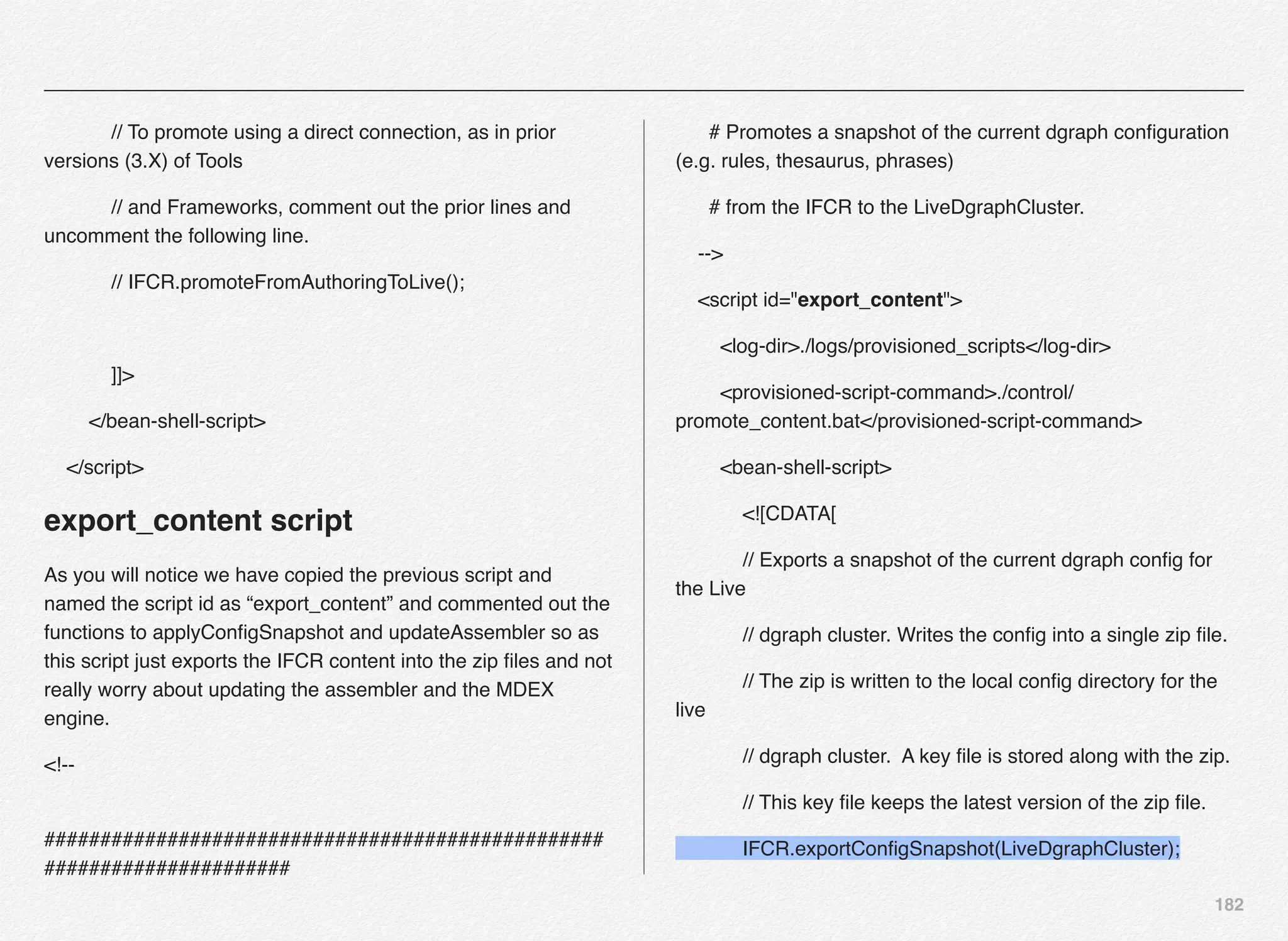
  • 182.
    181 // dgraph cluster.A key file is stored along with the zip. // This key file keeps the latest version of the zip file. IFCR.exportConfigSnapshot(LiveDgraphCluster); // IFCR exportApplication // Used to export a particular node to disk. This on disk format will represent // all nodes as JSON files. Can be used to update the Assembler. // Note that these updates are "Application Specific". You can only export nodes // that represent content and configuration relevant to this Application. IFCR.exportApplication(); // Applies the latest config of each dgraph in the Live Dgraph cluster // using the zip file written in a previous step. // The LiveDgraphCluster is the name of a defined dgraph-cluster // in the application config. If the name of the cluster is // different or there are multiple clusters, You will need to add // a line for each cluster defined. LiveDgraphCluster.applyConfigSnapshot(); // AssemblerUpdate updateAssemblers // Updates all the assemblers configured for your deployment template application. // The AssemblerUpdate component can take a list of Assembler Clusters which it // should work against, and will build URLs and POST requests accordingly for each // in order to update them with the contents of the given directory. AssemblerUpdate.updateAssemblers();
  • 183.
    182 // To promoteusing a direct connection, as in prior versions (3.X) of Tools // and Frameworks, comment out the prior lines and uncomment the following line. // IFCR.promoteFromAuthoringToLive(); ]]> </bean-shell-script> </script> export_content script As you will notice we have copied the previous script and named the script id as “export_content” and commented out the functions to applyConfigSnapshot and updateAssembler so as this script just exports the IFCR content into the zip files and not really worry about updating the assembler and the MDEX engine. <!-- ################################################## ###################### # Promotes a snapshot of the current dgraph configuration (e.g. rules, thesaurus, phrases) # from the IFCR to the LiveDgraphCluster. --> <script id="export_content"> <log-dir>./logs/provisioned_scripts</log-dir> <provisioned-script-command>./control/ promote_content.bat</provisioned-script-command> <bean-shell-script> <![CDATA[ // Exports a snapshot of the current dgraph config for the Live // dgraph cluster. Writes the config into a single zip file. // The zip is written to the local config directory for the live // dgraph cluster. A key file is stored along with the zip. // This key file keeps the latest version of the zip file. IFCR.exportConfigSnapshot(LiveDgraphCluster);
  • 184.
    183 // IFCR exportApplication //Used to export a particular node to disk. This on disk format will represent // all nodes as JSON files. Can be used to update the Assembler. // Note that these updates are "Application Specific". You can only export nodes // that represent content and configuration relevant to this Application. IFCR.exportApplication(); // Applies the latest config of each dgraph in the Live Dgraph cluster // using the zip file written in a previous step. // The LiveDgraphCluster is the name of a defined dgraph-cluster // in the application config. If the name of the cluster is // different or there are multiple clusters, You will need to add // a line for each cluster defined. // LiveDgraphCluster.applyConfigSnapshot(); // AssemblerUpdate updateAssemblers // Updates all the assemblers configured for your deployment template application. // The AssemblerUpdate component can take a list of Assembler Clusters which it // should work against, and will build URLs and POST requests accordingly for each // in order to update them with the contents of the given directory. // AssemblerUpdate.updateAssemblers(); // To promote using a direct connection, as in prior versions (3.X) of Tools
  • 185.
    184 // and Frameworks,comment out the prior lines and uncomment the following line. // IFCR.promoteFromAuthoringToLive(); ]]> </bean-shell-script> </script> Promote to Production ITL using RSYNC and running Promote_content in Production environment Once the IFCR content is exported to the ZIP files in destination folders, next step is to have a RSYNC script that synchronizes any new files from both destination folders in staging environment to the production ITL box and then from there synchronize the experience manager config zip file to the WebLogic server where the Assembler application is running. For simplicity sake, we will create the exact same folder structure on WebLogic server(s) i.e. /apps/opt/weblogic/endeca/ ToolsandFrameworks/11.2.0/server/workspace/state/repository/ Discover This folder location must be also added in the assembler.properties file for your front-end Java project so as the Assembler knows the where to read the ZIP files from when the promote_content is triggered in production on the ITL box. So, mechanically here is what will happen: 1. export_content in staging - creates the zip files 2. rsync - synchronizes both the ZIP files from staging environment to production ITL server 3. another rsync - synchronizes the Workbench content ZIP file from /apps/opt/weblogic/endeca/ToolsandFrameworks/ 11.2.0/server/workspace/state/repository/Discover location on ITL server to the same folder location on WebLogic Server running the web application 4. run promote_content script in production which will update all the MDEX Servers and also all the application servers running the Assembler application In the production environment you need to configure the promoteAuthoringToLive script in the WorkbenchConfig.xml file to comment out the export functions and leave the applyConfigSnapshot & updateAssembler functions uncommented as per this script:
  • 186.
    185 export_content script As youwill notice we have copied the previous script and named the script id as “export_content” and commented out the functions to applyConfigSnapshot and updateAssembler so as this script just exports the IFCR content into the zip files and not really worry about updating the assembler and the MDEX engine. <!-- ################################################## ###################### # Promotes a snapshot of the current dgraph configuration (e.g. rules, thesaurus, phrases) # from the IFCR to the LiveDgraphCluster. --> <script id="export_content"> <log-dir>./logs/provisioned_scripts</log-dir> <provisioned-script-command>./control/ promote_content.bat</provisioned-script-command> <bean-shell-script> <![CDATA[ // Exports a snapshot of the current dgraph config for the Live // dgraph cluster. Writes the config into a single zip file. // The zip is written to the local config directory for the live // dgraph cluster. A key file is stored along with the zip. // This key file keeps the latest version of the zip file. // IFCR.exportConfigSnapshot(LiveDgraphCluster); // IFCR exportApplication // Used to export a particular node to disk. This on disk format will represent // all nodes as JSON files. Can be used to update the Assembler. // Note that these updates are "Application Specific". You can only export nodes // that represent content and configuration relevant to this Application.
  • 187.
    186 // IFCR.exportApplication(); // Appliesthe latest config of each dgraph in the Live Dgraph cluster // using the zip file written in a previous step. // The LiveDgraphCluster is the name of a defined dgraph-cluster // in the application config. If the name of the cluster is // different or there are multiple clusters, You will need to add // a line for each cluster defined. LiveDgraphCluster.applyConfigSnapshot(); // AssemblerUpdate updateAssemblers // Updates all the assemblers configured for your deployment template application. // The AssemblerUpdate component can take a list of Assembler Clusters which it // should work against, and will build URLs and POST requests accordingly for each // in order to update them with the contents of the given directory. // AssemblerUpdate.updateAssemblers();
  • 188.
    187 // To promoteusing a direct connection, as in prior versions (3.X) of Tools // and Frameworks, comment out the prior lines and uncomment the following line. // IFCR.promoteFromAuthoringToLive(); ]]> </bean-shell-script> </script>
  • 189.
    188 Srv001 Srv002 CAS Crawl ITL /WB Srv001 Author View Authoring Site & Preview 17002 File-based content promotion ZIP Export content View Content Changes Staging Production Workbench Config ZIP for Assemblers on Web Servers Search Config ZIP for MDEX / Dgraph Servers Authors Record store Record store Promote content
  • 190.
    189 Understanding Cartridge In thissection we will explore Cartridges and Endeca Assembler Application by examining how they work together in a "Hello World" example cartridge. Let’s first understand what is a cartridge, cartridge template, cartridge handler and the structure of a cartridge before developing our own custom Cartridge. Further we will also take a close look at Endeca assembler application to understand what it does under the hood. About Cartridges and Cartridge Templates Endeca cartridge is a content item with a specific role in your application; for example, a cartridge can map to a GUI component in the front-end application. The Assembler includes a number of cartridges that map to typical GUI components – for example, a Breadcrumbs cartridge, a Search Box cartridge, and a Results List cartridge. You can create other cartridges that map to other GUI components expected by your business users. Section 8 Developing Custom Cartridge in Endeca
  • 191.
    190 Every cartridge isdefined by a template. A cartridge template defines:   ·    The structure and initial configuration for a content item.   ·    A set of configurable properties and the associated editors with which the business user can configure them. Experience Manager instantiates each content item from its cartridge template. This includes any configuration made by the business user, and results in a content item with instance configuration that is passed to the Assembler. Consider the below diagram for your understanding: Template Workbench Content Item Editor Panel Property Editor String Boolean … String Editor Boolean Editor …
  • 192.
    191 Experience manager iscomposed of templates and cartridges Templates are prebuilt page layouts that determine where the content and data is placed. Below are some of the template layouts that would help you strike the chord based on your desktop web or mobile web experience. Cartridge on the other side are prebuilt, modular components responsible for pulling the content and data from the Endeca MDEX engine and probably external systems (if that is the demand of your business). Not all data can or will reside in MDEX engine and at times you need integration with external or internal systems to get the data into a particular cartridge. Video Ratings Reviews Search Results Hero Banners Trending / Analytics Endeca provides 20+ cartridges out-of-the-box as below: These cartridges are located under the <app-dir>/config/import/ templates folder. Below is the location on my Linux instance /usr/local/endeca/Apps/CRS/config/import/templates or on a Windows machine below is the location: C:EndecaappsDiscoverconfigimporttemplates About Cartridge Handlers A cartridge handler takes a content item as input, processes it, and returns a content item as output. The input content item typically includes instance configuration, which consists of any properties specified by a business user using the Experience Manager or Rule Manager tool in Endeca
  • 193.
    192 Workbench. The contentitem is typically initialized by layering configuration from other sources: your application may include default values, or URL parameter that represent end user selections in the front-end application. A cartridge handler can optionally perform further processing, such as asking the search engine for data. When processing is finished, the handler returns a completed content item to the application. Note: Not all cartridges require cartridge handlers. In the case of a content item with no associated cartridge handler, the Assembler returns the unmodified content item. About Cartridge structure The template contains two main sections: the <ContentItem> element and the <EditorPanel> element. Content Item Editor Panel The content item is at the core in Assembler applications that can represent both the configuration model for a cartridge and the response model that the Assembler returns to the client application. A content item is a map of properties, or key-value pairs. The <ContentItem> element in the template defines the prototypical content item and its properties, similar to a class or type definition. Template Workbench Content Item Editor Panel Property Editor String Boolean … String Editor Boolean Editor … Property can be of the type String, Boolean, etc... Editor can of the type String Editor, Boolean Editor, etc...
  • 194.
    193 Creating Your OwnCustom Cartridge The high-level workflow for creating a basic cartridge is as follows: 1. Create a cartridge template (usually an XML file) in the templates folder and upload it to Endeca Workbench using set_templates control script 2. Use Experience Manager to create and configure and instance of the cartridge - this is typically a business user responsibility - but developers will use this step to test out the functionality of the cartridge once its developed and before releasing it to business user 3. Add a renderer to the front-end application FOR DEVELOPERS As you will notice and experience, step 2 is necessary during development to have a cartridge instance with which to test. However, once the cartridge development is complete and released by deploying it to Endeca Experience Manager, the business user is typically responsible for creating and maintaining cartridge instances in Experience Manager. Here we will define a new cartridge and use Workbench to configure it to appear on a page. Follow these steps to create and configure a basic "Hello World" cartridge. Step # 1 Navigate to the templates directory of your application (Discovery in our case), and create a subdirectory named "HelloWorld." This directory name will also be the template ID for your template. For example: C:EndecaappsDiscoverconfigimporttemplatesHelloWorld OR /usr/local/endeca/Apps/Discover/config/import/templates/ HelloWorld Step # 2 Create an empty cartridge template XML file with the name “template.xml” in the folder HelloWorld (per above) and paste below template XML into the template.xml file. <ContentTemplate xmlns="http://endeca.com/schema/content- template/2008" xmlns:editors="editors" type="SecondaryContent">
  • 195.
    194 ! <Description>A samplecartridge that can display a simple message.</Description> ! <ThumbnailUrl>/ifcr/tools/xmgr/img/template_thumbnails/ sidebar_content.jpg</ThumbnailUrl> ! <ContentItem> ! ! <Name>Hello cartridge</Name> ! ! <Property name="message"> ! ! ! <String/> ! ! </Property> ! ! <Property name="messageColor"> ! ! ! <String/> ! ! </Property> ! </ContentItem> ! <EditorPanel> ! ! <BasicContentItemEditor> ! ! ! <editors:StringEditor propertyName="message" label="Message"/> ! ! ! <editors:StringEditor propertyName="messageColor" label="Color"/> ! ! </BasicContentItemEditor> ! </EditorPanel> </ContentTemplate> Step # 3 In this step we will upload the template to Endeca Experience Manager using the set_templates control script. Open the terminal window or command prompt, navigate to application control folder as below: cd /usr/local/endeca/Apps/Discover/control or cd C:Endecaappsdiscovercontrol and run the set_templates control script which will looks for all the templates in the /usr/local/endeca/Apps/Discover/config/ import/templates folder and upload all the templates to Endeca experience manager (rather it will replace all the old templates with the new ones from the templates folder).
  • 196.
    195 As you wouldnotice in the above screenshot, Endeca set_templates.sh script just uploaded all the templates to the IFCR Discover site at the location http://localdomain:8006/ifcr/sites/Discover/templates. Step # 4 Now, we need to log into the Endeca Workbench and verify that the new template is available for business users to use and make necessary enhancements per business need. Let us launch the Endeca Workbench using http://localhost:8006 and click the application that you want to test for the new cartridge. Remember, we created the cartridge in the Discover application, hence that would be our target application in Workbench. Select the application and click on the “Experience Manager” link on the page.
  • 197.
    196 Expand the treein the left navigation under the “Content” > “Web” > “General” > “Pages” and click on the Default Browse Page as shown in the screenshot on the right. In the Edit pane on the right side click on the rightContent and click the button
  • 198.
    197 Click the “Add”button will launch a popup for you to select the cartridge you want to associate to the new secondary content. Select “HelloWorld” cartridge and click the OK button. The selected cartridge will be added to the DefaultBrowsePage.
  • 199.
    198 New rightContent isadded with the cartridge name “Hello Cartridge” as defined in the template.xml file, with 2 properties “Message” and “Color”
  • 200.
    199 Remember, all thechanges being made are currently only in the authoring environment and have not yet been promoted to the live environment. Add the custom “Message” and “Color” values followed by clicking on the “SAVE CHANGES” BUTTON (right top) Let us now visit the http:// localhost:8006/discover- authoring link. Search for any product and it will get you to the search results page with 3 column layout and rightContent. As you will notice, the Hello cartridge shows an error, since we have no front-end renderer specified. We need to write some code that will display the content in the front-end cartridge. Right Content Top Related Products Hello The error displays because we have not yet created a renderer for the Hello cartridge. http://localhost:8006/discover-authoring
  • 201.
    200 Additionally, at thefooter of the page you will notice you can view the response from assembler in either JSON or XML format. Click on the “json” link to view the json response returned by the assembler api - since we didn’t add any code in front-end to render the json response. Rendering the Cartridge Content The Endeca assembler application has no way to render the content to the front-end - its responsibility is to return the data structure as either JSON or XML. Rendering the JSON content to the front-end is the front-end web application responsibility. Hence, we need to write some basic rendering code to demonstrate how we can connect-the-dots and put things together. Create a new JSP file (HelloWorld.jsp) in the C:Endeca ToolsAndFrameworks11.1.0referencediscover-electronics- authoringWEB-INFviewsdesktopHelloWorld folder (You need to create the HelloWorld folder) or in the /usr/local/endeca/ToolsAndFrameworks/11.1.0/reference/ discover-electronics-authoring/WEB-INF/views/desktop/ HelloWorld (You need to create the HelloWorld folder) NOTE: Please remember that the name of the folder and jsp file must resemble the folder name under which you created the template.xml e.g. if the Template folder name (ID) is HelloWorld, then the folder name in front-end application must be HelloWorld and the JSP name must be HelloWorld.jsp.
  • 202.
    201 Add below snippedof code in the HelloWorld.jsp <%@page language="java" pageEncoding="UTF-8" contentType="text/html;charset=UTF-8"%> <%@include file="/WEB-INF/views/include.jsp"%> <div style="border-style: dotted; border-width: 1px; border-color: #999999; padding: 10px 10px"> <div style="font-size: 150%; color: ${component.messageColor}">${component.message} </div> </div> Just refresh the Discover authoring home page http:// localhost:8006/discover- authoring , and you should be able to see the Hello World! Message as defined in the experience manager. Full view of the Discover Electronics Authoring page, with message “Hello from Mars” Customizing the Cartridge We have learnt how to add a custom cartridge, add it to the experience manager, use the Endeca experience manager to instantiate the cartridge in the template, wrote simple rendering code, and finally were able to see it executing successfully. Let us now take this to next level, by customizing the cartridge to be able to pick and choose the color options from the drop- down list. Next page will demonstrate what are we going to accomplish by customizing the cartridge.
  • 203.
  • 204.
    203 Open the template.xmlfile that we created earlier in this section using your favorite text/xml editor from the folder /usr/local/ endeca/Apps/Discover/config/import/templates/HelloWorld/ template.xml. The new XML piece we are going to add is marked below: <ContentTemplate xmlns="http://endeca.com/schema/content- template/2008" xmlns:editors="editors" type="SecondaryContent"> ! <Description>A sample cartridge that can display a simple message.</Description> ! <ThumbnailUrl>/ifcr/tools/xmgr/img/template_thumbnails/ sidebar_content.jpg</ThumbnailUrl> ! <ContentItem> ! ! <Name>Hello cartridge</Name> ! ! <Property name="message"> ! ! ! <String/> ! ! </Property> ! ! <Property name="messageColor"> ! ! ! <String/> ! ! </Property> ! </ContentItem> ! <EditorPanel> ! ! <BasicContentItemEditor> ! ! ! <editors:StringEditor propertyName="message" label="Message" bottomLabel="Enter a message to display. HTML is allowed"/> ! ! ! <editors:ChoiceEditor propertyName="messageColor" label="Color"> ! ! ! ! <choice label="Red" value="#FF0000"/> ! ! ! ! <choice label="Green" value="#00FF00"/> ! ! ! ! <choice label="Blue" value="#0000FF"/> ! ! ! </editors:ChoiceEditor>! ! ! </BasicContentItemEditor> ! </EditorPanel> </ContentTemplate> We have added the bottomLabel for the Message and added the choice for author to pick from using the drop-down list.
  • 205.
    204 Also we havechanged the editor type from StringEditor to ChoiceEditor. Since, we are now required to provide drop-down list to the author to pick the value from and not type it manually in a text box we need to make this change. Now, let us switch the folder back to /usr/local/endeca/Apps/ Discover/control and re-execute the script set_templates.sh or set_templates.bat to reflect the changes in the Endeca experience manager. If there are no XML construct errors, you should find above response from set_templates control script. We can now logout and log back into the Endeca Workbench to see the changes. And, here is the effect of the change when you log back into Endeca Workbench - when you click on the Hello Cartridge in the rightContent in the Edit pane - you will see the string editor for Color have disappeared and now we have a drop-down list of choices for the author to pick from. Select the Green value for the Color, save the changes, and refresh the browser window to see the changes reflect in the discover-electronics-authoring application.
  • 206.
  • 207.
    206 Custom Icon forCartridge We created a new cartridge by copying the structure from another cartridge and manipulated it to add the elements such as message and color. But, the thumbnail URI was retained from the copy as below: <ThumbnailUrl>/ifcr/tools/xmgr/img/template_thumbnails/ sidebar_content.jpg</ThumbnailUrl> Now, let us create our own JPG or PNG file and add it to the images folder in the discover-electronics-authoring. ´ Create a custom JPG image in your favorite image tool e.g. You can use Windows paint application ´ Images are typically of 81x81 dimension in Experience Manager (below are examples of default images) ´ You can copy/save the custom thumbnail image on your web or image server ´ For this example, We are saving the image to /usr/local/endeca/ToolsAndFrameworks/11.1.0/referen ce/discover-electronics-authoring/images/
  • 208.
    207 Once the imagehas been copied to the specified location, we need to add that to the template.xml file for the HelloWorld template as below: <ThumbnailUrl>http://192.168.70.5:8006/discover-authoring/ images/rightContent.png</ThumbnailUrl> Save the file template.xml and then run the set_templates.bat/ sh from the Application control folder e.g. /usr/local/endeca/ Apps/Discover/control/set_templates.sh or C:EndecaApps Discovercontrolset_templates.bat. After setting the templates, now you can log back into the Endeca Workbench and traverse to the Default Browse Page and click change on the Hello Cartridge edit pane.
  • 209.
    208 Summary In this chapterwe have experienced the installation and configuration of Oracle Endeca Commerce application components such as MDEX, Platform Services, Tools and Frameworks, CAS, and Developer Studio. The process is somewhat simple on Linux or complex based your familiarity with Linux OS since the only interactive component is Tools & Frameworks, rest all are silent installation. I believe its simple but could be challenging if this is your 1st time on Linux. Also, we have learnt how to use the deployment template to deploy new Endeca applications and then configure the same using some of the control scripts. Towards the end of the chapter we understood how we can configure the Endeca content promotion across environments using out-of-the-box Endeca control scripts with RSYNC utility in Linux. Creating a custom cartridge, deploying it in workbench, writing renderer code, and customizing the cartridge is all we have understood in the last section of this chapter. In the next chapter we will learn various Oracle Commerce concept that will come in handy in later chapters in the book and with your hands-on experience with Oracle Commerce.
  • 210.
    7 In this chapterwe will cover the basic concepts and terms that we need to grasp about Oracle Commerce Configuration & Deployment in a systematic manner. Oracle Commerce Concepts
  • 211.
    210 Understanding Oracle Commerce Architecture& Concepts You were already introduced to some of the core Oracle Commerce concepts in Section 2 of Chapter 2. In this chapter we will dive further to get an understanding of some more Oracle Commerce concepts. Oracle Commerce is a highly customizable platform for creating and delivering end-2-end personalized customer experiences. Oracle Commerce platform is based on Java, J2EE, and JSP technologies and using highly customizable Java framework. If you are experienced with spring / struts framework, this would sound like known & sailed waters. Oracle Commerce is built on top of a highly scalable and reliable J2EE application server such as Oracle WebLogic Server and JBoss. All of these frameworks are designed to cater to more than just a static page of the conventional website. Most websites today provide dynamic responses and to great extent customize the responses to make it more relevant to the customer themselves - call it personalized. Section 1 Oracle Commerce Concepts & Terms
  • 212.
    211 With the growingcomplexity of the nature of the web and mobile sites / applications, the content residing in multiple sources, the product catalog being served by multiple data sources, and the business logic to tie all these together could be again hosted in disparate business engines. The point here is we can certainly write custom code and thats what most enterprises and businesses - large or small - have been doing for years. Until when they realize the size and complexity of code is simply unmanageable and quite error- prone. Even worse is the amount of time it takes to correct issues in the code and testing the same out. The whole philosophy of lifecycle is affected by these challenges in terns of turnaround time and time to market. One way to solve this puzzle is to make effective use of the MVC (Model-View-Controller) pattern and architecture - where the Model represents the business layer or backend data sources or databases, the View represents the front-end presentation layer of the underlying data and the Controller represents the navigational code. Most of these frameworks are targeted to developing enterprise applications quickly and easily using the Rapid Application Development models. The resulting applications are easy to test and provide reusability of code. These frameworks also brings in amazing use of POJO (Plain Old Java Objects), ORM (Object Relational Model/Mapping) frameworks, logging frameworks, Aspect Oriented Programming, Dependency Injection, and configurable components. Most web applications follow a simple paradigm at the top. They have a front-end application that the end-user uses, load balancer, and underlying web / application server (a.k.a. Page Servers) that serve users request by connecting to plethora of back-end services & databases and retrieving the information needed to be rendered on the front-end. Deployment Topology Typically, the “deployment topology” for your site comprises of the entire set of machines, servers, databases, and network configuration that makes up your ATG commerce deployment. A diagram is often helpful in describing the entire topology visually. Server Types Oracle ATG provides and support many types of servers that provide different functions, for example, a page server delivers site pages to customers and a server lock manager handles data access. Some of the typical server types are merchandising server, content administration server, page
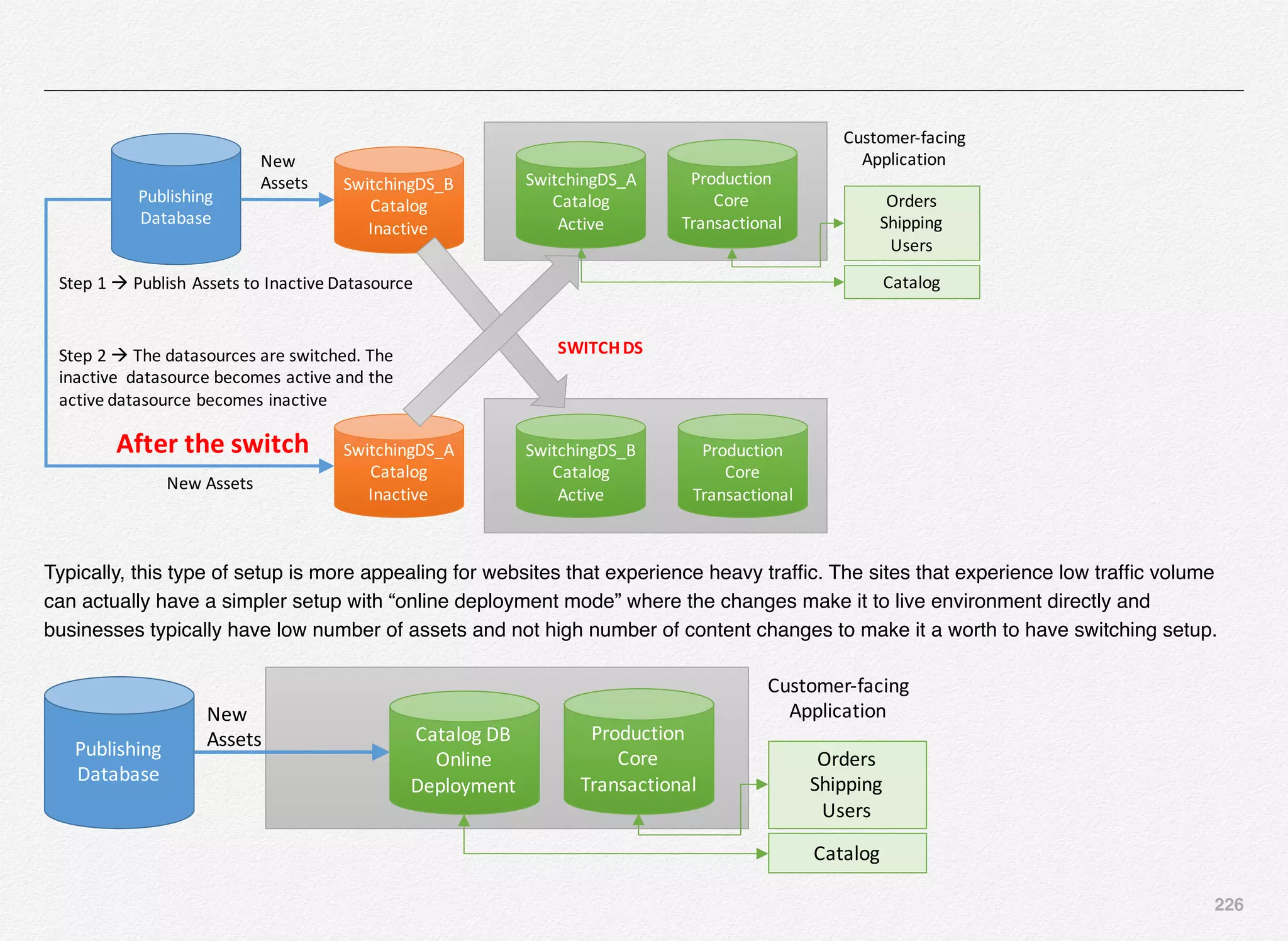
  • 213.
    212 server, server lockmanager, process editor servers, global scenario servers, fulfillment servers, and preview servers. ATG Server Instances You can run one or multiple instances for any of the above listed server types in ATG. The decision for # of instances is based on the server type and the amount of traffic it will need to handle. If it is a customer-facing server e.g. page server - then you need at least 2 instances of page server to provide fault tolerance. ATG Page Servers / Front-end Servers Let us get a quick grasp about the idea of Page Servers in the world of Oracle Commerce (ATG Commerce Web Servers). A page server is an Oracle Commerce (ATG) server that responds to end-user requests for a specific page on a website e.g. you goto www.oracle.com - that request will goto a page server. User requests originating from browsers (IE, Firefox, or Chrome) are typically routed through a dedicated hardware load balancer and a web server (such as iPlanet Web Server, Nginx, or Apache) to the Oracle Commerce (ATG) page server, which produces a personalized page by using data about the customer and the environment as well as other information. The system is made intelligent enough to figure out the whereabouts of the customer, the nature of their visit, other relevant information from the CRM or Order Fulfillment / Provisioning systems - and generate a experience that is relevant to the customer’s intent and interaction. The key here is to let the customer know that the company is open for business at their convenience in term of time, device, and functionality. I would certainly not like to use an online system just for certain money spending tasks and then make a call to talk to someone for tasks where I really need help with product support and service. All these factors need to be accounted for while designing an online system of commerce, service, and support.
  • 214.
    213 Here is themost basic form of Oracle Commerce Architecture: Customer) Load)Balancer) Oracle)Commerce)Page)Server) Oracle Commerce - ATG & Endeca Commerce suite is a platform that provides highly customizable and functional web and mobile sites/apps based on Java & JSP technologies that run on a highly scalable J2EE application servers such as Oracle WebLogic or IBM WebSphere. In-order-to further understand the role of Oracle Commerce ATG page server, let us first grasp terms such as versioned and non-versioned data. Versioned Data Oracle ATG provides User Interfaces such as BCC (Business Control Center), ACC (ATG Control Center), and EXM (Endeca Experience Manager) to create highly personalized web and mobile content While deploying the application and preparing the schema - Oracle commerce creates versioned versions of tables have additional columns to store data for versioned assets. Especially, the Merchandising module & functionality requires the versioned tables. With Versioned tables, authors can manage and track different changes that went live through the course of application evolution and construction and be able to rollback the content or asset to a specific version in case of any issues. Below are some out-of-the-box production ready scripts provided by the Oracle ATG Commerce framework to help you create versioned repositories/schema. To create versioned Commerce tables and versioned catalog tables on a production-ready or evaluation database, run the following scripts: <ATG10dir>/DCS/Versioned/sql/install/database-vendor/ dcs_versioned_ddl.sql <ATG10dir>/DAF/Search/Index/sql/db_components/database- vendor/search_ddl.sql <ATG10dir>/DAF/Search/Versioned/sql/db_components/ database-vendor/versioned_search_site_ddl.sql <ATG10dir>/DAF/Search/Routing/sql/db_components/ database-vendor/routing_ddl.sql Non-Versioned Data
  • 215.
    214 Once the contentor an asset has been through different stages of the publishing and approval workflow and is ready to be moved to the live site (production) - the author publishes the changes and promotes the content to the live site. The live site runs out of a non-versioned database schema, meaning - it does not have additional columns in the schema to store the version information for the content/assets. You need versioned data only in the authoring environment and a single version of truth in the live customer facing site. Hope this helps clarify the terms versioned and non-versioned data that we will use to further understand the ATG page server. Below diagram is created to support above explanations about the terms versioned and non-versioned data/schema. Oracle ATG Administration Server We use multiple names for the ATG Administration Server such as Asset Management Server or Content Administration Server or the BCC Server or at time as a publishing server. Essentially, these represents one thing in common and that is the administration related activities are carried out by this type of server(s). Usually, we have one administration server per environment for the site. Again, there are no hard and fast rules if your work flow is such that the content administration need to happen only in one environment and then the workflow will push the content to higher environments then you might have just 1 administration server. BCC (Business Control Center) is at the center of this server and provides all the business and administration functions that the business users can use to carry out tasks such as: • Create and manage users and groups • Create and modify site assets (e.g. images, block of text, triggers, slots, targeters, scenarios, etc...) • Create promotions, price lists, and other related contents • Create new projects and approve tasks in the workflow • Preview assets before deploying • Run reports • Import products • Supports versioning of assets and content
  • 216.
  • 217.
    216 Oracle ATG BCC (Business Control Center) ATG Administration Server and BCCInternal User Versioned Schema of the Oracle Commerce Database Non-Versioned Schema Live Site – Customer Facing Application Oracle ATG Page Server In thiscase, the business user also known as “internal user” interacts with the Oracle Commerce framework using the Oracle ATG Content Administration server and BCC to create / load the content and assets. Also, they define different business rules that drives the segmentation and personalization needs for targeting content to specific segment of users. The content and assets are stored in the versioned database providing the users means to rollback a specific version of content. Once the content is production ready and tested in staging environment, it is promoted or pushed to the customer-facing live environment which is based on non-versioned schema.
  • 218.
    217 In the previousdiagram we have outlined only one ATG Page server, but in the real production environment you will have multiple Page servers and you can learn about it more either in the Oracle Commerce documentation on the topic “Setting up a Production Cluster” or later in this book. Oracle ATG BCC (Business Control Center) ATG Administration Server and BCCInternal User Versioned Schema of the Oracle Commerce Database Non-Versioned Schema for Product Catalog & Content Live Site – Customer Facing Application Oracle ATG Page Server Transactional Database Developer J2ee App Source Code Repository Assemble & Deploy Application EAR
  • 219.
    218 Developers create anATG Application Module, which contains, a J2EE application. Typically, you need to place the application module into the ATG main directory, and assemble the application into an Enterprise Archive (EAR) file if packed or a folder. The EAR is then deployed to the application server instances. The deployment process varies depending on the application server that you use. In our case, all the environments have been configured to use Oracle WebLogic Server 12.x, in which application deployment is managed by the WebLogic Admin Server for the domain. Setting up the Oracle Commerce components to run everything on a single host is a much simpler experience compared to setting up the application in a typical multi-environment case where the organizations have development machines, development servers, testing/QA servers, Staging servers, and Production servers. You need a detailed launch plan, deployment topology, server role assignment, cluster setup plan, setting up and creating load balancer rules, server instance details, database setup, setting up the CDN, step-by-step task plan, architecture diagrams, ensure all the firewall rules have been implemented, and the servers (web, application, database, etc...) are able to talk to each other in multi-environment setup. ATG Server Lock Manager(s) According to Oracle Commerce documentation - “The server lock manager synchronizes locking among various ATG servers, so only one at a time can modify the same item” At least one ATG server must be configured to start the /atg/ dynamo/service/ServerLockManager component on application startup and each server in the cluster is a SLM client. Each cluster has one primary SLM and optionally 1 backup SLM. One important aspect to remember about the SLM is that it doesn’t run any application on it and hence is not CPU intensive We will look at the example cluster that comprises of different types of ATG servers in the topic covering “Clusters in ATG” Clusters in ATG The term cluster in ATG means somewhat different than the way it is understood and used in the traditional world of infrastructure - where cluster is a collection of physical or virtual servers with all running either WebLogic server or some other type of server on it. Cluster is a collection of different types of server instances that function collectively to perform major site responsibility such as Content Administration or Customer-facing eCommerce Application.
  • 220.
    219 Customer-facing cluster includesthe web server such as Java Web Server and primary transaction servers such as WebLogic server that hosts the customer-facing web applications. This cluster could also have additional servers such as lock server manager and process editor servers. Below are the common components that form the customer-facing cluster: • Application server (e.g. WebLogic) • ATG platform • Publishing agent • Customer-facing application(s) • Customer-facing application data Another familiar cluster is known as Asset Management Cluster that is primarily responsible for controlling and managing all the ATG-based sites. For example - business clients, marketing, merchandisers, and partners would use the ATG BCC (Business Control Center) to create, manage, and publish content, promotions, personalization rules, segments, web assets, and inter-linked sites. Also, the ATG sites & content is linked with Endeca Experience Manager for further creation of engaging and personalized experiences for the online and mobile customers. Below are the common components that form the asset management cluster: • ATG platform • BCC (Business Control Center) • Content Administration • Merchandising • Preview application / module • Asset management metadata • Versioned application data ATG repositories is yet another important component of the framework that helps improve the performance of ATG applications by caching data. We come across a scenario very frequently in the web applications where the data on one server might have changed and that needs to be synchronized with other servers without the possibility of other servers overwriting each other. One of the most common approaches is to use locking mechanism. A server that wants to modify some data requests a lock on it, and while it is locked, no other server may access it; when the server releases the lock, the other servers reload the fresh data. This sort of cache management is used mostly
  • 221.
    220 for data thatchanges often but is unlikely to be changed simultaneously on multiple servers (such as user profiles). ATG Instance ATG Instance A B C A B D SLM for AB SLM for CD Server Lock Managers Client Lock Managers Client Lock Managers ATG lock management controls read and write access to data shared by multiple servers. This type of server handles locks on data to prevent data collisions. Server Lock Managers (SLM) may be dedicated server instances, or another type of server can be configured to also be an SLM. SLMs are not CPU-intensive, so they can share a CPU with other servers. What happens if no primary or backup SLM is available? The site continues to function, but locked caching is no longer available, which has a negative impact on performance for data that uses that type of caching. Example of ATG Cluster - from Oracle Documentation Steps 1-15 Suppose you want to set up a site consisting of: • An Administration Server • Three servers that serve pages • One server that runs the ATG lock manager • One server that runs the process editor server
  • 222.
    221 Here’s an exampleof how you might do this: 1. Start up WebLogic Server using the startWebLogic script. This starts up the WebLogic Administration Server (e.g. wlsAdmin, default port 7001). 2. In the WebLogic Console, create servers named pageServer1, pageServer2, and pageServer3. Assign each server port number 7700. Assign a unique IP address to each server (i.e., an IP address used by no other server in the domain). 3. Create a cluster named pageCluster. Put pageServer1, pageServer2, and pageServer3 into this cluster. 4. Create servers named procedit and lockmgr. Assign each server the port number 7800. Assign each server a unique IP address. 5. Create a cluster named serviceCluster. Put procedit and lockmgr into this cluster. 6. Assign the two clusters different multicast addresses. 7. Using either the Dynamo Administration UI or the makeDynamoServer script, create ATG servers named pageServer1, pageServer2, pageServer3, procedit, and lockmgr. (You do not need to give the ATG servers the same names as the WebLogic servers, but it is a good idea do so.) 8. Configure the ATG lockmgr server to run the ATG ServerLockManager. (See Enabling the Repository Cache Lock Managers for more information.) 9. Configure the ATG Scenario Manager to run the process editor server on the ATG procedit server. (See the ATG Personalization Programming Guide for more information.) 10. Set up ATG session backup, as discussed in Enabling Session Backup. 11. Assemble your application, deploy it on each server in both clusters, and configure each instance to use the ATG server corresponding to the WebLogic server the instance is running on. (This process is discussed in Assembling for a WebLogic Cluster.) 12. Un-deploy any applications that are deployed on the Administration Server. 13. Configure your HTTP server to serve pages from each server in pageCluster (but not any of the other servers). 14. Shut down the Administration Server and then restart it. This will ensure that all of the changes you made will take effect.
  • 223.
    222 15. Start upthe managed servers you created, using the startManagedWebLogic script. The syntax of this script is:
 startManagedWebLogic WebLogicServeradminURL
 where WebLogicServer is the name of the WebLogic server, and adminURL is the URL of the WebLogic Administration Server. Let’s assume that the hostname for the Administration Server is myMachine. To start up the WebLogic pageServer1, the command would be:
 startManagedWebLogic pageServer1 http://myMachine/ 7001 ATG Process Editor Servers Oracle ATG Commerce provides a powerful tool to the business users knowns as Scenario Management, which helps them to outline and plan the customer interactions that varies depending on customer actions and behavior while interacting with the web or mobile applications. Most important factor here is that the business users can carry out these functions without the help or engagement of IT department. The scenario manager is a typical function available for business users in the BCC (Business Control Center). ATG provides another type of scenarios known as workflows, which are designed to manage the lifecycle of an asset in the BCC. The server serving/managing scenarios is known as SES - Scenario Editor Server and the server managing workflows is known as WES - Workflow Editor Server. Both scenarios and workflows can be created in the ACC (ATG Control Center) tool, whereas, the business users manage the lifecycle of those scenarios and workflows in the BCC. Process Editor Server Scenario Editor Server Workflow Editor Server ATG Preview Server Business users create assets using the BCC tool on the content administration and asset management server. Usually, business user need to preview these assets before approving and moving it to next environment. A preview application is set up as a Web application module on each preview-enabled server defined during the CIM. You use a “versioned instance” of an application that runs on the production server, and deploy this
  • 224.
    223 module on aserver where the ATG Business Control Center is running. One of the key aspect that we need to understand here is that the preview application doesn’t need to be 100% functional since it is not a customer facing commerce application. It only needs those pages / components functional that are required to preview the assets before deploying them at the target location. Though preview-enabled server is optional, most sites do implement this functionality as it empowers business users to validate the assets and trigger conditions. Preview server can be implemented as an internal to ATG administration server or external (stand alone) dedicated preview server or both. ATG Fulfillment Server ATG framework also provides necessary components and functions to handle customer orders after they have been submitted from the front-end. Also, ATG provides you an option to integrate the framework with external order management system. Some of the large enterprises or other small businesses might already have an existing order fulfillment services using either homegrown solutions or thru integration with 3rd party fulfillment serves. Once the orders are submitted and fulfilled by external order management system the response is sent back to the ATG framework and repositories are updated for accurate information about state of the customer order to reflect it back into the database and communicate the same back to the customer using email or SMS etc... Database Database is one of the key components of the Oracle Commerce ATG framework which needs multiple databases running on the same or different servers. You may use enterprise grade databases such as Oracle or Microsoft SQL Server for the multi-environment setup. For development purpose you may also use MySQL that Oracle provides out-of- the-box. We can focus primarily on 3 types of database schema for ATG-based applications: • Customer-facing or Production Schema • Staging Schema • Asset Management Schema
  • 225.
    224 ATG Clusters Customer Facing Production Core Switching A Catalogs & Assets Switching B Catalog & Assets Staging Core & catalog Asset Management Publishing This schema contains tables for customer profiles, orders, scenario metadata, security, JMS messages, etc… This schema containscommerce catalog and other assets. Assets are deployed to the offline database, and then the databases are switched. The schema of Switching A and B databases are identical. The staging schema is typically not switched and contains both core and catalog+asset related tables. The asset management cluster uses the publishing schema containing versioned assets, CA metadata, internal user profiles
  • 226.
    225 Each of theabove database schemas have its own unique set of tables (except switching A and B - which are identical) and hence you can create these schemas using one of the 2 methods: • Using the CIM (Configuration Installation & Management) utility • Using the out-of-the-box SQL scripts About Switching Datasources You might be guessing what is a switching datasource. Is this something unique to ATG? I guess you are right, a switching datasource is unique to ATG. I’m sure other frameworks might have similar mechanism or adept this concept. Business constantly works on the changes related to the content and assets using the authoring tool (BCC) and all those changes are in the publishing database. Business uses the BCC tool to roll over those thousands of changes from the publishing database to the live site and that can really be a very rocky transition. Many things can go wrong from data feed import to indexes to space issues etc... To address these type of issues, ATG implemented a switching datasource setup.  Typically, there will be two production customer-facing database setups, one active and the other inactive. Clients go into the Business Control Center and add all the changes they want to roll out. These changes are made on the publishing database. Using the BCC workflows then these changes are deployed onto the inactive production customer-facing setup in a ‘switch mode’ deployment. Then, in one transaction, the active datasource and inactive are switched. The inactive datasource with all the client’s changes is now the active datasource the site will run on. The business continues to make the changes to publishing database and once ready with the changes to make those to live site are again published to the inactive datasource, which then again switched to become active. And the story goes on.
  • 227.
    226 Publishing Database Production Core Transactional SwitchingDS_B Catalog Active SwitchingDS_A Catalog Active SwitchingDS_A Catalog Inactive SwitchingDS_B Catalog Inactive Production Core Transactional Step 1 à Publish Assets to Inactive Datasource Step 2 à The datasourcesare switched. The inactive datasource becomes active and the active datasource becomes inactive New Assets Customer-facing Application Catalog Orders Shipping Users SWITCH DS After the switch New Assets Typically, this type of setup is more appealing for websites that experience heavy traffic. The sites that experience low traffic volume can actually have a simpler setup with “online deployment mode” where the changes make it to live environment directly and businesses typically have low number of assets and not high number of content changes to make it a worth to have switching setup. Publishing Database Production Core Transactional Catalog DB Online Deployment New Assets Customer-facing Application Catalog Orders Shipping Users
  • 228.
    227 Oracle Commerce ProjectLifecycle The Oracle Commerce project lifecycle comprises a series of steps - some sequential and other intertwined & iterative - just like most of the projects we carry out in custom applications. The difference here is the engagement of business/marketing with the tools Oracle Commerce offer for better control over content management, segmentation, and experience management in numerous phases of the project lifecycle. We will review a stack of phases you will typically be involved in the Oracle Commerce project lifecycle as below: • Ideation & Research • Studying Competitors • Business Case Development • Project Kick-off • Requirements • Planning • System Architecture • Application Design Section 2 Oracle Commerce Project Lifecycle
  • 229.
    228 • Implementation • Testing •Training • Launch • Ongoing Maintenance Ideation, research, and analysis is a necessary step for lot of companies or online shops - especially, if they are exploring solutions that can provide benefits such as better ROI, time-2- market, business control over the content management etc... One of the deciding factors could be branded v/s Open Source. Once you are past that decision - you can study and review various leaders in the ecommerce/digital commerce space such as Oracle, IBM, and SAP (Hybris) for consideration based on your business needs and the feature set you are looking for as a part of the package - studying the competitor products factsheet, reviews from Gartner or Forrester are helpful as well, and you can also check out what others are using in your own industry or outside. Once you have the understanding of competitive products, their pricing models, and the ROI model - you can then work on developing a business case with help of your business, IT, and vendor leadership teams to outline the capital investment, implementation costs, returns, hard benefits, user productivity benefits, cost savings, etc... over a period of next few years (e.g. 5 years). Here is a link to a Mind Map PDF that will guide you through the process for creating or developing a business case. Assuming you have made your business case appealing to the leadership team, its approved and above the line from funding perspective for the subsequent business year - next step is for the program/project management team to kick-off the project and initiate its true life-cycle. The project kick-off meeting is setup with all stake-holders including business, marketing, IT, Architects, consulting members, vendors, and any others who are considered as the key players who will contribute to the success of the project. In the kick-off meeting - business shares the high-level objectives and the mission statement for the project with the stakeholders and contributors to ensure everyone is on the same page and has same understanding from the overall deliverable perspective. All the inputs, processes, outputs, facts and assumptions recorded along with the business requirements in business matrix which later is transformed into a business requirement
  • 230.
    229 document covering variousteams impacted directly or indirectly. Business & IT system architecture is equally important for the success of the project - making sure all the right systems, applications, databases, front-end systems, backend systems, methods, and procedures are captured and documented that interact with each other. Application design & Implementation is where the technical teams and the architects work closely with design, development, middleware, firewall/network security, operating system, configuration, management, deployment, and testing teams very closely. This is to ensure all the pieces are glued correctly for creating, developing, and providing the environment expected by the business users and testing team for validating the products and services to be delivered to the end-user (customer). Testing team develops test cases based on the business requirements to validate expected deliverables. Additionally, it is important to perform system and application level load, performance, and soak testing to ensure the system (hardware and software configuration) is ready to perform at the peak hours under the expected load. Training the business users to use the new tools to perform day-2-day operations for managing content, assets, rules, etc.. is an important step in the success of any out-of-the-box ecommerce platform such as Oracle Commerce. And, last but not least step is ongoing maintenance and support for the new platform. Launching the live site that runs on the Oracle Commerce Platform is like throwing a party for mega-event. With so many moving parts its important to keep an inventory of all the parts and ensure each part is configured and verified to be fully functional. NOTE Oracle Commerce Architect & Administrator plays a very important role in the overall delivery. They need to be engaged right from the project kick-off to the launch and any post- production issues. Below is a template of activities involved in an Oracle Commerce-based project life-cycle: • Project Start! ! ! • RGS - Requirement Gathering Session (Business, IT, Consulting Companies) • Developer local system setup & on-boarding resources!
  • 231.
    230 • DIT -Development Platform Setup! • Topology & Reference Architecture • SIT + UAT Platform Setup! • Product Catalog Design Discussion! • Extending the Product Catalog! • Product Catalog Integration! • Profile Customization! • Back-end API Integration! • Front-end Integration! • Core Development Activities (Experience Management)! • Core Development Activities (Ordering)! ! • Build Task Automation! • Integration with Source Control (TFS / Git / Clearcase / Subversion)! • External Systems Integration ! • Integration/Functional Testing! • Sample Page creation! • Sample Page/Flow Creation - Ordering! • Demonstrate Product Display! • Demonstrate Cart Adds! • Demonstrate Cart Display • Demonstrate Payment Methods • SIT / ITO Testing • Load Testing • Performance Tuning! • Logging & Reporting • Stage & Production Platform Setup! • Configuring Authoring / Preview / Display / Workflow across different environment • A/B / MV Testing • Document environment setup & deployment processes • GO LIVE • Post-production deployment monitoring • Post-production performance tuning
  • 232.
  • 233.
    8 In this chapterwe will look at the complete process to configure and install the Oracle Commerce Reference Store using the CIM utility. Configuration & Installation (CIM)
  • 234.
    233 Installing the WTEEUtility Before we step our foot on the gas pedal for installing and configuring the Oracle Commerce Reference Store, let us take a look at the Wtee utility that will come handy if you want to log the response text generated by the CIM utility to a text file for later reference with your responses to each prompt. For Unix/Linux users its not a big deal since they can use the out-of-the-box tee utility to perform similar task. Since, you may not find a tee equivalent on Microsoft Windows systems, you can goto the Google and search for “Wtee download” - which in-turn will lead you to https:// code.google.com/p/wintee/downloads/detail? name=wtee.exe&can=2&q=. Section 1 Installing the WTEE Utility
  • 235.
    234 You can clickon wtee.exe link on the destination page @ code.google.com - which will download the wtee.exe to the downloads folder. For convenience reasons, I would copy the wtee.exe from downloads folder to C:ATGATG11.1homebin. You may wonder on why would we want to do that - the reason is the Oracle Commerce CIM.bat file is also located under above folder. Since, You will be executing the CIM.bat from the homebin folder - we have copied/moved the wtee.exe there as well. Above screenshot is just a confirmation that the wtee.exe is indeed available in the C:ATGATG11.1homebin folder. We will now verify that the wtee.exe does the task that it is intended to (redirect the output of any executable from console/ stdout - to the text file). Assuming you have already launched the command window run the following command: C:ATGATG11.1homebin> dir | wtee dir_output.txt Here, we are sending the output of dir command to stdout as well as to wtee utility which will store the input received into the dir_output.txt Additionally, you can verify the content of the dir_output.txt file. C:ATGATG11.1homebin> Type dir_output.txt <enter> This will display the content of the text file as a proof of content redirected and stored in the destination file. Let us now move to next steps, i.e. understand CIM utility and the steps involved.
  • 236.
    235 About CIM -Configuration and Installation Manager Oracle Commerce is an enterprise application which comes with its own level of complexity just like any other enterprise application. Most enterprise applications cannot be used out-of- the-box - they need to be configured and customized as minimum based on our need and optionally extended/ developed for any additional needs. The CIM utility is a handy tool that Oracle provides that reduces the overall complexity of configuring the Oracle Commerce Applications. For understanding how CIM functions it is required to understand the previous chapter covering the Oracle Commerce Concepts - familiarize yourself with the important terms and concepts. At high-level these are some of the key tasks that the CIM utility performs for you based on the responses you provide to the CIM prompts: • Oracle Commerce Product Selection • Datasource Configuration Section 2 About Oracle Commerce Installation & Configuration Management (CIM) - Pre-requisites
  • 237.
    236 • Database schemacreation and importing the data • Oracle Commerce server instance creation and configuration • Assembling the application • Deploying the application It is important that you familiarize yourself with some of the key terminologies such as Oracle Commerce (ATG) Nucleus, Components, Configuration, Deployment, and Assembly of the applications. The figure on this page helps you understand the key objectives of CIM utility: • CIM ensures that the order of steps required to configure and install the Oracle Commerce application are followed strictly (validates) • CIM helps you with automation of most of the complex steps into simple prompts and responses • CIM also assigns intelligent defaults where applicable and possible • Ensure steps are complete for each task listed previously • You will be able to record the responses and repeat the CIM unattended on other developer machines
  • 238.
    237 • Last butnot the least, it helps you avoid opportunity for errors - that doesn’t completely eliminate the possibility of errors - but helps reduce all common mistakes that results into complex back ‘n’ forth during installation, CIM Prerequisites You need to aware of few details about different inputs CIM will need in order to configure the Oracle Commerce Platform & Commerce Reference Store. Below pre-requisites will come in handy: Document and know the path to your application server home directory. For example: C:OracleMiddlewareOracleHome wlserver Document and know the path to the domain directory for your application (in our case its base_domain). For example: C: OracleMiddlewareuser_projectsdomainsbase_domain You will also need to know the username and password for the administration account for your application server. In case of WebLogic, we have created a username “Weblogic” and password as “Welcome1” We are also assuming that you have used the SQL client or developer tool and created necessary database tablespace followed by the required username & password, listening port, database name, and server hostname for each database that your application requires. In our case we have Oracle XE database running on the local machine (localhost), with port 1521, and have created required accounts (username/ password) with appropriate privileges. The accounts that we created are: • publishingcrs • prodcorecrs • switching_a (optional) • switching_b (optional) During CIM installation if you do not select to install switching data sources (i.e. Online only mode) - then you don’t need to create switching_a and switching_b accounts. You also need to know the path to the JDBC (Java DataBase Connectivity driver for your database software You will be required to set several passwords including Oracle Commerce server administrator, merchandising user, and content administrator. You will enter this password during database imports. If you are not using Content Administration, you will not configure this user account.
  • 239.
    238 Configuration & Installation Management(CIM) - Product Selection Let us launch the CIM utility and get started with the configuration of Oracle Commerce Platform and Reference Store. Change the working directory to C:ATGATG11.1HomeBin - to launch the CIM utility along with the wtee utility to record all the responses you provide @ CIM prompts. C:> CD ATGATG11.1HomeBin C:ATGATG11.1HomeBin> Launch the CIM utility using the below command: C:ATGATG11.1HomeBin> CIM | WTEE CIM_Responses.txt Section 3 Configuration and Installation Management (CIM) CIM Installer - Initial Tasks Setup Administrator Password Product Selection Select Application Server NOTE: You can STOP and START the CIM utility @ your convenience - responses to your previous prompts have been saved by CIM.
  • 240.
    239 Once you launchthe CIM you will se some initial messages e.g. Nucleus running and Starting the Oracle Platform Security Services (OPSS) - and will present you with the CIM Main Menu. You are now required to set the Oracle Commerce Platform Administrator Password. We will set it to Welcome1 for this installation. The option [R] is already selected for you to set the administrator password. Make sure to follow the rules for setting the password for the Administrator account. We decided to use Welcome1 - and will use the same password for all of our admin & merchandising accounts for this setup.
  • 241.
    240 Next step isto select the products that you would like to configure for Oracle Commerce on your development machine. Just to jog your memory we selected few products during the installation of Oracle Commerce Platform (OCP) as per this screenshot: We had selected: 1. Oracle Commerce Core Platform 2. Core Commerce and Merchandising 3. ATG Portal 4. Content Administration 5. Motoprise B2B application 6. Quincy Funds - Demo application for personalization, targeted content, and Scenario features
  • 242.
    241 CIM then triesto verify the product folders and presents you with the screen full of options to choose from. Each option has one or more products selected to be configured as a part of the CIM guided process. For example, Option [9] includes: 1. Oracle Commerce Platform 2. Oracle Commerce Platform-guided Search Integration 3. Content Administration 4. Site Administration 5. Core Commerce 6. Merchandising 7. Data warehouse components 8. Preview Select Option [9] followed by the option [D] to continue with the configuration.
  • 243.
    242 Once you selectthe option [D] to continue, the CIM utility automatically selects some of the add-ons to be installed/configured based on the choice of product selection in previous step. You will notice that the add-ons Commerce Search & Merchandising UI have been automatically included. You have few more add-ons available to pick from the AddOns menu. We will select options [2] [4] [5] [6]. Select [D] to continue
  • 244.
    243 We will selectoptional Addons such as Staging Server, SSO, Preview Server, and Abandoned Order Services. Select [D] to continue Staging Server - Most companies in the real world have several environments for code deployment and validations, e.g DIT (development), SIT (system test), Staging (pre-production), and Live/Production. The staging environment in a way mimics the production environment. In Oracle Commerce world - the stating server is going to mimic the production EAR - while pointing to its own non-versioned data source / repository. SSO - Single Sign-on Server to establish links between the sign-in process for BCC and Experience Manager. Preview Server - If you want to provide preview capabilities to the authors / business owners / content creators - you will have to configure and setup preview server. Abandoned Order Services - Visitors and customers tend to abandon order or shopping cart during the process of learn/ explore/order - where they adds items to the order/cart but never check out. Instead, the customer simply exits the Web site, thus “abandoning” the incomplete order. Oracle Commerce’s Abandoned Order Services is a module designed specifically to address this use case and provides you with a collection of services and tools that enable you to detect, respond to, and report on the abandoned orders or shopping carts. This module helps business owners / marketers use their marketing dollars more effectively by providing them opportunity to carryout effective campaigns and help these visitors/customers close the orders by completing them with special offers/discounts.
  • 245.
    244 Since we selectedOption [4] in previous menu we need to select our mechanism for SSO authentication. Oracle Commerce supports 2 types of SSO authentication mechanisms: 1) Commerce Only SSO Authentication - which is basically single sign-on just between Oracle Commerce ATG & Oracle Commerce Guided Search / Experience Manager (Endeca). 2) OAM (Oracle Access Manager) authentication - Oracle Access Management (OAM) is a component of the Oracle Identity and Access Management (OIM) software suite, is an enterprise-level security application that allows you to configure a number of security functions, including Single Sign On (SSO). If your organization is using the OAM for various applications (internal) - you can use the SSO function of the OAM to authenticate the users Select [1] to select the “Commerce Only SSO Authentication” option. Also, select if you are planning to use internal LDAP Server based SSO Authentication. If you don’t have LDAP Server Authentication or don’t want to setup at this time - Select [D] to mark this option done and continue.
  • 246.
    245 Oracle AddonsStaging Server Lock Server SSO Commerce Only SSO Oracle Workbench Oracle Commerce BCC OAM WebCenter SitesOracle Workbench Oracle Commerce SSO Preview Server Reporting Abandoned Order Services Inthis book & for our purpose we just want the business users to be able to sign-in to Endeca Workbench and Oracle Commerce BCC (Business Control Center). If you are using WebCenter Sites, Oracle Commerce ATG, and Oracle Endeca Commerce - then it will be a good idea to use OAM for the single sign-on for all 3 products. With Oracle Commerce Only SSO you can use either the built- in user management and security functionality or use the LDAP Server Authentication if your organization has alternative SSO authentication - to integrate with existing internal SSO directory. What is Quincy Funds Demo? Oracle Commerce Platform comes with several demo/reference applications such as Oracle Commerce Reference Store (CRS), Quincy Funds Demo Application, Motoprise Application, Discover Electronics etc... Quincy Funds Demo is a great out-of-the-box application that is designed to demonstrate the power of Oracle Commerce
  • 247.
    246 Platform web sitecapabilities - specifically in the area of personalization and scenarios. Following are some of the areas that are @ the center of focus in this application: • Real-time Profiling Features • User Segmentation • Content Targeting • Scenarios We will select the Quincy Funds Demo application to be installed/configured as a part of this process and come back later in the book to review above features. Select [1] and [D] to continue Next step is a decision point for you to pick between Switching and Non-Switching Data Source. You might wonder about the terminology and its role in the way we configure our deployment. Let me give some background here - most of the enterprise application would face the challenge on what to do when there is a new release going live especially in the area of application and database. How do we keep the site running for 24x7 and still go ahead with deploying the changes without impacting the customer experience. When to flip the switch? Most of the cases what we’ve observed is we keep some DB or APP server in cluster - deploy the new code/db on others and then once these APP/DB servers are ready we move them in and out of cluster. This is all done in a traditional way. With tools that business uses today - they could be engaged in rolling out thousands of changes at a time from the content management systems to the live sites (customer facing). And,
  • 248.
    247 believe me itcan be as rocky as landing on the asteroid - since there are so many moving parts and anything can go wrong with any dependent part. This can force you to rollback the whole roll-out of changes back to previous state and that could also not be error free. Hope you get a bigger picture of what happens in enterprises large or small. What can be done about it? Oracle Commerce Platform provides us with the ability of a unique feature called switching datasources. It means when we architect, design, and implement the platform the choice is made to use 2 customer-facing setups - call those Switch_A & Switch_B for convenience sake. Of the 2 data sources one datasource is ACTIVE and the other is INACTIVE. The process kind of works as below: 1. Business users make changes to the publishing database (content administration / asset management) 2. Then the changes made by business users are deployed to the INACTIVE data source (in a switch-mode deployment) 3. Once all the changes have made its way to INACTIVE data source, with a single transaction the INACTIVE and ACTIVE data sources are switched or flipped. Note: Production core is your transactional database, whereas Switch A/B are going to be in a way static content holders that gets updated and switched only on the basis of business needs.
  • 249.
    248 The below diagramrepresents a typical setup of Oracle Commerce Platform with 3 sections: 1. Publishing Application - has 3-4 datasources pointing to local publishing schema, staging schema, production switching schema, and production core schema. 2. Staging Application - has 1 datasource pointing to its local staging schema 3. Production Application - has 3 schemas - 2 switching (active & inactive) and 1 core schemas NOTE: CIM will help you configure all the 3 server instances (Publishing, Staging, and Production).
  • 250.
    249 Next decision tomake is about the index type that you want to use - Index by SKU (Stock Keeping Unit) or Index by Product. Most retailers have products and pricing returned / controlled via faceted-search and for that to be effective you need to index by SKU rather than product. What is SKU (Stock Keeping Unit)? - SKU (stock keeping unit a.k.a. "Sku" or “SKU”) is an identification, usually alphanumeric, of a particular product or its variation based on different attributes (color or capacity) that allows it to be tracked for inventory purposes.
  • 251.
    250 Typically, SKU (alsopronounced as SKYEW) is associated with any item that is purchasable in the store (retail, catalog, or e-tail). It is clearly explained in the Oracle documentation using below example:
  • 252.
    251 Select the CommerceIndex Type (SKU or Product) and further select Experience Manager Preview options for staging server. In this case we will select Option [1] - Index by SKU.
  • 253.
  • 254.
    253 We are goingto configure few AddOns from the above list e.g. Storefront Demo App, Fulfillment, Oracle Recommendations on Demand Integration, RightNow Integration, and Mobile Reference Store. Primarily we will be looking as the Storefront demo application (CRS) and Mobile Reference Store.
  • 255.
    254 Select Inspect Application[2] and [D] to return to the previous menu options.
  • 256.
    255 You have theoption to either create a Storefront populated with all the data about product catalog, users, orders, promotions, etc... or just deploy the schema with empty data structures. This is useful if you intend to load your own product catalogs, user accounts, orders, promotions etc... If you want to use out-of- the-box data then go with option [1]. Select option [1] Full data set and continue. If you opt-in for Oracle Recommendations for Oracle Commerce then you would need an Oracle Recommendations on-demand account. We will select option [1] Use Recommendations demonstration account and continue. Select the only option [1] REST Web Services for Native Applications and continue. Oracle Commerce provides out-of- the-box example of the Commerce Reference Store for Mobile Web and iOS and its integration with the Oracle Commerce Platform using the RESTFul API for which you need to create the key/password etc.. Selection of Mobile Reference Store Web Services automatically includes below modules based on mobile recommendations: 1. Publishing Management Group 2. Publishing Staging Server 3. Choose Non-Switching Publishing Datasource
  • 257.
    256 CIM - ProductSelection Complete With the selection of Publishing preview option - we are now done with the products and its option/add-on selection. Below is a summary of products, addons, server modules, and validation response. Current Product Selection:   Content Administration   Oracle Commerce Reference Store   Oracle Commerce Site Administration   Oracle Commerce Platform-Guided Search Integration Selected AddOns:   Commerce Search   Merchandising UI   Staging Server   Single Sign On (SSO)   Abandoned Order Services   Preview Server   Commerce Only SSO Authentication   Quincy Funds Demo   Non-Switching Datasource   Add commerce data to SiteAdmin   Index by SKU
  • 258.
    257   Configure ExperienceManager Preview to run on the Staging Server   Configure Experience Manager Preview to run on the Production Server. Use this option in development or evaluation environments only. Do not use it for an actual production system.   Storefront Demo Application   Fulfillment   Oracle Recommendations On Demand Integration   RightNow KnowledgeBase   Mobile Reference Store   Inspect Application   Full   Fulfillment using Oracle Commerce Platform   RightNow (Non-International)   Use Recommendations demonstration account   REST Web Services for Native Applications   Mobile Recommendations   Publishing Management   Publishing Staging Server   Publishing Non-Switching Datasource   Configure Preview to run on the CA Server Server Instance Types: Production Server Store.EStore DCS.AbandonedOrderServices DafEar.Admin DPS DSS ContentMgmt DCS.PublishingAgent DCS.AbandonedOrderServices ContentMgmt.Endeca.Index DCS.Endeca.Index Store.Endeca.Index DAF.Endeca.Assembler DSSJ2EEDemo DCS.Endeca.Index.SKUIndexing Store.Storefront Store.Recommendations Store.Mobile Store.Fluoroscope Store.Fulfillment Store.KnowledgeBase Store.Mobile.REST Store.Mobile.Recommendations PublishingAgent Store.EStore
  • 259.
    258 Publishing Server DCS-UI.Versioned BIZUIPubPortlet DafEar.Admin ContentMgmt.Versioned DCS-UI.SiteAdmin.Versioned SiteAdmin.Versioned DCS.Versioned DCS-UI Store.EStore.Versioned Store.Storefront ContentMgmt.Endeca.Index.Versioned DCS.Endeca.Index.Versioned Store.Endeca.Index.Versioned DCS.Endeca.Index.SKUIndexing Store.Mobile Store.Mobile.Versioned Store.KnowledgeBase Store.Mobile.REST.Versioned Staging Server Store.EStore DafEar.Admin ContentMgmt DCS.PublishingAgent DCS.AbandonedOrderServices ContentMgmt.Endeca.Index DCS.Endeca.Index Store.Endeca.Index DAF.Endeca.Assembler DCS.Endeca.Index.SKUIndexing Store.Storefront Store.Recommendations Store.Mobile Store.Fluoroscope Store.Fulfillment Store.KnowledgeBase Store.Mobile.REST Store.Mobile.Recommendations Store.EStore   Commerce Only SSO Server DafEar.Admin SSO DafEar -------VALIDATING INSTALLATION---------------------------------- enter [h]Help, [m]Main Menu, [q]Quit to exit CIM is validating your Product Selection against your current installation.   >> All required modules exist - passed =======CIM MAIN MENU=========================== enter [h]Help, [q]Quit to exit
  • 260.
    259 CIM - ApplicationServer Selection & Configuration We have completed the necessary steps to set the administrator password and product selection in previous section of this chapter. Also, you can notice on below screenshot a message “pending database import” - which means we are yet to configure our database, create necessary schema, and import the data into the database schema. These actions will happen in upcoming sections/chapters. In this section we are going to take a look at the steps involved in selecting the application server for our Oracle Commerce Platform setup with Reference Store. select option [A] to select and configure the Application Server where you will be deploying the Oracle commerce Authoring and Display applications. The default option here is [1] Jboss Application Server. We will select option [2] to perform the Section 4 CIM - Application Server Selection & Configuration
  • 261.
    260 installation and configurationusing the Oracle WebLogic Server - primarily using the Developer Mode in this book. Select option [2] Next you need to provide WebLogic server path to the CIM script which will be further validated along with the version of WebLogic. Also, you need to provide the path to the domain folder that you want to use. For this setup we will go with the default base_domain folder under the Oracle WebLogic Home. Note: Make sure you have started the WebLogic admin server before moving forward since the next step will try to validate the username/password and connectivity to the WebLogic admin server
  • 262.
    261 Locate the startWebLogic.cmdexecutable in the C:Oracle MiddlewareOracle_Homeuser_projectsdomains base_domain folder and launch the WebLogic Admin Server. WebLogic server will be in RUNNING mode in a short while.
  • 263.
    262 Once the WebLogicAdmin Server is up and running you can select the option [P] to perform validation of the connectivity to WebLogic Admin Server using the username and password provided. CIM is not able to connect to the WebLogic server at the admin port 7001. With this we have completed the selection and configuration of application server for our Oracle ATG Commerce application.
  • 264.
    263 CIM - DatabaseConfiguration In this section, we will use the CIM utility to configure the database of your choice (Oracle Express Edition, SQL Server, MySql etc...) and create schemas for publishing, staging, production, switching A, and switching B - based on your configuration options in previous section. If you opted for switching datasources then you will need switching A and switching B datasources (we named them Switch A and Switch B respectively) in last section. Note: You will need at least 2 database schemas - publishing and production core. For your local setup you really don’t need switching database schema and staging is optional as well. Section 5 CIM - Database Configuration Database Configuration Publishing Production Staging SwitchingA SwitchingB Database Hostna me Port Driver Location DB Name DB URL JNDI Name Username Password Username Password Username Password Username Password Username Password
  • 265.
    264 What should beknown before you begin? This section will help you gather some information before proceeding with the database configuration using CIM as below: 1. Publishing database username and password 2. Production core database username and password 3. Staging database username and password 4. Switch A database username and password 5. Switch B database username and password 6. JDBC driver location 7. Database Hostname 8. Database port 9. Database Name (instance) 10.Database URL - CIM will create it for you 11.JNDI Name - CIM will provide default name We have completed the initial tasks: • Product selection • Application Server Selection & Configuration Next we are going to address 4 additional tasks based on the product selection & application server configuration: • Database Configuration • Configuring OPSS Security • Server Instance Configuration • Application Assembly & Deployment
  • 266.
    265 Publishing Data SourceConfiguration Based on the product and the respective add-ons selection we made in previous sections - CIM performs necessary checks on exactly what type of data sources we need to configure. For this installation - we are going to need 3 users created for publishing, production core, and staging respectively. If you recollect we have already created 3 users (publishingcrs, productioncrs, and stagingcrs) in pre-requisite chapter. Let us now configure the datasources required to be mapped to the server instances later using CIM prompts. We will start with publishing datasource configuration: You need to provide connection details as discussed earlier in this section. Select [C] for connection details and continue:
  • 267.
    266 Select the databasetype of your choice and continue. We have already installed Oracle Express Edition (XE instance) in the pre-requisites chapter. For the CRS (Commerce Reference Store) datasource configuration - we will use Oracle Thin as our database type. Select [1] to continue: You are now required to provide additional information to the CIM prompts such as: • User name • Password • Re-enter password • Host name • Port number • Database Name • Database URL (automatically constructed by CIM) • Driver Path Driver path is in C:oracleexeappsoracleproduct11.2.0server jdbclib folder. The file name you need is ojdbc.jar. Also, you will notice the CIM utility constructs the JNDI name for you as ATGPublishingDS - we will use the default - if you want to change you can.
  • 268.
    267 This is animportant step: Make sure the database instance is up and running - you can verify in the services using control panel. Optionally, verify that you are able to connect to it using sql developer client utility. Otherwise you can test the connection details using the CIM utility using the [T] - Test Connection prompt. We will use the CIM utility to test the connection to our data source. Select [T] to continue with the database connectivity test. As you can notice, the connection to the database publishingcrs was successful @ jdbc:oracle:thin:@localhost:1521:xe. Next, we need to create the schema for publishing datasource (publishingcrs). CIM have been designed to select the next step in some cases e.g. once you test the connection, it auto-selects [S] to provide you guidance on what should be the next natural step.
  • 269.
    268 Select [S] tocontinue with the creation of schema for publishing server & data source. You might wonder why did you get Create Schema option again with an option to Skip this step. Remember, CIM utility is not the only way to install and configure Oracle Commerce Products and its add-ons. You can do this even manually. In some cases you would like your database administration team (DBA) or system administrator to perform certain activities. Assume, you want your DBA team to manage & create schemas for you & on various servers (Development, Testing, Staging, QA, Training, and Production) - then how would the DBA team create the needed schema for a given server instance. Oracle Commerce comes well-equipped with several DDL scripts and supporting XML files to load the data from directly into the database with using CIM - so the CIM utility provides you an option to skip this step - if you so wish your DBA team to perform this task for you. For more information about using the SQL/DDL scripts for creating database schemas you can refer to the users guide - “ATG Installation and Configuration Guide” - chapter - “Configure Databases and Database Access - Section - Create Database Tables using SQL Scripts. In the book we will continue our journey with the CIM utility to create database schemas & import the sample data for commerce reference stores using the same.
  • 270.
    269 As you cansee in below screenshot - PUBLISHINGCRS publishing schema is now created and tables are visible in the SQL Developer Client: Whereas, the PRODCORECRS schema is not yet created and hence no tables are available/visible. Similar flexibility is available as Create Schema - for Import Data. You can either you CIM utility to import data into the schema or you can use the SQL scripts that comes out of the box to import data. ================================================ Define the password for the Merchandising User (login: merchandising). Password must be at least 8 characters in length. Password must contain one of the following characters: 1234567890. Password must contain both upper-case and lower-case letters. > ================================================
  • 271.
    270 Note: the Merchandisinguser is not a database username - it is a user that will be used to access the Oracle Commerce BCC (Business Control Center) tool. So, the username merchandising and password you are going to set it used for accessing the GUI BCC tool. Set the password - we’re setting it as Welcome1 / verified as Welcome1. Also, you will be required to set the password for Admin user for BCC tool. Set the password - we’re setting it as Welcome1 / verified as Welcome1. ================================================  Define the password for the Publishing Admin User (login: admin). Password must be at least 8 characters in length. Password must contain one of the following characters: 1234567890. Password must contain both upper-case and lower-case letters. > ******** Re-enter the password > ******** ================================================ Verifying the merchandising & admin password will trigger the data import process and it will run few SQL scripts with corresponding XML files to import the data into the publishing schema as below - COLORED lines are responses from the CIM utility while importing data. =============================================== Combining template tasks...Success Importing ( 1 of 17 ) /CIM/tmp/import/management-import1.xml: /DAS/install/data/dynAdminRepo.xml to /atg/dynamo/security/ AdminSqlRepository /DPS/InternalUsers/install/data/das-security.xml to /atg/ userprofiling/ InternalProfileRepository /DPS/InternalUsers/install/data/dcs-security.xml to /atg/ userprofiling/ InternalProfileRepository
  • 272.
    271 /DPS/InternalUsers/install/data/security.xml to /atg/userprofiling/ InternalProfileRepository /DPS/InternalUsers/install/data/searchadmin-security.xmlto / atg/userprofiling/ InternalProfileRepository /DPS/InternalUsers/install/data/contentmgmt-security.xml to / atg/userprofiling/ InternalProfileRepository ...Success Importing ( 2 of 17 ) /Publishing/base/install/epub-role-data.xml to /atg/userpr ofiling/InternalProfileRepository...Success Importing ( 3 of 17 ) /Publishing/base/install/epub-file- repository-data.xml to /atg/epub/file/PublishingFileRepository...Success Loading ( 4 of 17 ) DSS/atg/registry/data/scenarios/DSS/*.sdl & DSS/atg/ registry/data/scenarios/recorders/*.sdl...Success Importing ( 5 of 17 ) /CIM/tmp/import/management-import2.xml: /DCS/install/data/initial-segment-lists.xml to /atg/userprofiling/ PersonalizationRepository /DCS/Versioned/install/data/internal-users-security.xml to /atg/ userprofiling/ InternalProfileRepository /WebUI/install/data/profile.xml to /atg/userprofiling/ InternalProfileRepository /WebUI/install/data/external_profile.xml to /atg/userprofiling/ ProfileAdapterRepository /CommerceReferenceStore/Store/KnowledgeBase/install/data/ viewmapping.xml to / atg/web/viewmapping/ViewMappingRepository
  • 273.
    272 /CommerceReferenceStore/Store/Storefront/data/catalog- versioned.xml to /atg/ commerce/catalog/ProductCatalog …Success Importing( 6 of 17 ) /CommerceReferenceStore/Store/ Storefront/data/ pricelists.xml to /atg/commerce/pricing/priceLists/ PriceLists...Success Importing ( 7 of 17 ) /CommerceReferenceStore/Store/ Storefront/data/ inventory.xml to /atg/commerce/inventory/ InventoryRepository…Success Importing ( 8 of 17 ) /CommerceReferenceStore/Store/ Storefront/data/ inventory2.xml to /atg/commerce/inventory/ InventoryRepository...Success Importing ( 9 of 17 ) /CIM/tmp/import/management-import3.xml: /CommerceReferenceStore/Store/Storefront/data/wishlists.xml to /atg/commerce/ gifts/Giftlists /CommerceReferenceStore/Store/Storefront/data/users.xml to / atg/userprofiling/ ProfileAdapterRepository /CommerceReferenceStore/Store/Storefront/data/giftlists- updates.xml to /atg/ commerce/gifts/Giftlists ...Success Loading ( 10 of 17 ) Store.Storefront.NoPublishing/atg/registry/ Slots/ *.properties...Success
  • 274.
    273 Loading ( 11of 17 ) Store.Storefront.NoPublishing/atg/registry/ RepositoryTargeters/ProductCatalog/*.properties...Success Loading ( 12 of 17 ) Store.Storefront.NoPublishing/atg/registry/ RepositoryGroups/*.properties...Success Loading ( 13 of 17 ) Store.Storefront.NoPublishing/atg/registry/ RepositoryGroups/UserProfiles/*.properties...Success Loading ( 14 of 17 ) Store.Storefront.NoPublishing/atg/registry/ data/scenarios/ store/abandonedorders/*.sdl & Store.Storefront.NoPublishing/ atg/registry/data/ scenarios/store/global/*.sdl & Store.Storefront.NoPublishing/ atg/registry/data/ scenarios/store/homepage/*.sdl & Store.Storefront.NoPublishing/atg/registry/ data/scenarios/store/category/*.sdl & Store.Storefront.NoPublishing/atg/ registry/data/scenarios/store/orders/*.sdl & Store.Storefront.NoPublishing/atg/ registry/data/scenarios/store/returns/*.sdl & Store.Storefront.NoPublishing/ atg/registry/data/scenarios/DCS/*.sdl...Success Importing ( 15 of 17 ) /CIM/tmp/import/management- import4.xml: /CommerceReferenceStore/Store/Storefront/data/sites.xml to / atg/multisite/ SiteRepository /CommerceReferenceStore/Store/Storefront/data/stores.xml to / atg/commerce/ locations/LocationRepository /CommerceReferenceStore/Store/Storefront/data/promos.xml to /atg/commerce/ catalog/ProductCatalog
  • 275.
    274 /CommerceReferenceStore/Store/Storefront/data/claimable.xml to /atg/commerce/ claimable/ClaimableRepository /CommerceReferenceStore/Store/Storefront/data/ storecontent.xml to/atg/store/ stores/StoreContentRepository /CommerceReferenceStore/Store/Storefront/data/content- management.xml to /atg/ content/ContentManagementRepository /CommerceReferenceStore/Store/Storefront/data/seotags.xml to /atg/seo/ SEORepository /CommerceReferenceStore/Store/Mobile/data/catalog- versioned.xml to /atg/ commerce/catalog/ProductCatalog /CommerceReferenceStore/Store/Mobile/data/sites.xml to /atg/ multisite/ SiteRepository /CommerceReferenceStore/Store/Mobile/data/stores.xml to / atg/commerce/ locations/LocationRepository /CommerceReferenceStore/Store/Mobile/data/promos- versioned.xml to /atg/ commerce/catalog/ProductCatalog /CommerceReferenceStore/Store/Mobile/data/claimable.xml to /atg/commerce/ claimable/ClaimableRepository /CommerceReferenceStore/Store/Mobile/data/ promotionalContent-versioned.xml to / atg/commerce/catalog/ProductCatalog ...Success Loading ( 16 of 17 ) Store.Mobile/atg/registry/ RepositoryTargeters/ ProductCatalog/*.properties...Success
  • 276.
    275 Importing ( 17of 17 ) /CIM/tmp/import/management- import5.xml: /CommerceReferenceStore/Store/Mobile/data/storecontent.xml to /atg/store/ stores/StoreContentRepository /BIZUI/install/data/portal.xml to /atg/portal/framework/ PortalRepository /BIZUI/install/data/profile.xml to /atg/userprofiling/ InternalProfileRepository /BIZUI/install/data/viewmapping.xml to /atg/web/viewmapping/ ViewMappingRepository /BCC/install/data/viewmapping.xml to /atg/web/viewmapping/ ViewMappingRepository /DPS-UI/AccessControl/install/data/viewmapping.xml to /atg/ web/viewmapping/ ViewMappingRepository /DPS-UI/install/data/viewmapping.xml to /atg/web/viewmapping/ ViewMappingRepository /DPS-UI/install/data/viewmapping_preview.xml to /atg/web/ viewmapping/ ViewMappingRepository /AssetUI/install/data/viewmapping.xml to /atg/web/ viewmapping/ ViewMappingRepository /AssetUI/install/data/assetManagerViews.xml to /atg/web/ viewmapping/ ViewMappingRepository /SiteAdmin/Versioned/install/data/siteadmin-role-data.xml to / atg/ userprofiling/InternalProfileRepository /SiteAdmin/Versioned/install/data/viewmapping.xml to /atg/web/ viewmapping/ ViewMappingRepository /SiteAdmin/Versioned/install/data/viewmapping_preview.xml to / atg/web/ viewmapping/ViewMappingRepository
  • 277.
    276 /SiteAdmin/Versioned/install/data/templates.xml to /atg/ multisite/ SiteRepository /DPS-UI/Versioned/install/data/viewmapping.xmlto /atg/web/ viewmapping/ ViewMappingRepository /DPS-UI/Versioned/install/data/examples.xml to /atg/web/ viewmapping/ ViewMappingRepository /ContentMgmt-UI/install/data/viewmapping.xml to /atg/web/ viewmapping/ ViewMappingRepository /DCS-UI/install/data/viewmapping.xml to /atg/web/ viewmapping/ ViewMappingRepository /DCS-UI/install/data/viewmapping_preview.xml to /atg/web/ viewmapping/ ViewMappingRepository /CommerceReferenceStore/Store/EStore/Versioned/install/data/ sites-templates.xml to /atg/multisite/SiteRepository /CommerceReferenceStore/Store/KnowledgeBase/install/data/ basic-urls.xml to / atg/multisite/SiteRepository /CommerceReferenceStore/Store/EStore/Versioned/install/data/ viewmapping.xml to /atg/web/viewmapping/ViewMappingRepository /CommerceReferenceStore/Store/EStore/Versioned/install/data/ site-template-viewmapping.xml to /atg/web/viewmapping/ ViewMappingRepository /CommerceReferenceStore/Store/EStore/Versioned/install/data/ internal-users-security.xml to /atg/userprofiling/ InternalProfileRepository /CommerceReferenceStore/Store/Mobile/Versioned/install/data/ sites-templates.xml to /atg/multisite/SiteRepository /DCS-UI/Versioned/install/data/users.xml to /atg/userprofiling/ InternalProfileRepository
  • 278.
    277 /DCS-UI/Versioned/install/data/viewmapping.xml to /atg/web/ viewmapping/ ViewMappingRepository /DCS-UI/SiteAdmin/Versioned/install/data/viewmapping.xmlto / atg/web/ viewmapping/ViewMappingRepository ...Success Update administrator password (1 of 1). The administrator password was successfully updated in the database. All imports completed successfully. ================================================ With this we have completed the schema creation and data import for publishing datasource. Select [O] to configure another datasource (e.g. Production or Staging).
  • 279.
    278 Production Data SourceConfiguration Let us now configure the datasources required to be mapped to the server instances later using CIM prompts. We will start with production core datasource configuration: You need to provide connection details as discussed earlier in this section. Select [C] for connection details and continue: CIM remembers your choices to the prompts made earlier - these comes handy, especially if you are re-configuring your data sources - if something goes wrong - and you want to start over again. Since, we don’t have any existing production connection details - we will select [2] and continue. Select the database type of your choice and continue. We have already installed Oracle Express Edition (XE instance) in the pre-requisites chapter.
  • 280.
    279 For the CRS(Commerce Reference Store) datasource configuration - we will use Oracle Thin as our database type. Select [1] to continue: You are now required to provide additional information to the CIM prompts such as: • User name • Password • Re-enter password • Host name • Port number • Database Name • Database URL (automatically constructed by CIM) • Driver Path As you will notice, we’ve made a mistake in providing the JDBC driver file/path - CIM quickly checked if the file existed at the given location - which it didn’t find in this case. CIM will continue to next step once you provide correct location for the JDBC jar file. Driver path is in C:oracleexeappsoracleproduct11.2.0server jdbclib folder. The file name you need is ojdbc.jar. Also, you will notice the CIM utility constructs the JNDI name for you as ATGProductionDS - we will use the default - if you want to change you can. This is an important step:
  • 281.
    280 Make sure thedatabase instance is up and running - you can verify in the services using control panel. Optionally, verify that you are able to connect to it using sql developer client utility. Otherwise you can test the connection details using the CIM utility using the [T] - Test Connection prompt. We will use the CIM utility to test the connection to our data source. Select [T] to continue with the database connectivity test. As you can notice, the connection to the database productioncrs was successful @ jdbc:oracle:thin:@localhost: 1521:xe. Next, we need to create the schema for production datasource (productioncrs). CIM have been designed to select the next step in some cases e.g. once you test the connection, it auto-selects [S] to provide you guidance on what should be the next natural step. Select [S] to continue with the creation of schema for production server & data source.
  • 282.
    281 You might wonderwhy did you get Create Schema option again with an option to Skip this step. Remember, CIM utility is not the only way to install and configure Oracle Commerce Products and its add-ons. You can do this even manually. In some cases you would like your database administration team (DBA) or system administrator to perform certain activities. Assume, you want your DBA team to manage & create schemas for you & on various servers (Development, Testing, Staging, QA, Training, and Production) - then how would the DBA team create the needed schema for a given server instance. Oracle Commerce comes well-equipped with several SQL/DDL scripts and supporting XML files to load the data from directly into the database with using CIM - so the CIM utility provides you an option to skip this step - if you so wish your DBA team to perform this task for you. For more information about using the SQL/DDL scripts for creating database schemas you can refer to the users guide - “ATG Installation and Configuration Guide” - chapter - “Configure Databases and Database Access - Section - Create Database Tables using SQL Scripts. In the book we will continue our journey with the CIM utility to create database schemas & import the sample data for commerce reference stores using the same. As you can see in below screenshot - PRODCORECRS production core schema is now created and tables are visible in the SQL Developer Client:
  • 283.
    282 Next step isto Import Initial Data for the production core data source. Similar flexibility is available as Create Schema - for Import Data. You can either you CIM utility to import data into the schema or you can use the SQL scripts that comes out of the box to import data. COLORED lines are responses from the CIM utility while importing data. ================================================ Importing ( 1 of 4 ) /CIM/tmp/import/nonswitchingCore- import1.xml: /DAS/install/data/dynAdminRepo.xml to /atg/dynamo/security/ AdminSqlRepository /DSSJ2EEDemo/install/data/profileAdapterRepository.xml to / atg/userprofiling/ ProfileAdapterRepository /WebUI/install/data/external_profile.xml to /atg/userprofiling/ ProfileAdapterRepository /DCS/install/data/returnData.xml to /atg/commerce/custsvc/ CsrRepository /CommerceReferenceStore/Store/Storefront/data/catalog.xml to /atg/commerce/ catalog/ProductCatalog /CommerceReferenceStore/Store/Storefront/data/pricelists.xml to /atg/commerce/
  • 284.
    283 pricing/priceLists/PriceLists /CommerceReferenceStore/Store/Storefront/data/sites.xml to / atg/multisite/ SiteRepository /CommerceReferenceStore/Store/Storefront/data/stores.xmlto / atg/commerce/ locations/LocationRepository /CommerceReferenceStore/Store/Storefront/data/promos.xml to /atg/commerce/ catalog/ProductCatalog /CommerceReferenceStore/Store/Storefront/data/seotags.xml to /atg/seo/ SEORepository ...Success Importing ( 2 of 4 ) /CommerceReferenceStore/Store/Storefront/ data/inventory.xml to /atg/commerce/inventory/InventoryRepository...Success Importing ( 3 of 4 ) /CommerceReferenceStore/Store/Storefront/ data/ inventory2.xml to /atg/commerce/inventory/ InventoryRepository...Success Importing ( 4 of 4 ) /CIM/tmp/import/nonswitchingCore- import2.xml: /CommerceReferenceStore/Store/Storefront/data/wishlists.xml to /atg/commerce/ gifts/Giftlists /CommerceReferenceStore/Store/Storefront/data/users.xml to / atg/userprofiling/ ProfileAdapterRepository /CommerceReferenceStore/Store/Storefront/data/giftlists- updates.xml to /atg/ commerce/gifts/Giftlists /CommerceReferenceStore/Store/Storefront/data/orders.xml to /atg/commerce/
  • 285.
    284 order/OrderRepository /CommerceReferenceStore/Store/Storefront/data/returns.xml to /atg/commerce/ custsvc/CsrRepository /CommerceReferenceStore/Store/Storefront/data/ storecontent.xml to/atg/store/ stores/StoreContentRepository /CommerceReferenceStore/Store/Storefront/data/content- management.xml to /atg/ content/ContentManagementRepository /CommerceReferenceStore/Store/Storefront/data/claimable.xml to /atg/commerce/ claimable/ClaimableRepository /CommerceReferenceStore/Store/KnowledgeBase/install/data/ basic-urls.xml to / atg/multisite/SiteRepository /CommerceReferenceStore/Store/Mobile/data/catalog.xml to / atg/commerce/catalog/ ProductCatalog /CommerceReferenceStore/Store/Mobile/data/sites.xml to /atg/ multisite/ SiteRepository /CommerceReferenceStore/Store/Mobile/data/stores.xml to / atg/commerce/ locations/LocationRepository /CommerceReferenceStore/Store/Mobile/data/promos.xml to / atg/commerce/catalog/ ProductCatalog /CommerceReferenceStore/Store/Mobile/data/claimable.xml to /atg/commerce/ claimable/ClaimableRepository /CommerceReferenceStore/Store/Mobile/data/ promotionalContent.xml to /atg/ commerce/catalog/ProductCatalog /CommerceReferenceStore/Store/Mobile/data/storecontent.xml to /atg/store/ stores/StoreContentRepository ...Success
  • 286.
    285 Update administrator password(1 of 1). The administrator password was successfully updated in the database. All imports completed successfully. ================================================ With this we have completed the schema creation and data import for production datasource. Select [O] to configure our last datasource (e.g. Staging). Staging Data Source Configuration Let us now configure the staging datasource required to be mapped to the staging server instances later using CIM prompts. Select [S] for staging data source configuration and continue. You need to provide connection details as discussed earlier in this section. Select [C] for connection details and continue:
  • 287.
    286 You may re-useone of the above data source configuration values if you intend to - since most of the settings will remain the same except username and password. In this case we will continue by selection option [3] - None/Use Existing option to provide fresh set of values for staging datasource. Select the database type of your choice and continue. We have already installed Oracle Express Edition (XE instance) in the pre-requisites chapter. For the CRS (Commerce Reference Store) datasource configuration - we will use Oracle Thin as our database type. Select [1] to continue: You are now required to provide additional information to the CIM prompts such as: • User name • Password
  • 288.
    287 • Re-enter password •Host name • Port number • Database Name • Database URL (automatically constructed by CIM) • Driver Path CIM will continue to next step once you provide correct location for the JDBC jar file. Driver path is in C:oracleexeappsoracleproduct11.2.0server jdbclib folder. The file name you need is ojdbc.jar. Also, you will notice the CIM utility constructs the JNDI name for you as ATGStagingDS - we will use the default - if you want to change you can. This is an important step: Make sure the database instance is up and running - you can verify in the services using control panel. Optionally, verify that you are able to connect to it using sql developer client utility. Otherwise you can test the connection details using the CIM utility using the [T] - Test Connection prompt. We will use the CIM utility to test the connection to our data source. Select [T] to continue with the database connectivity test.
  • 289.
    288 As you cannotice, the connection to the database stagingcrs was successful @ jdbc:oracle:thin:@localhost:1521:xe. Next, we need to create the schema for staging datasource (stagingcrs). CIM have been designed to select the next step in some cases e.g. once you test the connection, it auto-selects [S] to provide you guidance on what should be the next natural step. Select [S] to continue with the creation of schema for staging server & data source. You might wonder why did you get Create Schema option again with an option to Skip this step. Remember, CIM utility is not the only way to install and configure Oracle Commerce Products and its add-ons. You can do this even manually. In some cases you would like your database administration team (DBA) or system administrator to perform certain activities. Assume, you want your DBA team to manage & create schemas for you & on various servers (Development, Testing, Staging, QA, Training, and Production) - then how would the DBA team create the needed schema for a given server instance.
  • 290.
    289 Oracle Commerce comeswell-equipped with several DDL scripts and supporting XML files to load the data from directly into the database with using CIM - so the CIM utility provides you an option to skip this step - if you so wish your DBA team to perform this task for you. For more information about using the SQL/DDL scripts for creating database schemas you can refer to the users guide - “ATG Installation and Configuration Guide” - chapter - “Configure Databases and Database Access - Section - Create Database Tables using SQL Scripts. In the book we will continue our journey with the CIM utility to create database schemas & import the sample data for commerce reference stores using the same. As you can see in below screenshot - STAGINGCRS staging schema is now created and tables are visible in the SQL Developer Client: Next step is to Import Initial Data for the production core data source.
  • 291.
    290 Similar flexibility isavailable as Create Schema - for Import Data. You can either you CIM utility to import data into the schema or you can use the SQL scripts that comes out of the box to import data. COLORED lines are responses from the CIM utility while importing data. ================================================ -------DATA IMPORT STAGING------------------------------------------- enter [h]Help, [m]Main Menu, [q]Quit to exit Combining template tasks...Success Importing ( 1 of 4 ) /CIM/tmp/import/stagingnonswitchingCore- import1.xml: /DAS/install/data/dynAdminRepo.xml to /atg/dynamo/security/ AdminSqlRepository /WebUI/install/data/external_profile.xml to /atg/userprofiling/ ProfileAdapterRepository /DCS/install/data/returnData.xml to /atg/commerce/custsvc/ CsrRepository /CommerceReferenceStore/Store/Storefront/data/catalog.xml to /atg/commerce/ catalog/ProductCatalog /CommerceReferenceStore/Store/Storefront/data/pricelists.xml to /atg/commerce/ pricing/priceLists/PriceLists /CommerceReferenceStore/Store/Storefront/data/sites.xml to / atg/multisite/ SiteRepository /CommerceReferenceStore/Store/Storefront/data/stores.xml to / atg/commerce/ locations/LocationRepository
  • 292.
    291 /CommerceReferenceStore/Store/Storefront/data/promos.xml to /atg/commerce/ catalog/ProductCatalog /CommerceReferenceStore/Store/Storefront/data/seotags.xml to /atg/seo/ SEORepository ...Success Importing( 2 of 4 ) /CommerceReferenceStore/Store/Storefront/ data/inventory.xml to /atg/commerce/inventory/InventoryRepository...Success Importing ( 3 of 4 ) /CommerceReferenceStore/Store/Storefront/ data/ inventory2.xml to /atg/commerce/inventory/ InventoryRepository...Success Importing ( 4 of 4 ) /CIM/tmp/import/stagingnonswitchingCore- import2.xml: /CommerceReferenceStore/Store/Storefront/data/wishlists.xml to /atg/commerce/ gifts/Giftlists /CommerceReferenceStore/Store/Storefront/data/users.xml to / atg/userprofiling/ ProfileAdapterRepository /CommerceReferenceStore/Store/Storefront/data/giftlists- updates.xml to /atg/ commerce/gifts/Giftlists /CommerceReferenceStore/Store/Storefront/data/orders.xml to /atg/commerce/ order/OrderRepository /CommerceReferenceStore/Store/Storefront/data/returns.xml to /atg/commerce/ custsvc/CsrRepository /CommerceReferenceStore/Store/Storefront/data/ storecontent.xml to /atg/store/ stores/StoreContentRepository
  • 293.
    292 /CommerceReferenceStore/Store/Storefront/data/content- management.xml to /atg/ content/ContentManagementRepository /CommerceReferenceStore/Store/Storefront/data/claimable.xml to/atg/commerce/ claimable/ClaimableRepository /CommerceReferenceStore/Store/KnowledgeBase/install/data/ basic-urls.xml to / atg/multisite/SiteRepository /CommerceReferenceStore/Store/Mobile/data/catalog.xml to / atg/commerce/catalog/ ProductCatalog /CommerceReferenceStore/Store/Mobile/data/sites.xml to /atg/ multisite/ SiteRepository /CommerceReferenceStore/Store/Mobile/data/stores.xml to / atg/commerce/ locations/LocationRepository /CommerceReferenceStore/Store/Mobile/data/promos.xml to / atg/commerce/catalog/ ProductCatalog /CommerceReferenceStore/Store/Mobile/data/claimable.xml to /atg/commerce/ claimable/ClaimableRepository /CommerceReferenceStore/Store/Mobile/data/ promotionalContent.xml to /atg/ commerce/catalog/ProductCatalog /CommerceReferenceStore/Store/Mobile/data/storecontent.xml to /atg/store/ stores/StoreContentRepository ...Success Update administrator password (1 of 1). The administrator password was successfully updated in the database. All imports completed successfully. ================================================
  • 294.
    293 With this wenow have successfully configured all the 3 data sources: 1. Publishing 2. Production Core 3. Staging Select [O] to continue We don’t have any other data source to be configured at this time - hence we will select [D] to return to previous CIM menu. You will notice this brings us back to CIM main menu. With this we have completed the database selection and configuration. Also, we have created schema for our target Oracle ATG Commerce application and imported the data into the tables. In next section, we will configure the Oracle security for the Commerce application.
  • 295.
    294 Configuring OPSS Security Whatis OPSS? - OPSS stands for Oracle Platform Security Services. The OPSS security store is the repository of system and application-specific policies, credentials, keys, and audit metadata. That is a lot of words in single sentence. Hold on to those for a moment. Oracle Commerce applications incorporate & implements Oracle Platform Security Services (OPSS), which allows you to configure your applications to collect and store credential data in a secure manner. OPSS provides a security framework that contains services and APIs (Application Programming Interface) for performing authentication and authorization functions. Oracle Commerce applications primarily uses and implements the CSF - Credential Store Framework - a sub-component of OPSS. CSF provides a set of APIs that basically enable external applications to store any credentials required by your application securely. E.g. Storing the credentials required by BCC (Business Control Center) or Experience Manager. By storing credentials in central location - you can help your business users have to sign-in using a single interface rather Section 6 CIM - Configure OPSS Security
  • 296.
    295 than signing intoBCC and Experience Manager separately. All of us agree multiple accounts and sign-in methods are painful. We will now get on to step [2] of the installation and configuration of Commerce Reference Store (CRS) - i.e. Configure OPSS Security. Select [1] to enter the location where the OPSS files will be deployed - also, you will notice additional instructions/ information specific to Windows and (*)nix based systems - especially if you have multiple servers that need to access the same security credentials. Since, we are installing on Windows bases system - we will continue with default path for shared location of the OPSS security files.
  • 297.
    296 CIM was successfullyable to store the shared path for OPSS security files. You will notice, that CIM automatically selected [3] instead of [2] - since [2] - Enter the security credentials for REST Services is kind of optional if you are just installing Oracle Commerce BCC components (ATG) and not going to work with Oracle Commerce Experience Manager (Endeca). Since we are going to install and use both Oracle Commerce BCC and Experience Manager components - we will opt for [2] and setup credentials to be used for REST API communication between Oracle Commerce BCC and Experience Manager - to share User Segments. In this case we are understanding that the business users will create / review the user segments in Oracle Commerce BCC tool and then the user segments will be pushed to Oracle Commerce Experience Manager tool - where the business users will be able to use those segments to design segment specific experiences. Oracle' Commerce'BCC' Oracle'Commerce' Experience'Manager' Business'User' Creates' Segments' Share'Segments' REST'API' Business'User' Use' Segments' OPSS' Select [2] to continue setting up the credentials for REST API.
  • 298.
    297 COLORED note belowis from CIM response - explanation to what the REST service helps with and why it is important secure the segment sharing mechanism. ================================================ Workbench accesses user segment data via REST services. These REST services are protected by a shared security credential which is used during machine-to-machine communication. The credential you specify here must also must be added to the Workbench configuration using the manage_credentials script. Administrators should use a complex, long, machine-generated credential. ================================================ As you have noticed - there are 2 parts to setting up the credentials: 1. Oracle Commerce (ATG) side - Completed with CIM 2. Oracle Commerce Workbench Access using Manage_Credentials script (Endeca) Next step is to deploy the OPSS configuration files to the destination folder. Select [3] to continue with deployment of configuration files CIM utility copies required OPSS files to the deploy directory - C:ATGATG11.1CIMdeploy folder in this case.
  • 299.
    298 Select [D] tovalidate the destination folder exists and copy the credentials to shared directory. You can notice the copy of credentials to shared directory was successful to C:ATGATG11.1homesecurity. We are back to the security deployment menu - all the 3 options have bee marked DONE. Select [D] to return to previous main (CIM Main Menu). With this we have completed the OPSS security configuration, setting up the REST API credentials, and deploying of shared credentials to the shared directory. Let us now move on to next step - Server Instance Configuration.
  • 300.
    299 CIM - ServerInstance Configuration As discussed in previous section - we have completed the database configuration [Done] and the OPSS security [Done]. Next step is to configure server instances. If you recollect we have already configured our data sources for 3 servers: • publishing - publishingcrs • production - prodcorecrs • staging - stagingcrs We need to now configure the server instances Section 7 CIM - Server Instance Configuration Server Instance Configuration Publishing Server Instance Production Server Instance Oracle Only SSO Server Staging Server Instance
  • 301.
    300 You would noticethat we have 4 server instances to configure - one extra compared to the data sources we configured. We need a server instance created and running to manage SSO (Single Sign-On) in addition to publishing, production, and staging server instances. Configure SSO Server Instance Oracle provides out-of-the-box implementation of OPSS - Oracle Product Security framework and APIs - part of which is configuring the SSO server instance using the CIM. Once you launch the server instance type selection menu - you will see several options to configure the server instance type. In this case, we selected the server instance type to be SSO. You have 3 options for the SSO server instance type configuration - 2 options are mandatory and 1 optional. You will notice the 1st 2 options (Server general configuration and Instance management) are required for all the server instance types that we are going to configure (SSO, Publishing, Staging, and Production). Select [C] to configure the Commerce Only SSO server general details for this instance. General configuration details are
  • 302.
    301 applied from thetemplate of the server instance that is provided by Oracle. In some cases you need to customize these settings and not in others. For Commerce Only SSO Server Instance, we were not required to make any changes or respond to any prompts during the general configuration. Marked as [DONE]. Let us now select [I] for instance management - where you can add, edit or remove instances. Select [A] to add a new server instance for Commerce Only SSO server - Oracle will provide default values to some/most of these prompts (feel free to override). It is possible you might be running multiple instances of Oracle Commerce (ATG) managed servers running on the same physical machine. This idea forces us to bind the WebLogic server (application server) to dedicated port numbers. CIM provides 4 out-of-the-box configuration set of values - but that doesn’t limit us from creating even 10 or 15 or even 100 instances. We can create as many server instances of different types based on our deployment topology and business requirement and use CIM to manually assign those port numbers to each application. At this stage, you can either pick and use the default port binding that CIM provides or you can provide customer port binding (including out-of-the-box bindings).
  • 303.
    302 We are goingto use the port bindings 03 with the set of values for each of below: • HTTP Port - Your WebLogic server port to receive HTTP requests • HTTPS Port - Secure version of HTTP port to receive requests • RMI Port - The RMI port allows various components of ATG Service to communicate • DRP Port - The DRP port number identifies each server as a unique ATG server instance. The DRP port number must be unique on a given host. The port itself is not used for communication • Lock Server Port - [Not Applicable] in case of SSO server • File Deployment Port - Port used by ATG to deploy file assets from the asset management server to the target server • File Synchronization Deploy Server Port - Useful in case if you have multiple asset management servers running on different hosts and if you are not using any solutions such as SAN or NFS or RSync - ATG provides you with a mechanism known as FileSynchronizationDeplotServer component that helps in synchronizing file assets spread across different asset management servers running on different hosts. Above are the port bindings we have selected for the Oracle Commerce Only SSO Server Instance.
  • 304.
    303 COLORED lines areresponse from CIM once you provide all the PORT numbers for each type. ================================================ >> Properties File successfully created at C:ATG ATG11.1home..home serversatg_sso_serverlocalconfigatgdynamo Configuration.properties >> Properties File successfully created at C:ATG ATG11.1home..home serversatg_sso_serverlocalconfigatgdynamoservicejdbc JTDataSource_production.properties >> Properties File successfully created at C:ATG ATG11.1home..home serversatg_sso_serverlocalconfigatgdynamoservicejdbc JTDataSource.properties >> Properties File successfully created at C:ATG ATG11.1home..home serversatg_sso_serverlocalconfigatgdynamoserver OPSSInitializer.properties >> Properties File successfully created at C:ATG ATG11.1home..home serversatg_sso_serverlocalconfigatgdynamoservicejdbc DirectJTDataSource_production.properties >> Properties File successfully created at C:ATG ATG11.1home..home serversatg_sso_serverlocalconfigatgdynamoservicejdbc DirectJTDataSource.properties >> Properties File successfully created at C:ATG ATG11.1home..home serversatg_sso_serverlocalconfigatgdynamoservice ClusterName.properties ================================================
  • 305.
    304 This concludes theOracle Commerce Only SSO server instance configuration. Select [D] to return to the Server Instance Type Configuration menu Select [O] to return back to Server Instance Type Selection menu, which indicates 1 instance is configured. [C] Commerce Only SSO Server - 1 instance configured - DONE
  • 306.
    305 Configure Publishing ServerInstance Oracle Commerce Publishing server instance contains below modules DCS-UI.Versioned BIZUI PubPortlet DafEar.Admin ContentMgmt.Versioned DCS-UI.SiteAdmin.Versioned SiteAdmin.Versioned DCS.Versioned DCS-UI Store.EStore.Versioned Store.Storefront ContentMgmt.Endeca.Index.Versioned DCS.Endeca.Index.Versioned Store.Endeca.Index.Versioned DCS.Endeca.Index.SKUIndexing Store.Mobile Store.Mobile.Versioned Store.KnowledgeBase Store.Mobile.REST.Versioned Primarily, it contains necessary modules that provides you with business UI for content administration, asset management, merchandising, workflow, and versioning. Select [P] to configure general settings for publishing server instance.
  • 307.
  • 308.
    307 ================================================ >> Properties Filesuccessfully created at C:ATG ATG11.1home..homeserversatg_publishinglocalconfigatg dynamoConfiguration.properties >> Properties File successfully created at C:ATG ATG11.1home..homeserversatg_publishinglocalconfigatg dynamoInitial.properties Enter Lock Server Port [[9010]] > >> Properties File successfully created at C:ATG ATG11.1home..homeserversatg_publishinglocalconfigatg dynamoservice ServerLockManager.properties >> Properties File successfully created at C:ATG ATG11.1home..homeserversatg_publishinglocalconfigatg dynamoservice ClientLockManager.properties >> Properties File successfully created at C:ATG ATG11.1home..homeserversatg_publishinglocalconfigatg dynamoservicejdbcJTDataSource_production.properties >> Properties File successfully created at C:ATG ATG11.1home..homeserversatg_publishinglocalconfigatg dynamoservicejdbcDirectJTDataSource_staging.properties >> Properties File successfully created at C:ATG ATG11.1home..homeserversatg_publishinglocalconfigatg dynamoservicepreviewLocalhost.properties >> Properties File successfully created at C:ATG ATG11.1home..homeserversatg_publishinglocalconfigatg remotecontrolcenterserviceControlCenterService.properties >> Properties File successfully created at C:ATG ATG11.1home..homeserversatg_publishinglocalconfigatg userprofilingProfileRequest.properties >> Properties File successfully created at C:ATG ATG11.1home..homeserversatg_publishinglocalconfigatg dynamoservicejdbc DirectJTDataSource_production.properties >> Properties File successfully created at C:ATG ATG11.1home..homeserversatg_publishinglocalconfigatg contentsearchMediaContentOutputConfig.properties
  • 309.
    308 >> Properties Filesuccessfully created at C:ATG ATG11.1home..homeserversatg_publishinglocalconfigatg dynamoservletdafpipelineProfileRequestServlet.properties >> Properties File successfully created at C:ATG ATG11.1home..homeserversatg_publishinglocalconfigatg commerceendecaindex CategoryToDimensionOutputConfig_staging.properties >> Properties File successfully created at C:ATG ATG11.1home..homeserversatg_publishinglocalconfigatg dynamoserverSQLRepositoryEventServer.properties >> Properties File successfully created at C:ATG ATG11.1home..homeserversatg_publishinglocalconfigatg endecaassembler AssemblerApplicationConfiguration.properties >> Properties File successfully created at C:ATG ATG11.1home..homeserversatg_publishinglocalconfigatg dynamoservicejdbcDirectJTDataSource.properties >> Properties File successfully created at C:ATG ATG11.1home..homeserversatg_publishinglocalconfigatg searchconfigLanguageDimensionService.properties >> Properties File successfully created at C:ATG ATG11.1home..homeserversatg_publishinglocalconfigatg dynamoservletdafpipelineAccessControlServlet.properties >> Properties File successfully created at C:ATG ATG11.1home..homeserversatg_publishinglocalconfigatg dynamoservletdafpipelineDynamoHandler.properties >> Properties File successfully created at C:ATG ATG11.1home..homeserversatg_publishinglocalconfigatg contentsearchArticleOutputConfig_staging.properties >> Properties File successfully created at C:ATG ATG11.1home..homeserversatg_publishinglocalconfigatg commercesearch StoreLocationOutputConfig_staging.properties >> Properties File successfully created at C:ATG ATG11.1home..homeserversatg_publishinglocalconfigatg dynamoserviceClientLockManager_production.properties >> Properties File successfully created at C:ATG ATG11.1home..homeserversatg_publishinglocalconfigatg storestoresStoreContentRepository_production.properties
  • 310.
    309 >> Properties Filesuccessfully created at C:ATG ATG11.1home..homeserversatg_publishinglocalconfigatg commercesearchProductCatalogOutputConfig.properties >> Properties File successfully created at C:ATG ATG11.1home..homeserversatg_publishinglocalconfigatg endecaApplicationConfiguration.properties >> Properties File successfully created at C:ATG ATG11.1home..homeserversatg_publishinglocalconfigatg dynamoserverOPSSInitializer.properties >> Properties File successfully created at C:ATG ATG11.1home..homeserversatg_publishinglocalconfigatg commercecatalogProductCatalog_production.properties >> Properties File successfully created at C:ATG ATG11.1home..homeserversatg_publishinglocalconfigatg contentsearchMediaContentOutputConfig_staging.properties >> Properties File successfully created at C:ATG ATG11.1home..homeserversatg_publishinglocalconfigatg endecaindexIndexingApplicationConfiguration.properties >> Properties File successfully created at C:ATG ATG11.1home..homeserversatg_publishinglocalconfigatg userprofilingInternalProfileFormHandler.properties >> Properties File successfully created at C:ATG ATG11.1home..homeserversatg_publishinglocalconfigatg endecaassemblercartridgemanager DefaultFileStoreFactory.properties >> Properties File successfully created at C:ATG ATG11.1home..homeserversatg_publishinglocalconfigatg userprofilingssoLightweightSSOTools.properties >> Properties File successfully created at C:ATG ATG11.1home..homeserversatg_publishinglocalconfig moduleList.properties >> Properties File successfully created at C:ATG ATG11.1home..homeserversatg_publishinglocalconfigatg dynamoservicejdbcJTDataSource.properties >> Properties File successfully created at C:ATG ATG11.1home..homeserversatg_publishinglocalconfigatg contentsearchArticleOutputConfig.properties >> Properties File successfully created at C:ATG ATG11.1home..homeserversatg_publishinglocalconfigatg commercesearchStoreLocationOutputConfig.properties >> Properties File successfully created at C:ATG ATG11.1home..homeserversatg_publishinglocalconfigatg commercesearch ProductCatalogOutputConfig_staging.properties
  • 311.
    310 >> Properties Filesuccessfully created at C:ATG ATG11.1home..homeserversatg_publishinglocalconfigatg commercepricingpriceListsPriceLists_production.properties >> Properties File successfully created at C:ATG ATG11.1home..homeserversatg_publishinglocalconfigatg commerceendecaindex CategoryToDimensionOutputConfig.properties >> Properties File successfully created at C:ATG ATG11.1home..homeserversatg_publishinglocalconfigatg dynamoservicejdbcJTDataSource_staging.properties >> Properties File successfully created at C:ATG ATG11.1home..homeserversatg_publishinglocalconfigatg dynamoserviceClusterName.properties >> Properties File successfully created at C:ATG ATG11.1home..homeserversatg_publishinglocalconfigatg webassetmanageruserprofiling NonTransientAccessController.properties ================================================ Deploying CRS EAC Application
  • 312.
  • 313.
    312 ================================================ Intitializing Endeca Application.View log file at C:/ATG/ ATG11.1/home/../ CIM/ log/cim.log |. . . . . . . . . . . . . . . . . . . . . | >> Application initialization successful. >> Properties File successfully created at C:ATG ATG11.1home..homeserversatg_publishinglocalconfigatg dynamoservicejdbcJTDataSource_production.properties >> Properties File successfully created at C:ATG ATG11.1home..homeserversatg_publishinglocalconfigatg dynamoservicejdbcDirectJTDataSource_staging.properties >> Properties File successfully created at C:ATG ATG11.1home..homeserversatg_publishinglocalconfigatg dynamoservicepreviewLocalhost.properties >> Properties File successfully created at C:ATG ATG11.1home..homeserversatg_publishinglocalconfigatg remotecontrolcenterserviceControlCenterService.properties >> Properties File successfully created at C:ATG ATG11.1home..homeserversatg_publishinglocalconfigatg userprofilingProfileRequest.properties >> Properties File successfully created at C:ATG ATG11.1home..homeserversatg_publishinglocalconfigatg dynamoservicejdbc DirectJTDataSource_production.properties >> Properties File successfully created at C:ATG ATG11.1home..homeserversatg_publishinglocalconfigatg contentsearchMediaContentOutputConfig.properties >> Properties File successfully created at C:ATG ATG11.1home..homeserversatg_publishinglocalconfigatg dynamoservletdafpipelineProfileRequestServlet.properties
  • 314.
    313 >> Properties Filesuccessfully created at C:ATG ATG11.1home..homeserversatg_publishinglocalconfigatg commerceendecaindex CategoryToDimensionOutputConfig_staging.properties >> Properties File successfully created at C:ATG ATG11.1home..homeserversatg_publishinglocalconfigatg dynamoserverSQLRepositoryEventServer.properties >> Properties File successfully created at C:ATG ATG11.1home..homeserversatg_publishinglocalconfigatg endecaassembler AssemblerApplicationConfiguration.properties >> Properties File successfully created at C:ATG ATG11.1home..homeserversatg_publishinglocalconfigatg dynamoservicejdbcDirectJTDataSource.properties >> Properties File successfully created at C:ATG ATG11.1home..homeserversatg_publishinglocalconfigatg searchconfigLanguageDimensionService.properties >> Properties File successfully created at C:ATG ATG11.1home..homeserversatg_publishinglocalconfigatg dynamoservletdafpipelineAccessControlServlet.properties >> Properties File successfully created at C:ATG ATG11.1home..homeserversatg_publishinglocalconfigatg dynamoservletdafpipelineDynamoHandler.properties >> Properties File successfully created at C:ATG ATG11.1home..homeserversatg_publishinglocalconfigatg contentsearchArticleOutputConfig_staging.properties >> Properties File successfully created at C:ATG ATG11.1home..homeserversatg_publishinglocalconfigatg commercesearch StoreLocationOutputConfig_staging.properties >> Properties File successfully created at C:ATG ATG11.1home..homeserversatg_publishinglocalconfigatg dynamoserviceClientLockManager_production.properties >> Properties File successfully created at C:ATG ATG11.1home..homeserversatg_publishinglocalconfigatg storestoresStoreContentRepository_production.properties >> Properties File successfully created at C:ATG ATG11.1home..homeserversatg_publishinglocalconfigatg commercesearchProductCatalogOutputConfig.properties >> Properties File successfully created at C:ATG ATG11.1home..homeserversatg_publishinglocalconfigatg endecaApplicationConfiguration.properties
  • 315.
    314 >> Properties Filesuccessfully created at C:ATG ATG11.1home..homeserversatg_publishinglocalconfigatg dynamoserverOPSSInitializer.properties >> Properties File successfully created at C:ATG ATG11.1home..homeserversatg_publishinglocalconfigatg commercecatalogProductCatalog_production.properties >> Properties File successfully created at C:ATG ATG11.1home..homeserversatg_publishinglocalconfigatg contentsearchMediaContentOutputConfig_staging.properties >> Properties File successfully created at C:ATG ATG11.1home..homeserversatg_publishinglocalconfigatg endecaindexIndexingApplicationConfiguration.properties >> Properties File successfully created at C:ATG ATG11.1home..homeserversatg_publishinglocalconfigatg userprofilingInternalProfileFormHandler.properties >> Properties File successfully created at C:ATG ATG11.1home..homeserversatg_publishinglocalconfigatg endecaassemblercartridgemanager DefaultFileStoreFactory.properties >> Properties File successfully created at C:ATG ATG11.1home..homeserversatg_publishinglocalconfigatg userprofilingssoLightweightSSOTools.properties >> Properties File successfully created at C:ATG ATG11.1home..homeserversatg_publishinglocalconfig moduleList.properties >> Properties File successfully created at C:ATG ATG11.1home..homeserversatg_publishinglocalconfigatg dynamoservicejdbcJTDataSource.properties >> Properties File successfully created at C:ATG ATG11.1home..homeserversatg_publishinglocalconfigatg contentsearchArticleOutputConfig.properties >> Properties File successfully created at C:ATG ATG11.1home..homeserversatg_publishinglocalconfigatg commercesearchStoreLocationOutputConfig.properties >> Properties File successfully created at C:ATG ATG11.1home..homeserversatg_publishinglocalconfigatg commercesearch ProductCatalogOutputConfig_staging.properties >> Properties File successfully created at C:ATG ATG11.1home..homeserversatg_publishinglocalconfigatg commercepricingpriceListsPriceLists_production.properties >> Properties File successfully created at C:ATG ATG11.1home..homeserversatg_publishinglocalconfigatg commerceendecaindex CategoryToDimensionOutputConfig.properties
  • 316.
    315 >> Properties Filesuccessfully created at C:ATG ATG11.1home..homeserversatg_publishinglocalconfigatg dynamoservicejdbcJTDataSource_staging.properties >> Properties File successfully created at C:ATG ATG11.1home..homeserversatg_publishinglocalconfigatg dynamoserviceClusterName.properties >> Properties File successfully created at C:ATG ATG11.1home..homeserversatg_publishinglocalconfigatg webassetmanageruserprofiling NonTransientAccessController.properties ================================================ Configure Production Server Instance
  • 317.
  • 318.
    317 ================================================ >> Properties Filesuccessfully created at C:ATG ATG11.1home..homeserversatg_productionlocalconfigatg dynamoConfiguration.properties >> Properties File successfully created at C:ATG ATG11.1home..homeserversatg_productionlocalconfigatg dynamoInitial.properties Enter Lock Server Port [[9012]] > >> Properties File successfully created at C:ATG ATG11.1home..homeserversatg_productionlocalconfigatg dynamoserviceServerLockManager.properties >> Properties File successfully created at C:ATG ATG11.1home..homeserversatg_productionlocalconfigatg dynamoserviceClientLockManager.properties >> Properties File successfully created at C:ATG ATG11.1home..homeserversatg_productionlocalconfigatg dynamoserviceClientLockManager_production.properties >> Properties File successfully created at C:ATG ATG11.1home..homeserversatg_productionlocalconfigatg trackingUsageTrackingService.properties
  • 319.
    318 >> Properties Filesuccessfully created at C:ATG ATG11.1home..homeserversatg_productionlocalconfigatg dynamoservletadminpipelineAdminHandler.properties >> Properties File successfully created at C:ATG ATG11.1home..homeserversatg_productionlocalconfigatg endecaApplicationConfiguration.properties >> Properties File successfully created at C:ATG ATG11.1home..homeserversatg_productionlocalconfigatg dynamoserverOPSSInitializer.properties >> Properties File successfully created at C:ATG ATG11.1home..homeserversatg_productionlocalconfigatg dynamoservicejdbc DirectJTDataSource_production.properties >> Properties File successfully created at C:ATG ATG11.1home..homeserversatg_productionlocalconfigatg commercecatalogProductCatalog.properties >> Properties File successfully created at C:ATG ATG11.1home..homeserversatg_productionlocalconfigatg commercecatalogcustom AncestorGeneratorService.properties >> Properties File successfully created at C:ATG ATG11.1home..homeserversatg_productionlocalconfigatg endecaindexIndexingApplicationConfiguration.properties >> Properties File successfully created at C:ATG ATG11.1home..homeserversatg_productionlocalconfigatg endecaassemblercartridgemanager DefaultFileStoreFactory.properties >> Properties File successfully created at C:ATG ATG11.1home..homeserversatg_productionlocalconfigatg dynamoservicejdbcDirectJTDataSource.properties >> Properties File successfully created at C:ATG ATG11.1home..homeserversatg_productionlocalconfig moduleList.properties >> Properties File successfully created at C:ATG ATG11.1home..homeserversatg_productionlocalconfigatg dynamoservicejdbcJTDataSource.properties >> Properties File successfully created at C:ATG ATG11.1home..homeserversatg_productionlocalconfigatg commercepricingpriceListsPriceLists.properties >> Properties File successfully created at C:ATG ATG11.1home..homeserversatg_productionlocalconfigatg endecaassembler AssemblerApplicationConfiguration.properties
  • 320.
    319 >> Properties Filesuccessfully created at C:ATG ATG11.1home..homeserversatg_productionlocalconfigatg dynamoserviceGSAInvalidatorService.properties >> Properties File successfully created at C:ATG ATG11.1home..homeserversatg_productionlocalconfigatg epubDeploymentAgent.properties >> Properties File successfully created at C:ATG ATG11.1home..homeserversatg_productionlocalconfigatg Initial.properties >> Properties File successfully created at C:ATG ATG11.1home..homeserversatg_productionlocalconfigatg dynamoservicejdbcDirectJTDataSource.properties >> Properties File successfully created at C:ATG ATG11.1home..homeserversatg_productionlocalconfigatg storestoresStoreContentRepository.properties >> Properties File successfully created at C:ATG ATG11.1home..homeserversatg_productionlocalconfigatg searchconfigLanguageDimensionService.properties >> Properties File successfully created at C:ATG ATG11.1home..homeserversatg_productionlocalconfigatg dynamoservletdafpipelineDynamoHandler.properties >> Properties File successfully created at C:ATG ATG11.1home..homeserversatg_productionlocalconfigatg dynamoserviceClusterName.properties ================================================
  • 321.
  • 322.
  • 323.
  • 324.
    323 ================================================ >> Properties Filesuccessfully created at C:ATG ATG11.1home..home serversatg_staginglocalconfigatgdynamo Configuration.properties >> Properties File successfully created at C:ATG ATG11.1home..home serversatg_staginglocalconfigatgcommerceendecaindex StoreLocationDimensionExporter.properties >> Properties File successfully created at C:ATG ATG11.1home..home serversatg_staginglocalconfigatgdynamoservicejdbc DirectJTDataSource_production.properties >> Properties File successfully created at C:ATG ATG11.1home..home serversatg_staginglocalconfigatgcommercecatalog ProductCatalog.properties >> Properties File successfully created at C:ATG ATG11.1home..home
  • 325.
    324 serversatg_staginglocalconfigatgcommerceendecaindex CategoryTreeService.properties >> Properties Filesuccessfully created at C:ATG ATG11.1home..home serversatg_staginglocalconfigatgcommerceendecaindex ProductCatalogSimpleIndexingAdmin.properties >> Properties File successfully created at C:ATG ATG11.1home..home serversatg_staginglocalconfigatgcontentendecaindex MediaContentDimensionExporter.properties >> Properties File successfully created at C:ATG ATG11.1home..home serversatg_staginglocalconfigatgdynamoservice GSAInvalidatorService.properties >> Properties File successfully created at C:ATG ATG11.1home..home serversatg_staginglocalconfigatgendecaassembler AssemblerApplicationConfiguration.properties >> Properties File successfully created at C:ATG ATG11.1home..home serversatg_staginglocalconfigatgdynamoservice IdGenerator_production.properties >> Properties File successfully created at C:ATG ATG11.1home..home serversatg_staginglocalconfigatgdynamoservicejdbc DirectJTDataSource.properties >> Properties File successfully created at C:ATG ATG11.1home..home serversatg_staginglocalconfigatgsearchconfig
  • 326.
    325 LanguageDimensionService.properties >> Properties Filesuccessfully created at C:ATG ATG11.1home..home serversatg_staginglocalconfigatgcontentendecaindex ContentMgmtSimpleIndexingAdmin.properties >> Properties File successfully created at C:ATG ATG11.1home..home serversatg_staginglocalconfigatgdynamoserver SQLRepositoryEventServer_production.properties >> Properties File successfully created at C:ATG ATG11.1home..home serversatg_staginglocalconfigatgdynamoservice ClientLockManager_production.properties >> Properties File successfully created at C:ATG ATG11.1home..home serversatg_staginglocalconfigatgdynamoservicejdbc SQLRepository_production.properties >> Properties File successfully created at C:ATG ATG11.1home..home serversatg_staginglocalconfigatgendeca ApplicationConfiguration.properties >> Properties File successfully created at C:ATG ATG11.1home..home serversatg_staginglocalconfigatgcommerceendecaindex RepositoryTypeDimensionExporter.properties >> Properties File successfully created at C:ATG ATG11.1home..home serversatg_staginglocalconfigatgdynamoserver OPSSInitializer.properties
  • 327.
    326 >> Properties Filesuccessfully created at C:ATG ATG11.1home..home serversatg_staginglocalconfigatgcommerceendecaindex StoreLocationSchemaExporter.properties >> Properties File successfully created at C:ATG ATG11.1home..home serversatg_staginglocalconfigatgcontentendecaindex ArticleDimensionExporter.properties >> Properties File successfully created at C:ATG ATG11.1home..home serversatg_staginglocalconfigatgcommerceendecaindex SchemaExporter.properties >> Properties File successfully created at C:ATG ATG11.1home..home serversatg_staginglocalconfigatgendecaindex IndexingApplicationConfiguration.properties >> Properties File successfully created at C:ATG ATG11.1home..home serversatg_staginglocalconfigatgendecaassemblercartridge manager DefaultFileStoreFactory.properties >> Properties File successfully created at C:ATG ATG11.1home..home serversatg_staginglocalconfigatgcontentsearch MediaContentProvider.properties >> Properties File successfully created at C:ATG ATG11.1home..home serversatg_staginglocalconfigatgdynamoservicejdbc JTDataSource.properties
  • 328.
    327 >> Properties Filesuccessfully created at C:ATG ATG11.1home..home serversatg_staginglocalconfigatgcommercepricingpriceLists PriceLists.properties >> Properties File successfully created at C:ATG ATG11.1home..home serversatg_staginglocalconfigatgcontentendecaindex MediaContentSchemaExporter.properties >> Properties File successfully created at C:ATG ATG11.1home..home serversatg_staginglocalconfigatgcontentendecaindex ArticleSchemaExporter.properties >> Properties File successfully created at C:ATG ATG11.1home..home serversatg_staginglocalconfigatgepub DeploymentAgent.properties >> Properties File successfully created at C:ATG ATG11.1home..home serversatg_staginglocalconfigatgstorestores StoreContentRepository.properties >> Properties File successfully created at C:ATG ATG11.1home..home serversatg_staginglocalconfigatgcontentsearch ArticlePropertyProvider.properties ================================================
  • 329.
  • 330.
    329 Application Assembly &Deployment We have completed the configuration of server instances in previous section. In this section, we will use CIM to build the EARs for respective server instances, deploying the EARs to respective managed servers on the WebLogic server, registering the data sources, add database driver to application server class path, and perform some post deployment cleanup activities. Select option [4] - Application Assembly & Deployment from the CIM main menu. Note: We have created 4 server instances in the previous option [3] - Server Instance Configuration as below: 1. atg_production Section 8 CIM - Application Assembly & Deployment
  • 331.
    330 2. atg_publishing 3. atg_sso_server 4.atg_staging Deploy Production Server Instance We can start with deployment of atg_production - Production server instance with a Server Lock Manager (SLM). Select [A] to continue with deployment of atg_production You are now required to provide the EAR name for Production server instance with a Server Lock Manager. We have entered atg_production.ear as the EAR name for the production instance. You will notice some runassembler arguments: - server atg_production - layer EndecaPreview
  • 332.
    331 Select option [D]to deploy the atg_production.ear to weblogic server If you notice the Online Deployment failed for the atg_production.ear. What could have caused it to fail? By checking the details in the log file - it was noticed that the WebLogic admin server was not running at the time of deployment and hence the failure. Start the WebLogic admin server and select the option [D] to go back to deployment menu and try to re-deploy the managed server EAR for atg_production.
  • 333.
    332 And, from thescreenshot above we have the managed server instance for atg_production created on WebLogic online - the ear was created and deployed successfully to WebLogic server. Also, you will notice the location of the atg_production managed server batch file location C:/ATG/ATG11.1/home/servers/ atg_production/startServerOnWeblogic.sh / bat - basically it writes both files .sh (*nix) and .bat (Windows). You can then visit the WebLogic admin console using the console URL http://localhost:7001/console and navigate to the deployment link in the left navigation menu. Next step is to register the ATG production DS (data source) on the WebLogic server online. Select option [R] to register the data source. Below is the response from CIM about registering the data source by the name ATGProductionDS for the atg_production managed server instance.
  • 334.
    333 Once the datasource is registered for the managed server instance, you can verify the JDBC data source in the WebLogic admin server console by visiting the URL http://localhost:7001/ console - expand Services from the left navigation and click on Data Sources link to view the available data sources on the admin server. You will observe a new JDBC data source registered and available with the name ATGProductionDS and its target is atg_production managed server instance. Click on Connection Pool tab to check the configuration of ATGProductionDS data source. Once CIM is through registering the data source with the WebLogic server - next step is to add the database driver to application server classpath (you provided the driver and path during CIM configuration).
  • 335.
    334 During the OracleCommerce configuration using CIM we provided the database driver details - JAR file + the physical path e.g. C:/oraclexe/app/oracle/product/11.2.0/server/jdbc/lib/ ojdbc6.jar. Selecting CIM option [A] will append the above path to the Weblogic classpath - results into updating the classpath in C:/ oracle/Middleware/Oracle_Home/user_projects/domains/ base_domain/bin/setDomainEnv.cmd file. The database driver path have been successfully appended to the Weblogic classpath. In the next step we will perform the post deployment tasks on the WebLogic server. As a part of post deployment activities, we are going to make changes to the WebLogic JVM (Java Virtual Machine) optimization and copy the protocol.jar.
  • 336.
    335 Selecting [U] updatestartup script will add necessary parameters to the managed server startup script C:/ATG/ ATG11.1/home/servers/atg_production/ startServerOnWeblogic.sh / bat In the next step we will copy the protocol.jar file to production instance with a server lock manager (SLM). Protocol.jar file is copied to the domain lib directory for example - C:OracleMiddlewareOracle_Homeuser_projectsdomains base_domainlib directory, This is the domain library directory and is usually located at $DOMAIN_DIR/lib. Since, you might have your domain name different than the default (base_domain - in this book) - you can check the location of your domain based on the DOMAIN_DIR variable - check for the file protocol.jar under the lib directory. The jars located in this directory will be picked up and added dynamically to the end of the server classpath at server startup. The jars will be ordered lexically in the classpath. The domain library directory is one mechanism that can be used for adding application libraries to the server classpath.
  • 337.
    336 It is possibleto override the $DOMAIN_DIR/lib directory using the -Dweblogic.ext.dirs system property during startup. This property specifies a list of directories to pick up jars from and dynamically append to the end of the server classpath using java.io.File.pathSeparator as the delimiter between path entries. With the above steps marked as “Done” - we have now completed the configuration and deployment of the atg_production server instance - the managed server is now created and registered with the WebLogic domain and the Select [O] to configure another server instance e.,g. publishing or staging. Deploy Publishing Server Instance We can start with deployment of atg_publishing - Publishing server instance with a Server Lock Manager (SLM). Select [P] to continue with deployment of atg_publishing You are now required to provide the EAR name for Publishing server instance with a Server Lock Manager. We have entered atg_publishing.ear as the EAR name for the publishing instance. You will notice some runassembler arguments: - server atg_publishing - layer Staging preview Basically, we are configuring this managed server as publishing server and it automatically includes Staging and ATG preview layers.
  • 338.
    337 We need toinclude Staging layer since we want to configure Staging site and agent using the BCC (Business Control Center) tool. Below is the list of modules automatically included for the publishing server. Top Level Module List: DCS-UI.Versioned BIZUI PubPortlet DafEar.Admin ContentMgmt.Versioned DCS-UI.SiteAdmin.Versioned SiteAdmin.Versioned DCS.Versioned DCS-UI Store.EStore.Versioned Store.Storefront ContentMgmt.Endeca.Index.Versioned DCS.Endeca.Index.Versioned Store.Endeca.Index.Versioned DCS.Endeca.Index.SKUIndexing Store.Mobile Store.Mobile.Versioned Store.KnowledgeBase Store.Mobile.REST.Versioned Next step is to register the data source with the WebLogic Server - selecting the option [R] will do the job. CIM will register the data source you have defined in previous steps with the WebLogic server.
  • 339.
    338 Next, we nedto add the database driver to the application server classpath so as the application server can find and interact with the database server using the database connection details specified in earlier steps.
  • 340.
    339 Top Level ModuleList: DCS-UI.Versioned BIZUI PubPortlet DafEar.Admin ContentMgmt.Versioned DCS-UI.SiteAdmin.Versioned SiteAdmin.Versioned DCS.Versioned DCS-UI Store.EStore.Versioned Store.Storefront ContentMgmt.Endeca.Index.Versioned DCS.Endeca.Index.Versioned Store.Endeca.Index.Versioned DCS.Endeca.Index.SKUIndexing Store.Mobile Store.Mobile.Versioned Store.KnowledgeBase Store.Mobile.REST.Versioned Select the option [A] to add the database driver to the application server classpath.
  • 341.
    340 Select [U] toupdate the classpath in the setDomainEnv.cmd file in the domain/bin folder. Select the option [P] to perform the post deployment actions on the application server - including the Weblogic JVM optimization, copying the protocol.jar file, and some cleanup as well. Select both the options [W] and [C] to let CIM instruct to perform the actions to let WebLogic JVM optimization and copy the protocol.jar. Selecting option [C] will copy the protocol.jar to the publishing with a Server Lock Manager atg_publishing.ear to the Weblogic managed server.
  • 342.
    341 Above screenshot showsyou the location of the protocol.jar where CIM will send the copy. This completes the deployment of publishing managed server to the WebLogic online. Let us now configure another server instance by selecting the option [O] The steps and the description is going to remain the same for all the other servers except the server name. Hence, we will just have the screenshots for your reference. By now you must have got an understanding of what does CIM do for deployment and how - hence we will not need to repeat all the description in remaining 2 sections.
  • 343.
    342 Deploy SSO ServerInstance We can start with deployment of atg_sso_server - SSO server instance - Commerce Only SSO Server. Select [C] to continue with deployment of atg_sso_server You are now required to provide the EAR name for SSO server instance. We have entered sso.ear as the EAR name for the SSO server instance. You will notice some runassembler arguments: - server atg_sso_server Basically, we are configuring this managed server as SSO server for Commerce Only SSO Server. We are now presented with the familiar deployment menu options as experienced in the Production and Publishing server instance deployment.
  • 344.
  • 345.
    344 Deploy Staging ServerInstance We can start with deployment of atg_staging - staging server instance - for ATG staging environment. Select [C] to continue with deployment of atg_staging server
  • 346.
  • 347.
  • 348.
    347 Summary In this chapterwe have looked at installing the WTEE utility which will help you capture all the responses generated by the CIM utility, understanding the CIM utility & its role, running the CIM utility to perform product selection, data source configuration, security configuration, server instance configuration, and finally deploying the application to WebLogic server online. In the next chapter, we will verify the server instances, their locations, and launch the publishing / production server.
  • 349.
    9 In this chapterwe will verify the server instances created in previous chapter. Especially, we will look at 2 instances: 1. Publishing 2. Production Verifying Server Instances
  • 350.
    349 Locating Publishing &Production Instance In the previous chapter, we created 4 server instances and registered the same with WebLogic Server Online using the CIM utility. The server instances we created were as follow: 1. Publishing 2. Production 3. SSO 4. Staging Now, what we need to find out is the location of server instances created on the disk and how do you start different managed servers for each of above list. CIM utility creates the server instances in the folder <ATGHOME>/home/servers folder. In this book, the ATGHOME is located in C:ATGATG11.1. Hence, the server instance folders would be available under C: ATGATG11.1homeservers folder - as per next screenshot. Section 1 Starting Oracle Commerce Publishing and Production Instance
  • 351.
    350 Navigating to oneof these folders you will realize it has a script to launch the respective managed server such as: 1. atg_publishing 2. atg_production 3. atg_sso_server 4. atg_staging Specifically, the server instance folder (e.g. atg_publishing) contains 2 important file/folder: 1. startServerOnWeblogic.bat or sh 2. localconfig startServerOnWeblogic script is configured to start specific managed server on WebLogic and the localconfig folder contains all the managed server specific configuration / property files per next folder structure of local config. Local config folder is located in 2 places - <ATGHOME>/home/ servers/<ATGServer> and <ATGHOME>/home/localconfig.
  • 352.
    351 These are thefolders contains server instance specific property files and configuration. Below are the high-level folders under localconfig: • Commerce • Dynamo • Endeca • Remote • Search • Store • UserProfiling • Web • Content Each parent and child folders contains property files per below screenshot (localconfig/dynamo): localconfig Commerce Catalog Endeca Pricing Search Content Search Dynamo Server Servlet Service Endeca Assembler Index Remote Control Center Search Config Store Stores UserProfiling sso Web Asset Manager
  • 353.
    352 Typically, properties fileis a name/value pair with each name carrying a specific message for the server in term of configuration and instantiation of the server instance. Below is a example of /localconfig/atg/dynamo/Configuration.properties file: Since, we have now looked at the configuration folder structure, let us switch our focus back to the startServerOnWeblogic script and look @ what does the script do and launch the publishing managed server. Below is the set of instructions inside the script that launches the publishing managed server on WebLogic: ============================================== setlocal title atg_publishing call "C:/Oracle/Middleware/Oracle_Home/user_projects/ domains/base_domain//bin/startManagedWebLogic.cmd" atg_publishing t3://localhost:7001/ %* endlocal ============================================== The EAR is already registered with WebLogic Server Online - but it is always good to know the location of the EAR files (if packed) / folders (if not packed).
  • 354.
    353 EAR files/folders arelocated in the <ATGHOME>/home/ cimEars folder as per the screenshot. Below are the modules/ ears contained in the atg_publishing.ear folder:
  • 355.
    354 Start Publishing ManagedServer Starting a server instance on WebLogic is a two-step process. First, you must start the WebLogic server that the server instance runs under, and then you start the server instance itself in the WebLogic Server Administration Console. Navigate to the C:ATGATG11.1homeserversatg_publishing and run the script startServerOnWeblogic.bat OR You can navigate to the C:OracleMiddlewareOracle_Home user_projectsdomainsbase_domainbin and run the script startManagedWebLogic.bat atg_publishing NOTE: You might be required to provide the WebLogic server username/password. AND Launch the WebLogic admin console by navigating to the URL http://localhost:7001/console in the browser - provide the admin username/password to sign-into the console. !Under Domain Structure, click Deployments for your user domain. Select the atg_publishing.ear - click Start and choose Servicing All Requests. Browsing the Publishing Server You can browse the publishing server / BCC (Business Control Center) using below URL on your local machine: http://localhost:7003/atg/bcc
  • 356.
    355 Browsing the ProductionServer (CRS Application) You can browse the production server and the CRS application using the below URL on your local machine: http://localhost:7103/crs SUMMARY In this chapter we have reviewed the ATG instances created in previous chapter for both publishing and production. Also, we have launched the CRS application.
  • 357.
    10 In this chapterwe will discover the Oracle Commerce Endeca concepts and reference application known as Discover Electronics. Endeca Commerce - Basics
  • 358.
    357 Basics of OracleEndeca Oracle Endeca based on its powerful MDEX engine is a hybrid search-analytical database with its proprietary algorithms and data structures designed for very efficient exploration of data/ information from numerous data sources - regardless of its data structure. Oracle Endeca product suite show cases some of the most innovative use cases developed based on the powerful underlying Endeca MDEX engine and framework. The use cases includes: 1. Guided Search & Navigation 2. Commerce Experience Management 3. Information Discovery Oracle Endeca Guided Search is a powerful platform based on the Endeca MDEX Engine. It helps you build Guided Search and Navigation applications for both customer facing online and contact center applications: 1. Provides capabilities to leverage live updates from web analytics data/logs, user reviews, user generated content, social content, online and offline product catalogs, and local Section 1 Understanding Oracle Endeca
  • 359.
    358 store inventory. Basically,you can crawl and index variety of data sources on timely intervals or continuous fashion. 2. Endeca empowers you to combine structured content (e.g. RDBMS) with unstructured content such as CMS Content, PDFs, and Media (audio and video) 3. A faceted approach helps you manage choices across every level of the catalog / content Oracle Endeca Experience Manager, Oracle Commerce Business Intelligence and Oracle Endeca Workbench are the business solutions that are built on top of its powerful MDEX engine. Experience Manager UI Experience manager is the UI (User Interface) business users use to create landing pages to deliver personalized and relevant content with a number of promotional strategies such as (even better with tighter integration with Oracle Commerce a.k.a. ATG): 1. Product/record promotions 2. Content promotions - Rule(s) driven 3. Grouping the records 4. Banners - Rule(s) driven 5. Profiling & Segmentation Oracle Endeca Commerce Components Oracle Endeca Commerce also enables companies to provide personalized and targeted experience to customers regardless of the communication touch-points such as: 1. In-store 2. Mobile 3. Social 4. Tablets 5. Gaming consoles 6. Online Oracle Endeca Commerce comprises of following key products, components and terms: • MDEX Engine – Is the engine that indexes and serves client requests • Presentation/Assembler API
  • 360.
    359 • Platform Services– provides all necessary tools and services for deploying, managing, and controlling Endeca applications • Tools and Frameworks – provides business tools and reference applications • Deployment Templates - provides you a pre-built production quality scripts to create new Endeca applications by simply answering to some prompts. This is a handy collection of tools for administrators to create new applications on the fly • CAS (Content Acquisition System) - provides a set of tools and APIs to integrate Endeca MDEX engine with underlying variety of data sources to index the content from • Social & Mobile adapters • Sitemap generator • Website Crawler • Assembler • Experience Manager • Page Builder • Guided Search / Navigation • Business Intelligence • Developer Studio • Forge • DGraph / AGraph Oracle Endeca Guided Search Features Guided Search / Navigation offers managing below items: 1. Breadcrumbs – Helps users understand where they are on your site 2. Guided navigation – Categorical view of your products and service 3. Iteratively refine or expand results 4. Enhance navigation with dynamic refinement ranking 5. Enhance navigation with refinement hierarchy 6. Enhance navigation with precedence rules 7. Enhance navigation with Range refinements 8. Displaying relevant results 9. Standard text search 10. Dimension search results
  • 361.
    360 11. Supporting type-aheadfunctionality 12. Relevance ranking 13. Auto-correct spelling 14. Did-you-mean functionality 15. Stemming and Thesaurus 16. Compound Dimension Search 17. Redirects 18. Snippets & Highlights Key Tasks for Business Users in Experience Manager Following are some of the key tasks involved while working with the Endeca Experience Manager tool: 1. Content creation 2. Template Creation 3. Configuration 4. Using pre-built components 5. Integrating existing cartridges 6. Merchandising / Searchandising 7. Targeting & Segmentation 8. Intelligence and optimization 9. Dynamic delivery of content based on rules & segments
  • 362.
  • 363.
    362 Endeca Installation andDeployment Flow Oracle Endeca MDEX Presentation API Platform Services + RESTART PC Tools And Frameworks + Verify Installation Initialize_Service Verify Admin Console Launch CAS Developer Studio Deployment Template Deploy Discover Electronics Initialize_servic es Load Baseline Test Data Baseline Update Promote Content
  • 364.
    363 Oracle Endeca -primarily comprises of 4 components: • MDEX • Platform Services • Tools and Frameworks with Experience Manager • CAS You can start with the installation of MDEX followed by the remaining 3 components. Once all the Endeca primary components are installed you can deploy the Discovery application that comes out-of-the-box to get a feel of various functionalities supported by Endeca Commerce. Endeca has several components that interact at different levels to help you generate the personalized and targeted user experience for your customers. Endeca Accelerator Application – e.g. Discover Electronics or CRS Endeca Application Assembler Mobile Experience Social Experience Experience Manager MDEX Intelligence / Analytic Content Acquisition System (CAS) Data sources e.g. DB, JSON, XML, Social, Web, Feedback At the underlying layer are numerous data sources such as a web site with few hundred to thousand(s) of pages, product catalog database tables, customer feedback, social media posts/feedback/tweets, online surveys, etc... Data sources e.g. DB, JSON, XML, Social, Web, Feedback The data sources could be structured (e.g. database tables), semi-structured (e.g. XML / JSON), and unstructured (e.g. surveys, comments, feedback text).
  • 365.
    364 Endeca provides acomponent known as CAS - Content Acquisition System - that you can use to connect to the underlying data sources and read/crawl the data to be indexed by the Endeca MDEX engine and make the indexed data available to the authoring tool (Experience Manager) and front-end application (via the Assembler). Content Acquisition System (CAS) The Endeca CAS Server is a Jetty based servlet container that manages record stores, dimensions, and crawling operations. The CAS Server API (Application Programming Interface) is an interface for interacting with the CAS Server. By default, the CAS Service runs on port 8500. Similarly, the Endeca EAC Central Server runs on Tomcat, and coordinates the command, control, and monitoring of EAC applications. Crawl Website Configuration Content Database & File System Indexing MDEX Dgraph / Index Console WSDL CMS Connector File System JDBC Merge Record Store Record Store MDEX Compatibl e Output Dimension Mapping Manipulators Document Conversion Content Acquisition System Custom
  • 366.
    365 Next component tounderstand in the sequence of interactions is the MDEX Engine. MDEX is designed to support Endeca’s “search and discovery” uses cases, where the user can search and filter arbitrarily, and get fast aggregated views returned back to them. As such, Endeca position MDEX as a hybrid search and analytical database designed for analysis of diverse, and fast-changing, data. Again, the search and discovery is a great use of the hybrid database with fast retrieval of indexed contents. The front-end application such as Endeca Studio or your own search application can query the content from the MDEX engine using the Endeca Web Service API. Remember, there are no JDBC or OJDBC calls to MDEX engine - since MDEX is not a traditional database. It is rather a proprietary data store and retrieval engine with its own data structures and algorithms. Following are some of the characteristics of MDEX: • MDEX has a light-weight design considering metadata and schema • MDEX records are made up of key/value pairs • Key/value pairs can contain hierarchy - schema-less data structure • Storage and retrieval is a combination of in-memory cache and disk-based column-storage data structure • No up-front modeling or design of data storage • All the access requests to data in the MDEX is via web service calls • More the memory less disk IO operations - better the performance Endeca Experience Manager was introduced with Oracle Commerce (Endeca) 10.x right after the acquisition of Endeca Technologies in 2011. Experience manager is a tool that authors can use to configure the entire front-end experience for search and navigation. Experience manager allows great level of flexibility for the business to easily configure their search experience, marketing landing pages, and eCommerce pages in both layout and functionality, based on the concept of page and cartridge templates. IT is involved in creating the template structures. Once the structures are created, deployed, and activated - business users could then pick and choose which cartridges to use, and MDEX Experience Manager
  • 367.
    366 where to placethem on the page. In addition, they could create separate page and cartridge configurations to trigger for any search or navigation state - e.g. provide personalized experience based on targeting and segmentation. Endeca experience manager empowers authors with out-of-the- box functionalities such as: • Create & control web page layouts • Add/remove components from web pages • Prioritize the order of search results • Schedule the times for display of specific content e.g. show certain banners during certain holiday • Boost and bury specific search results • Create custom landing pages for specific search queries • Fine-tune search relevancy • Define keyword redirects and synonyms • Segmentation and targeting customers - even more powerful when integrated with ATG segmentation Experience manager gives complete control to the authors to deliver and manage web/mobile experiences with little or no help from IT - once the system is operational. Mobile experiences - i.e. Web, iOS, and Android - are playing very important role in conducting business with customers with the growing sales of all types of mobile form factors including smartphones and tablets. Oracle Endeca for Mobile platform provides a unified platform that enables business users deliver consistent experience on mobile devices which is at par with web experience. Multi-channel and cross-channel experiences are playing pivotal role in the way companies are putting customers first and innovating ways of doing business with customers. Oracle Endeca empowers businesses to leverage the existing backend technology to provide consistent experiences to the customers on various form factors. What does this mean for customers? - The mobile customers can search and browse your entire product catalog, watch helpful videos, view support documents, read FAQs, create wish lists, download PDFs, read and write user reviews, and proceed through checkout—all from their mobile devices. Mobile Experience
  • 368.
    367 Oracle Endeca -Reference Applications Oracle Endeca provides Out-of-the-box applications, such as - Discover Electronics & Commerce Reference Store (CRS) that enable fast deployment and customization. Each reference application for mobile Web-enabled smartphones and tablet devices has robust features and device-specific templates, cartridges, and editors for a platform-optimized experience. Out-of- the-box features include: • Hooks for integrating with commerce platforms and other technologies • Store locator with location-based services • Wish lists, favorites, and order history • Social integrations with Facebook and Twitter Commerce Reference Store CRS – Web Store CRS-M Mobile Web Application Store.mobile CRS-IUA iOS Universal Application Store.Mobile.REST Mobile Commerce Reference Store (CRS-M) is a mobile web application, viewed in the browser of a mobile device. CRS-IUA is a native iPhone and iPad application that interacts with the web application's backend to send and receive data. A Universal app runs on both the iPhone/iPod Touch and the iPad. From a developer’s perspective, it is an iPhone and iPad app built as a single binary. Endeca Accelerator Application – e.g. Discover Electronics or CRS
  • 369.
    368 The Endeca Assemblerapplication enables a WEB application to query the MDEX Engine and retrieve the appropriate dynamic content based on user’s navigation state or other triggers. The Assembler application provides a RESTful web service API that returns results either in JSON or XML. The Assembler application returns deeply nested JSON or XML response to be interpreted by the front-end application. The application returns results an entire page at a time in the JSON or XML - hence some might feel this approach a little unusual when compared to the traditional approach where we request results on resource-by-resource basis. Example of JSON http://localhost:8006/discover/?format=json Explicitly retrieve JSON from Assembler Open the JSON in Notepad++ Download the JSON Viewer for Notepad++
  • 370.
    369 The Assembler APIis powered by Java, but the query interface is language-agnostic web service. Finding a way to navigate this structure both by traditional/hand and in-code is equally important. JSON or XML viewer would be extremely handy. Install one in your browser(s) so that you can view the returned results within the browser (Firefox has out-of-the-box support for JSON). You can also install tools such as Notepad++ with JSON viewer extension to save and view/navigate the JSON file. JSON Viewer in Notepad++ • You can download the JSON Viewer for Notepad++ from Sourceforge • http://sourceforge.net/projects/nppjsonviewer/?source=dlp • Unzip the download • This plugin is meant to display a JSON string in a Treeview. It also marks the error position in case of parsing errors. • Thats it!!! ============ Instruction ============ • Paste the file "NPPJSONViewer.dll" to Notepad++ plugin folder • open a document containing a JSON string • Select JSON fragment and navigate to plugins/JSON Viewer/show JSON Viewer or press "Ctrl+Alt+Shift+J"
  • 371.
    370 About EAC (EndecaApplication Controller) EAC is the central system for managing one or more Endeca applications and all of the components installed on each Endeca host. It consist of the EAC Central Server (which coordinates the command, control, and monitoring of all Agents in an Endeca implementation), the EAC Agent (which controls the work of an Endeca implementation on a single host machine) and the EAC command-line utility, eaccmd.
  • 372.
    371 MDEX Production Cluster@ HTTP Service (8888) HTTP Service (8888) EAC CS + DB Store EAC Agent WSDL (Public) WSDL (Internal) ITL Host Production EAC Agent WSDL (Internal) EAC Agent WSDL (Internal) EAC Agent WSDL (Internal) MDEX 1 MDEX 3 MDEX 3 EAC agent installed on each host machine where one or more Endeca components have been installed which receive commands from the EAC Central Server and executes the command for the components provisioned on that host machine. The Assembler Application Web Service Workflow We have reviewed various components and their functions as well as composition in the Oracle Endeca Commerce framework. Let us know understand what happens when the application user performs a search on keywords on your website. There is a chain of events that gets executed to assemble the request with the parameters based on customers request - whether it is for searching keywords or navigating to a particular category of products. Let us take a look at what happens exactly behind the scenes to process users request/action. STEP 1 The end-user (could be just a visitor or your existing customer) using the modern browser visits your website seeking for information e.g. interested in a particular product or support article and types search keywords in the search box and triggers the search request. This is basically - a HTTP Request that originates from the web browser and arrives at the web (e.g. Java Web Server) or the application (WebLogic / WebSphere / JBoss) server. The front-end application needs the content from Experience Manager, so it makes a request to the App Server running the Assembler Service. The content or configuration could either reside on the server where Assembler service is running or it could reside in MDEX engine on a separate server. For example: http://myserver:8080/assembler/json/guidedsearch?Ntt=camera
  • 373.
    372 Request Path -/assembler/json/guidedsearch Request Parameters - ?Ntt=camera Parameter "Ntt" has a value of "camera" STEP 2 App Server Sends Request to Assembler Service App Server decides: Which of my Web Apps should get this request? Most app servers look at first part of request path. Request path of "/assembler/json/guidedsearch" would go to the webapp deployed with a WAR file called "assembler.war" STEP 3 Assembler Service Receives Request Assembler Service decides: What do I do with this? Next action determined by web.xml - it runs an HttpServlet Class. web.xml In web.xml: <servlet> - defines a servlet (a Java class) <servlet-class> - Class extending HttpServlet <servlet-name> - Name you want to refer to servlet with <servlet-mapping> - defines which request path a servlet should handle. <url-pattern> - pattern of request paths to match <servlet-name> - Name of servlet to run when request paths match that url- pattern STEP 4 Servlet Receives Request Spring Beans Initialized from assembler-context.xml, loaded into a WebApplicationContext object (see "Spring Framework").
  • 374.
    373 Each <bean> justrepresents instructions for creating and initializing a Java object of a specific class. The "id" attribute is like the "variable name" of that object. <constructor-arg> - Argument to pass into object's constructor <property> - Invoke a setter after construction and pass a specific value "ref" attribute - Use another bean as the value instead of a literal STEP 5 Content Queried from EM Assembler bean retrieved from WebApplicationContext. The "assemble" method is invoked and passed one of two possibilities: What happens is up to whatever the developer wrote in the HttpServlet's "doGet" method? This describes the out-of-the-box implementation used by the Assembler Service. STEP 6 ContentInclude Constructed with a String representing a path to a page in the "Pages" section of EM. In the out of the box Servlet, it gets this string by removing "/assembler/json" from the request URL. A String like "/guidedsearch" would return a Page in the "Pages" section called "guidedsearch". STEP 7 ContentSlotConfig Constructed with a String representing a path to a folder in the "content" section of EM. Path always starts with "/content". A String like "/content/general/banners" would return one or more of whatever is in the "banners" folder, nested underneath the "general" folder. This might return some pages or some cartridge instances. You specify how many things to return from the folder. STEP 8 Assembler API Receives EM Content Content is just structured XML containing the property values specified by the user in EM. You can see what it looks like by
  • 375.
    374 selecting the "XMLView" tab in Experience Manager when viewing content. UNDERSTANDING THE TERMS USED IN WORKFLOW EM Experience Manager, also sometimes called Workbench. Front-end Your front-end application running on .NET, PHP, etc... Application Server A container that runs WARs (WebLogic, JBoss, Tomcat, Websphere, etc...). Runs the Assembler Service. Assembler Service Java EE Webservice deployed as a WAR file to an App Server like Tomcat or Websphere. Uses the Assembler API to provide access to Experience Manager content. Assembler API invokes Cartridge Handlers For each cartridge instance in the response from EM, the Assembler API searches for a bean in assembler-context.xml called "CartridgeHandler_<CartridgeType>". For example, if we recieved a Logo cartridge, it would look for a bean called "CartridgeHandler_Logo". It assumes this bean implements the CartridgeHandler interface and invokes the process method. CartridgeHandler Beans in assembler-context.xml. If there's a lot of configuration, typically, the configuration for the handler is specified in a separate bean called a "config object". This keeps things organized. For example, if we have a GuidedSearchHandler with lots of configuration options, we COULD give it a bunch of properties and constructor arguments for each config option. Or, we could encapsulate those into a config object - GuidedSearchHandlerConfig, and pass that bean using the "ref" attribute to GuidedSearchHandler. All the properties and constructor args would be specified in the config bean instead of the cartridge handler bean. Cartridge Handlers "process" Method The XML for the cartridge instance from EM is serialized to a ContentItem object and passed as the argument to the process method. ContentItem is just a Map, where each key is the property name from EM and each value is the property value defined by the user in EM.
  • 376.
    375 Usually, the handlerwill look at the request parameters from the initial request that came into the Webapp, look at the configuration specified in assembler-context.xml, and look at the configuration specified in the cartridge instance from EM. Then, it will make a request to Dgraph using the Presentation API and get back results, or do some other custom processing. Presentation API Gets Data From Dgraph Using: ENEQuery - describes what to get HttpENEConnection - describes hostname and port of Dgraph (usually defined in bean in assembler-context.xml) Cartridge Handlers Return Assembled ContentItem Each Cartridge Handler returns a ContentItem, which is just a Map of key-value pairs that can have anything you want. Don't confuse this with the ContentItem that gets passed into the process method. However, if you want to render JSP, the returned ContentItem needs to have a property called "@type" with a value of the name of the cartridge type (for example "Logo"). Assembler API combines all of the ContentItems from Cartridge Handlers into one "response" ContentItem (a Map). The structure of the response matches the structure of the content from EM. Response ContentItem Say this structure came from EM, where each element holds the config specified by the user in EM: • OneColumnPage (a Page) • headerContent (a content collection) • Logo (a cartridge containing an image URL) • SearchBox (a cartridge containing typeahead config options) • bodyContent (a content collection) • LeftNav (a cartridge containing guided nav configuration) • SearchResults (a cartridge containing search results configuration) The Response Content Item will have the same structure, but each Cartridge will be replaced with the return value (an object of type ContentItem) of its respective Cartridge Handler. The return value might simply be the ContentItem from EM, or it
  • 377.
    376 might be somethingcreated by the handler. Here's what the response ContentItem might look like: • OneColumnPage (a Page, @type="OneColumnPage") • headerContent (a content collection) • Logo (an image URL, @type="Logo") • SearchBox (the typeahead configuration, @type="SearchBox") • bodyContent (a content collection) • LeftNav (A List of Dimensions and Dimension Values from Dgraph, @type="LeftNav") • SearchResults (An ERecList from Dgraph, @type="SearchResults") • Servlet Recieves Response ContentItem The Assembler's "assemble" method completes and returns the final response ContentItem. The Servlet can do whatever it wants with this. Now it will serialize the ContentItem to JSON or XML and send that as the HTTP Response. Assembler Response Parsed Your frontend code can use a JSON or XML parser of your choice to convert the JSON or XML returned from the Assembler Service into an easy-to-use data structure. HTML Page Rendered Using the Assembler Response, the frontend can look at the refinements and records contained within to render the page. Additionally, the frontend can look at any other Experience Manager content (like banners) contained in the Assembler Response and render it appropriately. Dgraph port 15000 Endeca Server Experience Manager/Workbench port 8006 Webapp port 8080 Web Server App Server
  • 378.
    377 App Server Webapp App Server Servlet.doGet Assembler.assemble Assembler.assemble OrangeText - Execution context (logical place where control flow is currently at) Start End CartridgeHandler.process Assembler.assemble Servlet.doGet Frontend Frontend Spring Framework An open-source framework for instantiating Java objects using XML. This is not part of Endeca, but it is used by most Endeca applications that use the Assembler API. For example, it's not used in some ATG projects. It's also used by many non-Endeca web applications. Each "<bean>" element represents instructions for instantiating a Java object of a specific class. This Java object is called a "bean". The "id" element is like the variable name of the object. Inside the "<bean>" element, "<constructor-arg>" defines which arguments you want to pass to the class's constructor, and "<property>" defines which setters you want to invoke on that class and which values you'll pass to those setters. The "ref" attribute means, instead of a literal value, pass another bean defined somewhere else in the XML as the value to the constructor or setter. For example, if I have a bean with an id of "myPerson", for a class called "Person", and I have one constructor arg element with a value of "Kyle" and one property element with a name of "lastName" and a value of "Hipke", that's pretty much equivalent to the following Java code: Person myPerson = new Person("Keyur"); myPerson.setLastName("Shah");
  • 379.
    11 In this chapterwe will review and study the enterprise architecture requirements for setting up Oracle Endeca Commerce in Test, Stage, and Production environments - with single or multiple instances of Endeca Experience Manager. Endeca Enterprise Architecture
  • 380.
    379 Endeca Enterprise Architecture OracleEndeca based on its powerful MDEX engine is a hybrid search-analytical database with its proprietary algorithms and data structures designed for very efficient exploration of data/ information from numerous data sources - regardless of its data structure. You need to work out a detailed plan based on the business requirement covering the architecture, solution, and implementation of the entire endeca delivery and assembly pipeline workflow. Below is an elaborate list of components/activities/tasks you need to consider for designing the solution architecture of Endeca application: • Platform hardware - we have used Intel based VMs for our Oracle Commerce installation • Operating System - Oracle Linux, Solaris, RHEL, Microsoft Windows (2008 R2 and 2012) - Red Hat Enterprise Linux is what we have used • JDK - 1.7.0_40+ Section 1 Endeca Enterprise Architecture Requirements
  • 381.
    380 • Virtualization -Amazon, Exalogic, Oracle VM, VMWare - More coverage in chapter 12 on creating Oracle Commerce Virtual Environment • Environment for developer machines - How are you going to setup your developer machines - those could be running on Windows or you might want to use Linux based - production like - virtual machine on your local to simulate the live environment • Environment for Development environment servers • Environment for Integration testing servers • Environment for Staging servers • Environment for Production servers - most of the hardware and software needs would be identical across your environments for Oracle Commerce - except # of CPU, Memory, Storage, and # of servers in cluster • Database requirement - As such Oracle Commerce is database vendor agnostic, so you can use Oracle Commerce or Microsoft SQL Server • CPU and Memory requirements for each server in different environments - most companies like to mimic production configuration in staging environment • Identifying the server role in each environment - i.e. data processing server, tools server, MDEX server, application server, logging and reporting server • Physical network diagram and workflow connecting servers in each environment - you can use tools such as Visio or any flowcharting software to accomplish this. I’ve also used Powerpoint in many cases to quickly create architecture diagrams • Endeca component installation requirement for each server role - you will have to decide whether to install full set of all 4 components (i.e. MDEX, CAS, Platform Services, and Tools and Frameworks with Experience Manager) or just MDEX and Platform Services • Location for Endeca workbench / experience manager - whether you want single environment running Workbench or your business authors are going to re-create content in 2 different environments such as test and stage/prod • Total # of experience manager environments - previous point addresses this requirement - again based on business requirements • Website crawler configuration (if involved) - you can use out-of-the-box web crawler component of Oracle Endeca CAS (Content Acquisition System) to crawl the websites and
  • 382.
    381 create record storethat can be ingested into the pipeline, index, and make it available to the application via MDEX servers. • Product catalog CAS configuration (if involved) - you can configure endeca pipeline to ingest records from product catalog database to make products searchable and navigable • # of ITL servers and the # of authoring graphs - you need to have a detailed physical diagram • # of MDEX servers and the # of dgraphs • Configuration of ITL server XMLs • # of application servers & pertaining details • Logging/reporting server details • Firewall request for port access to be created • From which servers • To which servers • What are the port numbers • Uni-directional or bi-directional access - from all the tests we performed in lab to test the directions of the port, it was clear that better to leave these ports opened bi- directional. Oracle documentation does not mention specifically the directions of the ports • Make sure your application is listening on specified ports - ensure that the application is deployed on the servers ready to listen any incoming requests for the firewall team to be able to validate your port requests, risk evaluation, and execution Purpose Port Endeca Tools Service Port 8006 Endeca Tools Service SSL Port 8446 Endeca Tools Service Shutdown Port 8084 CAS Service Port 8500 CAS Service Shutdown Port 8506 Endeca HTTP Service Port 8888 Endeca HTTP Service SSL Port 8443 Endeca HTTP Service Shutdown Port 8090 Endeca Control System JCD Port 8088 Application Dgraph User Query Port e.g. Search Application 18000 Application Agraph User Query Port e.g. Search Application 18002 Application Logging Server Port e.g. Search Application 18010
  • 383.
    382 • Inventory ofall the ports, their functions, and directions (uni or bi-directional access of port) - prepare a spreadsheet or use any online tool that your operations team might have provided to document all the port requirements • Creating the endeca pipeline using developer studio - if you are developing a Guided Search application for your customers (internal or external) - you can use the developer studio tool that comes out of the box to configure the pipeline. Developer studio is available only on Windows platform. • Understand what can a pipeline do for you - below are some of the steps involved in creating the Endeca application: • Prepare the Source Data - could be a record store created by crawling the web pages or a product catalog database • Classify/Categorize the Data (Understand the Taxonomy) • Oracle Endeca EAC Application Creation - You will need your own version of Endeca application deployment script or you can use out-of-the-box deploy script to create Endeca EAC application • Oracle Endeca Pipeline Creation - you will be using the developer studio on windows to create Endeca pipeline to connect datasources, create taxonomy - properties/ dimensions, dimension groups, precedence rules, search interfaces, user profiles, keyword redirects, dynamic business rules • Oracle Endeca EAC Application Initialization - Once the application is deployed (which is copying the application folder structure and default configuration for a single machine setup) - you need to initialize the application which is as good as registering the application with the EAC - Endeca Application Controller • Indexing Data into MDEX - Once you have the pipeline ready with all the configurations, you can run the baseline updates process - which will index the data and push the index to MDEX servers • Testing Pipeline and Indexed Data Using jsp Reference Application - Endeca provides you a web application known as Endeca JSPREF that can be used to validate your index content, dimensions, properties, etc... • Development tools such as: • Eclipse IDE - most of Java development community uses Eclipse IDE for development of Java/J2EE applications - also there are other tools available in the industry such as NetBeans, IntelliJ, and BEA WebLogic Workshop • DCEVM / JRebel - JRebel and DCEVM are the plugins for Eclipse that you can use to speed up the development
  • 384.
    383 process by helpingdevelopers test the code without having to restart the Managed application servers • WebLogic / Tomcat server - you will need to use an application server maybe it Weblogic or Tomcat or Jboss for deploying and testing ATG/Endeca based applications just like any other J2EE applications. • XML viewer/editor - you will need to install / use tools such as XML SPY for viewing and editing XML files • Enhanced Notepad - you can use tools such as Notepad+ + or Text Wrangler or Text Mate to manipulate text files, JSON, and XMLs • Java SDK • Maven / ant • Git / TFS - your choice of source control system such as Git or Microsoft TFS. If you are working in an enterprise and using Git - you might be using enterprise Git server such as Atlassian Stash • Database engine (MySql, Oracle XE, Microsoft SQL) • Security clearance requirements - Advances in web technologies coupled with a changing business environment, mean that web applications are becoming more prevalent in corporate, public and Government services today. Although web applications can provide convenience and efficiency, there are also a number of new security threats, which could potentially pose significant risks to an organisation‟s information technology infrastructure if not handled properly. You need to get in touch with your security team within the enterprise to get the guidelines and requirements for security clearance of new servers and applications. • Security clearance documents - as a part of security clearance for the new application & hardware you will need to create documents such as physical network diagram, application architecture diagram, application flows, access control, etc... • Port scan for access and vulnerabilities - security team will initiate vulnerability scans for your application. Per Wikipedia - A port scanner is a software application designed to probe a server or host for open ports. This is often used by administrators to verify security policies of their networks and by attackers to identify running services on a host with the view to compromise it. Per TechTarget - A port scan is a series of messages sent by someone attempting to break into a computer to learn which computer network services, each associated with a "well-known" port number, the computer provides. • App scan for access and vulnerabilities - Per OWASP - Web Application Vulnerability Scanners are the automated
  • 385.
    384 tools that scanweb applications to look for known security vulnerabilities such as cross-site scripting, SQL injection, command execution, directory traversal and insecure server configuration. A large number of both commercial and open source tools are available and and all these tools have their own strengths and weaknesses. • Document the deployment topology for your ATG commerce application - The Deployment server requires information about the production and staging targets where assets are to be deployed. Sometimes your workflow may involve more sites such as Testing, Staging, and Production where the assets are to be deployed. In order to provide this information you Define the Deployment Topology—that is, deployment targets and their individual servers where agents are installed. 
 
 Before you do so, however, knowledge of the topology is required for several earlier steps in the deployment configuration process. For this reason, you should plan the deployment topology as the first step towards deployment setup. You can prepare a spreadsheet where you define which server plays what roles, the ports assigned to each server in different environment, repository mappings, etc... • Rsync scripts for synchronizing images from upload source to Endeca media folder - You might install web publishing agent on each and every server in production to be able to push the resources such as images, js, css, jsp etc... or you can configure to publish the resources to only one server with web publishing agent and then synchronize the folder(s) to other production servers. On Linux bases servers you can use a utility known as “rsync” that can be scheduled to synchronize the content of the folders every few minutes as a “cron” job. This is out-of-the-box Linux utility for synchronizing folders/files. There are other utilities that you can find on Github you can use to do real-time synchronization of folders/files without having to setup cron job to synchronize at pre-determined time interval • Scripts to promote content from one environment to another - depending on your business requirements - assume you have authoring setup in one environment and you want to promote Endeca content to various environments such as testing, staging, and production. You can use the file- based deployment functionality introduced in Endeca 11.0 using which you can export the the experience manager content to zip files and these zip files can be pushed to both the MDEX and application server running the assembler. Once these zip files are pushed and promote content script is run in the target environment the promoted content becomes live in the target environment.
  • 386.
    385 • Scripts toauto-trigger crawling, indexing, and baseline update on scheduled bases for website crawl - there are several other areas in Endeca where you will need to write scripts or configure Cron job to trigger these scripts at scheduled time intervals. For example, you might want to trigger the web site crawler every evening @ 7 or 8 (non- peak hours) - to crawl the entire site or product catalog and refresh the index with latest content. This can be achieved using the cron job. • Adding the scripts to EAC admin console in workbench for authors to execute the same - the custom scripts created to export and promote contents can be added to the Endeca workbench from the EAC admin console • Creating and deploying page templates / cartridges - as a part of business requirements and development you will be required to create page and cartridge templates and potentially add custom code to handle any special implementation details. You need to then execute Endeca scripts for your application to set the templates to make those available to content authors via the Endeca Experience Manager • Customizing out-of-the-box Endeca deployment scripts - Usually out-of-the-box Endeca deployment and controls scripts are sufficient enough and production ready. But, in case of any special functional or business needs you can customize the existing or create new bean shell-scripts to address the same. • Customizing out-of-the-box control folder scripts and application configuration XMLs based on the physical architecture - Once you deploy the Endeca application using the default deployment script, the application will be configured for a single machine - assuming that the same server (localhost) is going to play the role of data processing server, MDEX engine, Workbench, application server, web server, and any additional roles. Based on your physical architecture of the given environment you will be required to configure the XML files in the config/script folder to provide additional inputs about the machine IP/Hostname and ports that each server will play the role of • Need for the load-balancer URL for application servers - in the real world, when you configure your application for Staging or production environment - you are looking at a configuration of application that spans across multiple servers for scaling, load balancing, and disaster recovery reasons. For example, if you have 5 application servers responsible for assembling the pages at run-time facing the customers you need to assign a load-balancer to direct the traffic evenly to these application servers, making sure that no single server is over burdened
  • 387.
    386 • Need forthe load-balancer URL for MDEX server cluster - in the real world, when you configure your Endeca application for Staging or production environment - you are looking at a configuration of application that spans across multiple servers for scaling, load balancing, and disaster recovery reasons. For example, if you have 5 servers holding the application index responsible for receiving front-end application server requests and responding the queries with appropriate responses at run-time facing the customers - you need to assign a load-balancer to direct the traffic evenly to these MDEX servers, making sure that no single server is over burdened • Customize the front-end web application properties to point to the correct load-balancer URL and port - your web application responsible for assembling the pages at run- time would have to be configured (e.g. assembler.properties) to point to the correct values for workbench host/port and MDEX hostport Understanding Endeca Production Architecture In the next diagram I’ve put together the way a typical Endeca search application architecture would look like. Though, this architecture doesn’t show the hooks into the web crawling CAS server or product catalog integration. It typically shows you how the production Endeca application physical servers will be laid out for your understanding and convenience. The right side of the diagram explains the basic connectivity and flow from the instance when the user request is received and then it is passed through the application load balancer to the application server. The request is then assembled by the Endeca assembler on the Application server to be passed on to the MDEX server via the MDEX server load balancer. Assuming this is a production environment you tend to have more than one servers in each layer (Application & MDEX) to take care of the traffic distribution and load balancing. In the sample diagram we have: - 1 ITL Server - 1 Logging & Reporting Server - 3 Application Servers - 5 MDEX Servers
  • 388.
    387 MDEX 1 MDEX2 MDEX 3 MDEX 4 MDEX 5 App Server Cluster / LB MDEX/Dgraph Servers Cluster / LB iPlanet (80) Weblogic (6101) App Server Cluster Endeca DGRAPH Processes Addressing client search requests MDEX Server Cluster (8888/17000) ITL 1 RPT 1 8888 Log Server Logs (17010) ITL Server 8888 8000-8999 15000-17000 Search front-end Java Application APP SERVER 1 APP SERVER 2 APP SERVER 3 Endeca Workbench ports 8006, 8007
  • 389.
    388 Endeca Production ArchitectureComponents • Users / Customers • Application Server Load Balancer • Web Server (e.g. iPlanet / Java Web Server) • Cluster of Application Servers (e.g. WebLogic) • MDEX Server Load Balancer • MDEX Restart Groups • Cluster of MDEX Servers • ITL Server • Logging and Reporting Server Users / Customers - are the direct consumers of your web or mobile application - whether they are seeking some information on support documents, searching for product information, looking for contact numbers for your customer care center, navigating product categories, or wanting to find some product promotions and order products. Typically, these consumers would be using the browser of their choice or using a mobile application triggering the request that eventually reaches to the MDEX servers and the MDEX responds in either the JSON or XML format. Web Server (e.g. iPlanet / Java Web Server) - Web servers receive the browser requests originating from the web site users via the HTTP protocol. Application & MDEX Server Load Balancer - Load balancers are the preferred solution for providing scalability, redundancy, and fail-over for application requests originating from the web browsers or mobile applications. An Endeca-based application relies upon the availability of the MDEX Engine to service user requests. If that MDEX Engine should be unavailable, then the Endeca portion of the application will be unable to respond to queries. The MDEX Engine might be unavailable or appear to be unavailable for any number of reasons, including hardware failure, an in- process update of the MDEX Engine's indices, or, in extreme cases, very high load on a given MDEX Engine. In addition, for high traffic sites, it may be necessary to have more than one MDEX Engine to serve traffic. For these reasons, it is generally desirable to implement multiple MDEX Engines for a given deployment, to ensure the highest levels of availability and performance. The MDEX Engine functions very similarly to a web server in terms of network traffic: It simply accepts HTTP requests on a specified port, and returns results to the caller. This behavior allows for standard web load balancing techniques to be applied. In particular, all of these techniques will introduce a
  • 390.
    389 Virtual IP address,which will accept requests from the application server, and route the requests to the MDEX Engine it determines best suited to handling the request. REFERENCE ARCHITECTURE - SINGLE APPLICATION SERVER Endeca MDEX Engine 1 Endeca MDEX Engine 2 HTTPLoadBalancer HTTP Request To Specific IP and Port Application Server Endeca API HTTP Request Virtual IP (Load Balancer) Browser HTTP Requests To Virtual IP REFERENCE ARCHITECTURE - MULTIPLE APPLICATION SERVER Endeca MDEX Engine 1 Endeca MDEX Engine 2 HTTPLoadBalancer HTTP Request To Specific IP and Port Application Server HTTP Request Virtual IP (Load Balancer) Application Server Application Server Application Server MDEX HTTPLoadBalancer APP Browser HTTP Requests To Virtual IP
  • 391.
    390 It is importantto realize that the load balancing scheme described in the previous diagram is no different than the solution most web sites implement for balancing external traffic to application servers. The configuration process should therefore be familiar in terms of port access / firewalls etc... In many cases, if enough ports are available, the same physical hardware can even be used, provided any firewalls do not restrict this loop-back. Also, as mentioned earlier you need to be aware if the port access need is uni-directional or bi-directional since that will impact your firewall rules request to the firewall / network team - and be ready with documented justification. Endeca MDEX Engine 1 Endeca MDEX Engine 2 HTTPLoadBalancerHTTP Request To Specific IP and Port Application Server HTTP Request Virtual IP (Load Balancer) Application Server Application Server Application Server MDEX HTTPLoadBalancer APP Browser HTTP Requests To Virtual IPEndeca MDEX Engine 3 Endeca MDEX Engine 4 RestartGroupARestartGroupB When the baseline update process runs on the ITL, it creates the index and then distributes the index to the MDEX servers in cluster. But, before it does that you are required to assign one or more MDEX servers to a restart group. ITL server will have to bring down the DGRAPH process running on the MDEX server in order to push the new index. In production, typically you do not want to hinder the customer experience by bringing down all the DGRAPH at once. So, assigning the DGRAPH/MDEX servers to a restart group helps the baseline update bring down only those servers in a particular restart group. Assume, in above example we have MDEX Engine 1
  • 392.
    391 and 2 inrestart group A - and - MDEX Engine 3 and 4 in restart group B. When baseline update runs, it brings down the graphs in restart group A, pushes the new index to these servers, brings the graphs back up, and then brings down the graphs in the restart group B, pushes the new index to these servers, and then brings the graphs back up on the servers in restart group B. Per Oracle Documentation The restartGroup property indicates the Dgraph's membership in a restart group. When applying a new index or configuration updates to a cluster of Dgraphs (or when updating a cluster of Dgraphs with a provisioning change such as a new or modified process argument), the Dgraph cluster object applies changes simultaneously to all Dgraphs in a restart group. Similarly, the updateGroup property indicates the Dgraph's membership in an update group. When applying partial updates, the Dgraph cluster object applies changes simultaneously to all Dgraphs in an update group. Dgraph configuration snippet from LiveDgraphCluster.xml <dgraph id="Dgraph1" host-id="MDEXHost1" port="15000"> <properties> <property name="restartGroup" value="A" /> <property name="updateGroup" value="a" /> </properties> <log-dir>./logs/dgraphs/Dgraph1</log-dir> <input-dir>./data/dgraphs/Dgraph1/dgraph_input</input-dir> <update-dir>./data/dgraphs/Dgraph1/dgraph_input/updates</ update-dir> </dgraph> <dgraph id="Dgraph2" host-id="MDEXHost2" port="15000"> <properties> <property name="restartGroup" value="A" /> <property name="updateGroup" value="a" /> </properties> <log-dir>./logs/dgraphs/Dgraph2</log-dir>
  • 393.
    392 <input-dir>./data/dgraphs/Dgraph2/dgraph_input</input-dir> <update-dir>./data/dgraphs/Dgraph2/dgraph_input/updates</ update-dir> </dgraph> <dgraph id="Dgraph3" host-id="MDEXHost3"port="15000"> <properties> <property name="restartGroup" value="B" /> <property name="updateGroup" value="b" /> </properties> <log-dir>./logs/dgraphs/Dgraph3</log-dir> <input-dir>./data/dgraphs/Dgraph3/dgraph_input</input-dir> <update-dir>./data/dgraphs/Dgraph3/dgraph_input/updates</ update-dir> </dgraph> <dgraph id="Dgraph4" host-id="MDEXHost4" port="15000"> <properties> <property name="restartGroup" value="B" /> <property name="updateGroup" value="b" /> </properties> <log-dir>./logs/dgraphs/Dgraph4</log-dir> <input-dir>./data/dgraphs/Dgraph4/dgraph_input</input-dir> <update-dir>./data/dgraphs/Dgraph4/dgraph_input/updates</ update-dir> </dgraph>
  • 394.
    393 High-level Architecture forPromote Content At a very high level since Oracle Commerce 11.0 we have a new way to promote content from authoring environment to live environment e.g. staging authoring to production live. As depicted in the the picture on left, the Endeca Workbench has 2 types of content: 1.Workbench content that needs to goto Application server running the Assembler application in production 2.Search config content that needs to goto the MDEX server in production This is done by file-based method v/s the direct method... in the file-based method the changes made by authors in Endeca experience manager are separated into 2 set of zip files as described above. Then, these zip files need to be copied or rsync’d to the production environment and run the promote content script in production environment for it to make the changes alive. export_content.sh is not an out-of-the-box script - you make it by copying the promote_content.sh and making necessary adjustments to the name of the bean shell function name which you will create in WorkbenchConfig.xml in the <app-dir>/config/script folder of your application. Application Assembler MDEX Dgraph Application Servers MDEX Servers • Contents • Pages • Templates • Phrases • Rules • Thesaurus • Keyword Redirects Export_content.sh Staging Production
  • 395.
    394 PROMOTE_CONTENT.SH [vagrant@localhost control]$ catpromote_content.sh #!/bin/sh WORKING_DIR=`dirname ${0} 2>/dev/null` . "${WORKING_DIR}/../config/script/set_environment.sh" # "PromoteAuthoringToLive" can be used to promote the application. # "PromoteAuthoringToLive" exports configuration for dgraphs and for assemblers as files. These files are then applied to the live dgraph cluster(s) and assemblers. "${WORKING_DIR}/runcommand.sh" PromoteAuthoringToLive run 2>&1 WORKBENCHCONFIG.XML WorkbenchConfig.xml file is available in /usr/local/endeca/ Apps/Discover/config/script folder or C:EndecaAppsDiscover configscripts folder. This file contains the bean shell script function known as PromoteAuthoringToLive. This function makes 4 calls 1. to Export Workbench content as ZIP file with help of IFCR.exportApplication();
 Used to export a particular node to disk. This on disk format will represent all nodes as JSON files. Can be used to update the Assembler. Note that these updates are "Application Specific". You can only export nodes that represent content and configuration relevant to this Application. 2. to Export Search config in Workbench as ZIP file with help of IFCR.exportConfigSnapshot(LiveDgraphCluster);
 Exports a snapshot of the current dgraph config for the Live dgraph cluster. Writes the config into a single zip file. The zip is written to the local config directory for the live dgraph cluster. A key file is stored along with the zip. This key file keeps the latest version of the zip file. 3. to apply the ZIP file export to the live dgraph cluster (MDEX Servers) with help of
  • 396.
    395 LiveDgraphCluster.applyConfigSnapshot();
 Applies the latestconfig of each dgraph in the Live Dgraph cluster using the zip file written in a previous step. The LiveDgraphCluster is the name of a defined dgraph-cluster in the application config. If the name of the cluster is different or there are multiple clusters, You will need to add a line for each cluster defined. 4. to apply the ZIP file export to the assembler application running on WebLogic or WebSphere or JBoss server with help of AssemblerUpdate.updateAssemblers();
 Updates all the assemblers configured for your deployment template application. The AssemblerUpdate component can take a list of Assembler Clusters which it should work against, and will build URLs and POST requests accordingly for each in order to update them with the contents of the given directory. Minimalist code for PromoteAuthoringToLive is as below: <script id="PromoteAuthoringToLive"> <log-dir>./logs/provisioned_scripts</log-dir> <provisioned-script-command>./control/ promote_content.sh</provisioned-script-command> <bean-shell-script> <![CDATA[ IFCR.exportConfigSnapshot(LiveDgraphCluster); IFCR.exportApplication(); LiveDgraphCluster.applyConfigSnapshot(); AssemblerUpdate.updateAssemblers(); ]]> </bean-shell-script> </script>
  • 397.
    396 COPYING PromoteAuthoringToLive to ExportContent InWorkbenchConfig.xml you can copy and paste the script id “PromoteAuthoringToLive” and rename the script id to “Export_Content” and then have only 2 functions out of the 4 to do the job i.e. is to export the content and config to ZIP files. Minimalist code for ExportContent is as below: <script id="ExportContent"> <log-dir>./logs/provisioned_scripts</log-dir> <provisioned-script-command>./control/ promote_content.sh</provisioned-script-command> <bean-shell-script> <![CDATA[ IFCR.exportConfigSnapshot(LiveDgraphCluster); IFCR.exportApplication(); // LiveDgraphCluster.applyConfigSnapshot(); // AssemblerUpdate.updateAssemblers(); ]]> </bean-shell-script> </script> As you will notice we have commented 2 functions to update the live dgraph cluster and assembers. We will use this function in a separate script called export_content.sh which will refer to ExportContent script id as below: WORKING_DIR=`dirname ${0} 2>/dev/null` . "${WORKING_DIR}/../config/script/set_environment.sh" # "PromoteAuthoringToLive" can be used to promote the application. # "PromoteAuthoringToLive" exports configuration for dgraphs and for assemblers as files. These files are then applied to the live dgraph cluster(s) and assemblers. "${WORKING_DIR}/runcommand.sh" ExportContent run 2>&1
  • 398.
    397 PROMOTE_CONTENT IN PRODUCTION Similarly,once these ZIP files are RSYNC’d in production ITL server we can run a customized version of promote_content.sh with the 2 export functions commented and just the apply snapshot and update assembler. Minimalist code for PromoteAuthoringToLive in production environment is as below: <script id="PromoteAuthoringToLive"> <log-dir>./logs/provisioned_scripts</log-dir> <provisioned-script-command>./control/ promote_content.sh</provisioned-script-command> <bean-shell-script> <![CDATA[ // IFCR.exportConfigSnapshot(LiveDgraphCluster); // IFCR.exportApplication(); LiveDgraphCluster.applyConfigSnapshot(); AssemblerUpdate.updateAssemblers(); ]]> </bean-shell-script> </script>
  • 399.
    12 In this chapterwe will learn how to crawl a website using Endeca Web Crawler and feed that data to the Developer Studio and the Endeca Application using the Endeca pipeline. Oracle Endeca - Web Crawler
  • 400.
    399 Endeca Web Crawler Thischapter is designed to help you understand below areas: 1. How to configure and execute web crawling for a given site/ urls? 2. How to setup & deploy a sample Endeca application using the deploy script? 3. Build pipeline using Developer Studio - Next section 4. Running the Baseline Updates & Indexing - Next section 5. Testing the results using the Endeca jsp_ref – reference application - Next section Section 1 Crawling Websites & Initializing the TestCrawl Application
  • 401.
    400 Web Crawler -Introduction Web Crawlers are computer programs that browse the World Wide Web in a methodical, automated manner. Other terms for Web crawlers are ants, automatic indexers, bots, worms, Web spider, Web robot or Web scooter. This process is called Web crawling. Many sites, in particular search engines, use spiders as a means of providing up-to-date data. Web crawlers are mainly used to create a copy of all the visited pages for later processing by a search engine that will index the downloaded pages to provide fast searches. Also, crawlers can be used to gather specific types of information from Web pages, such as harvesting e-mail addresses (usually for spam). A Web crawler is a type of bot or software agent. In general, it starts with a list of URLs to visit, called the seeds. As the crawler visits these URLs, it identifies all the hyperlinks in the page and adds them to the list of URLs to visit, called the crawl frontier. URLs from the frontier are recursively visited according to a set of policies. Running the Endeca Crawl You can check the configuration and operation of the Endeca Web Crawler by running a sample web crawl script file (web- crawler.bat or web-crawler.sh) that is located in the C:Endeca CAS3.1.2bin folder. You can try the following steps to execute a sample crawl: 1.! Open a command prompt 2.! Navigate to the C:EndecaCAS11.2.0Bin folder 3.! Run the web-crawler.bat or web-crawler.sh script with the following flags. 4.! –d defines the depth of CRAWL a.! 0 for the –d flag is to crawl only the root of the site b.! 1 for the –d flag is to crawl the root and all the links under the root 5.! C:EndecaCAS11.2.0bin> web-crawler -c ....workspace confweb-crawlerpolite-crawl -d 1 -s http://www.oracle.com 6.! If the crawl begins successfully, you will see the INFO progress messages as per below screenshot / sample crawl run messages
  • 402.
    401 INFO! 2015-11-29 01:02:42,726!0! com.endeca.itl.web.Main![main]!Adding seed: http:// www.oracle.com INFO! 2015-11-29 01:02:42,726!0! com.endeca.itl.web.Main![main]! Seed URLs: [http:// www.oracle.com] INFO! 2015-11-29 01:02:43,617!891! com.endeca.itl.web.db.CrawlDbFactory! [main]! Initialized crawldb: com.endeca.itl.web.db.BufferedDerbyCrawlDb INFO! 2015-11-29 01:02:43,617!891! com.endeca.itl.web.Crawler! [main]! Using executor settings: numThreads = 100, maxThreadsPerHost=1 INFO! 2015-11-29 01:02:44,539!1813! com.endeca.itl.web.Crawler! [main]! Fetching seed URLs. INFO! 2015-11-29 01:02:45,977!3251! com.endeca.itl.web.Crawler! [main]! Seeds complete. INFO! 2015-11-29 01:03:43,923!61197! com.endeca.itl.web.Crawler! [Timer-2]! Progress: Perf: Level 0 (interval) 60.0s. 0.9 Pages/s. 44.5 kB/s. 57 fetched. 2.6 mB. 56 records. 1 redirected. 0 retried. 0 gone. 2892 filtered. INFO! 2015-11-29 01:03:43,923!61197! com.endeca.itl.web.Crawler! [Timer-2]! Progress: Perf: All (cumulative) 60.0s. 0.9 Pages/s. 44.5 kB/s. 57 fetched. 2.6 mB. 56 records. 1 redirected. 0 retried. 0 gone. 2892 filtered. INFO! 2015-11-29 01:03:43,923!61197! com.endeca.itl.web.Crawler! [Timer-2]! Progress: Queue: . active requests: 1 on 1 host(s) (www.oracle.com). pending requests: 42 on 1 host(s) (www.oracle.com). 1 host(s) visited INFO! 2015-11-29 01:04:28,426!105700! com.endeca.itl.web.Crawler! [pool-1-thread-70]! Finished level: host: www.oracle.com, depth: 1, max depth reached INFO! 2015-11-29 01:04:28,426!105700! com.endeca.itl.web.Crawler! [main]! Starting crawler shut down INFO! 2015-11-29 01:04:28,442!105716! com.endeca.itl.web.Crawler! [main]! Waiting for running threads to complete INFO! 2015-11-29 01:04:28,520!105794! com.endeca.itl.web.Crawler! [main]! Progress: Level: Cumulative crawl summary (level) INFO! 2015-11-29 01:04:28,520!105794! com.endeca.itl.web.Crawler! [main]! host-summary: www.oracle.com to depth 2 host!depth! completed! total!blocks
  • 403.
    402 www.oracle.com! 0! 1!1! 1 www.oracle.com! 1! 100! 100! 1 www.oracle.com! 2! 0! 2457!5 www.oracle.com! all! 101! 2558!7 INFO! 2015-11-29 01:04:28,520!105794! com.endeca.itl.web.Crawler! [main]! host-summary: total crawled: 101 completed. 2558 total. INFO! 2015-11-29 01:04:28,520!105794! com.endeca.itl.web.Crawler! [main]! Shutting down CrawlDb INFO! 2015-11-29 01:04:28,629!105903! com.endeca.itl.web.Crawler! [main]! Progress: Host: Cumulative crawl summary (host) INFO! 2015-11-29 01:04:28,629!105903! com.endeca.itl.web.Crawler! [main]! Host: www.oracle.com: 100 fetched. 4.4 mB. 97 records. 1 redirected. 0 retried. 0 gone. 4701 filtered. INFO! 2015-11-29 01:04:28,629!105903! com.endeca.itl.web.Crawler! [main]! Progress: Perf: All (cumulative) 104.7s. 1.0 Pages/s. 43.1 kB/s. 100 fetched. 4.4 mB. 97 records. 1 redirected. 0 retried. 0 gone. 4701 filtered. INFO! 2015-11-29 01:04:28,629!105903! com.endeca.itl.web.Crawler! [main]! Crawl complete.
  • 404.
    403 Crawl Output By defaultthe CRAWL OUTPUT is created in the folder C:EndecaCAS11.2.0binpolite-crawl-workspaceoutputpolite-crawl.xml NOTE: The CAS Server stores the records in either a Record Store instance or in a file on disk. By default record storage is written to a Record Store instance. The Web Crawler stores records, by default, in a file on disk but can be configured to store records in a Record Store instance. (Using a Record Store instance is the recommended approach.) The archive folder contains date/time stamped versions of polite-crawl.xml(S).
  • 405.
    404 Below is thesample output (format) in the polite-crawl.xml <?xml version='1.0' encoding='UTF-8'?> <RECORDS> <RECORD> <PROP NAME="Endeca.Web.HTMLMetaTag.language"> <PVAL>en</PVAL> </PROP> <PROP NAME="Endeca.Document.CharEncodingForConversion"> <PVAL>UTF-8</PVAL> </PROP> <PROP NAME="Endeca.Document.OutlinkCount"> <PVAL>155</PVAL> </PROP> <PROP NAME="Endeca.Web.HTMLMetaTag.title"> <PVAL>Oracle | Hardware and Software, Engineered to Work Together</PVAL> </PROP> <PROP NAME="Endeca.Web.Host"> <PVAL>www.oracle.com</PVAL> </PROP> <PROP NAME="Endeca.SourceType"> <PVAL>WEB</PVAL> </PROP> <PROP NAME="Endeca.Id"> <PVAL>http://www.oracle.com/index.html</PVAL> </PROP> <PROP NAME="Endeca.File.Size"> <PVAL>36358</PVAL> </PROP> By default, the Web-crawler creates the OUTPUT in the XML file. The crawl output can alternatively be stored in RECORD STORE using the sample script available in the folder C: EndecaCAS11.2.0samplewebcrawler-to-recordstorerun- sample.bat
  • 406.
    405 Before you canrun the run-sample.bat you need to make changes to 3 configuration LST/TXT/XML/BAT files as listed below: conf/endeca.lst In the file endeca.lst you can list all the URLs that you want to crawl.
 conf/crawl-urlfilter.txt In this file you can define what to do with URLs found on the page: you can specify to follow a URL and crawl it or skip certain URLs and not follow them. Example screenshot is available below for reference. You can modify this file based on your needs. conf/site.xml Here we can specify the record store to write to (among other things). So at the tag <property> with the name tag output.recordStore.instanceName. We can specify the record store name. If not existing it will be created automatically when running the crawl. My record store will be called rs-myfirstrs: Modify the run-sample.bat to include the resord store instance name you just configured so as the batch file will create and point to the correct record store instance.
  • 407.
    406 The run-sample.bat fileperforms following tasks: 1. Create a record store component (validates if the component already exist) 2. Point to the right record store component for storing the crawl output Run the web-crawler.bat using the site configuration RUN-SAMPLE.BAT - Content
  • 408.
    407 About Proxy Settings Ifyou are within the corporate networks it is quite possible that your 1st attempt to execute web crawl might actually fail or not work. That is because, you have or might not have configured the PROXY SETTINGS for your CRAWL configuration. You can achieve this by modifying the default.xml file located in the CONF folder of your webcrawl-to-recordstore folder. <!-- Proxy properties --> <property> <name>http.proxy.hostname</name> <value></value> <description>The proxy hostname. If empty, no proxy is used.</description> </property> <property> <name>http.proxy.port</name> <value>80</value> <description>The proxy port.</description> </property> Crawl Summary Below is the crawl host-summary defining the depth. Completed, total, and # of blocks.
  • 409.
    408 Deploying a TestCrawlerapplication for testing the Endeca pipeline and baseline updates The deploy script is located in the bin directory (as per the path below) creates, configures, and distributes the EAC application files into the deployment directory structure. 1.! Start a command prompt (on Windows) or a shell (on UNIX)
 2.! Navigate to <installationpath>ToolsAndFrameworks <version>deployment_templatebin or the equivalent path on UNIX
 3.! From the bin directory, run the deploy script. For example, on Windows: C:EndecaToolsAndFrameworks 11.2.0deployment_templatebin>deploy 
 4.! If the path to the Platform Services installation is correct, press Enter (The template identifies the location and version of your Platform Services installation based on the ENDECA_ROOT environment variable. If the information presented by the installer does not match the version or location of the software you plan to use for the deployment, stop the installation, reset your ENDECA_ROOT environment variable, and start again. Note that the installer may not be able to parse the Platform Services version from the ENDECA_ROOT path if it is installed in a non-standard directory structure. It is not necessary for the installer to parse the version number, so if you are certain that the ENDECA_ROOT path points to the correct location, proceed with the installation. )
  • 410.
    409 5.! Specify ashort name for the application. The name should consist of lower- or uppercase letters, or digits between zero and nine – e.g. TestCrawler
 6.! Specify the full path into which your application should be deployed This directory must already exist (e.g. C:Endecaapps). The deploy script creates a folder inside of the deployment directory with the name of your application (e.g. TestCrawler) and the application directory structure (I’ve just created a folder “apps” under C:Endeca) For example, if your application name is TestCrawler, and you specify the deployment directory as C:Endecaapps, the deploy script installs the template for your application into C:Endeca appsTestCrawler 7.! Specify the port number of the EAC Central Server By default, the Central Server host is the machine on which you are running deploy script and that all EAC Agents are running on the same port – e.g. 8888 8.! Specify the port number of Oracle Endeca Workbench, or press Enter to accept the default of 8006 and continue

  • 411.
    410 9.! Specify theport number of the Live Dgraph, or press Enter to accept the default of 15000 and continue 
 Note: You can use another port # since if you have discover electronics Endeca application deployed and graphs running, this would conflict with it. 10.! Specify the port number of the Authoring Dgraph, or press Enter to accept the default of 15002 and continue
 
 Note: You can use another port # since if you have discover electronics Endeca application deployed and graphs running, this would conflict with it. 11.! Specify the port number of the Log Server, or press Enter to accept the default of 15010 and continue. 
 
 Note: You can use another port # since if you have discover electronics Endeca application deployed and graphs running, this would conflict with it. 
 Note: If the application directory already exists, the deploy script time stamps and archives the existing directory to avoid accidental loss of data
 
 12. Specify the path for the Oracle Wallet jps-config.xml (for credentials configuration), state repository folder for archives, and path for the authoring application configuration to be exported to during deployment 13. TestCrawler application is now successfully deployed at the target folder
  • 412.
    411 Change the WorkbenchPassword before Initialize Before we look at how to initialize the newly deployed application and run post-initialize tasks, we need to log-in to the Endeca workbench web UI and change the default password from admin/admin to a strong password. This is a new requirement with 11.2 - where workbench and all other application related tasks will force you to change the default password. Below is a screenshot of the error when you try to initialize the application without changing the default password: NOTE: Error is pointing “The current password for user ‘admin’ is a one time password! You must logon to workbench and change your password” Let us logon to the Endeca workbench using http://localhost: 8006 as per below screenshot: Log-in to Oracle Endeca Commerce Workbench using username (admin) and password (admin) - which will trigger below dialog enforcing the password change.
  • 413.
    412 Clicking the “OK”button will request you to provide old and new password as below: And, also better to hover the mouse pointer over the “?” icon to know the password complexity rules to be able to change it painlessly. The new password is “Password1” respecting the rules for password complexity. And, now you have successfully logged into the workbench application. Let us now try to initialize the application again - remember we might have to either delete the old application and recreate or force the script to re-initialize the application from the ground-
  • 414.
    413 up. And, toour expectation we need to initialize the application using --force option - since it already performed some of the initialization tasks and failed in between. So, we just triggered the initialize_services script using --force option, but again the script failed with a new error message as below: Looks like, this time its complaining about the unauthorized (401): Unauthorized access to workbench. Please check your credentials in WorkbenchConfig.xml/OCS. OCS is Oracle Commerce Security section in the xml. Let us locate the file and review the security settings. WorkbenchConfig.xml file is located in the C:Endecaapps TestCrawlerconfigscript folder. After reviewing the content of this file there is nothing that points to setting a password in this file. So, what is the way out? Let us locate the utility known as “manage_credentials.bat or .sh” under the folder C:EndecaToolsandFrameworks 11.2.0credentialstorebin and execute the utility using below command > manage_credentials.bat add --user admin • provide the credential’s key name: ifcr - the key name is mentioned clearly in the WorkbenchConfig.xml file that we just reviewed
  • 415.
    414 • provide thenew password for user admin • re-enter the password to confirm for user admin The utility messages that the credential of type [password] already exists for this key. Do you want to replace it [yes/no]? Respond “y” to the prompt which will replace the password for the ifcr key in the credential store. Initializing the TestCrawler Application Once the application is deployed to C:Endecaapps folder, you can check out the structure of the folder by navigating to C: EndecaappsTestCrawler (TestCrawler is our application name) 1.! Navigate to the control directory of the newly deployed application. This is located under your application directory. For example: C:Endecaapps<app dir>control – e.g. C:Endeca appsTestCrawlercontrol.
 The control folder contains all the initialization, baseline updates, and other application management scripts that will help you control the application.
  • 416.
    415 2.! From thecontrol directory, run the initialize_services script. a.! On Windows: <app dir>controlinitialize_services.bat e.g. C:EndecaAppsTestCrawlercontrolinitialize_services.bat b.! On UNIX: <app dir>/control/initialize_services.sh e.g. ./usr/home/Endeca/Apps/TestCrawler/ control.initialize_services.sh The initialize_services script initializes each server in the deployment environment with the directories and configuration required to host your application. The script removes any existing provisioning associated with this application in the EAC and then adds the hosts and components in your application configuration file to the EAC. Once deployed, an EAC application includes all of the scripts and configuration files required to create an index and start an MDEX Engine.
  • 417.
    416 Initialize_services Response C:EndecaappsTestCrawlercontrol>initialize_services.bat -- force Removingexisting application provisioning... [11.29.15 12:41:53] INFO: Removing application. Any active components will be fo rced to stop. [11.29.15 12:41:54] INFO: Removing definition for custom component 'IFCR'. [11.29.15 12:41:54] INFO: Updating provisioning for host 'ITLHost'. [11.29.15 12:41:54] INFO: Updating definition for host 'ITLHost'. [11.29.15 12:41:58] INFO: Removing definition for application 'TestCrawler'. [11.29.15 12:42:00] INFO: Application 'TestCrawler' removed. Setting EAC provisioning and performing initial setup... [11.29.15 12:42:04] INFO: Checking definition from AppConfig.xml against existin g EAC provisioning. [11.29.15 12:42:04] INFO: Setting definition for application 'TestCrawler'. [11.29.15 12:42:05] INFO: Setting definition for host 'AuthoringMDEXHost'. [11.29.15 12:42:05] INFO: Setting definition for host 'LiveMDEXHostA'. [11.29.15 12:42:05] INFO: Setting definition for host 'ReportGenerationHost'. [11.29.15 12:42:05] INFO: Setting definition for host 'WorkbenchHost'. [11.29.15 12:42:05] INFO: Setting definition for host 'ITLHost'. [11.29.15 12:42:05] INFO: Setting definition for component 'AuthoringDgraph'. [11.29.15 12:42:07] INFO: Setting definition for component 'DgraphA1'. [11.29.15 12:42:07] INFO: Setting definition for script 'PromoteAuthoringToLive' . [11.29.15 12:42:07] INFO: Setting definition for custom component 'IFCR'.
  • 418.
    417 [11.29.15 12:42:07] INFO:Updating provisioning for host 'ITLHost'. [11.29.15 12:42:07] INFO: Updating definition for host 'ITLHost'. [11.29.15 12:42:07] INFO: [ITLHost] Starting shell utility 'mkpath_-'. [11.29.15 12:42:09] INFO: Setting definition for component 'LogServer'. [11.29.15 12:42:09] INFO: Setting definition for script 'DaySoFarReports'. [11.29.15 12:42:09] INFO: Setting definition for script 'DailyReports'. [11.29.15 12:42:09] INFO: Setting definition for script 'WeeklyReports'. [11.29.15 12:42:09] INFO: Setting definition for script 'DaySoFarHtmlReports'. [11.29.15 12:42:09] INFO: Setting definition for script 'DailyHtmlReports'. [11.29.15 12:42:09] INFO: Setting definition for script 'WeeklyHtmlReports'. [11.29.15 12:42:09] INFO: Setting definition for component 'WeeklyReportGenerato r'. [11.29.15 12:42:09] INFO: Setting definition for component 'DailyReportGenerator '. [11.29.15 12:42:10] INFO: Setting definition for component 'DaySoFarReportGenera tor'. [11.29.15 12:42:10] INFO: Setting definition for component 'WeeklyHtmlReportGene rator'. [11.29.15 12:42:10] INFO: Setting definition for component 'DailyHtmlReportGener ator'. [11.29.15 12:42:10] INFO: Setting definition for component 'DaySoFarHtmlReportGe nerator'.
  • 419.
    418 [11.29.15 12:42:10] INFO:Setting definition for script 'BaselineUpdate'. [11.29.15 12:42:10] INFO: Setting definition for script 'PartialUpdate'. [11.29.15 12:42:10] INFO: Setting definition for component 'Forge'. [11.29.15 12:42:11] INFO: Setting definition for component 'PartialForge'. [11.29.15 12:42:11] INFO: Setting definition for component 'Dgidx'. [11.29.15 12:42:11] INFO: Definition updated. [11.29.15 12:42:11] INFO: Provisioning site from prototype... [11.29.15 12:42:13] INFO: Finished provisioning site from prototype. Finished updating EAC. Importing content using public format... [11.29.15 12:42:16] INFO: Checking definition from AppConfig.xml against existin g EAC provisioning. [11.29.15 12:42:18] INFO: Definition has not changed. [11.29.15 12:42:19] INFO: Packaging contents for upload... [11.29.15 12:42:20] INFO: Finished packaging contents. [11.29.15 12:42:20] INFO: Uploading contents to: http:// DESKTOP-11BE6VH:8006/ifc r/sites/TestCrawler/pages [11.29.15 12:42:21] INFO: Finished uploading contents. Importing content using legacy format... [11.29.15 12:42:24] INFO: Checking definition from AppConfig.xml against existin g EAC provisioning. [11.29.15 12:42:25] INFO: Definition has not changed. [11.29.15 12:42:26] INFO: Packaging contents for upload... [11.29.15 12:42:26] INFO: Finished packaging contents. [11.29.15 12:42:26] INFO: Uploading contents to: http:// DESKTOP-11BE6VH:8006/ifc r/sites/TestCrawler [11.29.15 12:42:27] INFO: Finished uploading contents.
  • 420.
    419 Finished importing contentin legacy format C:EndecaappsTestCrawlercontrol> Delete an existing Endeca Application It is quite possible that you might want to delete an existing Endeca application and re-initialize the application. You can achieve this by navigating to the <app-dir>/control folder e.g. C: EndecaappsTestCrawlercontrol and execute below command to delete the current application. C:EndecaappsTestCrawlercontrol> runcommand.bat -- remove-app Once the above command is executed successfully you can navigate to the C:Endecaapps folder and delete the TestCrawler folder to completely remove all the files created by the deploy.bat. Know Your Application Folders config/lib Sub-directories to store custom scripts or code for your Deployment Template project config/pipeline Development studio pipeline file an XML config files config/ report_templates Files required to generate application reports config/script AppConfig.xml file and related deployment template scripts responsible for defining the baseline update workflow and communication of different Endeca components with the EAC CS control Scripts responsible for running different operations defined in AppConfig.xml data/incoming Premodified incoming data files ready for acquisition by the Endeca pipeline data/processing Temporary data and configuration files created and stored data/forge_output The data and configuration files that are output from the forge process to the Dgidx process data/dgidx_output Index files that are output from the Dgidx process data/dgraphs The copy of index files used by an instance of the MDEX Engine data/state Autogenerated dimension files
  • 421.
    420 Preparing the CrawlOutput for Pipeline In this section we will look at how to prepare the output XML generated by the web-crawler utility in previous section as an input to the Endeca TestCrawler application pipeline and later ingest the data from the XML or recordstore into the Endeca MDEX by running the baseline_updates utility. Next step is to copy the polite-crawl.xml from the C:Endeca CAS11.2.0binpolite-crawl-workspaceoutput folder to the C: EndecaAPPSTestCrawlertest_databaseline folder. Now that we have the data file i.e. polite-crawl.xml copied to the test_data/baseline folder, next step is to create a forge pipeline that will read the data from the crawl xml and probably modify the pipeline project with some additional data structuring and cleansing using the developer studio tool. I would recommend to delete data.txt file. Section 2 TestCrawl Application Pipeline
  • 422.
    421 Creating a ForgePipeline You can create different types of forge pipelines based on your needs. In this example we are going to create a baseline update pipeline, which is applicable to full crawl and not the incremental crawl. Below is the high-level overview of the baseline update pipeline that you will create in the developer studio: 1.! Create a record store to read ENDECA records produced using CAS 2.! Identify the language of documents 3.! Map record properties to Endeca properties and dimensions You can either create a new pipeline or modify the existing pipeline. The default pipeline is already available once you deploy the application in the C:EndecaAppsTestCrawler configpipeline* folder and the default project + relevant files already exist, e.g. TestCrawler.esp. Also, you will find about 30+ XML files in the same folder. Directory of C:EndecaAppsTestCrawlerconfigpipeline contains below list of files: 1.! crawl_profile_1.xml 2.! crawl_profile_1_config.xml 3.! crawl_profile_1_url_list.xml 4.! dimensions.xml 5.! externaldimensions.xml 6.! pipeline.epx 7.! pipeline.lyt 8.! TestCrawler.analytics_config.xml 9.! TestCrawler.crawler_defaults.properties 10.! TestCrawler.crawler_global_config.xml 11.! TestCrawler.crawl_profiles.xml 12.! TestCrawler.derived_props.xml 13.! TestCrawler.dimension_groups.xml 14.! TestCrawler.dimension_refs.xml 15.! TestCrawler.dimsearch_config.xml 16.! TestCrawler.dimsearch_index.xml 17.! TestCrawler.dval_ranks.xml
  • 423.
    422 18.! TestCrawler.dval_refs.xml 19.! TestCrawler.esp 20.!TestCrawler.key_props.xml 21.! TestCrawler.languages.xml 22.! TestCrawler.merchstyles.xml 23.! TestCrawler.merchzones.xml 24.! TestCrawler.merch_rules.xml 25.! TestCrawler.merch_rule_group_default.xml 26.! TestCrawler.merch_rule_group_default_redirects.xml 27.! TestCrawler.phrases.xml 28.! TestCrawler.precedence_rules.xml 29.! TestCrawler.profiles.xml 30.! TestCrawler.prop_refs.xml 31.! TestCrawler.record_filter.xml 32.! TestCrawler.record_sort_config.xml 33.! TestCrawler.record_spec.xml 34.! TestCrawler.recsearch_config.xml 35.! TestCrawler.recsearch_indexes.xml 36.! TestCrawler.refinement_config.xml 37.! TestCrawler.relrank_strategies.xml 38.! TestCrawler.render_config.xml 39.! TestCrawler.rollups.xml 40.! TestCrawler.search_chars.xml 41.! TestCrawler.stemming.xml 42.! TestCrawler.stop_words.xml 43.! TestCrawler.thesaurus.xml
  • 424.
    423 Launch Developer Studio Youwill be able to locate Endeca Developer Studio under C: EndecaDeveloperStudio11.2.0 folder with an executable EStudio.exe. Note: Developer studio is available only for Windows platform. In order to create a new project in Developer Studio, Click on File > New Project > Provide the project name and destination folder Or, you can open an existing project that was created by the deployment script in previous step. You can edit the existing (basic) pipeline for our purpose.
  • 425.
    424 In order toopen the default/basic pipeline of the TestCrawler project, double-click the “Pipeline Diagram” Link in the project explorer pane. After you double-click the “Pipeline Diagram” link as per above screenshot, you will get a view of the Endeca pipeline that is auto-generated by the deployment script located under the C: EndecaAppsTestCrawlerscriptpipeline with the name TestCrawler.esp
  • 426.
    425 Language_Identifier is notmandatory but if you have the data in other language supported by Oracle Endeca than English, you would want to use the Language_Identifier component in the pipeline. LoadData is the Record Adapter component of the Endeca pipeline - Record adapters read and write record data. A record adapter describes where the data is located (or will be saved to), the format, and various aspects of processing. The Endeca Forge process can read source data from a variety of file formats and source systems. Each data source needs a corresponding input record adapter describing the particulars of that source. Based on this information, Forge parses the data and turns it into Endeca records. Input record adapters automatically decompress source data that is compressed in the gzip format. We will change the default name of the record adapter from “LoadData” to “LoadCrawlData” and provide the URL which is a file name in the default location i.e. under C:Endecaapps TestCrawlertest_databaseline folder. The name of our data file is polite-crawl.xml. All the configuration changes are visible in the next screenshot for the LoadCrawlData record adapter.
  • 427.
  • 428.
    427 Save the DeveloperStudio project and next step is to run the load_baseline_test_data script followed by the baseline_update script in the <app-dir>/control folder. Load BaseLine Test Data During Endeca application development, use the load_baseline_test_data script to simulate the data extraction process (or data readiness signal, in the case of an application that uses a non-extract data source). This script delivers the data extract in [appdir]/test_data/ baseline and runs the set_baseline_data_ready_flag script, which sets a flag in the EAC indicating that data has been extracted and is ready for baseline update processing. Typically in production environment if the data extract is happening as a part of web crawler output or using some other process and if you just want to baseline index the data then you can customize your baseline_update script to add the line to set the baseline data ready flag and avoid calling the load_baseline_test_data scripot. In production, this step should be replaced with a data extraction process that delivers extracts into the incoming directory and sets the "baseline_data_ready" flag in the EAC. This flag can be set by making a Web service call to the EAC or by running the provided set_baseline_data_ready_flag script. Once the Polite-crawl.xml has been copied to the baseline folder, you can run the script the LOAD_BASELINE_TEST_DATA.BAT to move this file to the C: EndecaAppTestCrawlerdataincoming folder. C:EndecaAppsTestCrawler control>load_baseline_test_data.bat C:EndecaAppsTestCrawlerconfigscript....test_data baselinepolite-crawl.xml 1 file(s) copied. Setting flag 'baseline_data_ready' in the EAC (Endeca Application Controller).
  • 429.
    428 The load_baseline_test_data scriptcopied the crawl results xml file to the <app-dir>dataincoming folder as per above screenshot. Once you have verified that the file have been moved from the test_data/baseline folder to the incoming folder, next step is to run the baseline_update script. Running Baseline Update Once the baseline data ready flag is set either by running the load_baseline_test_data or with help of set_baseline_data_ready_flag script, you can fire the baseline_update script to read the data from the data source, apply all the dimensions & properties, index the content, and make the index available in all the graphs i.e. authoring and live dgraphs. Baseline Update Forge Dgidx Endeca Index Dgraph Endeca Index Data Source Baseline update script is a multipart process as outlined below: 1. Obtain lock 2. Validate data readiness 3. If workbench integration is enabled, download and merge workbench configuration 4. Clean processing directories 5. Copy data to processing directory 6. Release lock 7. Copy config to processing directory 8. Archive Forge logs 9. Forge 10.Archive Dgidx logs 11.Dgidx 12.Distribute index to each servers ITL and MDEX 13.Update MDEX engines 14.If Workbench integration is enabled, upload post-Forge dimensions to Oracle Endeca Workbench
  • 430.
    429 15.Archive index andForge state. The newly created index and the state files in Forge's state directory are archived on the indexing server. 16.Cycle LogServer. The LogServer is stopped and restarted. During the downtime, the LogServer's error and output logs are archived. 17.Release lock Let us now fire both the scripts to load the data into incoming folder followed by executing the baseline update script. C:EndecaappsTestCrawler control>load_baseline_test_data.bat C:EndecaappsTestCrawlerconfigscript....test_data baselinepolite-crawl.xml 1 file(s) copied. Setting flag 'baseline_data_ready' in the EAC. C:EndecaappsTestCrawlercontrol>baseline_update.bat [11.29.15 15:34:23] INFO: Checking definition from AppConfig.xml against existing EAC provisioning. [11.29.15 15:34:24] INFO: Definition has not changed. [11.29.15 15:34:24] INFO: Starting baseline update script. [11.29.15 15:34:24] INFO: Acquired lock 'update_lock'. [11.29.15 15:34:24] INFO: [ITLHost] Starting shell utility 'cleanDir_processing'. [11.29.15 15:34:26] INFO: [ITLHost] Starting shell utility 'move_- _to_processing'. [11.29.15 15:34:27] INFO: [ITLHost] Starting copy utility 'fetch_config_to_input_for_forge_Forge'. [11.29.15 15:34:28] INFO: [ITLHost] Starting backup utility 'backup_log_dir_for_component_Forge'. [11.29.15 15:34:29] INFO: [ITLHost] Starting component 'Forge'. [11.29.15 15:34:31] INFO: [ITLHost] Starting backup utility 'backup_log_dir_for_component_Dgidx'. [11.29.15 15:34:32] INFO: [ITLHost] Starting component 'Dgidx'. [11.29.15 15:34:46] INFO: [AuthoringMDEXHost] Starting copy utility 'copy_index_to_host_AuthoringMDEXHost_AuthoringDgraph'. [11.29.15 15:34:47] INFO: Applying index to dgraphs in restart group 'A'.
  • 431.
    430 [11.29.15 15:34:47] INFO:[AuthoringMDEXHost] Starting shell utility 'mkpath_dgraph-input-new'. [11.29.15 15:34:48] INFO: [AuthoringMDEXHost] Starting copy utility 'copy_index_to_temp_new_dgraph_input_dir_for_AuthoringDgr aph'. [11.29.15 15:34:50] INFO: [AuthoringMDEXHost] Starting shell utility 'move_dgraph-input_to_dgraph-input-old'. [11.29.15 15:34:51] INFO: [AuthoringMDEXHost] Starting shell utility 'move_dgraph-input-new_to_dgraph-input'. [11.29.15 15:34:52] INFO: [AuthoringMDEXHost] Starting backup utility 'backup_log_dir_for_component_AuthoringDgraph'. [11.29.15 15:34:53] INFO: [AuthoringMDEXHost] Starting component 'AuthoringDgraph'. [11.29.15 15:35:02] INFO: Publishing Workbench 'authoring' configuration to MDEX 'AuthoringDgraph' [11.29.15 15:35:02] INFO: Pushing authoring content to dgraph: AuthoringDgraph [11.29.15 15:35:05] INFO: Finished pushing content to dgraph. [11.29.15 15:35:06] INFO: [AuthoringMDEXHost] Starting shell utility 'rmdir_dgraph-input-old'. [11.29.15 15:35:07] INFO: [LiveMDEXHostA] Starting shell utility 'cleanDir_local-dgraph-input'. [11.29.15 15:35:09] INFO: [LiveMDEXHostA] Starting copy utility 'copy_index_to_host_LiveMDEXHostA_DgraphA1'. [11.29.15 15:35:10] INFO: Applying index to dgraphs in restart group '1'. [11.29.15 15:35:10] INFO: [LiveMDEXHostA] Starting shell utility 'mkpath_dgraph-input-new'. [11.29.15 15:35:11] INFO: [LiveMDEXHostA] Starting copy utility 'copy_index_to_temp_new_dgraph_input_dir_for_DgraphA1'. [11.29.15 15:35:12] INFO: [LiveMDEXHostA] Starting shell utility 'move_dgraph-input_to_dgraph-input-old'. [11.29.15 15:35:13] INFO: [LiveMDEXHostA] Starting shell utility 'move_dgraph-input-new_to_dgraph-input'. [11.29.15 15:35:14] INFO: [LiveMDEXHostA] Starting backup utility 'backup_log_dir_for_component_DgraphA1'. [11.29.15 15:35:16] INFO: [LiveMDEXHostA] Starting component 'DgraphA1'.
  • 432.
    431 [11.29.15 15:35:23] INFO:Publishing Workbench 'live' configuration to MDEX 'DgraphA1' [11.29.15 15:35:23] INFO: 'LiveDgraphCluster': no available config to apply at this time, config is created by exporting a config snapshot. [11.29.15 15:35:23] INFO: [LiveMDEXHostA] Starting shell utility 'rmdir_dgraph-input-old'. [11.29.15 15:35:25] INFO: [ITLHost] Starting copy utility 'fetch_post_forge_dimensions_to_config_postforgedims_dir_C- Endeca-apps-TestCrawler-config-script-config-pipeline- postforgedims'. [11.29.15 15:35:25] INFO: [ITLHost] Starting backup utility 'backup_state_dir_for_component_Forge'. [11.29.15 15:35:26] INFO: [ITLHost] Starting backup utility 'backup_index_Dgidx'. [11.29.15 15:35:27] INFO: [ReportGenerationHost] Starting backup utility 'backup_log_dir_for_component_LogServer'. [11.29.15 15:35:28] INFO: [ReportGenerationHost] Starting component 'LogServer'. [11.29.15 15:35:29] INFO: Released lock 'update_lock'. [11.29.15 15:35:29] INFO: Baseline update script finished. C:EndecaappsTestCrawlercontrol>
  • 433.
    432 Testing the Pipeline Youcan test the pipeline and indexed data using the built-in application provided by Oracle Endeca known as endeca_jspref. After you have successfully run a baseline update - data indexed, index distributed, and started the Endeca components, you can use the JSP reference implementation to navigate and search your data. This is a very useful tool during the development phase. The JSP reference application is installed as part of Oracle Endeca Workbench installation and runs in the Endeca Tools Service. To verify an Endeca setup with the internal Endeca JSP reference application: 1. Open the browser (IE, Firefox, Chrome, Safari) 2. Navigate to http://localhost:8006/endeca_jspref - it could be server name or IP or FQDN in your case instead of localhost 3. The above URL brings you to a page with a link called ENDECA-JSP Reference Implementation as shown below: Section 3 Testing the Pipeline and Indexed Data
  • 434.
    433 
 4. Click onthe link “ORACLE ENDECA-JSP Reference Implementation” - will launch the page where you need to provide additional details about the host and port of the Endeca application that you deployed, created, and initialized in previous sections 5. You can test both the graphs i.e. either Authoring graph or Live Dgraph at the ports 15002 or 15000 respectively - in below screenshot we will use localhost and 15002 (Authoring graph)
 As you will experience on your own machine, we are looking at about 97 records that Endeca indexed based on the crawl results that we collected by crawling the http://www.oracle.com home page. With this we have successfully tested the Endeca pipeline and Indexed data and are ready to move on to the next adventure.
  • 435.
    13 In this chapterwe will look at the necessity of automate setup of Oracle Commerce using DevOps tools such as VagrantUp, VirtualBox, and Puppet. Automated Setup using VagrantUp
  • 436.
    435 What is DevOps? Automationis the key for time-2-implement & executing new requirements for the middleware or the network team. For years, system administrators have been using various means to automate the processes using shell scripts and scheduling the scripts for execution at determines frequency & time using cron process. Development teams are no exception to the automation requirement. Think about 20 new developers joining your project on the SOW - Statement of Work, and you need to have them up and running quickly so as to be able to focus on development activities and deliver the project on time. What would the developers need? Development platform e.g. .Net or Java, development IDE e.g. Visual Studio .Net or Eclipse, XML viewer, JSON tools, some browser-plugins, additional tools to view the performance of their code, code analysis tools etc...  The point here is that right from the project inception to completion we need tools that can make lives easier of our co- workers - whether they are developers, operations team, or somewhere in between. Hence, a community of developers initiated a thought process to bring that change that everyone was seeking for - a philosophy to bring the development and Section 1 DevOps - Performance Culture
  • 437.
    436 operations teams closer,help the teams to collaborate better, stop the blame game and focus on the task at hand, and reduce the waste of time and resources. DevOps is not just about bringing automation to next level - rather it is a philosophy that will help teams collaborate better to produce continuous software and constantly enrich customer experience, eliminating all the delay caused otherwise by the manual or error prone steps in between. Historically, product managers, business analysts and software engineers would work together to organize a product release plan, with user stories sequenced and stitched into iterations that could be re-prioritized at each iteration boundary. While every iteration is supposed to end with a “production ready” version of the system, it has not been common to actually release to production regularly. More often, the output of an iteration makes it only as far as a “test” or “staging” environment, because actually pushing to production requires many more steps: bundling the code, packaging the product, provisioning the environment, performance & load testing, and coordinating with the operations staff.  Launching a software into production environment has plethora of additional steps compared to the test or staging environment. Also, the sheer # of hardware (cpu, memory, disk space, network cards, etc...) multiplies the challenges and tasks in terms of installing the operating system, web servers, application servers, software applications, configuration, backup software, monitoring software, etc... We need to embrace the tools, methods, and culture in order to be true DevOps minded company. Another way to understand DevOps is - through the acronym CAMS- Culture, Automation, Measurements and Sharing." You can refer to this article Just Enough Developed Infrastructure (Source of the above image).
  • 438.
    437 Challenges Most of usworking on Oracle Commerce (ATG/Endeca) have done the installation & configuration of the platform dozens of times already on our local machines & on server environments. And, I'm sure we hardly would have any exceptions who didn't experience the steep learning curve. Such is the process with learning enterprise grade products that needs tons of customization before the product is ready to use. What are the typical challenges we have faced with this mammoth platform and so is the experience with most enterprise grade platform with lot customization possibilities & generic in nature? We will stay focused on Oracle Commerce: 1. Size of the downloads - depending in what you are installing the base platform could amount to about 3GB of installers 2. Install the operating system of choice (if not already wanting to use Windows) 3. # of dependencies (Web server, Application server, JDK, IDE tools, plug-ins, source code management integration, database setup, database integration, etc...) 4. Oracle's own # of installers based on what you are trying to do with Commerce, Search and experience management 5. 100s of steps involved in installation of all the products 6. 100s of steps involved in configuration of the Oracle commerce software & application(s) Lot of these steps are error-prone and can lead to re-installation or re-configuration of some or all parts based on how bad it becomes in the process. Assuming you have floated new RFQ/RFP for an upcoming project & have picked the vendor to deliver the project OR you have 4-5 new team members joining the team from another project who just finished delivering another project (non-Oracle Commerce & have background of the Oracle Commerce platform). You want these new members to start working on your project... Do you know how much is the lead time you need to bring these new resources on board and have the right kind of development environment setup? Let us say it will take anywhere from 3-5 days (if you are lucky) to have all the access to the software, permissions, downloads, install, configure, and get going. You really do not want these resources to be spending their 1st week on a mammoth of error-prone processes/methods of setting up the development machines. What can you do about it? How can you cut down the time to start for these new members? How do you work with
  • 439.
    438 infrastructure team tomake sure you can get these members up and running quickly on the new project? In the matter of minutes to a day - v/s 3-5 days or even more. Lot of moving parts & manual configuration – Error Prone Download JDK Oracle DB WebLogic Server Oracle ATG -  Platform -  CRS Oracle Endeca -  MDEX -  Platform Services -  CAS -  Tools & Frameworks -  Developer Studio Eclipse IDE Step # 1 Admin Rights (HDSUser) Get Temp Admin rights to install all the software – Elevated Rights are not helpful Step # 2 Software Installation Install all the software from Step # 1 Step # 3 4-5 Hours ~1 Hour – Chat with helpdesk 1 Working Day Endeca Configuration After the software installation – we need to configure the reference & Verizon Search / MSearch applications on local machine Step # 4 1 Working Day Setting up the Search/ Msearch Front-end project using TFS ATG Configuration Setting up the DB users Step # 5 1-2 Working Day(s) Configuring the ATG Commerce using CIM Setting up the SITE & AGENTS 5-7 Business Days for New Developer Machine SETUP 100+ Steps to setup Developer Machine
  • 440.
    439 Solutions One solution tohandle this situation is to create a Virtual Machine with all the software, tools, and configuration that you can think of that the developers would need. And, then copy the VM to developers machine and code against the Virtual Machine. Would cut down the get go time for the development team to a great extent. But, you are still looking forward to about a week of time to plan, setup & configure the virtual machine, and test it for stability & reliability. But, this solution has a potential bottleneck. Once you have a new version out  or an upgrade... you are required to redo the whole exercise again and create a NEW Virtual Machine and make sure it will work for all developers. That's the downside of this solution otherwise, it should help cut the chase. Assume you created a Virtual Machine for Version 10.2 of Oracle Commerce and 4 or 6 months later Oracle launches a new version 11.0 with significant business and functional changes. If you want to try out the new version on your Windows PC which already has OC 10.2 running would be practically impossible. You have to discard the old version and install the new version. In case you are using the VM, you will have to invest time and resources to setup the VM for Oracle Commerce 11.0 all over again even thought there might be no significant changes in the installation and configuration procedure. What would you do in that case? This is something that we faced during our experience and experimentation of various versions of Oracle Commerce. Hence, we started looking around for potential solutions that would take the VM to next level where the VM itself can be created on the fly by just supplying it the necessary scripts, configurations, and software installers. Hence, the beginning of journey to the world of automation of development and operations a.k.a. DevOps.
  • 441.
    440 Manual Development Machine Setup Virtualization AgileDevelopment DevOps Solves the problem partially Potential to solve bigger problems •  Re-creating a virtual machine is still manual & error-prone •  Need multiple-virtual for different hardware configuration & environment •  Change in software version will need to –recreate VM which will take about a week – since need all steps to be redone •  Automate VM creation & equipping with right Software •  Getting up and running in minutes or hours v/s days •  Automation to next level Bring Agility to Deployment & Operations In next section, we will look at what does it take to automate the virtualization of the development machines and hence, virtualization of environments such as development, testing, staging, and production.
  • 442.
    441 DevOps Tool Chain& Categorization DevOps offers plethora open source and paid tools for automation of numerous areas in development and operations. These tools help you automate the entire software development and deployment pipeline - providing you the opportunity to implement continuous development, continuous integration, continuous build, continuous deployment, continuous delivery of software, and enhancing the customer experience on continuous basis. Below is a category outline of DevOps tools: • Enterprise Architecture • Logging, tracing, metrics measurement, and discovery • Containers • Capacity Management • Continuous Integration • Monitoring • Configuration Management • Test and Build systems Section 2 DevOps Tool Chain & Virtualization of Oracle Commerce
  • 443.
    442 • Collaboration /Project Management • Source Control • Test & Performance • Deployment • Infrastructure Automation • Code quality & Security For the automation of development virtual machine and environment running Oracle Commerce we will take review specific tools and technologies in this section. The tools required for the job are: • VirtualBox • Vagrant Up • Puppet / Chef • Shell scripts VirtualBox - helps you create, manage, and use virtual machines on your local machine Vagrant Up - wraps the functionality of VirtualBox and embeds the ability to use orchestration scripts / tools to manage the installation and configuration of softwares/applications on the VM Puppet / Chef - are infrastructure orchestration and automation tools that use RDSL - Ruby Domain Specific Language to write the configuration for any given environment in simple text files that can be shared with your colleagues in both development and operations to be able to replicate the VM instance for any environment - maybe it in test, stage, or production. Shell scripts - for starters who have probably no knowledge of how to write Puppet / Chef scripts or configuration files - but already have knowledge of writing Unix/Linux shell scripts - can use that knowledge to perform the automated installation of software. For example, you can write a bootstrap.sh file to update the Linux OS libraries post installation and install apache web server or nginx web server.
  • 444.
    443 What is VagrantUp? Vagrant Up is a tool for building complete development environments. With an ease-to-use workflows and focus on automation it addresses following: •  Lowers development environment setup time •  Increases development/production parity •  Makes “works on my machine” excuse a relic of past Current Process VB / Vagrant / Git / Stash Impact •  Someone joins your project… •  They pick up their laptop… •  Then spend the next 5-7 days following instructions on setting up their environment, tools, etc… •  Someone joins your project… •  They pick up their laptop… •  Install VirtualBox and VagrantUp ~30 minutes •  Then spend next 1-2 hour(s) to clone the environment using the vagrant script 5-7 days 1 day
  • 445.
    444 We live inthe world where the business needs and the supporting stack of technologies are constantly undergoing change. As outlined in previous section, we maybe simply upgrading the software version or possibly adding a new software to the stack of softwares that we are currently using. Projects keep growing and become complex over a period of time. We constantly add new variables or exclude outdated variables from the software stack to support dynamics of business and customer experience. Vagrant Up is a software solution that allows you to create virtual machine for your business need on the fly and helps you to start developing against different versions or technologies no time. All the OS, web server, application server, software installation and configuration details are documented in form of configuration file known as Vagrantfile and orchestration scripts such as native shell scripts or puppet/chef scripts. Vagrantup is a lightweight software solution that integrates with existing virtualization, container, and orchestration technologies, rather then re-inventing the wheel. You can use existing virtualization technologies such as Virtual Box, VMWare, HyperV, AWS, etc... and use the shell or puppet scripts to automate the installation and confiugration of software. Getting Started with Vagrant Up In order to setup your 1st Oracle Commerce virtual machine using Vagrant Up you need to download and install Virtualbox as your virtualization solution for your choice of OS from the http://www.virtualbox.org/. Virtualbox is a open source tool sponsored by Oracle corporation, which lets you create, manage, and use virtual machines on your own computer. Vagrant wraps all the Virtualbox functionality into simple intuitive command-line user interface that helps you quickly create, manage, use, and destroy virtual machines on your local computer. One of the key concepts in Vagrant is provisioning. Provisioning is a mean Vagrant uses to automatically install necessary software and configure the same on the Virtual Machine. This is typically done using one of the 3 provisioning services: • SSH • Puppet • Chef
  • 446.
    445 We will lookat the steps involved in getting started with Vagrant Up based virtualization of Oracle Commerce. Download & Install VirtualBox Download & Install Vagrant Up Create Base Box & Run Orchestration Scripts On demand VM creation Light-weight Headless VM Development Engagement on Same Day GIT CLONE Package the Vagrant Box Shared folder with INSTALLERS 1. Download & install VirtualBox 2. Download & Install Vagrant Up 3. Create Base Box & write puppet/check configuration scripts
  • 447.
    446 4. Check-in thescripts into source control repository 5. Replicate the VM creation using Vagrant Up & Puppet configuration/scripts Installing VirtualBox The 1st step is to download and install VirtualBox from the VirtualBox download page at https://www.virtualbox.org/wiki/ Downloads. You need to select the download type based on the operating system you are trying to install VirtualBox on. The wizard/steps will more or less remain the same across different operating systems. I’ve downloaded the VirtualBox installer for Mac, hence the screenshots in the book are based on the installation on Mac OS X. You can double-click on the dmg file on Mac to launch the installer. Double-click on the VirtualBox.pkg icon to launch and complete the VirtualBox installation. On Windows, this will be a straightforward wizard - just like any other windows installer.
  • 448.
    447 Regardless of Windowsor Mac, VirtualBox installer will perform a check to figure out if the BIOS option for virtualization is enabled or not. If not, you will be required to enable hyper- threading option in the BIOS. Click continue to let VirtualBox perform the check and move to the next step where you can specify the location you want the installer to save the VirtualBox application on disk. Click the install button to complete the installation.
  • 449.
    448 With this theVirtualBox installation is complete and you are equipped to create, manage, and use Virtual Machines on your local computer. But, our journey doesn’t conclude here - we now need to install the Vagrant Up tool to be able to manage Virtual Machines using provisioning tools such as Puppet, Chef, or Shell Scripts.
  • 450.
    449 Installing Vagrant Up Onceyou have installed VirtualBox, next step is to download and install Vagrant Up for your choice of operation from https:// www.vagrantup.com/downloads.html as below: For demonstration purpose, we will install Vagrant Up as well on Mac - but again similar wizard oriented installer for Windows. Once the installation is complete, you can verify if Vagrant is installed and available by launching the terminal (Linux) or Command-prompt (Windows) window and execute the command “vagrant”.
  • 451.
    450 Downloading Oracle Commerce- Vagrant Project from Github Graham Mather have created 3 projects on GitHub as follows: • Vagrant-Endeca - https://github.com/kpath/Vagrant-Endeca • Vagrant-CRS - https://github.com/kpath/Vagrant-CRS • Vagrant-CRS-AWS - https://github.com/kpath/Vagrant-CRS- AWS The Vagrant-Endeca project is for anyone who wants to just create an Endeca 11.1 Virtual Machine. The Vagrant-CRS project is for anyone who want to try out full capabilities of Oracle Commerce which includes the out-of-the- box CRS (Commerce Reference Store) application with full integration of ATG and Endeca. The Vagrant-CRS-AWS project is for anyone who want a quick and easy way to stand up an ATG CRS 11.1 server on Amazon AWS. This is good for demos and just for playing around with a running instance. Setting Up Vagrant Folder for CRS We have already setup the prerequisite for the Vagrant-CRS project to setup the Oracle Commerce (ATG & Endeca) using Oracle Database 11G or 12C. Let us know setup the Vagrant- CRS folder on our local machine and ready it for creating 2 virtual machines 1 for Oracle Commerce and Database each respectively. You have couple of options to get the latest Vagrant-CRS project from GitHub: 1. If you already have Git client installed on your local computer - you can simply clone the Git repository - either to desktop or your choice of location 2. If you do not have Git client installed and still want to continue without cloning the Git repository - you can do it by downloading the ZIP version of this project from the GitHub location OPTION 1 - Cloning Vagrant-CRS repository from GitHub This option is assuming you have installed the Git client from http://git-scm.com/download for your choice of operating system.
  • 452.
    451 Once you haveinstalled Git, you can goto the terminal window in Mac/Linux or command-prompt in Windows and execute below command: Type the git command at the terminal prompt and you can confirm if Git is already installed - you can expect the response as shown in above screenshot. Next step is to visit this link - https://github.com/kpath/Vagrant- CRS and use one of the 3 options as per this screenshot: We will goto the Downloads folder and clone the Git repository as below: $ cd Downloads $ git clone https://github.com/kpath/Vagrant-CRS.git Will clone the repository into a new folder called “Vagrant-CRS”
  • 453.
    452 Once the projectis cloned on your local - you change the current working directory to Vagrant-CRS - and inspect the folder contents as below: Before you continue with bringing up the virtual machine for ATG-CRS and DB11G or DB12C as defined in the README.MD section below - you need to download all the installers and move/copy the same to “software” folder. You can open the README.MD file in your favorite text editor such as Notepad or Notepad++ or Textpad on Windows OR Sublime Text or TextWrangler in Mac or maybe vi in Linux. The README.MD file will guide you through all the steps required to bring up the virtual machines. README.MD # ATG CRS Quickstart Guide ### About This document describes a quick and easy way to install and play with ATG CRS. By following this guide, you'll be able to focus on learning about ATG CRS, without debugging common gotchas. If you get lost, you can consult the [ATG CRS Installation and Configuration Guide](http://docs.oracle.com/cd/E52191_01/ CRS.11-1/ATGCRSInstall/html) for help. ### Conventions Throughout this document, the top-level directory that you checked out from git will be referred to as `{ATG-CRS}` ### Product versions used in this guide: • Oracle Linux Server release 6.5 (Operating System) - [All Licenses](https://oss.oracle.com/linux/legal/pkg-list.html)
  • 454.
    453 • Oracle Database(choose either 11g or 12c) • Oracle Database 11.2.0.4.0 Enterprise Edition - [license] (http://docs.oracle.com/cd/E11882_01/license.112/e47877/ toc.htm) • Oracle Database 12.1.0.2.0 Enterprise Edition - [license] (http://docs.oracle.com/database/121/DBLIC/toc.htm) • Oracle ATG Web Commerce 11.1 - [license](http:// docs.oracle.com/cd/E52191_02/Platform.11-1/ ATGLicenseGuide/html/index.html) • JDK 1.7 - [Oracle BCL license](http://www.oracle.com/ technetwork/java/javase/terms/license/index.html) • ojdbc7.jar - driver [OTN license](http://www.oracle.com/ technetwork/licenses/distribution-license-152002.html) • Jboss EAP 6.1 - [LGPL license](http://en.wikipedia.org/wiki/ GNU_Lesser_General_Public_License) ### Other software dependencies • Vagrant - [MIT license](https://github.com/mitchellh/vagrant/ blob/master/LICENSE) • VirtualBox - [License FAQ](https://www.virtualbox.org/wiki/ Licensing_FAQ) - [GPL](http://www.gnu.org/licenses/old- licenses/gpl-2.0.html) • vagrant-vbguest plugin - [MIT license](https://github.com/ dotless-de/vagrant-vbguest/blob/master/LICENSE) • Oracle SQL Developer - [license](http://www.oracle.com/ technetwork/licenses/sqldev-license-152021.html) ### Technical Requirements This product stack is quite heavy. It's a DB, three endeca services and two ATG servers. You're going to need: • 16 gigs RAM ### Download Required Database Software The CRS demo works with either Oracle 11g or Oracle 12c. Pick one and follow the download and provisioning instructions for the one you picked.
  • 455.
    454 ### Oracle 11g(11.2.0.4.0) Enterprise Edition The first step is to download the required installers. In order to download Oracle database software you need an Oracle Support account. • Go to [Oracle Support](http://support.oracle.com) • Click the "patches and updates" tab • On the left of the page look for "patching quick links". If it's not expanded, expand it. • Within that tab, under "Oracle Server and Tools", click "Latest Patchsets" • This should bring up a popup window. Mouse over Product- >Oracle Database->Linux x86-64 and click on 11.2.0.4.0 • At the bottom of that page, click the link "13390677" within the table, which is the patch number • Only download parts 1 and 2. Even though it says it's a patchset, it's actually a full product installer. **IMPORTANT:** Put the zip files parts 1 and 2, in the `{ATG- CRS}/software`directory at the top level of this project (it's the directory that has a `readme.txt`file telling you how to use the directory). ### Oracle 12c (12.1.0.2.0) Enterprise Edition • Go to [Oracle Database Software Downloads](http:// www.oracle.com/technetwork/database/enterprise-edition/ downloads/index-092322.html) • Accept the license agreement • Under the section "(12.1.0.2.0) - Enterprise Edition" download parts 1 and 2 for Linux x86-64 **IMPORTANT:** Put the zip files parts 1 and 2, in the `{ATG- CRS}/software`directory at the top level of this project (it's the directory that has a `readme.txt`file telling you how to use the directory).
  • 456.
    455 ### Oracle SQLDeveloper You will also need a way to connect to the database. I recommend [Oracle SQL Developer](http://www.oracle.com/ technetwork/developer-tools/sql-developer/downloads/ index.html). ### Download required ATG server software ### ATG 11.1 • Go to [Oracle Edelivery](http://edelivery.oracle.com) • Accept the restrictions • On the search page Select the following options: • Product Pack -> ATG Web Commerce • Platform -> Linux x86-64 • Click Go • Click the top search result "Oracle Commerce (11.1.0), Linux" • Download the following parts: • Oracle Commerce Platform 11.1 for UNIX • Oracle Commerce Reference Store 11.1 for UNIX • Oracle Commerce MDEX Engine 6.5.1 for Linux • Oracle Commerce Content Acquisition System 11.1 for Linux • Oracle Commerce Experience Manager Tools and Frameworks 11.1 for Linux • Oracle Commerce Guided Search Platform Services 11.1 for Linux **NOTE** The Experience Manager Tools and Frameworks zipfile (V46389-01.zip) expands to a `cd` directory containing an installer. It's not strictly required to unzip this file. If you don't unzip V46389-01.zip the provisioner will do it for you. ### JDK 1.7 • Go to the [Oracle JDK 7 Downloads Page](http:// www.oracle.com/technetwork/java/javase/downloads/jdk7- downloads-1880260.html) • Download "jdk-7u72-linux-x64.rpm" ### JBoss EAP 6.1
  • 457.
    456 • Go tothe [JBoss product downloads page](http:// www.jboss.org/products/eap/download/) • Click "View older downloads" • Click on the zip downloader for 6.1.0.GA ### OJDBC Driver • Go to the [Oracle 12c driver downloads page](http:// www.oracle.com/technetwork/database/features/jdbc/jdbc- drivers-12c-download-1958347.html) • Download ojdbc7.jar All oracle drivers are backwards compatible with the officially supported database versions at the time of the driver's release. You can use ojdbc7 to connect to either 12c or 11g databases. **IMPORTANT:** Move everything you downloaded to the `{ATG-CRS}/software`directory at the top level of this project. ### Software Check Before going any further, make sure your software directory looks like one of the following: If you seclected Oracle 11g: software/ ── OCPlatform11.1.bin ── OCReferenceStore11.1.bin ── OCcas11.1.0-Linux64.sh ── OCmdex6.5.1-Linux64_829811.sh ── OCplatformservices11.1.0-Linux64.bin ── V46389-01.zip ── jboss-eap-6.1.0.zip ── jdk-7u72-linux-x64.rpm ── ojdbc7.jar ── p13390677_112040_Linux-x86-64_1of7.zip ── p13390677_112040_Linux-x86-64_2of7.zip
  • 458.
    457 └── readme.txt if youselected Oracle 12c: software/ ── OCPlatform11.1.bin ── OCReferenceStore11.1.bin ── OCcas11.1.0-Linux64.sh ── OCmdex6.5.1-Linux64_829811.sh ── OCplatformservices11.1.0-Linux64.bin ── V46389-01.zip ── jboss-eap-6.1.0.zip ── jdk-7u72-linux-x64.rpm ── linuxamd64_12102_database_1of2.zip ── linuxamd64_12102_database_2of2.zip ── ojdbc7.jar └── readme.txt ### Install Required Virtual Machine Software Install the latest versions of [VirtualBox](https:// www.virtualbox.org/wiki/Downloads) and [Vagrant](http:// www.vagrantup.com/downloads.html). Also get the [vagrant- vbguest plugin](https://github.com/dotless-de/vagrant-vbguest). You install it by typing from the command line: `vagrant plugin install vagrant-vbguest` ### Create the database vm This project comes with two databases vm definitions. Pick either Oracle 11g or 12c. They both run on the same private IP address, so ATG will connect to either one the same way. For 11g, type `vagrant up db11g` For 12c type `vagrant up db12c`
  • 459.
    458 This will setin motion an amazing series of events, *and can take a long time*, depending on your RAM, processor speed, and internet connection speed. The scripts will: • download an empty centos machine • switch it to Oracle Linux (an officially supported platform for Oracle 11g and ATG 11.1) • install all prerequisites for the oracle database • install and configure the oracle db software • create an empty db name `orcl` • import the CRS tables and data To get a shell on the db vm, type `vagrant ssh db11g | db12c` Either db11g or db12c. You'll be logged in as the user "vagrant". This user has sudo privileges (meaning you can run `somecommand`as root by typing `sudo somecommand`). To su to root (get a root shell), type `su -`. The root password is "vagrant". If you want to su to the oracle user, the easiest thing to do is to su to root and then type `su - oracle`. The "oracle" user is the user that's running oracle and owns all the oracle directories. The project directory will be mounted at `/vagrant`. You can copy files back and forth between your host machine and the VM using that directory. Key Information: • The db vm has the private IP 192.168.70.4. This is defined at the top of the Vagrantfile. If you want you can change the IP address by modifying the Vagrantfile. • The system username password combo is system/oracle • The ATG schema names are crs_core,crs_pub,crs_cata,crs_catb. Passwords are the same as schema name. • The SID (database name) is orcl • It's running on the default port 1521 • You can control the oracle server with a service: "sudo service dbora stop|start" ### Create the "atg" vm `vagrant up atg` When it's done you'll have a vm created that is all ready to install and run ATG CRS. It will have installed jdk7 at /usr/java/
  • 460.
    459 jdk1.7.0_72 and jbossat /home/vagrant/jboss/. You'll also have the required environment variables set in the .bash_profile of the "vagrant" user. To get a shell on the atg vm, type `vagrant ssh atg` Key Information: • The atg vm has the private IP 192.168.70.5. This is defined at the top of the Vagrantfile. If you want you can change the IP address by modifying the Vagrantfile. • java is installed in `/usr/java/jdk1.7.0_72` • jboss is installed at `/home/vagrant/jboss` • Your project directory is mounted at `/vagrant`. You'll find the installers you downloaded at `/vagrant/software`from within the atg vm • All the endeca software is installed under `/usr/local/ endeca`and your CRS endeca project is installed under `/usr/ local/endeca/Apps` ### Run the ATGPublishing and ATGProduction servers For your convenience, this project contains scripts that start the ATG servers with the correct options. Use `vagrant ssh atg`to get a shell on the atg vm, and then run: `/vagrant/scripts/atg/startPublishing.sh` and then in a different shell `/vagrant/scripts/atg/startProduction.sh` Both servers start in the foreground. To stop them either press control-c or close the window.
  • 461.
    460 Dynamo Admin UI KeyInformation: • The ATGProduction server's primary HTTP port is 8080. You access its dynamo admin at: http://192.168.70.5:8080/ dyn/admin. You need to change the password while accessing the dynamo admin UI. Enter the username, current password, new password, and confirm new password 
 • The ATGPublishing server's primary HTTP port is 8180. You access its dynamo admin at: http://192.168.70.5:8180/ dyn/admin. It's started with the JBoss option `- Djboss.socket.binding.port-offset=100`so every port is 100 more than the corresponding ATGProduction port.
 You need to change the password while accessing the
  • 462.
    461 dynamo admin UI.Enter the username, current password, new password, and confirm new password.
 • The ATG admin username and password is: admin/ Admin123. This applies to both ATGPublishing and ATGProduction. Use this to log into Dynamo Admin and the BCC. Remember from preview steps - you will be required to change the default password from Admin123 to something else. • The various endeca components are installed as the following services. From within the atg vm, you can use the scripts `/vagrant/scripts/atg/start_endeca_services.sh`and `/ vagrant/scripts/atg/stop_endeca_services.sh`to start|stop all the endeca services at once: • endecaplatform • endecaworkbench • endecacas • You can launch BCC using http://192.168.70.5:8180/atg/bcc/
  • 463.
    462 ### Run initialfull deployment At this point, you can pick up the ATG CRS documentation from the [Configuring and Running a Full Deployment] (http://docs.oracle.com/cd/E52191_01/CRS.11-1/ ATGCRSInstall/html/ s0214configuringandrunningafulldeploy01.html) section. Your publishing server has all the CRS data, but nothing has been deployed to production. You need to: • Deploy the crs data • Check the Endeca baseline index status • Promote the CRS content from the command line You have already started the publishing server successfully potentially without any errors - When you see the message “Server started in RUNNING mode” continue with the next step - which is to launch BCC using http://192.168.70.5:8180/atg/ bcc/
  • 464.
    463 Configuring and Runninga Full Deployment and Deploy the CRS data Do this from within the BCC by following the [docs](http:// docs.oracle.com/cd/E52191_01/CRS.11-1/ATGCRSInstall/html/ s0214configuringthedeploymenttopology01.html) • Log onto the Business Control Center - http:// 192.168.70.5:8180/atg/bcc/ • Expand Content Administration (CA), and then click CA Console • Click Configuration, and then click Add Site [if the site doesn’t already exist] • Enter the following details: • Site Name: Production • Site Initialization Options: Do a full deployment • Site Type: Workflow target • Add the following repository mappings. To add a repository mapping, select a Source Repository and Destination Repository, then click Add " Source Repository • /atg/commerce/catalog/SecureProductCatalog • /atg/commerce/claimable/SecureClaimableRepository • /atg/commerce/locations/SecureLocationRepository • /atg/commerce/pricing/priceLists/SecurePriceLists • /atg/content/SecureContentManagementRepository • /atg/multisite/SecureSiteRepository • /atg/seo/SecureSEORepository • /atg/store/stores/SecureStoreContentRepository • /atg/userprofiling/PersonalizationRepository " Destination Repository • /atg/commerce/catalog/ProductCatalog_production • /atg/commerce/claimable/ ClaimableRepository_production • /atg/commerce/locations/ LocationRepository_production • /atg/commerce/pricing/priceLists/ PriceLists_production
  • 465.
    464 • /atg/content/ ContentManagementRepository_production • /atg/multisite/SiteRepository_production •/atg/seo/SEORepository_production • /atg/store/stores/StoreContentRepository_production • /atg/userprofiling/ PersonalizationRepository_production • Click Save Changes to save your changes and enable the Agents tab. • Click the Agents tab, and then click Add Agent to Site. • Enter the following details: • Agent Name: ProdAgent • Transport URL: rmi:// <ATGProduction_host>:<ATGProduction_rmi_port>/atg/ epub/AgentTransport • Click the button with the double-right arrow to include both the /atg/epub/file/WWWFileSystem and /atg/epub/file/ ConfigFileSystem file systems in the configuration. • Click Save Changes. • Click the Back to deployment administration configuration link. • Click Make changes live. • Accept the default, Do a full deployment (data NOT imported), then click Make changes live. • To view your deployment’s progress, under Deployment Administration, click Overview, then click Production to see the percent complete. • After the deployment has finished, proceed to the next section, Checking the Baseline Index Status, to verify that the baseline index initiated after the deployment completes successfully. ### Check the baseline index status Do this from within the Dynamo Admin by following the [docs] (http://docs.oracle.com/cd/E52191_01/CRS.11-1/ ATGCRSInstall/html/ s0215checkingthebaselineindexstatus01.html) After a full deployment, a baseline index is automatically initiated. Follow the steps below to ensure that the baseline index has completed and you can move on to promoting content.
  • 466.
    465 To check thebaseline index status: 1. In a browser, return to the Dynamo Server Admin on the ATGProduction server. See Browsing the Production Server for details. 2. Click the Component Browser link, and then use the subsequent links to navigate to the /atg/commerce/endeca/ index/ProductCatalogSimpleIndexingAdmin component. 3. Ensure that the Auto Refresh option is selected so that the status information is refreshed. 4. When the Status for all phases is COMPLETE (Succeeded), proceed to the next section, Promoting the Commerce Reference Store Content. 5. ### Promote the Commerce Reference Store Content (endeca) Do this from the command line from within the atg vm: `vagrant ssh atg` `/usr/local/endeca/Apps/CRS/control/promote_content.sh` ### Access the storefront The CRS application is live at: http://192.168.70.5:8080/crs
  • 467.
    466 Summary We have learnthow to install Oracle Commerce - CRS application on a Linux-based virtual machines using Vagrant and VirtualBox tools. The key is for anyone who wants to try out this setup they need to follow simple steps: 1. Install VirtualBox 2. Install Vagrant 3. Git Clone the Vagrant-CRS from GitHub 4. Vagrant Up db11g or db12c 5. Vagrant Up atg Recommendation is to use db12c virtual machine over db11g.
  • 468.
    467 Creating Shared Folders Whenwe configured the Vagrantfile for this project under the VagrantCRS folder - we configured how to access the host OS folder (e.g. /VagrantCRS) as a /vagrant folder on the guest OS. But, sometimes you might want to do the reverse as well - e.g. access one or more folders from the Guest OS on your host OS. For example, I would like to use the /home/vagrant/ATG folder accessible to my host operating system (e.g. on my Mac OS X) so as I can configure the Eclipse ATG plug-in. Without the plug- in jar file accessible you wont be able to install and enable the ATG plug-in in Eclipse IDE. The ATG plug-in for Eclipse is available under the /home/ vagrant/ATG/ATG11.1/Eclipse folder with the name “ATGUpdateSite.jar”. Section 3 Accessing Guest ATG folder on Host Operating System
  • 469.
    468 The VagrantCRS ATGvirtual machine that we created using Vagrant doesn’t have any support for Samba (file/folder sharing service) out-of-the-box. Hence, we need to install the Samba package using the Root privileges and configure the same so as we can share one or more folders with the host operating system e.g. Windows or Mac OS X. You can install Sambe on your flavor of Linux using the yum install command as below:        $ su - (to login as root) ! $ yum -y install samba (Install samba on Linux OS) Once samba file sharing utility is installed on Linux OS, next we need to add an existing user - Use the following command to add a new Samba user (the new Samba user must be an existing Linux user or the command will fail):        smbpasswd -a <username> ! e.g. smbpasswd -a vagrant (remember vagrant is the user we used to log-into the ATG virtual machine).
  • 470.
    469 Next step isthe create the samba group - perform the following steps to create a smbusers group, change ownership of the /smbdemo directory, and add a user to the smbusers group: ! $ groupadd smbusers
         $ chown :smbusers /home/vagrant/ATG
         $ usermod -G smbusers vagrant Samba configuration is done in the file /etc/samba/smb.conf. There are two parts to /etc/samba/smb.conf: Global Settings: This is where you configure the server. You’ll find things like authentication method, listening ports, interfaces, workgroup names, server names, log file settings, and similar parameters. Share Definitions: This is where you configure each of the shares for the users. By default, there’s a printer share already configured In the Global Settings section, at line 74, change the workgroup name to your workgroup name. I’m going to use the default or change it to Vagrant.
  • 471.
    470 Now, confirm thatthe authentication type is set to user by going to the authentication section, still in Global Settings, and line 101. Make sure there is no hash mark at the beginning of the line to enable user security. This change allows users on your Red Hat/CentOS server to log in to shares on the Samba server. Next, add a section for /smbdemo, which you created earlier. You can just add it to the very bottom of /etc/samba/smb.conf with the following lines: In this case you can provide the actual folder that you want to share with the Host operating system - e.g. path = /home/vagrant/ATG
  • 472.
    471 After making thechanges to the smb.conf - save and exit back to the terminal. Now you can restart both smb and nmb services using the following commands: $ service smb restart $ service nmb restart After restarting both the services, you can go back to the host operating system and add a network share and map it to a drive letter ( in Windows) or add as a smb share in Mac OS X as below:
  • 473.
    472 Post-connect, you willsee the share in your host operating system finder or explorer window as below:
  • 474.
    473 Alternatively, you cancreate a folder on your local computer e.g. Windows/Mac, map that folder to the Virtual Machine and install ATG in the mapped folder. What you achieve with this method is the entire ATG software gets installed on host computer OS i.e. Windows or Mac and still visible in the guest OS running the ATG application on the WebLogic or JBoss server. Also, it becomes easy for the Eclipse IDE to locate the ATG home and install and setup the ATG plug-in for Eclipse IDE using this mechanism.
  • 475.
    14 In this chapterwe will look at installing Eclipse IDE and look at Oracle ATG Plug-in for Eclipse Developers. Also we will look at the ATG Colorizer utility which is a great tool while you are watching the console running the ATG application server. Configure Eclipse & ATG Plug-in
  • 476.
    475 Open Source IDEfor Java Java IDE (Integrated Development Environment) is a software application which facilitates developers to write, manage, modify, debug, and execute Java-based programs easily. These IDE provide features such as syntax highlighting, intellisense (code completion), refactoring, project management, plug-in integration, connect with wide variety of code management tools, code build tools, server integration, error checking, etc... Some of the popular open source IDE are Eclipse, NetBeans, IntelliJ IDEA, and JBuilder. You can find a bigger list at https:// en.wikibooks.org/wiki/Java_Programming/Java_IDEs. Above listed IDE are desktop based i.e. you can run those on Windows, Mac, and flavors of Linux OS. There is a growing segment of developers interested in building applications in the cloud-based infrastructure. In this case, the code repositories could be in public cloud e.g. GitHub or private corporate source control management systems such as Bitbucket/Stash. The code could be built and deployed in cloud e.g. on Amazon EC2 or Microsoft Azure or Google Cloud or private cloud for enterprises. Section 1 Installing Eclipse IDE
  • 477.
    476 The key iswe need an IDE that would accelerate the development tasks and let the development team focus on the deliverables. You can download Eclipse by visiting http://www.eclipse.org and download the Java EE Developers edition as below: Select the 64 bit Eclipse IDE for Java EE Developers for your operating system - in this example it is Mac OS X. Clicking the link for 64 bit will take you to next page where you can select the default online location for download or you can pick another mirror location. Click the “Download” link to download the zip file as below in your downloads folder.
  • 478.
    477 Extract the contentsof the zip file or tar.gz file and launch the Eclipse IDE by double-clicking on the Eclipse executable or Eclipse.app (on Mac). Select the workspace location for your projects by responding to below screen prompt and click OK to continue. The above splash indicates eclipse IDE is being launched (MARS.1). Once ready you should see a screen similar to below
  • 479.
    478 Oracle ATG Plug-infor Eclipse Eclipse IDE is an application which provides the functionality of typical loader called plug-in loader. On its own, Eclipse is a simple program but it is made extremely useful and powerful by plugging in variety of integrations and functionalities with help of plug-in modules. Eclipse (plug-in loader) is surrounded by hundreds and thousands of plug-ins. Plug-in is yet another java program which extends the functionality of Eclipse in some way. Each eclipse plug-in can either consume service provided by other plug-in or can extend its functionality to be consumed by other plug-ins. These plug-in are dynamically loaded by eclipse at run time on demand basis. One of such plug-ins is provided by Oracle to aid developers in building Oracle ATG framework based applications. Oracle Commerce (ATG) offers a set of development tools for the open source Eclipse Platform (http://www.eclipse.org). Open the Eclipse IDE and use the Eclipse Update Manager to install the ATG Eclipse plug-in: Section 2 Installing ATG Plugin for Eclipse
  • 480.
    479 1. Open theEclipse Workbench and select Help > Install New Software
 2. In the Available Software dialog box, click the “Add...” button
 3. Then give a name to the plugin ATG Plugin
 4. Then browse Archive and go to /ATG/ATG11.1/Eclipse or / ATG/ATG11.2/Eclipse folder.
  • 481.
    480 5. Then youcan find jar file named “ATGUpdateSite.jar”
 6. Select that jar file, which will bring you back to the Add Repository dialog box. Click OK to continue
 7. Now we have pointed the ATG Plugin Jar file and now going install it in Eclipse. Select “Oracle ATG Web Commerce Development Tools (for Eclipse 3.7.0 platform) checkbox (both) as per below screenshot
  • 482.
    481 8. Then clickNext to start the installation process
 
 9. Review the items to be installed and click Next to continue
  • 483.
    482 10. Review thelicensing terms, accept the terms, and click Finish to continue with the plug-in installation
 11. If you receive a warning about unsigned content click “OK” and continue
 12. Eclipse will continue installing the ATG plug-in as per below screenshot
 13. You need to restart Eclipse to activate the plug-in
 To learn more about using the ATG Eclipse plugins, see the ATG documentation under Help > Help Contents in Eclipse after you have installed them.
  • 484.
    483 Clicking on HelpContents menu option will launch a localhost help for Eclipse which will provide you help on Oracle ATG Web Commerce Development Tools 3.7
  • 485.
    484 When you expandthe Oracle ATG Web Commerce Development Tools 3.7 in the help window you will notice the documentation provides you guidelines on how to perform certain most common tasks related to Oracle ATG Web Commerce application as below: Using the ATG Project Wizards The ATG Project wizards enable you to quickly create ATG modules and skeleton J2EE applications. • The New ATG Module wizard extends the standard Eclipse Java Project wizard. It creates a new Java project and sets up the required directory structure and configuration files for an ATG application module, J2EE application and web application. • The Existing ATG Module wizard creates a new Java project for a module that already exists in your ATG installation. • The ATG J2EE Application wizard creates a basic J2EE application and web application within an existing ATG module project. • The ATG Web Application wizard creates a basic web application within an existing J2EE application. • The ATG Standalone Web Application wizard creates a basic web application that is not part of a J2EE application.
  • 486.
    485 Working with ATGNucleus Components The Oracle ATG Web Commerce Development Tools plug-in provides several tools for component development, including a component browser, a component editor, and a wizard for creating new components. All of these tools are focused on helping developers manage the components based on the ATG framework and Nucleus. The ATG Component Browser view appears automatically in the Workbench's Java and Resource perspectives (see note below). It shows you the hierarchy of components within a selected ATG module project. You can create a new Nucleus component or a new Repository using the Oracle ATG Web Commerce Development Tools plug- in. Typical input provided by the developer for a new component are module, scope, class name, and component name.
  • 487.
    486 Optionally, developer canedit the component in the component editor after the component creation. You can create a new Oracle ATG repository using the repository editor (essentially component editor) and provide input such as module, scope (defaulted to global), class name of the repository, and the component name. Also, you can use component editor to either create a new component or open an existing component from the component browser view. Component editor is primarily used to edit component’s scope, modify property values, and description.
  • 488.
    487 Assembling an ATGApplication The assembly process for ATG applications can be surely complicated to setup and slow to start with.  Oracle Commerce ATG installation comes with an executable, runAssembler, that helps developer in assembling ATG modules/applications. The runAssembler executable has a plethora of options, which could make it complex in the beginning for a new developer and it is critical to know when to use each option or even how to use the combination of these options. Additionally, since ATG applications consist of many individual modules, it’s important to know how to properly order the modules. ATG’s idea of configuration layering starts with the correct module ordering in the final assembled application. Mastering the assembly of ATG applications is beneficial for every project, team, and team member. The runAssembler utility can be found in $DYNAMO_HOME/bin.  For windows, it’s a batch file, while *nix will be an executable.  runAssembler could be located ATG/ATG11.1/home/bin On the next page, you can find the location and the name of the utility (runAssembler for Linux platforms & runAssembler.bat for Windows platform) on my Virtual Machine setup.
  • 489.
  • 490.
    489 The basic usageis: Below are some of the most relevant and useful arguments that you would potentially use on regular-basis: -usage Prints out usage instructions, including syntax and options The following installed Oracle Commerce components are being used to launch: ATGPlatform version 11.1 installed at /home/vagrant/ATG/ ATG11.1 Usage: runAssembler [option*] output-file-name [-layer config- layer-list] -m dynamo-module-list For extended information on options, use the -usage flag. The runAssembler command assembles Dynamo Application Modules into a single ear file. J2EE modules contained within a Dynamo Application Module are declared by adding one or more of the following attributes to a given module's META-INF/ MANIFEST.MF: ATG-EAR-Module: path/to_your/earfile ATG-Web-Module: path/to_your/warfile ATG-EJB-Module: path/to_your/ejb.jar Replace path/to_your/XXXX with the relative path to a j2ee module. See the Installation and Configuration guides specific to your appserver on http://www.atg.com/ -liveconfig This flag instructs the application to use a special layer of configuration only appropriate for production environments. This needs to be the first argument after runAssembler.
  • 491.
    490 -overwrite Use this tocompletely overwrite the previous ear file. By default, only the newest files are overwritten and the unchanged are unchanged. -pack By default, ATG ears are assembled into ‘exploded’ directory. This option packs the ear down into an ear file. -server [server] If you’re building out an ear for a specific server, i.e publishing or storefront etc, you can include the ATG server name to include a server-specific configuration layer. These are the servers that will be in $DYNAMO_HOME/servers. -standalone This must be after the -layer flag and before -m flag.  This puts everything required into the ear file and does not refer back to the ATG installation at runtime (much preferred in a production environment). Without this, configuration isn’t included in the ear, but instead referenced from the ATG installation. -m <module-1 module-2..> A list of modules to include in the application. This is very important and will be discussed further down. The Oracle ATG Web Commerce Development Tools plug-in also provides you with a wizard that can be used to take the application modules specified in the ATG project and assemble these modules into an EAR file, which you can then deploy to the enterprise class application servers such as WebLogic or IBM WebSphere - of course even JBoss. If you have already used the runAssembler command-line utility provided by Oracle ATG Web Commerce - this wizard is the GUI version of the same utility. -liveconfig configure the production level caching
  • 492.
    491 Some of theotherwise command-line means to execute the runAssembler utility would be as follows: Control the size of your ear and ease in deployment with the - pack flag Note: In below examples DYNAMO_HOME represents ATG/ ATG11.1/home folder Include server configuration into your application using the - server flag Build application on one server and then distribute it to other servers as standalone application. Of course, these type of EAR will be significant larger You may assemble a “BIG” ear by bundling all modules within a single EAR file but you can decide how to stop and start or launch modules on need basis at runtime. If you want to start specific modules only even if it had more modules included in the build - use below option
  • 493.
    492 Module ordering isvery important to build the ATG application What-if you want to specify your own ATG config add-on directory - To change the localconfig directory of the application, modify the ‘dataDir’ setting for the ear: Out-of-the-box, Oracle ATG adds the $DYNAMO_HOME/ localconfig folder e.g. /home/vagrant/ATG/ATG11.1/home/ localconfig folder to the end of the config path. This option would help you start the server with the /foo/bar/ ATG_Config directory enabled as the localconfig layer. What’s Next? - After Installing ATG Plug-in Once you have the ATG plug-in installed, next step is to check it out using the ATG perspective. Just like if you are a Java developer or a Java EE developer - you can use those perspectives so as Eclipse would be switching the UI components to best let the developer take advantage of the UI based on the type of application they are developing. To enable ATG perspective in the Eclipse IDE you need to select and show the ATG perspective as per below screenshots:
  • 494.
    493 Select the ATGperspective from the Open Perspective > Other dialog box and click OK to continue.
  • 495.
    494 Now it willopen all components related to ATG development ATG Component Browser  Located left upper corner along with package explorer
  • 496.
    495 This represents ATGdefault components and components which are created by the developer. ATG DSP Tag Libraries ( /ATG/ATG11.1/DAS/taglib/) These libraries are coming with default ATG framework. As a best practice, you should try to use default ATG framework for their developments. We have to use these tag libraries in our JSP pages. ATG Servlet Beans These are pure Java Servlets enabled with ATG features. You can extend and customized these default ATG servlet beans. If the environment variables e.g. DYNAMO_ROOT and DYNAMO_HOME are set correctly the eclipse ATG plug-in will traverse thru the folders and identify ATG libraries and plug-in details. If not, you might have to set the ATG root manually using this dialog box
  • 497.
  • 498.
    497 ATG Plug-in 101 Inthis section we will look at how to use the ATG plug-in in Eclipse to create a new ATG module and a sample project using the ATG JSP tag library. Creating new Oracle ATG web commerce project in Eclipse could be really challenging for beginners (was also for me). Hope this section will help you ride in high spirits in terms of getting started and cruising after this initial experience of constructing a ATG project in Eclipse. ATG’s plug-in for the open source Eclipse Platform (http:// www.eclipse.org) enables you to quickly create ATG modules and skeleton J2EE applications using an Eclipse-based IDE. The plug-in adds four ATG wizards to your Eclipse Workbench: • The ATG Module Project wizard creates a new Java project and sets up the required directory structure and configuration files for an ATG application module, J2EE application and web application. • The ATG J2EE Application wizard creates a basic J2EE application and web application within an existing ATG module project. Section 3 Using the Oracle ATG Web Commerce Plug-in
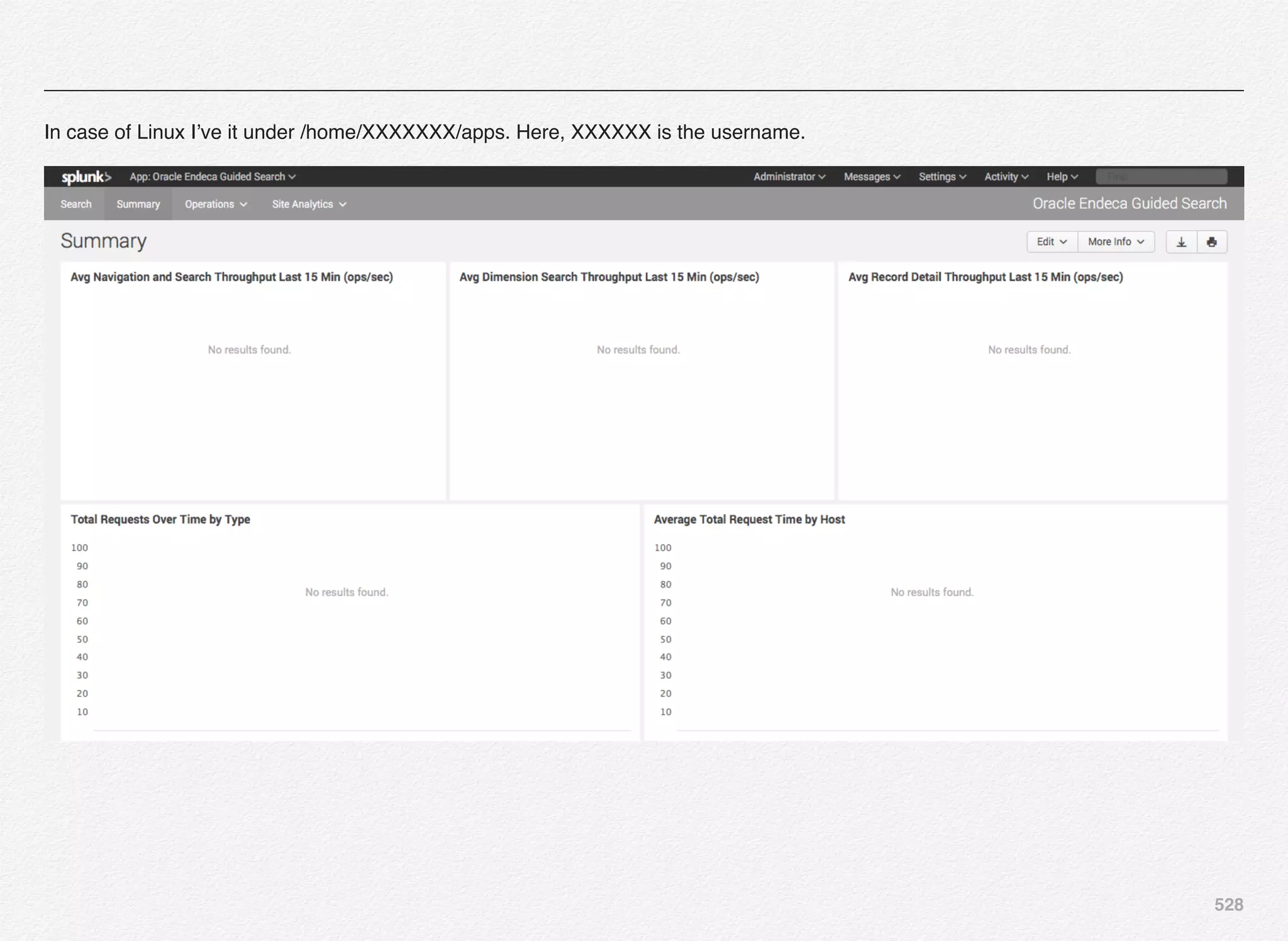
  • 499.
    498 • The ATGWeb Application wizard creates a basic web application within an existing J2EE application. • The ATG Standalone Web Application wizard creates a basic web application that is not part of a J2EE application. Before you go ahead and try out these steps, below are some of the pre-requisites: ! •! JDK 7/8 ! •! ATG11.1 / 11.2 ! •! JBoss6+ ! •! Oracle 11G (even Express Edition will do) ! •! Eclipse With Installed ATG Plugin - for this demonstration i’m using Eclipse Indigo Version 3.7.0 After getting all the required software installed open the Eclipse and go with the screenshots listed below. Click File -> New -> New ATG Module
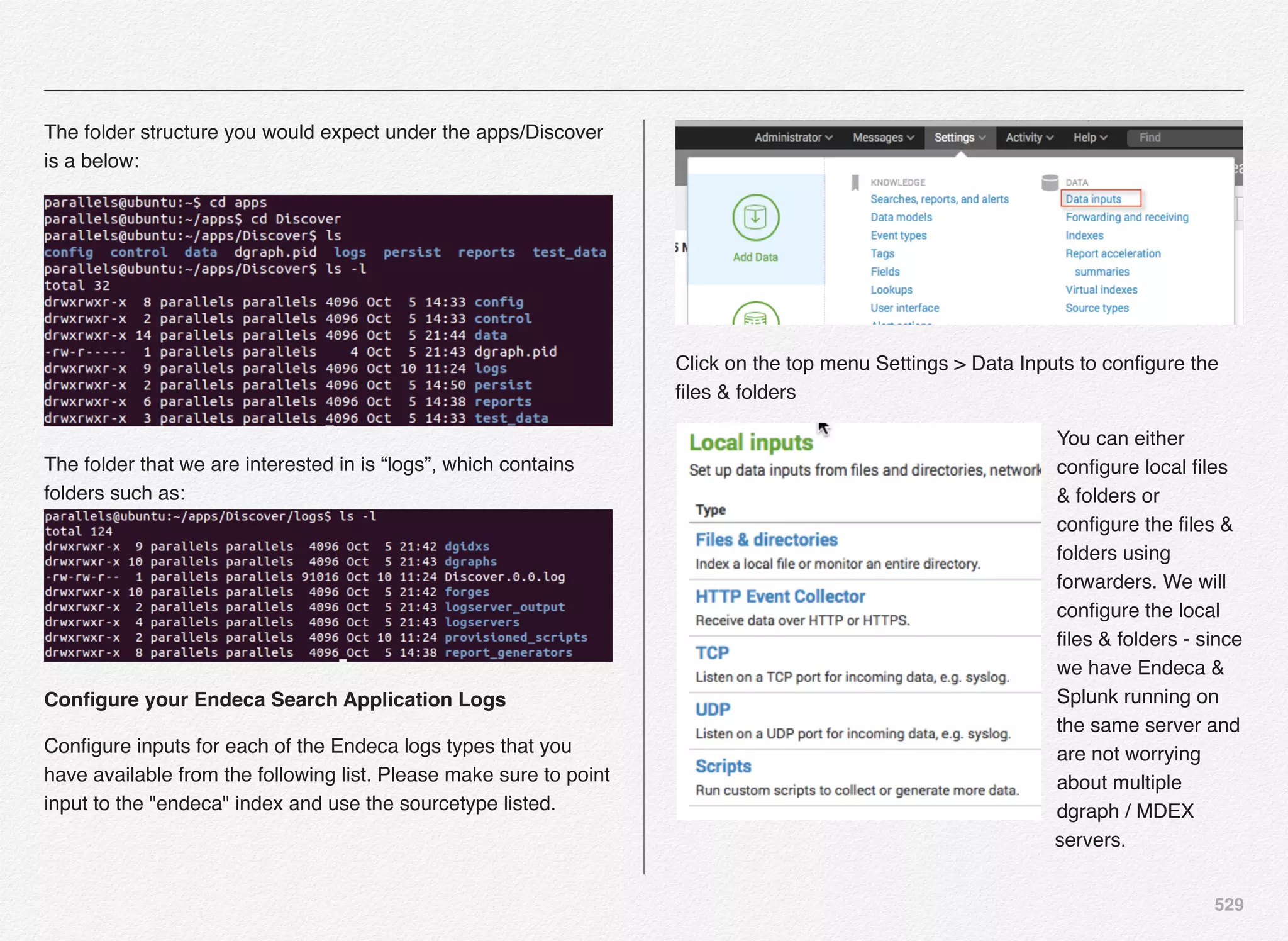
  • 500.
    499 Make sure yourproject location is ATG root directory where ATG is installed e.g. C:ATGATG11.1 or ATG11.2 - and click Next to continue
  • 501.
  • 502.
    501 Click Finish. You havesuccessfully created a new ATG module. You can check your new module in ATG root folder. As we have seen there are three base modules DAS, DPS, DSS that are necessary for ATG application so we database configuration to get these modules running.
  • 503.
    502 Need for Colors Colorcoding is a great way to specify the difference between different actions.  With color we can immediately recognize patterns, signals, warnings, etc.  By using a utility that color codes your logs and server outputs to highlight errors in red, warnings in yellow or orange, and the good parts in green, you can be much more efficient about how you monitor and search for situations that needs your attention on the console. ATG Colorizer Utility This utility color-codes log files or console output from JBoss, WebLogic, WebSphere, and DAS application servers. Output originating from ATG is also recognized and colored appropriately. This utility greatly aids in reading and interpreting log files. You can download the ATG Colorizer for your choice of operating system at http://atglogcolorizer.sourceforge.net/. Quick Start - Windows Download the application, strip the "v1_2" from the file name, then run it any one of the following ways: • /application/start/script.ext | C:pathtoATGLogColorizer.exe Section 4 ATG Colorizer Utility
  • 504.
    503 • C:pathtoATGLogColorizer.exe C:pathtofile.log QuickStart - Unix Variants Download the application, strip the "v1_2" from the file name, make it executable, then run it any one of the following ways: • tail -f /path/to/file.log | /path/to/./ATGLogColorizer • /path/to/./ATGLogColorizer /path/to/file.log • bin/appServerStartupScript.sh | /path/to/./ATGLogColorizer Are you a Mac user? Download an OSX release, courtesy of Glen Borkowski Are you a Solaris user? Download a Solaris release, courtesy of Mark Donnelly Below are sample screenshots from the web for JBoss and WebLogic:
  • 505.
    504 ATG Developer Tools Inthis chapter you have already been introduced to some of the developer tools such as the Eclipse IDE, ATG Plug-in for Eclipse, and ATG Colorizer. We will now look at some more tools that you will find handy while working with ATG & Endeca projects. Oracle ACC (ATG Control Center) The Oracle ATG Control Center (ACC) is a GUI tool that helps developers configure and personalize website content. Developers can browse and edit component configurations and live values of the running application. IT & business users can build scenarios using ACC and, also view / edit repository data. One of the easiest way to launch the ACC tool is using the dynamo administration UI e.g. http://<server/ip>:<port>/dyn/ admin. In my case the server is running on 192.168.70.5 so the URL would be http://192.168.70.5:8180/dyn/admin. Enter the admin username and password to log into the dynamo admin UI as in the screenshot. Section 5 Other ATG Developer Tools
  • 506.
    505 Now, you canclick on the ATG Control Center Administration link. The ACC may be run in one of three modes: 
 Same VM: The ACC application runs in the same Java Virtual Machine (JVM) as your ATG application. Different VM on the same computer: The ACC will run from the same installation as your ATG application but in a separate process. 
 Different computer: You can run the ACC as a stand-alone application that connects over a network to an ATG server instance running on a different machine. You would remember we installed ACC on a local machine using the Oracle ACC installer in the earlier part of this book (Chapter 5, Section 2). Note: If you have installed Oracle ATG Commerce on Linux based system, launching ACC in server/separate VM will require that the OS supports or has the necessary components to launch the X11 UI or you will receive below error in the dynamo administration console. The ATG Control Center could not be started. Dynamo received the following error message from the JVM: java.awt.HeadlessException: No X11 DISPLAY variable was set, but this program performed an operation which requires it. You can also install the Oracle ATG Control Center on Mac OS X using below guideline. Download V78201-01.zip from Oracle edelivery site and unzip it in your downloads folder on Mac. It is already marked executable hence simply execute the .bin file e.g. ./
  • 507.
    506 OCACC11.2.bin or OCACC11.1.binwhich will run the installer in terminal window Installation is now complete and is Oracle ACC is available under /Users/<username>/ATG/ACC11.2 or 11.1 based on the version you have downloaded and installed. Navigate to the /Users/FamilyMac/ATG/ACC11.2/bin folder you will find an executable script or a batch file (windows) that you can execute. For Mac, I would execute ./startClient - but that resulted into an error. Since my download was for Linux x86-64 bit operating system, i have still managed to install the bin on Mac but it is assuming this is Sun Solaris OS and trying to locate the JVM in a particular Sun Solaris specific folder which it could not locate.
  • 508.
    507 So, we haveto do a little hack here - open the startClient file in your favorite text editor and hard code JAVA_VM variable where your Java is on Mac. So, 1st task is to locate Java on Mac using $ which java command. And, in the text editor go to the bottom of the startClient script file and add this line of code JAVA_VM=”/usr/bin/java” right after the if..fi block of code where its setting the JAVA_VM to override whatever OS specific VM path the script is trying to set. Once done, save the file and exit the editor, and launch the startClient utility again and here it launches...
  • 509.
    508 Oracle ATG ServerAdministration One of the useful tools that developers (in the development state) and the administrators can use to manage ATG instance is the dynamo server administration. ATG dynamo admin utility is available for each instance of the ATG server - maybe it publishing server or staging or live production site. ATG dynamo admin provides web-based UI (User Interface) that you can use to manage several aspects of the ATG instance and also, manipulate the behavior of the running instance. Though, those setting changes are alive until the instance is restarted and not made permanent to the properties file. To access Oracle ATG Dynamo Server Admin you need to follow these steps: 1. In a browser of your choice, navigate to:
 http://<hostname>:<port>/dyn/admin
 For example, on WebLogic:
 http://localhost:7003/dyn/admin OR 
 http://localhost:8180/dyn/admin - based on at which port you have your publishing / production server running 2. You will be presented with the authentication dialog box - enter admin for both the username and password and click OK 3. While launching ACC, WebLogic also requires an additional login for the WebLogic server. Enter your WebLogic username and password, and then click OK 4. You see the Password Management page. For security reasons, you must change the password to ATG Dynamo Server Admin the first time you access it 5. In the Username and Current Password fields, enter admin 6. In the New Password field, enter a new password, for example, admin123 7. Re-enter the new password in the Confirm Password field, then click Submit button 8. In the authentication dialog box, enter admin for the user name and admin123 for the password, and then click OK.
 You are notified that the password has been successfully updated 9. To access the ATG Dynamo Administration interface, click the admin link at the top of the Password Management page
  • 510.
    509 10.! For subsequentaccess to the ATG Dynamo Administration interface, you need only follow steps 1 through 3 above, using admin123 as the password Clicking on the “admin” link in the above “Password Management” screen will present the ATG Administration page.
  • 511.
    510 ATG DUST &Test Driven Development (TDD) The software development world have is moving away from the waterfall model to agile and so are the release cycles of the software deployment to production. The release cycles are moving from months and weeks to continuous deployment model. To achieve this you certainly have to automate your testing of the software as well as a part of the process - since even thought you might achieve automating the entire pipeline from process perspective if testing is still manual - it could pose some challenges in automation. Test-driven-development (TDD) is an evolutionary approach that refers to a style programming in which the focus is on 3 interwoven pieces: • Coding • Testing • Design (refactoring) TDD can be described using below set of rules: • Start with single unit test describing an aspect of the program / code • Execute the test, which should fail because the program lacks that feature • Write just enough code, the simplest possible, to make the test pass • Next, refactor the code until it conforms to the simplicity criteria • Repeat, accumulating unit tests over time Let us look at it further and break it down into easy to understand steps: 1. Assuming you have the project requirements from the business or clients - before you start writing code for the requirements, you need to first focus and write an automated test for your code. Well, you might think - how can I do that? 2. While writing the automated tests, you must consider all possible conditions covering inputs, errors, and outputs. This way, your mind is not clouded by any code that's already been written 3. The noble purpose here is that the first time you run your automated test, the test should fail—indicating that the code
  • 512.
    511 is not yetready - remember you have not yet written any code - just the automated tests. Assume you wrote about 10 tests. 4. Next step for you is to begin coding. Since there's already an automated test, as long as the code fails it, it means that the code is still not ready. The code need to be fixed until it passes all assertions 5. Once the code passes the test, you can then begin cleaning it up, using refactoring. As long as the code still passes the test, it means that it still works. 6. And, just like what we used to do in basic --- redo from start when you introduce new requirements (Re)Write a test Write code Refactor / Clean-up code Check if the test fails Run all tests Test succeeds Repeat All tests succeed Test fails Test(s) fails
  • 513.
    512 The teams mighthave tons of reasons for not implementing TDD in their existing or new projects - but the benefits of implementing TDD out-weights the reasons for not. When you develop using TDD, it gives certain subtle benefits with testing quickly and efficiently. I’m sure most of the developers who use TDD regularly for their projects are very well versed and know how to use it or you can get few lessons / tutorials and get yourself acquainted with the subject. What we want to focus in this book is give you a quick start on how to get it going for your ATG application. Since, ATG Nucleus framework is unique in its own right its better to use something that is readily available - developed by the open source community and not to reinvent. There are couple of open source projects that you can look at and get started with: 1. ATG DUST available on SourceForge 2. Extension to the ATG DUST - A framework to simplify TDD with Oracle Web Commerce (ATG) on GitHub What is ATG DUST? ATG DUST is a framework for building JUnit tests for applications built on the ATG Dynamo platform. This framework allows one to quickly write test code that depends up Nucleus or ATG Repositories. By using this framework one can drastically cut down on development time. It takes only a few seconds to start up a test with a repository, but it may take multiple minutes to start up an application server. To get started with DUST, take a look at http://atgdust.sourceforge.net/first- test.html. This page will walk you through the process of running a basic test which starts Nucleus. After that, read the other getting started guides to describe how to create standalone Junit tests which can startup repositories and use the DynamoHttpServletResponse classes. Above description about ATG DUST is credited to the ATG DUST site on sourceforge.net. To get started with ATG DUST visit this page on ATG DUST site and follow the steps outlined. You should be able to test Nucleus, Out-of-the-box ATG components, ATG Repositories, Dynamo Servlets, and FormHandler testing using the ATG DUST framework.
  • 514.
    513 Simplify TDD withOracle Web Commerce (ATG) The team as http://www.roanis.com (Roanis Computing, UK) have published an open source framework enhancements that further simplify Test Driven Development using the ATG DUST framework for the Oracle Web Commerce (ATG) developers. You can find the open source project at https://github.com/ Roanis/atg-tdd. The aim of this open source project is to provide an annotation driven framework, which takes care of lot of typical setup needed to setup TDD for ATG project(s). This project enhances and is built on top of the great work already done by JUnit and ATG DUST open source projects - the aim is to make writing unit tests easy. For using this project to implement TDD in your Oracle Web Commerce project the prerequisite is ATG DUST 1.2.2 and definitely the knowledge of ATG DUST would come in very handy as well. Based on the outline on GitHub below steps should be sufficient to get you started with the enhanced TDD with Oracle Web Commerce: 1. Download the release and extract the tdd-x.x.jar. 2. Copy the TDD folder into your ATG install under $DYNAMO_HOME/../ i.e. at the same level as the other modules (e.g. DAS, DCS, etc). 3. Make the file Core/libs/core-x.x.jar available to your project/ build. 4. See the Core build file for which transitive dependencies are needed and add those to your project/build. 5. Start writing tests! Supported ATG Versions Below are the TDD versions and its support for the respective ATG versions: TDD Version" ATG Version 1.0! ! ! 10.2 1.1, 1.2! ! 11.0, 11.1 1.3, 1.4! ! 10.2, 11.0, 11.1
  • 515.
    514 Summary In this chapterwe looked at some of the tools that can come handy while developing ATG-based web applications such as the ATG plug-in for Eclipse, ATG Colorizer, ACC utility, ATG DUST, and the enhanced TDD for ATG using ATG DUST. In the next chapter we will cover the integration between Oracle Endeca MDEX & ITL server logs into Splunk tool for monitoring and reporting.
  • 516.
    15 In this chapterwe will look at how to integrate Oracle Endeca Guided Search application logs into Splunk discover and analysis tool. Oracle Endeca - Splunk Integration
  • 517.
    516 Reporting & MonitoringUsing Splunk Splunk is one of the disruptive software products that is aimed at automating the log search and analysis in real-time. It speeds tactical troubleshooting by gathering real-time log data from your distributed applications and infrastructure in one place to enable powerful searches, dynamic dashboards and alerts, and reporting for real-time analysis—all at an attractive price that will fit your budget. Best way to understand the value of Splunk is by looking at what kind of logs/data we are dealing with, realizing the complexity of these logs in terms of analysis and identifying valuable information / insights from the same. Before Splunk and all other similar tools in the market - it was really difficult to present the information from logs in the form that can make sense to IT, operations, and executives. What does Splunk bring to the table? Immediate results & actionable insights - you can download and install Splunk free edition (even limited edition for enterprise) in minutes and get it up and running no time. Delivers high-performance indexing and search technology - the engine indexes the logs/content in a fast and efficient Section 1 Reporting & Monitoring Tools
  • 518.
    517 manner. Also, providesa search interface & APIs to dip into the indexes and pull the right information based on search keywords. Analytical index database - Splunk index is stored in a form of data structure that is not only fast to retrieve but also supports the analytical model to be able to pull numerical time series data on the fly for analytical reasons. Plenty of Splunk applications available for ease of analysis - Splunk platform is extensible and there are 1000s of applications available that you can pick and choose from to cut the chase to operationalizing the data/log analysis. One such application available is for Oracle Endeca Guided Search at https://splunkbase.splunk.com/app/1525/ Reporting & Monitoring Using Splunk The Splunk App for Oracle Endeca Guided Search allows you to consume logs from your implementation of Oracle Endeca Guided Search for both systems operations and site analytics use cases. The application provides extractions, transforms, configuration, lookups, saved searches, and dashboards for several different log types including... - Dgraph Request Logs - Endeca logserver output - Forge logs - Dgidx logs - Baseline update logs NOTE: At the time of writing this book, Splunk works on Yosomite Mac OS - but not on El Capitan
  • 519.
    518 Installing Splunk EnterpriseFree (500MB Limit) You can visit this URL http://www.splunk.com/en_us/download/ splunk-enterprise.html to download and install Splunk enterprise free edition for your choice of OS (Windows, Linux, Solaris, or Mac OS). In this book, We’ll install Splunk enterprise on Mac OS. Click on the DMG file which will redirect you to create a Splunk.com account as below:
  • 520.
    519 If you area returning Splunk use - you can login using existing username/password to download the software. Locate your Splunk installer on Mac > Downloads folder as below and double-click the DMG file to launch the Splunk installer.
  • 521.
    520 Double-click the InstallSplunk icon, which in-turn will launch the Splunk installer as below: Click Continue Accept the license agreement and click Continue to navigate the remaining steps and perform the installation.
  • 522.
    521 Select the installationlocation and click Install to continue: Enter the Mac user password and click Install Software button. Hurray - Splunk installation is now complete and we are ready to take the leap to installing the Oracle Endeca Guided Search Splunk application.
  • 523.
    522 Search for Splunkfrom spotlight (Mac) or Start > All Programs (Windows) Launch Splunk daemon using below: Mac - /Applications/Splunk/bin/splunk start Windows - Start > All Programs > Splunk > Splunk Linux - ./opt/splunk/bin/splunk start One Splunk server starts you can access it using the browser windows by pointing it to http://localhost:8000 or whatever is the
  • 524.
    523 IP address ofthe machine where its running with 8000 port e.g. http://10.211.55.31:8000 in my case. Since, I have latest Mac OS - which is not yet supported by Splunk - i installed it on Ubuntu. Below is the 1st run screen of Splunk: Enter the username & password - which you need to change during your 1st login.
  • 525.
    524 Splunk is nowready and we can install the Oracle Endeca Guided Search application on it. In order to do that - we need to download the application from Splunk market place @ https://splunkbase.splunk.com/app/1525/. Click the Download button and accept the license agreements followed by clicking Agree to download.
  • 526.
    525 Below file willbe available in Downloads folder once you click on Agree on download. Now, go back to the localhost splunk browser interface located @ http:// localhost:8000 and click on the blue gear icon in the Splunk interface. Splunk will let you browse more apps in the market place or you can selectively install a particular app from the tgz file that you ust downloaded from the market place. Click on Install app from file to install the Oracle Endeca Guided Search Splunk application from the file. Select the file from your downloads folder and click the Upload button to continue. Once you click upload, Splunk will upload the tgz file to the Splunk server location, install the application and make it available listed in the interface:
  • 527.
    526 You should seea message - App "Oracle Endeca Guided Search" was installed successfully. Let us know look at and configure the newly installed Splunk application for Oracle Endeca Guided Search by clicking on the App menu as per below screenshot: Clicking the Oracle Endeca Guided Search menu option would launch the application and present its out-of-the-box dashboard - but as you would expect it would be an empty dashboard. We are yet to configure various data sources / log file locations for dgraph, forge, log server out, dgidx, and baseline update. Before we get started with configuration of the application data/ log sources - let us take a moment to understand the physical architecture on how Splunk is installed, where are the log files located, and how these logs will be forwarded to the Splunk log receiver.
  • 528.
    527 Also, we shouldunderstand how Splunk architecture works - since that will help you design the architecture for your application. MDEX Server 1 Endeca Dgraph Request Log DgraphA1.reqlog MDEX Server 2 Endeca Dgraph Request Log DgraphB1.reqlog MDEX Server 3 Endeca Dgraph Request Log DgraphC1.reqlog MDEX Server 4 Endeca Dgraph Request Log DgraphD1.reqlog Splunk Forwarder Splunk Forwarder Splunk Forwarder Splunk Forwarder Indexer Receives and Indexes all the logs from forwarders Splunk Receiver Web Access User Interface for Search & Analysis Splunk Interface You can have Splunk running on single server pointing to the logs on a single server in the most simplistic scenario. But, thats not a scenario in real world. Most of the companies running small, medium, or enterprise level applications have more than 1 servers in the farm serving the traffic to their websites or the backend systems serving those front-end web applications. So, for this discussion we are going to assume we have 4 Endeca MDEX servers serving the front-end application server for search application - once we have reviewed how to configure Oracle Endeca Guided Search Splunk application on a single server. The application that we are going to use is the one provided out-of-the-box by Oracle i.e. Discover Electronics. Since, all of us are familiar with the application and have installed it at some point of our learning curve - it would be easy to use it as a candidate for our Splunk configuration & testing. To start with we have already installed the Splunk platform & the Oracle Endeca Guided Search Splunk application on our local computer and we have Endeca Guided Search - Discover Electronics running on the same computer as well. So, ideally we would not need receiver/forwarder configured in this scenario. Now that we have launched Oracle Endeca Guided Search application - as you can see all the charts are empty - since we have not yet configured an of the input sources. Let us 1st discuss where to find all the log files for any Endeca application of interest to plug-in to Splunk. You need to locate the apps folder on your local file system maybe it Windows, Mac, or Linux. In case of Windows I would typically have configured it under C: Apps or C:UsersXXXXXXXapps. In case of Mac I’ve it under /Users/XXXXXXX/apps.
  • 529.
    528 In case ofLinux I’ve it under /home/XXXXXXX/apps. Here, XXXXXX is the username.
  • 530.
    529 The folder structureyou would expect under the apps/Discover is a below: The folder that we are interested in is “logs”, which contains folders such as: Configure your Endeca Search Application Logs Configure inputs for each of the Endeca logs types that you have available from the following list. Please make sure to point input to the "endeca" index and use the sourcetype listed. Click on the top menu Settings > Data Inputs to configure the files & folders You can either configure local files & folders or configure the files & folders using forwarders. We will configure the local files & folders - since we have Endeca & Splunk running on the same server and are not worrying about multiple dgraph / MDEX servers.
  • 531.
    530 Click on Files& directories under “Local Inputs” to configure different log folders for this application. Click on the New button to kick-start the process to add data inputs. The wizard will navigate you through the below process: • Select Source • Set Source Type • Input Settings • Review • Done Select the folder for Dgraph request log files using Browse dialog box Dgraph folder location - /home/parallels/apps/Discover/logs/ dgraphs
  • 532.
    531 Click Next tospecify the source type Source type The source type is one of the default fields that Splunk assigns to all incoming data. It tells Splunk what kind of data you've got, so that Splunk can format the data intelligently during indexing. And it's a way to categorize your data, so that you can search it easily. Click New and provide the source type name as “dgraph_request” App context Application contexts are folders within a Splunk instance that contain configurations for a specific use case or domain of data. App contexts improve manageability of input and source type definitions. Splunk loads all app contexts based on precedence rules. Host When Splunk indexes data, each event receives a "host" value. The host value should be the name of the machine from which the event originates. The type of input you choose determines the available configuration options. ubuntu is my host name - could be localhost or an IP address or a fully-qualified domain name.
  • 533.
    532 Index Splunk stores incomingdata as events in the selected index. Consider using a "sandbox" index as a destination if you have problems determining a source type for your data. A sandbox index lets you troubleshoot your configuration without impacting production indexes. You can always change this setting later. We will create a new index called “endeca”. Enter the index name as “endeca” and click the Save button.
  • 534.
    533 With this weare done setting the source type, host, and the index name. Click “Review” to re-visit all the changes and click the “Submit” button. Once the request is submitted, you should see the status of your submission and can opt to start searching - Splunk would have already started to read the log files and index the content right after you submit the request. There you go... You are now ready to discover the information from logs that you are seeking for e.g. what are the search terms, errors, warnings, whether or not the baseline updates ran, the click- stream analysis of products, etc..
  • 535.
    534 You are looking@ all request logs in the dgraphs folder e.g. AuthoringGraph & LiveGraph (e.g. DGraphA1).
  • 536.
    535 Similarly, configure allthe 5 data inputs e.g. Dgraph quest, Endeca Logserver Output, Forge, Dgidx, and Provisioned Scripts. For the 1st time you need to select “Create new index” e.g. endeca, but for the rest of the 4 requests you need to select from the drop-down and pick endeca as existing index - since it was already created during 1st step. Dgraph Request • Standard monitor location (update as appropriate)=[HTML_REMOVED]/logs/dgraphs/.../*.reqlog • index = endeca • sourcetype = dgraph_request Endeca Logserver Output • Standard monitor location (update as appropriate)=[HTML_REMOVED]/logs/logserver_output • index = endeca • sourcetype = logserver_output Forge • Standard monitor location (update as appropriate)=[HTML_REMOVED]/logs/forges/.../Forge.log • index = endeca • sourcetype = forge Dgidx • Standard monitor location (update as appropriate)=[HTML_REMOVED]/logs/dgidxs/.../Dgidx.log
  • 537.
    536 • index =endeca • sourcetype = dgidx Baseline Update • Standard monitor location (update as appropriate)=[HTML_REMOVED]/logs/provisioned_scripts/BaselineUpdate*.log • index = endeca • sourcetype = baseline_update Verify data is flowing by executing a search query over all time of ... index=endeca and start using the application. At the end of creating all 5 data inputs, you would see below inputs created in Files & Directories: So, now your Splunk instance is monitoring the activities happening on the local files & directories under above configured folders and as you can see its showing # of files it has identified and read from each folder and its sub-folders (recursively).
  • 538.
    537 High-Level Splunk Architecture& Application Dashboard Screenshots Download & Install Splunk Download & Install Endeca guided Search Splunk Application Configure Endeca Guided Search Splunk Application Create an Index by the name “endeca” 11 Forwarders 1 Receiver Dgraph request log Forge request log Logserver Output Dgidx log Output Baseline Update log Configure Data Files and Directories HTTP READY TO DISCOVER DATA
  • 539.
  • 540.
  • 541.
  • 542.
    16 In this chapterwe will use another stack of tools & technologies to integrate Endeca guided search application logs for discovering and analyzing logs. The tool set we are going use is known as ELK - ElasticSearch, Logstash, and Kibana. Dgraph Log Analysis - ELK
  • 543.
    542 What is ELKStack? ELK is a tool-chain stack of open source technologies that lets you integrate logs from your existing production systems, integrate the same for discovery, analysis, and visualization. ELK - ElasticSearch Elasticsearch is a document store in which data with no predefined structure can be stored. Elasticsearch is based on Apache Lucene - its origins and core strength are in full text search of any of the data held within it, and it is this that differentiates it from pure document stores such as MongoDB, Cassandra, Couchbase, etc... In Elasticsearch, data is stored and retrieved through messages sent over the HTTP protocol using the RESTful API. Also, Elasticsearch provides seamless integration with Logstash. Below are some of the features / functionalities of Elasticsearch: • Sharded, replicated, searchable, json document store • Used by many big name services out there - Github, Soundcloud, Foursquare, Xing, many others • Full text search, geo spatial search, advanced search ranking, suggestions, … much more. It’s awesome • Restfully JSON over HTTP Section 1 Introduction to ELK Stack
  • 544.
    543 • Two Typesof Shards • Primary • Replica • Replicas of Primary Shards • Protect the data • Make Searches Faster ELK - Logstash Logstash is a powerful framework and an open source tool to read the log inputs from numerous sources, filter the logs, apply codecs, and redirect the output to systems such as Elasticsearch for further indexing and processing. • Plumbing for your logs • Many different inputs for your logs • Filtering/parsing for your logs • Many outputs for your logs: for example redis, elasticsearch, file ELK - Kibana Kibana is a web application that adds value to the already powerful functionality provided by Logstash and Elasitcsearch in form of Search interface and Visualization elements. Kibana enables you to build flexible and interactive time-based dashboards, sourcing data from Elasticsearch. I’ve also used another visualization and dashboard tool known as Grafana, which is forked from Kibana and is used to interact with some of the time-series data collection tools such as Graphite (carbon, graphite web, whisper) or Influx DB. In the next couple of pages you will see that both the UI looks very similar but Grafana has been enhanced to deal with JSON object structure with much ease. • Highly configurable dashboard to slice and dice your logstash logs in elasticsearch • Real-time dashboards, easily configurable • Creation of tables, graphs and sophisticated visualizations • Search the log events • Support Lucene Query Syntax
  • 545.
  • 546.
    545 Grafana UI What isthe role of Broker (e.g. Redis)? • Broker acts as Temp Buffer between Logstash Agents and the Central server • Enhance Performance by providing caching buffer for log events • Adds Resiliency • Incase the Indexing fails, the events are held in a queue instead of getting lost
  • 547.
    546 Logstash Agents Redis Logstash Central ServerElasticSearch Shipper Shipper Shipper Kibana Broker Indexer Search & Storage
  • 548.
    547 Where to start? Youcan get started by visiting the elastic search web URL - http://www.elastic.co and downloading Elasticsearch, Logstash, and Kibana from below locations: https://www.elastic.co/downloads/elasticsearch https://www.elastic.co/downloads/logstash https://www.elastic.co/downloads/kibana I’m installing this on a Ubuntu 14.04 OS and hence below steps are applicable to Ubuntu for now - but the steps are either same or similar on most Linux flavors either you get a zip or .gz or deb or rpm and install it. STEP # 1 - Install Java sudo add-apt-repository -y ppa:webupd8team/java sudo apt-get update echo debconf shared/accepted-oracle-license-v1-1 select true | sudo debconf-set-selections echo debconf shared/accepted-oracle-license-v1-1 seen true | sudo debconf-set-selections sudo apt-get -y install oracle-java8-installer java -version STEP # 2 - Install Elasticsearch cd /var/cache/apt/archives sudo wget https://download.elastic.co/elasticsearch/ elasticsearch/elasticsearch-1.7.1.deb sudo dpkg -i elasticsearch-1.7.1.deb sudo update-rc.d elasticsearch defaults 95 10
  • 549.
    548 sudo /etc/init.d/elasticsearch restart ConfigureElasticsearch cd /etc/elasticsearch sudo nano /etc/elasticsearch/elasticsearch.yml Add below lines to the elasticsearch.yml file: http.cors.enabled: true http.cors.allow-origin: "*" STEP # 3 - Test Elasticsearch service & access ps aux | grep elasticsearch curl -X GET 'http://localhost:9200' curl 'http://localhost:9200/_search?pretty' Expected output $ curl -X GET 'http://localhost:9200' { "status" : 200, "name" : "Richard Rider", "cluster_name" : "elasticsearch", "version" : { "number" : "1.7.3", "build_hash" : "05d4530971ef0ea46d0f4fa6ee64dbc8df659682", "build_timestamp" : "2015-10-15T09:14:17Z", "build_snapshot" : false, "lucene_version" : "4.10.4" }, "tagline" : "You Know, for Search" } Optionally, you can install the Kopf plugin for elasticsearch - The kopf plugin provides an admin GUI for Elasticsearch. It helps in debugging and managing clusters and shards. It’s really easy to install: sudo /usr/share/elasticsearch/bin/plugin -install lmenezes/ elasticsearch-kopf
  • 550.
    549 View in browserat: http://localhost:9200/_plugin/kopf/#!/cluster. You should see something like this: STEP # 4 - Install Logstash cd /var/cache/apt/archives sudo wget http://download.elastic.co/logstash/logstash/packages/debian/logstash_1.5.3-1_all.deb sudo dpkg -i logstash_1.5.3-1_all.deb sudo update-rc.d logstash defaults 95 10 sudo /etc/init.d/logstash restart By default Logstash filters will only work on a single thread, and thus also one CPU core. To increase the number of cores available to LogStash, edit the file /etc/default/logstash and set the -w parameter to the number of cores: LS_OPTS="-w 8". lscpu
  • 551.
    550 sudo nano /etc/default/logstash Youcan increase the Java heap size here as well. Make sure to uncomment the line you are updating. LS_OPTS="-w 8" LS_HEAP_SIZE="1024m" Don’t forget to restart logstash afterwards. sudo /etc/init.d/logstash restart ps aux | grep logstash STEP # 5 - Install Kibana cd /opt sudo wget https://download.elasticsearch.org/kibana/kibana/ kibana-4.1.2-linux-x64.tar.gz sudo tar xvfz kibana-4.1.2-linux-x64.tar.gz sudo ln -s kibana-4.1.2-linux-x64 kibana If you intend to configure Kibana - you can edit the kibana.yml located @ /opt/kibana/config folder. STEP # 6 - Start Kibana Let us now start Kibana manually by executing the following command: sudo ./kibana/bin/kibana You can also start Kibana automatically when the server comes up by following this procedure: cd /etc/init.d sudo wget https://raw.githubusercontent.com/akabdog/scripts/ master/kibana4_init sudo chmod 755 kibana4_init sudo update-rc.d kibana4_init defaults 95 10 sudo /etc/init.d/kibana4_init restart Once Kibana starts, you can verify it by launching the following URL in browser: http://localhost:5601.
  • 552.
    551 With this wenow have Elasticsearch, Logstash, and Kibana (ELK) stack up and running. Next step is to configure Logstash to get the input by reading the DGraph request log files for your Endeca application, indexing the records in those log files in Elasticsearch, and discovering/visualizing the same in Kibana. We are now going to create a sample Logstash configuration file with the capability to read CSV (Comma Separated Values) file with some sample data. This will help you understand exactly what happens under the hood in ELK stack and how the information gets presented in Kibana with help of Elasticsearch.
  • 553.
    552 Create a folderwhere you want to place Logstash config files e.g. logstash-configs and create a file e.g. logstash-csv.conf under the configs folder. Below is the sample content for the logstash-csv.conf file: input { ! file { ! ! path => "/home/parallels/Desktop/logstash-configs/ test.csv" ! ! type => "csv" ! ! start_position => "beginning" ! } } filter { ! csv { ! ! columns => ["name","age","gender"] ! ! separator => "," ! } } output { ! elasticsearch { ! ! action => "index" ! ! host => "localhost" ! ! index => "logstash-%{+YYYY.MM.dd}" ! ! workers => 1 ! } # stdout { # codec => rubydebug # } } INPUT BLOCK In this config file, we have used the input {} code-block to make Logstash aware about the source of the log/data file(s). Logstash provides a number of different ways to get the data into Logstash ranging from CSV, network logs, system logs,
  • 554.
    553 IRC, Files onthe Filesystem, Redis, RabbitMQ, and many more. Today we want to watch a CSV file using the file{} block inside the input{}. Inside the file{} block, we have the ability to specify options dictating the path, the type of source, and from where to start reading the file. Here we will specify three options: path, type, and start_position in this sample test. input { ! file { ! ! path => "/home/parallels/Desktop/logstash-configs/ test.csv" ! ! type => "csv" ! ! start_position => "beginning" ! } } The path setting is the first required option and must be an absolute path, or the full path to the file. In this case we are using the absolute file name with the extension CSV, since the intent is to read and index the CSV file content e.g. /home/ parallels/Desktop/logstash-configs/test.csv. We could have configured the file{} block to read all the CSV files using *.csv instead of test.csv. Using the wildcard character will instruct Logstash to monitor the folder for all the files with the csv extension and ingest the content of all the csv files for indexing. The second option we specify is type and is a custom option. It is optional but important to specify the type - since type is passed along to each event the happens to this input from here on in. For our test configuration, this may mean how it is parsed and it may mean what the document type is when sent to ElasticSearch. E.g. we are specifying the type as “csv” or you could make it as “personal” - to signify its personal information contained in the data source. Lastly, we specify the start_position option - which is important to let Logstash know to read from the beginning of the source file. By default, Logstash uses end as the start_position which typically means it is expecting a live stream and reads at the end of the stream to start streaming the data to Elasticsearch. FITER BLOCK We have now configured the input{} block and told Logstash where to look for the data file. Next, we need to tell Logstash how to deal with this data and should it use it as is or pick ‘n’ choose only the data of interest and leave the rest at the
  • 555.
    554 source. Below isthe list of filter plugins available out-of-the-box for you to use for variety of data sources: ! •! aggregate ! •! alter ! •! anonymize ! •! collate ! •! csv ! •! cidr ! •! clone ! •! cipher ! •! checksum ! •! date ! •! dns ! •! drop ! •! elasticsearch ! •! extractnumbers ! •! environment ! •! elapsed ! •! fingerprint ! •! geoip ! •! grok ! •! i18n ! •! json ! •! json_encode ! •! kv ! •! mutate ! •! metrics ! •! multiline ! •! metaevent ! •! prune ! •! punct ! •! ruby ! •! range ! •! syslog_pri
  • 556.
    555 ! •! sleep !•! split ! •! throttle ! •! translate ! •! uuid ! •! urldecode ! •! useragent ! •! xml ! •! zeromq We might have 10-20 attributes in the csv file (e.g. Name, Age, Gender, Address, City, Zipcode, Occupation, etc...) - but we might be just interested in 3-4 attributes to be used by Logstash for indexing. Hence, we will use the filter{} block to customize that. This helps in not burdening Logstash central server and Elasticsearch with unnecessary data and keeps these servers light weight. So, while planning the storage for central server and Elasticsearch you need to be careful and calculate based on how much data will be pushed to Central server and Elasticsearch v/s how much is available at the point of data origin. filter { ! csv { ! ! columns => ["name","age","gender"] ! ! separator => "," ! } } The first option, columns, allows us to specify the names of the columns in our csv file e.g. name, age, gender. By default, logstash will simply name them using a default name / number format where the first column would be named column1 and the 7th column would be named column7 - if not specified. Optionally, you can specify the names of columns you want Logstash to extract and send to Elasticsearch for indexing e.g. by specifying columns => [“name”, “age”, “gender”] The second option, separator, is used to specify and tell Logstash which character is used to separate columns. The default separator character is "," as we set it specifically in the
  • 557.
    556 conf file, butfor all the love for documentation I find it is useful to include this setting in the configuration file so that it is no- brainer to anybody reading the file how our files are formatted. No assumptions whatsoever. OUTPUT BLOCK We have already read the data from source as specified in the input{} block and parsed & filtered as specified in the filter{} block. Last and final block of our test configuration file is the output{} block. Last block that we will look as is the output{} block. Where do we send the extracted, parsed, and processed logs for further application. output { ! elasticsearch { ! ! action => "index" ! ! host => "localhost" ! ! index => "logstash-%{+YYYY.MM.dd}" ! ! workers => 1 ! } # stdout { # codec => rubydebug # } } Logstash can output data to many different places such as ElasticSearch as we will use here, but also email, a file, Google Big Query, JIRA, IRC, and much more. Below is a full list of all the plugins at the point of writing this book: ! •! boundary ! •! circonus ! •! csv ! •! cloudwatch ! •! datadog ! •! datadog_metrics ! •! email ! •! elasticsearch ! •! exec ! •! file ! •! google_bigquery
  • 558.
    557 ! •! google_cloud_storage !•! ganglia ! •! gelf ! •! graphtastic ! •! graphite ! •! hipchat ! •! http ! •! irc ! •! influxdb ! •! juggernaut ! •! jira ! •! kafka ! •! lumberjack ! •! librato ! •! loggly ! •! mongodb ! •! metriccatcher ! •! nagios ! •! null ! •! nagios_nsca ! •! opentsdb ! •! pagerduty ! •! pipe ! •! riemann ! •! redmine ! •! rackspace ! •! rabbitmq ! •! redis ! •! riak ! •! s3 ! •! sqs ! •! stomp ! •! statsd ! •! solr_http
  • 559.
    558 ! •! sns !•! syslog ! •! stdout ! •! tcp ! •! udp ! •! webhdfs ! •! websocket ! •! xmpp ! •! zabbix ! •! zeromq In this book, we are going to redirect the output to Elasticsearch by specifying four options: action, host, index, and workers. We also have the stdout output option included, but commented out, for debugging purposes. Within the elasticsearch output option, we begin by setting the action we would like ElasticSearch to perform which can be either "index" or "delete". "index" is the default value for this option. Secondly, we set the host option which tells logstash the hostname or IP address to use for ElasticSearch unicast discovery. According to Logstash, many times this is not a required field and should be used when normal node / cluster discovery does not function properly. But, we continue to specify the IP or hostname for our Elasticsearch server, anyways. Third, we set the index option which allows us to specify what ElasticSearch index we would like to write our data to. The value provided in this configuration file is the default value, which uses logstash- followed by the current four digit year, two digit month, and two digit day. We will go with the default option here. Fourth, we set the number of workers that you would like for this output - that is the default. Logstash does clarify that this setting may not be useful for all types of outputs. Also, I’m still doing a soul search on what this option is. EXECUTION TIME Now, let us take a quick look at how to start Logstash using the configuration file that we just created and understood. You need to know/document the bin folder location for Logstash. In my case it is located under /opt/logstash/bin,
  • 560.
    559 hence my commandto start Logstash with the custom configuration file would be as follows: $ /opt/logstash/bin/logstash -f /home/parallels/logstash-configs/ logstash-csv.conf EXPECTED CONSOLE OUTPUT Above is the console response printed during Logstash startup for your reference. If there are any errors you will see those on the console as well - you might want to redirect the console response to a log file for future references - and start the process in background or as a service. VERIFYING IN KIBANA I’m assuming here that Elasticsearch is already up and running. Let us launch Kibana web UI and verify if the indexed contents are available for search, discovery, and visualization in Kibana. Also, I’m assuming that Kibana web UI is already running we just need to launch it in your favorite browser. http://localhost:5601 - if you recollect if Kibana UI runs at the 5601 port.
  • 561.
    560 Below is asample screen visual of the Kibana UI at launch-time:
  • 562.
    561 This signifies thatits time to create an index pattern for Kibana to look for and interact with the Index created by Elasticsearch. Remember, we specified the format of the index in the output{} section for Elasticsearch as “index => "logstash-% {+YYYY.MM.dd}". Click on “refresh fields” and then select @timestamp from the Time-field name drop-down box as below: Select @timestamp and click on the button, which will create the index pattern that Kibana will use to lookup the content in Elasticsearch and will navigate you to below page with list of all the attributes of the index. You can select to mark this pattern as the default index pattern for Kibana to use. Scroll-through the entire list of field names to ensure the fields you specified in the logstash filter section to be indexed are present e.g. name, age, and gender as below:
  • 563.
    562 We are currentlyon the settings tab - since we were in the process of creating the index pattern for Kibana. Let us now move our focus on the Discover tab where we can check if the indexed data is available and searchable. Test data in the test.csv file for reference "Phil",54,"Male" "Dawn",63,"Female" "John", 34,"Male" "Keyur",99,"Male" "Steve",35,"Male" "Laura",32,"Female" “Kristine”,20,”Female” Click on the Discover tab and the UI should show you the Kibana search interface as below:
  • 564.
    563 On the left,you will notice list of all the attributes. On the top you see an empty search box with an * - meaning search will return all items in the index. and the big section showing you the data timeline and result e.g. Time and _source. You can add other elements from the left navigation.
  • 565.
  • 566.
    565 You can trysearching any keyword that comes to mind associated to the data in the csv file. E.g. I tried to search “Phil” and below is the response from Kibana search interface: Notice - 1 hit, Yellow keyword highlight in the search result.
  • 567.
    566 SAMPLE VISUALIZATION Now isthe time to create a sample visualization from our indexed content. Let us click on the Visualize tab and below is the experience - Kibana will present you with a wizard to create the Visualization.
  • 568.
    567 Pick the visualizationformat you are interested in (e.g. Pie Chart) and specify the metric data source for the given series (x, y) and format the visualization. We will clicl on the “Pie chart” for visualization and pick either existing search configuration or use new search results for visualization. We will go with “From a new search”. You will be presented with the Visualization configuration screen as below: Here you need to configure the bucket type as either Split slices or Split chart. We will go with Split slices based on the Term - Gender from the index data - click on the Split slices link and continue to configure by providing the Aggregation means input from the Aggregation dropdown. Following are pre-defined values for the Aggregation dropdown: • Data Histogram • Histogram • Range • Data Range • IPv4 Range • Terms • Significant Terms • Filters You can download some sample data from the web or use this link http://www.briandunning.com/sample-data/ We will use this free data for some more analysis and visualization as below. Let us download and place the us-500.csv file to the ELKStack configs folder.
  • 569.
    568 Below are thelist of fields in the csv file: "first_name","last_name","company_name","address","city","co unty","state","zip","phone1","phone2","email","web" We will import all the 500 records using logstash CSV filter and change the logstash-csv.conf file as per below instructions: input { ! file { ! ! path => "/Volumes/EXTERNAL/ELKStack/configs/ us-500.csv" ! ! type => "csv" ! ! start_position => "beginning" ! } } filter { ! csv { ! ! columns => ["first_name","last_name","company_name","address","city","co unty","state","zip","phone1","phone2","email","web"] ! ! separator => "," ! } } output { ! elasticsearch { ! ! action => "index" ! ! hosts => "localhost" ! ! index => "logstash-%{+YYYY.MM.dd}" ! ! workers => 1 ! } # stdout { # codec => rubydebug # } }
  • 570.
  • 571.
    570 Re-run logstash, elasticsearch,and kibana and you will notice that now logstash will load all 500+ records from the csv file into elastic search and if you run the following command, you will see the index created with 500+ documents in the index. http://localhost:9200/_cat/indices?v Note, you can also run this command using the curl command on the command-line as below: $ curl 'localhost:9200/_cat/indices?v' Index name - logstash-2015.10.31 docs.count - 505 store.size - 852.1kb
  • 572.
    571 Let us nowcreate the index pattern in Kibana using the timestamp field as below:
  • 573.
    572 As a resultof which you will see all the fields being indexed by Elasticsearch as below: Mark this index as default using this button and goto Discover tab for your journey to search, then create sample visualization, and dashboard respectively. Click on the tab to create a new chart. Select the visualization of choice e.g.
  • 574.
    573 Select the X- Axisto add the data series aggregation type of interest: I’ve selected “Terms” and now we need to select the Field on which we want to aggregate and the field I’ve chosen is “State” followed by clicking the Play button. Also, i’ve changed the Size to 10 instead of 5, so it will provide the list of 10 states in descending order of the metric: count by terms on State field as in this chart:
  • 575.
  • 576.
    575 Click on theSave icon in the toolbar to save the Visualization with a specific title/name (spaces are allowed), followed by clicking the Save button e.g. Next, you can click on the Dashboard tab to get toolbar associated to the Dashboard Click on the + icon to add saved Visualizations to the Dashboard e.g. Population Spread by State visualization as below: You now have 1 visualization added to the Dashboard, likewise, you can create multiple visualizations, save those, and add to the Dashboard and your Dashboard can eventually look like below and even better: Now, back to how to create a dashboard for the Endeca Search application. Remember, we created a Oracle CRS virtual environment using Virtualbox, Vagrant, and DSL scripts Chapter 12 “Automated Setup Using Vagrant”. We are going to leverage the same setup to pull the DGraph request log and parse, discover, visualize in ELK stack in this chapter.
  • 577.
    576 If you look@ the Apps/CRS folder, you will notice the logs folder which contains all the different types of log files for CRS (Commerce Reference Store) application. Below is the directory structure of the logs folder for your CRS application: We are interested in the DgraphA1 request logs which are available at logs/dgraphs/DgraphA1 folder as in the next screenshot: The file that we are interested in is DgraphA1.reqlog. We can either copy this file to separate folder on your computer or you can make ELK stack (logstash) point to this file in the external folder and which will work fine as well if you have proper firewalls and access to the file location no matter which server it is on (especially in production). For simplicity sake, i will copy the file to my local computer and point the logstash config to point to this file.
  • 578.
    577 The logstash configfile for reading the Endeca dgraph request log is different than from reading the CSV file, since Endeca logs are written in different format by the MDEX engine. Below is the entire endeca.conf content - this is based on my experience with Endeca logs and requirement to take only the data elements that we really need. I’m leaving out probably some of the other data elements from the request log file. input { ! file { ! ! type => "endeca" ! ! path => ["/Volumes/EXTERNAL/VagrantCRS/ DgraphA1.reqlog"] ! ! start_position => "beginning" ! } } filter { ! if [type] == "endeca" { ! ! urldecode {all_fields => true } ! ! if ([message] =~ /(graph)/) { ! ! ! drop{} ! ! } ! ! mutate { ! ! ! gsub => [ "message","[+=]"," " ] ! ! } ! ! grok {
  • 579.
    578 ! ! !match => [ "message", "%{NUMBER:timpstamp} %{IP:clientip} - %{NUMBER:httpid} %{NUMBER:bytes} % {NUMBER:time_taken} %{NUMBER:duration} % {NUMBER:response} %{NUMBER:results} % {NUMBER:Q_status} %{NUMBER:Q_status2} %{DATA:URI} % {DATA:Terms}&" ] ! ! } ! } } output { elasticsearch { action => "index" hosts => "127.0.0.1" index => "endeca-search" workers => 1 } stdout {} } In endeca.conf we are using the grok filter to retrieve/match fields from the dgraph request log file. Also, we are eliminating some of the dgraph log entries especially which are not search related. We are only extracting log entries which are related to the search and navigation. Let us now start the Logstash, Elasticsearch, and Kibana services and watch it index the content of the dgraph request log file. If you look @ the list of indexes in Elasticsearch you would notice a new index has been added by the name endeca- search with 54 documents.
  • 580.
    579 Now, let usgoto the Kibana UI and create a new index pattern for endeca-search index using the settings tab and click Create button to create a new Index pattern for endeca-search:
  • 581.
    580 You would nownotice a new index pattern is created called endeca* and it contains all the fields that we have otherwise mapped in the endeca.conf file. Mark it as a default index and click on the Discover tab on the top to try out some search queries using the Kibana UI. You can also goto visualization and create a Vertical Bar Chart using the search Terms. The endecal.conf file provided in this book is for reference purpose and can be enhanced / extended based on your experience with Endeca dgraph request logs and logstash grok insights. I would consider learning grok filter from this link to start with - https:// www.elastic.co/guide/en/ logstash/current/plugins- filters-grok.html. The point is as a part of your
  • 582.
    581 DevOps performance cultureyou need to think about various frameworks, platforms, tools, and technologies that you can try out as a open source software or branded solution. In this book so far we have covered Vagrant Up - environment setup automation, puppet/chef - Domain Specific Language for automation of environments, VirtualBox - virtual machine environment, ELK Stack - log analysis and visualization softwares. Also, you can consider looking at other open source softwares such as Docker, Graphite, Grafana, Sitespeed.io, Bucky server/ client, Piwik analytics for web and mobile, etc... Indexing Database Content into Elasticsearch So far in this chapter, we have looked at how to index the CSV file and also the Endeca Dgraph request log(s). Let us continue our adventure and now look at how to index the database table(s) into Elasticsearch. Prior to Elasticsearch 1.5 we used the River JDBC driver in Elasticsearch to index the database content. But, with the release of 1.5 and above we now have something known as JDBC Importer which can be found at https://github.com/ jprante/elasticsearch-jdbc. Below is the compatibility matrix between various versions of JDBC Importer and Elasticsearch.
  • 583.
    582 You can downloadthe JDBC Importer from the online distribution at http://xbib.org/repository/org/xbib/elasticsearch/importer/ elasticsearch-jdbc. The latest vesion is 2.0.0.1 so you can either use 2.0.0.0 or 2.0.0.1 with Elasticsearch 2.0 that was released on Oct 28, 2015.
  • 584.
    583 Download the elasticsearch-jdbc-2.0.0.1-dist.zipand extract it to the folder under your ELK stack folder. The folder structure would look as below:
  • 585.
    584 Navigate under elasticsearch-jdbc-2.0.0.1/libfolder and you will notice out-of-the-box JDBC drivers provided for various data sources as below:
  • 586.
    585 You need toperform following steps in order to establish connectivity to the database of your choice and index the table content into Elasticsearch: • Download the JDBC importer distribution as outlined on previous page • Unpack / Unzip the zip file to the ELK stack folder (you can actually unzip anywhere - just remember the location) • Goto the unpacked directory (for convenience we will call it $JDBC_IMPORTER_HOME) • Goto the lib directory under the $JDBC_IMPORTER_HOME • If you do not find the JDBC driver jar in the lib directory, download it from the vendor’s site and put the driver jar into the lib folder - this is pretty much what we used to do with River JDBC for Elasticsearch • Modify the script in the bin directory to your needs. Remember, JDBC Importer provides you scripts for out-of- the-box drivers - mostly open source databases e.g. mysql, etc... • Run the script with a command that start org.xbib.tools.JDBCImporter with the lib directory on the classpath These are the scripts that come out-of-the- box providing you examples of how to do things with JDBC, database, and Elasticsearch. As you can see you have examples for mysql primarily, oracle, and postgres sql. Also, it logs all the details using log4j. We are going to configure the Oracle datasource for demonstration in this chapter, so let us make a copy of oracle- connection-properties.sh as atg-oracle-connection- properties.sh.
  • 587.
    586 Below are thecontent of the script file #!/bin/sh # This example is a template to connect to Oracle # The JDBC URL and SQL must be replaced by working ones. DIR="$( cd "$( dirname "${BASH_SOURCE[0]}" )" && pwd )" bin=${DIR}/../bin lib=${DIR}/../lib echo ' { "type" : "jdbc", "jdbc" : { "url" : "jdbc:oracle:thin:@//192.168.70.4:1521/orcl", "connection_properties" : { "oracle.jdbc.TcpNoDelay" : false, "useFetchSizeWithLongColumn" : false, "oracle.net.CONNECT_TIMEOUT" : 10000, "oracle.jdbc.ReadTimeout" : 50000 }, "user" : "crs_pub", "password" : "crs_pub", "sql" : [ !{"statement" : "select a.*, sysdate from crs_prd_features a"}, !{"statement" : "select a.*, sysdate from crs_feature a"} ! ! ! ], "index" : "myoracle1", "type" : "myoracle", "elasticsearch" : { "cluster" : "elasticsearch", "host" : "localhost", "port" : 9300
  • 588.
    587 }, "max_bulk_actions" : 20000, "max_concurrent_bulk_requests": 10, "index_settings" : { "index" : { "number_of_shards" : 1, "number_of_replica" : 0 } } } } ' | java -cp "${lib}/*" -Dlog4j.configurationFile=${bin}/log4j2.xml org.xbib.tools.Runner org.xbib.tools.JDBCImporter Most of the settings will remain default, as provided by the JDBC importer distribution except few as below: url - where you need to provide your Oracle database url with port and database name user - need to provide the username to connect to the DB password - need to provide the password to connect to the DB sql - provide the sql statement e.g. select statement to pull records from the DB table into Elasticsearch index index - the name of the Elasticsearch index type - the type of the index Also, in this example, if you look at closely we are pulling the data from 2 tables just for demonstration purpose. You can pull data from one or more tables by passing multiple sql select statements. $ ./atg-oracle-connection-properties.sh
  • 589.
    588 After you runthe script from the terminal or command window and the script runs successfully, you can check the list of indexes in Elasticsearch using below command in the browser: http://localhost:9200/_cat/indices?v As you can observe in above screenshot, we now have a new index “myoracle1” with a certain document count - based on how many records you have in the database table.
  • 590.
    589 Below is thevisualization based on the crs_prd_features table:
  • 591.
    590 Summary In this chapterwe have looked at in details how to setup ELK environment to create a search interface and visualization for your Endeca Dgraph Logs. You have learnt how to setup Logstash, Elasticsearch, and Kibana. Also, we have looked at how to import CSV data and create visualizations in Kibana. ELK is completely open source and free, with abundant of online articles, forums, and videos for you to learn quickly.
  • 592.
    17 In this chapterwe will look at what’s new in Oracle Commerce (ATG & Endeca) v11.2 There are some new and exciting features made available in Endeca and some of the bug fixes done as a part of this release. Oracle Commerce v11.2 - What’s New
  • 593.
    592 Continuous Education One thingthat I believe is critical in not just technology sector but rather about in each field in which you pursue the career is “CONTINUOUS EDUCATION”. With so much advancement in technology and the role it plays in our lives and work - it is important to keep in touch with what is going on and keep ourselves updated to certain extent based. Oracle just released the 2nd update after v11 for Oracle Commerce i.e. 11.2. At first look I didn’t realize significant changes, but later found out some interesting changes and advancements especially in Endeca Experience Manager while discussing with a colleague and we thought of giving it a spin on a virtual box and the changes are pretty important from authoring perspective. Let us look at high-level and then some in details about “What’s New” in 11.x. The new features and capabilities are in alignment with three main themes: • Customer Engagement - delivering relevant, personal and consistent experiences across all customer touchpoints  Section 1 What’s New in Oracle Commerce v11.x
  • 594.
    593 • Business Engagement- simplifying and unifying business user tools to manage, create and optimize customer experiences  • IT Engagement - building for tomorrow with a flexible and extensible architecture  As part of the 11.2 release, there is a new reference application, Commerce Store Accelerator.    Clear difference in documentation - but not found in release notes so easily is about the way you can create and manage project in Endeca Experience Manager (Workbench): 11.1 Documentation - Chapter 2 11.2 Documentation - Chapter 2 Oracle Commerce 11.2 documentation focuses on a new section in the “Workbench User’s Guide” (Page 31-42) about managing Endeca projects. This is completely new and good news for both IT and business teams who are responsible for authoring content and constructing pages using Endeca Experience Manager. After experiencing the way it works, looks like its inspired by the way Git works (just my thought). There are other number of bug fixes, enhancements made as a part of this release which you can find in the Release notes PDF - http://docs.oracle.com/cd/E55783_01/ReleaseNotes. 11-2/ATGPlatformReleaseNotes/ ATGPlatformReleaseNotes.pdf.
  • 595.
  • 596.
  • 597.
  • 598.
  • 599.
  • 600.
  • 601.
  • 602.
  • 603.
  • 604.
    18 You don’t haveto limit your learning experience to just the topics covered in this book. This chapter provides you with list of useful links on the web to bolster your learning process and cut the learn curve. Useful Online Resources
  • 605.
    604 Oracle ATG Blogs/ Articles • ATG REST Services Demonstration • ATG Log Colorizer – What is it & how can you use it? • Oracle ATG Web Commerce 10 Implementation Developer Essentials • Oracle/ATG Commerce Training – Your Options • ATG Commerce Platform – Introduction • ATG Commerce – Installation Steps [UPDATED] • ATG Commerce – Step 1 (Install JDK) • Preparing for the ATG Installation & Configuration [UPDATED] • Bringing Endeca into ATG • Useful ATG – Blogs/Sites [UPDATED] • Useful ATG Personalization Fundamental – Articles on Oracle Blog • ATG – ACC Doesnt Start with JDK 1.7 (Read about the fix) • Oracle ATG – Introduction (Prezi) • Builtwith – Web Sites Using ATG Commerce • ATG CIM – Configuration and Installation Guide • Setting up ATG Web Commerce on Mac OSX • 5 Key Themes Driving Oracle Commerce (ATG, Endeca) • Oracle Endeca Guided Search – Components MindMap • ATG Web Commerce Installer – Step 3 • Spark::red – Oracle ATG Web Commerce Pricing: How does it work? • ATG – Merchandising Features • ATG Commerce Services [UPDATED] • Oracle Social ATG Shop Demo • ATG/Endeca Commerce – Installation & Configuration [PRESENTATION] Section 1 Useful Links to Online Content
  • 606.
    605 • ATG –Installing WebLogic Server [PRESENTATION] – Step-by-Step Guide • ATG – Installing JDK 1.7 [PRESENTATION] – Step-by- Step Guide • ATG – Install Oracle Express Edtion [PRESENTATION] – Step-by-Step Guide • ATG/Endeca – Installation Sequence [PRESENTATION] • ATG Web Commerce 10.2 – Installation Steps • ATG – Commerce Reference Store Installation [Step-by- Step] • Oracle Endeca – Installation Guide [SLIDESHARE] – Step-by-Step • Oracle ATG -Launch Management Framework [PART 1] • ATG – Customer Service Center [SLIDESHARE] – Installation • ATG – Promotions Introduction • ATG CIM – Logging Entire CIM Interaction (TEXT FILE) • ATG Control Center – Installation • Starting ATG Servers – Bypass WLS Username & Password Prompt • ATG -Terminologies • ATG – CIM Clean Start (Development) [UPDATED] • ATG – Understanding CIM Modes • Oracle Commerce Community • Where’s My ATG Plug-in For Eclipse? • ATG Repository Caching – Article Series • Oracle ATG – Scenarios & Execution • Oracle ATG Social Integration – Gigya Module for ATG • Oracle ATG Social Integration – Janrain | ATG Extension • ATG Modules & Features [PREZI] • Oracle Commerce V11 – Some high-level changes • Oracle Commerce V11 – Now Available on eDelivery • Replay the Oracle Commerce V11 – Webcast • Oracle Commerce V11 – SSO Implementation • Oracle Commerce V11- Step-by-Step CIM Responses • ATG Products Modules & Roles [INTERESTING WORK] • ATG Commerce – Launch Management Framework • Oracle Commerce V11 – Enabling SSO IN WEBSTUDIO.PROPERTIES • Oracle Commerce V11 – Adding BCC Menu Item to Experience Manager • eCommerce Platforms [PRESENTATION] • eCommerce Platform – From Business Perspective • Anatomy of an Oracle Endeca Experience Manager Site • Oracle Endeca Developer’s Guide [PRESENTATION + STEPS] • Webcast – Oracle Commerce 11.1 • Oracle Commerce 11.1 – New Training Released Oracle Endeca Blogs / Articles • ATG REST Services Demonstration • Oracle Endeca Guided Search – Components MindMap • Anatomy of an Oracle Endeca Experience Manager Site [VIDEO] • ATG – Install Oracle Express Edtion [PRESENTATION] – Step-by-Step Guide • Webinar: Drive Valuable Insight From Diverse And Unstructured Data With Oracle Endeca Information Discovery • Webinar – The Power of Oracle Endeca Advanced Enterprise Guided Search • Oracle Endeca – Installation Guide [SLIDESHARE] – Step-by-Step
  • 607.
    606 • Oracle CommerceCommunity • Where’s My ATG Plug-in For Eclipse? • ATG Repository Caching – Article Series • Oracle Endeca Commerce 3.1 Implementation Developer Exam • Oracle ATG – Scenarios & Execution • Endeca -Useful Links/Sites [UPDATED] • Evolution of a Great User Experience • Oracle ATG Social Integration – Gigya Module for ATG • Oracle Endeca Pipeline – Introduction • Endeca – Configuring the User Inactivity Logout • Endeca – Check Status of Endeca Application • ATG Modules & Features [PREZI] • Oracle Commerce V11 – Some high-level changes • Oracle Commerce V11 – Now Available on eDelivery • Replay the Oracle Commerce V11 – Webcast • Oracle Commerce V11 – SSO Implementation • Oracle Commerce V11- Step-by-Step CIM Responses • ATG Commerce – Launch Management Framework • Oracle Commerce V11 – Enabling SSO IN WEBSTUDIO.PROPERTIES • eCommerce Platforms [PRESENTATION] • eCommerce Platform – From Business Perspective • Anatomy of an Oracle Endeca Experience Manager Site • Endeca Information Discovery Architecture Video on Vimeo • Oracle Endeca Developer’s Guide [PRESENTATION + STEPS] • Endeca – Monitoring the Log Server • Endeca – Promoting Content from Staging to Production • Endeca – Troubleshooting Article – 1 • Webcast – Oracle Commerce 11.1 • Oracle B2C Commerce in Action • Endeca MDEX Plugin – for New Relic by Spark::red • Lost Endeca Workbench Password – What would you do? • Endeca Configuration – What can a SPACE do to your deployment? • Oracle Commerce 11.1 – New Training Released • Endeca Application Assembler – Web Service Workflow • Oracle Commerce – Needs DevOps Culture & Tools Other Online Sources for Articles • Key ATG architecture principles • Design for Complex ATG Applications • ATG in Telecommunications Industry • Personalization Fundamentals (Part 1) – The ATG Profile • Personalization Fundamentals (Part 2) – Rule-based Personalization • Personalization Fundamentals (Part 3) – Event-based Personalization • Installing Oracle ATG Commerce 10.2 with CRS • Installing Oracle ATG & Endeca 10.2 on Linux • Installing Oracle ATG & Endeca 10.2 on Windows • Learn Oracle ATG ATG/Endeca Presentations • Oracle - Endeca Developer's Guide - http:// www.slideshare.net/softwareklinic/oracle-endeca-developers- guide • Oracle - ATG Control Center - http://www.slideshare.net/ softwareklinic/atg-installing-atg-control-center-acc
  • 608.
    607 • Oracle -Endeca Installation - http://www.slideshare.net/ softwareklinic/oracle-endeca-commerce-installation • Oracle - ATG Commerce Reference Store Installation - http:// www.slideshare.net/softwareklinic/atg-commerce-reference- store-installation • Oracle - ATG Web Commerce Installation - http:// www.slideshare.net/softwareklinic/atg-web-commerce-10-2- installation-steps • Oracle - Endeca Installation Steps - http:// www.slideshare.net/softwareklinic/atgendeca-installation- sequence • Oracle - Express Edition Installation - http:// www.slideshare.net/softwareklinic/atg-oracle-express-edition • Oracle - Installing JDK 1.7 - http://www.slideshare.net/ softwareklinic/atg-installing-jdk-1-7 • Oracle - Installing WebLogic Server - http:// www.slideshare.net/softwareklinic/atg-installing-web-logic- server • Oracle - ATG Web Commerce @ your fingertips - http:// www.slideshare.net/softwareklinic/atg-web-commerce-your- fintertips Useful Videos - iLearning on Oracle.com Visit http://ilearning.oracle.com and sign-in using your Oracle Account username/password. Next search for “oracle commerce” as per this screenshot, which will yield you the result list with all the topics associated with Oracle Commerce (i.e. ATG / Endeca).
  • 609.
    608 The result listprovides you with list of videos/tutorials on several topics as below: You can click on “See all 55 results in Self-Paced Topics - this list will cover all the latest versions of Oracle Commerce - 10x and 11.x.