


By Kate Soglaeva
»FormHandlers do’s
»Droplets do’s
»Repositories do’s
2
ATG Hints by Kate Soglaeva
3
4
ATG Hints by Kate Soglaeva
5
ATG Hints by Kate Soglaeva
HTML
JSP
Droplets
ServicesManagers
viewpresentermodel
Form
Handlers
Tags
Xml,json
Repositories
Web Services
6
ATG Hints by Kate Soglaeva
Manager
Form Handler
Form
Form Value
Object
Business
Object
Repositories
Field
Validator
1 : 1 Request
Business
logic
validation
logic
7
ATG Hints by Kate Soglaeva
Form
Manager
Form
Handler
Form
Handler
Form
Field
Validator
Business
Object
Repositories
Droplet
8
ATG Hints by Kate Soglaeva
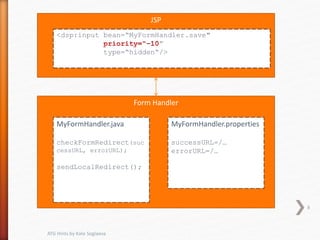
JSP
Form Handler
<dsp:input bean=“MyFormHandler.save"
“
type=“hidden“/>
MyFormHandler.properties
successURL=/…
errorURL=/…
MyFormHandler.java
checkFormRedirect(suc
cessURL, errorURL);
sendLocalRedirect();
9
ATG Hints by Kate Soglaeva
10
ATG Hints by Kate Soglaeva
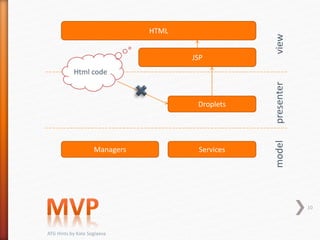
HTML
JSP
Droplets
ServicesManagers
viewpresentermodel
Html code
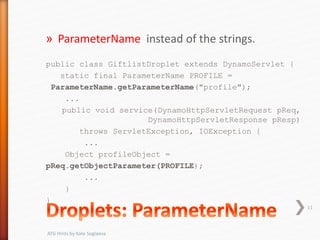
» ParameterName instead of the strings.
public class GiftlistDroplet extends DynamoServlet {
static final ParameterName PROFILE =
ParameterName.getParameterName("profile");
...
public void service(DynamoHttpServletRequest pReq,
DynamoHttpServletResponse pResp)
throws ServletException, IOException {
...
Object profileObject =
pReq.getObjectParameter(PROFILE);
...
}
}
11
ATG Hints by Kate Soglaeva
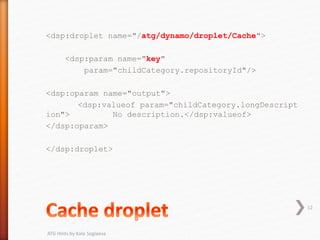
<dsp:droplet name="/atg/dynamo/droplet/Cache">
<dsp:param name="key"
param="childCategory.repositoryId"/>
<dsp:oparam name="output">
<dsp:valueof param="childCategory.longDescript
ion"> No description.</dsp:valueof>
</dsp:oparam>
</dsp:droplet>
12
ATG Hints by Kate Soglaeva
13
ATG Hints by Kate Soglaeva
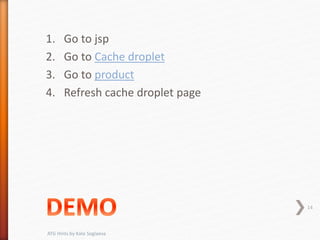
1. Go to jsp
2. Go to Cache droplet
3. Go to product
4. Refresh cache droplet page
14
ATG Hints by Kate Soglaeva
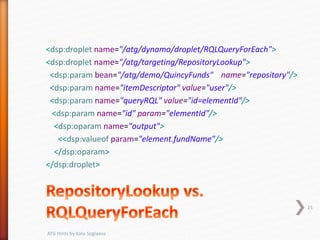
<dsp:droplet name="/atg/dynamo/droplet/RQLQueryForEach">
<dsp:droplet name="/atg/targeting/RepositoryLookup">
<dsp:param bean="/atg/demo/QuincyFunds" name="repository"/>
<dsp:param name="itemDescriptor" value="user"/>
<dsp:param name="queryRQL" value="id=elementId"/>
<dsp:param name="id" param="elementId"/>
<dsp:oparam name="output">
<<dsp:valueof param="element.fundName"/>
</dsp:oparam>
</dsp:droplet>
15
ATG Hints by Kate Soglaeva
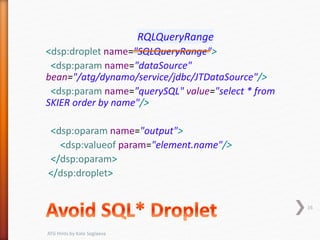
RQLQueryRange
<dsp:droplet name="SQLQueryRange">
<dsp:param name="dataSource"
bean="/atg/dynamo/service/jdbc/JTDataSource"/>
<dsp:param name="querySQL" value="select * from
SKIER order by name"/>
<dsp:oparam name="output">
<dsp:valueof param="element.name"/>
</dsp:oparam>
</dsp:droplet>
16
ATG Hints by Kate Soglaeva
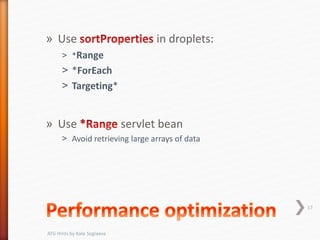
» Use in droplets:
˃ *Range
˃ *ForEach
˃ Targeting*
» Use servlet bean
˃ Avoid retrieving large arrays of data
17
ATG Hints by Kate Soglaeva
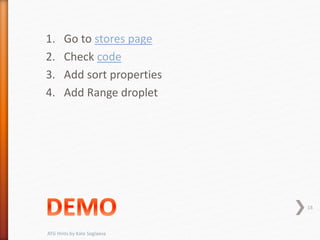
1. Go to stores page
2. Check code
3. Add sort properties
4. Add Range droplet
18
ATG Hints by Kate Soglaeva
19
ATG Hints by Kate Soglaeva
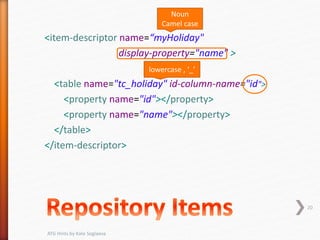
<item-descriptor name=“myHoliday"
display-property="name" >
<table name="tc_holiday" id-column-name="id">
<property name="id"></property>
<property name="name"></property>
</table>
</item-descriptor>
20
ATG Hints by Kate Soglaeva
Noun
Camel case
lowercase , ‘_’
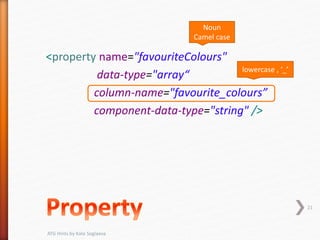
<property name="favouriteColours"
data-type="array“
column-name="favourite_colours”
component-data-type="string" />
21
ATG Hints by Kate Soglaeva
Noun
Camel case
lowercase , ‘_’
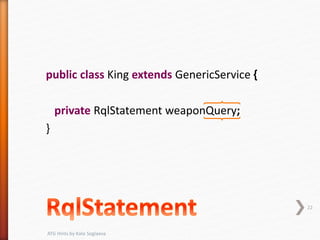
public class King extends GenericService {
private RqlStatement weaponQuery;
}
22
ATG Hints by Kate Soglaeva
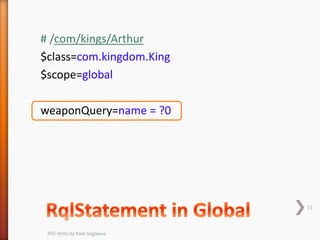
# /com/kings/Arthur
$class=com.kingdom.King
$scope=global
weaponQuery=name = ?0
23
ATG Hints by Kate Soglaeva
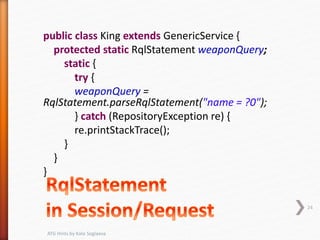
public class King extends GenericService {
protected static RqlStatement weaponQuery;
static {
try {
weaponQuery =
RqlStatement.parseRqlStatement("name = ?0");
} catch (RepositoryException re) {
re.printStackTrace();
}
}
}
24
ATG Hints by Kate Soglaeva
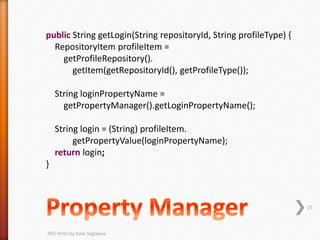
public String getLogin(String repositoryId, String profileType) {
RepositoryItem profileItem =
getProfileRepository().
getItem(getRepositoryId(), getProfileType());
String loginPropertyName =
getPropertyManager().getLoginPropertyName();
String login = (String) profileItem.
getPropertyValue(loginPropertyName);
return login;
}
25
ATG Hints by Kate Soglaeva
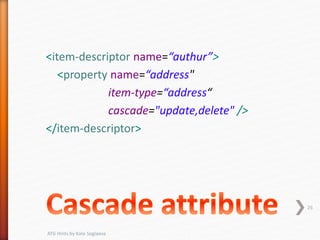
<item-descriptor name=“authur”>
<property name=“address"
item-type=“address“
cascade="update,delete" />
</item-descriptor>
26
ATG Hints by Kate Soglaeva
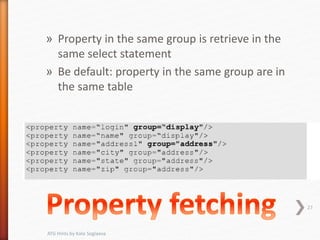
» Property in the same group is retrieve in the
same select statement
» Be default: property in the same group are in
the same table
27
ATG Hints by Kate Soglaeva
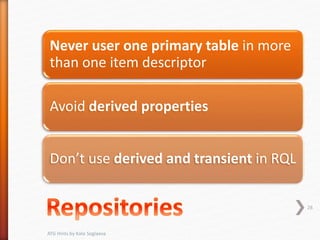
Never user one primary table in more
than one item descriptor
Avoid derived properties
Don’t use derived and transient in RQL
28
ATG Hints by Kate Soglaeva
29
30
ATG Hints by Kate Soglaeva
» ATG Order object must follow a specific
transactional pattern to avoid
˃ exceptions and deadlocks,
˃ ConcurrentUpdateExceptions,
˃ InvalidVersionExceptions
31
ATG Hints by Kate Soglaeva
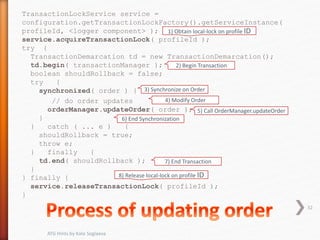
TransactionLockService service =
configuration.getTransactionLockFactory().getServiceInstance(
profileId, <logger component> );
service.acquireTransactionLock( profileId );
try {
TransactionDemarcation td = new TransactionDemarcation();
td.begin( transactionManager );
boolean shouldRollback = false;
try {
synchronized( order ) {
// do order updates
orderManager.updateOrder( order );
}
} catch ( ... e ) {
shouldRollback = true;
throw e;
} finally {
td.end( shouldRollback );
}
} finally {
service.releaseTransactionLock( profileId );
}
32
ATG Hints by Kate Soglaeva
1) Obtain local-lock on profile ID
2) Begin Transaction
3) Synchronize on Order
4) Modify Order
5) Call OrderManager.updateOrder
6) End Synchronization
7) End Transaction
8) Release local-lock on profile ID
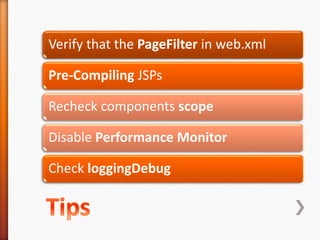
Verify that the PageFilter in web.xml
Pre-Compiling JSPs
Recheck components scope
Disable Performance Monitor
Check loggingDebug
34
ATG Hints by Kate Soglaeva

ATG Best Practices

Editor's Notes

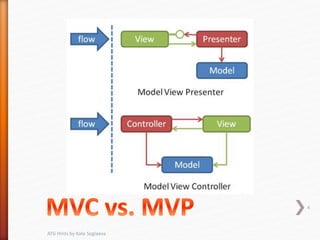
  • #5 MVC architecture is one of the oldest patterns available for achieving the separation of concerns. MVC consists of three layers, viz, Model, View, and Controller. MVC View May retrieve data from Model directly Controller Changes view when nessesary MVP summarized: Navigation is handled on a per page basis using page controller pattern approach. Classic MVC existed at a time when every control/gadget that existed in the screen was considered dumb and each control is paired with its own controller to manage the user interactions happening on them. So if 10 gadgets exist, then 10 controllers have to exist. In this scenario, every gadget is counted as a view. The advent of Windows GUI systems changed this picture. The Control-Controller relationship became obsolete. Controls gained the intelligence to respond to the actions initiated by the user. In the Windows world, view is a surface on which all the controls/gadgets exist, hence there is a need for only one controller. View can receive events and reach for controllers help to do further processing. Model – Model receives input from the controller and decides what data it needed to fulfill the request raised by the controller. Model is also capable of doing transactions with databases or other persistent storage as needed. Once it gathers the required information, it informs the view (via controller) about the new data by raising appropriate events. View – View hosts all the UI controls needed by the end-user to interact with the application. Its job is to monitor end-user gestures and pass it to the controller for further handling. View handles the event notification received from the Model and may request for any new data required to render it on the screen. However, in some variations, Controller can be designated to retrieve dataset from the Model, format it and send it to the View. Here the view’s job is to render the data received from the view without any other processing. Controller – Controller can be imagined as an extension or a personal assistant to the view, all the events originated from the view is handled by the controller. Controller will also inform the Model on behalf of view that some event happened on the view and some new data might be required.
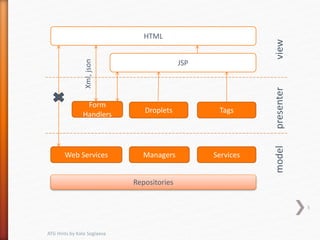
  • #6 Form handlers provide an instance of a Presenter element of the MVP pattern. They supply values for control widgets exposed by JSP’s and manage the exchange of form data. Ideally, they are the only means of acquiring data from the web site user and supplying it to business components (droplets and tags being outwardly oriented only). Form handlers have no knowledge of business logic, but they do have enough knowledge of where that logic “lives” so as to direct actions to it. In the diagram you will note that although Ajax can be used to exchange information with web services directly, that is not considered best practice for web applications serving users on the open Internet. The issue with calling web services directly, rather than obtaining their services through corresponding form handlers, is that it exposes the site to various forms of cross site scripting attacks. ATG has added an increasing amount of scripting attack mitigation support into the form handlers. Calling web services (or any nucleus component) directly from the JSP bypasses this support.
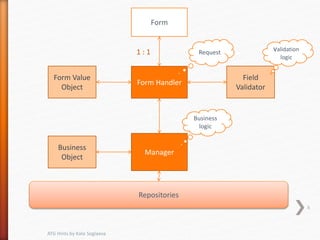
  • #7 The Form Handler Pattern Form handlers may be either request or session scoped, with strong preference given to request scope. In general, if the form is used very frequently it may be session scoped so as to avoid instantiating new copies. However, when session scoping is used then tighter maintenance of instance variables must accompany that (and session scoping form handlers is the exception).
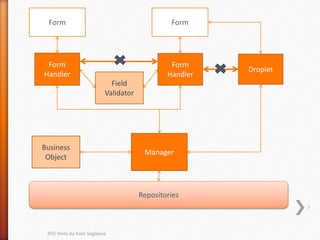
  • #8 A series of related forms
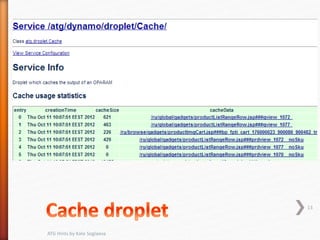
  • #13 Cache can help reduce repetitive time-consuming tasks by keeping content in temporary memory. When you use Cache, you specify the content to cache and how frequently to clear the cache. Cached URLs do not retain session or request IDs. Avoid Cache in these circumstances: When the content to cache is static. When it takes more time to cache the content than to render the content. When the cached content is not applicable for many users.
  • #14 The Cache.purgeCacheSeconds property determines how often content cached by any Cache servlet bean is flushed. The default is 21600 seconds (6 hours). Cache purging also occurs when a JSP is removed or recompiled.
  • #15 c:\AE10\ATG10.0.3\MyStore\Storefront\j2ee-apps\Storefront\store.war\browse\gadgets\cacheProductDisplay.jsp
  • #17 Avoid SQLQueryForEach, SQLQueryRange and other non-cached database querying
  • #18 The sortProperties parameter of *Range, *ForEach, and Targeting* servlet beans The Range, TargetingRange, TableRange, ForEach, TargetingForeach, TableForEach, TargetingArray and TargetingFirst servlet beans accept a sortProperties parameter which provides an easy way to sort items in an array.  However, sorting large arrays is expensive performance-wise. When the number of items to be sorted is potentially large, try to have the data source (e.g. the database server) handle the sorting instead
  • #19 3) <dsp:param name="sortProperties" value="+storeName"/> 4) Rage parameters <dsp:param name="howMany" value="2"/> <dsp:param name="start" value="2"/>
  • #23 All RqlStatement properties have to be suffixed with word 'Query'.
  • #24 RqlStatement in Global component: RqlStatement has to be used as property type of a class member variable 
  • #25 RqlStatement could be used as property type (see previous slide) or as a static variable RqlStatement  in Request component should be used as a static variable
  • #26 Repository have to use the property managers to access repository properties. See below example based on the profile property manager To check the item descriptor of the element it's better to use DynamicBeans API
  • #27 The SQL repository uses the cascade attribute in a <property> tag to better handle hierarchical properties, which is to say properties with either the item-type or component-item-type attributes. The cascade attribute can have one or more of the values insert, update, or delete When item property refers to another item, both items can be deleted, inserted or updated at the same time Insert: an item of the type declared by item-type attribute is also created Update: any modified referenced items are automatically updated, Any referenced items that are new items are added (Update incapsulates insert?) Delete: when an item is deleted, the referenced item is deleted as well
  • #29 Never user one primary table in more than one item descriptor,this can create problem in Item caching.If table get updated by one Item, other Item will not get invalidate. Try to avoid derived properties, it can adversely affect system performance Don’t use derived and transient property as part of RQL and ATG Query Use Lazy loading in repository item to improve performance.
  • #34  Verify that the PageFilter in web.xml is bound to the right extension. Typically it's *.jsp, not /*. Pre-Compiling JSPs Recheck components scope Disable Performance Monitor Ensure that loggingDebug is disabled for all components Disabling Document and Component Indexing /atg/devtools/DocumentIndex.enabled=false and /atg/devtools/ComponentIndex.enabled=false