Name:- Sunipa Bera
B.Tech CSE(CSF)
Roll no:- 2
Operating System
&
Application Security
Acknowledgement
Primarily I would thank God for being able to complete
this presentation in Success. Then I would like to thank
my teacher, whose valuable guidance has been the ones
that helped me patch this presentation and make it full
proof success his suggestions and his instructions has
served as the major contributor towards the completion of
the presentation.
Then I would like to thank my parents and friends who
have helped me with their valuable suggestions and
guidance.
Operating System
○ The OS can be drawn as the life of
a computer system.
○ It runs all the programs and
applications on the computer.
○ Being the control center of the
computer, its role in the overall
security of the system is very
important.
Application Security
○ Security refers to providing a protection
system to computer system resources.
○ If a computer program is run by an
unauthorized user, then he/she may
cause severe damage to computer or data
stored in it.
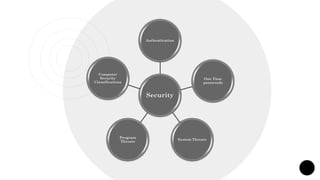
Security
Authentication
One Time
passwords
System Threats
Program
Threats
Computer
Security
Classifications
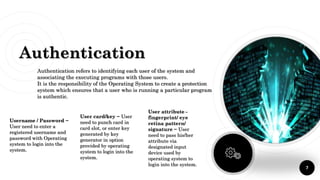
Authentication
Username / Password −
User need to enter a
registered username and
password with Operating
system to login into the
system.
User card/key − User
need to punch card in
card slot, or enter key
generated by key
generator in option
provided by operating
system to login into the
system.
User attribute -
fingerprint/ eye
retina pattern/
signature − User
need to pass his/her
attribute via
designated input
device used by
operating system to
login into the system.
7
Authentication refers to identifying each user of the system and
associating the executing programs with those users.
It is the responsibility of the Operating System to create a protection
system which ensures that a user who is running a particular program
is authentic.
Random numbers −
Users are provided cards
having numbers printed
along with corresponding
alphabets. System asks
for numbers
corresponding to few
alphabets randomly
chosen.
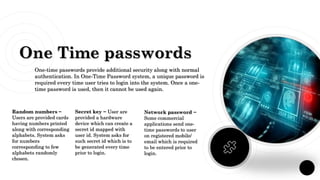
One Time passwords
Secret key − User are
provided a hardware
device which can create a
secret id mapped with
user id. System asks for
such secret id which is to
be generated every time
prior to login.
Network password −
Some commercial
applications send one-
time passwords to user
on registered mobile/
email which is required
to be entered prior to
login.
One-time passwords provide additional security along with normal
authentication. In One-Time Password system, a unique password is
required every time user tries to login into the system. Once a one-
time password is used, then it cannot be used again.
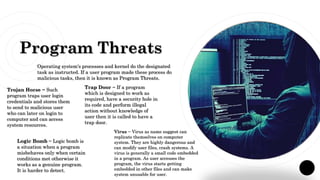
Program Threats
Operating system's processes and kernel do the designated
task as instructed. If a user program made these process do
malicious tasks, then it is known as Program Threats.
Trojan Horse − Such
program traps user login
credentials and stores them
to send to malicious user
who can later on login to
computer and can access
system resources.
Trap Door − If a program
which is designed to work as
required, have a security hole in
its code and perform illegal
action without knowledge of
user then it is called to have a
trap door.
Logic Bomb − Logic bomb is
a situation when a program
misbehaves only when certain
conditions met otherwise it
works as a genuine program.
It is harder to detect.
Virus − Virus as name suggest can
replicate themselves on computer
system. They are highly dangerous and
can modify user files, crash systems. A
virus is generally a small code embedded
in a program. As user accesses the
program, the virus starts getting
embedded in other files and can make
system unusable for user.
System Threats
System threats refers to misuse of system services and network
connections to put user in trouble. System threats can be used to
launch program threats on a complete network called as program
attack. System threats creates such an environment that operating
system resources/ user files are misused.
Worm − Worm is a process
which can choked down a
system performance by
using system resources to
extreme levels. A Worm
process generates its
multiple copies where each
copy uses system resources,
prevents all other processes
to get required resources.
Worms processes can even
shut down an entire
network.
Port Scanning − Port
scanning is a
mechanism or means
by which a hacker can
detects system
vulnerabilities to make
an attack on the
system.
Denial of Service −
Denial of service
attacks normally
prevents user to make
legitimate use of the
system. For example, a
user may not be able to
use internet if denial of
service attacks
browser's content
settings.
Computer Security
Classifications
○ As per the U.S. Department of Defense Trusted Computer
System's Evaluation Criteria there are four security
classifications in computer systems: A, B, C, and D. This is
widely used specifications to determine and model the
security of systems and of security solutions.
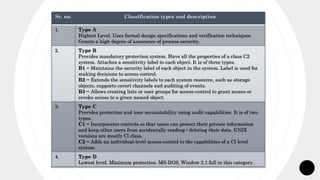
Sr. no. Classification types and description
1. Type A
Highest Level. Uses formal design specifications and verification techniques.
Grants a high degree of assurance of process security.
2. Type B
Provides mandatory protection system. Have all the properties of a class C2
system. Attaches a sensitivity label to each object. It is of three types.
B1 − Maintains the security label of each object in the system. Label is used for
making decisions to access control.
B2 − Extends the sensitivity labels to each system resource, such as storage
objects, supports covert channels and auditing of events.
B3 − Allows creating lists or user groups for access-control to grant access or
revoke access to a given named object.
3. Type C
Provides protection and user accountability using audit capabilities. It is of two
types.
C1 − Incorporates controls so that users can protect their private information
and keep other users from accidentally reading / deleting their data. UNIX
versions are mostly Cl class.
C2 − Adds an individual-level access control to the capabilities of a Cl level
system.
4. Type D
Lowest level. Minimum protection. MS-DOS, Window 3.1 fall in this category.
Credits:
I extended my heartiest thanks to my friends and my mentor to
understand different principles and different judgement variables that
made this project works a success.
Thanks!
Any Questions?
Biblography
- Reference book
- Online sites:
- - geeksforgeeks
- - tutorialspoint
15

Operating System & Application Security

  • 1.
    Name:- Sunipa Bera B.TechCSE(CSF) Roll no:- 2
  • 2.
  • 3.
    Acknowledgement Primarily I wouldthank God for being able to complete this presentation in Success. Then I would like to thank my teacher, whose valuable guidance has been the ones that helped me patch this presentation and make it full proof success his suggestions and his instructions has served as the major contributor towards the completion of the presentation. Then I would like to thank my parents and friends who have helped me with their valuable suggestions and guidance.
  • 4.
    Operating System ○ TheOS can be drawn as the life of a computer system. ○ It runs all the programs and applications on the computer. ○ Being the control center of the computer, its role in the overall security of the system is very important.
  • 5.
    Application Security ○ Securityrefers to providing a protection system to computer system resources. ○ If a computer program is run by an unauthorized user, then he/she may cause severe damage to computer or data stored in it.
  • 6.
  • 7.
    Authentication Username / Password− User need to enter a registered username and password with Operating system to login into the system. User card/key − User need to punch card in card slot, or enter key generated by key generator in option provided by operating system to login into the system. User attribute - fingerprint/ eye retina pattern/ signature − User need to pass his/her attribute via designated input device used by operating system to login into the system. 7 Authentication refers to identifying each user of the system and associating the executing programs with those users. It is the responsibility of the Operating System to create a protection system which ensures that a user who is running a particular program is authentic.
  • 8.
    Random numbers − Usersare provided cards having numbers printed along with corresponding alphabets. System asks for numbers corresponding to few alphabets randomly chosen. One Time passwords Secret key − User are provided a hardware device which can create a secret id mapped with user id. System asks for such secret id which is to be generated every time prior to login. Network password − Some commercial applications send one- time passwords to user on registered mobile/ email which is required to be entered prior to login. One-time passwords provide additional security along with normal authentication. In One-Time Password system, a unique password is required every time user tries to login into the system. Once a one- time password is used, then it cannot be used again.
  • 9.
    Program Threats Operating system'sprocesses and kernel do the designated task as instructed. If a user program made these process do malicious tasks, then it is known as Program Threats. Trojan Horse − Such program traps user login credentials and stores them to send to malicious user who can later on login to computer and can access system resources. Trap Door − If a program which is designed to work as required, have a security hole in its code and perform illegal action without knowledge of user then it is called to have a trap door. Logic Bomb − Logic bomb is a situation when a program misbehaves only when certain conditions met otherwise it works as a genuine program. It is harder to detect. Virus − Virus as name suggest can replicate themselves on computer system. They are highly dangerous and can modify user files, crash systems. A virus is generally a small code embedded in a program. As user accesses the program, the virus starts getting embedded in other files and can make system unusable for user.
  • 10.
    System Threats System threatsrefers to misuse of system services and network connections to put user in trouble. System threats can be used to launch program threats on a complete network called as program attack. System threats creates such an environment that operating system resources/ user files are misused. Worm − Worm is a process which can choked down a system performance by using system resources to extreme levels. A Worm process generates its multiple copies where each copy uses system resources, prevents all other processes to get required resources. Worms processes can even shut down an entire network. Port Scanning − Port scanning is a mechanism or means by which a hacker can detects system vulnerabilities to make an attack on the system. Denial of Service − Denial of service attacks normally prevents user to make legitimate use of the system. For example, a user may not be able to use internet if denial of service attacks browser's content settings.
  • 11.
    Computer Security Classifications ○ Asper the U.S. Department of Defense Trusted Computer System's Evaluation Criteria there are four security classifications in computer systems: A, B, C, and D. This is widely used specifications to determine and model the security of systems and of security solutions.
  • 12.
    Sr. no. Classificationtypes and description 1. Type A Highest Level. Uses formal design specifications and verification techniques. Grants a high degree of assurance of process security. 2. Type B Provides mandatory protection system. Have all the properties of a class C2 system. Attaches a sensitivity label to each object. It is of three types. B1 − Maintains the security label of each object in the system. Label is used for making decisions to access control. B2 − Extends the sensitivity labels to each system resource, such as storage objects, supports covert channels and auditing of events. B3 − Allows creating lists or user groups for access-control to grant access or revoke access to a given named object. 3. Type C Provides protection and user accountability using audit capabilities. It is of two types. C1 − Incorporates controls so that users can protect their private information and keep other users from accidentally reading / deleting their data. UNIX versions are mostly Cl class. C2 − Adds an individual-level access control to the capabilities of a Cl level system. 4. Type D Lowest level. Minimum protection. MS-DOS, Window 3.1 fall in this category.
  • 13.
    Credits: I extended myheartiest thanks to my friends and my mentor to understand different principles and different judgement variables that made this project works a success.
  • 14.
  • 15.
    Biblography - Reference book -Online sites: - - geeksforgeeks - - tutorialspoint 15