1
Operating System - 2
Dr.R.U.Anitha
2
Chapter # 7 – Security
3
Topics Covered
 The security problems
 User Authentication
 Program threats
 System threats
 Securing systems and facilities
4
The security Problem
Lecture - 1
5
 Protection is an internal problem. Whereas
security requires an adequate protection as well
as consideration of the external environment
within which the system operates. Internal
protection is not useful if the system is exposed
to external threats.
6
THE SECURITY PROBLEM
 A system is secured if its resources are used and
accessed as intended under all circumstances. Total
security and absolute protection cannot be
achieved, but the system must be defended from all
possible security breaches up to a maximum level.
 There can be two categories of security violations
i.e. intentional and accidental. The accidental
violations are easy to protect. The intentional
violation can be further classified as:
 Unauthorized reading of data (information theft)
 Unauthorized modification of data
 Unauthorized destruction of data
 Preventing the authorized users from the system
7
 There are four important security measures:
 Physical: The site of the computer systems must
properly be protected from intruders by having
proper locks.
 Human: The authorized users must be screened
to reduce the chance of indirect access by an
unauthorized user.
 Network:When the data travel over the
internet/Network it must be secured from
interception. (Denial of Service Attack)
 Operating System: The OS must protect itself
from accidental or intentional security breaches
8
User Authentication
Lecture - 2
9
USER AUTHENTICATION
 Users can provide their authentication by three
means:
 Users’ Possession (a key or card)
 User Knowledge (a user identifier and password)
 User Attribute (Fingerprint, retina pattern or
signature)
10
Passwords
 When a user authenticates himself by user ID or
account name then he is asked for a password.
 If the user supplied password matches with the
pre-stored system password then the user is
considered as legal.
 Passwords can also be used to protect resources
or objects like a file.
 Different passwords can be associated with
different resources with different access rights.
11
Password Vulnerability
 Passwords can be guessed easily, accidently
exposed, sniffed or may illegally transferred
by an authorized user to an unauthorized
one.
 There are two common methods to guess a
password:
 The intruder may try different information related
to the user e.g. His spouse name, date of birth,
name of pets etc.
 The intruder may try brute force method i.e. to try
all possible combinations of letters, numbers and
punctuations until the password is found.
12
 The password can be sniffed or theft by shoulder
surfing and then can be used anywhere.
 If the password is written somewhere due to its long
length then it’s more vulnerable to exposure as
compared to a short password.
 The illegal transfer of password is due to human
nature. The sharing of users account can also create
problems and are very difficult to associate the
breach with a user.
 If the password is changed frequently then it can
solve most of the password security problems
13
Encrypted Passwords
 Keeping the password secretly is the system is a
difficult issue.
 The passwords can be stored in a system database in
an encrypted form.
 The system can use a function (An Encryption
Algorithm) for storing the passwords within the system
database. The function is extremely difficult to reverse
but easy to compute.
 In this method, the system has no control over the
password. A decryption routine can be used to get the
password within few hours using a fast computer/grid
or even a slow cluster.
 UNIX newer versions store all the passwords in an
encrypted file that can only be read by super user.
14
On Time Passwords
 In this scheme, when a session begins, the
system randomly selects and presents one part of
password pair. The user must supply the other
part.
 A special algorithm is used to generate the
random numbers (seed). The seed is an
authentication challenge from the computer.
 A secret is shared by the user and system.
 The seed is used along with the secret as input to
the function f(secret, seed).
 The password is different every time a new
session begins. The password of one session does
not work the other session.
15
Biometrics
 The retina pattern, finger length, finger width
and finger line patterns can also be used as
secrete and unique passwords.
 The fingerprint readers are nowadays common
and cost effective to be used.
 These devices read the finger’s ridge patterns
and store them as sequence of numbers.
 The retina patterns are also common is use
because these are also distinct from human to
human.
16
Program Threats
Lecture - 3
17
PROGRAM THREATS
Trojan Horse
 A Trojan horse is code segment that hide its identity by
pretending itself as a useful program.
 It never harms other programs until and unless is
activated by the legitimate users.
 Once activated it can perform any illegal operation to
cause damage or information theft or misuse the
environment.
 One version of Trojan horse pretends itself as a login
program, when a user type his ID and password it
shows a message that your ID or password is incorrect
meanwhile storing/emailing the user typed ID and
password to the desired location.
18
Trap Doors
 When the designer of software leaves a hole in it
for himself for later use, it’s called a trap door for
example, as shown in War Games and bank
frauds.
 The designer’s own ID and password is known to
the software when he uses that information then
he can breach normal security procedure.
 Trap doors are difficult to detect because all the
source code need to be analyzed very carefully.
19
Stack and Buffer Overflow
 It is the most common attack from outsiders
through a network or dialup connection to
gain access of the system.
 This method can be used to gain privileges
beyond those allowed for a user.
 The attacker finds a bug in the program; this
bug can be due to poor programming.
 For example, if the program doesn’t check for
input bounds then the attacker can send
more data than required which may cause
overflow.
20
 Such bugs made by the designers are
examined by the attacker to check the
strength and vulnerability of the program to
do the following:
 Overflow an input field, command line argument,
or input buffer
 Overwrite the current return address on the stack
with the address of the exploit code loaded in step
3.
 Write a simple set of code/commands for the next
space in the stack that the attacker wants to
execute.
21
System Threats
Lecture - 4
22
SYSTEM THREATS
Worms
 Worm is a process that uses spawn mechanism
to affect system performance.
 It copies itself using system resources and finally
locking out system use by all other processes.
 On computer networks worms are very common
and they can reproduce themselves which may
result in shutting down the entire network.
23
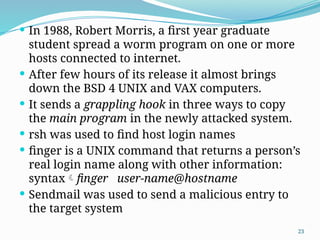
 In 1988, Robert Morris, a first year graduate
student spread a worm program on one or more
hosts connected to internet.
 After few hours of its release it almost brings
down the BSD 4 UNIX and VAX computers.
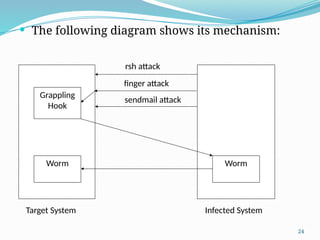
 It sends a grappling hook in three ways to copy
the main program in the newly attacked system.
 rsh was used to find host login names
 finger is a UNIX command that returns a person’s
real login name along with other information:
syntaxfinger user-name@hostname
 Sendmail was used to send a malicious entry to
the target system
24
 The following diagram shows its mechanism:
Grappling
Hook
Worm Worm
rsh attack
finger attack
sendmail attack
Infected System
Target System
25
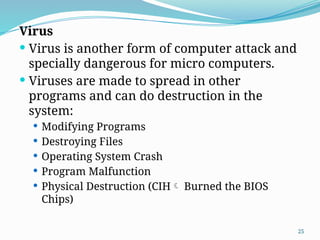
Virus
 Virus is another form of computer attack and
specially dangerous for micro computers.
 Viruses are made to spread in other
programs and can do destruction in the
system:
 Modifying Programs
 Destroying Files
 Operating System Crash
 Program Malfunction
 Physical Destruction (CIH Burned the BIOS
Chips)
26
 A worm is a standalone program where as a
virus is fragment of code embedded in another
legal program.
 Multiuser systems are not prone to viruses
because the executable programs are protected
by OS. The user has limited access to system files.
 The major source of spreading virus is internet,
USB, Floppy disk and other portable storage
mediums.
 The history is full of the stories of developing viruses
and spreading them out. The most famous story was
about the Russian programmers who spread CIH. It
causes millions of losses in the entire world. This
virus is activated every year on 26 February. It is the
same date when the Russian atomic Reactor was
27
 The MS office files are another famous source
of spreading the virus over the internet.
 To protect form viruses we can follow the
following guidelines:
 Installing the antivirus program and scanning the
system periodically.
 The best protection against the viruses to use the
licensed software.
 Never open the unknown emails.
 A new system must be started by reformatting the
disk, especially the boot sector. The boot sector
resident viruses are hard to detect and if once
activated are impossible to recover.
28
Securing System and Facilities
Lecture - 5
29
SECURING SYSTEMS AND FACILITIES
 Securing a system is liked with the intrusion
detection, both techniques work together. The
periodic scan also prevents from potential threats.
Such a scan can check a variety of aspects like:
 Short or easy to guess passwords
 Unauthorized privileged programs
 Unauthorized programs in system directory
 Unexpected long-running processes
 Improper directory protection
 Detection of Trojan Horses
 Changes to system programs by checksum method
 Unexpected or hidden network services/daemons
30
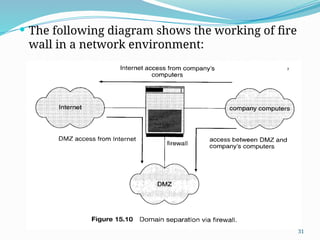
 The firewall is another way of protection. It is a
computer or router that sits between the trusted
and un-trusted.
 It limits the network access between two security
domains and monitors and logs all connections.
 It allows only the designated to programs to pass
through the wall. E.g. Only HTTP can pass
through web-server.
31
 The following diagram shows the working of fire
wall in a network environment:

CHAPTER 7 - Operating system Security.pptx

  • 1.
    1 Operating System -2 Dr.R.U.Anitha
  • 2.
    2 Chapter # 7– Security
  • 3.
    3 Topics Covered  Thesecurity problems  User Authentication  Program threats  System threats  Securing systems and facilities
  • 4.
  • 5.
    5  Protection isan internal problem. Whereas security requires an adequate protection as well as consideration of the external environment within which the system operates. Internal protection is not useful if the system is exposed to external threats.
  • 6.
    6 THE SECURITY PROBLEM A system is secured if its resources are used and accessed as intended under all circumstances. Total security and absolute protection cannot be achieved, but the system must be defended from all possible security breaches up to a maximum level.  There can be two categories of security violations i.e. intentional and accidental. The accidental violations are easy to protect. The intentional violation can be further classified as:  Unauthorized reading of data (information theft)  Unauthorized modification of data  Unauthorized destruction of data  Preventing the authorized users from the system
  • 7.
    7  There arefour important security measures:  Physical: The site of the computer systems must properly be protected from intruders by having proper locks.  Human: The authorized users must be screened to reduce the chance of indirect access by an unauthorized user.  Network:When the data travel over the internet/Network it must be secured from interception. (Denial of Service Attack)  Operating System: The OS must protect itself from accidental or intentional security breaches
  • 8.
  • 9.
    9 USER AUTHENTICATION  Userscan provide their authentication by three means:  Users’ Possession (a key or card)  User Knowledge (a user identifier and password)  User Attribute (Fingerprint, retina pattern or signature)
  • 10.
    10 Passwords  When auser authenticates himself by user ID or account name then he is asked for a password.  If the user supplied password matches with the pre-stored system password then the user is considered as legal.  Passwords can also be used to protect resources or objects like a file.  Different passwords can be associated with different resources with different access rights.
  • 11.
    11 Password Vulnerability  Passwordscan be guessed easily, accidently exposed, sniffed or may illegally transferred by an authorized user to an unauthorized one.  There are two common methods to guess a password:  The intruder may try different information related to the user e.g. His spouse name, date of birth, name of pets etc.  The intruder may try brute force method i.e. to try all possible combinations of letters, numbers and punctuations until the password is found.
  • 12.
    12  The passwordcan be sniffed or theft by shoulder surfing and then can be used anywhere.  If the password is written somewhere due to its long length then it’s more vulnerable to exposure as compared to a short password.  The illegal transfer of password is due to human nature. The sharing of users account can also create problems and are very difficult to associate the breach with a user.  If the password is changed frequently then it can solve most of the password security problems
  • 13.
    13 Encrypted Passwords  Keepingthe password secretly is the system is a difficult issue.  The passwords can be stored in a system database in an encrypted form.  The system can use a function (An Encryption Algorithm) for storing the passwords within the system database. The function is extremely difficult to reverse but easy to compute.  In this method, the system has no control over the password. A decryption routine can be used to get the password within few hours using a fast computer/grid or even a slow cluster.  UNIX newer versions store all the passwords in an encrypted file that can only be read by super user.
  • 14.
    14 On Time Passwords In this scheme, when a session begins, the system randomly selects and presents one part of password pair. The user must supply the other part.  A special algorithm is used to generate the random numbers (seed). The seed is an authentication challenge from the computer.  A secret is shared by the user and system.  The seed is used along with the secret as input to the function f(secret, seed).  The password is different every time a new session begins. The password of one session does not work the other session.
  • 15.
    15 Biometrics  The retinapattern, finger length, finger width and finger line patterns can also be used as secrete and unique passwords.  The fingerprint readers are nowadays common and cost effective to be used.  These devices read the finger’s ridge patterns and store them as sequence of numbers.  The retina patterns are also common is use because these are also distinct from human to human.
  • 16.
  • 17.
    17 PROGRAM THREATS Trojan Horse A Trojan horse is code segment that hide its identity by pretending itself as a useful program.  It never harms other programs until and unless is activated by the legitimate users.  Once activated it can perform any illegal operation to cause damage or information theft or misuse the environment.  One version of Trojan horse pretends itself as a login program, when a user type his ID and password it shows a message that your ID or password is incorrect meanwhile storing/emailing the user typed ID and password to the desired location.
  • 18.
    18 Trap Doors  Whenthe designer of software leaves a hole in it for himself for later use, it’s called a trap door for example, as shown in War Games and bank frauds.  The designer’s own ID and password is known to the software when he uses that information then he can breach normal security procedure.  Trap doors are difficult to detect because all the source code need to be analyzed very carefully.
  • 19.
    19 Stack and BufferOverflow  It is the most common attack from outsiders through a network or dialup connection to gain access of the system.  This method can be used to gain privileges beyond those allowed for a user.  The attacker finds a bug in the program; this bug can be due to poor programming.  For example, if the program doesn’t check for input bounds then the attacker can send more data than required which may cause overflow.
  • 20.
    20  Such bugsmade by the designers are examined by the attacker to check the strength and vulnerability of the program to do the following:  Overflow an input field, command line argument, or input buffer  Overwrite the current return address on the stack with the address of the exploit code loaded in step 3.  Write a simple set of code/commands for the next space in the stack that the attacker wants to execute.
  • 21.
  • 22.
    22 SYSTEM THREATS Worms  Wormis a process that uses spawn mechanism to affect system performance.  It copies itself using system resources and finally locking out system use by all other processes.  On computer networks worms are very common and they can reproduce themselves which may result in shutting down the entire network.
  • 23.
    23  In 1988,Robert Morris, a first year graduate student spread a worm program on one or more hosts connected to internet.  After few hours of its release it almost brings down the BSD 4 UNIX and VAX computers.  It sends a grappling hook in three ways to copy the main program in the newly attacked system.  rsh was used to find host login names  finger is a UNIX command that returns a person’s real login name along with other information: syntaxfinger user-name@hostname  Sendmail was used to send a malicious entry to the target system
  • 24.
    24  The followingdiagram shows its mechanism: Grappling Hook Worm Worm rsh attack finger attack sendmail attack Infected System Target System
  • 25.
    25 Virus  Virus isanother form of computer attack and specially dangerous for micro computers.  Viruses are made to spread in other programs and can do destruction in the system:  Modifying Programs  Destroying Files  Operating System Crash  Program Malfunction  Physical Destruction (CIH Burned the BIOS Chips)
  • 26.
    26  A wormis a standalone program where as a virus is fragment of code embedded in another legal program.  Multiuser systems are not prone to viruses because the executable programs are protected by OS. The user has limited access to system files.  The major source of spreading virus is internet, USB, Floppy disk and other portable storage mediums.  The history is full of the stories of developing viruses and spreading them out. The most famous story was about the Russian programmers who spread CIH. It causes millions of losses in the entire world. This virus is activated every year on 26 February. It is the same date when the Russian atomic Reactor was
  • 27.
    27  The MSoffice files are another famous source of spreading the virus over the internet.  To protect form viruses we can follow the following guidelines:  Installing the antivirus program and scanning the system periodically.  The best protection against the viruses to use the licensed software.  Never open the unknown emails.  A new system must be started by reformatting the disk, especially the boot sector. The boot sector resident viruses are hard to detect and if once activated are impossible to recover.
  • 28.
    28 Securing System andFacilities Lecture - 5
  • 29.
    29 SECURING SYSTEMS ANDFACILITIES  Securing a system is liked with the intrusion detection, both techniques work together. The periodic scan also prevents from potential threats. Such a scan can check a variety of aspects like:  Short or easy to guess passwords  Unauthorized privileged programs  Unauthorized programs in system directory  Unexpected long-running processes  Improper directory protection  Detection of Trojan Horses  Changes to system programs by checksum method  Unexpected or hidden network services/daemons
  • 30.
    30  The firewallis another way of protection. It is a computer or router that sits between the trusted and un-trusted.  It limits the network access between two security domains and monitors and logs all connections.  It allows only the designated to programs to pass through the wall. E.g. Only HTTP can pass through web-server.
  • 31.
    31  The followingdiagram shows the working of fire wall in a network environment: