OPERATING SYSTEM
By
Syed Abdul Ghafoor Shah
Senior Subject Specialist
Govt. College for Elementary Teachers (M) Bahawalpur
What is
OPERATING SYSTEM
A Collection of system programs that controls and
coordinates the overall operation of a computer system.
Examples:-Microsoft windows, Linux, Unix, Sun
Solaris, Mac OS
FUNCTIONS OF OS
 Acts as interface between the
hardware, application programs, files
and user.
 A communication link between the user
and computer
 Helps the user to run the application
programs
 Manages the computer resources
(CPU, Memory and I/O devices)
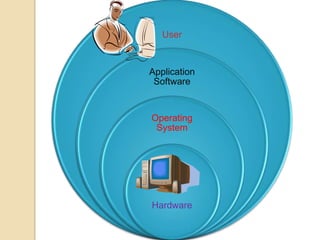
User
Application
Software
Operating
System
Hardware
LOCATION OF
OPERATING SYSTEM
A small part of operating system called
“Kernel” resides in memory(Main
Memory). It works in booting. Other
large part of operating system is stored
in secondary memory. It is swapped in
or out when needed.
ARCHITECTURE OF
OPERATING SYSTEM
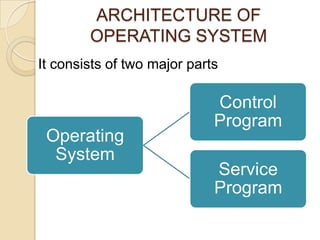
It consists of two major parts
Operating
System
Control
Program
Service
Program
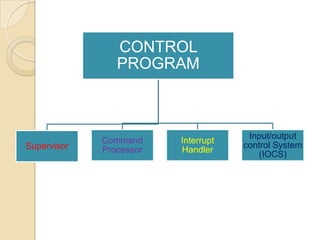
CONTROL
PROGRAM
Supervisor
Command
Processor
Interrupt
Handler
Input/output
control System
(IOCS)
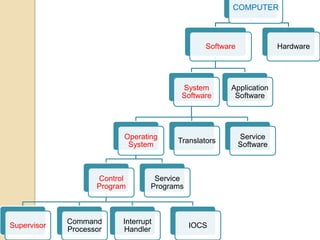
COMPUTER
Software
System
Software
Operating
System
Control
Program
Supervisor
Command
Processor
Interrupt
Handler
IOCS
Service
Programs
Translators
Service
Software
Application
Software
Hardware
SUPERVISOR
 Major part of operating system that
controls the operation of the computer
 Memory Resident
 Supervises the loading of other part of
the operating system from Sec. to
Main memory
 Loads programs or data into main
memory from backing storage
 Scheduling the sequence of jobs to be
run
COMMAND PROCESSOR
 Accepts and carries out user
commands e.g. copy , format, print
INTERRUPT HANDLER
 Keeps track of all the process and
executions of commands
 Displays error massages
e.g. not reading drive A
INPUT OUTPUT CONTROL
SYSTEM (IOCS)
 Monitors the operation of input/output
devices
 Controls and coordinates the flow of
data between I/O devices
SERVICE PROGRAMS
 Utility Programs
 Library Programs
UTILITY PROGRAMS
Enables the user to handle the file
management
e.g. File can easily be
prepared, copied, deleted, mer.ged, so
rted, updated etc
LIBRARY PROGRAMS
Maintains directory of software and
their locations
CATEGORIES OF
OPERATING SYSTEM
 Stand alone Operating System
 Network Operating System
 Embedded Operating System
STAND ALONE
OPERATING SYSTEM
 That works on a desktop or notebook
Computer
 When it works with a Network operating
system is called Client Operating system
Examples:-DOS, Windows XP, Windows
Vista, Macintosh OS
NETWORK OPERATING
SYSTEM
 An OS that supports network
 Allows to share resources such as hard
disk, printer etc.
 Works on network server
Examples:-Windows NT Server, Windows
2003 Server, Netware, UNIX, Linux, Solaris
EMBEDDED OPERATING
SYSTEM
 It is used in hand held devices
 It resides on a ROM chip
 Examples:- Windows CE, Windows
Mobile 2003, Palm OS
TYPES OF OPERATING
SYSTEM
 Single User
 Multi User
SINGLE USER
 This OS can run only one program at
a time
 Only one user is in command at any
given time
 It runs on microcomputers
Examples:- DOS, Macintosh system
MULTI USER
 Able to run several jobs at a time
 Many users can use simultaneously
 Run in main frames
Examples:- UNIX, ZNIX
FUNCTIONS OF
OPERATING SYSTEM
 Memory management
 Booting
 Loading and execution
 Disk management
 Job scheduling
 Device controlling
 Accessing the Web
 Providing interface
(Command line user interface/Graphical user
interface)
FUNCTIONS OF
OPERATING SYSTEM
 Controlling Network
 Monitoring performance
 Administrating security
CLASSIFICATION OF OPERATING
SYSTEM
OR PROCESSING METHODS
 Batch Processing
 Online processing
 Real time processing
 Multiprogramming
 Multiprocessing
 Time sharing
BATCH PROCESSING
 Also known as sequential
serial, Stacked processing or queued
processing
I. Jobs of different users are stacked in
queue
II. A batch of jobs when completed
is sent to processor
 It is low cost but time consuming
ONLINE PROCESSING
 A job is processed at the same time
when it is received
Random & rapid input of transactions
Immediate and direct access to record
REAL TIME PROCESSING
 Use data as they become available
 Receiving and processing of
transaction is performed
simultaneously and there is no delay
 This system uses the features of one-
line system
Used in banking for account
maintaining, reservation system in
railways Hotels
MULTIPROGRAMMING
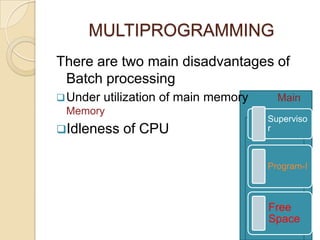
There are two main disadvantages of
Batch processing
Under utilization of main memory Main
Memory
Idleness of CPU
Superviso
r
Program-I
Free
Space
MULTI PROGRAMMING
 Simultaneous Execution of two or
more programs on one computer
system
 Computer accesses each program in
turn, loading segments of each
program into separate section of main
storage called partition.
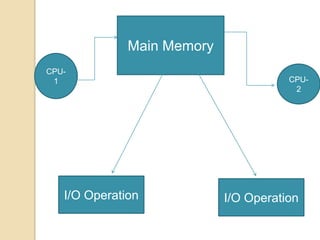
MULTIPROCESSING
 When two or more processors share
common memory and communicate
with each other, it is called multi
processing
 Use of two or more CPUs within a
mainframe
Main Memory
I/O Operation I/O Operation
CPU-
1 CPU-
2
TIME SHARING
 This system allows different users to
use the same CPU simultaneously by
dividing CPU time among all the users
on a scheduled basis.
 Only one CPU
 No. of terminals can be more than
100, so it is called as multi access
system
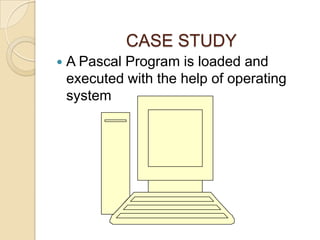
CASE STUDY
 A Pascal Program is loaded and
executed with the help of operating
system
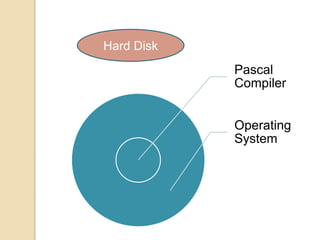
Pascal
Compiler
Operating
System
Hard Disk
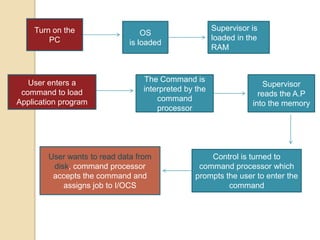
Turn on the
PC
OS
is loaded
Supervisor is
loaded in the
RAM
User enters a
command to load
Application program
The Command is
interpreted by the
command
processor
Supervisor
reads the A.P
into the memory
Control is turned to
command processor which
prompts the user to enter the
command
User wants to read data from
disk, command processor
accepts the command and
assigns job to I/OCS
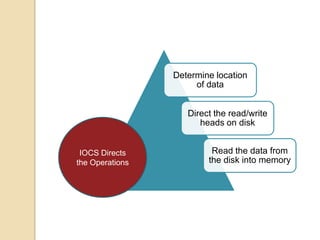
Determine location
of data
Direct the read/write
heads on disk
Read the data from
the disk into memory
IOCS Directs
the Operations
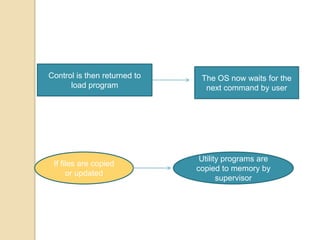
Control is then returned to
load program
The OS now waits for the
next command by user
If files are copied
or updated
Utility programs are
copied to memory by
supervisor
Operating system

Operating system