Cloud for Scientific Computing
@ STFC
Alexander Dibbo, George Ryall
Alexander.dibbo@stfc.ac.uk
Rutherford Appleton Laboratory
Science and Technology Facilities Council
United Kingdom
What I’m Going to talk about
• Background (STFC, Scientific Computing Department,
Cloud project)
• Use Cases
– Self Service VMs
– “Cloud Bursting” our Batch System
– Other Projects and Communities
• Work done
– Traceability
– Quattor/Aquilon Integration
– Web Frontend
• Work left to do
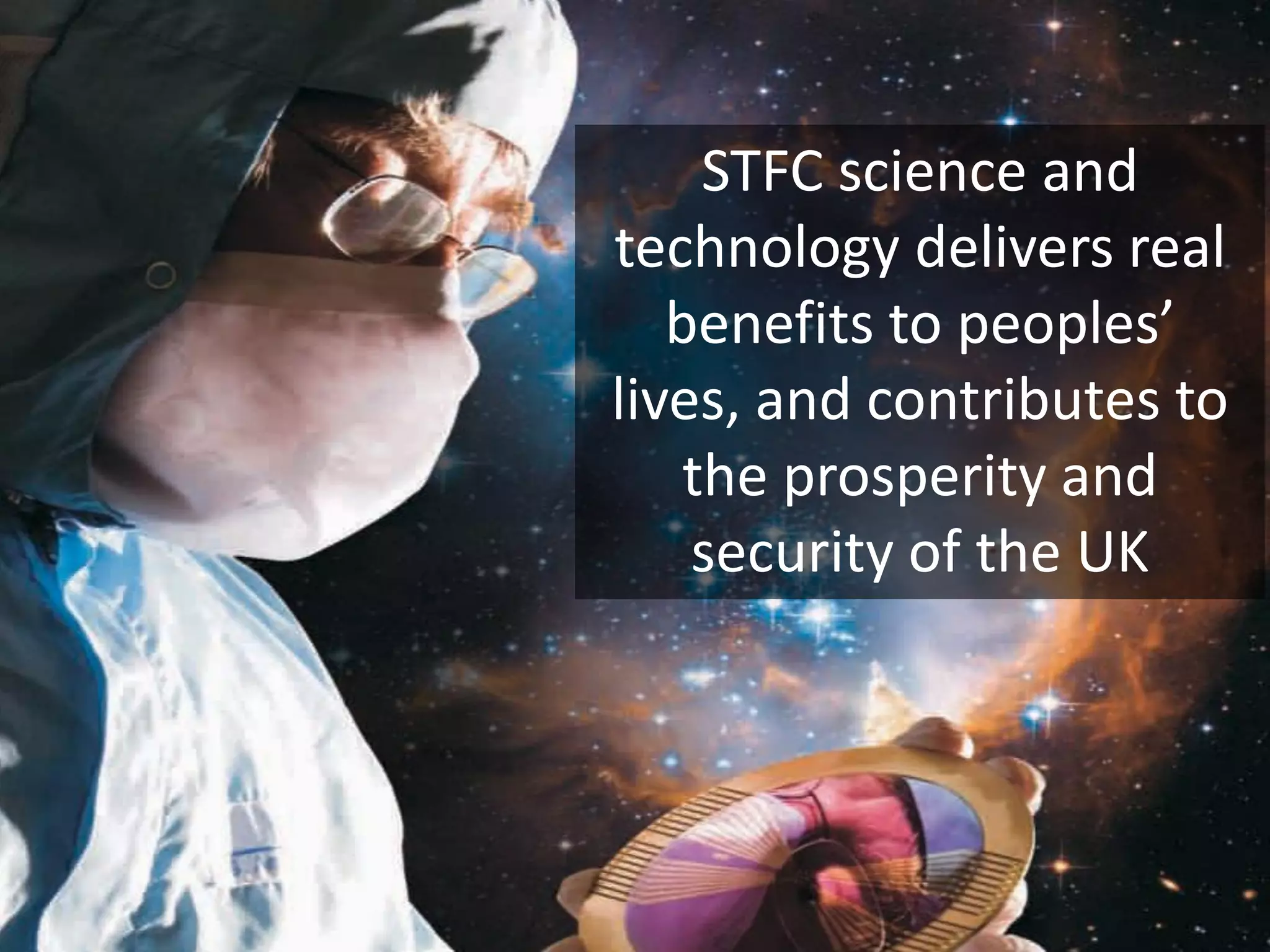
STFC science and
technology delivers real
benefits to peoples’
lives, and contributes to
the prosperity and
security of the UK
What is the STFC?
• One of Europe’s largest multi-disciplinary scientific research
organizations
• One of 7 UK Research Councils that fund research in all Disciplines
• We provide World Class Research, Innovation and Skills
– Broad range of physical, life and computational sciences
– Around 1,700 scientists in particle and nuclear physics, and
astronomy and Access for 7,500 scientists to world-leading, large-
scale facilities
– Science and Innovation Campuses at Daresbury and Harwell
– Globally-recognised capabilities and expertise in technology R&D
– Inspiring young people to undertake STEM
Scientific Computing Department
• ~190 staff – Developers (including World Leading experts
in computational sciences), Systems Administrators etc.
• Provides Large Scale HPC facilities, computing data
services and infrastructure
• Four Divisions (plus a partner)
– Applications
– Data
– Systems
• Provides National and Internationally recognized computing
services for academia, industry and business
– Technology
– Hartree Centre
Systems Division
• Petascale Computing and Storage
– The UK LHC Tier-1 Centre for GridPP
• High Performance Systems
– HPC services including the BlueWonder and BlueJoule
systems and support to the HECToR and ARCHER
supercomputers
• Research Infrastructure
– Provides computing resources to the UK and EGI such as the
JASMIN Super Data Cluster
Cloud Background
• Began as small experiment 3 years ago
– Initially using StratusLab & old worker nodes
– Initially very quick and easy to get working
– But fragile, and upgrades and customisations always harder
• Work until last spring was implemented by graduates on 6
month rotations
– Disruptive & variable progress
• Worked well enough to prove its usefulness
• Self service VMs proved very popular, though something
of an exercise in
managing expectations
Cloud Use Cases
• Self Service VMs on Demand
– For use within the department for development and testing
– Possibly for production workloads in the future
• “Cloud Bursting” our batch farm
– We want to blur the line between the cloud and batch
compute resources
• Experiment and Community specific uses
– Mostly a combination of the first two
– Includes
• ISIS, CLF and others within STFC
• INDIGO Data Cloud
• LOFAR
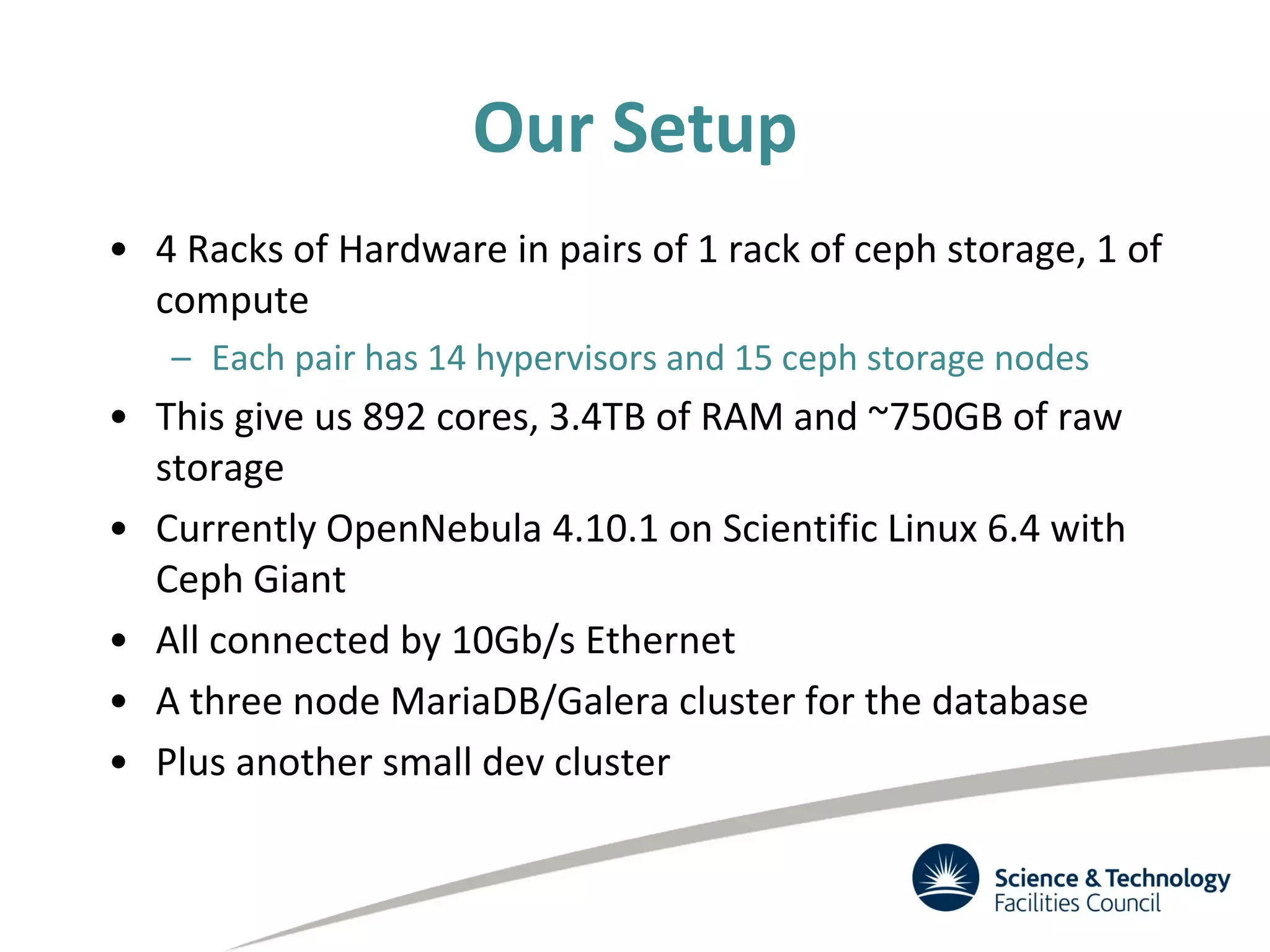
Our Setup
• 4 Racks of Hardware in pairs of 1 rack of ceph storage, 1 of
compute
– Each pair has 14 hypervisors and 15 ceph storage nodes
• This give us 892 cores, 3.4TB of RAM and ~750GB of raw
storage
• Currently OpenNebula 4.10.1 on Scientific Linux 6.4 with
Ceph Giant
• All connected by 10Gb/s Ethernet
• A three node MariaDB/Galera cluster for the database
• Plus another small dev cluster
Self-service VMS
• Exposed to users in a pre-production way with a
(somewhat limited) SLA
• Provides VMs to the department (~160 users, ~80
registered and using the cloud) to speed up development
and testing. We aim to have machines up and running in
about 1 minute
• We have a simplified web interface for users to use to
access this.
• VMs are logged in to with the users Organisation Wide
credentials or SSH key.
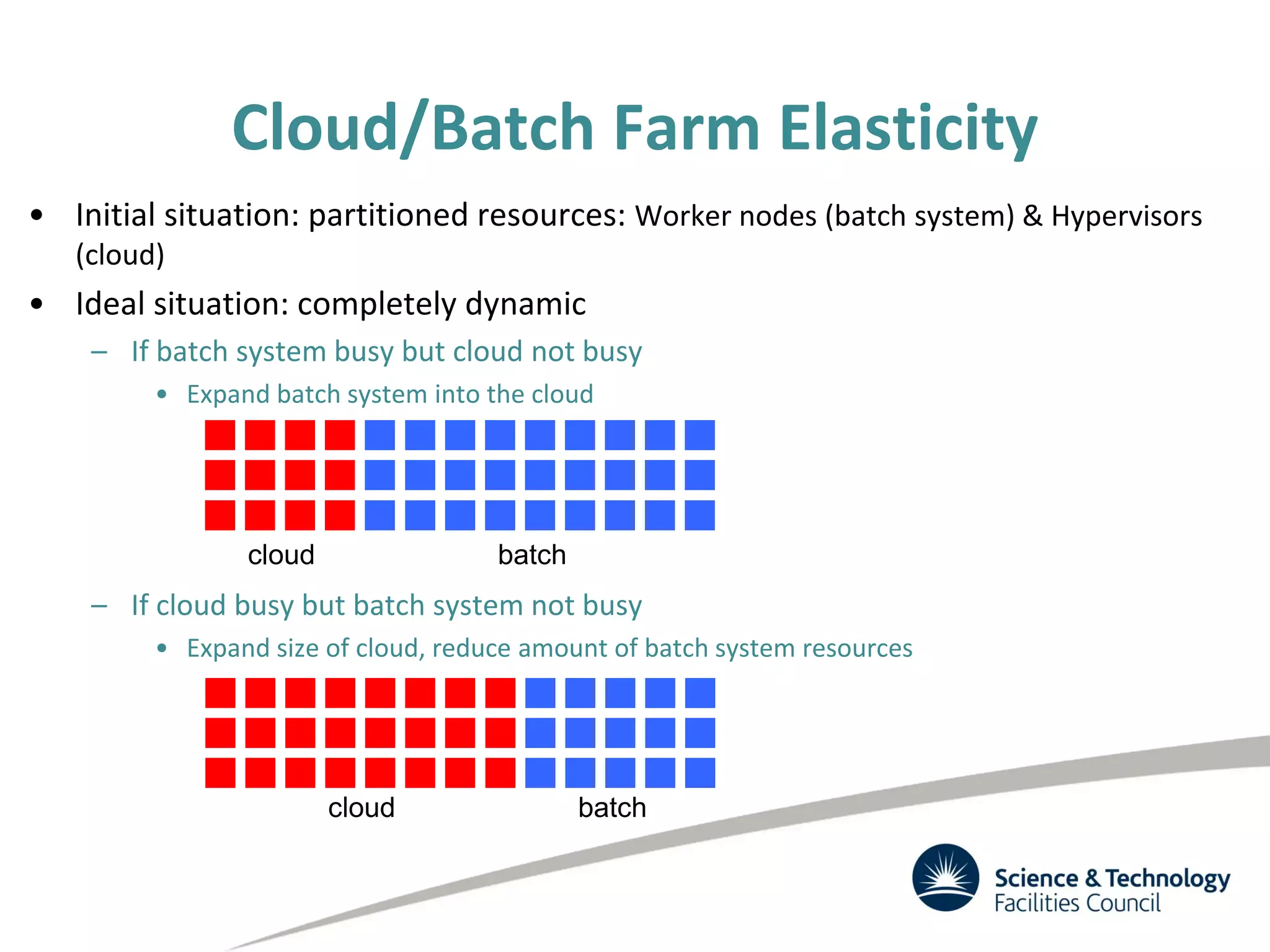
• Initial situation: partitioned resources: Worker nodes (batch system) & Hypervisors
(cloud)
• Ideal situation: completely dynamic
– If batch system busy but cloud not busy
• Expand batch system into the cloud
– If cloud busy but batch system not busy
• Expand size of cloud, reduce amount of batch system resources
cloud batch
cloud batch
Cloud/Batch Farm Elasticity
Bursting the batch system into the cloud
• This lead to an aspiration to Integrate cloud with batch
system
• This will ensure our private cloud is always used
– LHC VOs can be depended upon
to provide work
• We have successfully tested both dynamic expansion of the
batch farm into the cloud using virtual worker nodes and
launching hypervisors on worker nodes – see multiple talks
& posters by Andrew Lahiff at CHEP 2015
– http://indico.cern.ch/event/304944/session/15/contribution/576/6
– http://indico.cern.ch/event/304944/session/7/contribution/450
– http://indico.cern.ch/event/304944/session/10/contribution/452
Experiments and Communitys
• We hope to have Communities within the STFC running
production work soon in the form of:
– Build Nodes
– Worker Nodes
– Development machines
• Once we are happy with the network isolation then
external communities should follow soon after
Restrictions on VMs
• We have a number of restrictions on us so we have a
Terms of Service which users agree to:
– All VMs must be kept up to date (auto updates are enabled
by default)
– All VMs must log to Central SysLoggers
– All VMs must report to Pakiti (patching status monitoring)
– Cloud admins must be able to log in (by either public key or
password)
• These are defaults in all of our images
• VMs which do not comply with these are terminated
What we need?
• Network Isolation
– We need to be able to isolate traffic from communities and
user groups for security and useability
• Traceability
– We need to be able to find our what our users are doing
• Federated Identity Management
– We need users with a wide variety of different ‘Identities’ to
be able to sign in and start using the Cloud
• EGI
• STFC Federal ID
Restrictions - Traceability
• For security reasons we need to be able to find out exactly
what a machine has been doing at any given time.
• There are two approaches we can take to achieve this:
– NetFlow Monitoring
• This is a significant project to undertake with our limited
resources
– Make a copy of machines at the end of their lives.
• This is our chosen approach to begin with but is not without
issues
• To fully achieve what we need, both are necessary
Traceability
• In 4.10.1 we have a trigger when a machine enters
running state which sets all of its disks to persistent and
sets the gives the images to a specific user.
• When the machine is SHUTDOWN the image is saved
• A cron on our headnode then cleans up these images
once they are over a certain age.
• The web front end does not allow delete of images.
Traceability Limitation
• The functionality we use is not ideal (doesn’t seem to be
possible in 4.14)
• A better way would be when anything happens to kill a
machine - stop the machine and move it to a quarantine
user where it can then be saved and deleted permanently
• Ideally there should be a hook trigger whenever an action
is initiated that would lead to a VM entering the DONE
state.
Integration with Quattor/Aquilon 1
• All of our infrastructure is configured using the Quattor
configuration management system, we are investigating
UGent developed OpenNebula Quattor component. We
are already using the UGent developed Ceph component.
• Our Scientific Linux images are built using Quattor. Images
for users who do not interact with Quattor have the
Quattor components removed as the last step in the
process
• When VMs are deleted a hook triggers to ensure that the
VM wont receive configuration from Aquilon
Integration with Quattor/Aquilon 2
• We have written hooks for OpenNebula that call to the
Aquilon API to change the Personality (web server, db
server etc) within the configuration management system.
• The VMs then come up with the right configuration to fill
a specific roll – this is how we configure the Virtual
Worker Nodes when Cloud Bursting the batch farm
• Currently this is configured by setting Custom Variables
within the template
• In the future this will be surfaced through the Web
Interface
Web FrontEnd 1
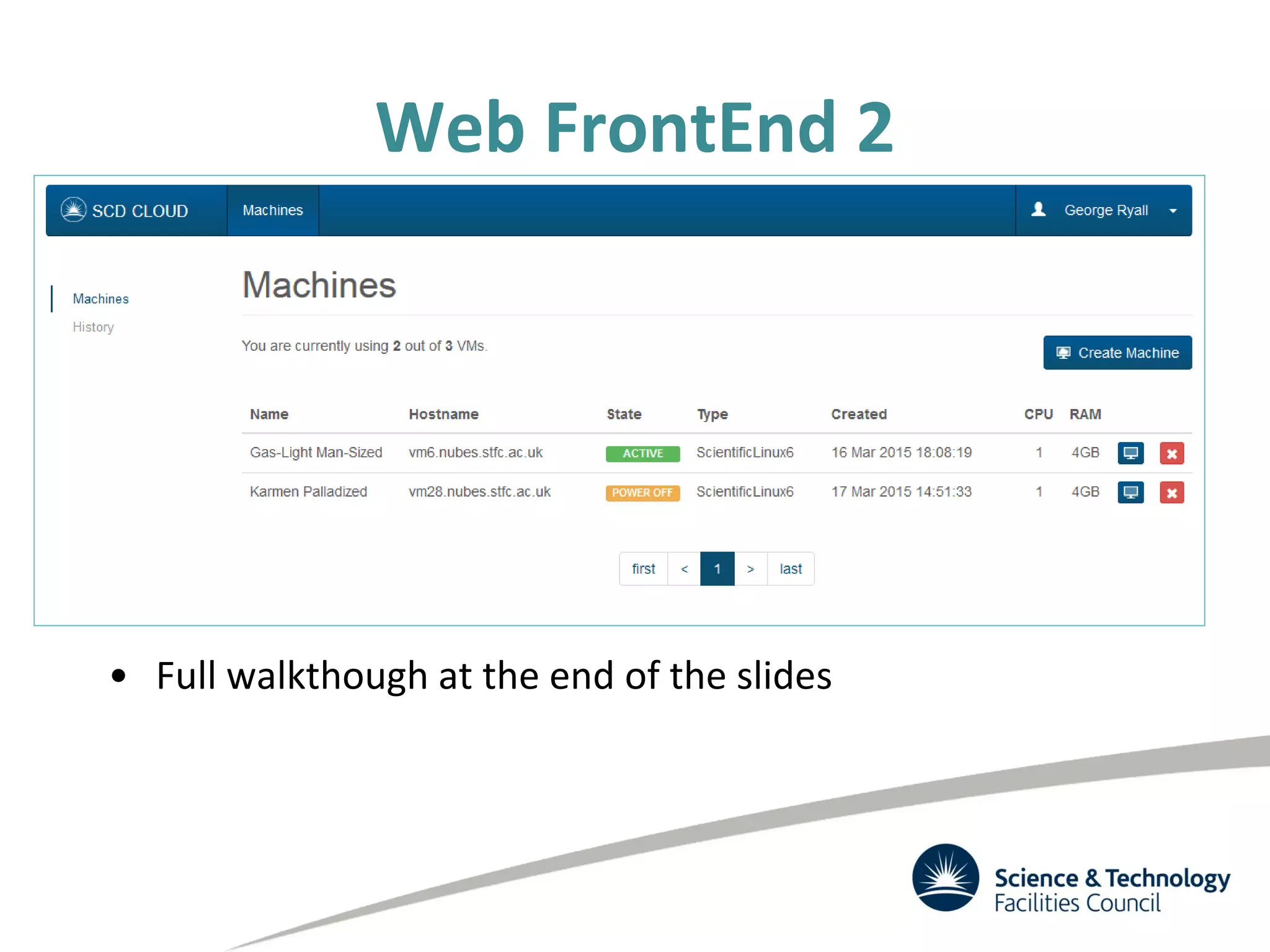
• We have a custom Web FrontEnd which has been
developed to provide a very simplified interface to the
cloud.
– Users can:
• Launch New Machines
• View existing machine and open a VNC session
• Delete machines (as far as they know)
• It has been developed to be capable of being cloud
agnostic (it should be relatively trivial to add support for
OpenStack)
Web FrontEnd 2
• Full walkthough at the end of the slides
Web FrontEnd – Upcoming Features
• Aquilon interaction
– Select a personality/sandbox/archetype for your machine
on creation
• Attach Disks
• Resize VMs
• Additional Useability Tweaks
• https://github.com/stfc/cloud to try or contribute
Issues
• Traceability
– This is a huge sticking point for us
• Ceph Monitor Configuration
– We recently replaced our Virtual Monitors with Physical
machines giving them new hostnames as per our policy.
– VMs created before the change still look to the old monitors
– What is the best way to correct this?
– We have a hack to resolve this but it is very manual
What’s next?
• Upgrade OpenNebula to 4.14
• Upgrade Ceph to Hammer
• Upgrade both cloud and storage to Scientific Linux 7
• Network Isolation
– We need to be able to isolate different communities
• Federated Identity Management
– We need to get this right so we can reach as many
communities as possible
Any Questions?
Additional Slides – launching a
VM through our self service
portal
George Ryall
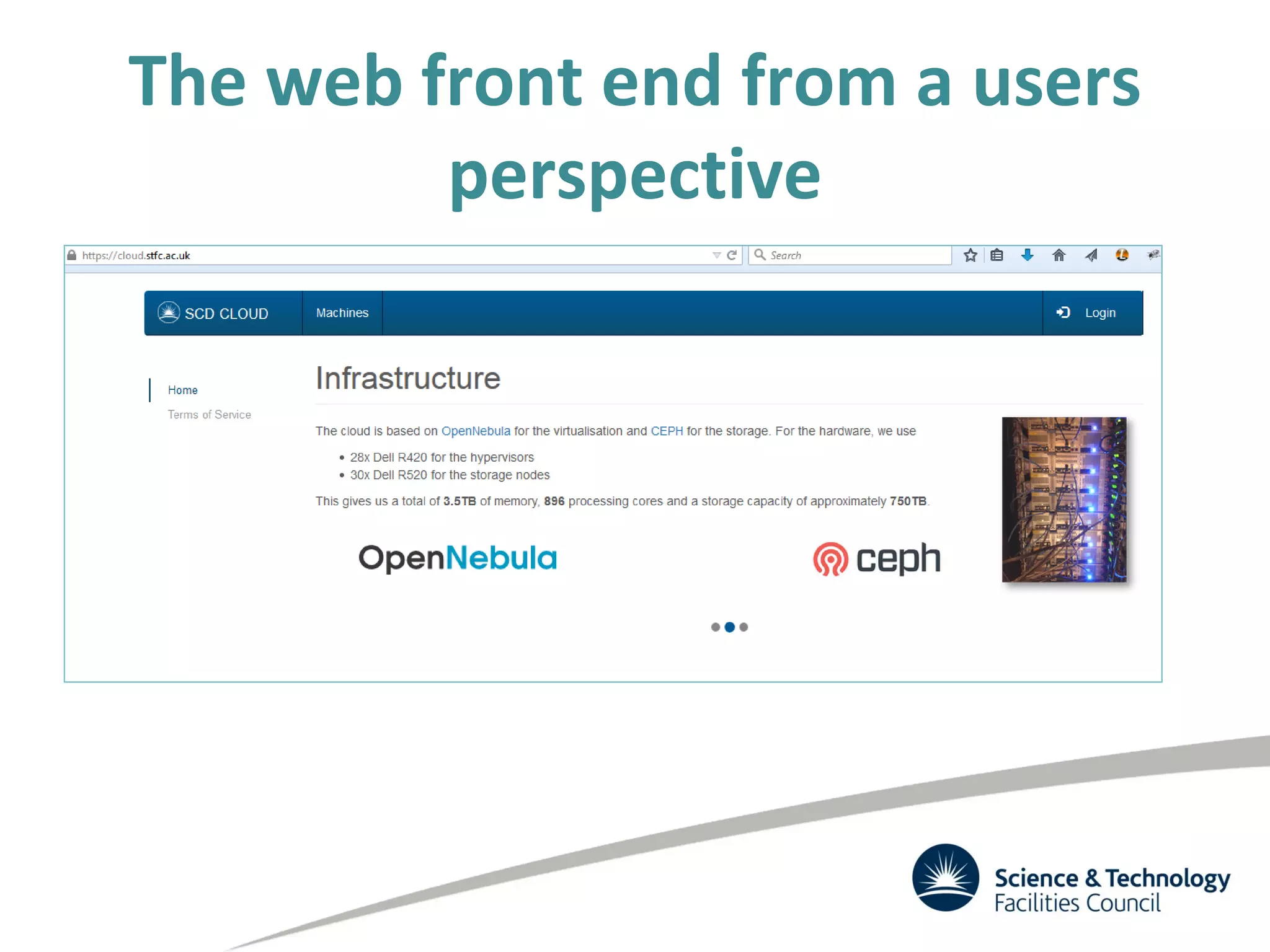
The web front end from a users
perspective
The web front end from a users
perspective
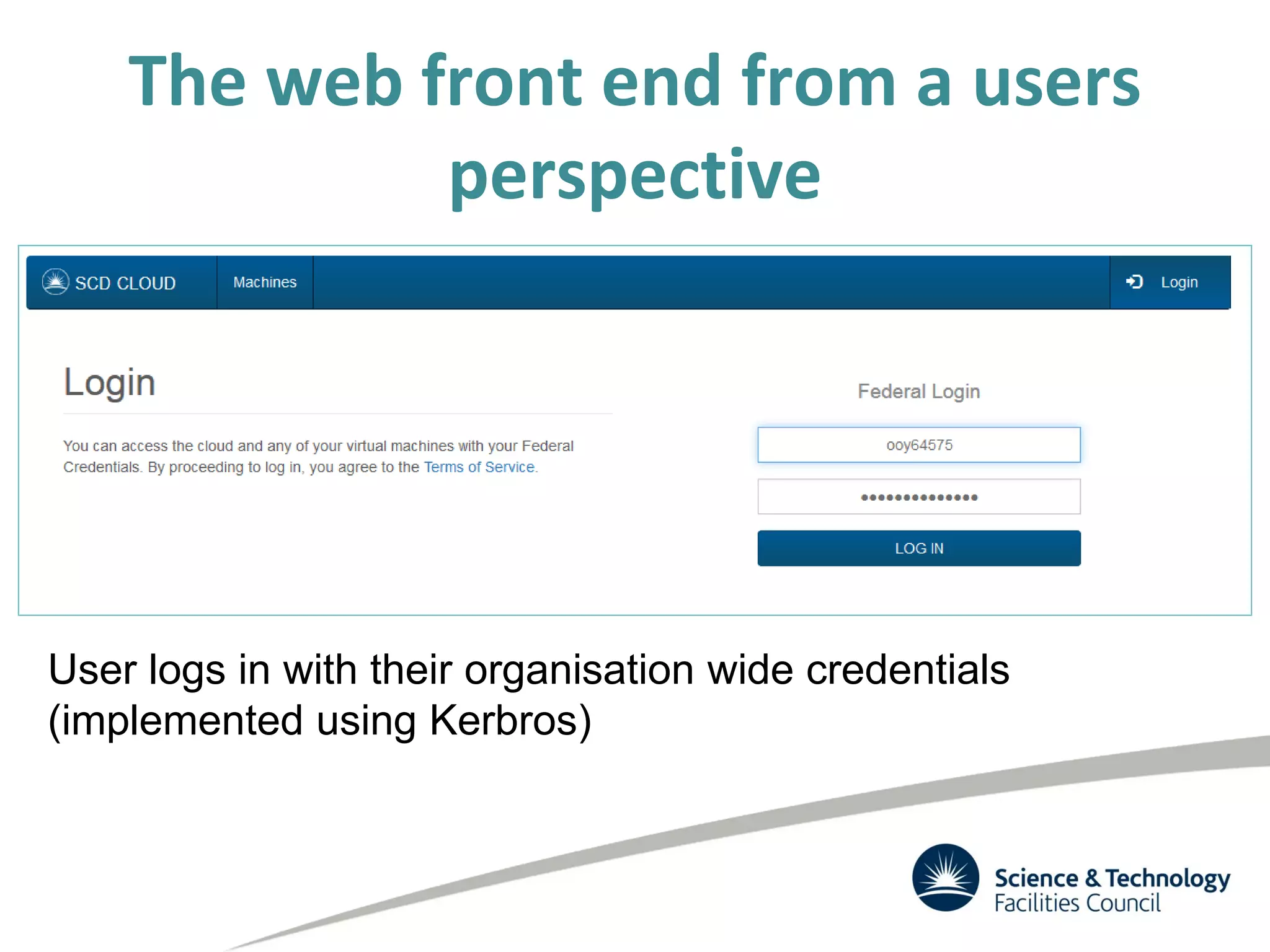
User logs in with their organisation wide credentials
(implemented using Kerbros)
The web front end from a users
perspective
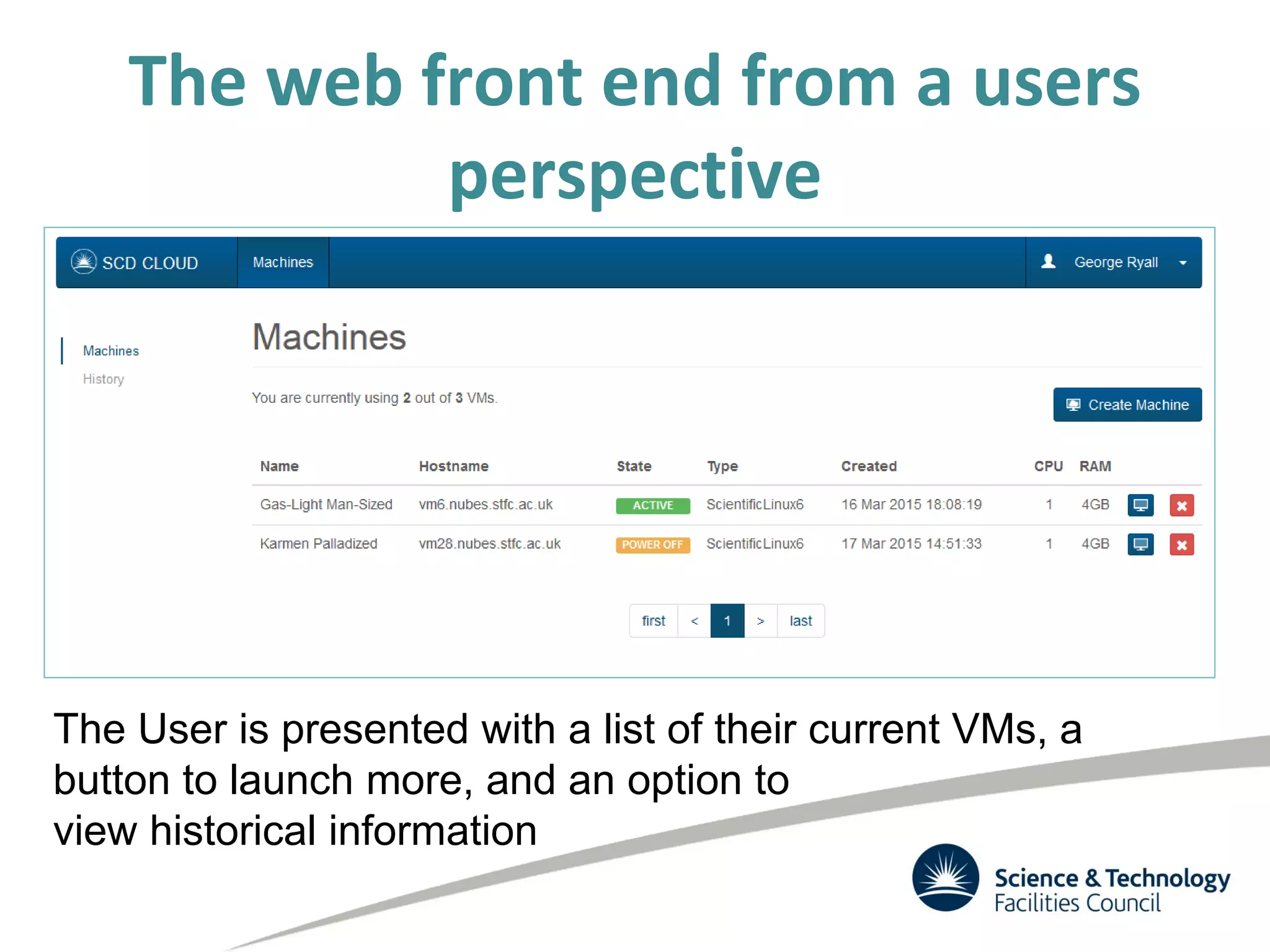
The User is presented with a list of their current VMs, a
button to launch more, and an option to
view historical information
The web front end from a users perspective
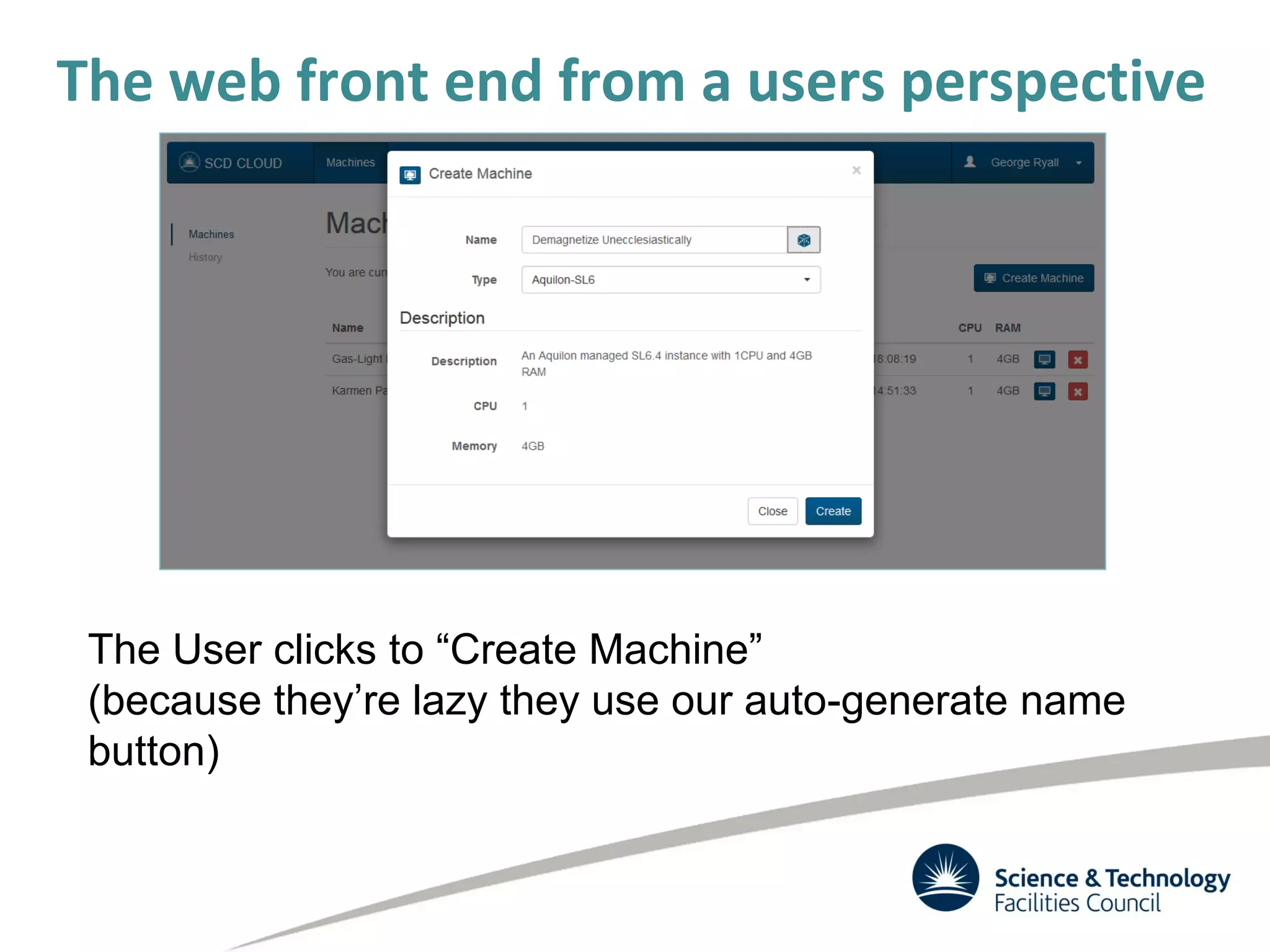
The User clicks to “Create Machine”
(because they’re lazy they use our auto-generate name
button)
The web front end from a users perspective
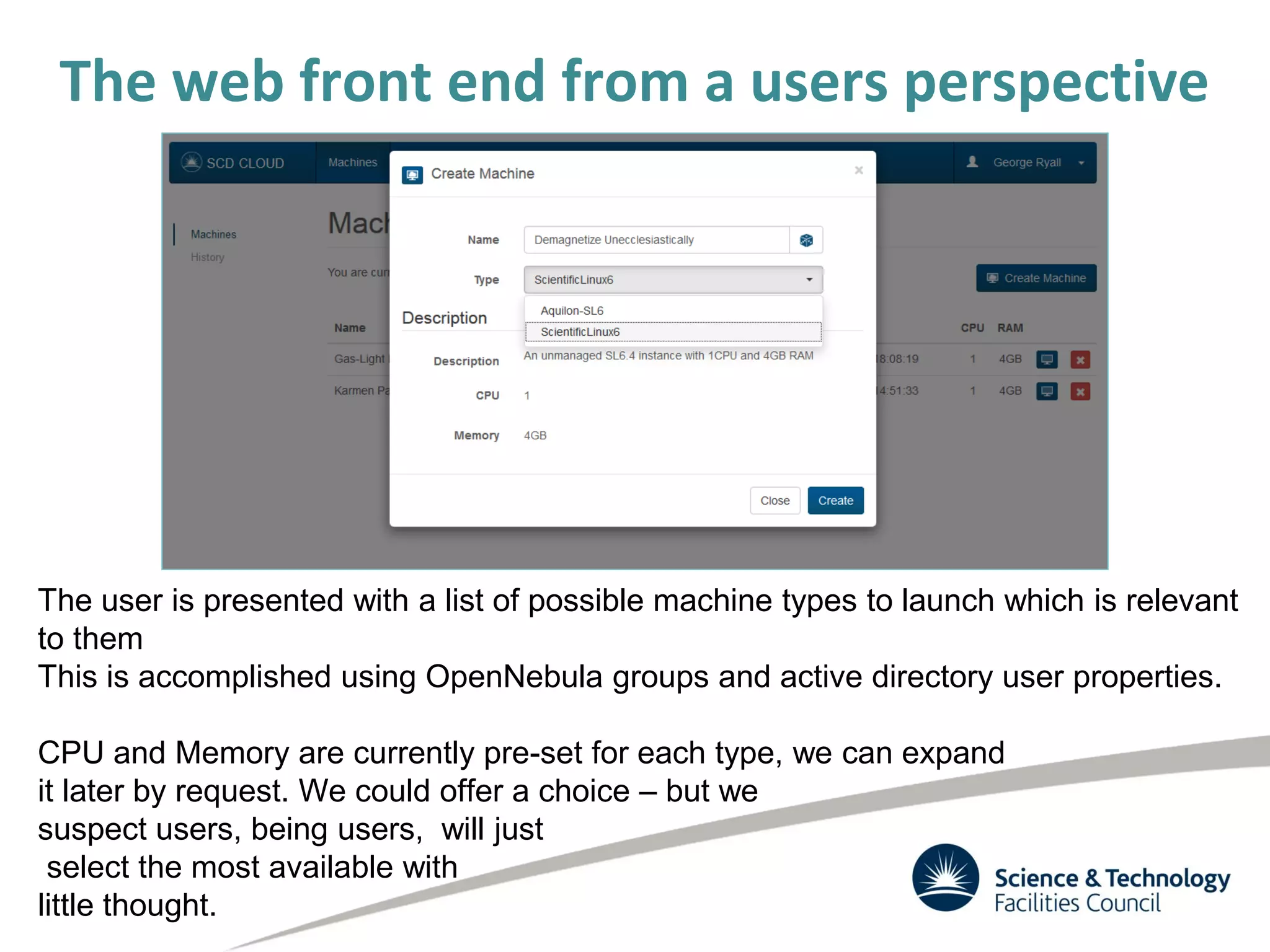
The user is presented with a list of possible machine types to launch which is relevant
to them
This is accomplished using OpenNebula groups and active directory user properties.
CPU and Memory are currently pre-set for each type, we can expand
it later by request. We could offer a choice – but we
suspect users, being users, will just
select the most available with
little thought.
The web front end from a users
perspective
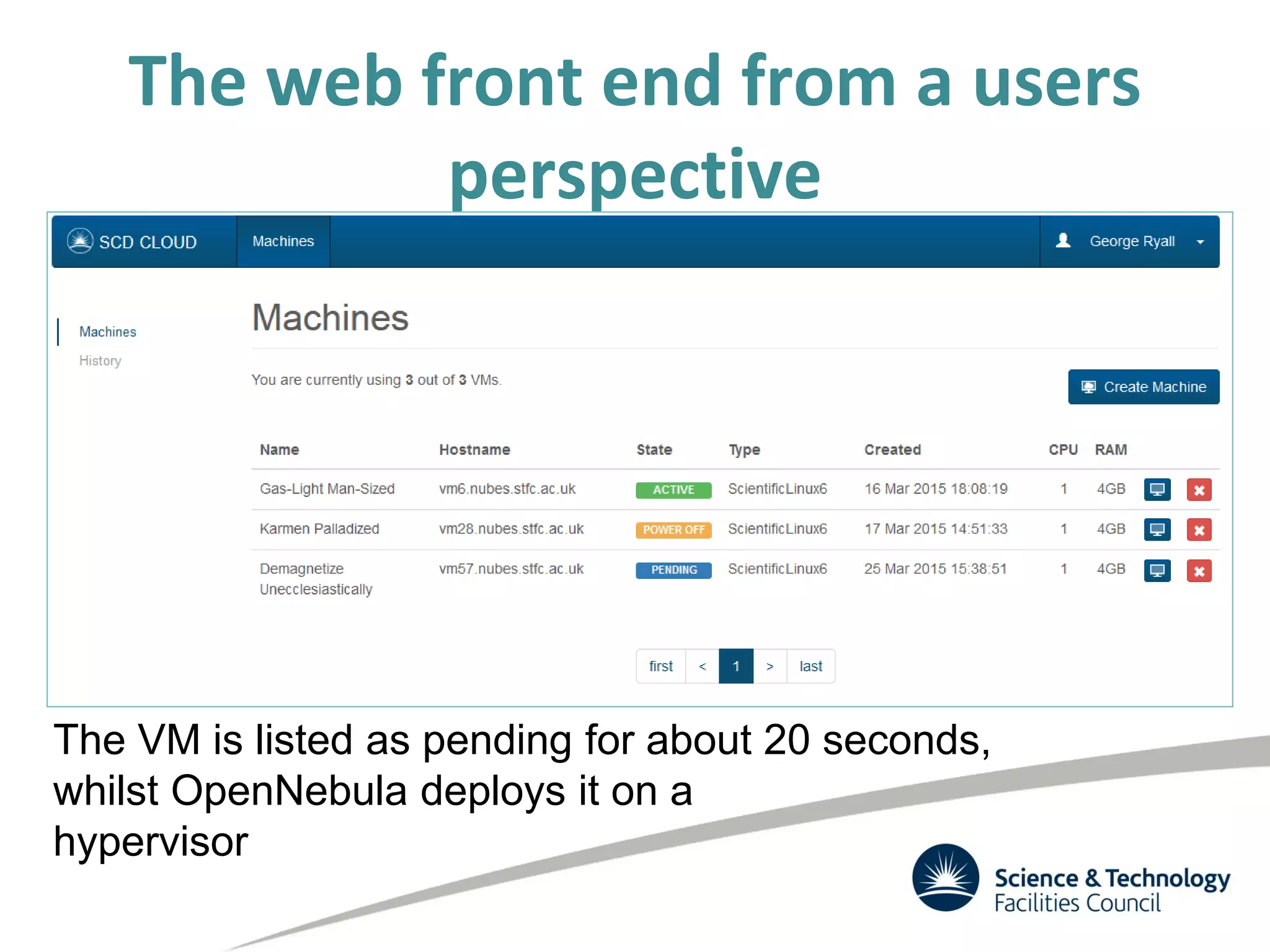
The VM is listed as pending for about 20 seconds,
whilst OpenNebula deploys it on a
hypervisor
The web front end from a users
perspective
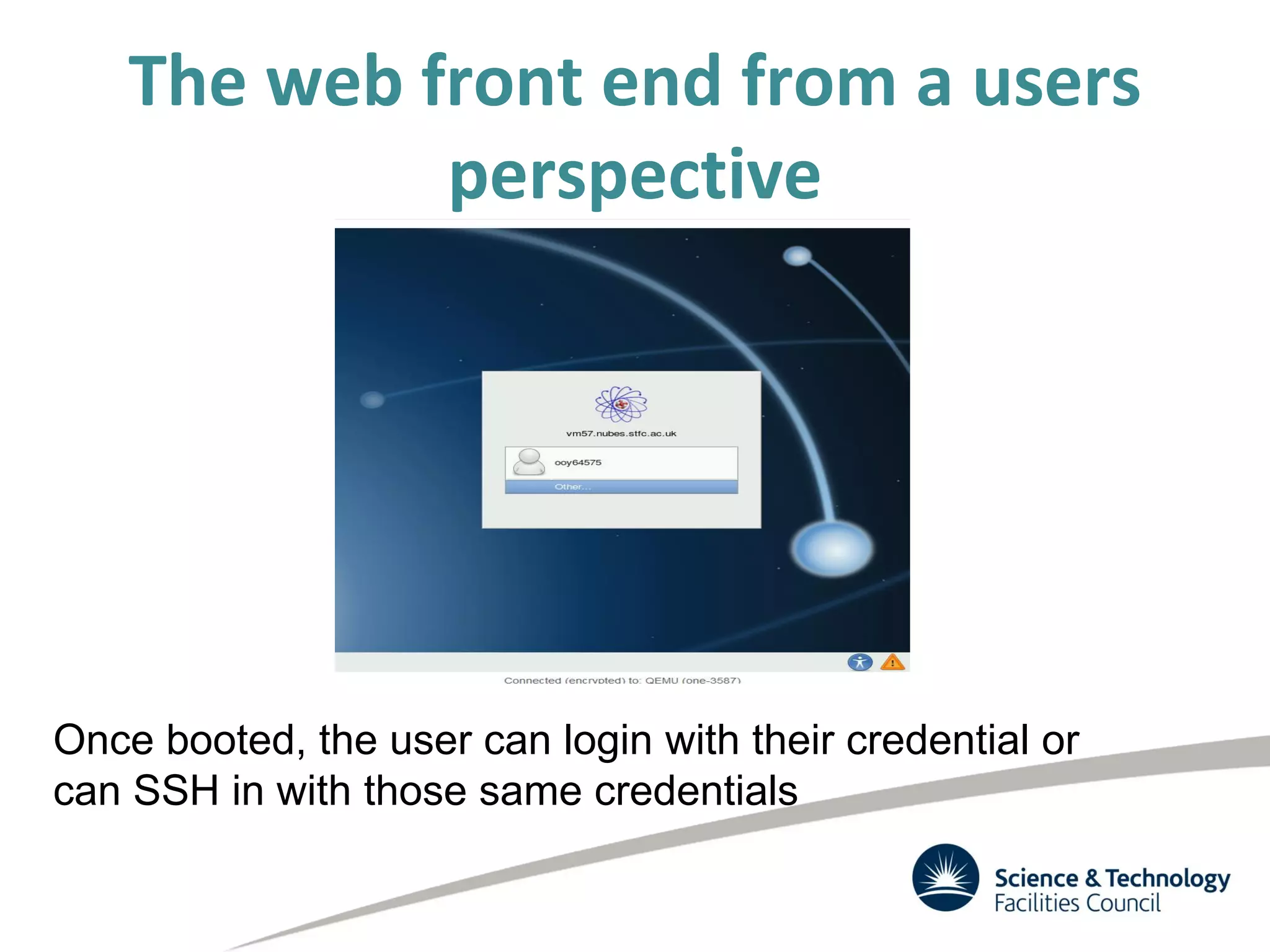
Once booted, the user can login with their credential or
can SSH in with those same credentials
The web front end from a users
perspective
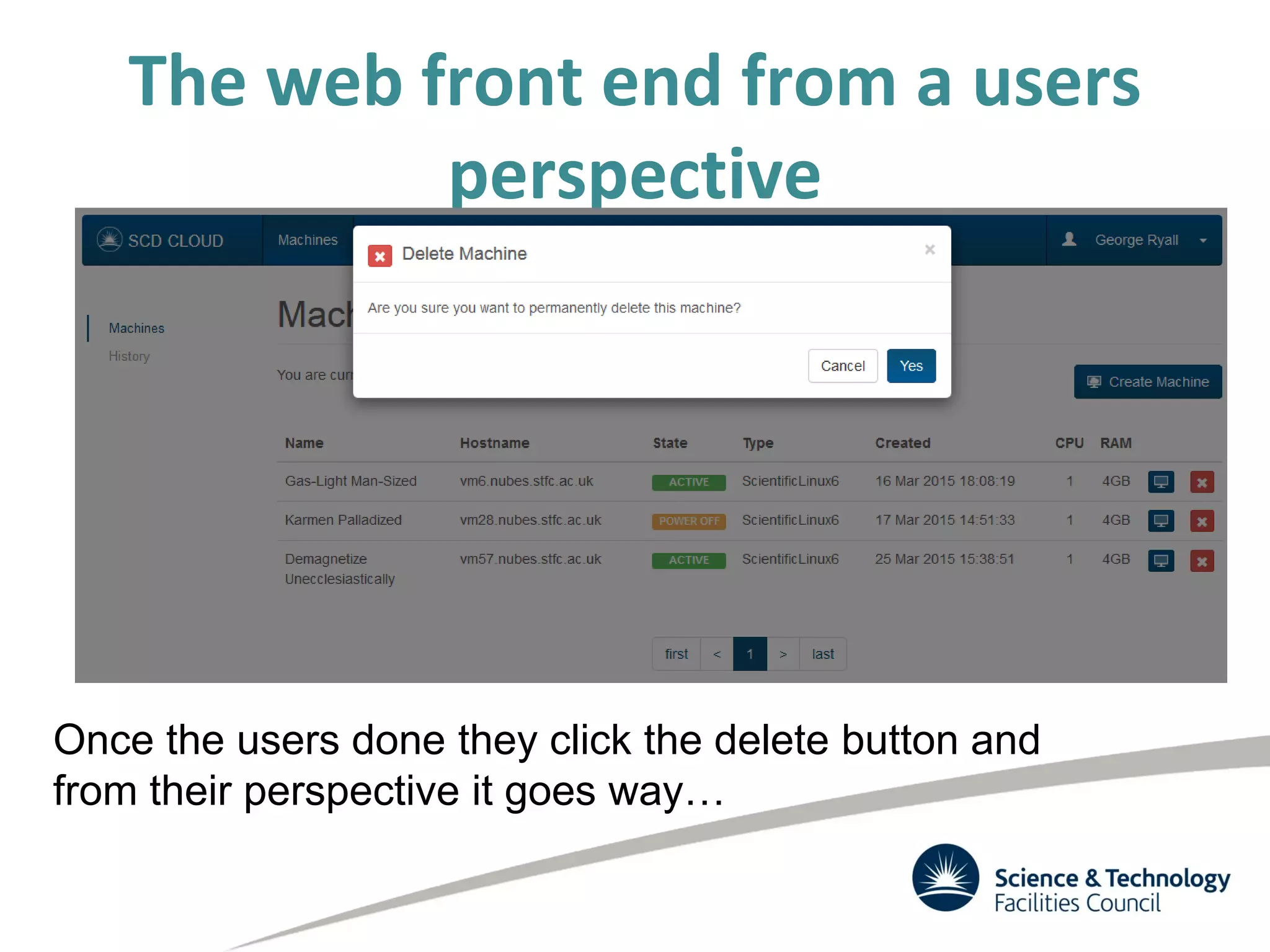
Once the users done they click the delete button and
from their perspective it goes way…

OpenNebulaConf2015 1.07 Cloud for Scientific Computing @ STFC - Alexander Dibbo

  • 1.
    Cloud for ScientificComputing @ STFC Alexander Dibbo, George Ryall Alexander.dibbo@stfc.ac.uk Rutherford Appleton Laboratory Science and Technology Facilities Council United Kingdom
  • 2.
    What I’m Goingto talk about • Background (STFC, Scientific Computing Department, Cloud project) • Use Cases – Self Service VMs – “Cloud Bursting” our Batch System – Other Projects and Communities • Work done – Traceability – Quattor/Aquilon Integration – Web Frontend • Work left to do
  • 3.
    STFC science and technologydelivers real benefits to peoples’ lives, and contributes to the prosperity and security of the UK
  • 4.
    What is theSTFC? • One of Europe’s largest multi-disciplinary scientific research organizations • One of 7 UK Research Councils that fund research in all Disciplines • We provide World Class Research, Innovation and Skills – Broad range of physical, life and computational sciences – Around 1,700 scientists in particle and nuclear physics, and astronomy and Access for 7,500 scientists to world-leading, large- scale facilities – Science and Innovation Campuses at Daresbury and Harwell – Globally-recognised capabilities and expertise in technology R&D – Inspiring young people to undertake STEM
  • 5.
    Scientific Computing Department •~190 staff – Developers (including World Leading experts in computational sciences), Systems Administrators etc. • Provides Large Scale HPC facilities, computing data services and infrastructure • Four Divisions (plus a partner) – Applications – Data – Systems • Provides National and Internationally recognized computing services for academia, industry and business – Technology – Hartree Centre
  • 6.
    Systems Division • PetascaleComputing and Storage – The UK LHC Tier-1 Centre for GridPP • High Performance Systems – HPC services including the BlueWonder and BlueJoule systems and support to the HECToR and ARCHER supercomputers • Research Infrastructure – Provides computing resources to the UK and EGI such as the JASMIN Super Data Cluster
  • 7.
    Cloud Background • Beganas small experiment 3 years ago – Initially using StratusLab & old worker nodes – Initially very quick and easy to get working – But fragile, and upgrades and customisations always harder • Work until last spring was implemented by graduates on 6 month rotations – Disruptive & variable progress • Worked well enough to prove its usefulness • Self service VMs proved very popular, though something of an exercise in managing expectations
  • 8.
    Cloud Use Cases •Self Service VMs on Demand – For use within the department for development and testing – Possibly for production workloads in the future • “Cloud Bursting” our batch farm – We want to blur the line between the cloud and batch compute resources • Experiment and Community specific uses – Mostly a combination of the first two – Includes • ISIS, CLF and others within STFC • INDIGO Data Cloud • LOFAR
  • 9.
    Our Setup • 4Racks of Hardware in pairs of 1 rack of ceph storage, 1 of compute – Each pair has 14 hypervisors and 15 ceph storage nodes • This give us 892 cores, 3.4TB of RAM and ~750GB of raw storage • Currently OpenNebula 4.10.1 on Scientific Linux 6.4 with Ceph Giant • All connected by 10Gb/s Ethernet • A three node MariaDB/Galera cluster for the database • Plus another small dev cluster
  • 10.
    Self-service VMS • Exposedto users in a pre-production way with a (somewhat limited) SLA • Provides VMs to the department (~160 users, ~80 registered and using the cloud) to speed up development and testing. We aim to have machines up and running in about 1 minute • We have a simplified web interface for users to use to access this. • VMs are logged in to with the users Organisation Wide credentials or SSH key.
  • 11.
    • Initial situation:partitioned resources: Worker nodes (batch system) & Hypervisors (cloud) • Ideal situation: completely dynamic – If batch system busy but cloud not busy • Expand batch system into the cloud – If cloud busy but batch system not busy • Expand size of cloud, reduce amount of batch system resources cloud batch cloud batch Cloud/Batch Farm Elasticity
  • 12.
    Bursting the batchsystem into the cloud • This lead to an aspiration to Integrate cloud with batch system • This will ensure our private cloud is always used – LHC VOs can be depended upon to provide work • We have successfully tested both dynamic expansion of the batch farm into the cloud using virtual worker nodes and launching hypervisors on worker nodes – see multiple talks & posters by Andrew Lahiff at CHEP 2015 – http://indico.cern.ch/event/304944/session/15/contribution/576/6 – http://indico.cern.ch/event/304944/session/7/contribution/450 – http://indico.cern.ch/event/304944/session/10/contribution/452
  • 13.
    Experiments and Communitys •We hope to have Communities within the STFC running production work soon in the form of: – Build Nodes – Worker Nodes – Development machines • Once we are happy with the network isolation then external communities should follow soon after
  • 14.
    Restrictions on VMs •We have a number of restrictions on us so we have a Terms of Service which users agree to: – All VMs must be kept up to date (auto updates are enabled by default) – All VMs must log to Central SysLoggers – All VMs must report to Pakiti (patching status monitoring) – Cloud admins must be able to log in (by either public key or password) • These are defaults in all of our images • VMs which do not comply with these are terminated
  • 15.
    What we need? •Network Isolation – We need to be able to isolate traffic from communities and user groups for security and useability • Traceability – We need to be able to find our what our users are doing • Federated Identity Management – We need users with a wide variety of different ‘Identities’ to be able to sign in and start using the Cloud • EGI • STFC Federal ID
  • 16.
    Restrictions - Traceability •For security reasons we need to be able to find out exactly what a machine has been doing at any given time. • There are two approaches we can take to achieve this: – NetFlow Monitoring • This is a significant project to undertake with our limited resources – Make a copy of machines at the end of their lives. • This is our chosen approach to begin with but is not without issues • To fully achieve what we need, both are necessary
  • 17.
    Traceability • In 4.10.1we have a trigger when a machine enters running state which sets all of its disks to persistent and sets the gives the images to a specific user. • When the machine is SHUTDOWN the image is saved • A cron on our headnode then cleans up these images once they are over a certain age. • The web front end does not allow delete of images.
  • 18.
    Traceability Limitation • Thefunctionality we use is not ideal (doesn’t seem to be possible in 4.14) • A better way would be when anything happens to kill a machine - stop the machine and move it to a quarantine user where it can then be saved and deleted permanently • Ideally there should be a hook trigger whenever an action is initiated that would lead to a VM entering the DONE state.
  • 19.
    Integration with Quattor/Aquilon1 • All of our infrastructure is configured using the Quattor configuration management system, we are investigating UGent developed OpenNebula Quattor component. We are already using the UGent developed Ceph component. • Our Scientific Linux images are built using Quattor. Images for users who do not interact with Quattor have the Quattor components removed as the last step in the process • When VMs are deleted a hook triggers to ensure that the VM wont receive configuration from Aquilon
  • 20.
    Integration with Quattor/Aquilon2 • We have written hooks for OpenNebula that call to the Aquilon API to change the Personality (web server, db server etc) within the configuration management system. • The VMs then come up with the right configuration to fill a specific roll – this is how we configure the Virtual Worker Nodes when Cloud Bursting the batch farm • Currently this is configured by setting Custom Variables within the template • In the future this will be surfaced through the Web Interface
  • 21.
    Web FrontEnd 1 •We have a custom Web FrontEnd which has been developed to provide a very simplified interface to the cloud. – Users can: • Launch New Machines • View existing machine and open a VNC session • Delete machines (as far as they know) • It has been developed to be capable of being cloud agnostic (it should be relatively trivial to add support for OpenStack)
  • 22.
    Web FrontEnd 2 •Full walkthough at the end of the slides
  • 23.
    Web FrontEnd –Upcoming Features • Aquilon interaction – Select a personality/sandbox/archetype for your machine on creation • Attach Disks • Resize VMs • Additional Useability Tweaks • https://github.com/stfc/cloud to try or contribute
  • 24.
    Issues • Traceability – Thisis a huge sticking point for us • Ceph Monitor Configuration – We recently replaced our Virtual Monitors with Physical machines giving them new hostnames as per our policy. – VMs created before the change still look to the old monitors – What is the best way to correct this? – We have a hack to resolve this but it is very manual
  • 25.
    What’s next? • UpgradeOpenNebula to 4.14 • Upgrade Ceph to Hammer • Upgrade both cloud and storage to Scientific Linux 7 • Network Isolation – We need to be able to isolate different communities • Federated Identity Management – We need to get this right so we can reach as many communities as possible
  • 26.
  • 27.
    Additional Slides –launching a VM through our self service portal George Ryall
  • 28.
    The web frontend from a users perspective
  • 29.
    The web frontend from a users perspective User logs in with their organisation wide credentials (implemented using Kerbros)
  • 30.
    The web frontend from a users perspective The User is presented with a list of their current VMs, a button to launch more, and an option to view historical information
  • 31.
    The web frontend from a users perspective The User clicks to “Create Machine” (because they’re lazy they use our auto-generate name button)
  • 32.
    The web frontend from a users perspective The user is presented with a list of possible machine types to launch which is relevant to them This is accomplished using OpenNebula groups and active directory user properties. CPU and Memory are currently pre-set for each type, we can expand it later by request. We could offer a choice – but we suspect users, being users, will just select the most available with little thought.
  • 33.
    The web frontend from a users perspective The VM is listed as pending for about 20 seconds, whilst OpenNebula deploys it on a hypervisor
  • 34.
    The web frontend from a users perspective Once booted, the user can login with their credential or can SSH in with those same credentials
  • 35.
    The web frontend from a users perspective Once the users done they click the delete button and from their perspective it goes way…