

Operating OpenStack on a Budget
Susan Wu
Director of Technical Marketing
Midokura
Samir Ibradžić
Head of Infrastructure and Systems
Midokura
Agenda
• Introduction to myself and Midokura
• About our private cloud “MidoCloud”
• Planning your OpenStack Cloud
• Building your OpenStack Cloud
• Operating your OpenStack Cloud
• Lessons Learned
• Q&A
About us: Susan Wu @susanwu88
• Product marketing for container technologies like Solaris Zones, Docker
• Built plugins/connectors for Oracle enterprise manager
• Open Source experience - Ubuntu, Docker, OpenStack, CloudStack, MidoNet
• Member of the Certified OpenStack Administrator Exam working group
About us: Samir Ibradžić
• IT systems architect for telecom and enterprises
• Experience leading DevOps and engineering teams
• Highly skilled in FOSS, distributed systems, VOIP, networking and embedded systems
About Midokura
• Originally building public cloud for Asia
• Founders hailed from Amazon
• Built missing networking piece (now MidoNet)
• Moved into pure software technology company to focus on building best of
breed networking for public and private clouds
• Customers in the enterprise, web scale companies, service providers, higher
ed
About MidoCloud
• Private OpenStack cloud
• Developer sandboxes (40+)
• QA
• CI/CD
• Eventually production services
– websites, software repos, mailing lists
– Back office apps
About MidoCloud
• Started on Grizzly, now Kilo (upgrading to Liberty soon)
• Proof of concept with 10 servers
• Later upgraded to 36 Servers, full HA
– 22 compute
– Handles 700 VMs (heavily oversubscribed)
• Recently added a 100 more compute hosts, still growing
• Run both KVM and Docker
Planning your OpenStack Deployment
KISS (Keep it Simple, Stupid)
• Start out with a small HW footprint to test it out
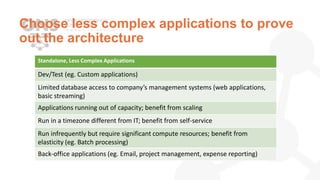
• Choose less complex workloads to prove out the architecture
• Plan it out in phases
• Phase 1: Just the basic services, non HA is OK
• Phase 2: Full HA, Config Management
• Phase 3: Add Monitoring
• Phase 4: Bring in the workloads (Dev only)
• Phase 5: Fix problems, stabilize
• Phase 6: Add optional services: Load Balancing, Heat, Murano
Building your OpenStack Cloud
Using OpenStack Software
• Linux OS: CentOS, Ubuntu
• OpenStack Distro (RDO, Canonical)
• Networking:
• MidoNet (highly recommended)
• Storage:
• Red Hat Storage
• Monitoring:
• Zabbix
Why MidoNet for Networking?
• OVS Plugin is default, but largest headache in OpenStack
• Fully Open Source (Apache 2)
• Dramatically simplifies Neutron networking
• No SPOF
• Scalable
• Fewer components to setup and manage
• Great community support
• More at www.midonet.org
Need Supported Software?
• Need an SLA?
• Can your team handle problems when things inevitably go horribly wrong?
• Choose a consumption model that fits your team – DIY, Managed, Distro
• Characterize the workoads
• Start with supporting critical software
• Storage (block) and Networking
• OpenStack software is not usually a critical component
Choose less complex applications to prove
out the architecture
Standalone, Less Complex Applications
Dev/Test (eg. Custom applications)
Limited database access to company’s management systems (web applications,
basic streaming)
Applications running out of capacity; benefit from scaling
Run in a timezone different from IT; benefit from self-service
Run infrequently but require significant compute resources; benefit from
elasticity (eg. Batch processing)
Back-office applications (eg. Email, project management, expense reporting)
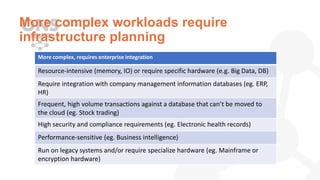
More complex workloads require
infrastructure planning
More complex, requires enterprise integration
Resource-intensive (memory, IO) or require specific hardware (e.g. Big Data, DB)
Require integration with company management information databases (eg. ERP,
HR)
Frequent, high volume transactions against a database that can’t be moved to
the cloud (eg. Stock trading)
High security and compliance requirements (eg. Electronic health records)
Performance-sensitive (eg. Business intelligence)
Run on legacy systems and/or require specialize hardware (eg. Mainframe or
encryption hardware)
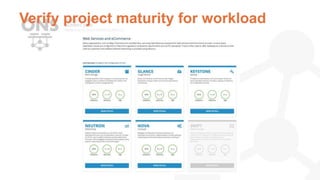
Verify project maturity for workload
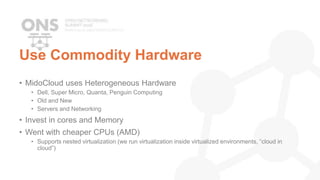
Use Commodity Hardware
• MidoCloud uses Heterogeneous Hardware
• Dell, Super Micro, Quanta, Penguin Computing
• Old and New
• Servers and Networking
• Invest in cores and Memory
• Went with cheaper CPUs (AMD)
• Supports nested virtualization (we run virtualization inside virtualized environments, “cloud in
cloud”)
Build your team
• “DevOps” focus
• Traditional Sys Admins with high Linux competency and scripting skills
• Thirst to learn new tech
• Patience of a saint
• 1-2 people initially
• Became part time gig for 3 people eventually
• Training
• Don’t be reliant on “easy installers”
• Start with manual installs of OpenStack to understand all components
• Later, installers are fine
Operating your OpenStack Cloud
Proper Monitoring and Alerting
• Zabbix (Monitoring and Alerts)
• Implement good monitoring is critical
• Don’t monitor too many things
• Just want to know when things go horribly wrong, in a timely manner
• PagerDuty
• Not Free, but worth the peace of mind
• Rotate on-call schedule if you have more than 1 person
Communication
• Good team chat (Slack)
• Good integrations with tools (PagerDuty, etc)
• Connects operators with Devs for better communication and knowledge sharing
Upgrades
• Prepare for Pain
• Schedule maintenance window
• Use a staging cloud, seriously, it’s critical
• Even a virtual staging cloud is better than nothing
Prepare for abuse
• “Free VMs!” – Devs will love it, and abuse it
• You will run out of memory and cores quickly
• Send usage reports to Devs to guilt them into “cleaning up” unused VMs
• Use Quotas, especially for RAM
Lessons Learned
Seriously, Keep it Simple, Stupid (KISS)
• We had to redo everything at one point because our initial deployment was
overly complex.
• Too many moving pieces makes it hard to pin down problems
Become familiar with storage and
networking
• Get familiar with OpenStack but also with underlying technologies.
• Get to understand your storage, compute and networking backends well,
because sooner or late you would have to fix them.
• OpenStack has changed. For the better. It is production worthy now.
Test it before going live!
• Reboot servers, unplug servers
• Things should come back to life without manual intervention
• Abuse it heavily
• Spin up tons of VMs, kill them quickly.
• Try to break it
Don’t underestimate OpenStack
• It will probably cost more and take longer time than you expect to go into
production
• Stick it out, in the end it will be worth it
Embrace the Community
• Many operators have the same pains you have, reach out and make friends.
Learn from others
• I’m happy to talk after about our experiences
Thank you! Any Questions?
Susan Wu @susanwu88

Operating OpenStack on a Budget

  • 1.
    Operating OpenStack ona Budget Susan Wu Director of Technical Marketing Midokura Samir Ibradžić Head of Infrastructure and Systems Midokura
  • 2.
    Agenda • Introduction tomyself and Midokura • About our private cloud “MidoCloud” • Planning your OpenStack Cloud • Building your OpenStack Cloud • Operating your OpenStack Cloud • Lessons Learned • Q&A
  • 3.
    About us: SusanWu @susanwu88 • Product marketing for container technologies like Solaris Zones, Docker • Built plugins/connectors for Oracle enterprise manager • Open Source experience - Ubuntu, Docker, OpenStack, CloudStack, MidoNet • Member of the Certified OpenStack Administrator Exam working group About us: Samir Ibradžić • IT systems architect for telecom and enterprises • Experience leading DevOps and engineering teams • Highly skilled in FOSS, distributed systems, VOIP, networking and embedded systems
  • 4.
    About Midokura • Originallybuilding public cloud for Asia • Founders hailed from Amazon • Built missing networking piece (now MidoNet) • Moved into pure software technology company to focus on building best of breed networking for public and private clouds • Customers in the enterprise, web scale companies, service providers, higher ed
  • 5.
    About MidoCloud • PrivateOpenStack cloud • Developer sandboxes (40+) • QA • CI/CD • Eventually production services – websites, software repos, mailing lists – Back office apps
  • 6.
    About MidoCloud • Startedon Grizzly, now Kilo (upgrading to Liberty soon) • Proof of concept with 10 servers • Later upgraded to 36 Servers, full HA – 22 compute – Handles 700 VMs (heavily oversubscribed) • Recently added a 100 more compute hosts, still growing • Run both KVM and Docker
  • 7.
  • 8.
    KISS (Keep itSimple, Stupid) • Start out with a small HW footprint to test it out • Choose less complex workloads to prove out the architecture • Plan it out in phases • Phase 1: Just the basic services, non HA is OK • Phase 2: Full HA, Config Management • Phase 3: Add Monitoring • Phase 4: Bring in the workloads (Dev only) • Phase 5: Fix problems, stabilize • Phase 6: Add optional services: Load Balancing, Heat, Murano
  • 9.
  • 10.
    Using OpenStack Software •Linux OS: CentOS, Ubuntu • OpenStack Distro (RDO, Canonical) • Networking: • MidoNet (highly recommended) • Storage: • Red Hat Storage • Monitoring: • Zabbix
  • 11.
    Why MidoNet forNetworking? • OVS Plugin is default, but largest headache in OpenStack • Fully Open Source (Apache 2) • Dramatically simplifies Neutron networking • No SPOF • Scalable • Fewer components to setup and manage • Great community support • More at www.midonet.org
  • 12.
    Need Supported Software? •Need an SLA? • Can your team handle problems when things inevitably go horribly wrong? • Choose a consumption model that fits your team – DIY, Managed, Distro • Characterize the workoads • Start with supporting critical software • Storage (block) and Networking • OpenStack software is not usually a critical component
  • 13.
    Choose less complexapplications to prove out the architecture Standalone, Less Complex Applications Dev/Test (eg. Custom applications) Limited database access to company’s management systems (web applications, basic streaming) Applications running out of capacity; benefit from scaling Run in a timezone different from IT; benefit from self-service Run infrequently but require significant compute resources; benefit from elasticity (eg. Batch processing) Back-office applications (eg. Email, project management, expense reporting)
  • 14.
    More complex workloadsrequire infrastructure planning More complex, requires enterprise integration Resource-intensive (memory, IO) or require specific hardware (e.g. Big Data, DB) Require integration with company management information databases (eg. ERP, HR) Frequent, high volume transactions against a database that can’t be moved to the cloud (eg. Stock trading) High security and compliance requirements (eg. Electronic health records) Performance-sensitive (eg. Business intelligence) Run on legacy systems and/or require specialize hardware (eg. Mainframe or encryption hardware)
  • 15.
  • 16.
    Use Commodity Hardware •MidoCloud uses Heterogeneous Hardware • Dell, Super Micro, Quanta, Penguin Computing • Old and New • Servers and Networking • Invest in cores and Memory • Went with cheaper CPUs (AMD) • Supports nested virtualization (we run virtualization inside virtualized environments, “cloud in cloud”)
  • 17.
    Build your team •“DevOps” focus • Traditional Sys Admins with high Linux competency and scripting skills • Thirst to learn new tech • Patience of a saint • 1-2 people initially • Became part time gig for 3 people eventually • Training • Don’t be reliant on “easy installers” • Start with manual installs of OpenStack to understand all components • Later, installers are fine
  • 18.
  • 19.
    Proper Monitoring andAlerting • Zabbix (Monitoring and Alerts) • Implement good monitoring is critical • Don’t monitor too many things • Just want to know when things go horribly wrong, in a timely manner • PagerDuty • Not Free, but worth the peace of mind • Rotate on-call schedule if you have more than 1 person
  • 20.
    Communication • Good teamchat (Slack) • Good integrations with tools (PagerDuty, etc) • Connects operators with Devs for better communication and knowledge sharing
  • 21.
    Upgrades • Prepare forPain • Schedule maintenance window • Use a staging cloud, seriously, it’s critical • Even a virtual staging cloud is better than nothing
  • 22.
    Prepare for abuse •“Free VMs!” – Devs will love it, and abuse it • You will run out of memory and cores quickly • Send usage reports to Devs to guilt them into “cleaning up” unused VMs • Use Quotas, especially for RAM
  • 23.
  • 24.
    Seriously, Keep itSimple, Stupid (KISS) • We had to redo everything at one point because our initial deployment was overly complex. • Too many moving pieces makes it hard to pin down problems
  • 25.
    Become familiar withstorage and networking • Get familiar with OpenStack but also with underlying technologies. • Get to understand your storage, compute and networking backends well, because sooner or late you would have to fix them. • OpenStack has changed. For the better. It is production worthy now.
  • 26.
    Test it beforegoing live! • Reboot servers, unplug servers • Things should come back to life without manual intervention • Abuse it heavily • Spin up tons of VMs, kill them quickly. • Try to break it
  • 27.
    Don’t underestimate OpenStack •It will probably cost more and take longer time than you expect to go into production • Stick it out, in the end it will be worth it
  • 28.
    Embrace the Community •Many operators have the same pains you have, reach out and make friends. Learn from others • I’m happy to talk after about our experiences
  • 29.
    Thank you! AnyQuestions? Susan Wu @susanwu88

Editor's Notes

  • #9 Most important thing to remember!
  • #14 Scaling paradigm: Scale-out Automatic and horizontal scaling for each service and component of the application Modular, loosely-coupled distributed application architecture; APIs for each service Shared-nothing architecture Resiliency in app, not reliant on infrastructure Deals gracefully with timeouts Services providing active-active redundancy Usage of distributed storage Broad consumption of infrastructure and platform services Replication of data done on software level
  • #15  Scaling paradigm: Scale-up Important complex and centralized systems Big failure domains Services protected by failover pairs Dedicated servers or virtual machines managed manually by administrators Consumes large SANs or persistent block storage Consumes high CPU (GPU) or high speed SSD storage All infrastructure components expected to 100% available Requires high-performance hardware to make infrastructure highly available.