On Page Optimization 
www.digitalmarketing.ac.in
What is On page optimization 
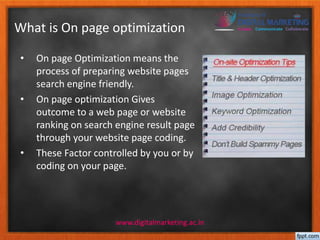
• On page Optimization means the 
process of preparing website pages 
search engine friendly. 
• On page optimization Gives 
outcome to a web page or website 
ranking on search engine result page 
through your website page coding. 
• These Factor controlled by you or by 
coding on your page. 
www.digitalmarketing.ac.in
On Page optimization 
Checklist….. 
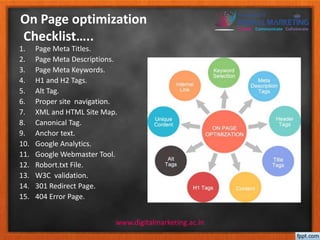
1. Page Meta Titles. 
2. Page Meta Descriptions. 
3. Page Meta Keywords. 
4. H1 and H2 Tags. 
5. Alt Tag. 
6. Proper site navigation. 
7. XML and HTML Site Map. 
8. Canonical Tag. 
9. Anchor text. 
10. Google Analytics. 
11. Google Webmaster Tool. 
12. Robort.txt File. 
13. W3C validation. 
14. 301 Redirect Page. 
15. 404 Error Page. 
www.digitalmarketing.ac.in
Meta Title Tag 
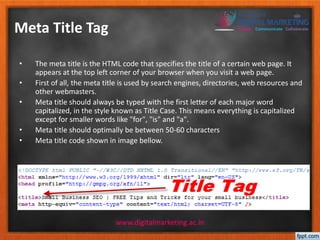
• The meta title is the HTML code that specifies the title of a certain web page. It 
appears at the top left corner of your browser when you visit a web page. 
• First of all, the meta title is used by search engines, directories, web resources and 
other webmasters. 
• Meta title should always be typed with the first letter of each major word 
capitalized, in the style known as Title Case. This means everything is capitalized 
except for smaller words like "for", "is" and "a". 
• Meta title should optimally be between 50-60 characters 
• Meta title code shown in image bellow. 
www.digitalmarketing.ac.in
Meta Descriptions Tag 
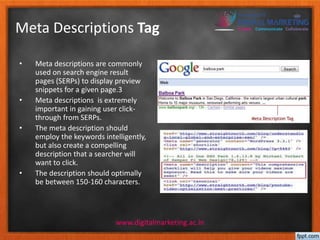
• Meta descriptions are commonly 
used on search engine result 
pages (SERPs) to display preview 
snippets for a given page.3 
• Meta descriptions is extremely 
important in gaining user click-through 
from SERPs. 
• The meta description should 
employ the keywords intelligently, 
but also create a compelling 
description that a searcher will 
want to click. 
• The description should optimally 
be between 150-160 characters. 
www.digitalmarketing.ac.in
Meta Keywords tag 
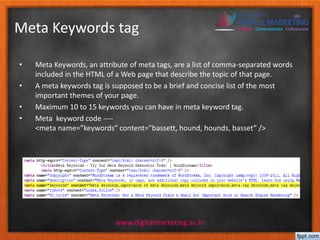
• Meta Keywords, an attribute of meta tags, are a list of comma-separated words 
included in the HTML of a Web page that describe the topic of that page. 
• A meta keywords tag is supposed to be a brief and concise list of the most 
important themes of your page. 
• Maximum 10 to 15 keywords you can have in meta keyword tag. 
• Meta keyword code ---- 
<meta name=”keywords” content=”bassett, hound, hounds, basset” /> 
www.digitalmarketing.ac.in
Alt tag 
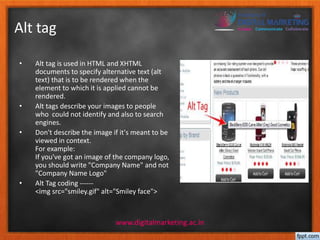
• Alt tag is used in HTML and XHTML 
documents to specify alternative text (alt 
text) that is to be rendered when the 
element to which it is applied cannot be 
rendered. 
• Alt tags describe your images to people 
who could not identify and also to search 
engines. 
• Don't describe the image if it's meant to be 
viewed in context. 
For example: 
If you've got an image of the company logo, 
you should write "Company Name" and not 
"Company Name Logo" 
• Alt Tag coding ------ 
<img src="smiley.gif" alt="Smiley face"> 
www.digitalmarketing.ac.in
Header Tag 
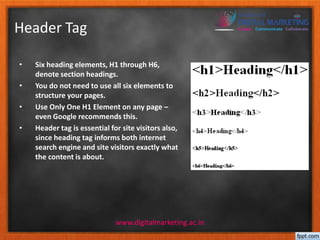
• Six heading elements, H1 through H6, 
denote section headings. 
• You do not need to use all six elements to 
structure your pages. 
• Use Only One H1 Element on any page – 
even Google recommends this. 
• Header tag is essential for site visitors also, 
since heading tag informs both internet 
search engine and site visitors exactly what 
the content is about. 
www.digitalmarketing.ac.in
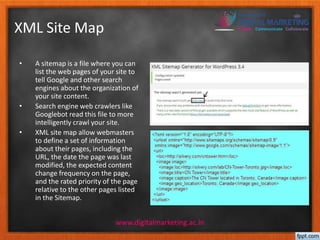
XML Site Map 
• A sitemap is a file where you can 
list the web pages of your site to 
tell Google and other search 
engines about the organization of 
your site content. 
• Search engine web crawlers like 
Googlebot read this file to more 
intelligently crawl your site. 
• XML site map allow webmasters 
to define a set of information 
about their pages, including the 
URL, the date the page was last 
modified, the expected content 
change frequency on the page, 
and the rated priority of the page 
relative to the other pages listed 
in the Sitemap. 
www.digitalmarketing.ac.in
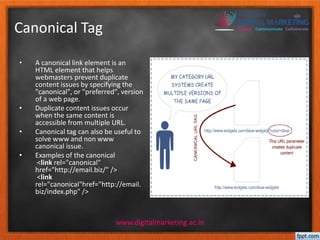
Canonical Tag 
• A canonical link element is an 
HTML element that helps 
webmasters prevent duplicate 
content issues by specifying the 
"canonical", or "preferred", version 
of a web page. 
• Duplicate content issues occur 
when the same content is 
accessible from multiple URL. 
• Canonical tag can also be useful to 
solve www and non www 
canonical issue. 
• Examples of the canonical 
<link rel="canonical" 
href="http://email.biz/" /> 
<link 
rel="canonical"href="http://email. 
biz/index.php" /> 
www.digitalmarketing.ac.in
Anchor text 
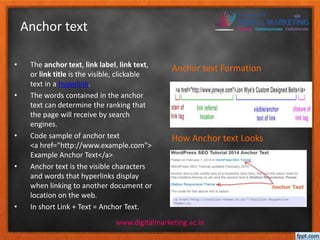
• The anchor text, link label, link text, 
or link title is the visible, clickable 
text in a hyperlink. 
• The words contained in the anchor 
text can determine the ranking that 
the page will receive by search 
engines. 
• Code sample of anchor text 
<a href="http://www.example.com"> 
Example Anchor Text</a> 
• Anchor text is the visible characters 
and words that hyperlinks display 
when linking to another document or 
location on the web. 
• In short Link + Text = Anchor Text. 
Anchor text Formation 
How Anchor text Looks 
www.digitalmarketing.ac.in
Robort.txt File 
• A robots.txt file is a text file that stops web crawler software, such as 
Googlebot, from crawling certain pages of your site. 
• To exclude all robots from the entire server 
User-agent: * 
Disallow: / 
• To allow all robots complete access 
User-agent: * 
Disallow: 
• To exclude all files except one 
User-agent: * 
Disallow: /~joe/stuff/ 
www.digitalmarketing.ac.in
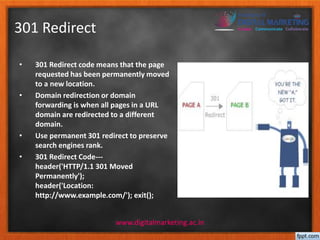
301 Redirect 
• 301 Redirect code means that the page 
requested has been permanently moved 
to a new location. 
• Domain redirection or domain 
forwarding is when all pages in a URL 
domain are redirected to a different 
domain. 
• Use permanent 301 redirect to preserve 
search engines rank. 
• 301 Redirect Code--- 
header('HTTP/1.1 301 Moved 
Permanently'); 
header('Location: 
http://www.example.com/'); exit(); 
www.digitalmarketing.ac.in
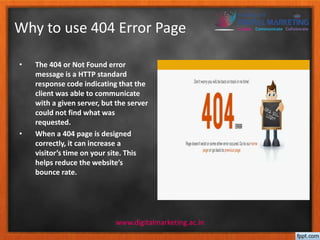
Why to use 404 Error Page 
• The 404 or Not Found error 
message is a HTTP standard 
response code indicating that the 
client was able to communicate 
with a given server, but the server 
could not find what was 
requested. 
• When a 404 page is designed 
correctly, it can increase a 
visitor’s time on your site. This 
helps reduce the website’s 
bounce rate. 
www.digitalmarketing.ac.in
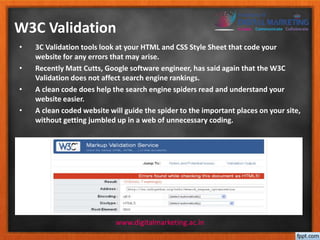
W3C Validation 
• 3C Validation tools look at your HTML and CSS Style Sheet that code your 
website for any errors that may arise. 
• Recently Matt Cutts, Google software engineer, has said again that the W3C 
Validation does not affect search engine rankings. 
• A clean code does help the search engine spiders read and understand your 
website easier. 
• A clean coded website will guide the spider to the important places on your site, 
without getting jumbled up in a web of unnecessary coding. 
www.digitalmarketing.ac.in
Tool Used in On Page 
Optimization 
• Wordstream(Keyword Research tool). 
• Copyscape(Find duplicate content). 
• Google Snippet Preview(Visualize and 
optimize what is displayed to 
searchers). 
• Pingdom Website Speed Tool(tests the 
www.digitalmarketing.ac.in 
load time of a page). 
• Meta Tag Generator 
• Keyword Density Analyzer 
• SEO book
Videos for References 
• http://videos.webpronews.com/2009/02/breaking-news-matt-cutts- 
explains-canonical-tag-from-google-yahoo-microsoft/ 
• http://www.youtube.com/watch?v=ttYiP_KIw_w 
• http://www.youtube.com/watch?v=I2giR-WKUfY 
• http://www.youtube.com/watch?v=3NbuDpB_BTc 
• http://www.youtube.com/watch?v=GIn5qJKU8VM 
• http://www.youtube.com/watch?v=Cm9onOGTgeM 
www.digitalmarketing.ac.in
Further Reading 
• http://www.searchenginejournal.com/on-page-optimization-a-complete-walkthrough/ 
6746/ 
• http://moz.com/learn/seo/title-tag 
• http://moz.com/learn/seo/meta-description 
• http://searchengineland.com/a-primer-on-how-to-get-the-most-out-of-sitemaps- 
152092 
• http://moz.com/learn/seo/anchor-text 
• http://searchenginewatch.com/article/2172839/Google-Penguin-Update- 
Impact-of-Anchor-Text-Diversity-Link-Relevancy 
• http://www.robotstxt.org/robotstxt.html 
• http://tools.seobook.com/ 
• http://www.hobo-web.co.uk/headers/ 
• http://www.rankingbyseo.com/heading-optimization.html 
• https://support.google.com/webmasters/answer/93641?hl=en 
www.digitalmarketing.ac.in
Thank You 
www.digitalmarketing.ac.in

On-Page SEO

  • 1.
    On Page Optimization www.digitalmarketing.ac.in
  • 2.
    What is Onpage optimization • On page Optimization means the process of preparing website pages search engine friendly. • On page optimization Gives outcome to a web page or website ranking on search engine result page through your website page coding. • These Factor controlled by you or by coding on your page. www.digitalmarketing.ac.in
  • 3.
    On Page optimization Checklist….. 1. Page Meta Titles. 2. Page Meta Descriptions. 3. Page Meta Keywords. 4. H1 and H2 Tags. 5. Alt Tag. 6. Proper site navigation. 7. XML and HTML Site Map. 8. Canonical Tag. 9. Anchor text. 10. Google Analytics. 11. Google Webmaster Tool. 12. Robort.txt File. 13. W3C validation. 14. 301 Redirect Page. 15. 404 Error Page. www.digitalmarketing.ac.in
  • 4.
    Meta Title Tag • The meta title is the HTML code that specifies the title of a certain web page. It appears at the top left corner of your browser when you visit a web page. • First of all, the meta title is used by search engines, directories, web resources and other webmasters. • Meta title should always be typed with the first letter of each major word capitalized, in the style known as Title Case. This means everything is capitalized except for smaller words like "for", "is" and "a". • Meta title should optimally be between 50-60 characters • Meta title code shown in image bellow. www.digitalmarketing.ac.in
  • 5.
    Meta Descriptions Tag • Meta descriptions are commonly used on search engine result pages (SERPs) to display preview snippets for a given page.3 • Meta descriptions is extremely important in gaining user click-through from SERPs. • The meta description should employ the keywords intelligently, but also create a compelling description that a searcher will want to click. • The description should optimally be between 150-160 characters. www.digitalmarketing.ac.in
  • 6.
    Meta Keywords tag • Meta Keywords, an attribute of meta tags, are a list of comma-separated words included in the HTML of a Web page that describe the topic of that page. • A meta keywords tag is supposed to be a brief and concise list of the most important themes of your page. • Maximum 10 to 15 keywords you can have in meta keyword tag. • Meta keyword code ---- <meta name=”keywords” content=”bassett, hound, hounds, basset” /> www.digitalmarketing.ac.in
  • 7.
    Alt tag •Alt tag is used in HTML and XHTML documents to specify alternative text (alt text) that is to be rendered when the element to which it is applied cannot be rendered. • Alt tags describe your images to people who could not identify and also to search engines. • Don't describe the image if it's meant to be viewed in context. For example: If you've got an image of the company logo, you should write "Company Name" and not "Company Name Logo" • Alt Tag coding ------ <img src="smiley.gif" alt="Smiley face"> www.digitalmarketing.ac.in
  • 8.
    Header Tag •Six heading elements, H1 through H6, denote section headings. • You do not need to use all six elements to structure your pages. • Use Only One H1 Element on any page – even Google recommends this. • Header tag is essential for site visitors also, since heading tag informs both internet search engine and site visitors exactly what the content is about. www.digitalmarketing.ac.in
  • 9.
    XML Site Map • A sitemap is a file where you can list the web pages of your site to tell Google and other search engines about the organization of your site content. • Search engine web crawlers like Googlebot read this file to more intelligently crawl your site. • XML site map allow webmasters to define a set of information about their pages, including the URL, the date the page was last modified, the expected content change frequency on the page, and the rated priority of the page relative to the other pages listed in the Sitemap. www.digitalmarketing.ac.in
  • 10.
    Canonical Tag •A canonical link element is an HTML element that helps webmasters prevent duplicate content issues by specifying the "canonical", or "preferred", version of a web page. • Duplicate content issues occur when the same content is accessible from multiple URL. • Canonical tag can also be useful to solve www and non www canonical issue. • Examples of the canonical <link rel="canonical" href="http://email.biz/" /> <link rel="canonical"href="http://email. biz/index.php" /> www.digitalmarketing.ac.in
  • 11.
    Anchor text •The anchor text, link label, link text, or link title is the visible, clickable text in a hyperlink. • The words contained in the anchor text can determine the ranking that the page will receive by search engines. • Code sample of anchor text <a href="http://www.example.com"> Example Anchor Text</a> • Anchor text is the visible characters and words that hyperlinks display when linking to another document or location on the web. • In short Link + Text = Anchor Text. Anchor text Formation How Anchor text Looks www.digitalmarketing.ac.in
  • 12.
    Robort.txt File •A robots.txt file is a text file that stops web crawler software, such as Googlebot, from crawling certain pages of your site. • To exclude all robots from the entire server User-agent: * Disallow: / • To allow all robots complete access User-agent: * Disallow: • To exclude all files except one User-agent: * Disallow: /~joe/stuff/ www.digitalmarketing.ac.in
  • 13.
    301 Redirect •301 Redirect code means that the page requested has been permanently moved to a new location. • Domain redirection or domain forwarding is when all pages in a URL domain are redirected to a different domain. • Use permanent 301 redirect to preserve search engines rank. • 301 Redirect Code--- header('HTTP/1.1 301 Moved Permanently'); header('Location: http://www.example.com/'); exit(); www.digitalmarketing.ac.in
  • 14.
    Why to use404 Error Page • The 404 or Not Found error message is a HTTP standard response code indicating that the client was able to communicate with a given server, but the server could not find what was requested. • When a 404 page is designed correctly, it can increase a visitor’s time on your site. This helps reduce the website’s bounce rate. www.digitalmarketing.ac.in
  • 15.
    W3C Validation •3C Validation tools look at your HTML and CSS Style Sheet that code your website for any errors that may arise. • Recently Matt Cutts, Google software engineer, has said again that the W3C Validation does not affect search engine rankings. • A clean code does help the search engine spiders read and understand your website easier. • A clean coded website will guide the spider to the important places on your site, without getting jumbled up in a web of unnecessary coding. www.digitalmarketing.ac.in
  • 16.
    Tool Used inOn Page Optimization • Wordstream(Keyword Research tool). • Copyscape(Find duplicate content). • Google Snippet Preview(Visualize and optimize what is displayed to searchers). • Pingdom Website Speed Tool(tests the www.digitalmarketing.ac.in load time of a page). • Meta Tag Generator • Keyword Density Analyzer • SEO book
  • 17.
    Videos for References • http://videos.webpronews.com/2009/02/breaking-news-matt-cutts- explains-canonical-tag-from-google-yahoo-microsoft/ • http://www.youtube.com/watch?v=ttYiP_KIw_w • http://www.youtube.com/watch?v=I2giR-WKUfY • http://www.youtube.com/watch?v=3NbuDpB_BTc • http://www.youtube.com/watch?v=GIn5qJKU8VM • http://www.youtube.com/watch?v=Cm9onOGTgeM www.digitalmarketing.ac.in
  • 18.
    Further Reading •http://www.searchenginejournal.com/on-page-optimization-a-complete-walkthrough/ 6746/ • http://moz.com/learn/seo/title-tag • http://moz.com/learn/seo/meta-description • http://searchengineland.com/a-primer-on-how-to-get-the-most-out-of-sitemaps- 152092 • http://moz.com/learn/seo/anchor-text • http://searchenginewatch.com/article/2172839/Google-Penguin-Update- Impact-of-Anchor-Text-Diversity-Link-Relevancy • http://www.robotstxt.org/robotstxt.html • http://tools.seobook.com/ • http://www.hobo-web.co.uk/headers/ • http://www.rankingbyseo.com/heading-optimization.html • https://support.google.com/webmasters/answer/93641?hl=en www.digitalmarketing.ac.in
  • 19.