JUNOS Simulator
              Olive introduction

Johnson Liu
Staff Engineer
What is Olive ?

 Olive is also the codename name given to JUNOS
  software running on an PC rather than a Juniper router.

 If you took a Routing Engine out of a Juniper router and
  booted it in a blade server chassis, it would effectively be
  an Olive.

 Juniper originally developed Olive functionality as a
  software development platform, before its hardware
  product was fully implemented.

 At one point it was used by Juniper internally for lab
  work, but has largely been phased out of this role with
  the availability of low-end hardware based platforms such
  as the M5.
What is Logical Router?
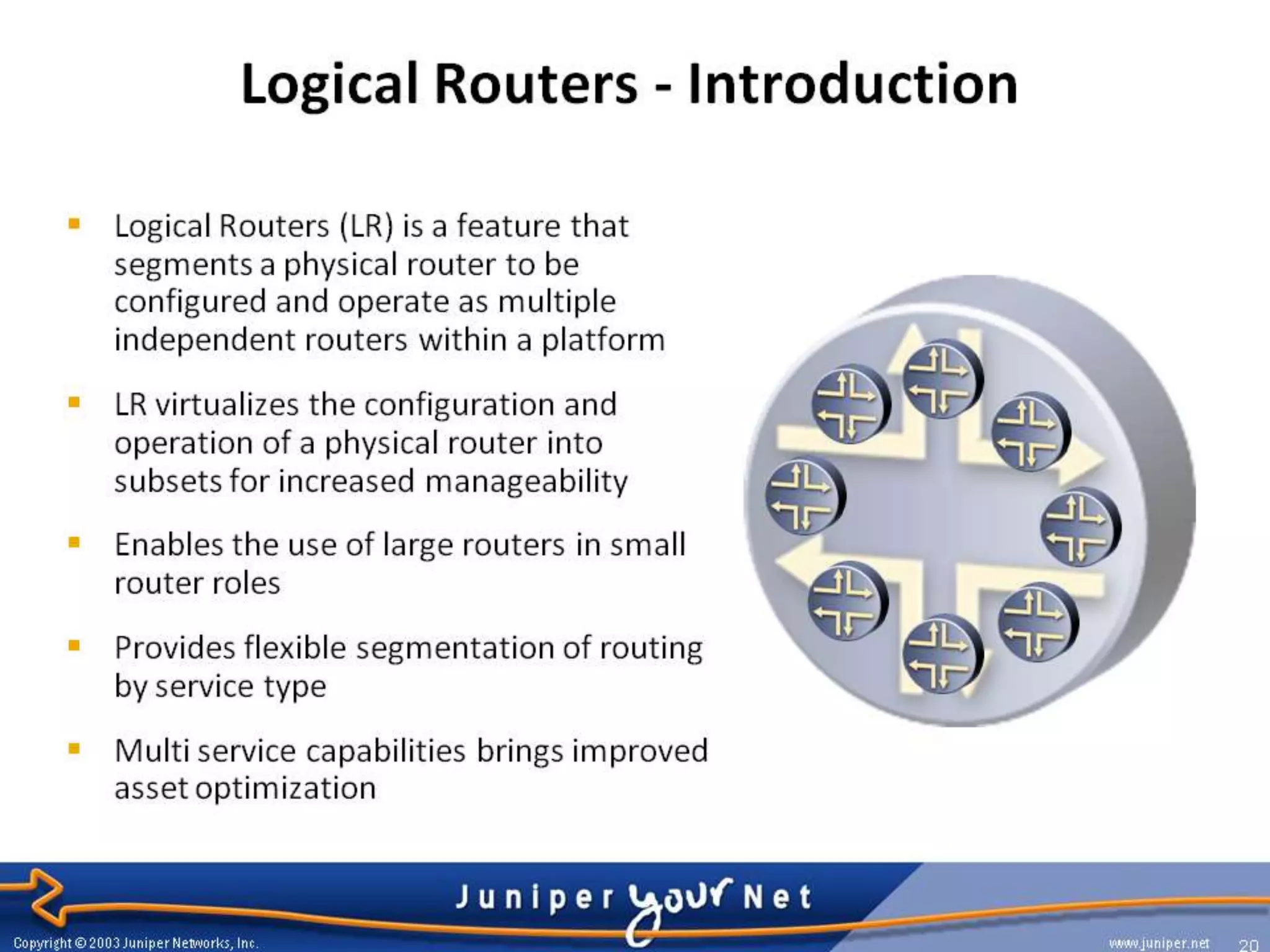
 Logical router (LR) is a feature that segment
  a physical router to be configured and
  operate as multiple independent routers
  within a platform

 You can partition a single physical router into
  multiple logical devices that perform
  independent routing tasks.

 Because logical routers perform a subset of
  the tasks once handled by the physical
  router, logical routers offer an effective way
  to maximize the use of a single router.
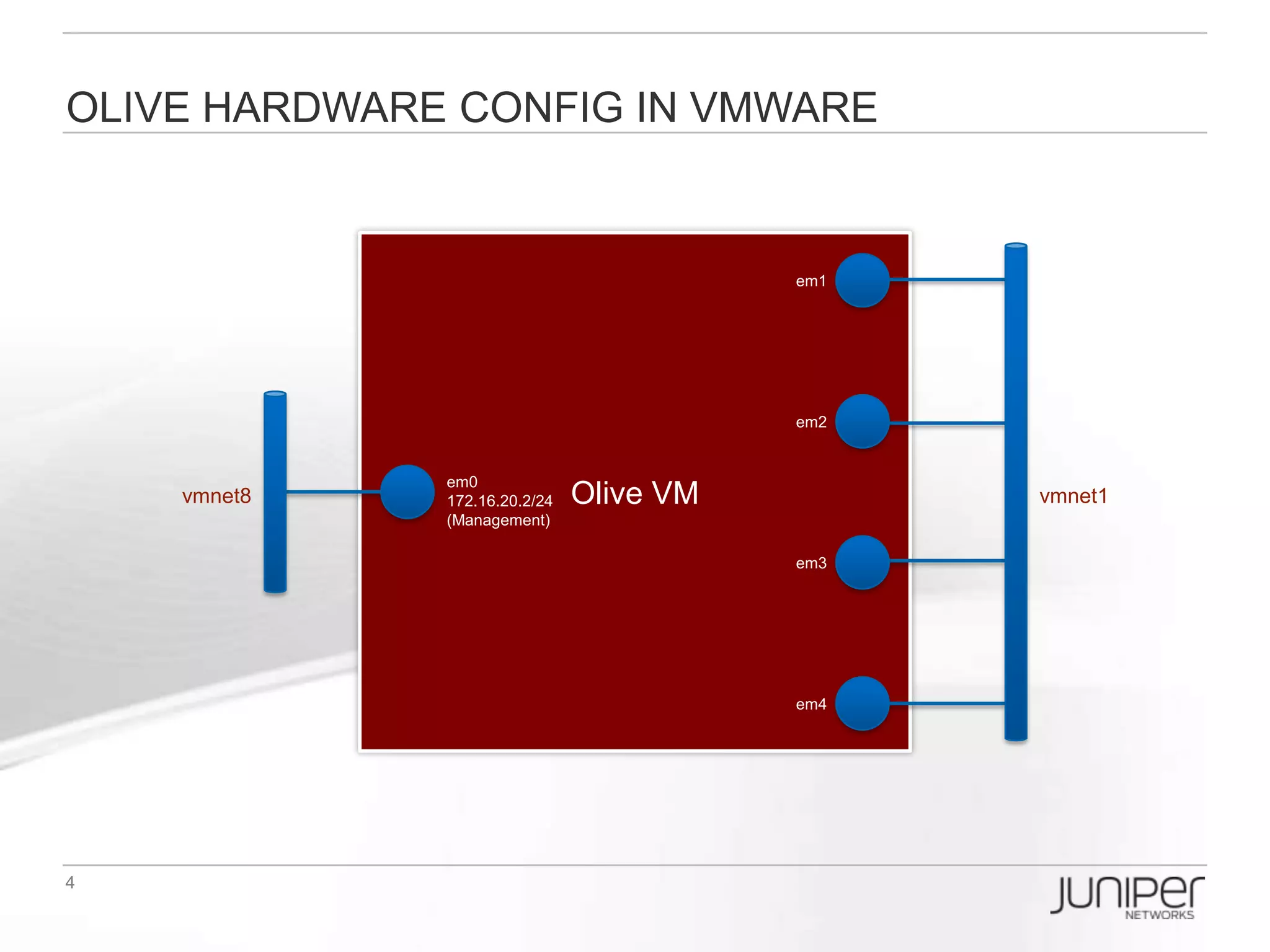
Olive Hardware Config in VMWARE


                                        em1


                                        em2


                 em0
   vmnet8   172.16.20.2/24   Olive VM         vmnet1
            (Management)

                                        em3


                                        em4
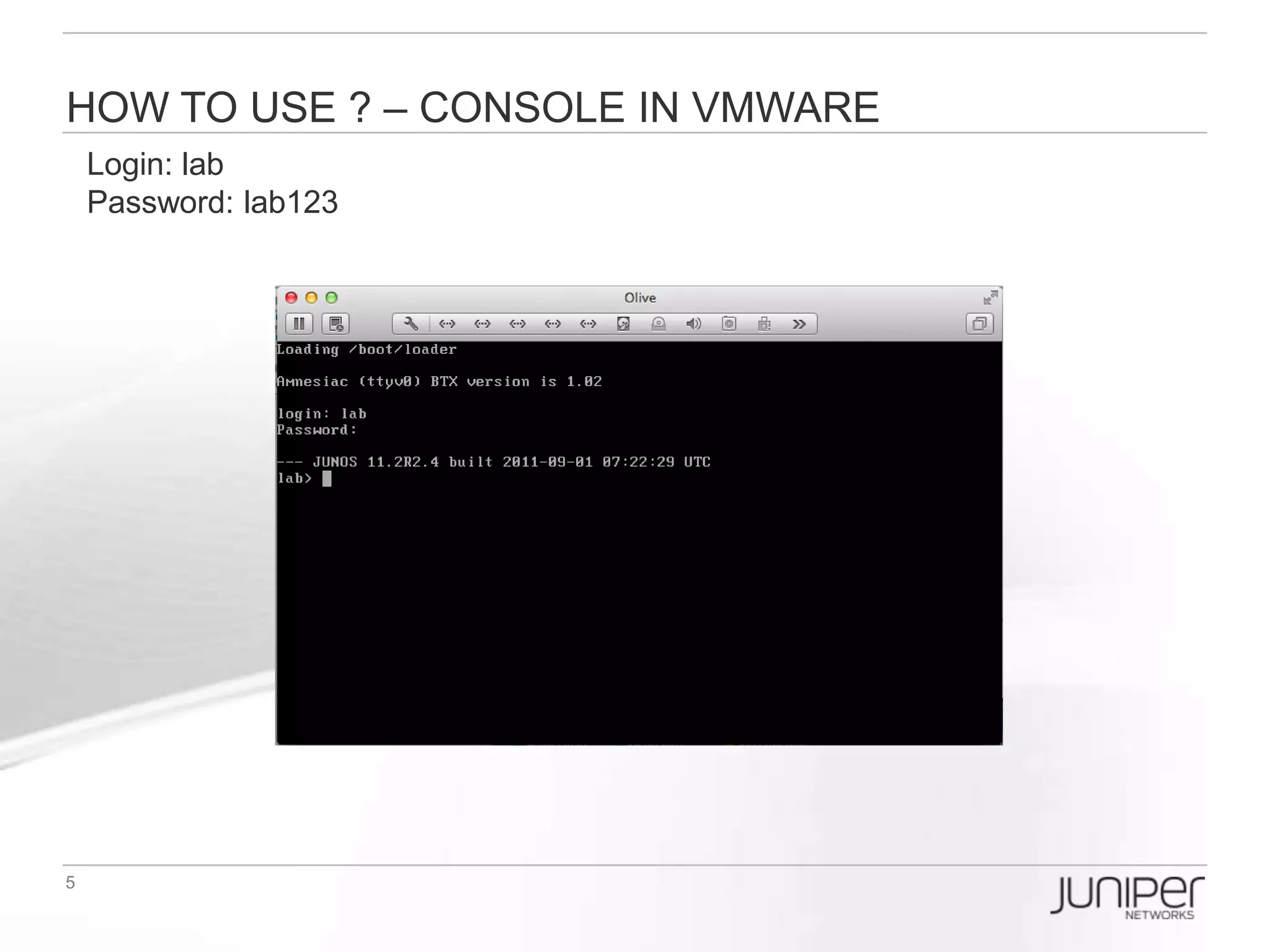
How to USE ? – Console in VMWARE
Login: lab
Password: lab123
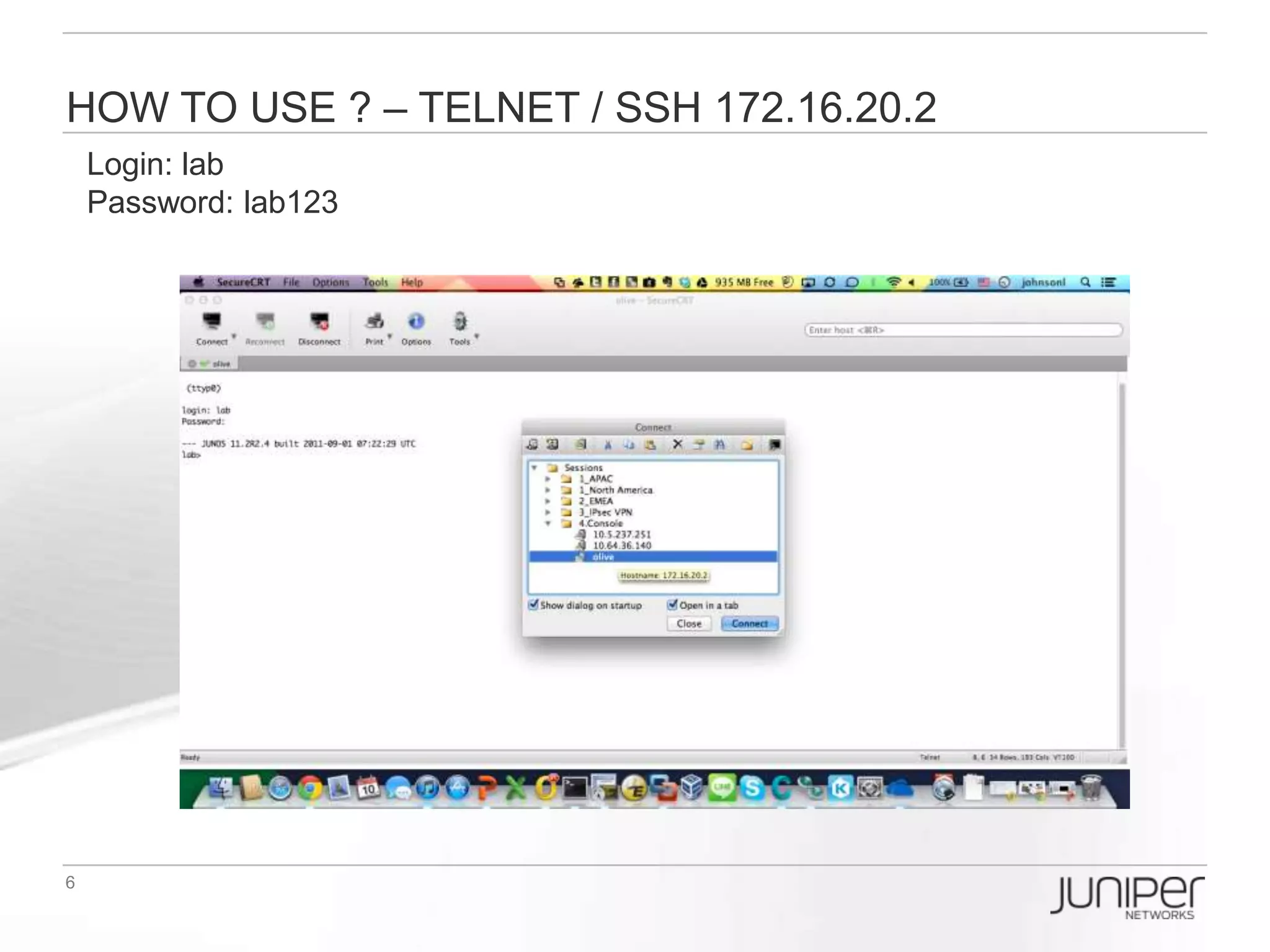
How to USE ? – Telnet / SSH 172.16.20.2
Login: lab
Password: lab123
Check interface in olive

At first, let’s see what interface we have, in baseline.conf I had pre-configured four
interface for use(except the em0 for management purpose):

[edit]
lab# run show interfaces terse
Interface        Admin Link Proto Local        Remote
em0             up up
em0.0            up up inet 172.16.20.2/24
em1             up up
em2             up up
em3             up up
em4             up up
Setup 1st Logical router
Now, I decide to setup a logical router(called WR) which will use the interface
em1.10 and loopback0.1 :
[edit]
lab# set logical-systems WR interfaces em1 unit 10 vlan-id 10
lab# set logical-systems WR interfaces em1 unit 10 family inet address 10.10.10.1/24
lab# set logical-systems WR interfaces lo0.1 family inet address 1.1.1.1/32
Lab# commit

lab# show logical-systems WR
interfaces {
   em1 {
     unit 10 {
         vlan-id 10;
         family inet {
            address 10.10.10.1/24;
         }
     }
   }
   lo0 {
     unit 1 {
         family inet {
            address 1.1.1.1/32;
         }
     }
   }
}
Setup 2nd Logical router
Then, I setup a logical router(called VPN) which will use the interface em2.10 and
loopback0.2 :
[edit]
lab# set logical-systems VPN interfaces em2 unit 10 vlan-id 10
lab# set logical-systems VPN interfaces em2 unit 10 family inet address 10.10.10.2/24
lab# set logical-systems VPN interfaces lo0.2 family inet address 2.2.2.2/32
Lab# commit

lab# show logical-systems VPN
interfaces {
   em2 {
     unit 10 {
         vlan-id 10;
         family inet {
            address 10.10.10.2/24;
         }
     }
   }
   lo0 {
     unit 2 {
         family inet {
            address 2.2.2.2/32;
         }
     }
   }
}
TEST Logical routers’ connection
NOW, test the logical router WAN interface reachability:

[edit]
lab# run ping logical-system WR 10.10.10.2
PING 10.10.10.2 (10.10.10.2): 56 data bytes
64 bytes from 10.10.10.2: icmp_seq=0 ttl=64 time=1.026 ms
64 bytes from 10.10.10.2: icmp_seq=1 ttl=64 time=0.355 ms
64 bytes from 10.10.10.2: icmp_seq=2 ttl=64 time=0.313 ms
64 bytes from 10.10.10.2: icmp_seq=3 ttl=64 time=0.298 ms
^C
--- 10.10.10.2 ping statistics ---
4 packets transmitted, 4 packets received, 0% packet loss
round-trip min/avg/max/stddev = 0.298/0.498/1.026/0.306 ms

lab# run show route logical-system WR

inet.0: 3 destinations, 3 routes (3 active, 0 holddown, 0 hidden)
+ = Active Route, - = Last Active, * = Both

1.1.1.1/32     *[Direct/0] 00:06:08
            > via lo0.1
10.10.10.0/24    *[Direct/0] 00:06:08
            > via em1.10
10.10.10.1/32    *[Local/0] 00:06:08
              Local via em1.10
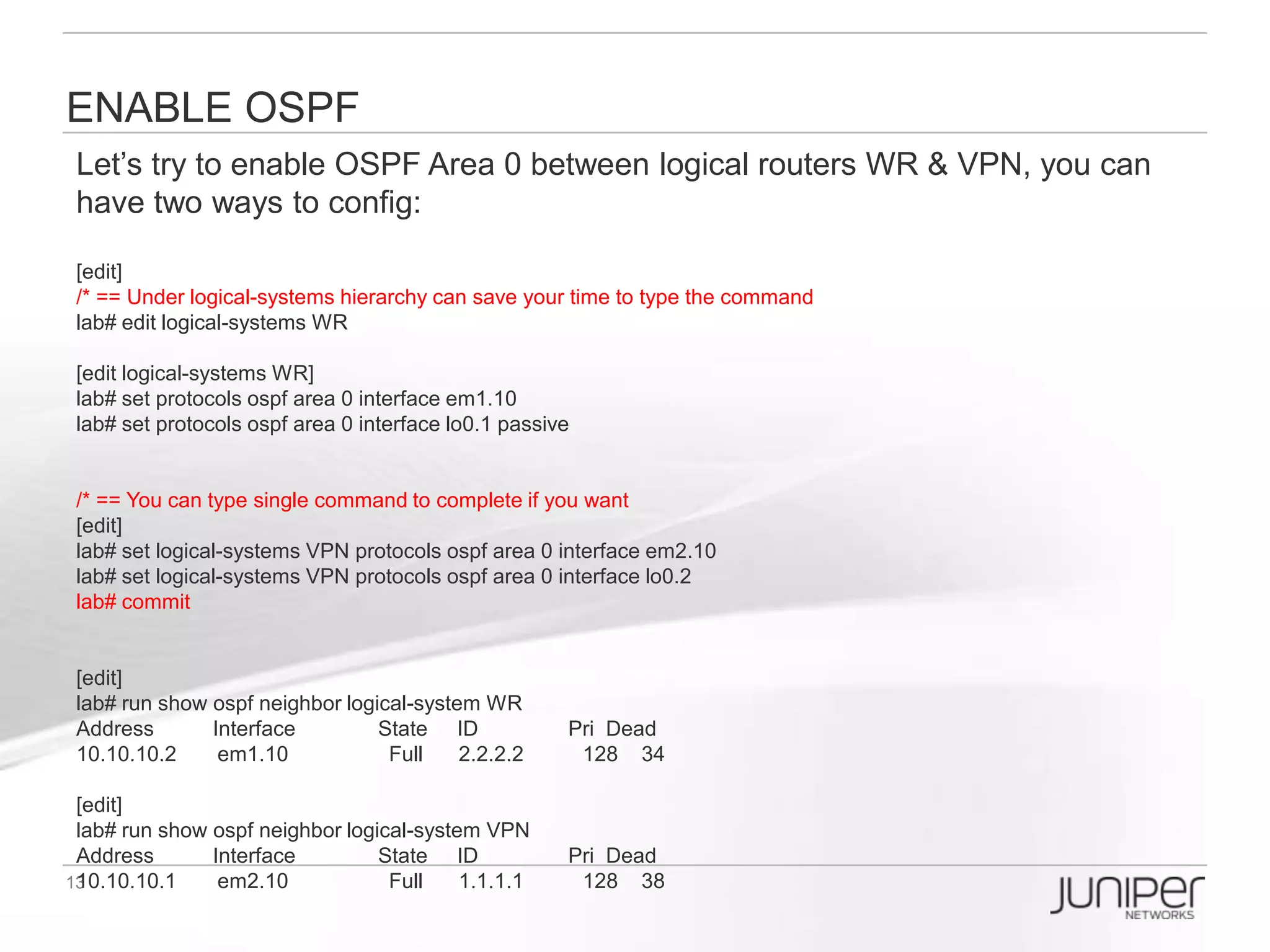
Enable OSPF
Let’s try to enable OSPF Area 0 between logical routers WR & VPN, you can have
two ways to config:

[edit]
/* == Under logical-systems hierarchy can save your time to type the command
lab# edit logical-systems WR

[edit logical-systems WR]
lab# set protocols ospf area 0 interface em1.10
lab# set protocols ospf area 0 interface lo0.1 passive


/* == You can type single command to complete if you want
[edit]
lab# set logical-systems VPN protocols ospf area 0 interface em2.10
lab# set logical-systems VPN protocols ospf area 0 interface lo0.2
lab# commit


[edit]
lab# run show ospf neighbor logical-system WR
Address      Interface        State ID             Pri Dead
10.10.10.2   em1.10           Full   2.2.2.2       128 34

[edit]
lab# run show ospf neighbor logical-system VPN
Address      Interface        State ID         Pri Dead
10.10.10.1   em2.10           Full   1.1.1.1   128 38
Enable BGP
Let’s try to enable BGP in logical router WR:
[edit]
lab# edit logical-systems WR
lab# set routing-options autonomous-system 65001
lab# set protocols bgp group IBGP type internal
lab# set protocols bgp group IBGP neighbor 2.2.2.2 peer-as 65001
lab# set protocols bgp group IBGP neighbor 2.2.2.2 local-address 1.1.1.1

[edit logical-systems WR]
lab# top edit logical-systems VPN
lab# set routing-options autonomous-system 65001
lab# set protocols bgp group IBGP type internal
lab# set protocols bgp group IBGP neighbor 1.1.1.1 peer-as 65001
lab# set protocols bgp group IBGP neighbor 1.1.1.1 local-address 2.2.2.2
lab# commit

[edit]
lab# run show bgp summary logical-system WR
Groups: 1 Peers: 1 Down peers: 0
Table      Tot Paths Act Paths Suppressed History Damp State Pending
inet.0         0     0      0      0    0     0
Peer             AS   InPkt OutPkt OutQ Flaps Last Up/Dwn State|#Active/Received/Accepted/Damped...
2.2.2.2        65001      5      5   0   0   1:13 0/0/0/0     0/0/0/0

[edit]
lab# run show bgp summary logical-system VPN
Groups: 1 Peers: 1 Down peers: 0
Table      Tot Paths Act Paths Suppressed History Damp State Pending
inet.0         0     0      0      0    0     0
Peer             AS   InPkt OutPkt OutQ Flaps Last Up/Dwn State|#Active/Received/Accepted/Damped...
1.1.1.1        65001      4      5   0   0   1:11 0/0/0/0     0/0/0/0
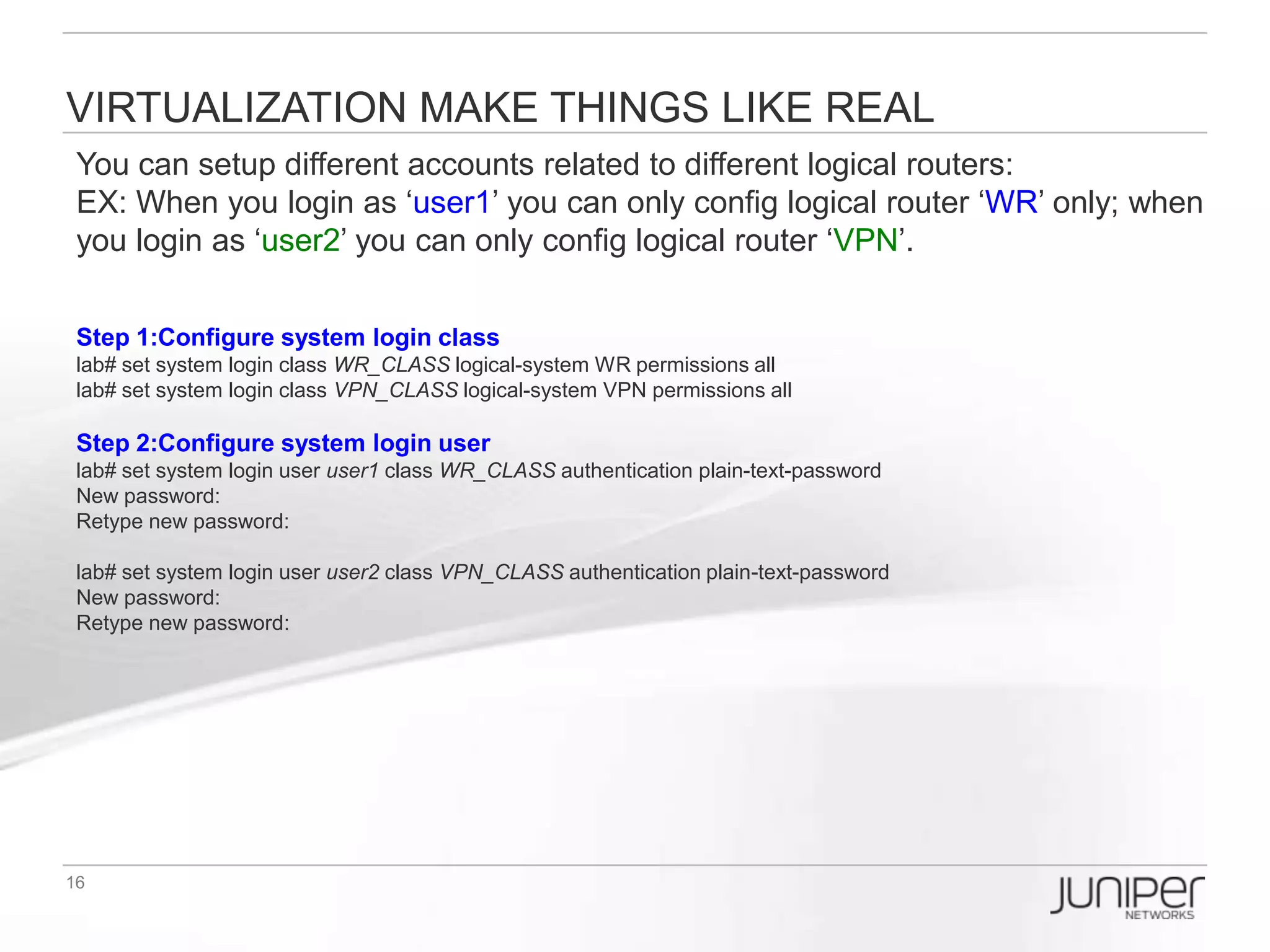
Virtualization makes things like real
You can setup different accounts related to different logical routers:
EX: When you login as ‘user1’ you can only config logical router ‘WR’ only; when
you login as ‘user2’ you can only config logical router ‘VPN’.


Step 1:Configure system login class
lab# set system login class WR_CLASS logical-system WR permissions all
lab# set system login class VPN_CLASS logical-system VPN permissions all

Step 2:Configure system login user
lab# set system login user user1 class WR_CLASS authentication plain-text-password
New password:
Retype new password:

lab# set system login user user2 class VPN_CLASS authentication plain-text-password
New password:
Retype new password:
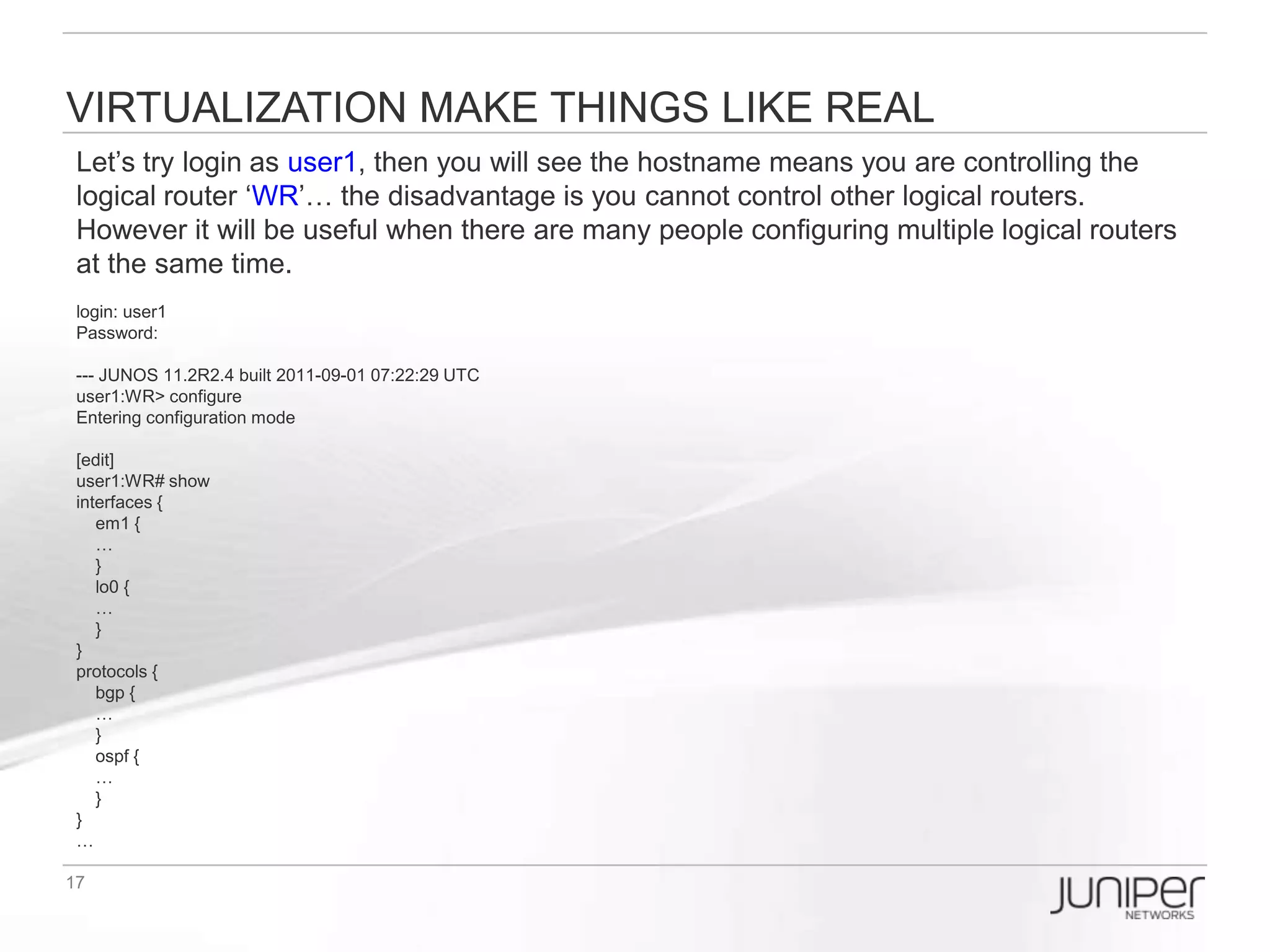
Virtualization make things like real
Let’s try login as user1, then you will see the hostname means you are controlling
the logical router ‘WR’… the disadvantage is you cannot control other logical
routers. However it will be useful when there are many people configuring multiple
logical routers at the same time.
login: user1
Password:

--- JUNOS 11.2R2.4 built 2011-09-01 07:22:29 UTC
user1:WR> configure
Entering configuration mode

[edit]
user1:WR# show
interfaces {
   em1 {
   …
   }
   lo0 {
   …
   }
}
protocols {
   bgp {
   …
   }
   ospf {
   …
   }
}
…
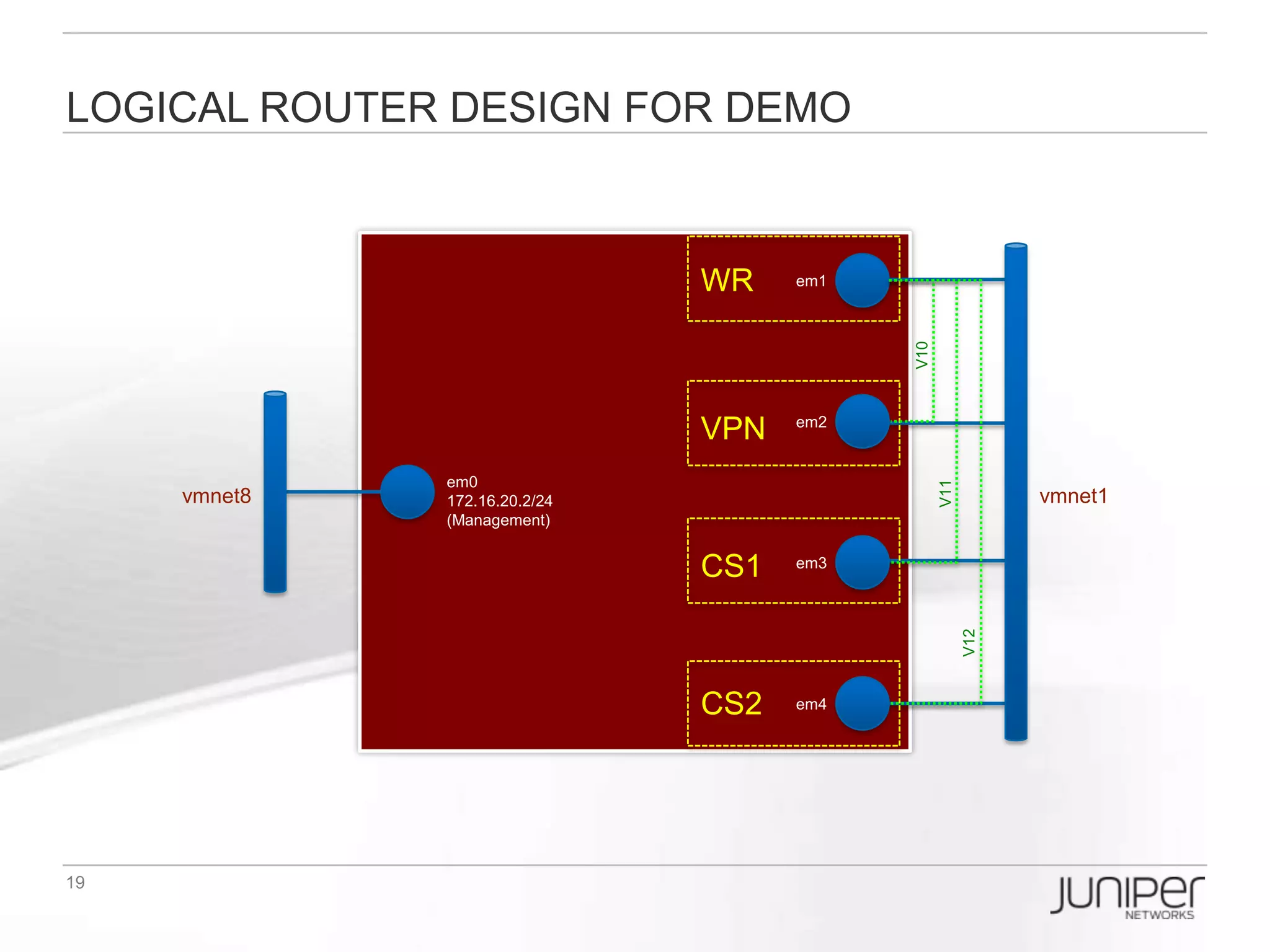
Logical Router Design for DEMO


                                                    WR      em1


                                                                       V10
                                                     VPN    em2


                                   em0


                                                                             V11
       vmnet8                 172.16.20.2/24                                             vmnet1
                              (Management)


                                                    CS1     em3


                                                                                   V12
                                                    CS2     em4


PS: You don’t need to use so many interface, in fact, you can just use two interface with vlan-
tagging then assign each vlan to each router directly connection.
EX: WR em1.1  VPN em2.1, WR em1.2  CS1 em2.2, CS1 em1.3  CS2 em2.3,
VPN em1.4  CS1 em2.4, … etc.
Logical Router Design for EBB DEMO


                              WR    em1


                              VPN   em2


                  em0


                                          V21
   vmnet8    172.16.20.2/24                           vmnet1
             (Management)


                              CS1   em3


                                          V20

                                                V22
                              CS2   em4
Logical Router EBB Logical Topology
                                          iBGP

                                       AS65001

                                         OSPF
                              em1.10     Area0       em2.10
               WR                                                 VPN
                                       10.10.10/24
           (1.1.1.1/32)                                       (2.2.2.2/32)
            1.0.0.0/8                                          2.0.0.0/8
          em1.11                em1.12           em2.21              Em2.22


                                                                 (Secondary)
                                                                  22.22.22/24
               11.11.11/24
                (Primary)


   eBGP                                                                          eBGP


          em3.11             em3.21                   em4.12            em4.22
               CS1                                                CS2
           (3.3.3.3/32)                20.20.20/24            (4.4.4.4/32)
            3.0.0.0/8                                          4.0.0.0/8
                              em3.20                 em4.20
                                         OSPF
                                         Area0

                                       AS36421
                                          iBGP
How to apply the pre-config (1/2) ?
[edit]
lab# run file list
/* == olive basic config for interface and management IP access ==*/
baseline.conf

/* == pre-config for EBB topology ==*/
LR_WR_VPN_CS1_CS2.conf
LR_WR_VPN_CS1_CS2_OSPF.conf
LR_WR_VPN_CS1_CS2_BGP.conf

/* == pre-config for R1-R2 (Single AS iBGP) topology ==*/
LR_R1R2.conf
LR_R1R2_OSPF.conf
LR_R1R2_iBGP.conf
LR_R1R2_iBGP_LocalAccount.conf

/* == pre-config for R1-R2, R3-R4 (Multi-AS eBGP) topology ==*/
LR_R1R2R3R4.conf
LR_R1R2R3R4_OSPF.conf
LR_R1R2R3R4_LDP.conf
LR_R1R2R3R4_iBGP_eBGP.conf
LR_R1R2R3R4_iBGP_eBGP_LocalAccount.conf
Lab Time


9/24/2012   Confidential | Copyright 2012 Trend Micro Inc.   23

Olive Introduction for TOI

  • 1.
    JUNOS Simulator Olive introduction Johnson Liu Staff Engineer
  • 2.
    What is Olive?  Olive is also the codename name given to JUNOS software running on an PC rather than a Juniper router.  If you took a Routing Engine out of a Juniper router and booted it in a blade server chassis, it would effectively be an Olive.  Juniper originally developed Olive functionality as a software development platform, before its hardware product was fully implemented.  At one point it was used by Juniper internally for lab work, but has largely been phased out of this role with the availability of low-end hardware based platforms such as the M5.
  • 3.
    What is LogicalRouter?  Logical router (LR) is a feature that segment a physical router to be configured and operate as multiple independent routers within a platform  You can partition a single physical router into multiple logical devices that perform independent routing tasks.  Because logical routers perform a subset of the tasks once handled by the physical router, logical routers offer an effective way to maximize the use of a single router.
  • 4.
    Olive Hardware Configin VMWARE em1 em2 em0 vmnet8 172.16.20.2/24 Olive VM vmnet1 (Management) em3 em4
  • 5.
    How to USE? – Console in VMWARE Login: lab Password: lab123
  • 6.
    How to USE? – Telnet / SSH 172.16.20.2 Login: lab Password: lab123
  • 7.
    Check interface inolive At first, let’s see what interface we have, in baseline.conf I had pre-configured four interface for use(except the em0 for management purpose): [edit] lab# run show interfaces terse Interface Admin Link Proto Local Remote em0 up up em0.0 up up inet 172.16.20.2/24 em1 up up em2 up up em3 up up em4 up up
  • 8.
    Setup 1st Logicalrouter Now, I decide to setup a logical router(called WR) which will use the interface em1.10 and loopback0.1 : [edit] lab# set logical-systems WR interfaces em1 unit 10 vlan-id 10 lab# set logical-systems WR interfaces em1 unit 10 family inet address 10.10.10.1/24 lab# set logical-systems WR interfaces lo0.1 family inet address 1.1.1.1/32 Lab# commit lab# show logical-systems WR interfaces { em1 { unit 10 { vlan-id 10; family inet { address 10.10.10.1/24; } } } lo0 { unit 1 { family inet { address 1.1.1.1/32; } } } }
  • 9.
    Setup 2nd Logicalrouter Then, I setup a logical router(called VPN) which will use the interface em2.10 and loopback0.2 : [edit] lab# set logical-systems VPN interfaces em2 unit 10 vlan-id 10 lab# set logical-systems VPN interfaces em2 unit 10 family inet address 10.10.10.2/24 lab# set logical-systems VPN interfaces lo0.2 family inet address 2.2.2.2/32 Lab# commit lab# show logical-systems VPN interfaces { em2 { unit 10 { vlan-id 10; family inet { address 10.10.10.2/24; } } } lo0 { unit 2 { family inet { address 2.2.2.2/32; } } } }
  • 10.
    TEST Logical routers’connection NOW, test the logical router WAN interface reachability: [edit] lab# run ping logical-system WR 10.10.10.2 PING 10.10.10.2 (10.10.10.2): 56 data bytes 64 bytes from 10.10.10.2: icmp_seq=0 ttl=64 time=1.026 ms 64 bytes from 10.10.10.2: icmp_seq=1 ttl=64 time=0.355 ms 64 bytes from 10.10.10.2: icmp_seq=2 ttl=64 time=0.313 ms 64 bytes from 10.10.10.2: icmp_seq=3 ttl=64 time=0.298 ms ^C --- 10.10.10.2 ping statistics --- 4 packets transmitted, 4 packets received, 0% packet loss round-trip min/avg/max/stddev = 0.298/0.498/1.026/0.306 ms lab# run show route logical-system WR inet.0: 3 destinations, 3 routes (3 active, 0 holddown, 0 hidden) + = Active Route, - = Last Active, * = Both 1.1.1.1/32 *[Direct/0] 00:06:08 > via lo0.1 10.10.10.0/24 *[Direct/0] 00:06:08 > via em1.10 10.10.10.1/32 *[Local/0] 00:06:08 Local via em1.10
  • 11.
    Enable OSPF Let’s tryto enable OSPF Area 0 between logical routers WR & VPN, you can have two ways to config: [edit] /* == Under logical-systems hierarchy can save your time to type the command lab# edit logical-systems WR [edit logical-systems WR] lab# set protocols ospf area 0 interface em1.10 lab# set protocols ospf area 0 interface lo0.1 passive /* == You can type single command to complete if you want [edit] lab# set logical-systems VPN protocols ospf area 0 interface em2.10 lab# set logical-systems VPN protocols ospf area 0 interface lo0.2 lab# commit [edit] lab# run show ospf neighbor logical-system WR Address Interface State ID Pri Dead 10.10.10.2 em1.10 Full 2.2.2.2 128 34 [edit] lab# run show ospf neighbor logical-system VPN Address Interface State ID Pri Dead 10.10.10.1 em2.10 Full 1.1.1.1 128 38
  • 12.
    Enable BGP Let’s tryto enable BGP in logical router WR: [edit] lab# edit logical-systems WR lab# set routing-options autonomous-system 65001 lab# set protocols bgp group IBGP type internal lab# set protocols bgp group IBGP neighbor 2.2.2.2 peer-as 65001 lab# set protocols bgp group IBGP neighbor 2.2.2.2 local-address 1.1.1.1 [edit logical-systems WR] lab# top edit logical-systems VPN lab# set routing-options autonomous-system 65001 lab# set protocols bgp group IBGP type internal lab# set protocols bgp group IBGP neighbor 1.1.1.1 peer-as 65001 lab# set protocols bgp group IBGP neighbor 1.1.1.1 local-address 2.2.2.2 lab# commit [edit] lab# run show bgp summary logical-system WR Groups: 1 Peers: 1 Down peers: 0 Table Tot Paths Act Paths Suppressed History Damp State Pending inet.0 0 0 0 0 0 0 Peer AS InPkt OutPkt OutQ Flaps Last Up/Dwn State|#Active/Received/Accepted/Damped... 2.2.2.2 65001 5 5 0 0 1:13 0/0/0/0 0/0/0/0 [edit] lab# run show bgp summary logical-system VPN Groups: 1 Peers: 1 Down peers: 0 Table Tot Paths Act Paths Suppressed History Damp State Pending inet.0 0 0 0 0 0 0 Peer AS InPkt OutPkt OutQ Flaps Last Up/Dwn State|#Active/Received/Accepted/Damped... 1.1.1.1 65001 4 5 0 0 1:11 0/0/0/0 0/0/0/0
  • 13.
    Virtualization makes thingslike real You can setup different accounts related to different logical routers: EX: When you login as ‘user1’ you can only config logical router ‘WR’ only; when you login as ‘user2’ you can only config logical router ‘VPN’. Step 1:Configure system login class lab# set system login class WR_CLASS logical-system WR permissions all lab# set system login class VPN_CLASS logical-system VPN permissions all Step 2:Configure system login user lab# set system login user user1 class WR_CLASS authentication plain-text-password New password: Retype new password: lab# set system login user user2 class VPN_CLASS authentication plain-text-password New password: Retype new password:
  • 14.
    Virtualization make thingslike real Let’s try login as user1, then you will see the hostname means you are controlling the logical router ‘WR’… the disadvantage is you cannot control other logical routers. However it will be useful when there are many people configuring multiple logical routers at the same time. login: user1 Password: --- JUNOS 11.2R2.4 built 2011-09-01 07:22:29 UTC user1:WR> configure Entering configuration mode [edit] user1:WR# show interfaces { em1 { … } lo0 { … } } protocols { bgp { … } ospf { … } } …
  • 15.
    Logical Router Designfor DEMO WR em1 V10 VPN em2 em0 V11 vmnet8 172.16.20.2/24 vmnet1 (Management) CS1 em3 V12 CS2 em4 PS: You don’t need to use so many interface, in fact, you can just use two interface with vlan- tagging then assign each vlan to each router directly connection. EX: WR em1.1  VPN em2.1, WR em1.2  CS1 em2.2, CS1 em1.3  CS2 em2.3, VPN em1.4  CS1 em2.4, … etc.
  • 16.
    Logical Router Designfor EBB DEMO WR em1 VPN em2 em0 V21 vmnet8 172.16.20.2/24 vmnet1 (Management) CS1 em3 V20 V22 CS2 em4
  • 17.
    Logical Router EBBLogical Topology iBGP AS65001 OSPF em1.10 Area0 em2.10 WR VPN 10.10.10/24 (1.1.1.1/32) (2.2.2.2/32) 1.0.0.0/8 2.0.0.0/8 em1.11 em1.12 em2.21 Em2.22 (Secondary) 22.22.22/24 11.11.11/24 (Primary) eBGP eBGP em3.11 em3.21 em4.12 em4.22 CS1 CS2 (3.3.3.3/32) 20.20.20/24 (4.4.4.4/32) 3.0.0.0/8 4.0.0.0/8 em3.20 em4.20 OSPF Area0 AS36421 iBGP
  • 18.
    How to applythe pre-config (1/2) ? [edit] lab# run file list /* == olive basic config for interface and management IP access ==*/ baseline.conf /* == pre-config for EBB topology ==*/ LR_WR_VPN_CS1_CS2.conf LR_WR_VPN_CS1_CS2_OSPF.conf LR_WR_VPN_CS1_CS2_BGP.conf /* == pre-config for R1-R2 (Single AS iBGP) topology ==*/ LR_R1R2.conf LR_R1R2_OSPF.conf LR_R1R2_iBGP.conf LR_R1R2_iBGP_LocalAccount.conf /* == pre-config for R1-R2, R3-R4 (Multi-AS eBGP) topology ==*/ LR_R1R2R3R4.conf LR_R1R2R3R4_OSPF.conf LR_R1R2R3R4_LDP.conf LR_R1R2R3R4_iBGP_eBGP.conf LR_R1R2R3R4_iBGP_eBGP_LocalAccount.conf
  • 19.
    Lab Time 9/24/2012 Confidential | Copyright 2012 Trend Micro Inc. 23