



Network Automation
Alejandro Salinas
Intro
WHERE ARE YOU WITH REGARDS TO AUTOMATION?
IT’S ALSO ABOUT PROCESS AND CULTURAL CHANGE
Story 1
An experiment that pays off
xkcd.com
•  A script to find a host in the network and its port settings
•  A script to change the vlan in a specific port
•  A script that combines both functionalities
THREE SCRIPTS
THREE SCRIPTS (CONT)
[asalinas:juniper_tools] ./set_vlan.py vlan2 myhost.grpn -p
Password:
INFO: Looking for myhost.grpn MAC address
INFO: Translating hostname myhost.grpn into MAC address ab:cd:fe:00:01:02
INFO: Starting search in: myswitch.grpn
INFO: Getting MAC Address table
INFO: Host myhost.grpn (MAC: ab:cd:fe:00:01:02) is in myswitch.grpn (vlan,port) [('vlan1', 'ge-2/0/20.0')]
INFO: DISCOVERY COMPLETED - Setting Vlans
INFO: Getting VLAN info...
INFO: vlan vlan2 exists in myswitch.grpn - OK
INFO: Getting interface ge-2/0/20 information
INFO: Current vlans are ['vlan1']
INFO: Interface ge-2/0/20 is in access mode, setting/changing vlan.
INFO: Locking configuration
INFO: Configuration Sent OK
INFO: Configuration Validation OK
INFO: Config diff:
[edit interfaces ge-2/0/20 unit 0 family ethernet-switching vlan]
- members vlan1;
+ members vlan2;
INFO: Releasing Lock
INFO: Cleanup: myswitch.grpn
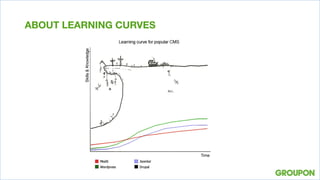
ABOUT LEARNING CURVES
•  Small interruptions was a good place to start our automation efforts
•  Your first win does not need to be a fully automated process
•  Not all automation efforts require a source of truth/systems in place
STORY 1: LEARNINGS
Story 2
Code your way out of a crisis
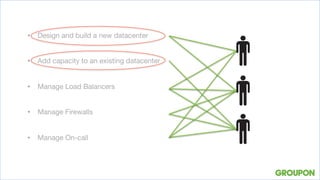
•  Design and build a new datacenter
•  Add capacity to an existing datacenter
•  Manage Load Balancers
•  Manage Firewalls
•  Manage On-call
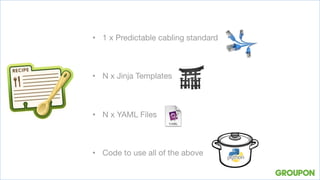
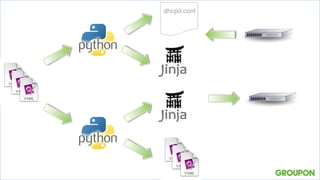
•  1 x Predictable cabling standard 
•  N x Jinja Templates
•  N x YAML Files 
•  Code to use all of the above
dhcpd.conf
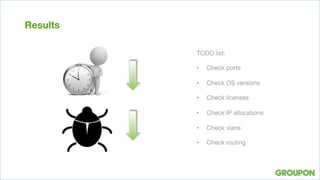
Results
TODO list:

•  Check ports
•  Check OS versions
•  Check licenses
•  Check IP allocations
•  Check vlans
•  Check routing
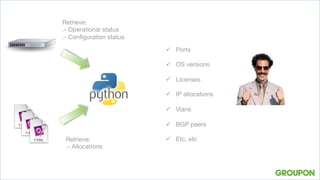
Retrieve:
.- Operational status
.- Configuration status
Retrieve:
.- Allocations
ü  Ports
ü  OS versions
ü  Licenses
ü  IP allocations
ü  Vlans
ü  BGP peers
ü  Etc, etc
asalinas@netserver.grpn:provisioning] ./config_auditor.py -d access12419.grpn
INFO: access12419 : Connected
INFO: Device is part of a virtual_chassis - checking membership and ports
INFO: Both units run 14.2X99-D99.2
INFO: FPC0 seems to be the TOP TORS – Good
INFO: RE0 is master
INFO: Port ('fpc0', '2/0') is Configured and UP
INFO: Port ('fpc0', '2/1') is Configured and UP
INFO: LY0123456 has a valid Routing license
INFO: vme 10.22.16.220/22 is assigned to this device
INFO: loopback 10.22.0.57/32 is assigned to this device
INFO: 0 P2P allocations found for this device, no errors found
INFO: VLAN Audit completed, 7 vlans configured, no errors found
INFO: Looking for interface et-0/1/0
INFO: Interface et-0/1/0 is part of LACP interface ae62, will check later
INFO: Checking physical port...
INFO: Oper status is UP
INFO: Admin status is UP
INFO: Checking LLDP neighbors...
INFO: LLDP neighbors and descriptions seems consistent
INFO: Finished with et-0/1/0 - interface is OK
INFO: Checking interface ae62
INFO: LACP interface ae62 (et-0/1/0) looks good
INFO: Finished with access12419.grpn - All seems OK!!
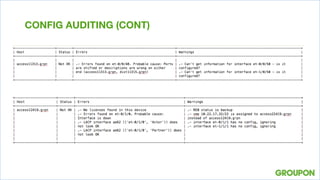
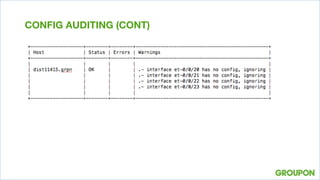
CONFIG AUDITING
CONFIG AUDITING (CONT)
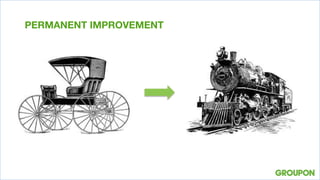
PERMANENT IMPROVEMENT
•  It’s not about the system but about delivering

•  Do not expect immediate results, it could still be nobody’s job, 
•  Change management / Cultural change is a big challenge
STORY 2: LEARNINGS
Story 3
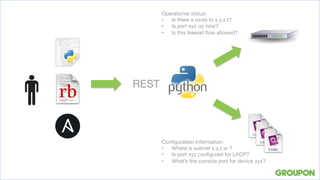
Ask the Network
Operational status:
•  Is there a route to x.y.z.t?
•  Is port xyz up now?
•  Is this firewall flow allowed?
Configuration information:
•  Where is subnet x.y.z.w ?
•  Is port xyz configured for LACP?
•  What’s the console port for device xyz?
REST
[asalinas@GMGM20689:juniper_tools] curl -s http://localhost:8000/get_host_information?
hostname=otherhost.grpn | python -m json.tool
{
"device_queried": "access1128.grpn",
"interface_information": {
"ab:cd:ef:fe:bc:b8": [
{
"interface": "ae33.0",
"vlan_id": "100",
"vlan_name": "vlan100"
}
],
"ab:cd:ef:fe:bc:ba": null,
"ab:cd:ef:fe:bc:bc": null,
"ab:cd:ef:fe:bc:bd": null
},
"mac_addresses": [
"ab:cd:ef:fe:bc:b8",
"ab:cd:ef:fe:bc:ba",
"ab:cd:ef:fe:bc:bc",
"ab:cd:ef:fe:bc:bd"
],
"success": true
}
FIND A HOST
[asalinas@GMGM20689:juniper_tools] curl -s http://localhost:8000/get_firewall_zone?
destination=10.10.10.21/31 | python -m json.tool
{
"colo": "grpn",
"destination": "10.10.10.21/31",
"device_queried": "somefw.grpn",
"success": true,
"zone_data": [
{
"destination_match": "10.10.10.0/24",
"interface": "ae8.0",
"next_hop": "10.10.12.3",
"zone_name": "trust__zone20"
}
]
}
SECURITY ZONES
[asalinas@GMGM20689:~] curl -s "http://localhost:8000/check_flow?
source=10.1.2.3&destination=10.11.12.13&port=22" | python -m json.tool
{
"action_type": "permit",
"destination": "10.11.12.13",
"destination_zone": "trust__zone1",
"device_queried": "somefw.grpn",
"dst_colo": "colo1",
"policy_name": "NETOPS-9999",
"source": "10.1.2.3",
"source_zone": "trust__zone2",
"src_colo": "colo2",
"success": true
}
IS THIS FLOW ALLOWED?
[asalinas@GMGM20689] curl -s "http://localhost:8000/get_policy_by_name?
device_name=somefw.grpn&policy_name=NETOPS-9999" | python -m json.tool
{
"device_name": "somefw.grpn",
"policy_information": {
"NETOPS-9999": {
"action": "permit",
"application": "junos-ssh",
"destination_addresses": [
"host1.grpn",
"host2.grpn"
],
"destination_zone_name": "trust__zone1",
"policy_sequence_number": "100",
"policy_state": "enabled",
"seq_check": "No",
"source_addresses": "host3.grpn",
"source_zone_name": "trust__zone2",
"syn_check": "No"
}
},
"policy_name": "NETOPS-9999",
"success": true
}
FIREWALL POLICY DETAIL
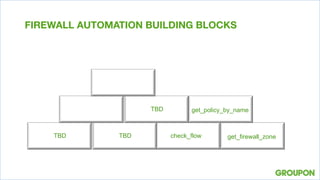
get_firewall_zone
get_policy_by_name
FIREWALL AUTOMATION BUILDING BLOCKS
check_flowTBD
TBD
TBD
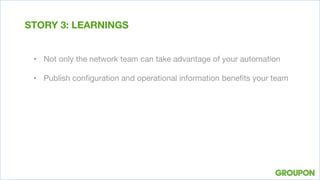
•  Not only the network team can take advantage of your automation
•  Publish configuration and operational information benefits your team
STORY 3: LEARNINGS
WRAPPING UP

ALEJANDRO SALINAS
Sr Manager – Network Operations
Q+A
Thank you very much!

Network Automation (Bay Area Juniper Networks Meetup)

  • 1.
  • 2.
  • 3.
    WHERE ARE YOUWITH REGARDS TO AUTOMATION?
  • 4.
    IT’S ALSO ABOUTPROCESS AND CULTURAL CHANGE
  • 5.
    Story 1 An experimentthat pays off
  • 6.
  • 7.
    •  A scriptto find a host in the network and its port settings •  A script to change the vlan in a specific port •  A script that combines both functionalities THREE SCRIPTS
  • 8.
    THREE SCRIPTS (CONT) [asalinas:juniper_tools]./set_vlan.py vlan2 myhost.grpn -p Password: INFO: Looking for myhost.grpn MAC address INFO: Translating hostname myhost.grpn into MAC address ab:cd:fe:00:01:02 INFO: Starting search in: myswitch.grpn INFO: Getting MAC Address table INFO: Host myhost.grpn (MAC: ab:cd:fe:00:01:02) is in myswitch.grpn (vlan,port) [('vlan1', 'ge-2/0/20.0')] INFO: DISCOVERY COMPLETED - Setting Vlans INFO: Getting VLAN info... INFO: vlan vlan2 exists in myswitch.grpn - OK INFO: Getting interface ge-2/0/20 information INFO: Current vlans are ['vlan1'] INFO: Interface ge-2/0/20 is in access mode, setting/changing vlan. INFO: Locking configuration INFO: Configuration Sent OK INFO: Configuration Validation OK INFO: Config diff: [edit interfaces ge-2/0/20 unit 0 family ethernet-switching vlan] - members vlan1; + members vlan2; INFO: Releasing Lock INFO: Cleanup: myswitch.grpn
  • 10.
  • 11.
    •  Small interruptionswas a good place to start our automation efforts •  Your first win does not need to be a fully automated process •  Not all automation efforts require a source of truth/systems in place STORY 1: LEARNINGS
  • 12.
    Story 2 Code yourway out of a crisis
  • 13.
    •  Design andbuild a new datacenter •  Add capacity to an existing datacenter •  Manage Load Balancers •  Manage Firewalls •  Manage On-call
  • 14.
    •  1 xPredictable cabling standard •  N x Jinja Templates •  N x YAML Files •  Code to use all of the above
  • 15.
  • 16.
    Results TODO list: •  Checkports •  Check OS versions •  Check licenses •  Check IP allocations •  Check vlans •  Check routing
  • 17.
    Retrieve: .- Operational status .-Configuration status Retrieve: .- Allocations ü  Ports ü  OS versions ü  Licenses ü  IP allocations ü  Vlans ü  BGP peers ü  Etc, etc
  • 18.
    asalinas@netserver.grpn:provisioning] ./config_auditor.py -daccess12419.grpn INFO: access12419 : Connected INFO: Device is part of a virtual_chassis - checking membership and ports INFO: Both units run 14.2X99-D99.2 INFO: FPC0 seems to be the TOP TORS – Good INFO: RE0 is master INFO: Port ('fpc0', '2/0') is Configured and UP INFO: Port ('fpc0', '2/1') is Configured and UP INFO: LY0123456 has a valid Routing license INFO: vme 10.22.16.220/22 is assigned to this device INFO: loopback 10.22.0.57/32 is assigned to this device INFO: 0 P2P allocations found for this device, no errors found INFO: VLAN Audit completed, 7 vlans configured, no errors found INFO: Looking for interface et-0/1/0 INFO: Interface et-0/1/0 is part of LACP interface ae62, will check later INFO: Checking physical port... INFO: Oper status is UP INFO: Admin status is UP INFO: Checking LLDP neighbors... INFO: LLDP neighbors and descriptions seems consistent INFO: Finished with et-0/1/0 - interface is OK INFO: Checking interface ae62 INFO: LACP interface ae62 (et-0/1/0) looks good INFO: Finished with access12419.grpn - All seems OK!! CONFIG AUDITING
  • 19.
  • 20.
  • 21.
  • 22.
    •  It’s notabout the system but about delivering •  Do not expect immediate results, it could still be nobody’s job, •  Change management / Cultural change is a big challenge STORY 2: LEARNINGS
  • 23.
  • 24.
    Operational status: •  Isthere a route to x.y.z.t? •  Is port xyz up now? •  Is this firewall flow allowed? Configuration information: •  Where is subnet x.y.z.w ? •  Is port xyz configured for LACP? •  What’s the console port for device xyz? REST
  • 25.
    [asalinas@GMGM20689:juniper_tools] curl -shttp://localhost:8000/get_host_information? hostname=otherhost.grpn | python -m json.tool { "device_queried": "access1128.grpn", "interface_information": { "ab:cd:ef:fe:bc:b8": [ { "interface": "ae33.0", "vlan_id": "100", "vlan_name": "vlan100" } ], "ab:cd:ef:fe:bc:ba": null, "ab:cd:ef:fe:bc:bc": null, "ab:cd:ef:fe:bc:bd": null }, "mac_addresses": [ "ab:cd:ef:fe:bc:b8", "ab:cd:ef:fe:bc:ba", "ab:cd:ef:fe:bc:bc", "ab:cd:ef:fe:bc:bd" ], "success": true } FIND A HOST
  • 26.
    [asalinas@GMGM20689:juniper_tools] curl -shttp://localhost:8000/get_firewall_zone? destination=10.10.10.21/31 | python -m json.tool { "colo": "grpn", "destination": "10.10.10.21/31", "device_queried": "somefw.grpn", "success": true, "zone_data": [ { "destination_match": "10.10.10.0/24", "interface": "ae8.0", "next_hop": "10.10.12.3", "zone_name": "trust__zone20" } ] } SECURITY ZONES
  • 27.
    [asalinas@GMGM20689:~] curl -s"http://localhost:8000/check_flow? source=10.1.2.3&destination=10.11.12.13&port=22" | python -m json.tool { "action_type": "permit", "destination": "10.11.12.13", "destination_zone": "trust__zone1", "device_queried": "somefw.grpn", "dst_colo": "colo1", "policy_name": "NETOPS-9999", "source": "10.1.2.3", "source_zone": "trust__zone2", "src_colo": "colo2", "success": true } IS THIS FLOW ALLOWED?
  • 28.
    [asalinas@GMGM20689] curl -s"http://localhost:8000/get_policy_by_name? device_name=somefw.grpn&policy_name=NETOPS-9999" | python -m json.tool { "device_name": "somefw.grpn", "policy_information": { "NETOPS-9999": { "action": "permit", "application": "junos-ssh", "destination_addresses": [ "host1.grpn", "host2.grpn" ], "destination_zone_name": "trust__zone1", "policy_sequence_number": "100", "policy_state": "enabled", "seq_check": "No", "source_addresses": "host3.grpn", "source_zone_name": "trust__zone2", "syn_check": "No" } }, "policy_name": "NETOPS-9999", "success": true } FIREWALL POLICY DETAIL
  • 29.
  • 30.
    •  Not onlythe network team can take advantage of your automation •  Publish configuration and operational information benefits your team STORY 3: LEARNINGS
  • 31.
    WRAPPING UP ALEJANDRO SALINAS SrManager – Network Operations
  • 32.