PST Migration
New service mailbox
User or IT PST migration options
PST
IMAP
Cutover
Staged
2010Hybrid
2013Hybrid
Exchange 5.5  
Exchange 2000  
Exchange 2003     
Exchange 2007      
Exchange 2010     
Exchange 2013    
Notes/Domino 
GroupWise 
Other  
IMAP Migration
Supports wide range of email platforms
Email only (no calendar, contacts, or tasks)
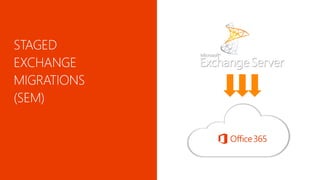
Staged Exchange Migration (SEM)
No migration tool or computer required on-premises
Requires Directory Synchronization with on-premises AD
Cutover Exchange Migration (CEM)
Good for fast, cutover migrations
No migration tool or computer required on-premises
ServiceMigrationsHybrid
Hybrid Deployment
Manage users on-premises and online
Enables cross-premises calendaring, smooth migration,
and easy off-boarding
3 | Microsoft Confidential
Exchange
IMAP
Lotus
Notes
Google
Large
Medium
Small
On-Premise
Single
Sign-On
On-Cloud
DirSync
Manual/Bulk
Provisioning
Automatic
Provisioning
Simple
Rich
In EAC, select
recipients | migration
Start migration
wizard
Choose migration
type and follow
prompts
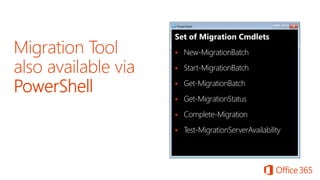
Set of Migration Cmdlets
 New-MigrationBatch
 Start-MigrationBatch
 Get-MigrationBatch
 Get-MigrationStatus
 Complete-Migration
 Test-MigrationServerAvailability
 Works with customers using Outlook independent of mail
systems
 Enables user driven or IT migration
 Users can migrate content on demand
 Migrates mail, calendar, contacts, tasks
 New mailbox in cloud – new Outlook profile and caching
 Stand alone tool to capture and migrate PST data
 Option to import to mailbox or archive
 Requires central PST capture console installation
 Agent required on client computers for capture and migration
Migrate
PST
Configure
Outlook
Change
MX
record
PST
creation
Provision
users
+
mailboxes
in O365
(license
assigned)
Install and
configure
PST
Capture
Discover
PST
 Works with a large number of source mail systems
 Works with on-premises or hosted systems
 Users can be migrated in batches
 On-premises migration tool is not required
 Access to IMAP ports (TCP/143/993)
 Users + mailboxes must be provisioned prior to migration
 Bulk provisioning, CSV parser, manual, etc.

 Gather user credentials or setup admin credentials
 Prepare a CSV file with list of users
 EmailAddress, UserName, Password
 Max of 50,000 rows
 Max 10 MB in size
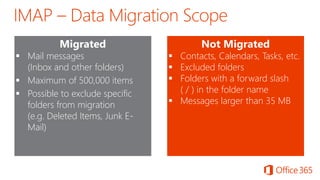
Migrated
 Mail messages
(Inbox and other folders)
 Maximum of 500,000 items
 Possible to exclude specific
folders from migration
(e.g. Deleted Items, Junk E-
Mail)
Not Migrated
 Contacts, Calendars, Tasks, etc.
 Excluded folders
 Folders with a forward slash
( / ) in the folder name
 Messages larger than 35 MB
Delta
sync
every 24
hours
Mark
migration
as
complete
Change
MX
record
Gather
IMAP
creds and
prepare
CSV
Provision
users
+
mailboxes
in O365
(license
assigned)
Wizard:
Enter
server
settings
and
upload
CSV
Initial
sync
Final
sync and
cleanup
 Simple and quick migration solution
 High-fidelity solution – all mailbox content is migrated
 Suited to organizations who want a full migration all at once
 Users are provisioned automatically during migration
 Works with Exchange 2003 and newer
 Works with on-premises or hosted Exchange systems
 Identity management in the cloud (at least initially)
 On-premises migration tool is not required
 Up to 1000 mailboxes in source system
 Outlook Anywhere service on source system
(m

 Directory Sync tool initially disabled in

On-premises Exchange Org
Users, Groups, Contacts via Outlook
Anywhere (NSPI)
Mailbox Data via Outlook Anywhere
(RPC over HTTP)
Office 365
Exchange 2003 or later








Migrated
 Mail messages and folders
 Rules and categories
 Calendar (normal, recurring)
 Out-of-Office settings
 Contacts
 Tasks
 Delegates and folder perms
 Outlook settings (e.g. favorites)
Not Migrated
 Security Groups, DDLs
 System mailboxes
 Dumpster
 Send-As Permissions
 Messages larger than 35 MB
 Partial migrations are not possible (folder exclusion, time range)





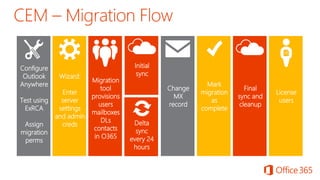
Wizard:
Enter
server
settings
and admin
creds Delta
sync
every 24
hours
Mark
migration
as
complete
Change
MX
record
Initial
sync
Final
sync and
cleanup
License
users
Configure
Outlook
Anywhere
Test using
ExRCA
Assign
migration
perms
Migration
tool
provisions
users
mailboxes
DLs
contacts
in O365
 Simple and flexible migration solution
 High-fidelity solution – all mailbox content is migrated
 Suited to organizations who want to migrate in batches
 Source of Exchange 2003 or 2007 only
 Users are provisioned with Directory Sync prior to migration
 No limit on the number of mailboxes
 Users can be migrated in batches (up to )
 Identity management on-premises
 On-premises migration tool is not required
 Outlook Anywhere service on source system
(m

 Directory Sync tool enabled in

 Does not work with Exchange 2010 or 2013
On-premises Exchange Org
Users, Groups, Contacts via DirSync
Mailbox Data via Outlook Anywhere
(RPC over HTTP)
Office 365
Exchange 2003 or 2007
Office 365 Directory
Synchronization
App







› EmailAddress, Password, ForceChangePassword



Migrated
 Mail messages and folders
 Rules and categories
 Calendar (normal, recurring)
 Out-of-Office settings
 Contacts
 Tasks
 Delegates and folder perms
 Outlook settings (e.g. favorites)
Not Migrated
 Security Groups, DDLs
 System mailboxes
 Dumpster
 Send-As Permissions
 Messages larger than 35 MB
 Partial migrations are not possible (folder exclusion, time range)





Configure
Directory
Sync
Wizard:
Enter
server
settings
and admin
creds Delta
sync
every 24
hours
Mark
migration
as
complete
Change
MX
record
Initial
sync
Final
sync and
cleanup
License
users
Configure
Outlook
Anywhere
Test using
ExRCA
Assign
migration
perms
Outlook.com Help
Simple Migrations
Compare Simple Migration Types
PST Exchange PST Capture
IMAP Migrations
Cutover Exchange Migrations
Staged Exchange Migrations
Tools
https://www.testexchangeconnectivity.com/
http://gallery.technet.microsoft.com/Exchange
-Client-Network-8af1bf00
http://www.microsoft.com/en-
us/download/details.aspx?id=36789
http://technet.microsoft.com/en-
us/library/hh974318.aspx
36

Office 365 migration

  • 2.
    PST Migration New servicemailbox User or IT PST migration options PST IMAP Cutover Staged 2010Hybrid 2013Hybrid Exchange 5.5   Exchange 2000   Exchange 2003      Exchange 2007       Exchange 2010      Exchange 2013     Notes/Domino  GroupWise  Other   IMAP Migration Supports wide range of email platforms Email only (no calendar, contacts, or tasks) Staged Exchange Migration (SEM) No migration tool or computer required on-premises Requires Directory Synchronization with on-premises AD Cutover Exchange Migration (CEM) Good for fast, cutover migrations No migration tool or computer required on-premises ServiceMigrationsHybrid Hybrid Deployment Manage users on-premises and online Enables cross-premises calendaring, smooth migration, and easy off-boarding
  • 3.
    3 | MicrosoftConfidential Exchange IMAP Lotus Notes Google Large Medium Small On-Premise Single Sign-On On-Cloud DirSync Manual/Bulk Provisioning Automatic Provisioning Simple Rich
  • 4.
    In EAC, select recipients| migration Start migration wizard Choose migration type and follow prompts
  • 5.
    Set of MigrationCmdlets  New-MigrationBatch  Start-MigrationBatch  Get-MigrationBatch  Get-MigrationStatus  Complete-Migration  Test-MigrationServerAvailability
  • 7.
     Works withcustomers using Outlook independent of mail systems  Enables user driven or IT migration  Users can migrate content on demand  Migrates mail, calendar, contacts, tasks  New mailbox in cloud – new Outlook profile and caching
  • 8.
     Stand alonetool to capture and migrate PST data  Option to import to mailbox or archive  Requires central PST capture console installation  Agent required on client computers for capture and migration
  • 9.
  • 11.
     Works witha large number of source mail systems  Works with on-premises or hosted systems  Users can be migrated in batches  On-premises migration tool is not required
  • 12.
     On-premises migrationtool is not required  Access to IMAP ports (TCP/143/993)  Users + mailboxes must be provisioned prior to migration  Bulk provisioning, CSV parser, manual, etc.   Gather user credentials or setup admin credentials  Prepare a CSV file with list of users  EmailAddress, UserName, Password  Max of 50,000 rows  Max 10 MB in size
  • 13.
    Migrated  Mail messages (Inboxand other folders)  Maximum of 500,000 items  Possible to exclude specific folders from migration (e.g. Deleted Items, Junk E- Mail) Not Migrated  Contacts, Calendars, Tasks, etc.  Excluded folders  Folders with a forward slash ( / ) in the folder name  Messages larger than 35 MB
  • 14.
    Delta sync every 24 hours Mark migration as complete Change MX record Gather IMAP creds and prepare CSV Provision users + mailboxes inO365 (license assigned) Wizard: Enter server settings and upload CSV Initial sync Final sync and cleanup
  • 16.
     Simple andquick migration solution  High-fidelity solution – all mailbox content is migrated  Suited to organizations who want a full migration all at once  Users are provisioned automatically during migration  Works with Exchange 2003 and newer  Works with on-premises or hosted Exchange systems  Identity management in the cloud (at least initially)  On-premises migration tool is not required
  • 17.
     Up to1000 mailboxes in source system  Outlook Anywhere service on source system (m   Directory Sync tool initially disabled in 
  • 18.
    On-premises Exchange Org Users,Groups, Contacts via Outlook Anywhere (NSPI) Mailbox Data via Outlook Anywhere (RPC over HTTP) Office 365 Exchange 2003 or later
  • 19.
  • 20.
    Migrated  Mail messagesand folders  Rules and categories  Calendar (normal, recurring)  Out-of-Office settings  Contacts  Tasks  Delegates and folder perms  Outlook settings (e.g. favorites) Not Migrated  Security Groups, DDLs  System mailboxes  Dumpster  Send-As Permissions  Messages larger than 35 MB
  • 21.
     Partial migrationsare not possible (folder exclusion, time range)  
  • 22.
  • 23.
    Wizard: Enter server settings and admin creds Delta sync every24 hours Mark migration as complete Change MX record Initial sync Final sync and cleanup License users Configure Outlook Anywhere Test using ExRCA Assign migration perms Migration tool provisions users mailboxes DLs contacts in O365
  • 25.
     Simple andflexible migration solution  High-fidelity solution – all mailbox content is migrated  Suited to organizations who want to migrate in batches  Source of Exchange 2003 or 2007 only  Users are provisioned with Directory Sync prior to migration  No limit on the number of mailboxes  Users can be migrated in batches (up to )  Identity management on-premises  On-premises migration tool is not required
  • 26.
     Outlook Anywhereservice on source system (m   Directory Sync tool enabled in   Does not work with Exchange 2010 or 2013
  • 27.
    On-premises Exchange Org Users,Groups, Contacts via DirSync Mailbox Data via Outlook Anywhere (RPC over HTTP) Office 365 Exchange 2003 or 2007 Office 365 Directory Synchronization App
  • 28.
  • 29.
     › EmailAddress, Password,ForceChangePassword   
  • 30.
    Migrated  Mail messagesand folders  Rules and categories  Calendar (normal, recurring)  Out-of-Office settings  Contacts  Tasks  Delegates and folder perms  Outlook settings (e.g. favorites) Not Migrated  Security Groups, DDLs  System mailboxes  Dumpster  Send-As Permissions  Messages larger than 35 MB
  • 31.
     Partial migrationsare not possible (folder exclusion, time range)  
  • 32.
  • 33.
    Configure Directory Sync Wizard: Enter server settings and admin creds Delta sync every24 hours Mark migration as complete Change MX record Initial sync Final sync and cleanup License users Configure Outlook Anywhere Test using ExRCA Assign migration perms
  • 35.
    Outlook.com Help Simple Migrations CompareSimple Migration Types PST Exchange PST Capture IMAP Migrations Cutover Exchange Migrations Staged Exchange Migrations
  • 36.