Top Five Office 365 Migration Headaches
and How to Avoid Them
Confidential2
Our Speakers
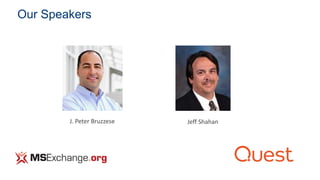
J. Peter Bruzzese Jeff Shahan
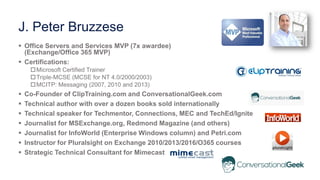
J. Peter Bruzzese
 Office Servers and Services MVP (7x awardee)
(Exchange/Office 365 MVP)
 Certifications:
Microsoft Certified Trainer
Triple-MCSE (MCSE for NT 4.0/2000/2003)
MCITP: Messaging (2007, 2010 and 2013)
 Co-Founder of ClipTraining.com and ConversationalGeek.com
 Technical author with over a dozen books sold internationally
 Technical speaker for Techmentor, Connections, MEC and TechEd/Ignite
 Journalist for MSExchange.org, Redmond Magazine (and others)
 Journalist for InfoWorld (Enterprise Windows column) and Petri.com
 Instructor for Pluralsight on Exchange 2010/2013/2016/O365 courses
 Strategic Technical Consultant for Mimecast
• First, we’ll go through 5 migration headaches
• Note: Each will have a real-world anecdote connected
• Second, we’ll hear from Quest and learn more about their
migration methodology to help eliminate those headaches
• Finally, we’ll do a Q&A
Agenda
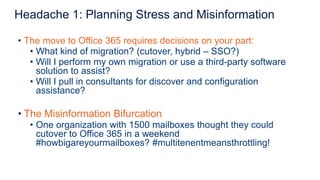
• The move to Office 365 requires decisions on your part:
• What kind of migration? (cutover, hybrid – SSO?)
• Will I perform my own migration or use a third-party software
solution to assist?
• Will I pull in consultants for discover and configuration
assistance?
• The Misinformation Bifurcation
• One organization with 1500 mailboxes thought they could
cutover to Office 365 in a weekend
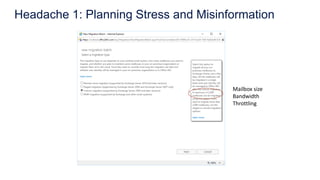
#howbigareyourmailboxes? #multitenentmeansthrottling!
Headache 1: Planning Stress and Misinformation
Mailbox size
Bandwidth
Throttling
• There is pre-migration prep work you MUST do:
• Clean up your AD before you begin the process of
synchronization
• Microsoft provides a free tool called IDFix (basic tool)
• PSTs may also be a concern (need to locate and resolve)
• Public Folder migration prep work
• The Two Day Bunker Verification
• A 100,000 mailbox migration strategy session to ensure they
company didn’t miss anything
Headache 2: Preparation Gotchas
• Many are still working with Lotus or moved to Gmail and now
want to switch over to Office 365
• Data can be moved but configuration settings will not be
preserved (no 1-to-1 migration)
• May be best to seek a third-party to assist
• The Lotus Notes Displacement
• Company acquisition of a 3000 mailbox Lotus environment
• Used a cloud archive solution to assist
Headache 3: Lotus/Gmail Migrations
• Most legacy archives will not work (or not work well) with Office
365 and so decisions have to be made
• How to handle? Move to a cloud archive? Move to Office
365? Does Office 365 have an eDiscovery solution to meet
my compliance needs?
• The “Archive in the Closet” Decoupling
• Company had an archive solution on-prem and one of their
options was to unplug it and put it in the closet rather than
worry about rehydrating the data and moving it
Headache 4: Legacy Archive Data
• You don’t know what you don’t know – so learn as much as you
can
• Gaps – Security, Availability, Compliance, Monitoring, Backups
etc.
• The “No Backups?!” Hesitation
• Lack of comfortability over the inability to do a point-in-time
restore (aka the Legal Hold Insufficiency)
Headache 5: Day After Gotchas
Quest Solutions for Office 365
Jeff Shahan, Sr. Solutions Principle Architect and Migration Subject Matter Expert
Confidential12
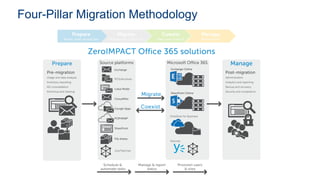
Four-Pillar Migration Methodology
1) Prepare
Confidential14
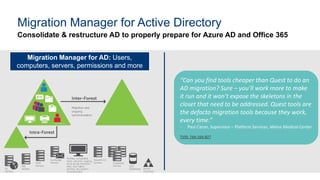
Consolidate & restructure AD to properly prepare for Azure AD and Office 365
Migration Manager for Active Directory
Migration Manager for AD: Users,
computers, servers, permissions and more
“Can you find tools cheaper than Quest to do an
AD migration? Sure – you’ll work more to make
it run and it won’t expose the skeletons in the
closet that need to be addressed. Quest tools are
the defacto migration tools because they work,
every time.”
- Paul Caron, Supervisor – Platform Services, Maine Medical Center
TVID: 74A-164-B27
Confidential15
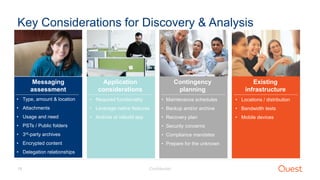
Key Considerations for Discovery & Analysis
Messaging
assessment
• Type, amount & location
• Attachments
• Usage and need
• PSTs / Public folders
• 3rd-party archives
• Encrypted content
• Delegation relationships
• Required functionality
• Leverage native features
• Archive or rebuild app
• Maintenance schedules
• Backup and/or archive
• Recovery plan
• Security concerns
• Compliance mandates
• Prepare for the unknown
• Locations / distribution
• Bandwidth tests
• Mobile devices
Application
considerations
Contingency
planning
Existing
infrastructure
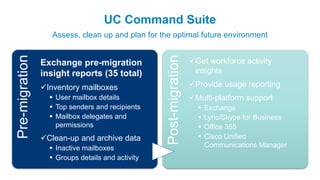
UC Command Suite
Assess, clean up and plan for the optimal future environment
Pre-migration
Post-migration
Exchange pre-migration
insight reports (35 total)
Inventory mailboxes
 User mailbox details
 Top senders and recipients
 Mailbox delegates and
permissions
Clean-up and archive data
 Inactive mailboxes
 Groups details and activity
Get workforce activity
insights
Provide usage reporting
Multi-platform support
 Exchange
 Lync/Skype for Business
 Office 365
 Cisco Unified
Communications Manager
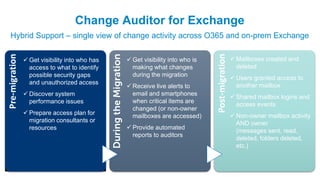
Change Auditor for Exchange
Hybrid Support – single view of change activity across O365 and on-prem Exchange
Pre-migration
DuringtheMigration
Post-migration
 Get visibility into who has
access to what to identify
possible security gaps
and unauthorized access
 Discover system
performance issues
 Prepare access plan for
migration consultants or
resources
 Get visibility into who is
making what changes
during the migration
 Receive live alerts to
email and smartphones
when critical items are
changed (or non-owner
mailboxes are accessed)
 Provide automated
reports to auditors
 Mailboxes created and
deleted
 Users granted access to
another mailbox
 Shared mailbox logins and
access events
 Non-owner mailbox activity
AND owner
(messages sent, read,
deleted, folders deleted,
etc.)
2) Migrate
Confidential19
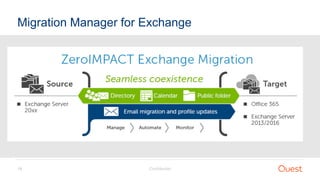
Migration Manager for Exchange
Confidential20
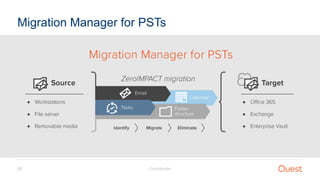
Migration Manager for PSTs
Confidential21
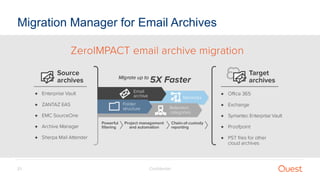
Migration Manager for Email Archives
Confidential22
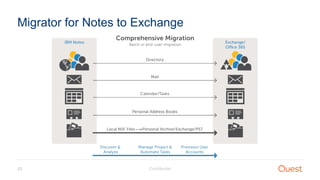
Migrator for Notes to Exchange
3) Coexist
Confidential24
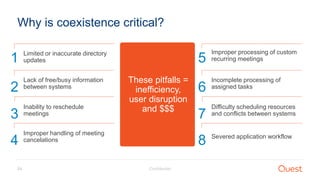
Why is coexistence critical?
1 Limited or inaccurate directory
updates
2
Lack of free/busy information
between systems
3
Inability to reschedule
meetings
4
Improper handling of meeting
cancelations
5
Improper processing of custom
recurring meetings
6
Incomplete processing of
assigned tasks
7
Difficulty scheduling resources
and conflicts between systems
8 Severed application workflow
These pitfalls =
inefficiency,
user disruption
and $$$
4) Manage
Confidential26
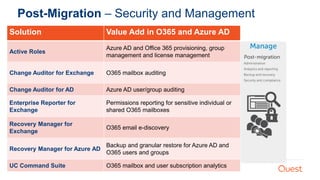
Post-Migration – Security and Management
Solution Value Add in O365 and Azure AD
Active Roles
Azure AD and Office 365 provisioning, group
management and license management
Change Auditor for Exchange O365 mailbox auditing
Change Auditor for AD Azure AD user/group auditing
Enterprise Reporter for
Exchange
Permissions reporting for sensitive individual or
shared O365 mailboxes
Recovery Manager for
Exchange
O365 email e-discovery
Recovery Manager for Azure AD
Backup and granular restore for Azure AD and
O365 users and groups
UC Command Suite O365 mailbox and user subscription analytics
Questions?
Confidential28
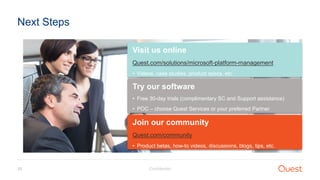
Next Steps
Visit us online
Quest.com/solutions/microsoft-platform-management
• Videos, case studies, product specs, etc.
Try our software
• Free 30-day trials (complimentary SC and Support assistance)
• POC – choose Quest Services or your preferred Partner
Join our community
Quest.com/community
• Product betas, how-to videos, discussions, blogs, tips, etc.
Watch the webcast here:
http://bit.ly/2hOlgtL

Top Five Office 365 Migration Headaches and How to Avoid Them

  • 1.
    Top Five Office365 Migration Headaches and How to Avoid Them
  • 2.
  • 3.
    J. Peter Bruzzese Office Servers and Services MVP (7x awardee) (Exchange/Office 365 MVP)  Certifications: Microsoft Certified Trainer Triple-MCSE (MCSE for NT 4.0/2000/2003) MCITP: Messaging (2007, 2010 and 2013)  Co-Founder of ClipTraining.com and ConversationalGeek.com  Technical author with over a dozen books sold internationally  Technical speaker for Techmentor, Connections, MEC and TechEd/Ignite  Journalist for MSExchange.org, Redmond Magazine (and others)  Journalist for InfoWorld (Enterprise Windows column) and Petri.com  Instructor for Pluralsight on Exchange 2010/2013/2016/O365 courses  Strategic Technical Consultant for Mimecast
  • 4.
    • First, we’llgo through 5 migration headaches • Note: Each will have a real-world anecdote connected • Second, we’ll hear from Quest and learn more about their migration methodology to help eliminate those headaches • Finally, we’ll do a Q&A Agenda
  • 5.
    • The moveto Office 365 requires decisions on your part: • What kind of migration? (cutover, hybrid – SSO?) • Will I perform my own migration or use a third-party software solution to assist? • Will I pull in consultants for discover and configuration assistance? • The Misinformation Bifurcation • One organization with 1500 mailboxes thought they could cutover to Office 365 in a weekend #howbigareyourmailboxes? #multitenentmeansthrottling! Headache 1: Planning Stress and Misinformation
  • 6.
    Headache 1: PlanningStress and Misinformation Mailbox size Bandwidth Throttling
  • 7.
    • There ispre-migration prep work you MUST do: • Clean up your AD before you begin the process of synchronization • Microsoft provides a free tool called IDFix (basic tool) • PSTs may also be a concern (need to locate and resolve) • Public Folder migration prep work • The Two Day Bunker Verification • A 100,000 mailbox migration strategy session to ensure they company didn’t miss anything Headache 2: Preparation Gotchas
  • 8.
    • Many arestill working with Lotus or moved to Gmail and now want to switch over to Office 365 • Data can be moved but configuration settings will not be preserved (no 1-to-1 migration) • May be best to seek a third-party to assist • The Lotus Notes Displacement • Company acquisition of a 3000 mailbox Lotus environment • Used a cloud archive solution to assist Headache 3: Lotus/Gmail Migrations
  • 9.
    • Most legacyarchives will not work (or not work well) with Office 365 and so decisions have to be made • How to handle? Move to a cloud archive? Move to Office 365? Does Office 365 have an eDiscovery solution to meet my compliance needs? • The “Archive in the Closet” Decoupling • Company had an archive solution on-prem and one of their options was to unplug it and put it in the closet rather than worry about rehydrating the data and moving it Headache 4: Legacy Archive Data
  • 10.
    • You don’tknow what you don’t know – so learn as much as you can • Gaps – Security, Availability, Compliance, Monitoring, Backups etc. • The “No Backups?!” Hesitation • Lack of comfortability over the inability to do a point-in-time restore (aka the Legal Hold Insufficiency) Headache 5: Day After Gotchas
  • 11.
    Quest Solutions forOffice 365 Jeff Shahan, Sr. Solutions Principle Architect and Migration Subject Matter Expert
  • 12.
  • 13.
  • 14.
    Confidential14 Consolidate & restructureAD to properly prepare for Azure AD and Office 365 Migration Manager for Active Directory Migration Manager for AD: Users, computers, servers, permissions and more “Can you find tools cheaper than Quest to do an AD migration? Sure – you’ll work more to make it run and it won’t expose the skeletons in the closet that need to be addressed. Quest tools are the defacto migration tools because they work, every time.” - Paul Caron, Supervisor – Platform Services, Maine Medical Center TVID: 74A-164-B27
  • 15.
    Confidential15 Key Considerations forDiscovery & Analysis Messaging assessment • Type, amount & location • Attachments • Usage and need • PSTs / Public folders • 3rd-party archives • Encrypted content • Delegation relationships • Required functionality • Leverage native features • Archive or rebuild app • Maintenance schedules • Backup and/or archive • Recovery plan • Security concerns • Compliance mandates • Prepare for the unknown • Locations / distribution • Bandwidth tests • Mobile devices Application considerations Contingency planning Existing infrastructure
  • 16.
    UC Command Suite Assess,clean up and plan for the optimal future environment Pre-migration Post-migration Exchange pre-migration insight reports (35 total) Inventory mailboxes  User mailbox details  Top senders and recipients  Mailbox delegates and permissions Clean-up and archive data  Inactive mailboxes  Groups details and activity Get workforce activity insights Provide usage reporting Multi-platform support  Exchange  Lync/Skype for Business  Office 365  Cisco Unified Communications Manager
  • 17.
    Change Auditor forExchange Hybrid Support – single view of change activity across O365 and on-prem Exchange Pre-migration DuringtheMigration Post-migration  Get visibility into who has access to what to identify possible security gaps and unauthorized access  Discover system performance issues  Prepare access plan for migration consultants or resources  Get visibility into who is making what changes during the migration  Receive live alerts to email and smartphones when critical items are changed (or non-owner mailboxes are accessed)  Provide automated reports to auditors  Mailboxes created and deleted  Users granted access to another mailbox  Shared mailbox logins and access events  Non-owner mailbox activity AND owner (messages sent, read, deleted, folders deleted, etc.)
  • 18.
  • 19.
  • 20.
  • 21.
  • 22.
  • 23.
  • 24.
    Confidential24 Why is coexistencecritical? 1 Limited or inaccurate directory updates 2 Lack of free/busy information between systems 3 Inability to reschedule meetings 4 Improper handling of meeting cancelations 5 Improper processing of custom recurring meetings 6 Incomplete processing of assigned tasks 7 Difficulty scheduling resources and conflicts between systems 8 Severed application workflow These pitfalls = inefficiency, user disruption and $$$
  • 25.
  • 26.
    Confidential26 Post-Migration – Securityand Management Solution Value Add in O365 and Azure AD Active Roles Azure AD and Office 365 provisioning, group management and license management Change Auditor for Exchange O365 mailbox auditing Change Auditor for AD Azure AD user/group auditing Enterprise Reporter for Exchange Permissions reporting for sensitive individual or shared O365 mailboxes Recovery Manager for Exchange O365 email e-discovery Recovery Manager for Azure AD Backup and granular restore for Azure AD and O365 users and groups UC Command Suite O365 mailbox and user subscription analytics
  • 27.
  • 28.
    Confidential28 Next Steps Visit usonline Quest.com/solutions/microsoft-platform-management • Videos, case studies, product specs, etc. Try our software • Free 30-day trials (complimentary SC and Support assistance) • POC – choose Quest Services or your preferred Partner Join our community Quest.com/community • Product betas, how-to videos, discussions, blogs, tips, etc.
  • 29.
    Watch the webcasthere: http://bit.ly/2hOlgtL