Digital Electronics
Number Systems,
Conversion between Bases,
and
Basic Binary Arithmetic
Digital Electronics 2
Numbers
Digital Electronics 3
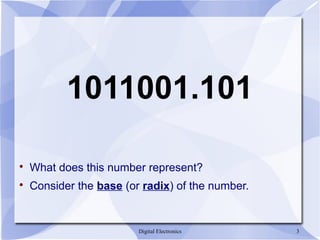
1011001.101

What does this number represent?

Consider the base (or radix) of the number.
Digital Electronics 4
Number Systems

R is the radix or base of the number system
− Must be a positive number
− R digits in the number system: [0 .. R-1]

Important number systems for digital systems:
− Base 2 (binary): [0, 1]
− Base 8 (octal): [0 .. 7]
− Base 16 (hexadecimal): [0 .. 9, A, B, C, D, E, F]
ECE 301 - Digital Electronics 5
Number Systems
Positional Notation
D = [a4
a3
a2
a1
a0
.a-1
a-2
a-3
]R
D = decimal value
ai
= ith
position in the number
R = radix or base of the number
Digital Electronics 6
Number Systems
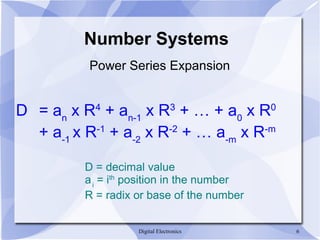
Power Series Expansion
D = an
x R4
+ an-1
x R3
+ … + a0
x R0
+ a-1
x R-1
+ a-2
x R-2
+ … a-m
x R-m
D = decimal value
ai
= ith
position in the number
R = radix or base of the number
ECE 301 - Digital Electronics 7
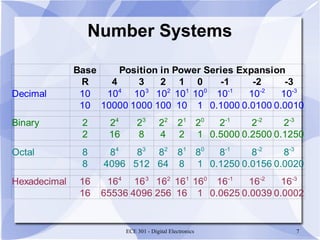
Number Systems
Base Position in Power Series Expansion
R 4 3 2 1 0 -1 -2 -3
Decimal 10
10 10000 1000 100 10 1 0.1000 0.0100 0.0010
Binary 2
2 16 8 4 2 1 0.5000 0.2500 0.1250
Octal 8
8 4096 512 64 8 1 0.1250 0.0156 0.0020
Hexadecimal 16
16 65536 4096 256 16 1 0.0625 0.0039 0.0002
104
103
102
101
100
10-1
10-2
10-3
24
23
22
21
20
2-1
2-2
2-3
84
83
82
81
80
8-1
8-2
8-3
164
163
162
161
160
16-1
16-2
16-3
ECE 301 - Digital Electronics 8
Conversion between Number Systems
Digital Electronics 9
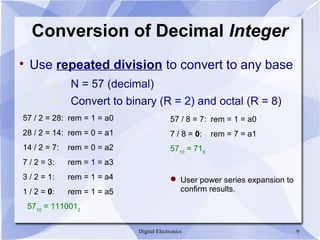
Conversion of Decimal Integer

Use repeated division to convert to any base
− N = 57 (decimal)
− Convert to binary (R = 2) and octal (R = 8)
57 / 2 = 28: rem = 1 = a0
28 / 2 = 14: rem = 0 = a1
14 / 2 = 7: rem = 0 = a2
7 / 2 = 3: rem = 1 = a3
3 / 2 = 1: rem = 1 = a4
1 / 2 = 0: rem = 1 = a5
5710
= 1110012
57 / 8 = 7: rem = 1 = a0
7 / 8 = 0: rem = 7 = a1
5710
= 718
 User power series expansion to
confirm results.
Digital Electronics 10
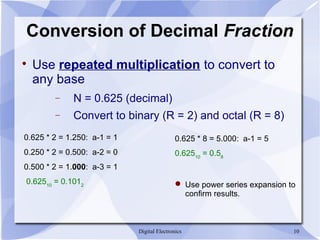
Conversion of Decimal Fraction

Use repeated multiplication to convert to
any base
− N = 0.625 (decimal)
− Convert to binary (R = 2) and octal (R = 8)
0.625 * 2 = 1.250: a-1 = 1
0.250 * 2 = 0.500: a-2 = 0
0.500 * 2 = 1.000: a-3 = 1
0.62510
= 0.1012
0.625 * 8 = 5.000: a-1 = 5
0.62510
= 0.58
 Use power series expansion to
confirm results.
Digital Electronics 11
Conversion of Decimal Fraction

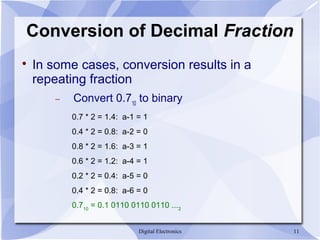
In some cases, conversion results in a
repeating fraction
− Convert 0.710
to binary
0.7 * 2 = 1.4: a-1 = 1
0.4 * 2 = 0.8: a-2 = 0
0.8 * 2 = 1.6: a-3 = 1
0.6 * 2 = 1.2: a-4 = 1
0.2 * 2 = 0.4: a-5 = 0
0.4 * 2 = 0.8: a-6 = 0
0.710
= 0.1 0110 0110 0110 ...2
Digital Electronics 12
Number System Conversion

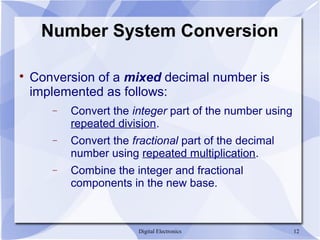
Conversion of a mixed decimal number is
implemented as follows:
− Convert the integer part of the number using
repeated division.
− Convert the fractional part of the decimal
number using repeated multiplication.
− Combine the integer and fractional
components in the new base.
Digital Electronics 13
Number System Conversion
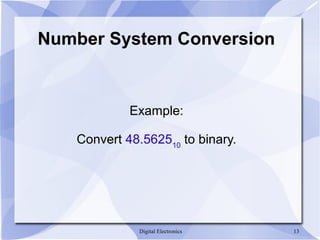
Example:
Convert 48.562510
to binary.
Digital Electronics 14
Number System Conversion

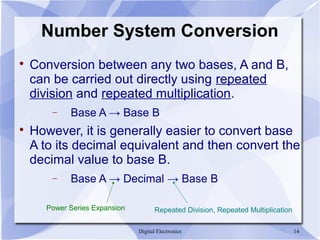
Conversion between any two bases, A and B,
can be carried out directly using repeated
division and repeated multiplication.
− Base A → Base B

However, it is generally easier to convert base
A to its decimal equivalent and then convert the
decimal value to base B.
− Base A → Decimal → Base B
Power Series Expansion Repeated Division, Repeated Multiplication
Digital Electronics 15
Number System Conversion

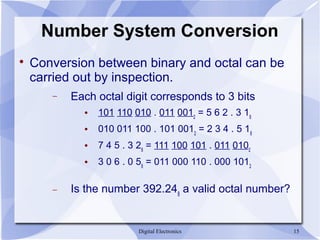
Conversion between binary and octal can be
carried out by inspection.
− Each octal digit corresponds to 3 bits
 101 110 010 . 011 0012
= 5 6 2 . 3 18
 010 011 100 . 101 0012
= 2 3 4 . 5 18
 7 4 5 . 3 28
= 111 100 101 . 011 0102
 3 0 6 . 0 58
= 011 000 110 . 000 1012
− Is the number 392.248
a valid octal number?
Digital Electronics 16
Number System Conversion

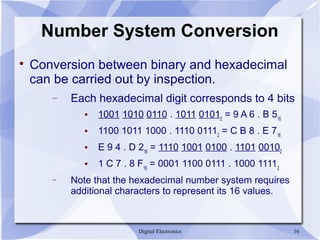
Conversion between binary and hexadecimal
can be carried out by inspection.
− Each hexadecimal digit corresponds to 4 bits
 1001 1010 0110 . 1011 01012
= 9 A 6 . B 516
 1100 1011 1000 . 1110 01112
= C B 8 . E 716
 E 9 4 . D 216
= 1110 1001 0100 . 1101 00102
 1 C 7 . 8 F16
= 0001 1100 0111 . 1000 11112
− Note that the hexadecimal number system requires
additional characters to represent its 16 values.
Digital Electronics 17
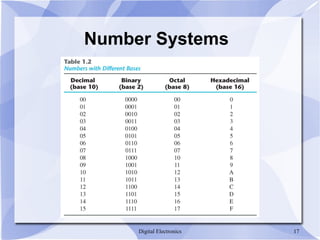
Number Systems
Digital Electronics 18
Basic Binary Arithmetic
Digital Electronics 19
Binary Addition
Basic Binary Arithmetic
Digital Electronics 20
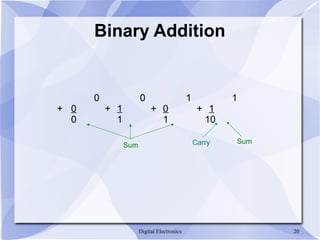
Binary Addition
0 0 1 1
+ 0 + 1 + 0 + 1
0 1 1 10
Sum Carry Sum
Digital Electronics 21
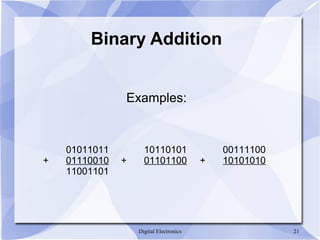
Binary Addition
Examples:
01011011
+ 01110010
11001101
00111100
+ 10101010
10110101
+ 01101100
Digital Electronics 22
Binary Subtraction
Basic Binary Arithmetic
Digital Electronics 23
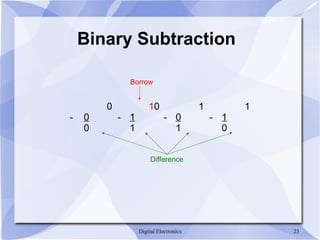
Binary Subtraction
0 10 1 1
- 0 - 1 - 0 - 1
0 1 1 0
Difference
Borrow
Digital Electronics 24
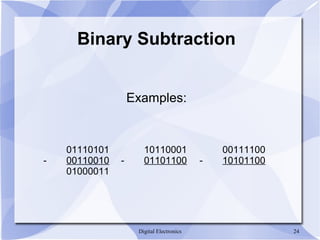
Binary Subtraction
Examples:
01110101
- 00110010
01000011
00111100
- 10101100
10110001
- 01101100
ECE 301 - Digital Electronics 25
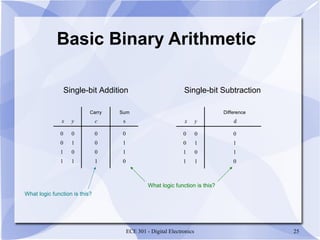
Basic Binary Arithmetic
Single-bit Addition Single-bit Subtraction
s
0
1
1
0
c
0
0
0
1
x y
0
0
1
1
0
1
0
1
Carry Sum
d
0
1
1
0
x y
0
0
1
1
0
1
0
1
Difference
What logic function is this?
Digital Electronics 26
Binary Multiplication
Digital Electronics 27
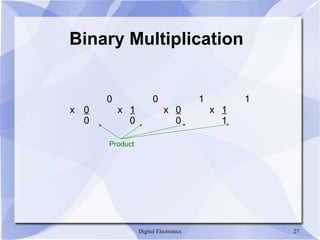
Binary Multiplication
0 0 1 1
x 0 x 1 x 0 x 1
0 0 0 1
Product

Number systems ppt

  • 1.
    Digital Electronics Number Systems, Conversionbetween Bases, and Basic Binary Arithmetic
  • 2.
  • 3.
    Digital Electronics 3 1011001.101  Whatdoes this number represent?  Consider the base (or radix) of the number.
  • 4.
    Digital Electronics 4 NumberSystems  R is the radix or base of the number system − Must be a positive number − R digits in the number system: [0 .. R-1]  Important number systems for digital systems: − Base 2 (binary): [0, 1] − Base 8 (octal): [0 .. 7] − Base 16 (hexadecimal): [0 .. 9, A, B, C, D, E, F]
  • 5.
    ECE 301 -Digital Electronics 5 Number Systems Positional Notation D = [a4 a3 a2 a1 a0 .a-1 a-2 a-3 ]R D = decimal value ai = ith position in the number R = radix or base of the number
  • 6.
    Digital Electronics 6 NumberSystems Power Series Expansion D = an x R4 + an-1 x R3 + … + a0 x R0 + a-1 x R-1 + a-2 x R-2 + … a-m x R-m D = decimal value ai = ith position in the number R = radix or base of the number
  • 7.
    ECE 301 -Digital Electronics 7 Number Systems Base Position in Power Series Expansion R 4 3 2 1 0 -1 -2 -3 Decimal 10 10 10000 1000 100 10 1 0.1000 0.0100 0.0010 Binary 2 2 16 8 4 2 1 0.5000 0.2500 0.1250 Octal 8 8 4096 512 64 8 1 0.1250 0.0156 0.0020 Hexadecimal 16 16 65536 4096 256 16 1 0.0625 0.0039 0.0002 104 103 102 101 100 10-1 10-2 10-3 24 23 22 21 20 2-1 2-2 2-3 84 83 82 81 80 8-1 8-2 8-3 164 163 162 161 160 16-1 16-2 16-3
  • 8.
    ECE 301 -Digital Electronics 8 Conversion between Number Systems
  • 9.
    Digital Electronics 9 Conversionof Decimal Integer  Use repeated division to convert to any base − N = 57 (decimal) − Convert to binary (R = 2) and octal (R = 8) 57 / 2 = 28: rem = 1 = a0 28 / 2 = 14: rem = 0 = a1 14 / 2 = 7: rem = 0 = a2 7 / 2 = 3: rem = 1 = a3 3 / 2 = 1: rem = 1 = a4 1 / 2 = 0: rem = 1 = a5 5710 = 1110012 57 / 8 = 7: rem = 1 = a0 7 / 8 = 0: rem = 7 = a1 5710 = 718  User power series expansion to confirm results.
  • 10.
    Digital Electronics 10 Conversionof Decimal Fraction  Use repeated multiplication to convert to any base − N = 0.625 (decimal) − Convert to binary (R = 2) and octal (R = 8) 0.625 * 2 = 1.250: a-1 = 1 0.250 * 2 = 0.500: a-2 = 0 0.500 * 2 = 1.000: a-3 = 1 0.62510 = 0.1012 0.625 * 8 = 5.000: a-1 = 5 0.62510 = 0.58  Use power series expansion to confirm results.
  • 11.
    Digital Electronics 11 Conversionof Decimal Fraction  In some cases, conversion results in a repeating fraction − Convert 0.710 to binary 0.7 * 2 = 1.4: a-1 = 1 0.4 * 2 = 0.8: a-2 = 0 0.8 * 2 = 1.6: a-3 = 1 0.6 * 2 = 1.2: a-4 = 1 0.2 * 2 = 0.4: a-5 = 0 0.4 * 2 = 0.8: a-6 = 0 0.710 = 0.1 0110 0110 0110 ...2
  • 12.
    Digital Electronics 12 NumberSystem Conversion  Conversion of a mixed decimal number is implemented as follows: − Convert the integer part of the number using repeated division. − Convert the fractional part of the decimal number using repeated multiplication. − Combine the integer and fractional components in the new base.
  • 13.
    Digital Electronics 13 NumberSystem Conversion Example: Convert 48.562510 to binary.
  • 14.
    Digital Electronics 14 NumberSystem Conversion  Conversion between any two bases, A and B, can be carried out directly using repeated division and repeated multiplication. − Base A → Base B  However, it is generally easier to convert base A to its decimal equivalent and then convert the decimal value to base B. − Base A → Decimal → Base B Power Series Expansion Repeated Division, Repeated Multiplication
  • 15.
    Digital Electronics 15 NumberSystem Conversion  Conversion between binary and octal can be carried out by inspection. − Each octal digit corresponds to 3 bits  101 110 010 . 011 0012 = 5 6 2 . 3 18  010 011 100 . 101 0012 = 2 3 4 . 5 18  7 4 5 . 3 28 = 111 100 101 . 011 0102  3 0 6 . 0 58 = 011 000 110 . 000 1012 − Is the number 392.248 a valid octal number?
  • 16.
    Digital Electronics 16 NumberSystem Conversion  Conversion between binary and hexadecimal can be carried out by inspection. − Each hexadecimal digit corresponds to 4 bits  1001 1010 0110 . 1011 01012 = 9 A 6 . B 516  1100 1011 1000 . 1110 01112 = C B 8 . E 716  E 9 4 . D 216 = 1110 1001 0100 . 1101 00102  1 C 7 . 8 F16 = 0001 1100 0111 . 1000 11112 − Note that the hexadecimal number system requires additional characters to represent its 16 values.
  • 17.
  • 18.
  • 19.
    Digital Electronics 19 BinaryAddition Basic Binary Arithmetic
  • 20.
    Digital Electronics 20 BinaryAddition 0 0 1 1 + 0 + 1 + 0 + 1 0 1 1 10 Sum Carry Sum
  • 21.
    Digital Electronics 21 BinaryAddition Examples: 01011011 + 01110010 11001101 00111100 + 10101010 10110101 + 01101100
  • 22.
    Digital Electronics 22 BinarySubtraction Basic Binary Arithmetic
  • 23.
    Digital Electronics 23 BinarySubtraction 0 10 1 1 - 0 - 1 - 0 - 1 0 1 1 0 Difference Borrow
  • 24.
    Digital Electronics 24 BinarySubtraction Examples: 01110101 - 00110010 01000011 00111100 - 10101100 10110001 - 01101100
  • 25.
    ECE 301 -Digital Electronics 25 Basic Binary Arithmetic Single-bit Addition Single-bit Subtraction s 0 1 1 0 c 0 0 0 1 x y 0 0 1 1 0 1 0 1 Carry Sum d 0 1 1 0 x y 0 0 1 1 0 1 0 1 Difference What logic function is this? What logic function is this?
  • 26.
  • 27.
    Digital Electronics 27 BinaryMultiplication 0 0 1 1 x 0 x 1 x 0 x 1 0 0 0 1 Product