A Garage for Hackers http://www.Garage4Hackers.com and Security Professionals


 Penetration Testing Biometric System


  A Penetration Testers Guide to Finger Print
                Authentication


                      [FB1H2S aka Rahul Sasi]


                            http://Fb1h2s.com
        http://www.Garage4Hackers.com


Presented @ NullCon International Conference 2011
                                 http://nullcon.net/


http://www.garage4hackers.com/entry.php?103-Penetration-Testing-Biometric-System-Part-1-Local-Attacks
A Garage for Hackers http://www.Garage4Hackers.com and Security Professionals


Abstract: This paper act as a guide explaining the necessity of including Biometric-
Devices in the scope of a network audit and the procedures that could be used for
Security auditing one such system. The paper explains both local and remote attacks and
the procedures to carry out vulnerability detection, exploitation and reporting.

Introduction: Biometric Fingerprint system is rapidly developing and the no of Biometric
systems deployed is increasing day by day along with the amount of vital information it
is holding. And this brings the necessity of including these devices on to the list of
devices subjected to a Penetration Testing/Security Auditing.

Biometric Fingerprint systems have several advantages over classical methods based on
password and ID cards. These systems are considered effective and fast. The advantages
of this system over traditional systems are very high. In spite of the many advantages
biometric systems got few draw-backs like a)Your finger print is not a secret eg: any one
could have a copy of your finger print b) it‟s a onetime password once stolen cannot be
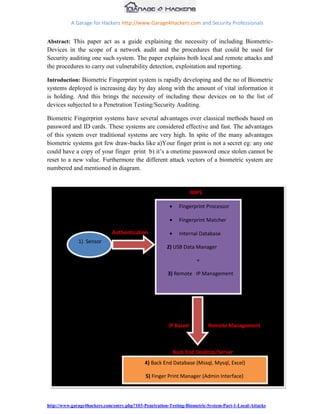
reset to a new value. Furthermore the different attack vectors of a biometric system are
numbered and mentioned in diagram.


                                                                   MIPS

                                                            Fingerprint Processor

                                                            Fingerprint Matcher

                              Authentication                Internal Database
              1) Sensor
                                                       2) USB Data Manager

                                                                     +

                                                       3) Remote IP Management


                                                        IP Based          Remote Management


                                                          Back End Desktop/Server
                                             4) Back End Database (Mssql, Mysql, Excel)

                                             5) Finger Print Manager (Admin Interface)


                                                          Remote Computer
http://www.garage4hackers.com/entry.php?103-Penetration-Testing-Biometric-System-Part-1-Local-Attacks
A Garage for Hackers http://www.Garage4Hackers.com and Security Professionals


Diagram fb1_01 explains the various possible points of attack, and these would be the
areas this research would be concentrating on. On basis of the attack methodology we
have categorized the attacks into Local and Remote attacks.

Local Attacks:

        1) Finger Print Sensor

        2) USB Data Manager

Remote Attacks:

        3) Remote IP Management

        4) Back End Database

        5) Finger Print Manager (Admin Interface)

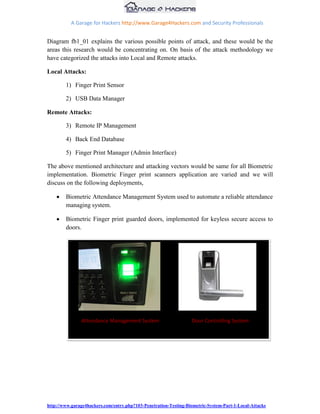
The above mentioned architecture and attacking vectors would be same for all Biometric
implementation. Biometric Finger print scanners application are varied and we will
discuss on the following deployments,

        Biometric Attendance Management System used to automate a reliable attendance
        managing system.

        Biometric Finger print guarded doors, implemented for keyless secure access to
        doors.


               Attendance Management System                       Door Controlling System


http://www.garage4hackers.com/entry.php?103-Penetration-Testing-Biometric-System-Part-1-Local-Attacks
A Garage for Hackers http://www.Garage4Hackers.com and Security Professionals


                           Biometrics: The Non Technical part:
Local Attack: Finger print sensor

Finger print scanners read input using two methodologies:

1) Optical scanner

2) Capacitance scanner

Optical Scanner are most widely used ones and the main part of it are the CCD[charge
coupled device ], these are simply an array of light-sensitive diodes called photosites,
which generate an electrical signal in response to light photons. Each photosite records a
pixel, a tiny dot representing the light that hit that spot. Collectively, the light and dark
pixels form an image of the scanned finger print. So the theory says that if a similar
image of finger print is placed in front the scanner we would be able to bypass them. This
theory is practically not easy as the problems we would have to face would be the
validation of the machine in order to differentiate between a real and valid image by
checking the average pixel darkness, or the overall values in a small sample by rejecting
the scan if the overall image is too dark or too light. One part of this paper would be
reproducing two dimensional images of a fingerprint.


Capacitance Scannerswork on the principle of capacitance. It relies on the properties of
flesh and air to measure differences in capacitance on the scanner when the finger is
placed upon the scanner. Certain systems along with capacitance checks blood flow,
temperature, and even simulate human sweat.

One advantage of capacitance scanners over optical scanners is the fact that the
capacitance scanner requires a three-dimensional print, whereas an optical scanner needs


http://www.garage4hackers.com/entry.php?103-Penetration-Testing-Biometric-System-Part-1-Local-Attacks
A Garage for Hackers http://www.Garage4Hackers.com and Security Professionals


a two dimensional only. This makes the capacitance scanners more difficult to deceive.
However, if one could recreate a three-dimensional representation of a print, then one
could theoretically “trick” the scanner into falsely authenticating a user.

The objective of the first section is to try by-passing these devices by steeling and cloning
the fingerprint. And later these clones would be modified into three dimensional and two
dimensional dummy s that could be used to see the above mentions vulnerabilities exist
or not.

This above mentioned approaches are practically not easy as the problems we would have
to face would be the validation of the machine in order to differentiate between a real and
valid image by checking the average pixel darkness, or the overall values in a small
sample by rejecting the scan if the overall image is too dark or too light. .


http://www.garage4hackers.com/entry.php?103-Penetration-Testing-Biometric-System-Part-1-Local-Attacks
A Garage for Hackers http://www.Garage4Hackers.com and Security Professionals


Local attacks:

Detailed methodology: Penetration Testing a Biometric device.

This section will explain the methodologies in order to recreate a fingerprint for tricking
these systems. Attacks like this were seen in videos that were spreading over the internet
by using a Photostat or image of the fingerprint. The issue we would be facing would be
the protection mechanism the systems have employed in order to prevent against such
attacks. Enough with the theoretical part let‟s move on to some action.

Objective: To bypass a finger print guarded door or to fake a finger print attendance
system.

Targets: Finger print guarded confidential room.

Scenario: Here our target would be a finger print guarded door where only the Manager is
allowed access using his fingerprint.

Bypassing a Finger print guarded door or attacking and faking an attendance system. The
first attack would not get the cooperation of user but in the second on we could. So I will
talk about the first case, as same methodology could be used in second scenario too. First
step would be to obtain victim‟s fingerprint that could later be used to recreate a dummy
fingerprint. Human fingers have friction ridges. And there are eccrine glands that
produce natural secretion of sweat on the fingers. So there would be the Impressions of
fingerprints left behind on surface when touched. What causes the fingerprint is a very
important factor, because recreating a fingerprint form few substances only would yield
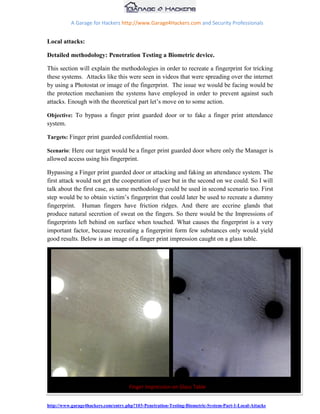
good results. Below is an image of a finger print impression caught on a glass table.


Finger Print Logger:


                                     Finger Impression on Glass Table


http://www.garage4hackers.com/entry.php?103-Penetration-Testing-Biometric-System-Part-1-Local-Attacks
A Garage for Hackers http://www.Garage4Hackers.com and Security Professionals


Instead of going after cups and bottles my idea here is to build a logger, a setup that could
log fingerprints when the victim logs in using the biometric machine. A traditional
Biometric sensor looks like this.


                               Finger Print Sensor Area: Logger is placed here

It‟s possible to place a transparent plastic cover on top of sensor and, whenever the victim
logs in his impression would be on the plastic, the authentication would take place and
later plastic could be removed and reproduced.

Refraction:

The problems we would have to face in the above procedure are refraction, refractive
index of the material we place on top of the sensor matters, as we have to maintain
stealth. Why refractive index because when light passes form one media to another other
it may also change its propagation direction [Refraction] in proportion to the refractive
index and the sensor won‟t be able to understand the distorted image and login won‟t take
place.


http://www.garage4hackers.com/entry.php?103-Penetration-Testing-Biometric-System-Part-1-Local-Attacks
A Garage for Hackers http://www.Garage4Hackers.com and Security Professionals


 This would create suspicion. So our logger would be build using a thin transparent sheet
placed on top of an OHP sheet cut out, in order to hold it stern.

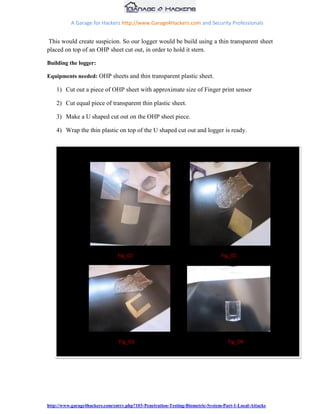
Building the logger:

Equipments needed: OHP sheets and thin transparent plastic sheet.

    1) Cut out a piece of OHP sheet with approximate size of Finger print sensor

    2) Cut equal piece of transparent thin plastic sheet.

    3) Make a U shaped cut out on the OHP sheet piece.

    4) Wrap the thin plastic on top of the U shaped cut out and logger is ready.


                                Fig_01                                          Fig_02


                                 Fig_03                                            Fig_04


http://www.garage4hackers.com/entry.php?103-Penetration-Testing-Biometric-System-Part-1-Local-Attacks
A Garage for Hackers http://www.Garage4Hackers.com and Security Professionals


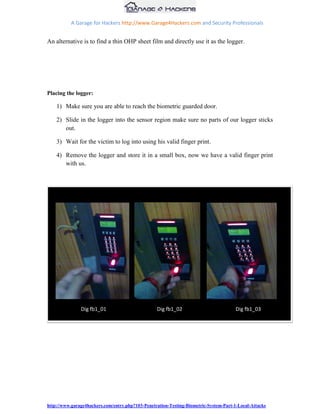
An alternative is to find a thin OHP sheet film and directly use it as the logger.


Placing the logger:

    1) Make sure you are able to reach the biometric guarded door.

    2) Slide in the logger into the sensor region make sure no parts of our logger sticks
       out.

    3) Wait for the victim to log into using his valid finger print.

    4) Remove the logger and store it in a small box, now we have a valid finger print
       with us.


               Dig fb1_01                         Dig fb1_02                           Dig fb1_03


http://www.garage4hackers.com/entry.php?103-Penetration-Testing-Biometric-System-Part-1-Local-Attacks
A Garage for Hackers http://www.Garage4Hackers.com and Security Professionals


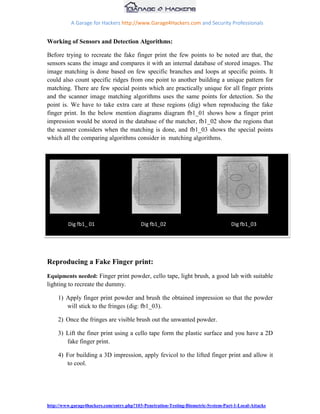
Working of Sensors and Detection Algorithms:

Before trying to recreate the fake finger print the few points to be noted are that, the
sensors scans the image and compares it with an internal database of stored images. The
image matching is done based on few specific branches and loops at specific points. It
could also count specific ridges from one point to another building a unique pattern for
matching. There are few special points which are practically unique for all finger prints
and the scanner image matching algorithms uses the same points for detection. So the
point is. We have to take extra care at these regions (dig) when reproducing the fake
finger print. In the below mention diagrams diagram fb1_01 shows how a finger print
impression would be stored in the database of the matcher, fb1_02 show the regions that
the scanner considers when the matching is done, and fb1_03 shows the special points
which all the comparing algorithms consider in matching algorithms.


         Dig fb1_ 01                       Dig fb1_02                                Dig fb1_03


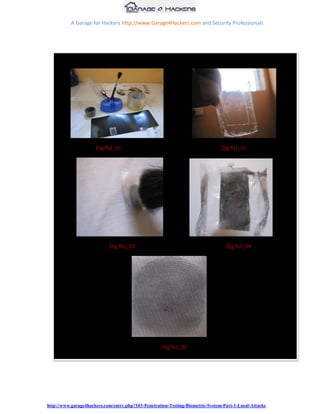
Reproducing a Fake Finger print:
Equipments needed: Finger print powder, cello tape, light brush, a good lab with suitable
lighting to recreate the dummy.

     1) Apply finger print powder and brush the obtained impression so that the powder
        will stick to the fringes (dig: fb1_03).

     2) Once the fringes are visible brush out the unwanted powder.

     3) Lift the finer print using a cello tape form the plastic surface and you have a 2D
        fake finger print.

     4) For building a 3D impression, apply fevicol to the lifted finger print and allow it
        to cool.


http://www.garage4hackers.com/entry.php?103-Penetration-Testing-Biometric-System-Part-1-Local-Attacks
A Garage for Hackers http://www.Garage4Hackers.com and Security Professionals


     5) Remove the fevicol layer once it‟s set and that will give you a 3D dummy finger
        print.


                      Dig fb1_01                                                Dig fb1_02


                            Dig fb1_03                                            Dig fb1_04


                                                    Dig fb1_05


http://www.garage4hackers.com/entry.php?103-Penetration-Testing-Biometric-System-Part-1-Local-Attacks
A Garage for Hackers http://www.Garage4Hackers.com and Security Professionals


Only optical scanners were tested and the above mentioned methods worked on a few
systems with less effort, the output is directly proportional to the quality of dummy finger
print you are able to obtain.

Local Attack: USB Data Manager.

Objective: To steel sensitive information stored on the device like employee details,
employee salary details, and other confidential details of the employees.

Targets: Finger print attendance monitoring system placed at the door of your
organization.

Biometrics devices have inbuilt data storage, were it stores the Finger prints and user
information. Unlike other data sources these Biometric devices are not kept in a protected
area instead kept at building entry or other unrestricted places where they could be easily
accessed. Basically all the Biometric systems come with a USB support in order to
download and upload finger prints and other log detail to and from the device. A normal
USB dongle could be used to download data from the device. Most of the devices do not
have any sort of protection mechanism employed to prevent data theft, and those which
uses password protection often is deployed with default password. So if the attacker
could walk to the system with a USB Pen drive then he would be able to copy all the
data. Data includes employee personal information, finger prints, time they logged in and
other sensitive information. I have gathered and listed commonly used devices default
password.


                        Dig fb1_                                              Dig fb1_


                                          [Videos Added]


http://www.garage4hackers.com/entry.php?103-Penetration-Testing-Biometric-System-Part-1-Local-Attacks
A Garage for Hackers http://www.Garage4Hackers.com and Security Professionals


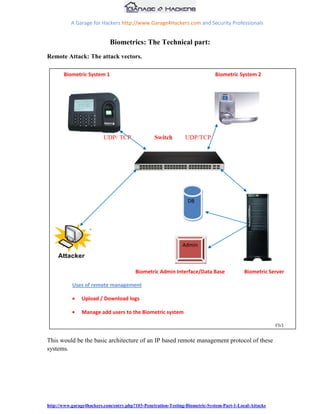
                             Biometrics: The Technical part:
Remote Attack: The attack vectors.

       Biometric System 1                                                    Biometric System 2


                          UDP/ TCP               Switch        UDP/TCP


                                                                DB


                                                              Admin


                                        Biometric Admin Interface/Data Base                Biometric Server

           Uses of remote management

               Upload / Download logs

               Manage add users to the Biometric system

                                                                                                        Fb1

This would be the basic architecture of an IP based remote management protocol of these
systems.


http://www.garage4hackers.com/entry.php?103-Penetration-Testing-Biometric-System-Part-1-Local-Attacks
A Garage for Hackers http://www.Garage4Hackers.com and Security Professionals


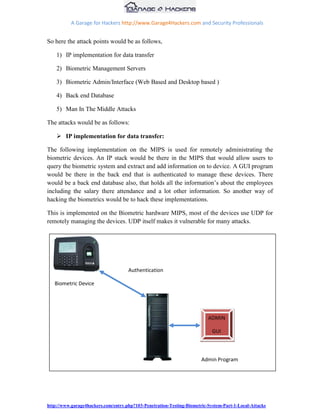
So here the attack points would be as follows,

    1) IP implementation for data transfer

    2) Biometric Management Servers

    3) Biometric Admin/Interface (Web Based and Desktop based )

    4) Back end Database

    5) Man In The Middle Attacks

The attacks would be as follows:

     IP implementation for data transfer:

The following implementation on the MIPS is used for remotely administrating the
biometric devices. An IP stack would be there in the MIPS that would allow users to
query the biometric system and extract and add information on to device. A GUI program
would be there in the back end that is authenticated to manage these devices. There
would be a back end database also, that holds all the information‟s about the employees
including the salary there attendance and a lot other information. So another way of
hacking the biometrics would be to hack these implementations.

This is implemented on the Biometric hardware MIPS, most of the devices use UDP for
remotely managing the devices. UDP itself makes it vulnerable for many attacks.


                                     Authentication

   Biometric Device


                                                                          ADMIN

                                                                            GUI


                                                                       Admin Program


http://www.garage4hackers.com/entry.php?103-Penetration-Testing-Biometric-System-Part-1-Local-Attacks
A Garage for Hackers http://www.Garage4Hackers.com and Security Professionals


The remote administration capability of this device lets biometric servers to authenticate
to it and manage remotely. So our primary check should be on this authentication
procedure. How the authentication is implemented on the MIPS device.

 We are completely unaware of the authentication mechanism used as the program is
embedded in the Biometric MIPS device. Sniffing network traffic and analyzing the
packets work, but the device communicates to the server only when initiated, and it
would be weekly or monthly. So the chance of getting an output out of that is limited.

Solution: The admin application knows everything about the remote device so if we could
get a copy of that application it will tell us everything we want. We could analyze the
authentication mechanism, database configuration, and the commands to communicate to
these devices. Let‟s move forward with a live example.

Scenario: Attacking the remote management protocol of Biometric device.

Situation: The remote administration implementation is unknown.

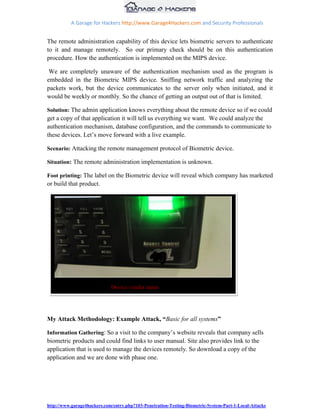
Foot printing: The label on the Biometric device will reveal which company has marketed
or build that product.


                             Device vendor name


My Attack Methodology: Example Attack, “Basic for all systems”

Information Gathering: So a visit to the company‟s website reveals that company sells
biometric products and could find links to user manual. Site also provides link to the
application that is used to manage the devices remotely. So download a copy of the
application and we are done with phase one.


http://www.garage4hackers.com/entry.php?103-Penetration-Testing-Biometric-System-Part-1-Local-Attacks
A Garage for Hackers http://www.Garage4Hackers.com and Security Professionals


Reverse Engineering the Application to extract the commands:

The current application is built in .Net C#, so „refelector‟ would be the right choice for
disassembling, we will have to deal with the same scenario in all the cases, languages
will vary so as the dissemblers.

The preliminary analysis revealed the Port the device use to communicate and also
information about the database settings and password files. A detailed analysis show the
algorithm embedded in Biometric device. It is possible to retrieve the commands to
interact with the system too.

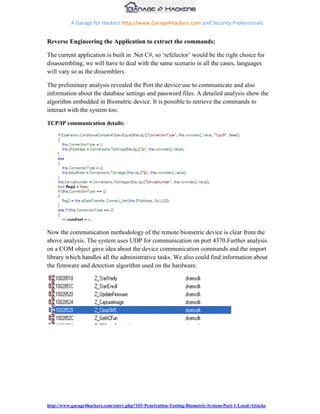
TCP/IP communication details:


Now the communication methodology of the remote biometric device is clear from the
above analysis. The system uses UDP for communication on port 4370.Further analysis
on a COM object gave idea about the device communication commands and the import
library which handles all the administrative tasks. We also could find information about
the firmware and detection algorithm used on the hardware.


http://www.garage4hackers.com/entry.php?103-Penetration-Testing-Biometric-System-Part-1-Local-Attacks
A Garage for Hackers http://www.Garage4Hackers.com and Security Professionals


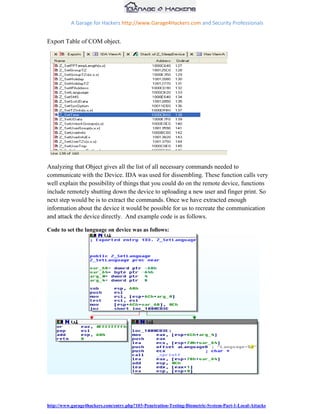
Export Table of COM object.


Analyzing that Object gives all the list of all necessary commands needed to
communicate with the Device. IDA was used for dissembling. These function calls very
well explain the possibility of things that you could do on the remote device, functions
include remotely shutting down the device to uploading a new user and finger print. So
next step would be is to extract the commands. Once we have extracted enough
information about the device it would be possible for us to recreate the communication
and attack the device directly. And example code is as follows.

Code to set the language on device was as follows:


http://www.garage4hackers.com/entry.php?103-Penetration-Testing-Biometric-System-Part-1-Local-Attacks
A Garage for Hackers http://www.Garage4Hackers.com and Security Professionals


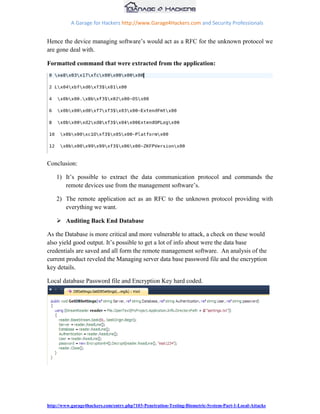
Hence the device managing software‟s would act as a RFC for the unknown protocol we
are gone deal with.

Formatted command that were extracted from the application:


Conclusion:

    1) It‟s possible to extract the data communication protocol and commands the
       remote devices use from the management software‟s.

    2) The remote application act as an RFC to the unknown protocol providing with
       everything we want.

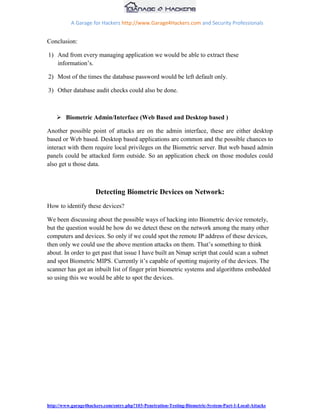
     Auditing Back End Database

As the Database is more critical and more vulnerable to attack, a check on these would
also yield good output. It‟s possible to get a lot of info about were the data base
credentials are saved and all form the remote management software. An analysis of the
current product reveled the Managing server data base password file and the encryption
key details.

Local database Password file and Encryption Key hard coded.


http://www.garage4hackers.com/entry.php?103-Penetration-Testing-Biometric-System-Part-1-Local-Attacks
A Garage for Hackers http://www.Garage4Hackers.com and Security Professionals


Conclusion:

1) And from every managing application we would be able to extract these
   information‟s.

2) Most of the times the database password would be left default only.

3) Other database audit checks could also be done.


     Biometric Admin/Interface (Web Based and Desktop based )

Another possible point of attacks are on the admin interface, these are either desktop
based or Web based. Desktop based applications are common and the possible chances to
interact with them require local privileges on the Biometric server. But web based admin
panels could be attacked form outside. So an application check on those modules could
also get u those data.


                      Detecting Biometric Devices on Network:
How to identify these devices?

We been discussing about the possible ways of hacking into Biometric device remotely,
but the question would be how do we detect these on the network among the many other
computers and devices. So only if we could spot the remote IP address of these devices,
then only we could use the above mention attacks on them. That‟s something to think
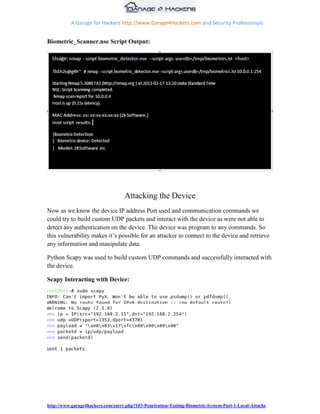
about. In order to get past that issue I have built an Nmap script that could scan a subnet
and spot Biometric MIPS. Currently it‟s capable of spotting majority of the devices. The
scanner has got an inbuilt list of finger print biometric systems and algorithms embedded
so using this we would be able to spot the devices.


http://www.garage4hackers.com/entry.php?103-Penetration-Testing-Biometric-System-Part-1-Local-Attacks
A Garage for Hackers http://www.Garage4Hackers.com and Security Professionals


Biometric_Scanner.nse Script Output:


                                   Attacking the Device
Now as we know the device IP address Port used and communication commands we
could try to build custom UDP packets and interact with the device as were not able to
detect any authentication on the device. The device was program to any commands. So
this vulnerability makes it‟s possible for an attacker to connect to the device and retrieve
any information and manipulate data.

Python Scapy was used to build custom UDP commands and successfully interacted with
the device.

Scapy Interacting with Device:


http://www.garage4hackers.com/entry.php?103-Penetration-Testing-Biometric-System-Part-1-Local-Attacks
A Garage for Hackers http://www.Garage4Hackers.com and Security Professionals


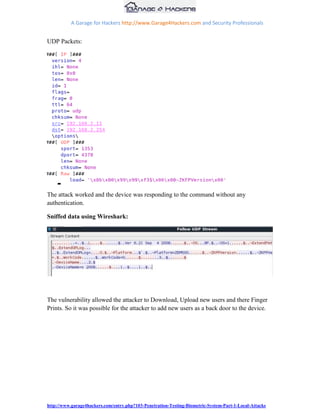
UDP Packets:


The attack worked and the device was responding to the command without any
authentication.

Sniffed data using Wireshark:


The vulnerability allowed the attacker to Download, Upload new users and there Finger
Prints. So it was possible for the attacker to add new users as a back door to the device.


http://www.garage4hackers.com/entry.php?103-Penetration-Testing-Biometric-System-Part-1-Local-Attacks
A Garage for Hackers http://www.Garage4Hackers.com and Security Professionals


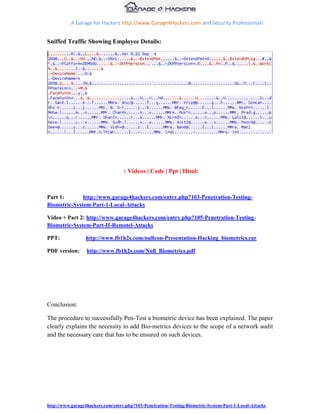
Sniffed Traffic Showing Employee Details:


                                   : Videos | Code | Ppt | Html:


Part 1:       http://www.garage4hackers.com/entry.php?103-Penetration-Testing-
Biometric-System-Part-1-Local-Attacks

Video + Part 2: http://www.garage4hackers.com/entry.php?105-Penetration-Testing-
Biometric-System-Part-II-Remotel-Attacks

PPT:             http://www.fb1h2s.com/nullcon-Presentation-Hacking_biometrics.rar

PDF version:      http://www.fb1h2s.com/Null_Biometrics.pdf


Conclusion:

The procedure to successfully Pen-Test a biometric device has been explained. The paper
clearly explains the necessity to add Bio-metrics devices to the scope of a network audit
and the necessary care that has to be ensured on such devices.


http://www.garage4hackers.com/entry.php?103-Penetration-Testing-Biometric-System-Part-1-Local-Attacks
A Garage for Hackers http://www.Garage4Hackers.com and Security Professionals


References:

http://atvs.ii.uam.es/files/2007_SWB_VulnerabilitiesRecentAdvances_Galbally.pdf

http://www.blackhat.com/presentations/bh-europe-08/Alonso-Parada/Presentation/bh-eu-
08-alonso-parada.pdf

http://www.blackhat.com/presentations/bh-europe-08/Lewis/Presentation/bh-eu-08-
lewis.pdf

http://www.blackhat.com/presentations/bh-europe-08/Lewis/Whitepaper/bh-eu-08-lewis-
WP.pdf

http://www.neurotechnology.com/download/NCheck_Finger_Attendance_Brochure_201
0-08-30.pdf

http://www.jkconsultancy.in/


Greetz to: B0Nd,Eberly,Wipu,Neo,Vinnu,prashant(null),sud0,Sagar,rohith,Nishant, atul, r4scal,
SmartKD, beenu, d4rkdawn,pk and all Null Members and AH members
Special Thanks to: the_empty, 41w4rior, d4rkest, Abishek Dutta, w3bdevil,


http://www.garage4hackers.com/entry.php?103-Penetration-Testing-Biometric-System-Part-1-Local-Attacks

nullcon 2011 - Penetration Testing a Biometric System

  • 1.
    A Garage forHackers http://www.Garage4Hackers.com and Security Professionals Penetration Testing Biometric System A Penetration Testers Guide to Finger Print Authentication [FB1H2S aka Rahul Sasi] http://Fb1h2s.com http://www.Garage4Hackers.com Presented @ NullCon International Conference 2011 http://nullcon.net/ http://www.garage4hackers.com/entry.php?103-Penetration-Testing-Biometric-System-Part-1-Local-Attacks
  • 2.
    A Garage forHackers http://www.Garage4Hackers.com and Security Professionals Abstract: This paper act as a guide explaining the necessity of including Biometric- Devices in the scope of a network audit and the procedures that could be used for Security auditing one such system. The paper explains both local and remote attacks and the procedures to carry out vulnerability detection, exploitation and reporting. Introduction: Biometric Fingerprint system is rapidly developing and the no of Biometric systems deployed is increasing day by day along with the amount of vital information it is holding. And this brings the necessity of including these devices on to the list of devices subjected to a Penetration Testing/Security Auditing. Biometric Fingerprint systems have several advantages over classical methods based on password and ID cards. These systems are considered effective and fast. The advantages of this system over traditional systems are very high. In spite of the many advantages biometric systems got few draw-backs like a)Your finger print is not a secret eg: any one could have a copy of your finger print b) it‟s a onetime password once stolen cannot be reset to a new value. Furthermore the different attack vectors of a biometric system are numbered and mentioned in diagram. MIPS Fingerprint Processor Fingerprint Matcher Authentication Internal Database 1) Sensor 2) USB Data Manager + 3) Remote IP Management IP Based Remote Management Back End Desktop/Server 4) Back End Database (Mssql, Mysql, Excel) 5) Finger Print Manager (Admin Interface) Remote Computer http://www.garage4hackers.com/entry.php?103-Penetration-Testing-Biometric-System-Part-1-Local-Attacks
  • 3.
    A Garage forHackers http://www.Garage4Hackers.com and Security Professionals Diagram fb1_01 explains the various possible points of attack, and these would be the areas this research would be concentrating on. On basis of the attack methodology we have categorized the attacks into Local and Remote attacks. Local Attacks: 1) Finger Print Sensor 2) USB Data Manager Remote Attacks: 3) Remote IP Management 4) Back End Database 5) Finger Print Manager (Admin Interface) The above mentioned architecture and attacking vectors would be same for all Biometric implementation. Biometric Finger print scanners application are varied and we will discuss on the following deployments, Biometric Attendance Management System used to automate a reliable attendance managing system. Biometric Finger print guarded doors, implemented for keyless secure access to doors. Attendance Management System Door Controlling System http://www.garage4hackers.com/entry.php?103-Penetration-Testing-Biometric-System-Part-1-Local-Attacks
  • 4.
    A Garage forHackers http://www.Garage4Hackers.com and Security Professionals Biometrics: The Non Technical part: Local Attack: Finger print sensor Finger print scanners read input using two methodologies: 1) Optical scanner 2) Capacitance scanner Optical Scanner are most widely used ones and the main part of it are the CCD[charge coupled device ], these are simply an array of light-sensitive diodes called photosites, which generate an electrical signal in response to light photons. Each photosite records a pixel, a tiny dot representing the light that hit that spot. Collectively, the light and dark pixels form an image of the scanned finger print. So the theory says that if a similar image of finger print is placed in front the scanner we would be able to bypass them. This theory is practically not easy as the problems we would have to face would be the validation of the machine in order to differentiate between a real and valid image by checking the average pixel darkness, or the overall values in a small sample by rejecting the scan if the overall image is too dark or too light. One part of this paper would be reproducing two dimensional images of a fingerprint. Capacitance Scannerswork on the principle of capacitance. It relies on the properties of flesh and air to measure differences in capacitance on the scanner when the finger is placed upon the scanner. Certain systems along with capacitance checks blood flow, temperature, and even simulate human sweat. One advantage of capacitance scanners over optical scanners is the fact that the capacitance scanner requires a three-dimensional print, whereas an optical scanner needs http://www.garage4hackers.com/entry.php?103-Penetration-Testing-Biometric-System-Part-1-Local-Attacks
  • 5.
    A Garage forHackers http://www.Garage4Hackers.com and Security Professionals a two dimensional only. This makes the capacitance scanners more difficult to deceive. However, if one could recreate a three-dimensional representation of a print, then one could theoretically “trick” the scanner into falsely authenticating a user. The objective of the first section is to try by-passing these devices by steeling and cloning the fingerprint. And later these clones would be modified into three dimensional and two dimensional dummy s that could be used to see the above mentions vulnerabilities exist or not. This above mentioned approaches are practically not easy as the problems we would have to face would be the validation of the machine in order to differentiate between a real and valid image by checking the average pixel darkness, or the overall values in a small sample by rejecting the scan if the overall image is too dark or too light. . http://www.garage4hackers.com/entry.php?103-Penetration-Testing-Biometric-System-Part-1-Local-Attacks
  • 6.
    A Garage forHackers http://www.Garage4Hackers.com and Security Professionals Local attacks: Detailed methodology: Penetration Testing a Biometric device. This section will explain the methodologies in order to recreate a fingerprint for tricking these systems. Attacks like this were seen in videos that were spreading over the internet by using a Photostat or image of the fingerprint. The issue we would be facing would be the protection mechanism the systems have employed in order to prevent against such attacks. Enough with the theoretical part let‟s move on to some action. Objective: To bypass a finger print guarded door or to fake a finger print attendance system. Targets: Finger print guarded confidential room. Scenario: Here our target would be a finger print guarded door where only the Manager is allowed access using his fingerprint. Bypassing a Finger print guarded door or attacking and faking an attendance system. The first attack would not get the cooperation of user but in the second on we could. So I will talk about the first case, as same methodology could be used in second scenario too. First step would be to obtain victim‟s fingerprint that could later be used to recreate a dummy fingerprint. Human fingers have friction ridges. And there are eccrine glands that produce natural secretion of sweat on the fingers. So there would be the Impressions of fingerprints left behind on surface when touched. What causes the fingerprint is a very important factor, because recreating a fingerprint form few substances only would yield good results. Below is an image of a finger print impression caught on a glass table. Finger Print Logger: Finger Impression on Glass Table http://www.garage4hackers.com/entry.php?103-Penetration-Testing-Biometric-System-Part-1-Local-Attacks
  • 7.
    A Garage forHackers http://www.Garage4Hackers.com and Security Professionals Instead of going after cups and bottles my idea here is to build a logger, a setup that could log fingerprints when the victim logs in using the biometric machine. A traditional Biometric sensor looks like this. Finger Print Sensor Area: Logger is placed here It‟s possible to place a transparent plastic cover on top of sensor and, whenever the victim logs in his impression would be on the plastic, the authentication would take place and later plastic could be removed and reproduced. Refraction: The problems we would have to face in the above procedure are refraction, refractive index of the material we place on top of the sensor matters, as we have to maintain stealth. Why refractive index because when light passes form one media to another other it may also change its propagation direction [Refraction] in proportion to the refractive index and the sensor won‟t be able to understand the distorted image and login won‟t take place. http://www.garage4hackers.com/entry.php?103-Penetration-Testing-Biometric-System-Part-1-Local-Attacks
  • 8.
    A Garage forHackers http://www.Garage4Hackers.com and Security Professionals This would create suspicion. So our logger would be build using a thin transparent sheet placed on top of an OHP sheet cut out, in order to hold it stern. Building the logger: Equipments needed: OHP sheets and thin transparent plastic sheet. 1) Cut out a piece of OHP sheet with approximate size of Finger print sensor 2) Cut equal piece of transparent thin plastic sheet. 3) Make a U shaped cut out on the OHP sheet piece. 4) Wrap the thin plastic on top of the U shaped cut out and logger is ready. Fig_01 Fig_02 Fig_03 Fig_04 http://www.garage4hackers.com/entry.php?103-Penetration-Testing-Biometric-System-Part-1-Local-Attacks
  • 9.
    A Garage forHackers http://www.Garage4Hackers.com and Security Professionals An alternative is to find a thin OHP sheet film and directly use it as the logger. Placing the logger: 1) Make sure you are able to reach the biometric guarded door. 2) Slide in the logger into the sensor region make sure no parts of our logger sticks out. 3) Wait for the victim to log into using his valid finger print. 4) Remove the logger and store it in a small box, now we have a valid finger print with us. Dig fb1_01 Dig fb1_02 Dig fb1_03 http://www.garage4hackers.com/entry.php?103-Penetration-Testing-Biometric-System-Part-1-Local-Attacks
  • 10.
    A Garage forHackers http://www.Garage4Hackers.com and Security Professionals Working of Sensors and Detection Algorithms: Before trying to recreate the fake finger print the few points to be noted are that, the sensors scans the image and compares it with an internal database of stored images. The image matching is done based on few specific branches and loops at specific points. It could also count specific ridges from one point to another building a unique pattern for matching. There are few special points which are practically unique for all finger prints and the scanner image matching algorithms uses the same points for detection. So the point is. We have to take extra care at these regions (dig) when reproducing the fake finger print. In the below mention diagrams diagram fb1_01 shows how a finger print impression would be stored in the database of the matcher, fb1_02 show the regions that the scanner considers when the matching is done, and fb1_03 shows the special points which all the comparing algorithms consider in matching algorithms. Dig fb1_ 01 Dig fb1_02 Dig fb1_03 Reproducing a Fake Finger print: Equipments needed: Finger print powder, cello tape, light brush, a good lab with suitable lighting to recreate the dummy. 1) Apply finger print powder and brush the obtained impression so that the powder will stick to the fringes (dig: fb1_03). 2) Once the fringes are visible brush out the unwanted powder. 3) Lift the finer print using a cello tape form the plastic surface and you have a 2D fake finger print. 4) For building a 3D impression, apply fevicol to the lifted finger print and allow it to cool. http://www.garage4hackers.com/entry.php?103-Penetration-Testing-Biometric-System-Part-1-Local-Attacks
  • 11.
    A Garage forHackers http://www.Garage4Hackers.com and Security Professionals 5) Remove the fevicol layer once it‟s set and that will give you a 3D dummy finger print. Dig fb1_01 Dig fb1_02 Dig fb1_03 Dig fb1_04 Dig fb1_05 http://www.garage4hackers.com/entry.php?103-Penetration-Testing-Biometric-System-Part-1-Local-Attacks
  • 12.
    A Garage forHackers http://www.Garage4Hackers.com and Security Professionals Only optical scanners were tested and the above mentioned methods worked on a few systems with less effort, the output is directly proportional to the quality of dummy finger print you are able to obtain. Local Attack: USB Data Manager. Objective: To steel sensitive information stored on the device like employee details, employee salary details, and other confidential details of the employees. Targets: Finger print attendance monitoring system placed at the door of your organization. Biometrics devices have inbuilt data storage, were it stores the Finger prints and user information. Unlike other data sources these Biometric devices are not kept in a protected area instead kept at building entry or other unrestricted places where they could be easily accessed. Basically all the Biometric systems come with a USB support in order to download and upload finger prints and other log detail to and from the device. A normal USB dongle could be used to download data from the device. Most of the devices do not have any sort of protection mechanism employed to prevent data theft, and those which uses password protection often is deployed with default password. So if the attacker could walk to the system with a USB Pen drive then he would be able to copy all the data. Data includes employee personal information, finger prints, time they logged in and other sensitive information. I have gathered and listed commonly used devices default password. Dig fb1_ Dig fb1_ [Videos Added] http://www.garage4hackers.com/entry.php?103-Penetration-Testing-Biometric-System-Part-1-Local-Attacks
  • 13.
    A Garage forHackers http://www.Garage4Hackers.com and Security Professionals Biometrics: The Technical part: Remote Attack: The attack vectors. Biometric System 1 Biometric System 2 UDP/ TCP Switch UDP/TCP DB Admin Biometric Admin Interface/Data Base Biometric Server Uses of remote management Upload / Download logs Manage add users to the Biometric system Fb1 This would be the basic architecture of an IP based remote management protocol of these systems. http://www.garage4hackers.com/entry.php?103-Penetration-Testing-Biometric-System-Part-1-Local-Attacks
  • 14.
    A Garage forHackers http://www.Garage4Hackers.com and Security Professionals So here the attack points would be as follows, 1) IP implementation for data transfer 2) Biometric Management Servers 3) Biometric Admin/Interface (Web Based and Desktop based ) 4) Back end Database 5) Man In The Middle Attacks The attacks would be as follows:  IP implementation for data transfer: The following implementation on the MIPS is used for remotely administrating the biometric devices. An IP stack would be there in the MIPS that would allow users to query the biometric system and extract and add information on to device. A GUI program would be there in the back end that is authenticated to manage these devices. There would be a back end database also, that holds all the information‟s about the employees including the salary there attendance and a lot other information. So another way of hacking the biometrics would be to hack these implementations. This is implemented on the Biometric hardware MIPS, most of the devices use UDP for remotely managing the devices. UDP itself makes it vulnerable for many attacks. Authentication Biometric Device ADMIN GUI Admin Program http://www.garage4hackers.com/entry.php?103-Penetration-Testing-Biometric-System-Part-1-Local-Attacks
  • 15.
    A Garage forHackers http://www.Garage4Hackers.com and Security Professionals The remote administration capability of this device lets biometric servers to authenticate to it and manage remotely. So our primary check should be on this authentication procedure. How the authentication is implemented on the MIPS device. We are completely unaware of the authentication mechanism used as the program is embedded in the Biometric MIPS device. Sniffing network traffic and analyzing the packets work, but the device communicates to the server only when initiated, and it would be weekly or monthly. So the chance of getting an output out of that is limited. Solution: The admin application knows everything about the remote device so if we could get a copy of that application it will tell us everything we want. We could analyze the authentication mechanism, database configuration, and the commands to communicate to these devices. Let‟s move forward with a live example. Scenario: Attacking the remote management protocol of Biometric device. Situation: The remote administration implementation is unknown. Foot printing: The label on the Biometric device will reveal which company has marketed or build that product. Device vendor name My Attack Methodology: Example Attack, “Basic for all systems” Information Gathering: So a visit to the company‟s website reveals that company sells biometric products and could find links to user manual. Site also provides link to the application that is used to manage the devices remotely. So download a copy of the application and we are done with phase one. http://www.garage4hackers.com/entry.php?103-Penetration-Testing-Biometric-System-Part-1-Local-Attacks
  • 16.
    A Garage forHackers http://www.Garage4Hackers.com and Security Professionals Reverse Engineering the Application to extract the commands: The current application is built in .Net C#, so „refelector‟ would be the right choice for disassembling, we will have to deal with the same scenario in all the cases, languages will vary so as the dissemblers. The preliminary analysis revealed the Port the device use to communicate and also information about the database settings and password files. A detailed analysis show the algorithm embedded in Biometric device. It is possible to retrieve the commands to interact with the system too. TCP/IP communication details: Now the communication methodology of the remote biometric device is clear from the above analysis. The system uses UDP for communication on port 4370.Further analysis on a COM object gave idea about the device communication commands and the import library which handles all the administrative tasks. We also could find information about the firmware and detection algorithm used on the hardware. http://www.garage4hackers.com/entry.php?103-Penetration-Testing-Biometric-System-Part-1-Local-Attacks
  • 17.
    A Garage forHackers http://www.Garage4Hackers.com and Security Professionals Export Table of COM object. Analyzing that Object gives all the list of all necessary commands needed to communicate with the Device. IDA was used for dissembling. These function calls very well explain the possibility of things that you could do on the remote device, functions include remotely shutting down the device to uploading a new user and finger print. So next step would be is to extract the commands. Once we have extracted enough information about the device it would be possible for us to recreate the communication and attack the device directly. And example code is as follows. Code to set the language on device was as follows: http://www.garage4hackers.com/entry.php?103-Penetration-Testing-Biometric-System-Part-1-Local-Attacks
  • 18.
    A Garage forHackers http://www.Garage4Hackers.com and Security Professionals Hence the device managing software‟s would act as a RFC for the unknown protocol we are gone deal with. Formatted command that were extracted from the application: Conclusion: 1) It‟s possible to extract the data communication protocol and commands the remote devices use from the management software‟s. 2) The remote application act as an RFC to the unknown protocol providing with everything we want.  Auditing Back End Database As the Database is more critical and more vulnerable to attack, a check on these would also yield good output. It‟s possible to get a lot of info about were the data base credentials are saved and all form the remote management software. An analysis of the current product reveled the Managing server data base password file and the encryption key details. Local database Password file and Encryption Key hard coded. http://www.garage4hackers.com/entry.php?103-Penetration-Testing-Biometric-System-Part-1-Local-Attacks
  • 19.
    A Garage forHackers http://www.Garage4Hackers.com and Security Professionals Conclusion: 1) And from every managing application we would be able to extract these information‟s. 2) Most of the times the database password would be left default only. 3) Other database audit checks could also be done.  Biometric Admin/Interface (Web Based and Desktop based ) Another possible point of attacks are on the admin interface, these are either desktop based or Web based. Desktop based applications are common and the possible chances to interact with them require local privileges on the Biometric server. But web based admin panels could be attacked form outside. So an application check on those modules could also get u those data. Detecting Biometric Devices on Network: How to identify these devices? We been discussing about the possible ways of hacking into Biometric device remotely, but the question would be how do we detect these on the network among the many other computers and devices. So only if we could spot the remote IP address of these devices, then only we could use the above mention attacks on them. That‟s something to think about. In order to get past that issue I have built an Nmap script that could scan a subnet and spot Biometric MIPS. Currently it‟s capable of spotting majority of the devices. The scanner has got an inbuilt list of finger print biometric systems and algorithms embedded so using this we would be able to spot the devices. http://www.garage4hackers.com/entry.php?103-Penetration-Testing-Biometric-System-Part-1-Local-Attacks
  • 20.
    A Garage forHackers http://www.Garage4Hackers.com and Security Professionals Biometric_Scanner.nse Script Output: Attacking the Device Now as we know the device IP address Port used and communication commands we could try to build custom UDP packets and interact with the device as were not able to detect any authentication on the device. The device was program to any commands. So this vulnerability makes it‟s possible for an attacker to connect to the device and retrieve any information and manipulate data. Python Scapy was used to build custom UDP commands and successfully interacted with the device. Scapy Interacting with Device: http://www.garage4hackers.com/entry.php?103-Penetration-Testing-Biometric-System-Part-1-Local-Attacks
  • 21.
    A Garage forHackers http://www.Garage4Hackers.com and Security Professionals UDP Packets: The attack worked and the device was responding to the command without any authentication. Sniffed data using Wireshark: The vulnerability allowed the attacker to Download, Upload new users and there Finger Prints. So it was possible for the attacker to add new users as a back door to the device. http://www.garage4hackers.com/entry.php?103-Penetration-Testing-Biometric-System-Part-1-Local-Attacks
  • 22.
    A Garage forHackers http://www.Garage4Hackers.com and Security Professionals Sniffed Traffic Showing Employee Details: : Videos | Code | Ppt | Html: Part 1: http://www.garage4hackers.com/entry.php?103-Penetration-Testing- Biometric-System-Part-1-Local-Attacks Video + Part 2: http://www.garage4hackers.com/entry.php?105-Penetration-Testing- Biometric-System-Part-II-Remotel-Attacks PPT: http://www.fb1h2s.com/nullcon-Presentation-Hacking_biometrics.rar PDF version: http://www.fb1h2s.com/Null_Biometrics.pdf Conclusion: The procedure to successfully Pen-Test a biometric device has been explained. The paper clearly explains the necessity to add Bio-metrics devices to the scope of a network audit and the necessary care that has to be ensured on such devices. http://www.garage4hackers.com/entry.php?103-Penetration-Testing-Biometric-System-Part-1-Local-Attacks
  • 23.
    A Garage forHackers http://www.Garage4Hackers.com and Security Professionals References: http://atvs.ii.uam.es/files/2007_SWB_VulnerabilitiesRecentAdvances_Galbally.pdf http://www.blackhat.com/presentations/bh-europe-08/Alonso-Parada/Presentation/bh-eu- 08-alonso-parada.pdf http://www.blackhat.com/presentations/bh-europe-08/Lewis/Presentation/bh-eu-08- lewis.pdf http://www.blackhat.com/presentations/bh-europe-08/Lewis/Whitepaper/bh-eu-08-lewis- WP.pdf http://www.neurotechnology.com/download/NCheck_Finger_Attendance_Brochure_201 0-08-30.pdf http://www.jkconsultancy.in/ Greetz to: B0Nd,Eberly,Wipu,Neo,Vinnu,prashant(null),sud0,Sagar,rohith,Nishant, atul, r4scal, SmartKD, beenu, d4rkdawn,pk and all Null Members and AH members Special Thanks to: the_empty, 41w4rior, d4rkest, Abishek Dutta, w3bdevil, http://www.garage4hackers.com/entry.php?103-Penetration-Testing-Biometric-System-Part-1-Local-Attacks