Marko Heijnen CODEKITCHEN
Node.js to the rescue

Let Node.js do things when WordPress/PHP isn’t enough
Marko Heijnen
• Founder of CodeKitchen
• Lead developer of GlotPress
• Core contributor for
WordPress
• Plugin developer
• Organizer for WordCamp
Belgrade 2015
• Technologist
Why something else?
Yes, you can build almost
everything in WordPress
But is that the smart
thing to do?
Can you trust on WordPress
to be always stable?
This summer I started moving
things away from WordPress
WP Central
WP Central
• Showing download history
• Showing version usage history
• List all locales and their current state (need update)
• Showing contributors data (currently API only)
• Collects history of locale progress
• Getting checksums for plugins & themes
How it works
• A lot of data handling by wp_remote_get
• Scrapping profiles.WordPress.org to read data
• Multiple API calls to api.WordPress.org
• Combine data so it can be presented
The problem
• Most things happened through WP Cron
• Some things happens on the front end
• Resulting a load on the webserver that could and
should be prevented
New server setup
Loadbalancer
Memcached
Elasticsearch
MariaDB
New server setup
Micro
services
Webserver 1
Webserver 2
Thumbor
Public Private
Service server
• MariaDB as database
• Memcached as object cache
• Moving to Redis when the PHP7 version is out
• Elasticsearch to make search better/faster
The microservices server
• Handles all cronjobs for the network site
• Node.js services running for WP Central
• Like getting checksums for plugins/themes
• Soon merging other WP cronjob calls for getting
all the stats
Microservices
Microservices
• Microservices are small, autonomous services that
work together
• Small, and Focused on Doing One Thing Well
Benefits
• Different services can use different programming
languages
• High level separation
• If WordPress breaks, the services still keep running
• Ease of Deployment
• Scale services that require more resources
Benefits
• In general they have an (REST) API
• Reusable
• Other microservices could call the service to run a
task
Node.js
What is Node.js
• JavaScript platform
• Uses an event-driven, non-blocking I/O model
• Lightweight and efficient
• Ideal for real time application
• Lot’s of modules you can use
• Manage with NPM - https://www.npmjs.org
Why to use it
• Internal webserver
• No configuration needed outside it’s code base
• You could use nginx as a proxy but not needed
• You get what you see approach
Who is using it
• Netflix
Need to know modules
• Express / Restify -> Webserver
• Socket.io -> Real time
• Request -> Doing internet requests
• async -> async calls with callback
• mysql -> MySQL driver with Pool support
• node-cmd -> Command line
Checksums for
plugins/themes
What is does
• Request checksum of a certain version from a
plugin or theme
• Download the zip and unzips it.
• Reads it in memory and get the checksum per
entry
• After everything is retrieved stores it in MySQL
Modules used
• Build in modules

FS

Crypto
• NPM Modules

Express

MySQL

Request

Yauzl for unzipping
• And build a little queue class
Calling the API
• http://wpcentral.io/api/checksums/plugin/tabify-
edit-screen/0.8.3 (REST API)
• Calls nginx by IP (10.10.10.10) which handles as a
fallback when the node.js application is down
• nginx calls then internally the node.js application
like proxy_pass http://127.0.0.1:8080
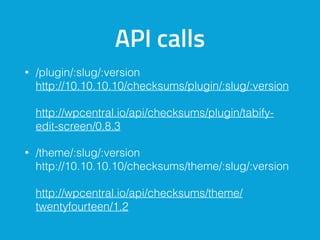
API calls
• /plugin/:slug/:version

http://10.10.10.10/checksums/plugin/:slug/:version 


http://wpcentral.io/api/checksums/plugin/tabify-
edit-screen/0.8.3
• /theme/:slug/:version

http://10.10.10.10/checksums/theme/:slug/:version


http://wpcentral.io/api/checksums/theme/
twentyfourteen/1.2
nginx rules
error_page 404 @404;

error_page 500 @500;

error_page 502 @502;
location @404 {

internal;

add_header Content-Type application/json always;

return 404 '{ "status": "Route Not Found" }';

}
return 500 '{ "status": "Service is down" }';

return 502 '{ "status": "Service is down" }';
Going over the code
Basic setup
// set variables for environment
var express = require('express'),
app = express(),
mysql = require('mysql'),
request = require('request'),
fs = require('fs'),
crypto = require('crypto'),
yauzl = require("yauzl");
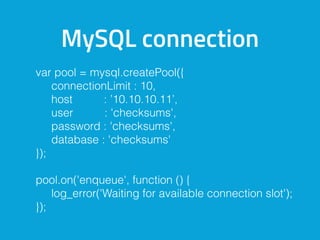
MySQL connection
var pool = mysql.createPool({
connectionLimit : 10,
host : ’10.10.10.11’,
user : 'checksums',
password : 'checksums',
database : 'checksums'
});
pool.on('enqueue', function () {
log_error('Waiting for available connection slot');
});
Server
app.listen(4000);
app.get( '/plugin/:slug/:version', function(req, res) {
if ( ! queue.add( 'plugin', req.params.slug,
req.params.version, res ) ) {
res.json({
'success': false,
'error': 'Generating checksums’
});
}
});
Server 404
app.use(function(req, res, next) {
res.status(404).json({
'success': false,
'error': "Route doesn;'t exist”
});
});
Lets check the rest
Starting the server
• The default way is: node server.js
• The production server way could be:

pm2 start server.js -u www-data --name “Cool service”
The new situation
The new situation
• No more unneeded logic in WordPress
• WordPress simple pipes the calls
• Small services that replacing it
• APIs can easily be reused
• Pushing new updates becomes easier
• Currently no caching but easily added
Other things you could
use node.js for
See my presentation:

Extending WordPress as a pro
Describing an idea of using Socket.io with WordPress
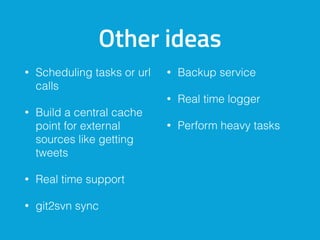
Other ideas
• Scheduling tasks or url
calls
• Build a central cache
point for external
sources like getting
tweets
• Real time support
• git2svn sync
• Backup service
• Real time logger
• Perform heavy tasks
Thank you for
listening
Questions?
@markoheijnen
markoheijnen.com


codekitchen.eu

Node.js to the rescue

  • 1.
    Marko Heijnen CODEKITCHEN Node.jsto the rescue
 Let Node.js do things when WordPress/PHP isn’t enough
  • 2.
    Marko Heijnen • Founderof CodeKitchen • Lead developer of GlotPress • Core contributor for WordPress • Plugin developer • Organizer for WordCamp Belgrade 2015 • Technologist
  • 3.
  • 4.
    Yes, you canbuild almost everything in WordPress
  • 5.
    But is thatthe smart thing to do?
  • 6.
    Can you truston WordPress to be always stable?
  • 7.
    This summer Istarted moving things away from WordPress
  • 8.
  • 9.
    WP Central • Showingdownload history • Showing version usage history • List all locales and their current state (need update) • Showing contributors data (currently API only) • Collects history of locale progress • Getting checksums for plugins & themes
  • 10.
    How it works •A lot of data handling by wp_remote_get • Scrapping profiles.WordPress.org to read data • Multiple API calls to api.WordPress.org • Combine data so it can be presented
  • 11.
    The problem • Mostthings happened through WP Cron • Some things happens on the front end • Resulting a load on the webserver that could and should be prevented
  • 12.
  • 13.
  • 14.
    Service server • MariaDBas database • Memcached as object cache • Moving to Redis when the PHP7 version is out • Elasticsearch to make search better/faster
  • 15.
    The microservices server •Handles all cronjobs for the network site • Node.js services running for WP Central • Like getting checksums for plugins/themes • Soon merging other WP cronjob calls for getting all the stats
  • 16.
  • 17.
    Microservices • Microservices aresmall, autonomous services that work together • Small, and Focused on Doing One Thing Well
  • 18.
    Benefits • Different servicescan use different programming languages • High level separation • If WordPress breaks, the services still keep running • Ease of Deployment • Scale services that require more resources
  • 19.
    Benefits • In generalthey have an (REST) API • Reusable • Other microservices could call the service to run a task
  • 20.
  • 21.
    What is Node.js •JavaScript platform • Uses an event-driven, non-blocking I/O model • Lightweight and efficient • Ideal for real time application • Lot’s of modules you can use • Manage with NPM - https://www.npmjs.org
  • 22.
    Why to useit • Internal webserver • No configuration needed outside it’s code base • You could use nginx as a proxy but not needed • You get what you see approach
  • 23.
    Who is usingit • Netflix
  • 24.
    Need to knowmodules • Express / Restify -> Webserver • Socket.io -> Real time • Request -> Doing internet requests • async -> async calls with callback • mysql -> MySQL driver with Pool support • node-cmd -> Command line
  • 25.
  • 26.
    What is does •Request checksum of a certain version from a plugin or theme • Download the zip and unzips it. • Reads it in memory and get the checksum per entry • After everything is retrieved stores it in MySQL
  • 27.
    Modules used • Buildin modules
 FS
 Crypto • NPM Modules
 Express
 MySQL
 Request
 Yauzl for unzipping • And build a little queue class
  • 28.
    Calling the API •http://wpcentral.io/api/checksums/plugin/tabify- edit-screen/0.8.3 (REST API) • Calls nginx by IP (10.10.10.10) which handles as a fallback when the node.js application is down • nginx calls then internally the node.js application like proxy_pass http://127.0.0.1:8080
  • 29.
    API calls • /plugin/:slug/:version
 http://10.10.10.10/checksums/plugin/:slug/:version
 
 http://wpcentral.io/api/checksums/plugin/tabify- edit-screen/0.8.3 • /theme/:slug/:version
 http://10.10.10.10/checksums/theme/:slug/:version
 
 http://wpcentral.io/api/checksums/theme/ twentyfourteen/1.2
  • 30.
    nginx rules error_page 404@404;
 error_page 500 @500;
 error_page 502 @502; location @404 {
 internal;
 add_header Content-Type application/json always;
 return 404 '{ "status": "Route Not Found" }';
 } return 500 '{ "status": "Service is down" }';
 return 502 '{ "status": "Service is down" }';
  • 31.
  • 32.
    Basic setup // setvariables for environment var express = require('express'), app = express(), mysql = require('mysql'), request = require('request'), fs = require('fs'), crypto = require('crypto'), yauzl = require("yauzl");
  • 33.
    MySQL connection var pool= mysql.createPool({ connectionLimit : 10, host : ’10.10.10.11’, user : 'checksums', password : 'checksums', database : 'checksums' }); pool.on('enqueue', function () { log_error('Waiting for available connection slot'); });
  • 34.
    Server app.listen(4000); app.get( '/plugin/:slug/:version', function(req,res) { if ( ! queue.add( 'plugin', req.params.slug, req.params.version, res ) ) { res.json({ 'success': false, 'error': 'Generating checksums’ }); } });
  • 35.
    Server 404 app.use(function(req, res,next) { res.status(404).json({ 'success': false, 'error': "Route doesn;'t exist” }); });
  • 36.
  • 37.
    Starting the server •The default way is: node server.js • The production server way could be:
 pm2 start server.js -u www-data --name “Cool service”
  • 38.
  • 39.
    The new situation •No more unneeded logic in WordPress • WordPress simple pipes the calls • Small services that replacing it • APIs can easily be reused • Pushing new updates becomes easier • Currently no caching but easily added
  • 40.
    Other things youcould use node.js for
  • 41.
    See my presentation:
 ExtendingWordPress as a pro Describing an idea of using Socket.io with WordPress
  • 42.
    Other ideas • Schedulingtasks or url calls • Build a central cache point for external sources like getting tweets • Real time support • git2svn sync • Backup service • Real time logger • Perform heavy tasks
  • 43.