Building plugins like a pro
WordCamp Sofia - 2013

WordCamp Sofia 2013

CodeKitchen
Who I am?
• Marko Heijnen	

• Founder of CodeKitchen	

• Working at 1&1	

• WordPress core contributor	

• GlotPress core developer	

• Recent rockstar of 3.4	

• Co author of WP_Image_Editor
WordCamp Sofia 2013

CodeKitchen
You want to build a
great plugin

WordCamp Sofia 2013

CodeKitchen
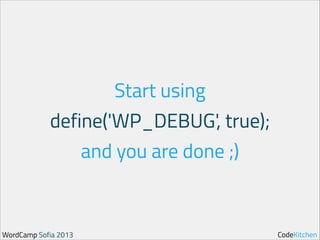
Start using

define('WP_DEBUG', true);
and you are done ;)

WordCamp Sofia 2013

CodeKitchen
First you need to
improve yourself

WordCamp Sofia 2013

CodeKitchen
Step 1:
Improve your workflow

WordCamp Sofia 2013

CodeKitchen
Invest time to
choose an editor

WordCamp Sofia 2013

CodeKitchen
Start using a
version control

WordCamp Sofia 2013

CodeKitchen
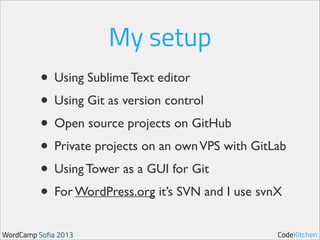
My setup
• Using Sublime Text editor	

• Using Git as version control	

• Open source projects on GitHub	

• Private projects on an own VPS with GitLab	

• Using Tower as a GUI for Git	

• For WordPress.org it’s SVN and I use svnX
WordCamp Sofia 2013

CodeKitchen
Step 2:
Understand WordPress

WordCamp Sofia 2013

CodeKitchen
How the

code is structured

WordCamp Sofia 2013

CodeKitchen
A lot of awesome APIs

WordCamp Sofia 2013

CodeKitchen
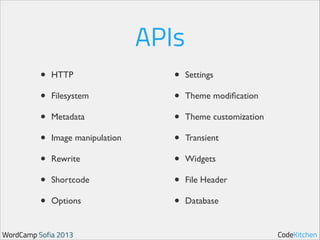
APIs
•
•
•
•
•
•
•

HTTP	

Filesystem	

Metadata	

Image manipulation	

Rewrite	

Shortcode	

Options	


WordCamp Sofia 2013

•
•
•
•
•
•
•

Settings	

Theme modification	

Theme customization	

Transient	

Widgets	

File Header	

Database

CodeKitchen
1556 Hooks

WordCamp Sofia 2013

CodeKitchen
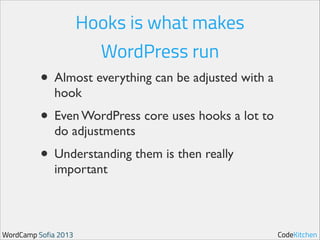
Hooks is what makes
WordPress run

• Almost everything can be adjusted with a
hook	


• Even WordPress core uses hooks a lot to
do adjustments	


• Understanding them is then really
important

WordCamp Sofia 2013

CodeKitchen
Step 3:
Follow the code standards

WordCamp Sofia 2013

CodeKitchen
Single vs double quotes

WordCamp Sofia 2013

CodeKitchen
Tabs vs spaces

WordCamp Sofia 2013

CodeKitchen
Brace style

WordCamp Sofia 2013

CodeKitchen
No Shorthand PHP tags

WordCamp Sofia 2013

CodeKitchen
White spacing
Spaces all the things

WordCamp Sofia 2013

CodeKitchen
And there are

so many more
http://codex.wordpress.org/WordPress_Coding_Standards

WordCamp Sofia 2013

CodeKitchen
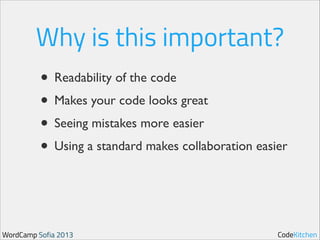
Why is this important?
• Readability of the code	

• Makes your code looks great	

• Seeing mistakes more easier	

• Using a standard makes collaboration easier

WordCamp Sofia 2013

CodeKitchen
Step 4:
Know the requirements

WordCamp Sofia 2013

CodeKitchen
Step 5:
Build that awesome plugin

WordCamp Sofia 2013

CodeKitchen
Define the focus
WordCamp Sofia 2013

CodeKitchen
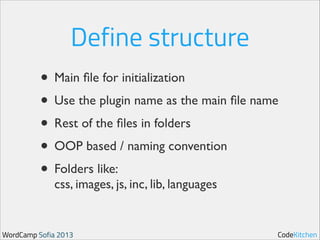
Define structure
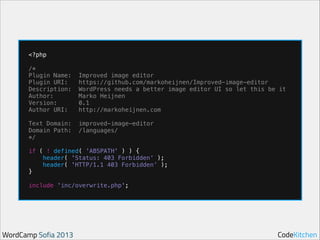
• Main file for initialization	

• Use the plugin name as the main file name	

• Rest of the files in folders	

• OOP based / naming convention	

• Folders like:

css, images, js, inc, lib, languages

WordCamp Sofia 2013

CodeKitchen
How does a main
plugin file look like

WordCamp Sofia 2013

CodeKitchen
!

!
!

!

<?php
/*
Plugin Name:
Plugin URI:
Description:
Author:
Version:
Author URI:
Text Domain:
Domain Path:
*/

Improved image editor
https://github.com/markoheijnen/Improved-image-editor
WordPress needs a better image editor UI so let this be it
Marko Heijnen
0.1
http://markoheijnen.com
improved-image-editor
/languages/

if ( ! defined( 'ABSPATH' ) ) {
header( 'Status: 403 Forbidden’ );
header( 'HTTP/1.1 403 Forbidden’ );
}
include 'inc/overwrite.php';

WordCamp Sofia 2013

CodeKitchen
!

!

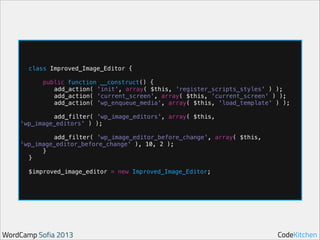
class Improved_Image_Editor {
public function __construct() {
add_action( 'init', array( $this, 'register_scripts_styles' ) );
add_action( 'current_screen', array( $this, 'current_screen' ) );
add_action( 'wp_enqueue_media', array( $this, 'load_template' ) );

add_filter( 'wp_image_editors', array( $this,
'wp_image_editors' ) );

!

add_filter( 'wp_image_editor_before_change', array( $this,
'wp_image_editor_before_change' ), 10, 2 );
}
}

!

$improved_image_editor = new Improved_Image_Editor;

WordCamp Sofia 2013

CodeKitchen
Step 6
Unit test & test

WordCamp Sofia 2013

CodeKitchen
Time to talk
about some code

WordCamp Sofia 2013

CodeKitchen
I released a few plugins
on WordPress.org

WordCamp Sofia 2013

CodeKitchen
Tabify Edit Screen
• Enable tabs in the edit screen and manage
them from the back-end	


• Cleans up the interface when you have lots
of metaboxes	


• Manage it all from the WordPress back-end

WordCamp Sofia 2013

CodeKitchen
Biggest issue
• Plugins that don’t add meta boxes with
add_meta_boxes	


• Only call the hook when on a certain page	

• Mostly because of weird lazy loading or
combining that code with loading JS.

WordCamp Sofia 2013

CodeKitchen
Expect WordPress
will change

WordCamp Sofia 2013

CodeKitchen
Some of the mistakes I
made with this plugin

WordCamp Sofia 2013

CodeKitchen
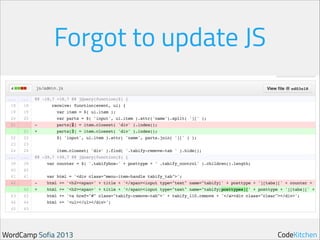
Forgot to update JS

WordCamp Sofia 2013

CodeKitchen
Version 0.5, 0.5.1 and 0.5.2
released the same day

WordCamp Sofia 2013

CodeKitchen
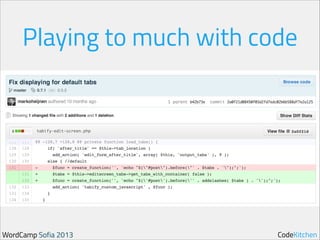
Playing to much with code

WordCamp Sofia 2013

CodeKitchen
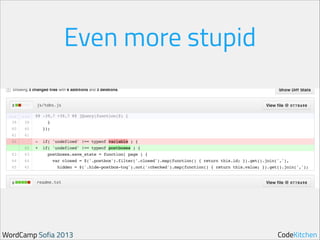
Even more stupid

WordCamp Sofia 2013

CodeKitchen
What makes this a good plugin

• It’s an unique plugin that cares about UX	

• No PHP notices that I know of	

• Takes care if plugins fails to add meta boxes
correctly	


• Some specific designs for color schemes	

• It works decent for non JS
WordCamp Sofia 2013

CodeKitchen
Questions?
@markoheijnen - http://markoheijnen.com

WordCamp Sofia 2013

CodeKitchen

Building plugins like a pro

  • 1.
    Building plugins likea pro WordCamp Sofia - 2013 WordCamp Sofia 2013 CodeKitchen
  • 2.
    Who I am? •Marko Heijnen • Founder of CodeKitchen • Working at 1&1 • WordPress core contributor • GlotPress core developer • Recent rockstar of 3.4 • Co author of WP_Image_Editor WordCamp Sofia 2013 CodeKitchen
  • 3.
    You want tobuild a great plugin WordCamp Sofia 2013 CodeKitchen
  • 4.
    Start using define('WP_DEBUG', true); andyou are done ;) WordCamp Sofia 2013 CodeKitchen
  • 5.
    First you needto improve yourself WordCamp Sofia 2013 CodeKitchen
  • 6.
    Step 1: Improve yourworkflow WordCamp Sofia 2013 CodeKitchen
  • 7.
    Invest time to choosean editor WordCamp Sofia 2013 CodeKitchen
  • 8.
    Start using a versioncontrol WordCamp Sofia 2013 CodeKitchen
  • 9.
    My setup • UsingSublime Text editor • Using Git as version control • Open source projects on GitHub • Private projects on an own VPS with GitLab • Using Tower as a GUI for Git • For WordPress.org it’s SVN and I use svnX WordCamp Sofia 2013 CodeKitchen
  • 10.
  • 11.
    How the
 code isstructured WordCamp Sofia 2013 CodeKitchen
  • 12.
    A lot ofawesome APIs WordCamp Sofia 2013 CodeKitchen
  • 13.
    APIs • • • • • • • HTTP Filesystem Metadata Image manipulation Rewrite Shortcode Options WordCamp Sofia2013 • • • • • • • Settings Theme modification Theme customization Transient Widgets File Header Database CodeKitchen
  • 14.
    1556 Hooks WordCamp Sofia2013 CodeKitchen
  • 15.
    Hooks is whatmakes WordPress run • Almost everything can be adjusted with a hook • Even WordPress core uses hooks a lot to do adjustments • Understanding them is then really important WordCamp Sofia 2013 CodeKitchen
  • 16.
    Step 3: Follow thecode standards WordCamp Sofia 2013 CodeKitchen
  • 17.
    Single vs doublequotes WordCamp Sofia 2013 CodeKitchen
  • 18.
    Tabs vs spaces WordCampSofia 2013 CodeKitchen
  • 19.
  • 20.
    No Shorthand PHPtags WordCamp Sofia 2013 CodeKitchen
  • 21.
    White spacing Spaces allthe things WordCamp Sofia 2013 CodeKitchen
  • 22.
    And there are somany more http://codex.wordpress.org/WordPress_Coding_Standards WordCamp Sofia 2013 CodeKitchen
  • 23.
    Why is thisimportant? • Readability of the code • Makes your code looks great • Seeing mistakes more easier • Using a standard makes collaboration easier WordCamp Sofia 2013 CodeKitchen
  • 24.
    Step 4: Know therequirements WordCamp Sofia 2013 CodeKitchen
  • 25.
    Step 5: Build thatawesome plugin WordCamp Sofia 2013 CodeKitchen
  • 26.
    Define the focus WordCampSofia 2013 CodeKitchen
  • 27.
    Define structure • Mainfile for initialization • Use the plugin name as the main file name • Rest of the files in folders • OOP based / naming convention • Folders like:
 css, images, js, inc, lib, languages WordCamp Sofia 2013 CodeKitchen
  • 28.
    How does amain plugin file look like WordCamp Sofia 2013 CodeKitchen
  • 29.
    ! ! ! ! <?php /* Plugin Name: Plugin URI: Description: Author: Version: AuthorURI: Text Domain: Domain Path: */ Improved image editor https://github.com/markoheijnen/Improved-image-editor WordPress needs a better image editor UI so let this be it Marko Heijnen 0.1 http://markoheijnen.com improved-image-editor /languages/ if ( ! defined( 'ABSPATH' ) ) { header( 'Status: 403 Forbidden’ ); header( 'HTTP/1.1 403 Forbidden’ ); } include 'inc/overwrite.php'; WordCamp Sofia 2013 CodeKitchen
  • 30.
    ! ! class Improved_Image_Editor { publicfunction __construct() { add_action( 'init', array( $this, 'register_scripts_styles' ) ); add_action( 'current_screen', array( $this, 'current_screen' ) ); add_action( 'wp_enqueue_media', array( $this, 'load_template' ) ); add_filter( 'wp_image_editors', array( $this, 'wp_image_editors' ) ); ! add_filter( 'wp_image_editor_before_change', array( $this, 'wp_image_editor_before_change' ), 10, 2 ); } } ! $improved_image_editor = new Improved_Image_Editor; WordCamp Sofia 2013 CodeKitchen
  • 31.
    Step 6 Unit test& test WordCamp Sofia 2013 CodeKitchen
  • 32.
    Time to talk aboutsome code WordCamp Sofia 2013 CodeKitchen
  • 33.
    I released afew plugins on WordPress.org WordCamp Sofia 2013 CodeKitchen
  • 34.
    Tabify Edit Screen •Enable tabs in the edit screen and manage them from the back-end • Cleans up the interface when you have lots of metaboxes • Manage it all from the WordPress back-end WordCamp Sofia 2013 CodeKitchen
  • 35.
    Biggest issue • Pluginsthat don’t add meta boxes with add_meta_boxes • Only call the hook when on a certain page • Mostly because of weird lazy loading or combining that code with loading JS. WordCamp Sofia 2013 CodeKitchen
  • 36.
  • 37.
    Some of themistakes I made with this plugin WordCamp Sofia 2013 CodeKitchen
  • 38.
    Forgot to updateJS WordCamp Sofia 2013 CodeKitchen
  • 39.
    Version 0.5, 0.5.1and 0.5.2 released the same day WordCamp Sofia 2013 CodeKitchen
  • 40.
    Playing to muchwith code WordCamp Sofia 2013 CodeKitchen
  • 41.
    Even more stupid WordCampSofia 2013 CodeKitchen
  • 42.
    What makes thisa good plugin • It’s an unique plugin that cares about UX • No PHP notices that I know of • Takes care if plugins fails to add meta boxes correctly • Some specific designs for color schemes • It works decent for non JS WordCamp Sofia 2013 CodeKitchen
  • 43.