Vaadin Framework – Filtering
           Table
 Make Restaurant License info from
       Gov.HK web editable
  By Leonard Siu – Twitter: @lsiu
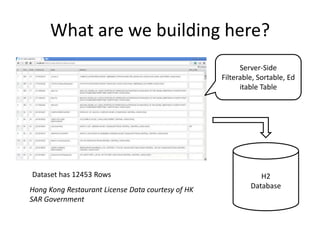
What are we building here?
                                                         Server-Side
                                                   Filterable, Sortable, Ed
                                                         itable Table


Dataset has 12453 Rows                                         H2
Hong Kong Restaurant License Data courtesy of HK            Database
SAR Government
This is CodeAholics
• Let’s go straight to coding!

• Pre-requisites:
  – JDK 1.6+
  – Maven 3+
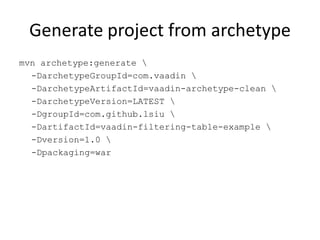
Generate project from archetype
mvn archetype:generate 
  -DarchetypeGroupId=com.vaadin 
  -DarchetypeArtifactId=vaadin-archetype-clean 
  -DarchetypeVersion=LATEST 
  -DgroupId=com.github.lsiu 
  -DartifactId=vaadin-filtering-table-example 
  -Dversion=1.0 
  -Dpackaging=war
Things to download
• Get the restaurant license info from HK gov
  website:
  – http://www.gov.hk/en/theme/psi/datasets/restau
    rantlicences.htm
• Place the file “LP_Restaurants_EN.XML” at the
  root of the project
Follow the project on Github
• http://github.com/lsiu/vaadin-filtering-table-
  example
• Go upto:
  – “Fix POM gwt:compile output compatible with
    eclipse servers”
• Run in Command Prompt on project root:
  – mvn vaadin:update-widgetset gwt:compile
Code Walk Through
http://github.com/lsiu/vaadin-filtering-table-
                   example
Compile Widgetset
• Vaadin is dependent of GWT
• Whenever new add-on used with client-side
  code, widgetset needs to be recompiled
• Compile widgetset takes a few minutes (about
  5 to 10 minutes on my old i3 Laptop)
Prepare Project for Vaadin WidgetSet
        Addon/Development
• Reference:
   – https://vaadin.com/book/-
     /page/addons.maven.html#addons.maven.widgetset
1. Configuring the POM
  – Add plugins
2. Creating a Widget Set Definition File
  – Create xxx.gwt.xml file
3. Enabling the Widget Set in the Application
  – Reference xxx.gwt.xml file in Vaadin Servlet in
    web.xml
WidgetSet strategy for large project
• Create separate maven module for Vaadin
  widgetset
• Only need to compile when client widgets are
  added
• Add it to internal maven repository for large
  DEV teams
Now let’s look at FilteringTable


             Code Walk Through
http://github.com/lsiu/vaadin-filtering-table-
                   example
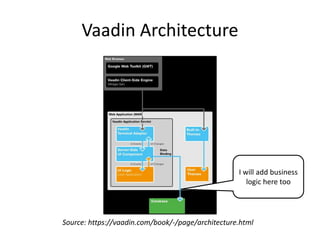
Vaadin Architecture


                                                   I will add business
                                                      logic here too


Source: https://vaadin.com/book/-/page/architecture.html
Great Framework for quick business
               apps
• RAPID development!
  – No client-server boilerplate code
  – Write validation code only once!
• Look Nice out-of the box
  – Skinnable through CSS
• Lot’s of nice widget out-of the box
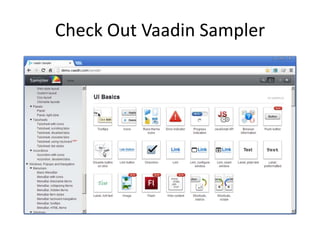
  – Checkout Vaadin Sampler:
  – http://demo.vaadin.com/sampler
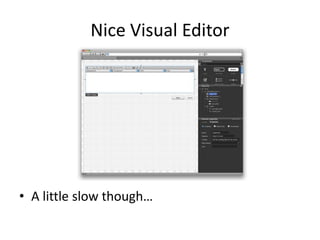
Nice Visual Editor


• A little slow though…
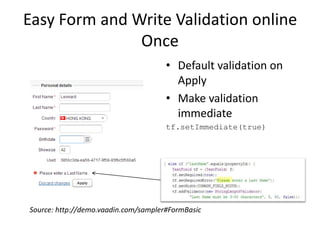
Easy Form and Write Validation online
               Once
                                      • Default validation on
                                        Apply
                                      • Make validation
                                        immediate
                                      tf.setImmediate(true)


Source: http://demo.vaadin.com/sampler#FormBasic
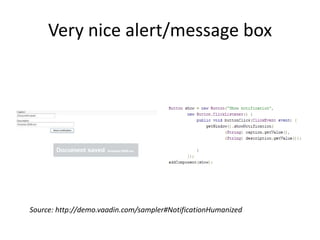
Very nice alert/message box


Source: http://demo.vaadin.com/sampler#NotificationHumanized
Check Out Vaadin Sampler
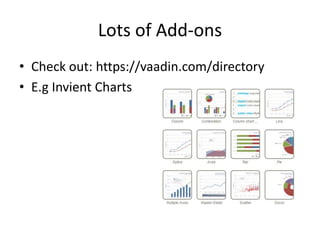
Lots of Add-ons
• Check out: https://vaadin.com/directory
• E.g Invient Charts
Thank You!
             Slides will be on
    http://www.slideshare.net/leonardsiu

                 Code on
http://github.com/lsiu/vaadin-filtering-table-
                   example

        Follow Me on Twitter: @lsiu
        http://about.me/leonardsiu

Vaadin filtering table example

  • 1.
    Vaadin Framework –Filtering Table Make Restaurant License info from Gov.HK web editable By Leonard Siu – Twitter: @lsiu
  • 2.
    What are webuilding here? Server-Side Filterable, Sortable, Ed itable Table Dataset has 12453 Rows H2 Hong Kong Restaurant License Data courtesy of HK Database SAR Government
  • 3.
    This is CodeAholics •Let’s go straight to coding! • Pre-requisites: – JDK 1.6+ – Maven 3+
  • 4.
    Generate project fromarchetype mvn archetype:generate -DarchetypeGroupId=com.vaadin -DarchetypeArtifactId=vaadin-archetype-clean -DarchetypeVersion=LATEST -DgroupId=com.github.lsiu -DartifactId=vaadin-filtering-table-example -Dversion=1.0 -Dpackaging=war
  • 5.
    Things to download •Get the restaurant license info from HK gov website: – http://www.gov.hk/en/theme/psi/datasets/restau rantlicences.htm • Place the file “LP_Restaurants_EN.XML” at the root of the project
  • 6.
    Follow the projecton Github • http://github.com/lsiu/vaadin-filtering-table- example • Go upto: – “Fix POM gwt:compile output compatible with eclipse servers” • Run in Command Prompt on project root: – mvn vaadin:update-widgetset gwt:compile
  • 7.
  • 8.
    Compile Widgetset • Vaadinis dependent of GWT • Whenever new add-on used with client-side code, widgetset needs to be recompiled • Compile widgetset takes a few minutes (about 5 to 10 minutes on my old i3 Laptop)
  • 9.
    Prepare Project forVaadin WidgetSet Addon/Development • Reference: – https://vaadin.com/book/- /page/addons.maven.html#addons.maven.widgetset 1. Configuring the POM – Add plugins 2. Creating a Widget Set Definition File – Create xxx.gwt.xml file 3. Enabling the Widget Set in the Application – Reference xxx.gwt.xml file in Vaadin Servlet in web.xml
  • 10.
    WidgetSet strategy forlarge project • Create separate maven module for Vaadin widgetset • Only need to compile when client widgets are added • Add it to internal maven repository for large DEV teams
  • 11.
    Now let’s lookat FilteringTable Code Walk Through http://github.com/lsiu/vaadin-filtering-table- example
  • 12.
    Vaadin Architecture I will add business logic here too Source: https://vaadin.com/book/-/page/architecture.html
  • 13.
    Great Framework forquick business apps • RAPID development! – No client-server boilerplate code – Write validation code only once! • Look Nice out-of the box – Skinnable through CSS • Lot’s of nice widget out-of the box – Checkout Vaadin Sampler: – http://demo.vaadin.com/sampler
  • 14.
    Nice Visual Editor •A little slow though…
  • 15.
    Easy Form andWrite Validation online Once • Default validation on Apply • Make validation immediate tf.setImmediate(true) Source: http://demo.vaadin.com/sampler#FormBasic
  • 16.
    Very nice alert/messagebox Source: http://demo.vaadin.com/sampler#NotificationHumanized
  • 17.
  • 18.
    Lots of Add-ons •Check out: https://vaadin.com/directory • E.g Invient Charts
  • 19.
    Thank You! Slides will be on http://www.slideshare.net/leonardsiu Code on http://github.com/lsiu/vaadin-filtering-table- example Follow Me on Twitter: @lsiu http://about.me/leonardsiu