BOOTSTRAPPING
YOUR PLUGIN
Marko Heijnen

WordCamp NYC 2014
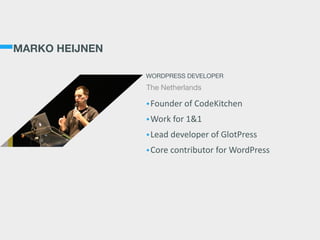
MARKO HEIJNEN
•Founder  of  CodeKitchen  
•Work  for  1&1  
•Lead  developer  of  GlotPress  
•Core  contributor  for  WordPress
WORDPRESS DEVELOPER
The Netherlands
TODAY’S

TOPICS
• Features of a plugin

• Setting up your plugin

• Automation of your tasks
THE START
You have a great idea and want to build it. You first start by
writing what it should do and plan ahead.
IN
TERN
ATIO
N
ALIZATIO
N
C
SS
/JAVASC
RIPT
VERSIO
N
C
O
N
TRO
L
C
O
M
PILIN
G
LESS/SASS
C
O
N
C
ATEN
ATE
JSH
IN
T
PH
PU
N
IT
/Q
U
N
IT
C
O
M
PRESS
PLU
G
IN
H
EADERS
&
READM
E
BU
ILD
PRO
C
ESS
M
IN
IFIC
ATIO
N
EAC
E
DESIG
N
LO
C
ALIZATIO
N
KEEP
U
P
TO
DATE
LO
G
O
TY
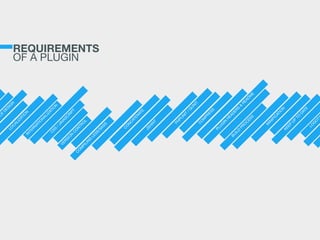
REQUIREMENTS
OF A PLUGIN
SETTING UP
YOUR PLUGIN
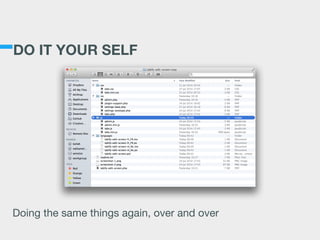
DO IT YOUR SELF
Doing the same things again, over and over
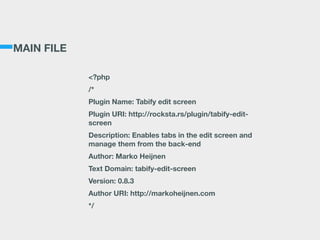
MAIN FILE
<?php
/*
Plugin Name: Tabify edit screen
Plugin URI: http://rocksta.rs/plugin/tabify-edit-
screen
Description: Enables tabs in the edit screen and
manage them from the back-end
Author: Marko Heijnen
Text Domain: tabify-edit-screen
Version: 0.8.3
Author URI: http://markoheijnen.com
*/
USE A SCAFFOLD
wp  scaffold  plugin  my-­‐cool-­‐plugin  
!
[--plugin_name=<title>]

What to put in the ‘Plugin Name:’ header

[--skip-tests]

Don’t generate files for unit testing.

[--activate]

Activate the newly generated plugin.
AND YOU WRITE
YOUR PLUGIN
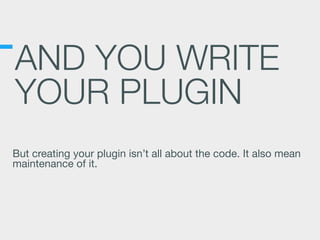
But creating your plugin isn’t all about the code. It also mean
maintenance of it.
SETTING UP
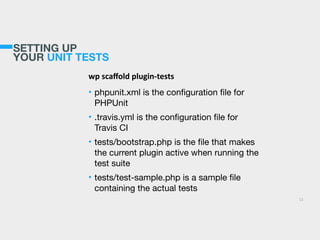
YOUR UNIT TESTS
wp  scaffold  plugin-­‐tests  
• phpunit.xml is the configuration file for
PHPUnit

• .travis.yml is the configuration file for
Travis CI

• tests/bootstrap.php is the file that makes
the current plugin active when running the
test suite

• tests/test-sample.php is a sample file
containing the actual tests
11
SETTING UP
YOUR UNIT TESTS
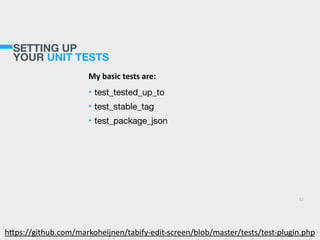
My  basic  tests  are:  
• test_tested_up_to

• test_stable_tag

• test_package_json
12
h>ps://github.com/markoheijnen/tabify-­‐edit-­‐screen/blob/master/tests/test-­‐plugin.php
AUTOMATION OF
YOUR TASKS
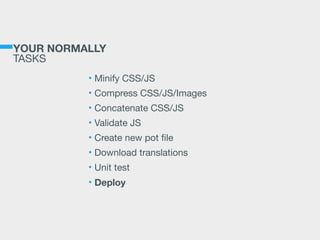
YOUR NORMALLY

TASKS
• Minify CSS/JS

• Compress CSS/JS/Images

• Concatenate CSS/JS

• Validate JS

• Create new pot file

• Download translations

• Unit test

• Deploy
GRUNT
•Running  tasks  by  using  CLI  
•Easy  to  use,  harder  to  configure  
•Extendable  with  your  own  plugins  
•Uses  npm  for  plugin  management  
THE JAVASCRIPT TASK RUNNER
http://gruntjs.com
THE BASIC SETUP
A typical setup will involve adding two
files to your project: package.json and
the Gruntfile

• package.json

This file is used by npm to store
metadata for projects published as
npm modules. You will list grunt and
the Grunt plugins your project needs
as devDependencies in this file.

• Gruntfile

Is used to configure or define tasks
and load Grunt plugins.
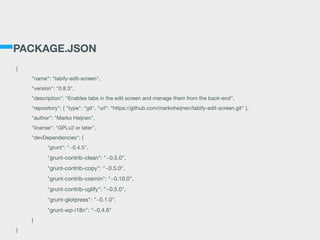
PACKAGE.JSON
{

	 "name": "tabify-edit-screen",

	 "version": "0.8.3",

	 "description": "Enables tabs in the edit screen and manage them from the back-end",

	 "repository": { "type": “git", "url": “https://github.com/markoheijnen/tabify-edit-screen.git" },

	 "author": "Marko Heijnen",

	 "license": "GPLv2 or later",

	 "devDependencies": {

	 	 "grunt": "~0.4.5",

	 	 "grunt-contrib-clean": "~0.5.0",

	 	 "grunt-contrib-copy": "~0.5.0",

	 	 "grunt-contrib-cssmin": "~0.10.0",

	 	 "grunt-contrib-uglify": "~0.5.0",

	 	 "grunt-glotpress": "~0.1.0",

	 	 "grunt-wp-i18n": "~0.4.6"

	 }

}
INSTALLING DEPENDENCIES
• npm install

• This will install all plugins inside
node_modules
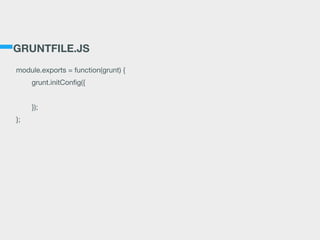
GRUNTFILE.JS
module.exports = function(grunt) {

	 grunt.initConfig({


	 });

};
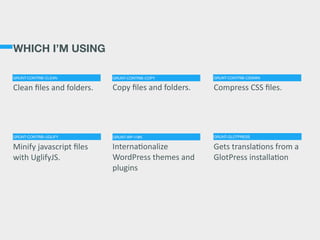
WHICH I’M USING
Copy  files  and  folders. Compress  CSS  files.
InternaPonalize  
WordPress  themes  and  
plugins
Gets  translaPons  from  a  
GlotPress  installaPon
Clean  files  and  folders.
Minify  javascript  files  
with  UglifyJS.
GRUNT-CONTRIB-CLEAN GRUNT-CONTRIB-COPY GRUNT-CONTRIB-CSSMIN
GRUNT-CONTRIB-UGLIFY GRUNT-WP-I18N GRUNT-GLOTPRESS
CREATING POT FILE
grunt.initConfig({

	 makepot: {

	 	 core: {

	 	 	 options: {

	 	 	 	 domainPath: '/languages',

	 	 	 	 type: 'wp-plugin',

	 	 	 }

	 	 }

	 },

});

!
grunt.loadNpmTasks(‘grunt-wp-i18n’);

!
grunt.registerTask('default', ['makepot:core']);
DOWNLOADING TRANSLATIONS
grunt.initConfig({

	 glotpress_download: {

	 	 core: {

	 	 	 options: {

	 	 	 	 domainPath: 'languages',

	 	 	 	 url: 'http://wp-translate.org',

	 	 	 	 slug: 'tabify-edit-screen',

	 	 	 	 textdomain: 'tabify-edit-screen'

	 	 	 }

	 	 }

	 },

});

!
grunt.registerTask('default', [‘glotpress_download:core']);
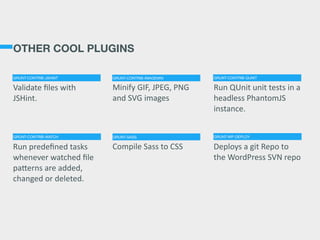
OTHER COOL PLUGINS
Minify  GIF,  JPEG,  PNG  
and  SVG  images
Run  QUnit  unit  tests  in  a  
headless  PhantomJS  
instance.
Compile  Sass  to  CSS Deploys  a  git  Repo  to  
the  WordPress  SVN  repo
Validate  files  with  
JSHint.
Run  predefined  tasks  
whenever  watched  file  
pa>erns  are  added,  
changed  or  deleted.
GRUNT-CONTRIB-JSHINT GRUNT-CONTRIB-IMAGEMIN GRUNT-CONTRIB-QUNIT
GRUNT-CONTRIB-WATCH GRUNT-SASS GRUNT-WP-DEPLOY
THANKS

QUESTIONS?

@markoheijnen - markoheijnen.com

Bootstrapping your plugin

  • 1.
  • 2.
    MARKO HEIJNEN •Founder  of CodeKitchen   •Work  for  1&1   •Lead  developer  of  GlotPress   •Core  contributor  for  WordPress WORDPRESS DEVELOPER The Netherlands
  • 3.
    TODAY’S
 TOPICS • Features ofa plugin • Setting up your plugin • Automation of your tasks
  • 4.
    THE START You havea great idea and want to build it. You first start by writing what it should do and plan ahead.
  • 5.
  • 6.
  • 7.
    DO IT YOURSELF Doing the same things again, over and over
  • 8.
    MAIN FILE <?php /* Plugin Name:Tabify edit screen Plugin URI: http://rocksta.rs/plugin/tabify-edit- screen Description: Enables tabs in the edit screen and manage them from the back-end Author: Marko Heijnen Text Domain: tabify-edit-screen Version: 0.8.3 Author URI: http://markoheijnen.com */
  • 9.
    USE A SCAFFOLD wp scaffold  plugin  my-­‐cool-­‐plugin   ! [--plugin_name=<title>] What to put in the ‘Plugin Name:’ header [--skip-tests] Don’t generate files for unit testing. [--activate] Activate the newly generated plugin.
  • 10.
    AND YOU WRITE YOURPLUGIN But creating your plugin isn’t all about the code. It also mean maintenance of it.
  • 11.
    SETTING UP YOUR UNITTESTS wp  scaffold  plugin-­‐tests   • phpunit.xml is the configuration file for PHPUnit • .travis.yml is the configuration file for Travis CI • tests/bootstrap.php is the file that makes the current plugin active when running the test suite • tests/test-sample.php is a sample file containing the actual tests 11
  • 12.
    SETTING UP YOUR UNITTESTS My  basic  tests  are:   • test_tested_up_to • test_stable_tag • test_package_json 12 h>ps://github.com/markoheijnen/tabify-­‐edit-­‐screen/blob/master/tests/test-­‐plugin.php
  • 13.
  • 14.
    YOUR NORMALLY
 TASKS • MinifyCSS/JS • Compress CSS/JS/Images • Concatenate CSS/JS • Validate JS • Create new pot file • Download translations • Unit test • Deploy
  • 15.
    GRUNT •Running  tasks  by using  CLI   •Easy  to  use,  harder  to  configure   •Extendable  with  your  own  plugins   •Uses  npm  for  plugin  management   THE JAVASCRIPT TASK RUNNER http://gruntjs.com
  • 16.
    THE BASIC SETUP Atypical setup will involve adding two files to your project: package.json and the Gruntfile
 • package.json
 This file is used by npm to store metadata for projects published as npm modules. You will list grunt and the Grunt plugins your project needs as devDependencies in this file. • Gruntfile
 Is used to configure or define tasks and load Grunt plugins.
  • 17.
    PACKAGE.JSON { "name": "tabify-edit-screen", "version": "0.8.3", "description": "Enables tabs in the edit screen and manage them from the back-end", "repository": { "type": “git", "url": “https://github.com/markoheijnen/tabify-edit-screen.git" }, "author": "Marko Heijnen", "license": "GPLv2 or later", "devDependencies": { "grunt": "~0.4.5", "grunt-contrib-clean": "~0.5.0", "grunt-contrib-copy": "~0.5.0", "grunt-contrib-cssmin": "~0.10.0", "grunt-contrib-uglify": "~0.5.0", "grunt-glotpress": "~0.1.0", "grunt-wp-i18n": "~0.4.6" } }
  • 18.
    INSTALLING DEPENDENCIES • npminstall • This will install all plugins inside node_modules
  • 19.
  • 20.
    WHICH I’M USING Copy files  and  folders. Compress  CSS  files. InternaPonalize   WordPress  themes  and   plugins Gets  translaPons  from  a   GlotPress  installaPon Clean  files  and  folders. Minify  javascript  files   with  UglifyJS. GRUNT-CONTRIB-CLEAN GRUNT-CONTRIB-COPY GRUNT-CONTRIB-CSSMIN GRUNT-CONTRIB-UGLIFY GRUNT-WP-I18N GRUNT-GLOTPRESS
  • 21.
    CREATING POT FILE grunt.initConfig({ makepot: { core: { options: { domainPath: '/languages', type: 'wp-plugin', } } }, }); ! grunt.loadNpmTasks(‘grunt-wp-i18n’); ! grunt.registerTask('default', ['makepot:core']);
  • 22.
    DOWNLOADING TRANSLATIONS grunt.initConfig({ glotpress_download:{ core: { options: { domainPath: 'languages', url: 'http://wp-translate.org', slug: 'tabify-edit-screen', textdomain: 'tabify-edit-screen' } } }, }); ! grunt.registerTask('default', [‘glotpress_download:core']);
  • 23.
    OTHER COOL PLUGINS Minify GIF,  JPEG,  PNG   and  SVG  images Run  QUnit  unit  tests  in  a   headless  PhantomJS   instance. Compile  Sass  to  CSS Deploys  a  git  Repo  to   the  WordPress  SVN  repo Validate  files  with   JSHint. Run  predefined  tasks   whenever  watched  file   pa>erns  are  added,   changed  or  deleted. GRUNT-CONTRIB-JSHINT GRUNT-CONTRIB-IMAGEMIN GRUNT-CONTRIB-QUNIT GRUNT-CONTRIB-WATCH GRUNT-SASS GRUNT-WP-DEPLOY
  • 24.